







The second installment to the Voyager Air Series – a wireless storage device allowing media playback which uses the USB 3.0 interface and wireless passthru.

Product On Review: Voyager Air 2
Manufacturer & Sponsor: Corsair
Street Price: £129 GBP / $159 USD
Back in 2013 Corsair stepped into the mobile storage market with the innovative Voyager Air and one year on, they are back again with the second instalment. Their venture into the mobile storage arena is of no surprise, Corsair has their finger in many pies and it appears that they never cease to flourish.
Voyager Air 2 is the successor to the original mobile storage drive and this time round comes with a refined aesthetic and feature-set. This new drive promises to deliver long battery life and a rather generous 1TB of storage, bringing with it handy tech such as USB 3.0 and wireless passthru.
Corsair on their Voyager Air 2
Voyager Air 2 is the wireless drive that’s optimized for mobility. It lets you enjoy all your videos, music, and photos wherever you go, freed from the storage limitations of your tablet and smartphone. It’s a great choice if you want the powerful storage and streaming features of the Voyager Air but you don’t need a wired connection to your home network.
Technical Specifications
Warranty
Three years
AC Plug Type
NA
Interface
USB 3.0
Unformatted Capacity
1 TB
Three years
AC Plug Type
NA
Interface
USB 3.0
Unformatted Capacity
1 TB
Packaging & Bundle
Packaging for Voyager Air 2 is eye-catching
Air 2 arrives in a bright and colourful box. All of the necessary information is listed on the front and reverse such as the intended use for this device, the capacity and feature-set.
Included items within box
There are very few items included within the box. Aside from the actual drive itself, there is just an instructions manual and a USB 3.0 cable (A to micro B – 50cm in length).
Over the page we’ll look at the Air 2 drive in closer detail.
Closer Look
An elegant and professional device
Styling matches many other devices
Air 2 is the successor to the original drive and has been refined somewhat. Air 2 is aesthetically very pleasing to the eye and uses plastic external casing which is both matt black and glossy black. This drive measures a mere 14 x 8.5 x 3cm. The Corsair insignia has been stamped on the top edge of the drive and seals the altogether professional appearance.
The front section which features a glossy black lip features a number of LED indicators and buttons. On the far left there is a power button which also glows when switched on and then we have charge and battery icon LEDs and a WiFi button which allows you to enable/disable wireless and also has a glowing LED which confirms whether this is on or off.
DC and USB 3.0 ports
In order to gain access to Air 2 its necessary to use the supplied USB 3.0 cable and connect the drive to a computer. Although there is a DC port, Corsair do not provide any such cable or adapter and therefore we have to use the USB cable to charge the unknit and gain connectivity to configure/transfer files.
The underside of Air 2
The reverse of Air 2 has been adorned in a baby blue colour and features a rubber strip which follows the parameter of the drive. In the middle, Corsair has stamped the model code/name and serial number for use with any technical support.
Overall, we’re very happy with the build quality of this device and it’s clear that extra care has been taken with the production of it.
Usage & Performance
Voyager Air 2’s primary use is to operate as a mobile storage device – allowing users to stream files to tablets and smart phones.
In order to gain access and transfer files to the Air 2 the USB 3.0 cable needs to be used between the Corsair drive and the computer. Once connected, files can simply be drag n’ dropped onto the drive. Furthermore, having the USB cable attached charges the Air 2 – while the cable is attached, wireless functionality will not work. Once the Air 2 has been charged, WiFi can be enabled by pressing the button and then the “Voyager Air” app must be installed on an apple or android based device (we used android).
Below is a demonstration of the Air 2 streaming multimedia files and the android based app in use:
The only complaint that we have with Air 2 is the strength of wireless signal. With a distance of 30ft (9m) between the Air 2 and smartphone, we struggle to access files because the signal drops significantly.
Air 2 can operate for 5-6 hours whilst providing video playback.
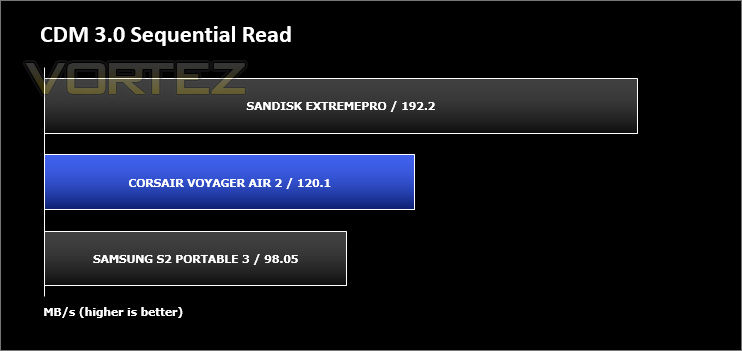
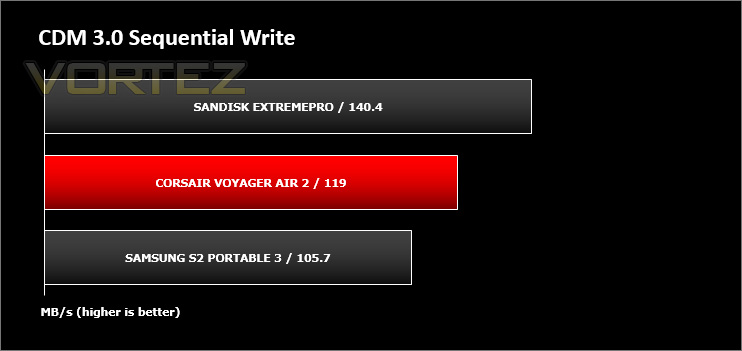
As a brief indicator of performance we connected Air 2 (via USB 3.0) to one of our computers and ran CrystalDiskMark to reveal how this new drive handles 1GB sequential transfer of data. The other drives also use the USB 3.0 interface. As you can see from the graph, the results are pleasing.
Conclusion
The new Voyager Air 2 builds on the success of the original Air design by offering a much more refined product.
By offering up to 1TB of mobile storage, this device can easily be the go-to device within the home (or even office). As we demonstrated in our short video, dropping files onto the drive is easy and accessing them via a smartphone or tablet is even easier. The idea of having a device ready to stream media and sat on a shelf without the need for a cumbersome cable brings innovation into the home but Air 2 isn’t restricted to only this arena – we can definitely see commuters using this funky device whilst travelling, especially since the generous battery life of 5-6 hours is made available.
Accessibility and functionality doesn’t end there either. Corsair has designed Air 2 and its handy little app to utilise wireless passthru allowing the drive to connect to another wireless network in order to obtain an internet connection. Pairing the device up to the TV won’t be a problem either so long as DLNA is available.
There are however a few things to consider with Air 2. The signal strength can only transmit up to approximately 30ft (9m) with a clear path, so the drive really needs to be nearby in order to access files without playback issues. If the drive runs out of battery, the USB cable must be used to charge Air 2 and while this is connected the wireless functionality does not work – the cable has to be removed to use WiFi. Therefore, media cannot be streamed from Air 2 whilst it is charging up.
Voyager Air 2 is available to buy for £129 GBP / $159 USD and is almost three times as expensive as various 1TB USB 3.0 drives but then we have to take into account these drives aren’t able to offer the wireless functionality which is native to Air 2, and really the product being reviewed today is in a completely different league.
Voyager Air 2 is an innovative mobile storage device that will serve a multitude of users. It features a large capacity HDD, rather generous battery life and a number of valuable technologies.
Pros
+ Big capacity – 1TB
+ Access library of files on the go
+ Built-in battery
+ 5-6 hours of playback
+ Wireless passthru
+ USB 3.0 interface
+ DLNA support
Cons
– Signal strength limitations 30ft (9m)
– Cannot be accessed wirelessly when USB cable attached
– Lacks possibility of expanding HDD (SD Card/bigger HDD)
+ Big capacity – 1TB
+ Access library of files on the go
+ Built-in battery
+ 5-6 hours of playback
+ Wireless passthru
+ USB 3.0 interface
+ DLNA support
Cons
– Signal strength limitations 30ft (9m)
– Cannot be accessed wirelessly when USB cable attached
– Lacks possibility of expanding HDD (SD Card/bigger HDD)

Click here for an explanation of our awards at Vortez.net.


