







Creative sail in with their latest flagship sound card, the Creative Sound Blaster ZxR. Promising unbeatable performance and versatility, is it all that it promises?

Product on review: Creative Sound Blaster ZxR
Manufacturer and Sponsor: Creative
MSRP: £199.99 (At time of review)
Street Price: £180 (At time of review)
Creative and the Sound Blaster brand is synonymous with PC audio and today we take a look at the latest Sound Blaster flagship, the ZxR. Promising an unbeatable 124dB Signal to noise ratio and comprised of high grade components and materials, the ZxR comes with a fairly hefty price tag too. Supplied with a DBPro daughter board for an I/O expansion, the ZxR is set to offer unprecedented versatility for many users. Comparing cost to competition it may be hard to see how this can fit into the add in sound card market over what the primary competition has to offer so let’s take a look inside and see if it is worth the fuss.
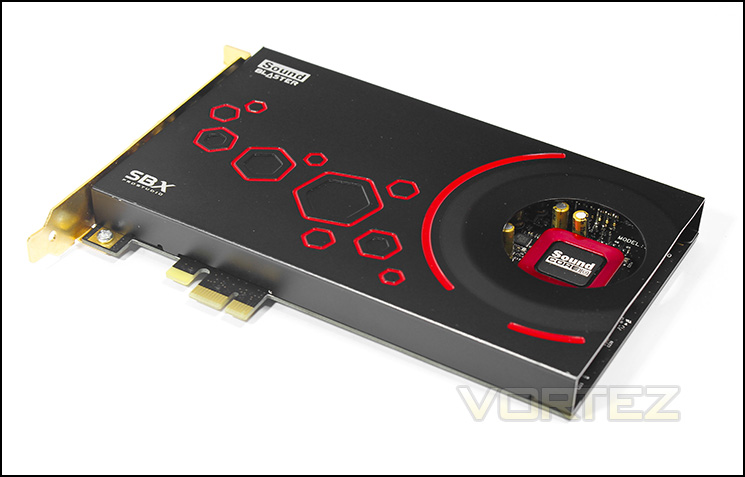
Overview by Creative
Flagship High Performance PCIe Sound Card
The flagship of the ultra high-performance Sound Blaster Z-Series of sound cards, Sound Blaster ZxR elevates the standards of technology and performance for the future of PC gaming and entertainment. Boasting an unbeatable SNR of 124dB, it includes a DBPro daughter board and Audio Control Module for unrivalled audio playback and content creation.
The flagship of the ultra high-performance Sound Blaster Z-Series of sound cards, Sound Blaster ZxR elevates the standards of technology and performance for the future of PC gaming and entertainment. Boasting an unbeatable SNR of 124dB, it includes a DBPro daughter board and Audio Control Module for unrivalled audio playback and content creation.
Specification & Features
Audio Processor
– Sound Core3D
SBX Pro Studio
– Yes
Max. Playback Quality
– 24-bit / 192kHz (Stereo-Direct Mode)
– 24-bit / 96kHz (5.1)
Max. Recording Quality
– 24-bit / 96kHz
Output
-5.1 Channels
Key Features
Signal-to-Noise Ratio (SNR)
– 124dB
Upmixing of Stereo to Multi-channels
– Yes
Connectivity Options (Main)
– Headphone: 1 x Amplified 1/4″ jack
– Speaker Out:
2 x RCA (L / R)
2 x 3.5mm jacks (Rear, C/Sub)
– Microphone In: 1 x 1/4″ jack
Connectivity Options (Accessory)DBPro Daughter Board
– Line In: 2 x RCA (L / R)
– Optical Out: 1 x TOSLINK
– Optical In: 1 x TOSLINK
CrystalVoice
– Yes
Scout Mode
– Yes
Headphone Amp
– Up to 600 Ohms
EAX
– EAX Advanced 5.0
DTS Connect Encoding
– Yes
Dolby Digital Live Encoding
– Yes
Audio Fidelity
– Up to 24-bit / 192kHz
Software & Compatibility
Supported Operating Systems
-Windows® 8
-Windows® 7
Compatible Platform
– PC – PCIe x1
Microphone
Beamforming Microphone (Built into Audio Control Module)
Microphone Type
– Dual-array Noise Canceling Condenser
Frequency Response
– 100Hz to 20kHz
Sensitivity
– -37dB
– Sound Core3D
SBX Pro Studio
– Yes
Max. Playback Quality
– 24-bit / 192kHz (Stereo-Direct Mode)
– 24-bit / 96kHz (5.1)
Max. Recording Quality
– 24-bit / 96kHz
Output
-5.1 Channels
Key Features
Signal-to-Noise Ratio (SNR)
– 124dB
Upmixing of Stereo to Multi-channels
– Yes
Connectivity Options (Main)
– Headphone: 1 x Amplified 1/4″ jack
– Speaker Out:
2 x RCA (L / R)
2 x 3.5mm jacks (Rear, C/Sub)
– Microphone In: 1 x 1/4″ jack
Connectivity Options (Accessory)DBPro Daughter Board
– Line In: 2 x RCA (L / R)
– Optical Out: 1 x TOSLINK
– Optical In: 1 x TOSLINK
CrystalVoice
– Yes
Scout Mode
– Yes
Headphone Amp
– Up to 600 Ohms
EAX
– EAX Advanced 5.0
DTS Connect Encoding
– Yes
Dolby Digital Live Encoding
– Yes
Audio Fidelity
– Up to 24-bit / 192kHz
Software & Compatibility
Supported Operating Systems
-Windows® 8
-Windows® 7
Compatible Platform
– PC – PCIe x1
Microphone
Beamforming Microphone (Built into Audio Control Module)
Microphone Type
– Dual-array Noise Canceling Condenser
Frequency Response
– 100Hz to 20kHz
Sensitivity
– -37dB
Features
Signal-to-Noise Ratio of 124dB
A signal to noise ratio or SNR of 124dB means your audio will be more than 99.99% pristine, which is over 89.1 times better than motherboard audio.
SBX Pro Studio™ technologies
SBX Pro Studio™ sound technologies create unprecedented levels of audio realism, including stunning 3D surround effects for your speakers and headsets.
Studio-grade content creation
Add studio quality audio sound tracks or voice tracks to your video clips or home videos created with hardware that uses only audiophile-grade components such as 123dB analog-to-digital converters (ADCs) with RCA Aux-in and optical inputs for outstanding recording quality. With the 600 ohm headphone amplifier, you can do studio-grade monitoring as well.
High-quality DBPro daughter board
The DBpro is another reason why Sound Blaster ZxR delivers only the best audio playback and creation. It offers optical output for outstanding audio playback, plus professional-grade ADCs with RCA Aux-in and optical inputs for studio-grade recording quality.
Accessible Audio Control Module (ACM)
Take control in style and ease with the ACM that incorporates a built-in microphone array and mic/headphone I/O connections. The knob on the ACM lets you conveniently adjust the headphone levels.
Sound Core3D audio processor
The multi-core Sound Core3D™ audio processor is designed to offload SBX Pro Studio and CrystalVoice effects processing from your primary CPU, improving your overall PC performance, resulting in drastically superior audio and voice quality.
Crystal clear communication
In gaming, if you’re not communicating, you’re not winning. Experience crystal clear communication with your teammates with the CrystalVoice™ suite of technologies that removes echoes, ambient noises and picks up your voice from within a zone (Voice Focus). It also maintains your voice level even if you are near or further away from the microphone.
High fidelity multi-channel surround
Connect to your home theatre system through a single digital cable and enjoy cinematic DVD movies by transforming any stereo or multi-channel streams into high fidelity immersive surround sound.
Never unplug your headphones again
With the Sound Blaster Z-series Control Panel, just toggle between your headphone and speaker system with a flip of a switch.
Packaging & First Look
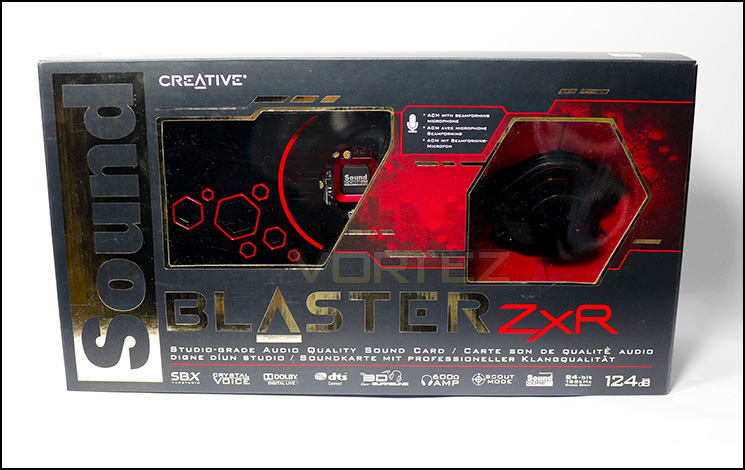
Packaging front
The packaging is similar in design to other Z-Series sound cards albeit being larger. There are windows showing off the ZxR inside as well as the ACM included. On the left hand face you can find a window showing all the I/O ports of the ZxR and the DBPRO daughter board.
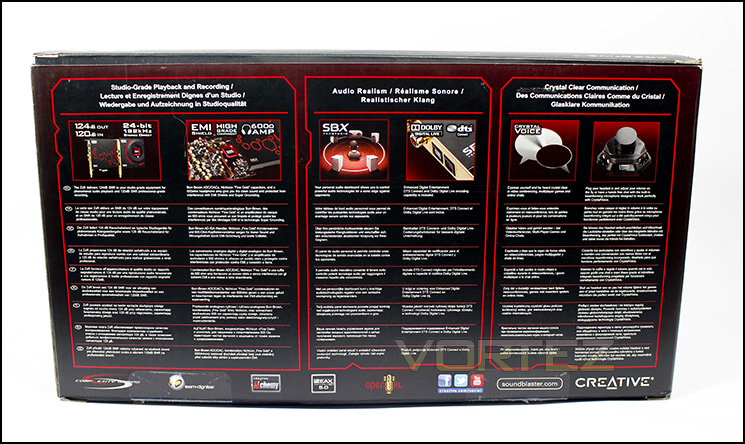
Multilingual information found on the back
On the rear we can find more information about the product in various languages.
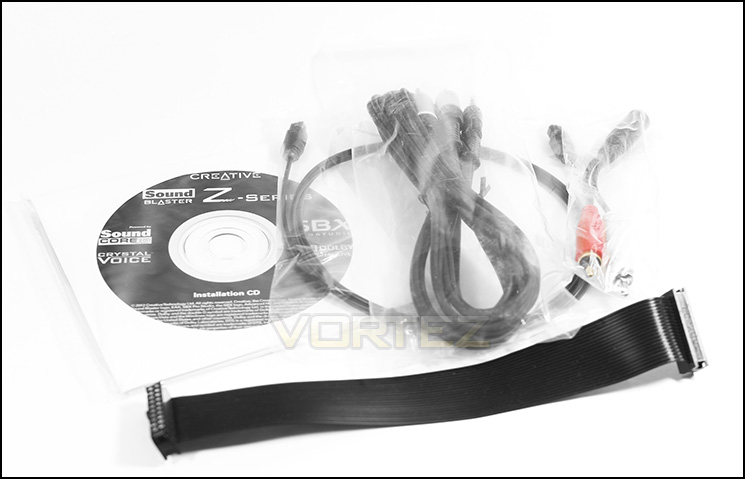
A neat selection of accessories
Included in the accessories we can find a driver CD with installation instructions, the DBPRO connection cable, RCA to female 3.5mm jack, male 3.5mm jack to RCA splitter as well as an included optical cable. It is pretty convenient to find such an inclusive array of cable adaptors which allows a good range of versatility out the box.
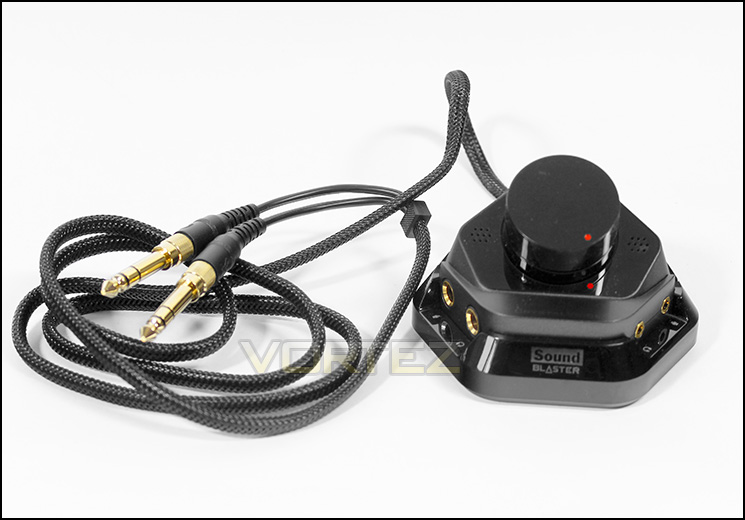
The Audio Control Module (ACM)
The ACM is far better built than what one may judge by looking at it. It is sturdy, heavy and good quality. The braided cable looks great and the two quarter inch jacks are actually adaptors which can be removed to reveal 3.5mm jacks underneath. Built in is a dual-array, noise canceling, beamforming microphone. A mouthful to say but at least it will be able to capture you saying it. It has a smooth gliding volume dial and two pairs of jacks for 6.3mm (quarter inch) heaphone/ mic and 3.5mm headphone/mic.
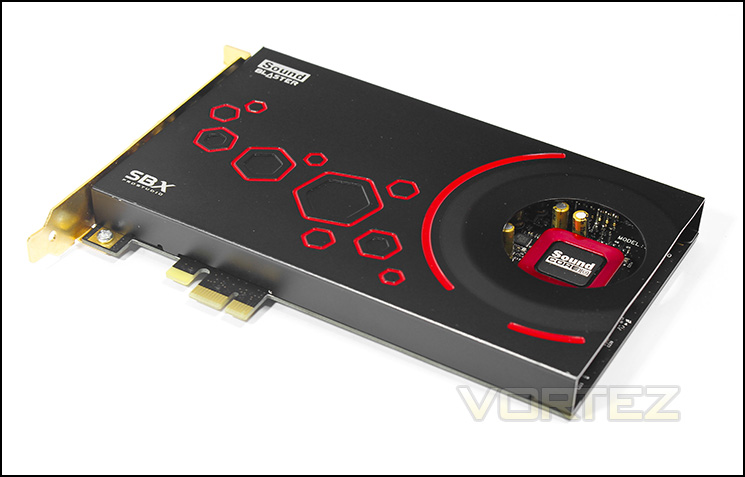
The Main Body of the ZxR
The Creative Sound Blaster ZxR has a full length, black faceplate with a hole cut out to show off the Sound Core3D. Strangely they opted not to cover the hole with acrylic like on the other Z-Series sound cards, this may be to save a little on cost, or to allow some air flow. The faceplate has an attractive geometric decoration in the form of a trail of red coloured hexagons.
Closer Look
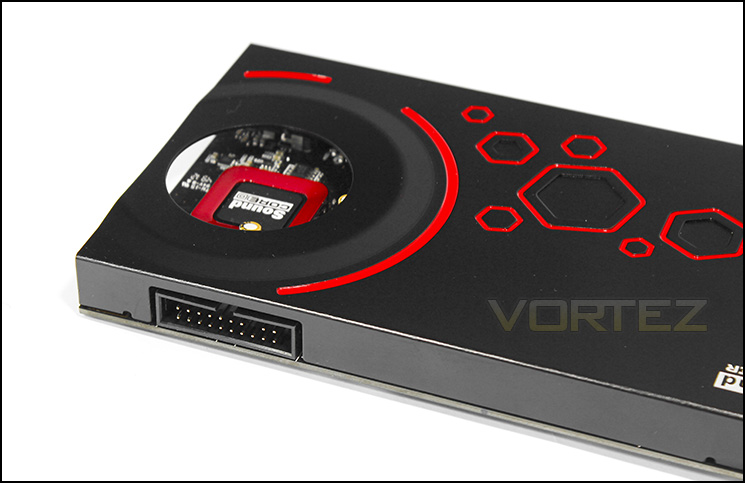
The header for the DBPRO expansion cable is found on the side face.
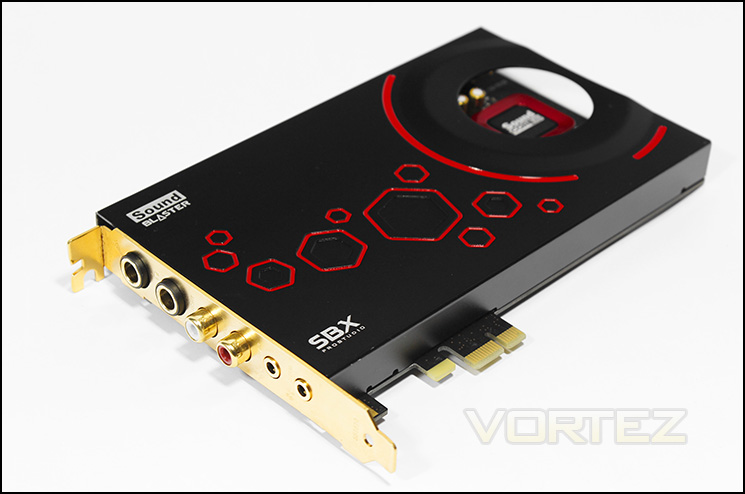
Rear I/O of the ZxR main body
In order we can find 6.3mm microphone jack, 6.3mm headphone hack, RCA L&R, Rear L/R 3.5mm jack, Centre/Sub 3.5mm jack. Who doesn’t like gold?
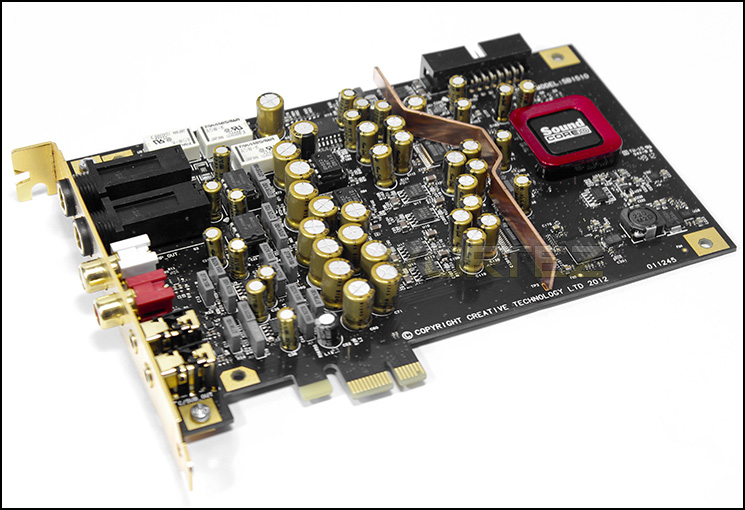
The ZxR Bare
On removing the EMI shield we find a neat array of capacitors and chips, an additional copper EMI shield separated the analogue circuitry from the digital circuitry.
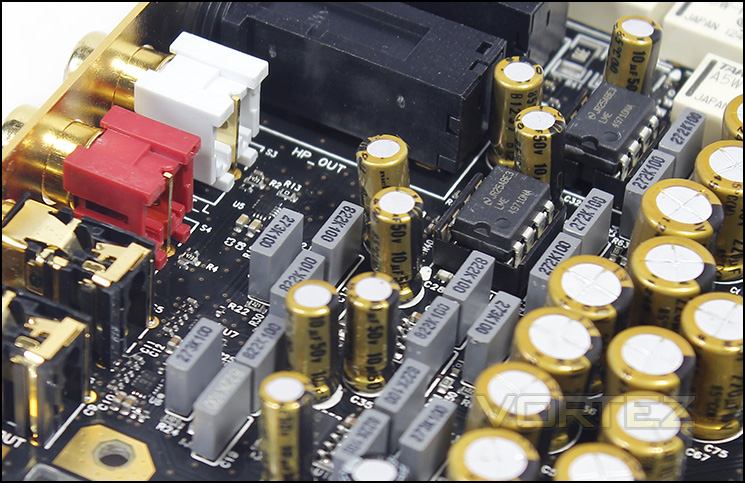
Rows of polyester film capacitors
At the back end, we can find 16 NTE polyester film capacitors, with a few exceptions, high grade ‘Fine Gold’ Nichicon capacitors are used everywhere else.
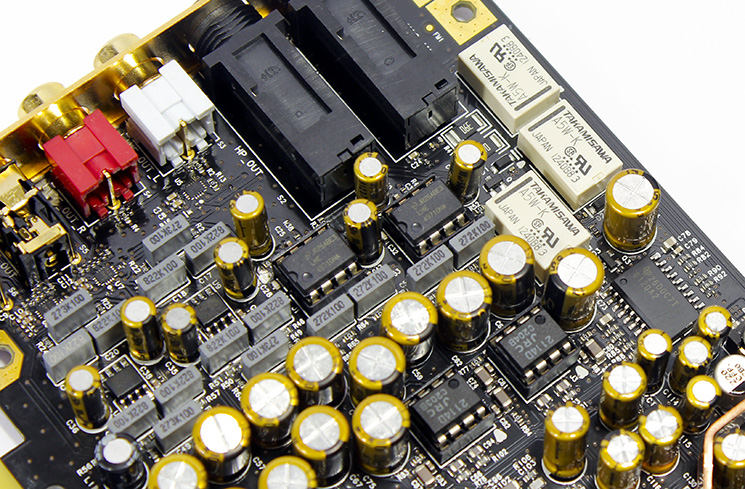
Around the headphone circuitry
The three large white plastic boxes are micro relays, this is likely used switch between the headphone and speakers on the fly via the software drivers. In this area we also find 4 removable opamps (operational amplifiers) 2x LME 49710NA and 2x JRC 2114D. On the far right you can find the TPA6120A2 headphone amplifier.
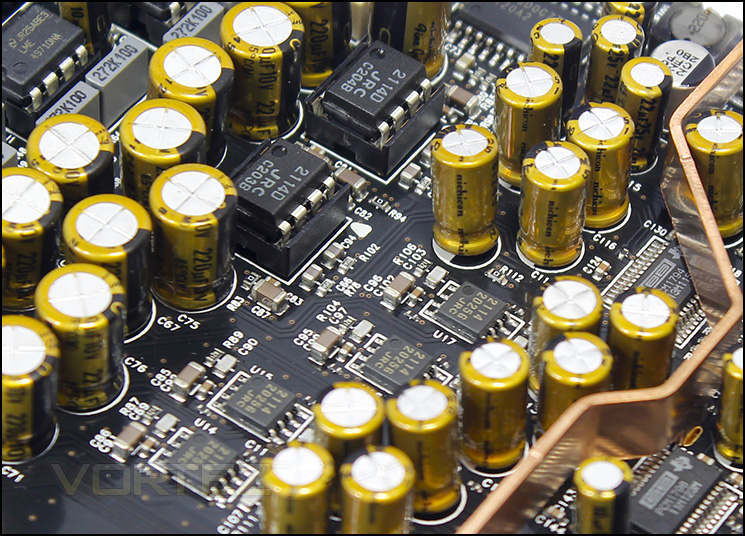
A closer look at some more SMDs
In the middle area we can see a line of four JRC 2114 opamps, these are soldered on so would be fairly difficult to replace should one seek to modify the sound card beyond the removable opamps.
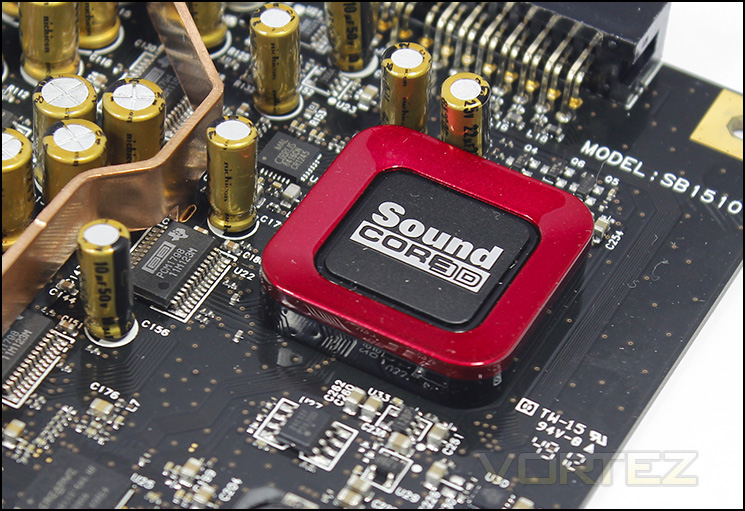
The Sound Core3D audio processor
The Sound Core3D is fairly prominent in this image though, looking closely along the copper EMI shield, there are two PCM 1798 DACs and a single PCM 1794 DAC used for the primary stereo channels, all of which have a resolution of 24bits and a sample rate of 192kHz.
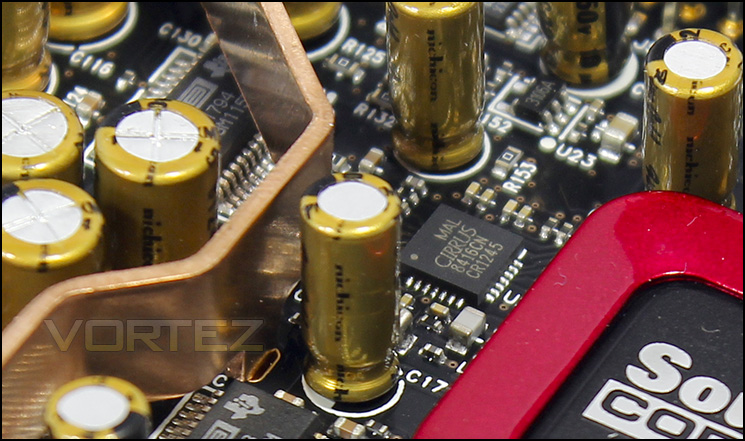
A digital audio receiver
The Cirrus 8416CN is used as a high quality digital audio receiver which supports sample rates of up to 192kHz.
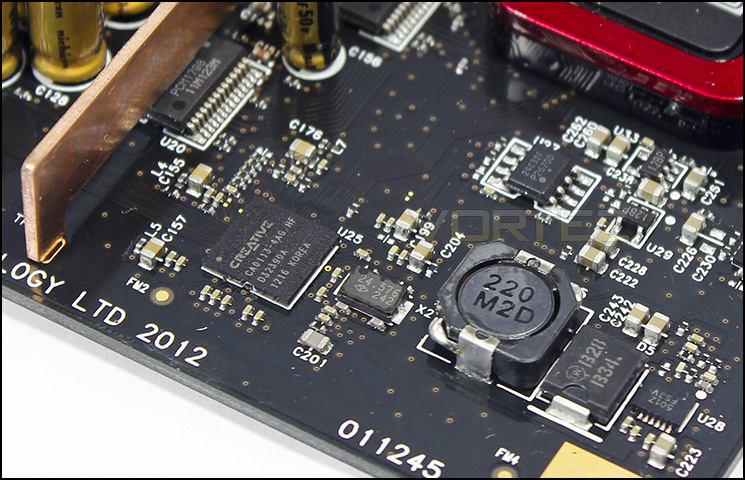
Creative CA0113-4AG HDA bus controller can be seen in the mid left
The DBPro Daughter Board
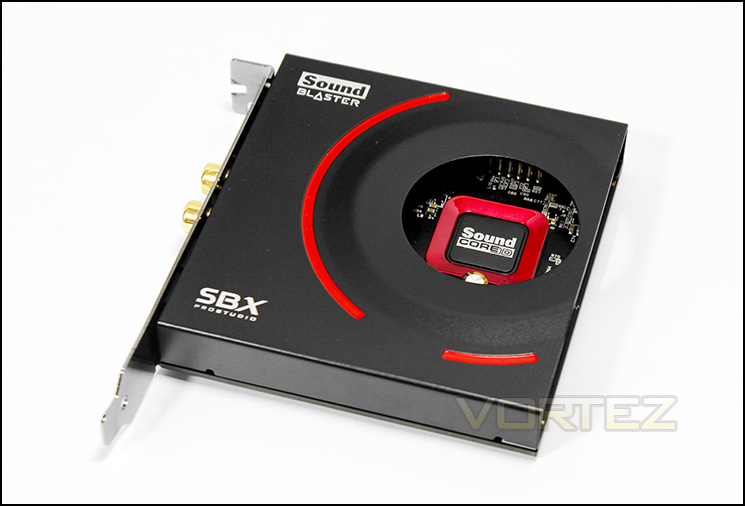
The DBPro Daughter board
Similar is design to the main board ZxR, just half the size and missing some hexagons. The main note we can determine here is that it has its own dedicated Sound Core3D which means any audio input can be processed independently.
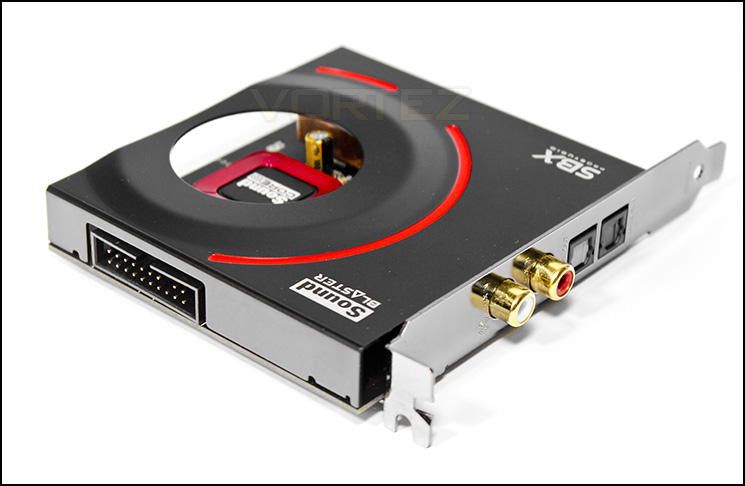
The daughter board I/O
On the left we have the DBPro cable port which allows it to connect with the main board. Note that this doesn’t need a dedicated PCIe slot as all its needs are catered for via the main board, all this requires is a spare PCI bracket in your case. On the rear I/O in order RCA L&R input, optical out and optical in.
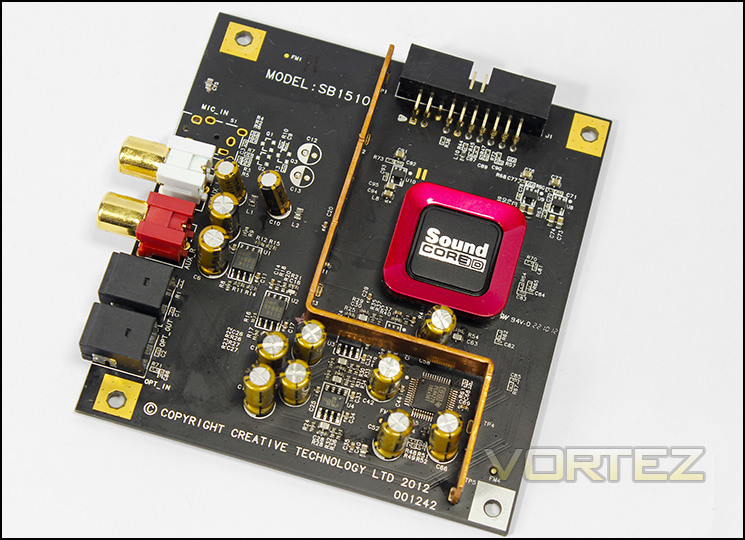
The daughter laid bare
Removing her clothes we find a pair of JRC 2114 opamps, a Ti PCM4220 high performance ADC with a resolution of 24bits and sample rate of 216kHz which has various applications and in this case is used for high grade recording.
Software
The software is easy to use and has a variety of functions. I downloaded the latest drivers (2.04.13) direct from Creative and experienced no problems during use. Though the drivers provide some Creative exclusive features, It seems a bit of a shame that they never went on to customise the drivers a little to celebrate, decorate and support their flagship sound card. It seems a little like wasted opportunity to use the same drivers as the other Z-Series sound cards and would have been nice to have something flashy like the Dolby HT V4 like what was seen on the ASUS ROG XONAR PHOEBUS with a real time EQ. Regardless the software remains functional intuitive and well implemented.
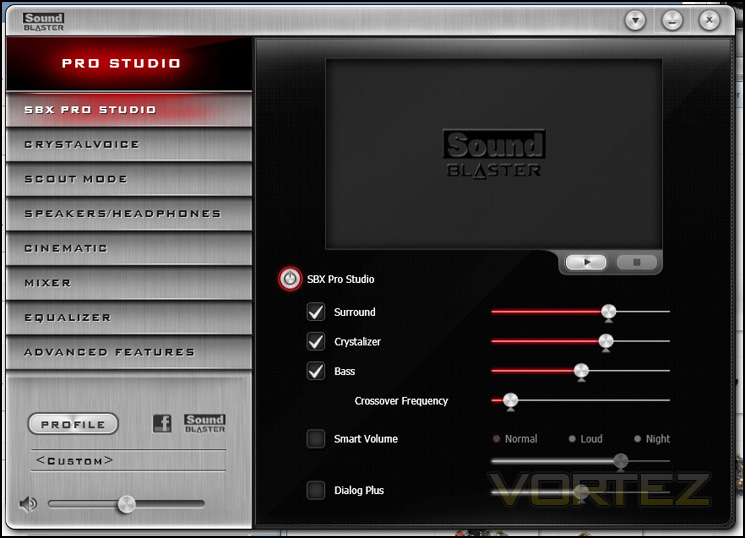
The SBX Pro Studio function was ‘On’ by default, and it gave rich colour to videos and games however for music it sounded too over processed and seemed like it caused the lows, mids and highs to fight for dominance rather than compliment one another. The crystalizer added too much attack to the treble that Ts and Ss (verbally in songs and sounds) were over pronounced, and the lows sounded warm but inconsistent. These features I would suggest are purely aimed at gaming and entertainment than music playback, fortunately you can change the options to your own preference.
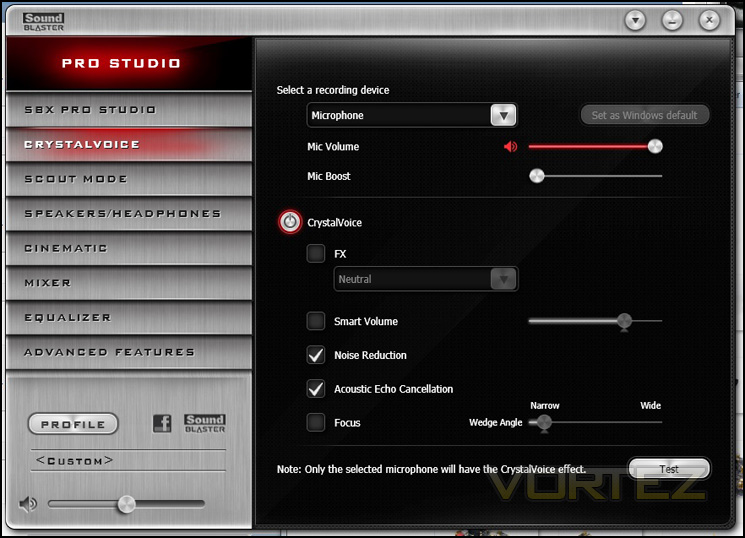
The CrystalVoice feature seemed to work ok, though I tend not to trust ‘smart volumes’ as this often means during times of silence, while in chat, the microphone would adjust to pick up breathing and juicy mouth noises or other background noises.
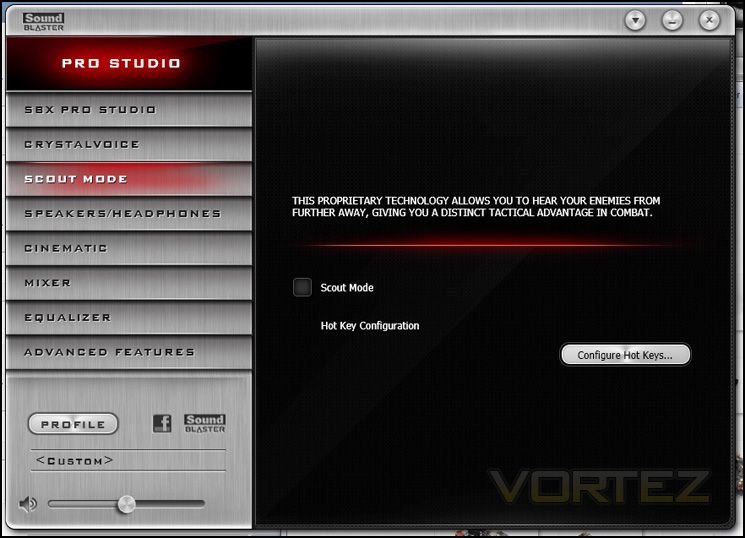
Scout mode again returns on the ZxR, the advantage is debatable though seems much better implemented when using a real 5.1 surround speaker setup over headphones/set.
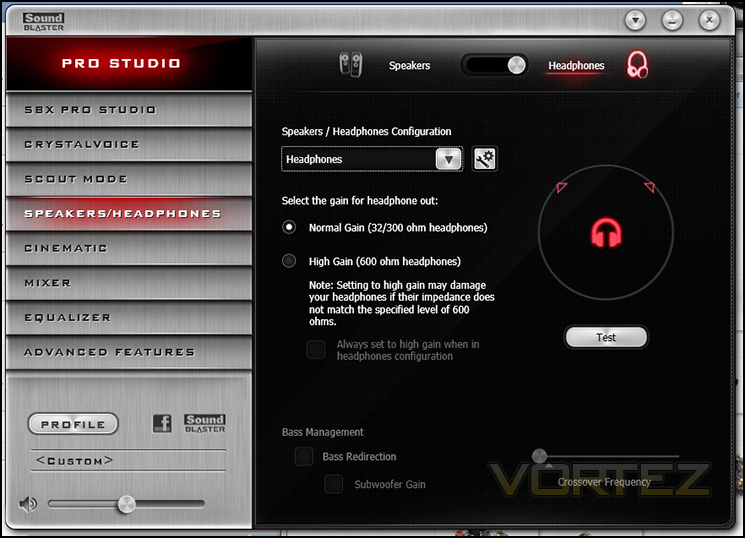
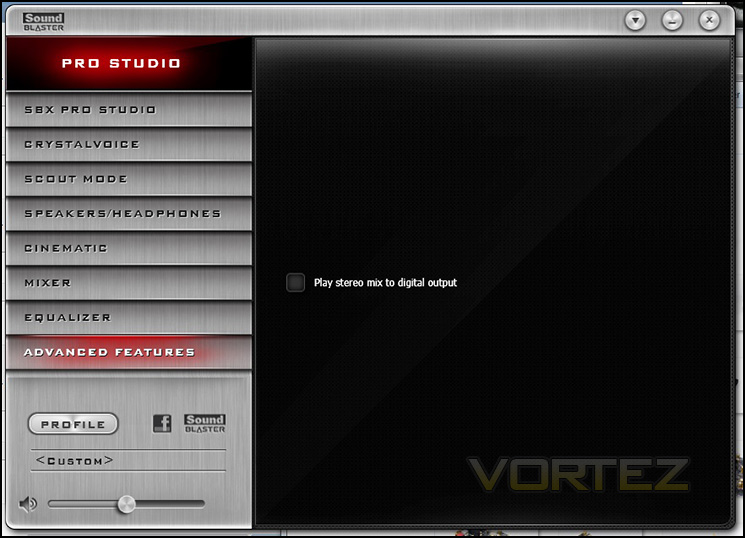
Easy speaker to headphone switch with the option of normal or high gain headphones, as well as a warning not to use high gain if your headphones do not support the specified level of impedance. When switching from speakers to headphones and back there is a loud audible ‘tick’ that comes from the sound card directly as the electricity shifts paths.
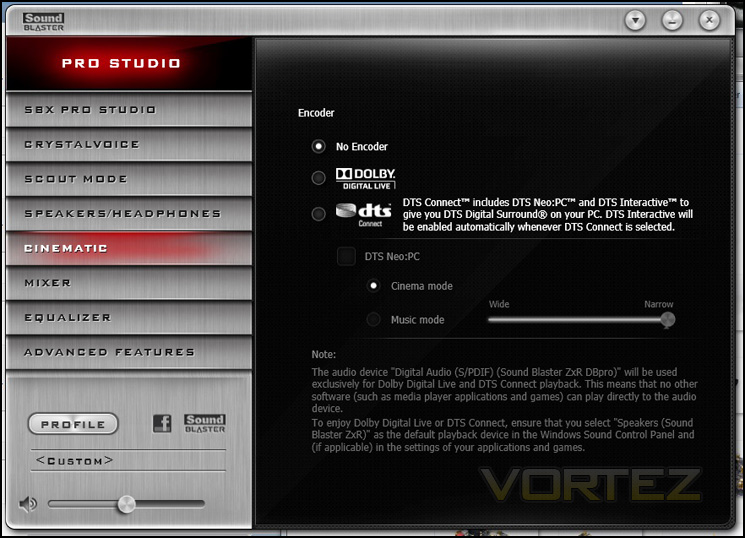
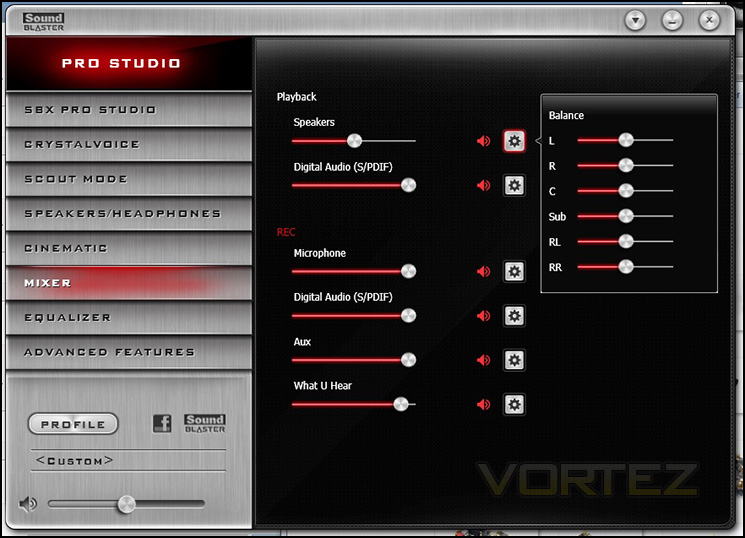
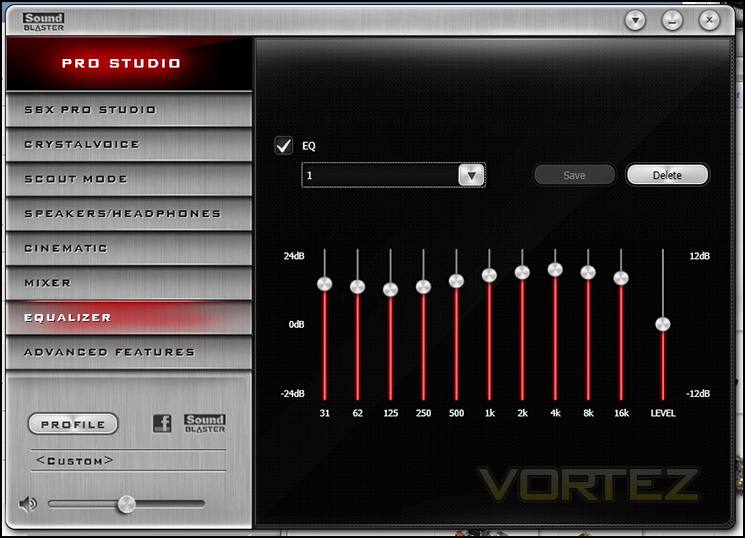
Some may prefer not to use the EQ on their sound system, though it is often a good way to compensate for the characteristics of your speakers/headphones as well as to adjust sounds to your own preference.
Performance Testing
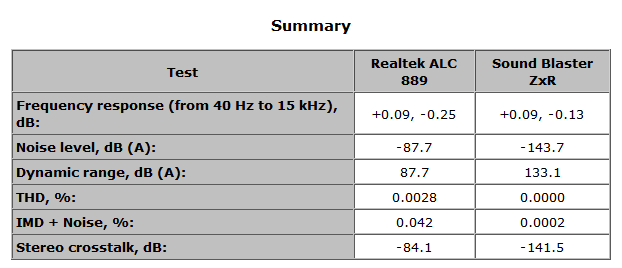
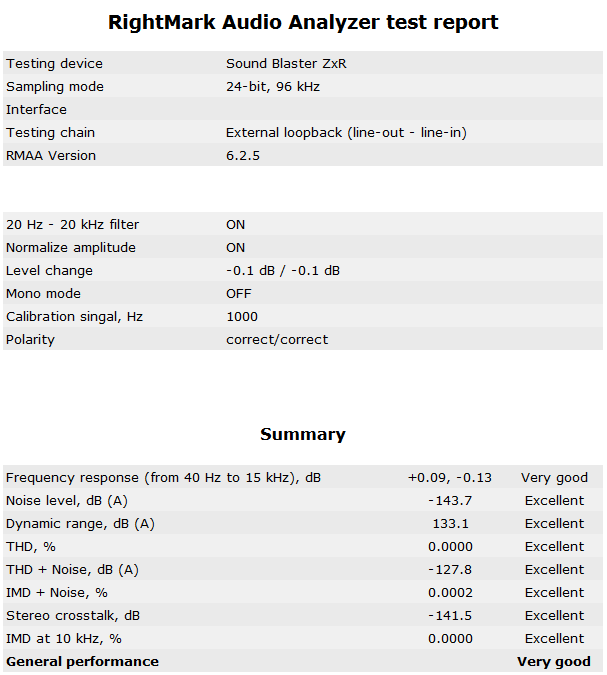
Right Mark Audio Analyzer
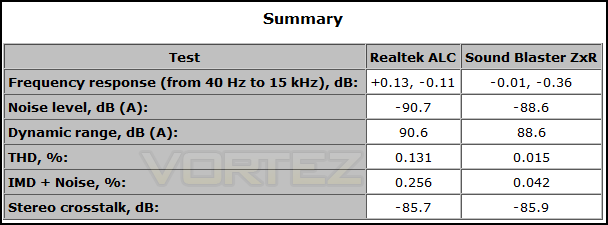
RMAA suite is designed for testing quality of analog and digital paths of any audio devices, be it a sound card, an MP3 player, a consumer CD/DVD player or an acoustic set. The results are obtained by playing and recording test signals passed through the tested audio path by means of frequency analysis algorithms. A more common mark is also provided for those unfamiliar with measured technical parameters.
Understanding the limitations of a test is something that should be addressed in regards to giving an accurate portrayal. RMAA is a useful tool but testing has many variables thus results are only comparable under similar set standards and parameters and shouldn’t be compared directly to other results that may have been obtained under different testing conditions.
In this test, we noticed various inconsistencies while trying to use the ‘backlooping’ method by using a jack to jack cable from the primary output port to the microphone port. These inconsistencies can be caused by any number of reasons E.G. having to use an RCA splitter to jack, having two separate audio channel paths, input recording quality, hardware variations, margin of error, quality of cable, software settings, drivers, hardware load and faulty hardware to name a few. So the testing was done by using the stereo mix function on both the integrated motherboard solution and on the Creative ZxR sound card as to obtain comparable results.
16 bit 44kHz
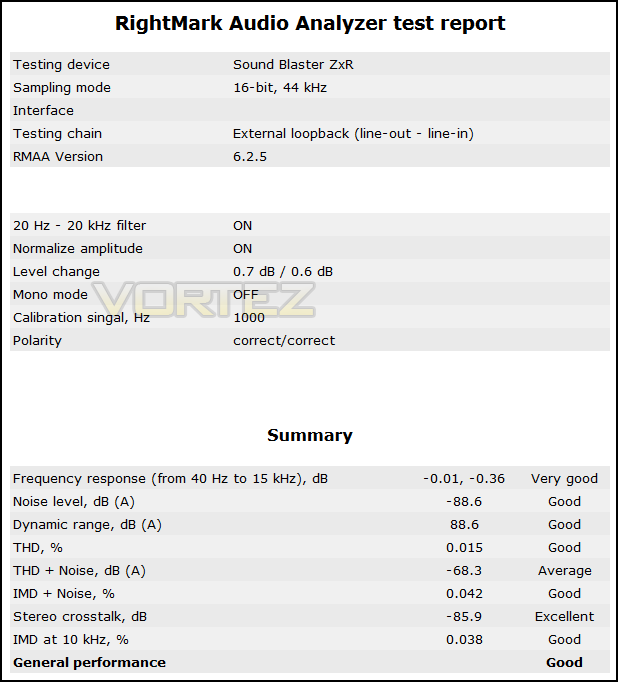
24 bit 96kHz
Setting up and observations
Setting up a 5.1 speaker system was easy due to the inclusion of various cables and adaptors along with the ACM which allowed easy access to the headphone and microphone ports not to mention the ability to use 3.5mm jacks out the box as many may not own headphones that have native quarter inch jacks and may not have an adaptor to hand either. Switching between headphone and speakers resulted in a slight crackle which lasted for a brief few seconds. This is likely due to the use of the micro relay switches that may ‘dirty’ the audio signal when swapping between speakers and headphones. This is a slightly confusing situation as this result should have been predictable. Though it is only a minor issue, it leads me to question, ‘Why couldn’t Creative have made the headphone jack ‘always on’? It is hardly correct to call it a ‘dedicated headphone jack, when it sacrifices the use of the front speakers to be able to use it. Surely it may have been more efficient to have both always on and simply swap audio source as using the ‘switch’, while simple, seems more of a gimmick and takes the same amount of time to change over as it would changing audio source though windows. So maybe this switch idea that is being sold as a feature is actually more down to a limitation of the Sound Core3D and has to share the primary stereo audio channel. That aside, using the ACM was a nice treat and the smooth volume dial was nice to play with. It is worth noting that you can only use one headset with the ACM, though there are two pairs of jacks the quarter inch take precedent.
Multimedia
Listening to music, I disabled the SBX effects and filters, this is more a personal preference. The bass in Sabrepulse’s First Crush in FLAC format was notably improved over what I had previously experienced before, picking out variations and wobbles comparable to a blueberry cheesecake which did not muddy the middle or treble. The treble was fast and sharp but not unbearably so making it crisp and refined. Listening through Jake Shimabukuro’s Beat of my Heart, an instrumental track played on a ukulele, tonal differences were noted with each strum and pluck as the strings are bent, faint sounds of fingers sliding on strings, light taps on the side of the instrument as well as some accidental strums were all picked up.
A high end sound card such as this really does well to bring gaming to life. In Battlefield 3, almost every aspect of sound has improved over the onboard solution, from reloading and shooting to ambient sounds, are all more defined and creates a great sense of alertness and realism. The SBX surround feature works well to give a sense of direction via stereo headset too.
Watching through the film Pandorum was a real treat as the sound effects really took you into the movie. The breathing, slight noises and footsteps in the quiet, the high pitch whine when Bower falls and hits his head is almost lost using the onboard solution. Pumping bass helps build suspense and the SBX effects too again help draw you into the movie more with the slightly exaggerated sounds giving a more dramatic effect and the surround option through stereo headset feels like you have been dropped into the middle of the film.
Conclusion
The Creative ZxR delivers awesome fidelity as one would expect from a flagship sound card, though quality of audio on this level becomes dependent on the peripherals you want to use this to drive. To the point, you want to be using high quality audio peripherals to get the most out of this sound card because using a £30 set of speakers on a £200 sound card will not provide you with that breath taking experience in your multimedia playback. Again this product may deliver more features than someone needs, considering the cost, you could get a Creative Sound Blaster Z and a fairly good set of headphones such as the Beyerdynamics DT770 for the same price and you will likely net better audio quality than you would by buying the ZxR and sticking to your old £50 headset or speakers.
So who is the ZxR aimed at? It would appear, everyone who cares about audio. The reason for this is, it is the first soundcard to deliver ‘audiophile’ grade components and features, yet being able to cater for the needs of gamers, entertainment and home theater enthusiasts, budding musicians seeking high quality recording features at home and of course people who want to plug in their high end headphones into an amplified quarter inch jack and get high fidelity music playback. It doesn’t stop there though, there are removable opamps to give audio enthusiasts the choice to swap them out for something more to their liking, the 124dB SNR is an immense achievement and the ZxR hammers home with some exclusive features using the Sound Core3D. Did I forget to mention that the soundcard itself and the DBPro daughter board actually look good and sound even better. Furthermore, it is bundled with a competent, good quality ACM with an integrated microphone as well as various cables which should allow most people to get specific use out of their new sound card out-the-box without having to track down any specialist cables.
So is all this worth the MSRP of £199.99? Well after making a count, there is at least over £100 in street value on just capacitors, opamps and the headphone amp, adding up the DACs and ADC as well as two of Creatives Sound Core3D then factor in the design and creation cost then the cost of the ACM and bundled cables, it does actually seem like you are getting your moneys worth, so can it compete with alternatives? For the price, the ASUS XONAR Essence STX is considered to be an ‘audiophile’ favourite, but at £120 you will be stuck with stereo channels. It is true that for gaming and entertainment, the Creative Sound Blaster Z will act as a very good all rounder giving great sound reproduction, a headphone amp and the choice for 5.1 surround sound speakers. What if someone wanted both audio enthusiast grade hardware and versatility? The ASUS ROG XONAR PHOEBUS? Well it does offer excellent sound and can support up to 7.1 surround analogue, but doesn’t offer the expanded I/O for recording or home entertainment, nor removable opamps and a quarter inch jack, and to be really critical, the ACM supplied with the ZxR is better quality than the headphone breakout supplied with the PHOEBUS. So the choice comes down to your demands, need a high grade audio hub that can do it all? You could choose to buy an ASUS XONAR Essence STX and a Creative Soundblaster Z to go in your system, or for a little less you could just get the Creative Sound Blaster ZxR.
Pushed to be highly critical, the drawbacks of the ZxR are very minor. I would have liked to have seen a more ‘wow’ factor in the design, for example, the PHOEBUS has rear green and red LEDs on the headphone and microphone jacks as well as side LEDs stamping its name into your PC setup. Even the Creative Sound Blaster Z had some attractive red LEDs which the ZxR is missing. Also, the DBPro cable could have been more considerately designed, PCI spacing is a standard so the spacing between the main body and daughter board is fairly predictable and Creative could have designed the cable to be of a precise length. Lastly, the driver software could have been refreshed a little to have that more exclusive top end ‘flagship feel’.
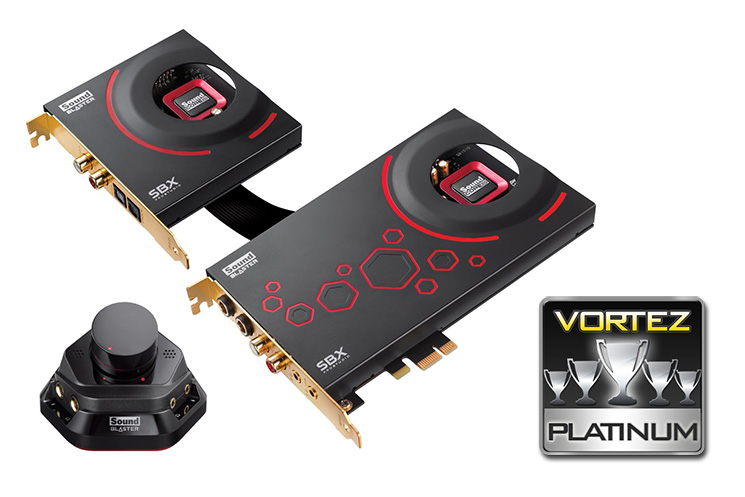
The Creative Sound Blaster ZxR leads the way in PC audio, offering high grade components and features for audio enthusiasts, versatility that will suit gamers and home entertainment buffs, as well as catering for those looking to make high quality recordings at home. Complimented with an attractive bundle and easy to use drivers with exclusive features, though not perfect, it is close. For this reason we happily present the Creative Sound Blaster ZxR our Platinum award.
Pros.
+ Attractive aesthetic
+ Leading PC audio reproduction
+ High grade components
+ Dedicated quarter inch amplified headphone jack
+ DBPro daughter board with expanded I/O and dedicated Sound Core3D
+ Removable opamps
+ Supports analogue 5.1 out
+ Excellent supporting bundle
+ Quality ACM with headphone and mic array and built in beamforming microphone
Cons.
– No pretty LEDs :*(
+ Attractive aesthetic
+ Leading PC audio reproduction
+ High grade components
+ Dedicated quarter inch amplified headphone jack
+ DBPro daughter board with expanded I/O and dedicated Sound Core3D
+ Removable opamps
+ Supports analogue 5.1 out
+ Excellent supporting bundle
+ Quality ACM with headphone and mic array and built in beamforming microphone
Cons.
– No pretty LEDs :*(

Click here for an explanation of our awards at Vortez.net. Thanks to Creative for providing today’s review sample.


