The new Crucial BX100 SSD offers large storage space at tremendous value. Is this truly a replacement for the ageing mechanical hard drive?

Product on Review Crucial BX100
Manufacturer & Sponsor: Crucial
Street Price: £282
It’s been five years since we first reviewed a Solid State drive and during that time performance has increased with the cost slowly decreasing. However, SSDs still cost considerably more per GB than their mechanical counterparts. For example, you are likely to pay in excess of £400 for a 1TB SSD whereas a 1TB mechanical hard drive is some 10x cheaper at a little over £40. SSD’s are however getting cheaper and the price gap is closing. Five years ago you would have been lucky to get a 256GB drive for £400 but today, 1TB SSDs are commonplace at that price. Crucial have now hammered that price point down further to just £282!
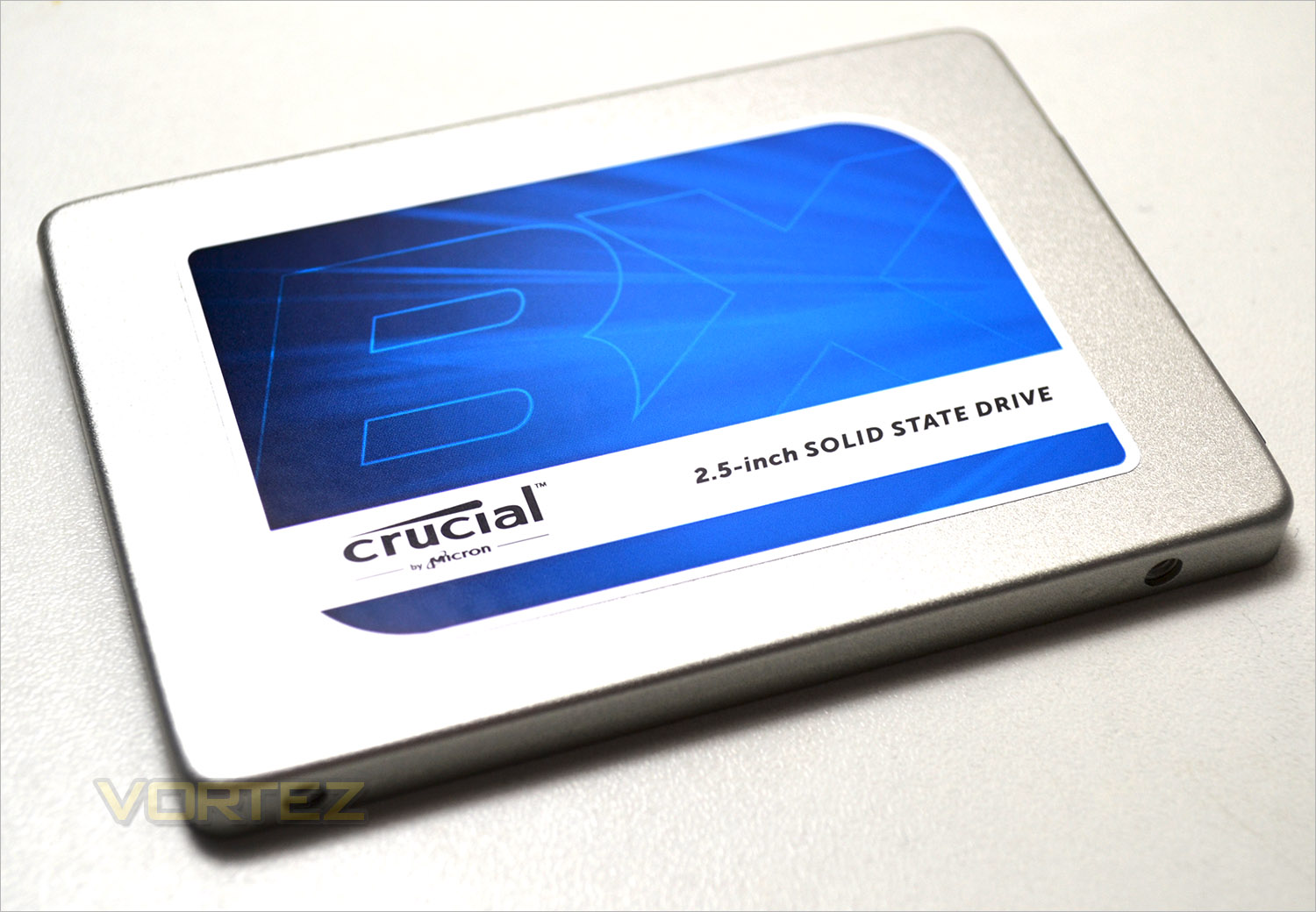
It is fair to say that the Crucial BX100 is still much more expensive than a mechanical hard drive however, before dismissing it you would be wise to factor in noise, heat, power consumption, weight, size, durability, encryption, and of course the main attraction of an SSD, performance when comparing the two. Crucial tell us that value, not performance was the driving force behind creating the BX100 and to that end they have clearly succeeded because it is much cheaper than the competition on all levels. Storage capacities are the norm with 120GB, 256GB, 512GB and 1TB values catered for with prices starting at just £50 for the 120GB but we would suspect that most will be interested in the higher storage capacity variants, perhaps with a view to replacing a standard mechanical hard drive. For this reason we will be putting the range topping 1TB version through its paces in today’s review.
Crucial on their BX100 SSD
The storage revolution that started in 2008 with our first SSD continues with the new Crucial® BX100. Engineered to outperform a hard drive and deliver cost-effective performance, the Crucial BX100 leverages advanced flash memory technology and moves your computer beyond the outdated storage limitations of spinning discs. By transmitting data in a digital manner rather than having to seek it out on a spinning platter, the Crucial BX100 makes nearly everything on your computer faster and more efficient.
Specification
Capacity 120GB 250GB 500GB 1TB
Part Number CT120BX100SSD1 CT250BX100SSD1 CT500BX100SSD1 CT1000BX100SSD1
Sequential Read MB/s 535 535 535 535
Sequential Write MB/s 185 370 450 450
Random Read IOPS 87k 87k 90k 90k
Random Write IOPS 43k 70k 70k 70k
Part Number CT120BX100SSD1 CT250BX100SSD1 CT500BX100SSD1 CT1000BX100SSD1
Sequential Read MB/s 535 535 535 535
Sequential Write MB/s 185 370 450 450
Random Read IOPS 87k 87k 90k 90k
Random Write IOPS 43k 70k 70k 70k
Life Expectancy (MTTF): 1.5 million hours
Endurance: 72TB total bytes written (TBW), equal to 40GB per day for 5 years
Warranty: Limited three-year warranty
Operating Temperature: 0°C to 70°C
Firmware: User-upgradeable firmware
Support: For installation and warranty information, visit crucial.com/support
Advanced Features
• Thermal Monitoring
• Data Path Protection
• Active Garbage Collection
• TRIM Support
• Self Monitoring and Reporting Technology (SMART)
• Error Correction Code (ECC) Compliance CE, FCC, BSMI, C-Tick, VCCI, Kcc, RoHS, China RoHS, WEEE, TUV, UL
Endurance: 72TB total bytes written (TBW), equal to 40GB per day for 5 years
Warranty: Limited three-year warranty
Operating Temperature: 0°C to 70°C
Firmware: User-upgradeable firmware
Support: For installation and warranty information, visit crucial.com/support
Advanced Features
• Thermal Monitoring
• Data Path Protection
• Active Garbage Collection
• TRIM Support
• Self Monitoring and Reporting Technology (SMART)
• Error Correction Code (ECC) Compliance CE, FCC, BSMI, C-Tick, VCCI, Kcc, RoHS, China RoHS, WEEE, TUV, UL
First Look
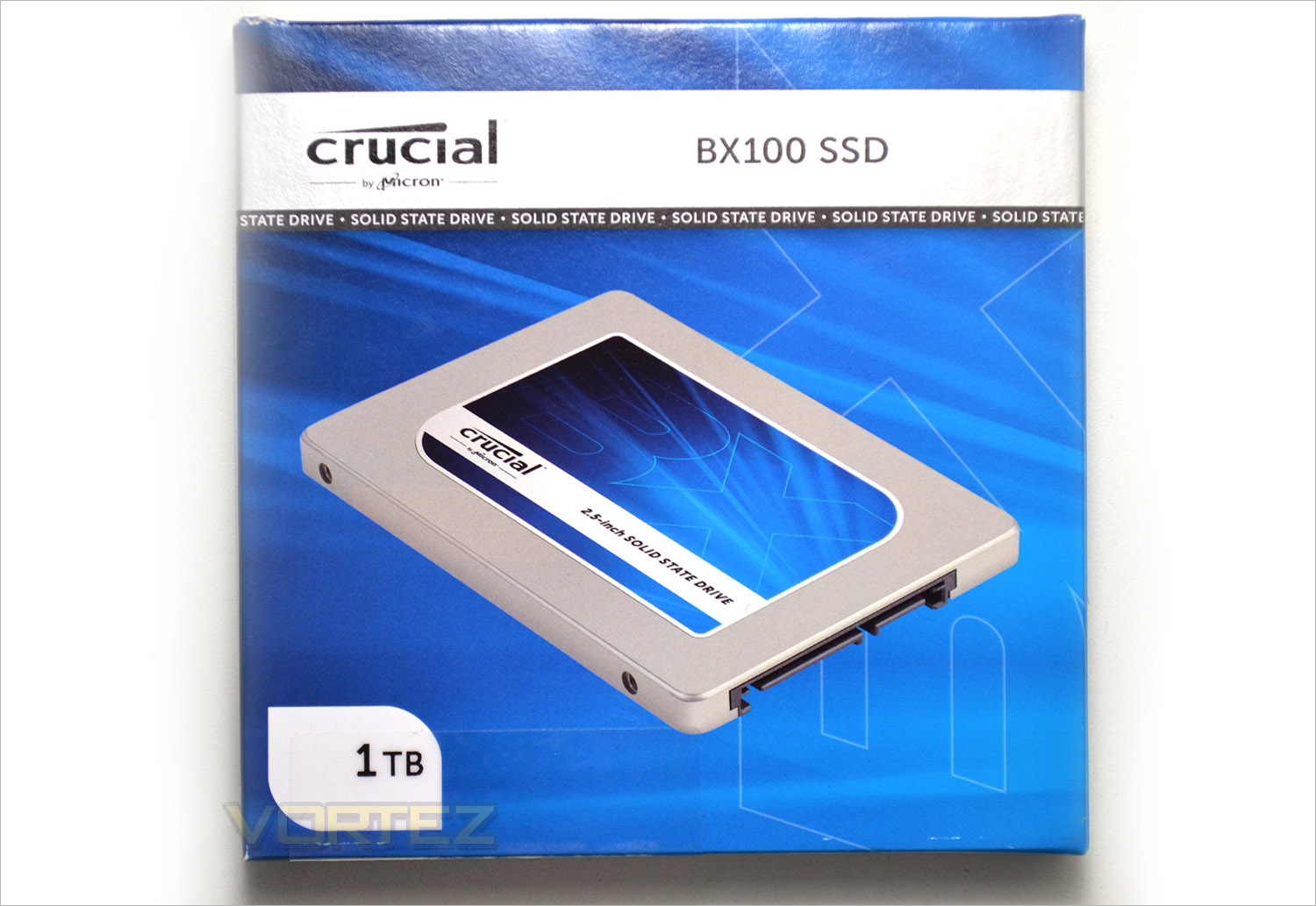
The outer packaging appears to be identical to the packaging of the MX100 we reviewed last year with just the product title and sticker to the bottom left telling us what the drive capacity is being the only differences.
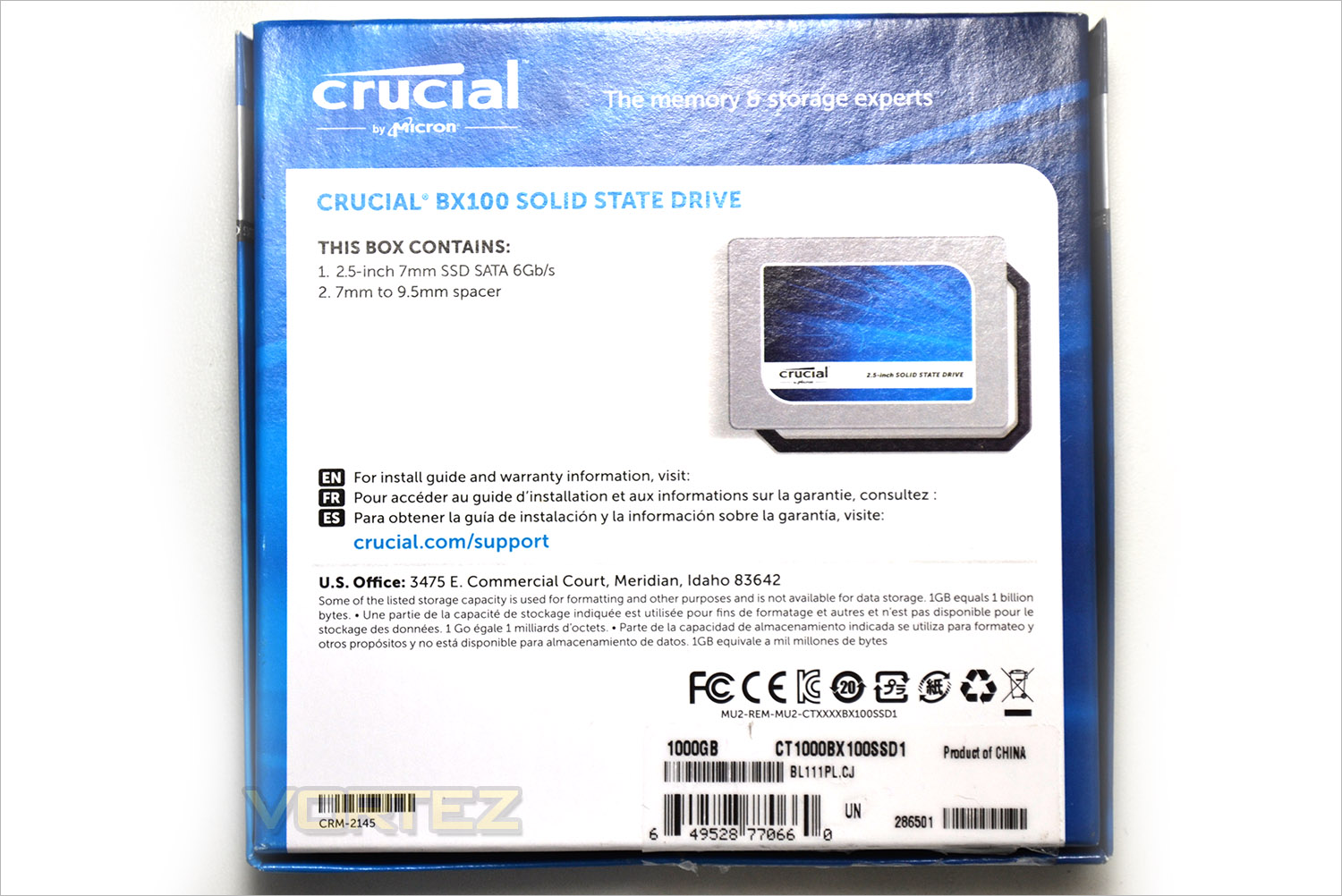
The rear of the package gives us the dimensions of the drive and that it comes with Crucial’s standard 3 year warranty.
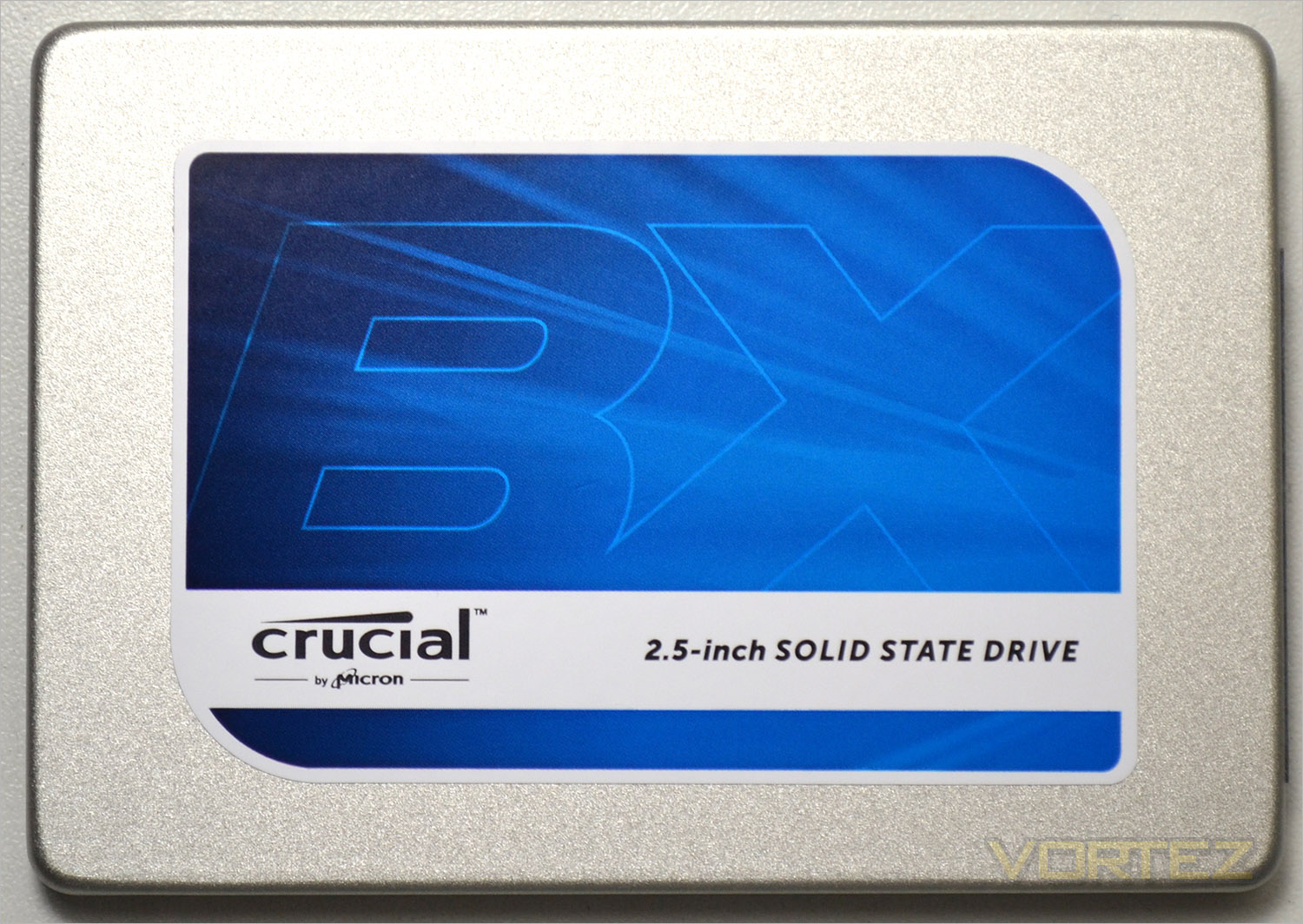
As with most SSDs, the Crucial BX100 measures 2.5 inches in width and just 7mm in height. Crucial have also kindly included a 9mm spacer for those that need to make the SSD a little bigger in the package.
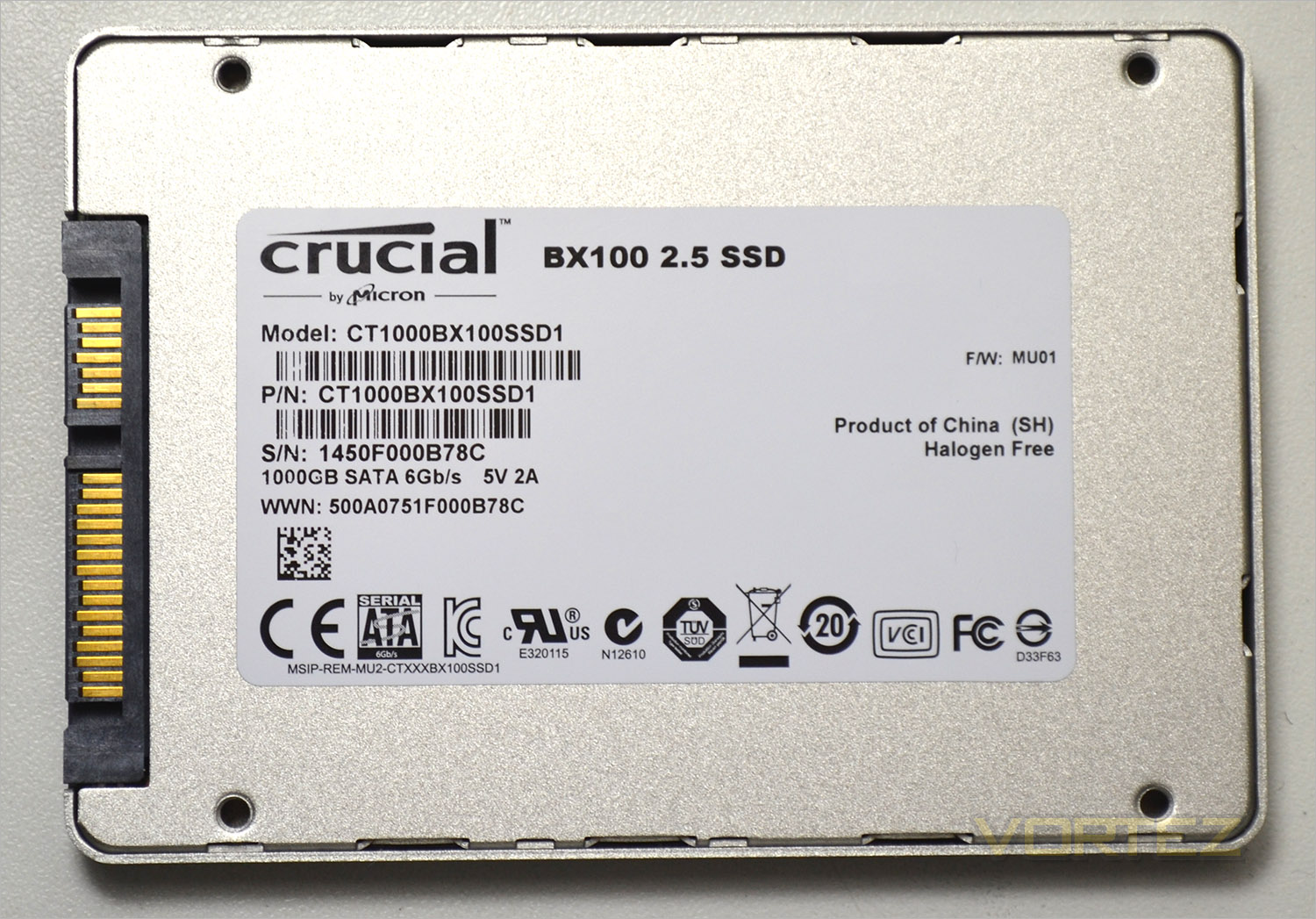
The rear of the drive has a sticker telling us the model number, product number and serial number (required for warranty purposes) along with the product storage size and power requirements (5v/2A).
Inside the drive we can tell you that the 1TB version features MICRON Flash NAND but the cornerstone, and perhaps where Crucial have made the most interesting cost cut is by the use of a Silicon Motion 4-channel SM2246EN controller as opposed to the traditional Marvell controller. Making up the memory are 16 x 64GB 128Gbit 16nm synchronous MLC NAND flash making a total of 1TB/931GB usable storage capacity.
Test Setup & Methodology
Our test system is formatted and a fresh version of Windows is installed with just drives in place – no additional applications. Windows is then updated to the latest release and the drivers are installed. Included in the list of benchmarks are the following applications:Benchmarks
ATTO Disk Benchmark v2.46
AS SSD
CrystalDiskMark 3.0
Iometer
SiSoftware SANDRA 2012
AS SSD
CrystalDiskMark 3.0
Iometer
SiSoftware SANDRA 2012
Test system
CPU Intel Core-i7 4770K
Motherboard GIGABYTE Z87X-OC
Graphics MSI R7970 Black Edition
Memory 16GB Corsair Vengeance Pro (2400MHz) CL10
HDD
– Crucial BX100 1TB (Sata 6Gbps)
– Plextor M6e 256GB(PCIe)
– Lexar Workflow DD512 512GB(USB 3.0B)
– Samsung 850 EVO 500GB(Sata 6Gbps)
– Crucial MX100 512GB(Sata 6Gbps)
– SanDisk Extreme Pro 480GB(Sata 6Gbps)
– Samsung 850 Pro 128GB (Sata 6Gbps)
– Corsair Force LX 256GB (Sata 6Gbps)
– Intel 730 240GB (Sata 6Gbps)
– ADATA Premier Pro SP920SS 256GB (Sata 6Gbps)
– OCZ Vertex 460 240GB (Sata 6Gbps)
– OCZ Vector 150 240GB (Sata 6Gbps)
– Samsung 840 EVO mSATA 500GB (Sata 6Gbps)
– Samsung 840 EVO mSATA 250GB (Sata 6Gbps)
– Kingston HyperX 3K Na’Vi 240GB (Sata 6Gbps)
– OCZ Vertex 450 256GB (Sata 6Gbps)
– Samsung 840 EVO 750GB (Sata 6Gbps)
– Samsung 840 Pro 256GB (Sata 6Gbps)
– Samsung 840 256GB (Sata 6Gbps)
– Toshiba 256GB THNSNH256GCST (Sata 6Gbps)
– OCZ Vector 256GB (Sata 6Gbps)
– Corsair Neutron GTX 240GB (Sata 6Gbps)
– Corsair Force GS 240GB (Sata 6Gbps)
– OCZ Vertex 4 128GB (Sata 6Gbps)
– Kingston HyperX 3K 120GB (Sata 6Gbps)
– Kingston HyperX 240GB (Sata 6Gbps)
– ADATA S510 120GB (Sata 6Gbps)
– Intel 520 480GB (Sata 6Gbps)
– Samsung 830 Series 256GB (Sata 6Gbps)
– Samsung HD103SJ 1TB (Sata 3Gbps)
PSU Corsair HX1050 Gold
OS Microsoft Windows 7 Professional 64-Bit
Motherboard GIGABYTE Z87X-OC
Graphics MSI R7970 Black Edition
Memory 16GB Corsair Vengeance Pro (2400MHz) CL10
HDD
– Crucial BX100 1TB (Sata 6Gbps)
– Plextor M6e 256GB(PCIe)
– Lexar Workflow DD512 512GB(USB 3.0B)
– Samsung 850 EVO 500GB(Sata 6Gbps)
– Crucial MX100 512GB(Sata 6Gbps)
– SanDisk Extreme Pro 480GB(Sata 6Gbps)
– Samsung 850 Pro 128GB (Sata 6Gbps)
– Corsair Force LX 256GB (Sata 6Gbps)
– Intel 730 240GB (Sata 6Gbps)
– ADATA Premier Pro SP920SS 256GB (Sata 6Gbps)
– OCZ Vertex 460 240GB (Sata 6Gbps)
– OCZ Vector 150 240GB (Sata 6Gbps)
– Samsung 840 EVO mSATA 500GB (Sata 6Gbps)
– Samsung 840 EVO mSATA 250GB (Sata 6Gbps)
– Kingston HyperX 3K Na’Vi 240GB (Sata 6Gbps)
– OCZ Vertex 450 256GB (Sata 6Gbps)
– Samsung 840 EVO 750GB (Sata 6Gbps)
– Samsung 840 Pro 256GB (Sata 6Gbps)
– Samsung 840 256GB (Sata 6Gbps)
– Toshiba 256GB THNSNH256GCST (Sata 6Gbps)
– OCZ Vector 256GB (Sata 6Gbps)
– Corsair Neutron GTX 240GB (Sata 6Gbps)
– Corsair Force GS 240GB (Sata 6Gbps)
– OCZ Vertex 4 128GB (Sata 6Gbps)
– Kingston HyperX 3K 120GB (Sata 6Gbps)
– Kingston HyperX 240GB (Sata 6Gbps)
– ADATA S510 120GB (Sata 6Gbps)
– Intel 520 480GB (Sata 6Gbps)
– Samsung 830 Series 256GB (Sata 6Gbps)
– Samsung HD103SJ 1TB (Sata 3Gbps)
PSU Corsair HX1050 Gold
OS Microsoft Windows 7 Professional 64-Bit
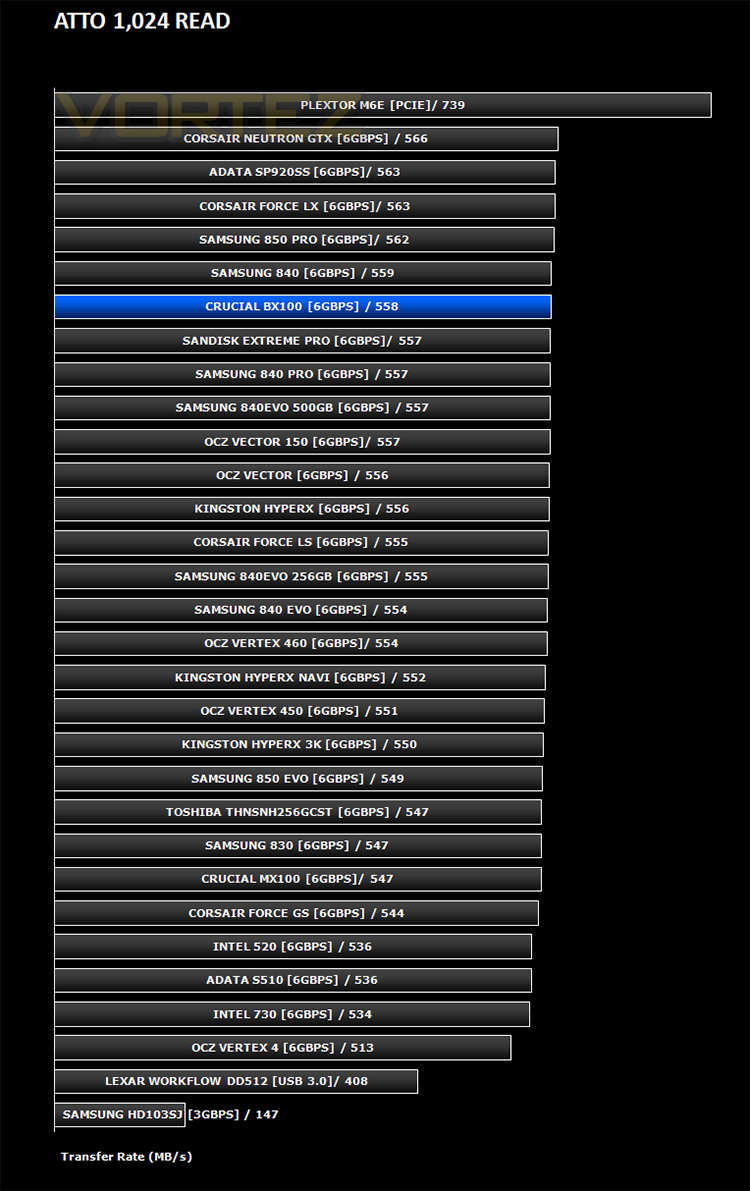
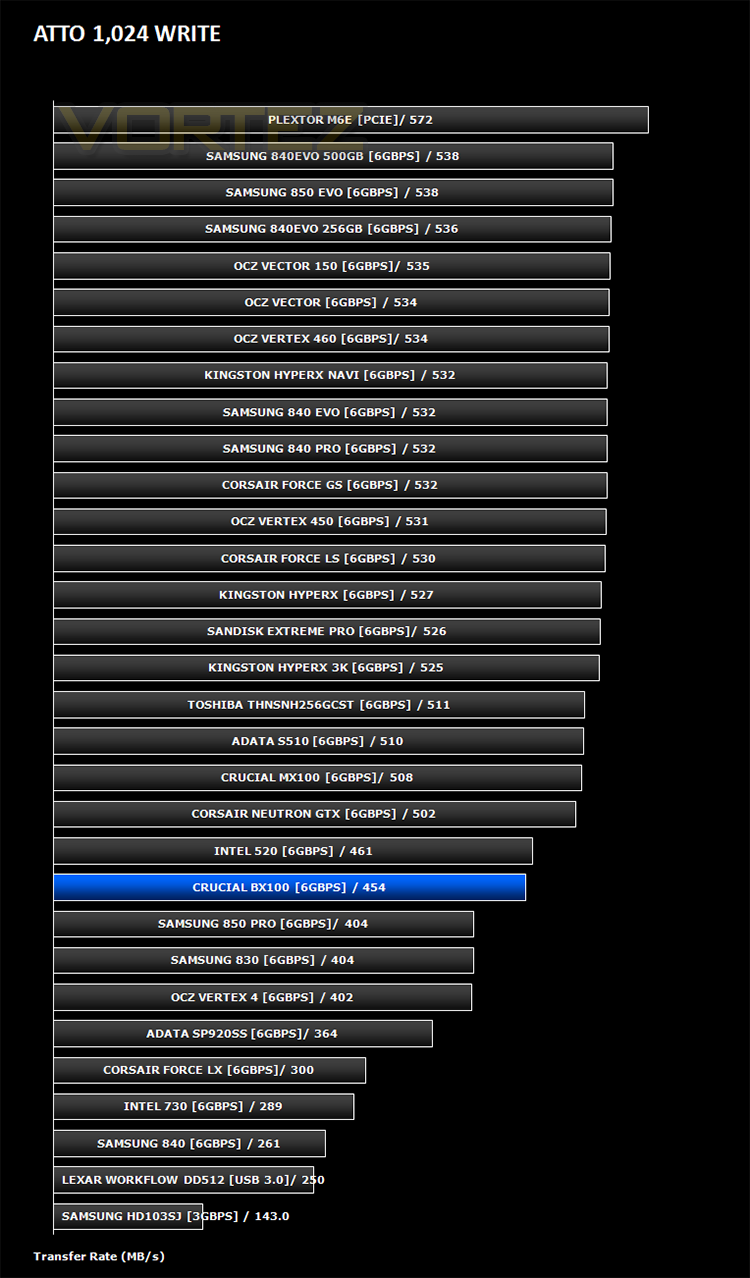
Benchmarks: ATTO
The ATTO Disk Benchmark performance measurement tool is compatible with Microsoft Windows. Measure your storage systems performance with various transfer sizes and test lengths for reads and writes. Several options are available to customize your performance measurement including queue depth, overlapped I/O and even a comparison mode with the option to run continuously. Use ATTO Disk Benchmark to test any manufacturers RAID controllers, storage controllers, host adapters, hard drives and SSD drives and notice that ATTO products will consistently provide the highest level of performance to your storage.
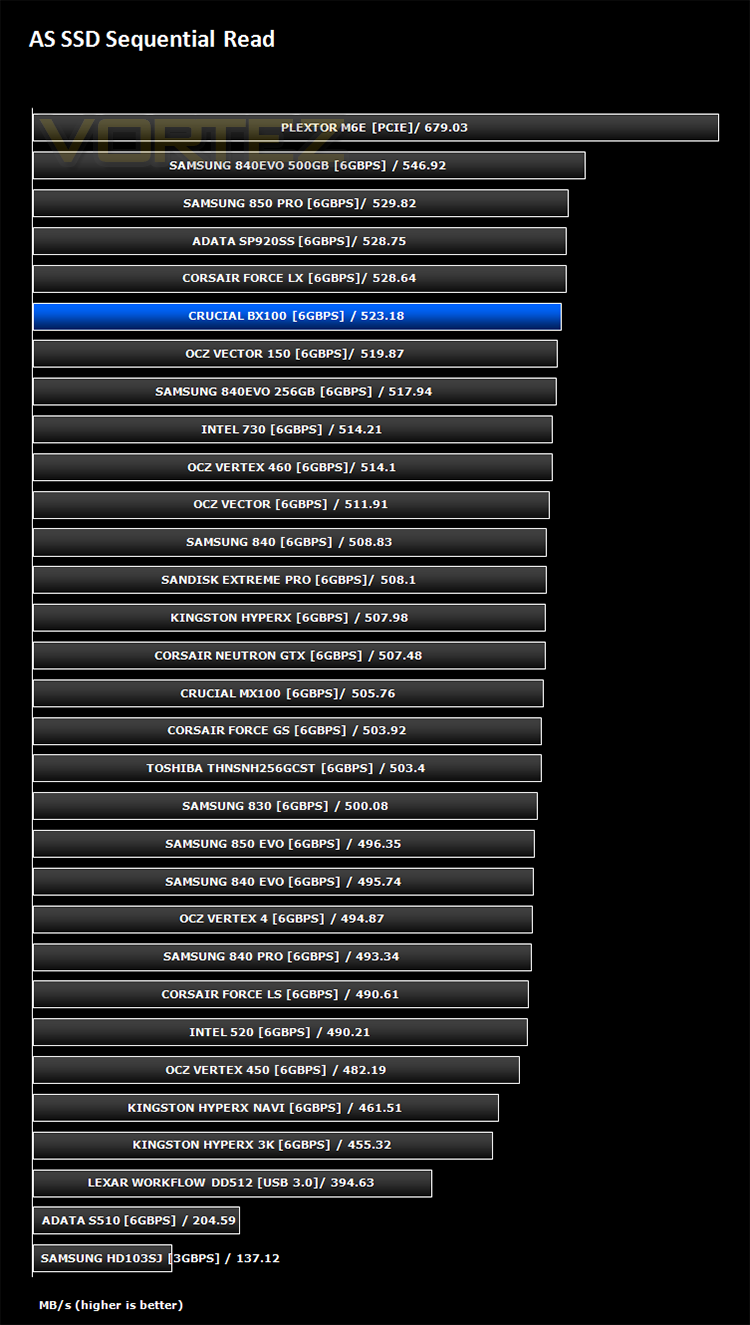
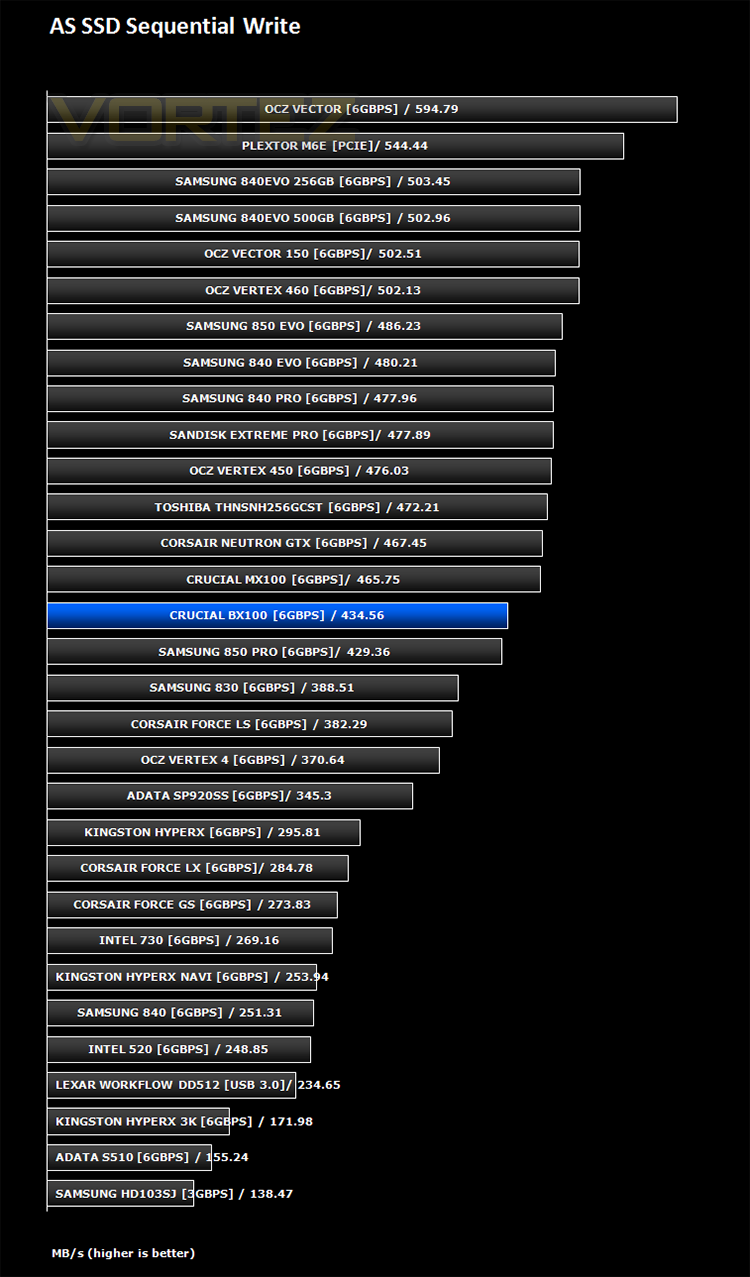
Benchmarks: AS SSD
AS SSD Benchmark is a straightforward tool for measuring the speed of your SSD drive.
Simply launch the program, choose your drive, click Start, and it’ll test your SSD’s read and write speed in a variety of ways, delivering a score for each when it’s done. And if that’s not enough, there are also additional file copy and compression-related benchmarks available from the Tools menu. (The author’s support page is German only, but if you need further English explanations then there’s a thread on the program at the OCZ Technology forum.).
Simply launch the program, choose your drive, click Start, and it’ll test your SSD’s read and write speed in a variety of ways, delivering a score for each when it’s done. And if that’s not enough, there are also additional file copy and compression-related benchmarks available from the Tools menu. (The author’s support page is German only, but if you need further English explanations then there’s a thread on the program at the OCZ Technology forum.).
Benchmarks: CrystalDiskMark 3.0
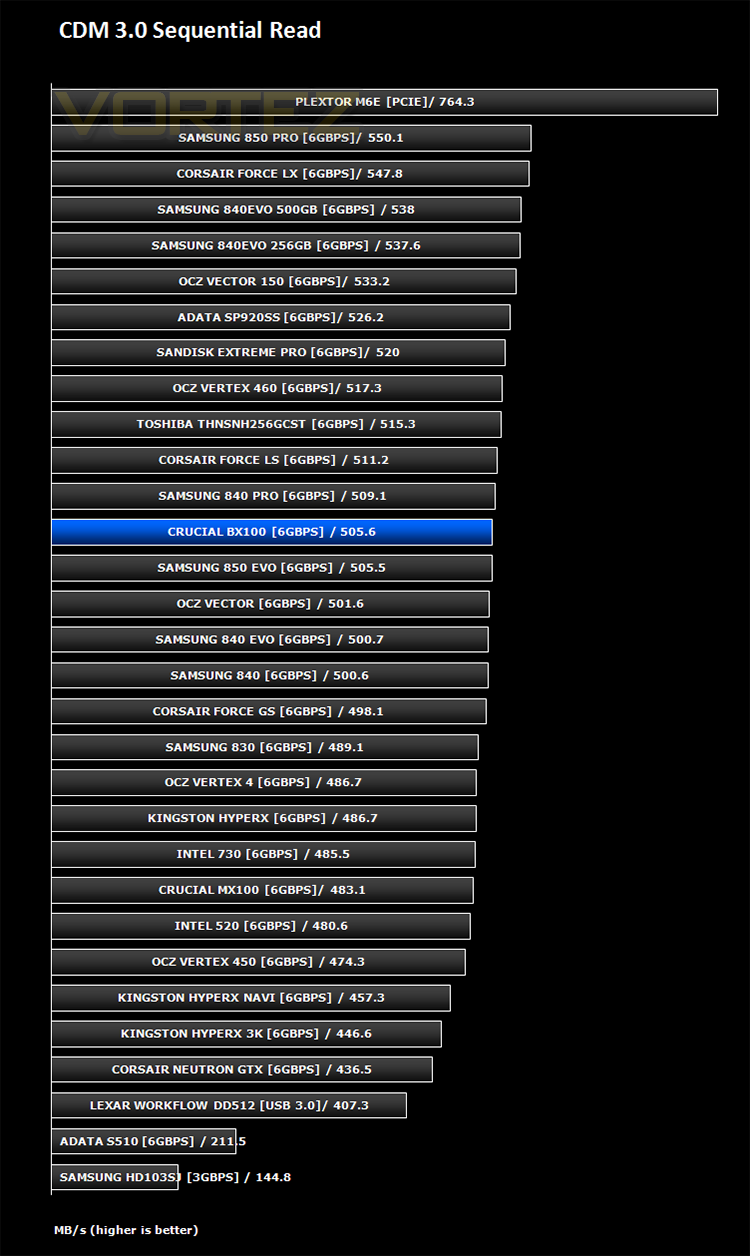
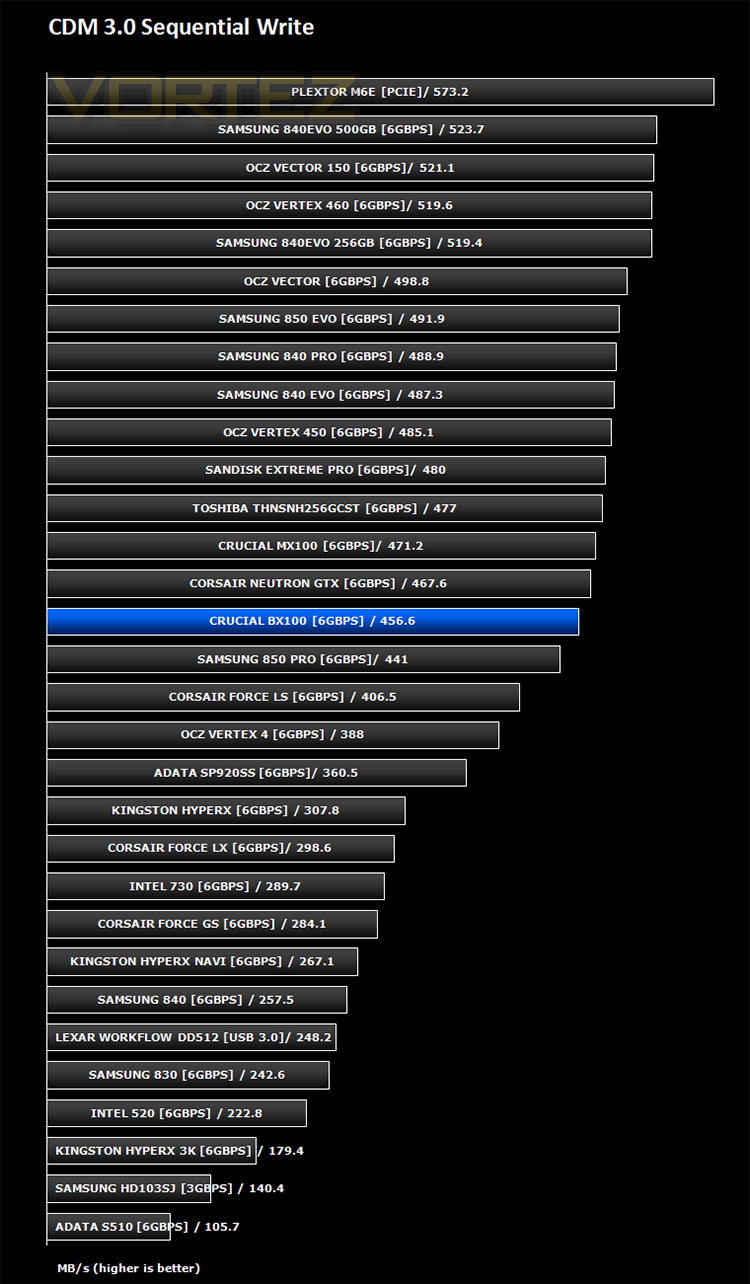
CrystalDiskMark is a disk benchmark software that analyses different types of hard drive. Giving sequential benchmark write and read statistics in MB/s. A simple program that is very useful.
Benchmarks: Iometer
Iometer is based on a client–server model, where one instance of the Iometer graphical user interface is managing multiple ‘workers’ (each one representing a separate Dynamo.exe process) which are doing the I/O. Iometer performs Asynchronous I/O – accessing files or block devices (later one allowing to bypass the file system buffers).
Iometer allows the configuration of disk parameters such as the ‘Maximum Disk Size’, ‘Starting Disk Sector’ and ‘# of Outstanding I/Os’. This allows a user to configure a test file upon which the ‘Access Specifications’ configure the I/O types to the file.
Iometer allows the configuration of disk parameters such as the ‘Maximum Disk Size’, ‘Starting Disk Sector’ and ‘# of Outstanding I/Os’. This allows a user to configure a test file upon which the ‘Access Specifications’ configure the I/O types to the file.
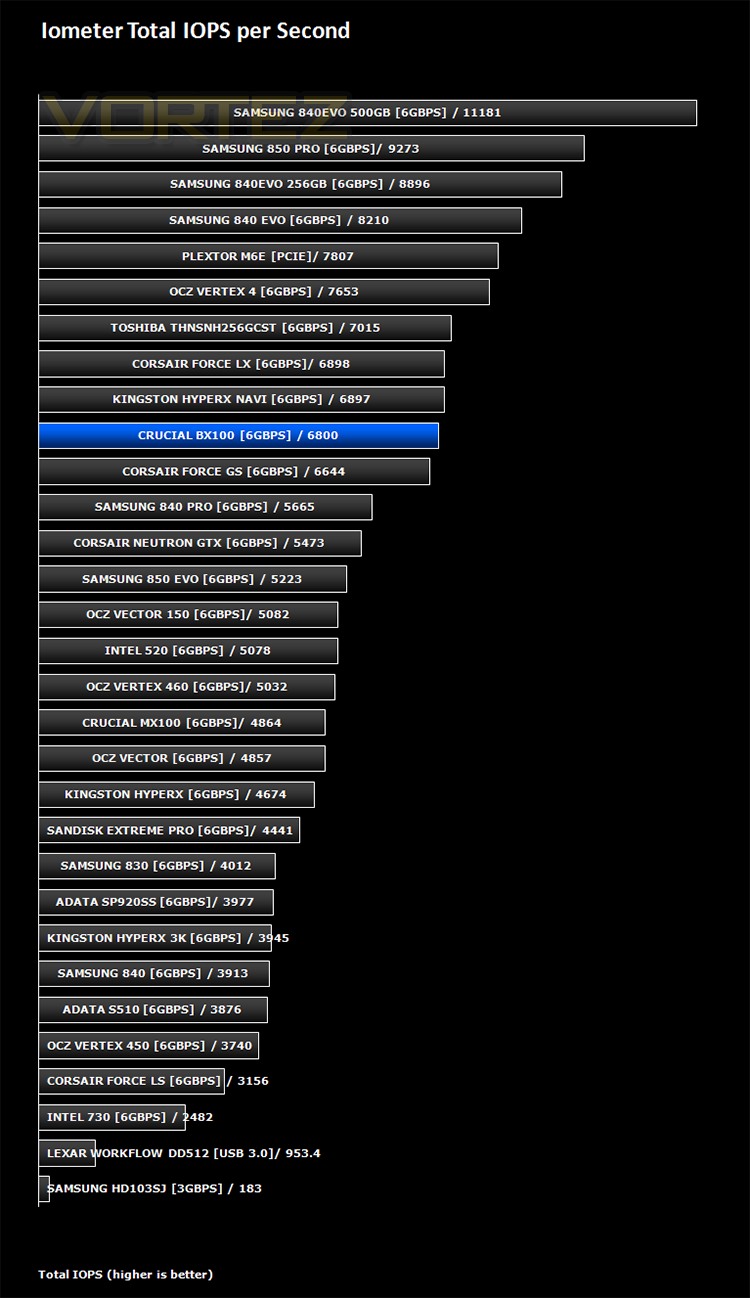
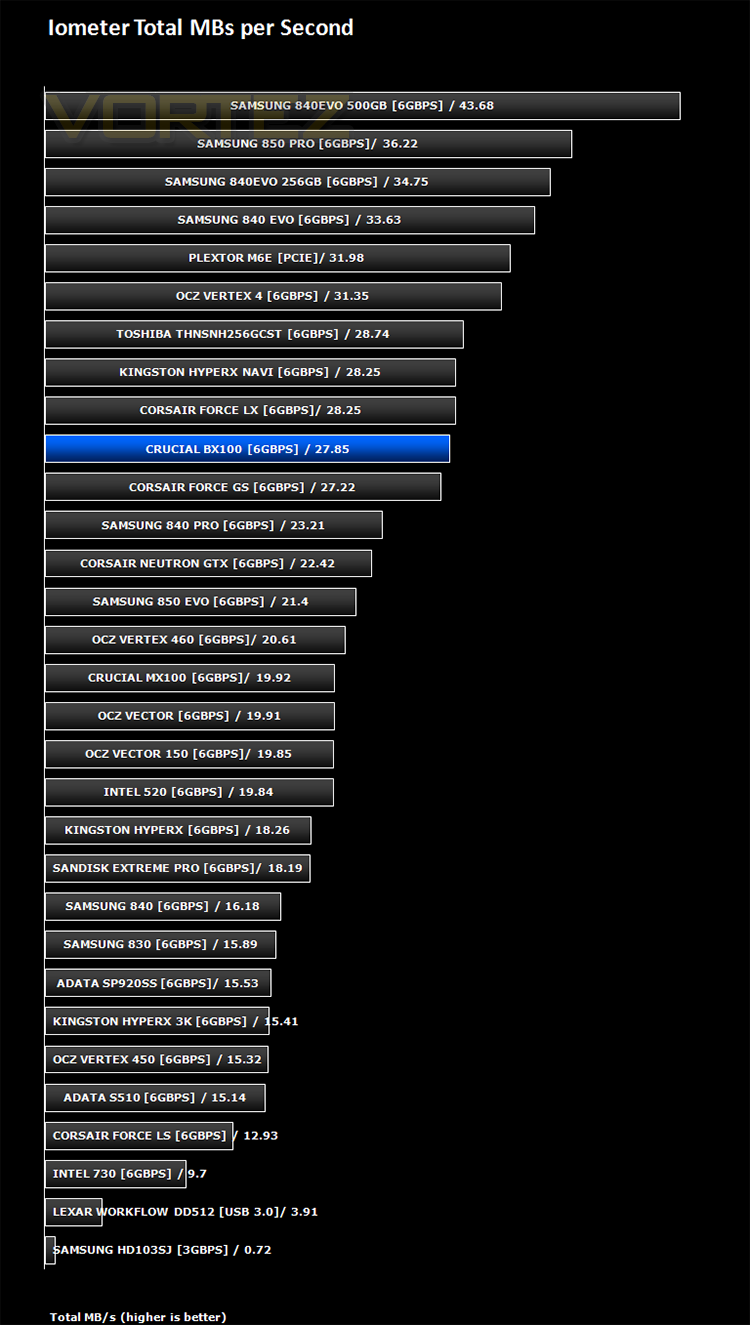
For the purpose of this test. The 4K 50%/50% read/write file will be under the examination with 100% Random Distribution – reporting back on IOPS and MBs per Second.
Benchmarks: SiSoft Sandra
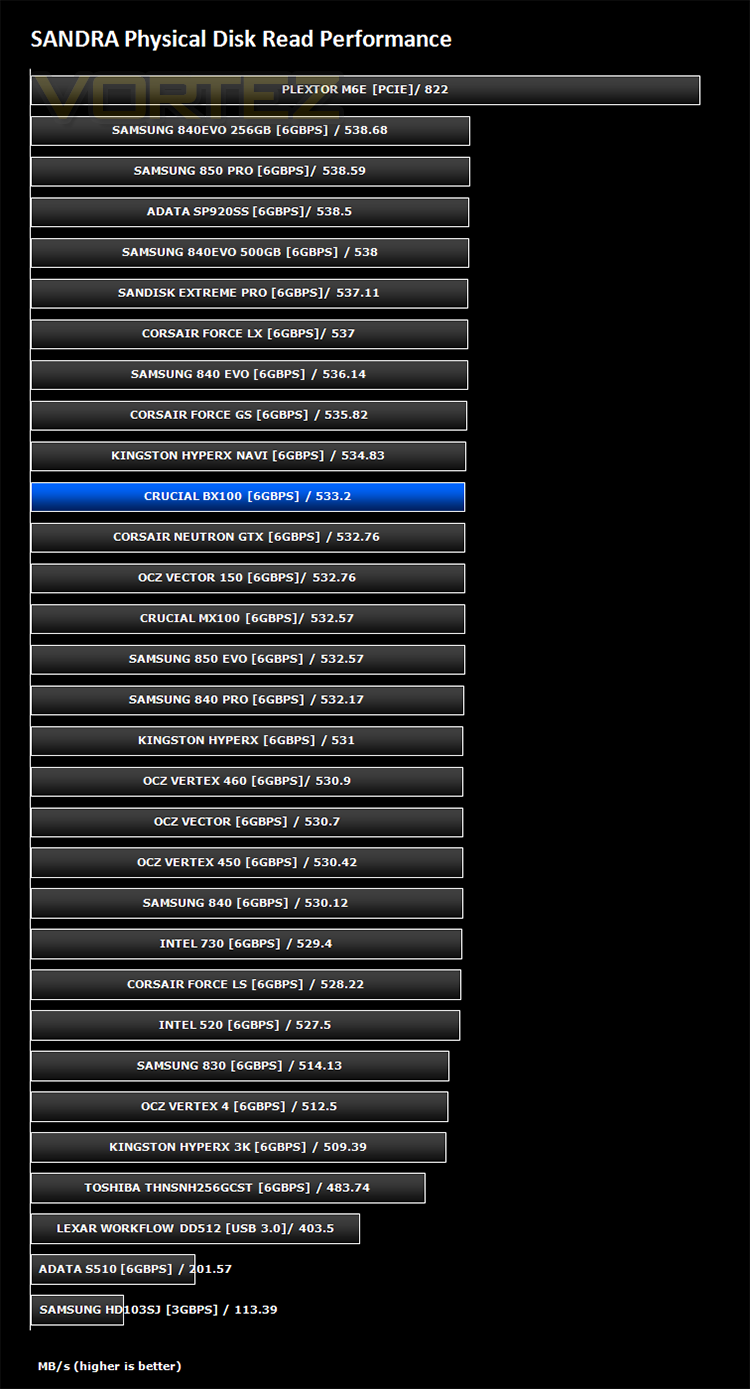
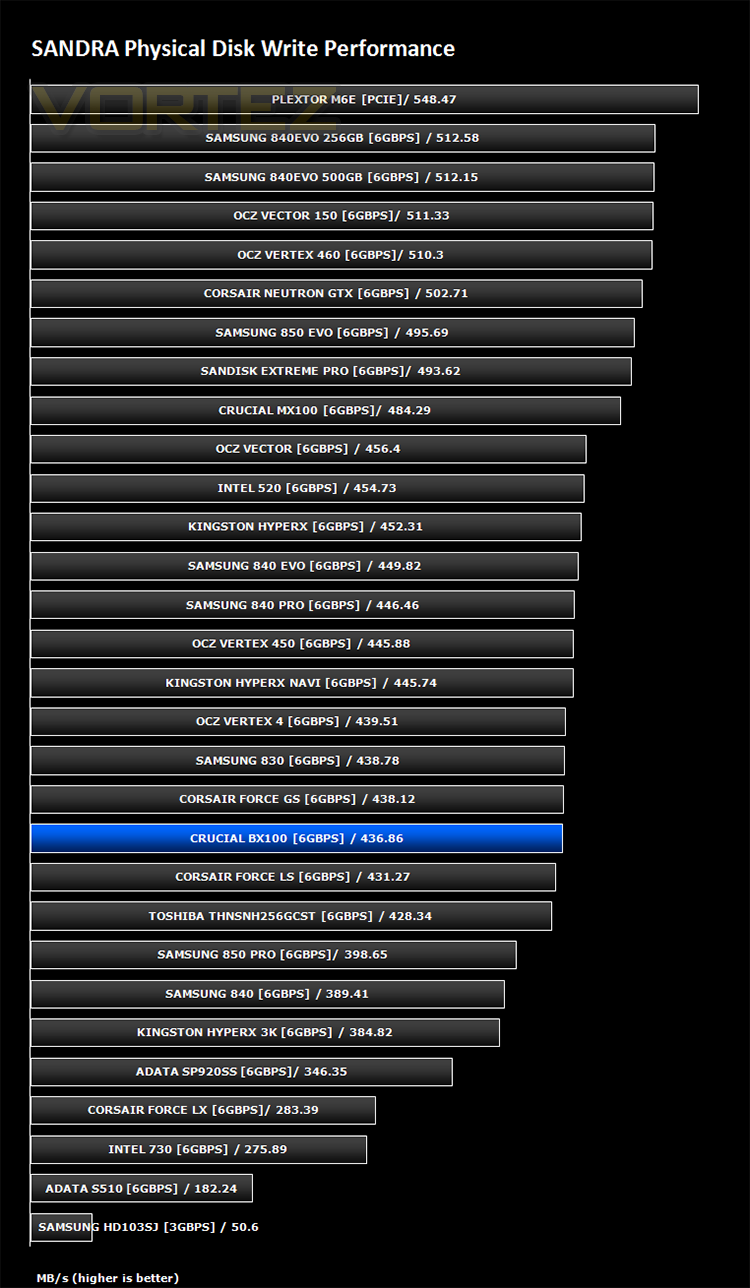
SiSoftware Sandra (the System ANalyser, Diagnostic and Reporting Assistant) is an information & diagnostic utility. It should provide most of the information (including undocumented) you need to know about your hardware, software and other devices whether hardware or software.
Sandra is a (girl) name of Greek origin that means “defender”, “helper of mankind”. We think that’s quite fitting.
It works along the lines of other Windows utilities, however it tries to go beyond them and show you more of what’s really going on. Giving the user the ability to draw comparisons at both a high and low-level. You can get information about the CPU, chipset, video adapter, ports, printers, sound card, memory, network, Windows internals, AGP, PCI, PCI-X, PCIe (PCI Express), database, USB, USB2, 1394/Firewire, etc.
Sandra is a (girl) name of Greek origin that means “defender”, “helper of mankind”. We think that’s quite fitting.
It works along the lines of other Windows utilities, however it tries to go beyond them and show you more of what’s really going on. Giving the user the ability to draw comparisons at both a high and low-level. You can get information about the CPU, chipset, video adapter, ports, printers, sound card, memory, network, Windows internals, AGP, PCI, PCI-X, PCIe (PCI Express), database, USB, USB2, 1394/Firewire, etc.
Conclusion
The 1TB Crucial BX100 offers the buyer tremendous value for money in comparison to other 1TB SSDs on the market, a rarity as far as Solid State Drive prices go. Costing around the £280 mark it is however still very expensive at £0.28 per GB compared to the 40p per GB of a mechanical drive. A mechanical drive is however much slower, consumes more power, runs hotter, weighs more and is all round generally much less efficient than that of an SSD. Whether those inefficiencies, be it speed or power are enough to sway your opinion away from the traditional hard disk drive to the much more modern SSD is a decision only you can make but at least Crucial have now given the buyer the opportunity to do so without breaking the bank.
We said at the start of this review that Crucial were not aiming to break any performance barriers but the BX100 was certainly no slouch, often holding its own against the top end drives currently available. We were worried that performance would take a big hit by changing from the traditional Marvell controller to the Silicon Motion controller but our fears were unfounded because this drive is plenty quick enough, especially for a storage drive which is where we feel this huge drive capacity is best suited.
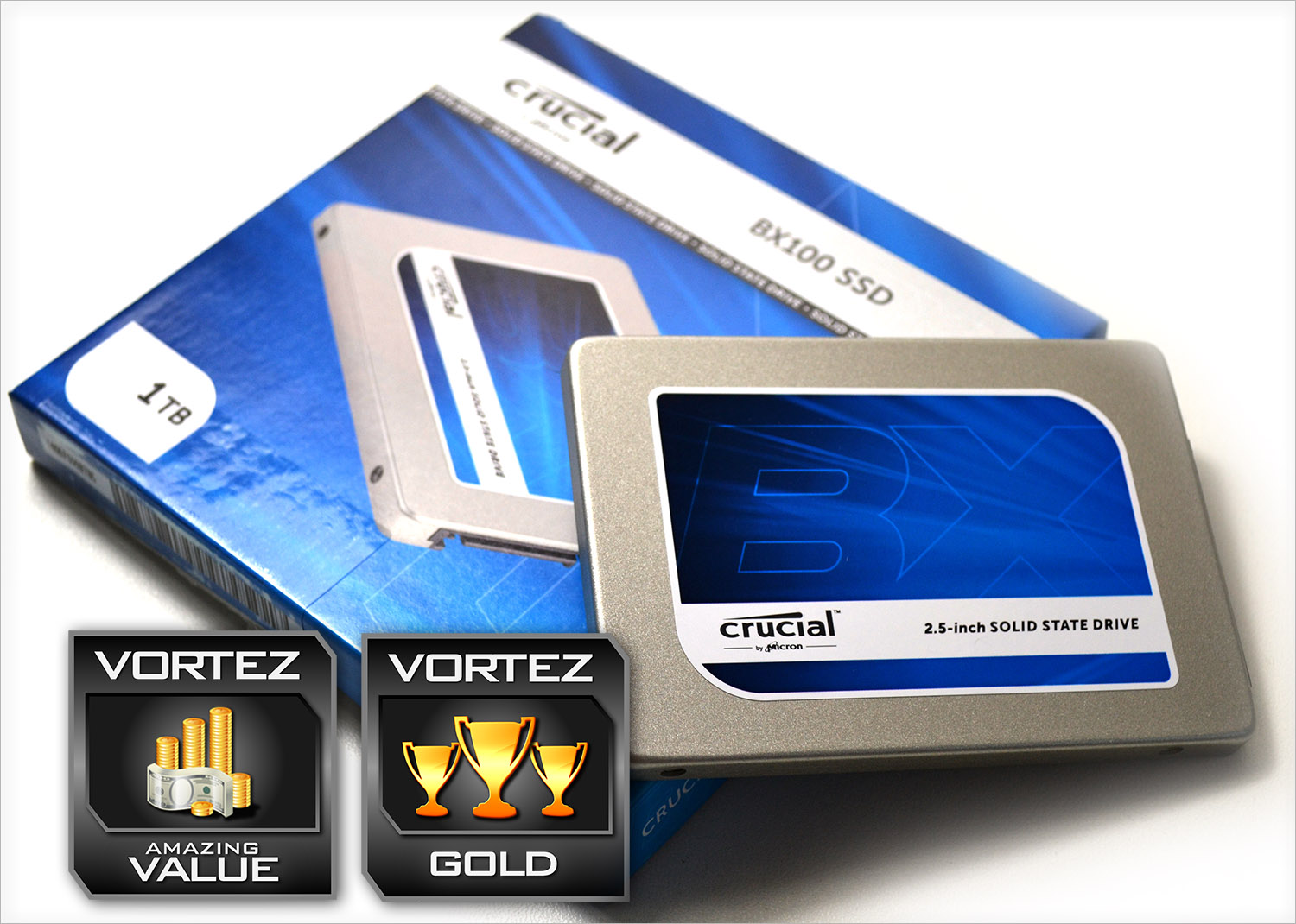
So, all things considered we feel justified in awarding our Value award not only because of the price in comparison to other SSDs but also because it offers a viable alternative to the traditional mechanical storage devices. It is also a well rounded, high performing product so Gold is comfortably awarded too. Well done Crucial.
In summary:
Whether you crave value or performance, Crucial satisfies both desires with the BX100 SSD.
Pros
+ Excellent Value for Money
+ Good Read/Write Performance
+ 3 year warranty
+ Included 9mm adaptor
Cons
– Still much more expensive than mechanical drives
+ Excellent Value for Money
+ Good Read/Write Performance
+ 3 year warranty
+ Included 9mm adaptor
Cons
– Still much more expensive than mechanical drives

Click here for an explanation of our awards at Vortez.net.