Hot off the press, the Crucial BX300 offers SSD performance without hurting your wallet. We’ve already seen what the MX300 can offer so let’s take a closer look.

Product on Review: Crucial BX300
Manufacturer: Crucial
Street Price: 120GB £55.99 / $59.99 – 240GB £83.99 / $89.99 – 480GB £140.99 / $149.99
Micron Technology, the parent company to Crucial are a global leader within the DRAM and Solid State memory industry with more than 20 years of experience under their belt.
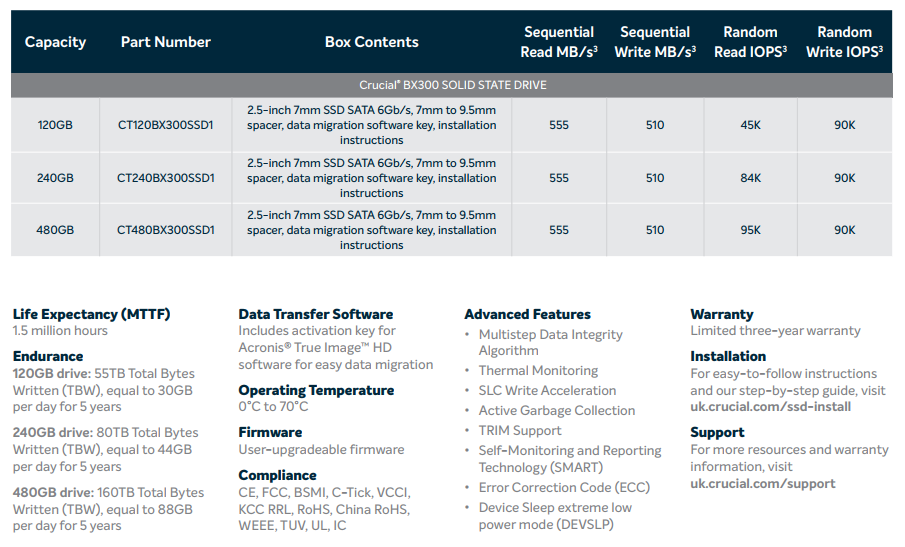
The Crucial BX300 is available in capacities of 120GB, 240GB and 480GB – we’ve been supplied with the 480GB for testing. Typically, the SATA interface, regardless of the relatively poor performance when compared to PCI-E solutions, is more than enough for a typical user, offering up to 550MB/s transfer speeds; PCI-E SSDs are also more expensive, which adds to the appeal of a SATA SSD.
Micron produced, 3D-MLC-NAND and the SMI 2258 controller have been married together, along with DDR3 DRAM and an SLC Write Acceleration chip, within the 2.5” enclosure to produce the Crucial BX300.
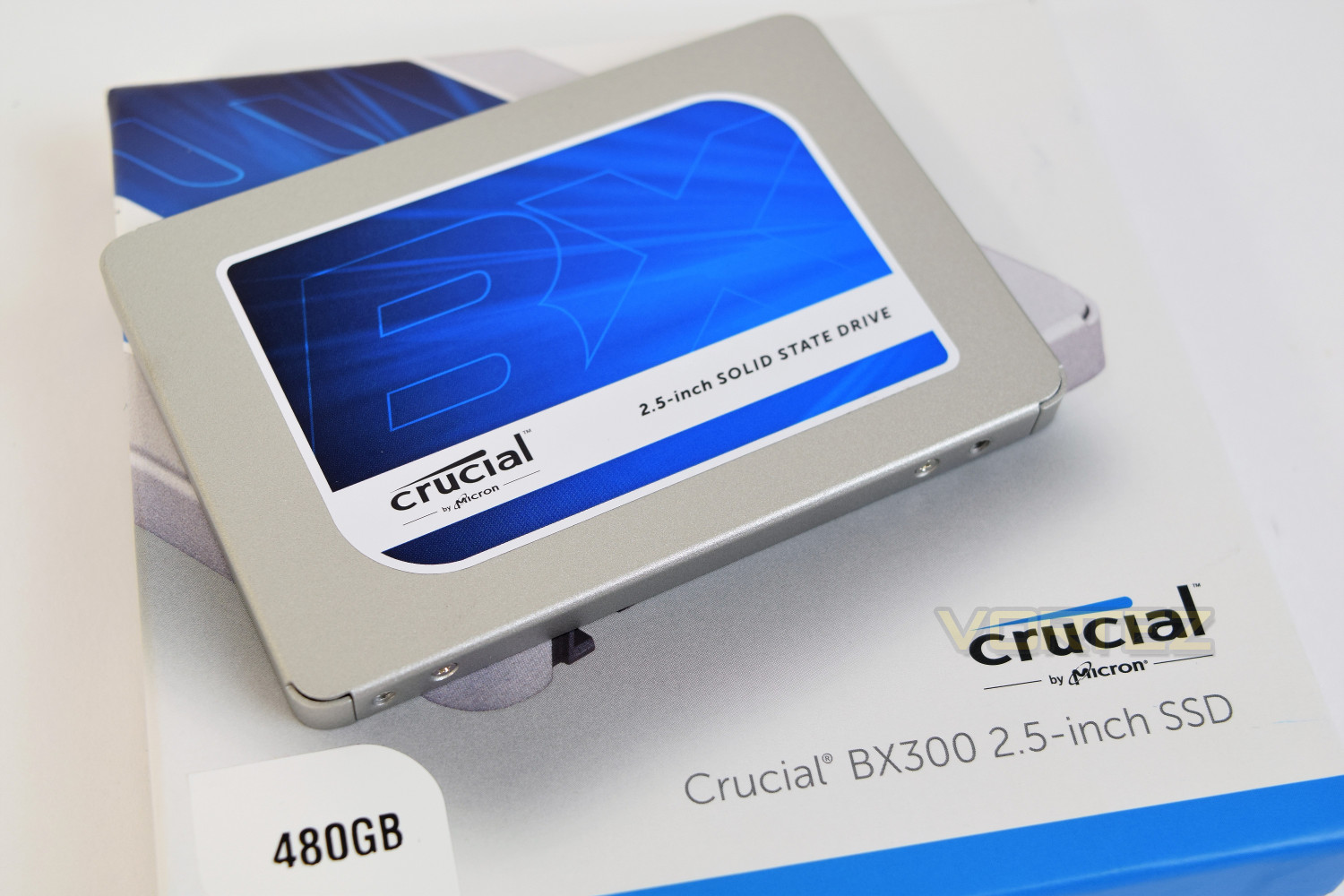
With the never-ending price cuts within the SSD sector, thanks to 3D-NAND and other technologies, the chance to rid your system of spinning mechanical drives moves ever closer.
We will put the Crucial BX300 through our benchmark suite and compare to other models on the SATA, PCI-E and even USB interfaces.
Crucial on the BX300:
We’ve learned a lot from building seven generations of SSDs, and we’ve applied that experience to make a better BX300 for consumers. The BX300 incorporates Micron® 3D MLC NAND and a robust selection of advanced features. It’s 300% faster1 and 45 times more energy efficient2 than a typical hard drive. The BX300 meets the needs of value-conscious DIYers and system upgraders with a great blend of performance and efficiency in 120GB, 240GB and 480GB capacities.
Technical Specifications
Packaging, Bundle & Closer Look
The BX300 arrives in a square box with a flip lid, featuring a large photo of the product on the front with an angle of the SATA connection. The capacity is clearly stated alongside the form factor, in this case being 2.5 inches.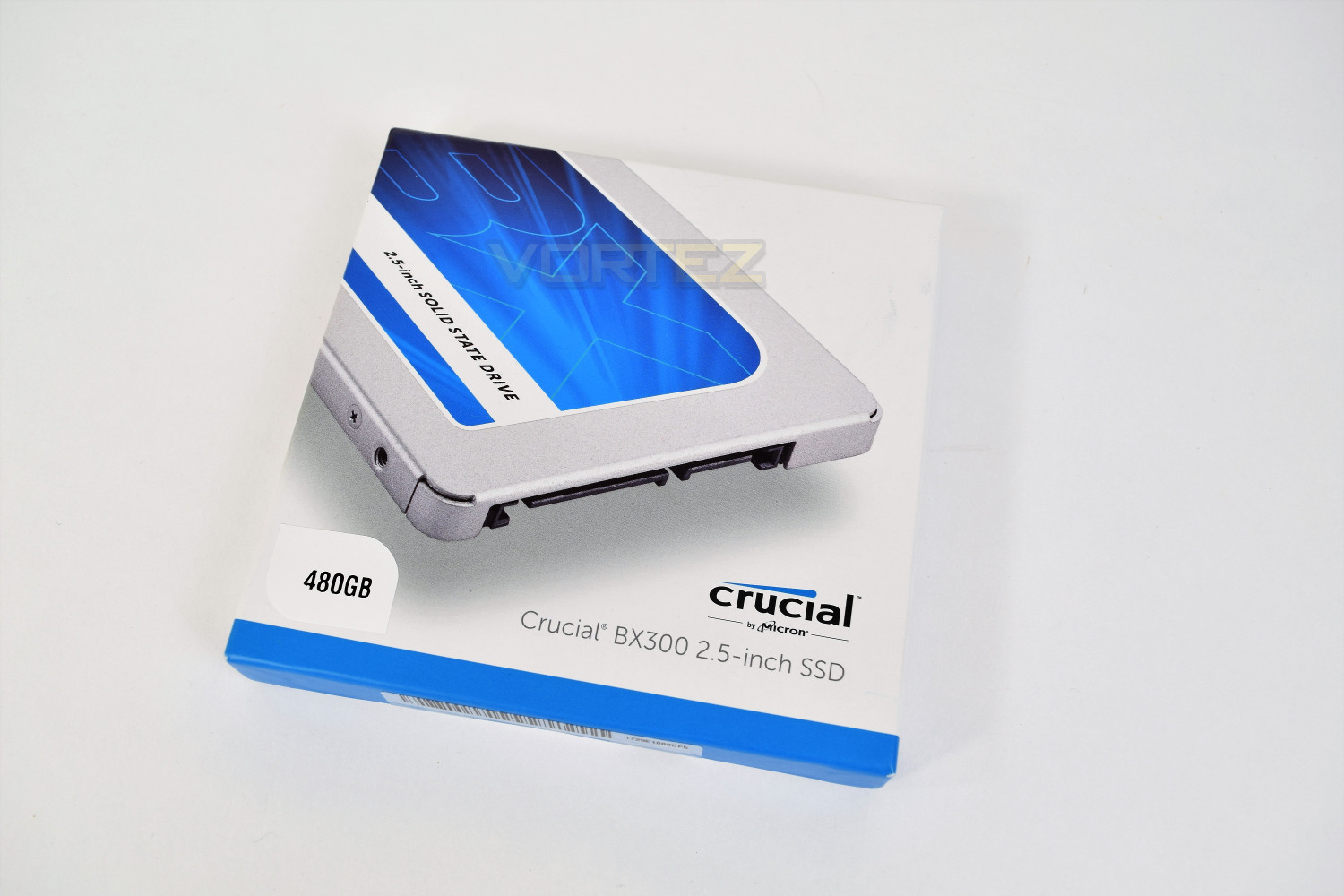
The drive is held in place within the packaging by a thing plastic shell, due to the complete lack of weight in the product, this is more than substantial enough to offer adequate protection.
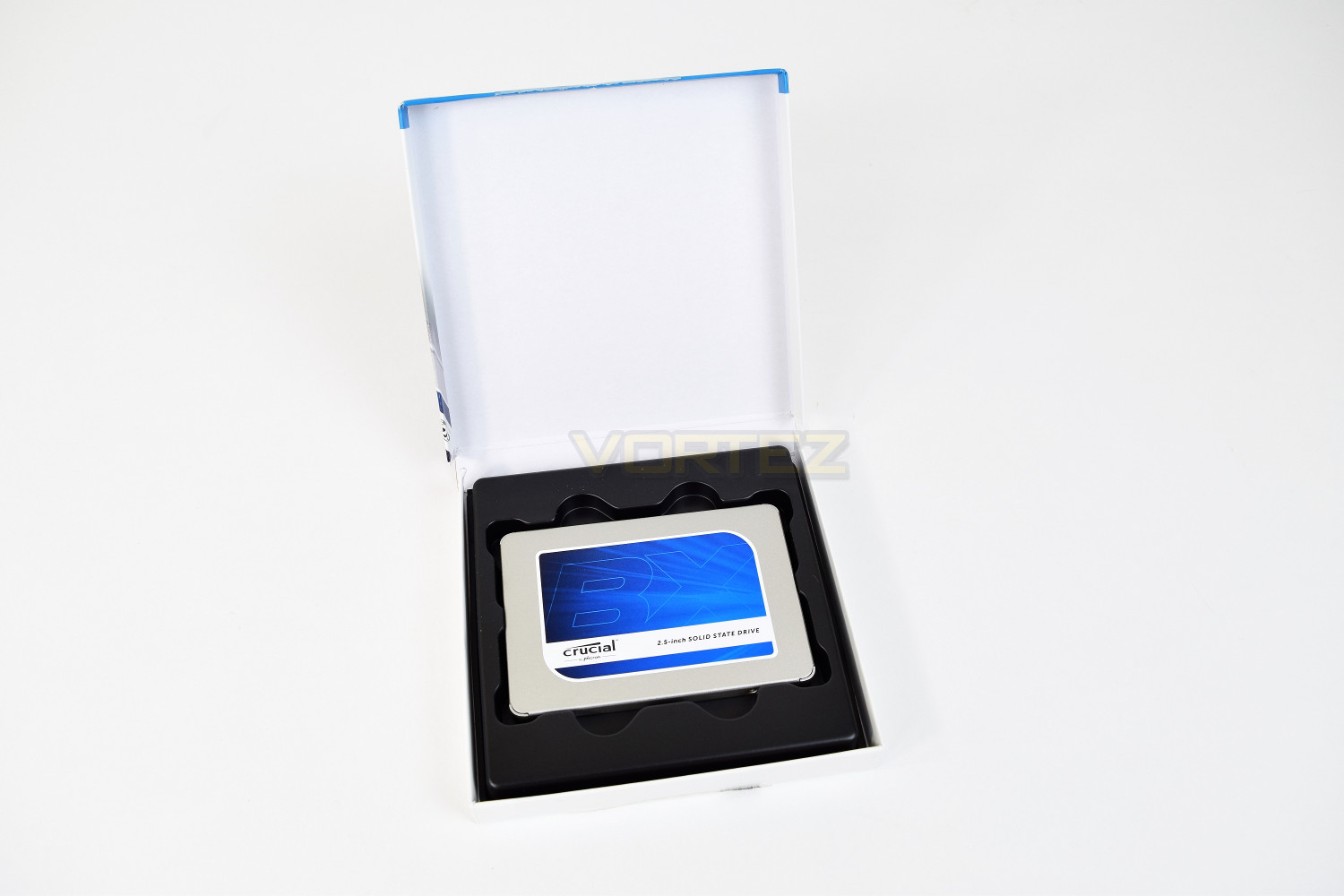
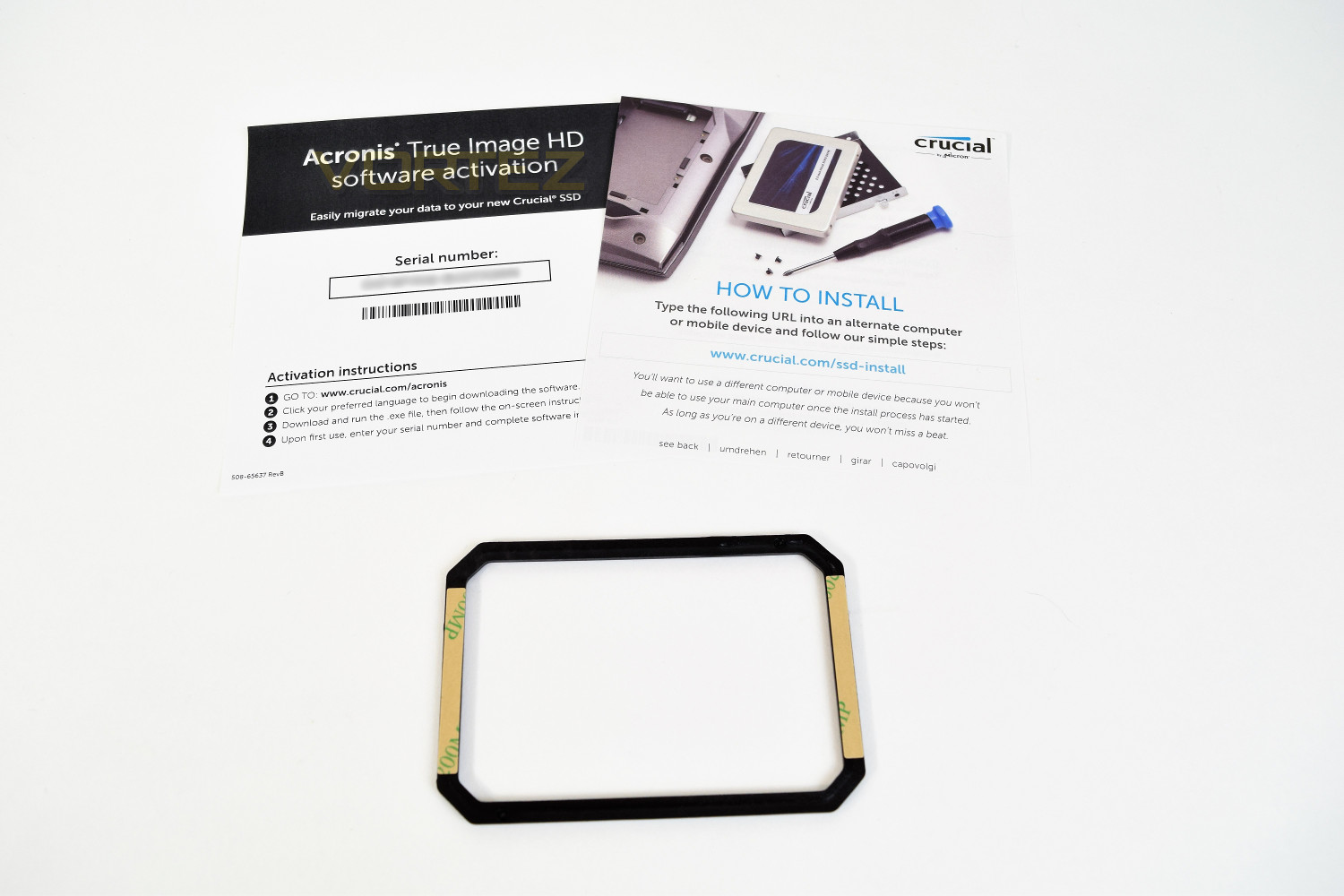
The drive also arrives with a spacer, used to install the SSD into any system that is designed to accept a 9.5mm SSD, as opposed to the 7mm that the BX300 conforms to. Crucial offers a product key to Acronis’ True Image HD, a piece of software designed to migrate your data from your current storage media to the shiny new SSD.
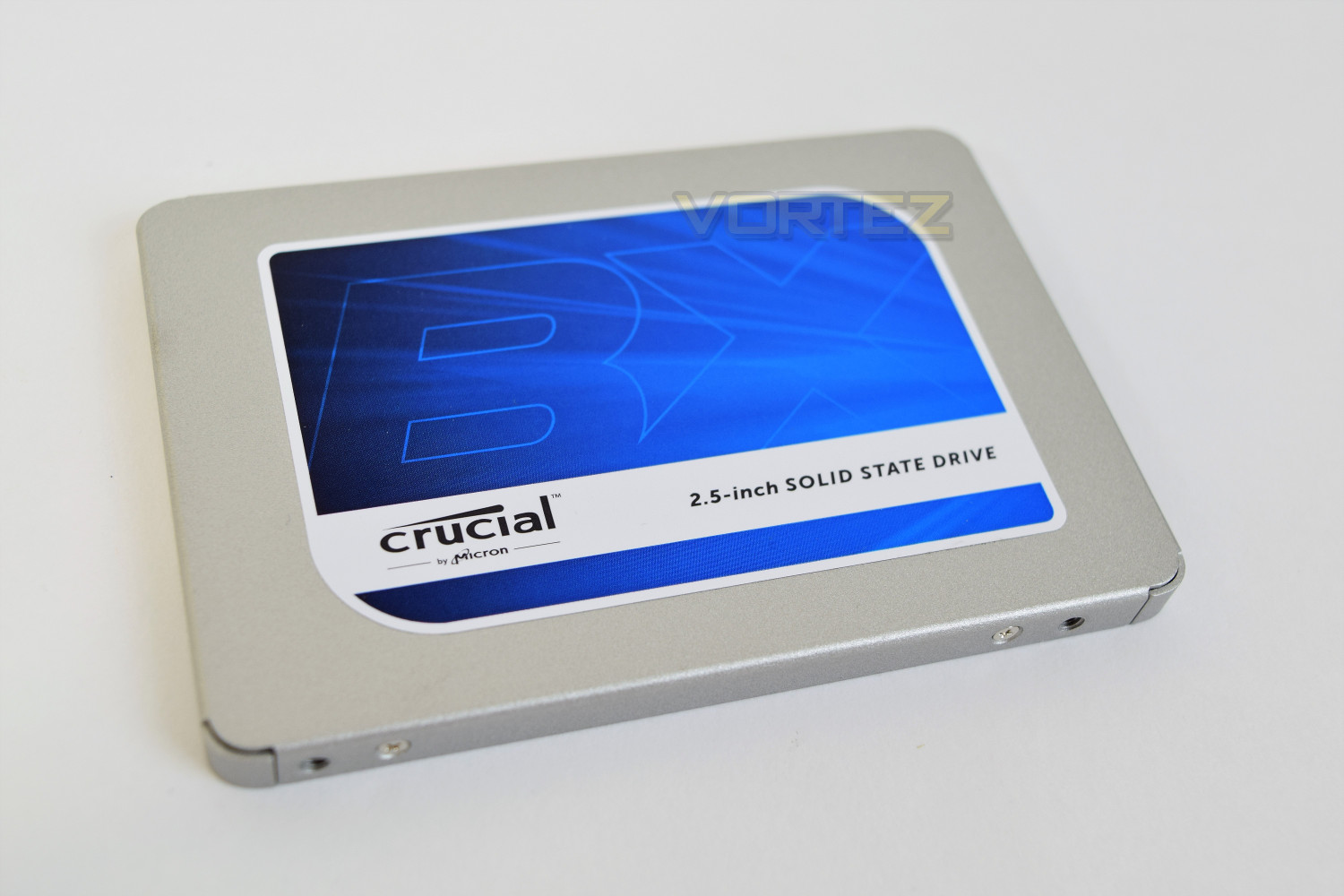
On the front of the Crucial is a large blue sticker, within which is the BX logo in a lighter shade of blue. This drive would suit most current builds and is designed to fit into any laptop with a 2.5” drive bay, either with or without the spacer.
Test Setup & Methodology
Our test system is formatted and a fresh version of Windows is installed with just drives in place – no additional applications. Windows is then updated to the latest release and the drivers are installed.Included in the list of benchmarks are the following applications:
Benchmarks
Anvil Pro
AS SSD
ATTO Disk Benchmark v2.46
Futuremark PCMark 8
AIDA64
AS SSD
ATTO Disk Benchmark v2.46
Futuremark PCMark 8
AIDA64
Test system
CPU: Intel Core i5 6600K
Motherboard: MSI Z270 Gaming M7
Graphics: EVGA GTX 1070 SC
Memory: 16GB CORSAIR Vengeance LPX 3200MHz DDR4
SAMSUNG SM961 256GB NVMe
Crucial BX300 480GB
PSU: Enermax Modu82+
OS: Microsoft Windows 10 Pro 64-Bit
Motherboard: MSI Z270 Gaming M7
Graphics: EVGA GTX 1070 SC
Memory: 16GB CORSAIR Vengeance LPX 3200MHz DDR4
SAMSUNG SM961 256GB NVMe
Crucial BX300 480GB
PSU: Enermax Modu82+
OS: Microsoft Windows 10 Pro 64-Bit
Benchmarks: Anvil Pro
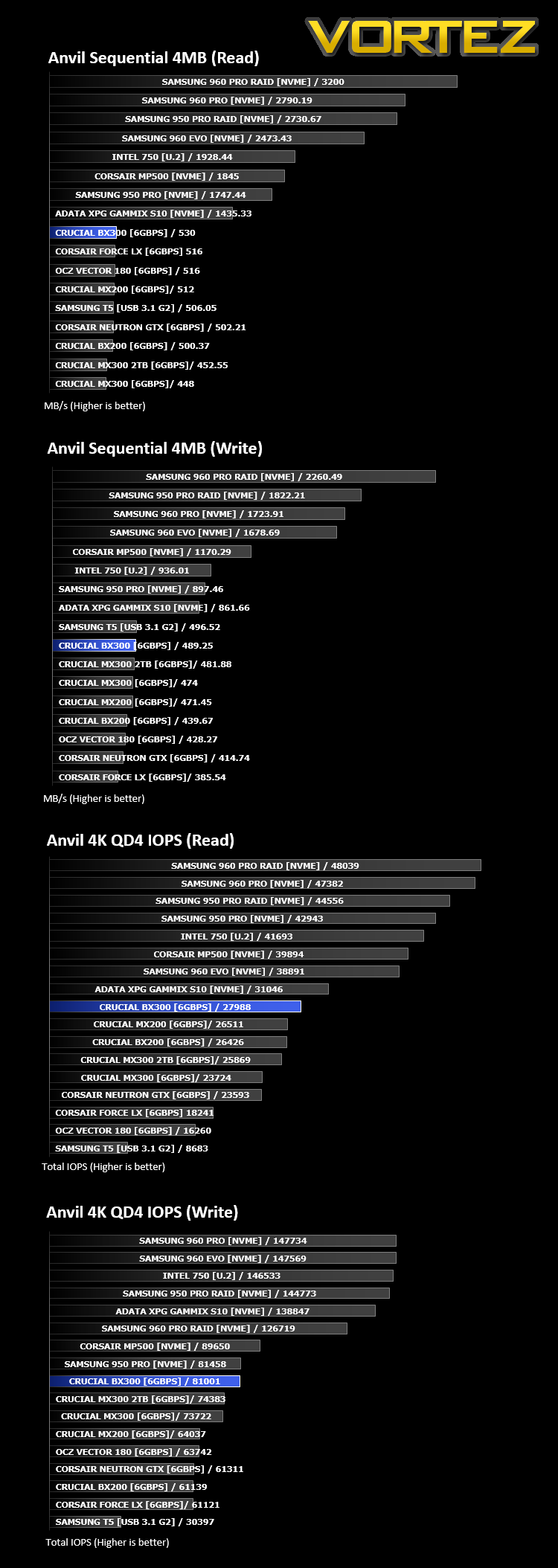
Anvil Pro from Anvil Storage utilities is one of the most popular storage benchmarking utilities today thanks to the large suite of tests available. You can test pretty much anything from Read/write Speed to IOPs with many variables to tweak allowing you to get either a single or host of results to compare with other like-minded enthusiasts. In our test we ran the standard suite 5 times, subtracting both the highest and lowest scores and determined the final result from the average of the remaining three results.
Benchmarks: AS SSD
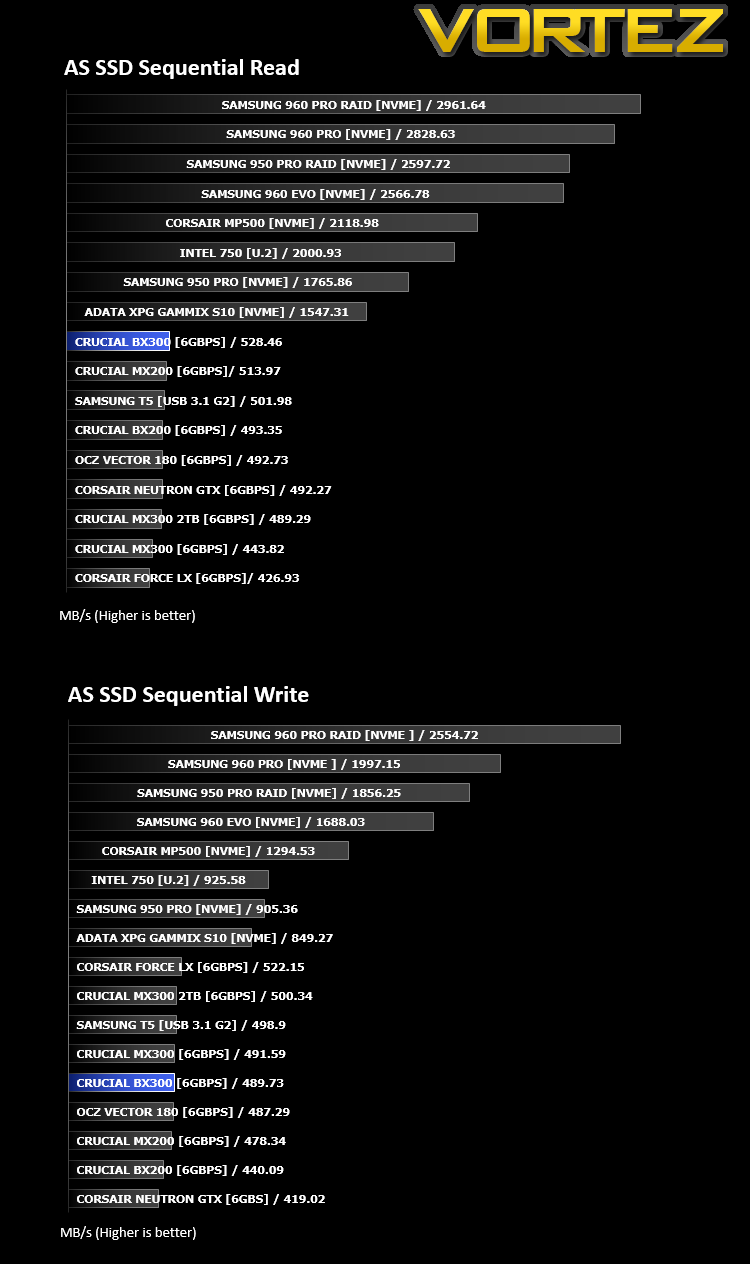
AS SSD Benchmark is a straightforward tool for measuring the speed of your SSD drive.
Simply launch the program, choose your drive, click Start, and it’ll test your SSD’s read and write speed in a variety of ways, delivering a score for each when it’s done. And if that’s not enough, there are also additional file copy and compression-related benchmarks available from the Tools menu. (The author’s support page is German only, but if you need further English explanations then there’s a thread on the program at the OCZ Technology forum.).
Simply launch the program, choose your drive, click Start, and it’ll test your SSD’s read and write speed in a variety of ways, delivering a score for each when it’s done. And if that’s not enough, there are also additional file copy and compression-related benchmarks available from the Tools menu. (The author’s support page is German only, but if you need further English explanations then there’s a thread on the program at the OCZ Technology forum.).
Benchmarks: ATTO
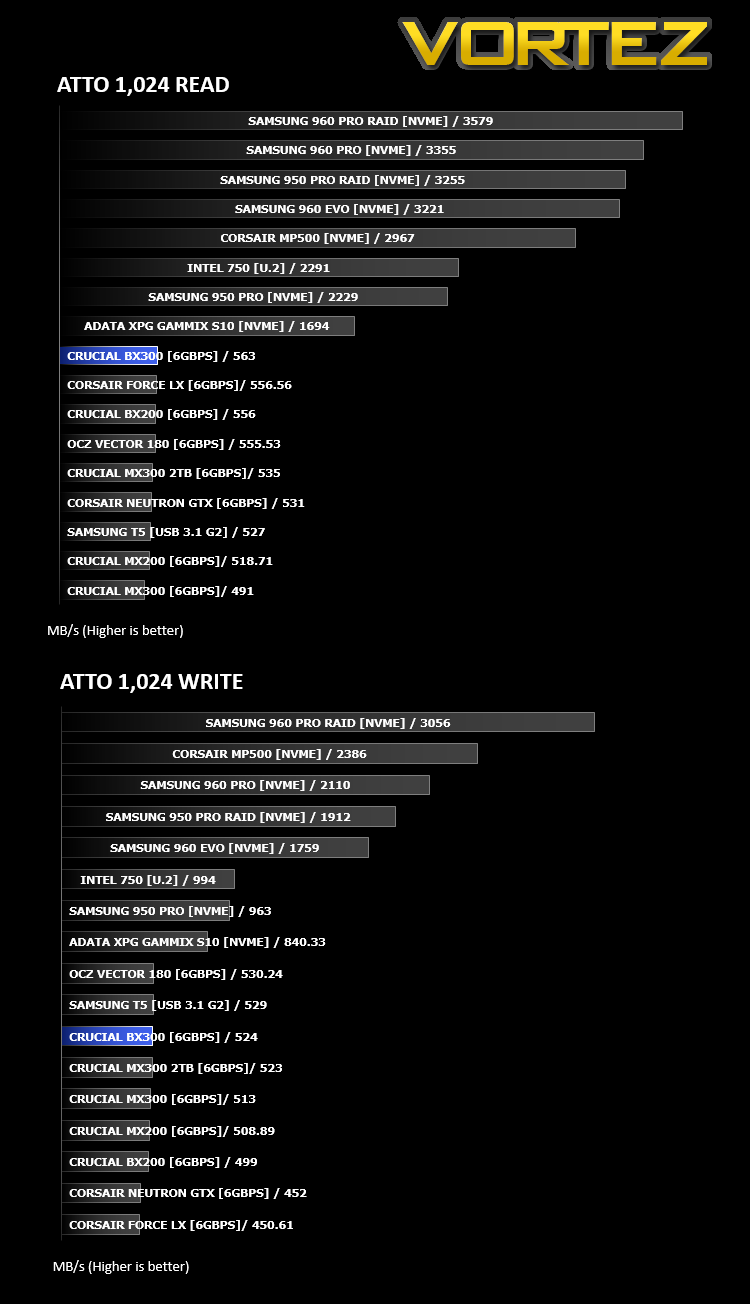
The ATTO Disk Benchmark performance measurement tool is compatible with Microsoft Windows. Measure your storage systems performance with various transfer sizes and test lengths for reads and writes. Several options are available to customize your performance measurement including queue depth, overlapped I/O and even a comparison mode with the option to run continuously. Use ATTO Disk Benchmark to test any manufacturers RAID controllers, storage controllers, host adapters, hard drives and SSD drives and notice that ATTO products will consistently provide the highest level of performance to your storage.
Benchmarks: AIDA64
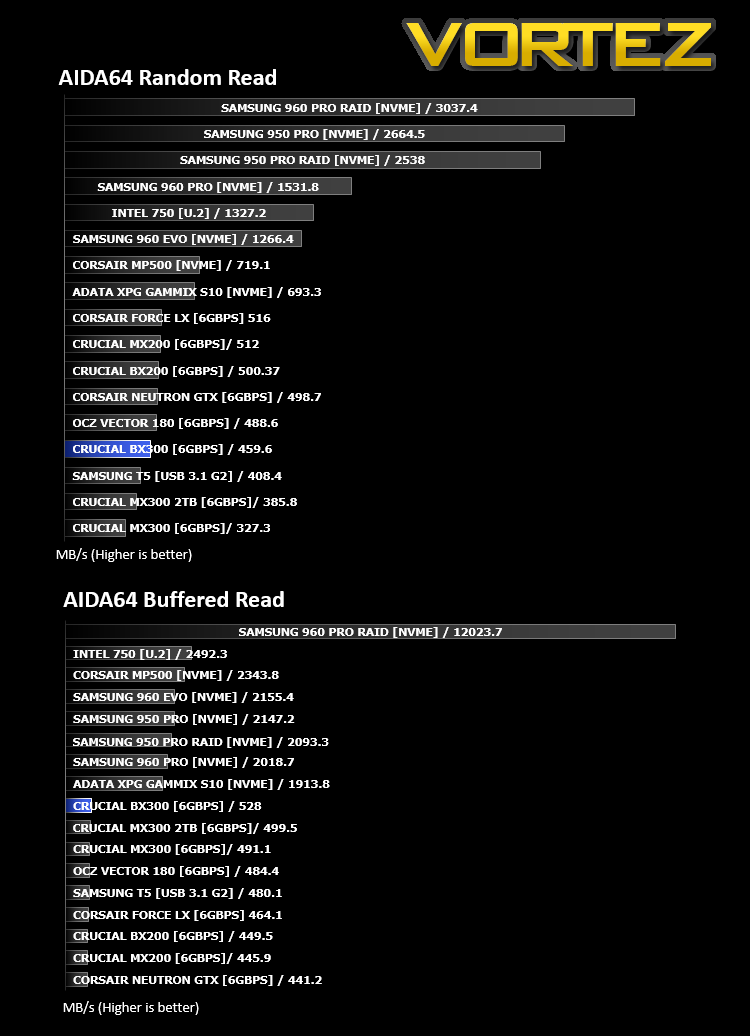
With this module, we can measure the performance of the PC’s storage devices, including (S)ATA or SCSI hard disk drives, RAID arrays, optical drives, solid-state drives (SSD), USB drives and memory cards. It also allows us to perform write tests, which helps us detect fake products and errors on the devices. In order to attain reliable benchmark results we have to make sure to close all background applications.
Benchmarks: PCMark 8
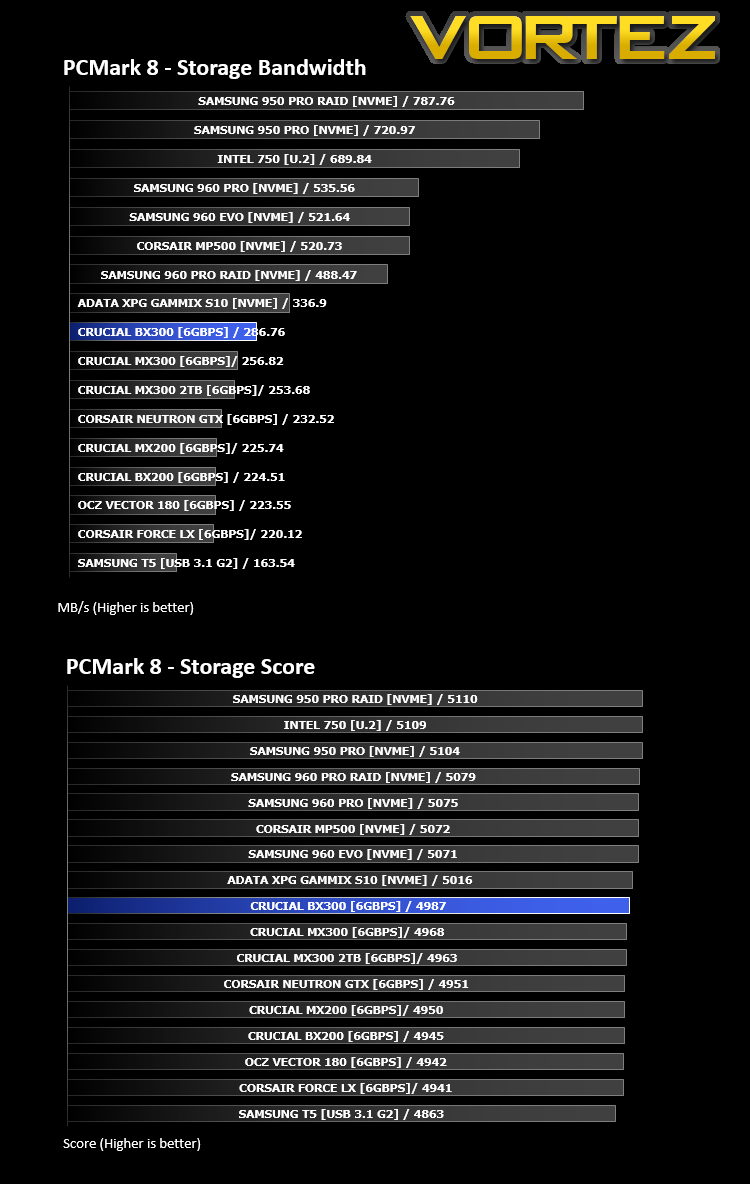
We use the Futuremark PCMark 8 utility to measure storage via Photoshop performance under both light and heavy loading conditions. Accelerated (open CL) is used to perform this test. The test is measured in seconds to complete.
Conclusion
The Crucial BX300 lands at a reasonable price point, especially when the performance of the drive is considered. After taking a look around the big retailers, the price, at £140 for the 480GB drive, is pretty much in line with everything else, but with the performance far surpassing those budget drives. Current pricing sees the 480GB drive sitting around the 3.5GB/£1 region.In our tests, the BX300 often finds itself topping the read performance charts, with only the Random Read in AIDA64 providing any real challenge for the controller. The write performance wasn’t lacking, either, but it didn’t cause quite the same SATA saturating results.
Crucial’s inclusion of the Acronis software to migrate data, along with an online tutorial to help even the most novice of PC-owner upgrade their storage drive, is a great inclusion, along with the 2.5mm spacer for greater compatibility.
Rounding up, the Crucial BX300 is an appealing package for anyone wishing to upgrade their internal storage and give their machine a speed boost.
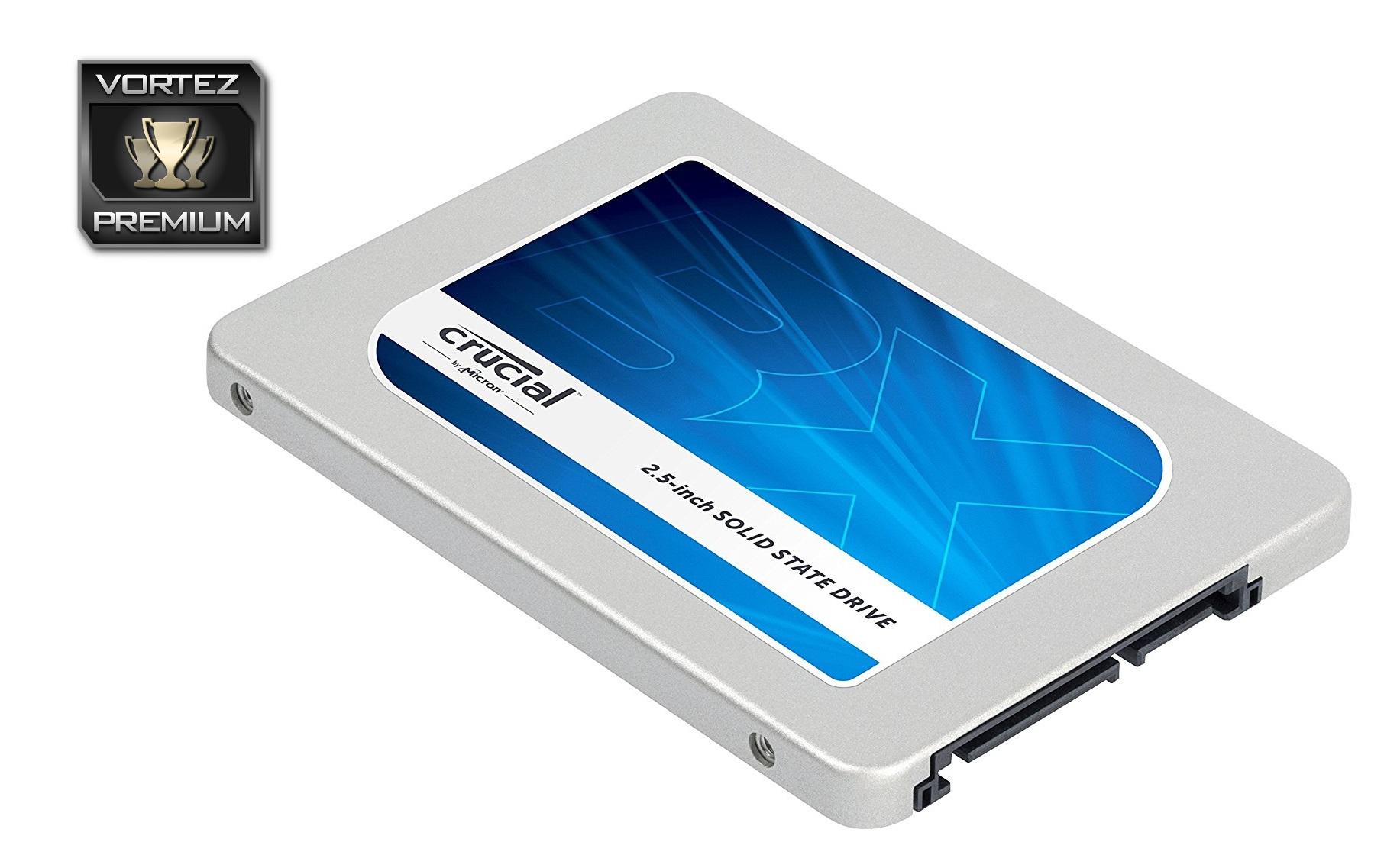
Taking all results into account, the Crucial BX300 is the fastest SATA 3 drive we’ve tested at a price point that’s more than reasonable.
Pros
+ Good price point
+ Acronis True Image software included
+ Solid, consistent performance
+ 3D-NAND offers incredible long-term endurance
+ Lightweight
+ Energy efficient
+ Lengthy 3 year warranty
Neutral
+- Average Random Read results in Anvil Pro
Cons
– None
+ Good price point
+ Acronis True Image software included
+ Solid, consistent performance
+ 3D-NAND offers incredible long-term endurance
+ Lightweight
+ Energy efficient
+ Lengthy 3 year warranty
Neutral
+- Average Random Read results in Anvil Pro
Cons
– None
Click here for an explanation of our awards at Vortez.net.