Crucial ventures into the world of M.2 NVMe storage with the Crucial P1, how does it stack up against the well-established competition?

Product on Review: Crucial P1 SSD
Manufacturer: Crucial
Street Price: 500GB – £99.99 / $109.99 – 1000GB – £199.99 / $219.99
Crucial are well established within the memory and flash storage sector, producing some of the best SSDs and RAM kits available, however, up to now, their M.2 storage options were limited to the SATA interface, bottlenecking speeds to 560MB/s read and 510MB/s write. Today we look at the latest innovation from Crucial, the P1 NVMe SSD.
This huge step forward for Crucial allows drives to go from speeds of around 500MB/s to almost four times that, mainly due to the NVMe (Non-Volatile Memory Express) interface; a much more efficient and well-tuned way to access data within a drive. Throughput is of course important, but queueing access requests and latency is also important, which is another strong-suit of NVMe. SATA can organise a single queue, with 32 requests within that queue, whereas NVMe is capable of 65535 queues with 65535 requests in each queue. A fairly considerable difference, we’re sure you’ll agree.
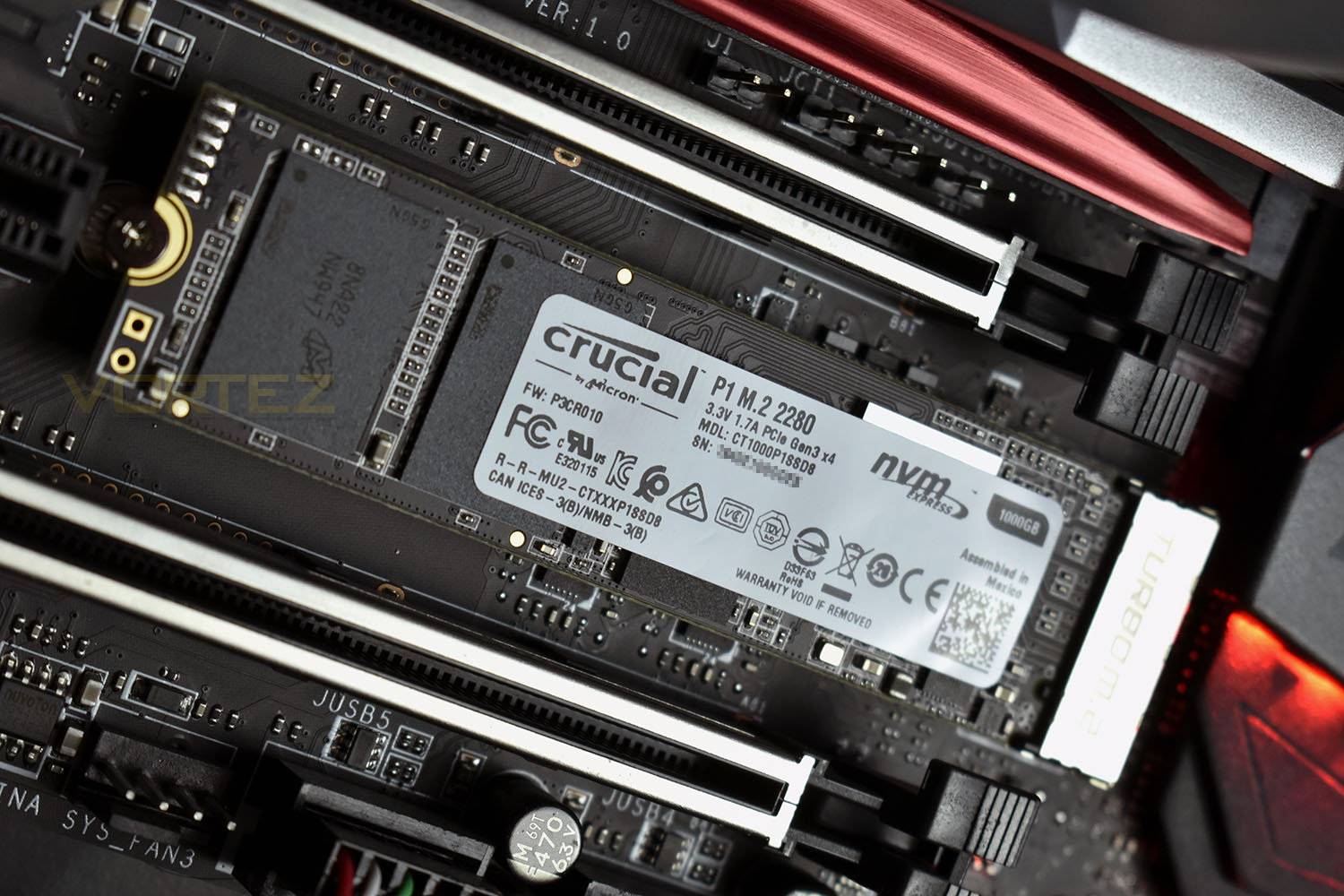
The Crucial P1 arrives in three different capacities, 500GB, 1000GB and 2000GB and offers speeds up to 2000MB/s read and 1750MB/s write. We also see random 4k IOPS up to 250,000 in both directions. We’re testing out the 1000GB model today, to give a good idea of rough performance of the three models.
Longevity is also built into the drive, with wear ratings of 100TB, 200TB and 400TB respectively for the 500GB, 1000GB and 2000GB drives. This equates to around 54GB/109GB/219GB per day for 5 years. There’s also a 5-year warranty with the P1 for extra peace of mind.
We’ve looked at plenty of SSDs from Crucial in the past, so we’re excited to find out how their first NVMe offering holds up. Read on for more.
Crucial on the P1 SSD:
Whether you are trying to get in the game faster or store all your precious memories, the Crucial® P1 SSD delivers. Capacities start at 500GB and scale to 2TB. Accelerate performance with the latest NVMe™ PCIe® technology. The P1 is designed to be the only storage upgrade you need — storage, speed, and dependability. Accelerate everything.
Technical Specifications
Interface: NVMe™ PCIe® (marks the next step in storage innovation)
Memory Type: Micron® 3D QLC NAND Flash
Life Expectancy (MTTF): 1.5 million hours
Advanced features: Dynamic Write Acceleration, Redundant Array of Independent NAND (RAIN), Multistep Data Integrity Algorithms, Adaptive Thermal Protection, Integrated Power Loss Immunity, Active Garbage Collection, TRIM Support, NVMe standard Self-Monitoring and Reporting Technology (SMART), Error Correction Code (ECC), NVMe Autonomous Power State Transition (APST) Support
Warranty: 5-year limited warranty
Operating temperature: 0°C – 70°C
500GB
Sequential Read MB/s: 1,900.
Sequential Write MB/s: 950.
4KB Random Read IOPS: 90K.
4KB Random Write IOPS: 220K.
Endurance: 100TB Total Bytes Written (TBW), approximately 54GB per day for 5 years
1TB
Sequential Read MB/s: 2,000.
Sequential Write MB/s: 1,700.
4KB Random Read IOPS: 170K.
4KB Random Write IOPS: 240K.
Endurance: 200TB: Total Bytes Written (TBW), approximately 109GB per day for 5 years
2TB
Sequential Read MB/s: 2,000.
Sequential Write MB/s: 1,750.
4KB Random Read IOPS: 250K.
4KB Random Write IOPS: 250K.
Endurance: 400TB Total Bytes Written (TBW), approximately 219GB per day for 5 years
Memory Type: Micron® 3D QLC NAND Flash
Life Expectancy (MTTF): 1.5 million hours
Advanced features: Dynamic Write Acceleration, Redundant Array of Independent NAND (RAIN), Multistep Data Integrity Algorithms, Adaptive Thermal Protection, Integrated Power Loss Immunity, Active Garbage Collection, TRIM Support, NVMe standard Self-Monitoring and Reporting Technology (SMART), Error Correction Code (ECC), NVMe Autonomous Power State Transition (APST) Support
Warranty: 5-year limited warranty
Operating temperature: 0°C – 70°C
500GB
Sequential Read MB/s: 1,900.
Sequential Write MB/s: 950.
4KB Random Read IOPS: 90K.
4KB Random Write IOPS: 220K.
Endurance: 100TB Total Bytes Written (TBW), approximately 54GB per day for 5 years
1TB
Sequential Read MB/s: 2,000.
Sequential Write MB/s: 1,700.
4KB Random Read IOPS: 170K.
4KB Random Write IOPS: 240K.
Endurance: 200TB: Total Bytes Written (TBW), approximately 109GB per day for 5 years
2TB
Sequential Read MB/s: 2,000.
Sequential Write MB/s: 1,750.
4KB Random Read IOPS: 250K.
4KB Random Write IOPS: 250K.
Endurance: 400TB Total Bytes Written (TBW), approximately 219GB per day for 5 years
Packaging, Bundle & Closer Look
Typically, from Crucial, the packaging isn’t over the top. Blue and white is always the theme, with a small amount of green introduced which we like. On the front, there’s nothing in the way of information, save for the capacity and mention of the interface and form factor. It’s clean.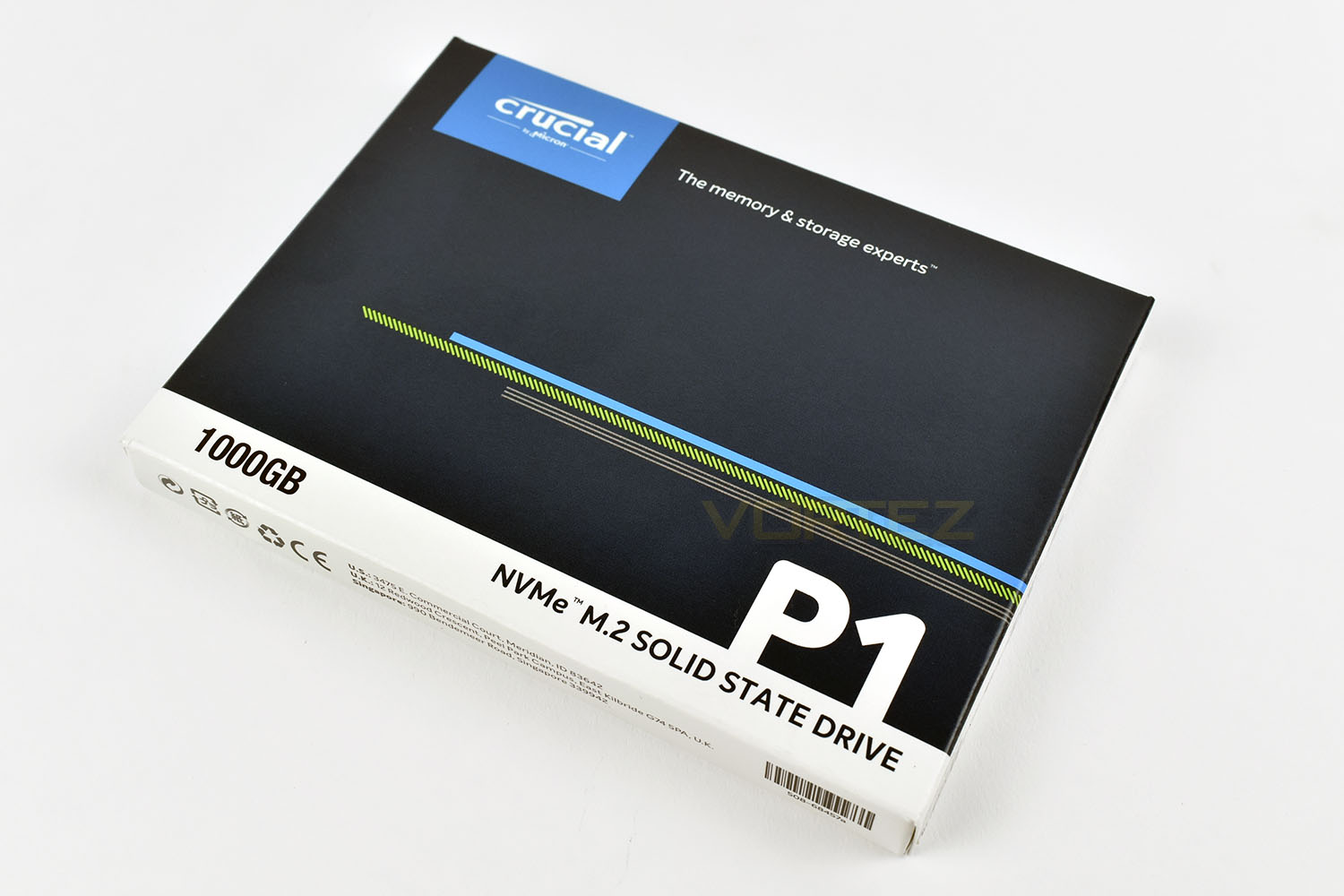
The reverse side of the packaging is much the same, though in many languages this time.
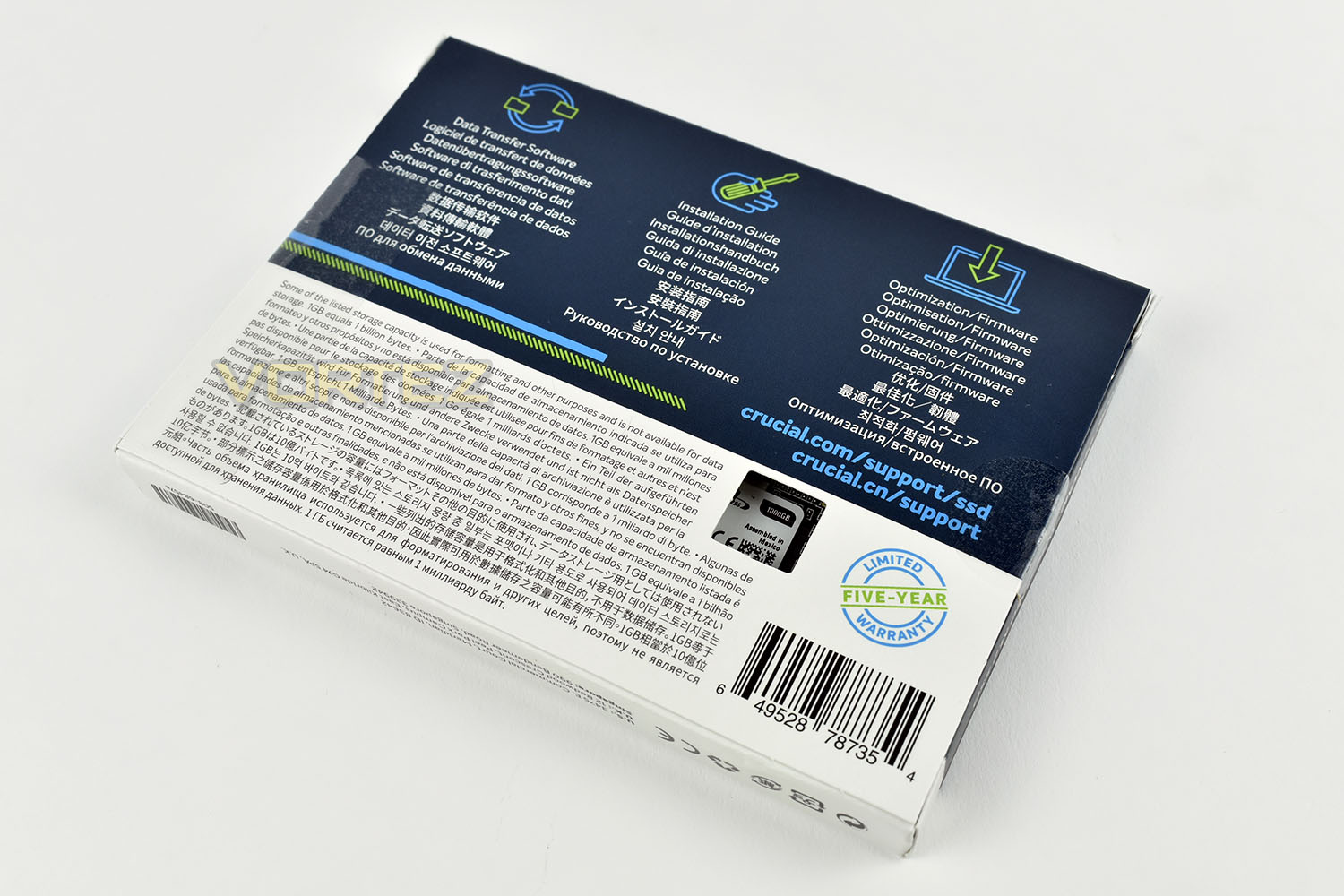
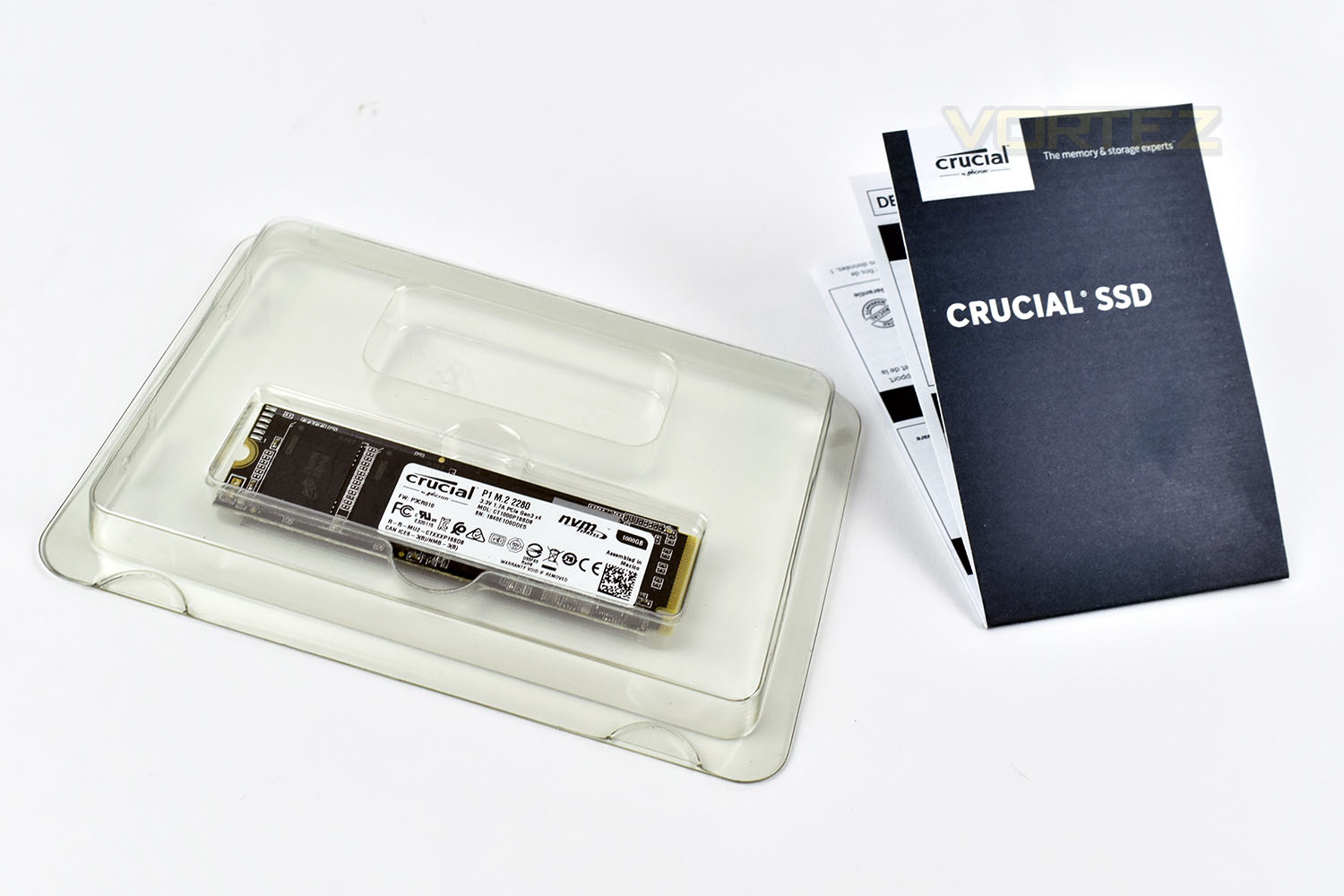
The word “Bundle” probably doesn’t accurately describe this, however, it’s what arrives with the SSD. A short instruction manual with web links to more accurate information as well as a download link for free data transfer software.
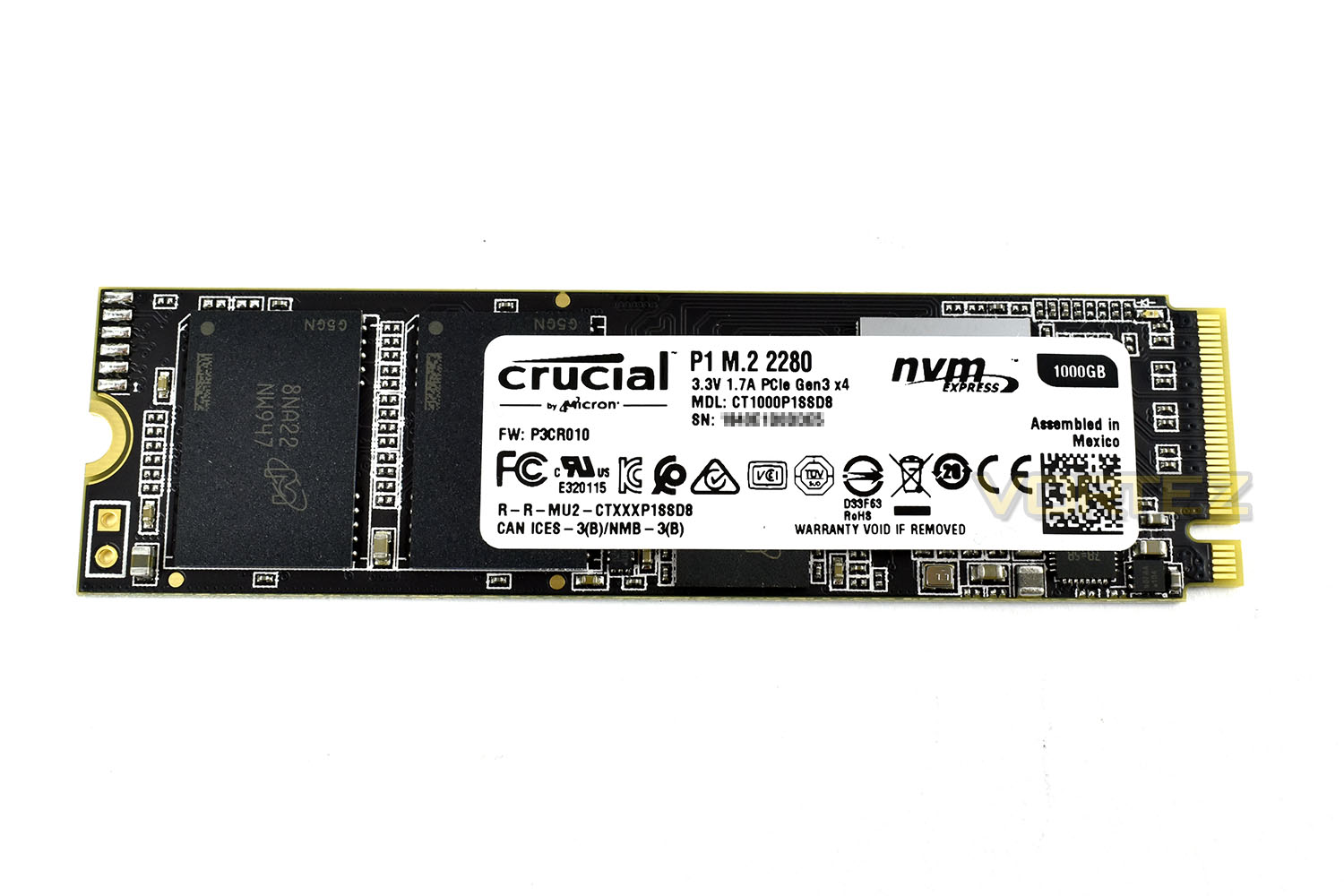
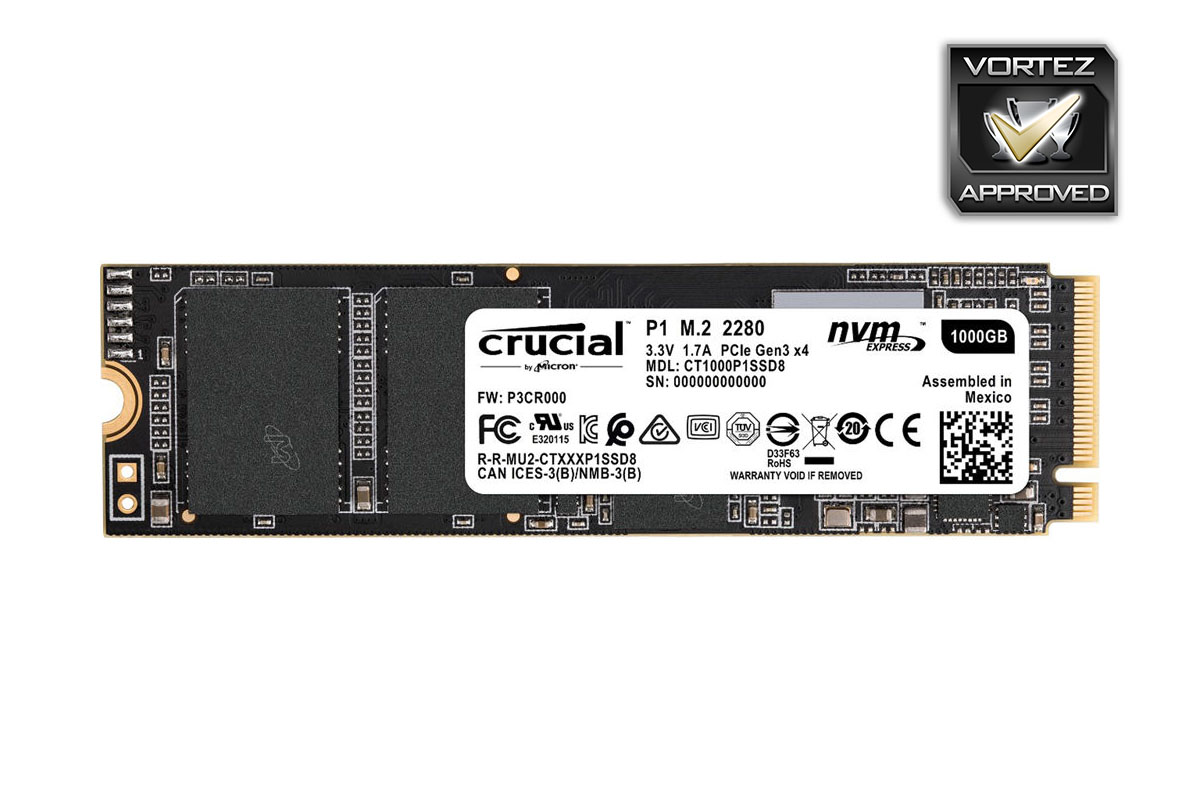
No ugly PCBs here, just plain black with some small gold sections; it’s basic but we believe most people will prefer this styling.
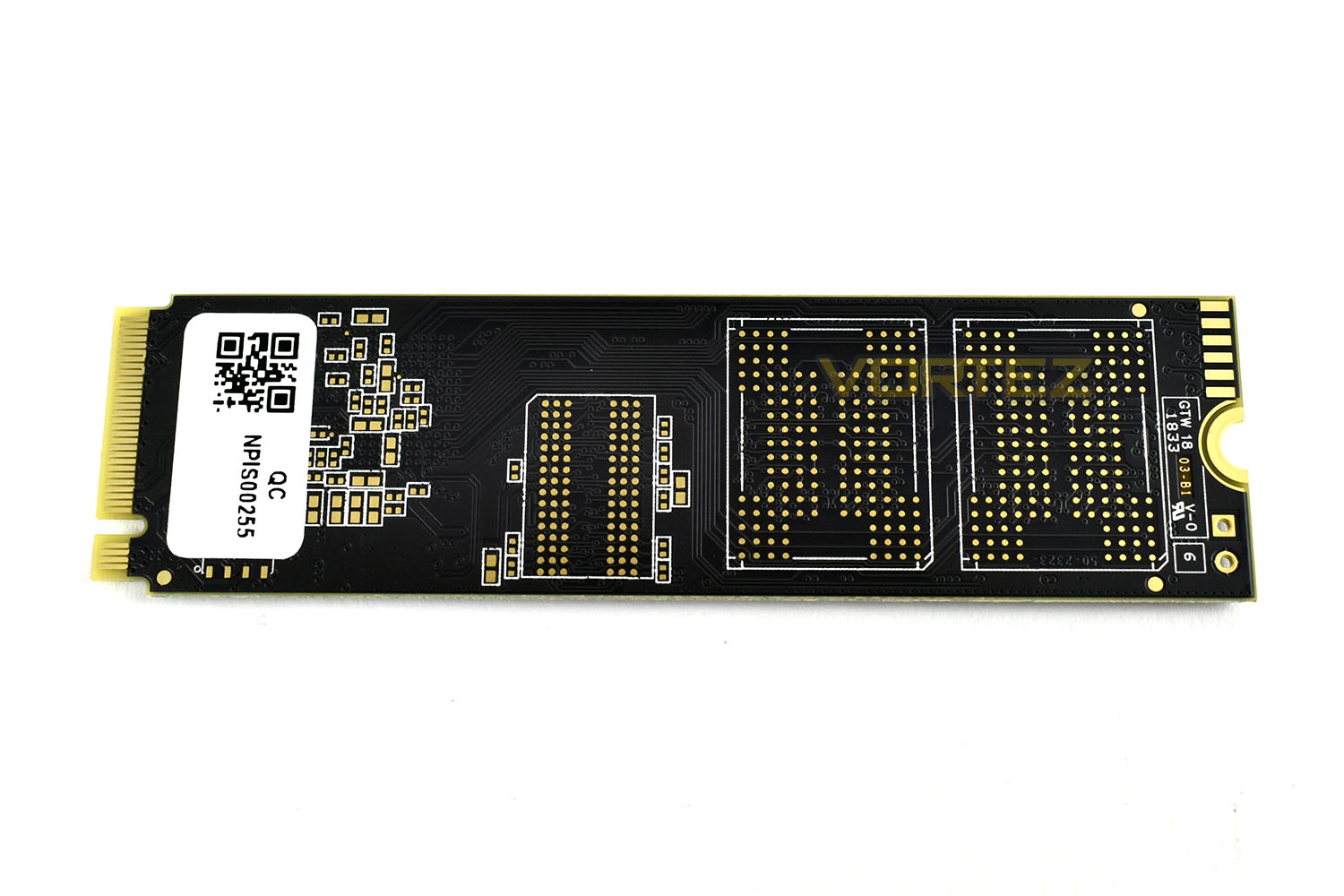
The reverse side is empty, showing that this drive is single-sided. This should make the drive easier to keep cool and retain its performance, with some drives being susceptible to throttling.
Test Setup & Methodology
Our test system is formatted and a fresh version of Windows is installed with just drives in place – no additional applications. Windows is then updated to the latest release and the drivers are installed.Included in the list of benchmarks are the following applications:
Benchmarks
Anvil Pro
AS SSD
ATTO Disk Benchmark v2.46
Futuremark PCMark 8
AIDA64
AS SSD
ATTO Disk Benchmark v2.46
Futuremark PCMark 8
AIDA64
Test system
CPU: Intel Core i7 7700K
Motherboard: MSI Z270 Gaming M7
Graphics: EVGA GTX 1070 SC
Memory: 16GB CORSAIR Vengeance LPX 3200MHz DDR4
Samsung 970 EVO 1TB
Crucial P1 1000GB
PSU: BeQuiet Straight Power 11 650W
OS: Microsoft Windows 10 Pro 64-Bit
Monitor: ASUS ROG PG279Q
Motherboard: MSI Z270 Gaming M7
Graphics: EVGA GTX 1070 SC
Memory: 16GB CORSAIR Vengeance LPX 3200MHz DDR4
Samsung 970 EVO 1TB
Crucial P1 1000GB
PSU: BeQuiet Straight Power 11 650W
OS: Microsoft Windows 10 Pro 64-Bit
Monitor: ASUS ROG PG279Q
Benchmarks: Anvil Pro
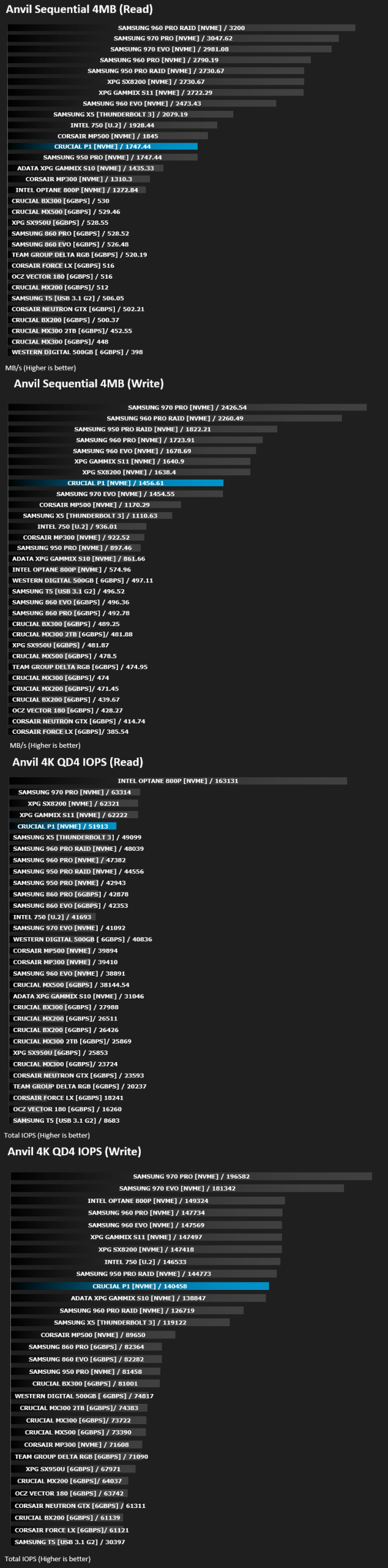
Anvil Pro from Anvil Storage utilities is one of the most popular storage benchmarking utilities today thanks to the large suit of tests available. You can test pretty much anything from Read/write Speed to IOPs with many variables to tweak allowing you to get either a single or host of results to compare with other likeminded enthusiasts. In our test we ran the standard suite 5 times, subtracting both the highest and lowest scores and determined the final result from the average of the remaining three results.
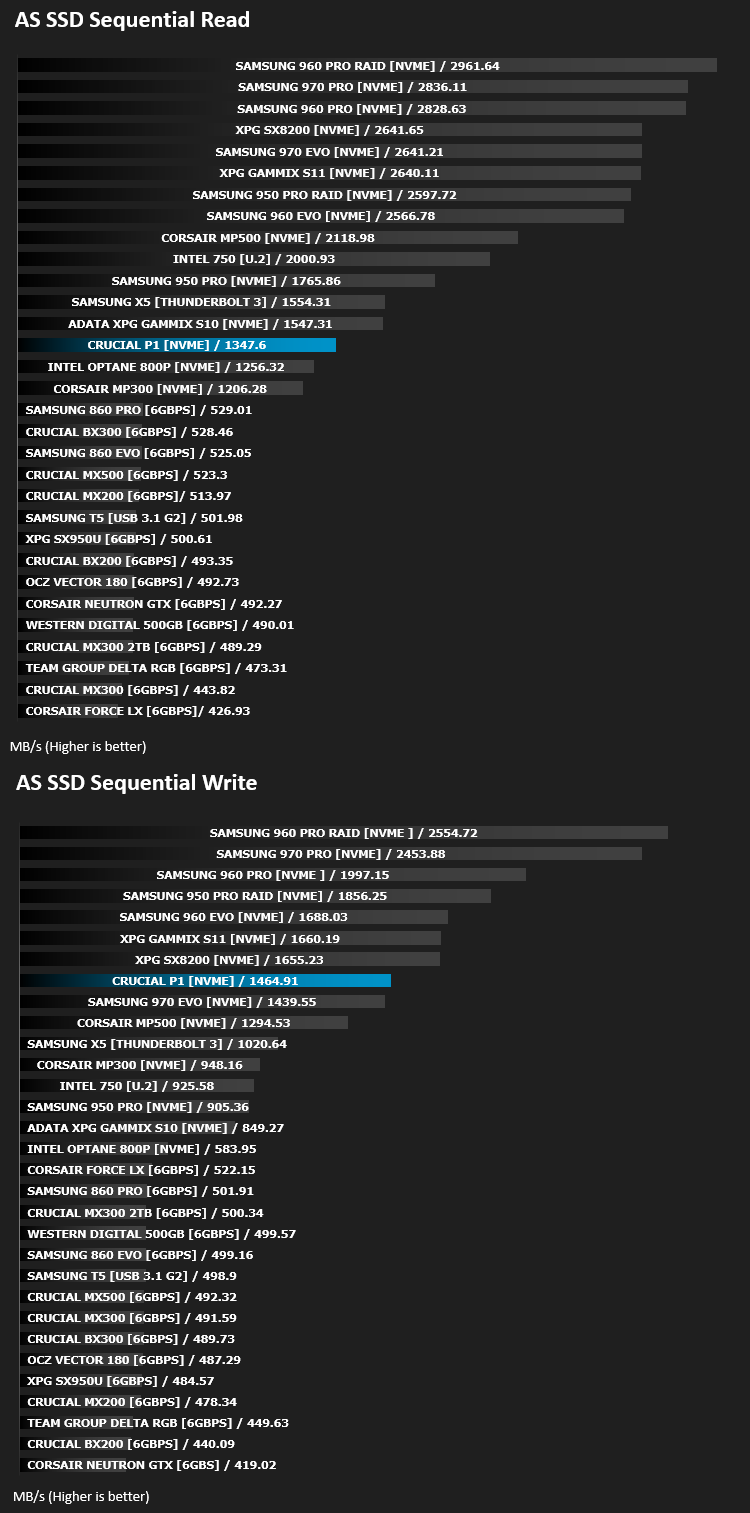
Benchmarks: AS SSD
AS SSD Benchmark is a straightforward tool for measuring the speed of your SSD drive.
Simply launch the program, choose your drive, click Start, and it’ll test your SSD’s read and write speed in a variety of ways, delivering a score for each when it’s done. And if that’s not enough, there are also additional file copy and compression-related benchmarks available from the Tools menu. (The author’s support page is German only, but if you need further English explanations then there’s a thread on the program at the OCZ Technology forum.).
Simply launch the program, choose your drive, click Start, and it’ll test your SSD’s read and write speed in a variety of ways, delivering a score for each when it’s done. And if that’s not enough, there are also additional file copy and compression-related benchmarks available from the Tools menu. (The author’s support page is German only, but if you need further English explanations then there’s a thread on the program at the OCZ Technology forum.).
Benchmarks: ATTO
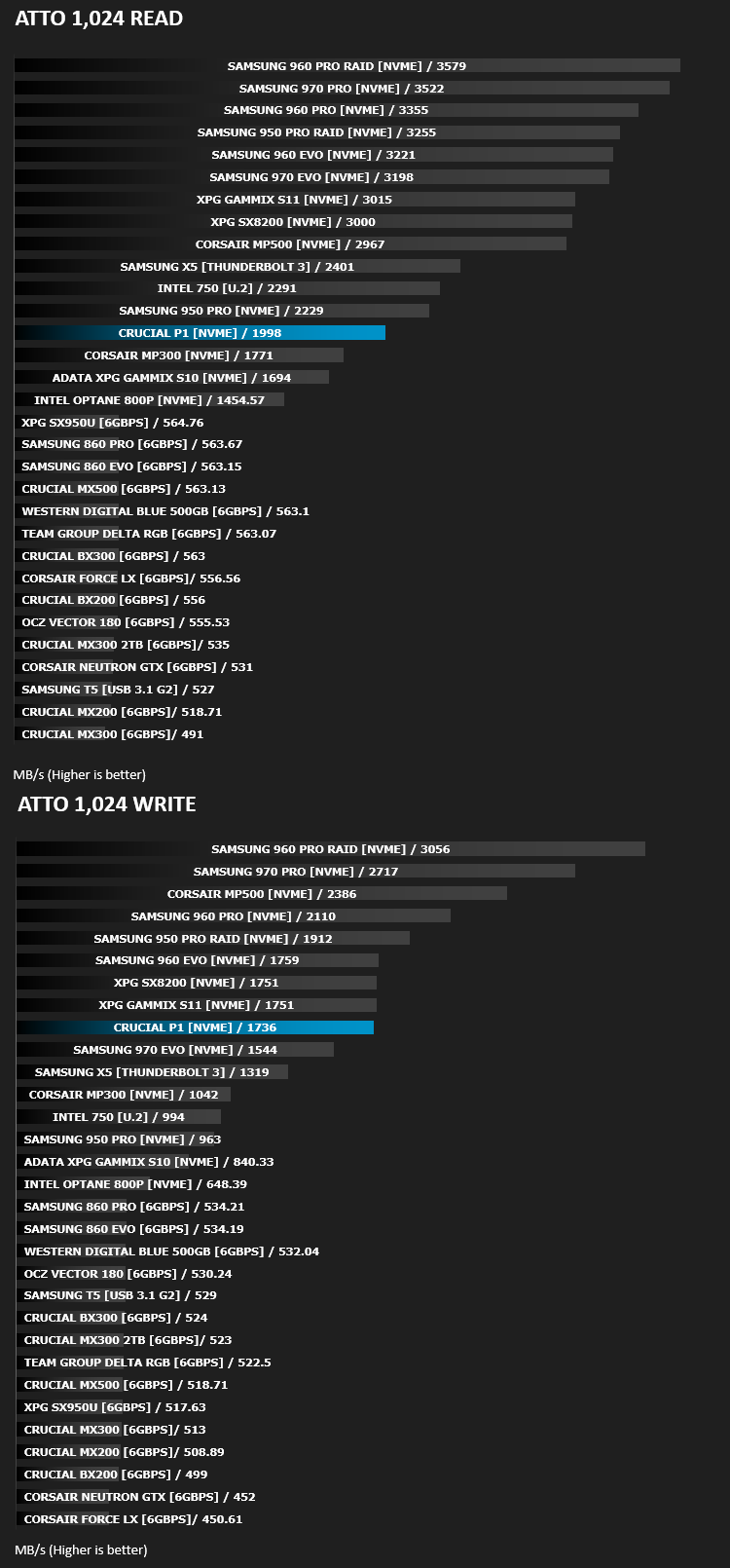
The ATTO Disk Benchmark performance measurement tool is compatible with Microsoft Windows. Measure your storage systems performance with various transfer sizes and test lengths for reads and writes. Several options are available to customize your performance measurement including queue depth, overlapped I/O and even a comparison mode with the option to run continuously. Use ATTO Disk Benchmark to test any manufacturers RAID controllers, storage controllers, host adapters, hard drives and SSD drives and notice that ATTO products will consistently provide the highest level of performance to your storage.
Benchmarks: AIDA64
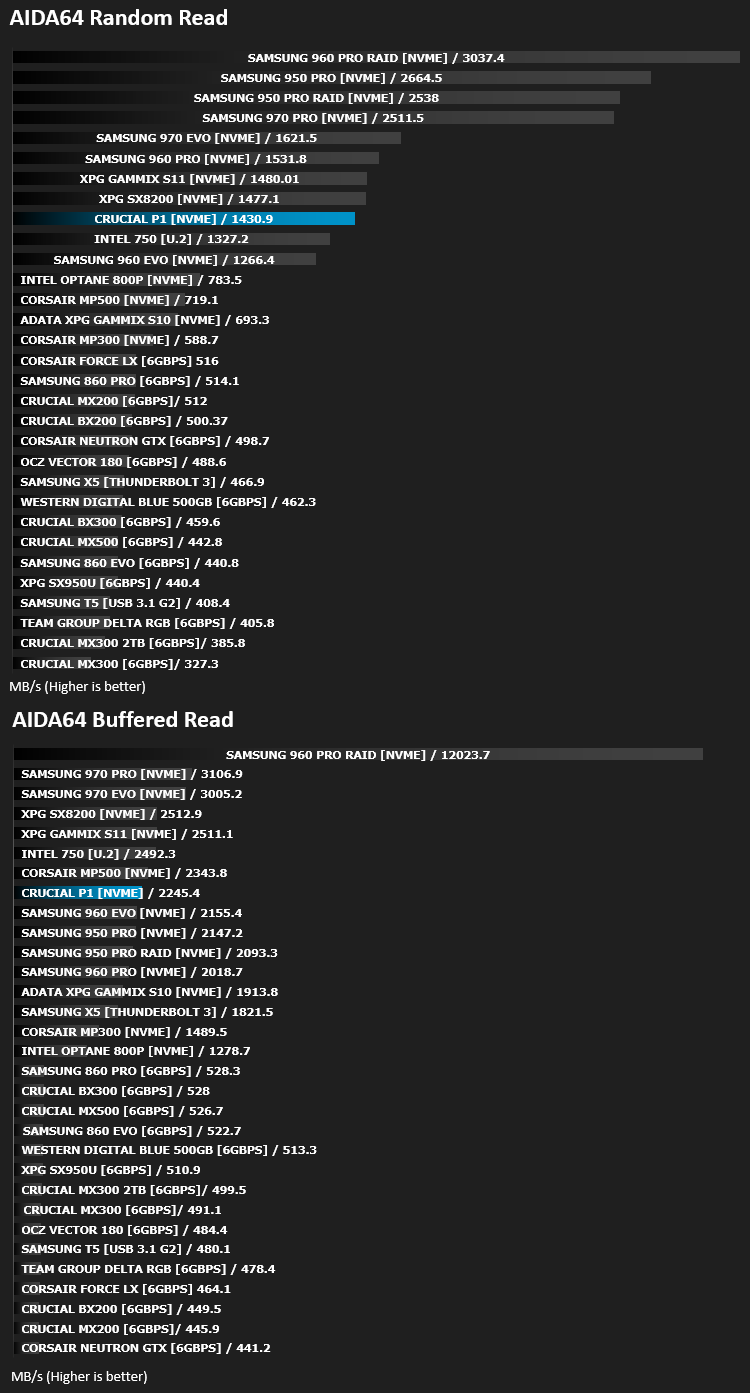
With this module, we can measure the performance of the PC’s storage devices, including (S)ATA or SCSI hard disk drives, RAID arrays, optical drives, solid-state drives (SSD), USB drives and memory cards. It also allows us to perform write tests, which helps us detect fake products and errors on the devices. In order to attain reliable benchmark results we have to make sure to close all background applications.
Benchmarks: PCMark 8
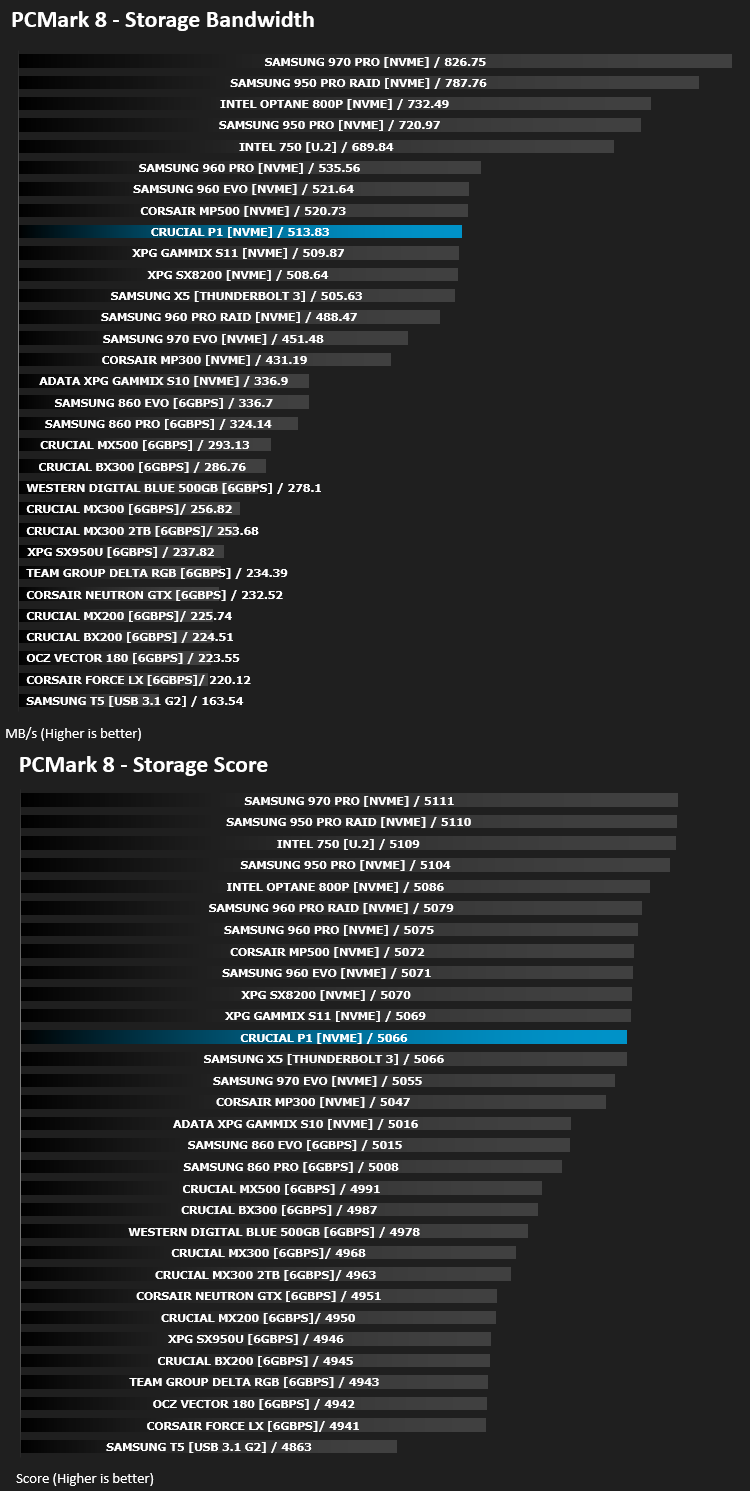
We use the Futuremark PCMark 8 utility to measure storage via Photoshop performance under both light and heavy loading conditions. Accelerated (open CL) is used to perform this test. The test is measured in seconds to complete.
Conclusion
It seems then, that Crucial’s first venture into the world on NVMe storage is largely successful, for a number of reasons.Firstly, aesthetics matter in today’s age of tempered glass panels and RGB lighting. While it may not be the most beautiful drive out there, with some arriving plastered in gorgeous heatsinks and fancy coloured labels, the black PCB and basic label will blend into most builds rather un-noticed, though we wish they’d placed that bright white warranty label on the reverse side of the drive. Another plus point of the M.2 form factor is the lack of wires, you just pop it into the slot and attach the single screw, resulting in cleaner builds.
Performance was a little underwhelming when compared to the heavy hitters in the industry, though it proved to be almost exactly what Crucial promised, so we can’t complain too much in this respect, we still saw numbers around the 2000MB/s read and 1750MB/s write, which cannot be sniffed at; IOPS are also impressive, producing a snappy and responsive system.
Price was an important factor to consider while writing this review, with the NVMe SSD sector becoming more and more fierce with drives offering massive read and write speeds. The Crucial P1 1000GB is priced at £199.99 in the UK and $219.99 in the US. Samsung, XPG, Western Digital, Corsair and Intel are all well above this price for a similar capacity, while real-world applications will benefit only very slightly from a 3.5GB/s read speed when compared to 2GB/s.
Perhaps their next step can be total domination of the NVMe market with something along the lines of the XPG SX8200 or the Samsung 970 PRO; we’ll wait and see.
When considering the plain appearance, relatively small pricetag and great performance, we feel the Crucial P1 should do very well in today’s market and is certainly worthy of some serious consideration.
Pros
+ Performance was as quoted
+ Decent price
+ Plain and simple appearance
+ Easy installation
+ 5 years warranty
Cons
– Not the fastest NVMe drive
Click here for an explanation of our awards at Vortez.net.
Stay connected with the Vortez Social Media pages:
Join in with the discussions on Discord