Cyberpower PC return with a stunning new system featuring Intel’s flagship 13th Generation CPU and NVIDIA’s intimidating RTX GeForce 4090, but the star of the show is their intricate dual loop water cooling. If that’s enough to tempt you, read on…

Product On Review: Hyper Liquid X139
Manufacturer: Cyberpower UK
MSRP: £4999 (inc. V.A.T.)
System integrators the world over offer a wide range of desktop PCs with custom configurations, built and shipped to your door with a minimum of fuss and bother. They’re a god-send for anyone who needs a PC that’s not a standardised (and often underwhelming) box from the likes or Dell or HP, and doesn’t have the time, skills or confidence to assemble a system themselves. That being said, with systems assembled to a tight margin for cost-conscious customers, even these configured systems can get a little cookie-cutter.
So it must come as something of a relief to the tech-heads at Cyberpower UK and other SIs when the more exotic orders come in, allowing them to draw from years of experience to create PCs which aren’t just plain boxes, but rather have something just a little bit special.
In common with other SIs both in the UK and abroad, Cyberpower UK offers a range of systems more towards the boutique end of the market, with specific features that test the hard-learned skills of the product design team. One of those skills is the crafting of the perfect bespoke water-cooling loop.
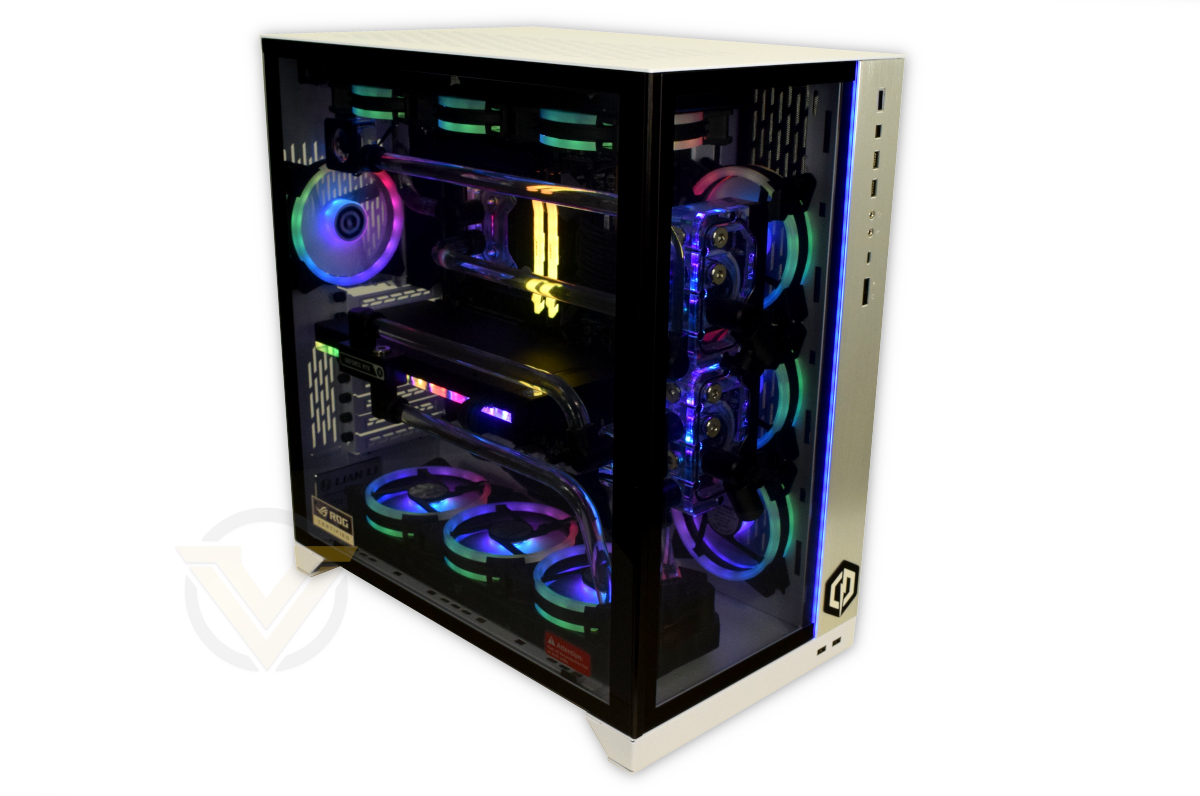
Cyberpower UK’s Hyper Liquid X139 pushes the performance envelope with flagship components from Intel, NVIDIA, EK WB, Lian Li and Corsair, leveraging a dual-loop cooling setup with hard tuning for a crisp finish that will be the envy of all.
About Cyberpower UK
Who is Cyberpower? Originally founded in the United States, Cyberpower Inc is one of the leading brands in the competitive US computer market. With vast global backing from leading technology brands such as Intel, AMD, Nvidia, Asus and Microsoft etc, we aim to deliver the most up to date hardware for your needs at wholesale prices, and bring the well renowned name of Cyberpower Inc to the UK.
With vision, commitment and determination we can manufacture a vast range of custom built PC systems to suit the needs of any individual or company. Our PC systems are built with utmost care and attention as we strive towards making this not just our profession, but our obsession.
With vision, commitment and determination we can manufacture a vast range of custom built PC systems to suit the needs of any individual or company. Our PC systems are built with utmost care and attention as we strive towards making this not just our profession, but our obsession.
Typically when a system is described as ‘water cooled’ it’s using a closed loop AIO such as those in the Corsair Hydro Series. Custom water cooled systems however can utilise a bespoke water cooling loop, complete with water block, tubing, fittings, and radiator, that offer not only cleaner aesthetics but also better performance than an off-the-shelf AIO. The CPU, GPU or both might take advantage of this solution that’s ideal for those with demanding performance requirements and deeper pockets than mainstream consumers.
As a system equipped with Intel’s blisteringly fast 13th Gen. Core i9-13900KS, NVIDIA’s brutal GeForce RTX 4090, and other high-performance parts from MSI and Kingston, the Hyper Liquid X139’s baseline is a configuration that warrants respect and admiration. It also arrives with a very very hefty price-tag of a shade under £5000 (inclusive of V.A.T.). It is therefore not a configuration for the budget-conscious, but rather for the enthusiast or content creator with money to spend but without the time or expertise to accomplish what Cyberpower UK’s experts can achieve.
System Specification
CPU:- Intel Core i9-13900KS
GPU:- MSI RTX 4090 Suprim X 24GB
Motherboard:- MSI MAG Z790 Tomahawk WIFI
RAM:- 32GB Kingston Fury Renegade 6000MHz DDR5 (2 x 16GB)
Storage:- Solidigm P44 PRO M.2 NVMe PCIe SSD 2TB
Power Supply: CORSAIR RM1000e Fully Modular 1000W PSU
Operating System: Windows 10 Home Advanced
Case: Lian Li O11 Dynamic XL White
Cooling
EK-Quantum Torque HDC Fitting (12 pcs)
EK-Quantum Torque Rotary 90-degree Fitting (15 pcs)
EK-AF Ball Valve (2 pcs)
EK-Quantum Torgue Extender (4 pcs)
EK-AF Extender (4 pcs)
EK-Quantum Flow Indicator D-RGB (2 pcs)
EK Water Blocks PETG Tubing 12/16mm
EK-Quantum Kinetic FLT 80 D5 PWM D-RGB Pump
EK-UNI Pump and Reservoir Bracket
EK-Quantum Velocity2 D-RGB CPU Block
EK-Quantum Vector2 TRIO RTX 4090 D-RGB Block
CORSAIR HydroX Series XR5 360 NEO Triple Slim Radiator (2 pcs)
Mayhems X1 ECO Clear 1L Coolant (2 pcs)
12x Cyberpower PC 120mm PWM RGB fans
GPU:- MSI RTX 4090 Suprim X 24GB
Motherboard:- MSI MAG Z790 Tomahawk WIFI
RAM:- 32GB Kingston Fury Renegade 6000MHz DDR5 (2 x 16GB)
Storage:- Solidigm P44 PRO M.2 NVMe PCIe SSD 2TB
Power Supply: CORSAIR RM1000e Fully Modular 1000W PSU
Operating System: Windows 10 Home Advanced
Case: Lian Li O11 Dynamic XL White
Cooling
EK-Quantum Torque HDC Fitting (12 pcs)
EK-Quantum Torque Rotary 90-degree Fitting (15 pcs)
EK-AF Ball Valve (2 pcs)
EK-Quantum Torgue Extender (4 pcs)
EK-AF Extender (4 pcs)
EK-Quantum Flow Indicator D-RGB (2 pcs)
EK Water Blocks PETG Tubing 12/16mm
EK-Quantum Kinetic FLT 80 D5 PWM D-RGB Pump
EK-UNI Pump and Reservoir Bracket
EK-Quantum Velocity2 D-RGB CPU Block
EK-Quantum Vector2 TRIO RTX 4090 D-RGB Block
CORSAIR HydroX Series XR5 360 NEO Triple Slim Radiator (2 pcs)
Mayhems X1 ECO Clear 1L Coolant (2 pcs)
12x Cyberpower PC 120mm PWM RGB fans
The Core i9-13900KS is the new flagship member of Intel’s 13th Gen. ‘Raptor Lake’ processor lineup. It’s equipped with a total of 24 CPU cores – 8 Performance cores and 16 Efficiency cores clocking up to 6GHz and 4.3GHz respectively – with the 6GHz headline frequency being a key point in their marketing: it’s the first time a retail consumer CPU has been sold with stock frequencies this high. Like the 12th Gen before it, this platform balances load between the P-Cores and E-Cores depending on the workload involved for higher performance or efficiency. Water Cooling will enable this system to maintain higher clocks for longer on a wider range of workloads as core temperature is a key variable in the algorithm that determines Turbo frequency.
NVIDIA’s RTX 4090 meanwhile is the launch flagship of the ‘Ada Lovelace’ RTX 40-series. It is NVIDIA’s best performing consumer GPU to date, handling 4K resolution gaming and ray-traced environments with ease and surpassing even the RTX 3090 in raw rasterization and frames per second. It also supports the full suite of NVIDIA technologies including the much-lauded DLSS 3.0, with almost assured support for what the green team’s tech wizards can some up with in the next few years.
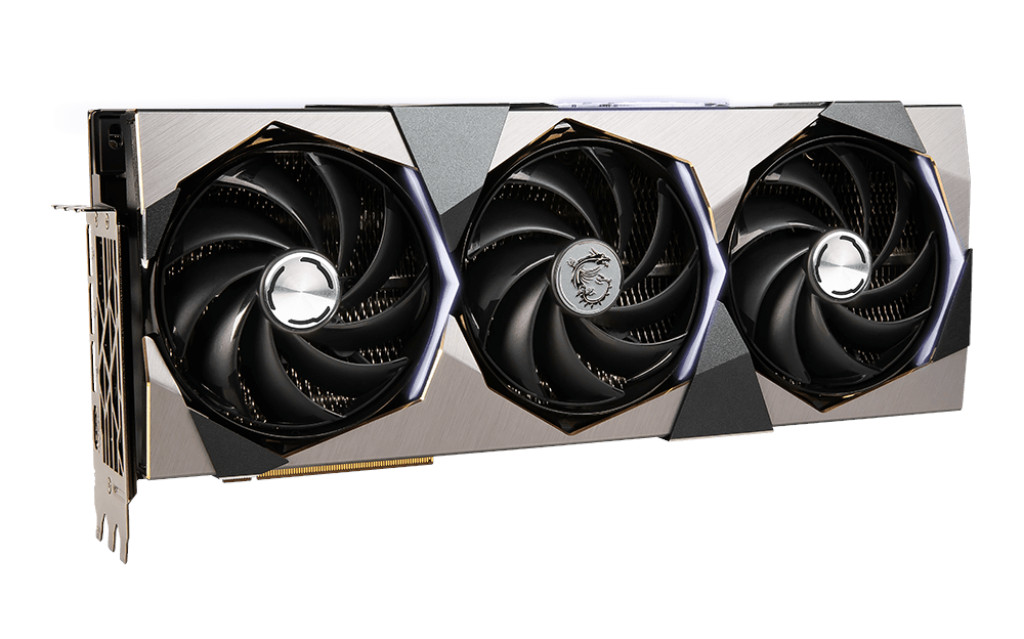
MSI’s GeForce RTX 4090 SUPRIM 24GB, with stock air cooler
MSI’s SUPRIM variant is the best of their best, incorporating a modest factory overclock and enhanced power delivery system. The standard version is equipped with a triple-fan cooling solution, but this system eschews that in favour of a full-coverage waterblock from EK.
A cursory glance at the specs might overlook MSI’s MAG Z790 Tomahawk, the motherboard opted for in this system. Sure, it’s a smidgen more affordable than some other options but it does help to keep costs low enough for the asking price. However, we’re not entirely sure it lives up to the billing suggests by the rest of the configuration. As good as it is, the motherboard lacks some troubleshooting features we’d like to see on a fully water-cooled setup. This includes, but isn’t limited to, a Debug display, which would make diagnosing any issues more straightforward. As it is, a small number of debug LEDs and POST beep-codes are all you can lean on should you encounter troubles.
One clear upgrade route is the RAM. Equipping a system with 32GB of DDR5 RAM is plenty for gaming solely, but content creators may instead want to opt for 48 or 64GB depending on budgets. 6000MHz RAM is also a very healthy speed for the majority of users, easily eclipsing the more common 4800MHz and 5600MHz DDR5 classes. Kingston’s Fury RGB RAM is well match to the lighting integrated into both fans
Of course, we’d be remiss in not mentioning Lian Li’s O11 Dynamic XL. A larger variant of the exceptionally well regarded O11D, the case leverages its sibling’s layout to display your system at its very best. This XL model also provides ample room for single and dual-loop water cooling, offering the very best of both worlds. A bottom-to-top air flow through two radiators should be ideal, but you’re still cooling two extremely toasty components alongside chipsets and RAM.
EK’s Vector2 series full cover waterblock for MSI’s RTX 4090
Solidigm is a less well known name in consumer PCs, but its P44 Pro NVMe SSD is a strong contender as the PCIe 4.0 generation of drives matures. It’s a 4 lane PCIe 4.0 drive with exceptional sequential read and write speeds rivalling strong competition such as Samsung’s 980 Pro.
The system is ably supported by a modular 1000W PSU, although that will feel a pinch should both the GPU and CPU be overclocked beyond their shipped factory overclock; it’s notable that the Hyper Liquid X139 maintains everything at a stock level. A PSU-specific 12+4-pin connector is provided rather than the less attractive NVIDIA adaptor.
And finally, the vast swathe of water cooling components are all picked from some of the very best available to consumers. EK is a market leader in water blocks and fittings, Corsair’s radiators are solid choices, and Mayhems coolant will help with the long-term health of the cooling loop. EK is also notable in that they design and manufacture waterblocks for major brand-named GPUs and motherboards, tailoring the base design to the unique layouts of each component where necessary.
Value for Money
The ‘value’ of a pre-built system is a subjective judgement at the best of times, but that’s even more the case for those with bespoke aspects that take a straightforward configuration to the next level. We can tally up the cost of components, compare it with the list price, and draw a conclusion based on that arithmetic alone; that sort of approach isn’t without merit, but almost by necessity ignores the assembly skill of the engineer as well as delivery and warranty servicing costs. Nonetheless, we’ve attempted a broad breakdown here.
Approx. UK Component Retail Price (inc. V.A.T., various etailers):
GPU:- £1910
CPU:- £690
Motherboard:- £320
RAM:- £155
Case:- £240
PSU:- £170
Storage:- £160
Total:- £3645
CPU:- £690
Motherboard:- £320
RAM:- £155
Case:- £240
PSU:- £170
Storage:- £160
Total:- £3645
So, if you can reasonably expect to source and assemble a total dual-loop water cooling solution for less than £1350, then this might not be the build for you. However, let’s get a ballpark figure for those cooling components:
EK Z790 CPU Waterblock – £97
EK RTX 4090 Waterblock – £300
Two EK 80mm D5 Pump/80mm Rez Combo – £282
Two 360mm Corsair Radiators (Slim) – £140
Two EK-Quantum Flow Indicators – £55
Twelve EK-Quantum Torque HDC 16mm Fittings – £73.92
Fifteen EK-Quantum Torque Rotary 90-degree Adapter – £118.8
Four EK-AF 6mm Extenders – £15
EK RTX 4090 Waterblock – £300
Two EK 80mm D5 Pump/80mm Rez Combo – £282
Two 360mm Corsair Radiators (Slim) – £140
Two EK-Quantum Flow Indicators – £55
Twelve EK-Quantum Torque HDC 16mm Fittings – £73.92
Fifteen EK-Quantum Torque Rotary 90-degree Adapter – £118.8
Four EK-AF 6mm Extenders – £15
Totalled, that comes to around £1100 when you throw in 2 litres of Mayhems Clear coolant, and doesn’t include the 12/16mm PETG tubing, 120mm RGB fans, LED lighting controller etc. Shaping hard tubing in particular is also a very hard-earned skill that you will fail multiple times when you try it yourself as a novice.
Realistically, this represents a very minimal premium (5-10%) over the cost of ‘doing it yourself’ if you don’t consider your time to be particularly valuable. In fact Cyberpower’s Hyper Liquid X139 instinctively feels like an excellent way to pursue the path of bespoke water cooling, unless the minutiae of assembling it yourself is part of the fun of course.
Packaging and Bundle
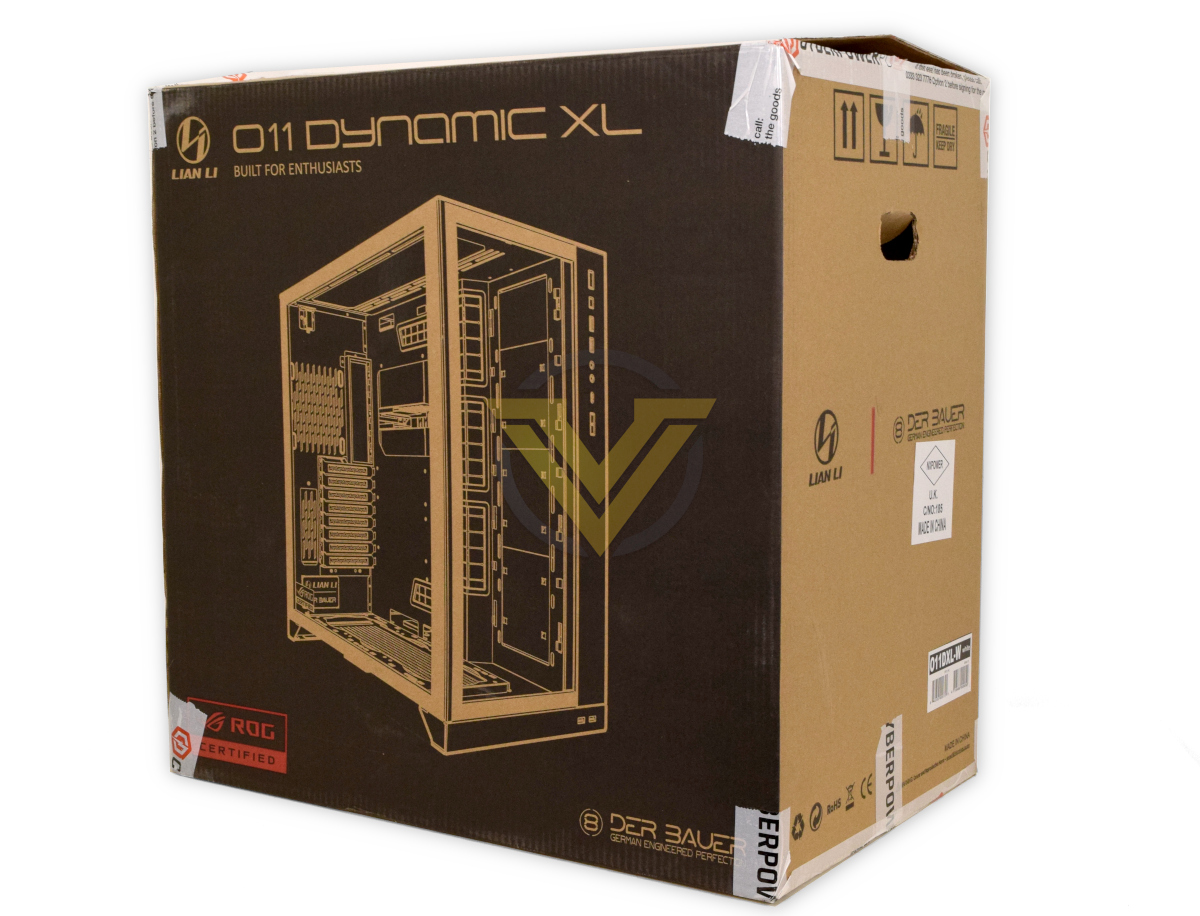
Cyberpower opted to ship this system securely double-boxed on a pallet, keeping the orientation of the system fixed to minimise the chances of loosening the fittings. In contrast to the Infinity X129 TI D5 from last year they somewhat surprisingly didn’t include any expanding foam pocket packaging internally.
By double-boxing the system and using thick foam as a buffer between outer and inner box, the system was protected from strong lateral shifts in shipping. It’s weight (significantly over 20kgs) and pallet delivery method ameliorates the risk of sharp vertical shifts.
Cyberpower also ensure that all the correct accessories – motherboard bundled items, surplus PSU cables, any extras supplied with premium components etc – are included in the delivery package in case you choose to add to the system after purchase.
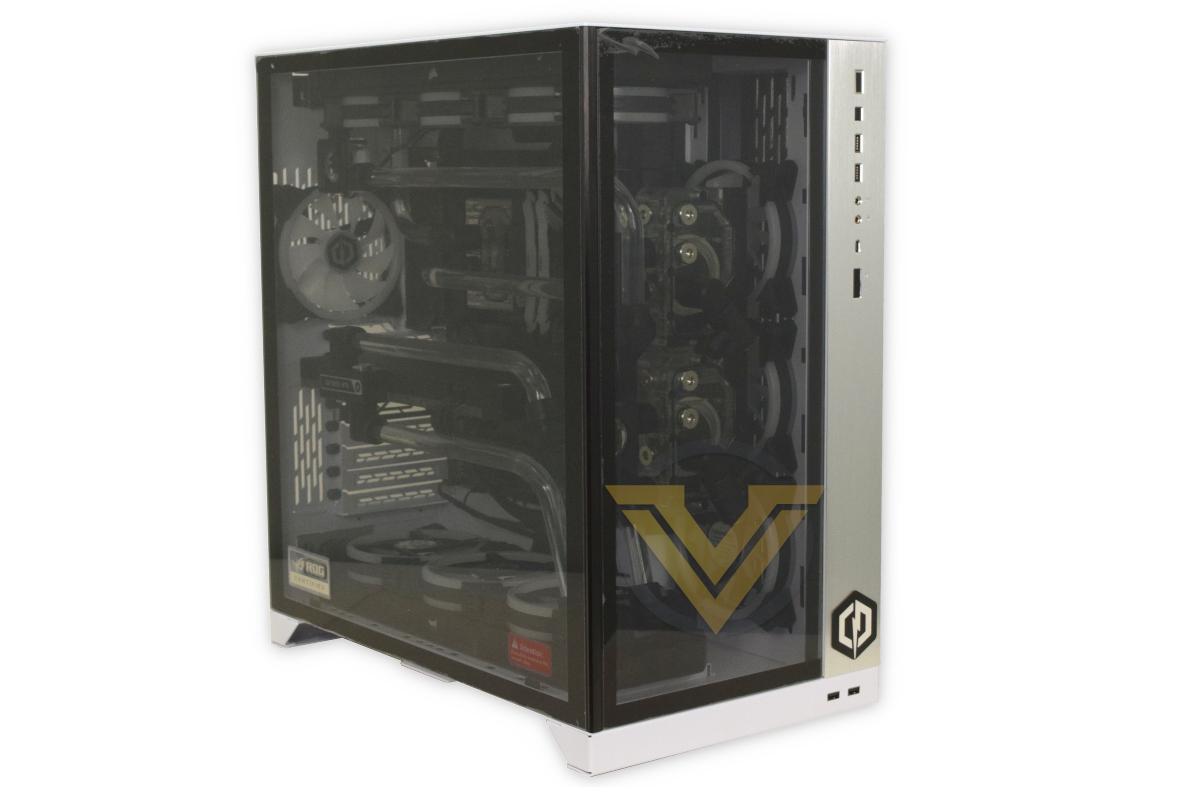
As a matter of course Cyperpower UK leave on the plastic protection for acrylic and tempered glass windows, minimising the risk of scratches and fingerprints when unboxing.
Closer Look
The Hyper Liquid X139 gaming system arrives in a Lian Li O11 Dynamic XL chassis that exposes almost all of the internal components through front and side tempered glass windows. It frames the tubing and LED fans attractively while also offering crystal clear vision of the two flow indicators (one per loop). To keep the loop routing a little more conventional the graphics card is mounted horizontally.
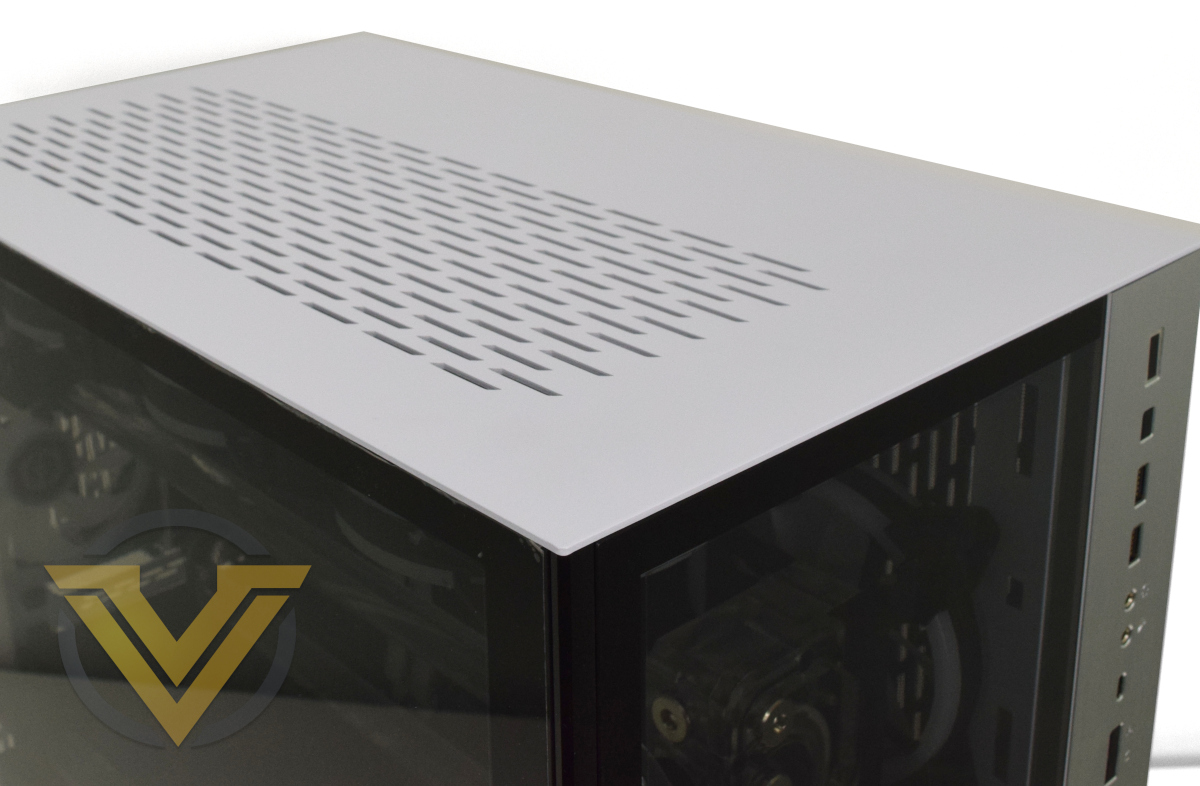
Most of the front panel IO is arranged down the top-right of the case front, comprising power and reset switches, 2x USB 3.0 ports, USB Type-C port, audio line-in and mic-out, and an RGB selector button that cycle the colour of the O11D XL’s integrated lighting.
Locating the primary IO here means that the system can be used effectively from the floor (but probably not on carpet due to dust) or on a low plinth. Putting it at desk height however gives you easy access to two further USB 3.0 ports at the bottom of the case.
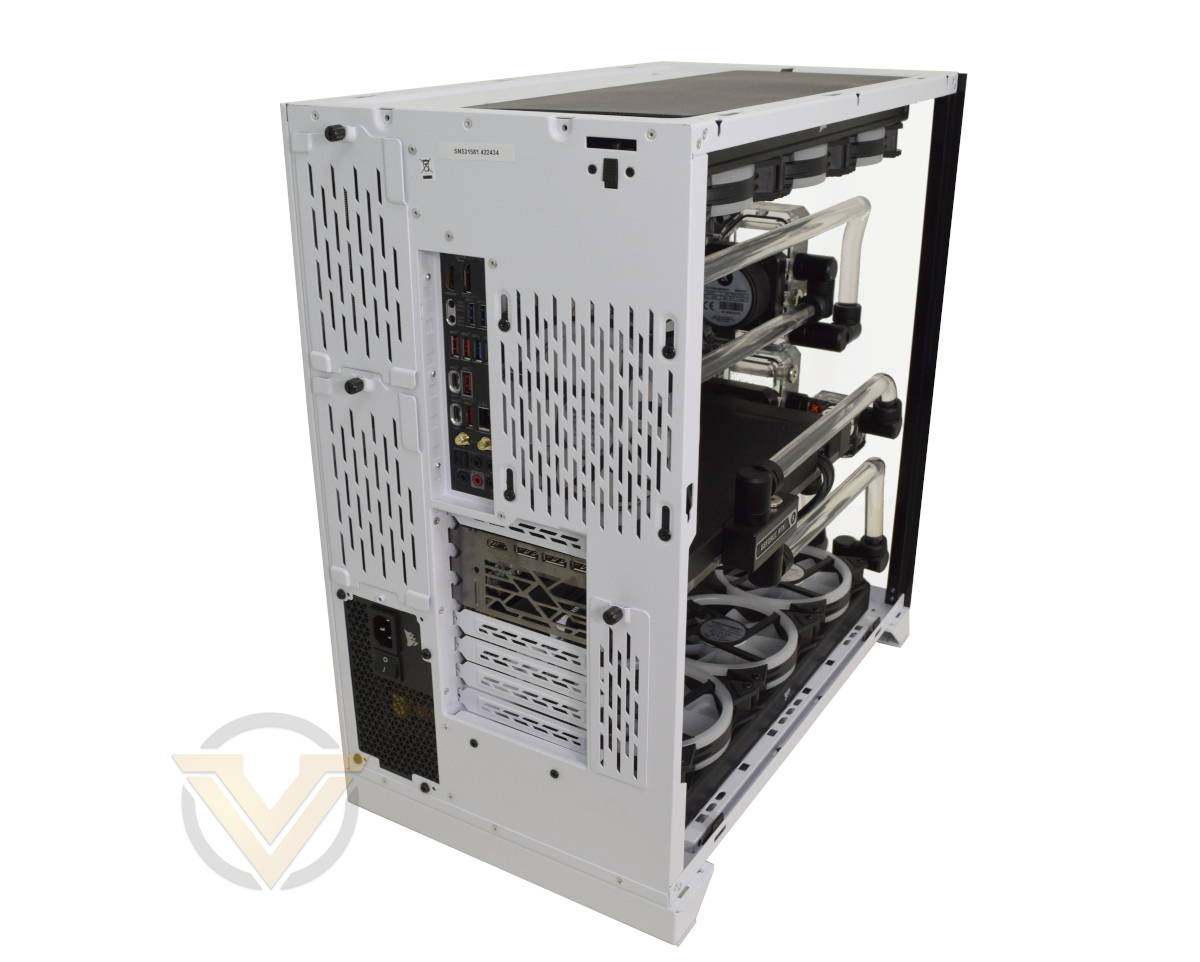
MSI are once again offering a plethora of options on the rear IO, thanks in part due to the capabilities of Intel Z790 chipset and 13th Gen CPU SOC. These include:
1x HDMI
1x DisplayPort
4 x USB 3.2 Gen 1 (5 Gbps)
4 x USB 3.2 Gen 2 (10 Gbps)
1 x USB Type-C Gen 2 (10Gbps)
1 x USB Type-C Gen 2×2 (20Gbps)
1 x Ethernet 2.5G
2 x WiFi 6E Antenna sockets
1 x SPDIF out
5 x 3.5mm audio connections (adaptive line in/out)
1x DisplayPort
4 x USB 3.2 Gen 1 (5 Gbps)
4 x USB 3.2 Gen 2 (10 Gbps)
1 x USB Type-C Gen 2 (10Gbps)
1 x USB Type-C Gen 2×2 (20Gbps)
1 x Ethernet 2.5G
2 x WiFi 6E Antenna sockets
1 x SPDIF out
5 x 3.5mm audio connections (adaptive line in/out)
Low profile clear CMOS and Flash BIOS buttons are also present on the rear.
From this angle you can also see the idiosyncratic orientation of the PSU, which is mounted vertically and behind the motherboard. That makes the case a little wider than EATX chassis of equivalent volume, but also not quite as tall. Worry not though, this is still a tall beasty.
MSI’s RTX 4090 SUPRIM 24GB features three Displayport 1.4a outputs and one HDMI 2.1a output (each capable of up to 4K120Hz or 8K60Hz).
The top of the chassis has a shallow grill for air intake/exhaust, as has the right hand side panel. To remove the side and front panels you first need to remove the two screws at the top-rear, then slide the latch just below them and slide the top panel off backwards. Both tempered glass panels can then be lifted out.
It should be noted that although the chassis appears to be resting across each wide ‘foot’ at the front and back, it in fact sits on two small rubberised pads on each of the feet. End users should pay attention to the weight of the finished system and hence the pressure these pads will exert on your desktop surface.
Closer Look (internal)
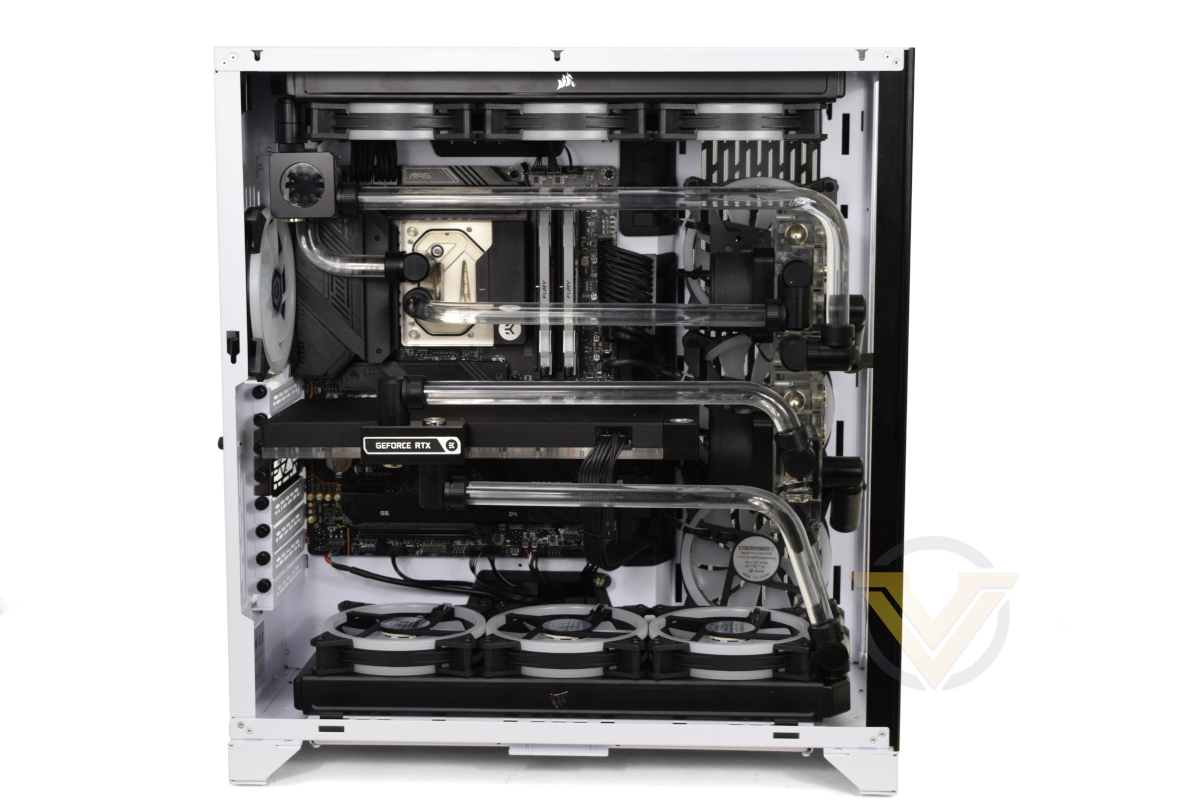
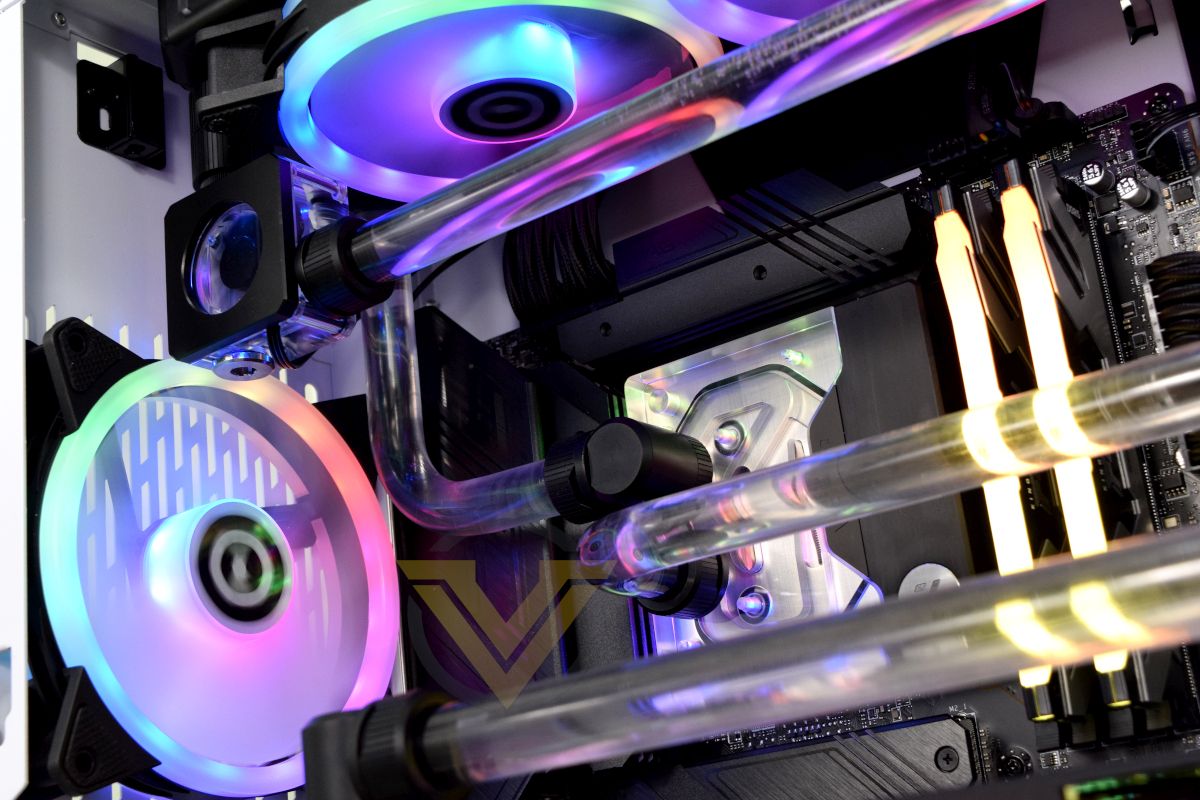
Starting at the top and working our way down, two 8-pin CPU power connectors in the top-left feed power directly to the exceptionally thirsty Intel i9-13900KS, ensuring that it doesn’t stumble for headroom when pushing the maximum single- and all-core frequencies. The EK Velocity2 waterblock once again looks fantastic placed on top of the processor, with the hardlined tubing winding its way across the rest of the system.
The first of two illuminated flow indicators sits next to the rear fan, making it easy to check the CPU loop’s status at a glance. A slim 360mm radiator is installed at the top of the chassis, once again dedicated to cooling the CPU.
Installed alongside the CPU is 32GB of Kingston’s Fury Renegade DDR5 memory clocking in at 6000MHz. Two DIMM slots remain unpopulated if you wish to expand this for more demanding tasks, though this will tend to limit the operating frequency of the DDR5 memory as a whole. Both are factors to consider if you want to upgrade to 64GB RAM.
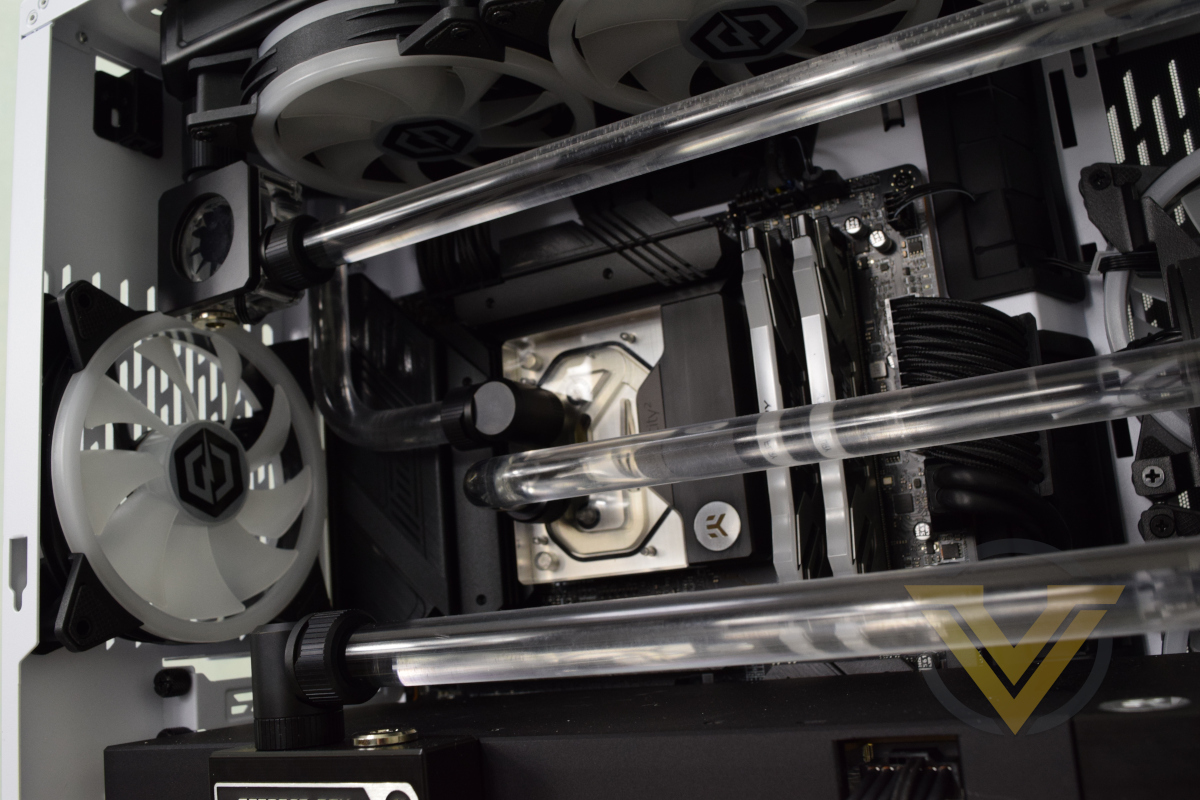
Located behind the built-in NVMe heatsink is a 2TB Solidigm P44 PRO M.2 NVMe PCIe SSD. Additional M.2 drives can be installed in the three spare slots, although the one directly below the GPU will require a lot of dexterity to utilise. Mounting points for 2.5” and 3.5” drives are located on the rear of the motherboard tray behind the right-hand side panel, the hardware for which is supplied by Cyberpower UK in a separate box.
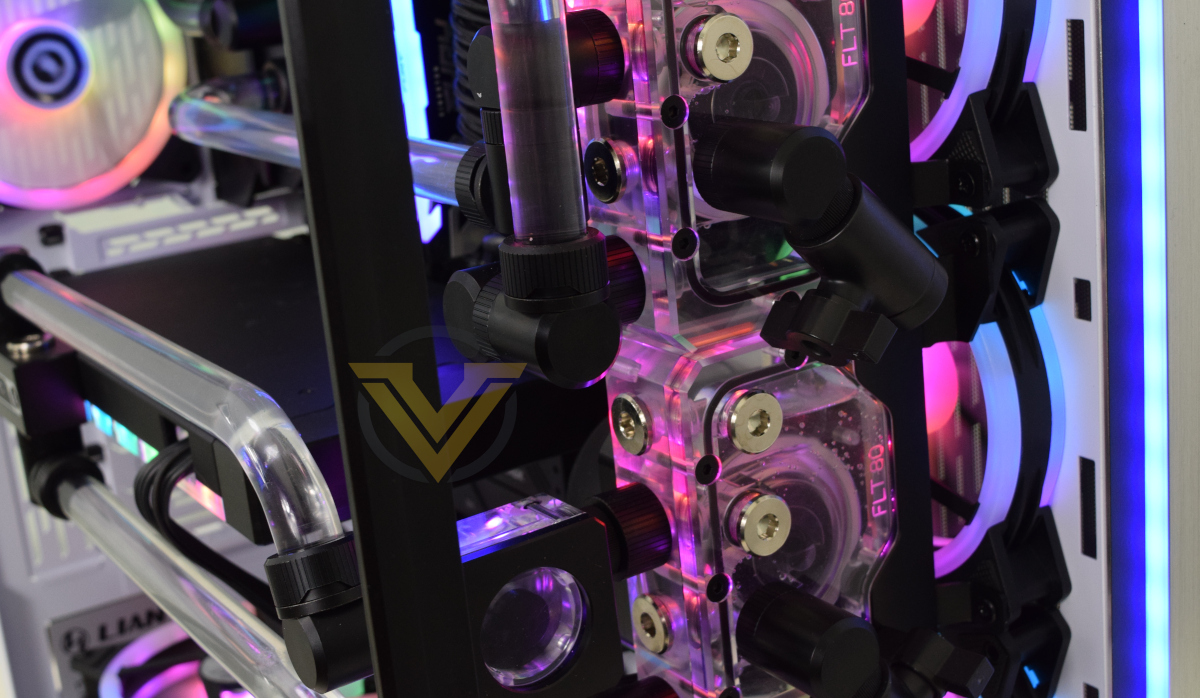
It gets a little complex to the right of the motherboard. Cyberpower have installed three fans rather than a radiator here, and used the section just behind the front tempered glass panel to place both EK Pump and Reservoir combo units (one per loop) which are mounted with EK hardware. Just below these two units is the second of the two flow indicators, this one for the GPU loop and visible through the front of the case.
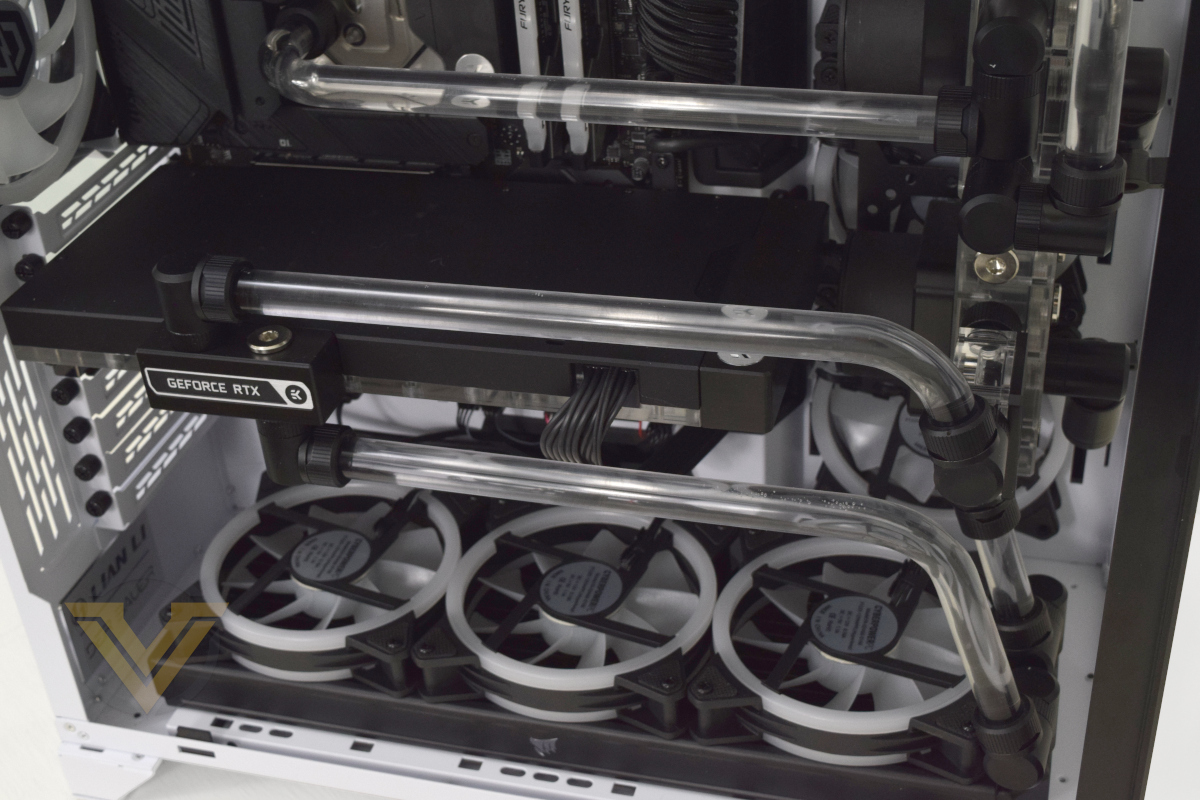
As well as taking advantage of the Vector2 full cover waterblock and dedicated water cooling loop, the graphics card also utilises the much-discussed 12+4-pin power connector through a native cable to the PSU rather than the ugly 3-to-1 adaptor NVIDIA supplies with the card.
Sitting at the bottom of the case is the second CORSAIR 360mm radiator and three Cyberpower 120mm LED fans, configured to pull air up and through the radiator.
Here’s a quick look at some of the internal components with the LED illumination active.
Benchmarks: Temperatures, Power Draw & Boot Time
In our first test we observe the max. CPU/GPU temperatures of the system while allowing Unigine Heaven 4.0 to run on a 30-minute loop with default system fan profile. Idle temperatures were read 10 minutes later, indicating how well the system exhausted latent heat. To report back on the temperatures we used Core Temp readings and GPU-Z.
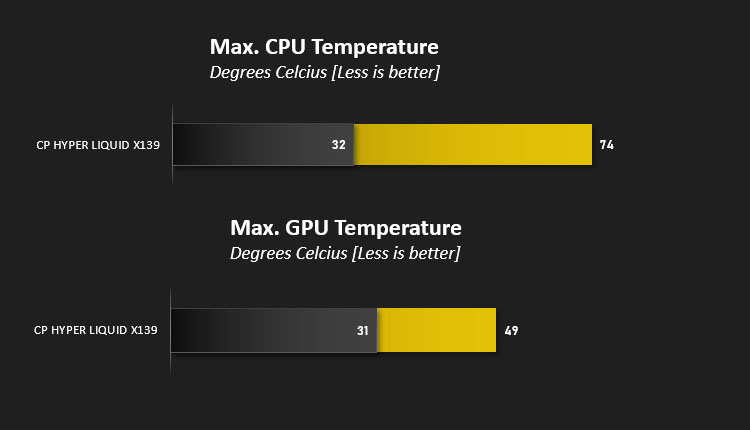
With the launch of the Core i9-13900K-series Intel implemented new dynamic overclocking logic for all-core workloads that seeks to push CPU frequencies as high as its thermal limits will allow. Such workloads are far from typical in a gaming scenario, but you can expect taxing multi-core scenarios such as video rendering to push the CPU into the high 80’s.
The RTX 4090 meanwhile remains relaxingly cool despite its enormous power, below even the cooling potential of the standard triple-fan coolers on most partner variant RTX 4090’s.
Bear in mind however that all this heat doesn’t magically disappear once it’s exhausted from the chassis. This system will be outputting hundreds of watts of heat that ideally you won’t want hanging around in a room, so get yourself plenty of ventilation for real-world extended gaming sessions.
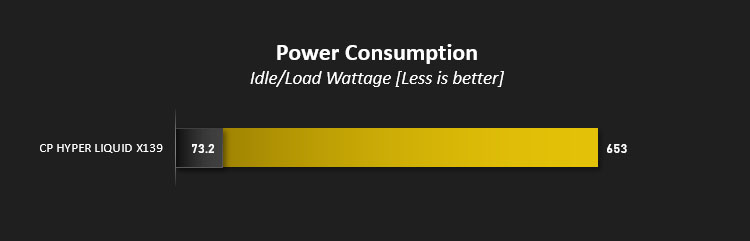
Speaking of power, system peak power draw was assessed under long game loads, and we found it to be exceptionally (but expectedly) high. A peak of 673W at the wall is paired with an average in the high 590’s, but once again this is by no means under true high-stress loads that would strain both GPU and CPU simultaneously. Under those conditions they could easily push over 700W in total.
This high power consumption, and its knock-on impact on your long term power bills, should factor into your purchase given the current energy supply climate.
Idle draw of 73W remains relatively low given the performance of these components, and can be pushed lower but transitioning to a more frugal power saving plan in Windows.

On your very first boot the system, like all Z790 DDR5 platform, will take longer than expected to POST and reach the OS as it is training the memory. Once complete, you’ll get these sub-15s cold boot times when paired with an SSD as fast as the Solidigm P44 PRO.
Benchmarks: Cinebench R20 & R23
Maxon’s Cinebench is a real-world cross-platform test suite that evaluates your computer’s hardware capabilities. Improvements to Cinebench Release 20 reflected the overall advancements to CPU and rendering technology in recent years, providing a more accurate measurement of Cinema 4D’s ability to take advantage of multiple CPU cores and modern processor features available to the average user.
In October 2020 Maxon launched Cinebench R23. This release formulated an updated test that defined a notational runtime of 10 minutes for both single and multicore tests, minimising the impact of initial performance spikes caused by a high Turbo/Boost clock at the start. The scores generated are not directly comparable to the R20 results, but we’ve included them here for reference.
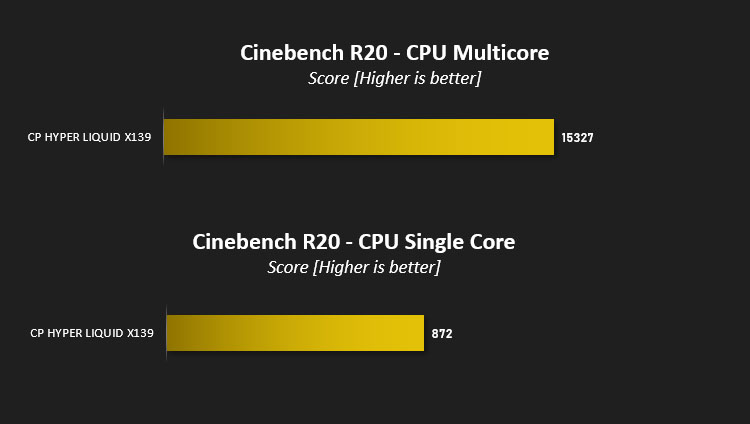
A Cinebench R20 multi-threaded score of 15324 is nothing short of chart-topping, easily ousting our previous best posted by a flagship Intel 12th Generation system. That’s in part thanks to the eight additional Efficiency-cores which push the total core count from 16 to 24, but higher operating frequencies also add up. The single-core score, which assesses the performance of the processor’s Performance-core only, is similarly impressive.
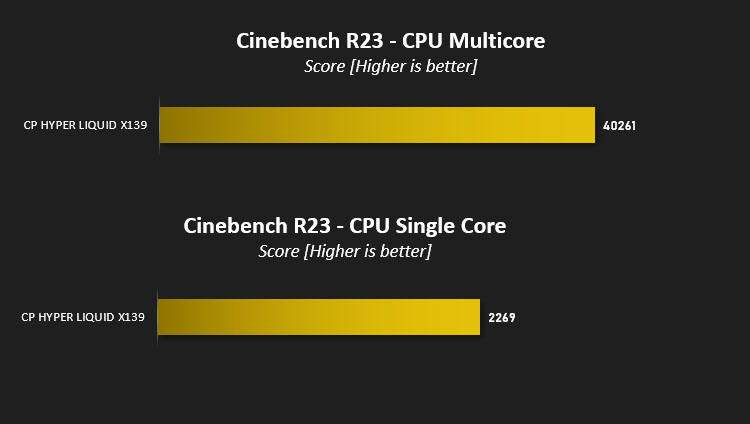
Cinebench R23 is a more representative test for modern many-core CPUs, and it really allows the i9-13900KS to stretch its legs. Hitting a score of over 40000 is intimidating, as is the high single threaded scores. These are very good conditions for the Raptor Lake, but it’s very reliant on the Windows Scheduler to leverage that horsepower in the real world. Still, for CPU-based video rendering, there’s surely no better CPU on the market today.
Benchmarks: PCMark 10, Unigine Heaven & 3D Mark
PCMark 10 by UL combines performance benchmarking with battery life measurement where applicable and includes tests based on popular Adobe and Microsoft applications. Whether you are looking for long battery life, or maximum power, PCMark 10 will help you find the devices that offer the perfect combination of efficiency and performance for your needs. It’s the complete PC performance benchmark for home and business.

PCMark 10 takes a balanced approach that assesses multiple aspects of performance, with no one aspect garnering too much weight. This system is once again ahead of the rest, but by a more modest margin than it’s specifications might suggest.
—
3DMark Time Spy by UL is a DirectX 12 benchmark test for gaming PCs running Windows 10. With its pure DirectX 12 engine, built from the ground up to support new API features like asynchronous compute, explicit multi-adapter, and multi-threading, Time Spy is the ideal benchmark for testing the DirectX 12 performance of the latest graphics cards.
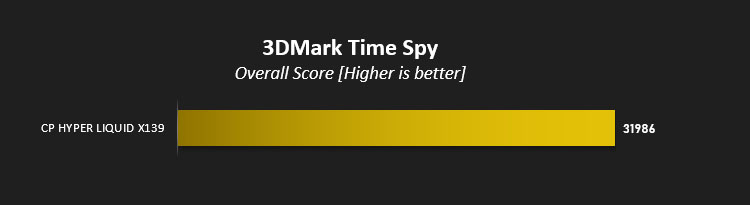
3DMark Time Spy presents users with a breakdown of scores: GPU, CPU and Combined. It will come as no surprise that the system dominates in both CPU and GPU aspects, hitting the following scores:
GPU:- 36641
CPU:- 18559
Overall:- 31968
CPU:- 18559
Overall:- 31968
Time Spy Extreme scores were similarly impressive.
GPU:- 20600
CPU:- 13704
Overall:- 19217
CPU:- 13704
Overall:- 19217
—
Unigine’s Heaven 4.0 utility is a performance and stability test for PC hardware: video card, power supply, cooling system. Check your rig in stock and overclocking modes with real-life load! Also includes interactive experience in a beautiful, detailed environment.
While relying on a DirectX 11 API renderer rather than more modern DX12 framework, Heaven 4.0 and DX11 performance is still a relevant metric today.
The score here is very good, proving the system is capable of handling just about whatever you want to throw at it. The RTX 4090 is above trifling things like conventional DX11 rendering.
Benchmarks: Gaming at 1440p & 4K
The mighty NVIDIA GeForce RTX 4090 does not fear games, games fear it. The card is more than capable of gaming at 4K resolutions above the standard recommendation of 60fps, but there will be users who will invest in this system and pair it with a high refresh rate 1440p display. We’ve included selected gaming results at both resolutions to give you some idea of the expected performance.
Middle-Earth: Shadow of War
The oldest of our titles, Middle-Earth: Shadow of War is still an exceptionally attractive game that utilises the DirectX 11 API. In deference to its vintage, we’ll be testing at 1440p and 4K with Ultra image quality presets.
Shadow of the Tomb Raider
The second sequel to the rebooted Tomb Raider franchise, Shadow of the Tomb Raider was also one of the first titles to incorporate NVIDIA RTX ray traced shadows and DLSS. At 1440p and 4K we’ll be testing with Ray Tracing on but without the benefit of DLSS’s recommended 1080p and 1440p upscaling modes respectively.
Horizon Zero Dawn
This game was new to PC in August 2020 and already has a reputation for taxing GPU hardware. It doesn’t feature ray tracing, but nonetheless has some of the most stunning scenes ever rendered in games. We’ve used the Ultimate preset at 1440p and 4K here, but Favoured also offers a visual feast with markedly higher performance.
Control
Critically acclaimed on release, Control is the title which made most comprehensive use of NVIDIA RTX prior to Cyberpunk 2077’s release in Holiday 2020. Shadows, lighting and reflections all make use of this advanced rendering standard, helping the transition from mundane world to its nightmarish reflection. We opted for the Highest detail settings preset with RTX features enabled including the default recommended level of DLSS: a rendering resolution of 1920×1080.
Cyberpunk 2077
Finally reliable after major patch releases, CDProjekt RED’s neo-futurist open world RPG has stunning visuals and ray traced lighting effects to enjoy. We took it for a spin with RTX On.
The oldest of our titles, Middle-Earth: Shadow of War is still an exceptionally attractive game that utilises the DirectX 11 API. In deference to its vintage, we’ll be testing at 1440p and 4K with Ultra image quality presets.
Shadow of the Tomb Raider
The second sequel to the rebooted Tomb Raider franchise, Shadow of the Tomb Raider was also one of the first titles to incorporate NVIDIA RTX ray traced shadows and DLSS. At 1440p and 4K we’ll be testing with Ray Tracing on but without the benefit of DLSS’s recommended 1080p and 1440p upscaling modes respectively.
Horizon Zero Dawn
This game was new to PC in August 2020 and already has a reputation for taxing GPU hardware. It doesn’t feature ray tracing, but nonetheless has some of the most stunning scenes ever rendered in games. We’ve used the Ultimate preset at 1440p and 4K here, but Favoured also offers a visual feast with markedly higher performance.
Control
Critically acclaimed on release, Control is the title which made most comprehensive use of NVIDIA RTX prior to Cyberpunk 2077’s release in Holiday 2020. Shadows, lighting and reflections all make use of this advanced rendering standard, helping the transition from mundane world to its nightmarish reflection. We opted for the Highest detail settings preset with RTX features enabled including the default recommended level of DLSS: a rendering resolution of 1920×1080.
Cyberpunk 2077
Finally reliable after major patch releases, CDProjekt RED’s neo-futurist open world RPG has stunning visuals and ray traced lighting effects to enjoy. We took it for a spin with RTX On.
Middle-Earth: Shadow of War – 1440p Ultra Preset – 290 fps
Shadow of the Tomb Raider – 1440p, DX 12; Highest Preset; RTX Shadows High; SMAAx4 Anti aliasing – 177 fps
Horizon Zero Dawn – 1440p, Ultimate Quality – 159 fps
Control – 1440p; Highest Quality; RTX On; DLSS Recommended – 175 fps
Cyberpunk 2077 – 1440p, Highest Quality, RTX On, DLSS Off – 76 fps
Shadow of the Tomb Raider – 1440p, DX 12; Highest Preset; RTX Shadows High; SMAAx4 Anti aliasing – 177 fps
Horizon Zero Dawn – 1440p, Ultimate Quality – 159 fps
Control – 1440p; Highest Quality; RTX On; DLSS Recommended – 175 fps
Cyberpunk 2077 – 1440p, Highest Quality, RTX On, DLSS Off – 76 fps
It will come as no surprise that the Hyper Liquid X139 chews through titles at 1440p, by itself making the argument for a variable refresh rate monitor that can hit or exceed 144Hz. Even with the power of NVIDIA’s RTX 4090 the resolutions will remain the gamers choice, allowing them to turn up the eye candy in even the most modern titles without sacrificing the gaming experience. Your favourite slightly older titles in particular – those released in the past 5 years – will all benefit even as you enjoy cutting edge titles at their best.
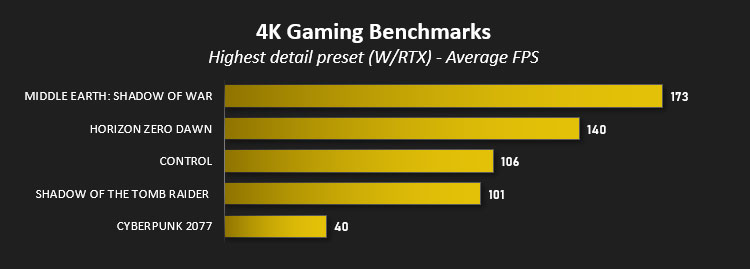
It’s a little more surprising that it makes the same arguments for a VRR 4K monitor, leveraging great performance to approach 4K @ 120fps averages in many titles. At all stages it trivialises Middle-Earth: Shadow of War as a challenge. Even Cyberpunk 2077, the most demanding of the bunch, worked hard to reach a >60fps average at 1440p, albeit requiring DLSS to do the same at 4K. We’re still not quite at the performance level needed to hit 4K60fps without DLSS on Cyberpunk, hovering at around 40fps, but it’s a testament to the card that it’s even playable.
Conclusion
Prior to this review the Infinity X129 Ti D5 from September 2022 was the most comprehensively equipped system we’d reviewed, and it’s safe to say that the Hydro Infinity X139 easily out-paces it in pretty much every aspect. Generational upgrades across the board, augmented bespoke water cooling to include the GPU as well as CPU, and an arguably more attractive overall package all go some way towards an increase in performance to another tier altogether. It’s built for 4K gaming and content creation much like the Infinity X129 Ti D5, but unlike its predecessor it lurches towards being a viable proposition. But it does come at a cost.
The £5000 price to bring it home is the obvious talking point here. Inflated component pricing across the board has punished all segments, including the premium and prosumer, and Cyberpower are trying to sweeten the package through plenty of flash to go with the additional substance. This isn’t a system for owners squeezing the most out of every single penny, instead it’s more about loading up with plenty of ‘nice to haves’ so it’s as complete a solution as possible.
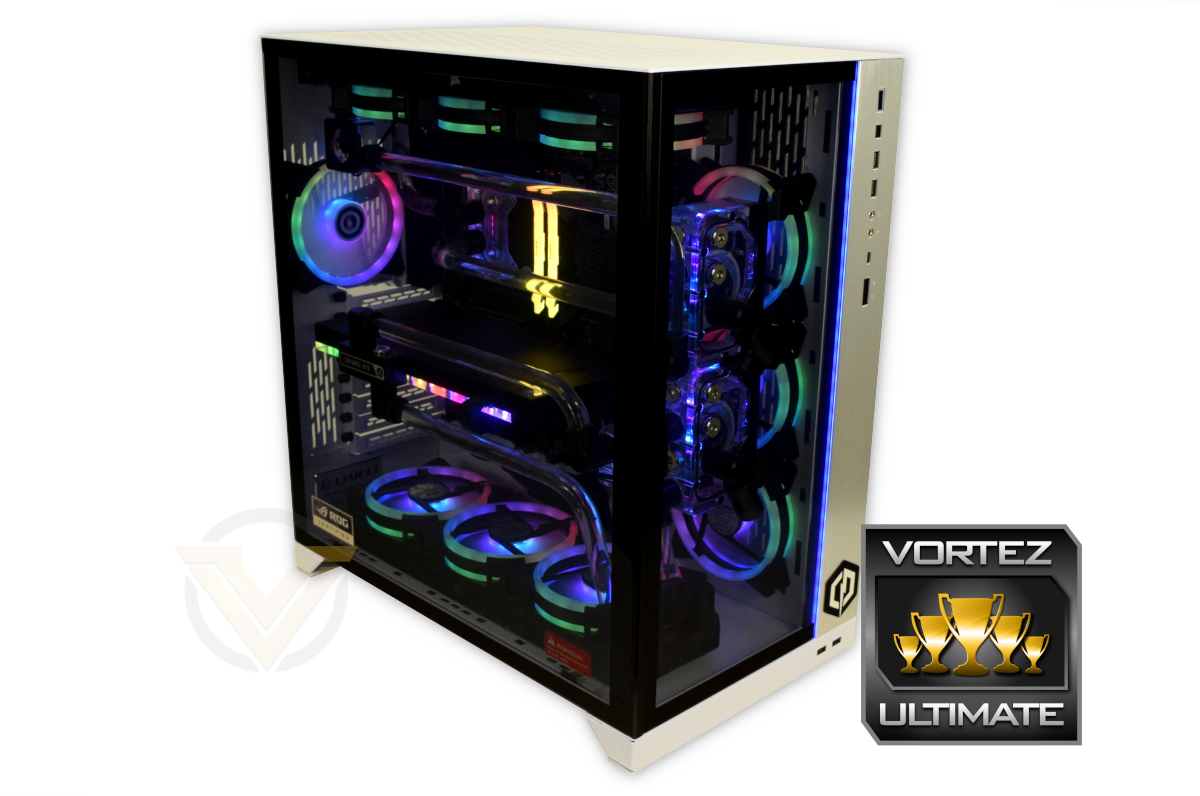
From the initial unboxing the system certainly has Wow Factor. It weighs a lot, to the extent that you might want to just double-check your desk’s load tolerances, but it’s immediately stunning. The cooling tube lines are just so clean, acrylic waterblocks shine, and of course Lian Li’s O11D XL is a fetching enclosure with few peers. Anyone presented with this system will immediately have a smile on their face, a smile that doesn’t disappear when you start putting it through its paces.
Both CPU and GPU are complete brutes performance-wise, trivially excellent in gaming and content creation. They’re the heirs apparent to the now broadly defunct HEDT class of desktop PC, shown by just how capable the system is compared to even its most recent precursor. It’s this sort of a system that would be ideal for the new class of 360Hz displays (for example) or any number of other new technologies that can take advantage of performance in new and innovative ways.
That being said, a monumental total system power draw far exceeding 600 Watts at the wall even under mere gaming loads speaks to how the landscape changes in a few short years. The system arrives with a 1000W PSU and we have no doubt whatsoever that going below this would be a mistake.
With high power draw comes large amounts of heat, which is a partial motivator for the water cooling solution assembled in the Hydro Infinity X139. Intel’s i9-13900K/KF and KS CPU models all seek to opportunistically hit their thermal limits of 100C to push all-core turbo frequencies as high as they can beyond their base clocks. Conventional gaming workloads aren’t enough to push this system to that extent, helping the CPU hover around 70C, but the amount of heat being pumped into the room becomes apparent very quickly.
RTX 4090 temperatures are quite a bit more controlled, hovering around the mid-40’s with a maximum junction temperature in the low 50’s. It’s benefiting greatly from existing in a separate loop from the CPU.
Perhaps the only significant reservation for us is the motherboard at the heart of this particular configuration. The MSI MAG Z790 Tomahawk has a few cut corners – most notably a lack of PCIe 5.0 M.2 support and troubleshooting tools – that this system justifies. It’s certainly adequate for the tasks it’s likely to face, but we were hoping for more. The same argument could be made for the included NVMe SSD but realistically you’re unlikely to hit a roadblock where relatively modest write performance is a problem.
In conclusion, Cyberpower UK’s Hydro Infinity X139 is a stunning premium PC boasting intimidating performance and an exceptionally clean dual-loop water cooling solution. The price is high but not unfairly so, and the skills on display in its assembly speak for themselves. If you have a budget this ‘premium’ and stringent requirements then this is a system you absolutely should consider.
Pros
+ Dominating performance
+ Cutting-edge technology
+ Competitive pricing at the premium end of the market
+ Eye-catching and attractive
+ Manageable temperatures, despite notorious components
Cons
– Weaker than expected motherboard
– Average SSD write speeds
– Exceptionally high power draw
– Requires a budget that many can only dream of
+ Dominating performance
+ Cutting-edge technology
+ Competitive pricing at the premium end of the market
+ Eye-catching and attractive
+ Manageable temperatures, despite notorious components
Cons
– Weaker than expected motherboard
– Average SSD write speeds
– Exceptionally high power draw
– Requires a budget that many can only dream of
Click here for an explanation of our awards at Vortez.net.
Stay connected with the Vortez Social Media pages:
Join in with the discussions on Discord