System Integrators are being held up as a bastion of calm in a time of strife for enthusiast PC gaming. How does Cyberpower PC’s latest stack up in the face of inflated GPU pricing?

Product Name: ICUE Infinity
Manufacturer: Cyberpower PC
MSRP (as configured): £1,749.00 inc. V.A.T.
It’s fair to say that times have never been tougher if you want to spec out and assemble a new gaming system. Silicon shortages, scalpers and a renewed engagement with cryptocurrency mining have made sourcing performance-class processors – GPU and CPU – more difficult than ever unless you’re willing to pay enormous premiums. Second hand hardware is spiking in price, and hardware two or more years old is being re-released to form a stop-gap until stock normalises… sometime in 2022.
Just prior to Christmas 2020 we reviewed the Ultra 7 RTX Elite, a system from Cyberpower PC in the UK powered by AMD’s Ryzen 5800 and the GeForce RTX 3060 Ti. At the time we opined that a system assembled by one of the wide selection of UK System Integrators might just be the most reliable way right now to really get the system specification you desire. A few non-essential parts might need to be compromised on, you might not be able to get the exact brand of graphics card you’d prefer (perhaps MSI rather than ASUS etc.), but in terms of getting a collection of hardware in a given performance band SI builds were the way to go.
The same appears to be true three months later. Parts for SIs are coming in more regularly, demand (and especially waiting lists) for entire systems isn’t quite as high as individual components, and at first glance pricing isn’t quite so inflated. That’s not to say you’ll always be able to place and order and get it next day, but you at least shouldn’t be held in pre-order limbo for months on end.
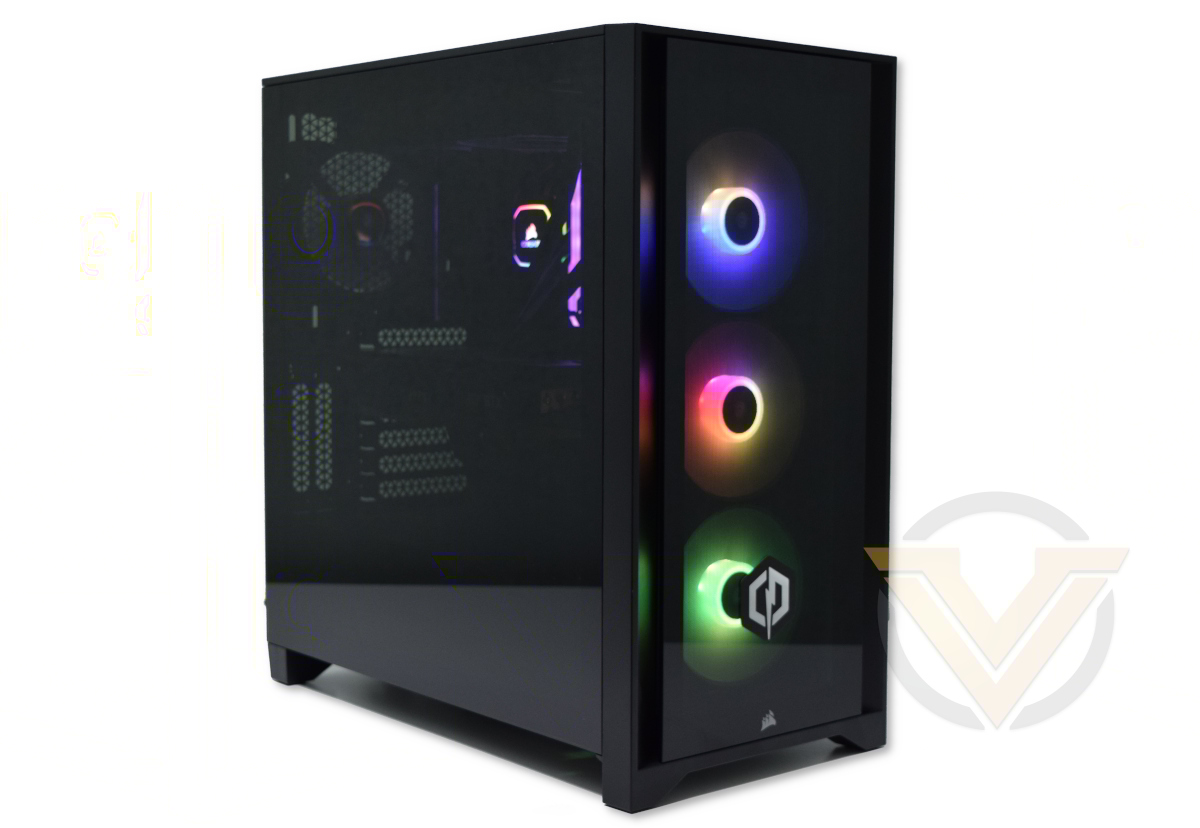
Take for example the system we’re reviewing today. As configured, Cyberpower PC’s ICUE Infinity is on paper a typical mid-tier gaming PC was a baseline specification oriented towards 1080p gameplay at greater than 60fps. Component customisation will allow plenty of flexibility but even these relatively modest aspirations can be un-done without its key component: NVIDIA’s GeForce RTX 3060. Released just last month, it brings new performance levels to the xx60-class of graphics cards on a par with last generation’s upper-mid-tier, and has flown off the shelves since launch. You’ll be hard-pressed to purchase the card alone today.
ICUE Infinity is ably buttressed by Intel’s i7-10700KF, a CPU with 8-core and 16-threads of thoroughbred horsepower, a cost-effective MSI Z490-A PRO motherboard, and CORSAIR Vengeance DDR4 3200MHz memory. And to sweeten the bundle in a way that makes it look like a million bucks Cyberpower PC utilised additional CORSAIR iCUE-powered components – including the new 4000X chassis – to give it the sort of bling you should expect from a quality SI.
So the question becomes, does the ICUE Infinity deliver on expectations of performance and affordability, or would it make you feel like the wait for standalone components is worth it? Let’s take a closer look.
About Cyberpower PC
Originally founded in the United States, Cyberpower Inc is one of the leading brands in the competitive US computer market. With vast global backing from leading technology brands such as Intel, AMD, Nvidia, Asus and Microsoft etc, we aim to deliver the most up to date hardware for your needs at wholesale prices, and bring the well renowned name of Cyberpower Inc to the UK. With vision, commitment and determination we can manufacture a vast range of custom built PC systems to suit the needs of any individual or company. Our PC systems are built with utmost care and attention as we strive towards making this not just our profession, but our obsession.
Technical Specifications
Processor: Intel Core i7-10700KF
Graphics Card: MSI GeForce RTX 3060 GAMING X 12G
Motherboard: MSI Z490-A PRO
Memory: 16GB CORSAIR Vengeance RGB PRO 3200MHz
Storage:
– 500GB WB Blue PCIe 3.0×4 M.2 NVMe SSD
– 2TB Seagate BarraCuda HDD
Chassis: CORSAIR iCUE 4000X
– External dimensions: 230 x 466 x 453 mm (WxHxD)
PSU: CORSAIR CX650
CPU Cooler: CORSAIR H100i RGB PRO XT
Additional:
Windows 10 HOME 64-bit
Graphics Card: MSI GeForce RTX 3060 GAMING X 12G
Motherboard: MSI Z490-A PRO
Memory: 16GB CORSAIR Vengeance RGB PRO 3200MHz
Storage:
– 500GB WB Blue PCIe 3.0×4 M.2 NVMe SSD
– 2TB Seagate BarraCuda HDD
Chassis: CORSAIR iCUE 4000X
– External dimensions: 230 x 466 x 453 mm (WxHxD)
PSU: CORSAIR CX650
CPU Cooler: CORSAIR H100i RGB PRO XT
Additional:
Windows 10 HOME 64-bit
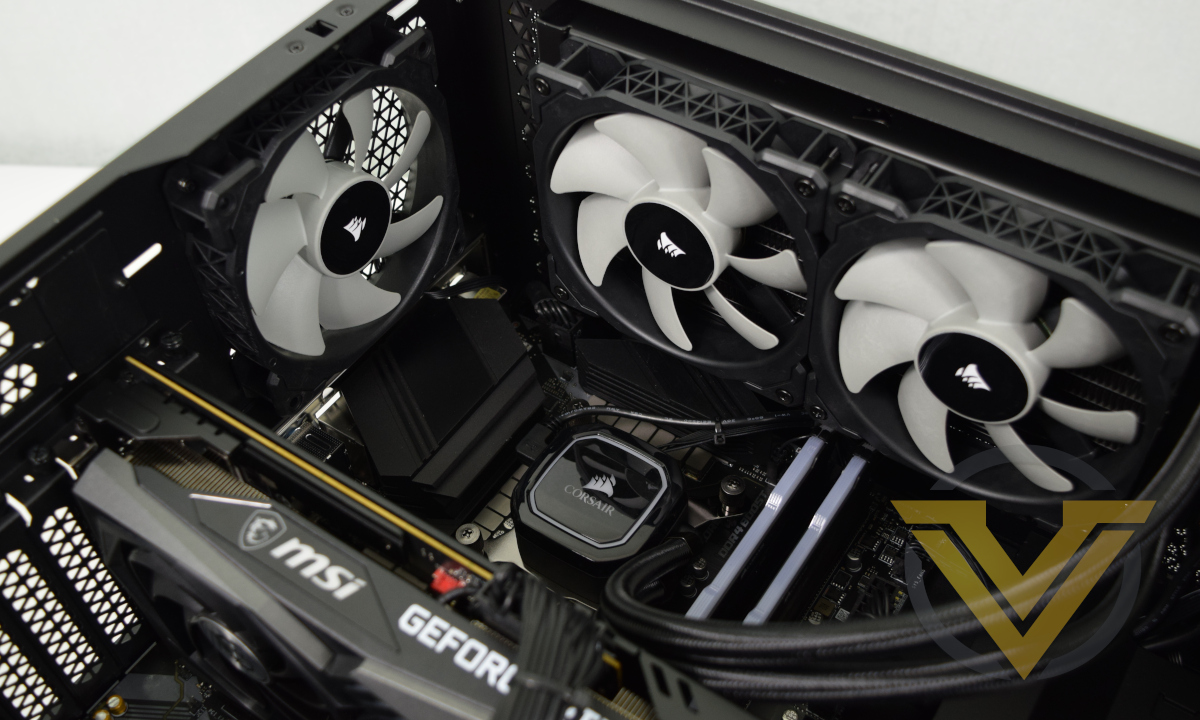
Intel’s Core i7-10700KF is an 8-core, 16-thread processor of 2020 vintage, launched mid way through last year as a stop-gap prior to the incoming 11th generation ‘Rocket Lake-S’ processors. Its speciality is high operating frequencies and an (at the time) class-leading IPC that put it ahead of the curve in gaming. As a ‘K’ class processor it’s unlocked for overclocking, while the ‘F’ suffix indicates that it lacks integrated graphics functionality. It was a well-balanced processor for gaming while simultaneously streaming, leveraging both relatively high core count and great IPC, but has come under pressure in recent months by AMD’s Ryzen 5800X. It will soon be supplanted by the 11th Gen. i7-11700K, but stock priorities may mean that it’s available at a compelling price for months to come.
CORSAIR’s H100i RGB PRO XT will do an ample job keeping the CPU cool. This 240mm AIO cooler will allow you to tweak the clocks higher if overclocking is your eventual preference, but perhaps more importantly should allow you to keep your overall system noise low at stock clocks. A series of fan profiles are available through CORSAIR’s iCUE software, with default fan curves based on expected tasks; we strongly advocate taking advantage of these.
NVIDIA’s GeForce RTX 3060 is a brand new entry-point into the RTX-powered gaming segment with support for real-time hybrid ray tracing and AI-powered upscaling. The reference specification pairs the GPU with 12GB of GDDR6 VRAM, ensuring that it’s not memory limited in modern games (the alternative being a 6GB configuration). It slips in under the RTX 3060 Ti with an MSRP from £299 (inc.V.A.T.), but demand for the chip and elaborate 3rd party implementations has made them difficult to find at this price point. Reviews placed their performance meaningfully higher than the RTX 2060 – the card it ostensibly replaces in NVIDIA’s product stack – and hits the right notes for 1080p gaming with all the bells and whistles enabled.
MSI have plenty of GeForce RTX 3060 flavours and this particular model is equipped with a beefy dual-fan Twin Frozr 8 cooler. The additional cooling headroom allows it to push a factory Boost overclock to 1837 MHz (from a reference Boost of ~1760 MHz), but more importantly enables the card to operate at its maximum Boosted speed for longer periods of time.
Meanwhile, the Z490-A PRO is perhaps the most entry-level component in this system. It’s not quite bare-bones, and the all-black colouring serves as an excellent blank canvas for the system’s RGB lighting, but it does lack some useful features such as integrated Wifi and a surfeit of USB ports. It does however incorporate a USB Type-C front panel header, a feature the iCUE 4000X by CORSAIR can take advantage of.
At 3200MHz and CAS 16-18-18-36 timings, this 16GB kit of CORSAIR’s Vengeance RGB PRO DDR4 isn’t the fastest available on the market. It is however some of the most attractive, featuring a diffuse RGB LED bar that can sync with other iCUE devices for a more complete lighting configuration. While 3200MHz may be more of a detriment on an AMD Ryzen system, it’s generally recognised as being more than adequate for one powered by Intel due to the CPU’s underlying architecture.
Finally, we come to the iCUE 4000X chassis. Last year David reviewed the 4000D, a mid-tower case with an identical internal layout that merely lacks some of the aesthetic features of the 4000X, so we won’t give a complete run-down of the enclosure. Its highlights are tempered glass panelling, iCUE compatible RGB LED fans, integrated Corsair Lighting Node Core and new Rapidroute cable management system.
The components chosen by this default configuration for the Cyberpower ICUE Infinity heavily emphasises CORSAIR’s iCUE family aesthetics. They’re of good quality, and you imagine would convey some well-deserved bragging rights when shown off to suitably impressed friends and relatives. But can you judge a book by its cover?
Value
Intel Core i7-10700KF:- 299.99
MSI Z490-A PRO:- 149.99
16GB CORSAIR Vengeance RGB PRO 3200MHz:- 99.98
CORSAIR CX650M:- 79.99
500GB WD Blue PCIe 3.0×4 M.2 SSD:- 54.99
2TB Seagate BarraCuda: 44.97
CORSAIR iCUE 4000X:- 109.99
CORSAIR H100i RGB PRO XT:- 114.98
Microsoft Windows 10 Home:- 96.49
Total:- £1051.37 inc. V.A.T.
Not accounted for:
MSI GeForce RTX 3060 GAMING X 12G:- UNKNOWN
MSI Z490-A PRO:- 149.99
16GB CORSAIR Vengeance RGB PRO 3200MHz:- 99.98
CORSAIR CX650M:- 79.99
500GB WD Blue PCIe 3.0×4 M.2 SSD:- 54.99
2TB Seagate BarraCuda: 44.97
CORSAIR iCUE 4000X:- 109.99
CORSAIR H100i RGB PRO XT:- 114.98
Microsoft Windows 10 Home:- 96.49
Total:- £1051.37 inc. V.A.T.
Not accounted for:
MSI GeForce RTX 3060 GAMING X 12G:- UNKNOWN
As part of the two most recent reviews of Cyberpower UK systems we included a section on ‘value’, the cost difference between buying the parts and assembling yourself versus this pre-assembled system in its entirety. Unfortunately things have changed considerably since even the halcyon days of… December 2020.
When totalled the combined street price of the components bought individually* – with the exception of the GPU – is £1051.37. You are therefore in effect paying a premium of £697.63 for the graphics card, assembly, delivery and 3yr limited warranty.
For the purposes of comparison we configured a similar system to include the GT1030 rather than the RTX 3060, the minimum specification GPU listed that is also widely available today for under £80. When configured in this way such a system came out at £1357 inc. V.A.T. for parts which at retail today cost ~£1130.
This implies that Cyberpower value their assembly etc. at ~£150-230, and the RTX 3060 GPU at £450-550.
However you wish to apportion the costs, its a valuation that many would deem to be excessive for a system in this performance category. Not three months ago the same SI was asking less than £1600 for a system equipped with AMD’s Ryzen 7 5800X and an NVIDIA RTX 3060 Ti. It would have a considerably less flashy exterior but far better gaming performance overall.
As far as pure value is concerned it’s not looking good at this stage.
*As priced on SCAN.co.uk just prior to publication
Packaging and Bundle
Cyberpower PC shipped the ICUE Infinity double-boxed. The iCUE 4000X packaging served as a secondary layer of protection, while a branded Cyberpower PC box housed both it and additional foam to cushion both front and rear. This adds just a touch more protection for the tempered glass of the iCUE 4000X, and helps to keep it safe against the sometimes mixed care taken by shipping firms. In this instance the ICUE Infinity arrived safely and without interior or exterior damage.
Cyberpower PC also fill the internal void within the tower with a foam that expands to fit the space, cradling components and keeping them in place. Removing it before first boot is an essential step, but the foam pack itself should be retained in case of an RMA.
Prior to first boot all internal connectors and components should be checked just in case they became dislodged or were disconnected prior to shipping.
The bundled accessories are barely worth mentioning this time around. A 3-pin PSU cable is included alongside spare AMD mounting hardware for the H100i CPU cooler, but nothing else. CORSAIR iCUE software handles this system’s RGB lighting configuration internally, and the motherboard lacks even the need for wireless antenna.
First Look
The ICUE Infinity is certainly an attractive monolith, and even on cursory inspection is a distinct cut above the already decent-looking ONYXIA II chassis we were treated to in our last system review. Having recently reviewed the Corsair 4000D we weren’t altogether surprised of course, but it’s notable that you still have the wow-factor despite this being a reasonably priced mid-tower enclosure.
Both the tempered glass front facia and side panel have a smoky tint that will very slightly cut the glare of internal LEDs, particularly those not part of the diffuse RGB bands on both the RAM and fans.
The 4000X’s air intakes thin slits are on either side of the glass facia. The channel narrows behind the facia such that the two intakes are only 0.5cm wide by 40cm high, greatly restricting the air even three 120mm fans can draw. This is likely the system’s major restriction when it comes to overclocking, and if preferred the airflow-optimised CORSAIR 4000D (with perforated front facia) can be chosen instead.
A modest I/O panel adorns the top of the 4000X, featuring a single USB 3.0, USB Type-C and combined headphone/mic port. Either side of this are the power and reset buttons, the former of which is illuminated. This location is ideal if the case sits on the floor or small pedestal, but also convenient if sat on a desk.
The rest of the roof is dominated by a mesh panel for exhausted air. A magnetic dust filter sits on it which is trivial to remove and clean.
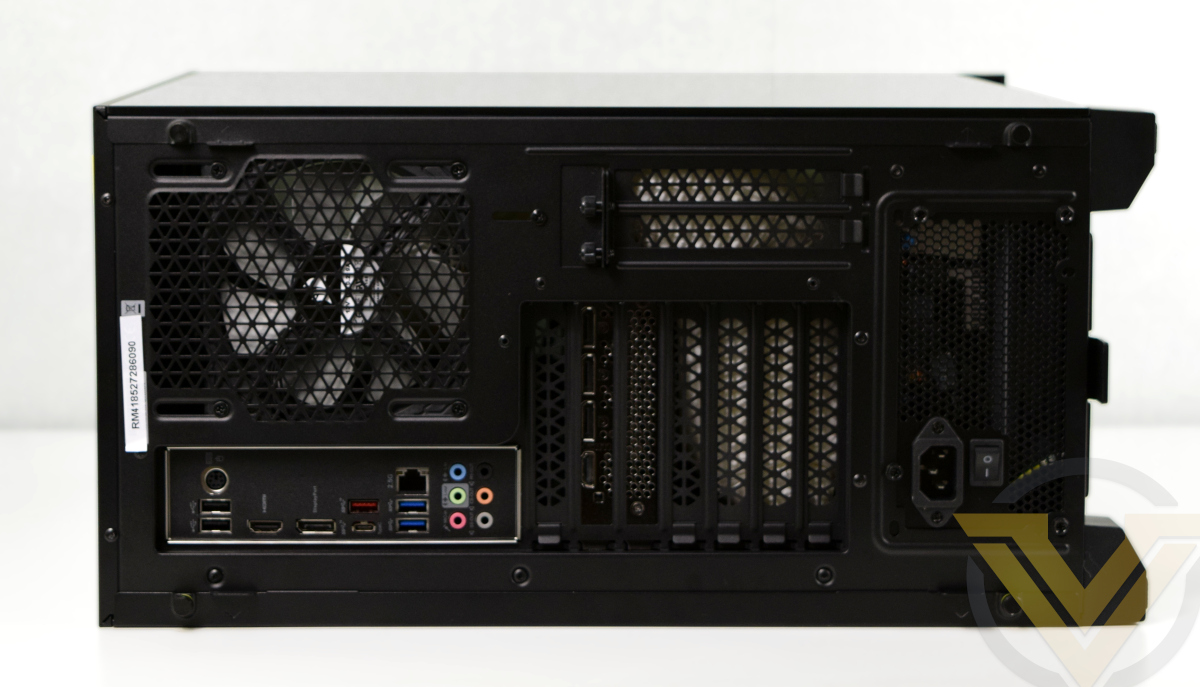
The rear I/O is exactly as basic as you should expect. MSI’s Z490-A Pro is a board with only the essential features, and you’ll only be treated to a handful of USB ports, audio, a single PS2 combo port, and the HDMI and Displayport that you’d be unable to use. One silver lining is the USB Type-C port.
Closer Look
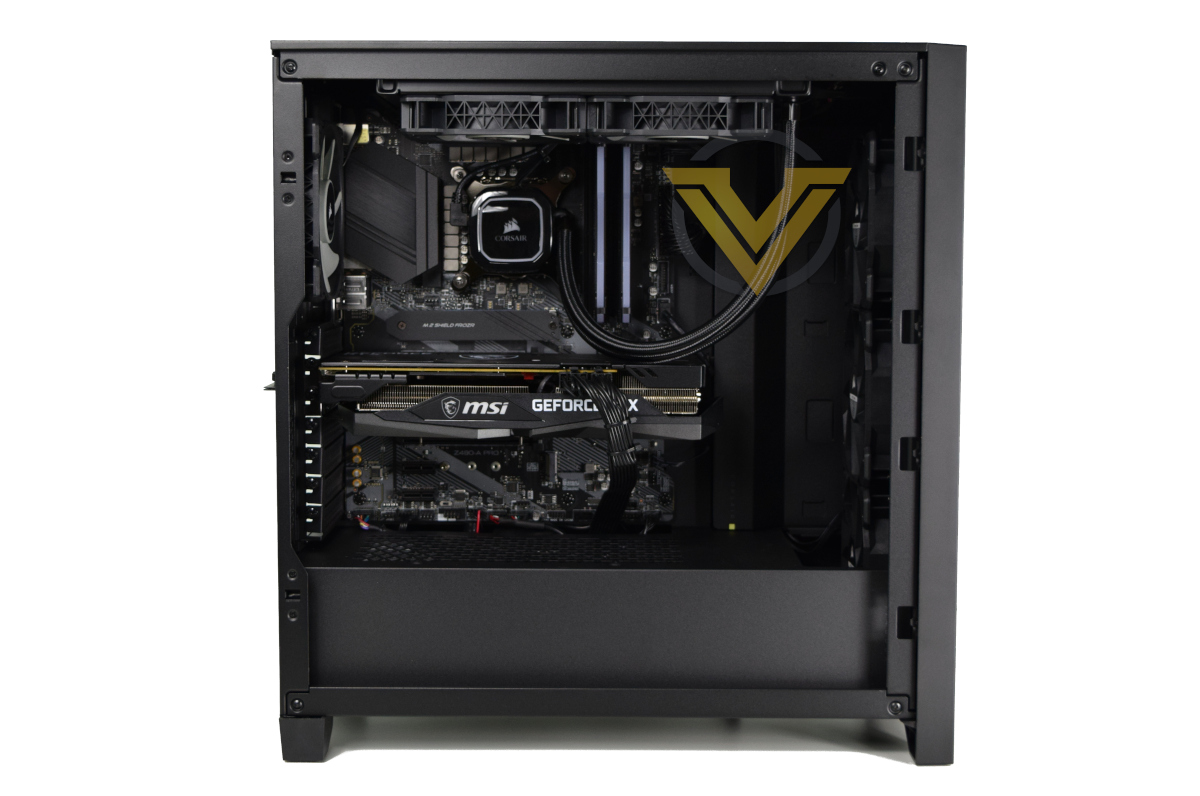
Removing the side panel exposes the iCUE Infinity’s internals for the world to see. We’ve been impressed by Cyberpower’s attention to detail in the past and this continues to be the case today.
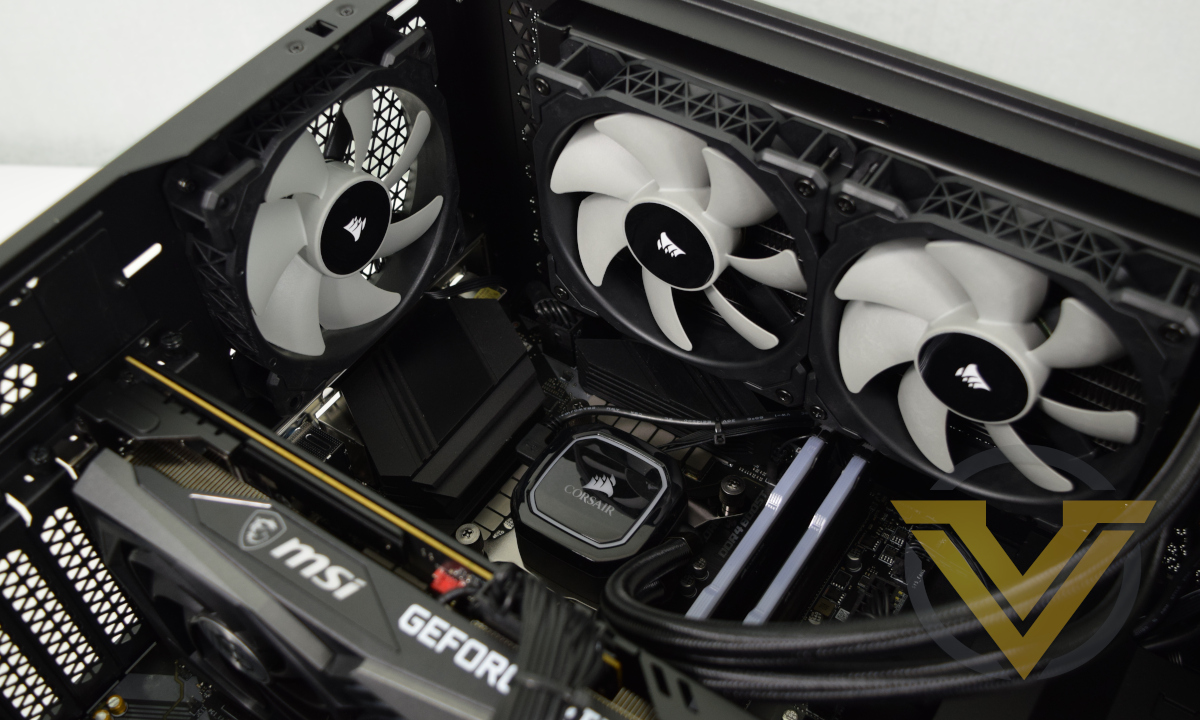
The trailing hoses of the H100i are as unobtrusive as they can be and the braiding sets them off nicely; in fact, only the GPU PCIe power cables stand out as being not quite in keeping with the tidiness as a whole. Thanks to a shroud shielding off the PSU (and its integrated cables) the excellent cable routing is displayed for an exceptionally clean build up to this point.
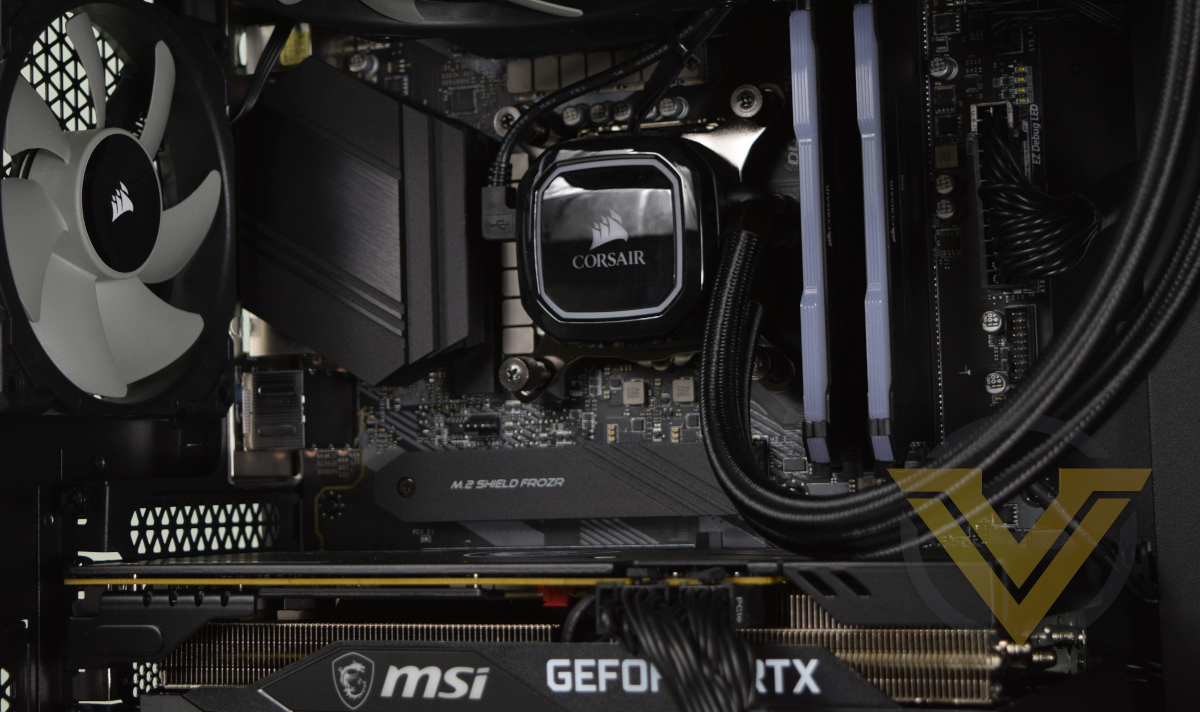
The motherboard-mounted M.2 SSD is hidden behind a heatspreader, which from an aesthetic perspective is an excellent choice. The system will however need good overall air flow to ensure that it is cooled adequately rather than act as a heat trap.
Only the three front fans incorporate RGB LEDs; those on the roof and rear do not. Still, the RAM, CPU pump housing and MSI logo on the GPU all also have some amount of configurable lighting available.
The lowest of the three front fans will direct air over the PSU compartment. Additional components mounted here – such as HDDs – will benefit even if the amount of air flow is relatively low. The PSU itself draws air in from the floor, and a filter will help to keep out dust.
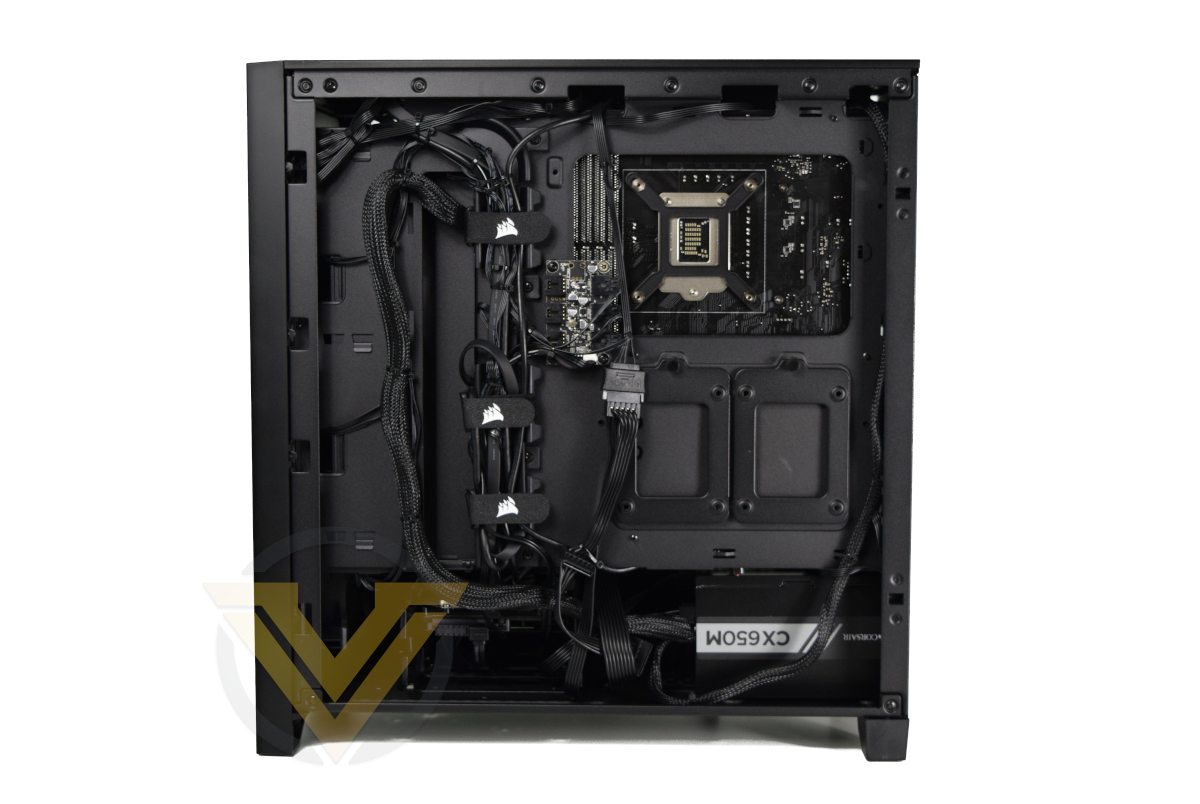
Opening up the other side panel exposes the impressive job that Cyberpower have performed to keep everything neat, even in areas that wouldn’t typically be seen. It also showcases the importance of Corsair’s Rapidroute cable management system. Bear in mind that this is with a non-modular PSU rather a more easy to handle modular unit.
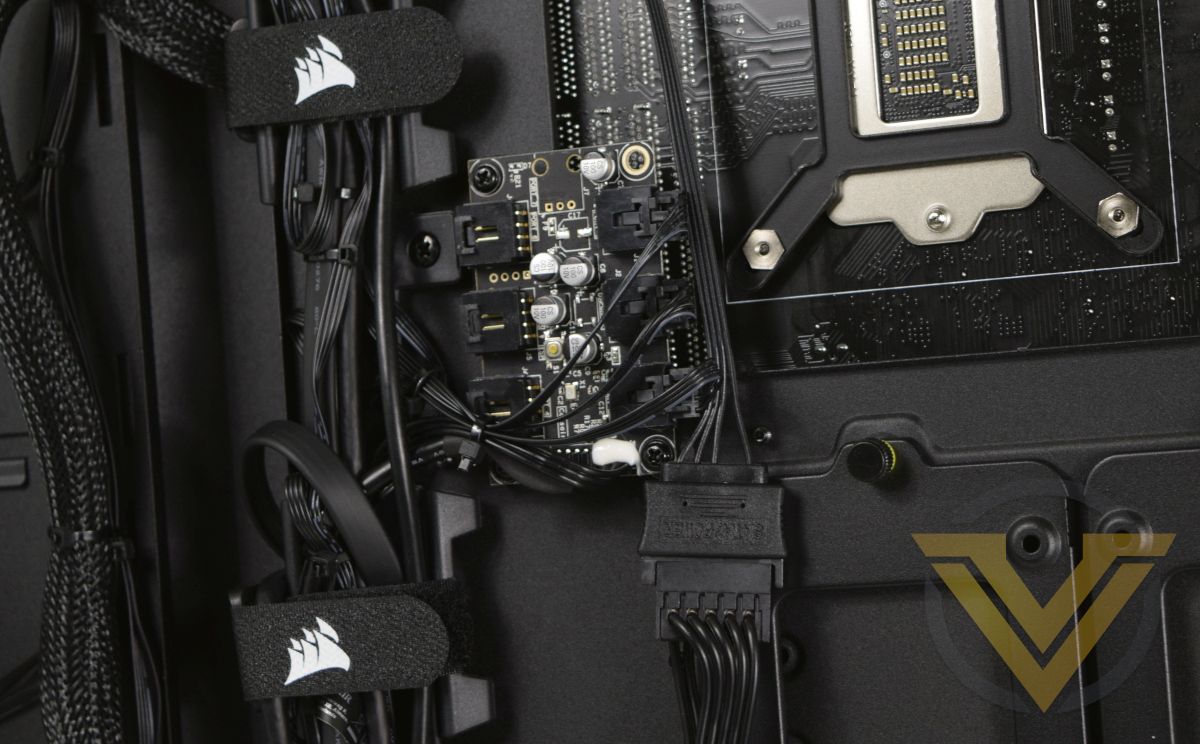
Despite the centrally placed Lighting Node hub there’s still plenty of free space for additional 2.5” drives attached to the back of the motherboard tray. One more 3.5” HDD can also be installed if necessary.
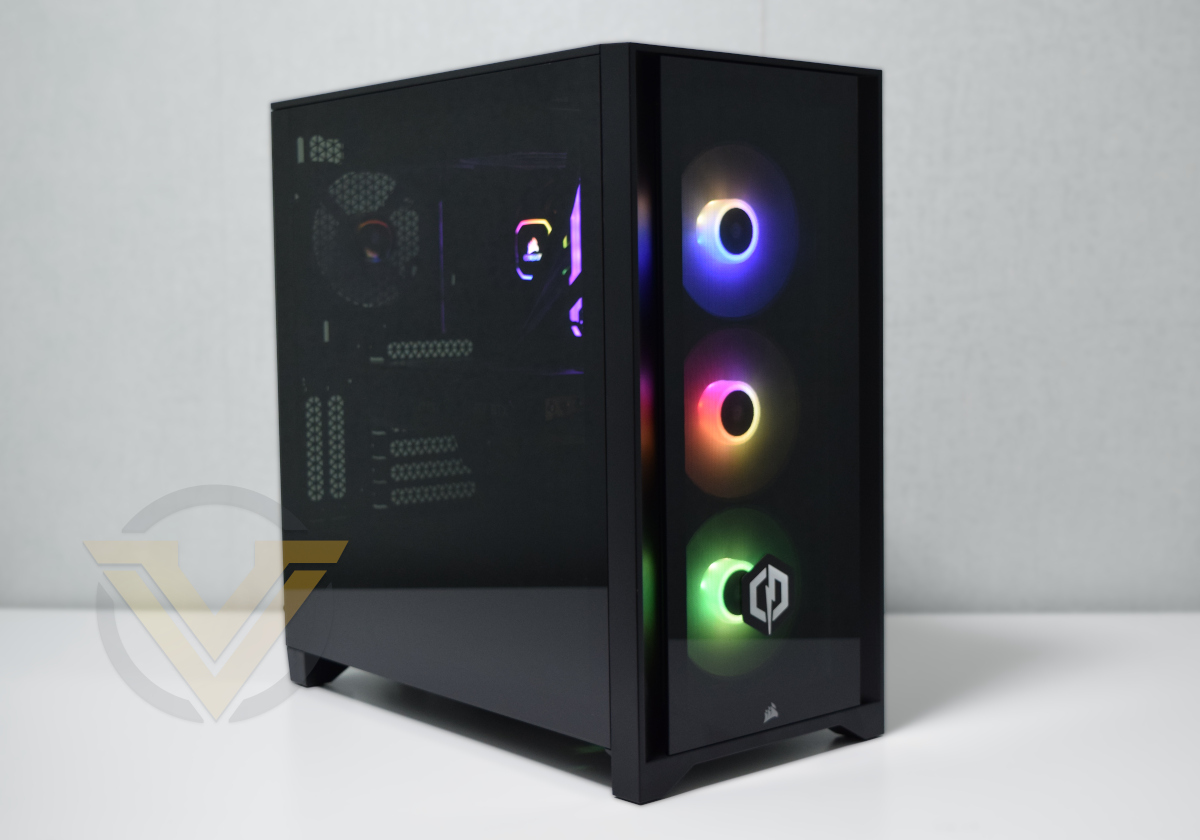
In operation, and without making any appreciable modifications to the default lighting scheme, this is the sort of result you can expect. The lighting is biased a little towards the front for our liking – a rear RGB 120mm fan would be a good addition to even things out – but it’s quite bright and very vibrant. The smokey panelling serves to reduce the brightness only a little, and cuts out some of the glare that can be caused by viewing blue-tinted LEDs through glasses.
Not that although disabled here the MSI logo on the graphics is capable of illumination, but not compatible with CORSAIR iCUE.
Benchmarks: Temperatures, Power Draw & Boot Time
In our first test we observe the max. CPU/GPU temperatures of the system while allowing Unigine Heaven 4.0 to run on a 30-minute loop with default system fan profile. Idle temperatures were read 10 minutes later, indicating how well the system exhausted latent heat. To report back on the temperatures we used Ryzen Master CPU package temperature readings and GPU-Z.
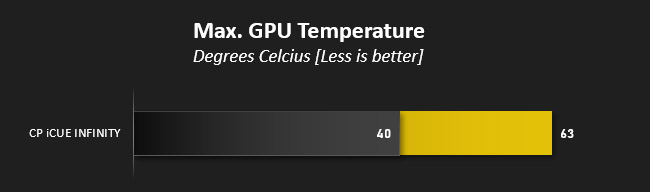
The MSI RTX 3060 GAMING X was able to maintain the card’s 60C target temperature thanks to the oversized dual-fan cooler, a design that is easily capable of handling the card’s rated 170W TDP. Just as significantly, a 2100MHz boost frequency was maintained for the entirety of its run.
The peak temp reached by the i7-10700KF was similarly low on the grand scheme of things, but this very much comes with a caveat. The default “balanced” iCUE fan profile for the H100i is *extremely* aggressive out of the box, ramping the fans to over 1900RPM even at temperatures which we would consider relatively low (55C). The ‘Quiet’ fan profile is much more gentle in its fan ramp, at the cost modestly higher temperatures. More broadly, relatively poor air intake would be a concern for longer gaming sessions or periods of heavy CPU workload unless the room itself was well ventilated.
—
System power draw readings at the wall were taken using a digital power meter during long idle and gaming load, allowing us to broadly assess overall power draw and PSU suitability. Lighting was disabled during these tests.

* We should also note that average power draw during gaming was ~265W.
80 PLUS Bronze Efficient PSUs are at the top of their rated efficiency curve at ~50% power draw, which for the Corsair CX650M is ~325W. There is therefore some additional headroom in this system for a faster CPU, GPU or overclock should the cooling be adequate. It may also be worth mentioning that the idle power draw is considerably lower than that of the 5800X/3060 Ti system reviewed in December.
If the ICUE Infinity was to form the basis of a system that will be upgraded over time then a higher rated PSU may not be necessary unless the user was graduating to a significantly more power-hungry GPU (such as the RTX 3080 and above). A similarly rated but modular PSU would make the act of installation a little easier however.
Windows 10 Boot Time

Intel once again has boot time licked, easily beating the AMD Ryzen system’s we’ve recorded thus far with a super quick 13.22 seconds. Mature BIOSes are a wonderful thing.
Benchmarks: Cinebench R20, R23 & 7-Zip
Cinebench is a real-world cross-platform test suite that evaluates your computer’s hardware capabilities. Improvements to Cinebench Release 20 reflect the overall advancements to CPU and rendering technology in recent years, providing a more accurate measurement of Cinema 4D’s ability to take advantage of multiple CPU cores and modern processor features available to the average user.
In October 2020 Maxon launched Cinebench R23. This release formulated an updated test that defined a notational runtime of 10 minutes for both single and multicore tests, minimising the impact of initial performance spikes caused by a high Turbo/Boost clock at the start. The scores generated are not directly comparable to the R20 results, but we’ve included them here for reference.
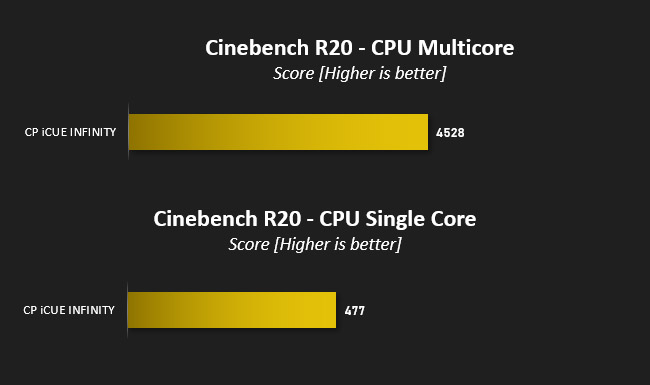
From these results we can clearly see the IPC gained by AMD with the release of the Ryzen 5000-series. The Ryzen 7 5800X – a similar 8-core, 16-thread CPU clocked at far lower frequencies – easily eclipses both single and multicore scores of the i7-10700KF by achieving 618 and 5792 respectively.
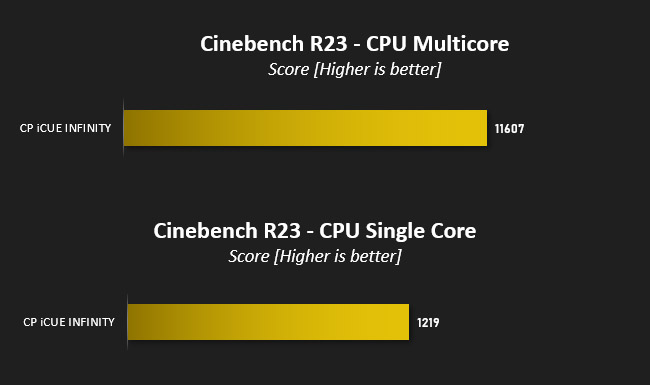
This finding is underscored by the Cinebench R23 scores gathered over much longer test runs. In simple terms: the 5800X is a more advanced CPU with great performance metrics, but it’s also a fair amount more expensive.
—
7-Zip is open-source software which unpacks compressed (zipped) files. It also features a benchmark which measures your systems ability to unpack files, typically stressing CPU and memory performance.
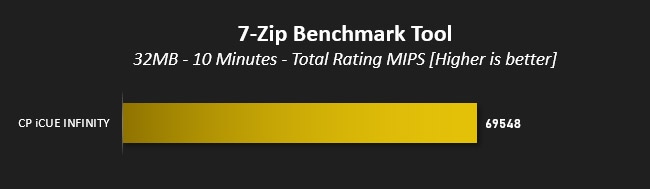
7-Zip’s multi-core benchmark tells a similar tail, garnering a total score of 69548 versus a crushing 92035 on the 5800X. This really underscores AMD’s architectural lead pre-Rocket Lake, but doesn’t necessarily translate into large gains in tests more representative of real-world scenarios.
Benchmarks: PCMark 10, Unigine Heaven & 3D Mark
PCMark 10 by UL combines performance benchmarking with battery life measurement where applicable and includes tests based on popular Adobe and Microsoft applications. Whether you are looking for long battery life, or maximum power, PCMark 10 will help you find the devices that offer the perfect combination of efficiency and performance for your needs. It’s the complete PC performance benchmark for home and business.

A PCMark 10 score of 6956 is well in line with expectations and represents a system well balanced for a mix of productivity tasks and gaming, but falls shorts of the heights of a similar system equipped with an i9-10900KF. The Ryzen-powered Cyberpower Ultra 7 RTX Elite once again easily outclasses it with a combined score of 7963.
—
3D Mark Time Spy by UL is a DirectX 12 benchmark test for gaming PCs running Windows 10. With its pure DirectX 12 engine, built from the ground up to support new API features like asynchronous compute, explicit multi-adapter, and multi-threading, Time Spy is the ideal benchmark for testing the DirectX 12 performance of the latest graphics cards.

A Time Spy combined score just above 8700 is roughly on par with expectations given the class of both CPU and GPU.The RTX 3060 Ti impressed us in December, but this system has far more modest aspirations.
—
Unigine’s Heaven 4.0 utility is a performance and stability test for PC hardware: video card, power supply, cooling system. Check your rig in stock and overclocking modes with real-life load! Also includes interactive experience in a beautiful, detailed environment.
While relying on a DirectX 11 API renderer rather than more modern DX12 framework, Heaven 4.0 and DX11 performance is still a relevant metric today.
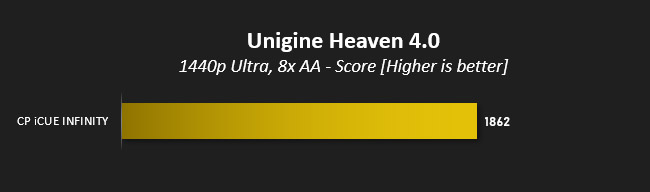
We’ve maintained Unigine Heaven 4.0 benchmarking at 1440p, with 8x AA and Tesselation set to moderate as a means of straightforward comparison to the Ultra 7 RTX Elite. The score attained do to a certain extent show the RTX 3060’s good rasterisation potential, but also indicate the magnitude to which it would fail to deliver at 1440p.
Benchmarks: Gaming (1080p)
If NVIDIA’s RTX 3060 Ti straddled the line between 1080p144Hz and 1440p60Hz gaming, the RTX 3060 is firmly entrenched in the former. We have therefore chosen to test at this resolution with high image quality settings to assess what informed owners of the system can expect from the hardware configuration.Mordor: Shadow of War
The oldest of our titles, Mordor: Shadow of War is still an exceptionally attractive game that utilises the DirectX 11 API. We expect it to be no match for the 2021 horsepower of the ICUE Infinity at 1080p Ultra settings.
Shadow of the Tomb Raider
The second sequel to the rebooted Tomb Raider franchise, Shadow of the Tomb Raider was also one of the first titles to incorporate NVIDIA RTX ray-traced shadows and DLSS. We’ll be testing with RTX on today, but DLSS is unavailable at 1080p.
Horizon Zero Dawn
This game was new to PC in August 2020 and already has a reputation for taxing GPU hardware. It doesn’t feature ray tracing, but nonetheless has some of the most stunning scenes ever rendered in games. We’ve used the Ultimate preset here, but Favoured also offers a visual feast with markedly higher performance.
Control
Critically acclaimed on release, Control is the title which made most comprehensive use of NVIDIA RTX prior to Holiday 2020. Shadows, lighting and reflections all make use of this advanced rendering standard, helping the transition from mundane world to its nightmarish reflection. We opted for the Highest settings preset with RTX features enabled including the default recommended level of DLSS: a rendering resolution of 1280×720.
Tests were performed with NVIDIA’s GeForce Game Ready 461.72 WHQL Driver.
The oldest of our titles, Mordor: Shadow of War is still an exceptionally attractive game that utilises the DirectX 11 API. We expect it to be no match for the 2021 horsepower of the ICUE Infinity at 1080p Ultra settings.
Shadow of the Tomb Raider
The second sequel to the rebooted Tomb Raider franchise, Shadow of the Tomb Raider was also one of the first titles to incorporate NVIDIA RTX ray-traced shadows and DLSS. We’ll be testing with RTX on today, but DLSS is unavailable at 1080p.
Horizon Zero Dawn
This game was new to PC in August 2020 and already has a reputation for taxing GPU hardware. It doesn’t feature ray tracing, but nonetheless has some of the most stunning scenes ever rendered in games. We’ve used the Ultimate preset here, but Favoured also offers a visual feast with markedly higher performance.
Control
Critically acclaimed on release, Control is the title which made most comprehensive use of NVIDIA RTX prior to Holiday 2020. Shadows, lighting and reflections all make use of this advanced rendering standard, helping the transition from mundane world to its nightmarish reflection. We opted for the Highest settings preset with RTX features enabled including the default recommended level of DLSS: a rendering resolution of 1280×720.
Tests were performed with NVIDIA’s GeForce Game Ready 461.72 WHQL Driver.
It’s nice to see a system so well equipped to deal with sensible resolution and image quality settings. The ICUE Infinity munched through Mordor: Shadow of War at 1080p Ultra, easily topping 100fps for a silky smooth experience if you’re gaming with a G-SYNC monitor and marking the game out as one with fading relevancy (for benchmarking) for even this class of GPU except for legacy purposes.
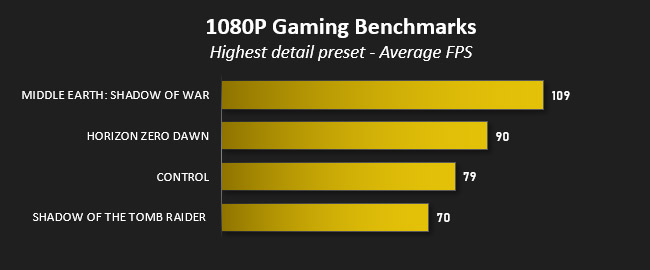
Shadow of the Tomb Raider was a sterner test. Without RTX Shadows but engaging the Highest image quality presets and SMAAx4 anti-aliasing the game maintained an average of 81fps hitting a minimum of 62. That’s a sweet spot to be in, but was undermined once RTX Shadows were enabled at high. Average frame rates cratered to 53fps with a minimum of 35, but knocking the anti-aliasing standard back to TAA pushes the frame rates back to a more creditable 70 average and 50 minimum (as indicated).
Horizon Zero Dawn results were a pleasant surprise. An average FPS of 90 with minimums at 48 at Ultimate settings is a great 1080p experience, and knocking image quality down to Favored unlocks average frame rates over 100fps. Pair this system with a great 1440Hz G-SYNC panel and you won’t be disappointed.
Finally, Control once again shows the performance impact of RTX ray tracing. At a standard 1080p with no Ray Tracing we achieved an average of near 80fps. Rendering at a native 1080p with RTX ray tracing set to high net an average of 48fps however.
Although certainly playable, you’ll want to adjust settings to find a quality sweet-spot that allows this system to hover at or above 60fps. For instance, knock down the rendering resolution to 720p through NVIDIA DLSS and it’s possible to greatly increase FPS to the level shown above.
The results strongly indicate how well suited the system is to 1080p gaming with RTX features enabled dependent on the game, and reinforces our perception that 1440p resolutions would be inappropriate for it in demanding modern titles.
Conclusion
With the home PC industry reeling due to over-inflated GPU pricing and the scarcity of some other components, System Integrators have been held up as an essential alternative avenue for assembling your dream gaming system, preferably without the premium. On the evidence of today we may need to start looking for another messiah.Cyberpower PC’s ICUE Infinity is an exceptionally well put together system range, peppered with RGB lighting and held together with the glue that is CORSAIR’s iCUE software. Components operate in harmony and Cyberpower PC’s overall ICUE Infinity category of systems may well be more tempting if the range is updated to Intel’s 11th Gen. Rocket Lake-S series of CPUs later this Spring. Match these aesthetics with cutting-edge hardware and you’ll certainly have a package to be reckoned with.
However, there is an elephant in the room, and he’s no Dumbo. The premium you’re paying here, for some mixture of assembly, delivery, warranty and the GPU, is substantial. Where previously Cyberpower’s assembled systems offered excellent value for money, asking £700 for this combination in addition to the £1000 for every other component on the list is excessive under market norms prior to the last three months. Recommending that anyone barring the most desperate purchase this is just not something we can do.
And to our frustration we cannot simply lay the blame at Cyberpower PC’s door. Demand for GPUs is as great as it ever has been, the price Cyberpower are asking is close to today’s market prices, and clearly reflects what they expect to pay for GPUs once the system is assembled and shipped. Calling on them to charge MSRP when they’re sourcing at a up to a 50% mark-up is deeply unrealistic.
In fairness they also seem to be getting GPU shipments in regularly. Lead time for this system is 3 weeks at the time of publication, and it’s not infeasible that you’d be waiting a lot longer for a RTX 3060 on retailer pre-order lists. In today’s market a customised but pre-built system still seems like the most reliable way to source a GPU for a new gaming PC, much as we might wish for that not to be the case.
In other respects the ICUE Infinity hit the right notes. Assembly is clean, presentation is excellent, the part selection (and those available through the customiser) can allow for a very attractive setup even if they are available off the shelf. The time taken and skill required to put the system together and ship securely isn’t trivial, no matter how snooty enthusiasts can be about pre-builts.
To conclude – your Princess is in another castle, Mario. Cyberpower PC’s iCUE Infinity may cut a striking figure but the components inside and £1750 price you pay is eye-watering for a rig configured for 1080p gaming. Should you need a full system in a month this might be a valid proposition but, if you have any sort of GPU to borrow or re-use near to this performance bracket, then you will be better served purchasing each other part individually and assembling yourself.
Pros
+ Attractive system thanks chiefly to the iCUE 4000X Chassis
+ Customisable Linked Lighting (Corsair iCUE)
+ Exceptional build quality
+ Best way to reliably source an RTX 30-series GPU
Cons
– Price
– Almost obsolete Intel 10th Gen CPU and Z490 motherboard
– Estimated 3 weeks from order to shipping lead time
– 1080p performance for 1440p money
– Not for critics of CORSAIR components or iCUE software
– Oh crikey, the price
+ Attractive system thanks chiefly to the iCUE 4000X Chassis
+ Customisable Linked Lighting (Corsair iCUE)
+ Exceptional build quality
+ Best way to reliably source an RTX 30-series GPU
Cons
– Price
– Almost obsolete Intel 10th Gen CPU and Z490 motherboard
– Estimated 3 weeks from order to shipping lead time
– 1080p performance for 1440p money
– Not for critics of CORSAIR components or iCUE software
– Oh crikey, the price
Click here for an explanation of our awards at Vortez.net.
Stay connected with the Vortez Social Media pages:
Join in with the discussions on Discord