Cyberpower PC have put together a budget configuration of their Ultra 55 Series, but is this <£800 system a compromise too far?

Product On Review: Ultra 55 Next Day PC
Manufacturer: Cyberpower PC UK
System Price (UK MSRP): £799.20 inc. V.A.T. (as configured)
Introduction
Summer has returned, its erratic heat beating down on the Northern Hemisphere as children, young adults and lucky others enjoy well-earned time off. Many will be spending it outside soaking up some rays, but an increasing number will be parked inside enjoying the plethora of new games available on PC in recent and coming months. Furthermore autumn is still months away yet the next educational year will be haunting some thoughts, with diligent preparation already underway. So what better time to invest in a new system, angling for one that doesn’t wage war on the wallet?
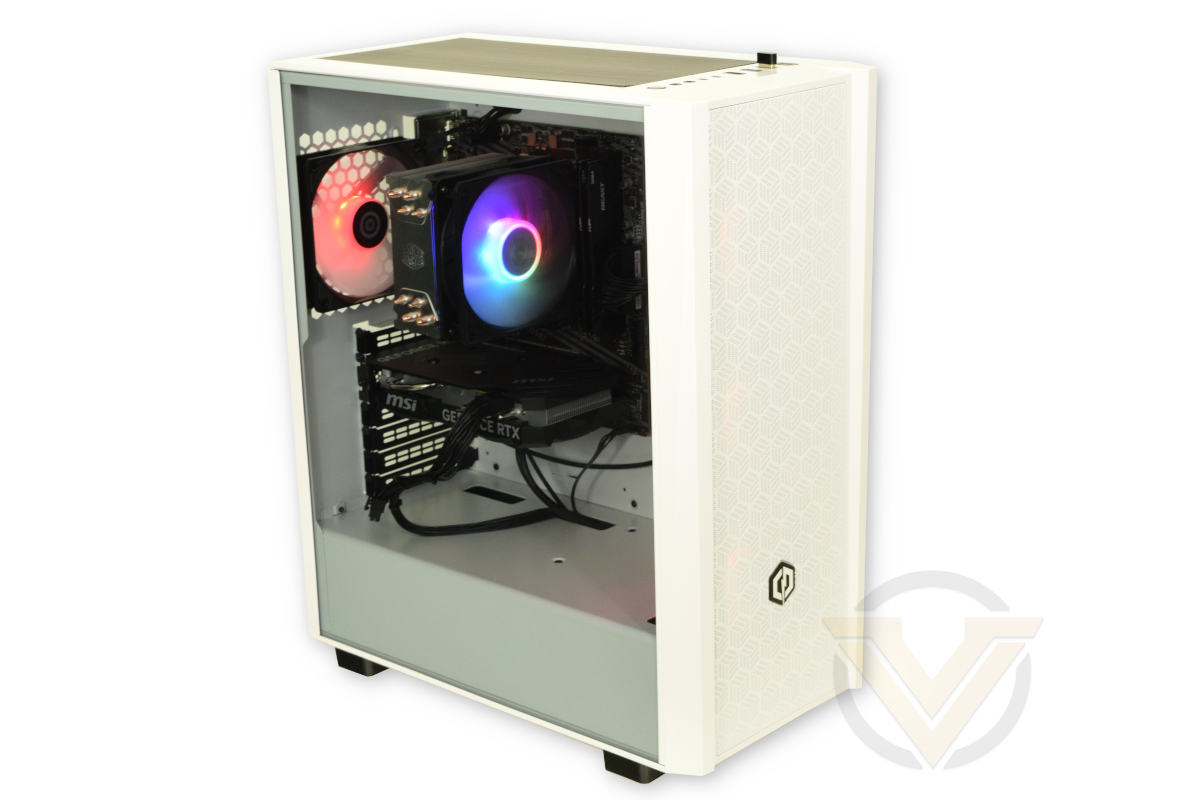
For this we’re returning to Cyberpower PC UK, eschewing their high-end systems in favour of an affordable variant of their Ultra 55 pre-configured range. This Ultra 55 is built on AMD’s entry-level AM4 platform with a configuration that targets 1080p gaming, but following-through with scope for later upgrades should your needs change over its life-span.
The Ultra 55 is an uneasy balance of parts necessitated by the needs of building to a tight price point. Its beating heart is AMD’s Ryzen 5 5500, a 6c/12t CPU that has been paired with an MSI A520 chipset motherboard and DDR4 RAM. Cooling it is Cooler Master’s Hyper 212 Spectrum, an attractive model of air cooler that will easily handle the system’s processor.
These veteran components are joined by an NVIDIA GeForce RTX 4060 8GB, itself a modest upgrade over its predecessor but still up to the task set. As a 40-series GPU it supports all of NVIDIA’s latest RTX technologies including hardware-accelerated ray tracing, DLSS, DLAA and (potentially crucially) frame-generation technology; it is however firmly pigeonholed into 1080p resolution gaming due to its 8GB frame buffer.
Joining the mATX A520 motherboard and 16GB of DDR4 memory is a 1TB M.2 SSD from Kingston. That’s capacious enough for the Operating System and plenty of games, and will ensure fast boot times and generally smooth OS operation. Games too will benefit, although the results will tend to be more subtle except in isolated instances such as specific MMOs and RPGs.
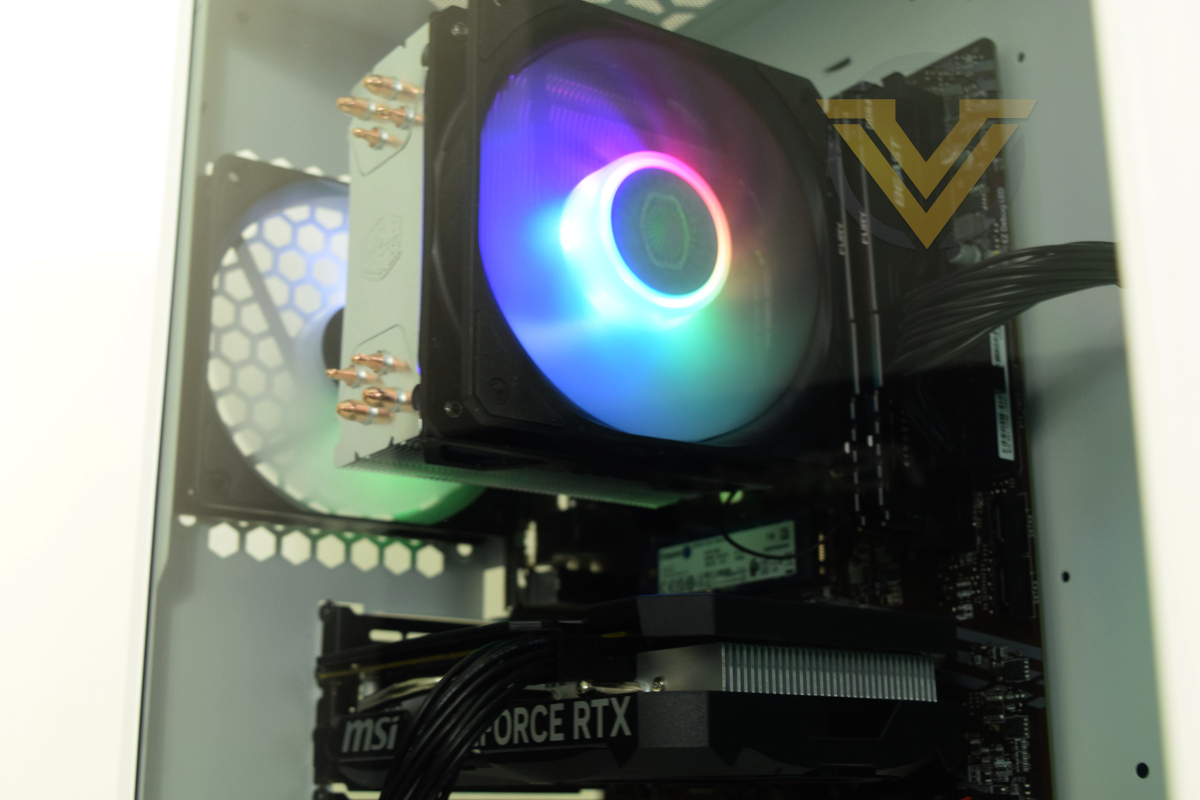
Putting the finishing touches to the setup is the Cyberpower-branded mid-tower chassis, complete with four 120mm RGB fans. An Inwin B65E 650W PSU keeps the system ticking while allowing for some modest additions to the base specification over time. Finally, this review system also shipped with an optional ASRock 100Hz 1080p monitor, on-paper an ideal complement to finish off a package that’s almost immediately ready to unbox and start gaming.
At £799.20 inc. V.A.T. and delivery, this system is at the upper-end of what we’d deem to be a budget system. It’s still a considered purchase but also comes in well under the important £1000 threshold. We’ll find out how it stacks up in terms of value for money shortly.
Technical Specifications
CPU:- AMD Ryzen 5 5500
GPU:- MSI GeForce RTX 4060 8GB
Motherboard:- MSI A520M-A PRO
RAM:- 16GB (2x8GB) DDR4/3200MHz Kingston Fury Beast Memory Kit
Storage:- 1TB Kingston NV2 M.2 NVMe SSD
Power Supply: Inwin B65E 650W
Operating System: Windows 11 Home
Case: Cyberpower PC Eluna ATX Case /w 4x ARGB Fans (485mm x 410mm x 210mm (HxLxW))
Display: ASRock CL25FF 100Hz 1080p Gaming Monitor
AMD’s Ryzen 5 5500 is a Socket AM4 6-core, 12-thread CPU from the Zen 3 family of processors. It’s a member of a workhorse tier but differences from the Ryzen 5 5600 are pronounced due to being derived from the Cezanne architecture, to the extent that they will affect its real-world performance. The Ryzen 5500 only supports PCIe 3.0 signalling, which will effectively halve the bandwidth available to the RTX 4060, and is equipped with half the amount of L3 cache (16MB) as its bigger brother. Its performance is closer to the Ryzen 5 3600/3600X, a fine CPU but perhaps not what would be expected given its lineage.
By opting for an older AM4 processor the 5700X3D and 5800X3D are available as a premium future slot-in upgrades should needs arise. AMD also continue to release affordable AM4 processors as upgrade paths for Ryzen 3000-series CPUs that should also serve as potential low-cost upgrade targets. This aspect of the build shouldn’t impact current purchasing decisions – we would ideally recommend adopting the AM5 platform should your budget stretch that far – it is an aspect of the bundle that’s worth keeping in mind.
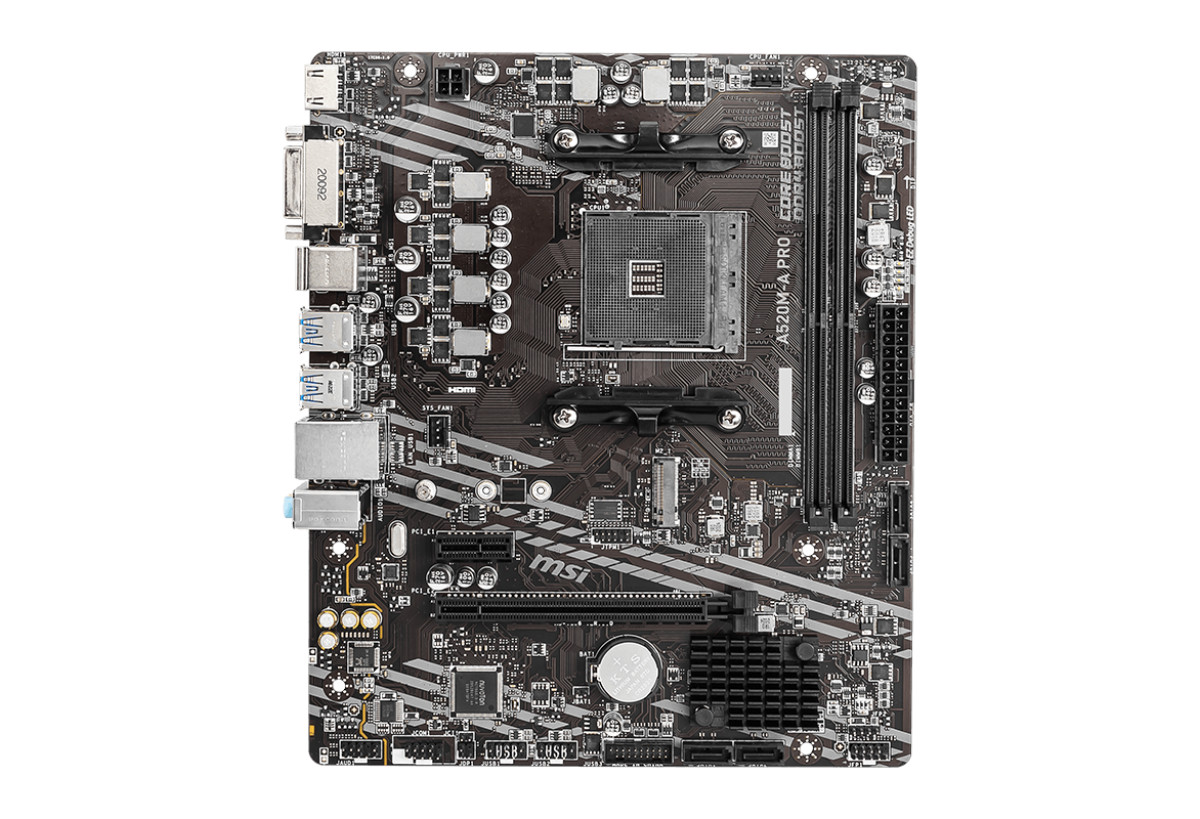
The A520 chipset for socket AM4 is very much a no-frills solution that is restricted even compared to the B550. It supports only PCIe 3.0 signalling – not that much of a factor given the Ryzen 5500’s limitations, but also offers little in the way of IO such as USB. You won’t want to overclock processors given its modest 4+2 phase power delivery, but it should be able to comfortably handle stock speeds up-to the 105W-rated Ryzen 5000-series lineup (including X3D chips).
This revision of MSI’s A520M motherboard has very limited USB (four 3.0 + two 2.0) and fan (2 headers including CPU) provision, the latter of which Cyberpower have compensated for by daisy-chaining the four chassis fans from one motherboard header..
Today 16GB of system memory is a minimum for gaming and the Ryzen 5000-series’ underlying architecture thrives on fast memory. A bump to either 32GB or 3600MHz memory would have been a nice little buff for performance in the long term.
CPU cooling is much more reasonably provisioned for with Cooler Master’s Hyper 212 Spectrum. The solid but unspectacular design looks great and should keep the CPU well below thermal limitations, but we would recommend tweaking the fan speed curve to get a nice balance of cooling and noise with minimal ramping.
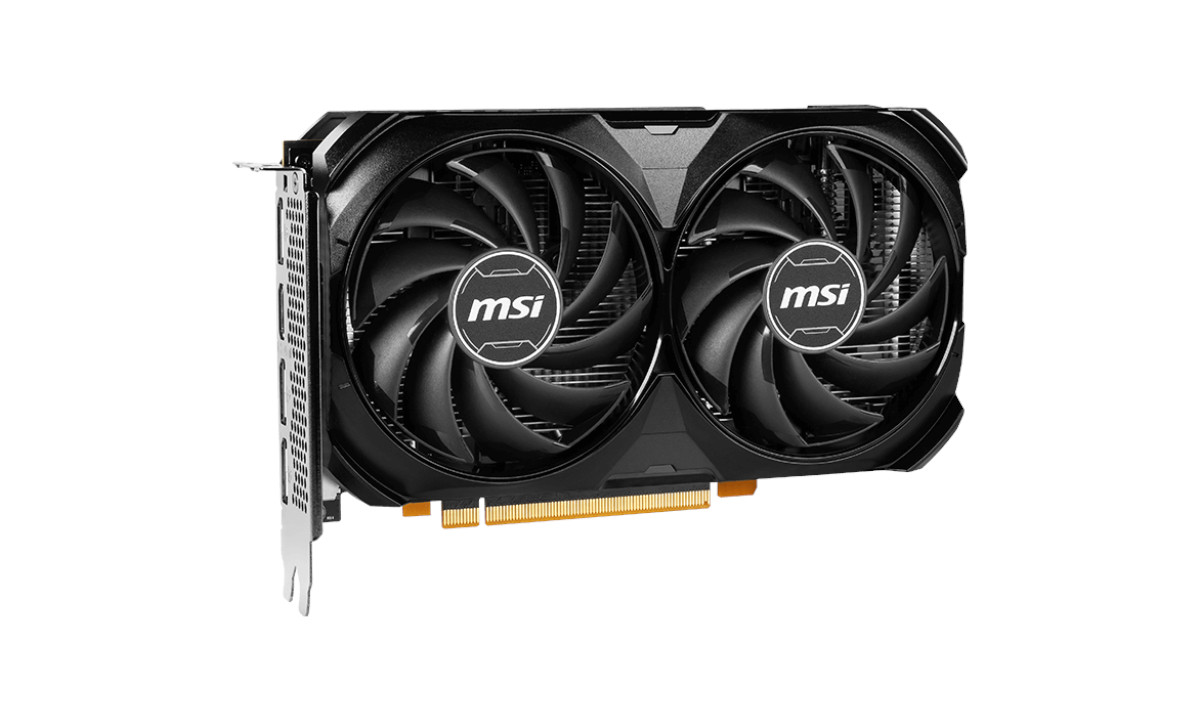
Now to the largest contributor to the overall cost of the system, the MSI RTX 4060 VENTUS 2X 8GB BLACK. We have in the past noted criticism aimed at this family of GPUs (i.e. RTX 4060 and 4060 Ti) stemming from lacklustre raw performance uplift over the RTX 3060. Since then the retail price of these cards has fallen significantly, but the limitations of 8GB VRAM are even more striking than a year ago. As a 40-series card it also supports DLSS 3 Frame Generation and the plethora of cutting edge RTX technologies for which 30-series compatibility is patchy at best. Gaming at 1080p should be good with this card in the vast majority of scenarios, yet stretching to 1440p is not realistic in most modern games unless paired with NVIDIA’s proprietary upscaling technologies. The most taxing titles, such as Cyberpunk with ray tracing enabled, might require upscaling from lower resolutions even at 1080p.
The RTX 4060 communicates to the CPU through eight PCIe lanes of speeds up to PCIe 4.0, but the Ryzen 5 5500 and A520 chipset motherboard are each limited to PCIe 3.0 signalling. As a result the GPU will be limited to the bandwidth offered by just eight PCIe 3.0 lanes, with a knock-on estimated impact on gaming performance of 1-10% depending on the title being played. To remove this bottleneck both motherboard and CPU would need to be changed, a factor that should be planned around for long-term system upgrades.
The MSI Ventus 2X GPU cooler is a dual axial fan design that should have no issue keeping the GPU cool under long-term load, presupposing that case airflow is up to the task. This model has a modest (30MHz) factory overclock over reference specifications with a further 15MHz bin available using the MSI software.
NVMe storage remains competitive even with higher performance PCIe 3.0 and 4.0 drives, and with videogame storage requirements booming it’s nice to see a 1TB drive in an ostensibly budget system. Kingston’s NV2 is a model that can make the most of its four lanes of PCIe 3.0 signalling, and is ample for the OS and a significant volume of software. Storage is expandable through four SATA ports for 2.5/3.5” SSDs and HDDs drives but there is no second M.2 slot.
The final point worth voicing is some minor trepidation over the InWin B65e PSU. InWin are certainly a reputable brand but there is very little information available about both this PSU, particularly its reliability. It should be able to handle this particular system easily, as well as straightforward additions such as more storage and fans. Where we would draw a line, based purely on a lack of information rather than evidence one way or another, is a significant GPU upgrade to a much higher tier of card. If in a future upgrade to a RTX 4070 or similar class was planned, even if it ostensibly only requires a 650W PSU, a model with more provenance would be in order.
Value
Core Component Retailer Itemised Pricing
AMD Ryzen 5 5500:- £90
MSI GeForce RTX 4060 VENTUS 2X BLACK 8GB:- £270
MSI A520M-Pro:- £56
16MB (2 x 8GB) 3200MHz DDR4:- £32
Kingston NV2 1TB NVMe SSD:- £56
Hyper 212 Spectrum V2 CPU Air Cooler:- £30
Cooler Master MWE 650W Bronze V2 PSU:- £55
Cyberpower PC Eluna ATX Tower Case & 4 x 120mm RGB Fans
USB 802.11ac Wireless Network Adapter:- £5
Windows 11 Home (Retail Download) – £120
ASRock CL25FF 1080p 100Hz Monitor: £75
Total (UK component etailer at time of publication): – £789 (inc. VAT, excl delivery)
MSI GeForce RTX 4060 VENTUS 2X BLACK 8GB:- £270
MSI A520M-Pro:- £56
16MB (2 x 8GB) 3200MHz DDR4:- £32
Kingston NV2 1TB NVMe SSD:- £56
Hyper 212 Spectrum V2 CPU Air Cooler:- £30
Cooler Master MWE 650W Bronze V2 PSU:- £55
Cyberpower PC Eluna ATX Tower Case & 4 x 120mm RGB Fans
USB 802.11ac Wireless Network Adapter:- £5
Windows 11 Home (Retail Download) – £120
ASRock CL25FF 1080p 100Hz Monitor: £75
Total (UK component etailer at time of publication): – £789 (inc. VAT, excl delivery)
Weighing whether to self-build rather than purchasing from an SI is especially difficult when budgets are constrained. Every penny given up to the SI is one not spent on a component, and in the case of the Ultra 55 you aren’t given the usual flexibility of choosing different components from a short list. It’s built to a cost, so what you see is what you get.
Note also that the constituent components of Cyberpower’s pre-built systems can vary slightly over time, for example a different brand of RAM or GPU, or case options might change. Actual performance is unlikely to change to any great degree.
The differential between Cyberpower PC’s Ultra 55 and the UK etailer pricing of core components individually is a £10, excluding case and fans but including Windows 11 Home. The case supplied with this system is a hefty cut above usual OEM enclosures from system integrators, but the PSU remains an unknown quantity despite its very reputable brand. It seems fair to allocate £50 to the case, fan hub and fans in a vacuum, putting us significantly in net gain total costs even before factoring in assembly, delivery and warranty.
Unsurprisingly the GPU dominates the parts budget allocation but isn’t out of place against the Ryzen 5 5500. The CPU and motherboard combination is logical but does make later upgrades awkward in a way that opting for the B550 chipset wouldn’t have. An RTX 4060 8GB does make sense, but only so far in that it’s the entry-level ‘modern’ 40-series card.
This strikes us as good value in an absolute sense if and only if you’re purchasing the entirety of the system completely from scratch. Free up the £120 required for a retail copy of Win11 and your budget is significantly more flexible at this price point in a way that would offer a meaningful performance uplift and future upgrade potential. It pays to keep those old Windows OS keys around.
Packaging and Bundle
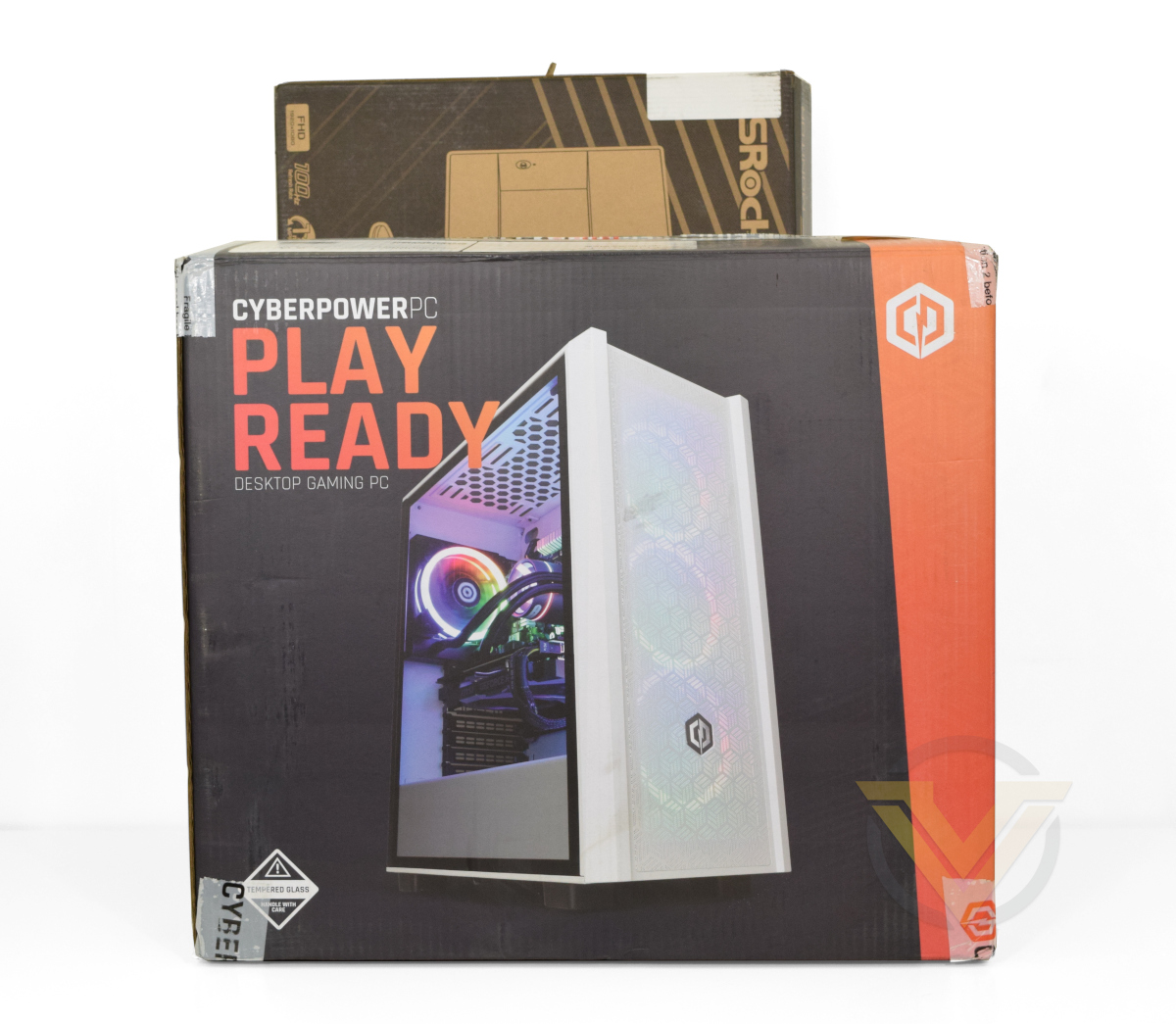
Cyberpower PC shipped this Ultra 55 single-boxed in the packaging of its chassis with an additional box for the 27” ASRock monitor if opted for. The system is cushioned by cellulose foam at least 2cm thick at each corner, providing some protection from bumps during transit.
Protecting internal components is a large pocket of expandable foam that’s contoured to hold heavier parts, particularly the GPU but also the CPU cooler, in place. It’s advised that all the packaging is retained just in case the system needs to be returned in the event of a RMA.
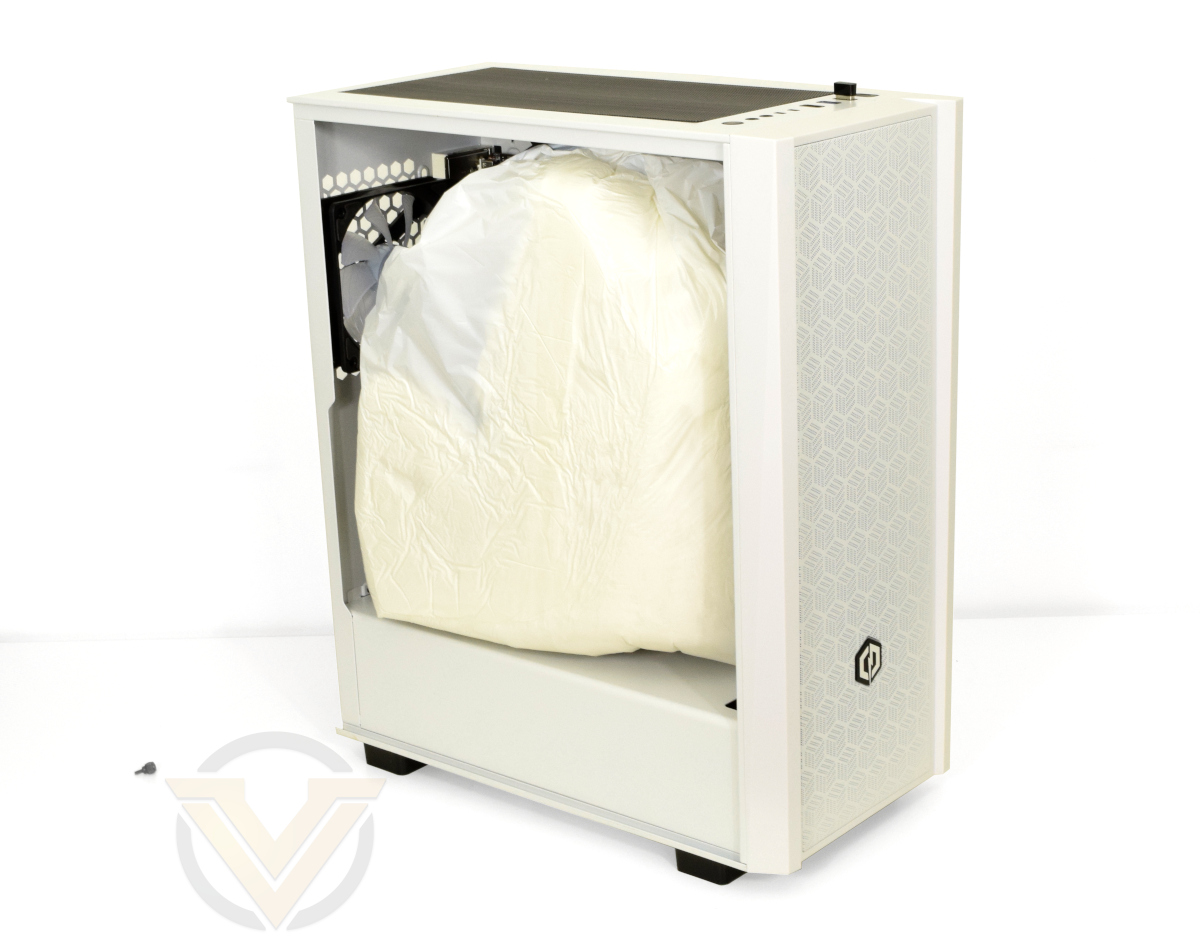
Cyberpower PC also ensures that all relevant accessories – i.e. motherboard bundled cables, wireless USB adapters, surplus PSU cables etc. – are included in the delivery package in case you choose to add to the system after purchase. These arrive in a branded zipped bag that can be used for longer term storage.
A cloth shroud protects the system, particularly its tempered glass window, from scratches during shipping and unboxing. As a matter of course Cyberpower also leave on the plastic protection for acrylic and tempered glass windows.
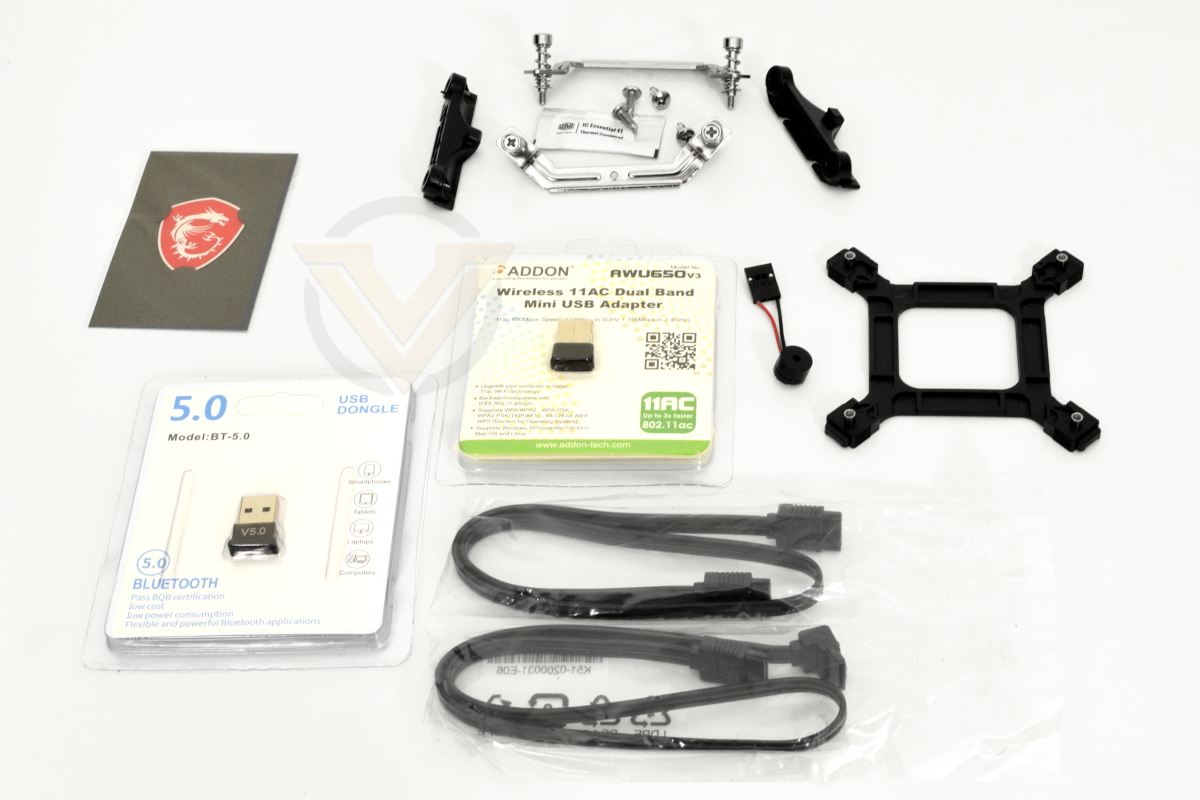
System accessories, including alternative mounting hardware for the CPU cooler
Closer Look
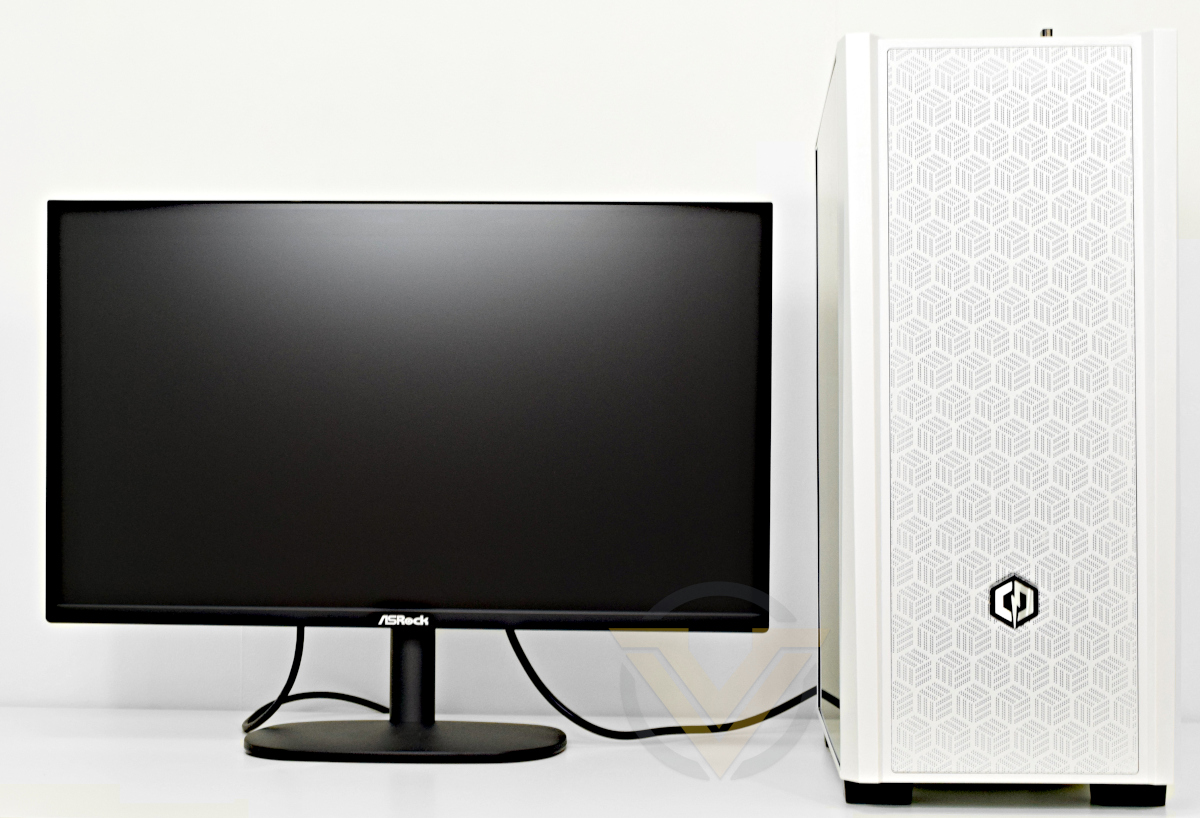
Cyberpower PC supplied a very interesting chassis with this particular system that they’ve branded the Eluna. It’s outwardly similar to a mainstream Corsair or Lancool model, complete with tempered glass side panel, magnetic dust filters and mounting point for additional AIO cooling and system storage. It also has exceptionally clean lines with only subtle ‘gamer’ aesthetics, making it in our eyes one of the more attractive that Cyberpower have available in their self-branded range. The perforated front fascia might be a little tight for air flow but that’s really overly criticising the design.
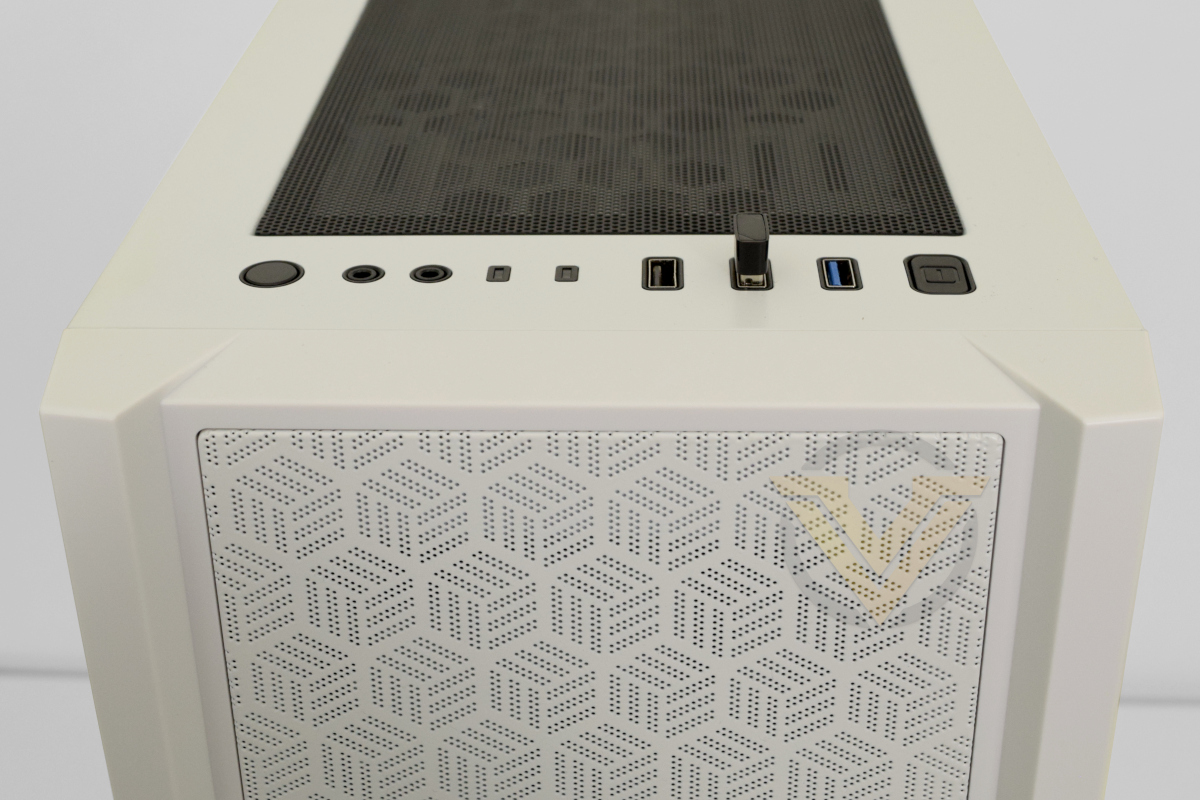
The case emphasises air flow with wide front fascia perforations and filtered intakes on the front and floor. Three 120mm fans are installed in the front as standard, while a single 120mm fan exhausts. There’s space in the roof for additional fans and an AIO cooler up-to 280mm in size can be installed, but more exotic solutions would be a challenge given the lack of space to work with internally.
The left hand side panel is full height tempered glass, displaying both system components and an extended PSU shroud. Four thumb screws affix the side panels in place.
The top is another well ventilated zone with a magnetic dust filter that’s removable for cleaning. I/O is located on the front, comprising Mic and Headphone ports, two USB 3.0 ports, a USB 2.0 port, reset button and power button. A further magnetic dust filter is on the floor of the case for PSU air intake.
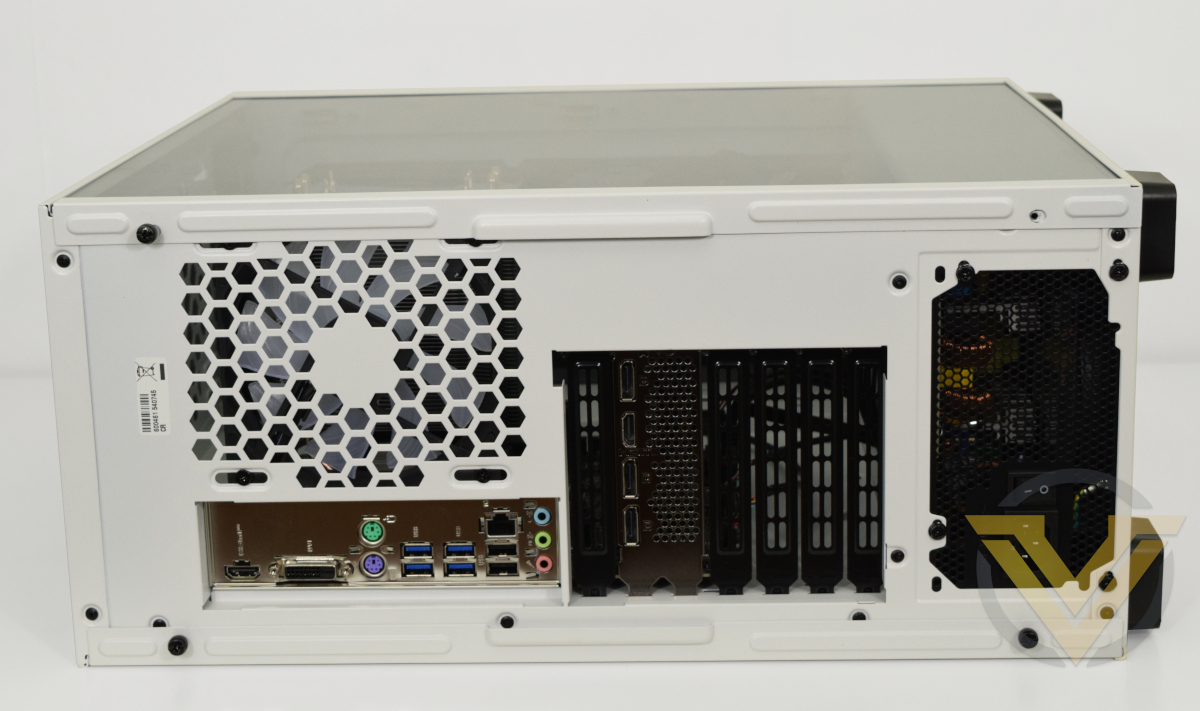
The rear has a standard I/O panel and plain shield. I/O options include (from top to bottom):
– HDMI for onboard graphics
– DVI-D display out for onboard graphics
– PS/2 ports for Keyboard and Mouse
– 4 x USB 3.2 Gen 1 (5 Gbps)
– 2 x USB 2.0 & RJ45 (GbE LAN)
– 3 x multifunction audio jacks
– DVI-D display out for onboard graphics
– PS/2 ports for Keyboard and Mouse
– 4 x USB 3.2 Gen 1 (5 Gbps)
– 2 x USB 2.0 & RJ45 (GbE LAN)
– 3 x multifunction audio jacks
Display outputs on the motherboard back panel are functional only when an APU with integrated graphics is installed.
A lack on on-board wireless networking options means that up-to two USB ports will need to be occupied by wireless networking and/or Bluetooth adaptors if required.
Given the case extends a little under 500mm in height and with I/O ports located on the top, it’s not best suited for sitting under a desk. On top, or ideally alongside given its size, would be preferable.
Closer Look (Internal)
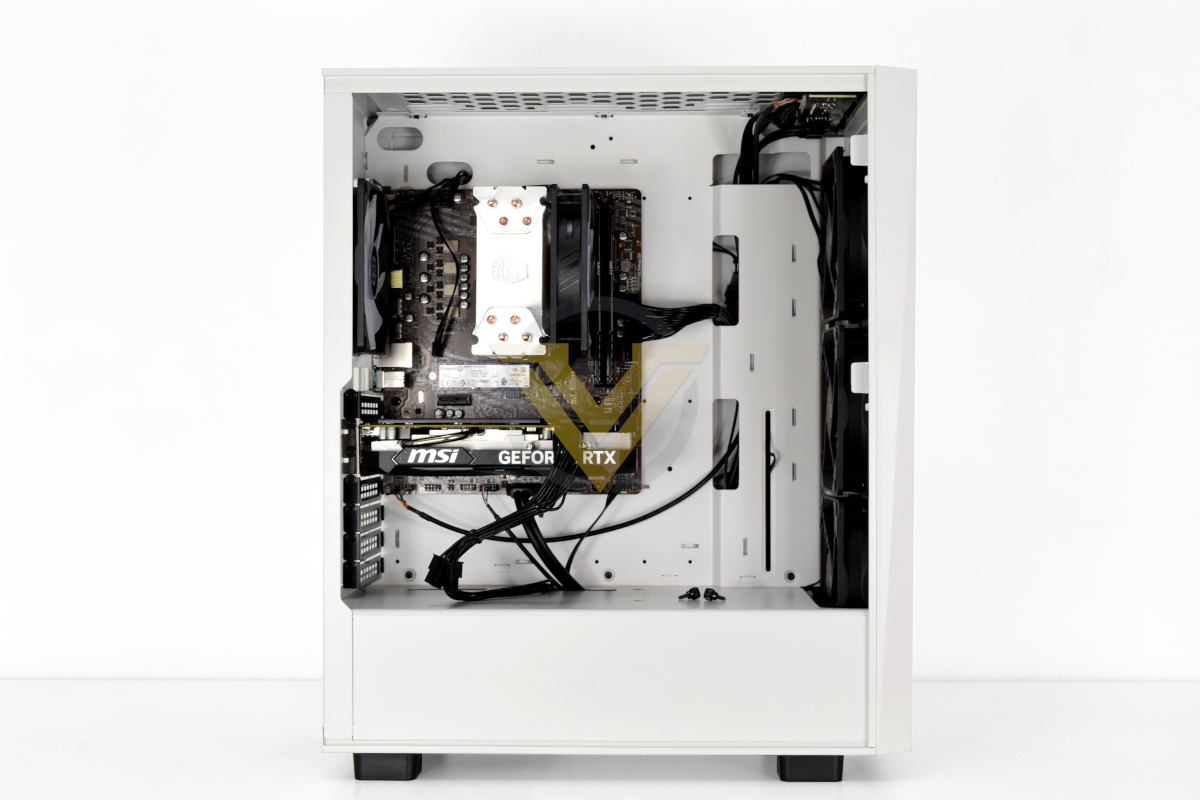
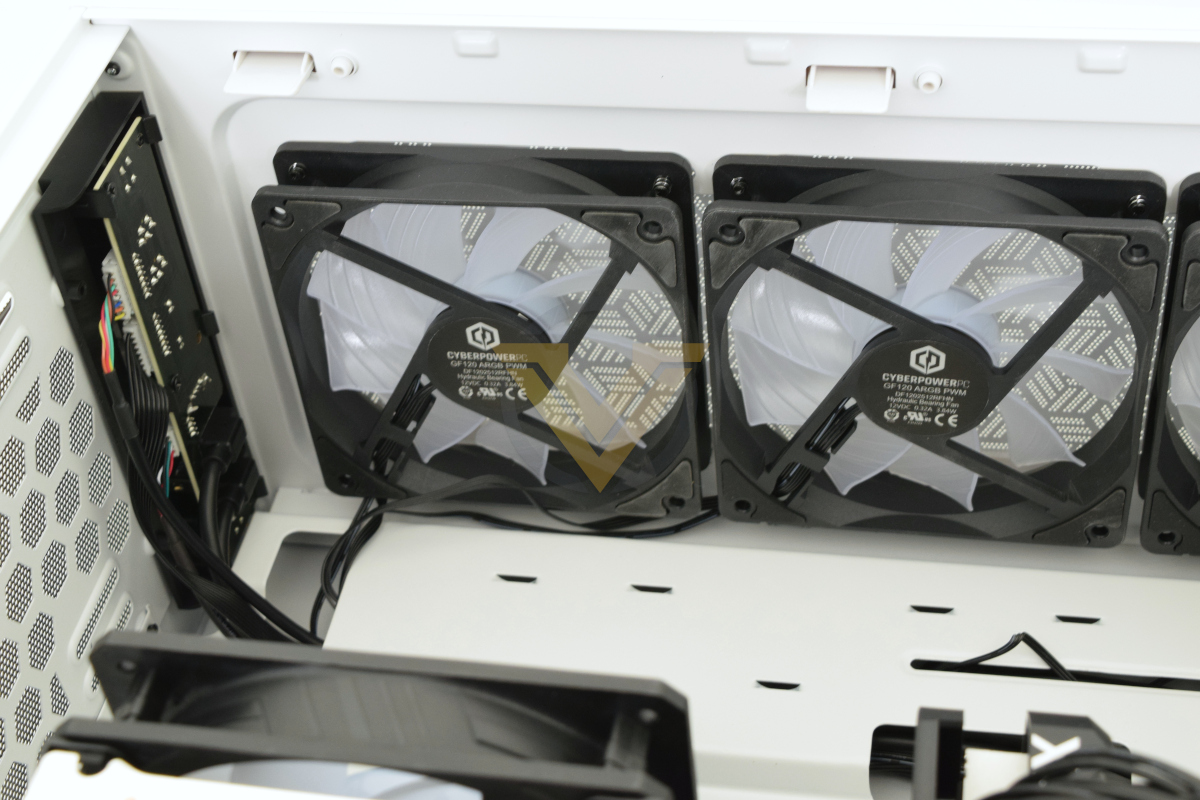
Sliding off the glass side panel exposes the Ultra 55’s guts and shows just how underutilised the case is for this system. It’s a full tower design with plenty of internal volume for ATX motherboards and components, yet in this case houses only a mATX ‘board and quite diminutive GPU. Some cables stretch across the motherboard tray rather than neatly routed through and the many cut-outs aren’t grommeted. Overall first impressions are just a little lackluster.
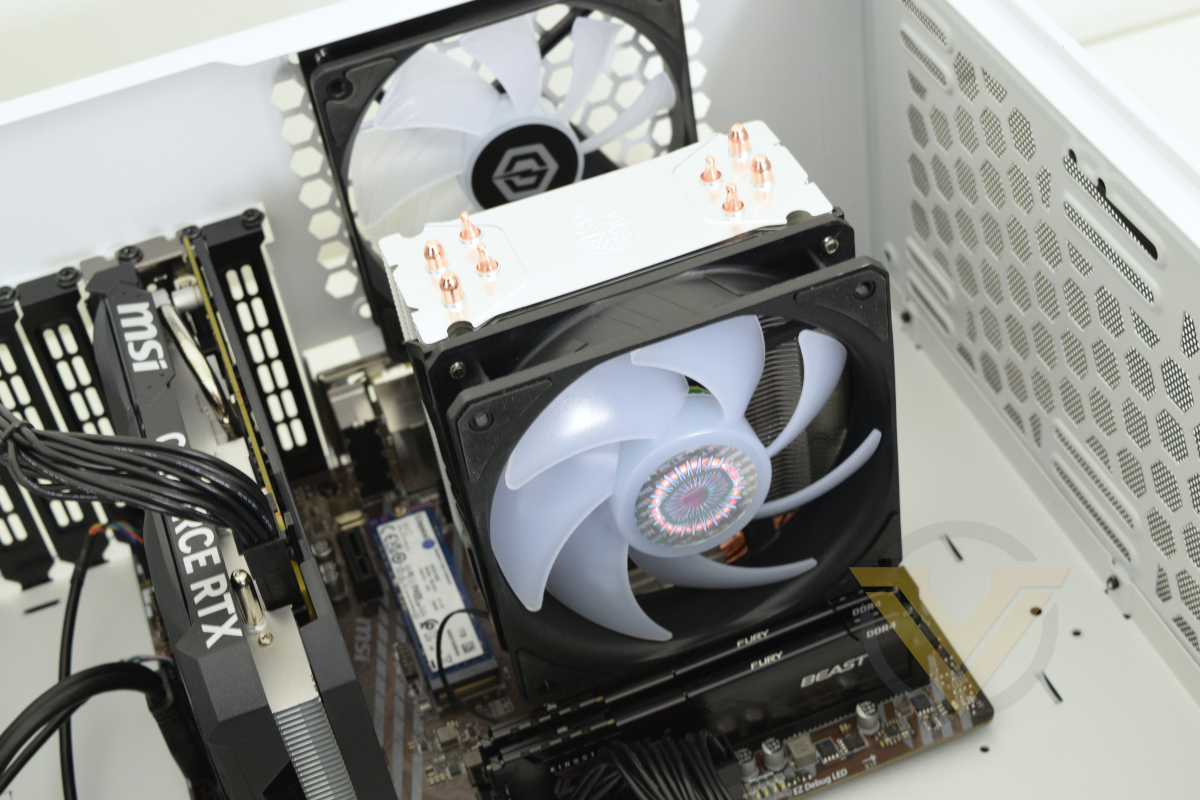
That being said, the case itself should serve you in good stead for any future builds and upgrades. View it as a blank canvas with potential and you won’t go far wrong.
One nice aspect of the design is the PSU’s oversized shroud that effectively sections it and a bay for a couple of additional 3.5” HDDs off into a separate compartment. The bottom of the three front fans will channel air through into it, offering ample flow if desired.
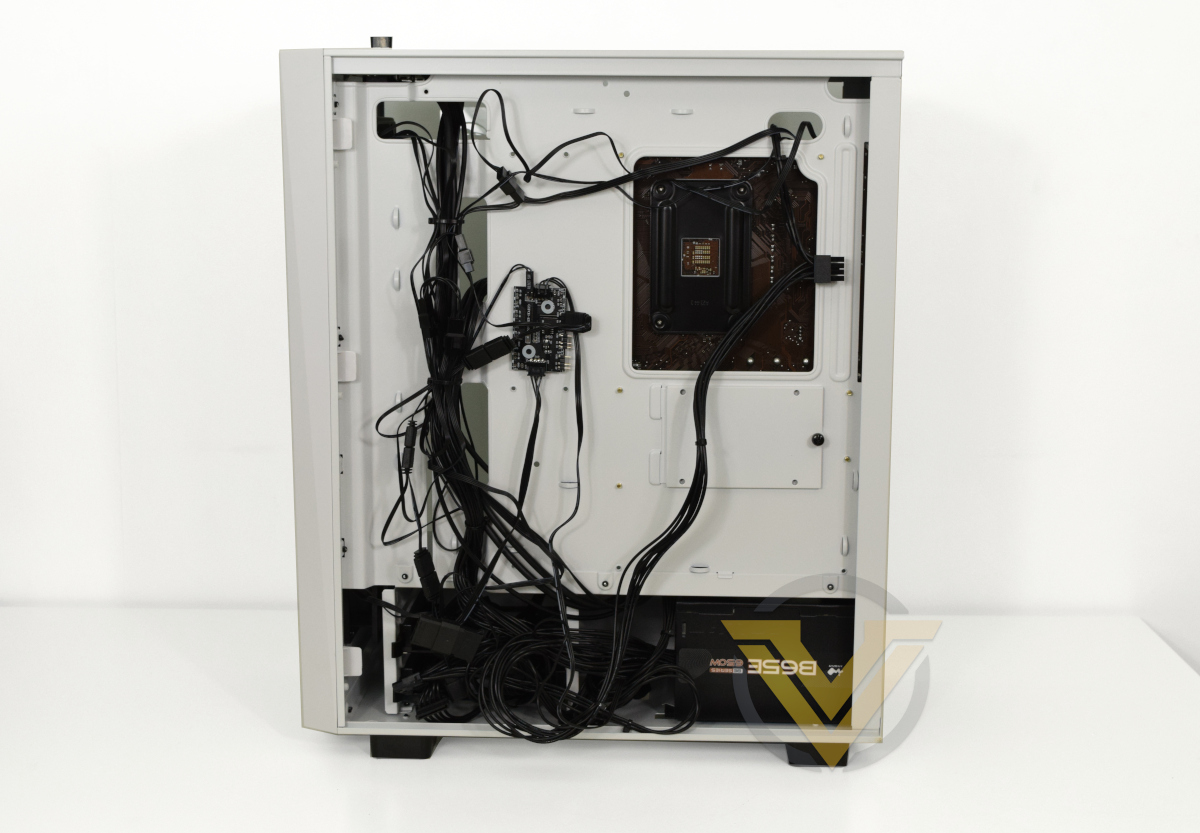
Next we’ll move behind the motherboard and an exceptionally disappointing aspect of this build. No care has been taken into proper cable routing for this system, a first for all the Cyberpower systems we’ve reviewed over the years, leaving it very untidy and a headache to navigate.
The motherboard tray offers ample cable tie points which haven’t been utilised. Most cables are gathered into one nest visible from the other side, and even the compartment at the bottom isn’t being utilised to full advantage to gather and neatly tuck away loose slack. We know that Cyberpower can do better because we’ve seen them do better with less, the fact that this is a ‘cheap’ £700 build isn’t an excuse.
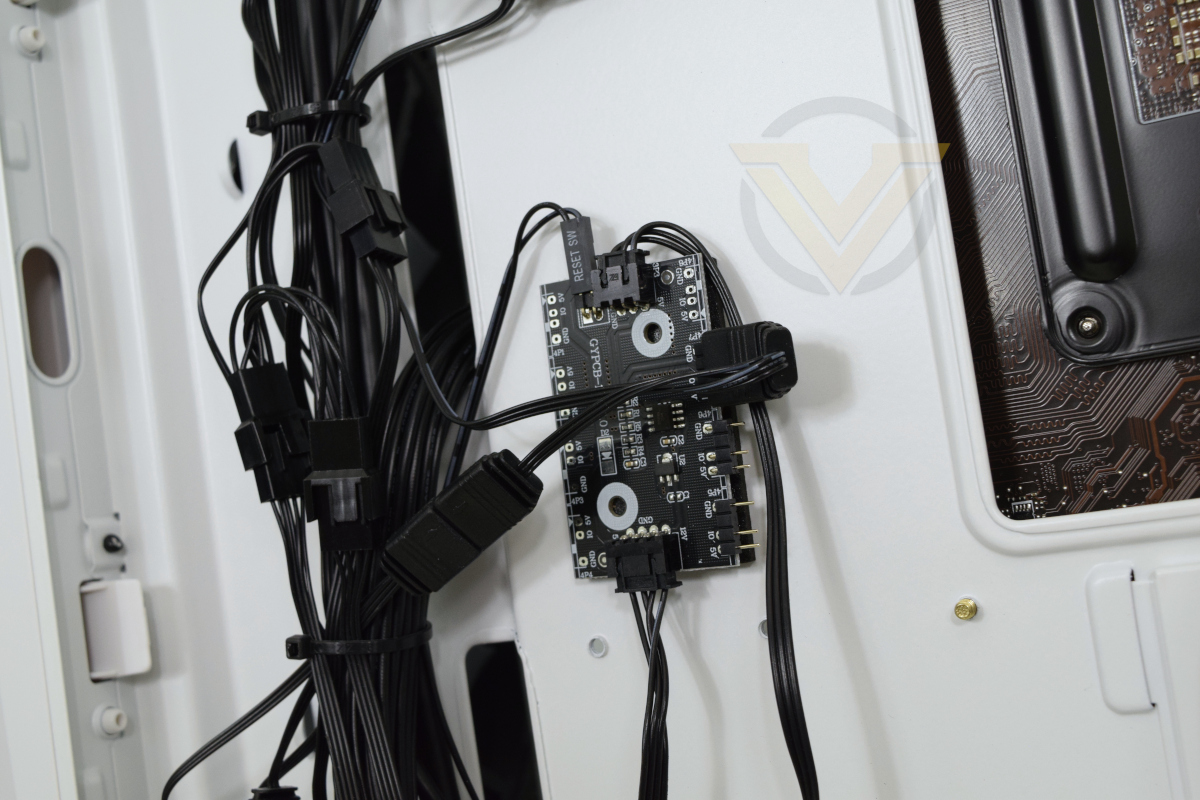
One reason for the trailing cables is the LED controller module mounted to the back of the motherboard tray. It links four 3-pin 5V RGB fan inputs via a daisy-chain (three to the front, one to the rear), as well power and a jumper lead that repurposes the reset switch as an LED control input that cycles through preset patterns.
Also gathered in the loose trunk of cables is the front panel and USB cables, as well as three of the four daisy-chained PWM 120mm fan cables. This latter set is hooked up to a single 4-pin PWM header on the motherboard, pushing the 1A tolerances of the header, because there is only one chassis fan header on this model.
One glaring flaw of the case is the short front panel audio header cable. It’s not long enough to be channelled through the shroud with the other front panel I/O cables, and instead must go through the lower motherboard tray cut-outs and across the motherboard itself. This flaw isn’t unique to this case, but remains bewildering because front-panel audio headers are almost always located at the bottom-left of the motherboard and far from the front-panel itself.
We won’t belabour the point. The quality of components is fine, the demonstrated skill in assembly however leaves a lot to be desired.
Benchmarks: Temperature, Power Draw, Boot Time
In our first test we observe the max. CPU/GPU temperatures of the system while allowing Unigine Heaven 4.0 to run on a 30-minute loop with default system fan profile. Idle temperatures were read 10 minutes later, indicating how well the system exhausted built up heat. To report back on the temperatures we used Ryzen Master readings and GPU-Z.
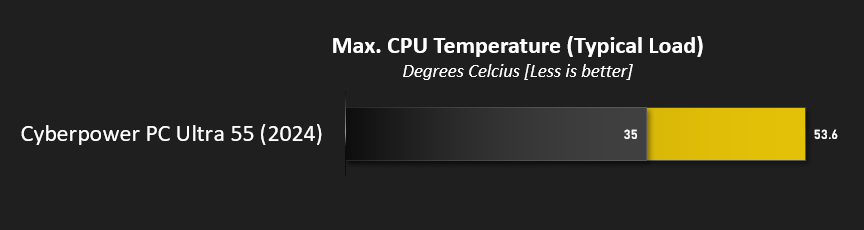
A maximum reported temperature of 53.6C is good and a reflection of the Hyper 212’s improvement over AMD’s stock cooler’s performance. Furthermore a long Cinebench R23 loop pushing the CPU hard resulted in an observed maximum of just 72.9C package temp. It’s a good foil for the Ryzen 5 5500’s 65W TDP.
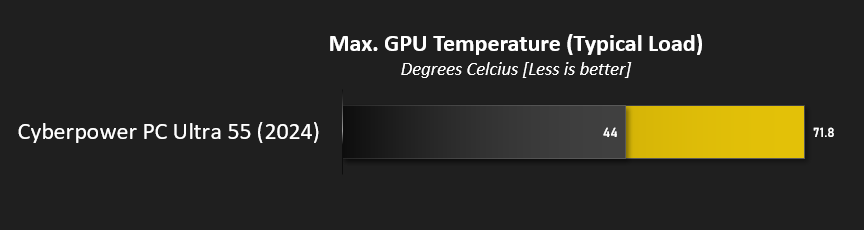
By the same token the system was able to return to an idle CPU temperature of 35C 10mins after load, indicating that general air-flow inside the case is adequate to its needs. This is backed up by GPU load temperatures sitting below a maximum of 71.8C under heavy gaming load.
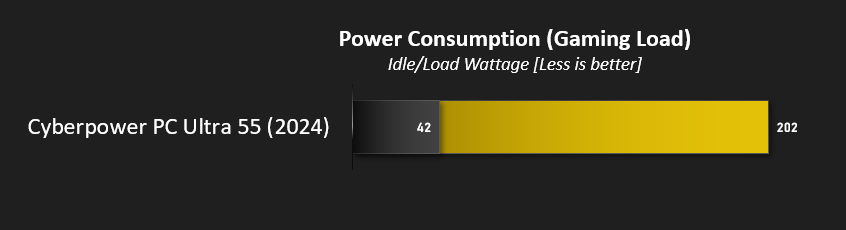
The Ultra 55 pushes a peak of 202W under gaming load, well within the rated specification of the supplied PSU, and falls to 42W at idle. That’s fairly efficient for a gaming PC if you’re the sort to leave a system powered up 24/7, and it won’t be a power guzzler if gaming is your primary use case. It also implies that there is plenty of headroom for additional components or a GPU upgrade.
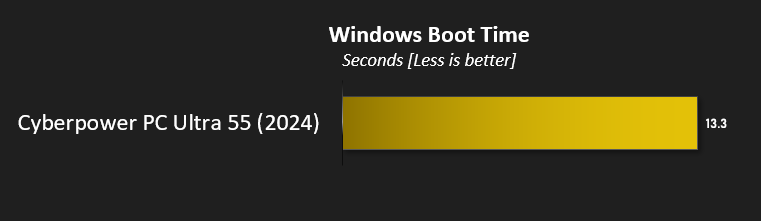
A boot to Windows 11 time of over 13.3 seconds is no more than fine, and reflects the somewhat laboured boot process common to AMD’s Ryzen AM4 platform.
Cinebench R20, R23 & 7Zip
Maxon’s Cinebench is a real-world cross-platform test suite that evaluates your computer’s hardware capabilities. Improvements to Cinebench Release 20 reflected the overall advancements to CPU and rendering technology in recent years, providing a more accurate measurement of Cinema 4D’s ability to take advantage of multiple CPU cores and modern processor features available to the average user.In October 2020 Maxon launched Cinebench R23. This release formulated an updated test that defined a notational runtime of 10 minutes for both single and multicore tests, minimising the impact of initial performance spikes caused by a high Turbo/Boost clock at the start. The scores generated are not directly comparable to the R20 results, but we’ve included them here for reference.
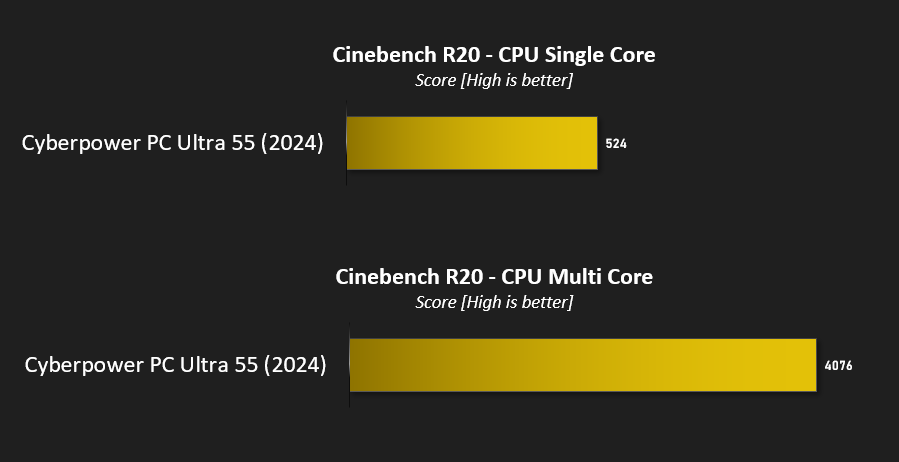
A Cinebench R20 multi-threaded score of 4076 with a single core score of 524 certainly won’t be topping any charts. These results are closer to those posted by the Ryzen 5 3600X than the 5600, reflecting its slightly awkward position in AMD’s product stack.
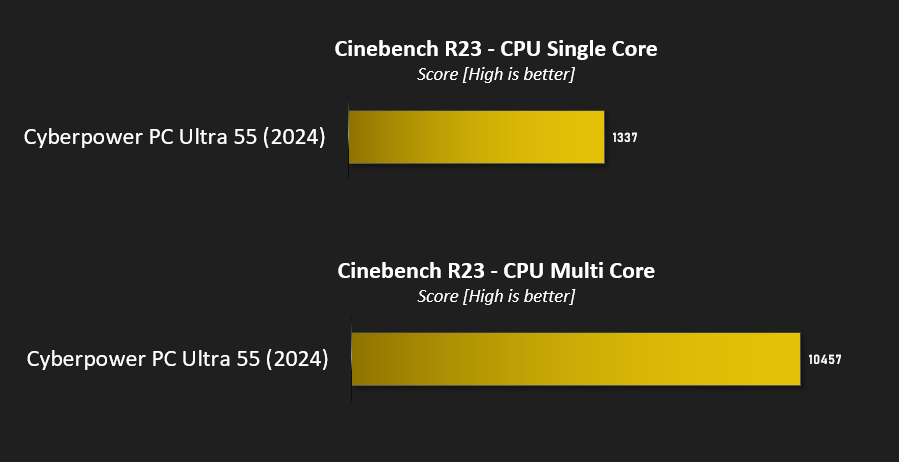
Cinebench R23 is a more representative test for modern many-core CPUs. The result neatly bisects the scores we’d expect from the Ryzen 5 3600X and 5600, the latter of which reaches a touch under 11000 at stock.
Our conclusions hold from previous experiences with the R5 5500: they show that AMD would have been well served by extending the ‘Ryzen 3’ branding to the desktop lineup and putting this chip under its banner. It is, in effect, a great entry-level chip, rather than a mediocre mid-range one.
—
7-Zip is open-source software which unpackages compressed (zipped) files. It also features a benchmark which measures your systems ability to unpack files, typically stressing CPU and memory performance.
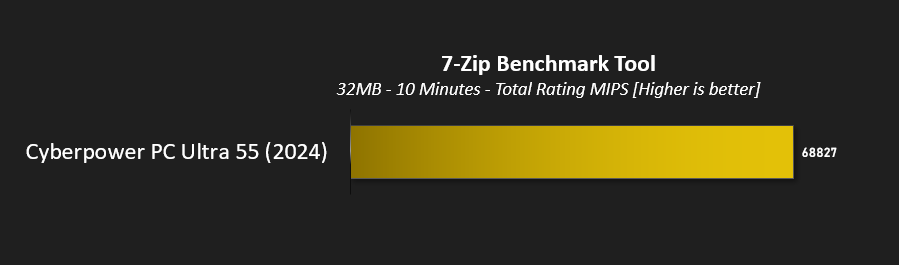
The system achieved a total rating of 68.82 GIPS during decompress testing, indicating that the test was making effective use of all 12 threads available.
Benchmarks: PC Mark 10, Unigine Heaven, 3D Mark
PCMark 10 by UL combines performance benchmarking with battery life measurement where applicable and includes tests based on popular Adobe and Microsoft applications. Whether you are looking for long battery life, or maximum power, PCMark 10 will help you find the devices that offer the perfect combination of efficiency and performance for your needs. It’s the complete PC performance benchmark for home and business.
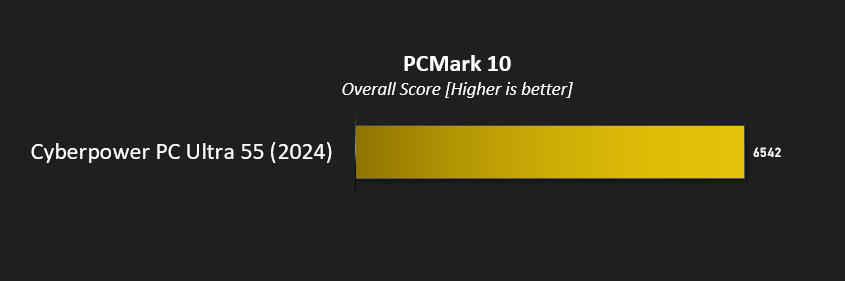
The Ultra 55 in this test scored a couple of hundred points lower than a similar system based on the B550 and RTX 4060 Ti, chiefly due to poorer scores in productivity and ‘essential tasks’. It scores much lower than the Hyper Liquid X139, a flagship Core i9 system with an RTX 4090, but realistically the two systems will feel similar experientially outside of gaming and very high workload tasks that can leverage the raw horsepower of the X139’s high end hardware.
—
3DMark Time Spy by UL is a DirectX 12 benchmark test for gaming PCs running Windows 10. With its pure DirectX 12 engine, built from the ground up to support new API features like asynchronous compute, explicit multi-adapter, and multi-threading, Time Spy is the ideal benchmark for testing the DirectX 12 performance of the latest graphics cards.
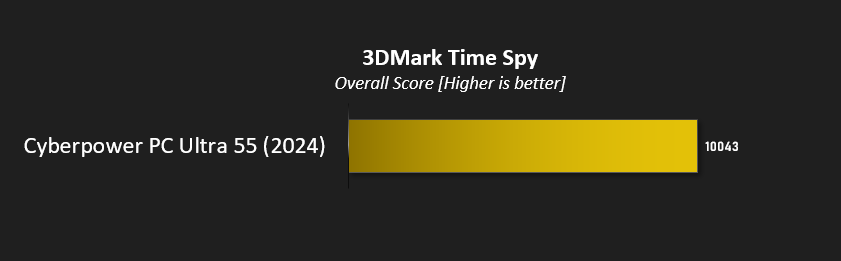
3DMark Time Spy presents users with a breakdown of scores: GPU, CPU and Combined.
Overall: 10043
GPU: 10564
CPU: 7553
GPU: 10564
CPU: 7553
For completeness we also put the system through 3D Mark’s newer Speed Way benchmark. It scored 2512 points.
—
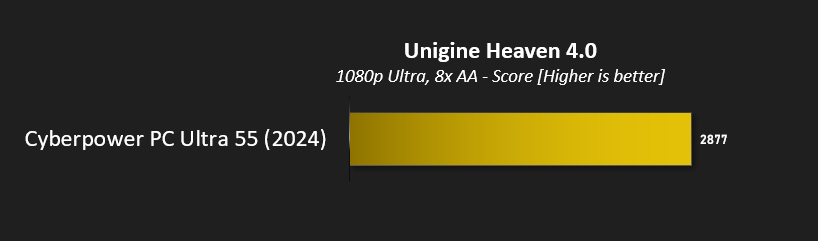
Unigine’s Heaven 4.0 utility is a performance and stability test for PC hardware: video card, power supply, cooling system. Check your rig in stock and overclocking modes with real-life load! Also includes interactive experience in a beautiful, detailed environment.
While relying on a DirectX 11 API renderer rather than more modern DX12 framework, Heaven 4.0 and DX11 performance is still a relevant metric today.
This test was performed at a resolution of 1080p with Extreme presets including High Tessellation, Ultra textures and x8 Anti-Aliasing.
Benchmarks: Gaming at 1080p
The GeForce RTX 4060 8GB is NVIDIA’s the entry-level RTX 40-series card and pitched squarely towards gaming at a resolution of 1080p due to its relatively small 8GB VRAM. Not all games are equally demanding however, particularly when ray traced lighting and shadows are added to the mix, so we looked at performance across a range of older and more recent titles.
Middle-Earth: Shadow of War
The oldest of our titles, Middle-Earth: Shadow of War is still an exceptionally attractive game that utilises the DirectX 11 API. In deference to its vintage, we’ll be testing at 1080p with Ultra image quality presets.
Shadow of the Tomb Raider
The second sequel to the rebooted Tomb Raider franchise, Shadow of the Tomb Raider was also one of the first titles to incorporate NVIDIA RTX ray traced shadows and DLSS. At 1080p we’ll be testing with the Highest quality presets, Ray Traced Shadows manually set at High, and SMAA at 4x.
Horizon Zero Dawn
This game was new to PC in August 2020 and at launch had a reputation for taxing GPU hardware. It doesn’t feature ray tracing, but nonetheless has some of the most stunning scenes ever rendered in games. We’ve used the Ultimate preset at 1080p here, but Favoured also offers a visual feast with markedly higher performance.
Control
Critically acclaimed Control is the title which made most comprehensive use of NVIDIA RTX tech. prior to Cyberpunk 2077’s release in Holiday 2020. Shadows, lighting and reflections all leverage advanced hybrid ray-traced rendering, helping the transition from mundane world to its nightmarish reflection. We opted for the Highest detail settings preset with RTX features enabled including the default recommended level of DLSS: a rendering resolution of 720p.
Cyberpunk 2077
Finally reliable after major patch releases, CDProjekt RED’s neo-futurist open world RPG has stunning visuals and ray traced lighting effects to enjoy. We took it for a spin with RTX On at 1080p with DLSS 3 enabled.
The oldest of our titles, Middle-Earth: Shadow of War is still an exceptionally attractive game that utilises the DirectX 11 API. In deference to its vintage, we’ll be testing at 1080p with Ultra image quality presets.
Shadow of the Tomb Raider
The second sequel to the rebooted Tomb Raider franchise, Shadow of the Tomb Raider was also one of the first titles to incorporate NVIDIA RTX ray traced shadows and DLSS. At 1080p we’ll be testing with the Highest quality presets, Ray Traced Shadows manually set at High, and SMAA at 4x.
Horizon Zero Dawn
This game was new to PC in August 2020 and at launch had a reputation for taxing GPU hardware. It doesn’t feature ray tracing, but nonetheless has some of the most stunning scenes ever rendered in games. We’ve used the Ultimate preset at 1080p here, but Favoured also offers a visual feast with markedly higher performance.
Control
Critically acclaimed Control is the title which made most comprehensive use of NVIDIA RTX tech. prior to Cyberpunk 2077’s release in Holiday 2020. Shadows, lighting and reflections all leverage advanced hybrid ray-traced rendering, helping the transition from mundane world to its nightmarish reflection. We opted for the Highest detail settings preset with RTX features enabled including the default recommended level of DLSS: a rendering resolution of 720p.
Cyberpunk 2077
Finally reliable after major patch releases, CDProjekt RED’s neo-futurist open world RPG has stunning visuals and ray traced lighting effects to enjoy. We took it for a spin with RTX On at 1080p with DLSS 3 enabled.
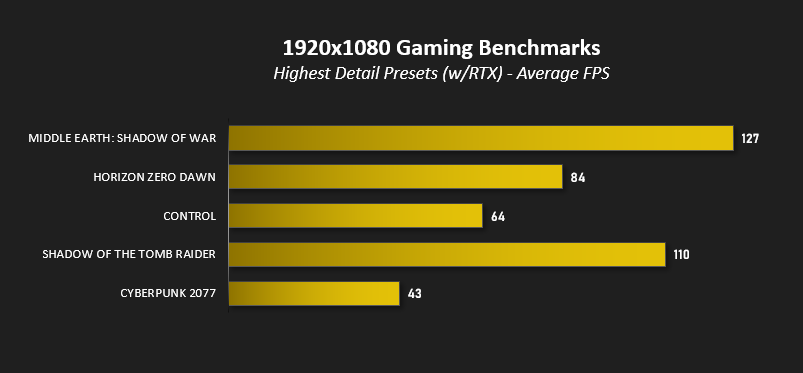
The system performs adequately at 1080p, comfortably exceeding 100fps in many older titles at the highest quality settings and reaching over the critical 60fps level in the nasty Control with ray tracing active test. It struggles in Cyberpunk 2077 at 1080p and requires tweaking of image quality settings downwards to reach comfortable frame rates. On the other hand it will have no problems whatsoever with the most popular ‘esports’ titles such as Fortnite and League of Legends.
Performance without DLSS on all RTX titles declines significantly at 1080p, the worst of which is the unplayable Cyberpunk 2077. That is what upscaling technologies and variably quality settings in general are there for of course but don’t be surprised if playing without ray tracing becomes preferable on this system.
More broadly, the system struggles in the most modern titles with some uncomfortable minimums potentially caused by underpowered platform. Turn off ray tracing and you’ll be fine at 1080p in effectively all cases, but requiring ever more complex upscaling technologies to reach acceptable FPS shows how NVIDIA perhaps missed the mark with the RTX 4060 8GB.
In common with many systems both pre-built and hand-selected, the system will benefit massively from a FreeSync/GSYNC Compatible monitor, particularly one with low frame rate compensation to smooth out momentary dips in frame rate. The supplied ASRock CL25FF doesn’t quite hit that bar – it has a wide refresh range of 48-100Hz but would need to go as low as 40Hz to meet the standard.
Conclusion
As one of the most affordable PCs CyberpowerPC offer, we were looking forward to seeing what the latest revisions to their Ultra 55 lineup could bring to the table. After some consideration it’s fair to say that we expected more.
Our reservations began only gently with the Ryzen 5 5500. It’s a much bigger step down from the R5 5600 than indicated by its SKU, and not just in clock speed. Half the L3 cache of its bigger brother and only PCIe 3.0 support undermines gaming performance while potentially locking off future support for APIs based on Microsoft DirectStorage including RTX IO. That being said, this is an affordable system so it makes sense to shave costs where it on balance makes sense. Furthermore, the AM4 socket has a plethora of upgrade options for exceptional boosts in performance later down the line.
So, while the Ryzen 5 5500 makes the grade, a A520 motherboard significantly restricts future upgrade potential in the modern arena. Its PCIe 3.0 signalling restriction would remain a limitation and we have significant reservations in upgrading to a high specification CPU, particularly on a ‘board with such limited power delivery capabilities. Simply switching to one based on the B550 chipset would ease these restrictions, making simple CPU upgrades a very meaningful pathway to system longevity.
Shipping with a GeForce RTX 4060 8GB however is the logical choice for entry-level pre-built systems at this price point as it’s the entry-level NVIDIA 40-series gaming card. We note that a broad selection of AMD cards are also offered in their pre-config. and customisable system sections that may represent better overall performance at the same price.
Performance-wise, the system largely meets expectations. It’s well up to the task for most 1080p gaming requirements, but does fall short in some aspects if you need all the ray-traced eye-candy in the most modern games. DLSS 3.5 support will help long-term if adoption rates of NVIDIA’s proprietary tech is high, but realistically you will be expected to at the very least become familiar with adjusting in-game video settings to maintain acceptable frame rates as the system ages.
Shipping with only 16GB of 3200MHz memory is par for the course with budget systems, but it would have been nice to see 3600MHz RAM to help push the CPU and memory subsystem a little harder. 32GB system memory recommendations are becoming more prevalent but will be unlikely to affect 1080p gaming for the time being.
General noise levels are good but we recommend that owners tweak fan curves to reduce a lot of the fan ramp experienced as CPU load increases. We are concerned that this motherboard required daisy-chaining four case fans from a single header, pushing its 1A specification limits. Temperatures are broadly fine with no evidence of CPU or GPU throttling, showing the value in opting for a good quality 3rd party CPU cooler and reliable GPU model.
Conversely, one aspect slightly over-provisioned by Cyberpower was the storage. The Kingston NV2 is a fine choice and 1TB is positively roomy for a brand new build. That being said, as a PCIe Gen4 drive some performance will be left on the table due to the platform’s PCIe Gen3 limits. Additional storage is restricted to up-to four SATA SSD/HDDs, which the Cyberpower Eluna case can easily accommodate.
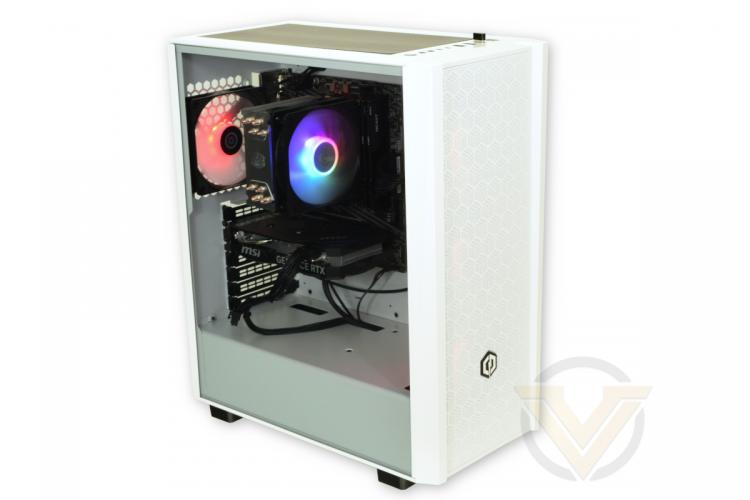
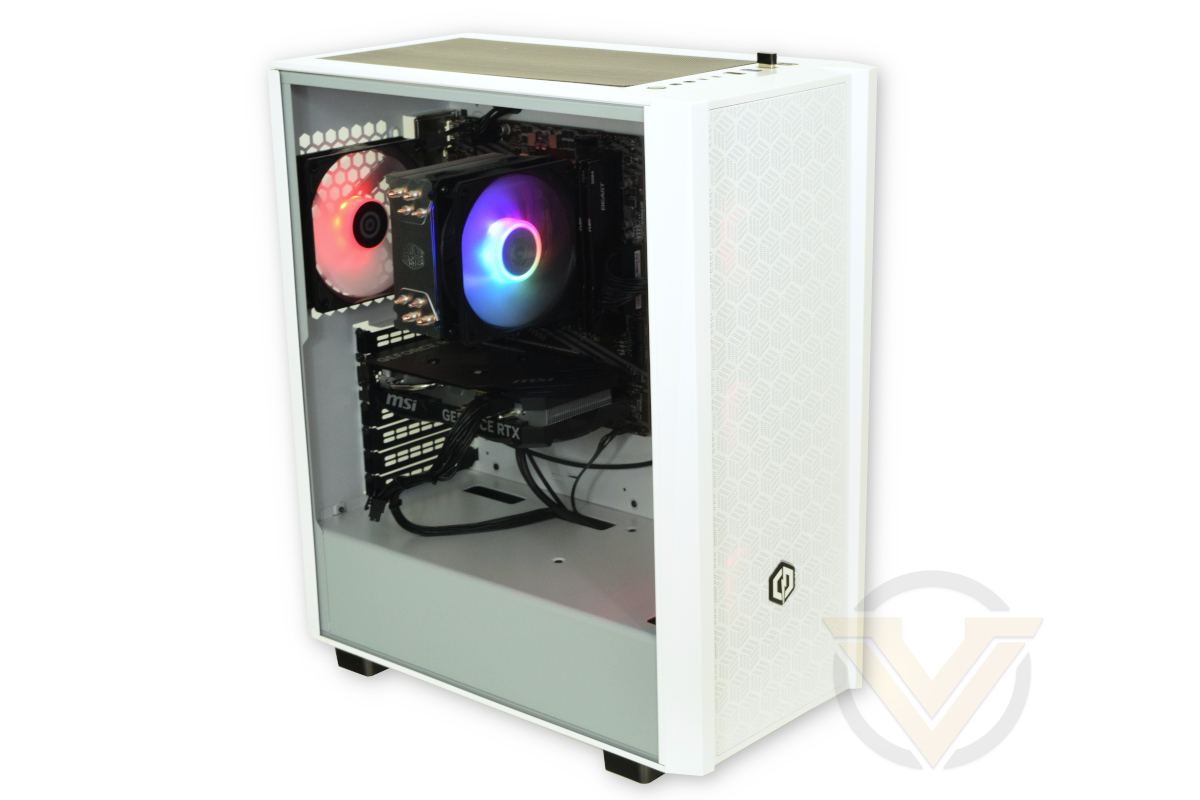
The case itself is attractive and provides excellent airflow thanks to a perforated front panel and triple 120 intake fans. Each fan’s RGB lighting is vibrant without necessarily being garish, allowing for an attractive lighting scheme slightly limited by the capabilities of the controller. Sadly there as no scope for software-based lighting control as the motherboard doesn’t support it.
[
Experientially, the system copes well with the tested games at 1080p. It’s not captured in raw results but some care with in-game settings will garner large improvements with little discernible impact on image quality. Owners should expect to lean heavily on DLSS upscaling and setting tweaks as the system ages and to keep a very close eye of 95%/99% minimums lest a weak CPU undermine your enjoyment.
One ray of sunshine was the ASRock CL25FF. It’s ‘only’ a 1080p 100Hz monitor, but the IPS panel has good sharpness and vibrant colour reproduction with excellent viewing angles and only adds £75 to the system’s overall cost. Its onboard UI perhaps isn’t the best and we’re really not a fan of the flashing blue standby LED on the rear, but as optional extras go you can do an awful lot worse than this FreeSync monitor if your new build requires one.
Concerns over components and future upgradability aside, we will also state our disappointment in the assembly of this system, specifically its cable management. The Eluna case offers plenty of cable tie points and other options for clean routing but Cyberpower chose not to take them. The outcome is poor, not only looking like a bird’s nest but also making it very difficult to track cables behind the motherboard tray. This system’s tidiness when viewed through the side panel is only just acceptable too due to the lack of grommeted cut-outs.
Fundamentally, the impression we get is that this system really needs about £40-50-worth of improvements to be a good budget design, essentially the cost of transitioning to a B550 motherboard. Doing so immediately presents those buying the system, potentially for a 3-year course of study or as a multi-year gaming system, an obvious upgrade path that will garner meaningful performance improvements whatever the expected workload.
As configured, Cyberpower PC’s Ultra 55 underscores just how unsuitable component selection can harm the longevity of a system that is inherently modular in design. If a system with upgrade potential is important we instead recommend configuring at least a B550 option and assess it against your budget. The compromise motherboard frustrates the most, but for its stated purpose – 1080p gaming – it’ll satisfy out-the-box without exceeding expectations. Finally, Cyberpower PC need to do better in their cable routing; we’ve been at least content with their efforts in the past but this would be unacceptable to buyers eagerly awaiting their new system.
Pros:
+ Meets the challenge of a 1080p gaming system for <£800 (or <£730 without the monitor)
+ Supports latest NVIDIA technologies via a GeForce RTX 40-series GPU
+ Good cooling for the components selected
+ Some welcome aesthetic frills
+ Some scope for future upgrades
= The ASRock monitor is a great affordable optional addition for those without one.
Cons
– A520 motherboard significantly restricts long-term upgrade options
– Relatively weak CPU selected
– 1080p system requirement creep for gaming may cause the system to struggle long-term
– Appalling cable management despite a good budget case
+ Meets the challenge of a 1080p gaming system for <£800 (or <£730 without the monitor)
+ Supports latest NVIDIA technologies via a GeForce RTX 40-series GPU
+ Good cooling for the components selected
+ Some welcome aesthetic frills
+ Some scope for future upgrades
= The ASRock monitor is a great affordable optional addition for those without one.
Cons
– A520 motherboard significantly restricts long-term upgrade options
– Relatively weak CPU selected
– 1080p system requirement creep for gaming may cause the system to struggle long-term
– Appalling cable management despite a good budget case
Click here for an explanation of our awards at Vortez.net.
Stay connected with the Vortez Social Media pages:
Join in with the discussions on Discord