Transitioning to PC for the plethora of Summer 2023 gaming experiences, or looking for a system when you return to education this September? If so, this £1000 system should more than pique your interest!

Product On Review: Ultra 55 4T
Manufacturer: Cyberpower PC UK
System Price (UK MSRP): £999.60 inc. V.A.T.
Introduction
Summer 2023 is now in full swing and with it a whole raft of new games are launching to fill your idle hours. Soon we’ll reach Autumn, when countless thousands of eager learners will be beginning or continuing their journey in education, learners who will need some space to decompress through online as well as offline worlds. So what better time to investigate invest in a new system, hopefully one that doesn’t quite push wallets to breaking point.
In our last system review we looked at Cyberpower PC’s Hyper Liquid X139, an exceptionally high-end customisable solution with premium components and bespoke water cooling. Today we’re aiming our sights a little more down to earth with the Ultra 55 4T, a significantly more affordable platform that can grow and evolve while still offering the day one performance you need.
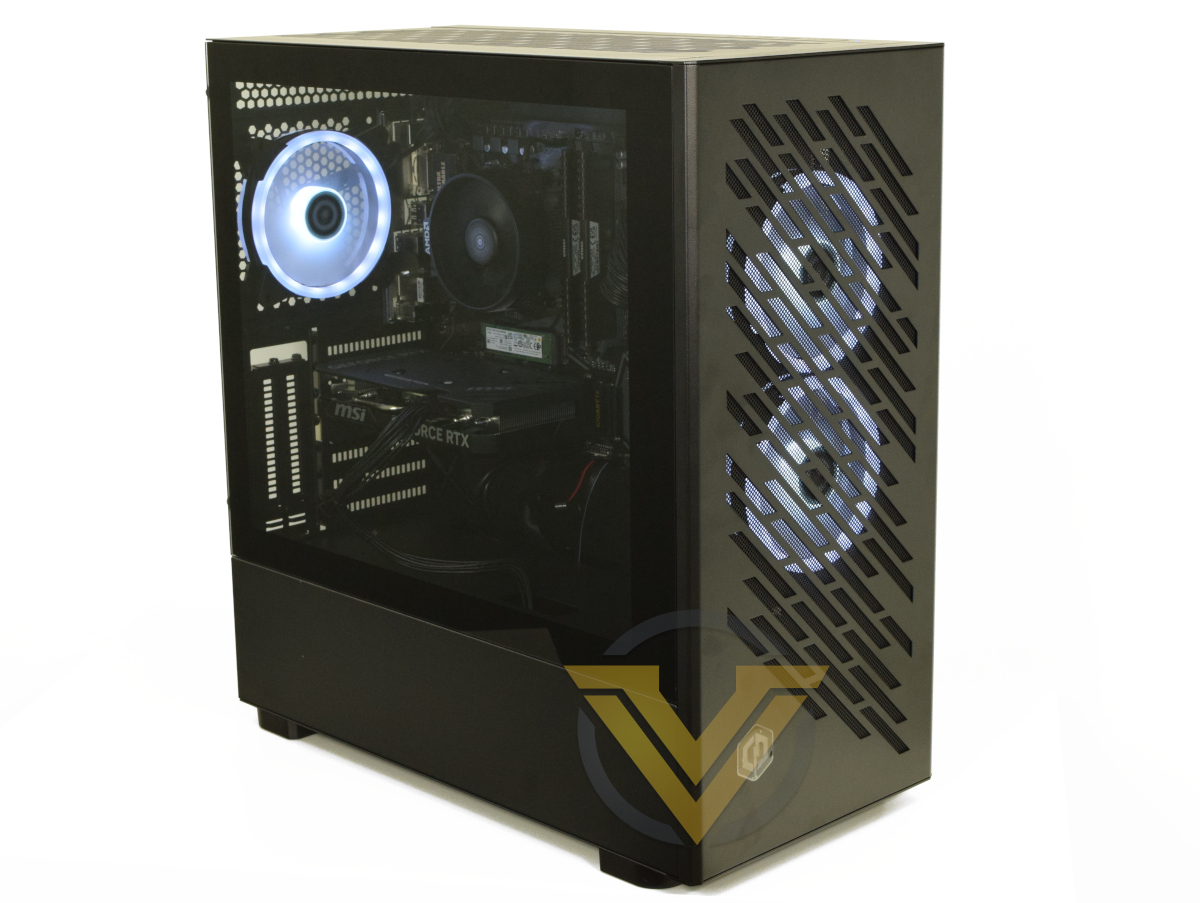
Coming in at a hair under £1000 inclusive of VAT, the Ultra 55 4T is more of a mainstream than entry-level gaming system. To maximise performance at this price point it compromises by having few frills and emphasising a balance of components for the best overall experience, and to keep it at a keen budget they return to some old classics where it’s most appropriate. Unlike most of Cyberpower PC’s catalogue however, the Ultra 55 4T has a fixed set of components which cannot be modified, they can only be added to. This inflexibility is a very real consequence of their effort to pair down overheads and maintain that price.
The Ultra 55 4T’s beating heart is AMD’s Ryzen 5 5500, a 6c/12t CPU that can pair with inexpensive B550 motherboards and DDR4 RAM. From a previous generation it may be, but that processor can still go when the situation demands. It should be plenty for 1440p with plenty of eye candy, as well as almost trivially supporting desktop productivity applications. The CPU is cooled by the stock AMD Wraith Stealth so we’re expecting some toasty temperatures under load.
New joins old in the form of NVIDIA’s GeForce RTX 4060 Ti 8GB. Somewhat maligned by reviews on launch, it’s still an upgrade to its RTX 30-series predecessor through both marginal performance and new technologies such as DLSS 3. That latter fact could be key in unlocking 1440p gameplay in the most modern FPS titles, particularly as engine complexity and VRAM footprint at higher resolutions increase in coming years.
Joining the mATX B550 motherboard and 16GB of DDR4 memory is a 1TB M.2 SSD from Intel. That’s capacious enough for Windows 11 alongside plenty of games, and will ensure fast boot times and generally smooth OS operation. Games too will benefit from its raw performance, although the results will tend to be more subtle except in isolated instances.
Putting the finishing touches to the setup is an Intel PCIe WiFi 6 network card, Cyberpower-branded mid-tower chassis, and three 120mm ARGB fans. An InWin A65e PSU keeps the system ticking and is rated up to 650W, allowing it to accommodate some modest additions to the base specification over time.
On paper this is a modest system, built to budget and a broad capability envelope for both work and gaming. It’s intended for more frugal gamers and PC users who need a system with some punch but who don’t have the time, skills or confidence to assemble the parts themselves. Furthermore, it is backed by a more hassle-free warranty than you might expect from components bought individually and assembled yourself.
So, will we be wowed by this £1000 powerhouse, or is it a compromise too far?
Technical Specifications
CPU:- AMD Ryzen 5 5500
GPU:- MSI GeForce RTX 4060 Ti 8GB
Motherboard:- GIGABYE B550M-DS3H (Rev. 1.5)
RAM:- 16GB (2x8GB) DDR4/3200MHz Corsair Vengeance Memory Kit
Storage:- 1TB Intel 670p M.2 NVMe SSD
Power Supply: Inwin A65E 650W
Operating System: Windows 11 Home
Case: Cyberpower PC Gaming Case /w 3x ARGB Fans
GPU:- MSI GeForce RTX 4060 Ti 8GB
Motherboard:- GIGABYE B550M-DS3H (Rev. 1.5)
RAM:- 16GB (2x8GB) DDR4/3200MHz Corsair Vengeance Memory Kit
Storage:- 1TB Intel 670p M.2 NVMe SSD
Power Supply: Inwin A65E 650W
Operating System: Windows 11 Home
Case: Cyberpower PC Gaming Case /w 3x ARGB Fans
AMD’s Ryzen 5 5500 is a Socket AM4 6-core, 12-thread CPU from the Zen 3 family of processors. It’s a member of a workhorse tier but differences from the Ryzen 5 5600 are pronounced, to the extent that they meaningfully will affect its real-world performance. The Ryzen 5500 only supports PCIe 3.0 signalling, which will effectively halve the bandwidth available to the RTX 4060, and is equipped with half the amount of L3 cache as its bigger brother. Its performance is closer to the Ryzen 5 3600, a fine CPU but perhaps not what would be expected given its lineage.
By opting for an older AM4 motherboard the 5800X3D is available as a future slot-in upgrade should needs arise. While not impacting current purchasing decisions, it’s an aspect of the bundle that’s worth keeping in mind.
Not many mATX B550 motherboards are still on the market but GIGABYTE’s DS3H variant remains a solid option. In addition to PCIe 4.0 on the main x16 slot, it supports two M.2 slots for NVMe storage (one of which is unpopulated) and an additional x16 slot (wired for PCIe 3.0 x4 operation) that in this case is populated by a WiFi 6 wireless network and Bluetooth card. You won’t necessarily want to overclock processors given its modest 5+3 phase power delivery, but it should be able to comfortably handle stock speeds up and down AMD’s Ryzen 5000-series lineup.
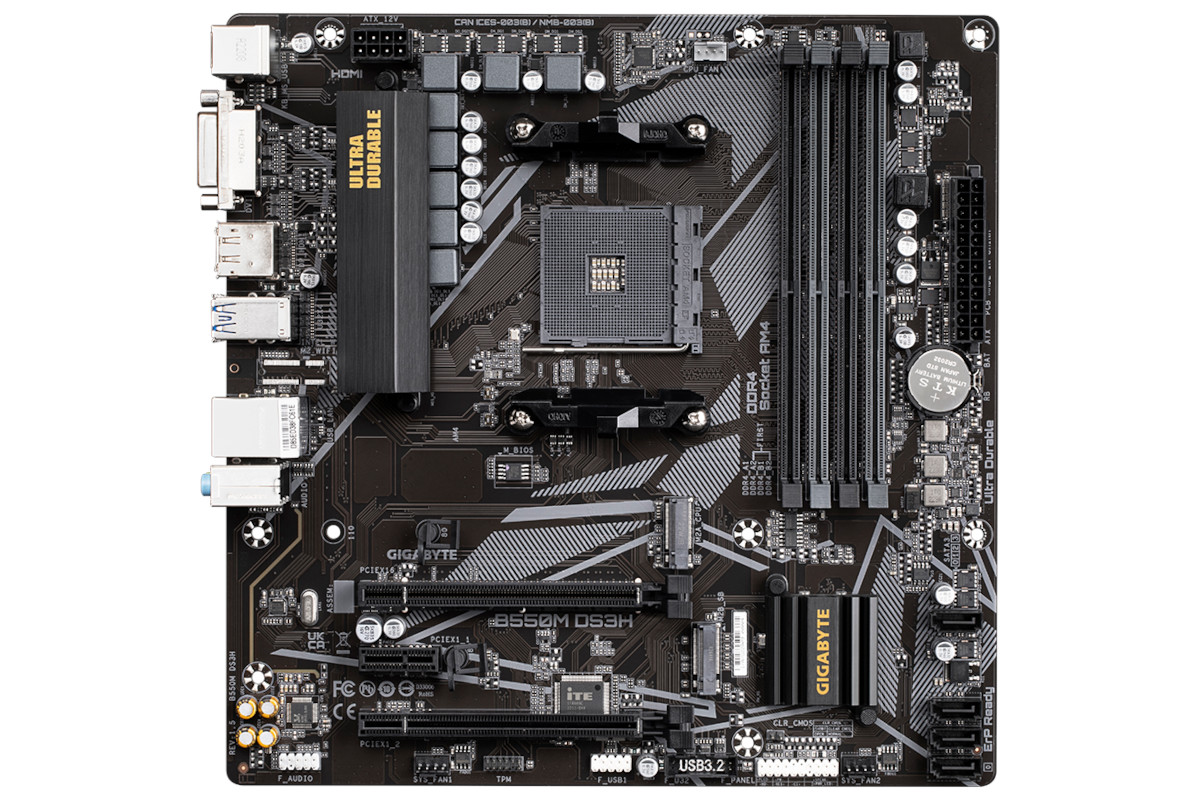
This revision of the DS3H has very limited fan provision (3 headers including CPU) and no on-board RGB controller support, in contrast to some other revisions of the same ‘board.
Today 16GB of memory is the minimum for a gaming system and the Ryzen 5000-series’ underlying architecture thrives on fast memory. A bump to either 32GB or 3600MHz memory would have been a nice little buff for performance in the medium term.
Unfortunately AMD’s stock cooler (the Wraith Stealth) is a weedy if relatively quiet model, even for this fairly low-power CPU, and would be heavily undermined by inadequate chassis air-flow. The short list of components we’d swap out would feature this in first place, likely for a cheap ~£20 single-tower HSF, but replacing it does require a little more knowledge and care than RAM or GPU.
Now to the elephant in the room, the RTX 4060Ti 8GB. It’s important to note that criticisms of this release primarily stem from its lacklustre improvement over the RTX 3060 Ti rather than the raw performance at its MSRP. As a 40-series card it also supports DLSS 3 Frame Generation and the plethora of cutting edge RTX technologies for which 30-series compatibility is uncertain at best. Gaming at 1080p should be trivial with this card in the vast majority of scenarios, with 1440p not being unrealistic in most games or when paired with NVIDIA’s proprietary upscaling technology.
The RTX 4060 Ti communicates to the CPU through eight PCIe lanes of speeds up to PCIe 4.0, but the Ryzen 5 5500 is limited to PCIe 3.0. As a result the GPU will be limited to the bandwidth offered by just eight PCIe 3.0 lanes, with a knock-on impact on gaming performance of 1-10% depending on the title being played.
The MSI Ventus 2X model is a dual axial fan design that should have no issue keeping the GPU cool under long-term load, presupposing that case air-flow is up to the task. This model has a modest 30MHz factory overclock over reference specifications.
NVMe SSD pricing has dropped like a stone in recent months but that doesn’t make the inclusion of the 1TB Intel 670p any less welcome. It’s a speedy model leveraging four lanes of PCIe 3.0 signalling, and is ample for the OS and a significant quantity of software. Total system storage is expandable through both a second M.2 slot (below the GPU) and four SATA3 ports for 2.5/3.5” SSDs and HDDs drives.
The final point worth voicing is some trepidation over the InWin A65e PSU. InWin are certainly a reputable brand but there is very little information available about the PSU, particularly its reliability. It should be able to handle this particular system easily, as well as straightforward additions such as more storage and fans. Where we would draw a line, based purely on a lack of information rather than evidence one way or another, is a significant GPU upgrade to a much higher tier of card. If in a future upgrade to a RTX 4070 or similar class was planned, even if it ostensibly only requires a 650W PSU, a model with more provenance would be in order.
To sum up, this is a specification with strong emphasis on GPU, reflected in that part being roughly 40% of the budget of the build (based on MSRP).
Value
Core Component Retailer Pricing
AMD Ryzen 5 5500:- £95
MSI GeForce RTX 4060 Ti VENTUS 2X 8GB:- £400
GIGABYTE B550m D3H mATX:- £90
16MB (2 x 8GB) 3200MHz DDR4:- £35
Intel 670p 1TB NVMe SSD:- £47
AMD Ryzen Wraith CPU Cooler:- £10
Inwin A65E 650W non-modular PSU:- Pricing Unavailable
Cyberpower PC OEM /w ARGB controller & remote:- Pricing Unavailable
3 x Cyberpower PC 120mm PWM ARGB Fans:- Pricing Unavailable
Intel AX200 PCIe Wireless Card:- £15
Windows 11 Home – £110
Total (UK etailer at time of publication) – £802 (inc. VAT, excl delivery)
MSI GeForce RTX 4060 Ti VENTUS 2X 8GB:- £400
GIGABYTE B550m D3H mATX:- £90
16MB (2 x 8GB) 3200MHz DDR4:- £35
Intel 670p 1TB NVMe SSD:- £47
AMD Ryzen Wraith CPU Cooler:- £10
Inwin A65E 650W non-modular PSU:- Pricing Unavailable
Cyberpower PC OEM /w ARGB controller & remote:- Pricing Unavailable
3 x Cyberpower PC 120mm PWM ARGB Fans:- Pricing Unavailable
Intel AX200 PCIe Wireless Card:- £15
Windows 11 Home – £110
Total (UK etailer at time of publication) – £802 (inc. VAT, excl delivery)
Weighing whether to self-build rather than purchasing from an SI is especially difficult when budgets are constrained. Every penny given up to the SI is one not spent on a component, and in the case of the Ultra 55 4T you aren’t given the usual flexibility of choosing different components from a short list. It’s spec’ed to a cost, so what you see is what you get.
The system’s most expensive component by far
Note also that the constituent components of the Ultra 55 4T can vary slightly over time, for example a different brand of RAM or GPU or case options might change. Actual performance is unlikely to change to any great degree.
The differential between Cyberpower PC’s Ultra 55 4T and the UK etailer pricing of core components individually is £198, excluding case, fans and PSU. The case supplied with this system is a cut above usual OEM enclosures from system integrators, but the PSU is an unknown quantity despite its brand. It seems fair to allocate £100 to these components in a vacuum, leaving £100 for non-hardware costs (i.e. assembly, delivery and warranty).
This strikes us as fair to good value. You can build a decent facsimile yourself with little trouble for less money if you have both skills and time; these aren’t the most difficult of systems to put together. However busy customers or those uncertain of their skills would likely welcome the no-hassle delivery of such a system.
Packaging and Bundle
Cyberpower PC ship the Ultra 55 4T single-boxed in the packaging of its chassis. The system is cushioned by cellulose foam at least 2.5cm thick at each corner, providing some protection from bumps during transit. The review sample arrived with some superficial exterior damage but the system was completely unharmed.
Protecting internal components is a large pocket of expandable foam that’s contoured to hold heavier parts, particularly the GPU but also the CPU cooler, in place. It’s advised that all the packaging is retained just in case the system needs to be returned for a refund or warranty RMA.
Cyberpower PC also ensures that all relevant accessories – i.e. motherboard bundled cables, wireless antenna, surplus PSU cables etc. – are included in the delivery package in case you choose to add to the system after purchase. These arrive in a branded zipped bag that can be used for longer term storage.
A cloth shroud protects the system, particularly its tempered glass window, from scratches during shipping and unboxing. As a matter of course Cyberpower also leave on the plastic protection for acrylic and tempered glass windows.
Closer Look
Cyberpower PC have supplied a very interesting chassis with the Ultra 55 4T, one that compensates for potential weaknesses while still offering aesthetic tweaks and opportunities to expand the system later. It’s fairly typical of some of the more practical gaming chassis, and is reminiscent of high quality budget designs from the likes of Cooler Master and Fractal Design.
The case emphasises air flow with wide front fascia perforations and filtered intakes on the front, floor and right hand side. Two 120mm fans are installed as standard, while a single 120mm fan exhausts. There’s space in the front, roof and to the right of the motherboard for 240mm radiators or additional fans, while more exotic solutions might be possible given the amount of space to work with internally.
The left hand side panel is 2/3rds height tempered glass. A zone comprising the entire bottom third is blocked as a shroud for the PSU and 3.5” HDD cage, which are installed from the other side of the case.
As noted, the right hand side panel incorporates a wide mesh section for air intake/exhaust. Otherwise, it is a rigid steel panel held in place with two captive thumb screws.
The top is another well ventilated zone with a panel that’s removable for cleaning. I/O is located on the right, comprising Mic and Headphone ports, two USB 3.0 ports, reset button and larger power button. A small blue indicator LED is positioned just below the power button.
The rear has a standard I/O panel and plain shield. I/O options include (from top to bottom):
– 2 x USB 2.0 & 1 x PS2 (Mouse/Keyboard port)
– DVI-D Display Out
– HDMI & Displayport Out
– 4 x USB 3.2 Gen 1
– 2 x USB 2.0 & RJ45 (GbE LAN)
– 3 x multifunction audio jacks
– DVI-D Display Out
– HDMI & Displayport Out
– 4 x USB 3.2 Gen 1
– 2 x USB 2.0 & RJ45 (GbE LAN)
– 3 x multifunction audio jacks
The display outputs on the motherboard back panel are functional only when an APU with graphics functionality is installed.
Below the video card are two aerial connectors for the PCIe wireless networking card. The card supports high speed Wifi 6 networking.
At almost half a metre tall, and given that I/O ports are situated on the top, the case isn’t suitable for sitting under a desk. On top, or ideally alongside given its size, would be preferable.
Closer Look (Internal)
Sliding off the glass side panel exposes the Ultra 55 4T’s rather sparse internals.
The mid-tower ATX case swallows up the micro-ATX B550m motherboard with plenty of room to spare, allowing it to accommodate upgraded components well into the future. On the other hand it also leaves so much empty space that seems almost bare – not the most attractive system to show off through that window. Like an empty room with well finished walls, it does show plenty of potential.
One notable factor if aesthetics are important to you is that – with the aid of a PCIe riser cable – the GPU can be vertically mounted in this case, using it as a showcase component and hiding the shortened motherboard and cables. Sadly even in that instance the NVMe SSD does stick out like a sore thumb, so consider investing in a cheap but attractive heatspreader.
Grommeted cable holes in the motherboard tray for ATX power are a nice inclusion. To the right of these is a vertical supporting bar/blanking plate behind which lies mounting points for two 120mm fans or a single 240mm radiator. That’s very much in the style popularised by Lian Li’s O11D, and something to consider as and when CPU cooling is upgraded.
Next we’ll move to the rear, and in fairness this isn’t the most tidy cable management we’ve seen from Cyberpower. Improvements are possible with the front panel cable routing that would make it a little tidier, and the non-modular PSU can always tend to result in something of a rats nest. Motherboard tray tie points throughout and two velcro cable straps will certainly help when additional fans, lighting and storage are installed later into this system’s life.
Cyberpower PC have smartly placed the RGB controller for the fans on a 2.5mm SSD mounting bracket, leaving free a further 2.5” bracket and the 3.5” drive bay at the bottom left.
Front panel I/O cables are attached at the top-left and are of adequate length to reach to the bottom of the case and back up to the lower edge of the short mATX motherboard. Care should be taken with the audio cable – yank on it too hard when getting it into place and the connector could easily be damaged.
Overall, the Ultra 55 4T finish is fine, if not quite up to the high standards we’ve come to expect from Cyberpower.
Benchmarks: Temperature, Power Draw, Boot Time
In our first test we observe the max. CPU/GPU temperatures of the system while allowing Unigine Heaven 4.0 to run on a 30-minute loop with default system fan profile. Idle temperatures were read 10 minutes later, indicating how well the system exhausted built up heat. To report back on the temperatures we used Ryzen Master readings and GPU-Z.
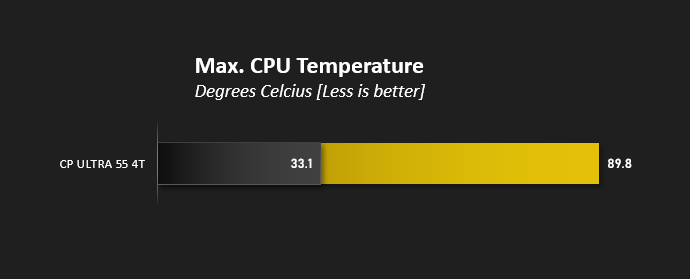
A maximum reported temperature of 89.8C is exceptionally high and a reflection of the stock cooler’s lacklustre performance. Bear in mind that the Ryzen 5 5500 is only a 65W TDP SKU and has a rated maximum operating temperature of 95C; pushing the system hard over extended periods in hotter conditions exceeding our 20C ambient temperatures could easily result in CPU throttling.
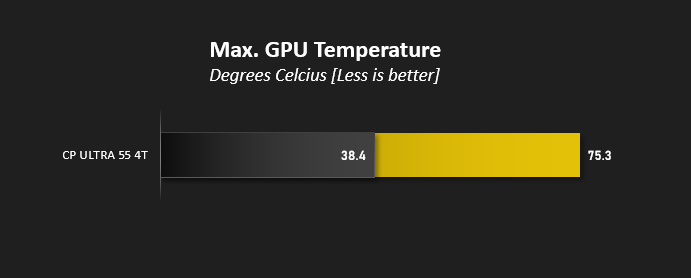
By the same token the system was able to regain an idle CPU temperature of 33C 10mins after load, indicating that general air-flow inside the case is adequate to its needs. This is backed up by fair GPU load temperatures hovering at or below 75C.
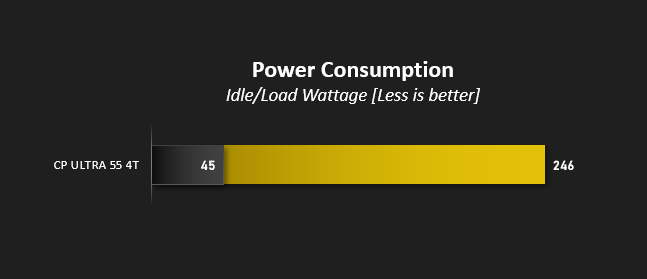
The Ultra 55 4T pushes a peak of 248W under gaming load, well within the rated specification of the supplied PSU, and falls to 45W at idle. That’s fairly efficient for a gaming PC if you’re the sort to leave a system powered up 24/7, and it won’t be a power guzzler if gaming is your primary use case.
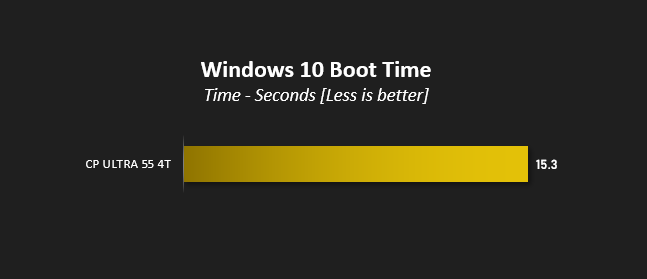
A boot to Windows time of over 14 seconds won’t be setting any records, and reflects the somewhat laboured boot process common to AMD’s Ryzen platform.
Benchmarks: Cinebench R20, R23 & 7Zip
Maxon’s Cinebench is a real-world cross-platform test suite that evaluates your computer’s hardware capabilities. Improvements to Cinebench Release 20 reflected the overall advancements to CPU and rendering technology in recent years, providing a more accurate measurement of Cinema 4D’s ability to take advantage of multiple CPU cores and modern processor features available to the average user.
In October 2020 Maxon launched Cinebench R23. This release formulated an updated test that defined a notational runtime of 10 minutes for both single and multicore tests, minimising the impact of initial performance spikes caused by a high Turbo/Boost clock at the start. The scores generated are not directly comparable to the R20 results, but we’ve included them here for reference.
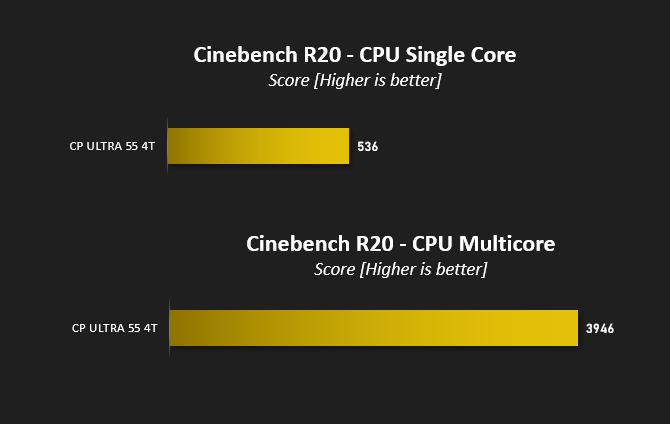
A Cinebench R20 multi-threaded score of 3946 with a single core score of 536 certainly won’t be topping any charts. These results are closer to those posted by a Ryzen 5 3600X (a mid-range CPU now two generations out of date) than the 5600, reflecting its slightly awkward position in AMD’s product stack.
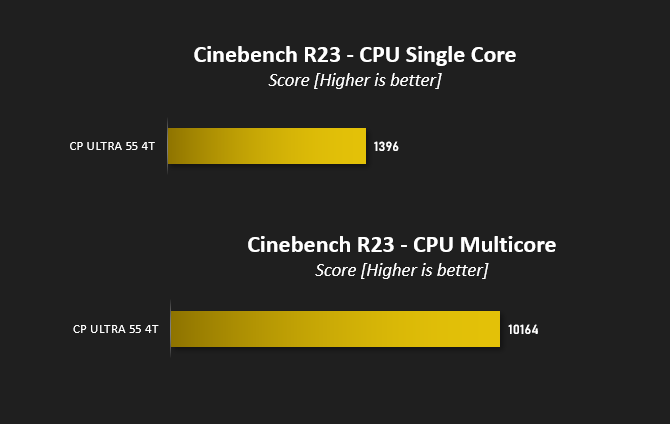
Cinebench R23 is a more representative test for modern many-core CPUs. The result neatly bisects the scores we’d expect from the Ryzen 5 3600X and 5600, the latter of which reaches a touch under 11000 at stock.
Obviously these results are nothing to write home about, and if anything show that AMD would have been well served by extending AMD’s ‘Ryzen 3’ branding to the desktop lineup and putting this chip under its banner. It is, in effect, a great entry-level chip, rather than a mediocre mid-range one.
—
7-Zip is open-source software which unpackages compressed (zipped) files. It also features a benchmark which measures your systems ability to unpack files, typically stressing CPU and memory performance.
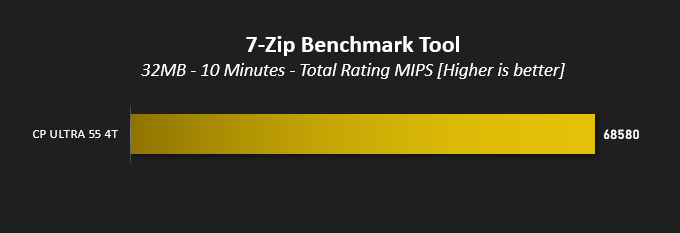
The system achieved a total rating of 68.58 GIPS during decompress testing, indicating that the test was making effective use of all 12 threads available.
Benchmarks: PC Mark 10, Unigine Heaven, 3D Mark
PCMark 10 by UL combines performance benchmarking with battery life measurement where applicable and includes tests based on popular Adobe and Microsoft applications. Whether you are looking for long battery life, or maximum power, PCMark 10 will help you find the devices that offer the perfect combination of efficiency and performance for your needs. It’s the complete PC performance benchmark for home and business.

Differences in system performance in PC Mark 10 are often represented by fairly marginal gaps in score, and that’s no better exemplified than with the Ultra 55 4T. It scores only 100pts less than the Hyper Liquid X139, a flagship Core i9 system with an RTX 4090, but realistically the two systems will feel similar experientially outside of gaming and very high workload tasks that can leverage the raw horsepower of the X139’s high end hardware.
—
3DMark Time Spy by UL is a DirectX 12 benchmark test for gaming PCs running Windows 10. With its pure DirectX 12 engine, built from the ground up to support new API features like asynchronous compute, explicit multi-adapter, and multi-threading, Time Spy is the ideal benchmark for testing the DirectX 12 performance of the latest graphics cards.

3DMark Time Spy presents users with a breakdown of scores: GPU, CPU and Combined.
Overall: 11925
GPU: 13165
CPU: 7786
GPU: 13165
CPU: 7786
For completeness we also put the system through 3D Mark’s newer Speed Way benchmark. It scored 3101 points.
—
Unigine’s Heaven 4.0 utility is a performance and stability test for PC hardware: video card, power supply, cooling system. Check your rig in stock and overclocking modes with real-life load! Also includes interactive experience in a beautiful, detailed environment.
While relying on a DirectX 11 API renderer rather than more modern DX12 framework, Heaven 4.0 and DX11 performance is still a relevant metric today.
This test was performed at a resolution of 2560×1440 with Extreme presets including High Tessellation, Ultra textures and x8 Anti-Aliasing.
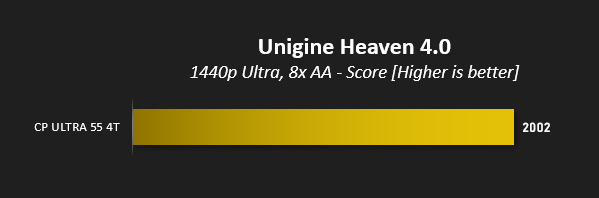
A score hovering about 2000 at the settings used is roughly on par with the RTX 2080 non-Super, which is a fine 1440p card that only struggles when pushing complex scenes in today’s most graphically demanding games.
Benchmarks: Gaming at 1440p
NVIDIA’s GeForce RTX 4060 Ti 8GB is the middle-est of this generation’s mid-range and is billed as a GPU for gaming primarily at a resolution of 1440p. Not all games are equally demanding however, particularly when ray traced lighting and shadows are added to the mix, so we’ve looked at performance across a range of older and more recent titles.
Middle-Earth: Shadow of War
The oldest of our titles, Middle-Earth: Shadow of War is still an exceptionally attractive game that utilises the DirectX 11 API. In deference to its vintage, we’ll be testing at 1440p with Ultra image quality presets.
Shadow of the Tomb Raider
The second sequel to the rebooted Tomb Raider franchise, Shadow of the Tomb Raider was also one of the first titles to incorporate NVIDIA RTX ray traced shadows and DLSS. At 1440p we’ll be testing with the Highest quality presets, Ray Traced Shadows manually set at the High, SMAA 4x, and the benefit of DLSS’s ‘Quality’ upscaling mode preset. Performance will also be noted with DLSS disabled .
Horizon Zero Dawn
This game was new to PC in August 2020 and already has a reputation for taxing GPU hardware. It doesn’t feature ray tracing, but nonetheless has some of the most stunning scenes ever rendered in games. We’ve used the Ultimate preset at 1440p here, but Favoured also offers a visual feast with markedly higher performance.
Control
Critically acclaimed on release, Control is the title which made most comprehensive use of NVIDIA RTX prior to Cyberpunk 2077’s release in Holiday 2020. Shadows, lighting and reflections all make use of this advanced rendering standard, helping the transition from mundane world to its nightmarish reflection. We opted for the Highest detail settings preset with RTX features enabled including the default recommended level of DLSS: a rendering resolution of 1920×1080.
Cyberpunk 2077
Finally reliable after major patch releases, CDProjekt RED’s neo-futurist open world RPG has stunning visuals and ray traced lighting effects to enjoy. We took it for a spin with RTX On at 1440p with DLSS 3 enabled.
The oldest of our titles, Middle-Earth: Shadow of War is still an exceptionally attractive game that utilises the DirectX 11 API. In deference to its vintage, we’ll be testing at 1440p with Ultra image quality presets.
Shadow of the Tomb Raider
The second sequel to the rebooted Tomb Raider franchise, Shadow of the Tomb Raider was also one of the first titles to incorporate NVIDIA RTX ray traced shadows and DLSS. At 1440p we’ll be testing with the Highest quality presets, Ray Traced Shadows manually set at the High, SMAA 4x, and the benefit of DLSS’s ‘Quality’ upscaling mode preset. Performance will also be noted with DLSS disabled .
Horizon Zero Dawn
This game was new to PC in August 2020 and already has a reputation for taxing GPU hardware. It doesn’t feature ray tracing, but nonetheless has some of the most stunning scenes ever rendered in games. We’ve used the Ultimate preset at 1440p here, but Favoured also offers a visual feast with markedly higher performance.
Control
Critically acclaimed on release, Control is the title which made most comprehensive use of NVIDIA RTX prior to Cyberpunk 2077’s release in Holiday 2020. Shadows, lighting and reflections all make use of this advanced rendering standard, helping the transition from mundane world to its nightmarish reflection. We opted for the Highest detail settings preset with RTX features enabled including the default recommended level of DLSS: a rendering resolution of 1920×1080.
Cyberpunk 2077
Finally reliable after major patch releases, CDProjekt RED’s neo-futurist open world RPG has stunning visuals and ray traced lighting effects to enjoy. We took it for a spin with RTX On at 1440p with DLSS 3 enabled.
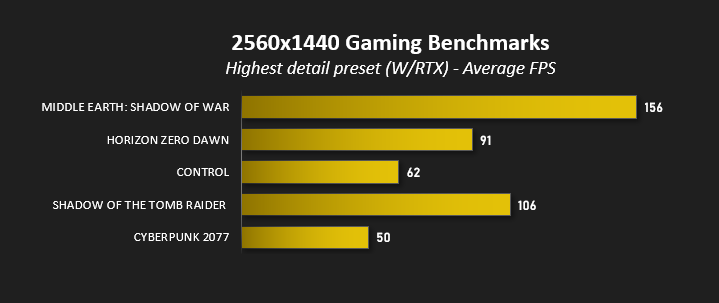
Performance expectations have broadly been met, with average FPS values that underscore the advantages of pairing with a variable refresh rate monitor. Managing a consistent 60fps in Control is particularly impressive, but 50 fps in Cyberpunk 2077 indicates that taking image quality down a notch might be in order.
Performance without DLSS on all RTX titles craters at 1440p, the worst of which is again Cyberpunk 2077 with low double-digit averages and single-digit minimums.
More broadly, the system is a capable 1440p machine in the majority of games, but its struggles in the most modern titles reflect a trend towards pushing graphical fidelity beyond what mid-range GPUs can handle at standard gaming resolutions. Turn off ray tracing and you’ll probably be fine, but requiring ever more complex upscaling technologies to reach acceptable FPS levels really poisons the well.
Conclusion
At the surface level Cyberpower PC’s Ultra 55 4T satisfactorily fits the envelope of a mainstream 1440p gaming system built to (what turns out to be) a tight cost basis. Its marquee component is the GeForce RTX 4060 Ti 8GB, displacing other parts into its shadow and drawing the eye away from their shortcomings. Only when you pause for a more than cursory examination do some of the compromises become clear, compromises which in hindsight are more significant than they might first appear.
For all the furore surrounding the RTX 4060 Ti’s launch, particularly as a 1440p card, it’s still the GPU most consumers would opt to buy at £400 and its performance reflects that. A system integrator won’t dig into eBay for that great deal on an RTX 3070, and bundling the cheaper RTX 3060 Ti would be a compromise too far given NVIDIA’s current preference for making newer RTX technologies exclusive to the 40-series. This card, particularly MSI’s Ventus 2X model, is optimal given the paucity of options available to Cyberpower PC, but it has led to shortcomings in other areas.
The most glaring of these is the choice of CPU. A Ryzen 5 5500 is a much bigger step down from the 5600 than indicated by its SKU, and not just clock speed. Half the L3 cache and only PCIe 3.0 support undermines gaming performance and starves the RTX 4060 Ti, while potentially locking off future support for APIs based on Microsoft DirectStorage including RTX IO. If the Ultra 55 4T has an eye to the future through its selection of GPU, it also has its foot firmly planted in the past thanks to an inferior CPU and motherboard platform.
In the face of these failings, criticising including only 16GB of 3200MHz memory is nit-picking, but the push towards 32GB system memory recommendations will be strong in the coming year. The stock CPU cooling is also sufficient, but only that. An upgrade for the latter would be a swift post-purchase recommendation if any hot weather is forecast.
One aspect nailed by Cyberpower was the storage. Intel’s 670p is an excellent budget choice, and 1TB is positively roomy for a brand new build. The performance of this drive is great – it’s on the faster end of PCIe Gen3 x4 drives – and additional storage is trivial to add to the system post-purchase.
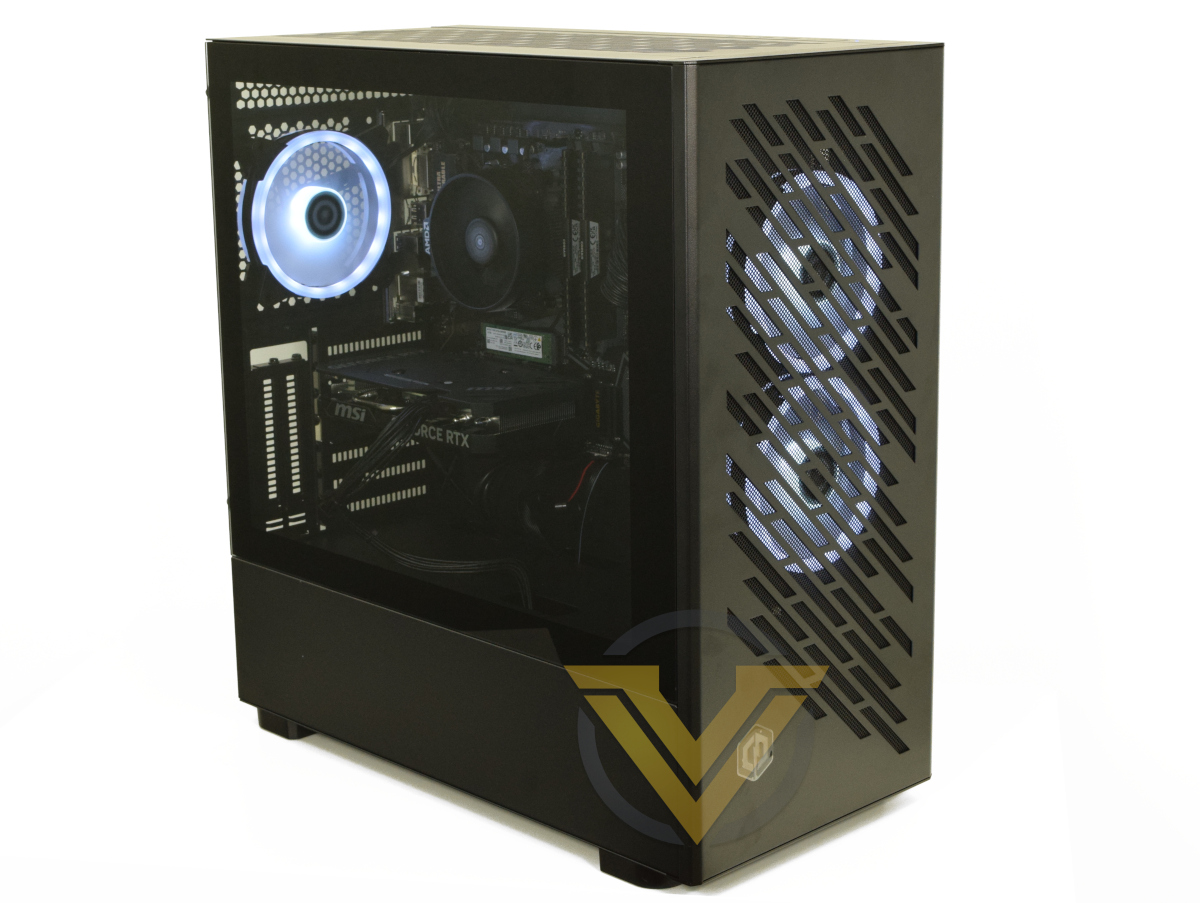
The case itself is attractive, has great build quality, and provides excellent airflow thanks to a perforated front panel and dual 120 intake fans. Each fan’s halo effect RGB lighting is bright and vibrant without necessarily being garish, allowing for a custom look somewhat at odds with the build’s relatively low cost.
Experientially, the system copes well with the tested games at 1440p. It’s not captured in raw results but some care with in-game settings will garner large improvements with little discernible impact on image quality, but for modern titles it’s just riding the edge of viability as a platform for gaming at this challenging resolution. Owners should expect to lean heavily on DLSS upscaling as the system ages and to keep a very close eye of 95%/99% minimums lest a weak CPU undermine your enjoyment.
Fundamentally, the impression we get is that this system really needs about £50-100 of improvements to be a great mainstream design, but it will still serve its intended role adequately so long as you temper your expectations. NVIDIA’s RTX 4060 Ti swallows up 40% of the cost of the system, but an even slightly more aggressive cost basis could have made all the difference. Those buying the system for the long haul however, potentially through a 3-year course of study or as a multi-year gaming system, immediately have an upgrade path that will garner meaningful results and can be done affordably in a piecemeal fashion.
Cyberpower PC’s Ultra 55 4T shows the frustrations of catering to a tight budget when GPU pricing is less than consumer friendly. Knock-on compromises to CPU and cooling will therefore disappoint the most tech-savvy. Great at 1080p but merely good at 1440p, it’ll satisfy those with realistic expectations who are more concerned by results today than forward-looking specifications.
Pros:
+ Meets the challenge of a good gaming system for £1000
+ Capable of gaming at 1440p with the majority of modern games
+ Supports latest NVIDIA technologies via a RTX 40-series GPU
+ Plethora of long-term upgrade options
+ Some aesthetic frills
Cons
– Key weaknesses in CPU selected
– Looming game recommended specs creep to beyond listed specifications
– Poor CPU cooling
+ Meets the challenge of a good gaming system for £1000
+ Capable of gaming at 1440p with the majority of modern games
+ Supports latest NVIDIA technologies via a RTX 40-series GPU
+ Plethora of long-term upgrade options
+ Some aesthetic frills
Cons
– Key weaknesses in CPU selected
– Looming game recommended specs creep to beyond listed specifications
– Poor CPU cooling
Click here for an explanation of our awards at Vortez.net.
Stay connected with the Vortez Social Media pages:
Join in with the discussions on Discord