A mid-tower chassis with sleek looks, bags of space and an interesting feature-set. Should you consider it for your next PC build?

Product on Review: CK500 WH Case
Manufacturer & Sponsor: Deepcool
Street Price: $89 USD | $129 AUD
At the beginning of the year, Deepcool released two new cases under the CK Series – consisting of the CK500 and CK560, offering up black and white versions. The ethos behind the CK Series is to provide a sleek enclosure which delivers a clean design, while catering for the plethora of different hardware options that are on the market.
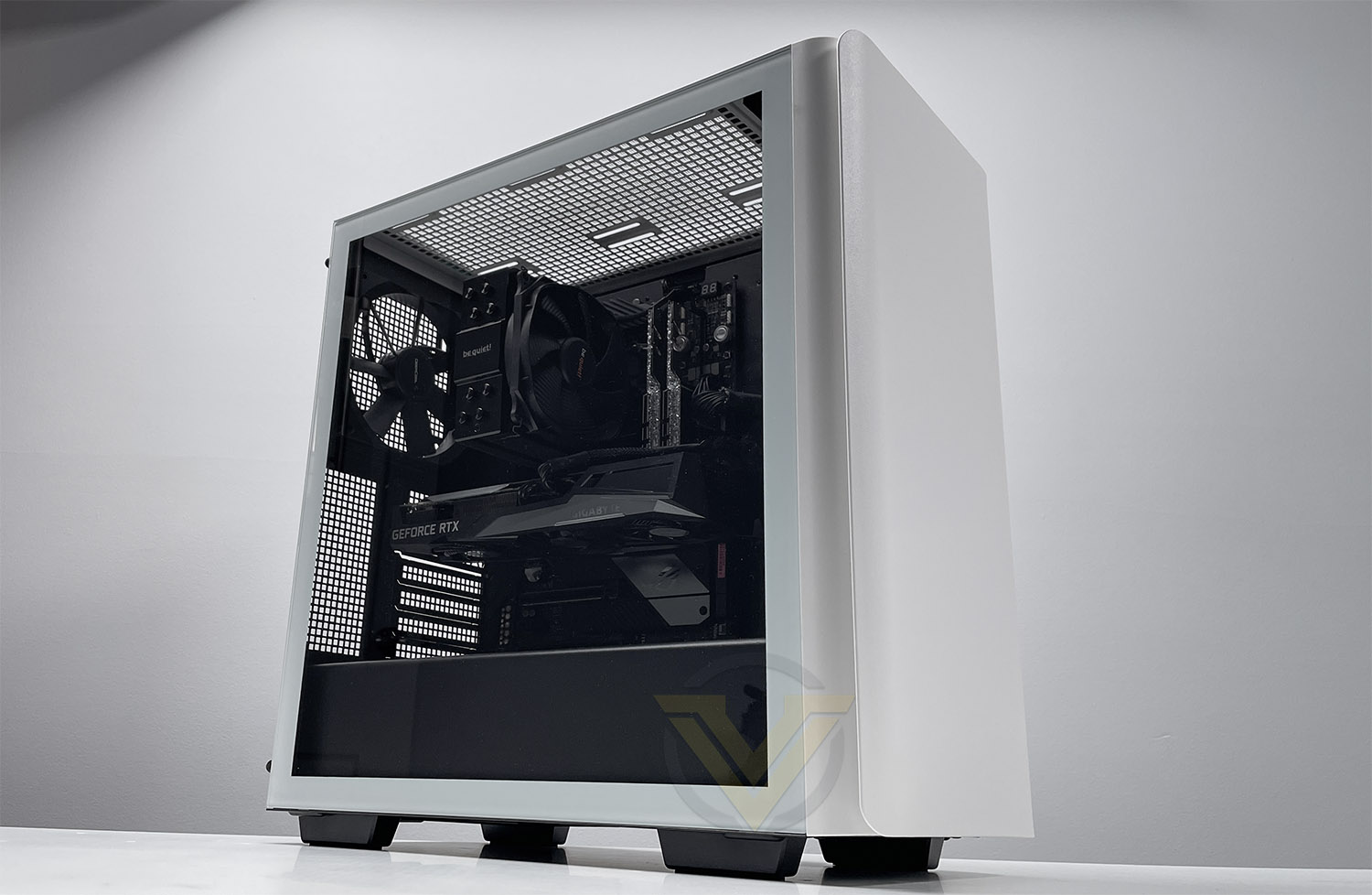
In the spotlight today is CK500 WH, which is the white edition of the CK500. As the CK series adopts a minimalist type of approach to computer case design, the CK500 WH serves up just that. It has a sophisticated look with easy to remove panels, and even comes with a handy GPU support adapter to alleviate weight caused by heavy graphics cards.
Deepcool on their CK500 WH
The DeepCool CK500 WH Mid-Tower Case is a sleek and minimal white case that delivers balanced airflow and noise performance for the modern-day builder with two pre-installed 140mm performance fans.
Technical Specifications
Below are the technical specifications surrounding the CK500 WH:
Closer Look Video Review
For this review we’ve also created a YouTube video which highlights all of the key features, shows a full system install and identifies the good/bad points regarding this computer case. Click the video below or go to the Deepcool CK500 WH:
Thermal Performance Testing
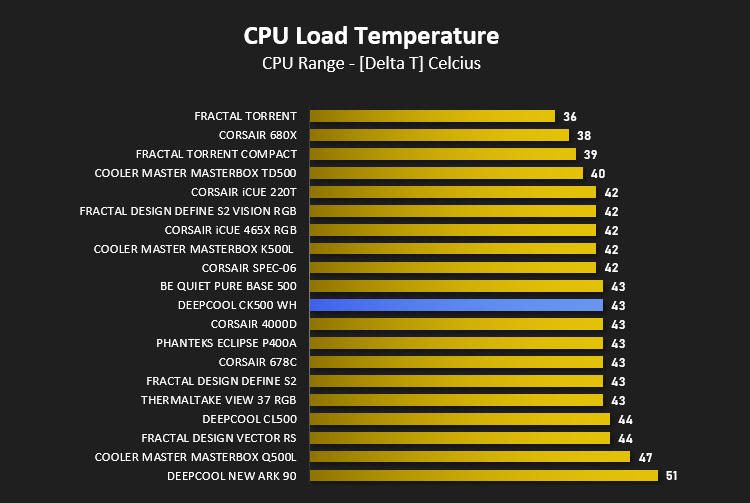
Inside CK500 WH there are two 140mm cooling fans – configured as push/pull at the front and rear of the chassis. This arrangement usually yields great results.
To discover the thermal performance of CK500 WH we will record idle temperatures after 20 minutes from a cold boot. We will then stress the system and temperatures will again be monitored after 30 minutes have elapsed.
For the purpose of accurate analysis, the idle and load temperatures for CPU will be recorded and the range between idle and load will be calculated to determine how efficient cooling is.
NOTE: Ambient temperature is 20C
The below system configuration is different to that which is displayed/installed within the pictures. We use this below configuration for historic comparison.
System Components
CPU Intel Pentium K G3258 @ 4GHz
Motherboard GIGABYTE Z87X-D3H
CPU Cooler Cooler Master Hyper 212 EVO (Different to cooler in pictures)
Graphics NVIDIA GTX 760
Memory 4GB Kingston HyperX DDR3
HDD Samsung Spinpoint 500GB SATA-II
PSU DeepCool DQ750
Motherboard GIGABYTE Z87X-D3H
CPU Cooler Cooler Master Hyper 212 EVO (Different to cooler in pictures)
Graphics NVIDIA GTX 760
Memory 4GB Kingston HyperX DDR3
HDD Samsung Spinpoint 500GB SATA-II
PSU DeepCool DQ750
Noise
CK500 WH emits very little noise as shown in our video review.
Conclusion
In our time with the CK500 WH, we have had a positive experience. There are many things to like about this new case!
Inside, Deepcool provides ample space for housing the very latest kit, whether that is large CPU coolers, long graphics cards or all in one liquid coolers. Cable management is easy to keep under control thanks to the way in which Deepcool has designed the backside of the motherboard tray. One particular feature which works surprisingly well is the GPU support mechanism which helps to reduce strain placed on the PCI Express slot by large, heavy, graphics cards.
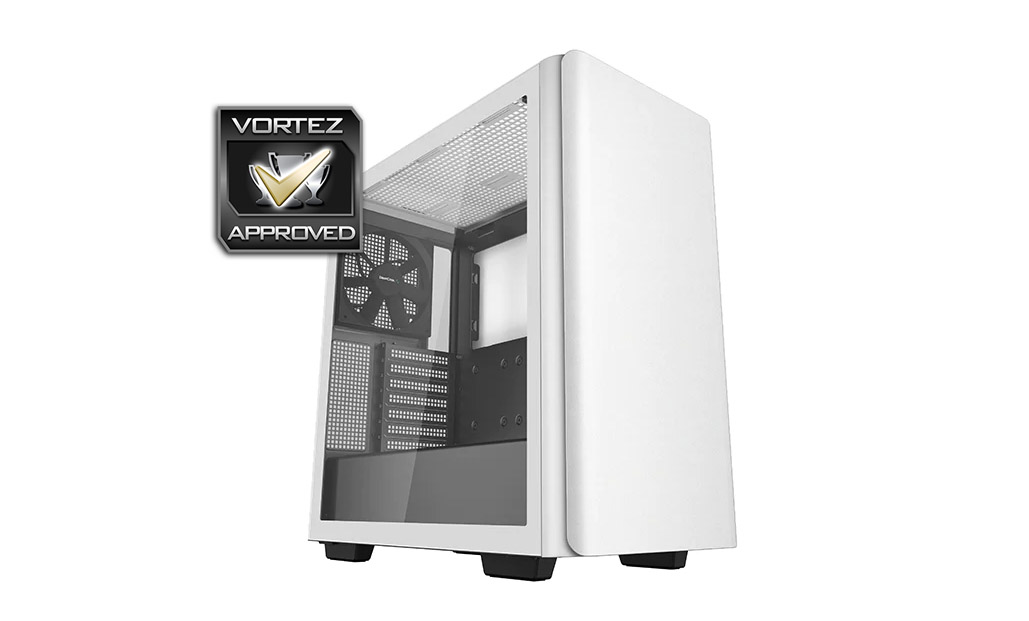
The CK560 (which is a similar case to the CK500) will be the obvious choice for those seeking better airflow, due to the perforated front panel, but CK500 does an admirable job in the cooling department despite having a closed off front section. Air from outside the case can still be sucked in from the edge for the front panel and the included dual 120mm fans produce decent airflow with their push/pull configuration.
CK500 WH arrives with a price-tag of USD: $89 | AUD $129 – which we feel represents reasonable value for money for what’s on offer.
Deepcool’s new CK500 WH is a great mid-tower case which is built well, supports high-end kit and looks sleek.
Pros
+ Sleek aesthetics
+ Easy to removal panels/dust filters
+ Includes USB 3.2 Gen2 Type-C
+ Cooling is decent
+ Ample space for hardware
+ Good build quality
+ Includes GPU support mechanism
Cons
– Storage lacks cooling
+ Sleek aesthetics
+ Easy to removal panels/dust filters
+ Includes USB 3.2 Gen2 Type-C
+ Cooling is decent
+ Ample space for hardware
+ Good build quality
+ Includes GPU support mechanism
Cons
– Storage lacks cooling
Click here for an explanation of our awards at Vortez.net.
Stay connected with the Vortez Social Media pages: