







A funky Micro ATX ready computer chassis based around the Steampunk genre and available with fan controller, LEDs and a plethora of varying colours.

Product On Review: STEAM CASTLE
Manufacturer & Sponsor: DeepCool
Street Price: £70 GBP / $100 USD
A number of weeks ago DeepCool announced their STEAM CASTLE and received a mixed reception. This bold new design follows the Steampunk genre and therefore by its very nature breaks away from the current trend of discreet and subtle styling which we are all too familiar with.
STEAM CASTLE is a fun and exciting new Micro ATX computer chassis which is available in a selection of colours. This case comes with a handy fan controller, two cooling fans and the prospect of future modding projects.
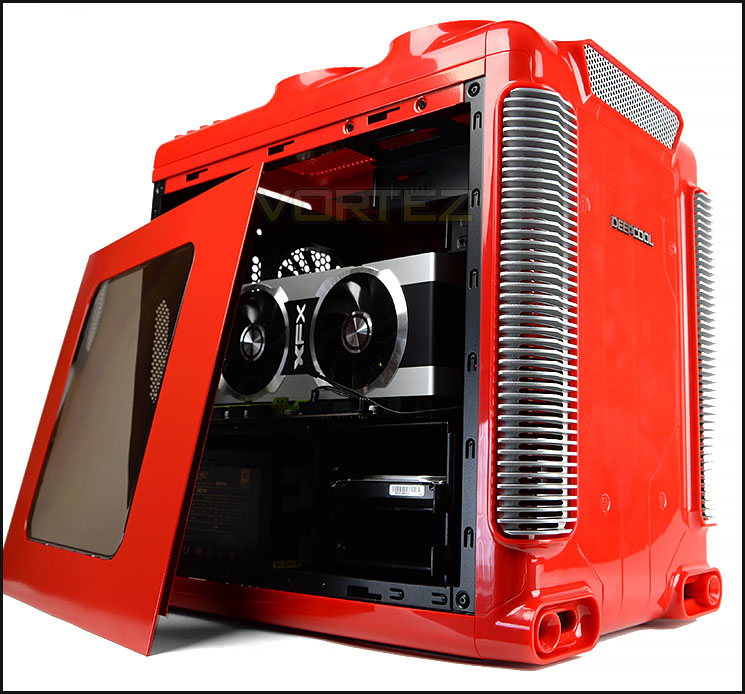
DeepCool on their STEAM CASTLE
The STEAM CASTLE Micro ATX case is designed as gaming case for hardware enthusiasts with the very impressive appearance, which is compatible to both Micro ATX and Mini ITX motherboards. Also to meet various requests of colorful motherboard themes, DEEPCOOL provides choices with fours colors as Black (the always classic one), White (Popular with APPLE), Red and Yellow. The case offers quite large space besides the Micro body, which is available for CPU cooling(air cooling up to 200 mm and liquid cooling up to 240 mm), two 2.5″ SSDs, long graphic card up to 320 mm. In addition, to increase the amazing effect, 4 magic LED flash lights are pre-installed on the top.
Features
• Unique post-modern steam-punk style appearance, very impressive
• Side-window and top 4 turbo-type air out-taking holes, excellent for PC MOD and gaming
• Horizontal structure, perfect for top-performance or big-size air cooler installation, ensures a great cooling performance while keeps no extra vertical pressure to the motherboard (compared with tower-type ATX case)
• Large area of rubber painting (soft touch)
• 4 magic color LED lights pre-installed on the top, amazing effect (color changing, brightness adjusting and breathing, fan speed adjusting)
• 2 USB 3.0 +2 USB 2.0 Ports
• 200 mm fan (front)+120 mm fan (rear) pre-installed
• Compatible with Micro ATX and Mini-ITX motherboards
• Support long VGA Card installation up to 320 mm length
• Top panel supports max 240 mm water cooler installation
• 2 grommets on the rear are ready for building external water-cooling system
• Tool free installation design for 2.5″/3.5″ SSD/HDD
• Independent two 2.5″ drive-bays support SSD RAID build-up
• Two-layer horizontal structure, excellent for heat dissipation & compatibility
• Side-window and top 4 turbo-type air out-taking holes, excellent for PC MOD and gaming
• Horizontal structure, perfect for top-performance or big-size air cooler installation, ensures a great cooling performance while keeps no extra vertical pressure to the motherboard (compared with tower-type ATX case)
• Large area of rubber painting (soft touch)
• 4 magic color LED lights pre-installed on the top, amazing effect (color changing, brightness adjusting and breathing, fan speed adjusting)
• 2 USB 3.0 +2 USB 2.0 Ports
• 200 mm fan (front)+120 mm fan (rear) pre-installed
• Compatible with Micro ATX and Mini-ITX motherboards
• Support long VGA Card installation up to 320 mm length
• Top panel supports max 240 mm water cooler installation
• 2 grommets on the rear are ready for building external water-cooling system
• Tool free installation design for 2.5″/3.5″ SSD/HDD
• Independent two 2.5″ drive-bays support SSD RAID build-up
• Two-layer horizontal structure, excellent for heat dissipation & compatibility
Packaging & First Look
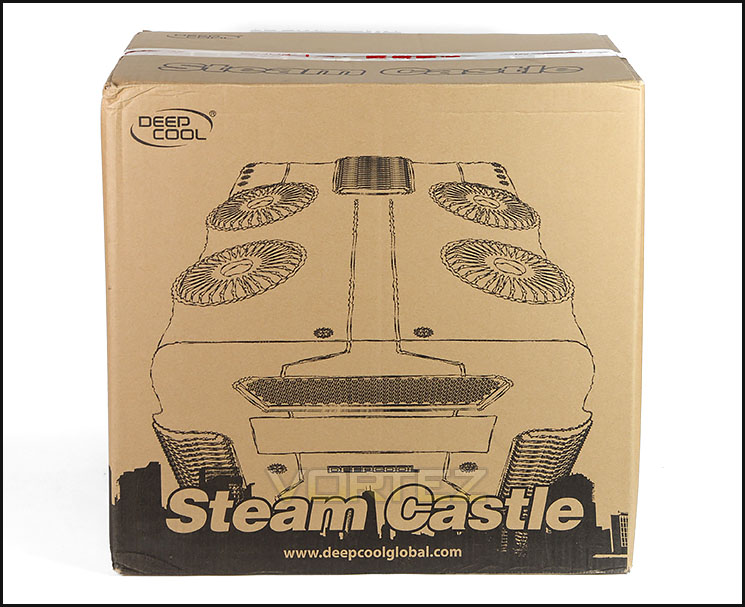
Eco-friendly packaging
Steam Castle is presented in an eco-friendly box which is recyclable. There is a brief illustration of the case on the front and around the back resides another illustration giving a breakdown of the features.
Inside the box, the chassis is covered in a plastic sheet and two polystyrene pads help to ensure protection during transit.
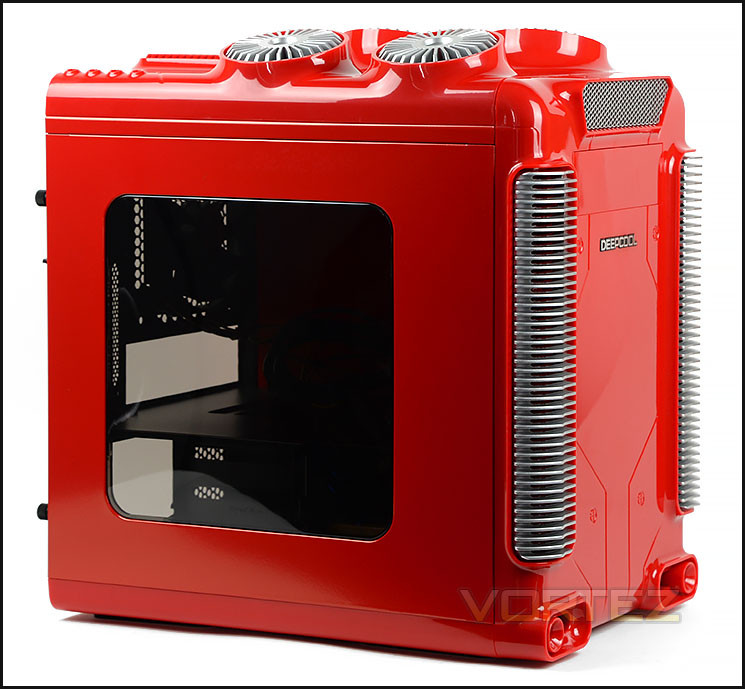
Quirky, unique asthetics
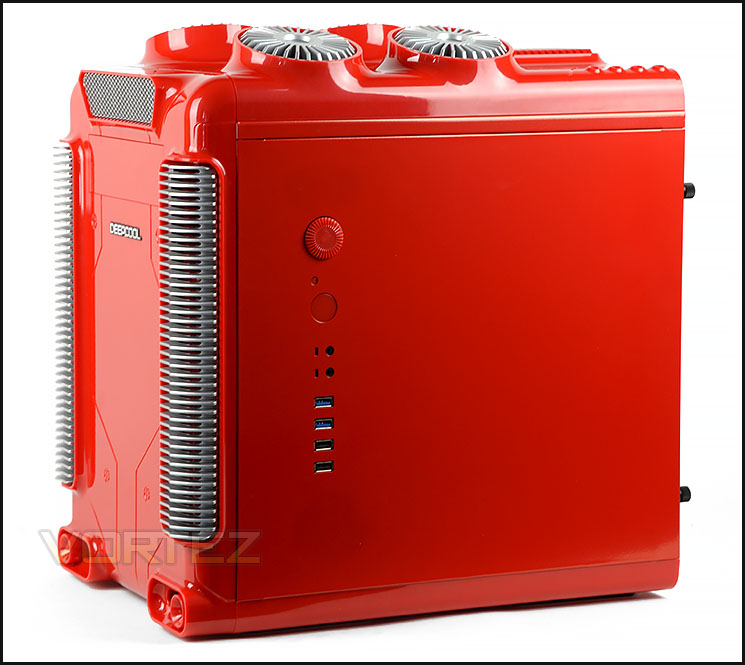
Front panel connectivity on alternate side panel
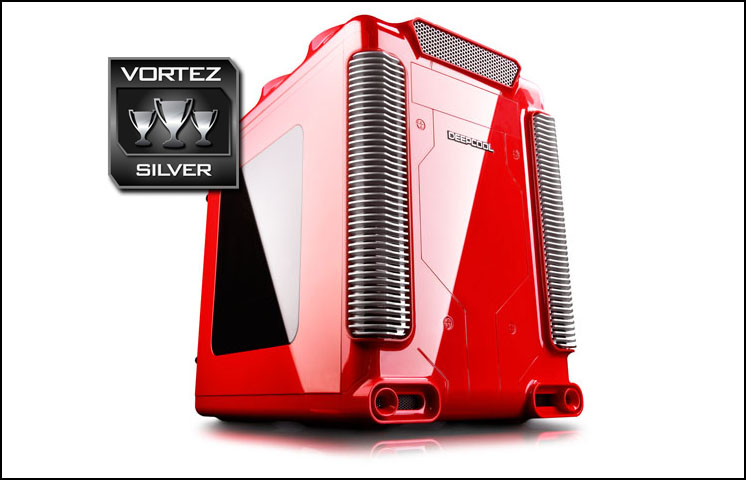
To say that Steam Castle is unique is an understatement. DeepCool has given this case distinct and eye-catching aesthetics unlike anything on the market. Since Steam Castle has such a striking design, this will likely divide favour.
On the prominent side panel there is a tined Perspex window which gives a preview inside the case whilst on the alternate side the panel we have the front panel connectivity which includes: fan controller wheel, power and reset button, headphone and microphone jacks, 2x USB 3.0 ports, 2x USB 2.0 ports.
On the next page we’ll be looking at the external features of Steam Castle.
Exterior
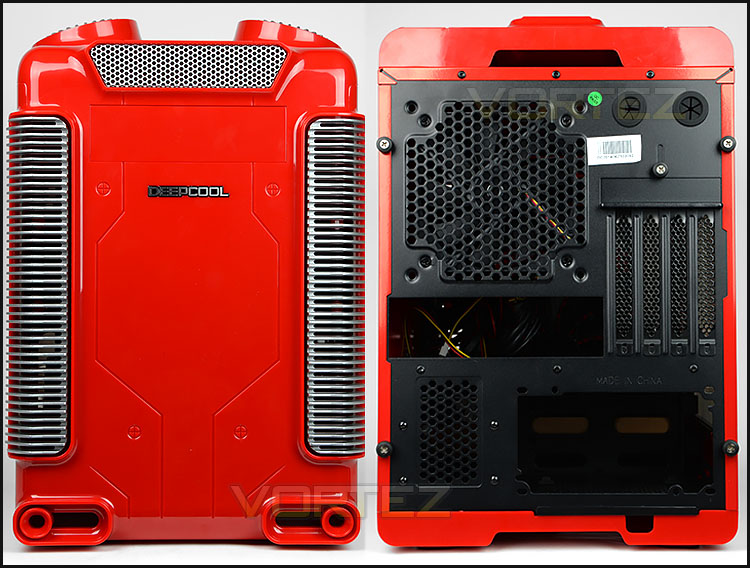
The front and back of Steam Castle
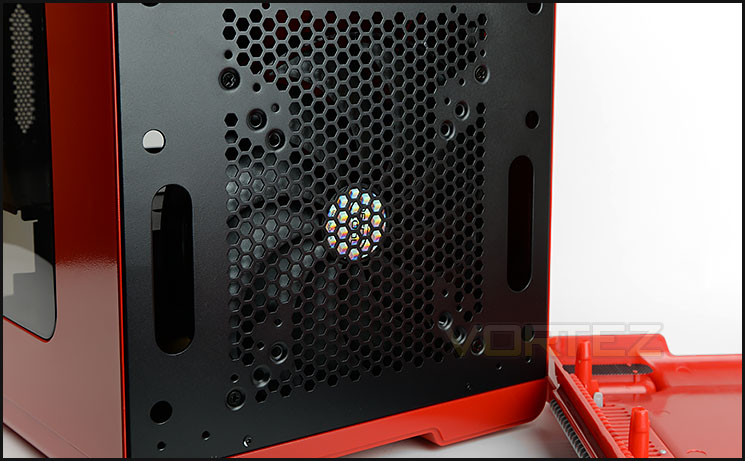
200mm front intake cooling fan pre-installed
At the front of Steam Castle we have a glossy plastic fascia which has a selection of accents and peculiar designs. There is ventilation at the bottom, side grills and upper perorated mesh since there is a 200mm front intake cooling fan. This fascia can be removed with a small tug – at the front there are mounting holes for a single 120/140mm fan. DeepCool has included a single 5.25” drive bay cover which can be removed from the inside of the case.
Around the back there is an opening at the bottom for mounting the PSU as well as a small honeycomb mesh section for the 2.5” drive cage. Above this there is an opening for the rear IO ports and then four PCI expansion slot covers which are vertically aligned since the motherboard orientation is horizontal within the chassis. These slots are perforated and use a unique shutter design for securing devices. There is a 120mm rear exhaust fan placed at the rear as well as two circular rubber grommets.
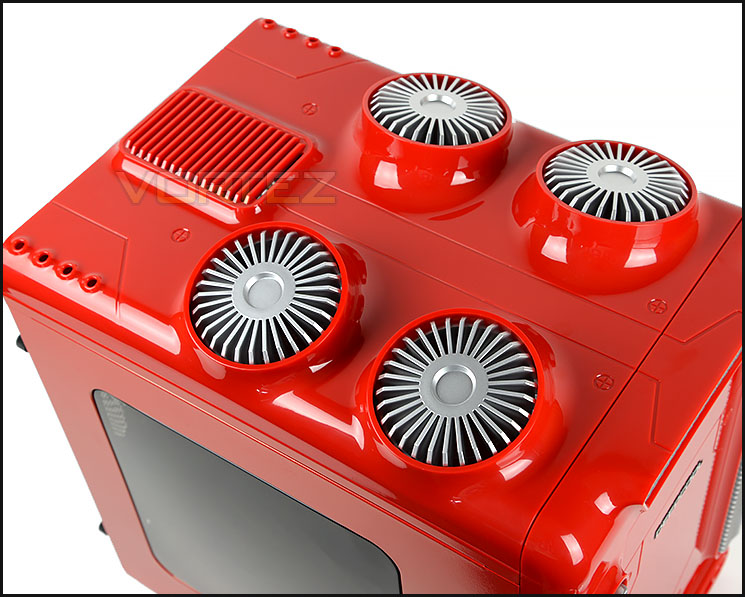
Steam-punk design is event at the top
Steam Castle follows steam-punk for its theme by including even more mechanical type designs at the top of the case. There are four circular shaped receptacles which support a series of LEDs rather than cooling fans which many will expect. Towards the back there is additional ventilation for the system.
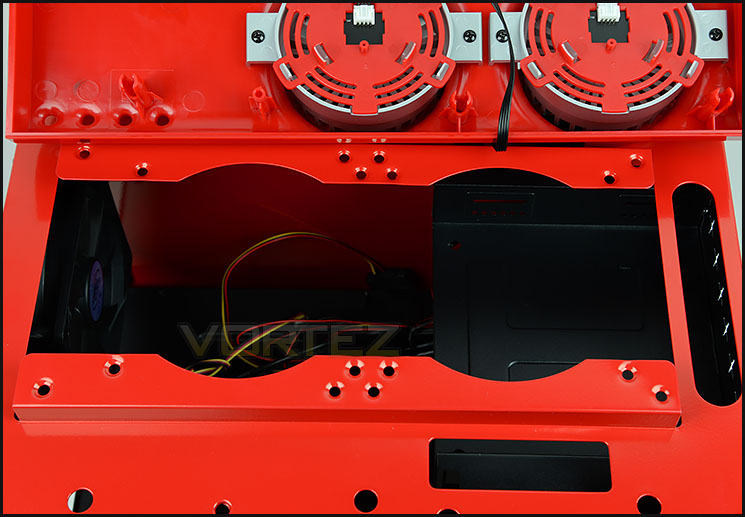
Allocation for dual 120/140mm cooling fans at the top
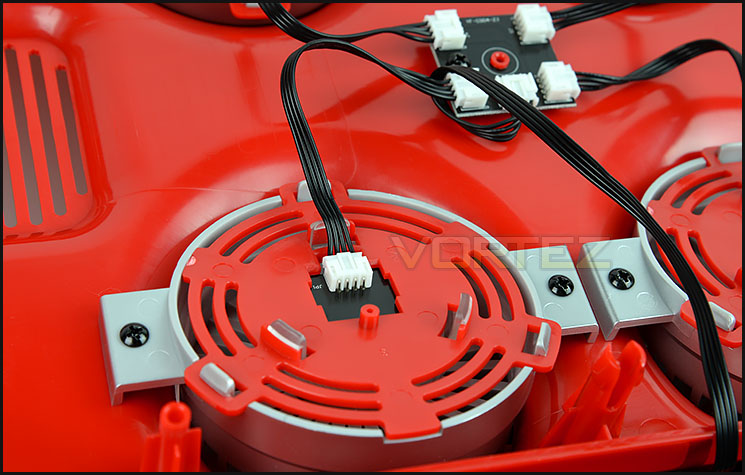
LED spots fix within the fascia
Again, just like the front fascia, the top unclips with a small tug. Removing this panel reveals allocation for dual 120/140mm cooling fans or 240/280mm radiators. Later on, we’ll be looking at the clearance options for radiators/ALCs.
As previously mentioned, the top fascia has four circular type objects – these host LEDs which all link to a hub and then this hub is powered by power from the PSU.
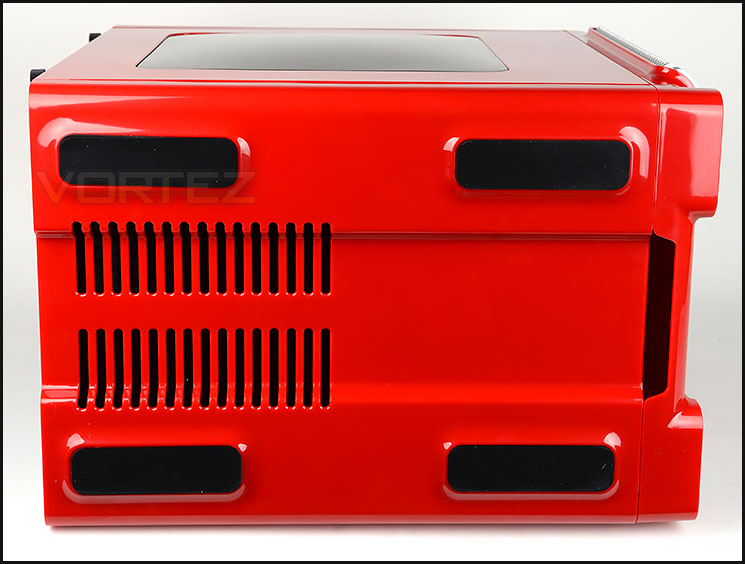
The underside of Steam Castle
At the bottom of Steam Castle there are four large rubber strips which help to ensure the case does not slip on smooth surfaces and there are ventilation cut-outs towards the back of the underside for the PSU.
Interior
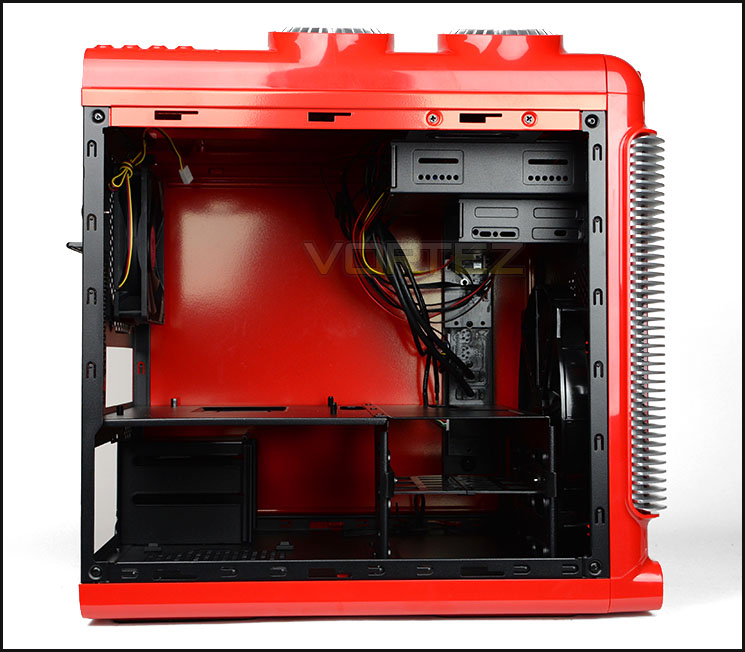
Powder coated black internal design
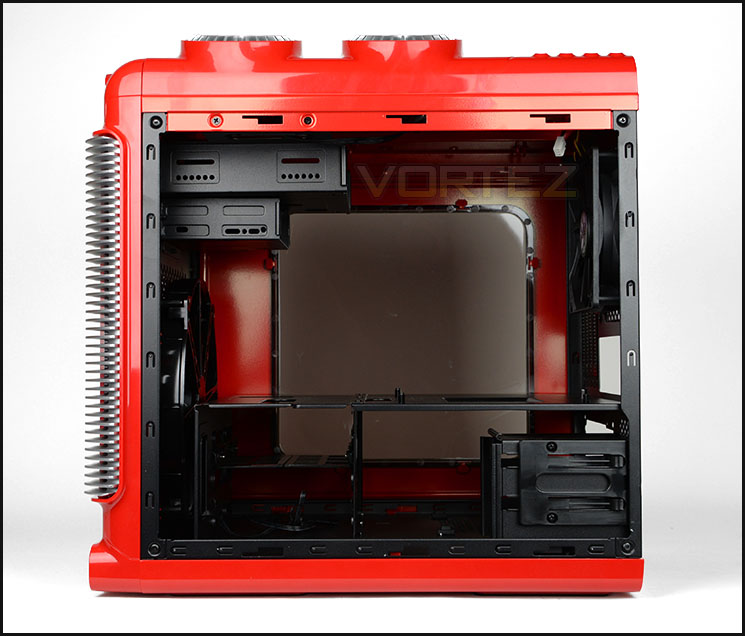
Micro ATX and Mini-ITX motherboard compatibility
Steam Castle uses thumbscrews to fix the side panels onto the chassis, once these are both detached from the case we can examine the inside.
Steam Castle has a motherboard tray which sits horizontally inside the chassis and can accommodate Micro ATX and Mini-ITX form factors.
All of the internal elements of Steam Castle are powder coated black and there is tool-free kit for installing storage.
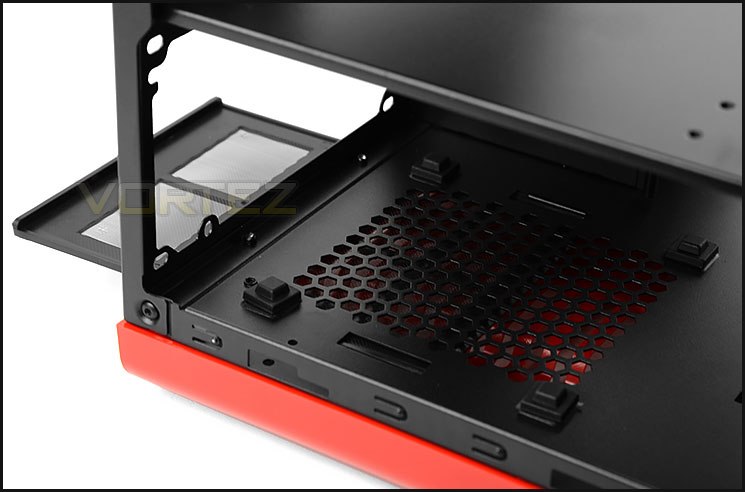
Dust filter for PSU
At the bottom of the case is the location for mounting the PSU. We’re pleased to report that there are rubber pads for the PSU to sit on and DeepCool has also included a removable dust filter for collecting dirt.
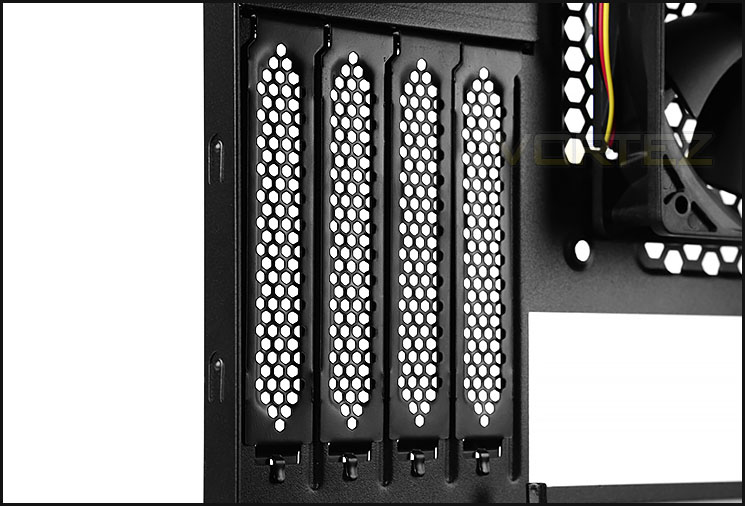
Support for multi-GPU configurations
Due to the motherboard orientation the PCI covers are vertically aligned. There are a total of four PCI covers which are all perforated and use a unique tool on the outside of the case for detaching brackets.
On the next page we’ll continue our look at the inside of Steam Castle.
Interior (Continued)
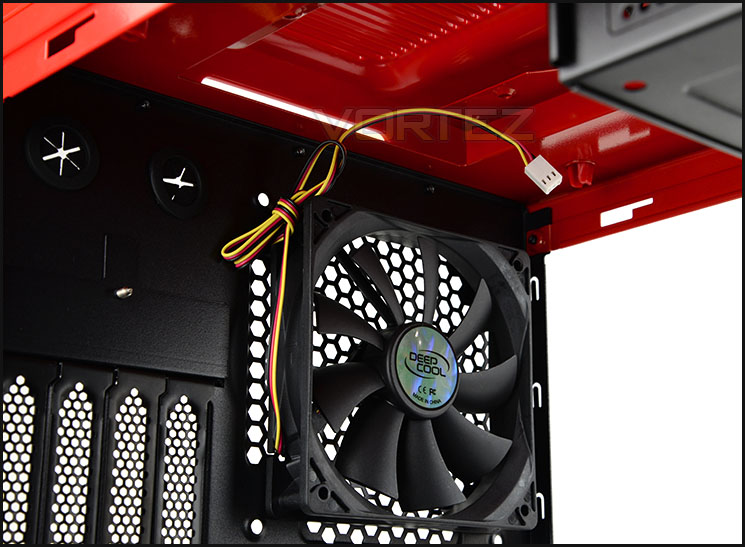
120mm rear exhaust fan
Next to the PCI slots there is a 120mm rear exhaust cooling fan. Sadly, the cables connected to this fan are not braided and are therefore yellow, red and black. This can make it hard to conceal cables and keep things tidy. As mentioned previously, we can also install dual 120/140mm fans at the top.
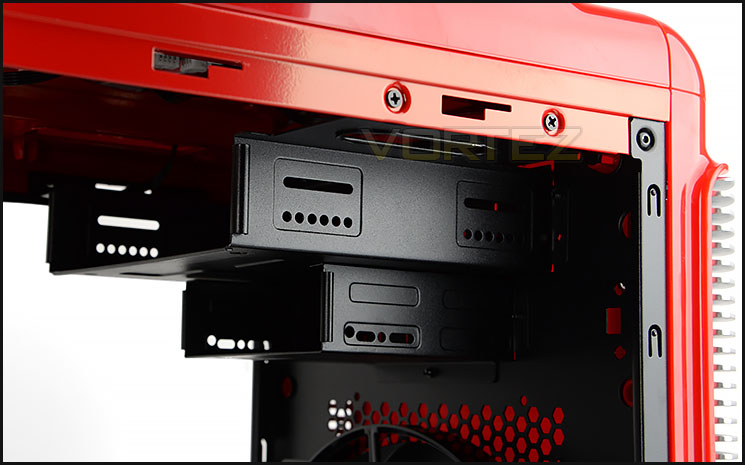
Single 5.25” and 2.5” bays
At the front of Steam Castle there is a single 5.25” and 2.5” drive bay. Both of these cages require a standard set of screws and do not have any tool-free mechanisms attached.
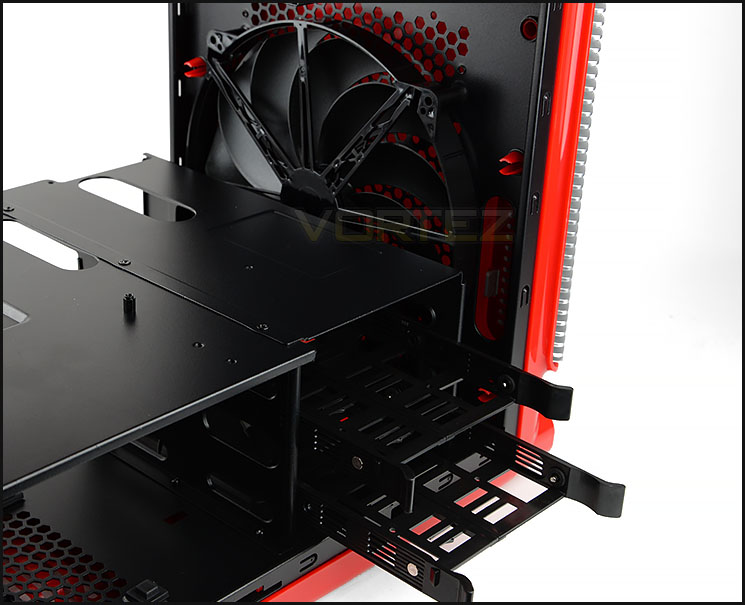
Primary storage cage and 200mm cooling fan
Beside the motherboard and PSU cage there is another cage which used for the primary source of storage. This cage has two trays which can accommodate 3.5” and 2.5” drives.
Behind the storage cage we have a large, 200mm intake cooling fan which is responsible for bringing cool air into the chassis.
Installation
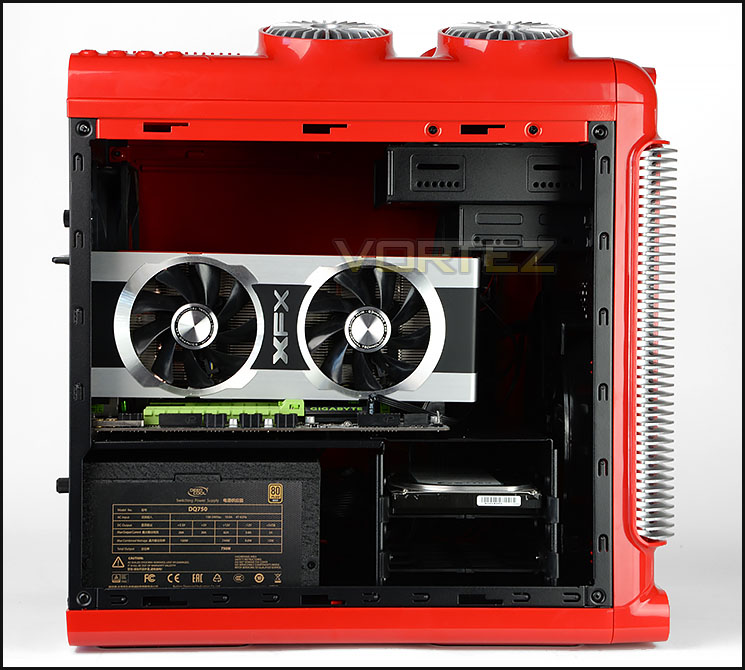
Micro ATX system installed
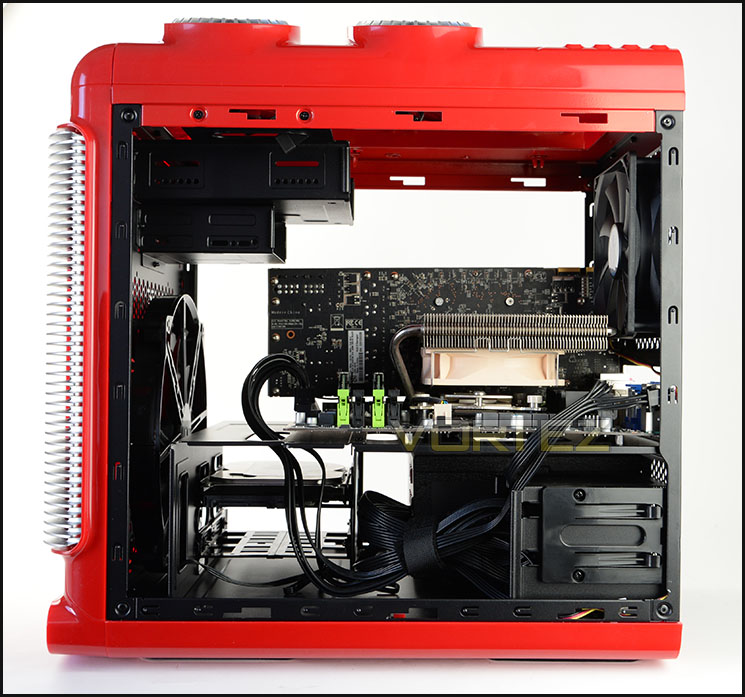
Cable management is easy to manage
Since Steam Castle can entertain Micro ATX as the biggest form factor we installed this sized system within the case. Getting all of the components inside the case is without any major problems. We were up and running in a matter of 20-30 minutes.
Due to the design and capacity, a wide range of high-performance kit can be installed within Steam Castle and we are happy to report that cable management is easy to organise and arrange. The actual clearance limitations we’ll look at in the next section of the review.
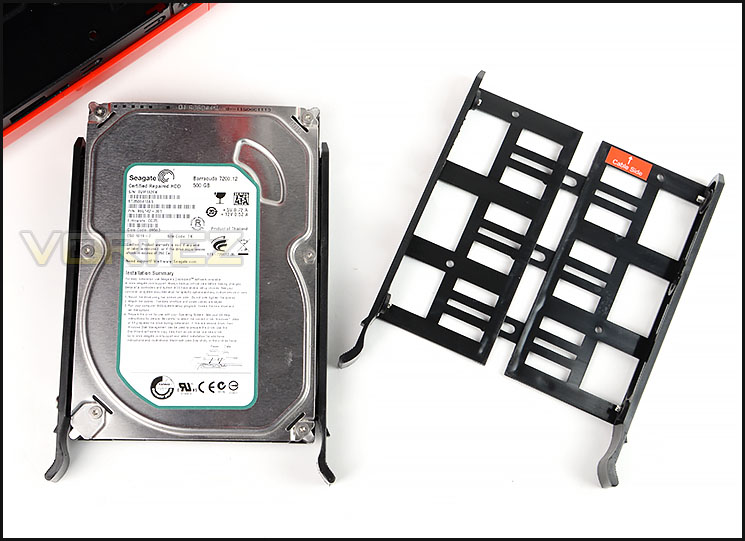
Adjustable HDD trays
The primary storage cage within Steam Castle uses two HDD trays which are adjustable and can accommodate 2.5” and 3.5” drives.
Clearance – CPU Cooler, GPU, WC
The clearance options inside a chassis are paramount to system builders since it highlights what hardware will be compatible with a specific case.
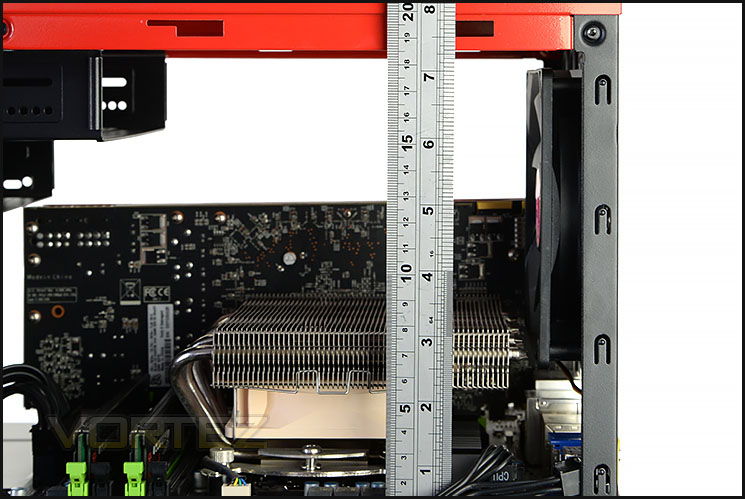
Good clearance for CPU coolers
CPU Cooler
There is up to 190mm of clearance for the CPU cooler which is a generous allocation, covering a wide array of different solutions.
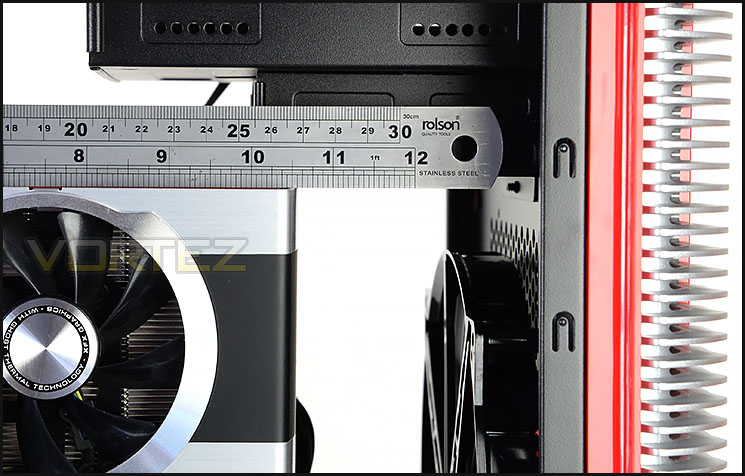
Up to 12” graphics cards supported
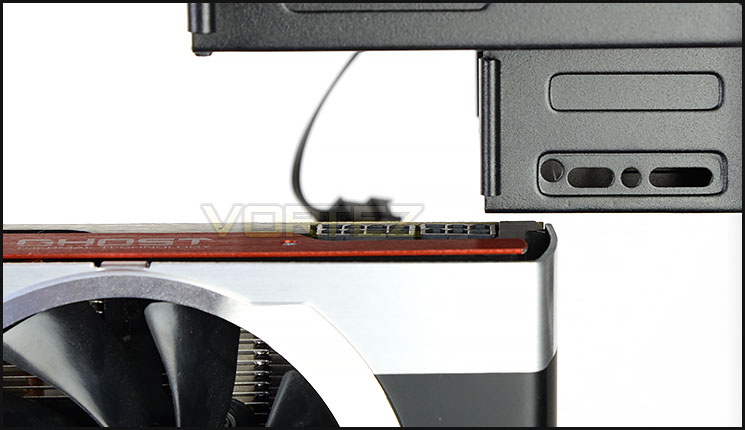
Top of GPU sits close to optical cage
Graphics Card
Steam Castle has compatibility for graphics cards which are up to 12” in length and allows multi-GPU support too.
The only issue that some might have is that if the PCI-E connectors are located on the upper-edge as pictured above, there could be an obstruction. Our graphics card (XFX HD 7970) is 10.5” in length.
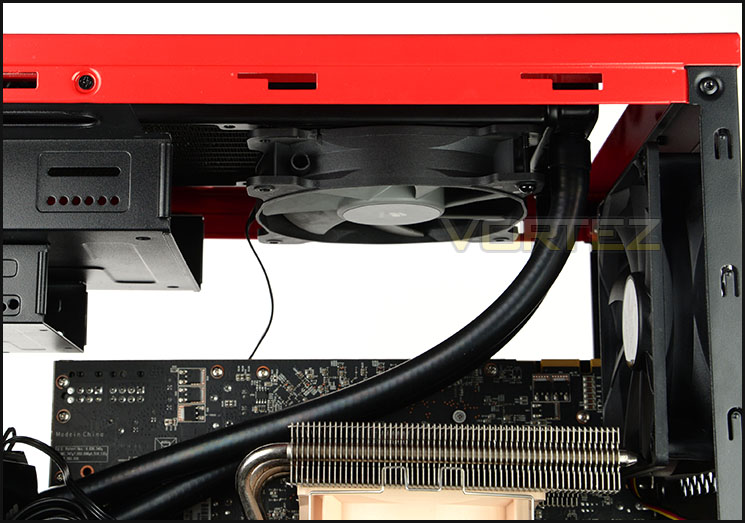
Popular ALCs can be installed
Water Cooling – ALC
Not only is there 200, 140, 120mm support at the front and 120mm support at the rear of Steam Castle for water cooling radiators but the top has 240 and 280mm support too – paving the way for compatibility with such coolers as Corsair’s popular Hydro Series.
Whilst there isn’t any space within the fascia compartment, there is enough room to have the ALC/radiator in a push configuration as pictured. Furthermore there is sufficient space inside the optical drive bay for both the radiator and cooling fans to be attached – though this will mean an optical drive cannot be used.
Thermal Performance Testing
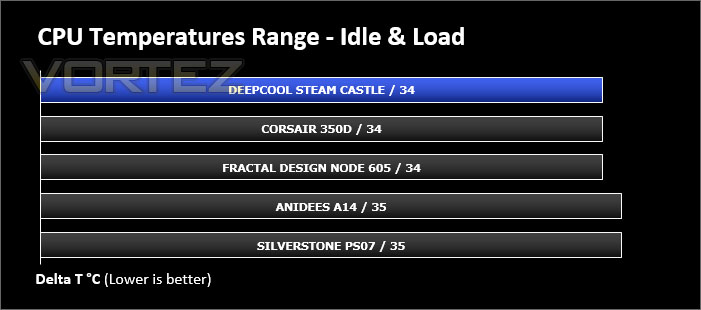
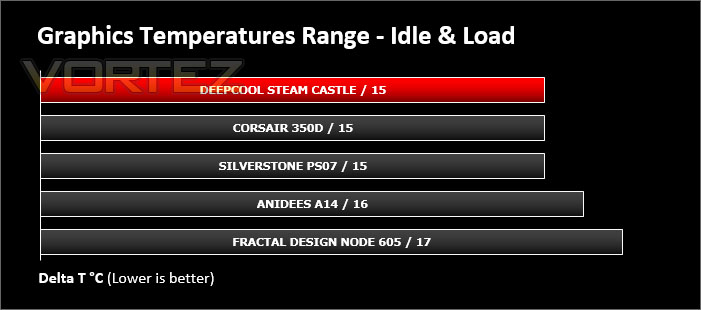
Inside just two cooling fans, a 200mm front intake and a 120mm rear exhaust. Since this follows a traditional push-pull air cooling methodology we are hopeful of some good results.
To discover the thermal performance of the Steam Castle we will record idle temperatures after 20 minutes from a cold boot. We will then stress the system and temperatures will again be monitored after 30 minutes have elapsed.
For the purpose of accurate analysis the idle and load temperatures for CPU and motherboard will be recorded and the range between idle and load will be calculated to determine how efficient cooling is.
Fan controller is set to low.
NOTE: Ambient temperature is 20C
System Components
CPU Intel Core i5 3570K
CPU Cooler Noctua NH-L12
Motherboard GIGABYTE G1 Sniper M3
Graphics XFX HD7970 Black Edition
Memory 4GB Kingston HyperX 1600MHz
HDD Kingston HyperX 240GB
PSU FSP Aurum 650M
CPU Cooler Noctua NH-L12
Motherboard GIGABYTE G1 Sniper M3
Graphics XFX HD7970 Black Edition
Memory 4GB Kingston HyperX 1600MHz
HDD Kingston HyperX 240GB
PSU FSP Aurum 650M
Noise
Noise can be heard from the cooling fans inside Steam Castle but they are only faint and can be regarded as quiet. Furthermore we can adjust the speed and noise of the cooling fans by using the fan controller wheel – with the fans on max, we can notice them but they aren’t unsettling.
Conclusion
Ever since DeepCool announced the Steam Castle we were eager to get this quirky new computer chassis in for review. There is no denying the appeal with this exciting new case because it drastically steps away from the norm in its external design. By the same token though, there’s nothing subtle about the Steam Castle’s looks. Deep Cool have opted for bold and curvy styling which is at odds with the current trend for rather monolithic exteriors; it seems almost as if they had their ‘turbine’ idea early on in the design process and decided to run with it, no matter the cost. The result is a chassis you love or you hate, but also unlike the busy (and often cheap-looking) designs of so-called gamer chassis.
Inside, we can house a wide array of high-performance hardware including big graphics cards, CPU coolers and 240mm ALCs. As well as having a powder coated internal design, the actual build quality is rather good and we can confidently report no issues in this particular department.
We really like the additional extras which come with Steam Castle which include a handy fan controller for adjusting the speed of the two cooling fans within the case, an innovative PCI locking mechanism and the varied storage options for 2.5” and 3.5” drives.
Our review of Steam Castle remains largely positive but there are a few areas which could be improved. Using a 240mm radiator at the top of the case prevents an optical drive being installed – with a slight modification to the design this could be resolved. Likewise, it’s the same situation for the graphics card support too. We would favour moving the 5.25” drive cage further down and completely removing the 2.5” cage below it. Another small and perhaps insignificant thing to note is that the cable running to the fans does not use black insulation or braiding to retain that clean and tidy look – adding in such a feature would be useful, however small it might be since it’s the small things that matter.
Being priced at £70 GBP / $100 USD places Steam Castle among some popular Micro ATX cases and the cost is neither pricey nor cheap. The choice of different colours is surely within DeepCool’s favour.
DeepCool’s new Steam Castle is certainly a head-turner. Regardless of whether you love it or hate it, this Micro ATX computer chassis includes a number of useful features and being available in a selection of bright and exciting colours can only stand it in good stead.
VIDEO REVIEW – VORTEZ TV
Pros
+ Available in numerous colours
+ Exciting & fun design
+ Decent build quality
+ Plenty of storage options
+ Fan controller included
+ Handy PCI fixing mechanism
+ Good cooling performance
Cons
– Steampunk design not everyone’s cup of tea
– 240mm radiator obstructs optical drive
– Fan cables without braiding or black insulation
– Possible PCI-E power connector obstruction for GPU
+ Available in numerous colours
+ Exciting & fun design
+ Decent build quality
+ Plenty of storage options
+ Fan controller included
+ Handy PCI fixing mechanism
+ Good cooling performance
Cons
– Steampunk design not everyone’s cup of tea
– 240mm radiator obstructs optical drive
– Fan cables without braiding or black insulation
– Possible PCI-E power connector obstruction for GPU

Click here for an explanation of our awards at Vortez.net.


