







The Dino PC Phantom GTX 670 is a gaming machine that is built around the idea of silence. How will this gaming system perform in our tests?

Product on Review: Dino PC Phantom GTX 670
Manufacturer and Sponsor: Dino PC
Street price: £1299 inc. VAT (At time of review)
Dino PC has sent us their “Phantom GTX 670” system and today we are going to be putting it to the test to find out how it performs. It is centred around the idea of silence, and built inside a Fractal Design R4 chassis with sound proofing all around. Even though the system is meant to be a silent beast at heart, there is still a pretty hefty overclock applied to the CPU. It runs at 4.5GHz which is a 1.2GHz (700MHz after turbo) increase in clock speed from its manufactured standard speed.
Upon a first glance, the system looks sleek and professional. There are no unnecessary stickers stuck on to the system which to me, it gives a greater sense of professionalism. Dino PC do include the stickers which you would get with the products if you were to buy them on their own if you wish to stick them to the case.
This system comes pre-installed with Windows 8 on its 120GB solid state drive. It also features a 2TB hard drive for your storage needs. There are also some extras included with this system which you will discover in the following page before we put the system to the test to show you how it performs.

Dino PC, An Overview
At Dino PC we always aim to give you more, bringing you the latest technology before the competition, and regularly updating our product range to make sure that only the best components go into every custom built PC. We have a fair pricing policy, where a fixed profit margin is set on all components, this means that we wouldn’t push you to buy certain technology, but we would always offer fair no-nonsense buying advise, making sure you get the right computer for you.
System Specifications
The Phantom GTX 670 consists of the following components:
System Specs
CPU Intel Core i5 3570K @ 4.5GHz
CPU Cooler Noctua NH-D14
Motherboard ASUS P8Z77-V Pro/Thunderbolt
RAM Corsair Vengeance 4x4GB (16GB total) 1866MHz
GPU Gainward Phantom GTX 670
Sound card ASUS Xonar DGX
Storage Corsair Force3 120GB SSD & 2TB SATA 3 HDD
Power Supply Corsair TX650M
Case Fractal Design R4
Operating System Windows 8
Extras Bullguard antivirus software and a surge protector
CPU Intel Core i5 3570K @ 4.5GHz
CPU Cooler Noctua NH-D14
Motherboard ASUS P8Z77-V Pro/Thunderbolt
RAM Corsair Vengeance 4x4GB (16GB total) 1866MHz
GPU Gainward Phantom GTX 670
Sound card ASUS Xonar DGX
Storage Corsair Force3 120GB SSD & 2TB SATA 3 HDD
Power Supply Corsair TX650M
Case Fractal Design R4
Operating System Windows 8
Extras Bullguard antivirus software and a surge protector
The system specifications seem very well picked out to me. They are all quality branded components and should last a long time.
A Closer Look & Accessories
When you receive the system, it will be delivered in the standard Fractal Design R4 case box, which will be placed in a larger box that is surrounded by air pockets for that added protection. The box is big and bulky so be prepared for a bit of heavy lifting. I am a big lad, 6ft3 in fact, and I struggled to manoeuvre it around. Perhaps the packaging is a little overkill but the phrase ‘better safe than sorry’ springs to mind.
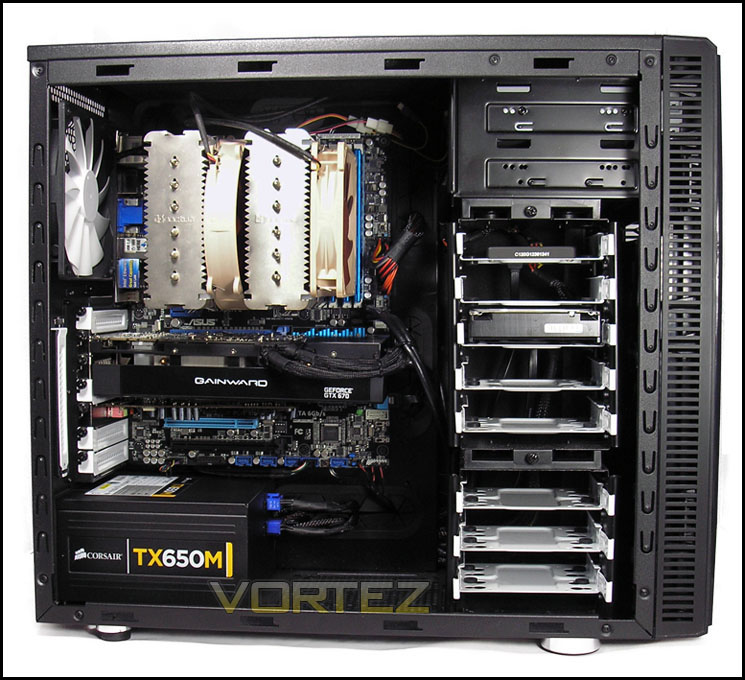
Upon a first look into the case, the overall impressions are good. You can clearly see that time has gone into the system to make sure that the cables are tidy. It is always nice to see a clean and well built system, especially when you are paying a lot of money for it. Personally, I would have routed the USB 3.0 cable differently but this is just a minor niggle in the bigger picture.
The components within the system, as mentioned in the specifications page, are top quality. At the base of the machine is an ASUS P8Z77-V PRO/THUNDERBOLT which is a premium motherboard from ASUS and features the very latest in connectivity options such as SATA 3, USB 3.0 throughout the IO of the motherboard, built in WiFi and much more. The CPU is a perfect balance between performance and cost. It is the much loved Intel Core i5 3570K, which is running at a clock speed of 4.5GHz. 16GB is plenty of RAM for even the most demanding of users and running at a speed 1866MHz, it is not slow.
The graphics card used in this system is a Gainward Phantom GTX 670 (hence the name of the system) which are known for their great quality cards and warranty services, should you ever need to use it. Last but not least, there is a Corsair power supply powering this system. Corsair are one of the most reliable and trusted brands out there for both power supplies and many other products they put on the market such as the Force 3 120GB solid state drive which is used for the boot drive with a 2TB Seagate for all of your other storage needs. Both of which are known for their reliability and transfer speeds.
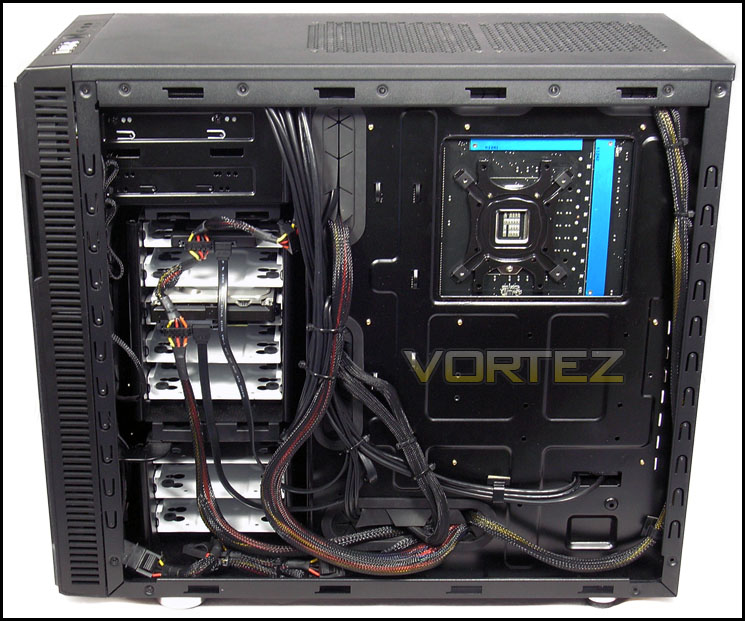
On the other side of the case, behind the motherboard tray, you will notice that all of the cables have been tied together. It leaves the front of the case looking as sleek as it does.
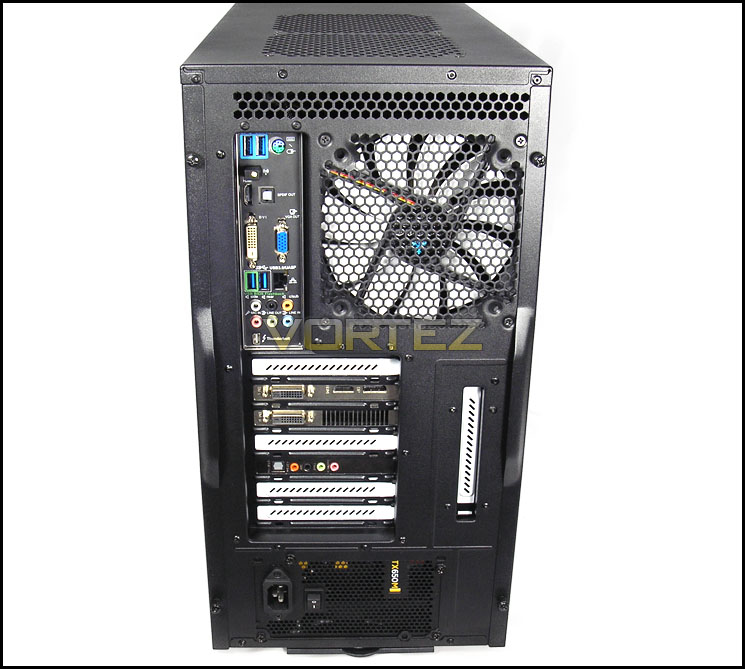
At the back of the motherboard, we have a vast array of different connections available. Going from top to bottom, they are as follows:
1x PS2 port
2x USB 3.0
1x WiFi Antenner Connection
1x Optican S/PDIF
1x HDMI
1x VGA
1x DVI
1x Gigabit LAN
2x USB 3.0
6x Audio jacks
1x ThunderBolt
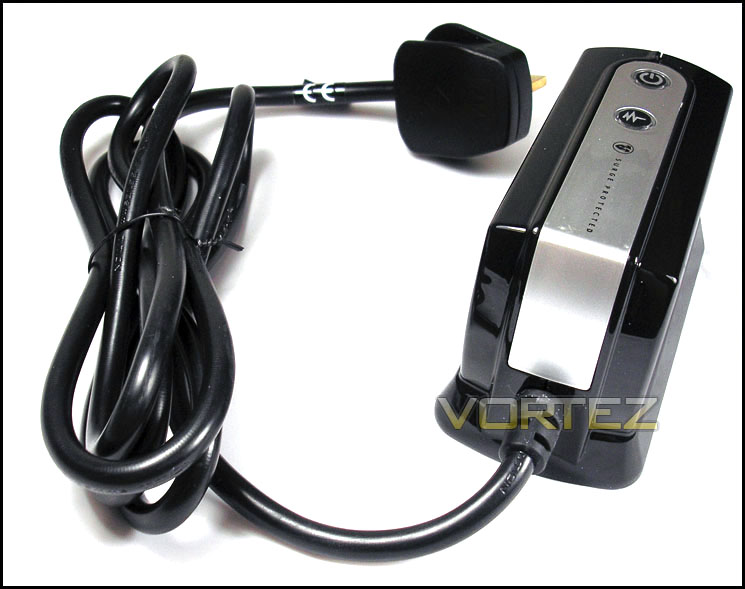
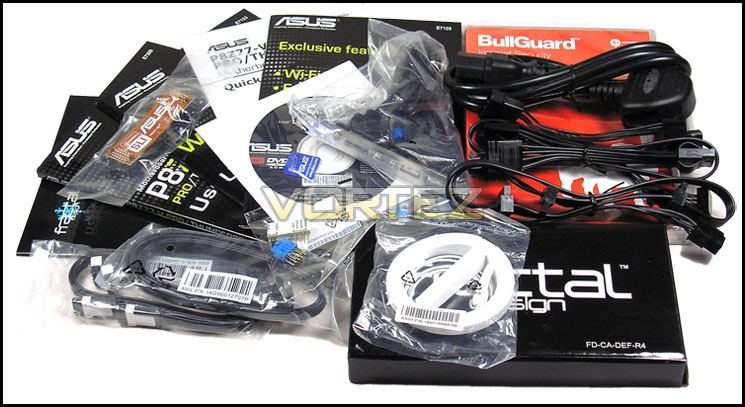
Inside the box, is a bundled surge protector to make sure that in the event of a power spike or surge, your system will remain safe.
Dino PC have also included most of the manuals from the products within the system and the extra power supply cables in case you wish to add more hard drives to your system in the future, for example.
Power Consumption
First of all, for the idle tests the system is cold booted into Windows and no additional applications are executed – the watts are noted on the external energy monitor we use. Then the system is loaded with 3DMark 11 to stress the system – watts are again monitored throughout the period of testing and the highest and lowest rated watts are then noted down. Below are the results of this energy test.
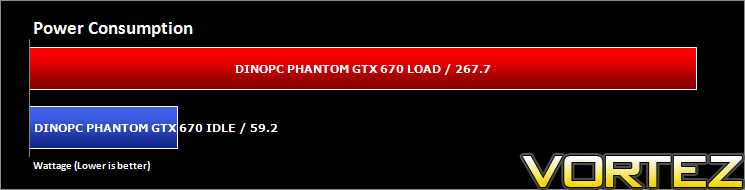
Considering how much performance this computer packs into it, the overall power consumption figures are low and very acceptable. It is more than capable of playing games in full HD and more.
Benchmarks: AIDA64
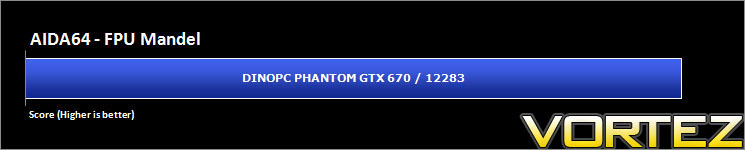
This simple integer benchmark focuses on the branch prediction capabilities and the misprediction penalties of the CPU. It finds the solutions for the classic “Queens problem” on a 10 by 10 sized chessboard. At the same clock speed theoretically the processor with the shorter pipeline and smaller misprediction penalties will attain higher benchmark scores. For example – with HyperThreading disabled – the Intel Northwood core processors get higher scores than the Intel Prescott core based ones due to the 20-step vs. 31-step long pipeline. The CPU Queen test uses integer MMX, SSE2 and SSSE3 optimizations.



Benchmarks: CINEBENCH 11.5
CINEBENCH can measure systems with up to 64 processor threads. This test scene contains approximately 2,000 objects which in turn contain more than 300,000 polygons in total, and uses sharp and blurred reflections, area lights, shadows, procedural shaders, antialiasing, and much more. The result is displayed in points (pts). The higher the number, the faster your processor is.

Benchmarks: SiSoftware SANDRA 2012
SANDRA isn’t always a benchmark that is included in hardware reviews but we believe it shouldn’t be ignored. SANDRA provides a vigorous package that tests your system in a rather large array of benchmarks. There are many aspects of benchmark that can be executed. We will be considering the CPU and memory tests.






Benchmarks: x264 Version 4
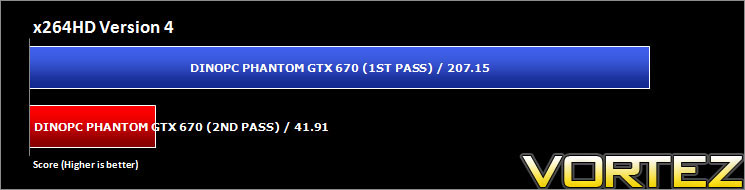
Simply put, this test measures how fast your machine can encode a short, DVD quality MPEG-2 video clip into a high-quality x264 video clip. What’s x264, you ask? It’s more or less the next-generation Xvid/DivX codec. We think it’s ideal for a benchmark because the application (x264.exe) reports fairly accurate compression results (in frames per second) for each pass of the video encoding process and it uses multi-core processors very efficiently
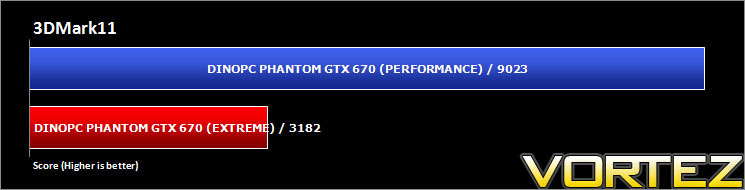
3D Benchmarks: 3DMark 11
Designed to measure your PC’s gaming performance 3DMark 11 makes extensive use of all the new features in DirectX 11 including tessellation, compute shaders and multi-threading. Trusted by gamers worldwide to give accurate and unbiased results, 3DMark 11 is the best way to consistently and reliably test DirectX 11 under game-like loads.
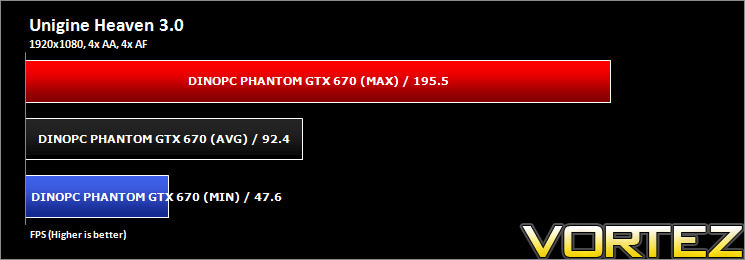
3D Benchmarks: Unigine Heaven 3.0
Unigine’s benchmark is to showcase the benefits of DX 11 and the use of tessellation as opposed to normal rendering techniques. The demo has impressive visuals that give an insight into what we can expect from gaming in the future.

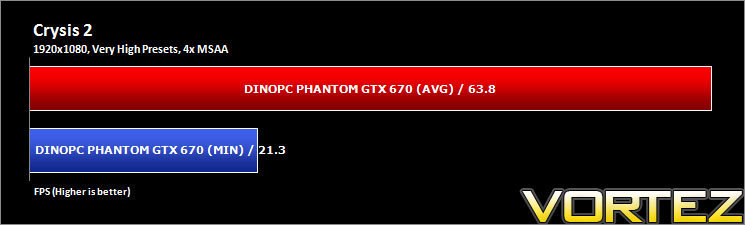
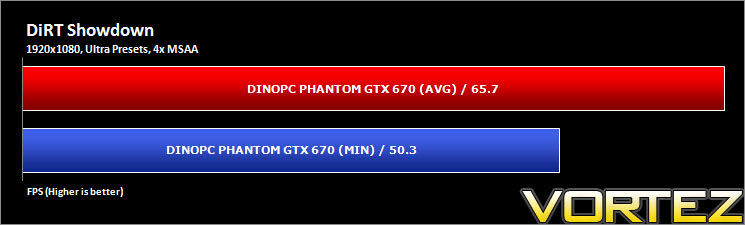
Gaming Benchmarks: Crysis 2 & DiRT Showdown
It’s important for us to perform a number of game benchmarks as well as the synthetic tests because it allows us to test the 3D performance. So here we have some popular titles, critically acclaimed and action-packed. FRAPS and in-house benchmarking tools were used to capture average FPS.
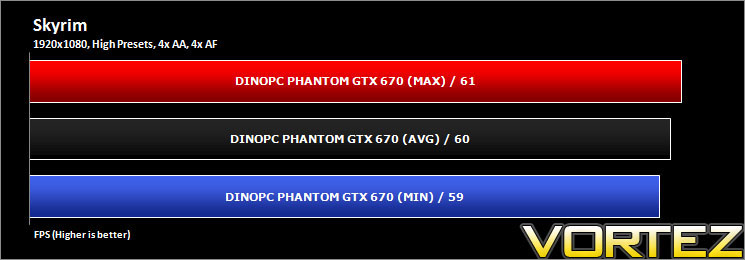
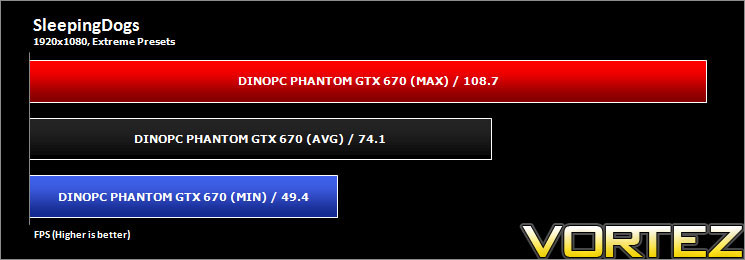
Gaming Benchmarks: Skyrim & SleepingDogs
It’s important for us to perform a number of game benchmarks as well as the synthetic tests because it allows us to test the 3D performance. So here we have some popular titles, critically acclaimed and action-packed. FRAPS and in-house benchmarking tools were used to capture average FPS.
Conclusion
Does this system live up to its name and deliver performance at a silent noise level? In short, yes! However, it is subjective as every one of us has a different perception of what is noisy and what is not. Whilst the system is just idling and sat on the desktop, it is whisper quiet. However, as soon as you launch a game, the GPU fan speed ramps up and it does become noticeable. This is no fault of the system; it is only doing what it was designed to do – keep itself cool.
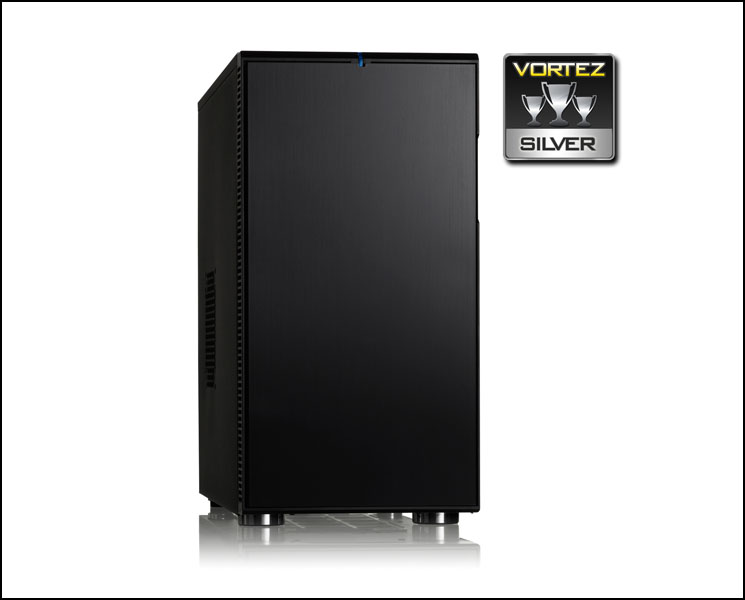
From a visual stand point, and a personal one too, I feel that the system is well suited for a case such as the Fractal Design R4 which is used in this build. Provided you do not touch it too much, it should not get dirty too quickly – but the materials used means it does attract finger prints and greasy marks like no tomorrow. The innards of the system have been well thought out and they are neatly laid out. Proper thought has gone into the cable management to make sure that the system looks the way it does.
Even though the system has an overclock applied to the CPU, it remains quiet and cool enough to run without any issues. The system is blazingly quick with an Intel Core i5 3570K running at 4.5GHz. There are voltage limiters installed on the CPU coolers fan which keep the fan speed low to bring down noise levels. If the noise is not too much of an issue, you could remove these if you wanted and you could run the fans at 12v to get maximum cooling power over quietness.
There are a few goodies packaged with the PC as a part of the bundle. They consist of a BullGuard Internet Security system and a surge protector to keep your new PC safe from the dangers of a voltage spike.
Since we have had the system for review, the specifications have changed ever so slightly. The CPU is now overclocked at 4.3GHz instead of the 4.5GHz it was said to be clocked at during our testing. This should not impact on performance very much as the CPU is still more than capable of crunching through anything you throw in its face at these speeds.
Due to the quality components used, and how it lives up to the idea of silence, we feel this system deserves no less than a silver award. It performs very well in our tests and it is one of the quietest systems I have yet to test. As mentioned previously, noise is subjective to each person, but I do like silent systems.
To top it all off, Dino PC offer a full three year warranty as standard on their entire product range which gives you peace of mind. The parts are covered for the first year as well as the labour costs and the other two years have the labour costs covered. Although, with the components used, they should easily out last the warranty and give you a solid system for many years. Some of the best branded hardware on the market today has been used in their system and in their other ranges too.
Pros
+ Very quiet in idle states
+ Solid build quality
+ Quality components
+ Good cable management
Cons
– Not so much a con but it is heavy!
+ Very quiet in idle states
+ Solid build quality
+ Quality components
+ Good cable management
Cons
– Not so much a con but it is heavy!


