ECS have sent us their brand new A885GM-A2 Full ATX AM3 motherboard for review. Take a look to see how it does!
Product on Review: ECS A885GM-A2
Manufacturer: ECS – Elitegroup Computer Systems
Street Price: 80-95 Euros
Up for review today is the A885GM-A2 motherboard from ECS. It’s a very well specified board that utilises a combination of some of AMD’s newer chipsets.
Whilst not a high end, enthusiast level, heavy clocking board the A885GM-A2 does offer some excellent features for the discerning power user. The board is fully Hex core compatible and offers SATA III 6Gb/s support. It also offers onboard graphics from the ATi HD4250 – this in particular is rather unusual for a full ATX board.

ECS (Elitegroup Computer Systems) is a large and well known company. It initially concentrated on motherboard manufacture in the early days however this focus has shifted to other sectors within the PC electronics market.
| Here’s a little about ECS themselves: ECS, the Elitegroup Computer Systems, was established in 1987, and is approaching its 23rd year of business. More than two decades, ECS has overcome a great deal of obstacles facing new businesses and has experienced the joy of significant growth and development. Her main focus has expanded to not only motherboards, but also desktop and notebook computers, graphics cards and other mobile products. ECS is strongly committed to develop cutting-edge technology in order to generate innovative products under environmental friendly designs. ECS comprehensive system of quality control provides our clients with reassurance and fosters long term cooperation. |
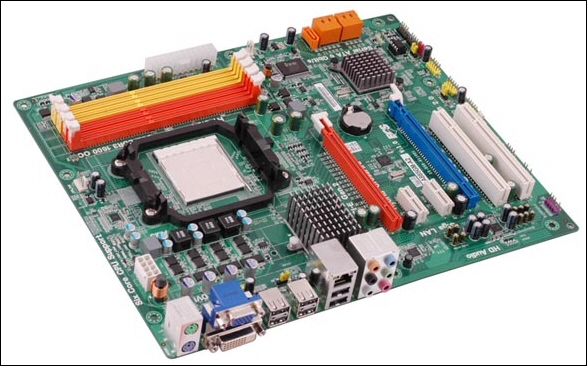
Specifications
| CPU º Socket AM3 socket for AMD Phenom™ II processors º High-performance HyperTransport 3.0 CPU Interface º Support transfer rate up to 5200 mega-transfers per second CHIPSET º AMD® 880G & AMD® SB850 º North Bridge: AMD® 880G º South Bridge: AMD® SB850 GRAPHICS º On Chip(AMD 880G-based with ATI™ Radeon HD4250 graphics ) º Integrated DirectX10.1 graphics processor º Share Memory: Maximum up to 512MB MEMORY º Dual-channel DDR3 memory architecture º 4 x 240-pin DDR3 DIMM socket support up to 32GB* º Support DDR3 up to 1600(OC)/1333/1066 DDR3 SDRAM º *(Due to the DRAM maximum size is 4GB at present, the memory maximum size we have tested is 16GB) EXPANSION SLOT º 2 x PCI Express Gen 2.0 x16 slots º 2 x PCI Express x1 slots º 2 x PCI slots º *The third PCIEX16 only support bandwidth x4 STORAGE º Support by AMD® SB850 • 5 x Serial ATAIII 6.0Gb/s devices • RAID0, RAID1, RAID5, RAID 10 configuration AUDIO º Realtek ALC892 8-Ch High Definition audio CODEC º Compliant with HD audio specification LAN º RealTek 8111DL Gigabit Fast Ethernet REAR PANEL I/O º 6 x USB ports º 1 x Gigabit Ethernet Port º 1 x Audio port (Line-in, Line-out, Mic-in) º 1 x DVI connector º 1 x VGA port INTERNAL I/O CONNECTORS & HEADERS º 1 x 24-pin ATX Power Supply connector º 1 x 8-pin ATX 12V Power Connector º 1 x 4pin CPU_FAN connectors º 1 x 3-pin PWR_FAN connector º 1 x 3-pin SYS_FAN connector º 3 x USB 2.0 headers support additional 6 USB ports º 5 x Serial ATAIII 6Gb/s connectors º 1 x Speaker header º 1 x Front panel switch/LED header º 1 x Front panel audio header º 1 x Clear CMOS header º 1 x Chassis intrusion header º 1 x SPDIF out header º 1 x COM header SYSTEM BIOS º AMI BIOS with 8Mb SPI Flash ROM º Supports Plug and Play, STR (S3) / STD (S4) , Hardware monitor, Multi Boot º Supports ACPI revision 3.0 specification º Supports ACPI 3.0 revision º Support Page Up clear CMOS Hotkey º Support over-clocking º Support ECS M.I.B III Utility º CPU voltage adjustable º Memory voltage adjustable • NB Chipset Voltage Adjustable • HT Voltage Adjustable • External Clock Adjustable • Multiple Frequency Adjustable FORM FACTOR º ATX Size 305mm*244mm |
As you can see it’s well specified.
I particularly like the Hex core support, onboard VGA, dual PCI-E x16 slots (second slot only runs at x4 though) and the SATA III 6Gb/s.
Packaging and board
Lovely bright and clear box art from ECS which clearly indicates the many features of the board. It’s quite honestly one of the clearest yet at the same time informative covers I’ve seen in a while.
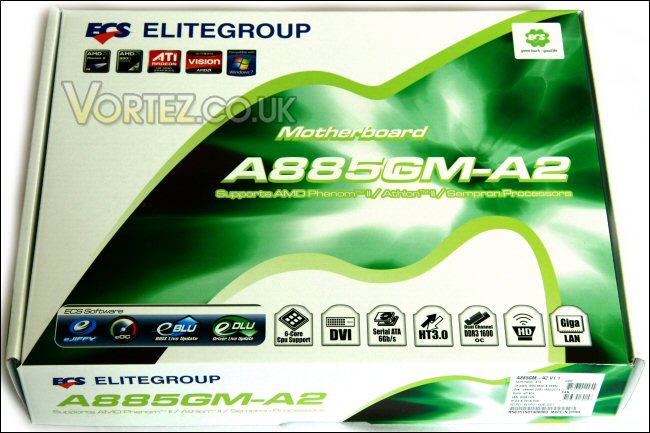
Box top.
The rear continues the trend with more specifically detailed information and a full colour image of the motherboard – in this case the image ECS have used is in fact the V1.0 rather than the V1.1 contained within. Not a big issue though as the only difference seems to be that the second PCI-E x16 slot has changed from blue to orange.
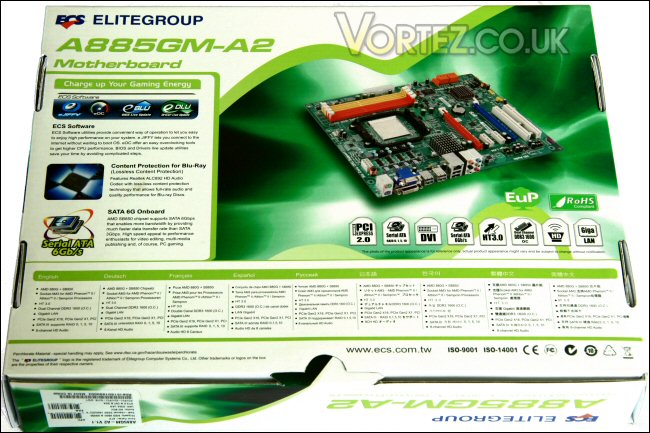
Box base.
Once open we can see the bundled extras.
These include a couple of SATA cables, an I/O backplate. Also included are a quick start guide, the instruction manual, and driver and utilities disk.
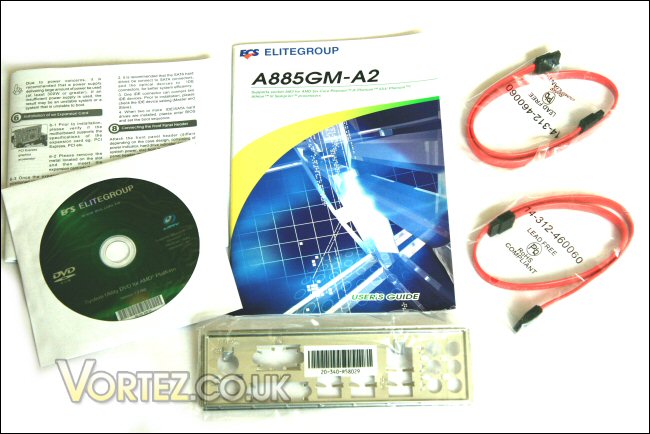
Manuals, cables, I/O plate and driver disk.
Unboxed the board looks to be a well laid out and somewhat clutter free design. It’s a fanless design with a somewhat retro colour scheme coming in the classic ‘PCB green’ hue! The cream PCI slots and plain and simple heatsinks only add to the look… only the DIMM, SATA and PCI-E x16 slots stand out as ‘in your face’.
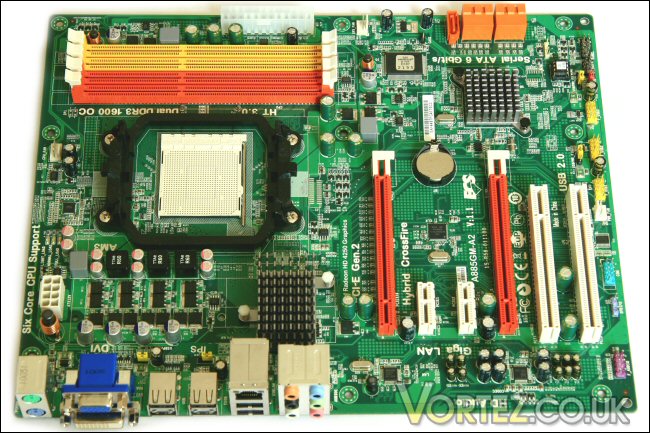
The A885GM-A2.
As with most boards these days the rear of the board is largely clutter free with only the CPU backplate as a standout point of interest.
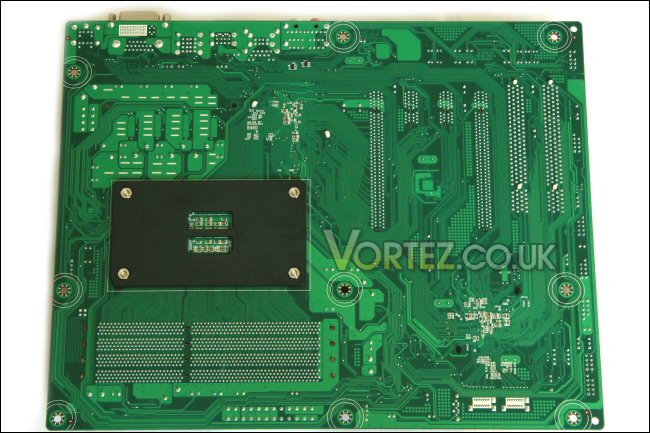
Board rear.
Board up close
Starting at the top of the board we see the four DDR3 DIMM slots. They are fairly tightly packed but I’d imagine only the largest DIMMs (think ‘Reaper’ style heatpipe models) might have issues during install. I would like to compliment ECS designers as they have placed the slots in such a way as to stop GPU proximity issues. Due to the need to fit multiple expansion slots and large DIMMs onto boards these days many manufacturers are left with placements that hinder insertion and removal of components. The DIMM + GPU issue is one that I must have come across with around half of the motherboards I’ve built into… not with the A885GM-A2! Nearby we see the 24pin ATX power connector – once again there’s a thumbsworth of clearance so unclipping the ATX plug should be easy enough.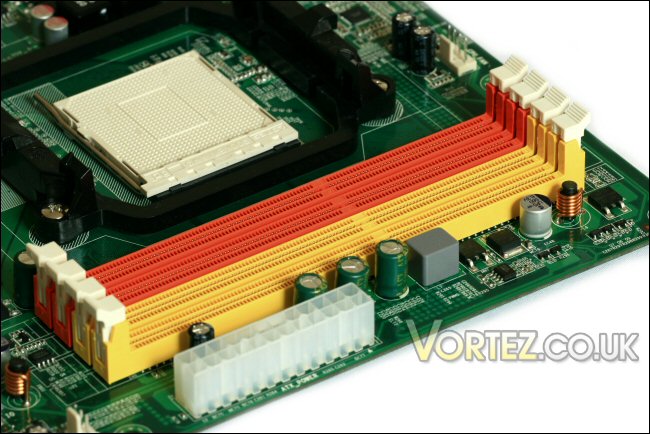
DIMM sockets and ATX 24-pin socket.
The CPU socket placement is probably a touch lower due to the placement of the Northbridge. It’s AMD’s standard LOTES design and provides a secure mount for a great many performance coolers.
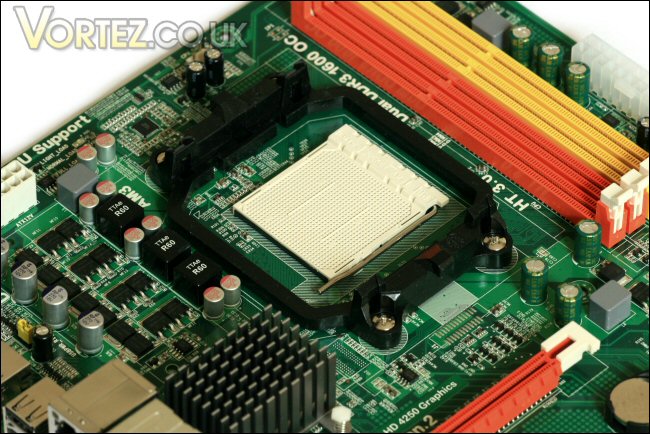
The CPU socket.
To the side of the CPU socket the mosfet section that provides the power delivery for the CPU is a compact and tidy arrangement. The board is compatible with 125w designs which includes all the current six core CPU designs including the flagship 1090T.
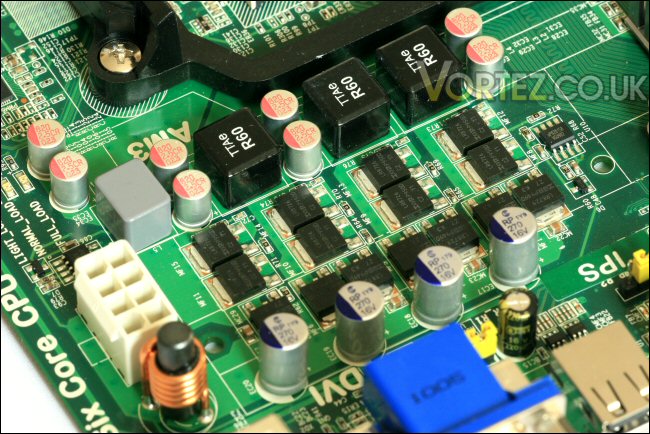
The CPU power section.
In fact the text above the 8-pin ATX 12v connector backs up what I’ve just said. HEX core here we come!
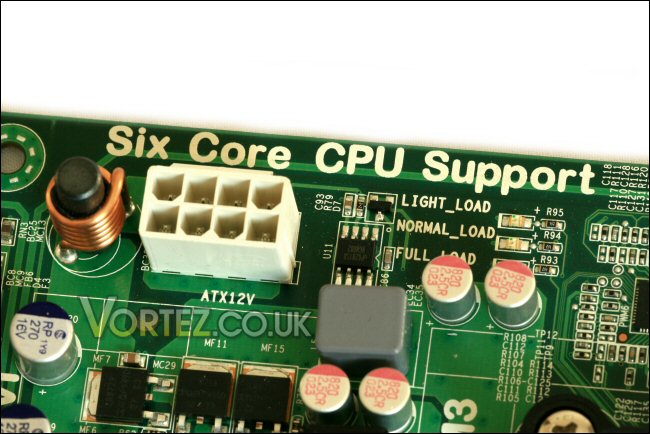
HEX core support.
The Northbridge chipset is cooled by a tiny passive heatsink. At first glance it doesn’t look much bigger than the boards Southbridge heatsink (which we’ll see in a moment) however in reality it’s probably just over twice the size so should be ok… hopefully!
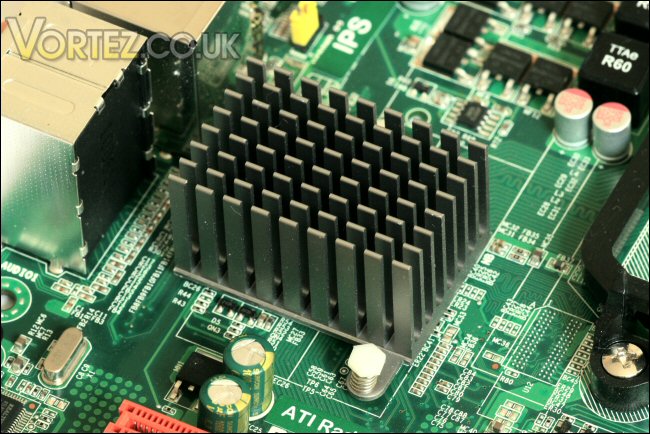
The compact Northbridge.
Moving down the board we find the ami bios chip – power management, wake functions and CPU and system modification are all controlled through this.
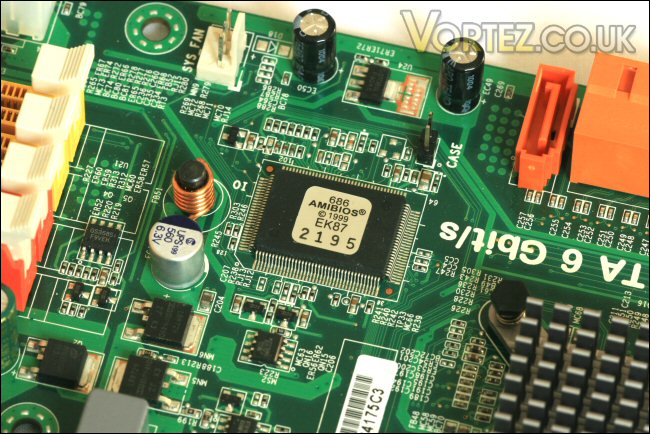
AMIBIOS chip.
Board up close continued
Just below are the five SATA III sockets. These are fully 6Gb/s compliant and four of them are conveniently 90 degree designs for easy connection when a large GPU is installed. The fifth isn’t fouled by a large graphics card so can be orientated upwards like this.
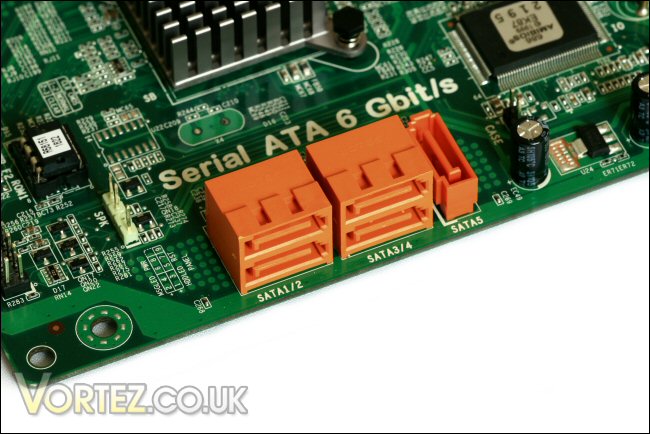
SATA III 6Gb/s.
Next to these we find the very compact and low profile Southbridge heatsink. Like others I’ve seen recently it certainly won’t obstruct any larger GPU’s – it should also cool that SATA 6.0Gb/s chip perfectly well.
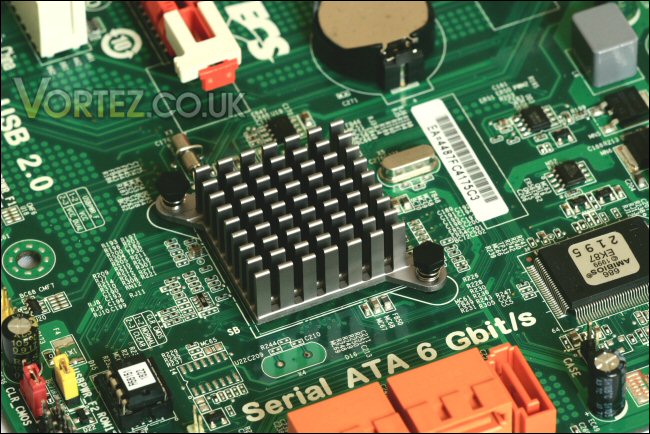
Southbridge.
A broader viewpoint shows the uncluttered layout at the base of the board. To the furthest left of the image we see the front panel connector pins and just above those we see the USB power jumper in yellow and the clear CMOS jumper in red.
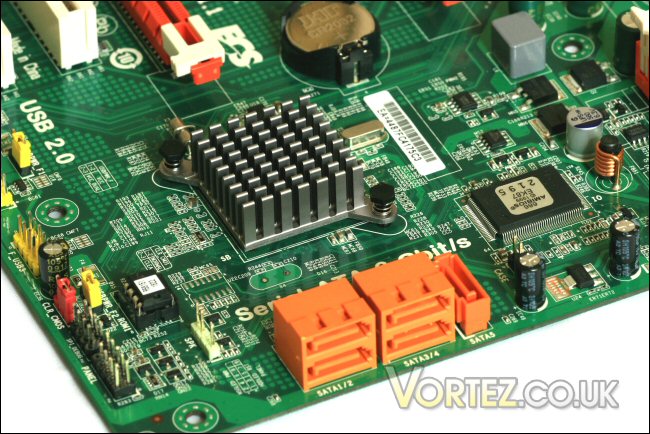
Uncluttered board design.
Moving along the bottom of the board we see the three USB headers, one of the boards three 3-pin fan headers and another USB power jumper in yellow.
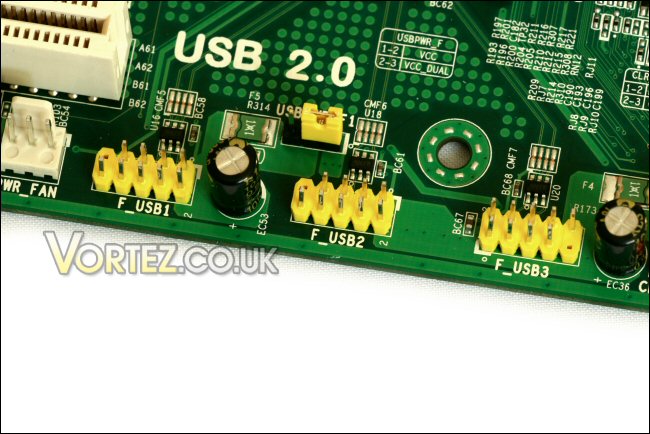
Plenty of USB connectivity on offer.
The A885GM-A2 carries a decent selection of expansion slots with two of each. We get two standard PCI slots, two PCI-E x1 slots and two full length PCI-E x16 slots (the second only runs at x4 remember). With the average mid range dual GPU setup the latter will be perfectly useful for power users – the 2nd generation PCI-E means the slot runs the equivalent of a 1st generation x8 slot which is perfectly adequate for midrange cards. In this regard the ECS board allows for the use of dual ATi cards in full crossfire configuration. Utilising two of their dual GPU designs will result in a quad crossfire setup however the power of such a card would be severely compromised by that second x4 slot. Also of note in this picture is the boards BIOS battery which nestles between the boards two PCI-E x16 slots.
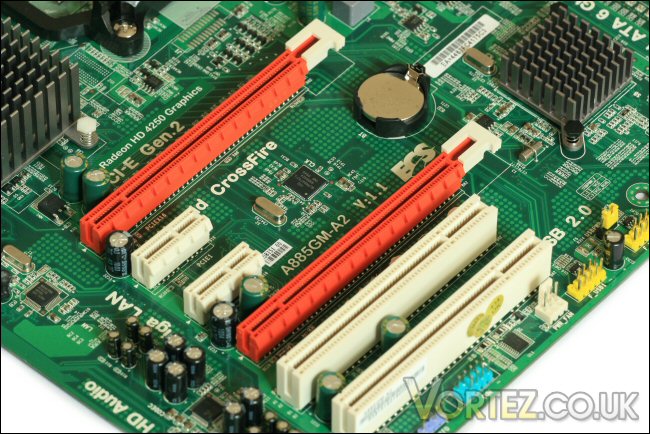
Expansion slots.
Last but not least is the I/O plate which contains mouse and keyboard PS2 connectors (old school!), VGA and DVI connectors supported by the HD4250 and hybrid crossfire, six USB 2.0 sockets, a gigabit LAN socket and the obligatory sockets for full multi channel HD audio.
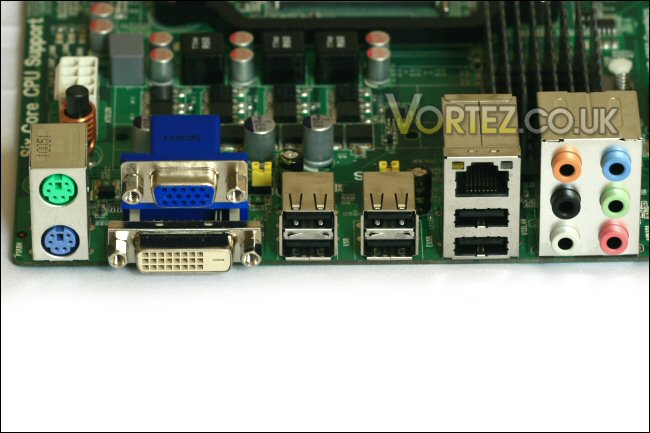
The I/O plate.
Driver disc and software
Like all motherboards the A885GM-A2 is supplied with a disk containing the drivers required to fully utilise the board. Also provided are a selection of programs to monitor, overclock and update your new toy.
First up we’ll take a look at the disc.
Upon first insertion the disk will autorun. From here you’re greeted with the ‘Driver’ page – simply click the ‘setup’ button and the program will autodetect the system and install all required drivers. For those wanting to install specific drivers there’s a ‘browse’ function too.
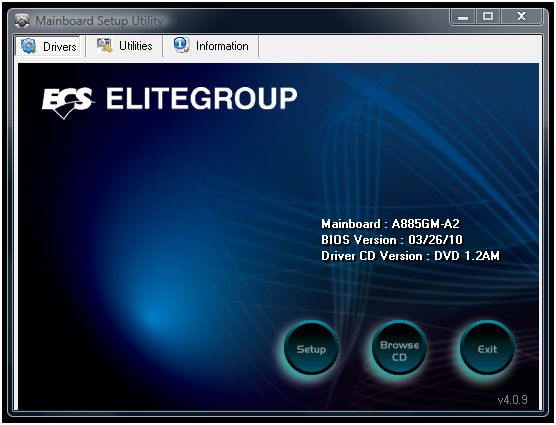
Driver section.
Next is the ‘Utilities’ tab. Here you find four programs – Adobe Reader, eBLU, eJIFFY and eOC. The first is self explanatory but the others are programs supplied by ECS for use with the motherboard.
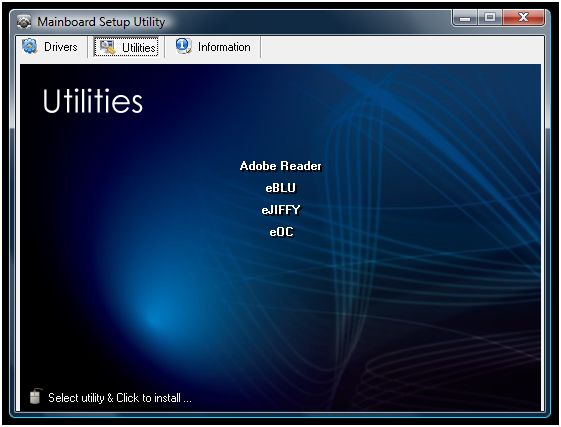
Utilities.
| I’ll look more closely in a little while but for now I’ll summarise each: – eBLU is the ‘BIOS Live Update’ utility designed to make BIOS flashing a quick, easy and worry free process. – eJIFFY is a Linux based fast boot application to allow web browsing, photo reviewing and online chat in a flash. – eOC is an Overclocking utility with a simple and straightforward interface that even novice users can easily use. |
The final section on the disk is the ‘Information’ tab which simply lists the path for all ECS drivers in use on the A885GM-A2.
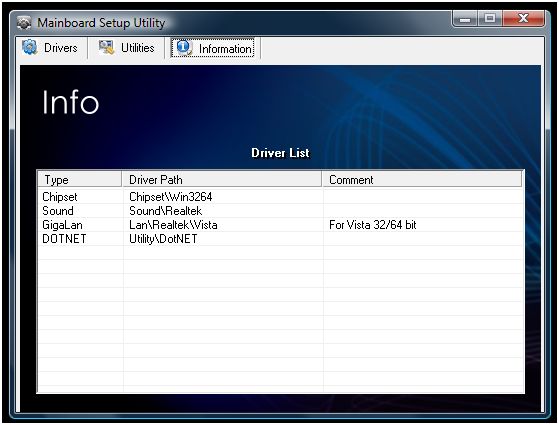
Driver information.
Now let’s take a closer look at the programs…
eBLU (BIOS Live Updater) is designed to save the time involved in finding your boards BIOS file as well as limiting the hassle and danger of flashing the BIOS onto the board. Simply click the ‘Check Update’ button to let eBLU check the ECS website for a new BIOS file. If one is available the ‘Recommended Updates’ section will be populated with details about the new Online Version and the ‘Install’ button will activate allowing you to tell eBLU to download and install the file. Once completed you’ll be asked to reboot the system.
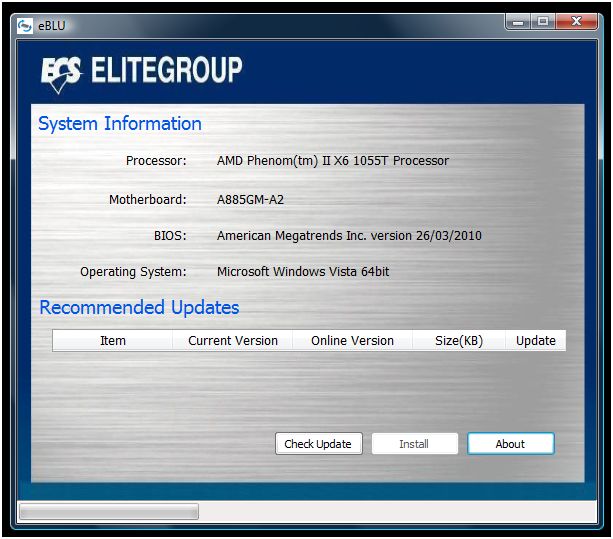
eBLU.
Since the A885GM-A2 was essentially brand new the resulting screen I received told me that no update was available.
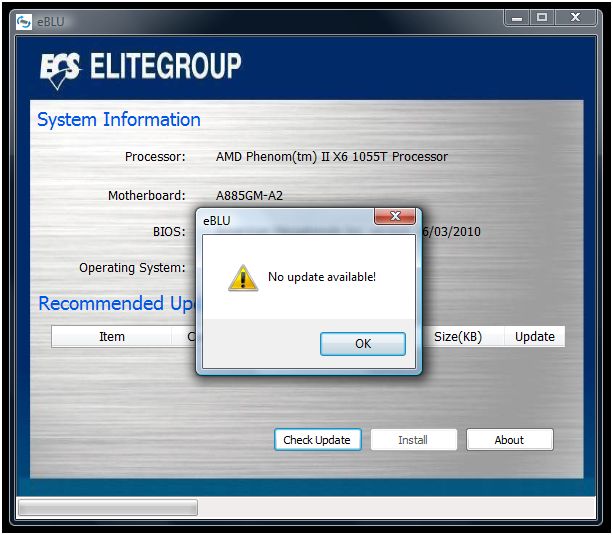
No update needed!
Software – eJIFFY
eJIFFY is similar to ‘Express Gate’ – a comparable feature offered by ASUS. It’s an ‘instant on’ utility to allow very fast access to the internet, online messaging and image and photo viewing.
Unlike Express Gate which is contained on the motherboard itself some components of eJIFFY are installed on the HDD by the utility disk. Once installed you can call up the eJIFFY configuration screen in windows. This is simply a language and keyboard settings window where you select the language you’d like for each – this means you’re able to use and understand eJIFFY once you’ve activated it.
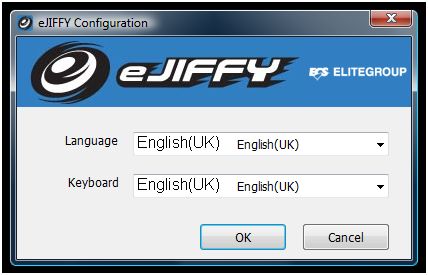
eJIFFY configuration screen.
Upon restart you need to go into BIOS to activate the utility – when this is done the motherboards startup splash screen changes to a menu which greets the user with three options – the first is to boot into the main operating system, the second is to boot into eJIFFY and the last is to go to the BIOS setup.
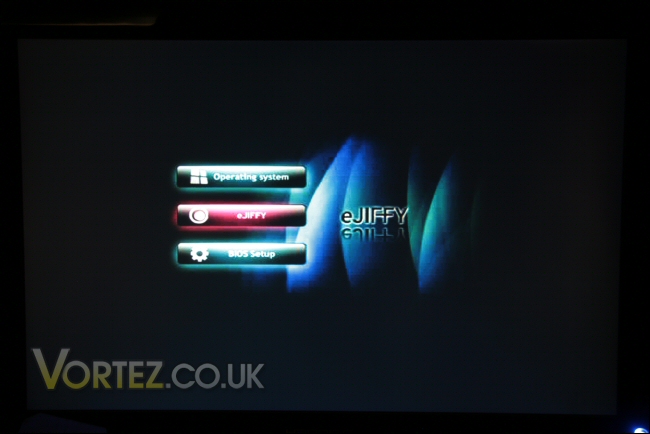
Selection screen at first boot up.
Choosing eJIFFY results in a loading screen that is present for only several seconds…
Loading… but not for long!
This is followed by the eJIFFY desktop. From here you have access to ‘eWEB’ which is a web browser powered by Firefox, ‘ePIX’ which allows photo and image viewing and ‘ePAL’ an online chat tool that can use a variety of the most popular Instant Messaging systems around (MSN, ICQ, etc) – next to its activation icon is an online connection status icon.
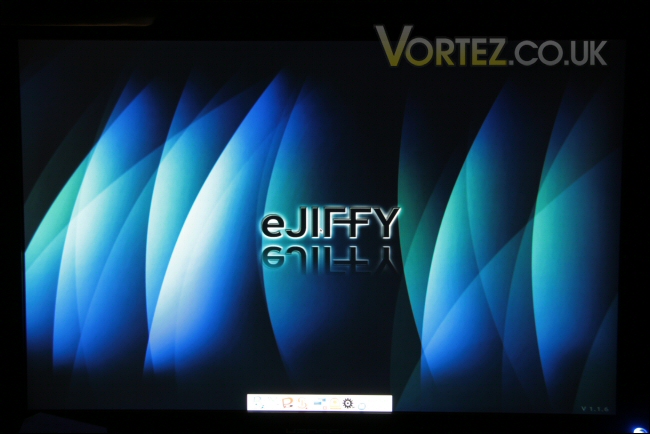
The eJIFFY desktop.
The remaining buttons control restart and shutdown, additional storage disk connection and removal, network connection status, eJIFFY language control and keyboard language control. Below is the photo viewer and Firefox in action. Unfortunately i don’t have a wired connection to my office so internet relies on a wireless dongle – although some wireless chipsets work with eJIFFY my edimax unit did not. Certainly worth thinking about if you think it might be an issue!
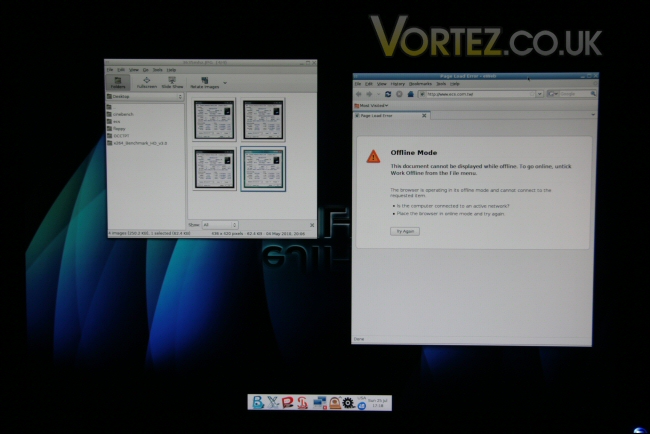
Photo viewer and Firefox.
In all it’s quite an intuitive attractive and effective system. That said, with current versions of Windows taking so little time to start up these days one must ask how long an ultra speedy OS like this would remain so useful.
Software – eOC
Lastly eOC is a straightforward overclocking utility. It allows the manipulation of the CPU/HT clockspeed and voltage adjustments for the CPU, memory, Northbridge and Hyper Transport link. Although not the most comprehensive suite (I would have like to see a multiplier adjustment option for example) it does offer some amount of useful control – indeed, with a clock frequency change effecting all of the areas covered by the voltage adjustment options it seems ECS have thought it through fairly well.
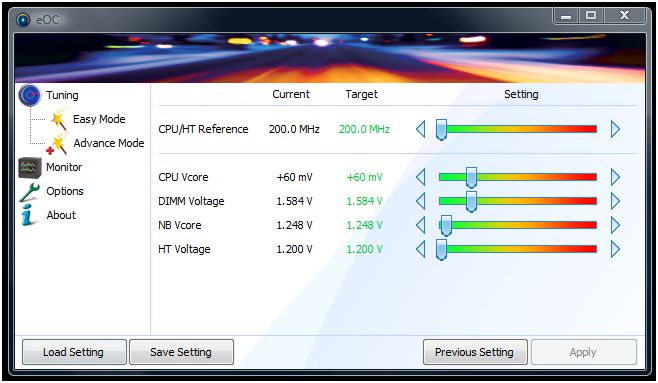
The eOC suite.
The utility also provides monitoring for current, minimum and maximum fan speeds, CPU and Northbridge temperatures and Memory, NB and HT voltages. This is particularly useful when fine tuning your clocks and voltages since you can witness what effect voltages and clock speeds have on the system temperatures.
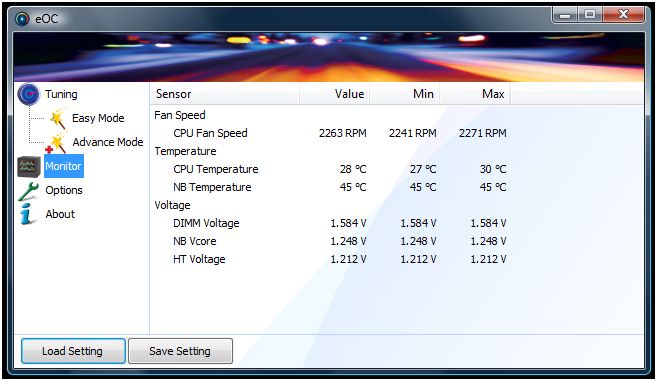
The suite offers monitoring.
The options page allows the setup of automated overclocking functionality. Since you’re able to save your overclock settings within the suite it stands to reason that eOC will be able to call up the file whenever needed. From here you can tell it which settings file to use and if it should ‘auto execute’ at startup and/or after resuming from sleep mode.
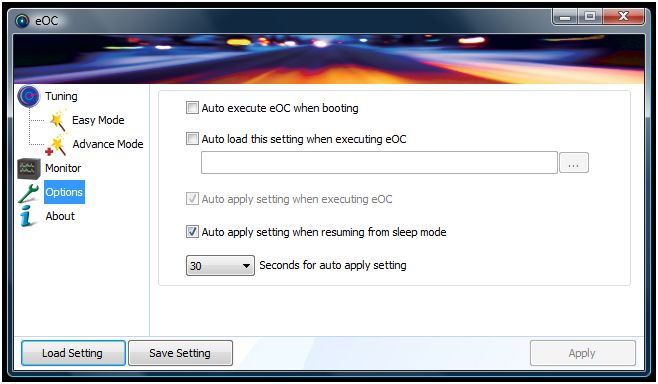
Automated functionality is also a bonus!
Test setup and installation
System setup
| CPU: Phenom II X2 555 Black Edition @ 3.2GHz & Phenom II X6 1055T @ 2.8GHz RAM: 4gb Corsair DDR3 HDD: 160gb Samsung 7200rpm SATA HDD Optical drive: NEC DVDRW CPU cooler: Cooler Master Hyper TX3 PSU: Hiper Type-R 580w GPU: Gainward GTX260 Case: Dimastech Bench/Test Table Easy V2.5 |
Installation
Installation was very easy. The install took place on the Dimastech Test Table so the combination of the boards size, the wonderful AMD CPU retention system and the excellent access offered by the case helped greatly. This meant that the whole build was complete in no more than 10 minutes.
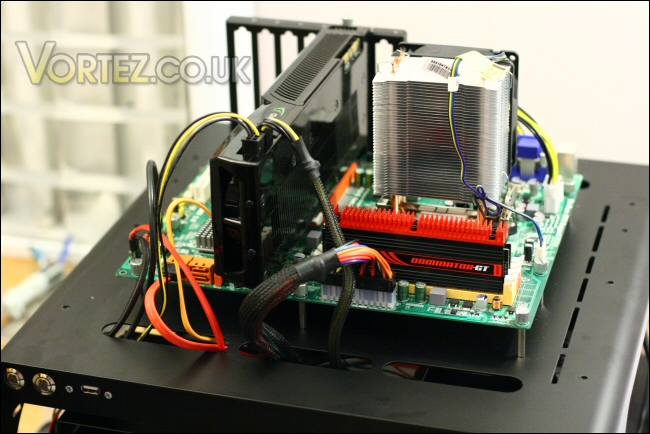
The A885GM-A2 on top of the Dimastech Test Table.
Sound level and temperatures
The PWM fan control of the ECS A885GM-A2 was fairly good. With both CPU’s it throttled up during very high load but in the case of the 1055T was never totally quiet… probably more to do with the 125w TDP and the overclock on top. The boards passive design means that (CPU cooling aside) it runs silently although that Northbridge does get quite warm. For the most part I’m impressed by the A885GM-A2.
CPU and chipset temperatures were excellent throughout and even when overclocked the board remained cool during testing.
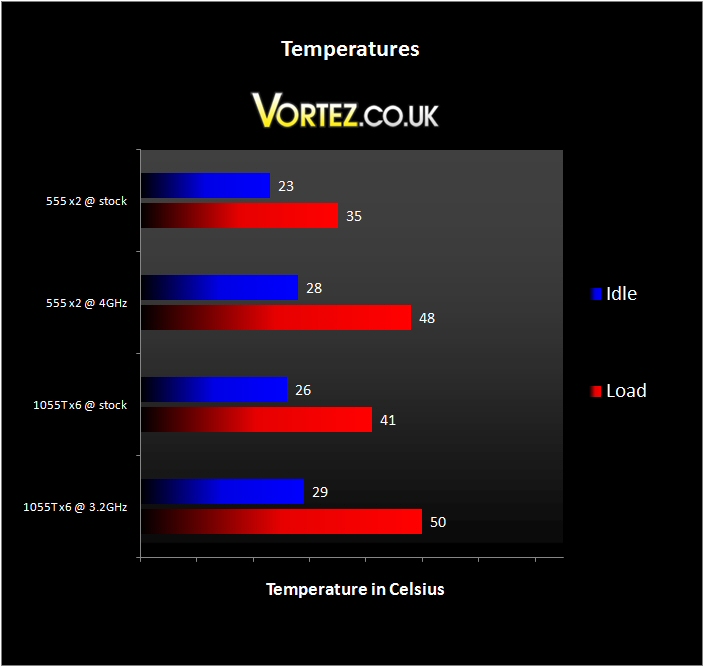
CPU temperatures.
Overclocking
Overclocking with the new AMD chipsets has been quite excellent and the ECS seems no exception. It was a very straight forward process using the M.I.B. III (Motherboard Intelligent BIOS III). From here I had full control over all the clock speeds and voltages I needed – the BIOS also lists the current clock speeds and voltages for reference so you’re never lost.
I started with the Phenom II X2 555 Black Edition – it’s stock clock of 3.2GHz is impressive plus it has an unlocked multiplier if needed.
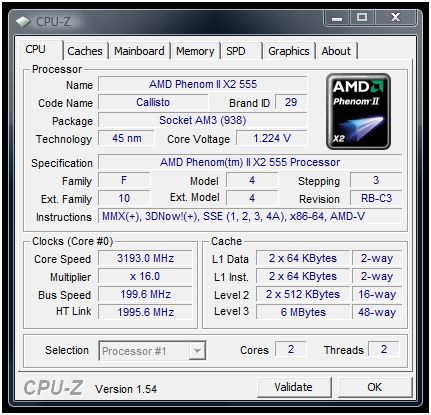
555 x2 @ stock.
I was able to take the board to a FSB of 225MHz with no voltage changes and the CPU sat @ 1.224V for its 3.6GHz.
Once tested I found this to be stable so pushed on.
This time I nudged the FSB up to 250MHz and bumped the CPU voltage a touch – like the other 800 series chipsets from AMD this simple approach to the overclocking is somewhat Intel like. I found it booted and worked like a charm with no system stability issues.
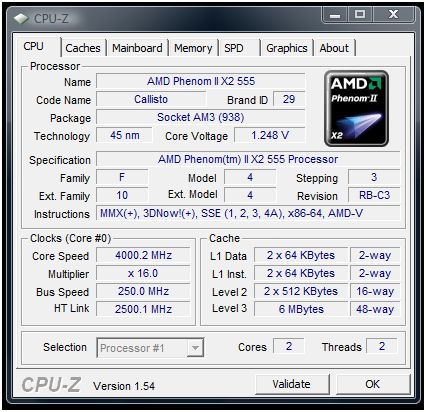
555 x2 @ 4GHz.
4GHz is a very impressive figure for what should be a very reasonably priced motherboard.
Unlike the ASUS boards I’ve tested recently the A885GM-A2 does not unlock cores so for a bit of last minute high end multicore overclocking I’ll move my attention to the 1055T six core processor.
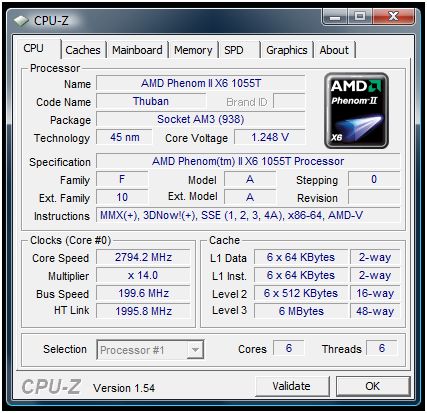
The 1055T six core.
Its 14x multiplier means that it has a stock clockspeed of 2.8GHz – hopefully there’s some room for improvement.
A little bit of tweaking returned just over 3.2GHz with a FSB increase to 230MHz.
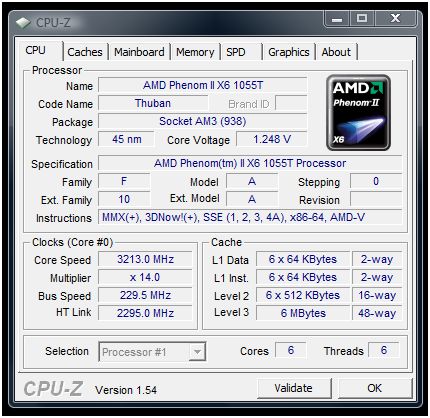
1055T @ 3.2GHz.
After playing with various voltages and clockspeeds I was unable to push the chip further so I returned the chip to 3.2GHz and started to begin testing.
PCMark and SuperPi
I tested desktop performance initially using Futuremark’s PCMark05, SuperPi, Cinebench and the x264 HD benchmark.
The A885GM-A2 would first face Futuremark’s PCMark05 which offers a selection of benchmarks to test virtually all aspects of the board.
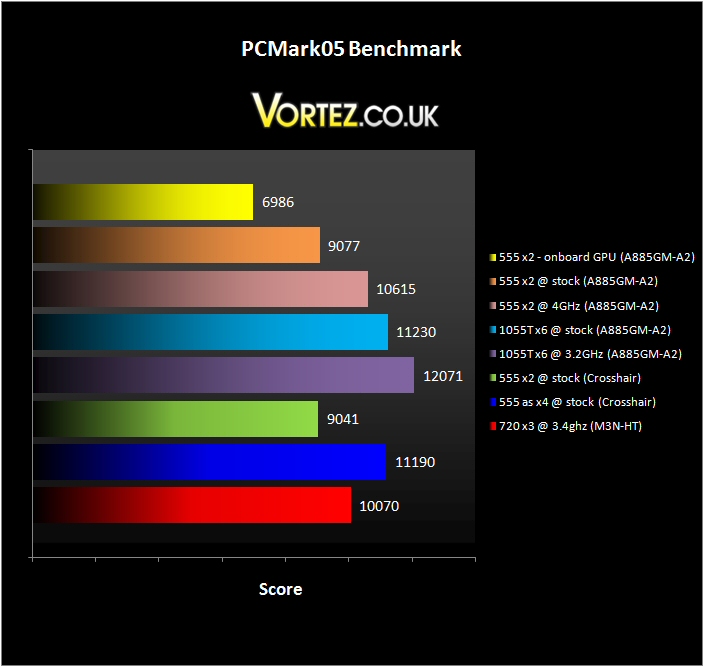
PCMark05.
As you can see the 555 x2 performs virtually identically compared to the recently tested Crosshair IV.
The uppermost and smallest score was to show how the system performed using it’s inbuilt HD4250 integrated GPU. It doesn’t look to be too different however a large chunk of the score comes from CPU heavy duties suggesting the score deficit is exclusively down to the low end GPU.
Next is SuperPi which is a very quick, easy and accurate test to identify system (primarily CPU and Ram) performance increases. It’s a great favourite of bleeding edge high end overclockers since shaving fractions of a second off the time taken to calculate Pi to so many decimal places is a real achievement.
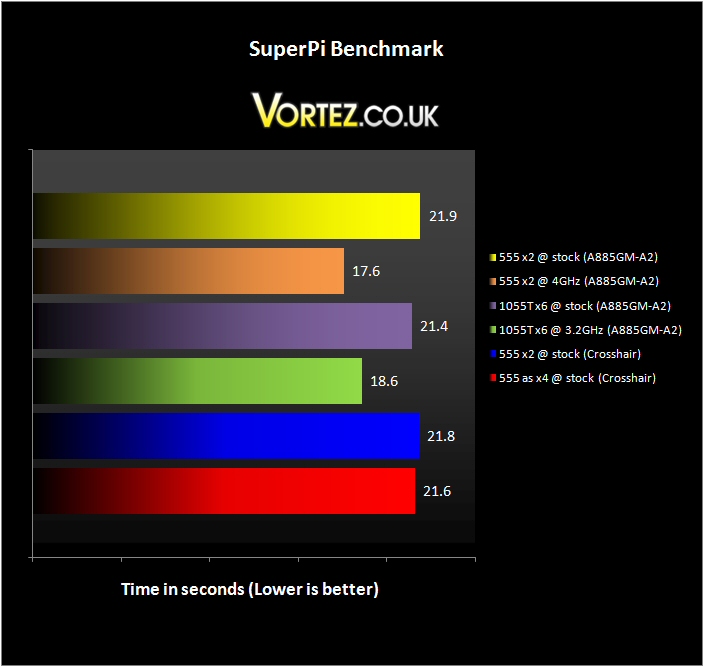
SuperPi.
As in previous testing you can see the comparable performance for the 555 x2 across both the Crosshair and the A885GM-A2. Rather interestingly the stock 1055T actually beats the stock 555. I repeated the test a few times over and got the same result each time – since SuperPi is single threaded I can only summarise that it’s something else – perhaps the memory controller on the x6 might be the factor here. One thing that can be concluded from the results is that clocking has offered the best performance boost.
Cinebench and x264 HD
Cinebench R11.5 is up next – it renders a 3D image in real time using all the available cores on the CPU.
It’s a true multithreaded program so should work particularly well with the x6.
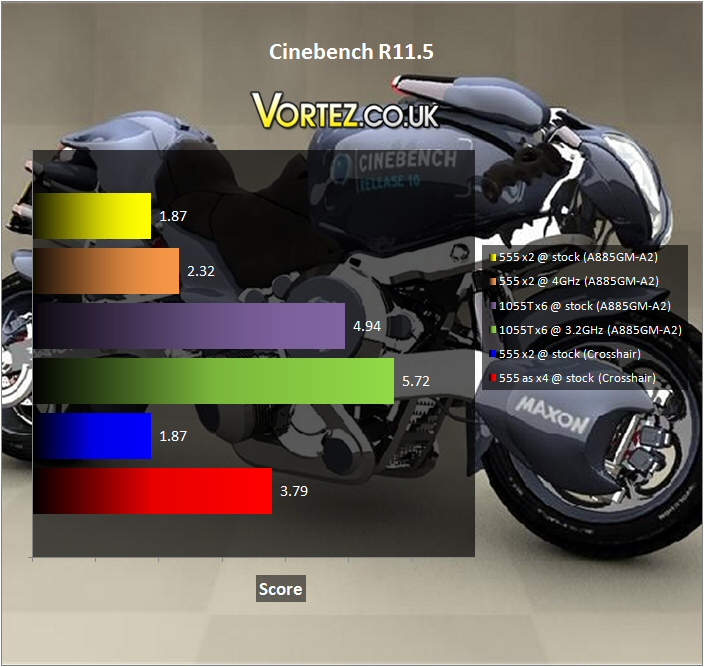
Cinebench R11.5.
As expected the 1055T is a clear winner – even overclocking seems to provide a decent boost since you are of course increasing the performance of six core rather than just 2, 3 or 4!
The last desktop performance test comes in the form of the x264 HD benchmark. This program encodes two full videos in real time one after the other over four separate passes. The resulting average is what you see below.
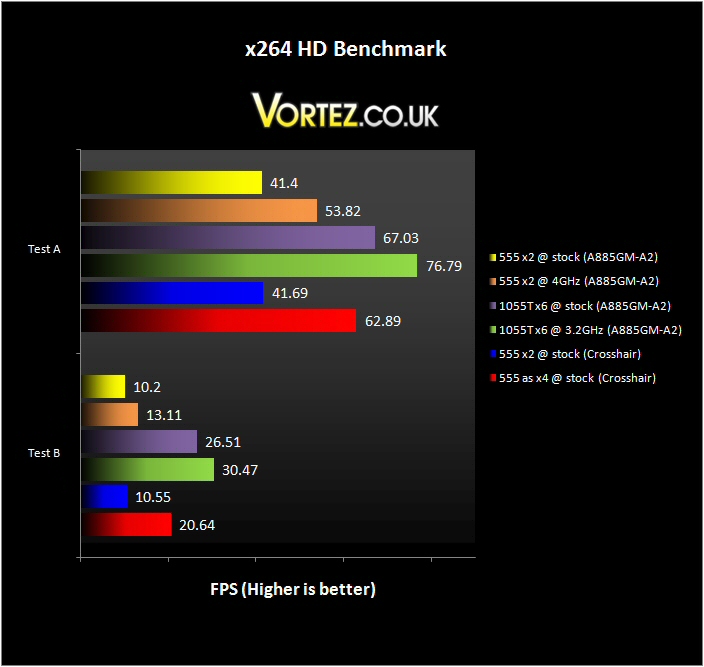
x264 HD.
For comparison purposes you can see that the 555 x2 @ stock scores are fundamentally identical between the ECS A885GM-A2 and Asus Crosshair IV. Overclocking provides a decent boost as does core count. The overclocked 1055T really pulls ahead with its two extra cores – indeed, you can see it best in test B where it’s 50% more cores push it 50% ahead of the core unlocked 555 (running as a quad) @ stock clocks.
3DMark06 and Vantage
Next is graphical performance – initially we’ll look at Futuremark’s two benchmarking programs 3DMark06 and 3DMark Vantage and then move onto a selection of games to assess performance.
First up is the 3DMark06 benchmark program.
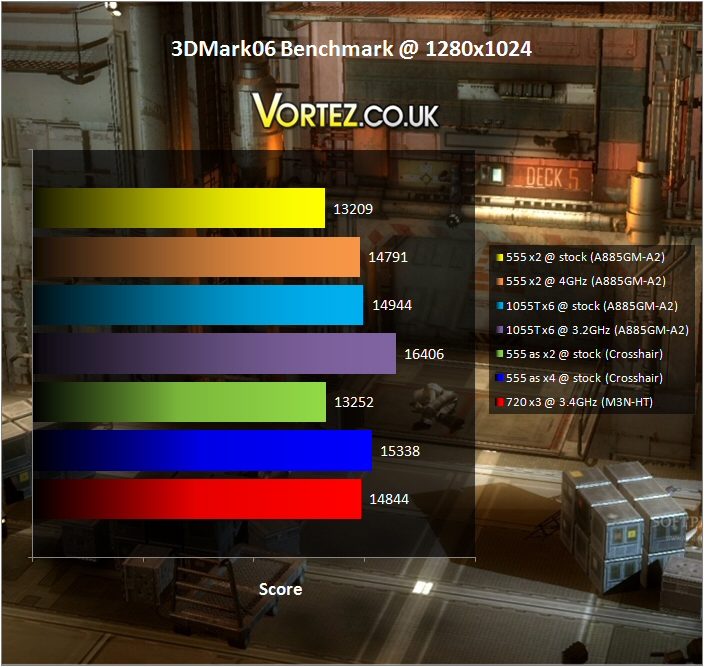
3DMark06.
The results play out as expected with a gradual increase in performance as clock speeds and core count ramp up. The 1055T is unsurprisingly in the lead providing the highest and most consistent framerates during the test.
Vantage was up next – it’s the newest incarnation of Futuremark’s successful benchmarking program and provides both GPU and CPU stress testing scenarios.
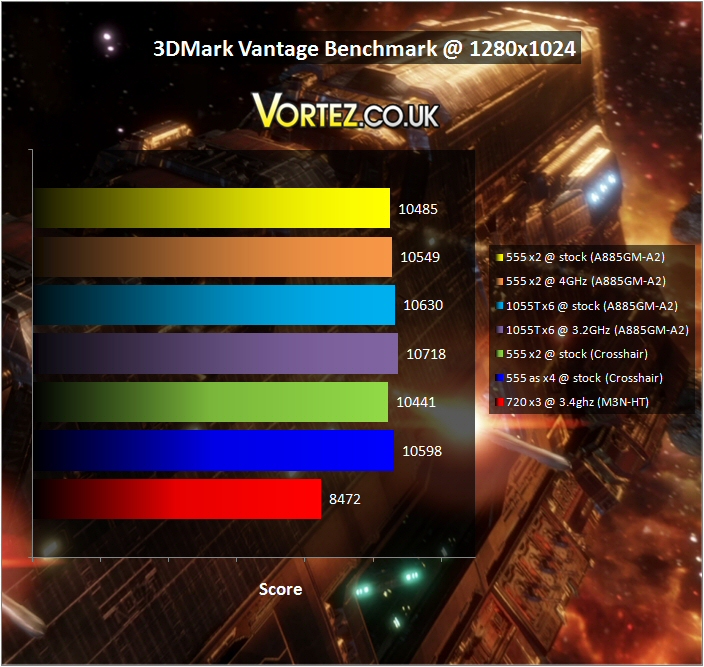
Vantage.
The results here appeared much closer compared to 06 but they ultimately identified the same trend.
Blacksite and Dead Space
Blacksite is the first of our game testing titles.
Its game engine provides great visuals with very playable framerates… it’s also great fun to play!
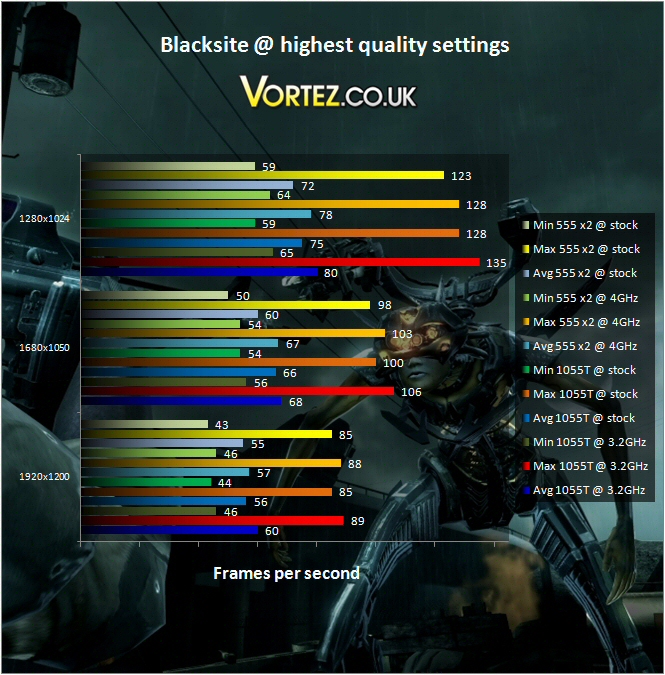
Blacksite.
Clock speed seems to have the biggest bearing on framerate increases although not by a massive amount. As resolution increases and the load passes over to the GPU the 555 pulls back ground. Certainly any combination will compete well against the recent AM3 boards I’ve tested. Indeed, they’re competition for the i5 and i7 machines I’ve tested too.
Dead Space follows. The survival horror game is not only scary – it’s also a decent benchmark game.
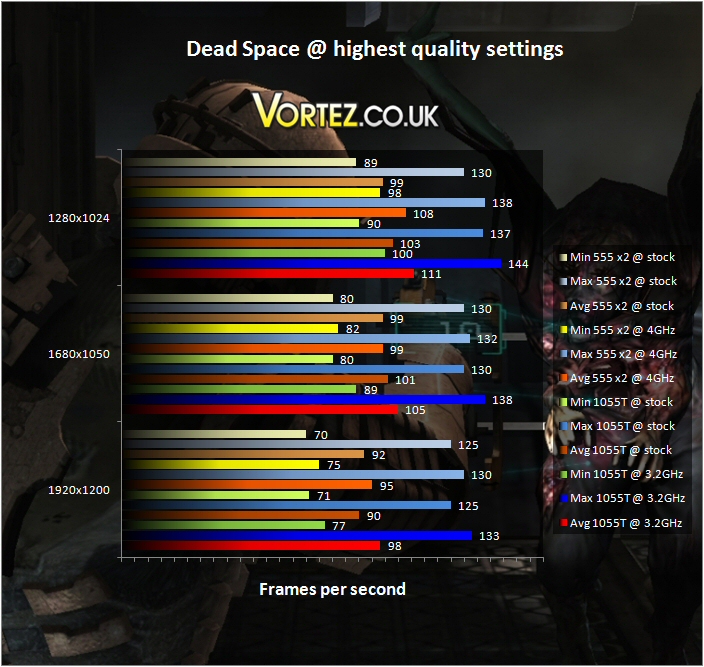
Dead Space.
Performance was once again similar although I’d say clocks peed has an even bigger effect on performance with the 4GHz dual core 555 reliably beating the stock six core 1055T.
Far Cry 2 and Unreal Tournament III
The penultimate game is Far Cry 2 – it’s striking visuals and open landscape push PC systems very hard. Add to that an inbuilt benchmarking suite and it’s a no brainer that it finds itself here.
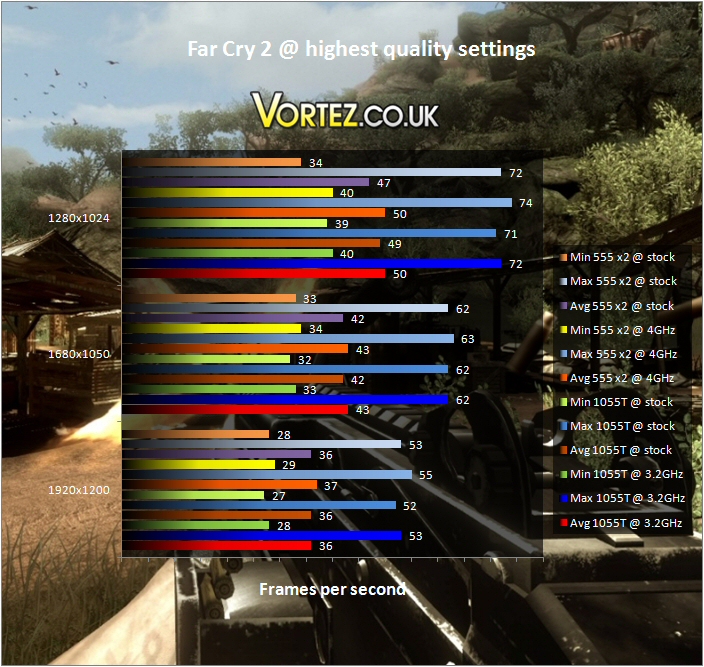
Far Cry 2.
Despite the cutting edge nature of the game the results show a tendency to favour clock speed over core count once again. Even if it’s only a frame or two here and there the 555 dual core @ 4GHz is consistently ahead. Quite honestly though – when looking at this set of results it begs you ask the question – why not just buy the 555 and run it @ stock!
Last but not least is Unreal Tournament III – this high velocity, visceral bloodbath of a game also has a downloadable benchmark program. It measures an average framerate over a set time limit of a gaming session at a level of your choice. I repeated the test five times and took an average of that for the results.
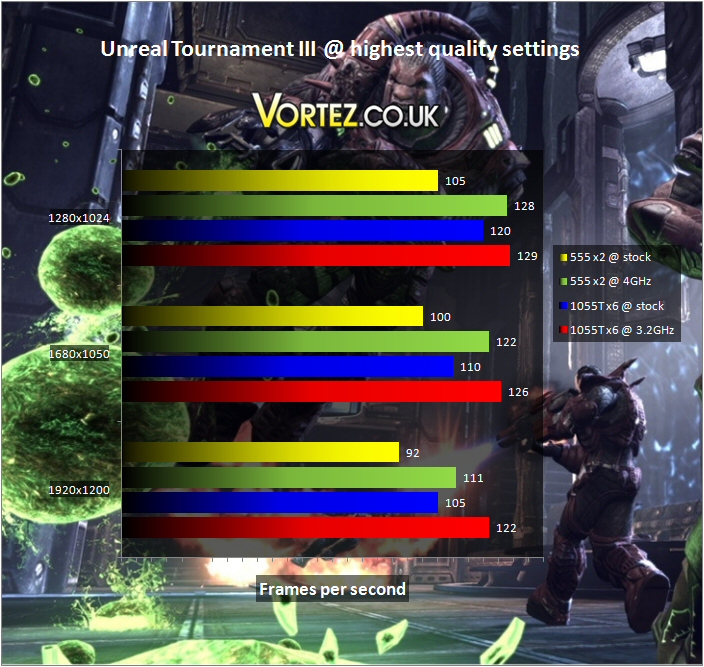
Unreal Tournament III.
It seems a combination of clock speed and core count has an effect here. There’s a performance boost in each case with the overclocked 1055T coming out on top at each resolution – especially 1920×1200 where it seems to be pulling ahead even more.
As per my normal conclusion to the testing section i can confirm that in each case all clocks at all resolutions were perfectly playable and incredibly smooth.
Conclusion
The ECS A885GM-A2 is an excellent board with many great features and one or two not so great ones!
Assuming it enters stores at the price point I\’ve found it will represent great value and is very well specified. Overall I\’d say that it\’s well laid out, well packaged, stable and seems to do everything in a refreshingly straightforward way.
The ECS A885GM-A2 AM3 Motherboard
The bundled programs and utilities whilst not great in number or features are probably all the average user would want. The eBLU BIOS update system should help make what can be a treacherous process quite simple and despite my initial misgivings over the eJIFFY program i can appreciate why some users may want a hassle free and fast loading interface for 5 minute email and web checks. Also, while the eOC utility is very sparse I would say that the BIOS level M.I.B. III clocking section is as comprehensive as anyone could want it to be.
I did mention a negative above but these are really only small issues –
The first and most minor is the lack of an HDMI socket. These days any board with integrated graphics, especially like the HD4250 here, really deserves one in my opinion.
Second is that the board cannot unlock chips with dormant cores – once again, not the end of the world but would have been lovely if the option was there in some form.
Third and last is that crippled PCI-E x16 slot that runs at x4 speed. From what I\’ve read the performance of GPU\’s above something like an HD5770 will be effected. Yes, in the whole scheme of things (and certainly considering the potential price of the board) this is not a major issue it\’s just more of a pity since the prospect of an overclocked 1090T combined with a couple of 5850\’s or better would really have been impressive!
Pros
+ Looks like it will be reasonably priced
+ Nice design and layout
+ Six core ready
+ SATA III 6Gb/s compliant
+ Clocks well and BIOS easy to use
+ Fanless design still runs quite cool
+ Small but useful software package
+ Onboard GPU is a nice feature
Cons
– Core unlock feature and HDMI would have been nice
– Second PCI-E x16 slot is only x4 speed
+ Looks like it will be reasonably priced
+ Nice design and layout
+ Six core ready
+ SATA III 6Gb/s compliant
+ Clocks well and BIOS easy to use
+ Fanless design still runs quite cool
+ Small but useful software package
+ Onboard GPU is a nice feature
Cons
– Core unlock feature and HDMI would have been nice
– Second PCI-E x16 slot is only x4 speed
All in all though I\’ve been immensely impressed. It overclocked very nicely indeed and performed virtually identically to the ASUS boards I tested recently.
To conclude, if you\’re either looking to make the move to AMD or simply upgrading then it\’s worth a look. SATA III and six core support – it\’s a futureproof little gem!
The ECS A885GM-A2 receives the Vortez Hardware \’Gold\’ award – well done!
Vortez Hardware would like to thank ECS for supplying the A885GM-A2 for review. Discuss this review on our forums.