Looking for a prebuilt system under £1000? The BlackFire Apex features the Intel Core i5-6500, 16GB DDR4, AMD’s RX 470 and more!

Product on Review: Blackfire Apex
Manufacturer & Sponsor: Fierce PC
Street Price: £799.98
As a stepping stone, investing in a prebuilt system is a great way to enter the world of PC gaming. After all, not all users have the know-how and expertise to pair up compatible hardware and then engage in the task of constructing their first computer system. Prebuilt systems are also a good avenue to take for those who simply want to leave the hard work to the experts.
So, today in our second outing with Fierce PC we’ll be exploring a gaming rig which is focussed in delivering good value – with a view to delivering decent hardware well under the £1000 mark.
Under our watchful eye today is the Blackfire Apex which is a low-to-mid range computer system based around Skylake architecture. So, at the heart of Apex is the Intel Core i5-6500, along with 16GB DDR4 and the AMD RX 470.
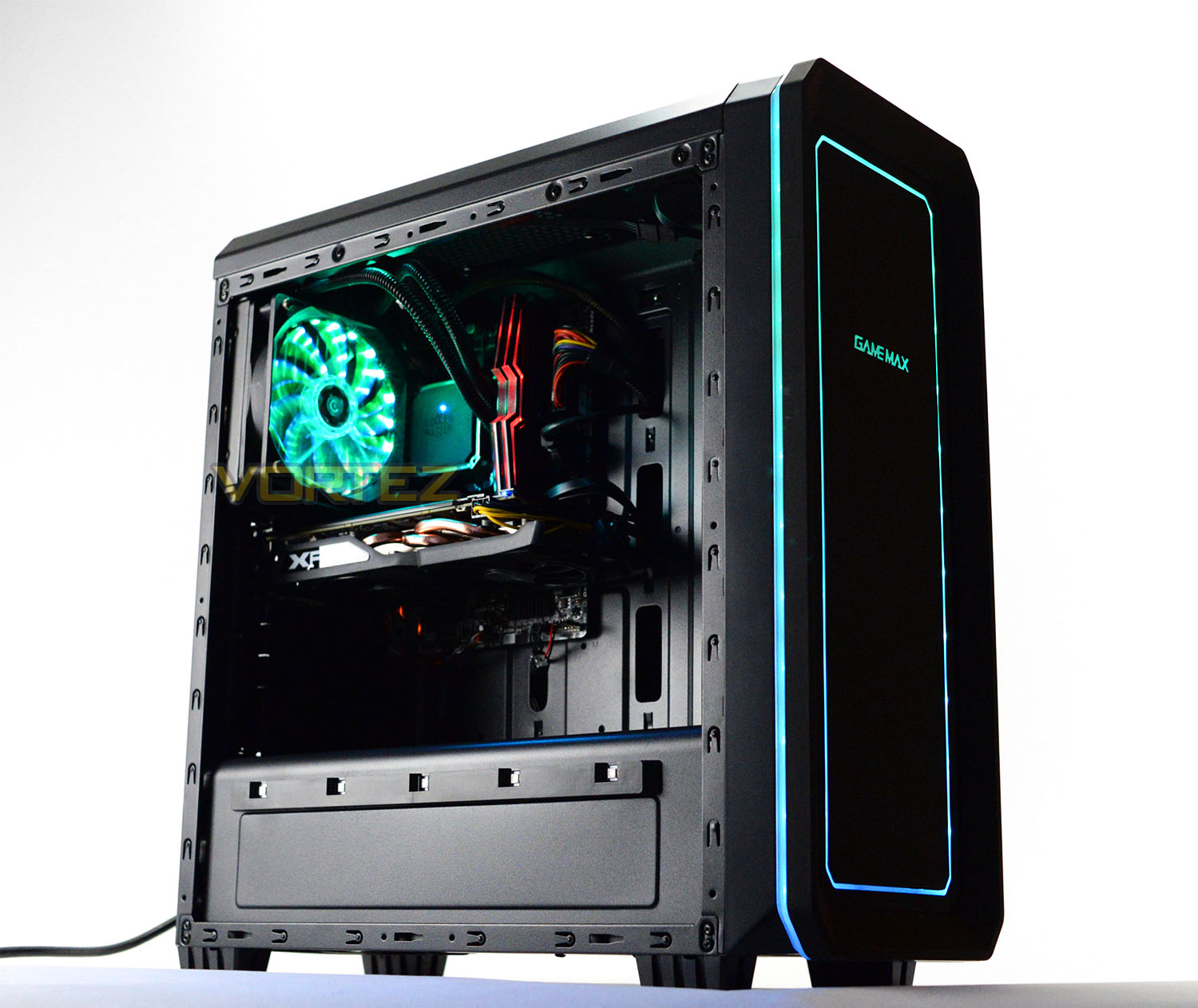
Fierce PC on their Blackfire Apex
This PC was designed from the ground up and fully tested to give you optimal performance to play all of the latest and greatest titles, without breaking the bank.
The Blackfire Apex is a fast, full-featured gaming PC with awesome RGB lighting. Powered by an Intel Core i5 6500 running with a 3.6GHz boost clock, cooled by a Cooler Master Seidon 120V v3.0 Liquid CPU Cooler. Paired with the new, powerful AMD Radeon RX 470 4GB Graphics Card and 16GB of ADATA XPG Dazzle 2400MHz Memory, and a 120GB solid state drive for near-instant boots with a huge 1TB SATA3 hard drive for all of your games, controlled by a Gigabyte H110M-S2H motherboard featuring USB3.
Includes 1 Year of BullGuard Internet Security, and the latest Microsoft Windows 10 Home pre-installed with drivers.
The Blackfire Apex is a fast, full-featured gaming PC with awesome RGB lighting. Powered by an Intel Core i5 6500 running with a 3.6GHz boost clock, cooled by a Cooler Master Seidon 120V v3.0 Liquid CPU Cooler. Paired with the new, powerful AMD Radeon RX 470 4GB Graphics Card and 16GB of ADATA XPG Dazzle 2400MHz Memory, and a 120GB solid state drive for near-instant boots with a huge 1TB SATA3 hard drive for all of your games, controlled by a Gigabyte H110M-S2H motherboard featuring USB3.
Includes 1 Year of BullGuard Internet Security, and the latest Microsoft Windows 10 Home pre-installed with drivers.
Technical Specifications
Below are the technical specifications supplied directly from Fierce PC themselves:
OS
Windows 10 Home 64-bit
CPU
Intel Core i5-6500 Quad Core (3.2GHz – 3.6GHz Boost)
CPU Cooler
Cooler Master Seidon 120V
RAM
ADATA XPG Dazzle – 16GB 2400MHz DDR4
Motherboard
GIGABYTE GA-G110M-S2H
GPU
4GB XFX RX 470 Black Edition
SSD
120GB ADATA SP550
HDD
1TB WD Blue 7200RPM
PSU
Cooler Master B500 (500W)
Case
GameMax Vegas
Weight
6KG
Warranty
3 Years Warranty
Windows 10 Home 64-bit
CPU
Intel Core i5-6500 Quad Core (3.2GHz – 3.6GHz Boost)
CPU Cooler
Cooler Master Seidon 120V
RAM
ADATA XPG Dazzle – 16GB 2400MHz DDR4
Motherboard
GIGABYTE GA-G110M-S2H
GPU
4GB XFX RX 470 Black Edition
SSD
120GB ADATA SP550
HDD
1TB WD Blue 7200RPM
PSU
Cooler Master B500 (500W)
Case
GameMax Vegas
Weight
6KG
Warranty
3 Years Warranty
Closer Look: External
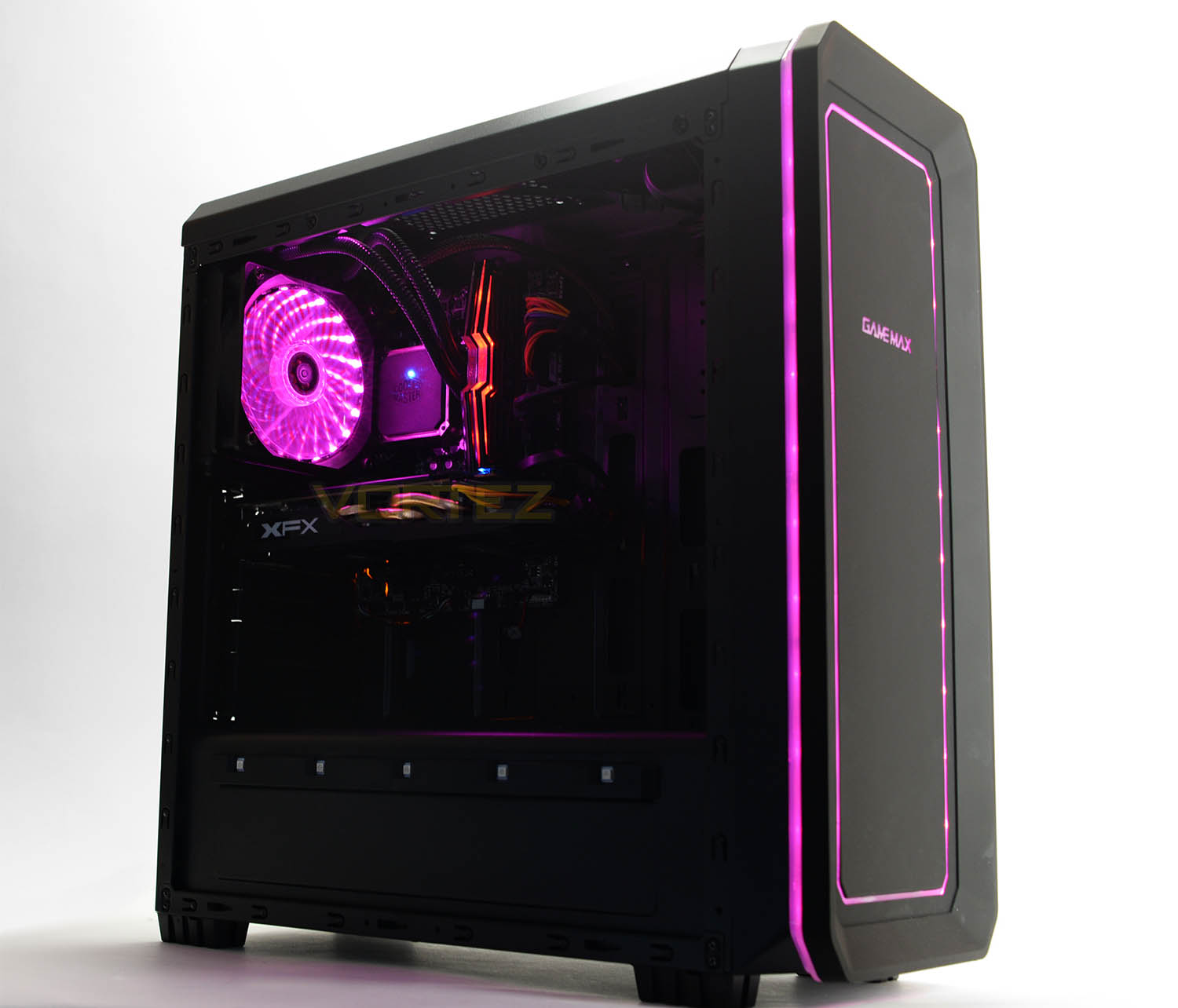
Blackfire Apex arrives in a large Fierce PC branded box which is loaded with plenty of padding – inside this box, the system is concealed within the original computer chassis packaging. This extra protection should ensure the parcel arrives to its destination without any hitches.
The chassis which Fierce PC are using for this system is the GameMax Vegas, which oddly has no manufacturers website but is available to buy as an individual item from various outlets like Amazon, CCL, Scan etc. This case is a midi tower and is touted as an entry-level enclosure, providing accommodation for up to ATX form factor. One of the biggest attractions to this case is its RGB functionality – this lighting can be controlled by the touch of a button up at the top.
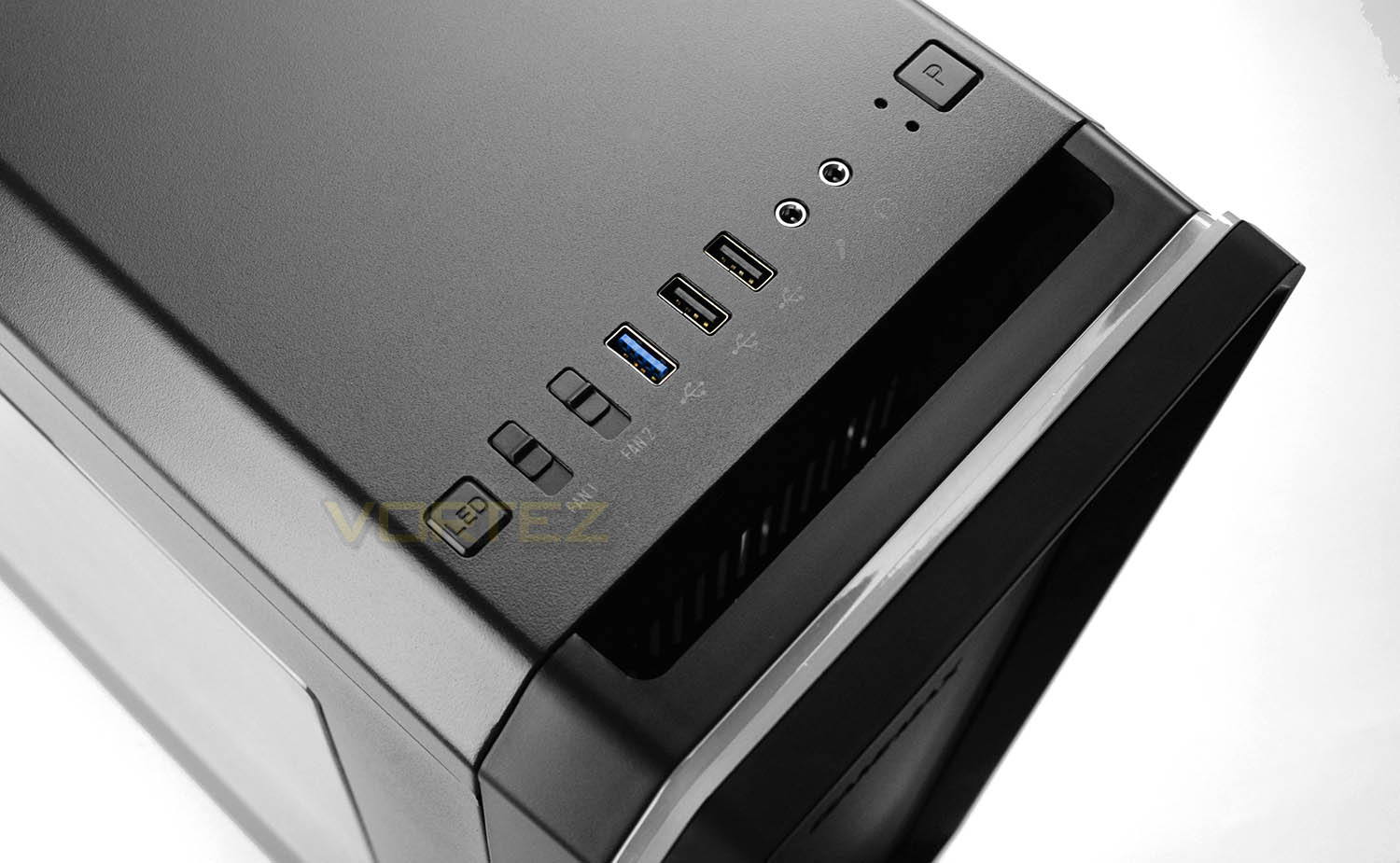
Up at the top of Blackfire Apex there is an assortment of ports and buttons to take advantage of. These include the following:
• Power button
• 2x USB 2.0 Ports
• 1x USB 3.0 Port
• Headphone and Microphone Jacks
• Two fan control switches
• RGB control switch
Having access to manage the speed of the cooling fans inside our system is very handy, furthermore, the RGB switch is also useful too; this button allows you to specify the colour (Red, Green, Blue, Cyan, Purple, Pink and White) or perform a demonstration of all the colours with a breathing animation.
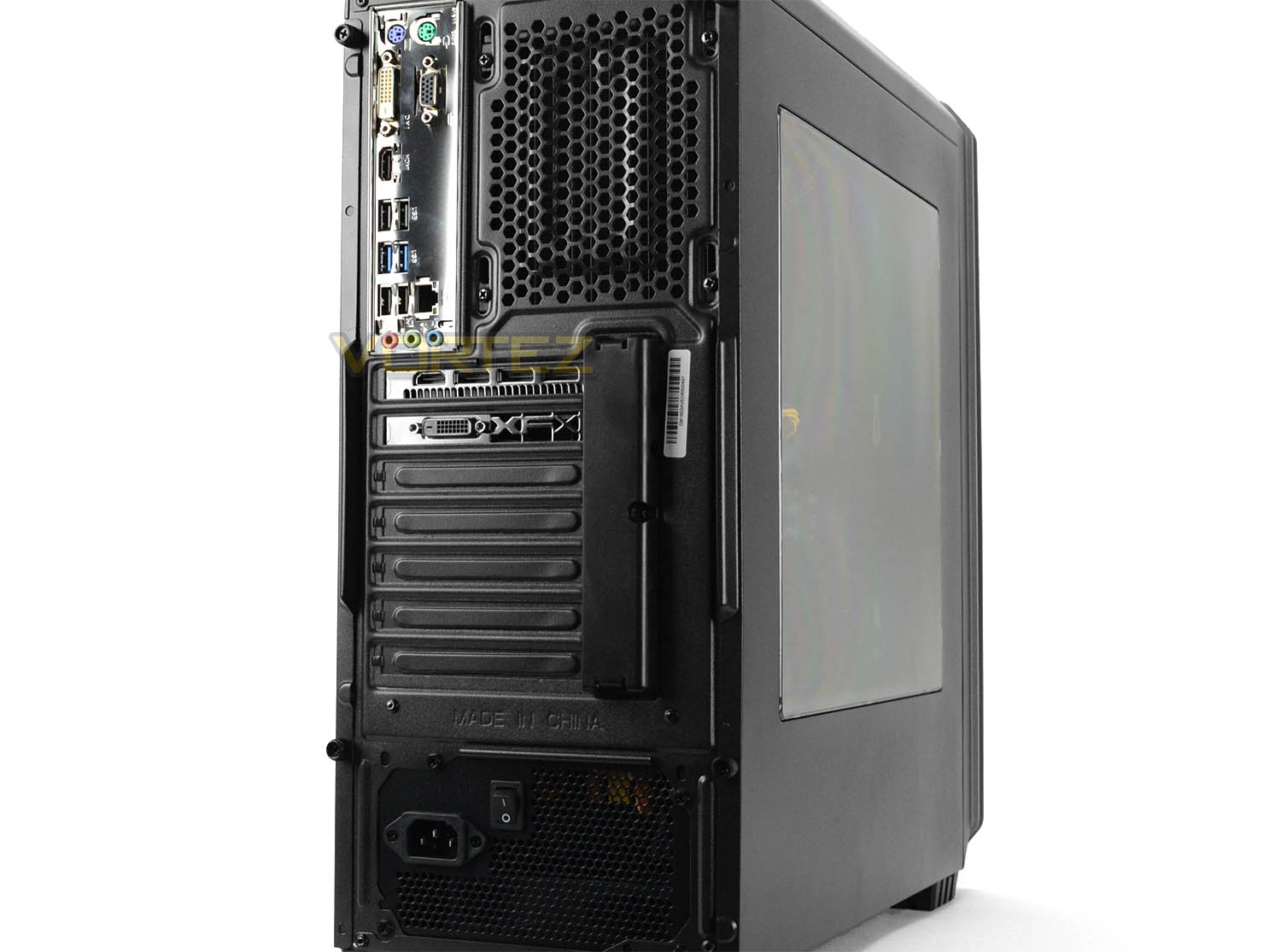
Around the back of Blackfire Apex there are further ports which offer even more functionality. In the upper section, the ports directly from the motherboard provide:
• 1x PS2 keyboard port
• 1x PS2 mouse port
• 1x D-Sub port
• 1x DVI-D port
• 1x HDMI port
• 2x USB 3.0 ports
• 4x USB 2.0 ports
• 1x Gigabit LAN port
• 7.1 Channel Hi-Def Audio Jacks (via Realtek ALC887)
Again, we have quite an assortment of ports available on the rear IO section of this system. The only flaw is that we have no USB 3.1 with this particular motherboard which is one of the benefits users can benefit from by using a Skylake-based configuration.
Below this we also have the graphics card (XFX RX 470 RS Black Edition). On the rear IO of this card we have a selection of video out ports to choose from:
• 1x HDMI port
• 1x Displayport
• 1x DVI port
And then we also have the power supply at the bottom which is a Cooler Master B500 PSU. This PSU is a 500W unit and is 80 plus certified.
Closer Look: Internal
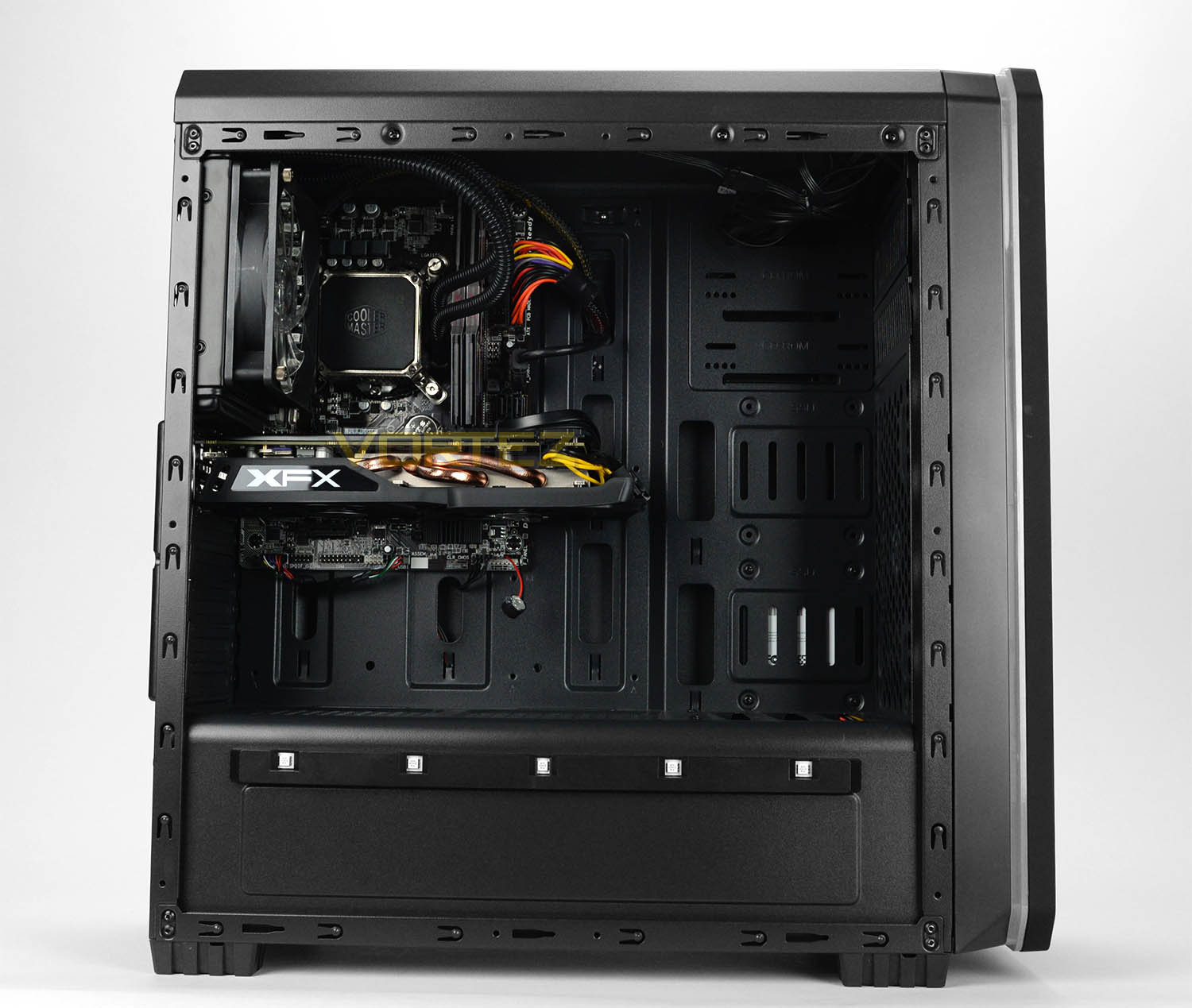
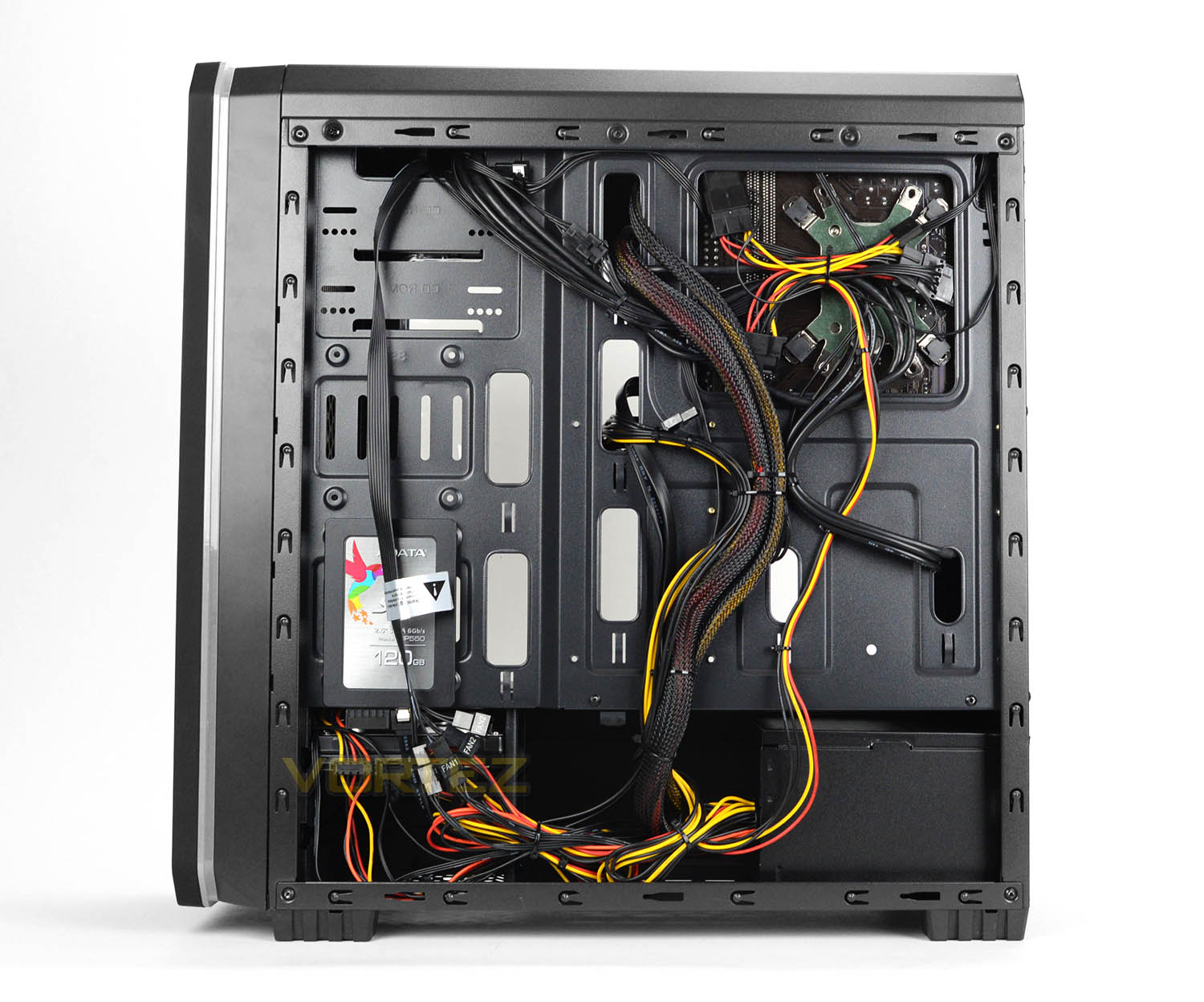
After detaching both steel side panels on Blackfire Apex, we are met by an attractive set of components. In the main chamber on the prominent side the pathway is clear of any obstruction and is tidy – on the reverse however, the cable management could be ordered in a better way. Although this won’t be detrimental to the operation of the system, we like things nice and tidy!
One particular choice which is rather puzzling is the inclusion of a Micro-ATX motherboard in a computer chassis of this size. As you can see from the above pictures, there is excessive space around the motherboard. Perhaps a smaller, more condensed chassis could have been used if the Micro-ATX form factor is the direction Fierce PC want to go with this rig.
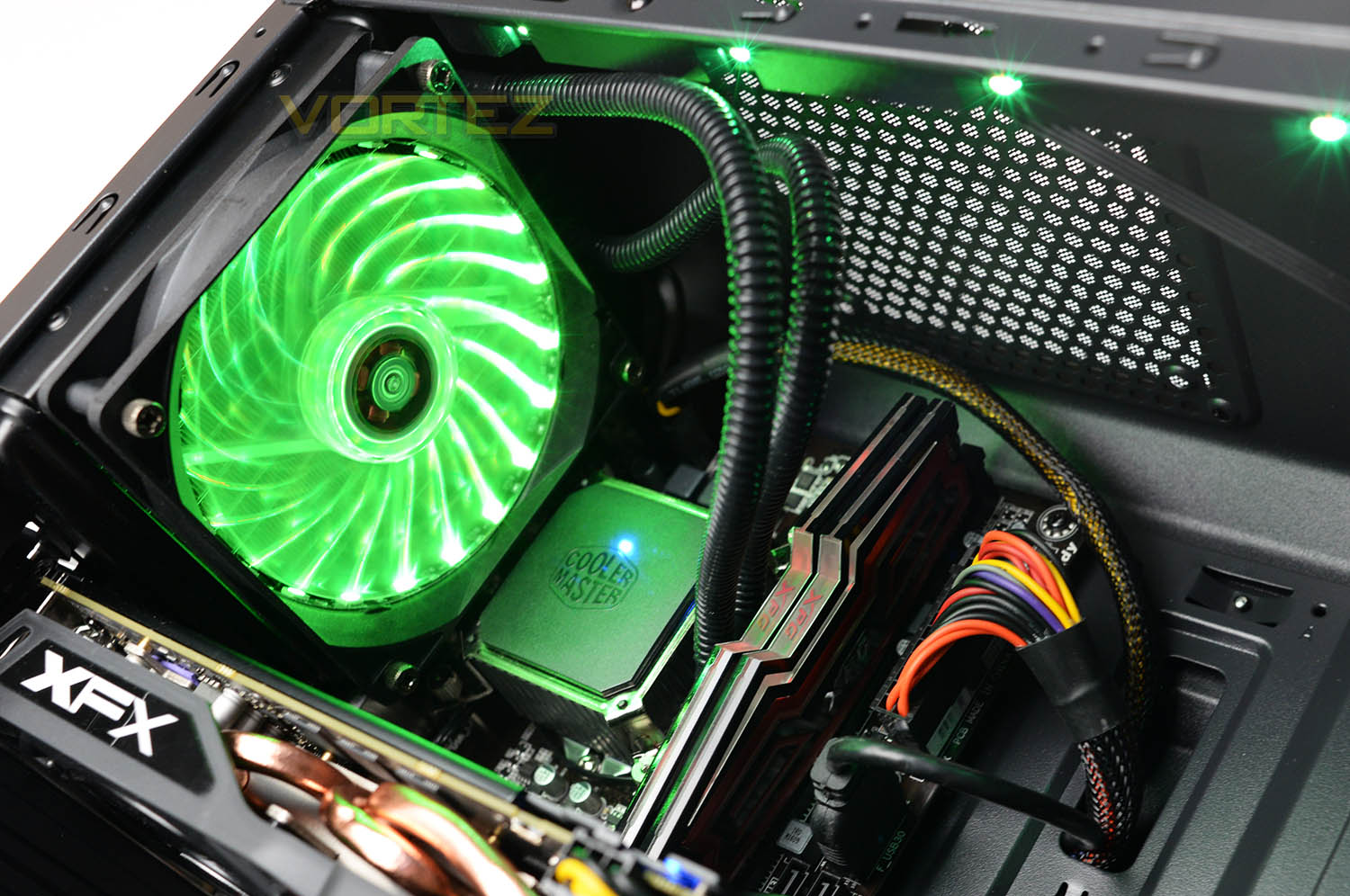
Taking a closer look at the components selection, the driving force behind Blackfire Apex is the Intel Core i5-6500 processor which touts a 3.20GHz base clock and up to 3.6GHz Turbo Boost. The 6500 sits on an GIGABYTE GA-H110M-S2H motherboard, this board uses the H110 chipset and while it is an entry-level solution, it bears the essentials that most users will require. Cooling the CPU Fierce PC has decided to opt for the Cooler Master Seidon 120V closed loop liquid cooler. The radiator and fan combo for this solution occupies the rear exhaust cooling fan location, rather than use the Cooler Master fan which come with Seidon, Fierce PC has taken advantage of the Gamemax Vegas RGB fan – underload the system is quiet and can be regarded as undisruptive.
Immediately next to the CPU and its cooling block we have 16GB of ADATA XPG Dazzle 2400MHz DDR4. If we take into account the overall configuration, along with this 16GB of memory we have a good foundation for basic content creation, gaming and general usage.
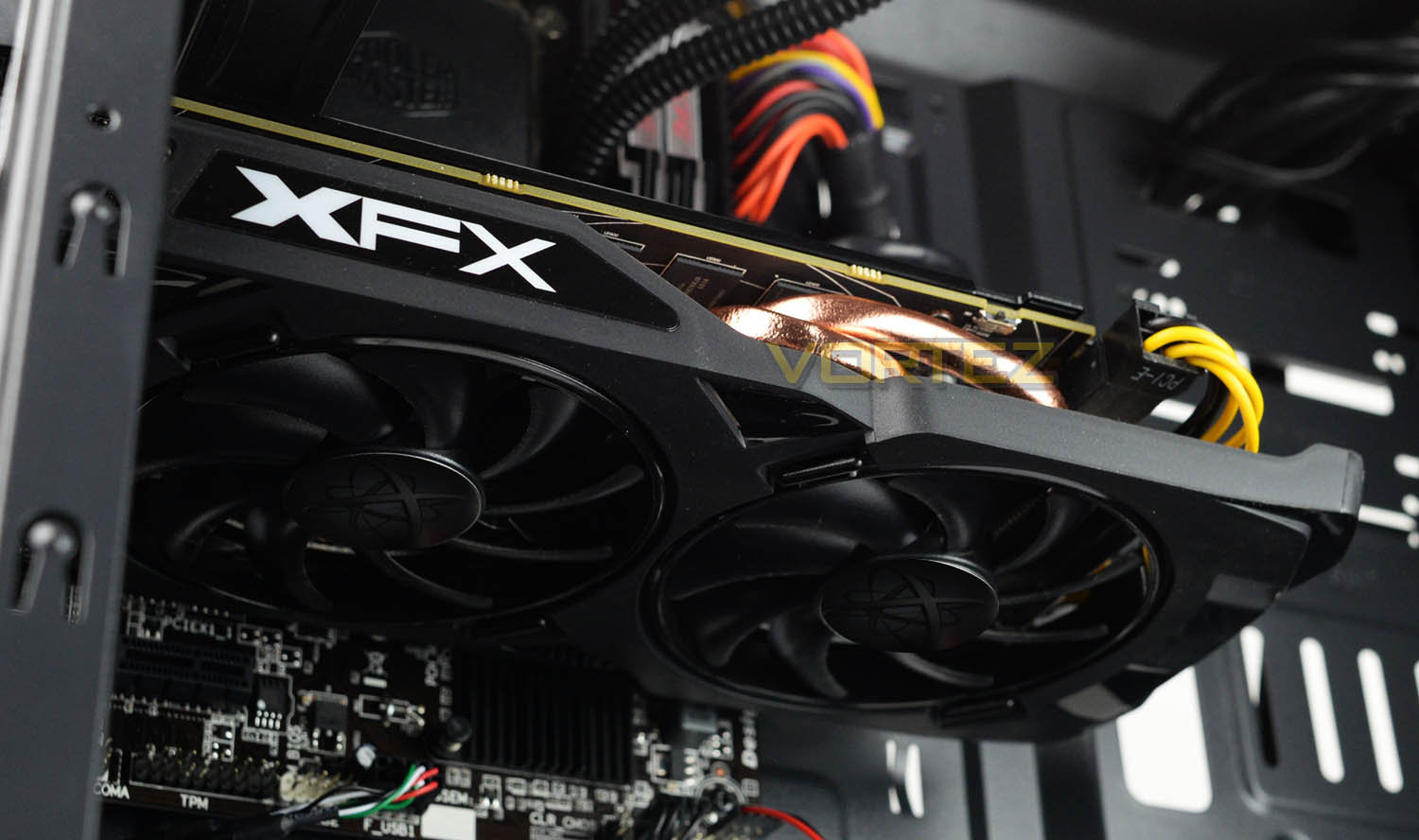
For graphics delivery this system takes advantage of the XFX RX 470 RS Black Edition. For 1080p gaming, this graphics card offers good performance for a mid-range solution. Over on the subsequent pages we’ll see just how capable this card and the components are when we run some 3D performance benchmarks.
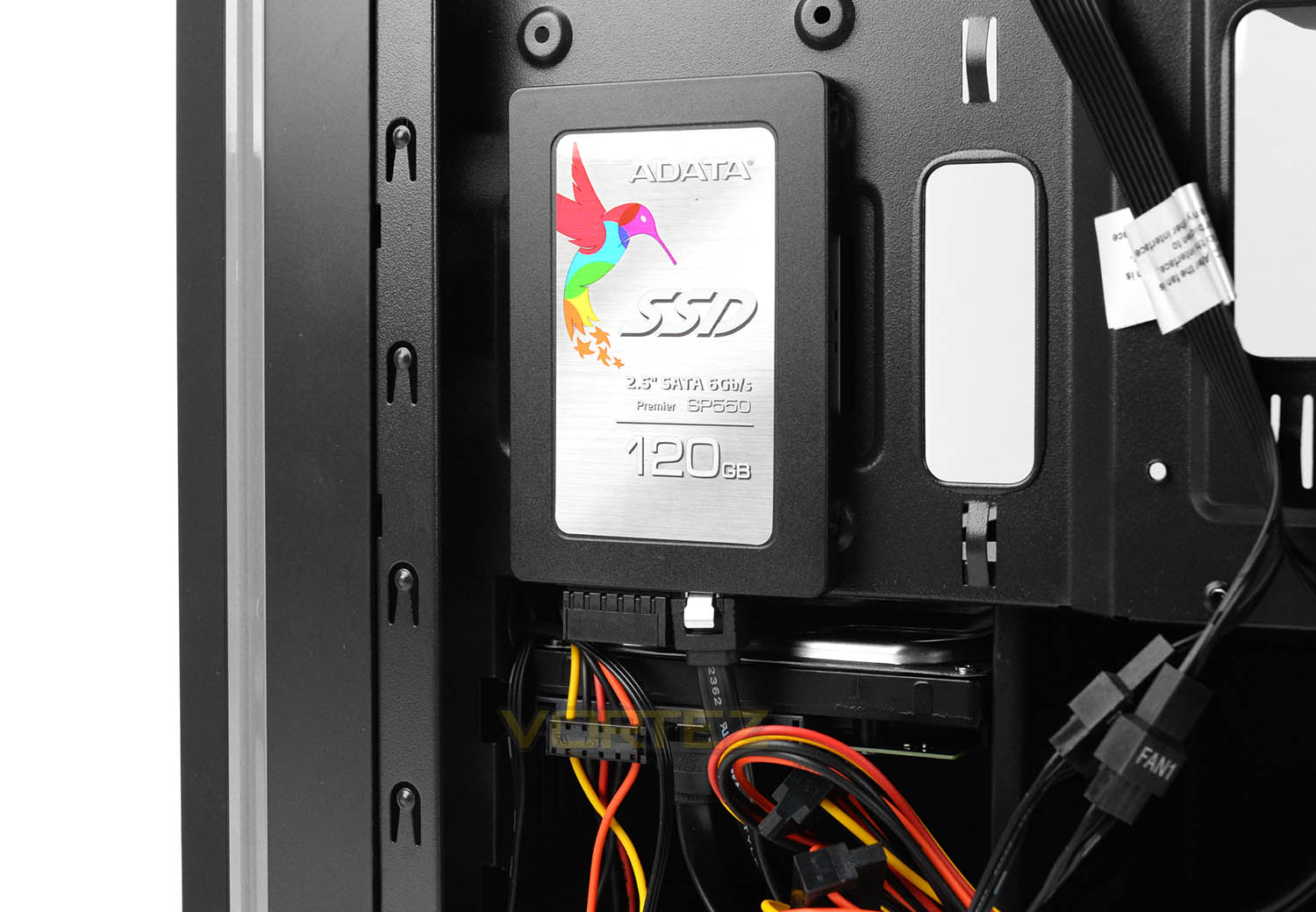
Blackfire Apex uses a storage combination which we see common nowadays. For the primary (Windows 10) drive, Fierce PC have used an ADATA SP550 SATA-based SSD which is capable of delivering 400-500MB/s+. Having an SSD for the boot drive means the startup time will be quick and the core software suite will tap into significantly quicker transfer rates for sequential read/write and IOPS. There is also a standard mechanical 3.5” drive which again is SATA-based. This is a Western Digital Blue 1TB drive and will be ideal for the games, music, movies libraries.
Behind the 3.5” drive the GameMax Vegas features a 120mm RGB fan which brings cool air into the chassis and will help to drive down the temperature of the HDD.
So that’s all a tour of the Blackfire Apex complete, on the following pages we’ll be testing out the performance of this system to see how capable it really is.
Benchmarks: Temperatures
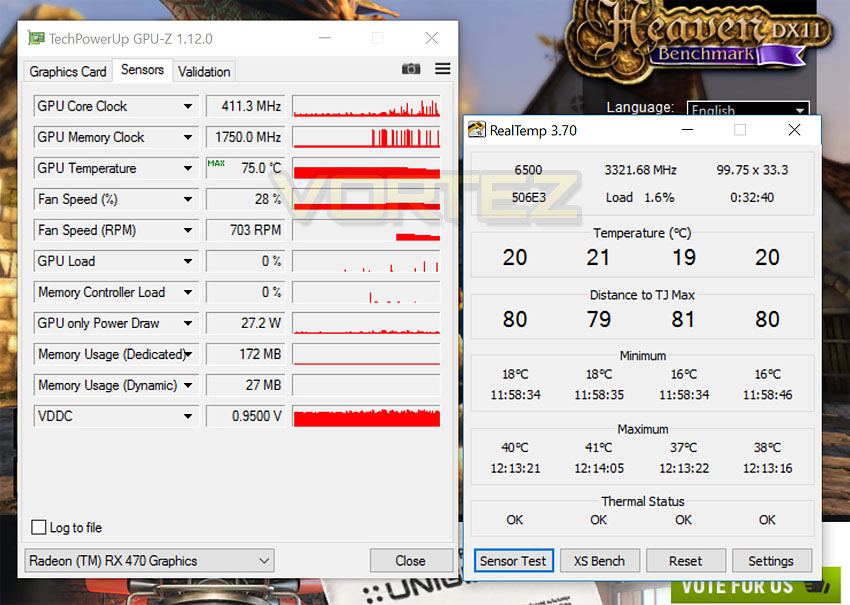
For our first benchmark test we observe the max. CPU/GPU temperatures of the system during a 20-minute run of Unigine Heaven 4.0. To report back on the temperatures we use RealTemp and GPU-Z which provide the peak figures.
Benchmarks: Boot Time & Power Consumption
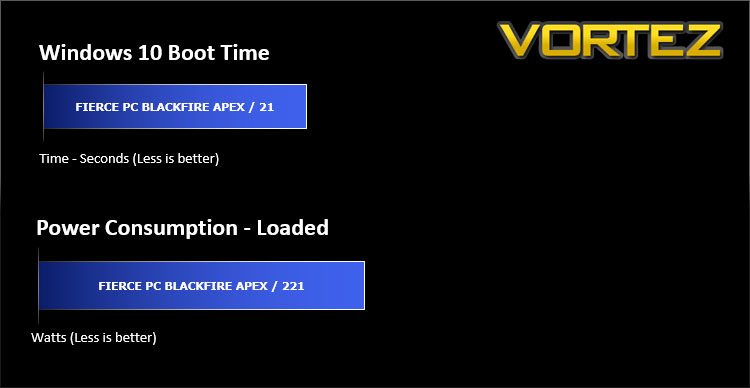
In this test we observe how fast the boot into Windows 10 is by using a digital stopwatch. Power consumption is another important observation, for this we observe the wattage from the wall while the system is running Heaven 4.0.
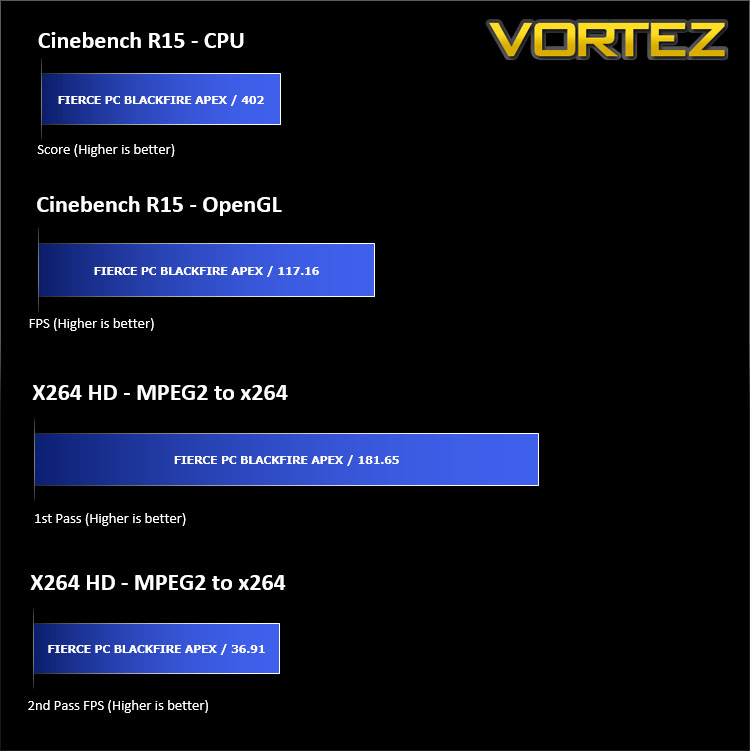
Benchmarks: Cinebench R15 & x264 HD
CINEBENCH can measure systems with up to 64 processor threads. This test scene contains approximately 2,000 objects which in turn contain more than 300,000 polygons in total, and uses sharp and blurred reflections, area lights, shadows, procedural shaders, antialiasing, and much more. The result is displayed in points (pts). The higher the number, the faster your processor is.
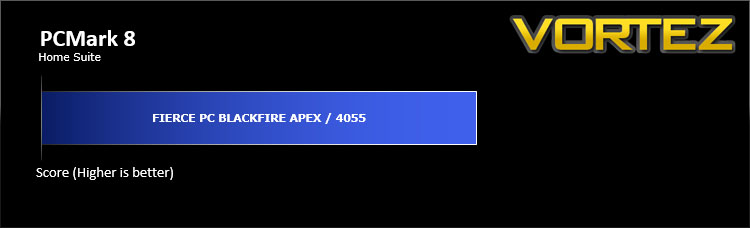
Benchmarks: PCMark 8
PCMark 8 DownloadPCMark 8 combines performance benchmarking with battery life measurement and includes tests based on popular Adobe and Microsoft applications. Whether you are looking for long battery life, or maximum power, PCMark 8 will help you find the devices that offer the perfect combination of efficiency and performance for your needs. It’s the complete PC performance benchmark for home and business.
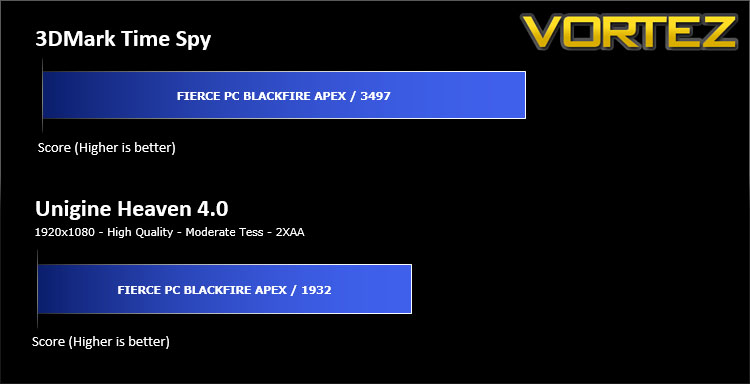
Benchmarks: 3DMark & Heaven 4.0
3DMark DownloadThe new 3DMark includes everything you need to benchmark your hardware. With three all new tests you can bench everything from smartphones and tablets, to notebooks and home PCs, to the latest high-end, multi-GPU gaming desktops. And it’s not just for Windows. With 3DMark you can compare your scores with Android and iOS devices too. It’s the most powerful and flexible 3DMark we’ve ever created.
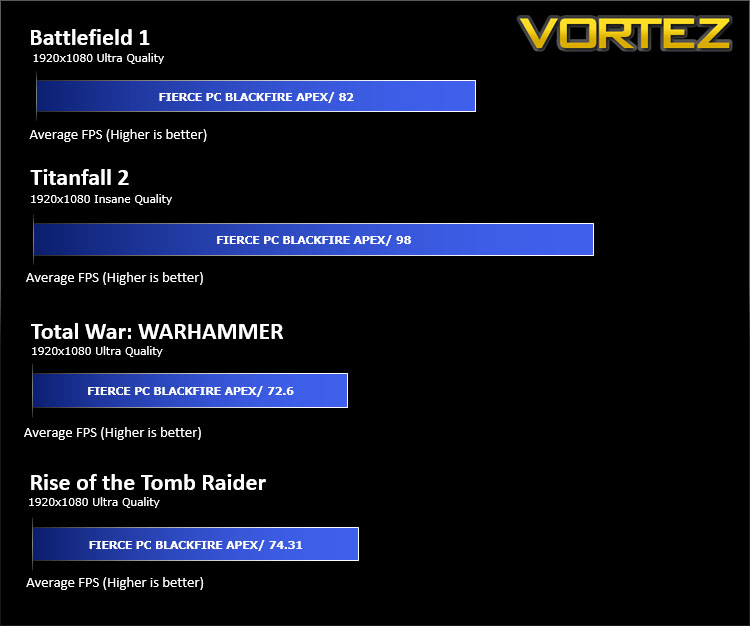
Benchmarks: BF1, Titanfall 2, WARHAMMER, Rise of the Tomb Raider
Blackfire Apex uses a single RX 470 for graphics delivery, in this section we test the latest gaming titles to see how effective the 3D capabilities are at 1080p with Ultra detail settings. We report on the average framerate using FRAPS.
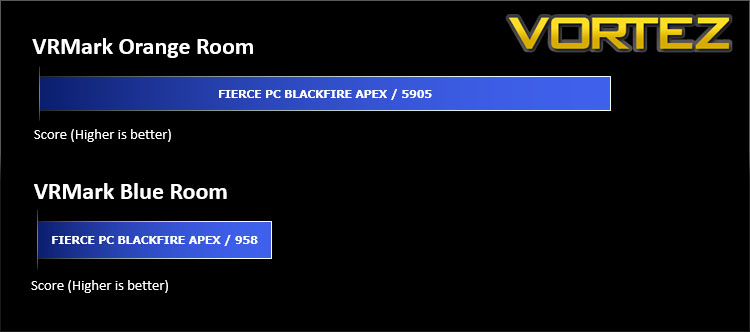
Benchmarks: VRMark
VRMark DownloadThe performance requirements for VR games are much higher than for typical PC games. So, if you’re thinking about buying an HTC Vive or an Oculus Rift this holiday, wouldn’t it be good to know that your PC is ready for VR?
VRMark includes two VR benchmark tests that run on your monitor, no headset required, or on a connected HMD. At the end of each test, you’ll see whether your PC is VR ready, and if not, how far it falls short.
VRMark includes two VR benchmark tests that run on your monitor, no headset required, or on a connected HMD. At the end of each test, you’ll see whether your PC is VR ready, and if not, how far it falls short.
Conclusion
The Blackfire Apex is a good representation of a prebuilt system under the £1000 mark. As we’ve seen in our review today, although this is a low-to-mid range configuration we’re still benefitting from reliable components from trustworthy manufacturers – it’s great to see that Fierce PC hasn’t cut any corners in this regard.
The Gamemax Vegas chassis is the first and obvious item we come into contact with and we were surprised to see how popular this enclosure is within the channel – an assortment of retailers stock this case and it’s a popular choice for a low-cost solution. In our experience with Vegas, we found it to be a decent midi tower with style, plenty of USB ports and of course the flashy RGB lighting. Switchable RGB functionality is rare to see on a case at this pricepoint and it works really well. Our only query with using Vegas is that it engulfs this Micro ATX system and as seen on the previous pages, there is excessive amounts of space around the motherboard. A smaller, compact chassis may have been a better option to go with for this particular configuration.
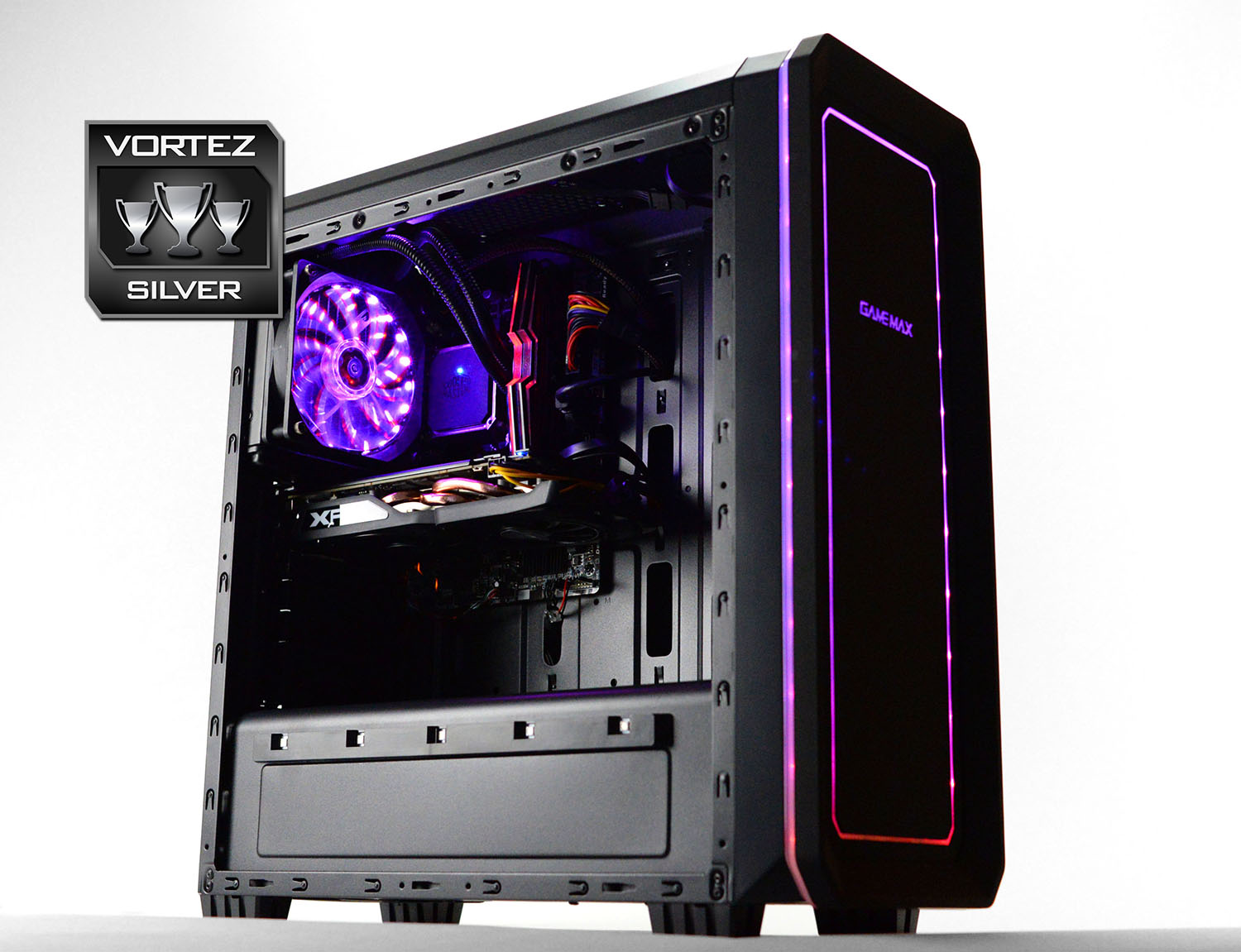
Seated at the centre of Blackfire Apex we have the Intel Core i5-6500 which is based on Skylake architecture and although this is an i5 processor, we still benefit from quad-core support. This chip offers good overall performance for gaming and general usage which may include some photo editing.
Fierce PC has made a classic move with the combination of an SSD and HDD inside Blackfire Apex. The cost of SATA-based SSDs has plummeted in the last 12 months and this assists with keeping the costs down. The ADATA SP550 which has been used in this rig presents us with a rapid boot into Windows 10 and supplies quick access to frequently used applications.
The Blackfire Apex is listed at £799.88 to buy and after doing our own calculations on the individuals components we hit around £760. So, Fierce PC has done a superb job in keeping the costs down – bearing in mind this configuration comes prebuilt without having to pair up and install any of the components and is backed by an impressive 3 years-warranty.
Fierce PC’s Blackfire Apex carries a strong lineup of decent hardware which translates to great performance in a range of different scenarios. If you’re a 1080p gamer and are looking for a good value prebuilt system, Apex is a worthwhile route to take.
Pros
+ Features RGB lighting
+ Reputable brands used throughout
+ Good processing power
+ Offers good 1080p performance
+ Can handle VR
+ Good value for money
+ Arrives with 3 years-warranty
Cons
– Case is unnecessarily big for motherboard/components
– Cable management could be tidier
– No USB 3.1
+ Features RGB lighting
+ Reputable brands used throughout
+ Good processing power
+ Offers good 1080p performance
+ Can handle VR
+ Good value for money
+ Arrives with 3 years-warranty
Cons
– Case is unnecessarily big for motherboard/components
– Cable management could be tidier
– No USB 3.1
Click here for an explanation of our awards at Vortez.net.