







Looking for something classy to house your Mini-ITX system in? Fractal Design bring style to your HTPC build, Node 304 is in the spotlight.

Product on Review: Node 304
Manufacturer: Fractal Design
Street Price: £70 inc. VAT
The Mini-ITX form factor has become quite a popular choice amongst the enthusiast and entertainment communities in the last 6 months. Since manufacturers began to release motherboards with the Intel Z77 chipset things have really gathered momentum due to the wealth of benefits that Ivy Bridge CPUs deliver. With demand for Mini-ITX based systems using Z77 clearly being there, case manufacturers have had their work cut out, downsizing their computer chassis and designing fresh new models to handle the smaller form factor. The task at hand isn’t an easy one, designing and building a case with such a condensed area is a difficult commission, especially since many will be wanting the inside to be as tight as possible if the system is to sit next to a family home entertainment setup.
Today it is the turn of Fractal Design to show us their worth in the Mini-ITX arena with the Node 304. Node 304 has typical Fractal Designing styling; minimalist, sleek and elegant and its design is compact yet still accommodates three cooling fans.
Fractal Design on Node 304
The Node 304 is the latest compact computer chassis from Fractal Design featuring a unique modular interior for outstanding configurability.
The Node 304 accommodates up to six hard drives. Unused mounting brackets can removed to allow for long graphic cards, additional airflow or more space for organizing cables. Additionally, it is equipped with three hydraulic bearing fans, easy-to-clean air filters in all intakes and two front USB 3.0 ports.
Featuring hybrid functionality, the Node 304 case is ideally used as a cool-running file server, a stylish and quiet home theatre PC or a powerful gaming system highlighting minimalistic and stunning Scandinavian design and maximum functionality.
The Node 304 accommodates up to six hard drives. Unused mounting brackets can removed to allow for long graphic cards, additional airflow or more space for organizing cables. Additionally, it is equipped with three hydraulic bearing fans, easy-to-clean air filters in all intakes and two front USB 3.0 ports.
Featuring hybrid functionality, the Node 304 case is ideally used as a cool-running file server, a stylish and quiet home theatre PC or a powerful gaming system highlighting minimalistic and stunning Scandinavian design and maximum functionality.
Technical Specifications
Form Factor
Mini ITX, DTX motherboard compatibility
Cooling / ventilation
2 – Front mounted 92mm Silent Series R2 hydraulic bearing fans, 1300 RPM speed (compatible with 80mm fans) – included
1 – Rear mounted 140mm Silent Series R2 hydraulic bearing fan, 1000 RPM speed (compatible with 120mm fans) – included
Removable air filters for front fans and PSU
Fan filter for graphics card
1 – fan controller for all 3 fans included
PCI-E
2 expansion slots
HDD
6 – supports either 3.5″ or 2.5″ HDD / SSD
PSU compatibility
ATX PSUs, up to 160mm in length (To fit in combination with a long graphics card, PSUs with modular connectors on the back typically need to be shorter than 160 mm)
Graphics card compatibility
Up to 310mm in length, when 2 HDD brackets are removed (Graphics cards longer than 170 mm will conflict with PSUs longer than 160mm)
CPU cooler compatibility
Tower CPU coolers, up to 165 mm tall
Case dimensions (W x H x D)
250 x 210 x 374 mm
Case volume
19,5 Liters
Net weight
4.9 kg
Mini ITX, DTX motherboard compatibility
Cooling / ventilation
2 – Front mounted 92mm Silent Series R2 hydraulic bearing fans, 1300 RPM speed (compatible with 80mm fans) – included
1 – Rear mounted 140mm Silent Series R2 hydraulic bearing fan, 1000 RPM speed (compatible with 120mm fans) – included
Removable air filters for front fans and PSU
Fan filter for graphics card
1 – fan controller for all 3 fans included
PCI-E
2 expansion slots
HDD
6 – supports either 3.5″ or 2.5″ HDD / SSD
PSU compatibility
ATX PSUs, up to 160mm in length (To fit in combination with a long graphics card, PSUs with modular connectors on the back typically need to be shorter than 160 mm)
Graphics card compatibility
Up to 310mm in length, when 2 HDD brackets are removed (Graphics cards longer than 170 mm will conflict with PSUs longer than 160mm)
CPU cooler compatibility
Tower CPU coolers, up to 165 mm tall
Case dimensions (W x H x D)
250 x 210 x 374 mm
Case volume
19,5 Liters
Net weight
4.9 kg
Packaging & Exterior
Node 304 is packaged within an eco-friendly cardboard box. The illustration on the front alludes to the case which is concealed within. As is usual, fundamental features and specifications can be found on the sides. Within the box, Node 304 is covered in a clear plastic sheet and held in place with dual polystyrene pillars for a safe arrival.
Packaging for Node 304
In typical fashion, Node 304 adopts styling which we have seen on other Fractal Design products. The overall look is minimalist and will be ideally situated beside any home entertainment system or office environment. The prominent side panel has a large ventilation panel with a dust filter attached – this area works in coordination with a discreet graphics card, should the user decide to install one, allowing cool air to enter into the case.
The alternate side also has a ventilated area too; this is positioned by the PSU. Over on this side, the front panel controls are accessible. Both side panels and the top section are a single piece of steel which wraps around to form the sides and roof. Thumbscrews at the top and sides secure this piece into place.
Minimalist styling, suitable for different environments
Steel outer shell
The front of Node 304 features a brushed aluminium panel with activity LED at the bottom right and respective Fractal Design logo. There is no support for a 5.25” drive which will come as a disappointment to some but to others a relief.
Around the back of Node 304 there is a power socket which has an extension cable attached because the actual spot the PSU sits is towards the front of the case, above this there is a 140mm Silent Series R2 rear exhaust fan and a convenient fan controller which can feed three cooling fans and adjust the speed between low, medium and high settings. Last of all, there are dual PCI expansion slot covers which both feature ventilation holes.
The rear IO ports will sit at the bottom of the case once the motherboard is installed.
The front and back of Node 304
The front panel controls run along the right edge of the case and sports a power button, dual USB 3.0 ports (via internal motherboard header) and headphone/microphone jacks.
The front panel controls include dual USB 3.0 ports
The underside of Node 304 features four rubber pads to prevent the chassis from slipping on smooth surfaces. The underside where the PSU sits also has a removable dust filter which can be detached and cleaned.
Dust filter and rubber pads on underside
Interior
Removing the thumbscrews at the back of the case allows for the steel panel to be detached from the chassis and gives us a good overview of what lies beneath.
With the outer shell taken away the inside of Node 304 reveals a very compact layout indeed. Inside such a tight enclosure, there are a considerable amount of cables to have to deal with. The two-tone black/white scheme which has been used inside Node 304 looks great and is a notable characteristic of Fractal Design.
A look inside Node 304
Towards the front of the case is an area for mounting the PSU. This area has rubber pads for the PSU to sit on and perforated mesh with a dust filter. Since the PSU will be located at the front of the case and the power cable will be plugged in around the back, an extension cable is supplied to plug directly into the unit once it is installed.
Node 304 can accommodate PSUs up to 160mm but size should be carefully considered if a discreet graphics card is also needed as the space is very tight. More on this later!
The PSU area towards front of the case
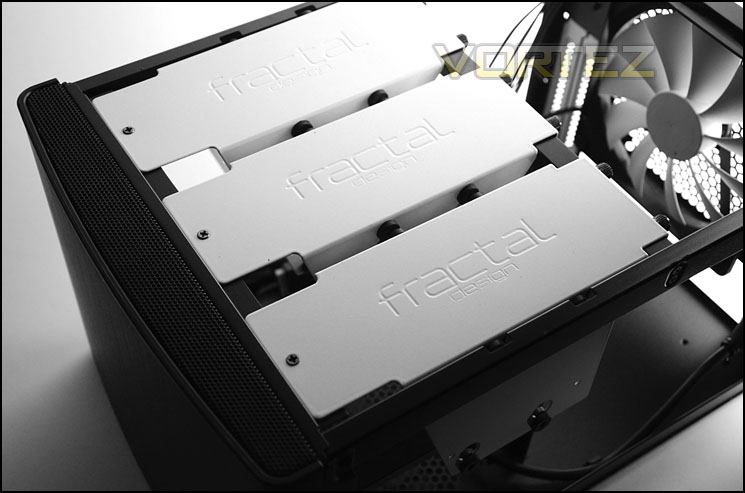
Hanging from the top of the chassis are three metal HDD cages which can accommodate six 2.5” or 3.5” drives. These cages can be individually detached to prevent obstruction for airflow. In the next section we will demonstrate how HDDs are installed within these cages.
Storage for up to six drives
In terms of cooling, Node 304 is well-equipped. There are a total of three cooling fans included with the chassis, a 140mm Silent Series R2 hydraulic bearing fan sits at the back of the case and is positioned to be an exhaust. Without being connected to the fan controller this operates at 1000RPM.
Behind the HDD storage dual 92mm Silent Series R2 hydraulic bearing fans have been installed as intakes and will operate at 1300RPM if not connected to the fan controller.
140mm rear exhaust fan
Dual 92mm intake fans at front
Installation
Looking at a bare computer chassis only reveals one side of the coin and so it’s important for us to take a look at the Node 304 with a full system installed so that we can determine its strengths and weaknesses (if any!).
Being designed for Mini-ITX our system for this form factor is installed. Due to Node 304 being so compact it’s necessary to install components in a certain order. The PSU should be installed firstly (especially if it’s a 160mm unit like ours) and then the motherboard and other items. Earlier in the review we mentioned that there are a considerable amount of cables inside Node 304, with the PSU installed there are obviously even more and keeping these tucked away becomes quite a difficult task. There are very few places to store cables – although Fractal Design do say that redundant HDD cages can be removed to assist with cable management, having the cables here is likely to obstruct airflow from the front intakes.
The overall installation went ahead without any hassle aside from cable management.
Installation complete – Mini-ITX system within Node 304
A compact setup with little space
Installing a HDD inside Node 304 is easy – first of all the HDD cage must be removed from the case. The cage can accommodate 2.5” or 3.5” drives, screws simply need to be applied to the undersides of the drive and tightened. Once fixed to the cage, the drive will suspend on its side. Each cage can house two drives.
2.5” and 3.5” drives can be installed to cages
Clearance – CPU Cooler, GPU, Cable Management
Clearance is an important aspect of case design for the enthusiast as it establishes whether certain hardware will be compatible with a chassis or not.
As Fractal Design rightly state, Node 304 can accommodate CPU coolers with a height of up to 165mm. This will allow good compatibility with a range of CPU coolers
Lots of space for CPU coolers
Graphics card clearance allows for up to 12” in total length but this is dependent on the type of PSU that is used. We have used a 160mm PSU and this prevents anything over 6.5” in length because the card touches the modular panel of the unit.
As you can see from the pictures, it is advisable to use a smaller sized PSU within Node 304, otherwise cable management is difficult and the installation of a discreet graphics card could be troublesome.
Support for long graphics cards
Problems when installing graphics card with 160mm PSU
Thermal Performance Testing
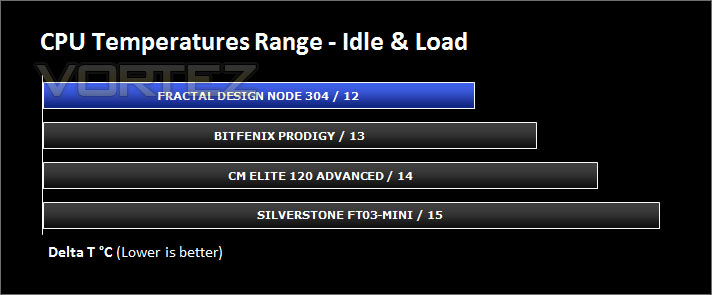
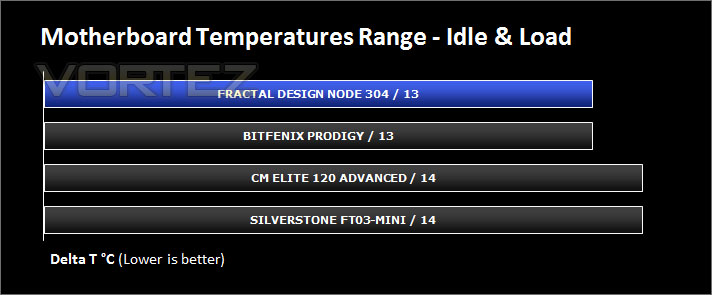
Inside Node 304 there are three cooling fans. A 140mm rear exhaust and two 92mm intake fans. Though our case is quite unique in its design it still follows in traditional airflow methods. Airflow travels in from the front and out through the back.
To discover the thermal performance of Node 304 we will record idle temperatures after 20 minutes from a cold boot. I will then stress the system and temperatures will again be monitored after 30 minutes have elapsed.
For the purpose of accurate analysis the idle and load temperatures for CPU and motherboard will be recorded and the range between idle and load will be calculated to determine how efficient cooling is.
All fans will be connected to the fan controller and set to ‘high’.
NOTE: Ambient temperature is 20C
System Components
CPU AMD E-350 APU
Motherboard ZOTAC ZOTAC E350-ITX WiFi
Graphics Integrated (AMD Radeon™ HD 6310)
Memory 4GB 1066MHz SODIMM DDR3
HDD Kingston HyperX 240GB
PSU FSP AURUM 620M
Motherboard ZOTAC ZOTAC E350-ITX WiFi
Graphics Integrated (AMD Radeon™ HD 6310)
Memory 4GB 1066MHz SODIMM DDR3
HDD Kingston HyperX 240GB
PSU FSP AURUM 620M
Noise
With the inclusion of three cooling fans it would be expected that noise levels could be quite noticeable but the noise emitted from Node 304 is barely noticeable, even with the fan controller set to high. Combine this case with an SSD, passively cooled system like ours and you have the ingredients for a very quiet system indeed.
Conclusion
With very few manufacturers catering for Mini-ITX it’s good to see another brand taking on this form factor. Is Fractal Design’s first attempt a good one?
Removing Node 304 out of its packaging it’s immediately apparent which brand this case belongs to. Fractal Design is stamped all over this case with its sleek, minimalist styling and non-descript characteristics. These attributes make it a good choice for the living room, beside the TV and as part of a home entertainment system.
Node 304 is quite a compact chassis yet it can still house up to six HDDs for storage and tall CPU cooler heatsinks which is deemed a bonus when dealing with such a form factor as Mini-ITX. Fractal Design have also managed to include three cooling fans inside Node 304 which are a significant benefit to thermal performance, these fans can have their speed managed thanks to the handy fan controller located at the back of the case. As we discovered, even having the cooling fans set to “high” mode results in low-noise output, which is once again a key advantage to HTPC builders.
There are however a few niggles that are worth mentioning. If you do opt to install a standard sized ATX PSU (160mm) then be warned; you will have difficulty housing a graphics card longer than 6.5” in length. The card will interfere with the modular panel on the PSU and as we demonstrated – clearance is an issue. This clearance problem only occurs if you have a 160mm PSU and a graphics card, but since the inclusion of a discreet graphics card would typically result in needing an adequate source of power from a larger unit this is something of a design conundrum. A smaller sized PSU will struggle to power a larger (more demanding) graphics card.
At £70 / $89, compared to rivals the Node 304 comes at quite a cost. Aluminium alternatives are priced in a similar region which poses quite a threat. It’s important to consider what Node 304 includes a fan controller and three cooling fans which do sweeten the deal.
With favourable characteristics that will look great next to any home entertainment system, Node 304 is a valiant effort for Fractal Design’s first Mini-ITX chassis. It delivers on quality, size and cooling.
Pros
+ Great build quality
+ Compact
+ Good, quiet cooling
+ Fan controller
+ Good clearance for CPU coolers
Cons
– 160mm PSUs obstruct graphics cards
– Cost
+ Great build quality
+ Compact
+ Good, quiet cooling
+ Fan controller
+ Good clearance for CPU coolers
Cons
– 160mm PSUs obstruct graphics cards
– Cost

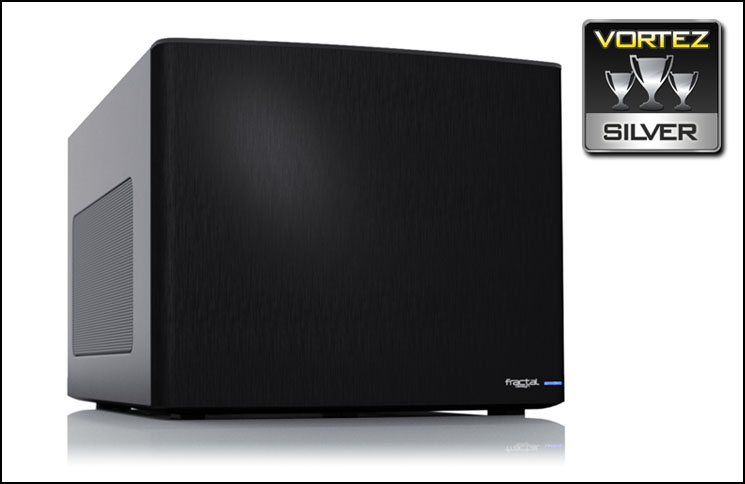
Click here for an explanation of our awards at Vortez.net.


