







Node 605 is designed for HTPC and is a computer chassis with full ATX compatibility. Can Fractal Design stamp their mark in a new sector?

Product on Review: Node 605
Manufacturer: Fractal Design
Street Price: £130 inc. VAT
As the home entertainment system becomes ever more popular, amusement seekers are building compact computer systems to sit beside the TV for a multitude of uses. To house these computer systems is the versatile HTPC computer chassis. The look of this type of case is essential as it typically sits in the lounge, on show and will have to co-ordinate with other furniture.
Fractal Design have jumped on the HTPC bandwagon where only a small number of brands currently dominate. Can they seize the opportunity?
Under the spotlight today is the Node 605, a HTPC chassis sporting typical Scandinavian styling and allowing compatibility for ATX motherboards. In true Fractal Design fashion, Node 605 is designed with silence as its primary purpose, low-noise fans, a three-speed fan controller and noise damping material should all assist with keeping noise levels to an absolute minimum.
Fractal Design on Node 605
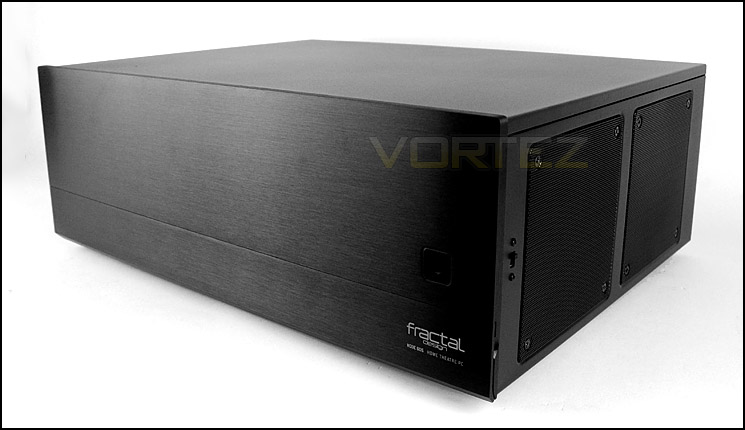
The Node 605 highlights a minimalistic, sleek Scandinavian appeal which is designed to integrate into your home theatre equipment.
Featuring a stunning exterior appearance accompanied by a modern, black interior with sound and vibration dampening materials, the Fractal Design Node 605 supports a full ATX motherboard as well as a graphics card up to 280mm in length.
Cleverly hidden behind the access panel on the solid 8mm thick aluminum front panel are two USB 3.0 ports, a FireWire port and a multi-format card reader for multiple formats.
Featuring a stunning exterior appearance accompanied by a modern, black interior with sound and vibration dampening materials, the Fractal Design Node 605 supports a full ATX motherboard as well as a graphics card up to 280mm in length.
Cleverly hidden behind the access panel on the solid 8mm thick aluminum front panel are two USB 3.0 ports, a FireWire port and a multi-format card reader for multiple formats.
Technical Specifications
ATX, microATX, Mini ITX, DTX motherboard compatibility
7 expansion slots
4 – supports either 2.5″ or 3.5″ HDD / SSD
1 slim-line ODD (only supported with mATX or smaller motherboards)
PSU compatibility: 180 mm (including any modular connectors) with both hard drive cages mounted or 190 mm (excluding cables and any modular connectors) with one hard drive cage mounted
CPU cooler compatibility: Approx 125mm with side-mounted fans – For coolers with top-mounted fans, Fractal Design recommends that you add at least 30 mm clearance for decent airflow
Case dimensions (W x H x D): 445 x 164 x 349 mm (excluding front panel – 440 x 162 x 341 mm)
Net weight: 6,0 kg
Cooling / ventilation
5 (3 – 120mm + 2 – 80mm)
2 – 120mm Silent Series R2 fans included
Removable air filters for side fans and PSU
Integrated three-channel fan controller
Graphics card compatibility
180 mm with both hard drive cages mounted
255 mm with one hard drive cage mounted
290 mm in the top two ATX expansion card slots with two hard drive cages mounted
280 mm in the top four ATX expansion card slots with one hard drive cage mounted, containing one 3.5″ HDD and one 2.5″ SSD
7 expansion slots
4 – supports either 2.5″ or 3.5″ HDD / SSD
1 slim-line ODD (only supported with mATX or smaller motherboards)
PSU compatibility: 180 mm (including any modular connectors) with both hard drive cages mounted or 190 mm (excluding cables and any modular connectors) with one hard drive cage mounted
CPU cooler compatibility: Approx 125mm with side-mounted fans – For coolers with top-mounted fans, Fractal Design recommends that you add at least 30 mm clearance for decent airflow
Case dimensions (W x H x D): 445 x 164 x 349 mm (excluding front panel – 440 x 162 x 341 mm)
Net weight: 6,0 kg
Cooling / ventilation
5 (3 – 120mm + 2 – 80mm)
2 – 120mm Silent Series R2 fans included
Removable air filters for side fans and PSU
Integrated three-channel fan controller
Graphics card compatibility
180 mm with both hard drive cages mounted
255 mm with one hard drive cage mounted
290 mm in the top two ATX expansion card slots with two hard drive cages mounted
280 mm in the top four ATX expansion card slots with one hard drive cage mounted, containing one 3.5″ HDD and one 2.5″ SSD
Packaging & Exterior
Node 605 is presented in an eco-friendly double reinforced cardboard box. A depiction of the case is found on both the front and back of the box, fundamental features are also listed and more technical details are on the sides of the box.
Packaging for Node 605
In true Scandinavian fashion, Node 605 has very sleek characteristics and has a professional visual appearance. The front panel (seen below) is aluminium and has a lovely brushed aluminium texture to it, accompanied by the Fractal Design logo and power button in the right-hand corner.
The front panel connectivity is accessible by flipping the cover down at the bottom of the front panel. Available here is a firewire port, headphone/microphone jacks, dual USB 3.0 ports (via internal motherboard header) and a handy card reader which has support for standard SD, micro SD and compact flash. Fractal Design have also included a slim optical drive cover should you want to include a drive.
Sleek, sophisticated and professional visual appearance
Front panel connectivity for Node 605
Observing the back of Node 605 there are dual 80mm cooling fan mounts with perforated mesh. The idea with this case is that it sits in a horizontal manner making it a HTPC design and similar to that of a desktop. The rear IO section of the motherboard appears beneath these fan mounts and there are seven white PCI expansion slot covers. On the far right there is an opening for the PSU to be mounted.
The rear of Node 605
On either side of Node 605 there are dual 120mm placements, there is a pre-installed 120mm cooling fan found on either side with the one side having only a filter since the PSU will reside in its position. Fractal Design have incorporated a three-speed fan controller with Node 605, the switch for this is found on the right side.
The side of Node 605 with three-speed fan controller switch
Finally, the underside of Node 605 has its serial number badge along with four rubber feet to help prevent any slippage on smooth surfaces. The feet at the front of the chassis are larger compared to the other two at the back but nevertheless the case stands solid. From an initial look at Node 605, the quality of construction, materials used are all very good indeed.
The underside of Node 605
Interior
Unlike a standard computer chassis which has at least two removable panels, Node 605 has only a single removable panel which covers the top. This panel is quite substantial in its thickness and has a layer of noise damping material to further assist with noise reduction from the system.
Node 605 has an interesting layout, upon first glance you would presume this chassis can accommodate just M-ATX, but you would be wrong. Node 605 can house full ATX motherboards, though clearance for graphics cards will need to be considered. Futhermore, full-sized PSUs can also be installed within this chassis, due to the mounting orientation for the PSU the cables and modular panel conveniently face the white HDD brackets and route behind giving an adequate cover.
An overview of the internal layout
Fractal Design have equipped Node 605 with two Silent Series R2 cooling fans, 1x 120mm fan is positioned in one of the two slots meaning it will sit in line with memory. It would probably be more effective if it was positioned as an exhaust rather than an intake since the cooling fan on the other side of the case is also an intake. The fan controller and power button PCB can be found to the immediate right of this fan. Both cooling fan spots have removable air filters.
Over on the other side resides the dual HDD brackets which have been powder coated white. The Fractal Design insignia is engraved over the top section of these brackets. Each bracket can accommodate two 2.5” or 3.5” drives, we’ll explore the installation within the next section of the review. Both brackets can be removed, throughout the installation it may be necessary to remove one or both in order to squeeze hardware in. Behind these brackets is another 120mm intake fan with a mesh cover to protect the blades from colliding with cables from the PSU. Again, it’s strange that both cooling fans have been given the intake orientation rather than a push/pull.
Dual cooling slots with pre-installed 120mm intake fan
HDD storage brackets with pre-installed 120mm intake fan
Installation
Observing the design of an empty case only tells half of the story. It’s important to install components within the case to ascertain any strengths/weaknesses.
Now, Node 605 is able to accommodate an ATX motherboard and we would typically use the largest compatible form factor but unfortunately our ATX test system has a CPU cooler which is 158mm in height – Node 605 can entertain CPU coolers with a maximum height of 140mm, therefore this wasn’t any option. So instead, we have installed our M-ATX test system within the case instead. M-ATX actually fills the internal layout of Node 605 very well indeed.
In order to fit a graphics card within our case it may be necessary to remove one or both HDD brackets as pictured.
Thanks to the channel which runs down the back of the HDD bracket it’s very easy to keep on top of cable management. The only cable which presents an issue is the CPU power, which would usually run behind the motherboard tray in a traditional case – but with Node 605, this cable has to trail across the motherboard instead.
Installation complete, clean and tidy
Our M-ATX test system featuring GIGABYTE Sniper M3
To install HDDs, in similar fashion to Node 304, the drive simply needs to attach to one of the brackets as pictured. The bracket will accommodate 2.5” and 3.5” drives, respectively screws just need to be applied.
HDD bracket can accommodate 2.5” and 3.5” drives
Clearance – CPU cooler, GPU
Clearance is an important aspect of case design for the enthusiast as it establishes whether certain hardware will be compatible with a chassis or not.
Due to Node 605 taking on a desktop orientation the CPU cooler clearance is somewhat limiting but this case can house coolers with a height of up to 140mm. This will rule out the bigger, flagship products and push system builders to opting for low-profile options instead.
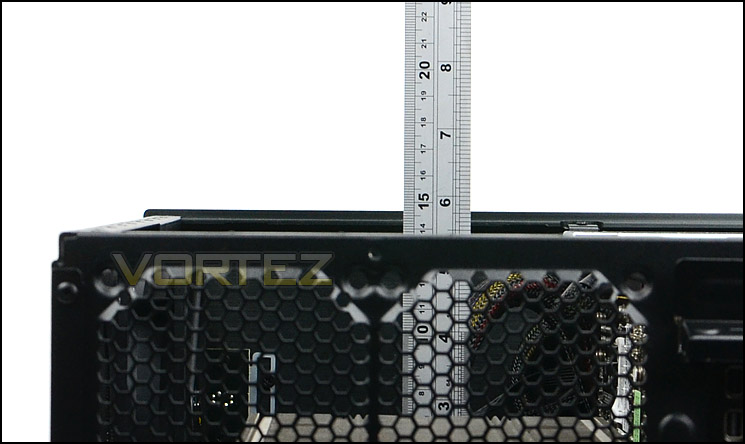
Up to 140mm in clearance for CPU coolers
Node 605 can accommodate long graphics cards, though you may need to remove HDD brackets in order to fit a substantial card inside. If the card is over 10.5″ in length care needs to be taken as the card could be obstructed by the lip and components from the front panel.
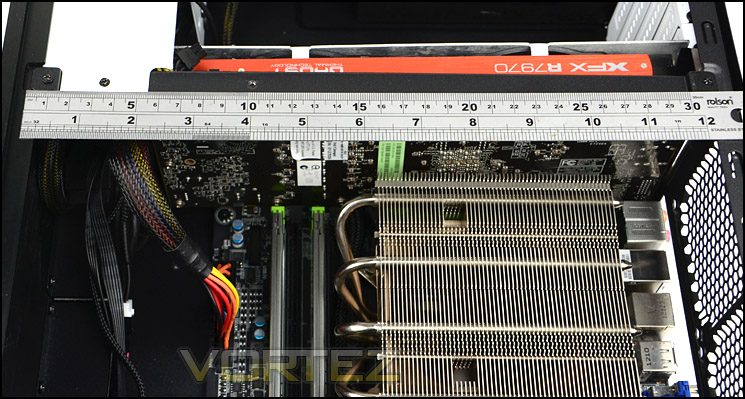
Long graphics cards can fit inside the chassis
Thermal Performance Testing
Inside Node 605 there are two Silent Series R2 120mm cooling positioned opposite one another but setup as intakes.
To discover the thermal performance of the Node 605 we will record idle temperatures after 20 minutes from a cold boot. We will then stress the system and temperatures will again be monitored after 30 minutes have elapsed.
For the purpose of accurate analysis the idle and load temperatures for CPU and motherboard will be recorded and the range between idle and load will be calculated to determine how efficient cooling is.
Fan controller will be set to medium for testing.
NOTE: Ambient temperature is 20C
System Components
CPU Intel Core i5 3570K
CPU Cooler Noctua NH-L12
Motherboard GIGABYTE G1 Sniper M3
Graphics XFX HD7970 Black Edition
Memory 4GB Kingston HyperX 1600MHz
HDD Kingston HyperX 240GB
PSU FSP Aurum 650M
CPU Cooler Noctua NH-L12
Motherboard GIGABYTE G1 Sniper M3
Graphics XFX HD7970 Black Edition
Memory 4GB Kingston HyperX 1600MHz
HDD Kingston HyperX 240GB
PSU FSP Aurum 650M
Noise
Just like the Node 304, 605 has the same specification of fan and we were pleased with the results this cooling fan gives both on an audible level and thermal performance. Even if the noise emitted from the fans is not to your liking – the three-speed fan controller allows for the customisation of the configuration anyway.
Conclusion
Taking on the HTPC territory which is currently dominated by big names such as SilverStone and Lian Li is a bold move for Fractal Design but they have done a great job for their first attempt.
There is a good reason why there is a contingent of individuals who favour Fractal Design’s styling. Their Scandinavian influence is seen through the product range and none more so than in Node 605. Its outer appearance oozes style and finesse, making it the perfect accompaniment for the home entertainment system which is now common in most households. The minimalist design with brushed aluminium front panel will be appreciated by any discerning eye, delving inside and under the cover also reveals great build quality and layout.
Although Node 605 can accommodate the ATX form factor things could get quite tight, especially if you are wanting to use all of the HDD brackets and a graphics card too but as we have demonstrated in this review, using a M-ATX system gives you more space and depending on the specification, can still satisfy those who are power hungry.
Out of all aspects of system building, HTPC users are generally more concerned by noise than anything else and Node 605 certainly has this covered. Its top panel is not only reasonably thick but it has also been furnished with a large noise damping sheet to further assist with noise reduction. It doesn’t end there either, Fractal Design have equipped this chassis with a handy three-speed fan controller to allow the noise of the fans to be managed.
Costing £130, Node 605 is an aspiring HTPC case that could find itself battling with quite a few rivals at a similar price-point. This case does have a lot to offer though and in its favour is quite a strong feature-set.
Node 605 is a great accomplishment by Fractal Design. It shows a good level of dexterity and is an ambitious attempt at joining the HTPC market.
Pros
+ Desirable to behold
+ Great build quality
+ Low noise fans
+ Card reader
+ Noise damping included
+ Can accommodate full size PSUs, graphics cards
Cons
– Fans positioned as intakes
– Installation can take longer than expected due to tightness
+ Desirable to behold
+ Great build quality
+ Low noise fans
+ Card reader
+ Noise damping included
+ Can accommodate full size PSUs, graphics cards
Cons
– Fans positioned as intakes
– Installation can take longer than expected due to tightness

Click here for an explanation of our awards at Vortez.net.


