The B450 chipset has proven itself to be of excellent value, but so far we’ve focused on ATX and mATX boards – now we look at a Mini-ITX board trying to take on the big guns, but how does it perform?

Product on Review: Aorus B450 I AORUS Pro WiFi
Manufacturer: AORUS
Street Price: UK – £139.99 / AUSTRALIA – $209.99 AUD
AMD’s release of the Ryzen CPUs has sparked excitement throughout the PC community over the last year or so, giving users massive multithreaded power at an affordable cost, however, those CPUs also required large motherboards with big heatsinks. AORUS believe they’ve fixed that issue with the AORUS B450 I Pro WiFi, catering to the Mini-ITX form factor while still providing a feature-packed B450 chipset.
While the AORUS board measures only 170mm x 170mm, the 2700X can still be equipped, giving any small form-factor system a healthy number of cores for processing work of any kind, providing you can cool the chip sufficiently, obviously. Not only are you capable of running massive CPUs, we also get four SATA connections, an M.2 slot with a sizeable heatsink and twin-antenna WiFi.
Many people may plan to use this as a small media hub under the TV; the B450 I Pro WiFi uses an ALC1220-VC Audio chip for clear sound, perfect for movie watchers and there’s also a pair of HDMI 2.0 ports and a Display Port 1.4, all capable of 4K output.
The B450 I Pro WiFi offers all of the essentials without any of the size, however, with a pricetag of £139.99, it needs to perform just like the big guns. Read on to see how it fares.
AORUS on the B450 I Pro WiFi:
AORUS B450 I AORUS PRO WIFI uses an all IR digital CPU power design which includes both digital PWM Controllers and Power Stage controllers, capable of providing at least 50A of power. These 100% digital controllers and additional 8 Solid-pin CPU Power Connectors offer incredible precision in delivering power to the motherboard’s most power-hungry and energy-sensitive components, allowing enthusiasts to get the absolute maximum performance from the new 2nd Gen AMD Ryzen™ processors.
Technical Specifications
CPU
AM4 Socket:
AMD Ryzen™ 2nd Generation processors
AMD Ryzen™ with Radeon™ Vega Graphics processors
AMD Ryzen™ 1st Generation processors
(Please refer “CPU Support List” for more information.)
Chipset
AMD B450
Memory
2 x DDR4 DIMM sockets supporting up to 32 GB of system memory
Dual channel memory architecture
Support for DDR4 3200(O.C.)/2933/2667/2400/2133 MHz memory modules
Support for ECC Un-buffered DIMM 1Rx8/2Rx8 memory modules
Support for non-ECC Un-buffered DIMM 1Rx8/2Rx8/1Rx16 memory modules
Support for Extreme Memory Profile (XMP) memory modules
(Please refer “Memory Support List” for more information.)
Onboard Graphics
Integrated Graphics Processor:
1 x DisplayPort, supporting a maximum resolution of 4096×2304@60 Hz
* Support for DisplayPort 1.2 version.
2 x HDMI ports, supporting a maximum resolution of 4096×2160@60 Hz(Note)
* Support for HDMI 2.0 version and HDCP 2.2.(Note)
Support for up to 3 displays at the same time
Maximum shared memory of 16 GB
(Note) Actual support may vary by CPU.
Audio
Realtek® ALC1220-VB codec
High Definition Audio
2/4/5.1/7.1-channel
* To configure 7.1-channel audio, you have to use an HD front panel audio module and enable the multi-channel audio feature through the audio driver.
Support for S/PDIF Out
LAN
Intel® GbE LAN chip (10/100/1000 Mbit)
Wireless Communication module
Wi-Fi 802.11a/b/g/n/ac, supporting 2.4/5 GHz Dual-Band
BLUETOOTH 5
Support for 11ac 160 MHz wireless standard and up to 1.73 Gbps data rate
* Actual data rate may vary depending on environment and equipment.
Expansion Slots
1 x PCI Express x16 slot, running at x16(Note)
(The PCIEX16 slot conforms to PCI Express 3.0 standard.)
1 x M.2 Socket 1 connector for the wireless communication module (M2_WIFI)
(Note) Actual support may vary by CPU.
Storage Interface
1 x M.2 connector (Socket 3, M key, type 2242/2260/2280 SATA and PCIe 3.0 x4/x2 SSD support)
4 x SATA 6Gb/s connectors
Support for RAID 0, RAID 1, and RAID 10
USB
Chipset:
2 x USB 3.1 Gen 2 Type-A ports (red) on the back panel
2 x USB 3.1 Gen 1 ports available through the internal USB header
2 x USB 2.0/1.1 ports available through the internal USB header
Integrated in the APU:
4 x USB 3.1 Gen 1 ports on the back panel
Internal I/O Connectors
1 x 24-pin ATX main power connector
1 x 8-pin ATX 12V power connector
1 x CPU fan header
1 x system fan header
1 x digital LED strip header
1 x CPU cooler LED strip/RGB LED strip header
4 x SATA 6Gb/s connectors
1 x M.2 Socket 3 connector
1 x front panel header
1 x front panel audio header
1 x S/PDIF Out header
1 x speaker header
1 x USB 3.1 Gen 1 header
1 x USB 2.0/1.1 header
1 x Trusted Platform Module (TPM) header (2×6 pin, for the GC-TPM2.0_S module only)
1 x Clear CMOS jumper
1 x chassis intrusion header
Back Panel Connectors
1 x DisplayPort
2 x HDMI ports
2 x USB 3.1 Gen 2 Type-A ports (red)
4 x USB 3.1 Gen 1 ports
1 x RJ-45 port
2 x SMA antenna connectors (2T2R)
3 x audio jacks
I/O Controller
iTE® I/O Controller Chip
H/W Monitoring
Voltage detection
Temperature detection
Fan speed detection
Overheating warning
Fan fail warning
Fan speed control
* Whether the fan speed control function is supported will depend on the cooler you install.
BIOS
1 x 128 Mbit flash
Use of licensed AMI UEFI BIOS
PnP 1.0a, DMI 2.7, WfM 2.0, SM BIOS 2.7, ACPI 5.0
Unique Features
Support for APP Center
* Available applications in APP Center may vary by motherboard model. Supported functions of each application may also vary depending on motherboard specifications.
@BIOS
3D OSD
AutoGreen
Cloud Station
EasyTune
Fast Boot
Game Boost
ON/OFF Charge
RGB Fusion
Smart Backup
Smart Keyboard
Smart TimeLock
Smart HUD
Smart Survey
System Information Viewer
USB Blocker
V-Tuner
Support for Q-Flash
Support for Xpress Install
Bundle Software
Norton® Internet Security (OEM version)
cFosSpeed
Operating System
Support for Windows 10 64-bit
Support for Windows 7 64-bit
* To support Windows 7 64-bit, you must install an AMD Pinnacle Ridge & Summit Ridge CPU.
* Please download the “Windows USB Installation Tool” from GIGABYTE’s website and install it before installing Windows 7.
Form Factor
Mini-ITX Form Factor; 17.0cm x 17.0cm
AM4 Socket:
AMD Ryzen™ 2nd Generation processors
AMD Ryzen™ with Radeon™ Vega Graphics processors
AMD Ryzen™ 1st Generation processors
(Please refer “CPU Support List” for more information.)
Chipset
AMD B450
Memory
2 x DDR4 DIMM sockets supporting up to 32 GB of system memory
Dual channel memory architecture
Support for DDR4 3200(O.C.)/2933/2667/2400/2133 MHz memory modules
Support for ECC Un-buffered DIMM 1Rx8/2Rx8 memory modules
Support for non-ECC Un-buffered DIMM 1Rx8/2Rx8/1Rx16 memory modules
Support for Extreme Memory Profile (XMP) memory modules
(Please refer “Memory Support List” for more information.)
Onboard Graphics
Integrated Graphics Processor:
1 x DisplayPort, supporting a maximum resolution of 4096×2304@60 Hz
* Support for DisplayPort 1.2 version.
2 x HDMI ports, supporting a maximum resolution of 4096×2160@60 Hz(Note)
* Support for HDMI 2.0 version and HDCP 2.2.(Note)
Support for up to 3 displays at the same time
Maximum shared memory of 16 GB
(Note) Actual support may vary by CPU.
Audio
Realtek® ALC1220-VB codec
High Definition Audio
2/4/5.1/7.1-channel
* To configure 7.1-channel audio, you have to use an HD front panel audio module and enable the multi-channel audio feature through the audio driver.
Support for S/PDIF Out
LAN
Intel® GbE LAN chip (10/100/1000 Mbit)
Wireless Communication module
Wi-Fi 802.11a/b/g/n/ac, supporting 2.4/5 GHz Dual-Band
BLUETOOTH 5
Support for 11ac 160 MHz wireless standard and up to 1.73 Gbps data rate
* Actual data rate may vary depending on environment and equipment.
Expansion Slots
1 x PCI Express x16 slot, running at x16(Note)
(The PCIEX16 slot conforms to PCI Express 3.0 standard.)
1 x M.2 Socket 1 connector for the wireless communication module (M2_WIFI)
(Note) Actual support may vary by CPU.
Storage Interface
1 x M.2 connector (Socket 3, M key, type 2242/2260/2280 SATA and PCIe 3.0 x4/x2 SSD support)
4 x SATA 6Gb/s connectors
Support for RAID 0, RAID 1, and RAID 10
USB
Chipset:
2 x USB 3.1 Gen 2 Type-A ports (red) on the back panel
2 x USB 3.1 Gen 1 ports available through the internal USB header
2 x USB 2.0/1.1 ports available through the internal USB header
Integrated in the APU:
4 x USB 3.1 Gen 1 ports on the back panel
Internal I/O Connectors
1 x 24-pin ATX main power connector
1 x 8-pin ATX 12V power connector
1 x CPU fan header
1 x system fan header
1 x digital LED strip header
1 x CPU cooler LED strip/RGB LED strip header
4 x SATA 6Gb/s connectors
1 x M.2 Socket 3 connector
1 x front panel header
1 x front panel audio header
1 x S/PDIF Out header
1 x speaker header
1 x USB 3.1 Gen 1 header
1 x USB 2.0/1.1 header
1 x Trusted Platform Module (TPM) header (2×6 pin, for the GC-TPM2.0_S module only)
1 x Clear CMOS jumper
1 x chassis intrusion header
Back Panel Connectors
1 x DisplayPort
2 x HDMI ports
2 x USB 3.1 Gen 2 Type-A ports (red)
4 x USB 3.1 Gen 1 ports
1 x RJ-45 port
2 x SMA antenna connectors (2T2R)
3 x audio jacks
I/O Controller
iTE® I/O Controller Chip
H/W Monitoring
Voltage detection
Temperature detection
Fan speed detection
Overheating warning
Fan fail warning
Fan speed control
* Whether the fan speed control function is supported will depend on the cooler you install.
BIOS
1 x 128 Mbit flash
Use of licensed AMI UEFI BIOS
PnP 1.0a, DMI 2.7, WfM 2.0, SM BIOS 2.7, ACPI 5.0
Unique Features
Support for APP Center
* Available applications in APP Center may vary by motherboard model. Supported functions of each application may also vary depending on motherboard specifications.
@BIOS
3D OSD
AutoGreen
Cloud Station
EasyTune
Fast Boot
Game Boost
ON/OFF Charge
RGB Fusion
Smart Backup
Smart Keyboard
Smart TimeLock
Smart HUD
Smart Survey
System Information Viewer
USB Blocker
V-Tuner
Support for Q-Flash
Support for Xpress Install
Bundle Software
Norton® Internet Security (OEM version)
cFosSpeed
Operating System
Support for Windows 10 64-bit
Support for Windows 7 64-bit
* To support Windows 7 64-bit, you must install an AMD Pinnacle Ridge & Summit Ridge CPU.
* Please download the “Windows USB Installation Tool” from GIGABYTE’s website and install it before installing Windows 7.
Form Factor
Mini-ITX Form Factor; 17.0cm x 17.0cm
Packaging & First Look
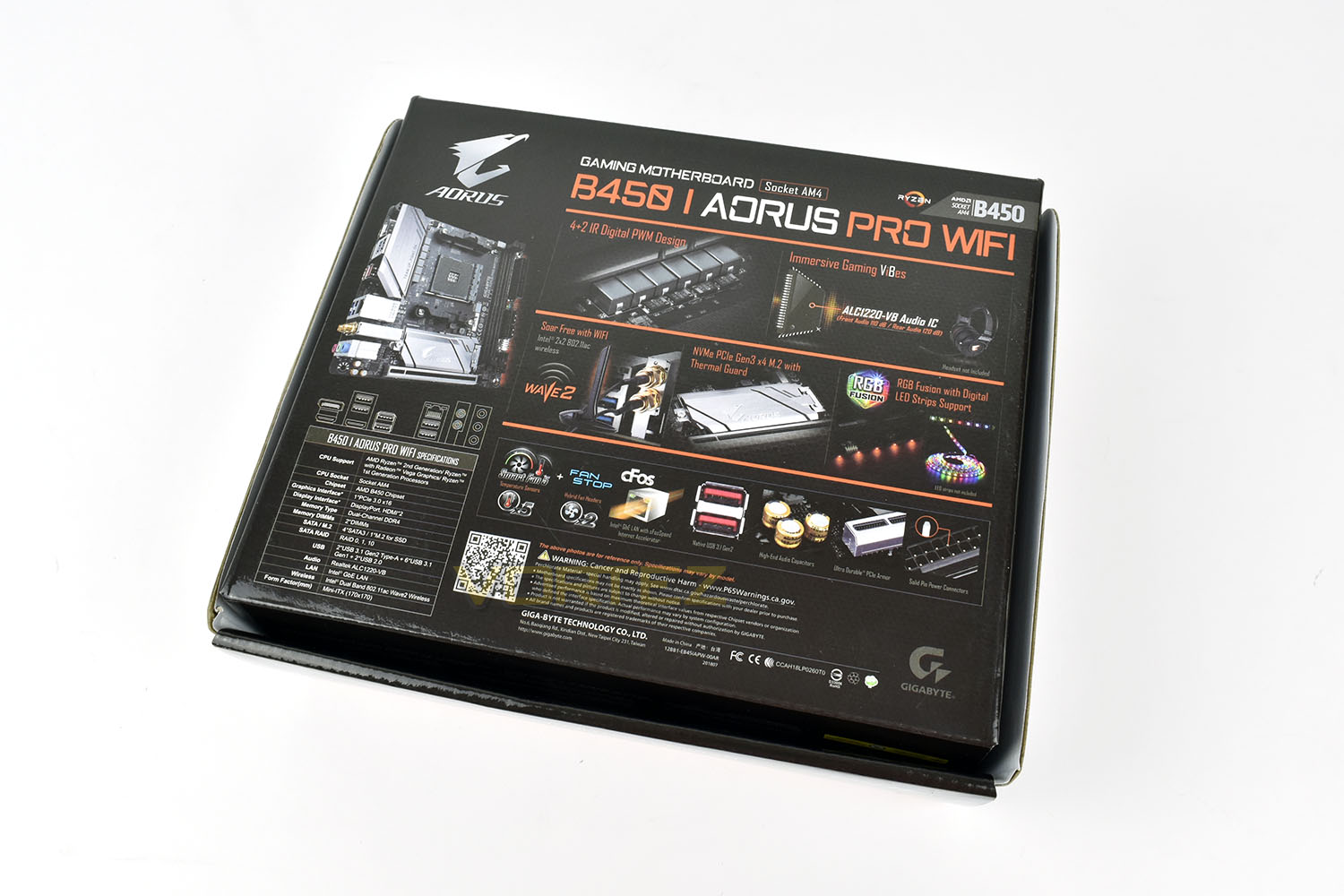
The tiny little box that the AORUS B450 I Pro WiFi arrives in features the AORUS eagle and orange/black colour scheme, making it immediately recognisable on the shelves. If you know what you’re looking for, the packaging is fine, but there’s not a whole lot of information considering it’s rather unique nature.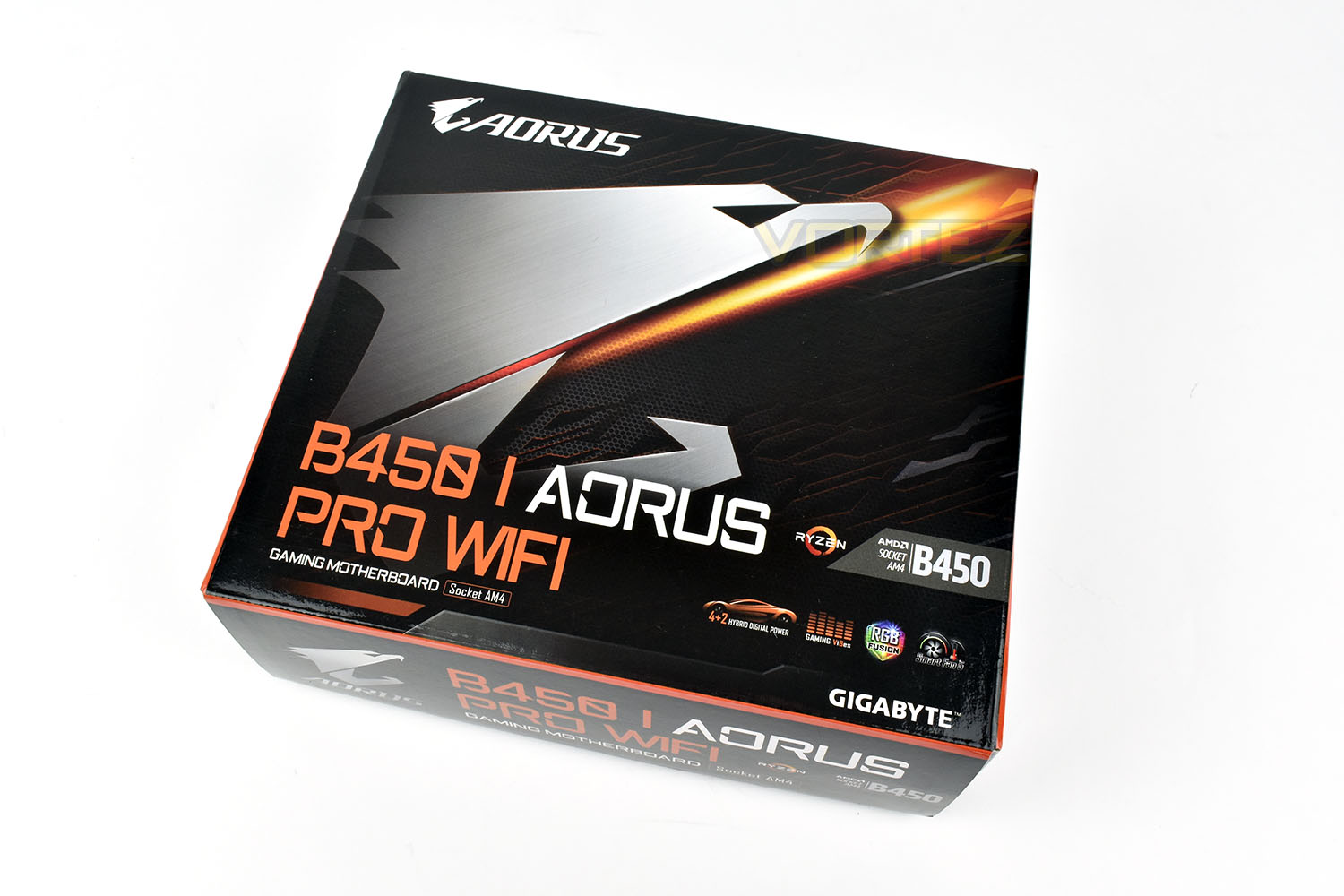
The rear of the box is much more informative, showing the many features this tiny board packs within.
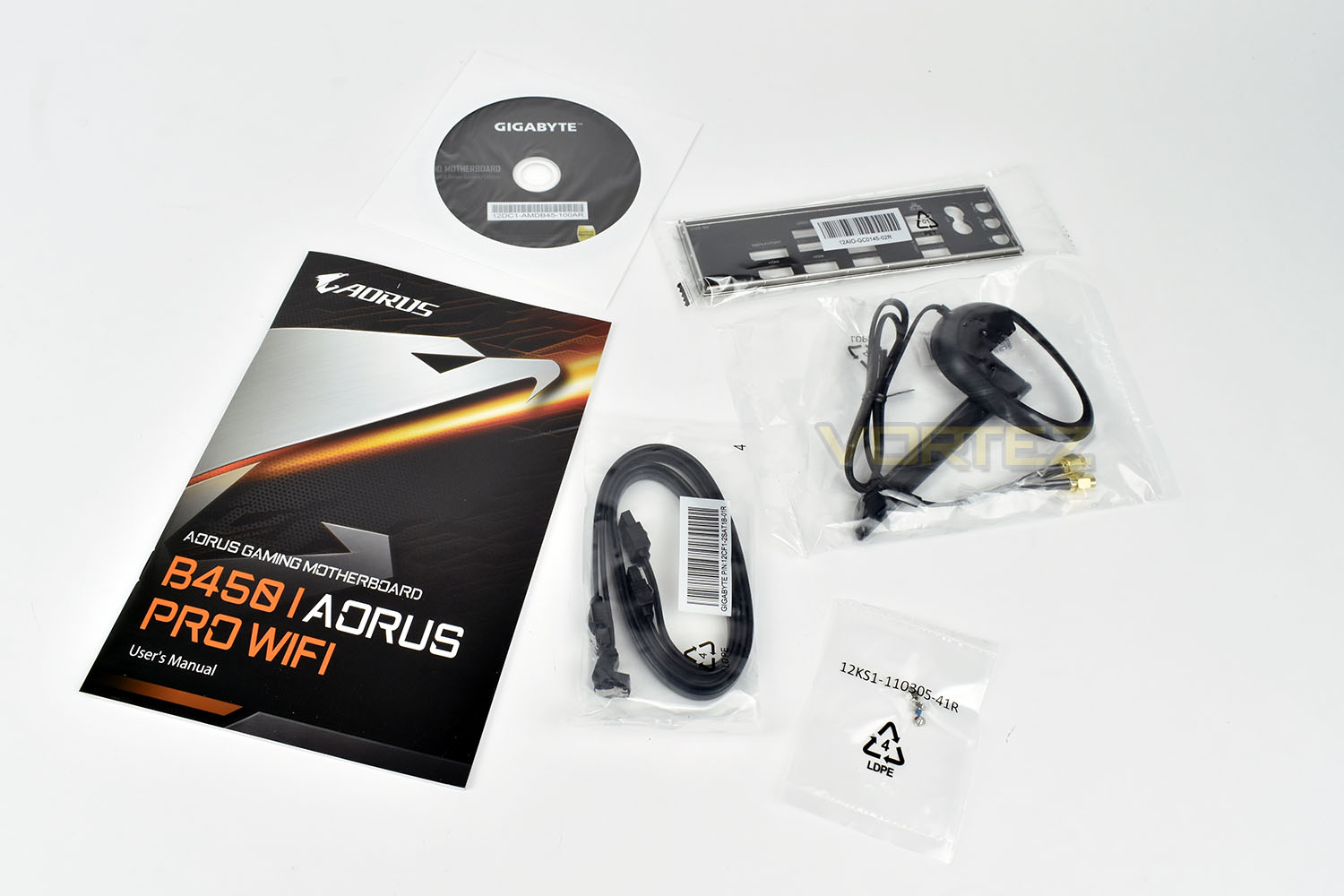
Included with the B450 I Pro WiFi is the twin antenna connection, which can be placed on your desk or above the PC for better reception, the backplate, mounting screws for the M.2 drive, a driver CD and a thick user manual to help you get set up and going.
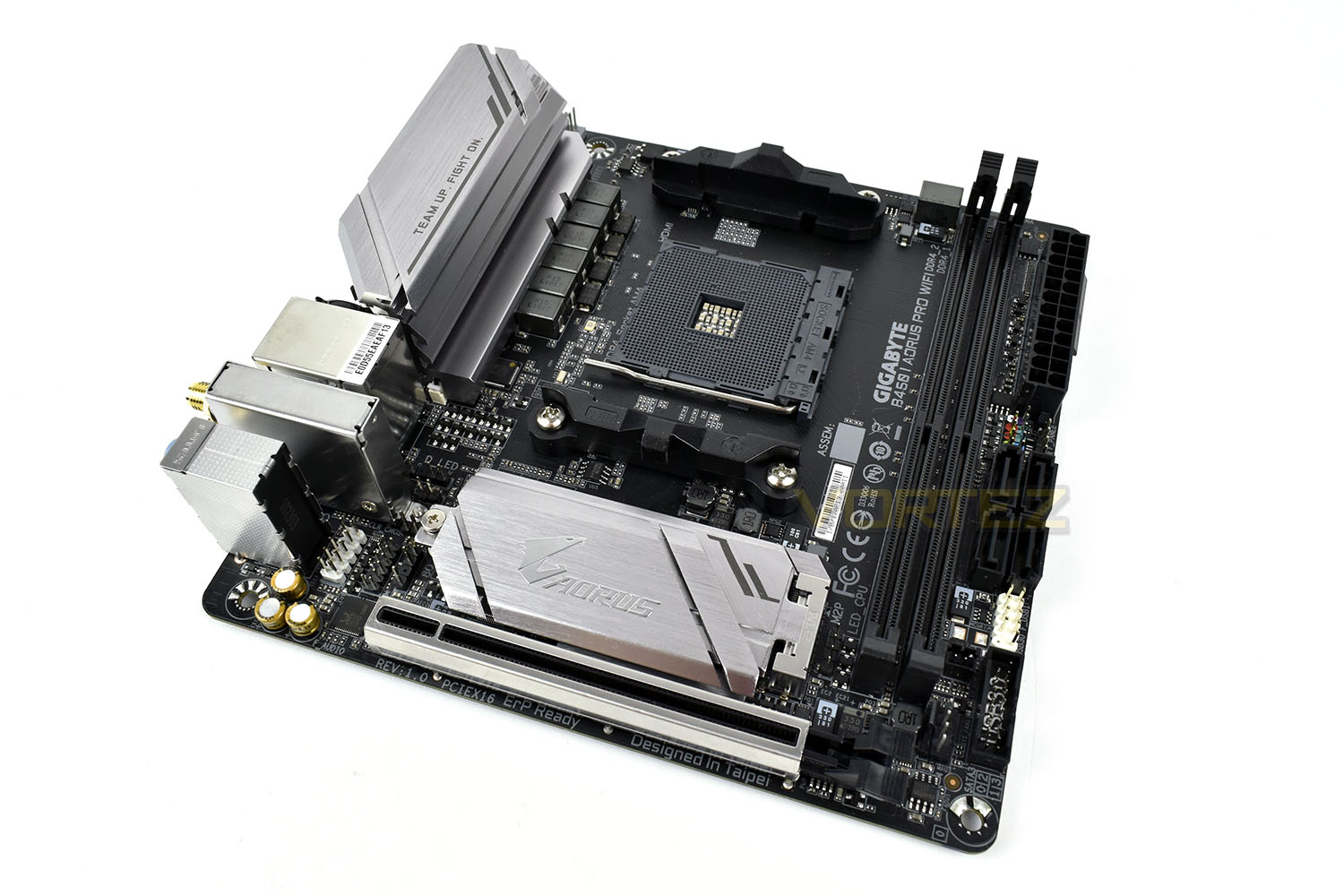
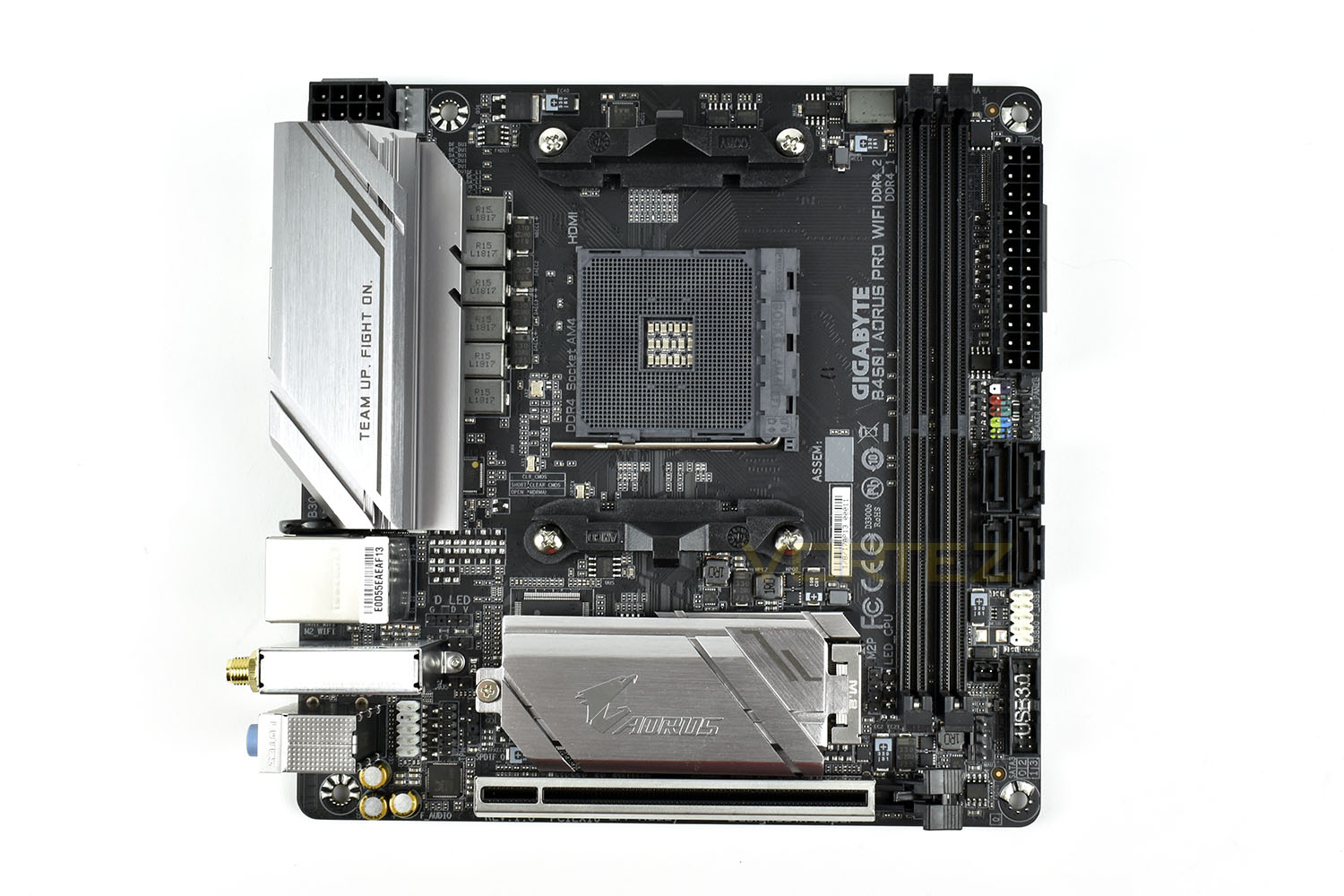
Measuring only 170mm x 170mm, the motherboard is barely big enough to house the DDR4 DIMM slots, however AORUS appear to have done a great job of packaging the ‘board.
Closer Look
The CPU socket on most of the B450 and X470 boards are surrounded by two heatsinks and plenty of power delivery components, however, due to the limited space, and likely smaller workloads, AORUS have employed a 4+2 Digital PWM design and used a single heatsink above to distribute the generated heat. The 8-pin CPU power socket is tucked away in the very top-left, hopefully helping with cable management in a smaller system.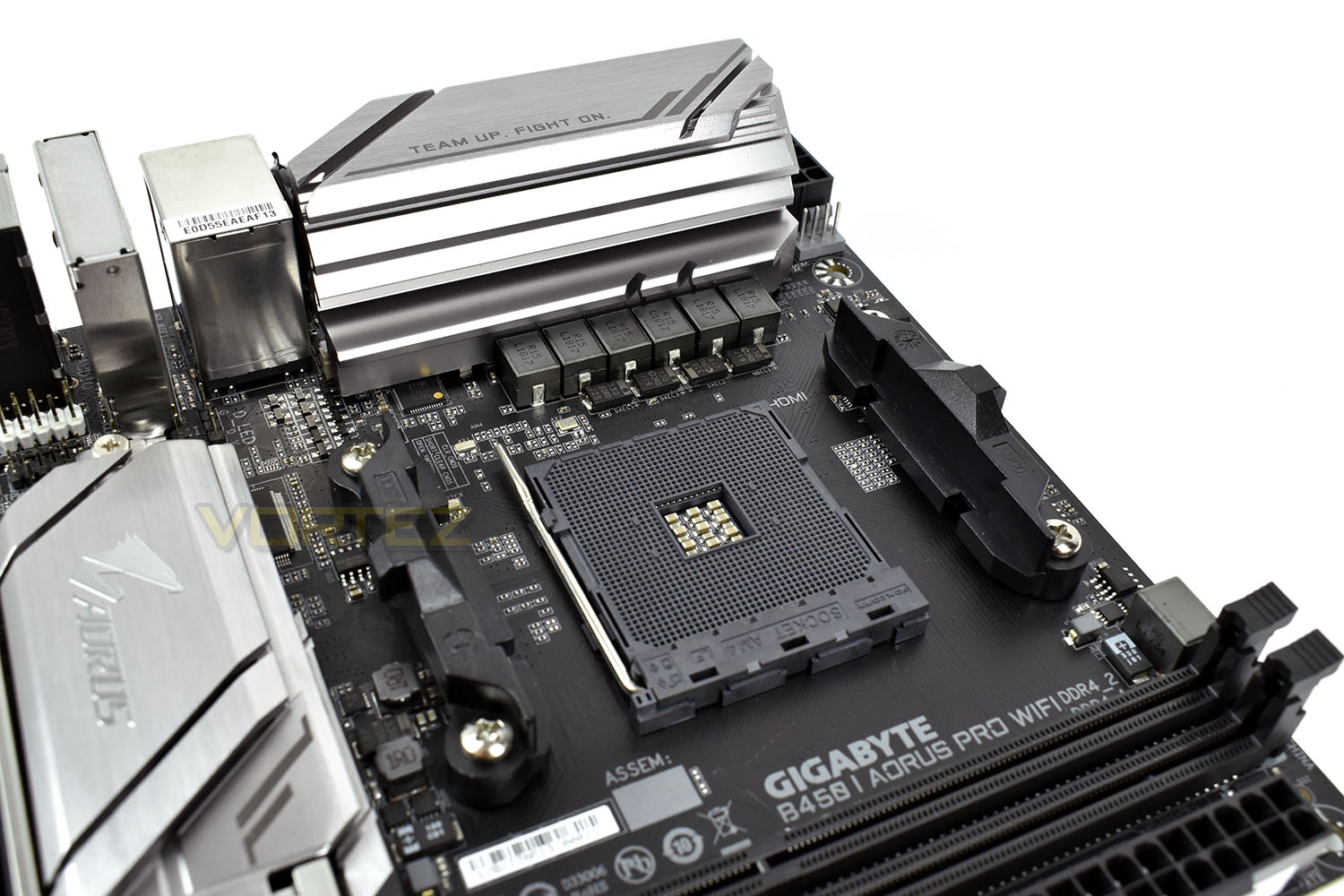
Obviously, due to the tiny size, some cut backs have to be made to large components, the most obvious is the lack of DDR4 DIMM slots; though, having said that, you can still install up to 32GB of DDR4 3200MHz – more than enough for any reasonable system.
Tucked in around the DIMM slots are the 4 SATA 3.0 ports, mounted at 180° of each other, front USB 2.0 and 3.0 and a PWM fan connection. The 24-pin PSU connection is also here.
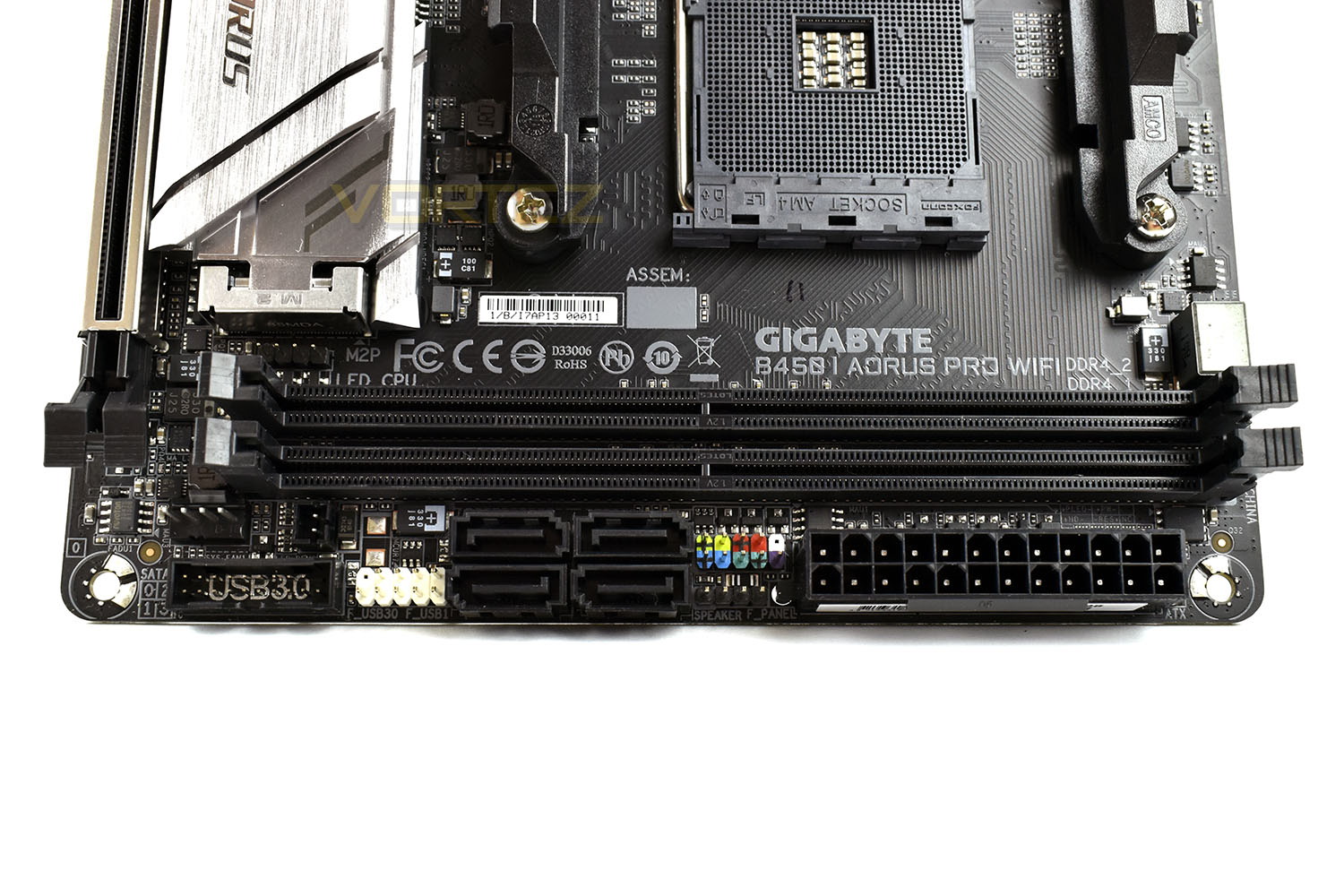
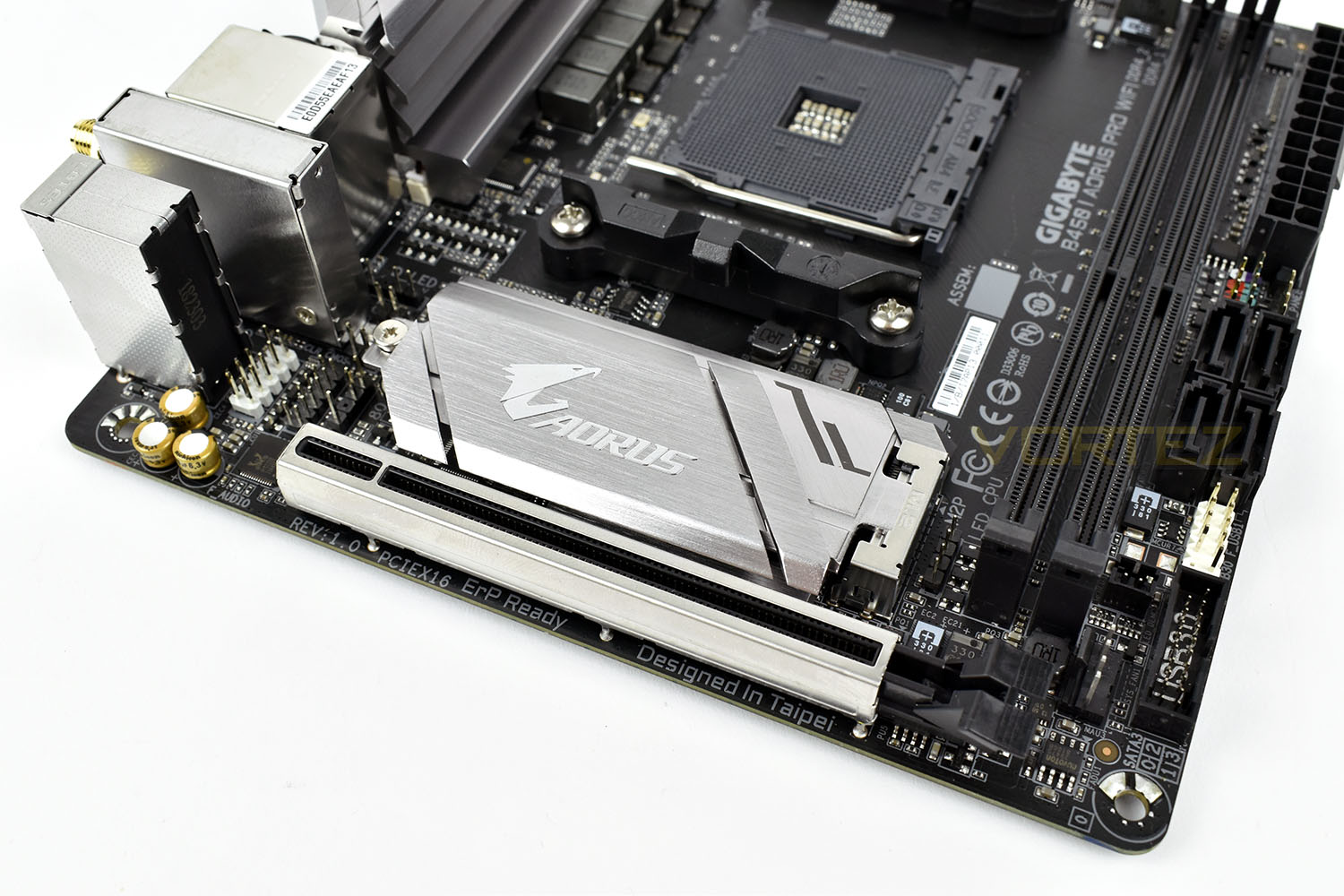
Under that large metal heatsink is the PCI-E NVMe M.2 slot, perfect for a large storage disk if the overall aim is keeping the build as small as possible, or for a small, fast drive as your boot disk and SATA HDDs for storage.
Directly under that is a reinforced PCI-E x16 slot for graphics cards or a dedicated soundcard.
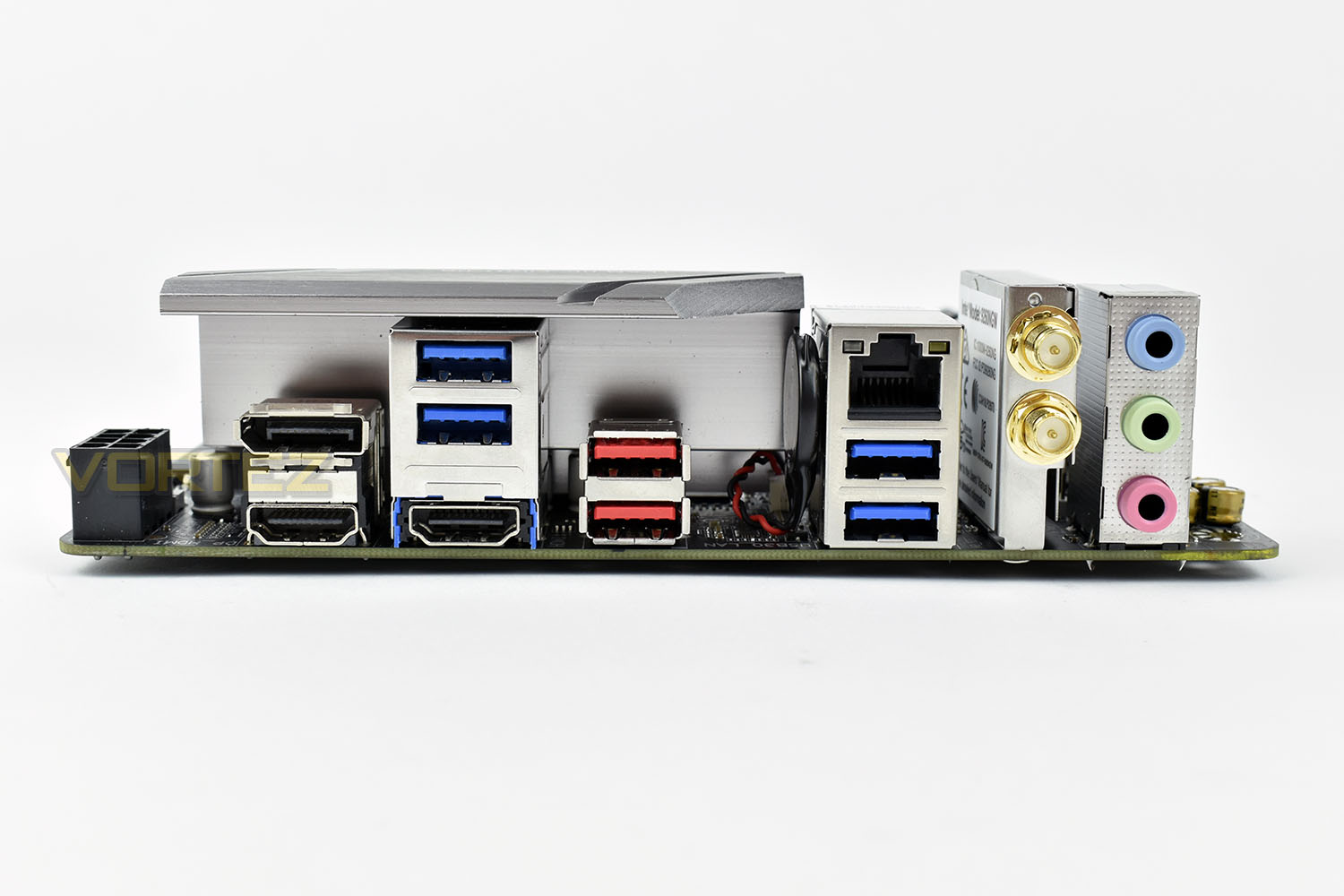
The rear IO is reasonably well equipped considering the size of the board; there’s a pair of HDMI 2.0 ports, capable of 2160p @ 60Hz and supporting the latest HDCP 2.2 standard, while the Display Port 1.2 is also capable of 2160p @ 60Hz. There’s 4x USB 3.0 ports and 2x USB 3.1 Gen. 2. Intel’s Gigabit ethernet is stacked above the USB alongside the WiFi connections. Finally, there’s the audio jacks supported by the ALC1220-VS Audio IC. Sadly, and quite importantly, we’re missing a USB 3.1 Gen. 2 Type C port, which is becoming more and more commonly used, especially with many phones now adopting the standard.
BIOS & Overclocking
BIOSDespite the boards tiny stature, the BIOS is far from lacking; inside you’ll find all of the features you’d see on any other AORUS B450 motherboard, allowing you to overclock to your hearts content.
We find the Gigabyte BIOS may look a little dated and boring, but it functions brilliantly. Things are laid out in a logical manner and easy to find while the overall system is very responsive.
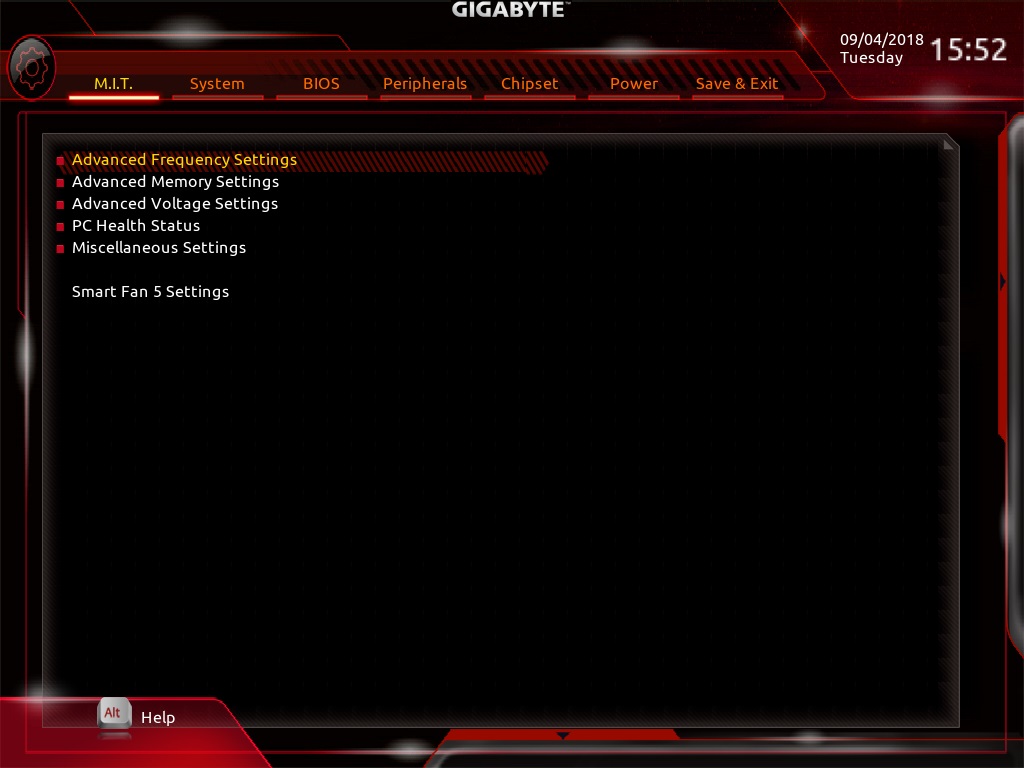
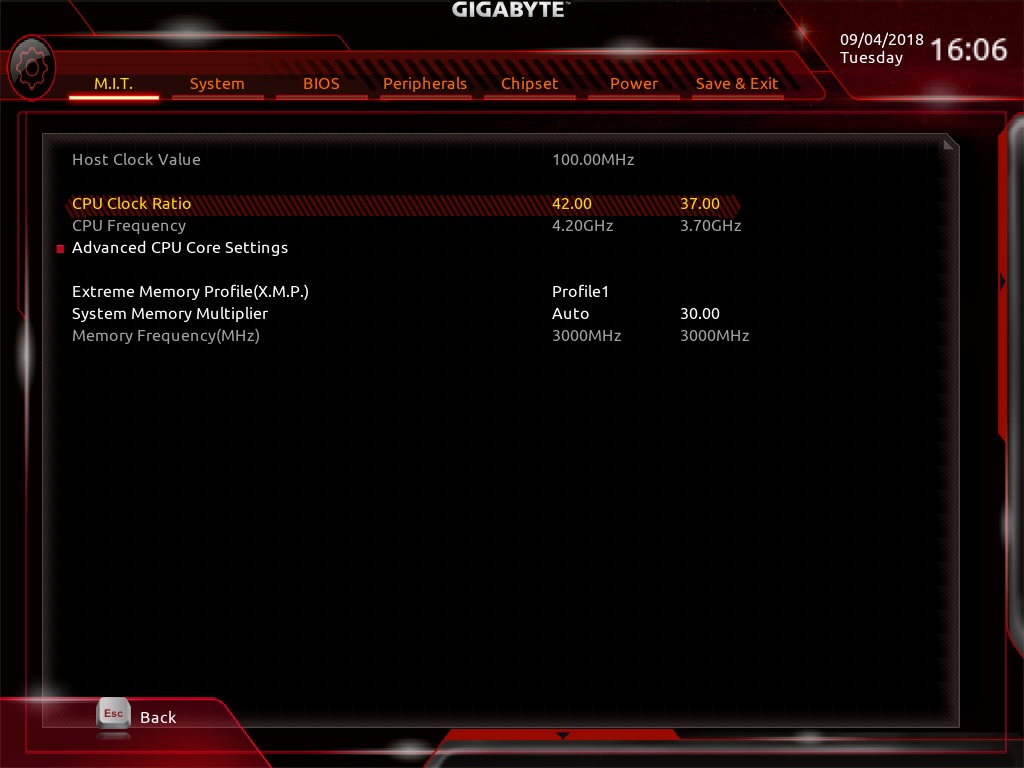
To overclock the system, it’s as simple as heading into the Advanced Frequency Settings and adjusting the CPU Core Clock ratio and then upping your voltage from the Advanced Voltage Settings.
Overclocking
We didn’t expect much from the Mini ITX B450 I Pro WiFi, if we’re being honest, but we went ahead and attempted an overclock on the 2700X anyway, giving the small heatsinks and tightly packed circuitry a real run for their money.
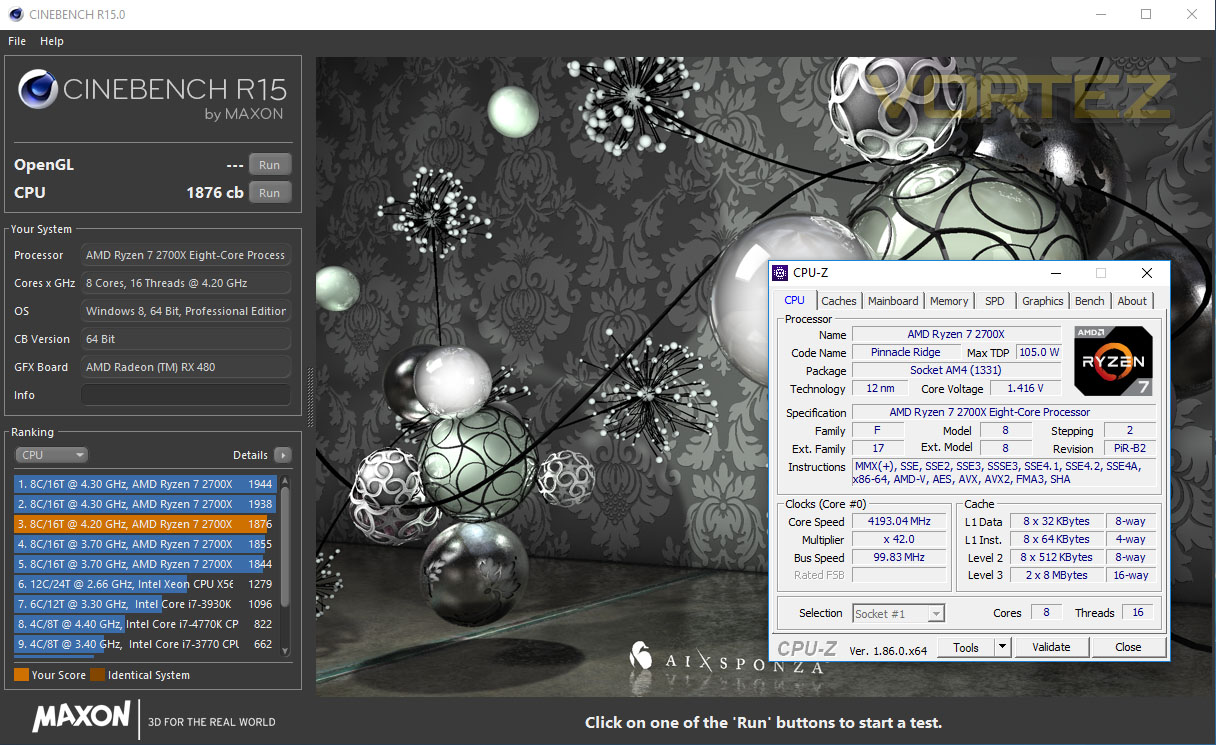
We managed to achieve a stable 4.2GHz on the core with 1.4v required, which isn’t too far from the best we’ve managed on some X470 boards. Reasonably impressive.
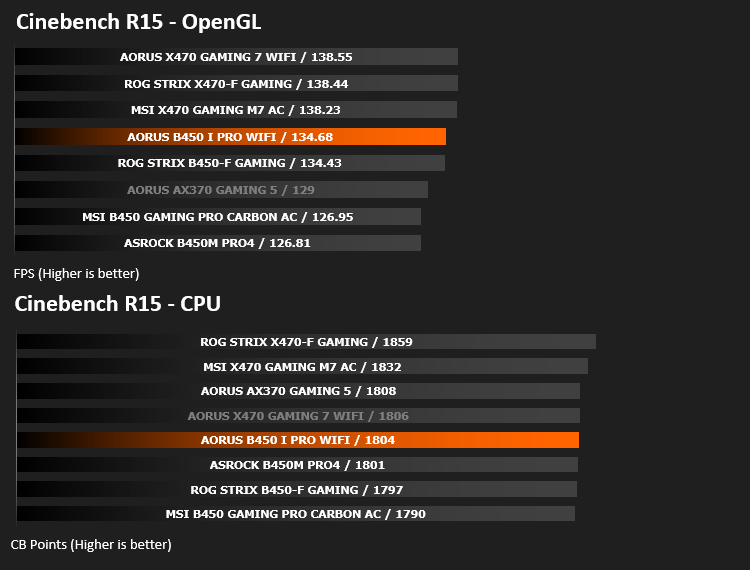
Our Cinebench R15 score raised from 1806 to 1876, which is all well and good, but massive airflow through the case isn’t just recommended, it’s absolutely necessary. The power delivery heatsink was scorching hot, to the point where we’d question long-term reliability if case airflow wasn’t good enough. This wasn’t anywhere near as big an issue when using the CPU within its usual parameters.
Test Setup & Software
Test SetupCPU AMD Ryzen 7 2700X
Cooling Noctua NH-U12S-SE-AM4
Motherboard AORUS B450 I Pro WiFi
Memory 16GB Corsair Vengeance LPX 3200MHz @ 3000MHz @ 15-17-17-38-58
Graphics AMD Radeon RX 480 8GB
Storage Corsair Force LE 480GB
PSU Corsair RM750X 80 Plus Gold Certified PSU
Cooling Noctua NH-U12S-SE-AM4
Motherboard AORUS B450 I Pro WiFi
Memory 16GB Corsair Vengeance LPX 3200MHz @ 3000MHz @ 15-17-17-38-58
Graphics AMD Radeon RX 480 8GB
Storage Corsair Force LE 480GB
PSU Corsair RM750X 80 Plus Gold Certified PSU
Benchmarks
Cinebench R15 – CPU/OpenGL Score
x264 HD 4.0 – 1st and 2nd pass encoding
SiSoftware SANDRA – CPU & Memory benchmarks
POV-RAY – CPU benchmarks
TrueCrypt – CPU benchmarks
AIDA64 – CPU benchmarks & Memory
PCMark 8 – Home Suite & Photoshop
3DMark FireStrike – 3D Benchmark
Games – Rise of the Tomb Raider & Total War: WARHAMMER
x264 HD 4.0 – 1st and 2nd pass encoding
SiSoftware SANDRA – CPU & Memory benchmarks
POV-RAY – CPU benchmarks
TrueCrypt – CPU benchmarks
AIDA64 – CPU benchmarks & Memory
PCMark 8 – Home Suite & Photoshop
3DMark FireStrike – 3D Benchmark
Games – Rise of the Tomb Raider & Total War: WARHAMMER
Other Software
Temperature Analysis: Aida64 & Ryzen Master
Stress Testing Software: AIDA64 Stability Test
CPU Specification Monitoring: CPU-Z
Performance Monitoring: MSI Afterburner
Stress Testing Software: AIDA64 Stability Test
CPU Specification Monitoring: CPU-Z
Performance Monitoring: MSI Afterburner
Benchmarks: Power Consumption
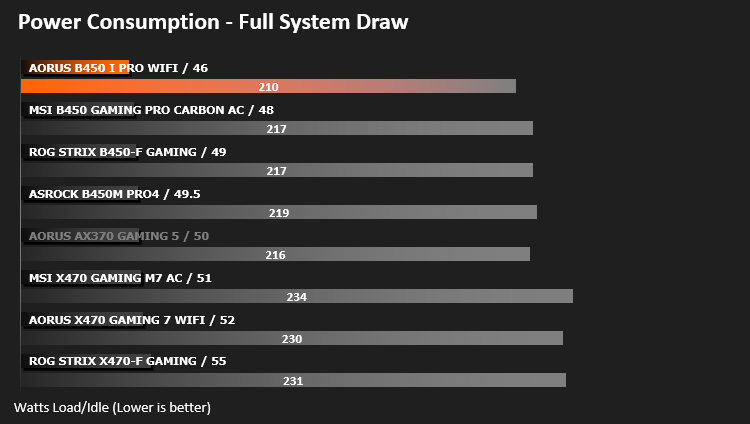
It’s interesting to note the power consumption across all motherboards. Although they are using the Z270 chipset, energy results can fluctuate between manufacturers due to the features and specifications that are integrated. First of all, for the idle tests the system is cold booted into Windows and no additional applications are executed – the watts are noted on the external energy monitor we use and then the system is loaded with 3DMark FireStrike – watts are again monitored for the duration of the test and the highest rated wattage result is then noted down. Below are the results of this energy test.
Ray Tracing Performance – POV-Ray 3.7
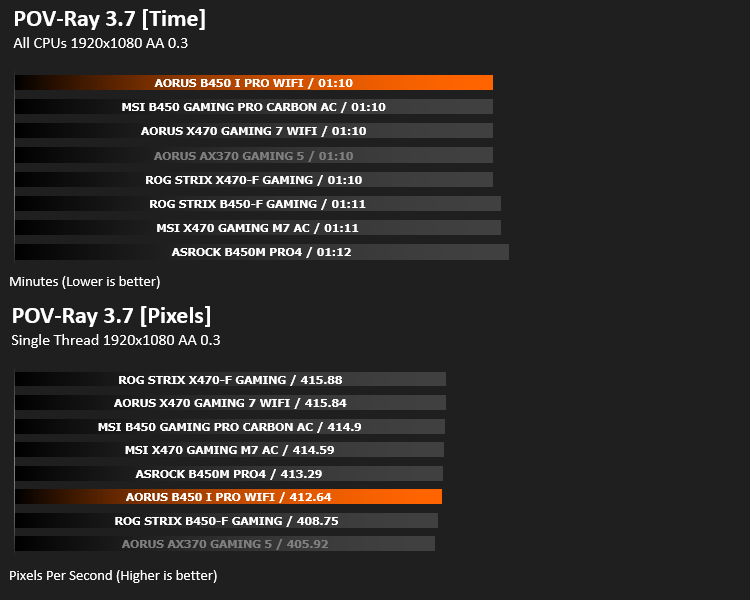
Persistence of Vision Raytracer’s PovRay is a free and open source 3D animator application with versions for computers with different operating systems.
This product allows users to build their custom 3D worlds with excellent quality despite their computer’s hardware. It has adjustable options for levels of radiance, refraction, and reflection. Calculation time may vary depending on the computer model, but PovRay can adapt to many computer builds, and is supported by the open source community.
This product allows users to build their custom 3D worlds with excellent quality despite their computer’s hardware. It has adjustable options for levels of radiance, refraction, and reflection. Calculation time may vary depending on the computer model, but PovRay can adapt to many computer builds, and is supported by the open source community.
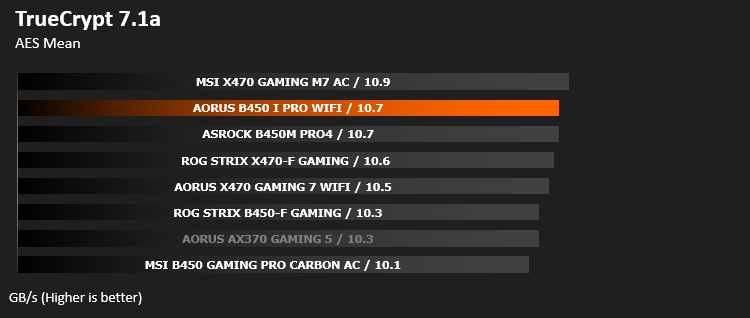
AES Encryption Performance – TrueCrypt 7.1a
TrueCrypt is a discontinued source-available freeware utility used for on-the-fly encryption (OTFE). It can create a virtual encrypted disk within a file or encrypt a partition or (under Microsoft Windows except Windows 8 with GPT) the entire storage device (pre-boot authentication).
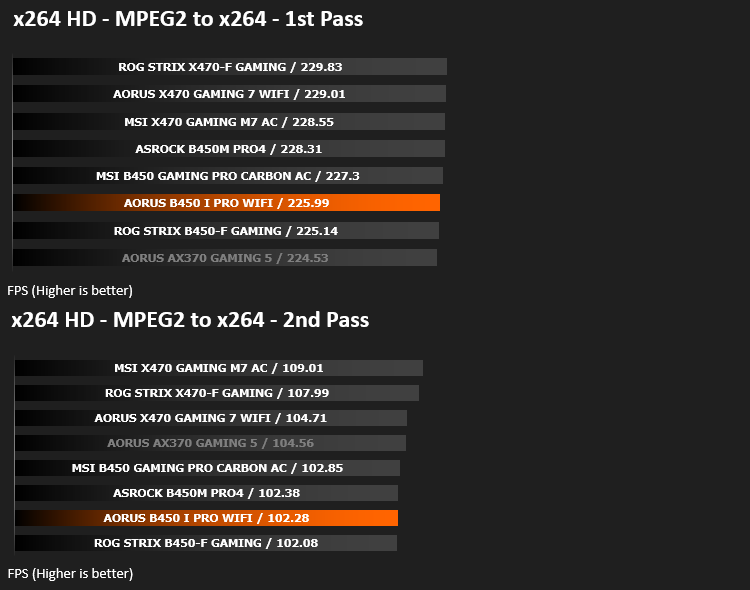
Encoding Performance – x264 HD
Simply put, this test measures how fast your machine can encode a short, DVD quality MPEG-2 video clip into a high-quality x264 video clip. What’s x264, you ask? It’s more or less the next-generation Xvid/DivX codec. I think it’s ideal for a benchmark because the application (x264.exe) reports fairly accurate compression results (in frames per second) for each pass of the video encoding process, and it uses multi-core processors very efficiently.
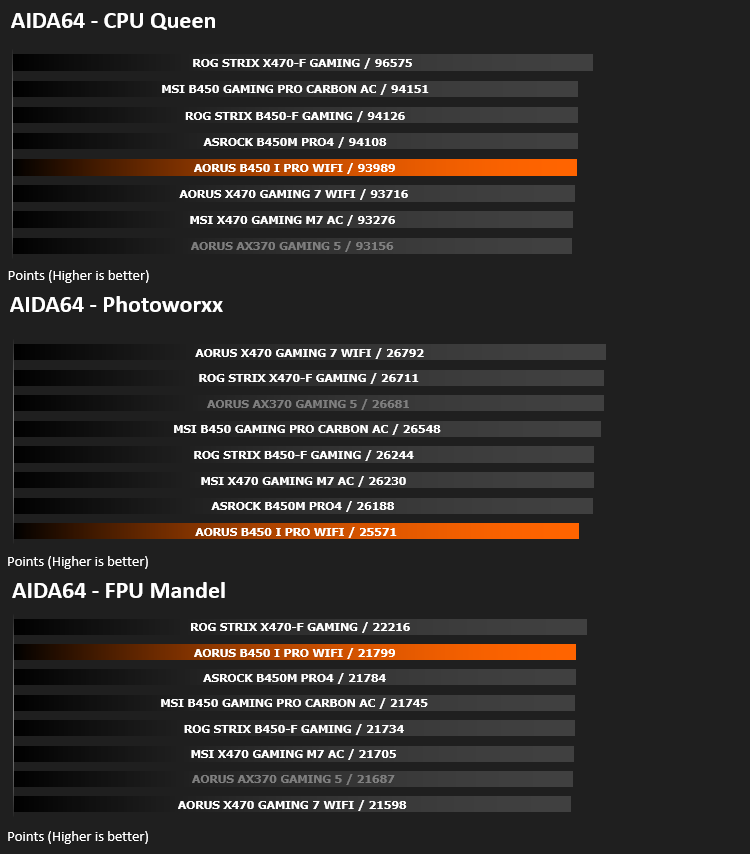
Processing Features Performance – AIDA64
AIDA64 Product PageThis simple integer benchmark focuses on the branch prediction capabilities and the misprediction penalties of the CPU. It finds the solutions for the classic “Queens problem” on a 10 by 10 sized chessboard. At the same clock speed theoretically the processor with the shorter pipeline and smaller misprediction penalties will attain higher benchmark scores. For example — with HyperThreading disabled — the Intel Northwood core processors get higher scores than the Intel Prescott core based ones due to the 20-step vs 31-step long pipeline. CPU Queen test uses integer MMX, SSE2 and SSSE3 optimizations.
Memory Transfer Performance – AIDA64
AIDA64 Product PageMemory bandwidth benchmarks (Memory Read, Memory Write, Memory Copy) measure the maximum achiveable memory data transfer bandwidth. The code behind these benchmark methods are written in Assembly and they are extremely optimized for every popular AMD, Intel and VIA processor core variants by utilizing the appropriate x86/x64, x87, MMX, MMX+, 3DNow!, SSE, SSE2, SSE4.1, AVX, and AVX2 instruction set extension.
The Memory Latency benchmark measures the typical delay when the CPU reads data from system memory. Memory latency time means the penalty measured from the issuing of the read command until the data arrives to the integer registers of the CPU.
The Memory Latency benchmark measures the typical delay when the CPU reads data from system memory. Memory latency time means the penalty measured from the issuing of the read command until the data arrives to the integer registers of the CPU.

Processing Power Performance – Cinebench R15
CINEBENCH can measure systems with up to 64 processor threads. This test scene contains approximately 2,000 objects which in turn contain more than 300,000 polygons in total, and uses sharp and blurred reflections, area lights, shadows, procedural shaders, antialiasing, and much more. The result is displayed in points (pts). The higher the number, the faster your processor.
Bandwidth Performance – SiSoftware SANDRA
SANDRA isn’t always a benchmark that is included in hardware reviews but I believe it shouldn’t be ignored. SANDRA provides a vigorous package that tests your system in a rather large array of benchmarks. There are many aspects of benchmark that can be executed. We will be considering – CPU and memory tests.
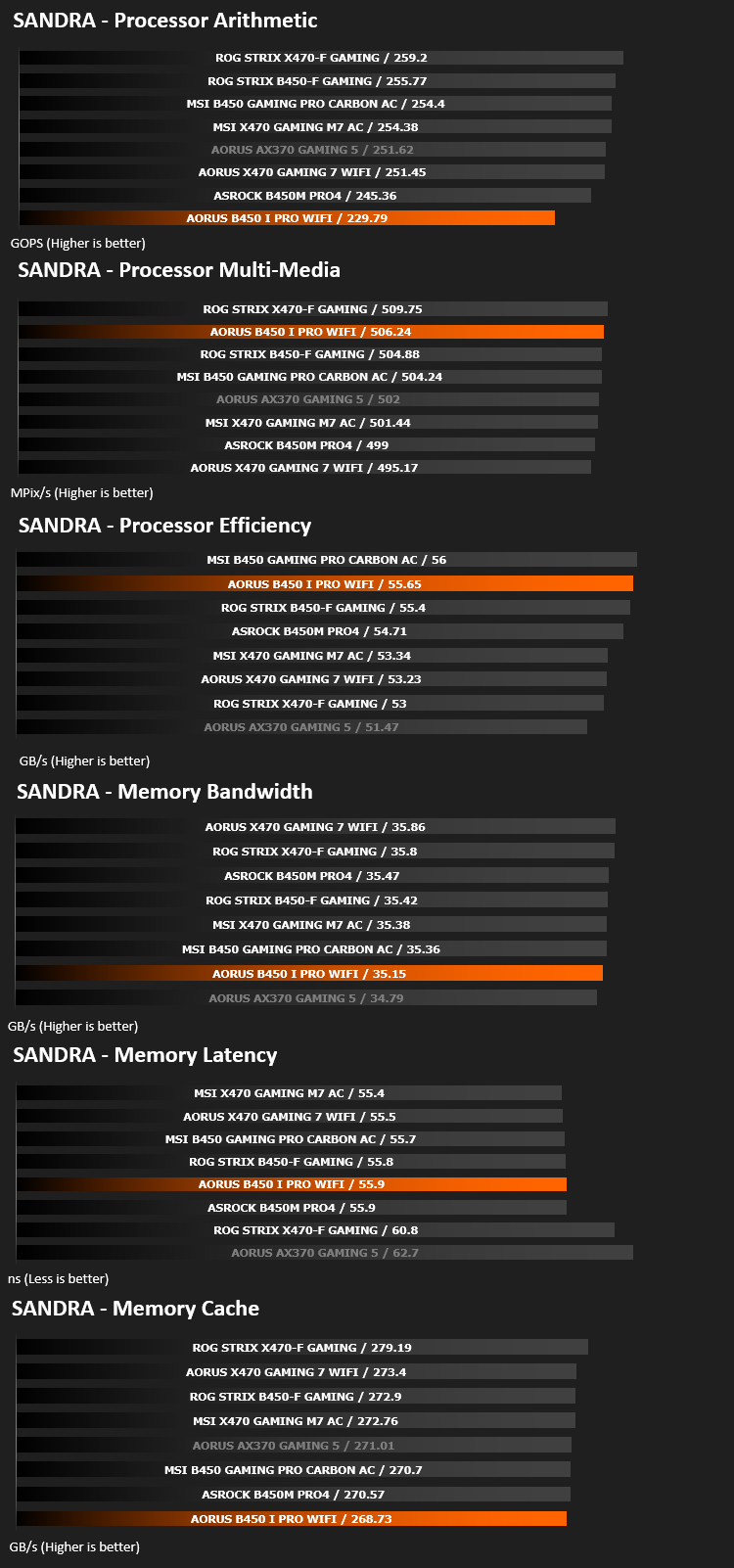
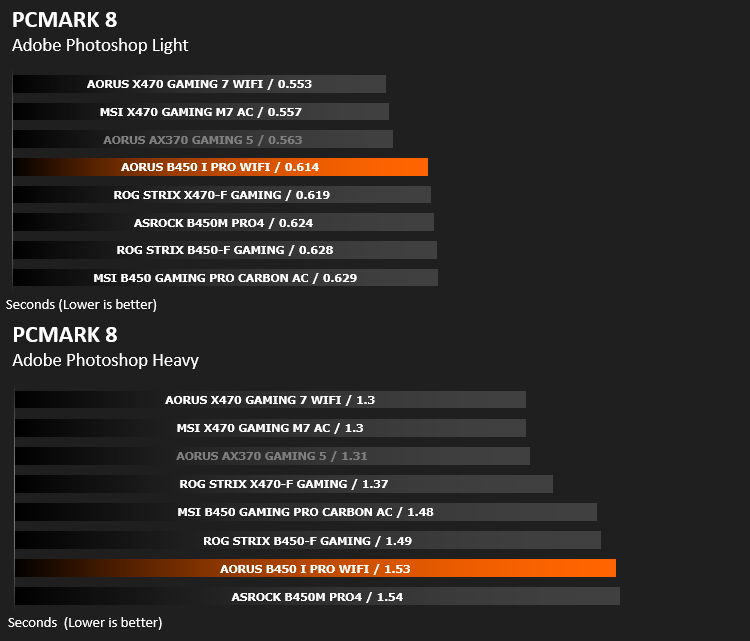
Image Editing Performance – PCMark 8 Photoshop
PCMark 8 Product Page Developed in partnership with Benchmark Development Program members Acer, AMD, Condusiv Technologies, Dell, HGST, HP, Intel, Microsoft, NVIDIA, Samsung, SanDisk, Seagate and Western Digital, PCMark 8 is the latest version in FutureMark’s popular series of PC benchmarking tools. Improving on previous releases, PCMark 8 includes new tests using popular applications from Adobe and Microsoft.
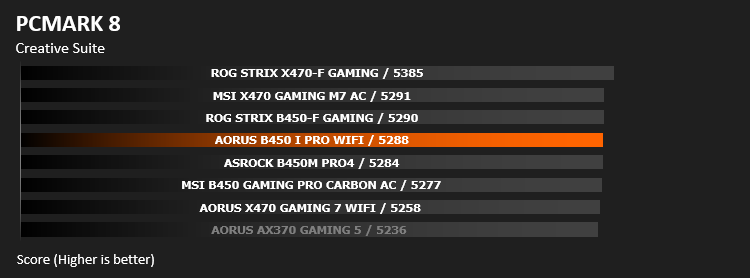
Overall System Performance – PCMark 8
PCMark 8 combines performance benchmarking with battery life measurement and includes tests based on popular Adobe and Microsoft applications. Whether you are looking for long battery life, or maximum power, PCMark 8 will help you find the devices that offer the perfect combination of efficiency and performance for your needs. It’s the complete PC performance benchmark for home and business.
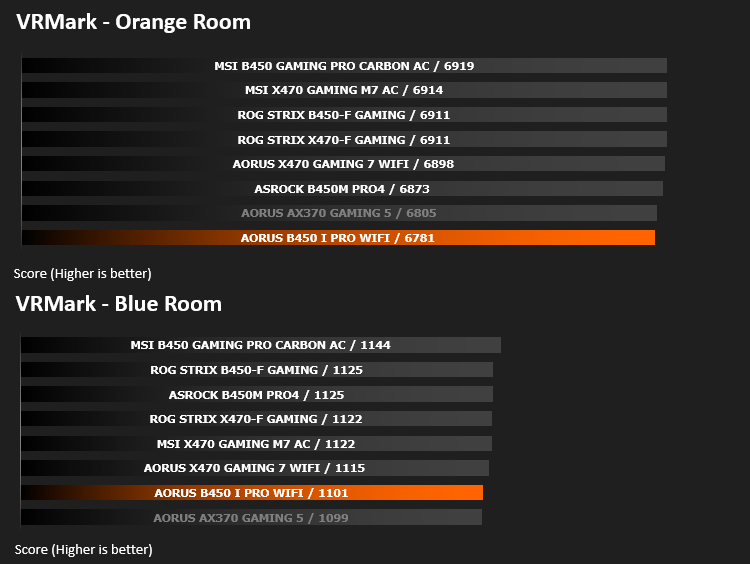
VR Performance – VRMark
VRMark Product PageVRMark includes two VR benchmark tests that run on your monitor, no headset required, or on a connected HMD. At the end of each test, you’ll see whether your PC is VR ready, and if not, how far it falls short.
3D Performance – 3DMark
3DMark FireStrike Product PageFire Strike is our new showcase DirectX 11 benchmark designed for high-performance gaming PCs. It is our most ambitious and technical benchmark ever, featuring real-time graphics rendered with detail and complexity far beyond what is found in other benchmarks and games today. Fire Strike will only be available in the Windows editions of 3DMark initially.
Gaming Performance – Rise of the Tomb Raider & Total War: WARHAMMER
It’s important for us to perform a number of game benchmarks as well as the synthetic tests because gamers will want to know if there are any significant benefits. So here we have two recent gaming titles.
Conclusion
The AORUS B450 I Pro WiFi has, regardless of its tiny size, has performed remarkably, swapping punches with many of the X470 and B450 boards in our tests.
Gigabyte have done a fine job of packing this feature set into a small amount of available real-estate, including an M.2 NVMe slot, equipped with large heatsink, which may prove very useful in smaller builds with lesser airflow. There’s the large heatsink on the 4+2 phase power delivery sector, helping keep things cool even when delivering upwards of 100W to the CPU. WiFi has been included on the rear which is essential if you also wish to use a discrete GPU of any kind. Four SATA ports, USB 2.0 and 3.0, and RGB lighting connections are all included too. The rear IO has three display outputs, all of which can be used at the same time if your chosen CPU allows.
32GB of DDR4 3200MHz, Ryzen 3, 5 and 7 (1st and 2nd gen) CPUs as well as the 2200G and 2400G APUs, four SATA HDDs/SSDs, an M.2 and a full-size GPU can all be utilised on this board, making it as capable as most motherboards, if you so wish.
Overclocking wasn’t a strong point of this motherboard, while being capable, it got far too hot for our liking; but having said that, the B450, regardless of its ability to overclock or not, isn’t designed to be utilised by those seeking the most extreme of overclocks, never mind customers purchasing a Mini-ITX format board, measuring only 170 x 170; you simply can’t expect this kind of ‘board to support high end overclocking of this kind.
For the price point, we believe the AORUS B450 I Pro WiFi opens up many avenues to those wishing to build a high-powered rig within a tiny chassis, such as a gaming PC below a TV or a media PC with a low-power AMD Ryzen CPU.
Unfortunately, for some unknown reason, the gaming performance on this motherboard was around 5-10% lower than the same RX480 and 2700X setup that we use on all of our AMD test rigs. We installed the correct drivers and ensured that the BIOS was completely up to date. Besides, it still performed well, but if gaming is your aim, perhaps look at alternatives.
If you’re building a small PC but don’t want to give up too many high-end features such as M.2 NVMe support and plenty of display outputs, the AORUS B450 I Pro WiFi should be top of the wish-list.
Pros
+ Competitive performance in most tests
+ Utilised the real-estate well (170mm x 170mm)
+ Large heatsink on M.2 slot
+ Rear IO features WiFi
+ No RGB lighting
+ 3 Display outputs
Neutral
+- A little pricey
Cons
– No USB Type-C
– Lacked some gaming performance
– Power delivery heatsink got extremely hot during overclocking tests
+ Competitive performance in most tests
+ Utilised the real-estate well (170mm x 170mm)
+ Large heatsink on M.2 slot
+ Rear IO features WiFi
+ No RGB lighting
+ 3 Display outputs
Neutral
+- A little pricey
Cons
– No USB Type-C
– Lacked some gaming performance
– Power delivery heatsink got extremely hot during overclocking tests
Click here for an explanation of our awards at Vortez.net.
Stay connected with the Vortez Social Media pages:
Join in with the discussions on Discord