If you are looking for a top-tier motherboard to support your Ryzen CPU, the GIGABYTE AX370-Gaming 5 has a host of special features that may catch your eye.

Product on Review: AORUS GA-AX370-Gaming 5
Manufacturer & Sponsor: GIGABYTE
Street Price: £199.99 GBP / $219 USD
GIGABYTE have always been a keen innovator, in days gone they were first to implement various motherboard specific technologies that was previously encompassed by the ‘Ultra Durable’ branding to ensure that their products were robust and long lasting. This is something that continues today with the PCIe and DIMM armour that is now seen across all motherboard manufacturers.
For those confused about what ‘AORUS is, one could think of it as GIGABYTE’s response to the ASUS ‘Republic of Gamers’ branding, representing the highest level of hardware for enthusiasts and gamers. Though we could cast doubt as to what that even means (specifically with the watering down of the ROG range products), for now GIGABYTE have two AORUS branded motherboards utilising the X370 chipset, the flagship being the AX370-Gaming K7, and the Gaming 5 that we are taking a look at today.
The most prominent thing we notice when looking through its feature set is that GIGABYTE have made it a master dual-wielder. They feature dual channel memory, dual BIOS, dual armour, dual networking (Killer E2500 + Intel), dual ALC 1220 audio codecs with dual Smart headphone amps, there are two thermistor headers, two internal USB 3.1 (Gen 1, aka USB 3.0) headers, two SATA Express ports, and of course it supports two-way SLI/CrossFire.
Aside from featuring SATA Express, GIGABYTE have expanded the storage options with a M.2 slot and an NVMe port which share the same PCIe lanes (priority going to the NVMe port). There is a whole host of USB options, including a total of 4x USB 3.1 Gen 2 (2x chipset 2x ASMedia), one of which is a type C, 6x USB 3.1 Gen 1 (Formerly USB 3.0) with internal headers to access an additional 4x 3.1 Gen 1 and 4x 2.0. GIGABYTE have also implemented their USB DAC-UP 2 technology on two rear panel USB ports, as well as via the front USB30_1 header, this technology provides clean, isolated, low noise power which is suitable for external DACs (Digital-to-Analogue Converter) aka external soundcards/headphone amps as well as high power peripherals such as VR headsets/external storage drives.
Being an enthusiast grade motherboard, there are various features to aid in keeping your system cool. This starts with the fact that all 8 fan headers are hybrid fan headers, two of which support a 2amp draw with overcurrent protection, this means it can support water pumps or high power fans of up to 24W, making the system friendlier for those looking to watercool. These fans are supported by GIGABYTEs Smart Fan 5 app that allows you to assign fan activity to different temperature sensors around the board (there are 7 internal points and two external with included thermistors).
As this is 2017, the aesthetics are much more neutral in design, using monochromatic shades (white/grey/black) that will suit any preference of colour or theme. Again because this is 2017, it also features RGB Fusion, GIGABYTE’s RGB surround LED lighting that is customisable using the dedicated app. Part of this lighting system is a swappable overlay dubbed ‘Accent LED’, a lengthy way to say a thin strip of acrylic attached to the board that can be swapped out for an equal sized piece of acrylic that you can engrave with custom design, perfect for highlighting your gamertag/callsign/guild/team name etc.
GIGABYTE on AORUS
GIGABYTE shares the same passion for gaming with all types of gamers. Therefore, we have extended the premium gaming brand – AORUS, the pinnacle of our hardware excellence, to provide a full spectrum of innovative gaming products that deliver the ultimate performance and exemplifies the PC’s capability for bringing gamers unprecedented delights. We will continue to participate in global gaming events, connecting with the community and actively listening to gamers’ desires in order to create marvellous products that are focused on gamers’ needs. AORUS is a team of gamers in the PC industry, looking to side with gamers in their quest for gaming, to challenge the limits, and become legendary.
Technical Specifications
AM4 Socket:
AMD Ryzen™ processor
AMD 7th Generation A-series/ Athlon™ processor
Chipset
AMD X370
Memory
4 x DDR4 DIMM sockets supporting up to 64 GB of system memory
* Due to a Windows 32-bit operating system limitation, when more than 4 GB of physical memory is installed, the actual memory size displayed will be less than the size of the physical memory installed.
Dual channel memory architecture
Support for DDR4 3200(O.C.)/2933(O.C.)/2667*/2400/2133 MHz memory modules
* Support for higher than DDR4 2667 MHz may vary by CPU.
Support for ECC Un-buffered DIMM 1Rx8/2Rx8 memory modules
Support for non-ECC Un-buffered DIMM 1Rx8/2Rx8/1Rx16 memory modules
Onboard Graphics
Integrated Graphics Processor:
1 x HDMI port, supporting a maximum resolution of 4096×2160@24 Hz
* Support for HDMI 1.4 version.
Maximum shared memory of 2 GB
* Actual support may vary by CPU.
Audio
2 x Realtek® ALC1220 codecs
Support for Sound Blaster X-Fi MB5
High Definition Audio
2/4/5.1/7.1-channel
Support for S/PDIF Out
LAN
1 x Intel® GbE LAN chip (10/100/1000 Mbit) (LAN1)
1 x Rivet Networks Killer™ E2500 LAN chip (10/100/1000 Mbit) (LAN2)
* Teaming is not supported.
Expansion Slots
1 x PCI Express x16 slot, running at x16 (PCIEX16)
* For optimum performance, if only one PCI Express graphics card is to be installed, be sure to install it in the PCIEX16 slot.
* Actual support may vary by CPU.
1 x PCI Express x16 slot, running at x8 (PCIEX8)
* The PCIEX8 slot shares bandwidth with the PCIEX16 slot. When the PCIEX8 slot is populated, the PCIEX16 slot operates at up to x8 mode.
* Actual support may vary by CPU.
(The PCIEX16 and PCIEX8 slots conform to PCI Express 3.0 standard.)
1 x PCI Express x16 slot, running at x4 (PCIEX4)
* The PCIEX4 slot shares bandwidth with all of the PCI Express x1 slots. The PCIEX4 slot operates at up to x4 mode when all of the PCI Express x1 slots are empty.
3 x PCI Express x1 slots
* All of the PCI Express x1 slots share bandwidth with the PCIEX4 slot. The PCIEX4/PCIEX1_2/PCIEX1_3 slot operates at up to x1 mode when the PCIEX1_1 slot is populated; the PCIEX4 slot operates at up to x2 mode when the PCIEX1_2/PCIEX1_3 slot is populated.
(The PCIEX4 and PCI Express x1 slots conform to PCI Express 2.0 standard.)
Storage Interface
1 x M.2 connector (Socket 3, M key, type 2242/2260/2280/22110 SATA and PCIe x4*/x2 SSD support)
* Actual support may vary by CPU.
1 x U.2 connector
* When the U.2 connector is populated, the M.2 connector becomes unavailable.
2 x SATA Express connectors
8 x SATA 6Gb/s connectors
Support for RAID 0, RAID 1, and RAID 10
* Refer to “1-8 Internal Connectors,” for the installation notices for the M.2 and SATA connectors.
Multi-Graphics Technology
Support for NVIDIA® Quad-GPU SLI™ and 2-Way NVIDIA® SLI™ technologies
* Actual support may vary by CPU.
Support for AMD Quad-GPU CrossFire™ and 2-Way AMD CrossFire™ technologies
USB
Chipset+ASMedia® USB 3.1 Gen 2 Controller:
1 x USB Type-C™ port on the back panel, with USB 3.1 Gen 2 support
1 x USB 3.1 Gen 2 Type-A port (red) on the back panel
Chipset:
2 x USB 3.1 Gen 2 Type-A ports (red) on the back panel
6 x USB 3.1 Gen 1 ports (2 ports on the back panel, 4 ports available through the internal USB headers)
4 x USB 2.0/1.1 ports (available through the internal USB headers)
CPU:
4 x USB 3.1 Gen 1 ports on the back panel
Internal I/O Connectors[b/]
1 x 24-pin ATX main power connector
1 x 8-pin ATX 12V power connector
1 x U.2 connector
1 x M.2 Socket 3 connector
2 x SATA Express connectors
8 x SATA 6Gb/s connectors
1 x CPU fan header
1 x water cooling CPU fan header
4 x system fan headers
2 x system fan/water cooling pump headers
1 x front panel header
1 x front panel audio header
1 x S/PDIF Out header
2 x USB 3.1 Gen 1 headers
2 x USB 2.0/1.1 headers
1 x Trusted Platform Module (TPM) header
1 x CPU cooler LED strip/RGB LED strip extension cable header
1 x RGB (RGBW) LED strip extension cable header
2 x temperature sensor headers
1 x Clear CMOS jumper
1 x power button
1 x reset button
1 x Clear CMOS button
1 x OC button
2 x BIOS switches
Back Panel Connectors
1 x PS/2 keyboard/mouse port
1 x HDMI port
1 x USB Type-C™ port, with USB 3.1 Gen 2 support
3 x USB 3.1 Gen 2 Type-A ports (red)
6 x USB 3.1 Gen 1 ports
2 x RJ-45 ports
1 x optical S/PDIF Out connector
5 x audio jacks (Center/Subwoofer Speaker Out, Rear Speaker Out, Line In, Line Out, Mic In)
I/O Controller
iTE® I/O Controller Chip
H/W Monitoring
Voltage detection
Temperature detection
Fan speed detection
Overheating warning
Fan fail warning
Fan speed control
* Whether the fan (pump) speed control function is supported will depend on the fan (pump) you install.
BIOS
2 x 128 Mbit flash
Use of licensed AMI UEFI BIOS
Support for DualBIOS™
PnP 1.0a, DMI 2.7, WfM 2.0, SM BIOS 2.7, ACPI 5.0
Unique Features
Support for APP Center
* Available applications in APP Center may vary by motherboard model. Supported functions of each application may also vary depending on motherboard specifications.
@BIOS
3D OSD
AutoGreen
BIOS Setup
Cloud Station
Color Temperature
EasyTune
Fast Boot
Game Boost
ON/OFF Charge
RGB Fusion
Smart Backup
Smart Keyboard
Smart TimeLock
System Information Viewer
USB Blocker
USB DAC UP 2
V-Tuner
Support for Q-Flash
Support for Xpress Install
Operating System
Support for Windows 10 64-bit
Support for Windows 7 64-bit
* Please download the “Windows USB Installation Tool” from GIGABYTE’s website and install it before installing Windows 7.
Form Factor
ATX Form Factor; 30.5cm x 24.4cm
AMD Ryzen™ processor
AMD 7th Generation A-series/ Athlon™ processor
Chipset
AMD X370
Memory
4 x DDR4 DIMM sockets supporting up to 64 GB of system memory
* Due to a Windows 32-bit operating system limitation, when more than 4 GB of physical memory is installed, the actual memory size displayed will be less than the size of the physical memory installed.
Dual channel memory architecture
Support for DDR4 3200(O.C.)/2933(O.C.)/2667*/2400/2133 MHz memory modules
* Support for higher than DDR4 2667 MHz may vary by CPU.
Support for ECC Un-buffered DIMM 1Rx8/2Rx8 memory modules
Support for non-ECC Un-buffered DIMM 1Rx8/2Rx8/1Rx16 memory modules
Onboard Graphics
Integrated Graphics Processor:
1 x HDMI port, supporting a maximum resolution of 4096×2160@24 Hz
* Support for HDMI 1.4 version.
Maximum shared memory of 2 GB
* Actual support may vary by CPU.
Audio
2 x Realtek® ALC1220 codecs
Support for Sound Blaster X-Fi MB5
High Definition Audio
2/4/5.1/7.1-channel
Support for S/PDIF Out
LAN
1 x Intel® GbE LAN chip (10/100/1000 Mbit) (LAN1)
1 x Rivet Networks Killer™ E2500 LAN chip (10/100/1000 Mbit) (LAN2)
* Teaming is not supported.
Expansion Slots
1 x PCI Express x16 slot, running at x16 (PCIEX16)
* For optimum performance, if only one PCI Express graphics card is to be installed, be sure to install it in the PCIEX16 slot.
* Actual support may vary by CPU.
1 x PCI Express x16 slot, running at x8 (PCIEX8)
* The PCIEX8 slot shares bandwidth with the PCIEX16 slot. When the PCIEX8 slot is populated, the PCIEX16 slot operates at up to x8 mode.
* Actual support may vary by CPU.
(The PCIEX16 and PCIEX8 slots conform to PCI Express 3.0 standard.)
1 x PCI Express x16 slot, running at x4 (PCIEX4)
* The PCIEX4 slot shares bandwidth with all of the PCI Express x1 slots. The PCIEX4 slot operates at up to x4 mode when all of the PCI Express x1 slots are empty.
3 x PCI Express x1 slots
* All of the PCI Express x1 slots share bandwidth with the PCIEX4 slot. The PCIEX4/PCIEX1_2/PCIEX1_3 slot operates at up to x1 mode when the PCIEX1_1 slot is populated; the PCIEX4 slot operates at up to x2 mode when the PCIEX1_2/PCIEX1_3 slot is populated.
(The PCIEX4 and PCI Express x1 slots conform to PCI Express 2.0 standard.)
Storage Interface
1 x M.2 connector (Socket 3, M key, type 2242/2260/2280/22110 SATA and PCIe x4*/x2 SSD support)
* Actual support may vary by CPU.
1 x U.2 connector
* When the U.2 connector is populated, the M.2 connector becomes unavailable.
2 x SATA Express connectors
8 x SATA 6Gb/s connectors
Support for RAID 0, RAID 1, and RAID 10
* Refer to “1-8 Internal Connectors,” for the installation notices for the M.2 and SATA connectors.
Multi-Graphics Technology
Support for NVIDIA® Quad-GPU SLI™ and 2-Way NVIDIA® SLI™ technologies
* Actual support may vary by CPU.
Support for AMD Quad-GPU CrossFire™ and 2-Way AMD CrossFire™ technologies
USB
Chipset+ASMedia® USB 3.1 Gen 2 Controller:
1 x USB Type-C™ port on the back panel, with USB 3.1 Gen 2 support
1 x USB 3.1 Gen 2 Type-A port (red) on the back panel
Chipset:
2 x USB 3.1 Gen 2 Type-A ports (red) on the back panel
6 x USB 3.1 Gen 1 ports (2 ports on the back panel, 4 ports available through the internal USB headers)
4 x USB 2.0/1.1 ports (available through the internal USB headers)
CPU:
4 x USB 3.1 Gen 1 ports on the back panel
Internal I/O Connectors[b/]
1 x 24-pin ATX main power connector
1 x 8-pin ATX 12V power connector
1 x U.2 connector
1 x M.2 Socket 3 connector
2 x SATA Express connectors
8 x SATA 6Gb/s connectors
1 x CPU fan header
1 x water cooling CPU fan header
4 x system fan headers
2 x system fan/water cooling pump headers
1 x front panel header
1 x front panel audio header
1 x S/PDIF Out header
2 x USB 3.1 Gen 1 headers
2 x USB 2.0/1.1 headers
1 x Trusted Platform Module (TPM) header
1 x CPU cooler LED strip/RGB LED strip extension cable header
1 x RGB (RGBW) LED strip extension cable header
2 x temperature sensor headers
1 x Clear CMOS jumper
1 x power button
1 x reset button
1 x Clear CMOS button
1 x OC button
2 x BIOS switches
Back Panel Connectors
1 x PS/2 keyboard/mouse port
1 x HDMI port
1 x USB Type-C™ port, with USB 3.1 Gen 2 support
3 x USB 3.1 Gen 2 Type-A ports (red)
6 x USB 3.1 Gen 1 ports
2 x RJ-45 ports
1 x optical S/PDIF Out connector
5 x audio jacks (Center/Subwoofer Speaker Out, Rear Speaker Out, Line In, Line Out, Mic In)
I/O Controller
iTE® I/O Controller Chip
H/W Monitoring
Voltage detection
Temperature detection
Fan speed detection
Overheating warning
Fan fail warning
Fan speed control
* Whether the fan (pump) speed control function is supported will depend on the fan (pump) you install.
BIOS
2 x 128 Mbit flash
Use of licensed AMI UEFI BIOS
Support for DualBIOS™
PnP 1.0a, DMI 2.7, WfM 2.0, SM BIOS 2.7, ACPI 5.0
Unique Features
Support for APP Center
* Available applications in APP Center may vary by motherboard model. Supported functions of each application may also vary depending on motherboard specifications.
@BIOS
3D OSD
AutoGreen
BIOS Setup
Cloud Station
Color Temperature
EasyTune
Fast Boot
Game Boost
ON/OFF Charge
RGB Fusion
Smart Backup
Smart Keyboard
Smart TimeLock
System Information Viewer
USB Blocker
USB DAC UP 2
V-Tuner
Support for Q-Flash
Support for Xpress Install
Operating System
Support for Windows 10 64-bit
Support for Windows 7 64-bit
* Please download the “Windows USB Installation Tool” from GIGABYTE’s website and install it before installing Windows 7.
Form Factor
ATX Form Factor; 30.5cm x 24.4cm
Packaging, Bundle & First Look
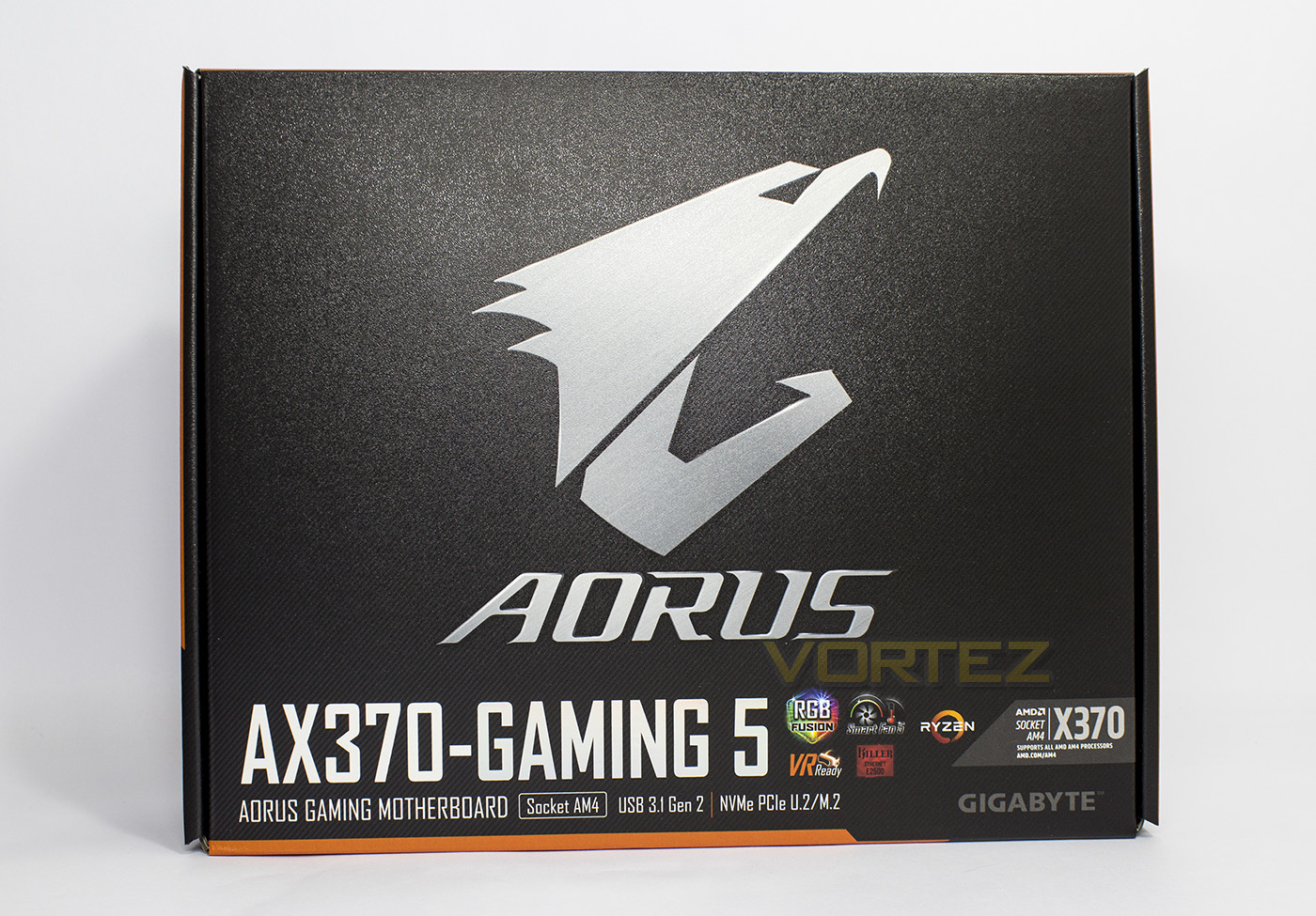
Carrying itself as a brand, AORUS takes centre stage on a sleek, high quality box, with the model number and features listed at the bottom.
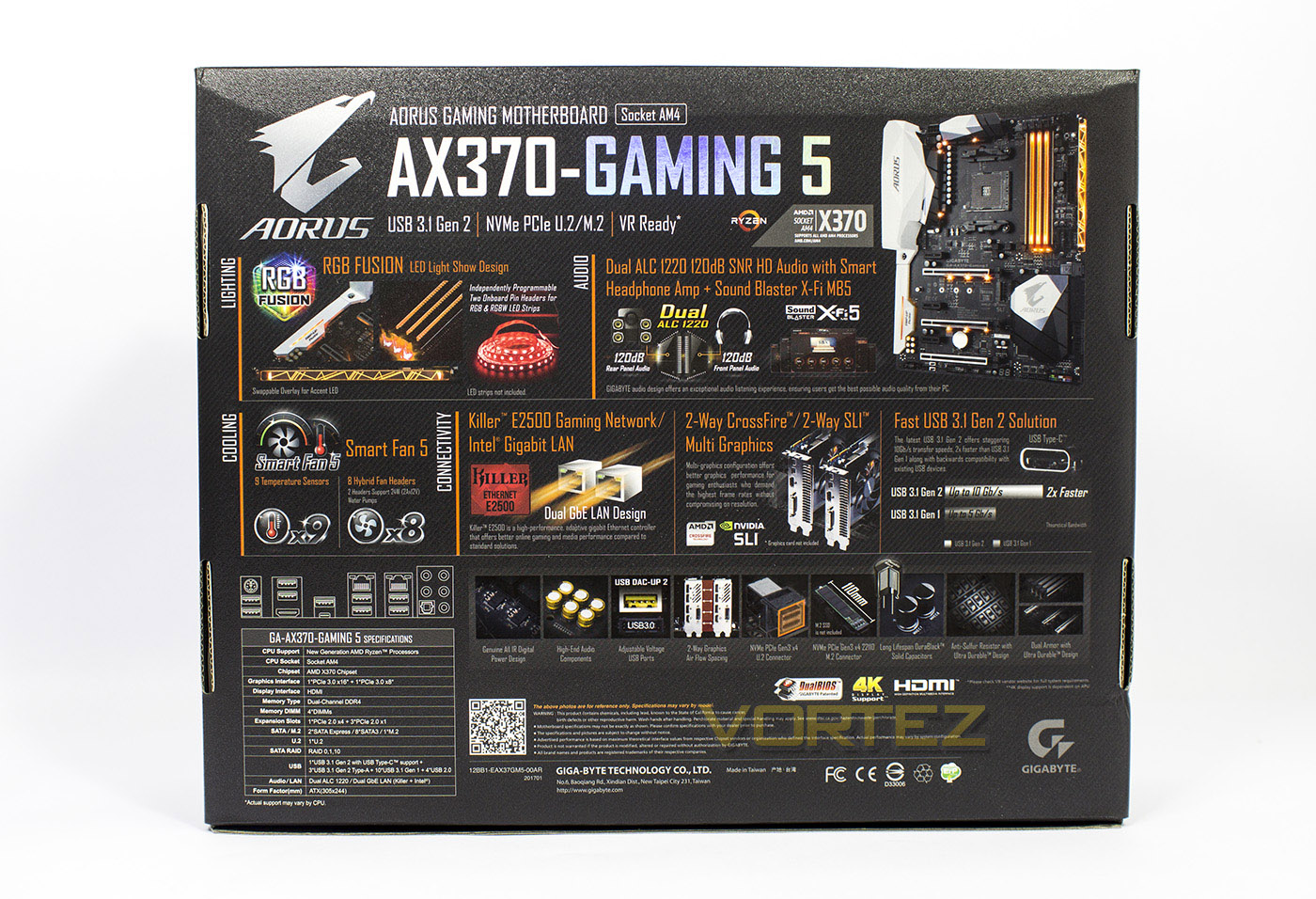
The reverse side crams in a wall of feature overviews along with its specifications listed on the bottom left.
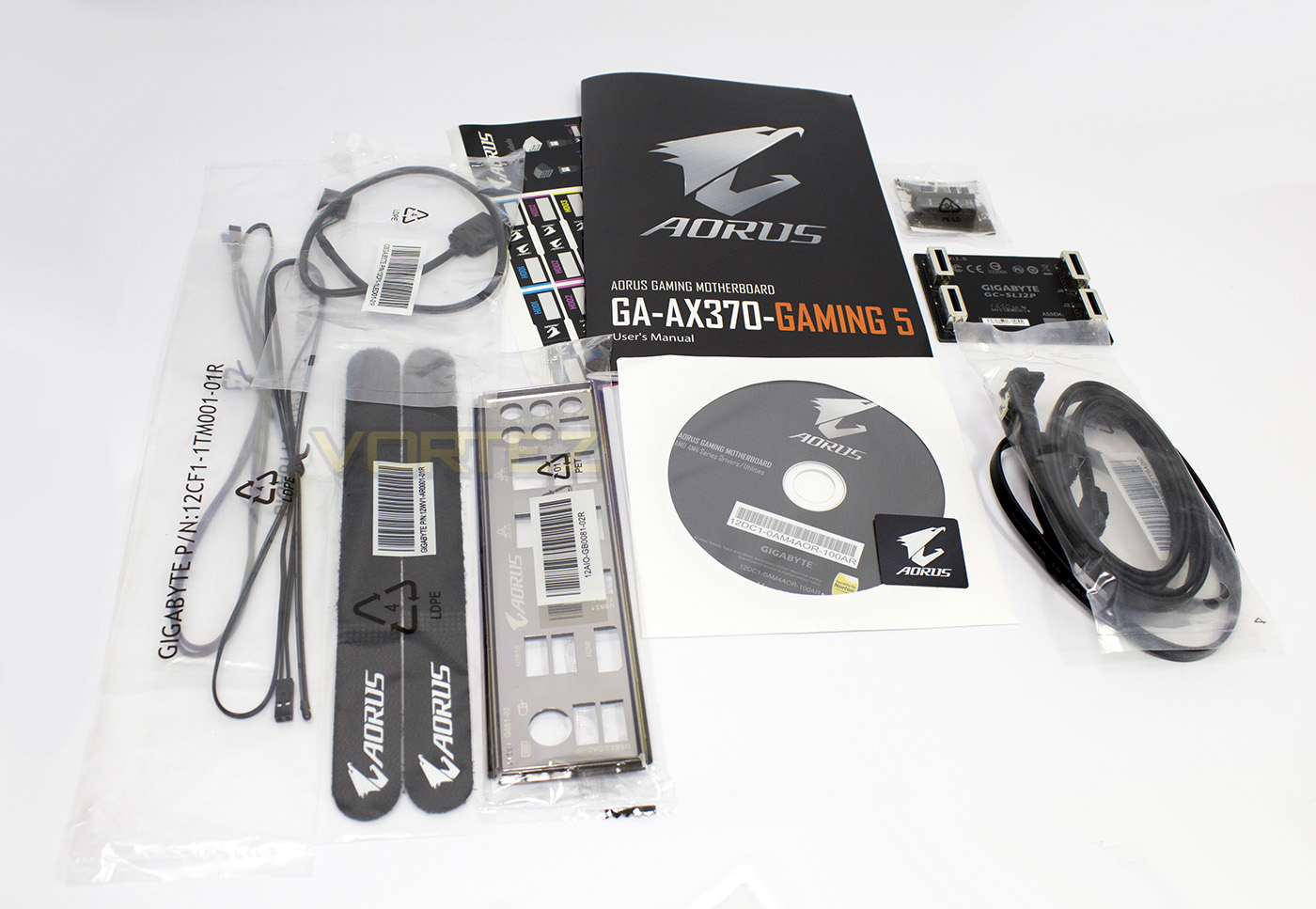
Included with the motherboard you will find the manual, 4x SATA cables, ‘G-Connector’ for easy front panel header connection. driver disc, case badge, rear IO plate, two-way SLI bridge, 2x termistors, RGBW LED header extension, and a selection of cable identification sticky labels. Unfortunately there is no blank ‘Accent LED’ acrylic strip included, but that isn’t a huge issue as acrylic is super cheap, and there are places around that can do custom engraving that is relatively affordable too, however there seems to be a lack of direct support for this feature from GIGABYTE right now, so those looking to take full advantage of this feature will need a little know how, though considering the Accent LED strip is seated behind a chunky 24pin ATX power cable, some may feel it may not entirely be worth the hassle.
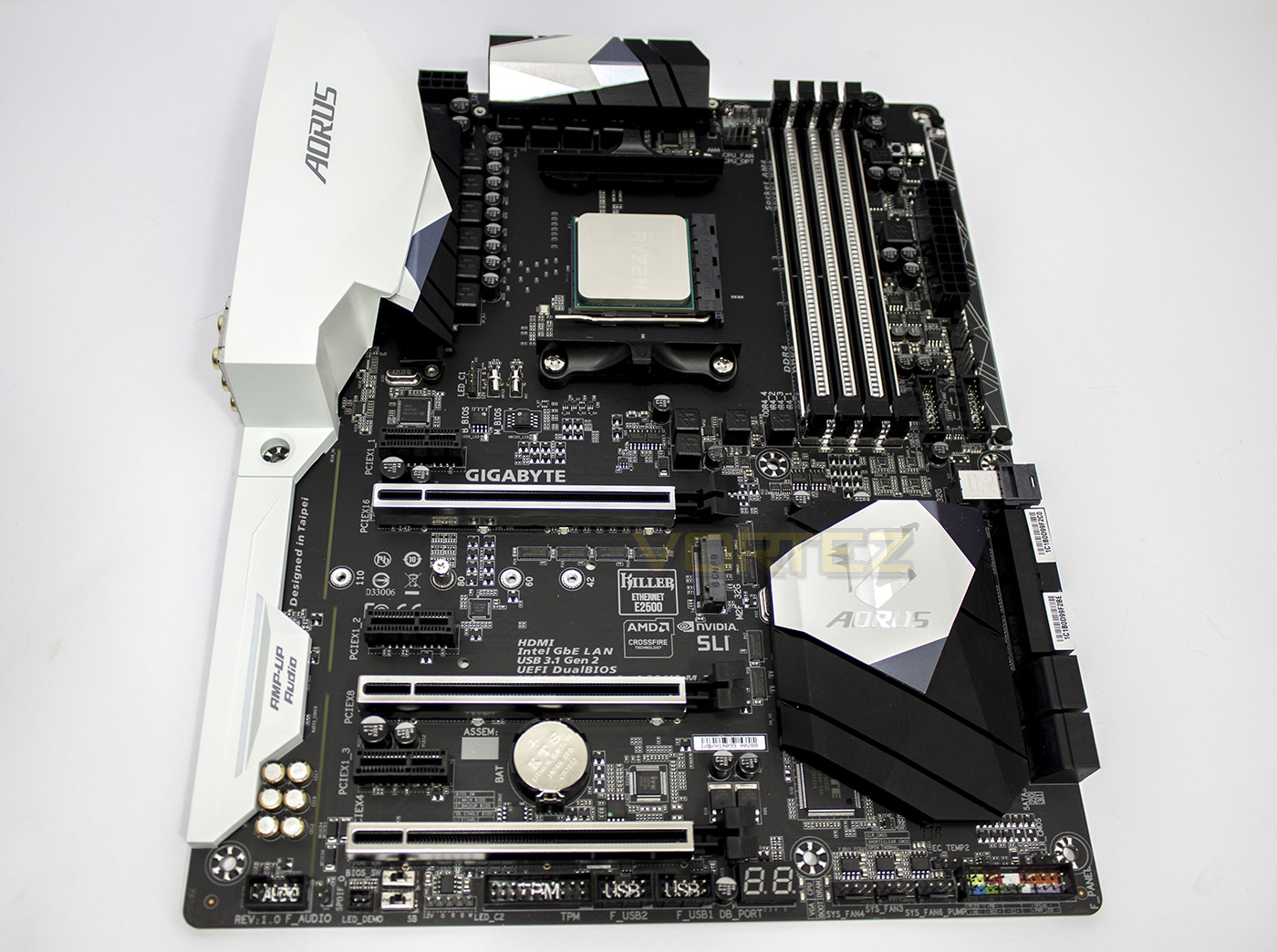
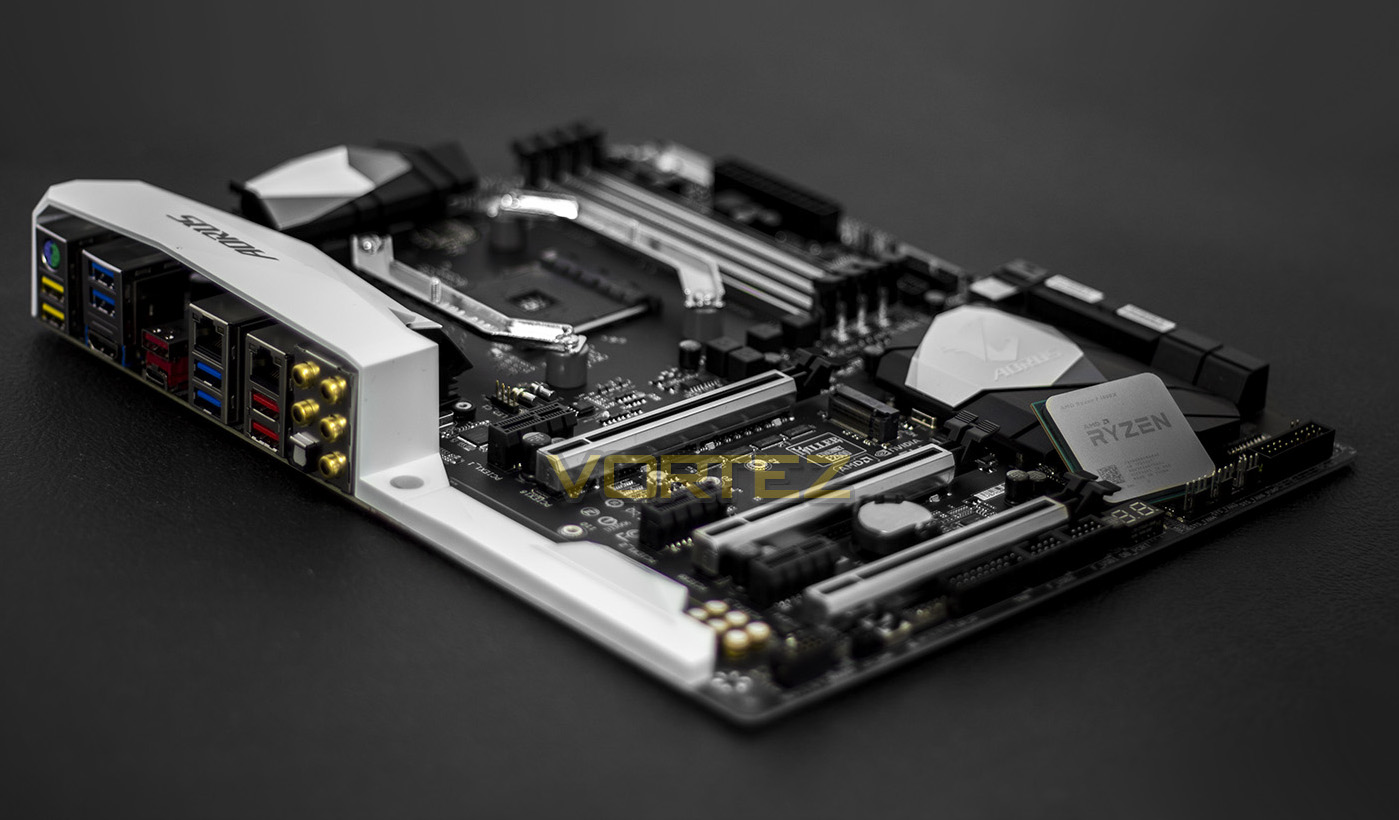
The AX370-Gaming 5 motherboard is well laid out, and features a triple space between the PCIe 16x and 8x lanes for two-way SLI or CrossFire. There is a large white plastic armour/cooling/shield that covers the rear IO and the audio circuitry, giving a more dramatic design aesthetic.
Closer Look
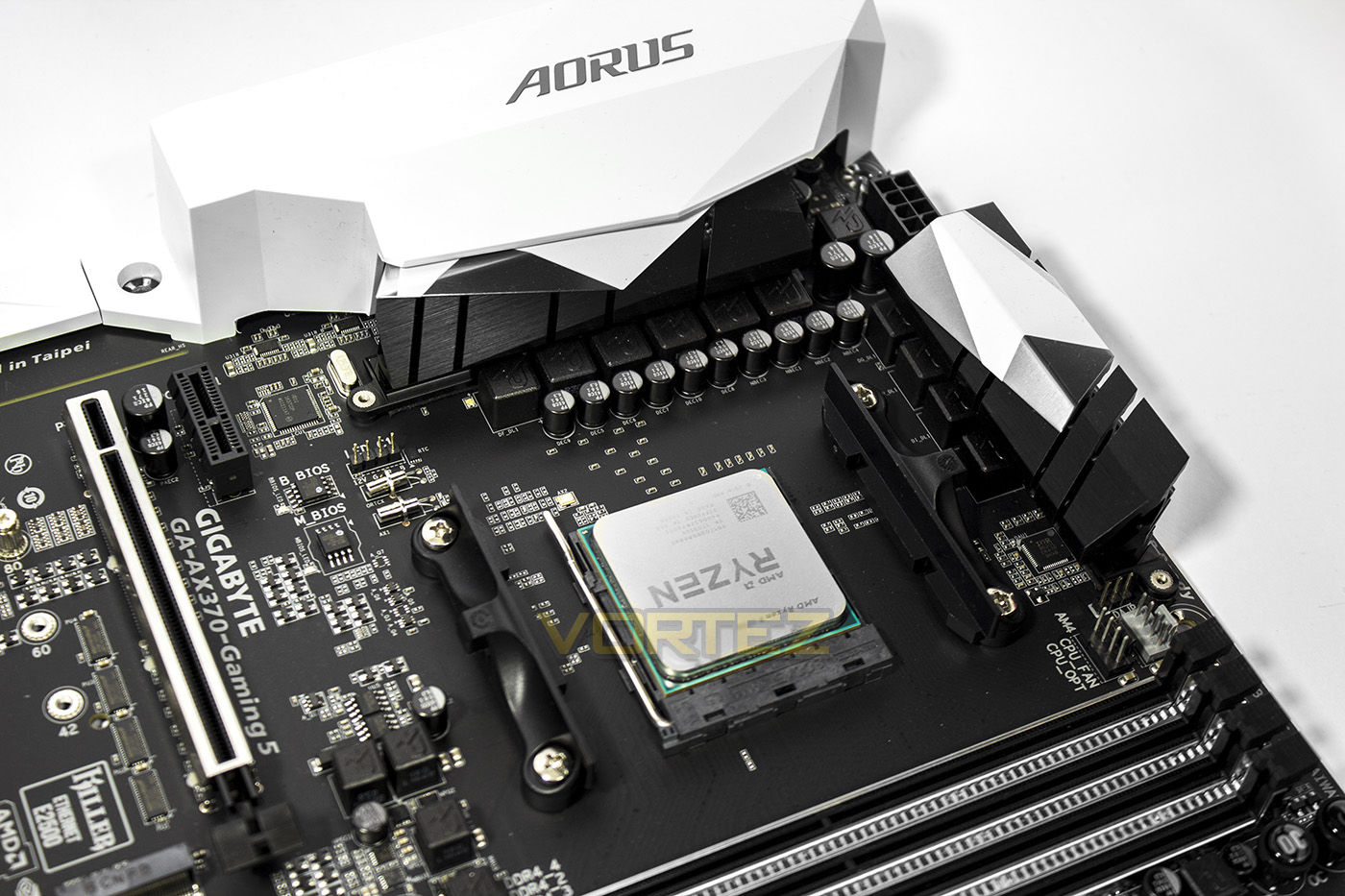
The AX370-Gaming 5 features a 6+4 digital phase power delivery system that features precise current sensing technology to ensure an even thermal loading for reliability and stability. Sitting just behind the 8pin EPS/CPU socket, there is a 4pin fan header, with another two 4pin fan headers for the CPU/CPU OPT towards the right of the image. Other features we can find is the Intel LAN chip which is sitting behind the dual BIOS chips, as the LED_C1 (Cooler LED) header as the Ryzen CPUs are shipped with RGB LED lighting.
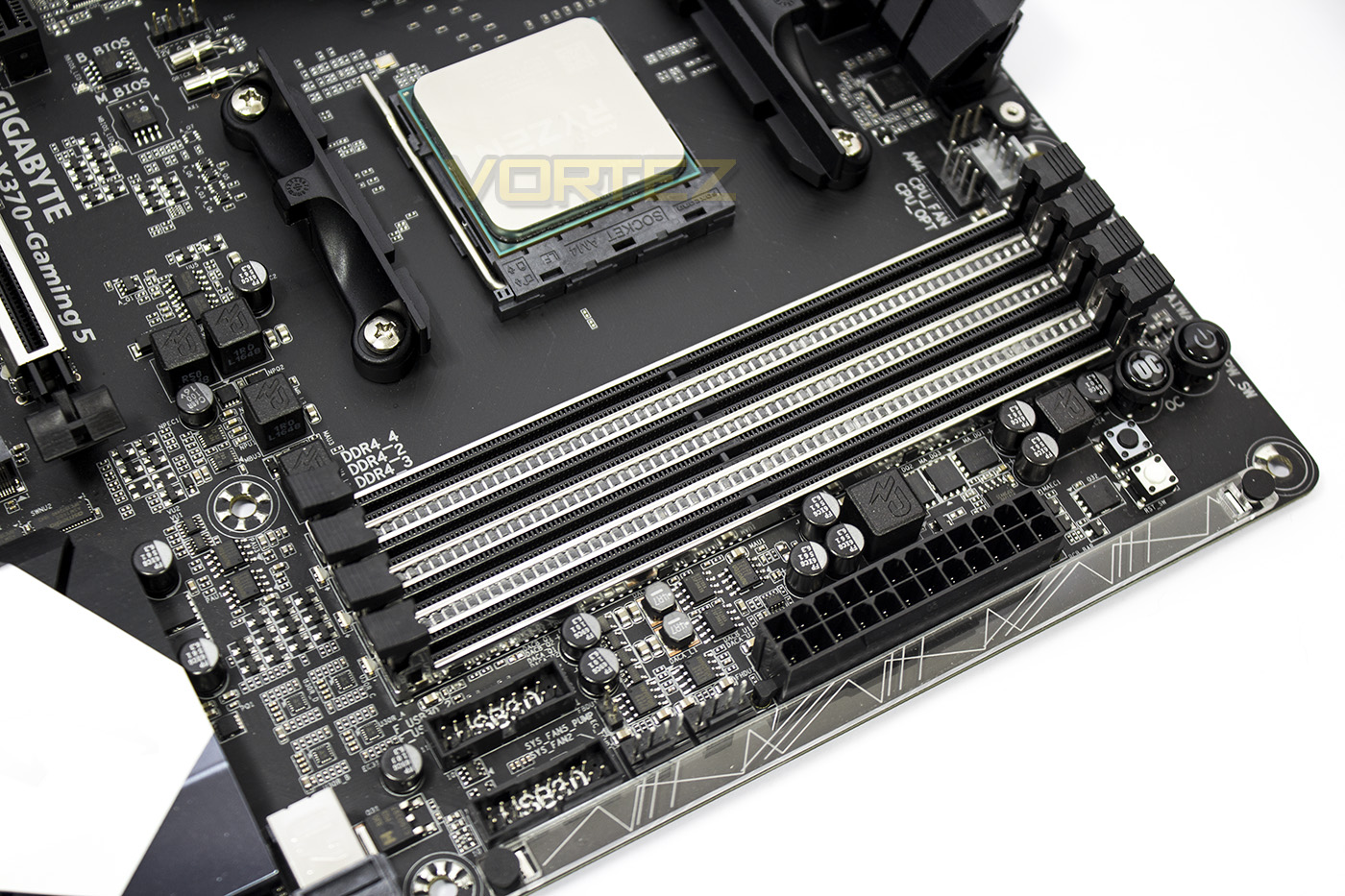
The DIMMs feature an armour similar to what we find on the PCIe lanes, between each slot is a row of RGB LEDs forming part of the Surround lighting effects. To the top right of the memory slots, there are some onboard controls including a power button, OC button, a smaller clear CMOS button, and a reset button. To the left of the 24pin ATX port there are a pair of 4pin fan headers (the right side is one of the 2a/24W pump header), a thermistor header, a pair of USB 3.1 Gen 1 headers (some would have preferred one of these to have been at a right angle), while at the edge of the board we see the Accent LED overlay.
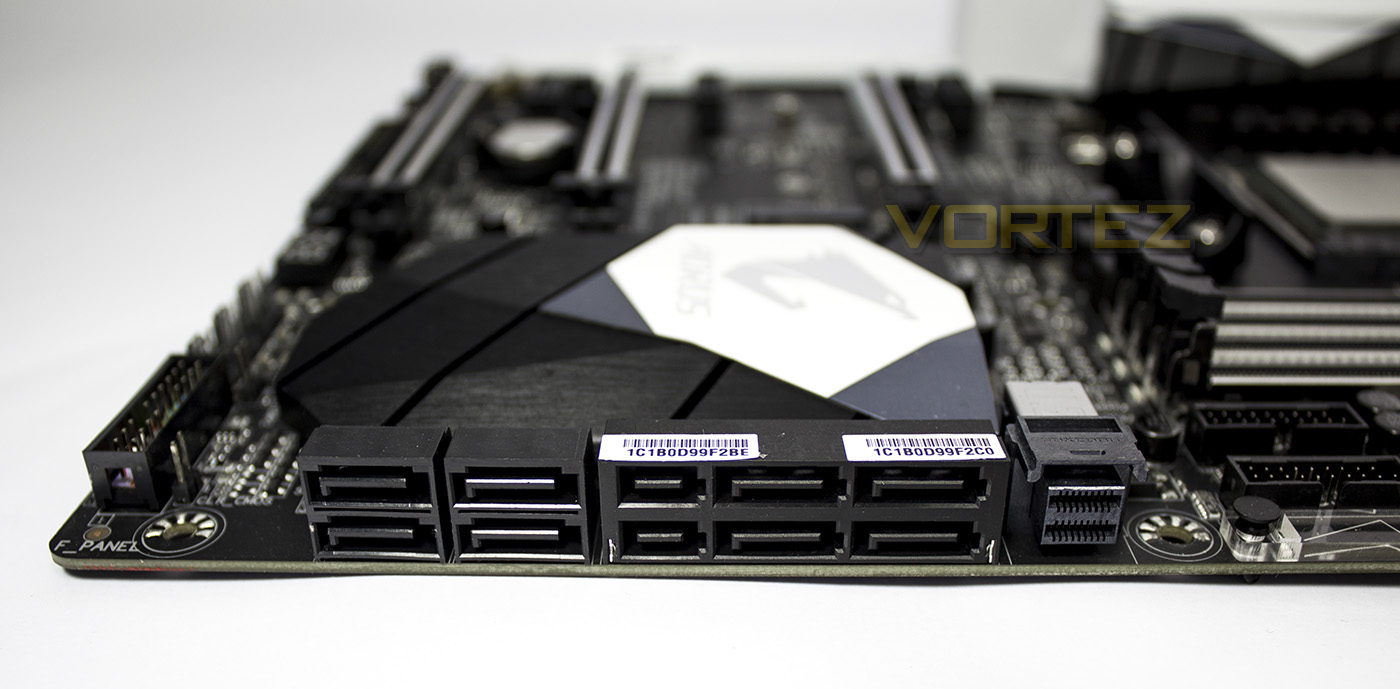
The bottom right of the board gives us the storage connectors, to which there are 8x SATA 6Gb/s, 2x SATA Express ports (with a maximum theoretical bandwidth of 1.97GB/s (16Gb/s). There is also the NVMe U.2 connector which shares PCIe lanes with the M.2 slot, which means that if you use the U.2 port, it disables the M.2 slot.
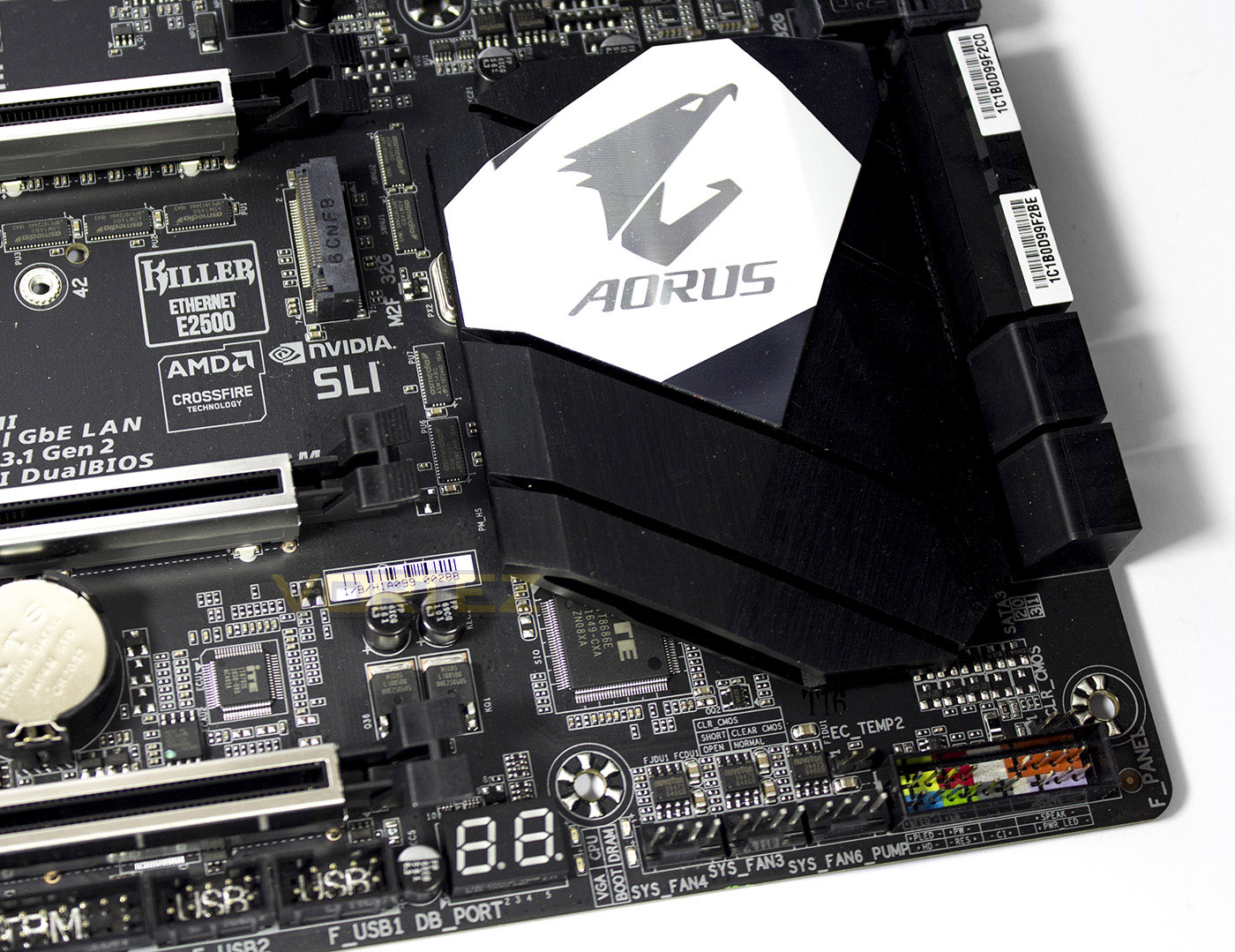
The bottom right of the board, sitting below the chipset headsink, you will find the front panel connection block. Just above and to the right of the FP block there is a CLR_CMOS jumper, and to the left of it is the second thermistor header. Moving along to the left you will find 3x 4pin fan headers of which farthest on the right is the second 2a/24W pump header, and of course there is a debug LED display.
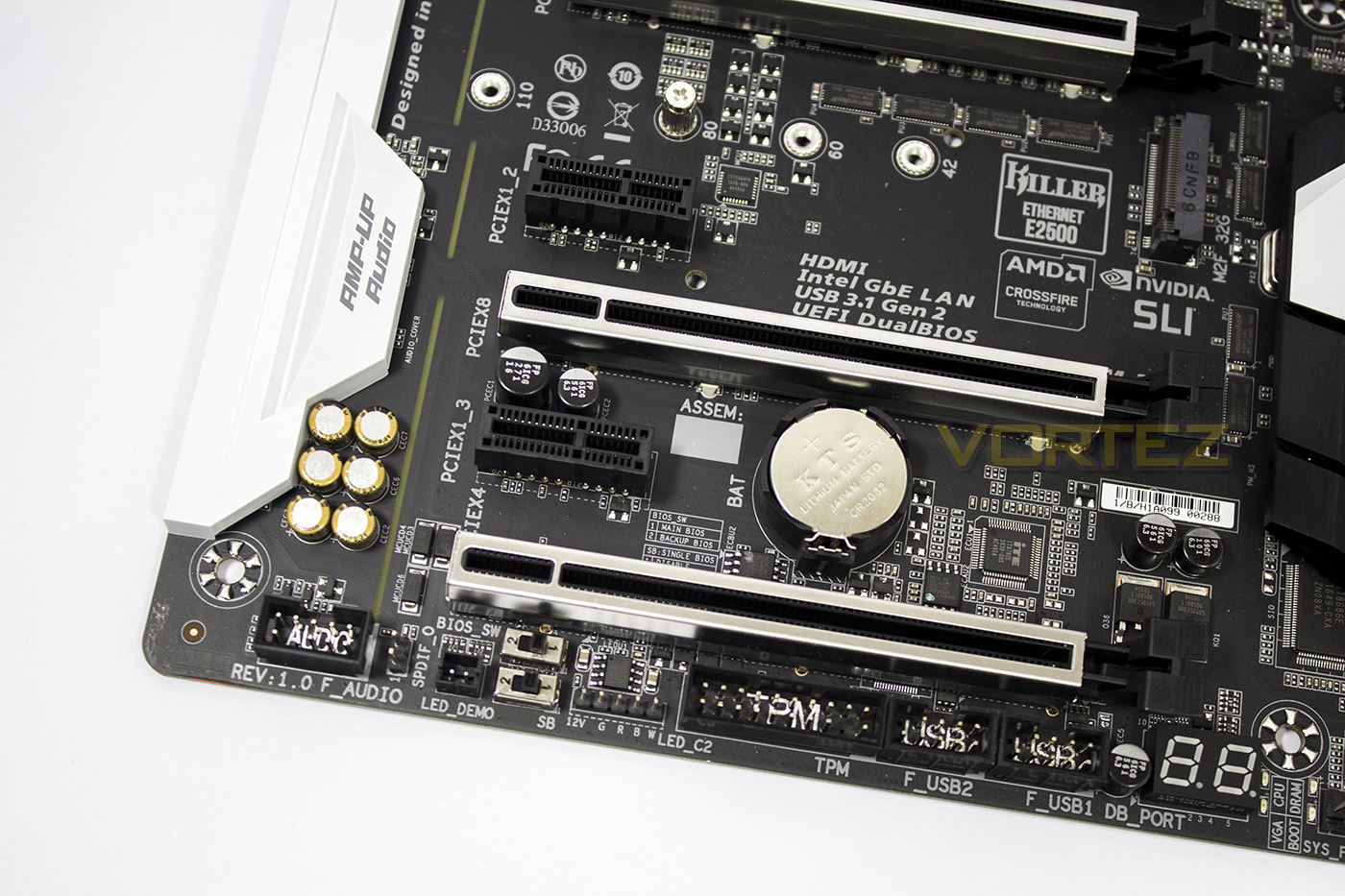
From the bottom left we can front panel audio connectors, S/PDIF out header, a pair of BIOS switches, the RGBW LED header, the TPM header, and finally 2x USB 2.0 headers.
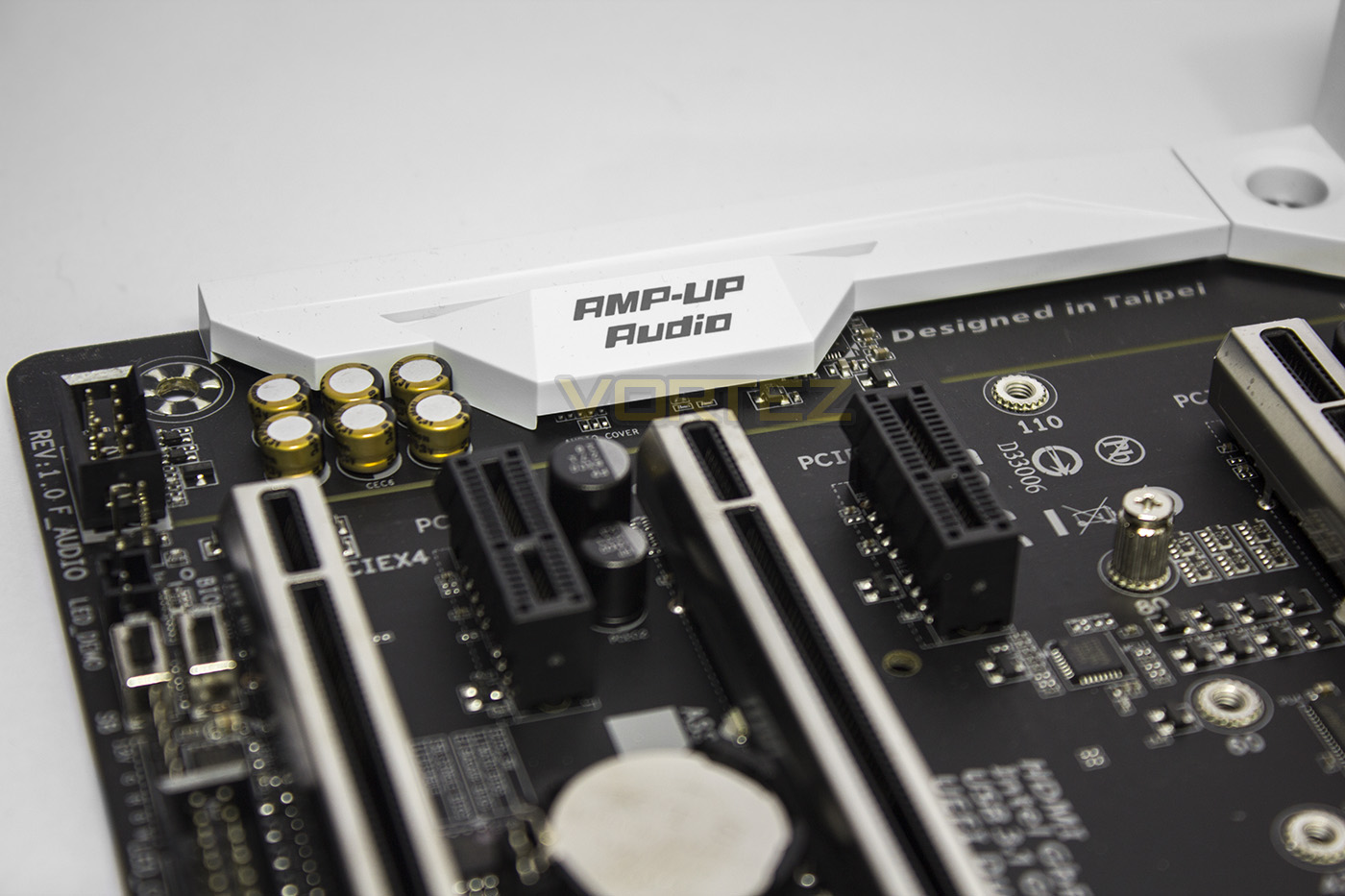
The audio circuitry is electronically isolated from other components much of it is hidden behind the plastic covering, though we get to see the cool Nichicon audio capacitors. The AX370-Gaming 5 sports two of the latest flagship audio codecs from Realtek, the ALC 1220, sporting an impressive 120dB SNR for both the rear, and front panel audio.
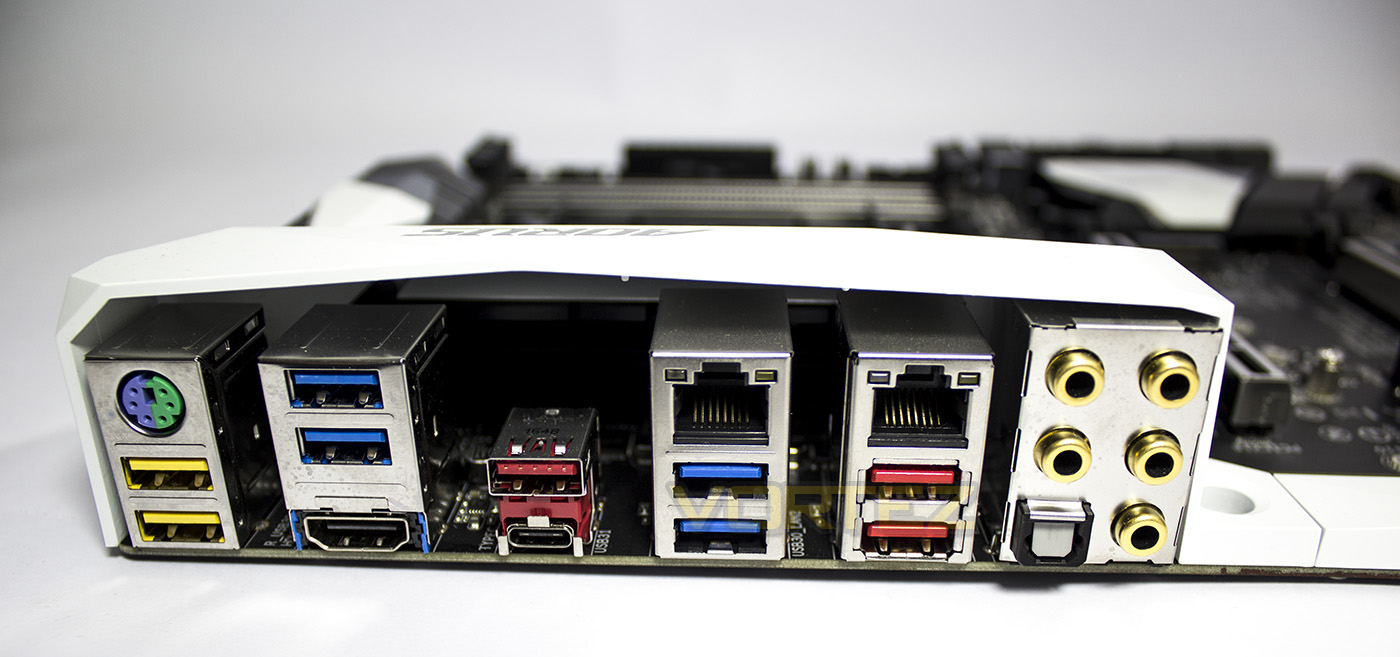
The Rear IO has an impressive selection of ports, including a universal PS/2 port, 2x DAC-UP USB 3.1 Gen 1 ports (Yellow), another 4x USB 3.1 Gen 1 ports (Blue), 3x USB 3.1 Gen 2 Type A (Red), 1x USB 3.1 Gen 2 Type C (the small port), HDMI 1.4b (for future support with A-Series APUs, supports 4096×2160@24 Hz), dual RJ-45 ports (left side for Killer E2500, right side Intel). Then we get an optical S/PDIF, and 5 audio jacks (centre/sub, speaker out, rear speaker out, Line in, Speaker/headphone out, and Mic in).
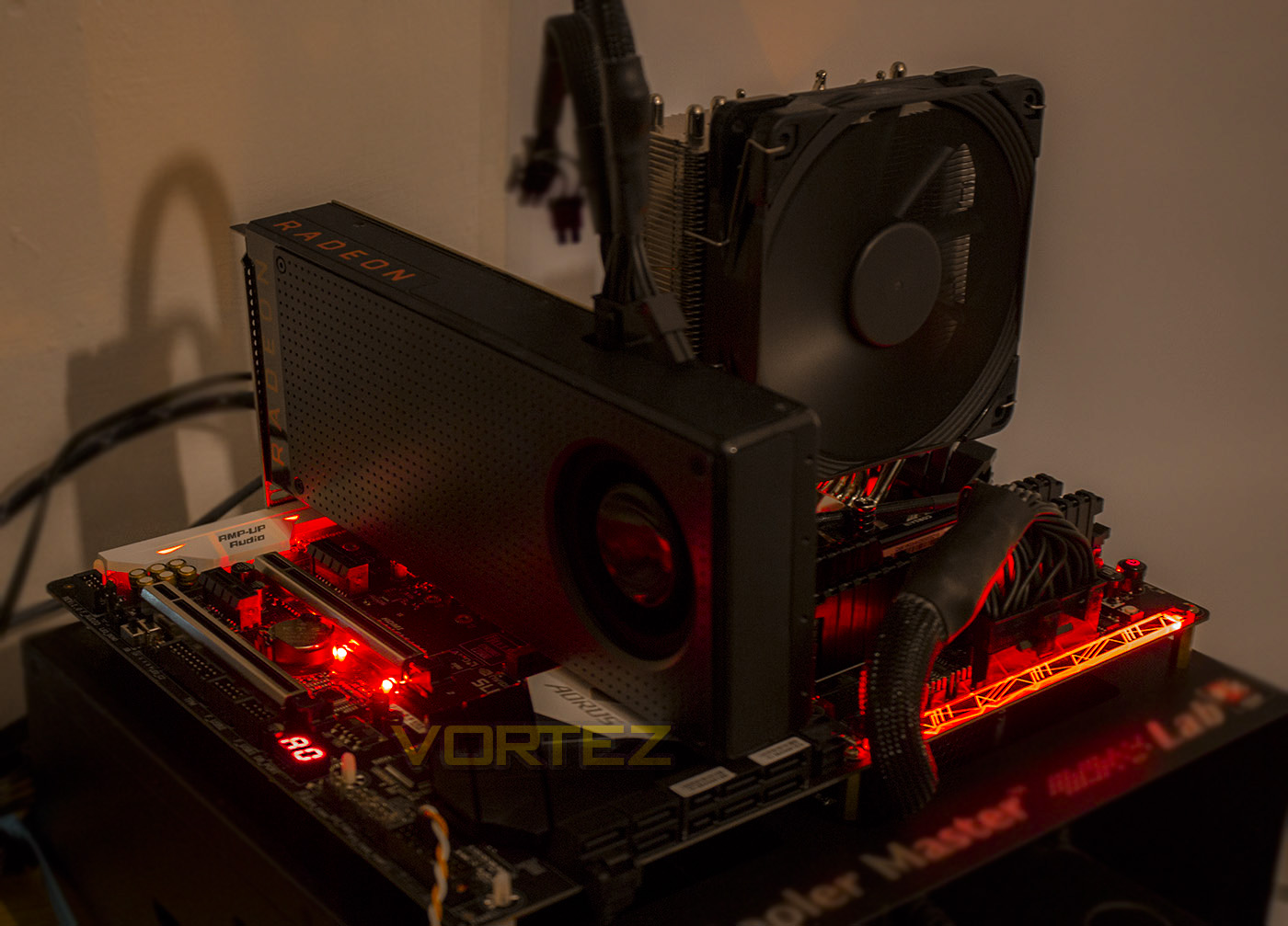
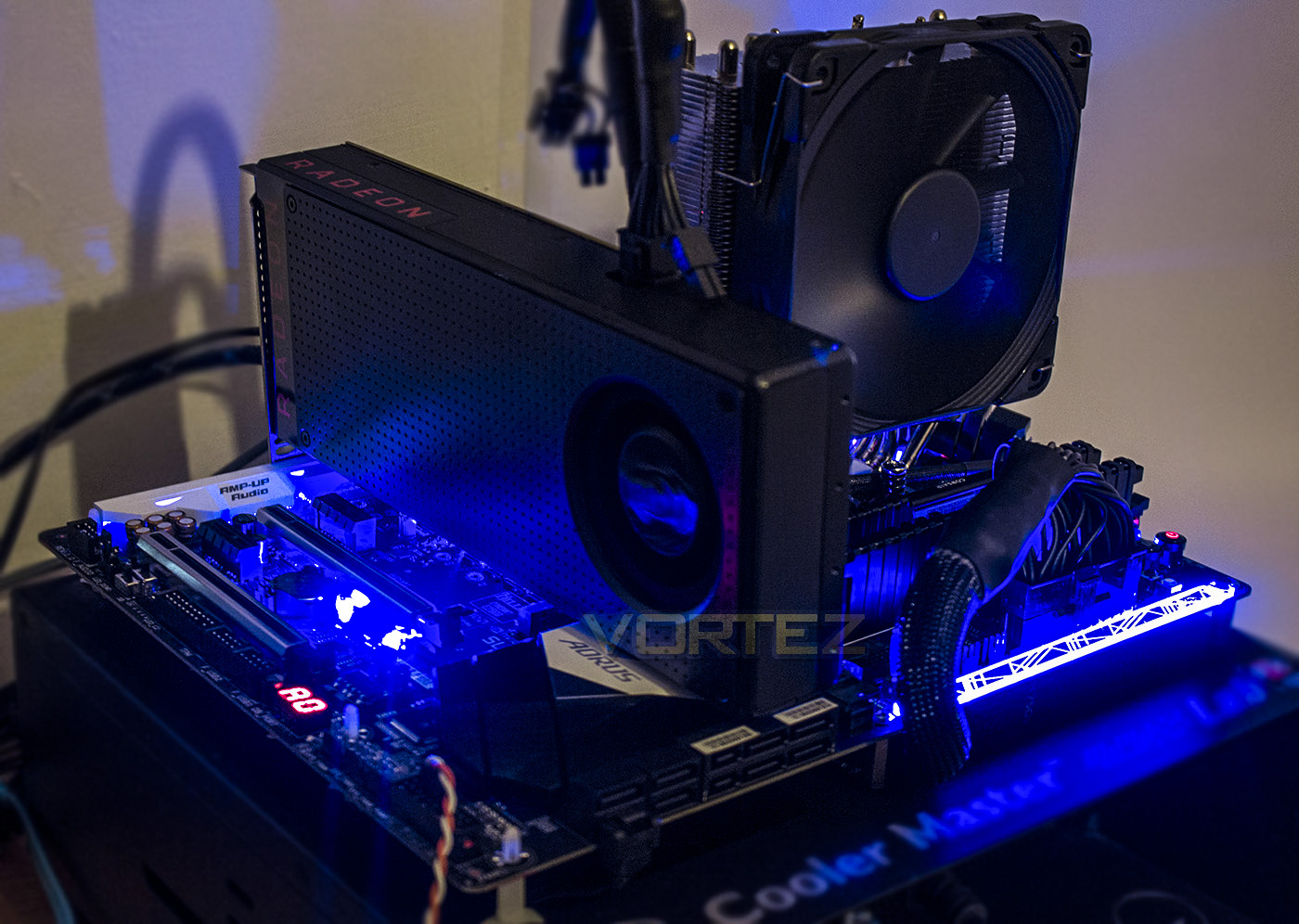
The lighting is customisable with various effects with the GIGABYTE RGB Fusion APP, which is also available as an Android/Apple mobile APP. There are various effects including pulse/music/and spectrum cycle, as well as performance related lighting indicator based on CPU load, thermal performance, or network performance. I was unable to create a mix of colours or a wave effect which is a shame, but maybe a Razer Chroma esque motherboard is yet to come.
Test Setup & Overclocking
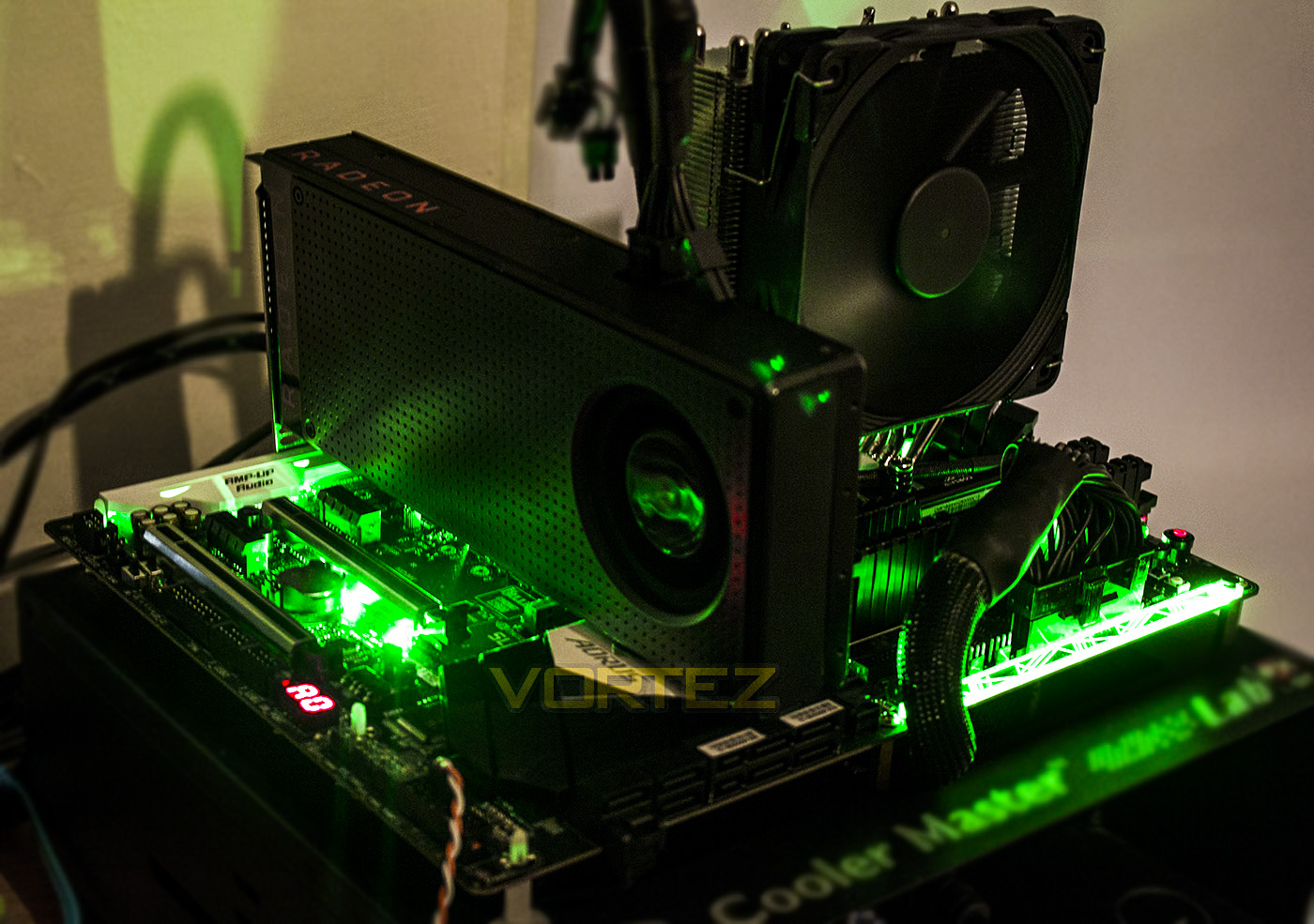
Test SetupCPU AMD Ryzen 7 1800X
Cooling Noctua U12S
Motherboard GIGABYTE AORUS GA-AX370-Gaming 5
Memory 16GB Corsair Vengeance LPX 3000MHz @ 2667MHz
Graphics AMD Radeon RX 480 8GB
Storage Corsair Force LE 480GB
PSU Corsair RM750X 80 Plus Gold Certified PSU
Cooling Noctua U12S
Motherboard GIGABYTE AORUS GA-AX370-Gaming 5
Memory 16GB Corsair Vengeance LPX 3000MHz @ 2667MHz
Graphics AMD Radeon RX 480 8GB
Storage Corsair Force LE 480GB
PSU Corsair RM750X 80 Plus Gold Certified PSU
Benchmarks
Cinebench R15 – CPU/OpenGL Score
x264 HD 4.0 – 1st and 2nd pass encoding
SiSoftware SANDRA – CPU & Memory benchmarks
POV-RAY – CPU benchmarks
TrueCrypt – CPU benchmarks
AIDA64 – CPU benchmarks & Memory
PCMark 8 – Home Suite & Photoshop
3DMark FireStrike – 3D Benchmark
Games – Rise of the Tomb Raider & Total War: WARHAMMER
x264 HD 4.0 – 1st and 2nd pass encoding
SiSoftware SANDRA – CPU & Memory benchmarks
POV-RAY – CPU benchmarks
TrueCrypt – CPU benchmarks
AIDA64 – CPU benchmarks & Memory
PCMark 8 – Home Suite & Photoshop
3DMark FireStrike – 3D Benchmark
Games – Rise of the Tomb Raider & Total War: WARHAMMER
Other Software
Temperature Analysis: Aida64 & Ryzen Master
Stress Testing Software: AIDA64 Stability Test
CPU Specification Monitoring: CPU-Z
Stress Testing Software: AIDA64 Stability Test
CPU Specification Monitoring: CPU-Z
Overclocking
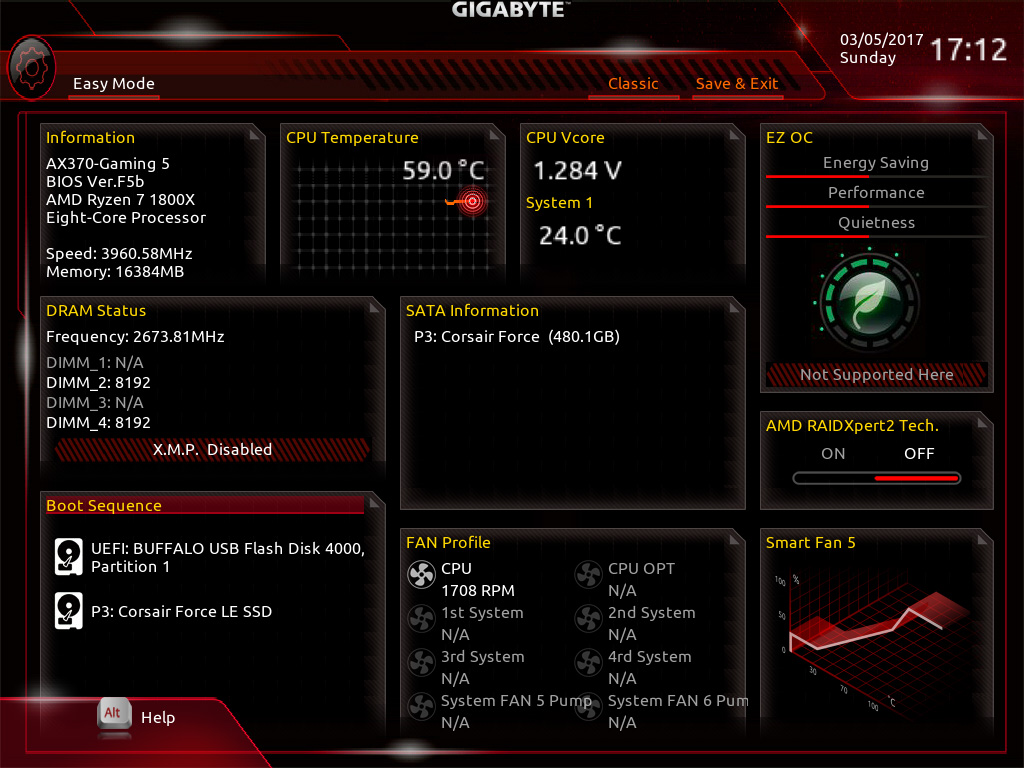
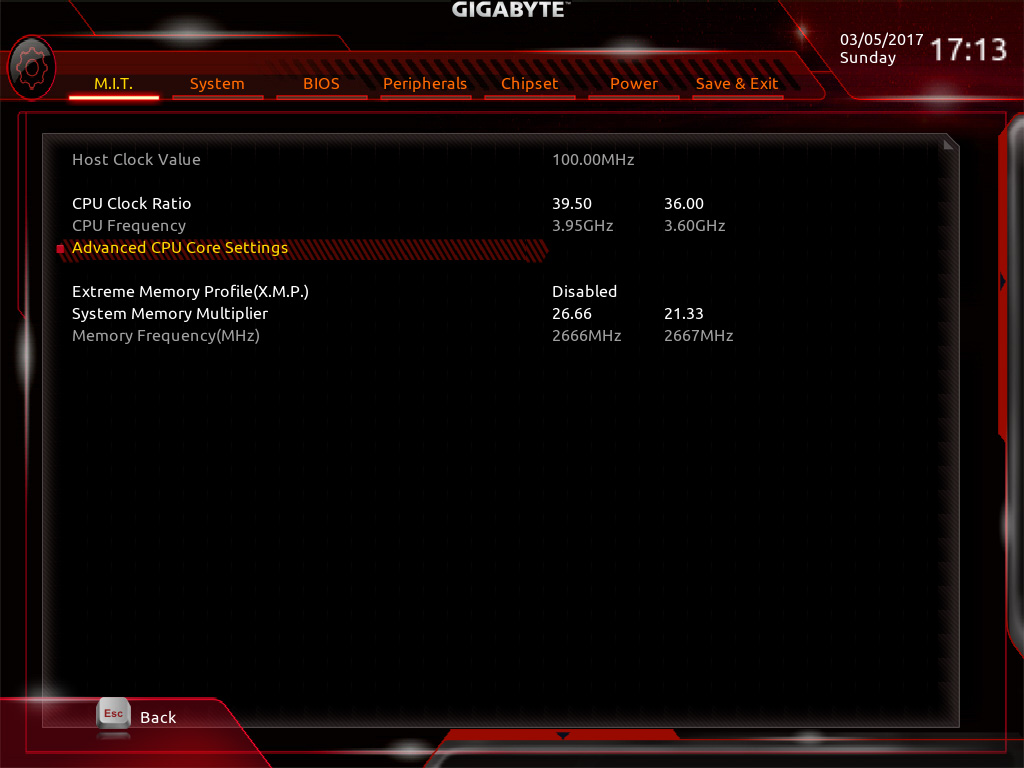
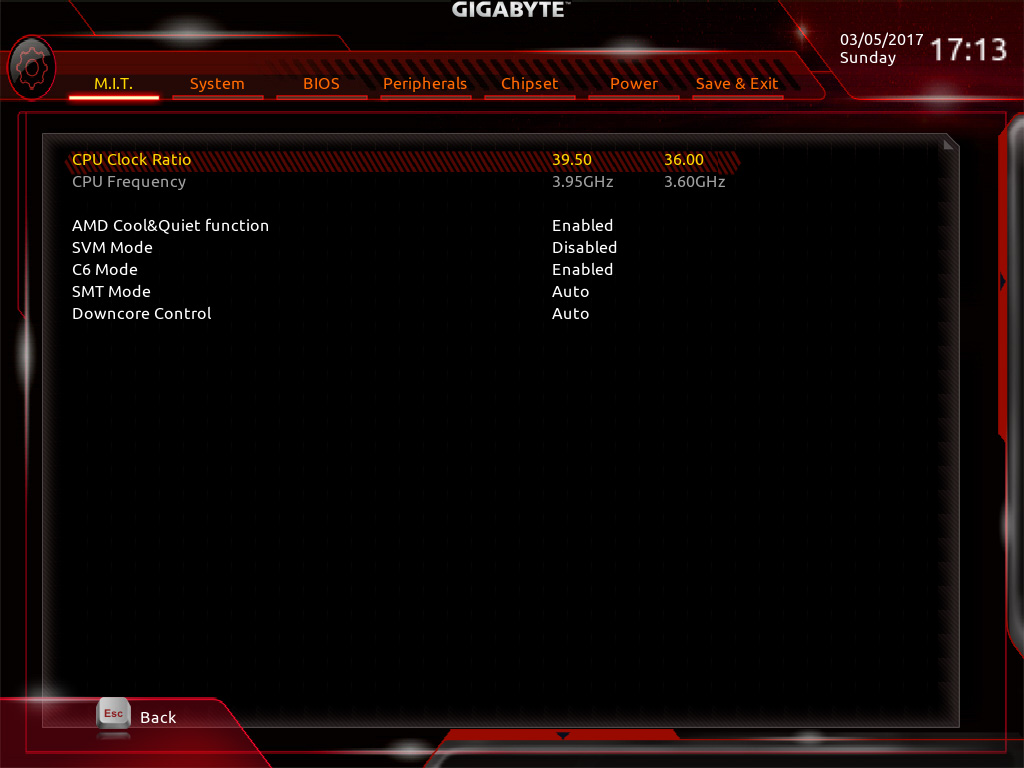
Overlocking with the AX370 is fairly easy as the primary controls you have at your disposal is the CPU Core Ratio (in 0.25x increments), the Memory speed/timings, the CPU/memory voltage, and the loadline calibration/digital power phase settings. We managed to boot into Windows at a setting of 41.75 x 100 = 4.175GHz (approx) but using auto voltage, it wanted to use 1.57V, which is rather high and isn’t recommended for anyone not using competent cooling. Moving the frequency down a little to around 4GHz, was easily attainable at around 1.425V with much more reasonable thermals. This will give a very good boost in performance. We were able to get our memory to run at its rated 3000MHz but we struggled to get over this stable. We have been informed that with the right kit, 3200MHz should be possible and it is likely that there are still some BIOS updates to come to improve memory stability. Those using high-end cooling, or a custom water cooling loop will likely find that this board will give competent overclocking results, however, the more enthusiast overclockers may prefer the AORUS AX370-Gaming K7 motherboard, or an alternative which provides control over the baseclock frequency for even greater control.
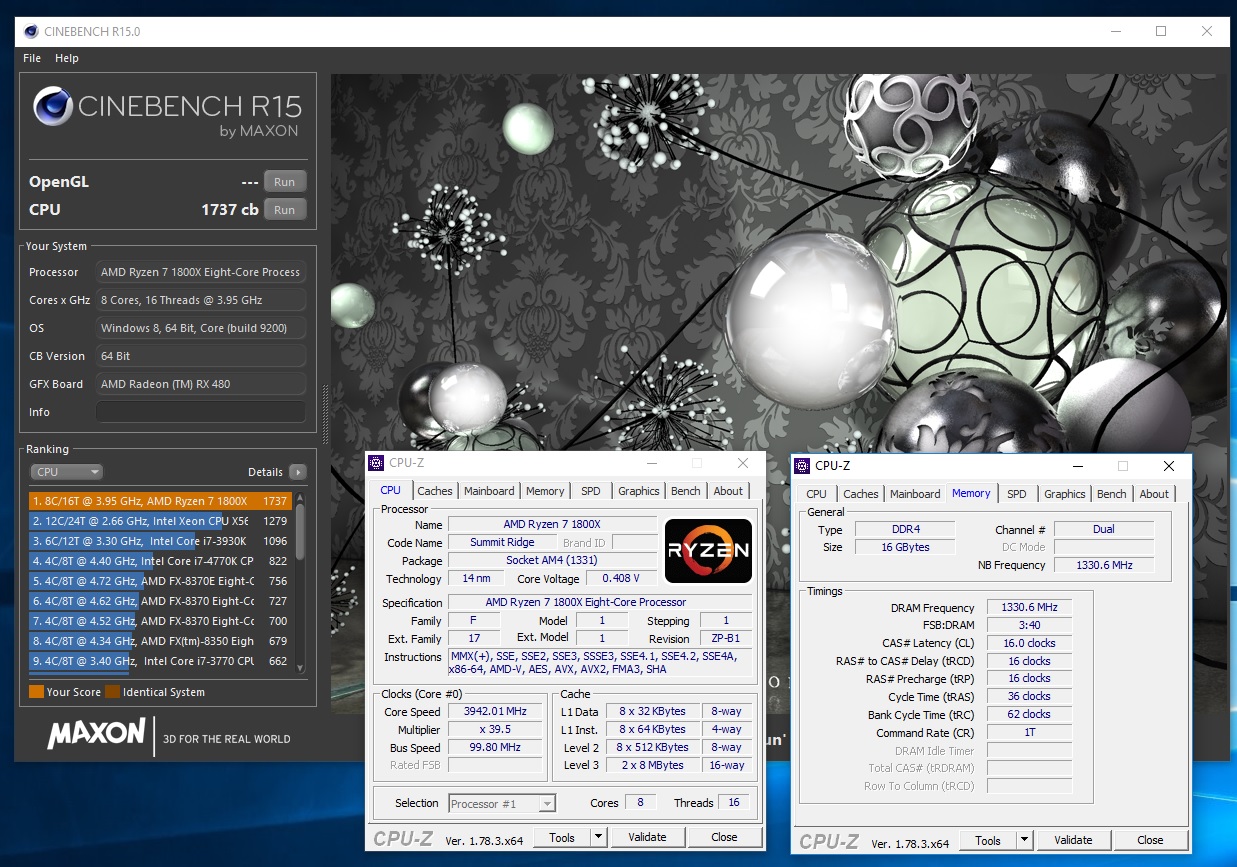
Benchmarks: Power Consumption
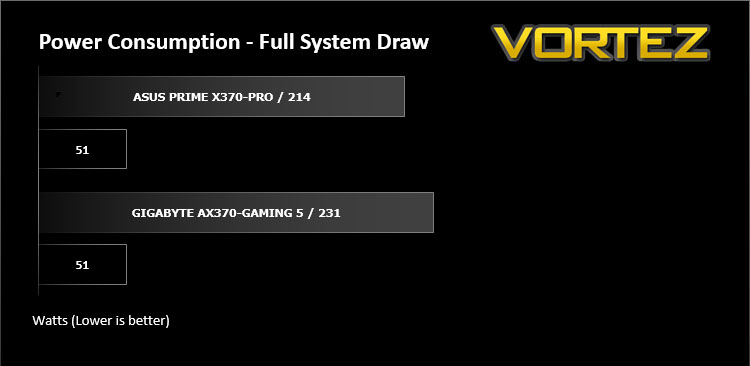
It’s interesting to note the power consumption across all motherboards. Although they are using the Z270 chipset, energy results can fluctuate between manufacturers due to the features and specifications that are integrated. First of all, for the idle tests the system is cold booted into Windows and no additional applications are executed – the watts are noted on the external energy monitor we use and then the system is loaded with 3DMark FireStrike – watts are again monitored for the duration of the test and the highest rated wattage result is then noted down. Below are the results of this energy test.
Benchmarks: Cinebench R15
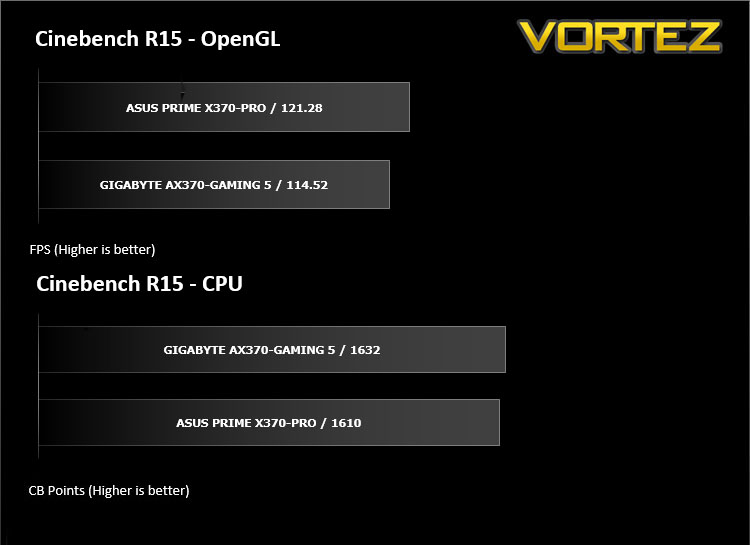
CINEBENCH is a real-world cross platform test suite that evaluates your computer’s performance capabilities. CINEBENCH is based on MAXON’s award-winning animation software CINEMA 4D, which is used extensively by studios and production houses worldwide for 3D content creation. MAXON software has been used in blockbuster movies such as Iron Man 3, Oblivion, Life of Pi or Prometheus and many more.
Benchmarks: X264 HD
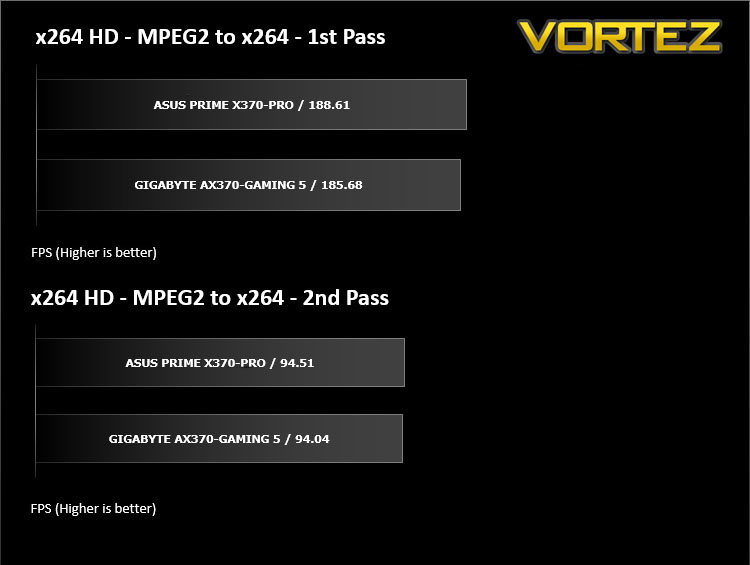
Simply put, this test measures how fast your machine can encode a short, DVD quality MPEG-2 video clip into a high-quality x264 video clip. What’s x264, you ask? It’s more or less the next-generation Xvid/DivX codec. I think it’s ideal for a benchmark because the application (x264.exe) reports fairly accurate compression results (in frames per second) for each pass of the video encoding process, and it uses multi-core processors very efficiently.
Benchmarks: SiSoftware SANDRA
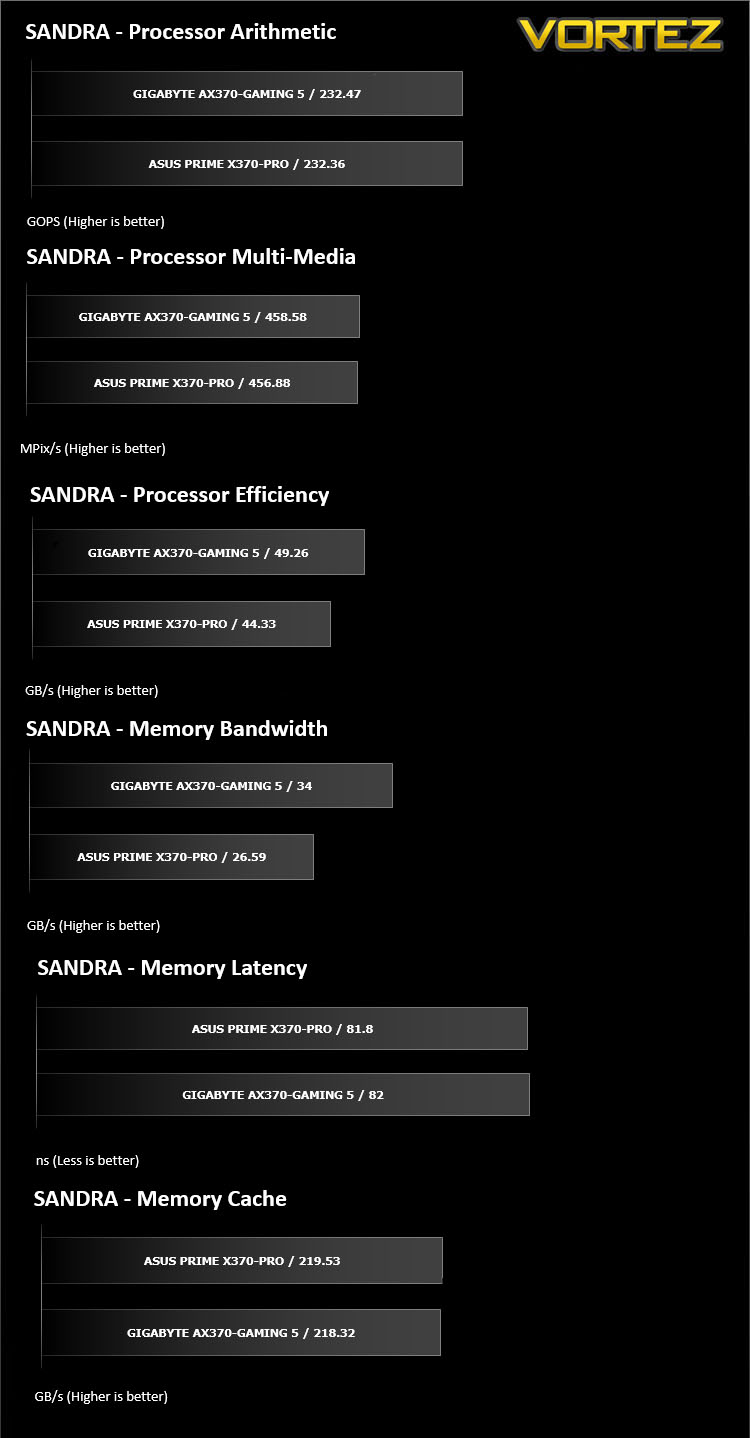
SANDRA isn’t always a benchmark that is included in hardware reviews but we believe it shouldn’t be ignored. SANDRA provides a vigorous package that tests your system in a rather large array of benchmarks. There are many aspects of benchmark that can be executed. We will be considering – CPU and memory tests.
Benchmarks: POV-RAY
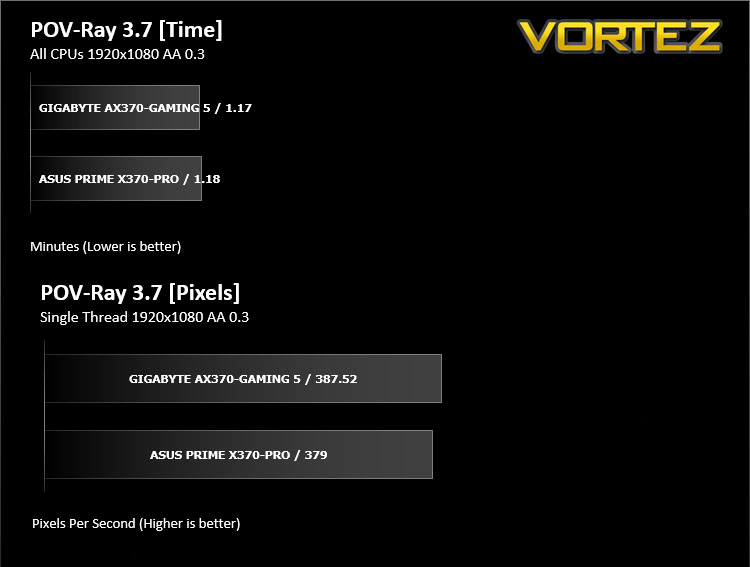
Persistence of Vision Raytracer’s PovRay is a free and open source 3D animator application with versions for computers with different operating systems.
This product allows users to build their custom 3D worlds with excellent quality despite their computer’s hardware. It has adjustable options for levels of radiance, refraction, and reflection. Calculation time may vary depending on the computer model, but PovRay can adapt to many computer builds, and is supported by the open source community.
This product allows users to build their custom 3D worlds with excellent quality despite their computer’s hardware. It has adjustable options for levels of radiance, refraction, and reflection. Calculation time may vary depending on the computer model, but PovRay can adapt to many computer builds, and is supported by the open source community.
Benchmarks: TrueCrypt
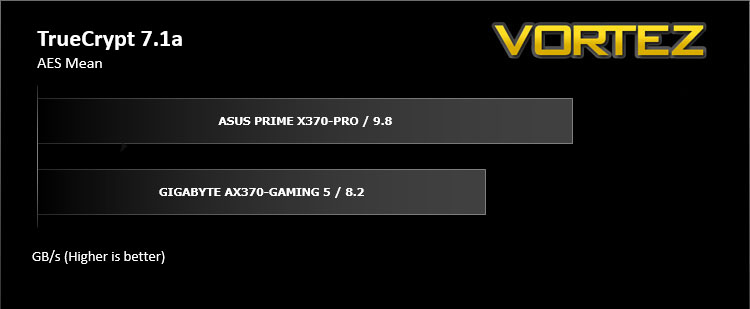
TrueCrypt is a discontinued source-available freeware utility used for on-the-fly encryption (OTFE). It can create a virtual encrypted disk within a file or encrypt a partition or (under Microsoft Windows except Windows 8 with GPT) the entire storage device (pre-boot authentication).
Benchmarks: AIDA64
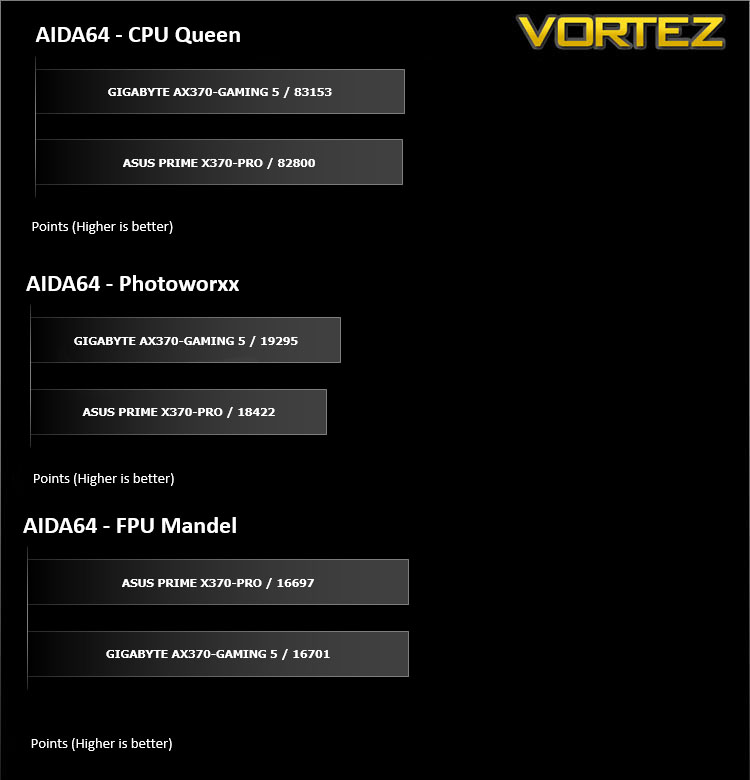
AIDA64 Product PageThis simple integer benchmark focuses on the branch prediction capabilities and the misprediction penalties of the CPU. It finds the solutions for the classic “Queens problem” on a 10 by 10 sized chessboard. At the same clock speed theoretically the processor with the shorter pipeline and smaller misprediction penalties will attain higher benchmark scores. For example — with HyperThreading disabled — the Intel Northwood core processors get higher scores than the Intel Prescott core based ones due to the 20-step vs 31-step long pipeline. CPU Queen test uses integer MMX, SSE2 and SSSE3 optimizations.
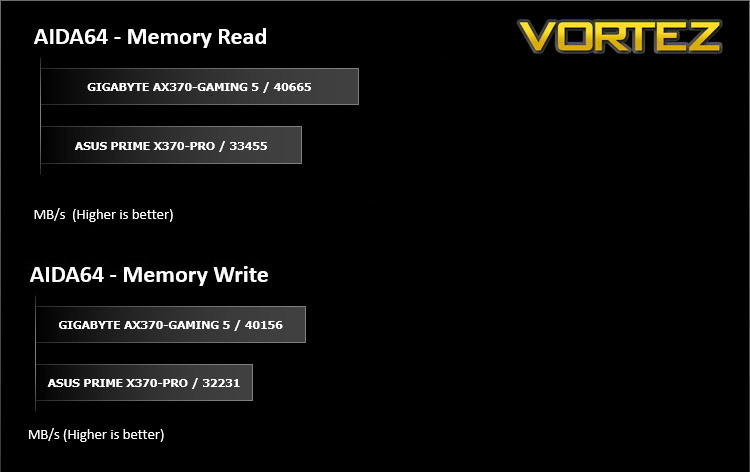
Benchmarks: PCMark 8
PCMark 8 combines performance benchmarking with battery life measurement and includes tests based on popular Adobe and Microsoft applications. Whether you are looking for long battery life, or maximum power, PCMark 8 will help you find the devices that offer the perfect combination of efficiency and performance for your needs. It’s the complete PC performance benchmark for home and business.
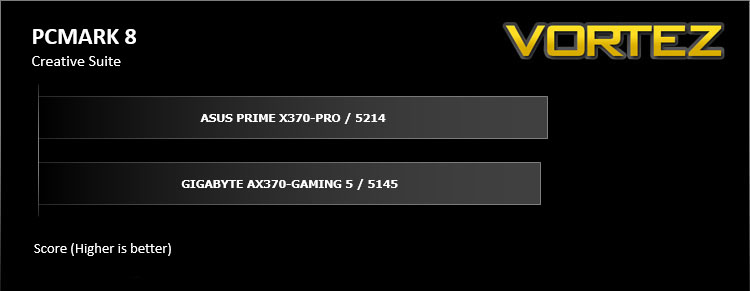
Benchmarks: PCMark 8 Photoshop
The PCMark 8 Applications benchmark measures system performance using popular applications from the Adobe Creative Suite and Microsoft Office. You can choose which tests to run based on the applications installed on your system. Each test automatically steps through a series of actions such as opening, editing and saving a file. The results are used to calculate the PCMark 8 Applications scores for the system.
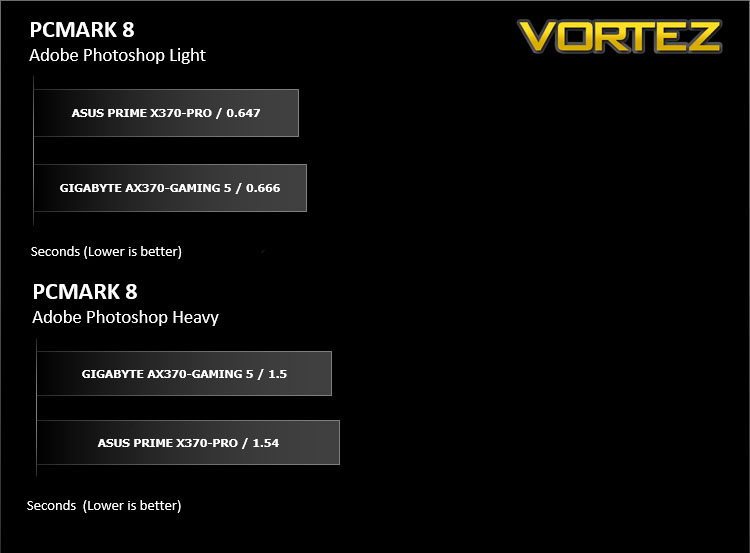
Benchmarks: 3DMark
3DMark FireStrike Product PageFire Strike is our new showcase DirectX 11 benchmark designed for high-performance gaming PCs. It is our most ambitious and technical benchmark ever, featuring real-time graphics rendered with detail and complexity far beyond what is found in other benchmarks and games today. Fire Strike will only be available in the Windows editions of 3DMark initially.
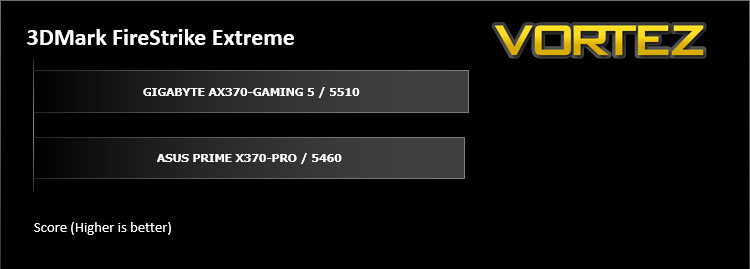
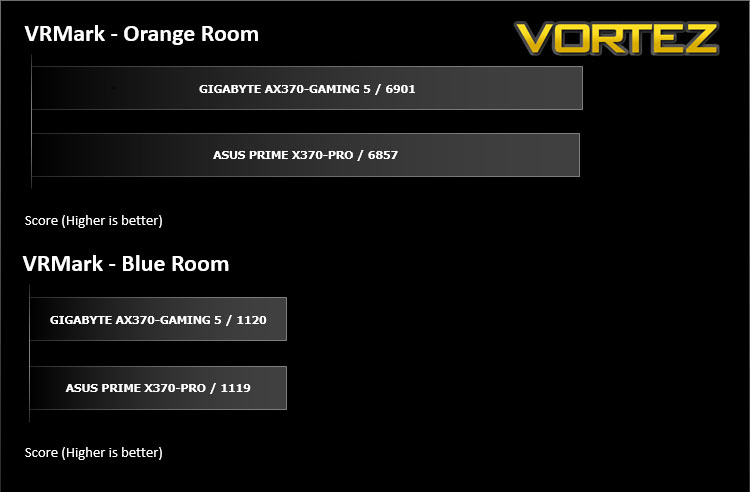
VR Performance – VRMark
VRMark Product PageVRMark includes two VR benchmark tests that run on your monitor, no headset required, or on a connected HMD. At the end of each test, you’ll see whether your PC is VR ready, and if not, how far it falls short.
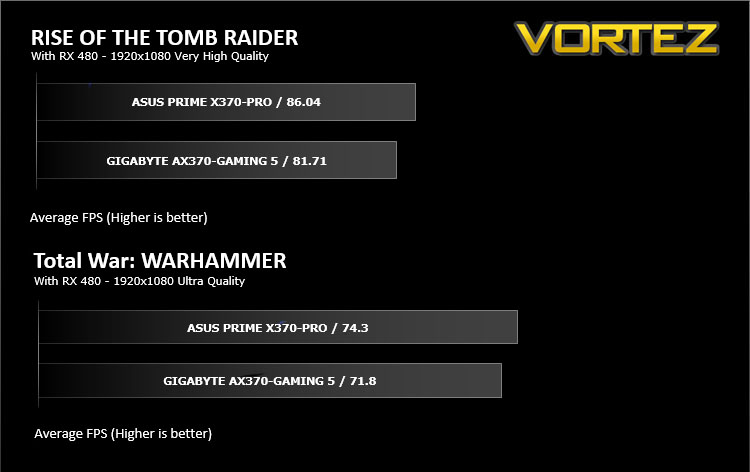
Gaming Performance – Rise of the Tomb Raider & Total War: WARHAMMER
It’s important for us to perform a number of game benchmarks as well as the synthetic tests because gamers will want to know if there are any significant benefits. So here we have two recent gaming titles.
Conclusion
GIGABYTE have provided enthusiasts and gamers with one hell of a motherboard to support the latest CPUs from AMD. Those in the AMD camp have been stuck with the 990FX motherboards for so long that contemporary motherboards almost look beautifully alien. What’s with all the metal and shiny lighting. The AORUS AX370-Gaming 5 picks up two swords by doubling up on many of its features, including the BIOS, audio codecs, and network options. There are a host of advanced control features ranging from performance related sensors, to aesthetic customisations all tied together by GIGABYTES APP Center software. There are some discrepancies noted in the performances between the PRIME X370 and the AX370-Gaming 5, and the truth is, these differences in performance are likely due to BIOS updates since the time of testing and there has been 2 BIOS updates for the Gaming 5 since initial testing, with the most recent being a few days ago (at time of writing).
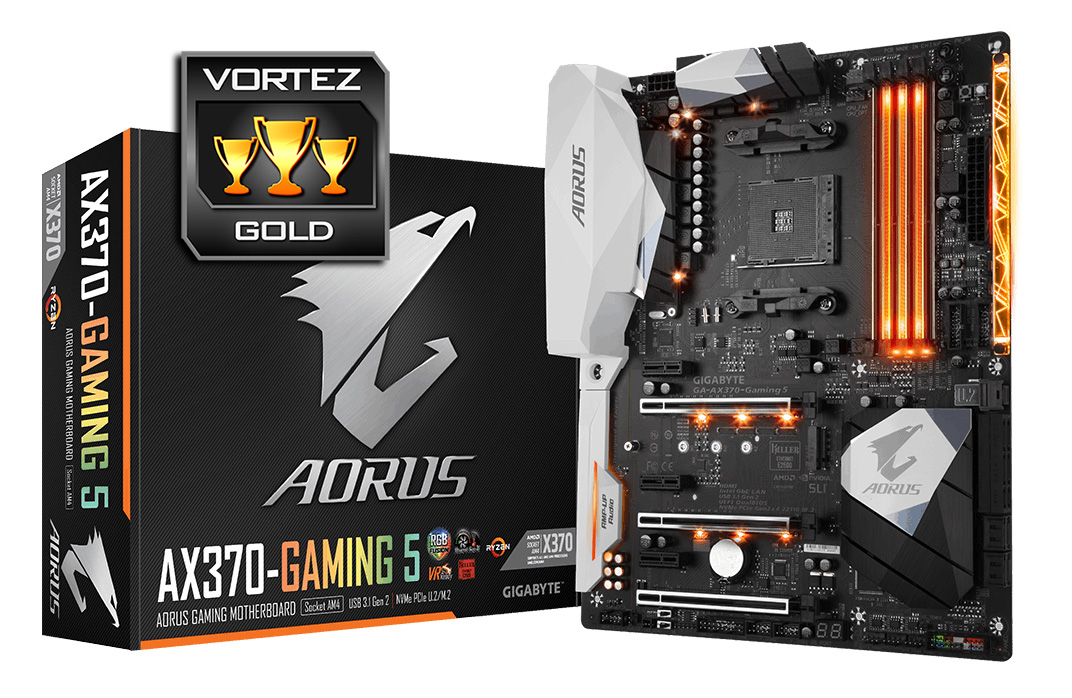
GIGABYTE make no mistake in providing people with the full X370 experience, including a selection of all the cutting edge storage connectivity. This includes: M.2, NVMe U.2, and SATA Express. So users can find comfort in knowing that this motherboard will support the latest and fastest storage solutions available.
Overclocking with AMD Ryzen is a rather simple affair, more so due to the fact that the baseclock is locked on the AX370-Gaming 5 board. This doesn’t appear to be too much of a problem however due to the x0.25 steps allowing for fine tuning of the CPU core frequency. We were able to boot in with the 1800X at 4.15GHz, however due to the high voltage required to run stable, we would only recommend this for those with capable coolers, or those that are watercooling (custom loops, not AIO). We did get a comfortable 4.05GHz stable on reasonable cooling/temperatures, meaning that this board is very capable of delivering competent headroom for the enthusiasts looking to get the most performance out of their system.
Of All the features the AX370-Gaming 5 motherboard offers, it lacks a front panel 3.1 Gen 2 header. I think many people would be happy to have an additional pair of USB 3.1 Gen 1 (OMG can we go back to just saying USB 3.0) on the rear IO, moving a pair of USB 3.1 Gen 2 to the front, this would give better chassis compatibility, as well as removing that huge cluster of pins which are renowned for being remarkably fragile.
Overall, the Aorus AX370-Gaming 5 is a highly competitive, feature rich board that matches, or even exceeds the feature set of similarly priced Intel boards (only the super high end Z270 motherboards feature SATA Express AND NVMe U.2), fitting in nicely as an upper mid/premium X370 motherboard. The host of internal expansions make the AX370-Gaming 5 a perfect match the Gamer, the Power User, and the watercooler, yet comes in a little cheaper than alternative similarly specced motherboards.
The AORUS AX370-Gaming 5 motherboard shows what the full unadulterated X370 experience is all about. There is an abundance of connectivity and storage options, custom lighting effects, and a near endless list of GIGABYTE exclusive technologies. If there is anything else you can think of that will make a motherboard better, GIGABYTE has added two of them.
Pros
+ Attractive design
+ Customisable RGB LED lighting (can be controlled via mobile app)
+ Excellent performance
+ 8x 4pin hybrid fan headers (including 2x 24W support)
+ Features SATA Express, M.2, and NVMe U.2
+ 10x USB 3.1 ports (including 4x 3.1 Gen 2)
+ Dual ALC 1220 supported by premium Creative technologies
+ Dual Network (Killer E2500 + Intel)
+ DualBIOS
+ Dual Armor DIMM and PCIe Metal Shielding
+ Onboard buttons/controls/indicators
+ Capable overclocker
+ Features onboard pins for an additional RGBW LED strip
+ HDMI 1.4b, (meaning that this is a top tier motherboard that will support the use of an A-Series APU)
Cons
– No front panel USB 3.1 Gen 2 connector
– M.2/U.2 share PCIe lanes (meaning only one can be used at a time)
– Locked Base clock
+ Attractive design
+ Customisable RGB LED lighting (can be controlled via mobile app)
+ Excellent performance
+ 8x 4pin hybrid fan headers (including 2x 24W support)
+ Features SATA Express, M.2, and NVMe U.2
+ 10x USB 3.1 ports (including 4x 3.1 Gen 2)
+ Dual ALC 1220 supported by premium Creative technologies
+ Dual Network (Killer E2500 + Intel)
+ DualBIOS
+ Dual Armor DIMM and PCIe Metal Shielding
+ Onboard buttons/controls/indicators
+ Capable overclocker
+ Features onboard pins for an additional RGBW LED strip
+ HDMI 1.4b, (meaning that this is a top tier motherboard that will support the use of an A-Series APU)
Cons
– No front panel USB 3.1 Gen 2 connector
– M.2/U.2 share PCIe lanes (meaning only one can be used at a time)
– Locked Base clock
Click here for an explanation of our awards at Vortez.net.