







Take an NVIDIA GTX 970, a hefty factory ‘Super overclock’ (SOC) and complete with Windforce cooling and you have a GIGABYTE G1 GAMING GTX 970.

Product on Review: GV-N970G1 GAMING-4GD
Manufacturer & Sponsor: GIGABYTE
Street Price: £289.99 GBP
GIGABYTE are perhaps best known for their range of motherboards but are rapidly becoming a firm favourite for that other essential PC component, the graphics card. With the advent of their Windforce cooling a few generations back, GIGABYTE are up there competing with the very best thanks to huge support and adoration of PC enthusiasts and overclockers alike. The G1 gaming (formally Super Overclock) range makes use of a innovative feature called GPU Guantlet which GIGABYTE say guarantees higher overclocking capability in terms of excellent power switching – a feature we will be putting to the test later in this review. So we have a custom PCB, custom cooling along with one of the fastest factory overclocks found on NVIDIA’s GTX 970 (BASE: 1178 MHz / BOOST: 1329 MHz). All this at a reasonable £289.99.
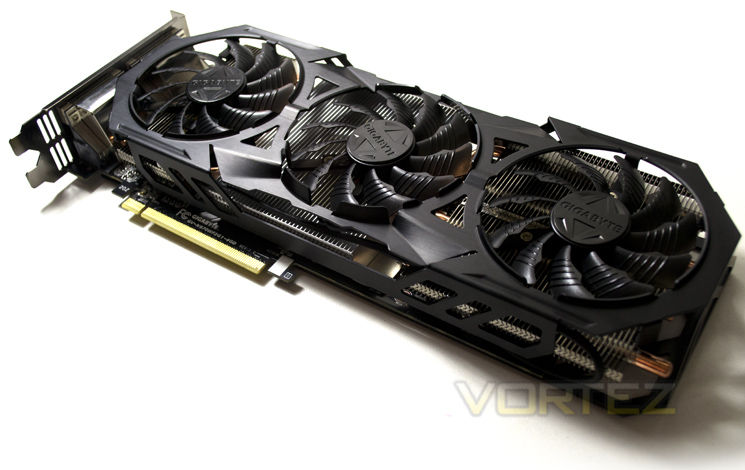
We were critical of the last GTX 970 we reviewed because of a £300 price tag and while this is a little cheaper, it is still at a similar level to a custom cooled and faster flagship card from AMD, the R9-290X so it will be interesting to see if the overclock applied to this model has closed the gap. We believe that at this level of the market speed isn’t everything however it has to be said that if it is not as fast then it needs to dominate in every other feature because if it doesn’t speed vs cost will likely be the deciding factor. That is unless you are looking through green tinted glasses (brand loyalty).
At this price point, the biggest draw to consumers is raw performance and by that we do mean FPS/benchmark scores. There may be people in this world who can’t tell the difference between 75fps and 150fps yet those very same people will still buy a stupidly fast GPU to run at 1080p resolutions when there is no perceived need. Why do they do this? We would wage for a few reasons. Perhaps it is because 2 years down the line when the next Crysis 5, Half Life 3 etc is released or for when they upgrade their screens and therefore resolutions, they want to know their cards can run it. Perhaps they like knowing they got the best they could afford? In short it doesn’t matter if there is only 1 fps or 10 fps between two cards, consumers will want the faster card, or at least the fastest card they can get for the money. To state otherwise just doesn’t make any sense. Of course it is not the ONLY feature to look at when considering the purchase of a graphics card, if it were then companies such as GIGABYTE, ASUS, MSI et al wouldn’t put so much effort into near silent cooling, which is why we try to cover all elements in our reviews but at this level, cooling, noise, power efficiency and looks will always come second to performance and then cost. A balanced card is no bad thing but being top heavy on performance is certainly the main priority when spending close to £300 on a component.
About GIGABYTE:
GIGABYTE was founded in 1986, establishing our uncontested position in continuous technological innovation. By focusing on key technologies and achieving strict quality standards, GIGABYTE has been regarded as an innovative and trusted motherboard leader in the globe. To keep pace in a rapidly changing world, we have offered a comprehensive product line covering Motherboards, Graphics Cards, PC Components, PC Peripherals, Laptops, Slate Devices, Desktop PCs, Network Communications, Servers and Mobile Phones. We are dedicated to building up a full-range digital life, responding promptly and sonorously to consumer needs and desires.
Specification
Chipset GeForce GTX 970
Core Clock Base / Boost clock:1178 / 1329 MHz
Process Technology 28 nm
Memory Clock 7Gbps
Memory Size 4 GB
Memory Bus 256 bit
Memory Type GDDR5
Card Bus PCI-E 3.0
DirectX 12
OpenGL 4.4
PCB Form ATX
Digital max resolution 4096 X 2160
Analog max resolution 2048 x 1536
Multi-view 4
I/O Dual-link DVI-I / DVI-D / DisplayPort*3 / HDMI*1
Card size L=312mm, W=129mm, H=43mm
Power requirement 550W(with one 6-pin and one 8-pin external power connectors)
Core Clock Base / Boost clock:1178 / 1329 MHz
Process Technology 28 nm
Memory Clock 7Gbps
Memory Size 4 GB
Memory Bus 256 bit
Memory Type GDDR5
Card Bus PCI-E 3.0
DirectX 12
OpenGL 4.4
PCB Form ATX
Digital max resolution 4096 X 2160
Analog max resolution 2048 x 1536
Multi-view 4
I/O Dual-link DVI-I / DVI-D / DisplayPort*3 / HDMI*1
Card size L=312mm, W=129mm, H=43mm
Power requirement 550W(with one 6-pin and one 8-pin external power connectors)
Features
WINDFORCE 3X cooling system
WINDFORCE 3X cooling system is equipped with high performance pure cooper heat-pipes which direct touch the GPU can strengthen the speed of heat dissipation. Besides, the air flow is effectively enhanced by the unique blade fan design, this not only increase the cooling capacity while reducing air turbulence but also results a lower noise level.
Flex Display technology
GIGABYTE Flex display technology(patent-pending) can automatically detect any connected monitors and achieve multi-display gaming up to 4 monitors at the same time by using various output groups. Users could enjoy the best gaming experience in ultra HD resolution with extended flexibility in arranging monitor configurations and making future system upgrade extremely easy.
SOC GPU Gauntlet™ Sorting
With GPU Gauntlet™ Sorting, the Gigabyte SOC graphics card guarantees the higher overclocking capability in terms of excellent power switching.
Ultra Durable VGA™
Ultra Durable VGA™
Lower GPU Temperature
Ultra Durable VGA board provides dramatic cooling effect on lowering both GPU and memory temperature by doubling the copper inner layer of PCB.
Better Overclocking Capability
Ultra Durable VGA board reduces voltage ripples in normal and transient state, thus effectively lowers noises and ensures higher overclocking capability.
Decrease Power Switching Loss
Ultra Durable VGA board allows more bandwidth for electron passage and reduces circuit impedance. The less circuit impedance, the more stable flow of current and can effectively improve power efficiency.
WINDFORCE 3X cooling system is equipped with high performance pure cooper heat-pipes which direct touch the GPU can strengthen the speed of heat dissipation. Besides, the air flow is effectively enhanced by the unique blade fan design, this not only increase the cooling capacity while reducing air turbulence but also results a lower noise level.
Flex Display technology
GIGABYTE Flex display technology(patent-pending) can automatically detect any connected monitors and achieve multi-display gaming up to 4 monitors at the same time by using various output groups. Users could enjoy the best gaming experience in ultra HD resolution with extended flexibility in arranging monitor configurations and making future system upgrade extremely easy.
SOC GPU Gauntlet™ Sorting
With GPU Gauntlet™ Sorting, the Gigabyte SOC graphics card guarantees the higher overclocking capability in terms of excellent power switching.
Ultra Durable VGA™
Ultra Durable VGA™
Lower GPU Temperature
Ultra Durable VGA board provides dramatic cooling effect on lowering both GPU and memory temperature by doubling the copper inner layer of PCB.
Better Overclocking Capability
Ultra Durable VGA board reduces voltage ripples in normal and transient state, thus effectively lowers noises and ensures higher overclocking capability.
Decrease Power Switching Loss
Ultra Durable VGA board allows more bandwidth for electron passage and reduces circuit impedance. The less circuit impedance, the more stable flow of current and can effectively improve power efficiency.
DSR & MFAA
Dynamic Super-Resolution
Super Sampling Anti-Aliasing (SSAA) isn’t a new concept, but its adoption in games or graphics hardware over the years has been patchy due how processor-intensive the process is. It relies on sampling the scene at a resolution much higher than your native screen resolution and then blending pixels together to output a ‘normal’ resolution frame, reducing ‘jaggies’. It’s often colloquially referred to as the ‘king of AA techniques’, but has given way to MSAA, MLAA and NVIDIA’s own FXAA, each of which are faster and less computationally expensive even if the quality isn’t as good.
Progress in graphics technology and horsepower has meant that a game which would bring a GPU to its knees five years ago can be comfortably played on mid-range hardware these days, whilst top-tier hardware push frame rates well into the hundreds. That’s a lot of horsepower going to waste when it could, if the game supported it, be used to improve image quality significantly.
Relatively recently enthusiasts have used a homebrew technique to increase the resolution which a game engine renders at, and then apply post-processing techniques to reduce the output resolution down to the monitor’s native. Known as downsampling, it’s essentially a form of SSAA. Unfortunately it’s very hit-and-miss, often relying of 3rd-party applications and prone to throwing up OS-level errors; and of course it’s very computationally expensive. However the rewards – beautiful images from older game engines – make the effort worth it.
Today GPUs such as the GTX 780Ti and Titan are being produced which are capable of and designed for 4K resolutions in even modern titles. However most gamers still use 1080p monitors on a day-to-day basis, making a $500+ GPU obscene overkill for all but the most taxing of titles. Because of this NVIDIA are going to start to support downsampling at the driver level through a method they’re calling Dynamic Super-Resolution (DSR).
Composite scene, DSR sample on right
Using DSR (which can be enabled automatically through GeForce Experience or the driver application) the game is rendered at a higher resolution and then downscaled to the monitor native resolution. Unlike previous methods however tt’s fully integrated into the driver, meaning not only ubiquitous game support but also a far more stable process than the bespoke solutions previously used.
Whilst the potential image quality benefits are significant it’s also worth noting that DSR would be an excellent measure of assessing whether your setup is capable of supporting a higher resolution monitor in gaming. The performance impact of the downsampling process is apparently only 1-2% (i.e less than a frame per second), so the framerates you get running DSR at 4K on your 1080p monitor should be extremely close to those you get for 4K natively. We’re not sure if NVIDIA intended this, but we’ll certainly take it.
DSR is part of NVIDIA’s launch driver for the GTX 980 and 970, but will also be rolled down to Kepler in the near future. The current implementation is still a little rough around the edges and NVIDIA haven’t supplied a software means of easily showing the downsampled output frame as all in-engine screenshots will be at the supersample resolution, but it shows a great deal of promise.
Multi-Frame Anti-Aliasing
Optimised anti-aliasing techniques is one of the ways GPU manufacturers have sought to differentiate themselves beyond pure frame rates and GFLOP statistics. Recognising that MSAA was insufficient to the needs of shader-based rendering and SSAA was too expensive both AMD and NVIDIA have generated their own methods to combat aliasing, to greater or lesser success. NVIDIA’s most well-known iteration is Fast Approximate Anti-Aliasing (FXAA), initially requiring in-engine implementation but later enabled at the driver level. More recently Temporal Anti-Aliasing was debuted, cleaning up an image based on frame-by-frame changes to pixels around edges. Each has their pros and cons; a good way to get into a fight on enthusiast boards is to claim that one method is flat out better than the other.
Today Multi-Frame Anti-Aliasing (MFAA, not to be mistaken for AMD’s Morphological Filtering AA) is being announced as a Maxwell-exclusive feature. As the name suggests MFAA is a post-processing anti-aliasing technique which operates by analysing a frame within the context of the previous frame, checking aliasing and rendering colours based on a proprietary algorithm in hardware.
The foundation of MFAA is multi-pixel programmable sampling, a means by which the matrix of sampling positions can be randomised to reduce data processing artefacts caused by repeating the same sample position from frame-to-frame.
MFAA seeks to be as good as MSAA, but without the performance impact algorithms and with image characteristics that are substantially different from FXAA. The latter has garnered a reputation for slightly blurring images, reducing the overall image quality, and so an effective alternative is probably due at this point.
Sadly MFAA is not quite ready for prime-time and will be issued as part of a driver update at a later date. The obvious question-mark is just how high the image quality presented is, and if it can operate well when the differences between frames is relatively large. However NVIDIA have clarified that the technique will work in tandem with alternate-frame rendering, an SLI mode available when using two or more matched NVIDIA GPUs.
Packaging & Accessories
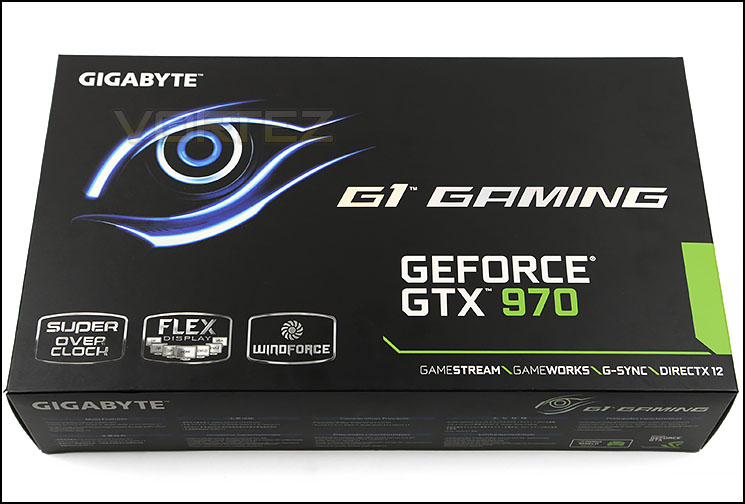
We see that GIGABYTE have stuck with the tried and testing packaging of the previous 7k series of graphics cards with a glossy black background upon which we find the product title and the ‘eye’ along with the main feature set printed out below.
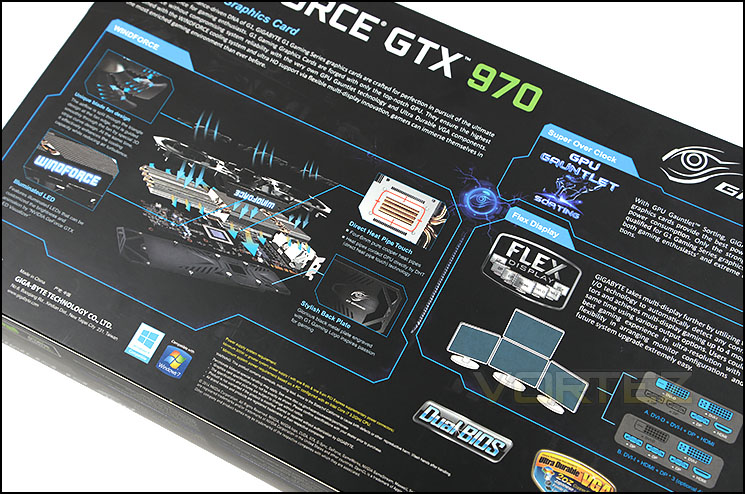
The rear of the package goes into detail regarding the three most interesting features of the graphics card, Windforce cooling, FLEX Display and GPU Gauntlet.
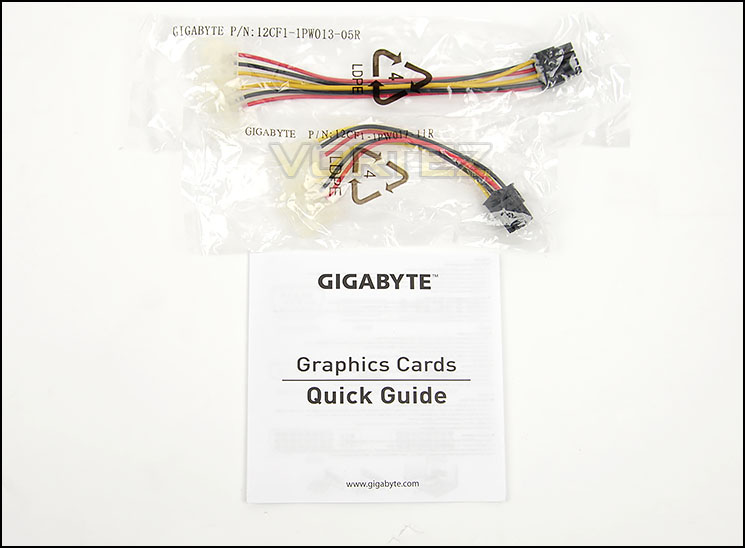
The accessory list is short and not so sweet because you only get an installation manual and a couple of PSU adaptors. No case badge or other accessories here I’m afraid, just the bare essentials.
First Look
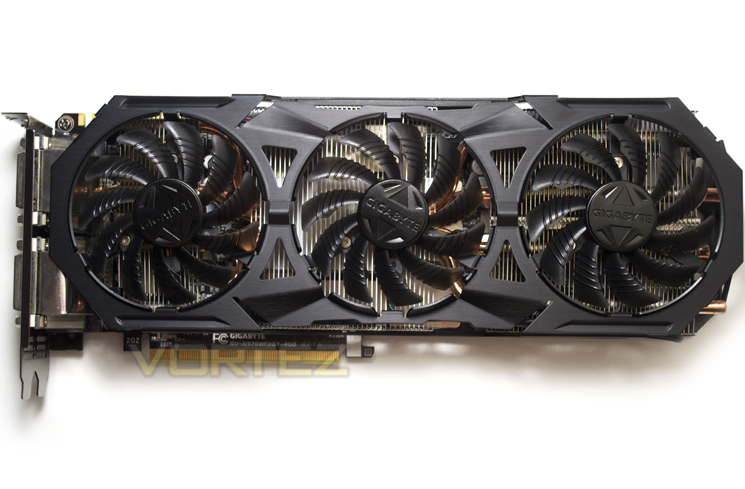
The Windforce cooler dominates proceedings here as it has in the past. This cooler is held in high regard here at Vortez and has seen some subtle changes over the years, this year being no different. This time it is the fans which have small ridges and are a little darker smoked than previous. The main shroud remains metal with a satin black finish only this time around has more louvers than previous.
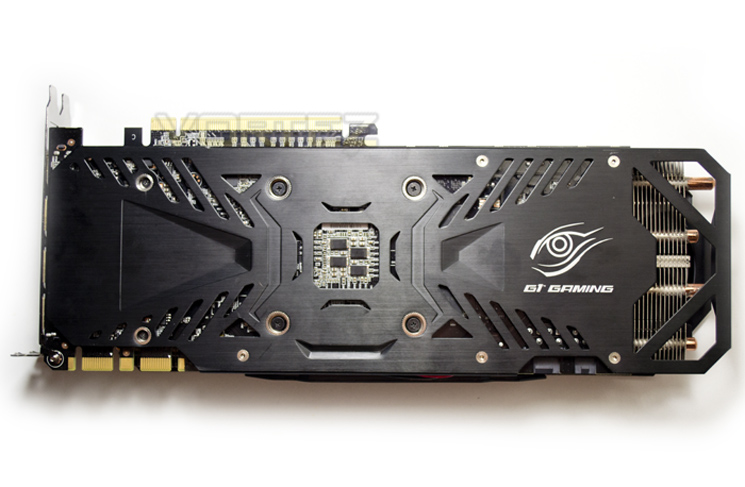
We are happy to report that a backplate is included in the heat shielding package which is great to see and it is also nice to see that GIGABYTE have included a Gaming G1 emblem to set it apart from other cards in the range.
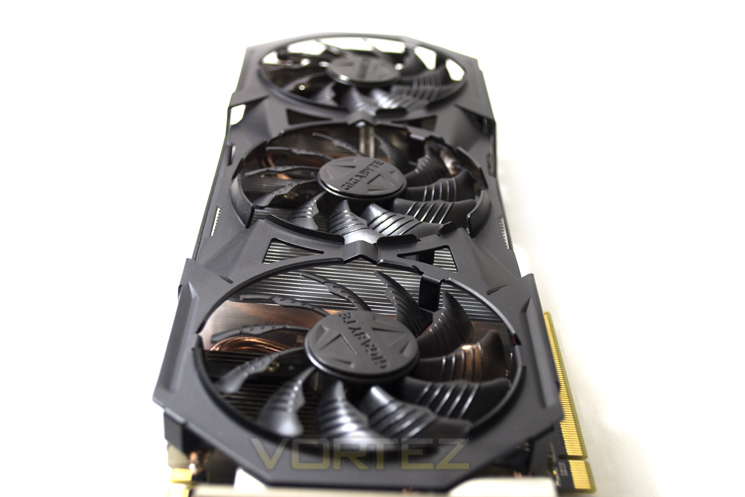
The card is quite a lot longer than the standard PCB size with full dimensions listed as : L=312mm, W=129mm, H=43mm.
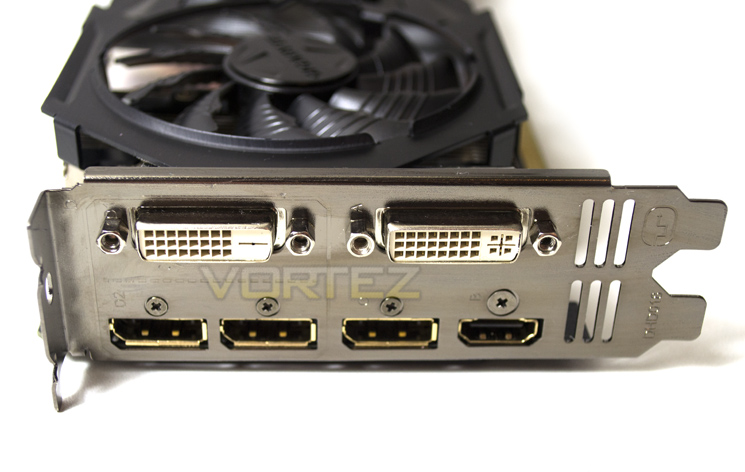
Here we see a break from the norm and a very welcome addition in the form of FLEX Display. While many gamers are moving toward 4k screens, multi-monitor setups are still proving popular and GIGABYTE are making this kind of setup easier with a single card by providing more ports than normally found on a GTX 970.
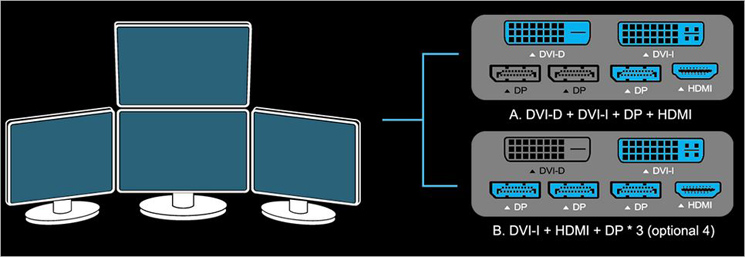
3x DisplayPorts along with HDMI, DVI-I and DVI-D give the user plenty of options to choose from whether you want dual, 3 or even a 4 screen setup.
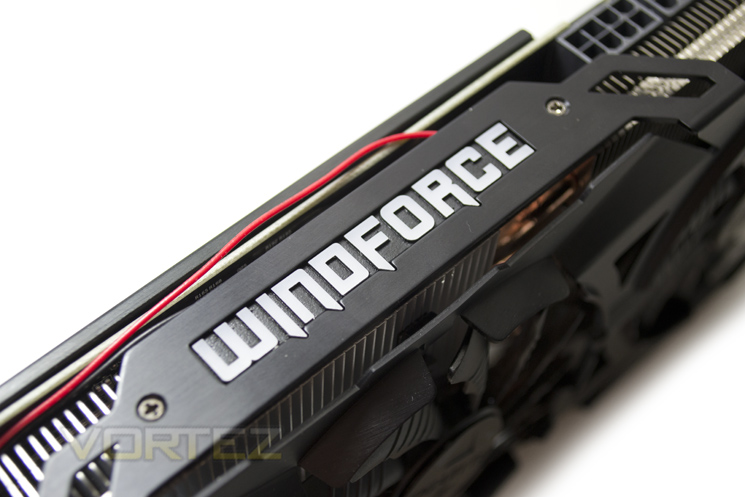
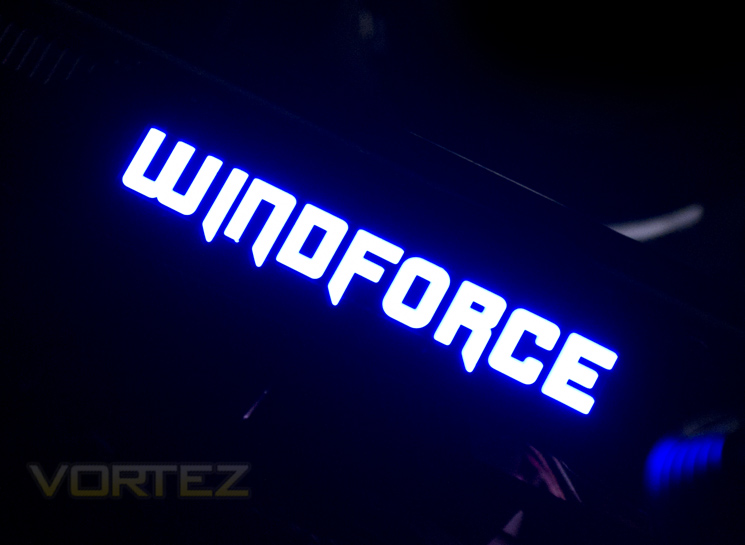
We like it when manufacturers put a different spin on an existing idea. NVIDIA have their green illuminated glowing GEFORCE emblem on the reference design, high end cards and so GIGABYTE have followed suit adding their own Windforce design, this time in blue:
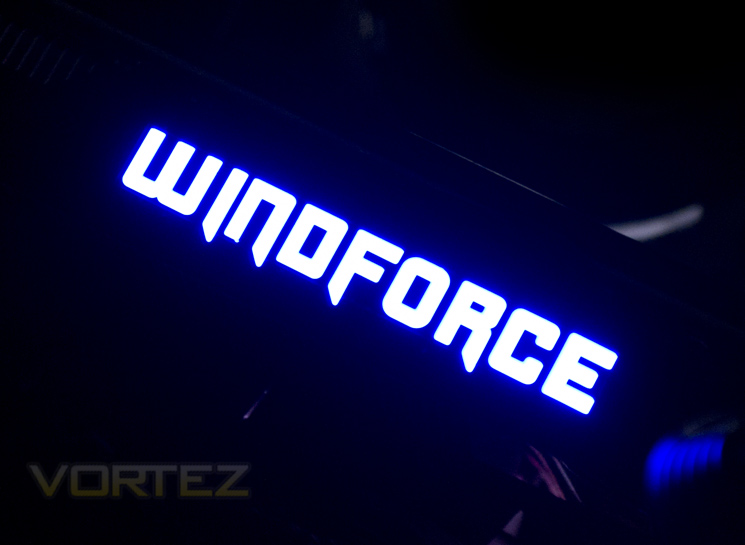
This will look stunning in any case with a Window and will leave no doubt as to which brand of graphics card you are running!
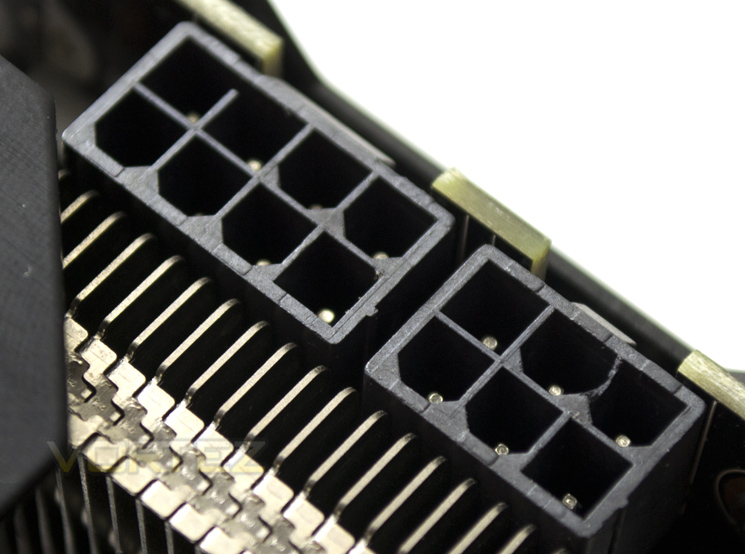
To power the card you will need both an 8pin and 6 pin PCIe power cables with a PSU capable of delivering 550W. We usually find that these ratings are over stated but as this card is overclocked and the need for the 8+6pin setup, it is unlikely you will be running anything lower than this power rating.
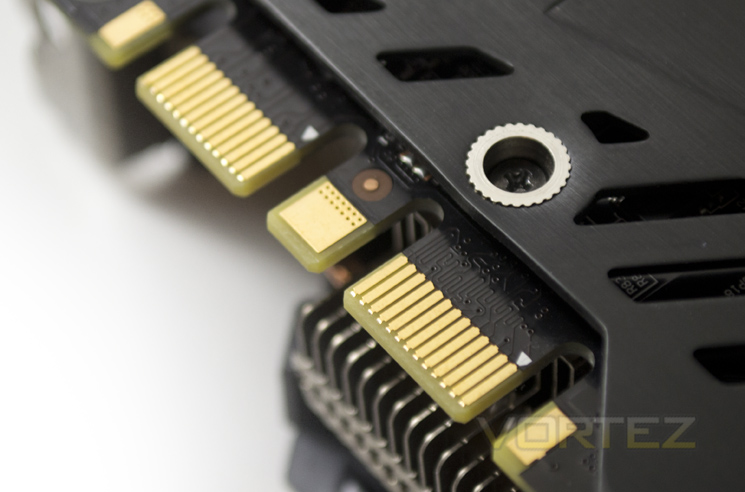
As with all high end NVIDIA cards, SLI is available in both dual and multiple card configurations thanks to twin SLI tabs.
Closer Look
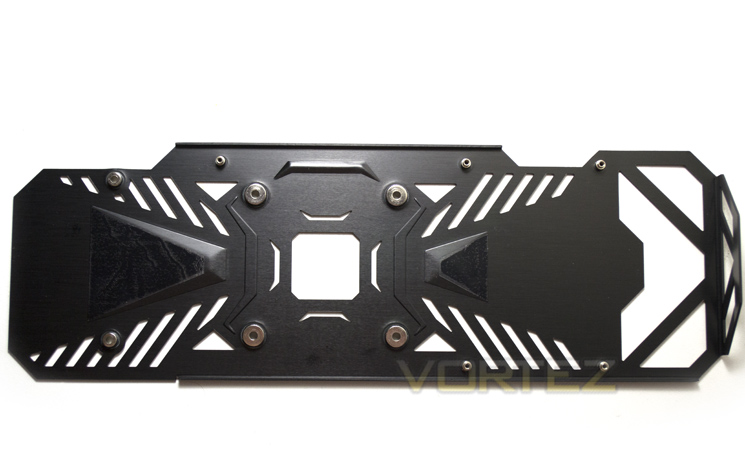
To remove the backplate, the main heatsink has to be removed. Once the main heatsink has been delicately pulled from the PCB, the screws holding the backplate to the PCB can be accessed.
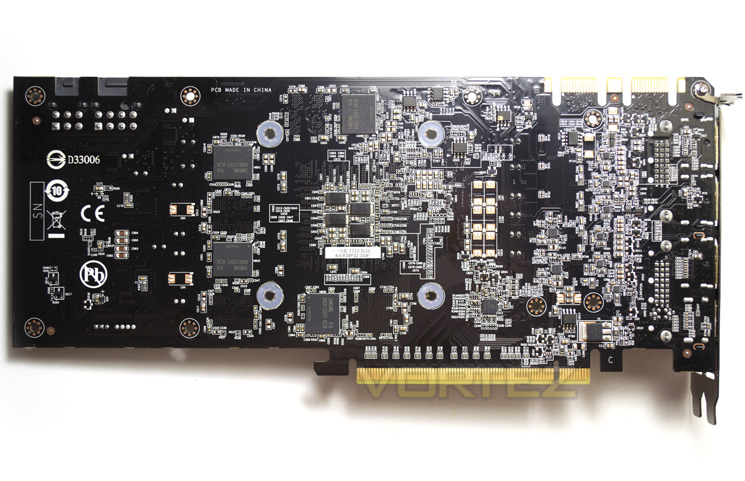
Interestingly, GIGABYTE have opted to spread the DDR5 distribution to both the front and back PCB. Strange that we find the back memory modules receive no TIM pads whereas those next to the core side do receive direct cooling. Hopefully this will not affect the overclocking of the card but regardless, heat is never a good thing and it seems to be a waste to add a backplate and then not take advantage of the cooling benefit.
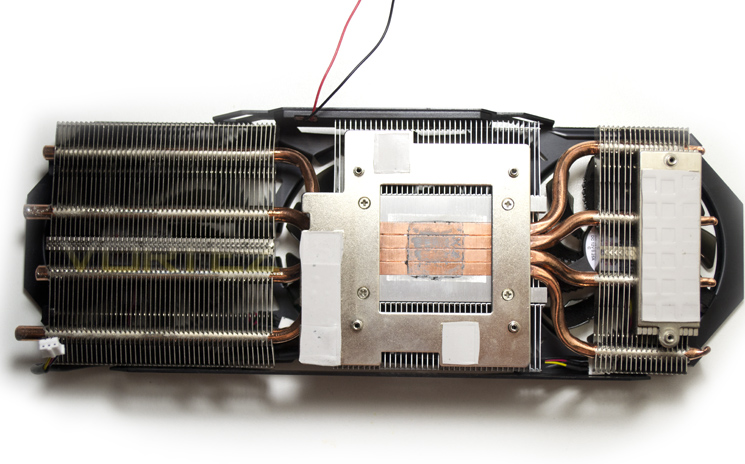
The heatsink is a direct to core type rather than using some form of vapour chamber or square plate. The four copper heatpipes make direct contact with the silicon which is perhaps the best method as the more metal there is between the cooling and the core, the less efficient the heatsink will be at wicking the heat away from the core.
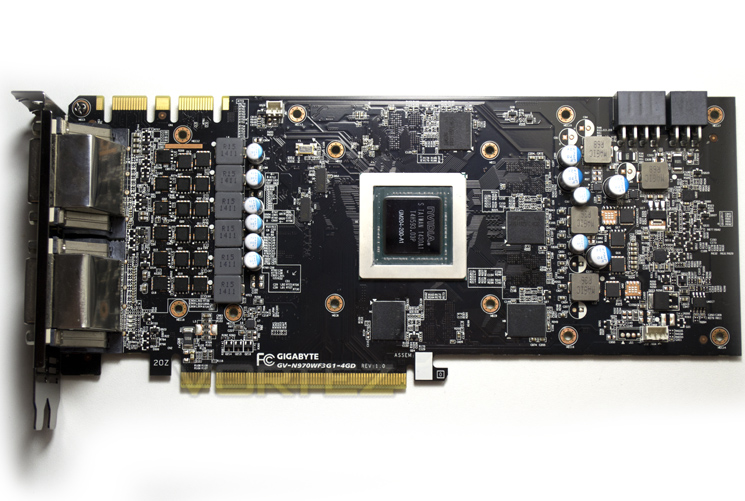
The PCB as you can see is gloss black in appearance matching the oily looks of the card. Note the missing memory chips which are found on the opposite side of the PCB.
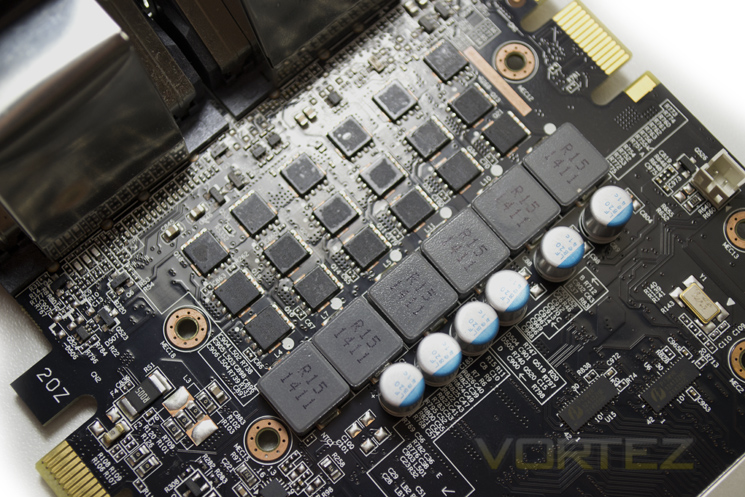
GIGABYTE have opted to use just 6 power phases for the core which we found odd, given this is a highly tuned piece of hardware. GIGABYTE assure us though that thanks to their Gauntlet power switching technology and speed binning of the cores that this card is the cream of the crop when it comes to power efficiency and power delivery providing ultimate overclocking.
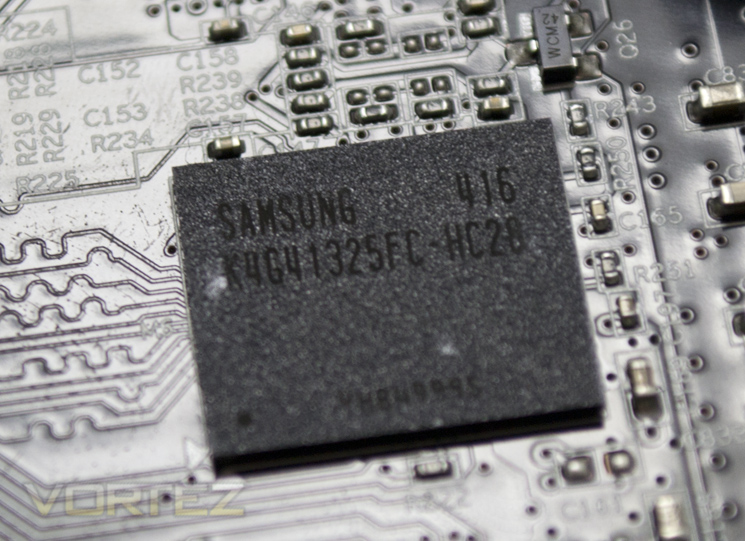
The memory chips are stamped with SAMSUNG K4G41325FC-HC28 which tells us these chips come as a 4GB package (this card is 2GB) and are rated to run at 3500MHz (7000MHz effective speed) at 1.5v.
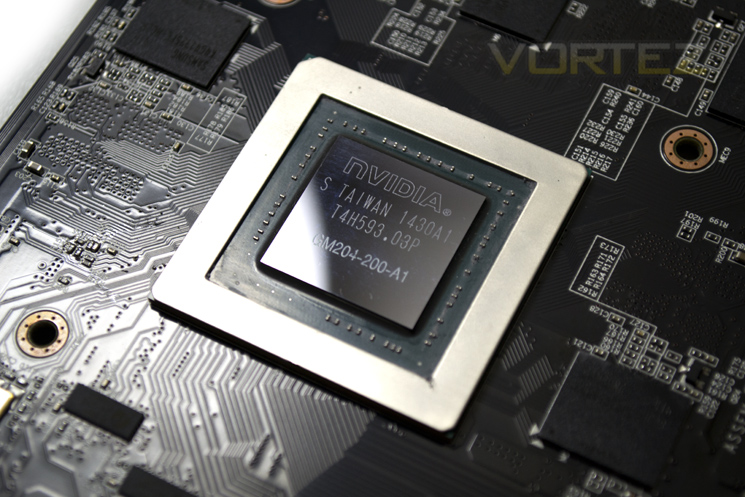
Finally we reach the core of the GIGABYTE G1 Gaming GTX 970. Overclocked from the factory to 1178MHz we expect this card to better the ASUS GTX 970 STRIX we reviewed recently albeit slightly so it remains to be seen if it can also produce better results in the secondary areas of graphics card attractions such as power consumption, temperature, cooling and noise.
Test Setup & Methodology
How we test graphics cardsTesting a graphics card is an extremely lengthy process. We sometimes see reviews where a graphic card has been tested using out of date equipment, out of date games and even out of date drivers. While the latter can be excused due to the sheer amount of driver updates making a thorough review impossible we will however notify the reader when we have used a different driver to the normal for example a pre-release driver. For the most part however we will always use the same hardware and latest drivers so this does certainly need to be taken into consideration when viewing our testing results. Each game and benchmark is tested times with the lowest and highest scores omitted out of the 5 results and the average then taken from the three remaining to give us our final result for each resolution and setting used.
HardwareWith the latest Intel chipset release we decided to update our ageing X79 setup to the very latest X99 chipset. Not only that but we will be using the flagship Core i7-5960X Extreme Edition processor clocked to a realistic, achieveable 4GHz to ensure we have no CPU bottlenecks. With 16GB (4x4GB) of GDDR4 at 2666MHz and a 500GB SSD there should be minimal paging so the benchmarks we run today will hopefully give a true reflection of the graphics card’s performance.
High End Graphics cards on test:
GIGABYTE G1 GAMING SOC GTX 970
(Forceware 344.75) ASUS STRIX GTX 970 4GB GDDR5(Forceware 340.60)
NVIDIA GTX 980 4GB GDDR5(Forceware 340.52)
SAPPHIRE TRI-X R9-290X 4GB GDDR5(Catalyst 14.3)
Special thanks go to Intel, Corsair, MSI and AOC for providing the extreme spec components used for our test bench:
Motherboard: MSI X99S GAMING 9 AC
CPU: Intel Core i7-5960X Extreme Edition @ 4GHz
RAM – 16GB (4x4GB) Corsair LPX Vengeance (Red) DDR3 @ 2666MHz 16-17-17-35 C1
Power Supply – CORSAIR RM Series™ RM1000
Hard Drive – CORSAIR Force Series™ LX 512GB SATA 3 6Gb/s SSD
Cooler – CORSAIR Hydro Series™ H105 240mm Extreme Performance Liquid CPU Cooler
Monitor – AOC 28″ 4K U2868 PQU
CPU: Intel Core i7-5960X Extreme Edition @ 4GHz
RAM – 16GB (4x4GB) Corsair LPX Vengeance (Red) DDR3 @ 2666MHz 16-17-17-35 C1
Power Supply – CORSAIR RM Series™ RM1000
Hard Drive – CORSAIR Force Series™ LX 512GB SATA 3 6Gb/s SSD
Cooler – CORSAIR Hydro Series™ H105 240mm Extreme Performance Liquid CPU Cooler
Monitor – AOC 28″ 4K U2868 PQU
Benchmarks
If you are a regular reader of our reviews you will know we like to test the latest hardware with the latest games and benchmarks on the market. Here are the games we have chosen:
Battlefield 4
Watchdogs
Company of Heroes 2
Thief
GRID: 2
Metro: Last Light
Watchdogs
Company of Heroes 2
Thief
GRID: 2
Metro: Last Light
We also take into consideration the benchmarkers out there so have included 3 of the more popular synthetic benchmarks available:
Unigine: Valley
Unigine: Heaven 4
Futuremark 3DMark Firestrike
Unigine: Heaven 4
Futuremark 3DMark Firestrike
Let’s see how today’s graphics card performed…
Temperature, Acoustics and Power Consumption
Power ConsumptionTo test for power consumption we take a measurement from the plug socket. It is important to note that the figures below represent total system power use and not just the GPU. The CPU was always in a fixed state (4GHz overclock) so did not affect the additional power load when the GPU was placed under 100% load using Furmark which was ran for 15 minutes at which point a load reading was taken. Idle readings were taken 5 minutes after system boot to ensure any background services and applications had loaded.
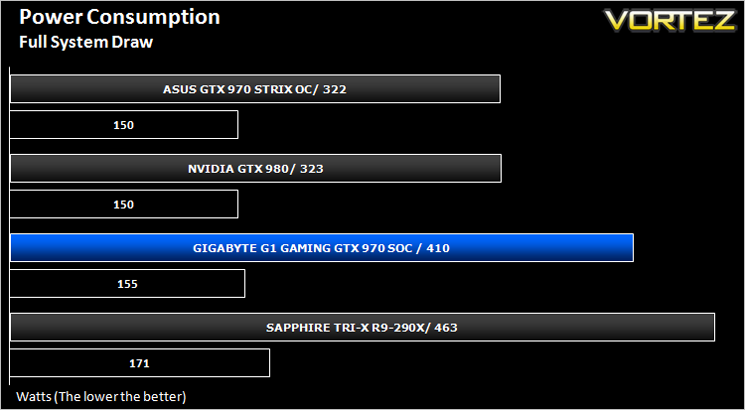
Despite GIGABYTE’s claims of efficiency, those claims could not be replicated on our setup with the GIGABYTE card drawing quite a lot more power than the equivalent ASUS card. To be fair to the GIGABYTE card it is much higher clocked and thus is likely to have additional voltage added to run those high overclocks. Regardless, if power consumption is a worry for you it is worth remembering that this card is not as power efficient as the competition.
Temperature
To test temperatures we measured idle temperatures after booting windows, letting all applications finish loading and ran a few benchmarks. Once the benchmarks were complete we left the card to reach a cooling plateau where we then took the idle temperatures. For the load tests, we would normally run Furmark for 20 minutes, taking the absolute maximum temperature attained however we found that this throttled the card and resulted in spurious results. So we set Heaven running continuously for 20 minutes and used this as a temperature result.
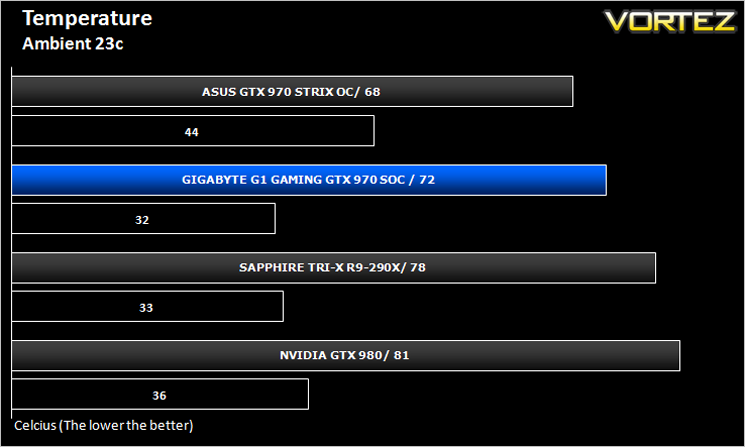
We know how well the Windforce cooler performs but again we see that it falls shy of the ASUS card. While there was only 4c between them, higher temps usually equate to higher fan speeds and thus higher noise. See below for our interpretation of this.
Acoustics
the Windforce cooler as expected could not be heard over normal case fans however when placed under stress for any length of time, the fans did speed up to compensate for the added heat and it became noticeable. It wasn’t too bad though and in an enclosed environment we dare say you wouldn’t notice however it is worth noting that this was the noisiest card on test which is a shame as Windforce coolers in the past have been regarded as pretty much silent runners.
Overclocking
For overclocking today’s sample we will be using MSI’s Afterburner tool as this gives us all of the options we require included the additional voltage controls.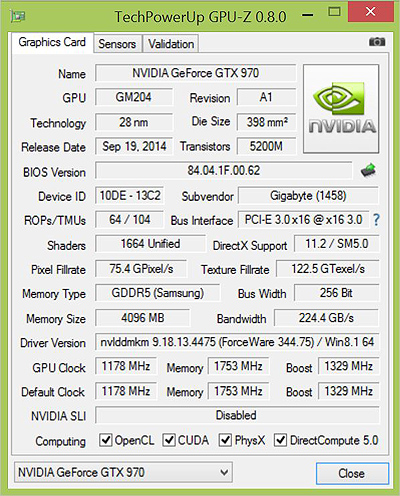
Above is a screenshot of GPU-Z showing the reference (factory overclocked) settings.
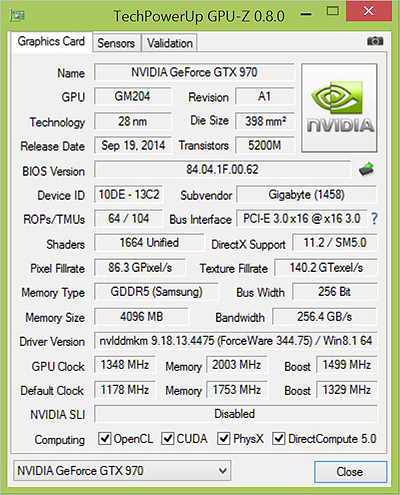
…and manually attained overclock speeds.
We entered the overclocking stage with trepidation as cards that come so heavily overclocked can be tricky to extract any further performance. Nevertheless we were surprised to find that this card had much more to give. We managed to surpass the ASUS STRIX with both core and memory clockspeeds settling on 1348MHz on the core with a final memory overclock of plus 1000MHz (8003MHz).
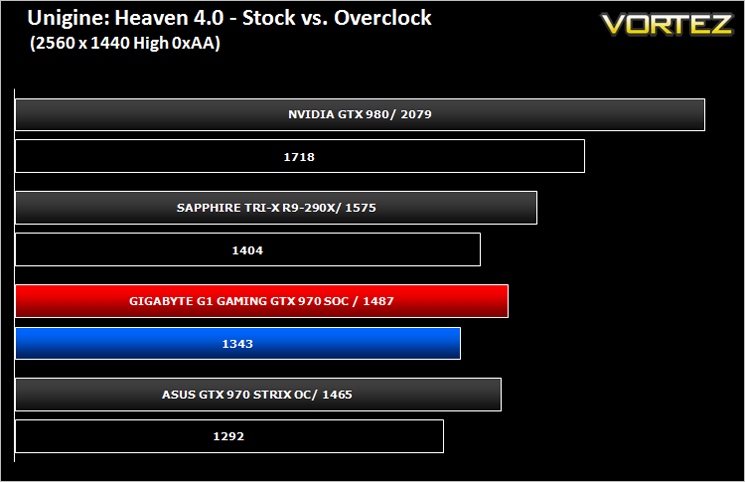
Above we can see the resulting performance increase of the overclock via Unigine Heaven 4.0.
Futuremark 3DMark Fire Strike (Synthetic)
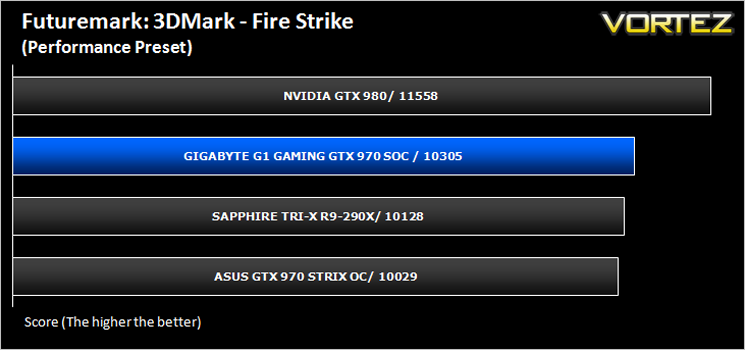
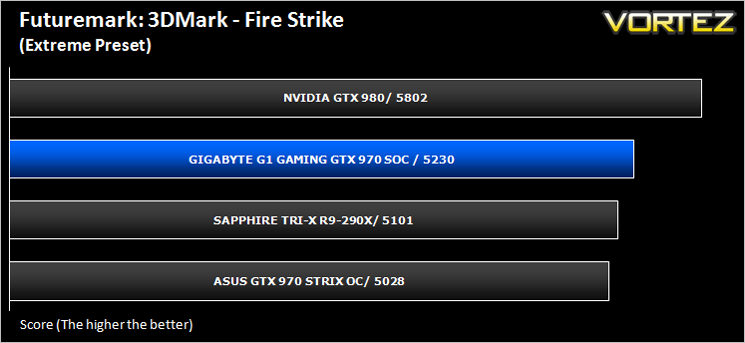
Fire Strike is the new showcase DirectX 11 benchmark designed for high-performance gaming PCs. It is Futuremark’s most ambitious and technical benchmark ever, featuring real-time graphics rendered with detail and complexity far beyond what is found in other benchmarks and games today.
Unigine: Heaven 4 (Synthetic)
Heaven Benchmark with its current version 4.0 is a GPU-intensive benchmark that hammers graphics cards to the limits. This powerful tool can be effectively used to determine the stability of a GPU under extremely stressful conditions, as well as check the cooling system’s potential under maximum heat output. It provides completely unbiased results and generates true in-game rendering workloads across all platforms.
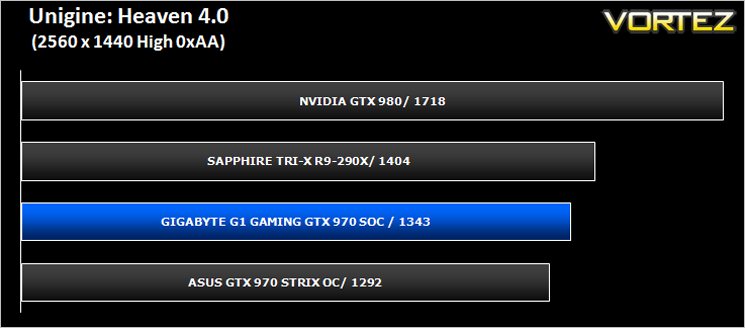
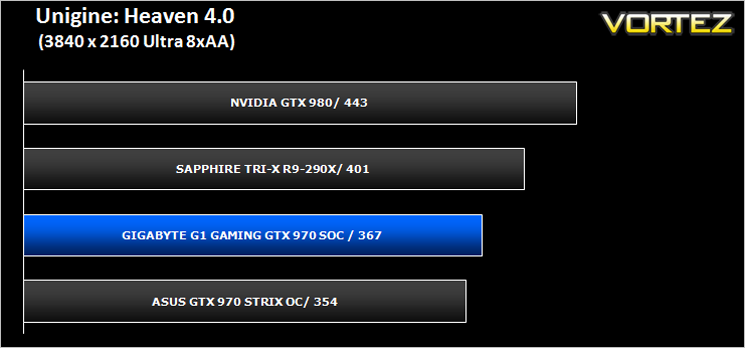
Unigine: Valley (Synthetic)
Valley Benchmark is a new GPU stress-testing tool from the developers of the very popular and highly acclaimed Heaven Benchmark. The forest-covered valley surrounded by vast mountains amazes with its scale from a bird’s-eye view and is extremely detailed down to every leaf and flower petal. This non-synthetic benchmark powered by the state-of-the art UNIGINE Engine showcases a comprehensive set of cutting-edge graphics technologies with a dynamic environment and fully interactive modes available to the end user.
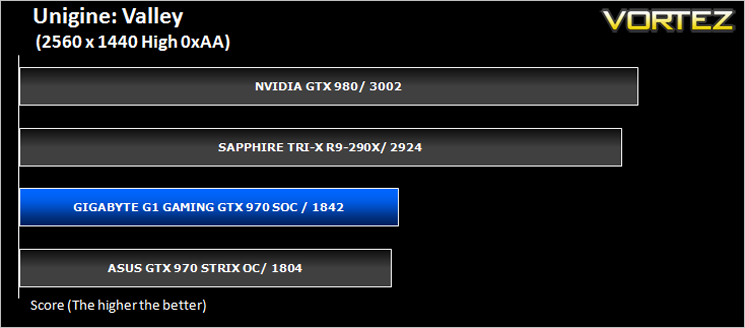
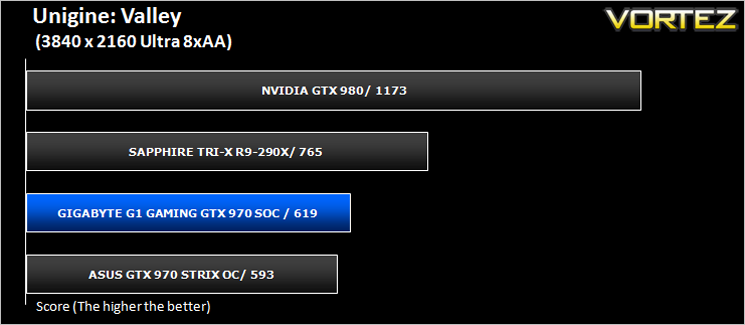
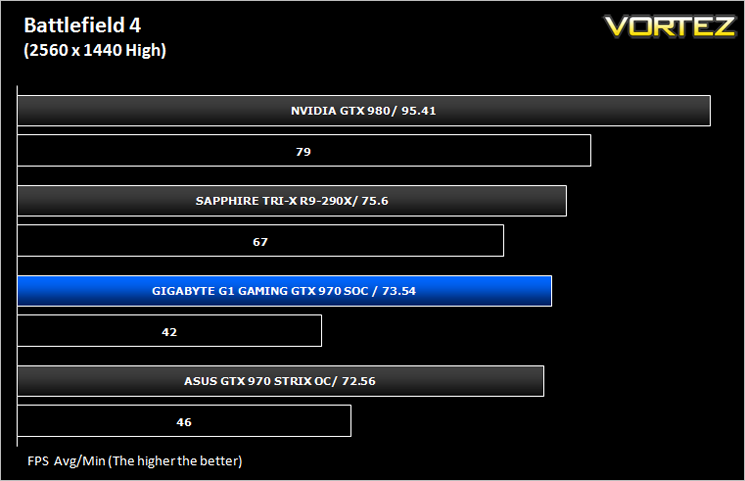
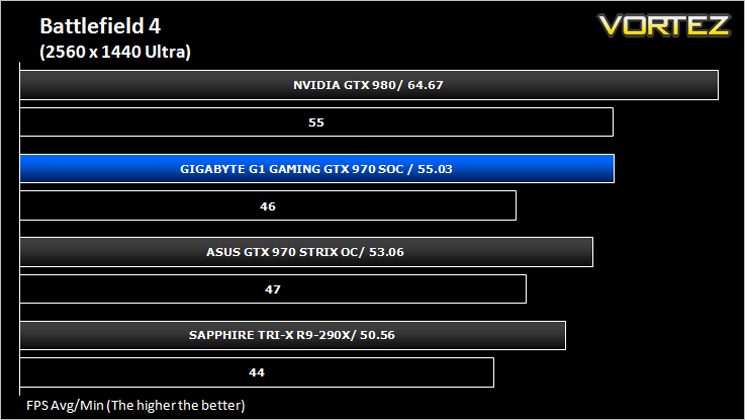
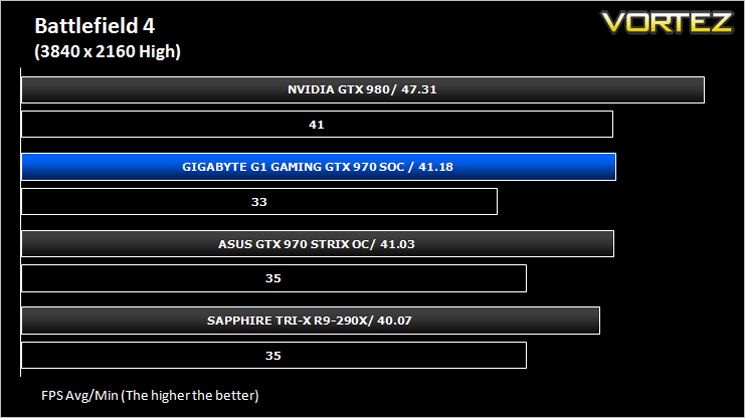
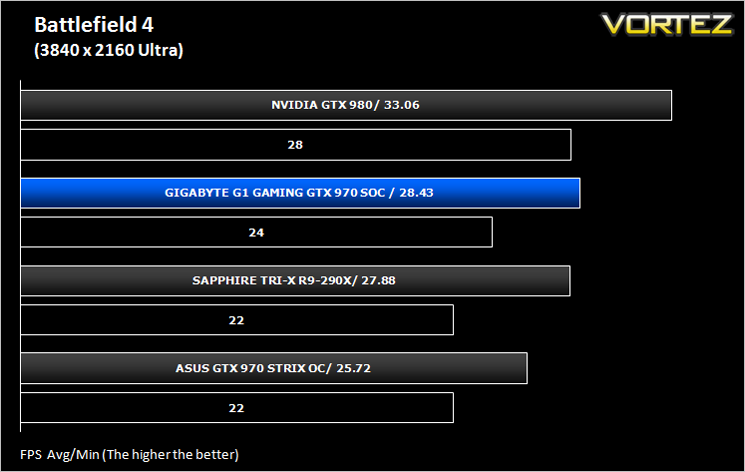
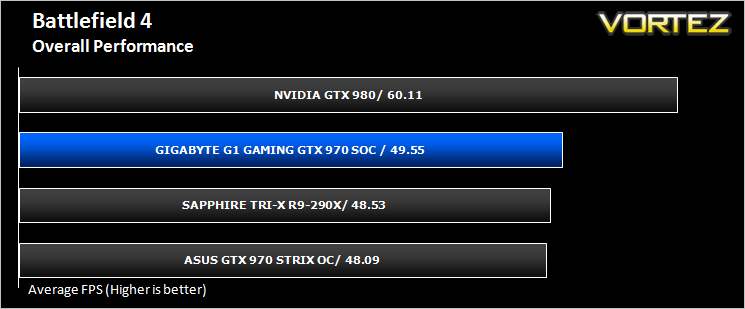
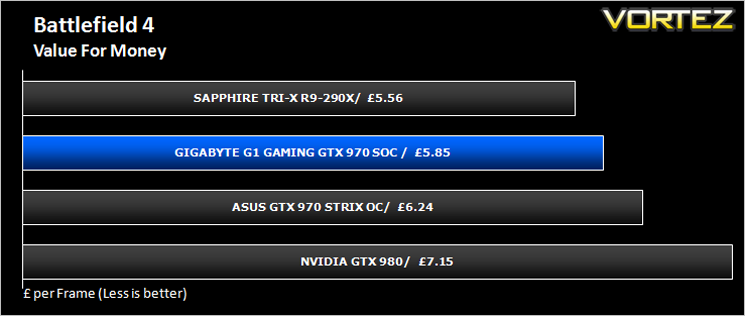
Battlefield 4 (FPS)
Battlefield 4 is a 2013 first-person shooter video game developed by Swedish video game developer EA Digital Illusions CE (DICE) and published by Electronic Arts. It is a sequel to 2011’s Battlefield 3 and is perhaps currently the most popular online First Person Shooter for PC gamers. It has an extremely powerful gaming engine that will stress components more than most FPS titles available.
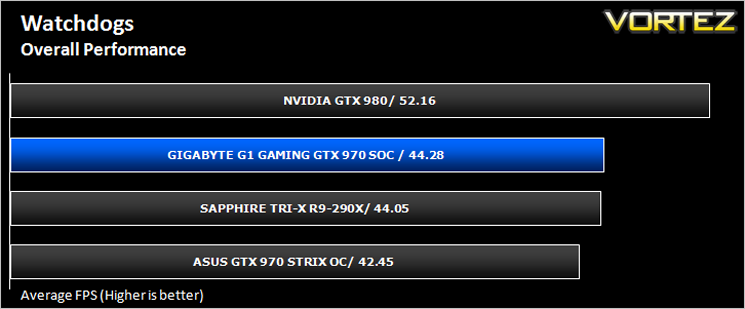
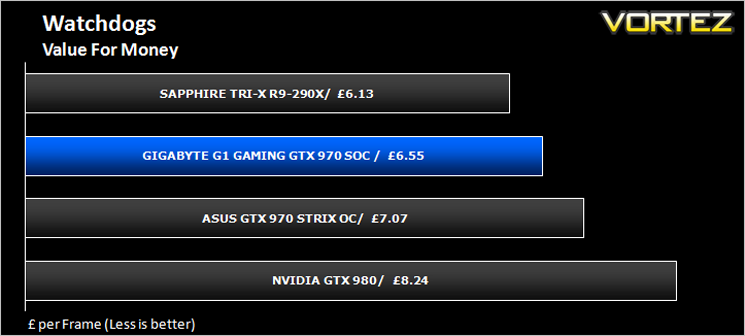
Watchdogs (Action/Adventure)
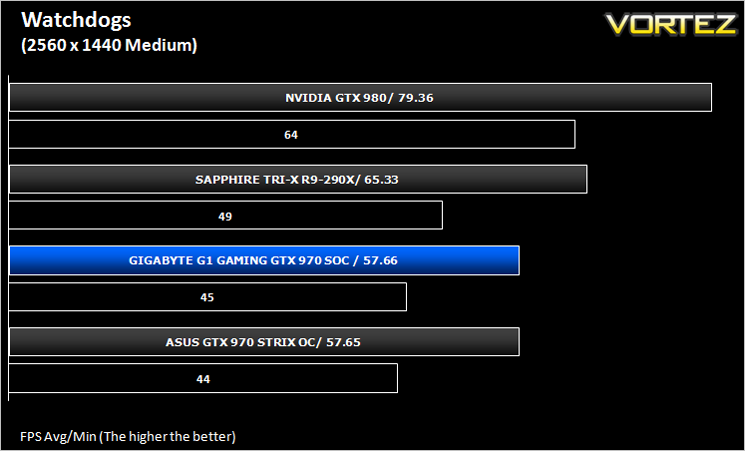
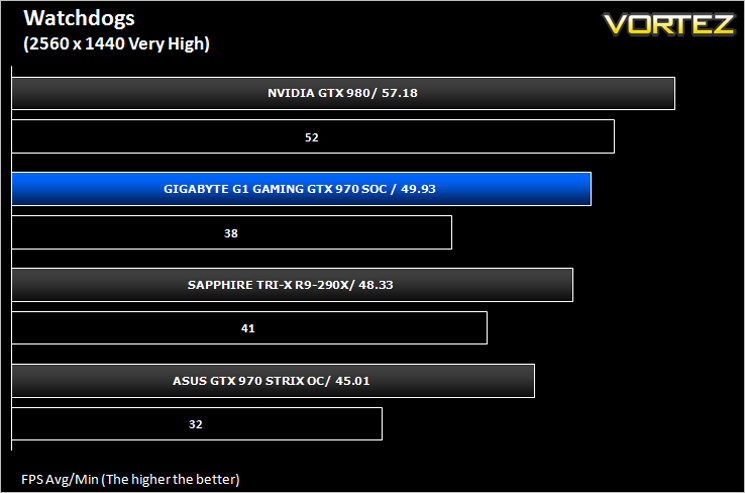
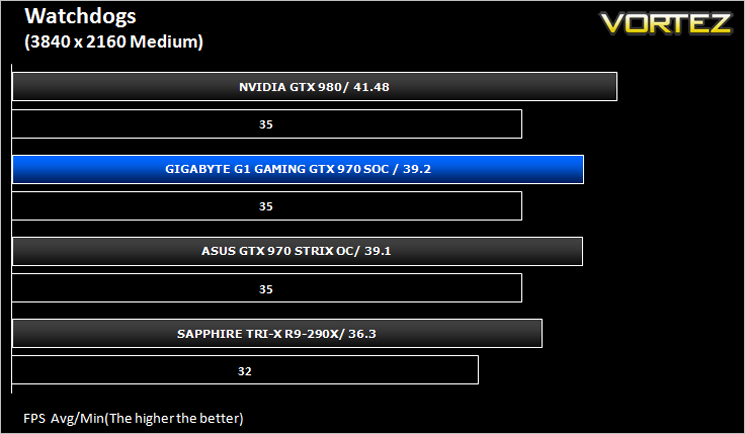
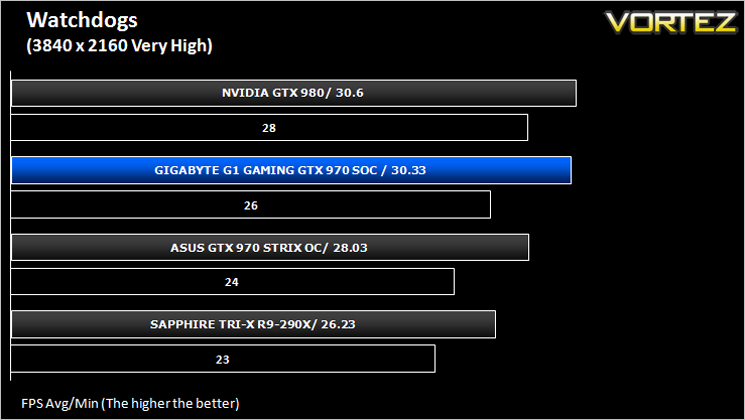
Watch Dogs is a 2014 open world action-adventure video game developed by Ubisoft Montreal and published by Ubisoft. Set within a fictionalized version of Chicago, Illinois, the single-player story follows a hacker and his efforts to seek revenge after the accidental death of his niece. The open world design lets players freely roam Chicago, which includes the urban city, open countryside, and slums. The game is played from a third-person perspective and its world is navigated on-foot or by vehicle. As such this is a very demanding game, especially when graphical options are turned up.
Thief (Stealth)
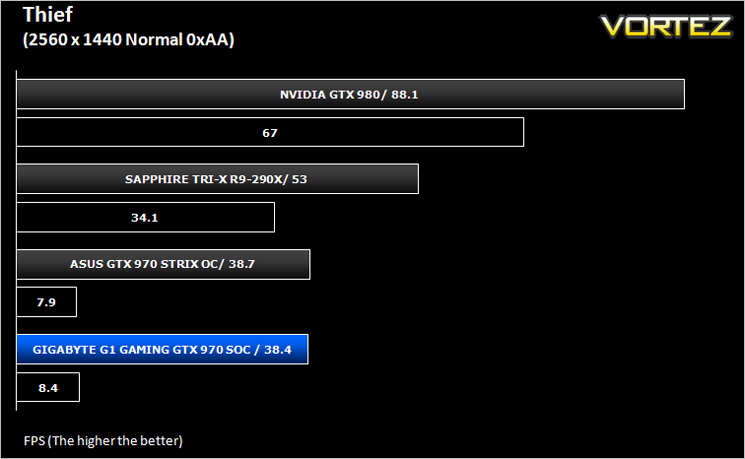
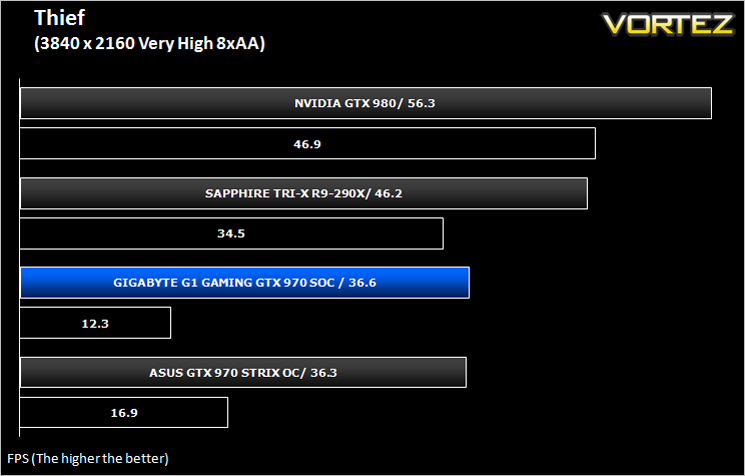
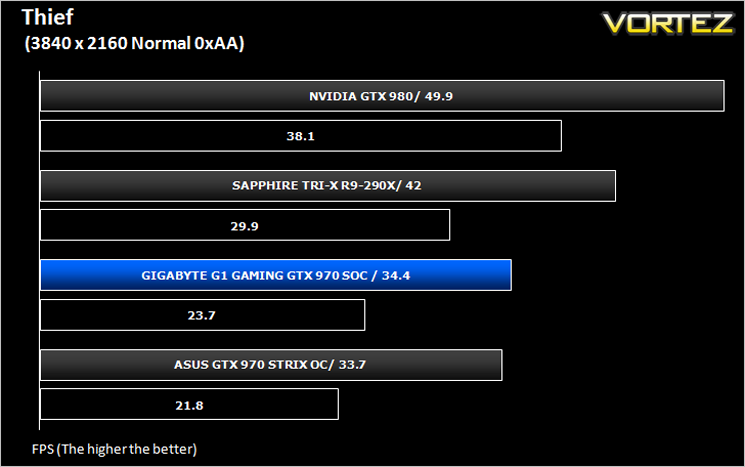
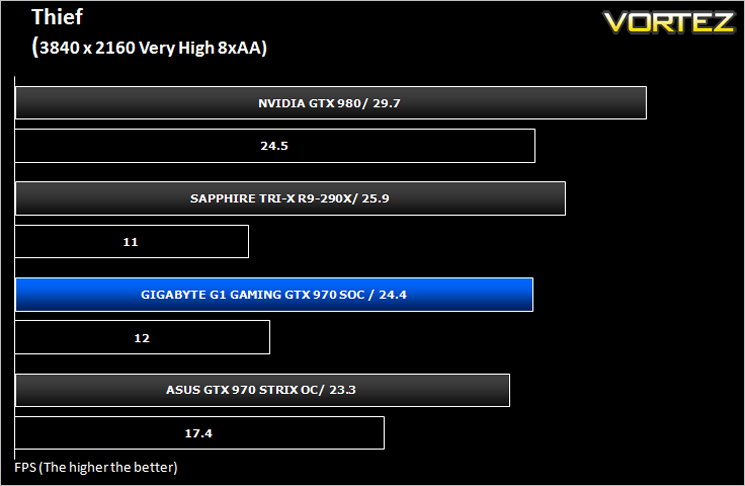
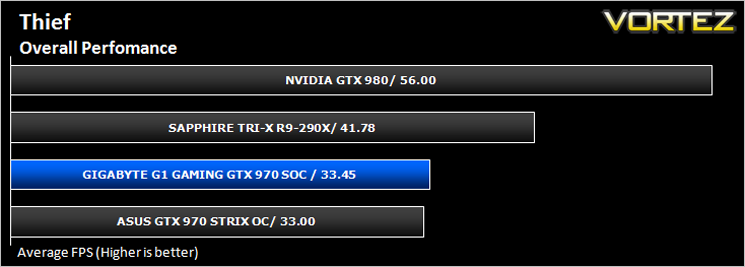
Thief is a stealth video game developed by the Canadian video game developer Eidos Montreal, and published by Square Enix. It is a revival of the cult classic Thief series of stealth games, of which it is the fourth game. Thief is set in a dark fantasy world inspired by Victorian, gothic, and steampunk aesthetics. Using a modified version of the Unreal Engine 3 it makes for a challenging game to pitch against our range of components.
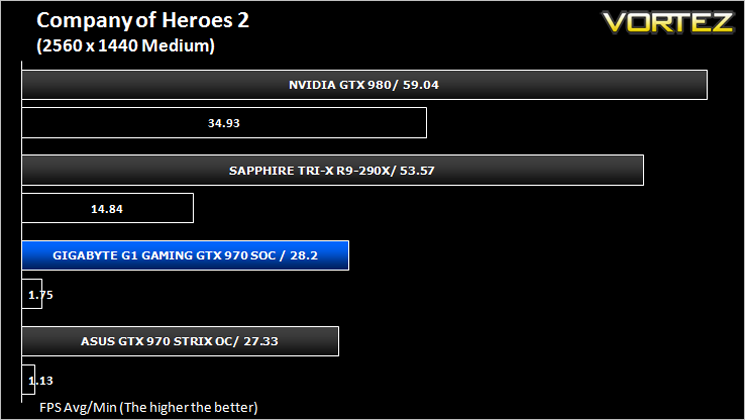
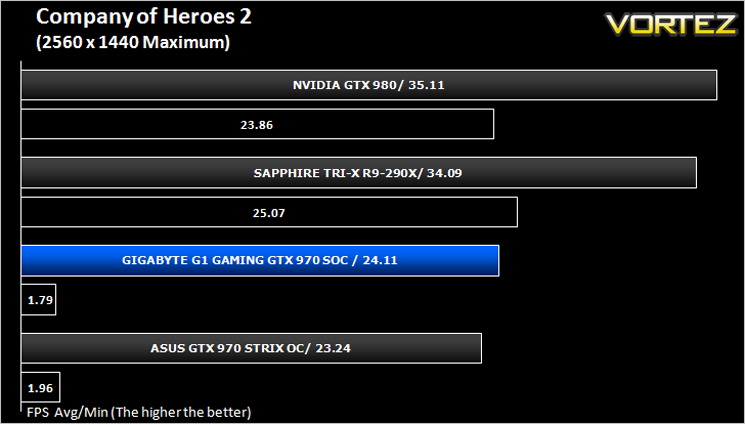
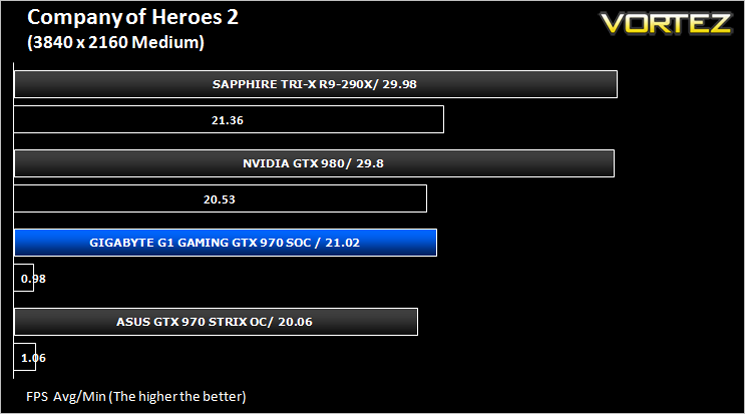
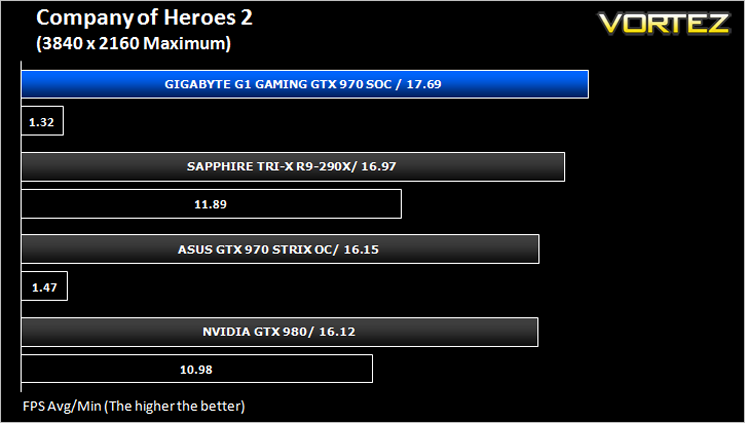
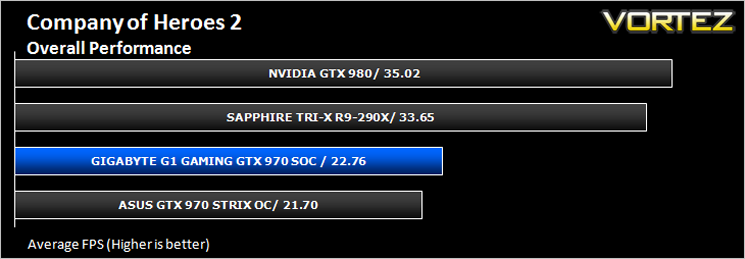
Company of Heroes 2 (RTS)
Watch Dogs is a 2014 open world action-adventure video game developed by Ubisoft Montreal and published by Ubisoft. Set within a fictionalized version of Chicago, Illinois, the single-player story follows a hacker and his efforts to seek revenge after the accidental death of his niece. The open world design lets players freely roam Chicago, which includes the urban city, open countryside, and slums. The game is played from a third-person perspective and its world is navigated on-foot or by vehicle. As such this is a very demanding game, especially when graphical options are turned up.
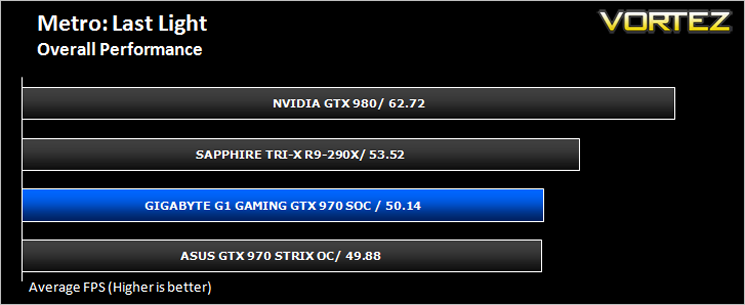
Metro: Last Light (FPS)
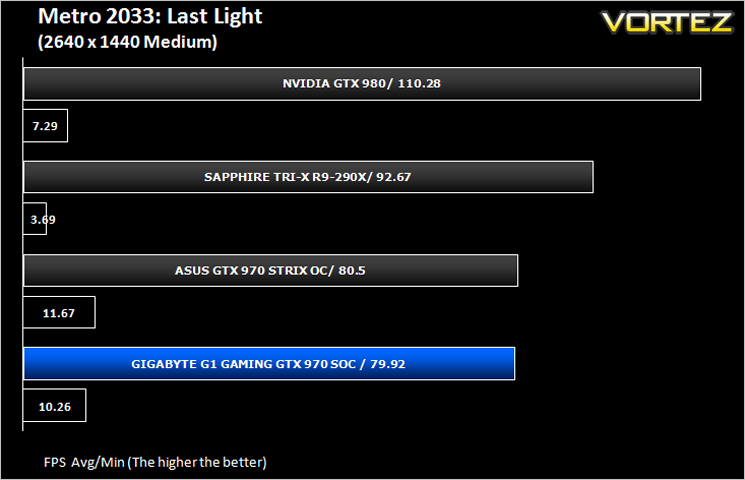
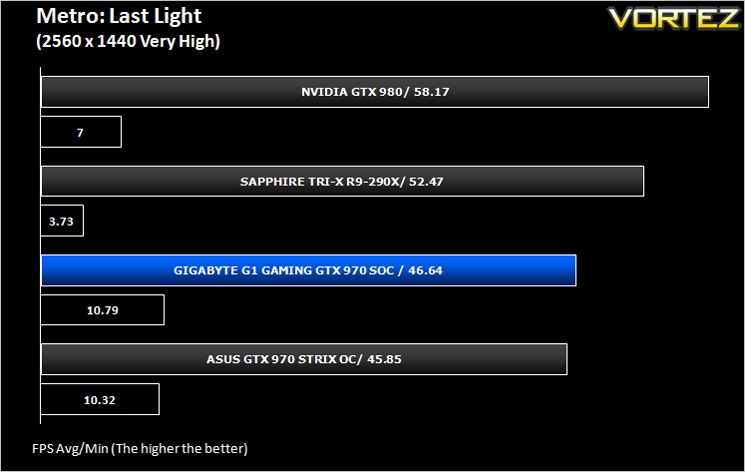
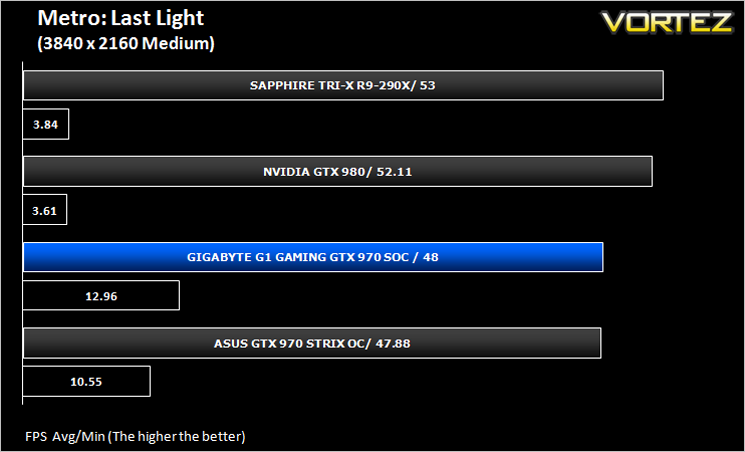
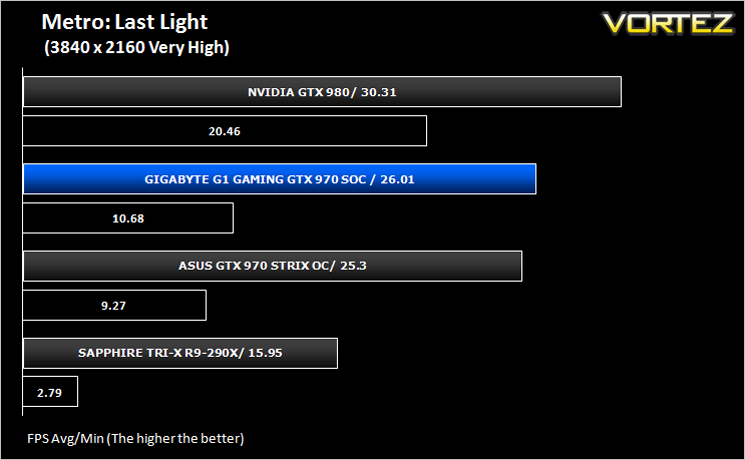
Metro: Last Light is a single-player post-apocalyptic-themed first-person shooter video game with stealth and survival horror elements, developed by Ukrainian studio 4A Games and published by Deep Silver. The game is set in a post-apocalyptic Moscow, part of the universe of the novel Metro 2033 and its sequels, written by Russian author Dmitry Glukhovsky. The second of our FPS titles, it runs on the 4A gaming engine which again, has the capability to stress even the best GPU components.
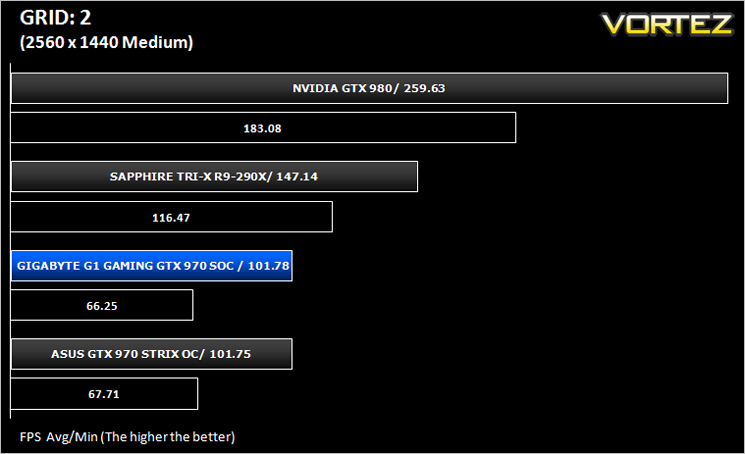
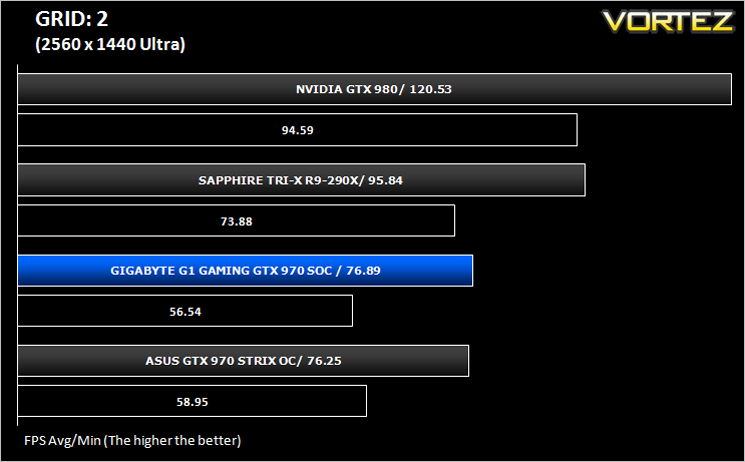
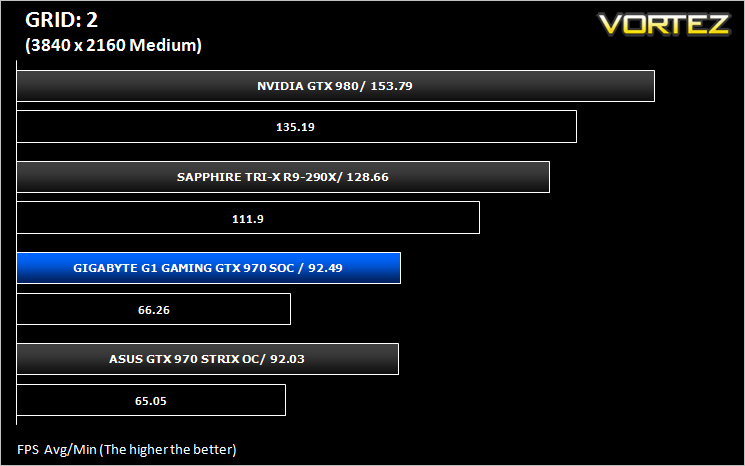
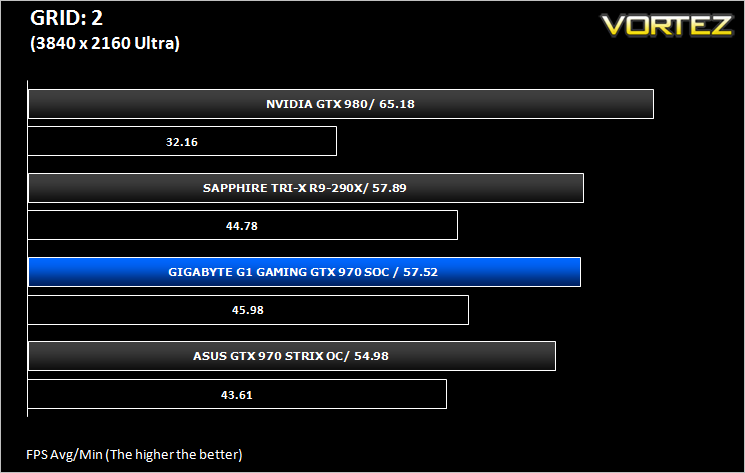
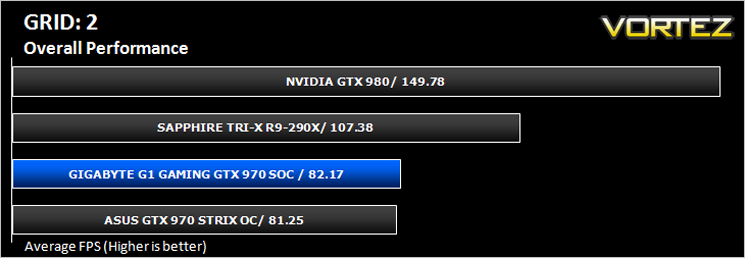
GRID: 2 (Arcade Sim)
Grid 2 (stylised as GRID 2 and known as Race Driver Grid 2 in Japan) is a racing video game developed and published by Codemasters and is the sequel to 2008’s Race Driver: Grid. The game includes numerous real world locations and cities such as Paris. It also includes motor vehicles spanning four decades. In addition, it includes a new handling system that developer Codemasters has dubbed ‘TrueFeel’, which aims to hit a sweet spot between realism and accessibility. It uses the EGO 3.0 engine which while not overly challenging, is representative of games of this genre.
Overall Performance
Here we take a look at the overall performance of the graphics card. This figure is determined by finding the average FPS across all of the settings used in a particular benchmark(game) to give us an overall value.
Value For Money
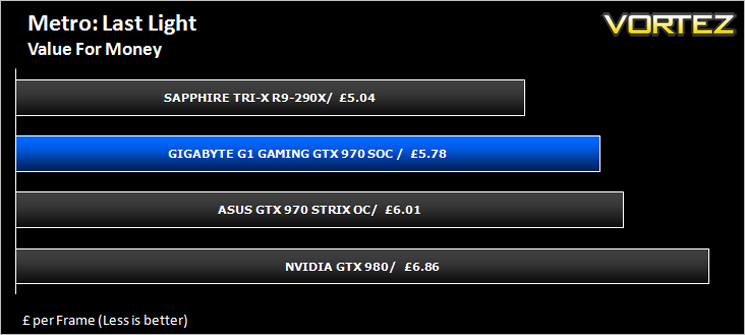
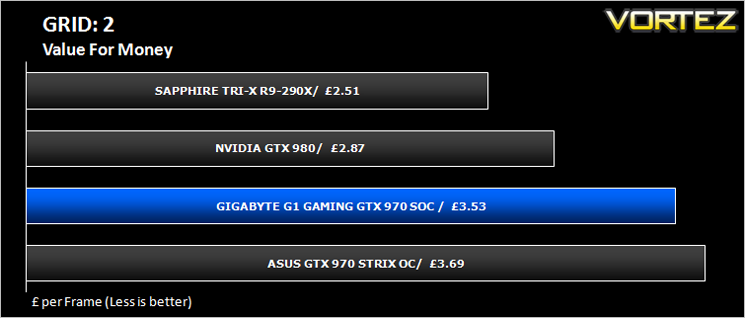
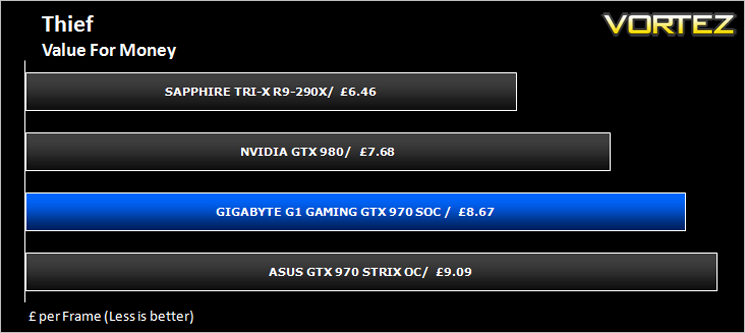
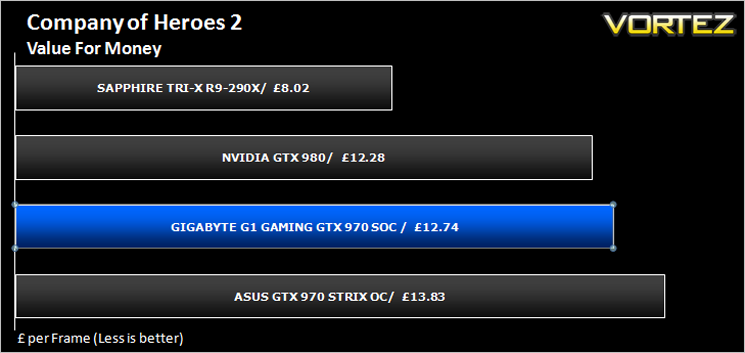
We make a simple calculation for this set of results. For each game we add all of the resulting FPS totals together and then divide by the four sets to give us an overall performance figure. While the figures alone do not give you an accurate picture of how the card will perform in any given scenario, they do tell you, when averaged, which GPU is the more capable across all of the benchmarks and settings tested.
Conclusion
It’s cool, it’s relatively quiet it is overclocked from the factory and looks the business so there is very little not to like about the GIGABYTE G1 GAMING GTX 970 SOC. IF you’re a gamer still clinging to 1080p resolutions then this card will no doubt cut through frame rates like a hot knife through butter however it will come at a cost. £289 is cheaper than other GTX 970’s on the market and also faster however it is still a little more expensive than the competing, and slightly faster R9-290X. As with the ASUS GTX 970 STRIX we reviewed recently, it is hard to recommend this card over that if raw performance is what you crave because in the majority of scenarios, the 290X is the faster card. If on the other hand you hold loyalty to NVIDIA then you could do a lot worse than buy this graphics card because despite being slightly slower than a R9-290X, it is still a very good graphics card.It is slightly faster and also slightly cheaper than the ASUS card we pitched it against today. Both cards look stunning and thus aesthetically at least, there is very little to choose between them. The G1 looks better from the side viewpoint thanks to the illuminated ‘WINDFORCE’ logo but other than that you could fit a cigarette paper between them as far as looks go. The ASUS card is quieter and slightly cooler while using less power but conversely didn’t overclock quite so high so we think your decision is most likely going to come down to whether you want raw performance or power efficiency and cooling. If the former is your choice and you feel an allegiance to NVIDIA then go for the GIGABYTE.
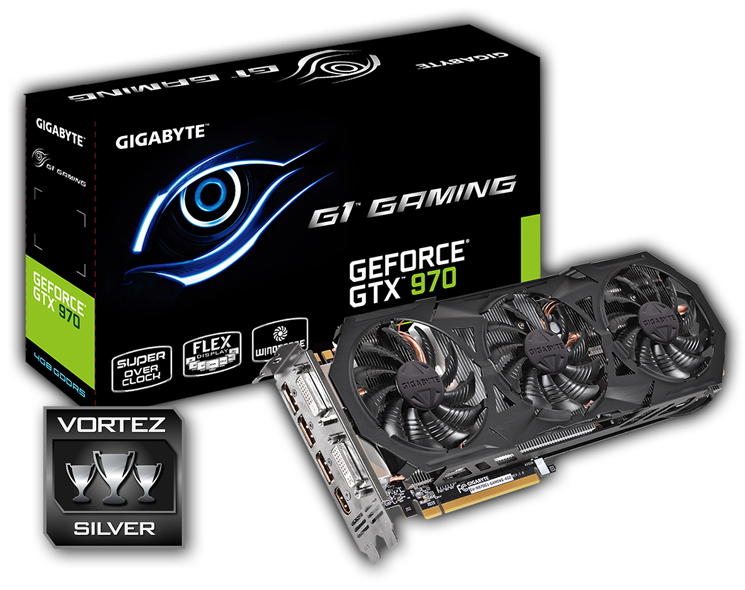
Overall, we feel that the graphics card we have reviewed today makes for a very good, high end graphics card that offers a good degree of future proofing. We liked the FLEX(ability) of having additional Displayports which is a rarity among NVIDIA based GPUs so GIGABYTE deserve credit for this but you will sacrifice case temperatures because of this due to the fact the additional ports take up the exhaust area and thus the hot air dissipated from the graphics card will be circulated back into the case. So this card has its good and not so good points which will depend greatly on your requirements as to whether you feel this card is right for you or not. Us? We liked it but it wasn’t quite good enough to warrant our Gold award on this occasion but does receive our stamp of approval.
To summarise:
A fast card that is forced to make sacrifices in cooling to provide some innovative features.
Pros
+ 6 monitor ports
+ High Factory overclock
+ Additional overclocking headroom
+ Good Aesthetics
Cons
– Good case airflow will be required
– Slightly slower than a R9-290X
+ 6 monitor ports
+ High Factory overclock
+ Additional overclocking headroom
+ Good Aesthetics
Cons
– Good case airflow will be required
– Slightly slower than a R9-290X

Click here for an explanation of our awards at Vortez.net.


