







GIGABYTE bring their well awarded G1.Killer range to AMD and the FM2+ platform ready to accept the latest Kaveri APUs. Will this be one to pick up?

Product on Review: G1.Sniper A88X
Manufacturer and Sponsor: GIGABYTE
Street Price: £75 inc. VAT
If you are looking for a gaming motherboard to go with your shiny new Kaveri APU, GIGABYTE will want to turn your attention to their G1.Sniper A88X, that’s right, SNIPER. Sitting at a very competitive price as far as the A88X motherboards go, there are likely concessions made when compared to the big boy brothers on the Intel side. Regardless, we have the green and black aesthetic for the AMD team which allows for personal preference and selection. Most noticeably with the G1.Sniper A88X, GIGABYTE shed a lot of the extreme designs and opt for a more sensible solution, we find a 4+2 digital power phase delivery which is perfectly adequate for this low power platform, as opposed to the 16 phases that can be found on the G1.Sniper 5! Also, you will not find any skulls! Let’s turn our eyes to the details then take a look at performance.
Overview by GIGABYTE
GIGABYTE G1-Killer series motherboards are packed with absolutely everything you’ll need to build an uncompromising, high-performance gaming PC. Loaded with advanced audio technologies, maxed out multi-card gaming support, and advanced cooling and high quality heatsink design, GIGABYTE G1-Killer motherboards are the ultimate choice for serious PC gamers.
GIGABYTE FM2+ series motherboards based on AMD A88X chipset and feature the new FM2+ APU socket, and are designed to get the most from forthcoming Kaveri AMD APUs, while preserving compatibility for current AMD FM2 APUs. FM2+ AMD APUs offer DDR3-2400 AMP memory support, native support for 8 GT/s PCI Express gen 3.0 as well as DX11.1 support integrating the high performance ‘Steamroller’ core. AMD socket FM2+ APUs also offer native support for 4K resolution displays on HDMI port.
GIGABYTE FM2+ series motherboards based on AMD A88X chipset and feature the new FM2+ APU socket, and are designed to get the most from forthcoming Kaveri AMD APUs, while preserving compatibility for current AMD FM2 APUs. FM2+ AMD APUs offer DDR3-2400 AMP memory support, native support for 8 GT/s PCI Express gen 3.0 as well as DX11.1 support integrating the high performance ‘Steamroller’ core. AMD socket FM2+ APUs also offer native support for 4K resolution displays on HDMI port.
Specifications & Features
APU
FM2+ Socket:
AMD A series processors
AMD Athlon™ series processors
(Please refer “CPU Support List” for more information.)
Chipset
AMD A88X
Memory
4 x 1.5V DDR3 DIMM sockets supporting up to 64 GB of system memory
* Due to a Windows 32-bit operating system limitation, when more than 4 GB of physical memory is installed, the actual memory size displayed will be less than the size of the physical memory installed.
* The maximum 64 GB of system memory can be supported using 16 GB (or above) memory modules. GIGABYTE will update the memory support list on the official website when the memory modules are available on the market.
Dual channel memory architecture
Support for DDR3 2400(OC)/2133/1866/1600/1333 MHz memory modules
Support for AMD Memory Profile (AMP)/Extreme Memory Profile (XMP) memory modules
(Please refer “Memory Support List” for more information.)
Onboard Graphics
APU with integrated AMD Radeon™ HD 8000/7000 series graphics:
* To use the onboard graphics port, you must install an AMD APU with integrated graphics.
1 x D-Sub port, supporting a maximum resolution of 1920×1200
1 x DVI-D port, supporting a maximum resolution of 2560×1600
* Support for 2560×1600 resolution requires both a monitor and cable that support Dual Link DVI.
* The DVI-D port does not support D-Sub connection by adapter.
1 x HDMI port, supporting a maximum resolution of 4096×2160
* The resolution of 4096×2160 can be supported when using an FM2+ APU; the maximum resolution supported is 1920×1200 when using an FM2 APU.
* Support for HDMI 1.4a version.
Maximum shared memory of 2 GB
Audio
Realtek® ALC898 codec
High Definition Audio
2/4/5.1/7.1-channel
Support for S/PDIF Out
LAN
Realtek® GbE LAN chip (10/100/1000 Mbit)
Expansion Slots
1 x PCI Express x16 slot, running at x16 (PCIEX16)
(The PCIEX16 slot conforms to PCI Express 3.0 standard.)
* To support PCI Express 3.0, you must install an FM2+ APU.
1 x PCI Express x16 slot, running at x4 (PCIEX4)
3 x PCI Express x1 slots
(The PCIEX4 and PCI Express x1 slots conform to PCI Express 2.0 standard.)
2 x PCI slots
Multi-Graphics Technology
Support for AMD CrossFire™ technology
Support for AMD Dual Graphics technology
* Only A series APUs support AMD Dual Graphics.
Storage Interface
Chipset:
8 x SATA 6Gb/s connectors
Support for RAID 0, RAID 1, RAID 5, RAID 10, and JBOD
USB Chipset:
4 USB 3.0/2.0 ports (2 ports on the back panel, 2 ports available through the internal USB header)
9 USB 2.0/1.1 ports (5 ports on the back panel, 4 ports available through the internal USB headers)
Internal I/O Connectors
1 x 24-pin ATX main power connector
1 x 8-pin ATX 12V power connector
8 x SATA 6Gb/s connectors
1 x APU fan header
3 x system fan headers
1 x front panel header
1 x front panel audio header
1 x S/PDIF Out header
1 x USB 3.0/2.0 header
2 x USB 2.0/1.1 headers
1 x serial port header
1 x Clear CMOS jumper
1 x Trusted Platform Module (TPM) header
2 x gain control switches
Back Panel Connectors
1 x PS/2 keyboard/mouse port
1 x D-Sub port
1 x DVI-D port
1 x HDMI port
2 x USB 3.0/2.0 ports
5 x USB 2.0/1.1 ports
1 x RJ-45 port
1 x optical S/PDIF Out connector
5 x audio jacks (Center/Subwoofer Speaker Out, Rear Speaker Out, Line In, Line Out, Mic In)
I/O Controller
iTE® I/O Controller Chip
H/W Monitoring
System voltage detection
APU/System temperature detection
APU/System fan speed detection
APU overheating warning
APU/System fan fail warning
APU/System fan speed control
* Whether the fan speed control function is supported will depend on the cooler you install.
BIOS
2 x 64 Mbit flash
Use of licensed AMI EFI BIOS
Support for DualBIOS™
PnP 1.0a, DMI 2.0, SM BIOS 2.6, ACPI 2.0a
Unique Features
Support for @BIOS
Support for Q-Flash
Support for Xpress Install
Support for EasyTune
* Available functions in EasyTune may differ by motherboard model.
Support for Smart Recovery 2
Support for ON/OFF Charge
Bundle Software
Norton® Internet Security (OEM version)
cFosSpeed
Operating System
Support for Windows 8.1/8/7 32-bit/64-bit
* If you plan to install Windows 8.1, please download the latest drivers from GIGABYTE’s website.
Support for Windows XP 32-bit
* To support Windows XP 32-bit, you must install an AMD FM2 Trinity APU.
Form Factor
ATX Form Factor; 30.5cm x 22.5cm
FM2+ Socket:
AMD A series processors
AMD Athlon™ series processors
(Please refer “CPU Support List” for more information.)
Chipset
AMD A88X
Memory
4 x 1.5V DDR3 DIMM sockets supporting up to 64 GB of system memory
* Due to a Windows 32-bit operating system limitation, when more than 4 GB of physical memory is installed, the actual memory size displayed will be less than the size of the physical memory installed.
* The maximum 64 GB of system memory can be supported using 16 GB (or above) memory modules. GIGABYTE will update the memory support list on the official website when the memory modules are available on the market.
Dual channel memory architecture
Support for DDR3 2400(OC)/2133/1866/1600/1333 MHz memory modules
Support for AMD Memory Profile (AMP)/Extreme Memory Profile (XMP) memory modules
(Please refer “Memory Support List” for more information.)
Onboard Graphics
APU with integrated AMD Radeon™ HD 8000/7000 series graphics:
* To use the onboard graphics port, you must install an AMD APU with integrated graphics.
1 x D-Sub port, supporting a maximum resolution of 1920×1200
1 x DVI-D port, supporting a maximum resolution of 2560×1600
* Support for 2560×1600 resolution requires both a monitor and cable that support Dual Link DVI.
* The DVI-D port does not support D-Sub connection by adapter.
1 x HDMI port, supporting a maximum resolution of 4096×2160
* The resolution of 4096×2160 can be supported when using an FM2+ APU; the maximum resolution supported is 1920×1200 when using an FM2 APU.
* Support for HDMI 1.4a version.
Maximum shared memory of 2 GB
Audio
Realtek® ALC898 codec
High Definition Audio
2/4/5.1/7.1-channel
Support for S/PDIF Out
LAN
Realtek® GbE LAN chip (10/100/1000 Mbit)
Expansion Slots
1 x PCI Express x16 slot, running at x16 (PCIEX16)
(The PCIEX16 slot conforms to PCI Express 3.0 standard.)
* To support PCI Express 3.0, you must install an FM2+ APU.
1 x PCI Express x16 slot, running at x4 (PCIEX4)
3 x PCI Express x1 slots
(The PCIEX4 and PCI Express x1 slots conform to PCI Express 2.0 standard.)
2 x PCI slots
Multi-Graphics Technology
Support for AMD CrossFire™ technology
Support for AMD Dual Graphics technology
* Only A series APUs support AMD Dual Graphics.
Storage Interface
Chipset:
8 x SATA 6Gb/s connectors
Support for RAID 0, RAID 1, RAID 5, RAID 10, and JBOD
USB Chipset:
4 USB 3.0/2.0 ports (2 ports on the back panel, 2 ports available through the internal USB header)
9 USB 2.0/1.1 ports (5 ports on the back panel, 4 ports available through the internal USB headers)
Internal I/O Connectors
1 x 24-pin ATX main power connector
1 x 8-pin ATX 12V power connector
8 x SATA 6Gb/s connectors
1 x APU fan header
3 x system fan headers
1 x front panel header
1 x front panel audio header
1 x S/PDIF Out header
1 x USB 3.0/2.0 header
2 x USB 2.0/1.1 headers
1 x serial port header
1 x Clear CMOS jumper
1 x Trusted Platform Module (TPM) header
2 x gain control switches
Back Panel Connectors
1 x PS/2 keyboard/mouse port
1 x D-Sub port
1 x DVI-D port
1 x HDMI port
2 x USB 3.0/2.0 ports
5 x USB 2.0/1.1 ports
1 x RJ-45 port
1 x optical S/PDIF Out connector
5 x audio jacks (Center/Subwoofer Speaker Out, Rear Speaker Out, Line In, Line Out, Mic In)
I/O Controller
iTE® I/O Controller Chip
H/W Monitoring
System voltage detection
APU/System temperature detection
APU/System fan speed detection
APU overheating warning
APU/System fan fail warning
APU/System fan speed control
* Whether the fan speed control function is supported will depend on the cooler you install.
BIOS
2 x 64 Mbit flash
Use of licensed AMI EFI BIOS
Support for DualBIOS™
PnP 1.0a, DMI 2.0, SM BIOS 2.6, ACPI 2.0a
Unique Features
Support for @BIOS
Support for Q-Flash
Support for Xpress Install
Support for EasyTune
* Available functions in EasyTune may differ by motherboard model.
Support for Smart Recovery 2
Support for ON/OFF Charge
Bundle Software
Norton® Internet Security (OEM version)
cFosSpeed
Operating System
Support for Windows 8.1/8/7 32-bit/64-bit
* If you plan to install Windows 8.1, please download the latest drivers from GIGABYTE’s website.
Support for Windows XP 32-bit
* To support Windows XP 32-bit, you must install an AMD FM2 Trinity APU.
Form Factor
ATX Form Factor; 30.5cm x 22.5cm
USB DAC-UP port
Featuring a gold plated USB 2.0 port, GIGABYTE USB DAC-UP provides clean, noise-free power delivery to your Digital-to-Analog Converter. DACs can be sensitive to fluctuations in power from the other USB ports, which is why GIGABYTE USB DAC-UP takes advantage of an isolated power source that minimizes potential fluctuations and ensures the best audio experience possible.
GIGABYTE AMP-UP Audio: Redefining Motherboard Audio
GIGABYTE AMP-UP Audio combines a range of unique features and technologies that are designed to give audio enthusiasts and PC gamers more control over their motherboard audio than ever before.
Gain Boost
To further optimize the audio experience provided by the onboard OP-AMP, GIGABYTE motherboards also debut Gain Boost. Gain Boost provides onboard switches to select between 2.5x and 6x amplification modes depending on speakers or headphones being used.
Upgradable Onboard OP-AMP
GIGABYTE motherboards are the world’s first to feature an onboard operational amplifier (OP-AMP), allowing users to physically switch out and try different OP-AMPs which offer distinct and nuanced properties that make the audio clearer, punchier and more life-like. Additional OP-AMPs can be purchased separately to further expand audio capabilities.
Audio Noise Guard
To help protect and insulate the the Realtek ALC898 audio processor and onboard amplifiers from electrostatic interference (ESD), the GIGABYTE G1.Sniper A88X motherboard features an audio noise guard that essentially separates the board’s sensitive analog audio components from potential ESD pollution at the PCB level. LED trace path lighting illuminates to show the separation of the PCB layers.
Gold Audio Plated Hardware
The GIGABYTE G1.Sniper A88X motherboard uses top quality gold plated hardware for improved connectivity and long lasting durability for the USB DAC-UP port and audio connectors. Gold has superb signal conductivity and will not tarnish over extended periods of use. The Realtek ALC898 audio processor is also shielded by a gold-plated cover which eliminates electrostatic interference.
Nichicon Pro Audio Caps
The GIGABYTE G1.Sniper A88X motherboard uses the highest quality Nichicon High End Audio Capacitors at each channel layout. These professional audio capacitors deliver the highest quality sound resolution and sound expansion to create the most realistic sound effects for professional gamers.
GIGABYTE Ultra Durable™ 4 Plus
GIGABYTE Ultra Durable™ 4 Plus debuts on GIGABYTE motherboards, with a range of features and component choices that provide record-breaking performance, cool and efficient operation and extended motherboard lifespan.
Ultra Cool
GIGABYTE motherboards feature new heatsink designs that offer uncompromisingly efficient cooling on key areas of the motherboard including the PWM area and chipset. GIGABYTE motherboards offer excellent cooling of the crucial APU power delivery area, ensuring even the most aggressive and extreme configurations will be kept well within optimal thermal parameters.
Ultra Performance
GIGABYTE uses All Solid Caps (Capacitors) and Low RDS(on) MOSFETs which are rated to work at higher temperatures to provide a longer lifespan.
Ultra Safe
GIGABYTE motherboards feature GIGABYTE DualBIOS™, an exclusive technology from GIGABYTE that protects arguably one of your PC’s most crucial components, the BIOS. GIGABYTE DualBIOS™ means that your motherboard has both a ‘Main BIOS’ and a ‘Backup BIOS’, making users protected from BIOS failure due to virus attack, hardware malfunction, improper OC settings or power failure during the update process.
Humidity Protection
Humidity can play havoc on a motherboard’s circuitry.GIGABYTE’s new Glass Fabric PCB design helps protect against electrical shorts due to humidity by reducing the gaps in spacing between PCB filaments.
Power Failure Protection
GIGABYTE also uses Anti-Surge ICs to protect the motherboard against power surges.
Electrostatic Protection
GIGABYTE motherboards feature High Resistance ICs which help protect the motherboard against electrostatic discharge.
AMD Dual Graphics Technology
The AMD FM2+ series platform showcases AMD Dual Graphics technology, allowing users to further boost 3D graphics performance by adding an additional discrete AMD Radeon™ HD 6000 series graphics card* to the system. This unique Dual Graphics technology means users can enjoy higher frame rates on the latest gaming titles, utilizing the processing power of both discrete and integrated graphics processors.
* Please use AMD Dual Graphics certified DX11 VGA card (i.e., Radeon HD 6670/6570/6450 etc.) and AMD Dual Graphics supported APU, detail information please refer to AMD official website:
http://www.amd.com/us/products/technologies/dual-graphics/Pages/dual-graphics.aspx#3
AMD Eyefinity Technology
Supporting multiple independent display outputs simultaneously, AMD Eyefinity technology delivers innovative graphics display capabilities enabling massive desktop workspaces and ultra-immersive visual environments for the ultimate panoramic computing experience.
Multi-display support with AMD CrossFire
Flexible graphics capabilities – Up to 2 VGA cards are supported for 2 way AMD CrossFire™ (running at x16, x4 bandwidth), delivering the ultimate in graphics performance for gaming enthusiasts who demand the highest frame rates without compromising on resolution.
Triple-monitor support
GIGABYTE FM2+ series motherboards are taking advantage of AMD Eyefinity technology, to allow users to extend their OS desktop by connecting up to three high-resolution digital displays. Triple displays mean more real-estate for enhanced productivity, plus the ability to enjoy panoramic triple screen 3D gaming thanks to AMD’s optimized Eyefinity driver technology.
Note: The functions supported of AMD Eyefinity technology may vary by Microsoft OS, Windows Vista/7/8 is recommended, please refer the AMD official website (www.amd.com) for more detail information.
Dual-link DVI port
Designed to leverage the awesome potential of the latest AMD Fusion A-series APUs, GIGABYTE motherboards deliver an enhanced visual experience that includes advanced DX11® gaming, incredibly smooth HD multimedia playback and support for high resolution displays of up to 2560 x 1600 pixels by Dual-link DVI port.
cFosSpeed
GIGABYTE motherboards feature cFos Speed, a network traffic management application which helps to improve network latency, maintaining low ping times to deliver better responsiveness in a crowded LAN environment. cFos Speed works in a similar way to an OS driver, monitoring network traffic packets at the application layer, allowing optimization and improved network performance for specific applications.
4K Ultra HD Support
4K resolution is the next technological milestone in high-definition content delivery, utilizing approximately 4,000 pixels on the horizontal axis, more than four times today’s standard HD pixel density. GIGABYTE FM2+ series motherboards provide native 4K support with FM2+ APU integrated graphics via HDMI port.
HDMI Interface
HDMI is latest High-Definition Multimedia Interface, which is able to provide up to 5Gb/s video transmitting bandwidth and also 8-channel high quality audio. Via transmitting uncompressed digital data, HDMI is able to reduce signal interference as transferring between digital and analog signal, seen and heard, direct from the source. In addition, HDMI is compatible with HDCP (High-bandwidth Digital Content Protection), which allowing playback of Blu-ray/ HD DVD and other protected contents.
High ESD protection for USB and LAN (USB3.0 only)
GIGABYTE motherboards raise the bar in terms of protecting your system, providing advanced electrostatic discharge (ESD) protection for both your Ethernet LAN and USB ports, both common sources of ESD-related failures. Each LAN and USB port is paired with a dedicated protection filter that can withstand high electrostatic discharges, protecting your system from common electrical surges and even direct lighting strikes.
One fuse per USB port (USB3.0 only)
On GIGABYTE motherboards each USB port has its own dedicated power fuse that prevents unwanted USB port failure, helping to safe guard your important data during transfer.
On/Off Charge Technology
GIGABYTE On/Off Charge technology allows you to charge your iPhone, iPad and iPod Touch regardless of whether your PC is on, in standby mode or even off. A derivative of GIGABYTE’s highly acclaimed 3x USB Power feature, On/Off Charge enables devices to draw more current from GIGABYTE motherboard USB ports than standard USB ports allow, so that charging from your PC can be as fast as with a charger…more
*Due to certain mobile phone limitations, users may need to connect the mobile phone to their PC before the PC enters S4/S5 mode to enable a quick charge from non On/Off Charge USB ports. Charging results may vary by model.
*Whether to support 3X USB power design, it may vary by models.
ErP Lot 6 support
The ErP (also known as Energy-Related Products Directive) is part of the European Union’s environmental regulations policy. It is based on concern for the environmental as the proliferation of electronic devices continues, and how to improve energy efficiency for a better and greener life. GIGABYTE supports ErP and produces motherboards that help you effectively improve system efficiency.
Packaging & First Look
Box cover
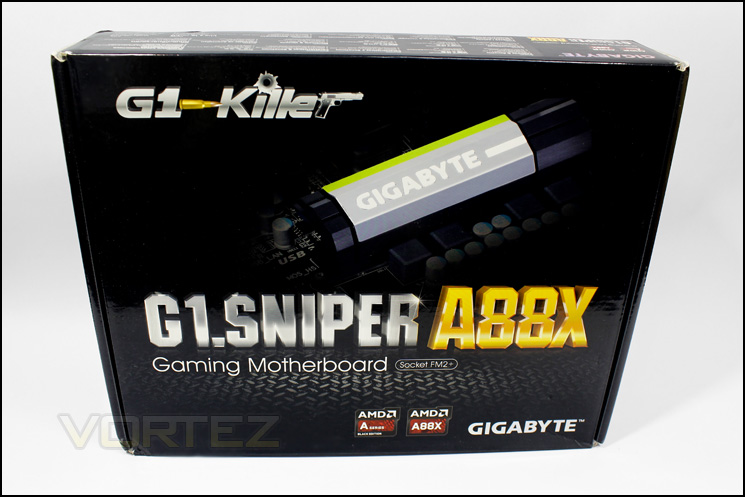
The box design is fairly simple with the various branding where it needs to be, quite understated but attractive.
Underside of packaging
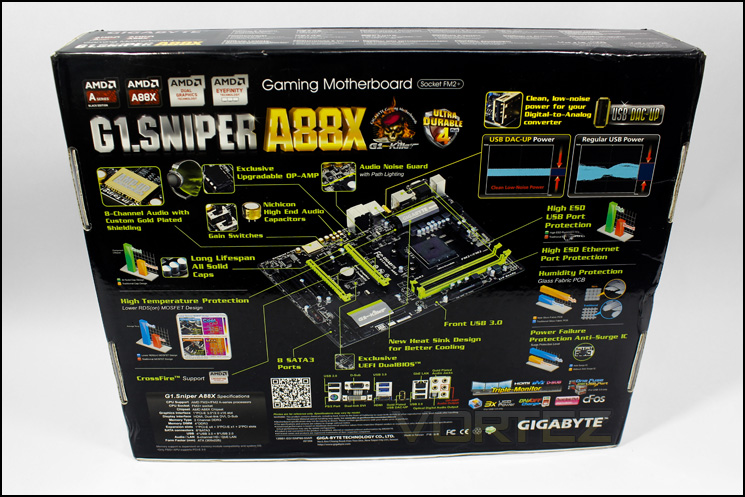
On the underside we find a diagram of the product with a break down of all the features.
Included accessories
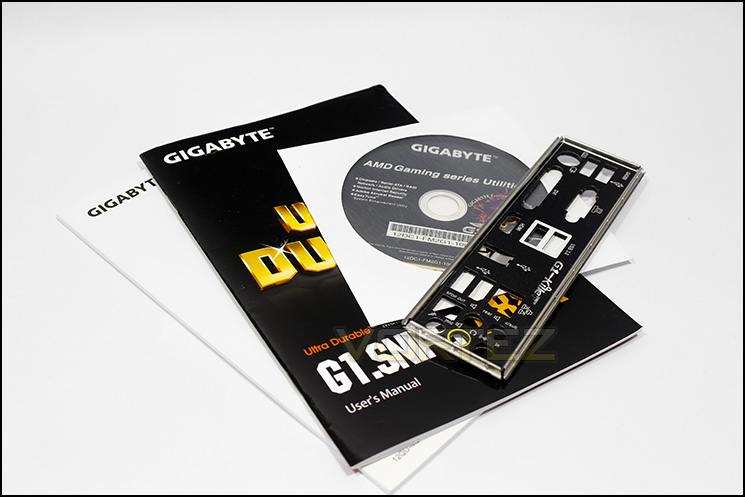
Manual and quick start guide, driver disc, case badge as well as4 SATA cables are bundled in. Nothing out of the ordinary.
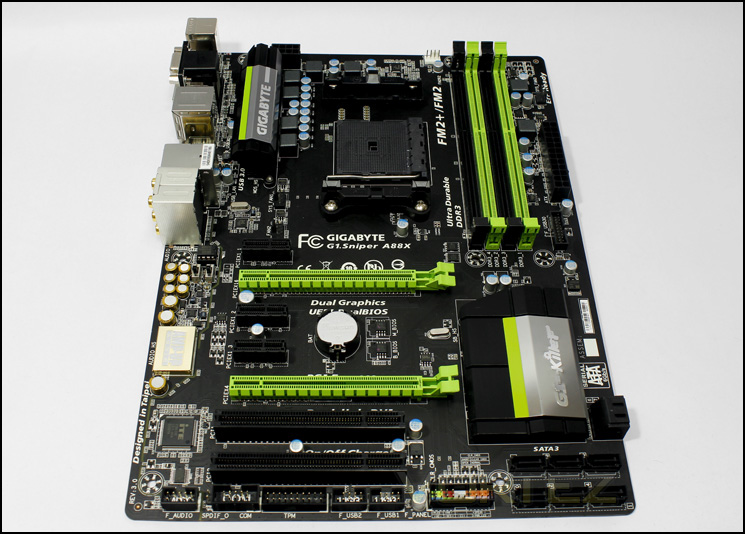
Overview of the G1.Sniper A88X
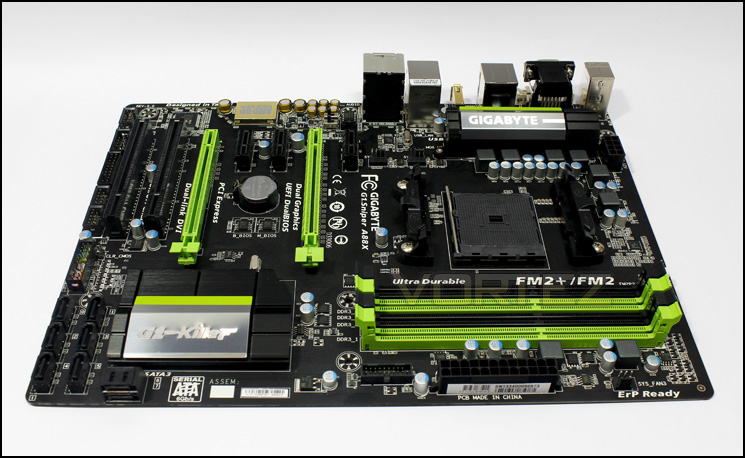
Instantly we get struck with the colour theme synonymous with the G1.Killer series and it does look good. This motherboard however, is not standard ATX, it is slightly slimmer. This will be good for space management inside your case, not so good if your case doesn’t support this size fully, as you may end up with 2-3 inches unsupported (take care when you install the 24pin ATX cable!). The other stand out feature is all that audio circuitry!
Closer Look
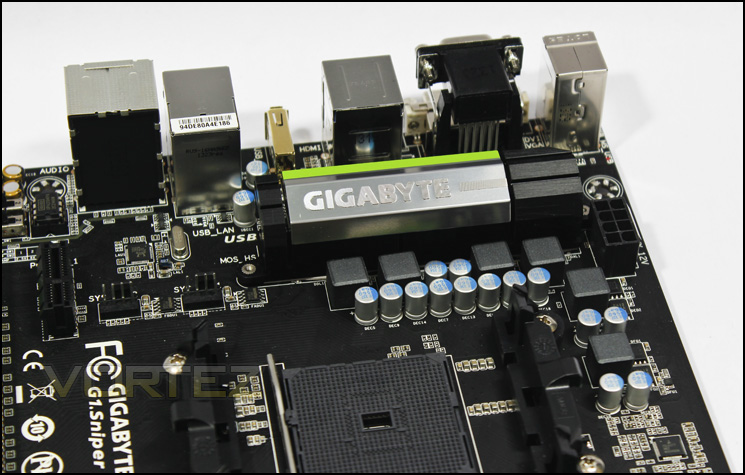
Power delivery
Surrounding the APU socket, we find a pair of 4pin pwm fan headers, the power delivery system that features some decent sized MOSFET cooling and an 8pin ATX socket.
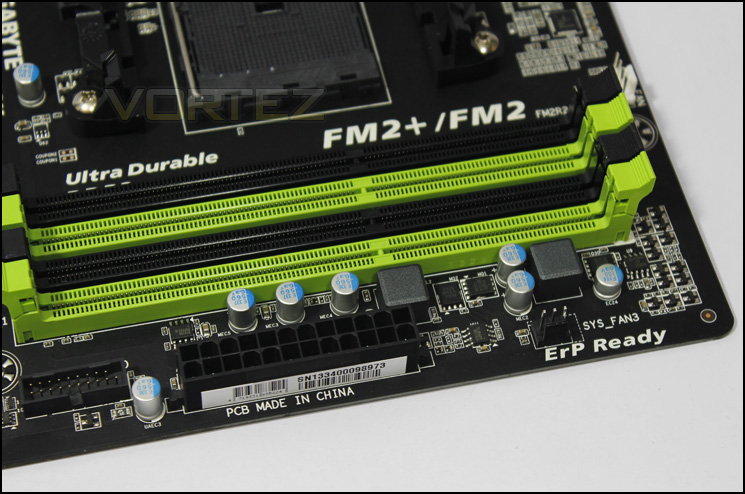
Memory slots
There are 4x memory slots that can support up to 64GB of memory. The G1.Sniper A88X also supports AMP 2400 and X.M.P. on the right, just above the memory slots, you can find the CPU fan header as well as an additional fan header to the side. In this area we also find the obligatory 24pin ATX connector and the neo-obligatory USB 3.0 front panel header.
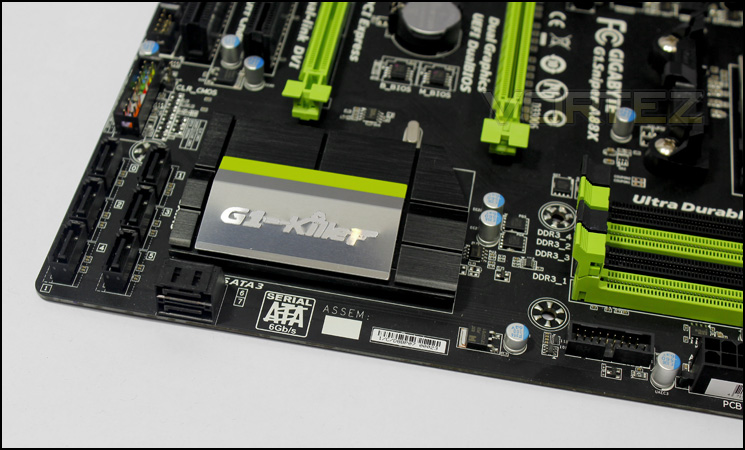
SATA area
The bottom right hand corner of the motherboard seems fairly bare, though we do have 8x SATA ports arranged in a cringe-worthy fashion. At least there are two at a right angle. Moving on, the chipset is covered by a large heatsink that should be very capable of dealing with any heat, and in the background we find the dual BIOS chips next to the CMOS battery.
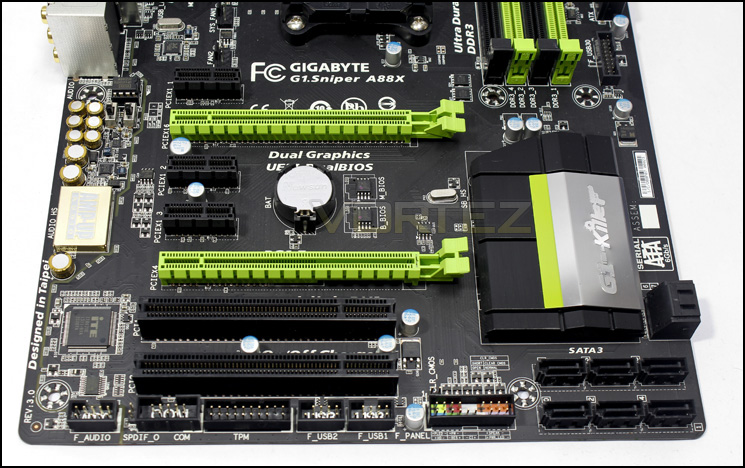
Expansion slot layout
This board has 3x PCIe x1, 1x PCIe 3.0 x16, 1x PCIe x4 (physical x16) and 2x legacy PCI slots. Having a two slot space in between the two PCIex16 slots will give good spacing for anyone who would like to use multiple graphics cards. However, considering this is a gaming motherboard, you would want to note that this does not support SLI.
Along the bottom edge, from the left, there is an isolated front panel audio header, S/PDIF and COM headers, a TPM (Trusted Module Platform) header and a pair of USB 2.0 headers.
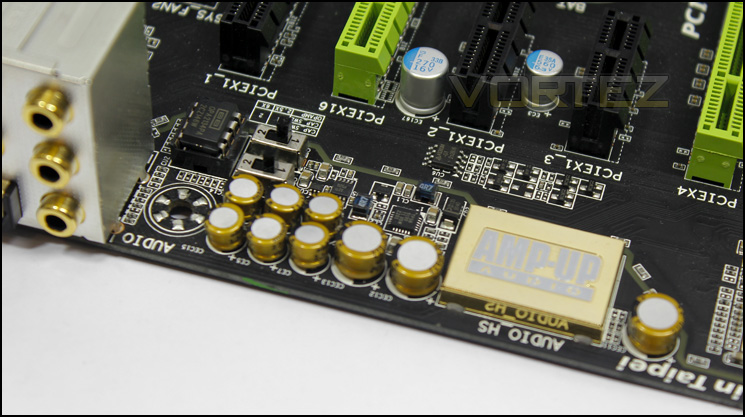
Audio section
The G1.Sniper A88X sports some impressive audio circuitry and is part of GIGABYTE’S AMP UP range. What this means is, this motherboard has a removable ‘op amp’ socket and is bundled with a Ti OPA2134PA op amp, which can be swapped for any op amp of your choice, or GIGABYTE sell an AMP UP pack which has a selection of op amps and tools to change them. This allows for a pair on board gain switches to boost the signal for high impedance headphones or speakers. A downside to all this fancy circuitry is that, unlike the ASRock and ASUS motherboards we have looked at recently, GIGABYTE are using the older Realtek ALC898 audio codec, over the latest, considered to be the best yet, ALC1150.
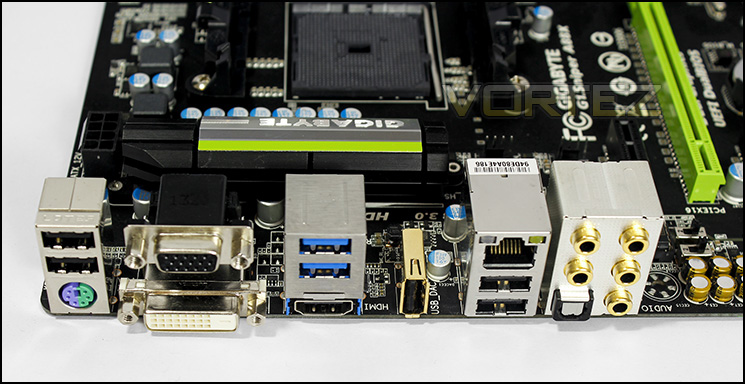
At the rear we have a universal PS2, 4x USB 2.0, 2x ‘lightning proof’ USB 3.0, gigabit lan (controlled by a RTL111F chip, no KILLER for AMD). For video output, HDMI, DVI and D-sub (VGA), foregoing the quad monitor capability of the Kaveri APUs. Continuing on to audio I/O, we have 5x gold plated 3.5mm jacks for 7.1 surround and microphone, optical out, and a ‘DAC UP’ port, which is a normal functioning, USB 2.0 port, that has a dedicated power delivery system specifically designed to be used with external DACs.
BIOS
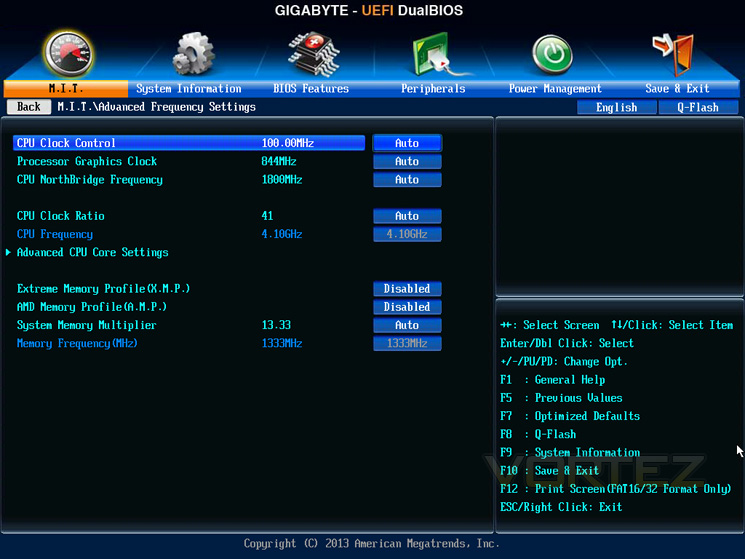
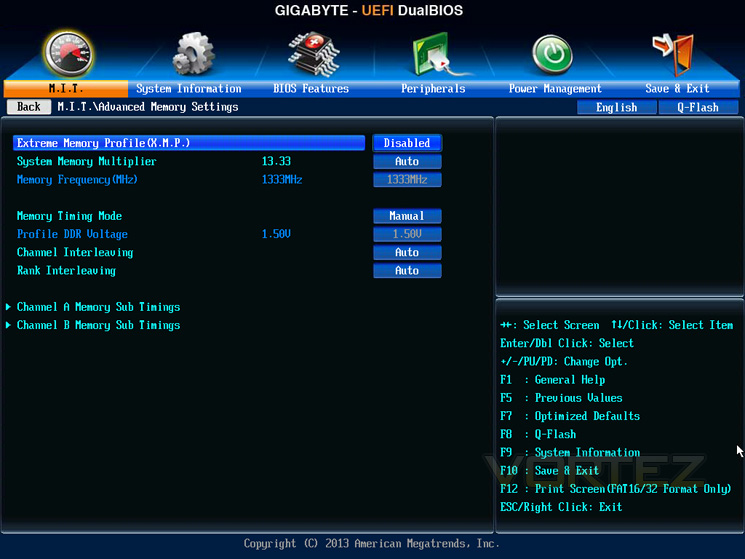
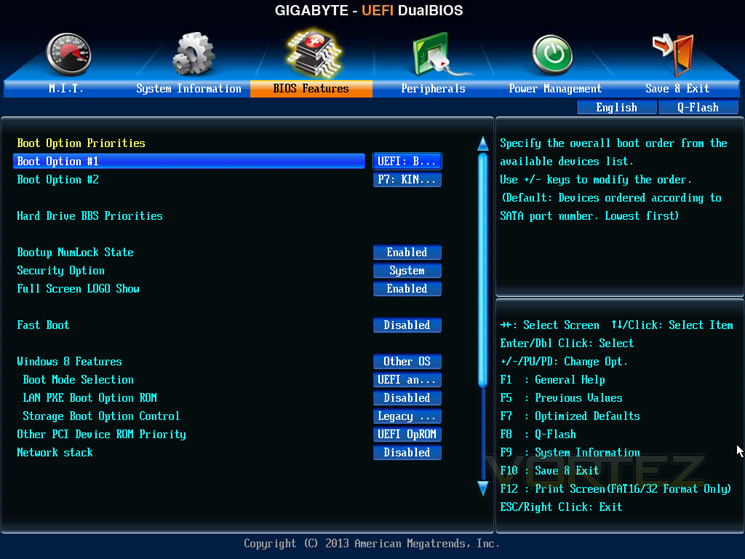
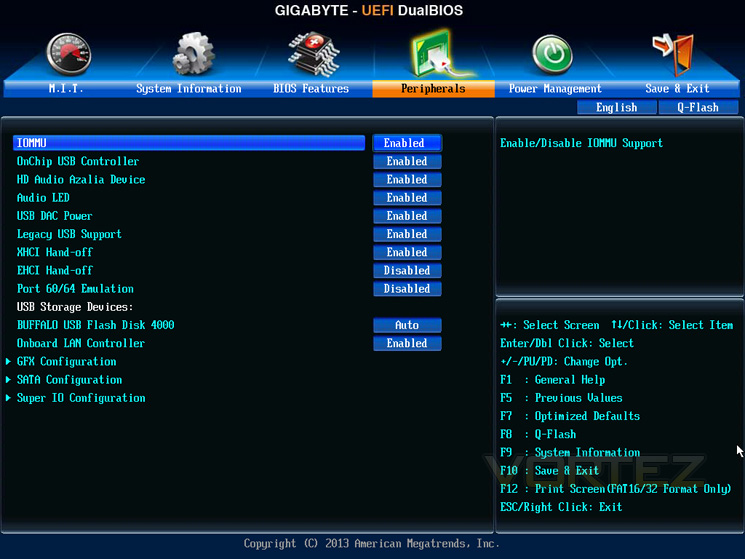
The BIOS is similar to other mainstream GIGABYTE motherboards, featuring slow mouse movement, yet neatly laid out and easy to find functions. Recently added to this BIOS is an interesting TDP mode, which limits the APU power to varying thermal points 45w/65w were the choices for the A10-6800K, which is a cool feature for those who want a heat and power friendly environment. The only annoyance I came across was the CPU voltage adjustment, which reads in a positive or negative manner, leaving you to guess what the stock voltage for your APU is, and with no final or target voltage indicator.
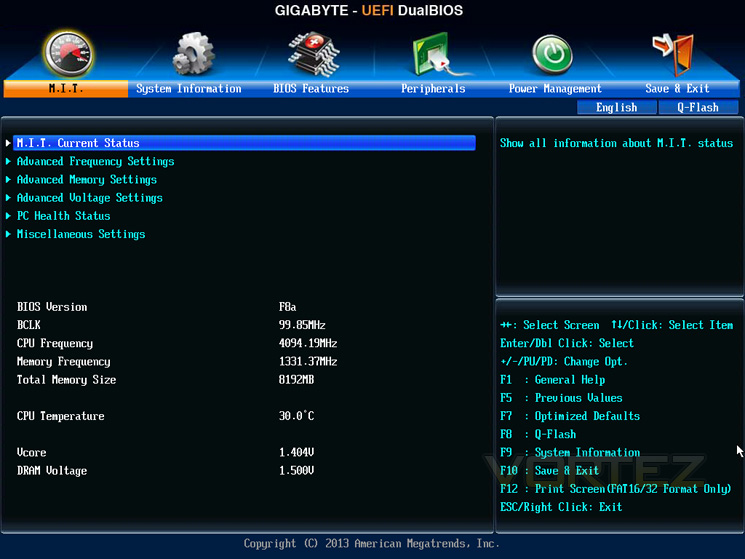
Test Setup
A88X Setup
APU – A10-6800K
Motherboard – ASUS A88X-PRO – ASRock A88X Extreme6+ – GIGABYTE G1.Sniper A88X
RAM – Xtreem LV PC3 19200 DDR3 LV 2400
SSD – Kingston Hyper X 120GB
Power Supply – NZXT Hale82 650W
Cooler – Noctua
APU – A10-6800K
Motherboard – ASUS A88X-PRO – ASRock A88X Extreme6+ – GIGABYTE G1.Sniper A88X
RAM – Xtreem LV PC3 19200 DDR3 LV 2400
SSD – Kingston Hyper X 120GB
Power Supply – NZXT Hale82 650W
Cooler – Noctua
APU Configurations
A10-6800K @ 4.1 GHz/4.4 GHz @ 100MHz x 41/44,
HD 8670D integrated graphics @ 844 MHz, (OC @ 1086 MHz)
Memory @ 1333 MHz 9-9-9-24, (OC @ 2400 MHz 9-11-11-33)
Overclocking
We know that our APU can overclock stable to around 4.7-4.8GHz and as expected we hit 4.7GHz with a speed of 950MHz on the GPU. However, we were able to boot in at just under 5.1GHz, meaning there is plenty of headroom for those die hard overclockers looking for interesting ways to kill their hardware. For those using the APU everyday, a small CPU boost to 4.4-4.5GHz may be more beneficial than trying to attain ceiling frequencies in regards to power draw, or even, considering the high turbo speeds, leaving it at stock settings because most of the performance improvement can be had by overclocking the GPU and memory. Previously, I had only been able to achieve 950MHz on the GPU stable, however, the G1.Sniper A88X allowed me to hit near 1100MHz! Combined with the 2400MHz memory, we should see huge gains over stock speeds.
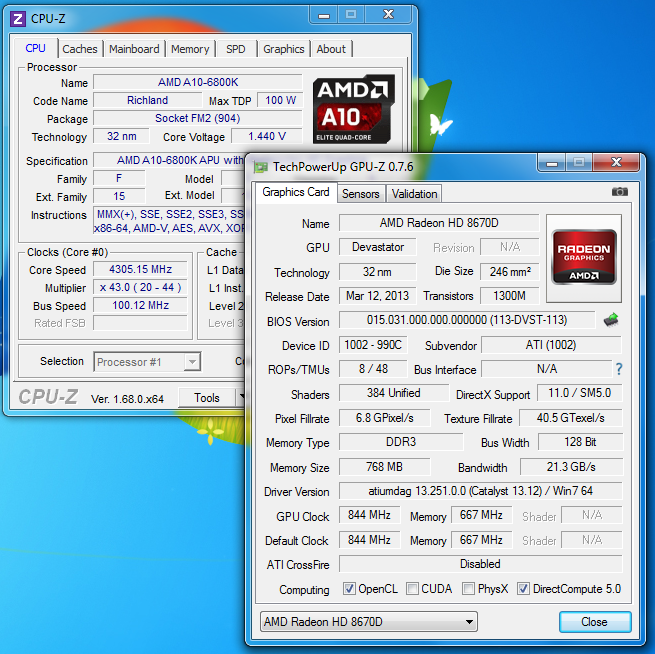
Stock settings
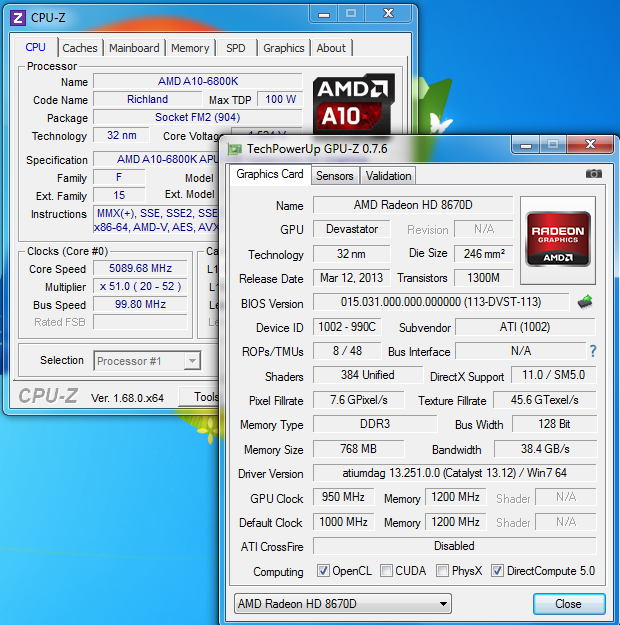
Entering windows high
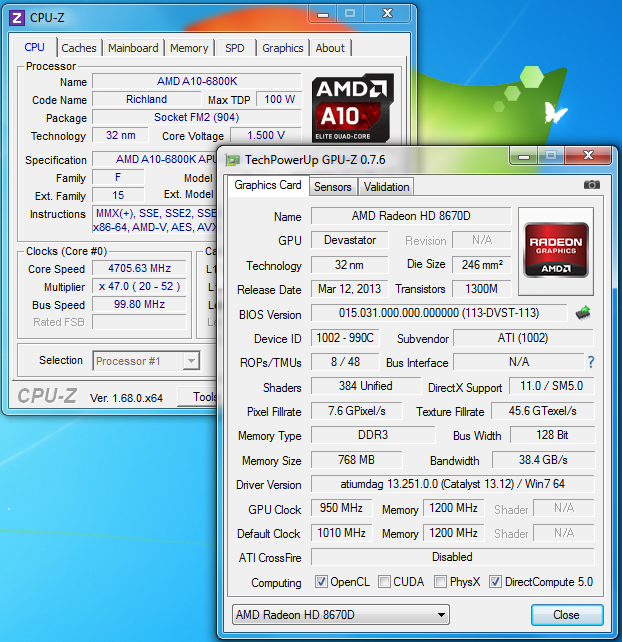
Max stable
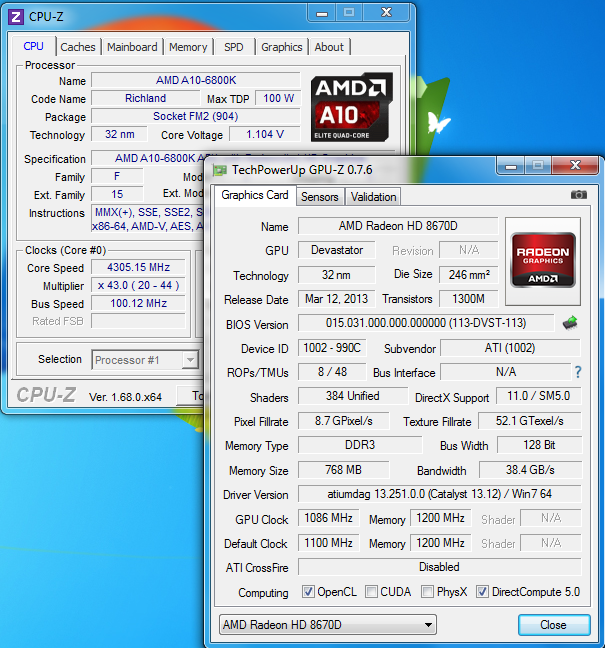
Ideal OC
Power Consumption
It’s interesting to note the power consumption across all motherboards because energy results can fluctuate between manufacturers due to the features and specifications that are integrated. First of all, for the idle tests the system is cold booted into Windows and no additional applications are executed – the watts are noted on the external energy monitor we use. Then the system is loaded with LinX 0.6.4 and MSI Kombustor simultainiously – watts are again monitored throughout the period of testing and the highest rated watts are then noted down. Below are the results of this energy test.
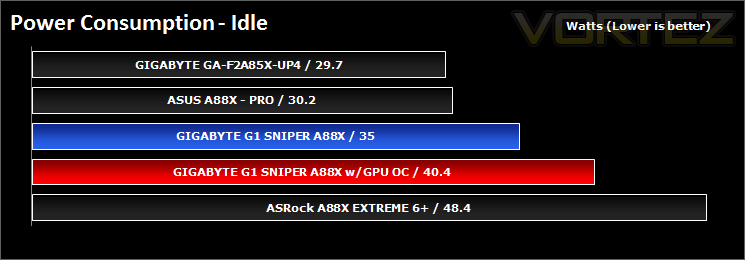
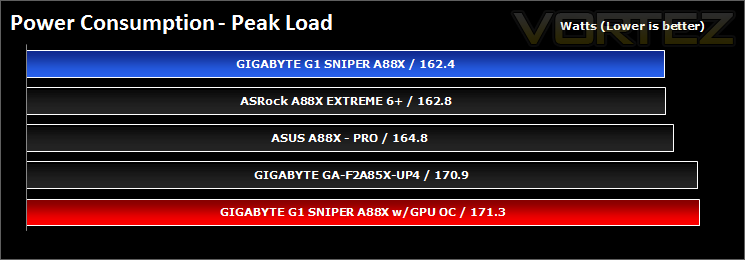
Using the GPU OC, we see that there is only a minor increase in min and max draws.
Synthetic Benchmarks: AIDA64
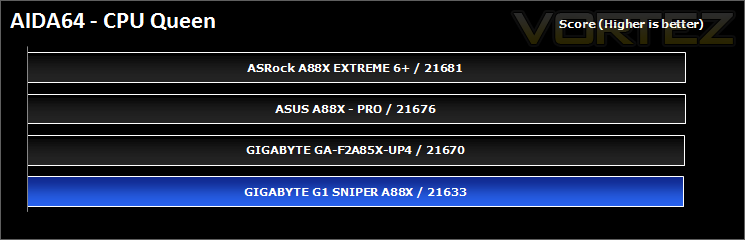
CPU Queen Benchmark
This simple integer benchmark focuses on the branch prediction capabilities and the misprediction penalties of the CPU. It finds the solutions for the classic “Queens problem” on a 10 by 10 sized chessboard. At the same clock speed theoretically the processor with the shorter pipeline and smaller misprediction penalties will attain higher benchmark scores. For example — with HyperThreading disabled — the Intel Northwood core processors get higher scores than the Intel Prescott core based ones due to the 20-step vs 31-step long pipeline. CPU Queen test uses integer MMX, SSE2 and SSSE3 optimizations.
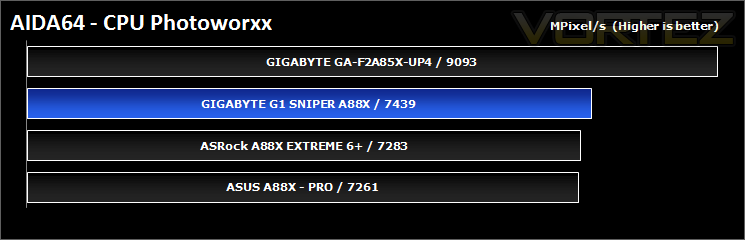
CPU Photoworxx Benchmark
This benchmark stresses the integer arithmetic and multiplication execution units of the CPU and also the memory subsystem. Due to the fact that this test performs high memory read/write traffic, it cannot effectively scale in situations where more than 2 processing threads used. For example, on a 8-way Pentium III Xeon system the 8 processing threads will be “fighting” over the memory, creating a serious bottleneck that would lead to as low scores as a 2-way or 4-way similar processor based system could achieve. CPU PhotoWorxx test uses only the basic x86 instructions, and it is HyperThreading, multi-processor (SMP) and multi-core (CMP) aware.
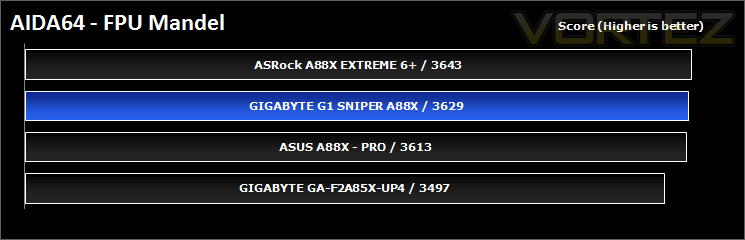
FPU Mandel Benchmark
This benchmark measures the double precision (also known as 64-bit) floating-point performance through the computation of several frames of the popular “Mandelbrot” fractal. The code behind this benchmark method is written in Assembly, and it is extremely optimized for every popular AMD, Intel and VIA processor core variants by utilizing the appropriate x87, SSE2, AVX or FMA4 instruction set extension. FPU Mandel test is HyperThreading, multi-processor (SMP) and multi-core (CMP) aware.
Synthetic Benchmarks: x264 HD
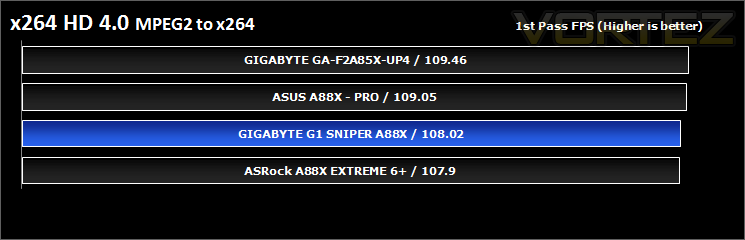
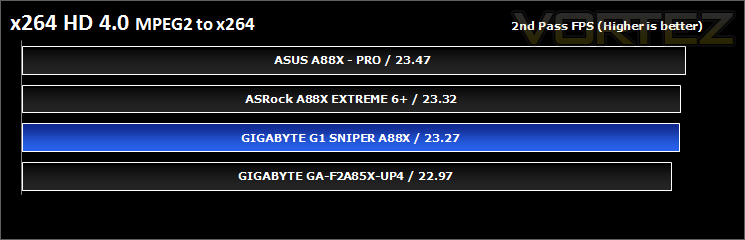
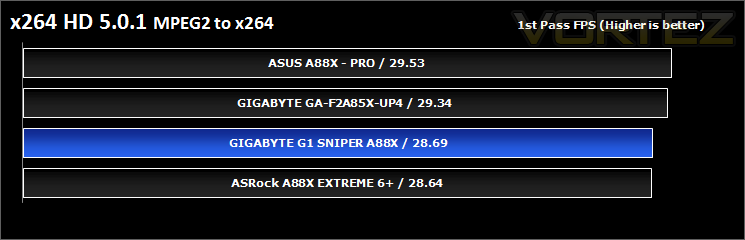
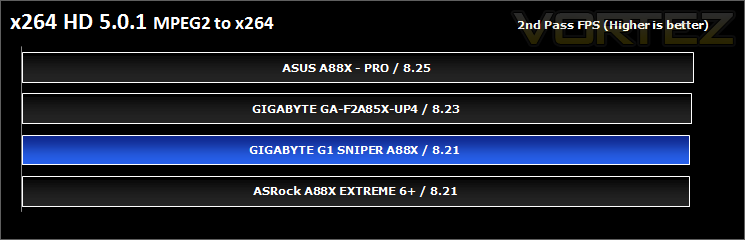
Simply put, this test measures how fast your machine can encode a short, DVD quality MPEG-2 video clip into a high-quality x264 video clip. What’s x264, you ask? It’s more or less the next-generation Xvid/DivX codec. I think it’s ideal for a benchmark because the application (x264.exe) reports fairly accurate compression results (in frames per second) for each pass of the video encoding process, and it uses multi-core processors very efficiently.
Synthetic Benchmarks: Cinebench
Cinebench 11.5
CPU Rendering
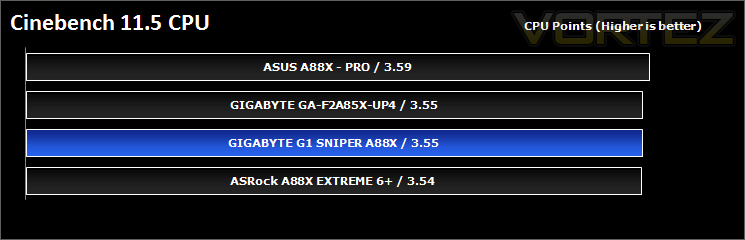
CINEBENCH can measure systems with up to 64 processor threads. This test scene contains approximately 2,000 objects which in turn contain more than 300,000 polygons in total, and uses sharp and blurred reflections, area lights, shadows, procedural shaders, antialiasing, and much more. The result is displayed in points (pts). The higher the number, the faster your processor.
Open GL Graphics Rendering
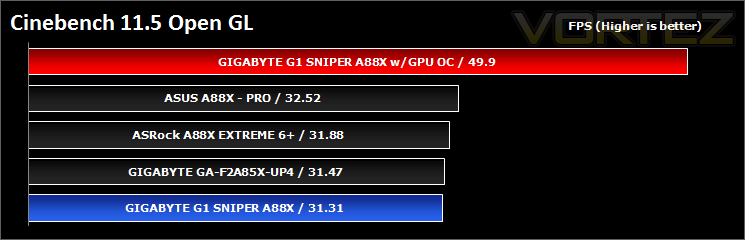
This procedure uses a complex 3D scene depicting a car chase (by renderbaron) which measures the performance of your graphics card in OpenGL mode. The performance depends on various factors, such as the GPU processor on your hardware, but also on the drivers used. The graphics card has to display a huge amount of geometry (nearly 1 million polygons) and textures, as well as a variety of effects, such as environments, bump maps, transparency, lighting and more to evaluate the performance across different disciplines and give a good average overview of the capabilities of your graphics hardware.
Synthetic Benchmarks: SiSoftware SANDRA
SANDRA isn’t always a benchmark that is included in hardware reviews but We believe it shouldn’t be ignored. SANDRA provides a vigorous package that tests your system in a rather large array of benchmarks. There are many aspects of benchmark that can be executed. We will be considering – CPU, memory and GPGPU tests.
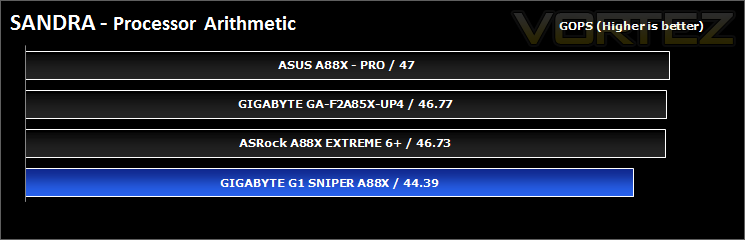
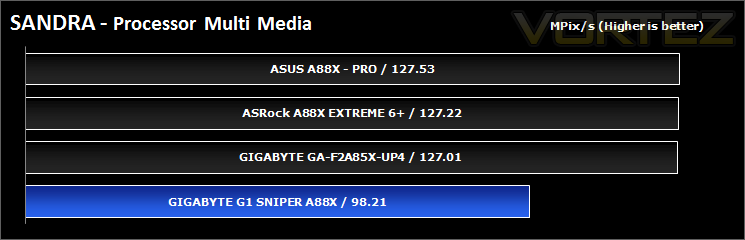
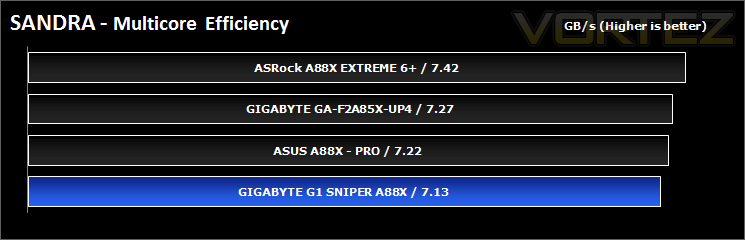
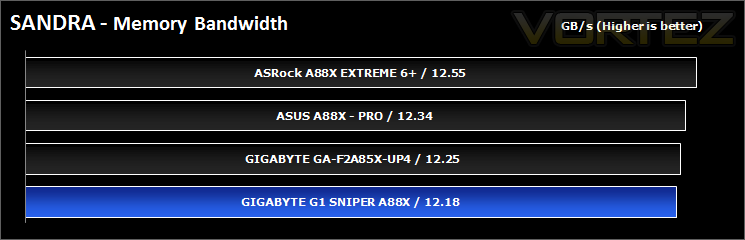
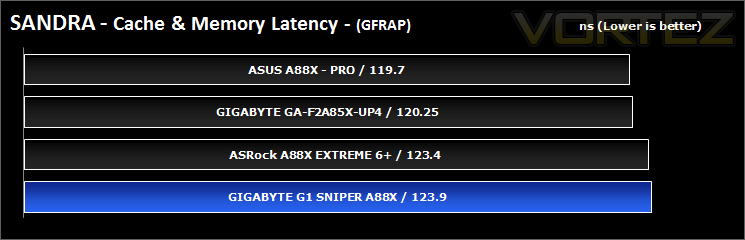
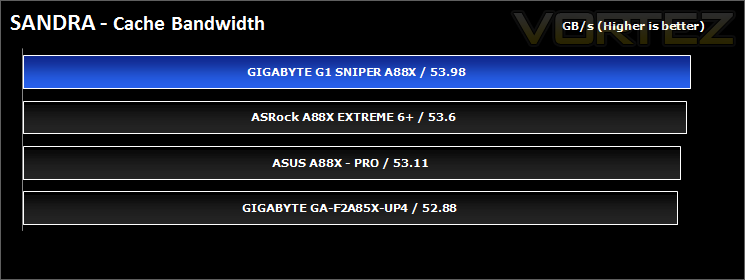
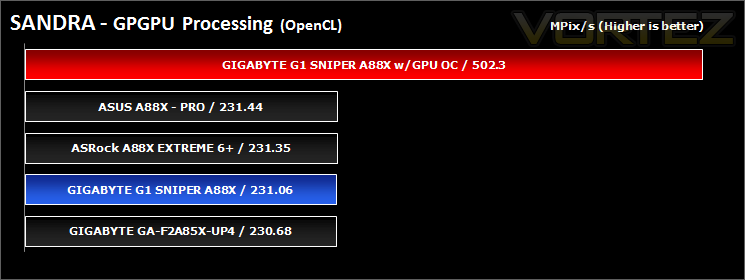
There seems to be a discrepancy in the processor multi-media, could be due to various factors with the hardware or software, maybe a software update will fix this.
The GPGPU processing shows how much potential is unleashed with the overclock, more than twice the performance at stock settings.
Synthetic Benchmarks: 3DMark 11 & 3DMark – Fire Strike
3DMark 11
Designed to measure your PC’s gaming performance 3DMark 11 makes extensive use of all the new features in DirectX 11 including tessellation, compute shaders and multi-threading. Trusted by gamers worldwide to give accurate and unbiased results, 3DMark 11 is the best way to consistently and reliably test DirectX 11 under game-like loads.
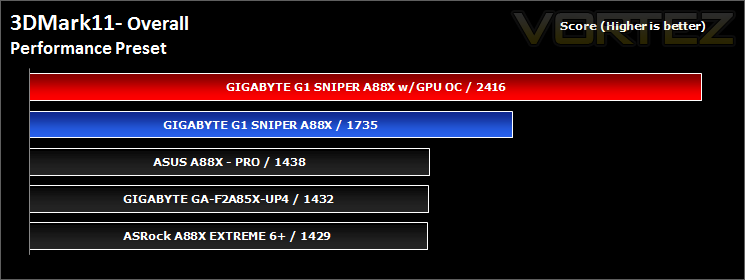
At stock there seems to be a performance misreading, unless GIGABYTE have a trick up their sleeve.
3DMark – Fire Strike
Fire Strike is our new showcase DirectX 11 benchmark designed for high-performance gaming PCs. It is our most ambitious and technical benchmark ever, featuring real-time graphics rendered with detail and complexity far beyond what is found in other benchmarks and games today. Fire Strike will only be available in the Windows editions of 3DMark initially.
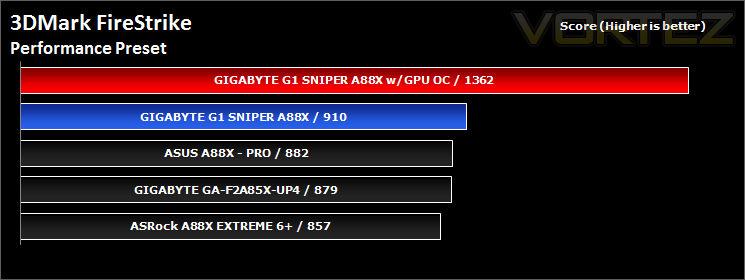
synthetic benchmarks: Basemark CL and PCMark 8
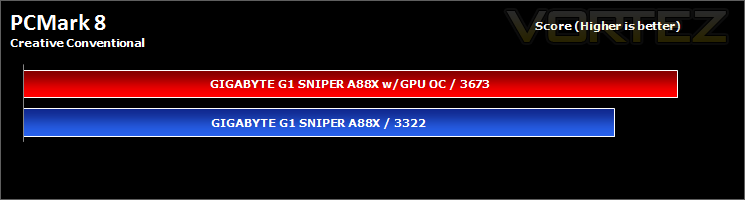
PCMark 8
PCMark 8 is the latest version in our series of popular PC benchmarking tools. It is designed to test the performance of all types of PC, from tablets to desktops. With five separate benchmark tests plus battery life testing, PCMark 8 helps you find the devices that offer the perfect combination of efficiency and performance. PCMark 8 is the complete PC benchmark for home and business.
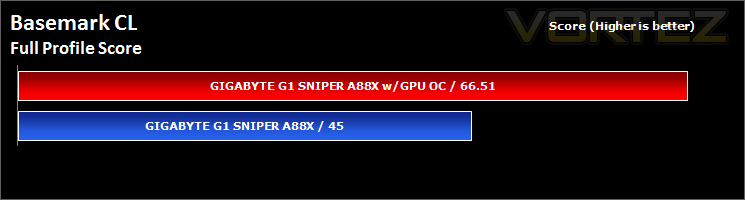
Basemark CL
Basemark CL by Rightware is a comprehensive benchmark tool designed to measure the performance of OpenCL 1.1 implementations on various devices ranging from desktops to embedded systems. Basemark CL uses OpenGL ES 2.0 or OpenGL 2.1 for rendering, depending on the platform.
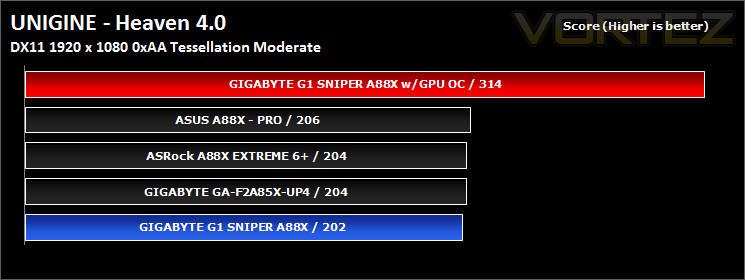
Synthetic Benchmarks: UNIGINE Heaven 4.0 & Valley 1.0
UNIGINE Heaven 4.0
Heaven Benchmark with its current version 4.0 is a GPU-intensive benchmark that hammers graphics cards to the limits. This powerful tool can be effectively used to determine the stability of a GPU under extremely stressful conditions, as well as check the cooling system’s potential under maximum heat output. It provides completely unbiased results and generates true in-game rendering workloads across all platforms, such as Windows, Linux and Mac OS X.
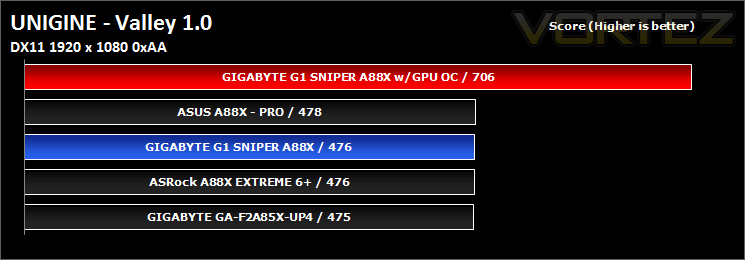
UNIGINE Valley 1.0
Valley Benchmark is a new GPU stress-testing tool from the developers of the very popular and highly acclaimed Heaven Benchmark. The forest-covered valley surrounded by vast mountains amazes with its scale from a bird’s-eye view and is extremely detailed down to every leaf and flower petal. This non-synthetic benchmark powered by the state-of-the art UNIGINE Engine showcases a comprehensive set of cutting-edge graphics technologies with a dynamic environment and fully interactive modes available to the end user.
Game Benchmarks: AVP, Deus Ex:HR, TESV, DiRT SD, DOTA 2
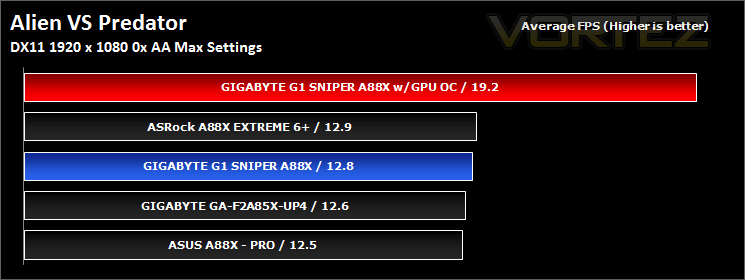
Alien Vs. Predator
Spawned from the popular Alien and Predator franchises, Rebellion have collaborated to bring the legendary war to us through the medium of a first-person shooter. The game forces you to hunt, prey and most importantly survive in the swamp colony of Freya’s prospect as a Predator, Alien or Marine. The stunning visuals add to the sense of dread and terror that we have become so accustomed to seeing with the series.
The stand-alone Alien VS Predator benchmark tool was used for testing here. All the settings were set to very high and Tessellation was applied. The average FPS was recorded at the end.
The stand-alone Alien VS Predator benchmark tool was used for testing here. All the settings were set to very high and Tessellation was applied. The average FPS was recorded at the end.
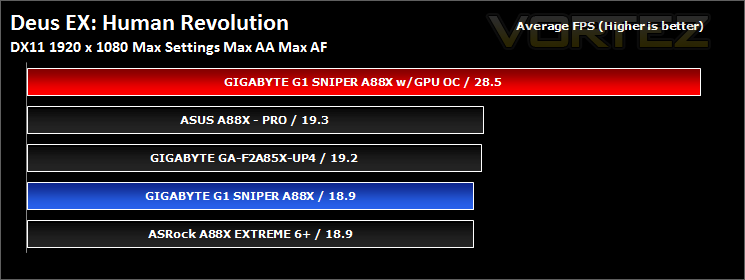
Deus Ex: Human Revolution
You play Adam Jensen, an ex-SWAT specialist who’s been handpicked to oversee the defensive needs of one of America’s most experimental biotechnology firms. Your job is to safeguard company secrets, but when a black ops team breaks in and kills the very scientists you were hired to protect, everything you thought you knew about your job changes.
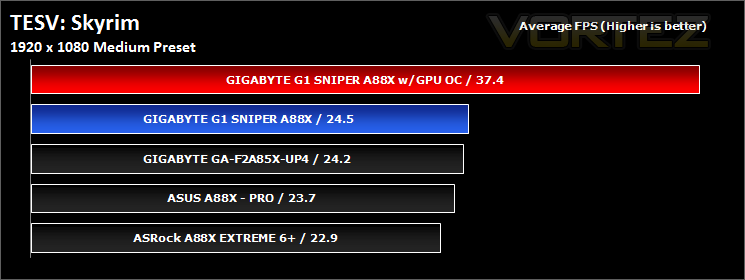
TESV: Skyrim
The Empire of Tamriel is on the edge. The High King of Skyrim has been murdered. Alliances form as claims to the throne are made. In the midst of this conflict, a far more dangerous, ancient evil is awakened. Dragons, long lost to the passages of the Elder Scrolls, have returned to Tamriel. The future of Skyrim, even the Empire itself, hangs in the balance as they wait for the prophesized Dragonborn to come; a hero born with the power of The Voice, and the only one who can stand amongst the dragons.
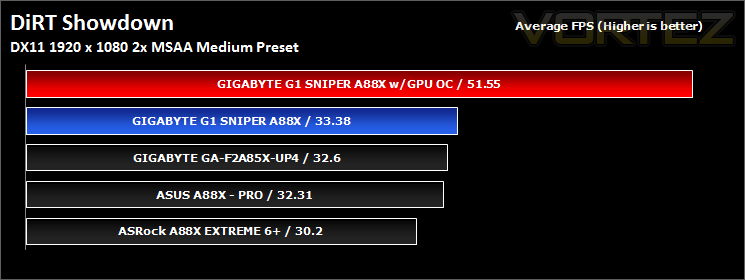
DiRT Showdown
DiRT Showdown is the new arcade racing game from the team that brought you the award-winning DiRT series, uncaged in 2012. Pick up and play controls combine with electrifying events, frenzied crowds and stunning graphics to deliver high octane, dive in and drive thrills from event one. DiRT Showdown comes with phenomenal graphical performance, bone-jarring damage, and social online and split-screen multiplayer as standard. Welcome to DiRT Showdown – a new world of driving delirium.
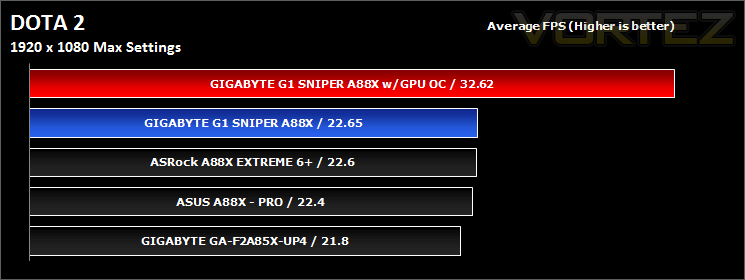
DOTA 2
Dota is a competitive game of action and strategy, played both professionally and casually by millions of passionate fans worldwide. Players pick from a pool of over a hundred heroes, forming two teams of five players. Radiant heroes then battle their Dire counterparts to control a gorgeous fantasy landscape, waging campaigns of cunning, stealth, and outright warfare.
Irresistibly colorful on the surface, Dota is a game of infinite depth and complexity. Every hero has an array of skills and abilities that combine with the skills of their allies in unexpected ways, to ensure that no game is ever remotely alike. This is one of the reasons that the Dota phenomenon has continued to grow.
Irresistibly colorful on the surface, Dota is a game of infinite depth and complexity. Every hero has an array of skills and abilities that combine with the skills of their allies in unexpected ways, to ensure that no game is ever remotely alike. This is one of the reasons that the Dota phenomenon has continued to grow.
Conclusion
The A88X chipset and FM2+ platform is a great opportunity for manufacturers to deliver a dedicated gaming platform, GIGABYTE seized this opportunity and allowed the humble APU into their G1.Killer camp. The black and green design looks great, and those fond of this colour pairing will relish this chance to get their hands on this board for their APU. Performance is competitive with other offerings and it has the guts for some decent overclocking too.
All things considered, one could argue that this board breaks the G1.Killer ‘no compromise’ attitude. There is no additional USB 3.0 besides what is offered by the A88X chipset, no Killer LAN, no ALC1150 audio codec, no SLI (on a gaming motherboard?) and we only get 2x right angle SATA (a kind of status symbol). That sounds like a fair bit of compromise when the competition does offer more features at a similar price. Though, when you consider the solid design of this board (some parts can allegedly take direct lightning bolts from Zeus himself!), a lot of that cost is likely going into reliability… and… the expensive audio setup. The integrated audio certainly is an improvement over many integrated solutions but would have hugely benefited from using the ALC1150 rather than the aging ALC898 and seems a bit of a waste. I guess some may ask a similar question about a gaming platform for an APU?
Allow me to answer that:
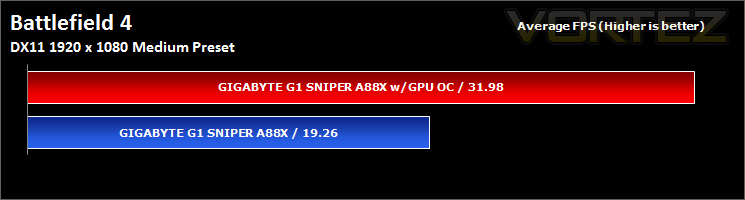
The reason this result was not included in the gaming benchmarks, is because it tells an incomplete story. Gaming at 1920×1080 at medium settings on battlefield 4 with the OC settings, achievable on stock cooling, is very smooth and very playable. So much so that I found myself getting engrossed and continuing to play after benching. Not once amongst the explosions (that sounded awesome) gunfights or game play for my 2-3hour bash did I experience any stuttering or slow downs with the min max fps between 27-41. While not perfect, we are expecting the catalyst 14.1 drivers from AMD (Beta already released) that will bring Mantle, and significant performance increases with it. Even if we see 5% increase in FPS, the APU is in that vital zone where every little helps, not to mention that the Kaveri APUs have an improved GPU core using GCN!
If I can game happily at reasonable settings on a system that is only 1/2 of the cost of a mainstream gaming PC, I am sure there are many others who could too.
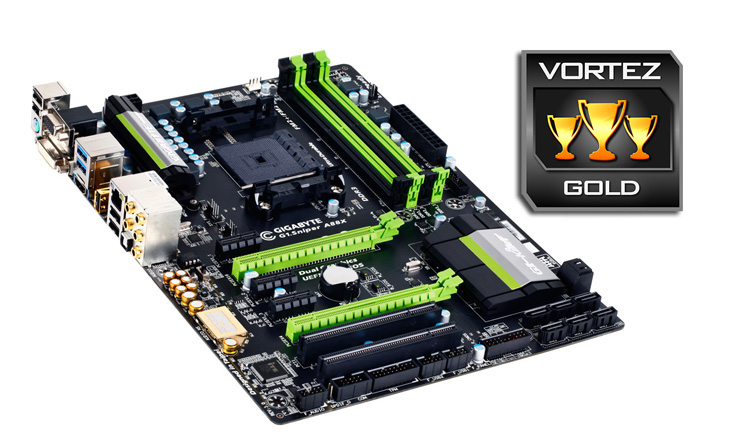
This platform would have done well as a thought out mATX motherboard, appealing to the mobile gamer and those who want something with decent gaming potential in a smaller form factor. As it stands the G1.Sniper A88X is a fantastic gaming motherboard that comes natively capable for many other home uses, we happily award the Vortez Gold.
The G1.Sniper A88X is a fantastic gaming motherboard that is robust, reliable and pretty. Armed with impressive audio components that gives improved, explosive sounds in your gaming sessions out-the-box, GIGABYTE have your back with this one!
Pros.
+ Attractive aesthetic: Green on black with green LEDs
+ Quality components
+ Quality Audio Circuitry
+ Good overclocked performance
+ Price
Cons.
– No ALC1150
+ Attractive aesthetic: Green on black with green LEDs
+ Quality components
+ Quality Audio Circuitry
+ Good overclocked performance
+ Price
Cons.
– No ALC1150
*There has been some concern over BIOS versions for those able to get a Kaveri APU, many FM2+ motherboards will need to have their BIOS updated for compatibility. So please check with the place of purchase for what revision you are buying.

Click here for an explanation of our awards at Vortez.net. Thanks to GIGABYTE for providing today’s review sample.


