GIGABYTE provide the AM3+ platform with a G1 Gaming facelift, with it comes latest additions such as USB 3.1 and an M.2 20Gb/s port.

Product on Review: GA-990X-Gaming SLI
Manufacturer & Sponsor: GIGABYTE
Street Price: £85 GBP / $110 USD
Although missing out on the RGB goodness that has been unveiled by GIGABYTE recently, the latest line of G1 Gaming motherboards for the AM3+ platform introduces various new standards to the ageing chipset including an M2 slot with a 20Gb/s transfer rate, as well as 2x USB 3.1 ports.
GIGABYTE have including good quality on-board audio with thanks to the ALC 1150, and have bolstered the chipset given 14x USB 2.0 with an additional 4x USB 3.0 and 2x USB 3.1. Of these, two are GIGABYTEs DAC UP USB ports that are specifically made to supply clean low-noise power to an external DAC (Digital-Analogue-Converter). Then we get to the meat of it, as standard the 990X chipset is not compatible with SLI, though as with the ASUS 970 PRO AURA and GIGABYTES 970 Gaming variant, the 990X will also be able to pair up your NVidia graphics cards in SLI.
There are various other features, such as the metal reinforced PCIe slots (as seen on other GIGABYTE motherboards) as well as onboard strip of red LED lighting that has limited set customisable effects (off, static, breathing, music pulse), there is everything a gamer could want for their AM3+ based system.
About GIGABYTE
Founded in 1986, GIGABYTE is committed to providing top-notch solutions that “upgrade your life”. We are regarded as a pioneer in innovation with groundbreaking excitements such as Ultra Durable™ — a revolutionary technology that redefines the industry, WINDFORCE™ — exclusive heat dissipation design that builds for extreme performance, G1™ Gaming series—the perfect solutions for gamers and enthusiasts, P series — a powerful gaming laptop less than an inch thick, and BRIX series—a versatile mini-PC in the palm of your hand. GIGABYTE has continuously brought unique new ways of digital world and created marvelous products that empower you with meaningful and charming experiences.
Technical Specifications
AM3+ Socket:
AMD AM3+ FX processor
AMD AM3 Phenom™ II processor/ AMD Athlon™ II processor
Hyper Transport Bus
HyperTransport™ 3.0
5200 MT/s
Chipset
North Bridge: AMD 990X
South Bridge: AMD SB950
Memory
4 x DDR3 DIMM sockets supporting up to 64 GB of system memory
* Due to a Windows 32-bit operating system limitation, when more than 4 GB of physical memory is installed, the actual memory size displayed will be less than the size of the physical memory installed.
Dual channel memory architecture
Support for DDR3 2000(O.C.)/1866/1600/1333/1066 MHz memory modules
* To support a DDR3 1866 MHz (and above) memory, you must install an AM3+ CPU first.
Support for Extreme Memory Profile (XMP) memory modules
Audio
Realtek® ALC1150 codec
High Definition Audio
2/4/5.1/7.1-channel
Support for S/PDIF Out
LAN
Intel® GbE LAN chip (10/100/1000 Mbit)
Expansion Slots
1 x PCI Express x16 slot, running at x16 (PCIEX16)
* For optimum performance, if only one PCI Express graphics card is to be installed, be sure to install it in the PCIEX16_1 slot.
1 x PCI Express x16 slot, running at x8 (PCIEX8)
* The PCIEX8 slot shares bandwidth with the PCIEX16 slot. When the PCIEX8 slot is populated, the PCIEX16 slot will operate at up to x8 mode.
2 x PCI Express x1 slots
(All of the PCI Express slots conform to PCI Express 2.0 standard.)
2 x PCI slots
Multi-Graphics Technology
Support for NVIDIA® Quad-GPU SLI™ and 2-Way NVIDIA® SLI™ technologies
Support for AMD Quad-GPU CrossFireX™ and 2-Way AMD CrossFire™ technologies
Storage Interface
South Bridge:
1 x M.2 connector (Socket 3, M key, type 2242/2260/2280/22110 SATA and PCIe x4/x2/x1 SSD support)
6 x SATA 6Gb/s connectors
Support for RAID 0, RAID 1, RAID 5, RAID 10, and JBOD
* Refer to “1-7 Internal Connectors,” for the supported configurations with the M.2 and SATA connectors.
USB
South Bridge:
12 x USB 2.0/1.1 ports (6 ports on the back panel, 6 ports available through the internal USB headers)
VIA® VL805 chip:
4 x USB 3.0/2.0 ports (2 ports on the back panel, 2 ports available through the internal USB header)
ASMedia® USB 3.1 Controller:
2 x USB 3.1 Type-A ports (red) on the back panel
Internal I/O Connectors
1 x 24-pin ATX main power connector
1 x 8-pin ATX 12V power connector
1 x M.2 Socket 3 connector
6 x SATA 6Gb/s connectors
1 x CPU fan header
2 x system fan headers
1 x power fan header
1 x front panel header
1 x front panel audio header
1 x S/PDIF Out header
1 x USB 3.0/2.0 header
3 x USB 2.0/1.1 headers
1 x serial port header
1 x Clear CMOS jumper
1 x Trusted Platform Module (TPM) header
Back Panel Connectors
1 x PS/2 keyboard/mouse port
2 x USB 3.1 Type-A port (red)
2 x USB 3.0/2.0 ports
6 x USB 2.0/1.1 ports
1 x RJ-45 port
1 x optical S/PDIF Out connector
5 x audio jacks (Center/Subwoofer Speaker Out, Rear Speaker Out, Line In, Line Out, Mic In)
I/O Controller
iTE® I/O Controller Chip
H/W Monitoring
System voltage detection
CPU/System temperature detection
CPU/System/Power fan speed detection
CPU overheating warning
CPU/System/Power fan fail warning
CPU/System fan speed control
* Whether the fan speed control function is supported will depend on the cooler you install.
BIOS
2 x 32 Mbit flash
Use of licensed AMI UEFI BIOS
Support for DualBIOS™
PnP 1.0a, DMI 2.7, WfM 2.0, SM BIOS 2.7, ACPI 5.0
Unique Features
Support for APP Center
* Available applications in APP Center may vary by motherboard model. Supported functions of each application may also vary depending on motherboard specifications.
@BIOS
Ambient LED
Cloud Station
EasyTune
Game Controller
Smart TimeLock
Smart Recovery 2
System Information Viewer
USB Blocker
Support for Q-Flash
Support for ON/OFF Charge
Support for Smart Switch
Support for Xpress Install
Bundle Software
Norton® Internet Security (OEM version)
cFosSpeed
Operating System
Support for Windows 10/8.1/7 32-bit/64-bit
Form Factor
ATX Form Factor; 30.5cm x 24.4cm
AMD AM3+ FX processor
AMD AM3 Phenom™ II processor/ AMD Athlon™ II processor
Hyper Transport Bus
HyperTransport™ 3.0
5200 MT/s
Chipset
North Bridge: AMD 990X
South Bridge: AMD SB950
Memory
4 x DDR3 DIMM sockets supporting up to 64 GB of system memory
* Due to a Windows 32-bit operating system limitation, when more than 4 GB of physical memory is installed, the actual memory size displayed will be less than the size of the physical memory installed.
Dual channel memory architecture
Support for DDR3 2000(O.C.)/1866/1600/1333/1066 MHz memory modules
* To support a DDR3 1866 MHz (and above) memory, you must install an AM3+ CPU first.
Support for Extreme Memory Profile (XMP) memory modules
Audio
Realtek® ALC1150 codec
High Definition Audio
2/4/5.1/7.1-channel
Support for S/PDIF Out
LAN
Intel® GbE LAN chip (10/100/1000 Mbit)
Expansion Slots
1 x PCI Express x16 slot, running at x16 (PCIEX16)
* For optimum performance, if only one PCI Express graphics card is to be installed, be sure to install it in the PCIEX16_1 slot.
1 x PCI Express x16 slot, running at x8 (PCIEX8)
* The PCIEX8 slot shares bandwidth with the PCIEX16 slot. When the PCIEX8 slot is populated, the PCIEX16 slot will operate at up to x8 mode.
2 x PCI Express x1 slots
(All of the PCI Express slots conform to PCI Express 2.0 standard.)
2 x PCI slots
Multi-Graphics Technology
Support for NVIDIA® Quad-GPU SLI™ and 2-Way NVIDIA® SLI™ technologies
Support for AMD Quad-GPU CrossFireX™ and 2-Way AMD CrossFire™ technologies
Storage Interface
South Bridge:
1 x M.2 connector (Socket 3, M key, type 2242/2260/2280/22110 SATA and PCIe x4/x2/x1 SSD support)
6 x SATA 6Gb/s connectors
Support for RAID 0, RAID 1, RAID 5, RAID 10, and JBOD
* Refer to “1-7 Internal Connectors,” for the supported configurations with the M.2 and SATA connectors.
USB
South Bridge:
12 x USB 2.0/1.1 ports (6 ports on the back panel, 6 ports available through the internal USB headers)
VIA® VL805 chip:
4 x USB 3.0/2.0 ports (2 ports on the back panel, 2 ports available through the internal USB header)
ASMedia® USB 3.1 Controller:
2 x USB 3.1 Type-A ports (red) on the back panel
Internal I/O Connectors
1 x 24-pin ATX main power connector
1 x 8-pin ATX 12V power connector
1 x M.2 Socket 3 connector
6 x SATA 6Gb/s connectors
1 x CPU fan header
2 x system fan headers
1 x power fan header
1 x front panel header
1 x front panel audio header
1 x S/PDIF Out header
1 x USB 3.0/2.0 header
3 x USB 2.0/1.1 headers
1 x serial port header
1 x Clear CMOS jumper
1 x Trusted Platform Module (TPM) header
Back Panel Connectors
1 x PS/2 keyboard/mouse port
2 x USB 3.1 Type-A port (red)
2 x USB 3.0/2.0 ports
6 x USB 2.0/1.1 ports
1 x RJ-45 port
1 x optical S/PDIF Out connector
5 x audio jacks (Center/Subwoofer Speaker Out, Rear Speaker Out, Line In, Line Out, Mic In)
I/O Controller
iTE® I/O Controller Chip
H/W Monitoring
System voltage detection
CPU/System temperature detection
CPU/System/Power fan speed detection
CPU overheating warning
CPU/System/Power fan fail warning
CPU/System fan speed control
* Whether the fan speed control function is supported will depend on the cooler you install.
BIOS
2 x 32 Mbit flash
Use of licensed AMI UEFI BIOS
Support for DualBIOS™
PnP 1.0a, DMI 2.7, WfM 2.0, SM BIOS 2.7, ACPI 5.0
Unique Features
Support for APP Center
* Available applications in APP Center may vary by motherboard model. Supported functions of each application may also vary depending on motherboard specifications.
@BIOS
Ambient LED
Cloud Station
EasyTune
Game Controller
Smart TimeLock
Smart Recovery 2
System Information Viewer
USB Blocker
Support for Q-Flash
Support for ON/OFF Charge
Support for Smart Switch
Support for Xpress Install
Bundle Software
Norton® Internet Security (OEM version)
cFosSpeed
Operating System
Support for Windows 10/8.1/7 32-bit/64-bit
Form Factor
ATX Form Factor; 30.5cm x 24.4cm
Unboxing & Closer Look
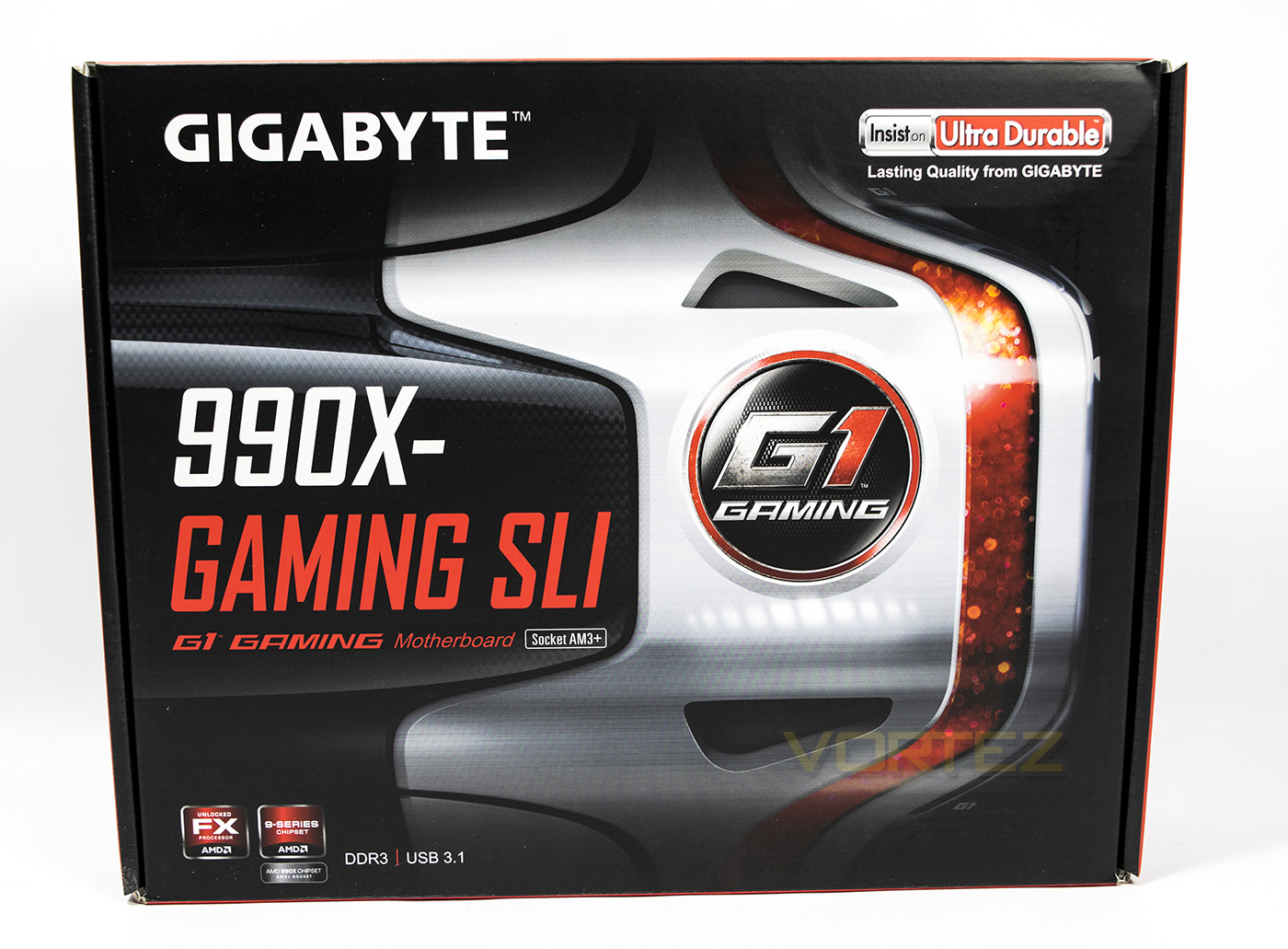
The packaging resembles GIGABYTES contemporary line of G1 Gaming motherboards, which is ultimately the successor to the Sniper Series. The model name is clearly identifiable as with information about its chipset and supported processors.
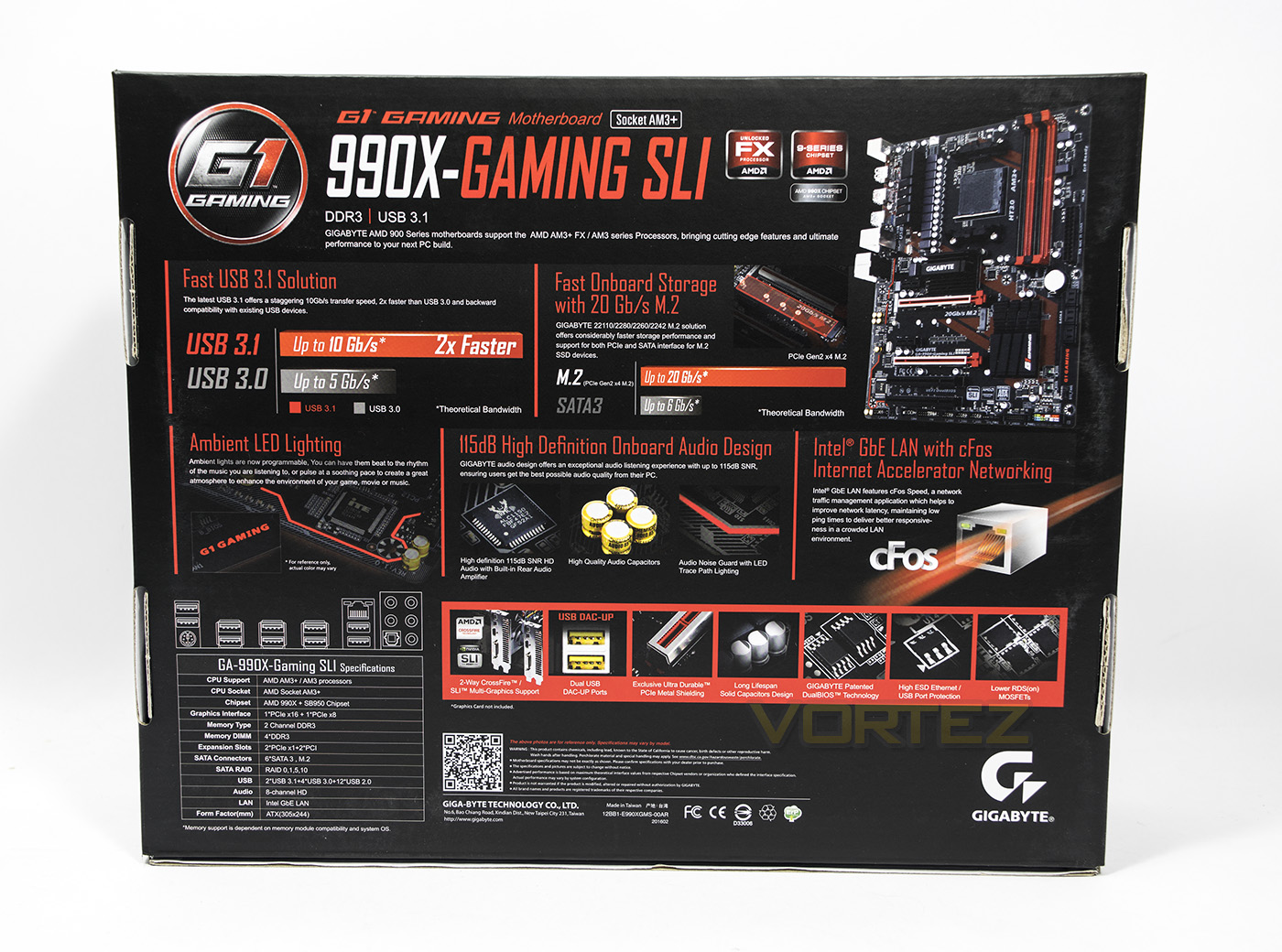
On the underside there is information regarding the features and details of the motherboard as well as a smaller image of said product. In the bottom left hand side the technical specifications are detailed.
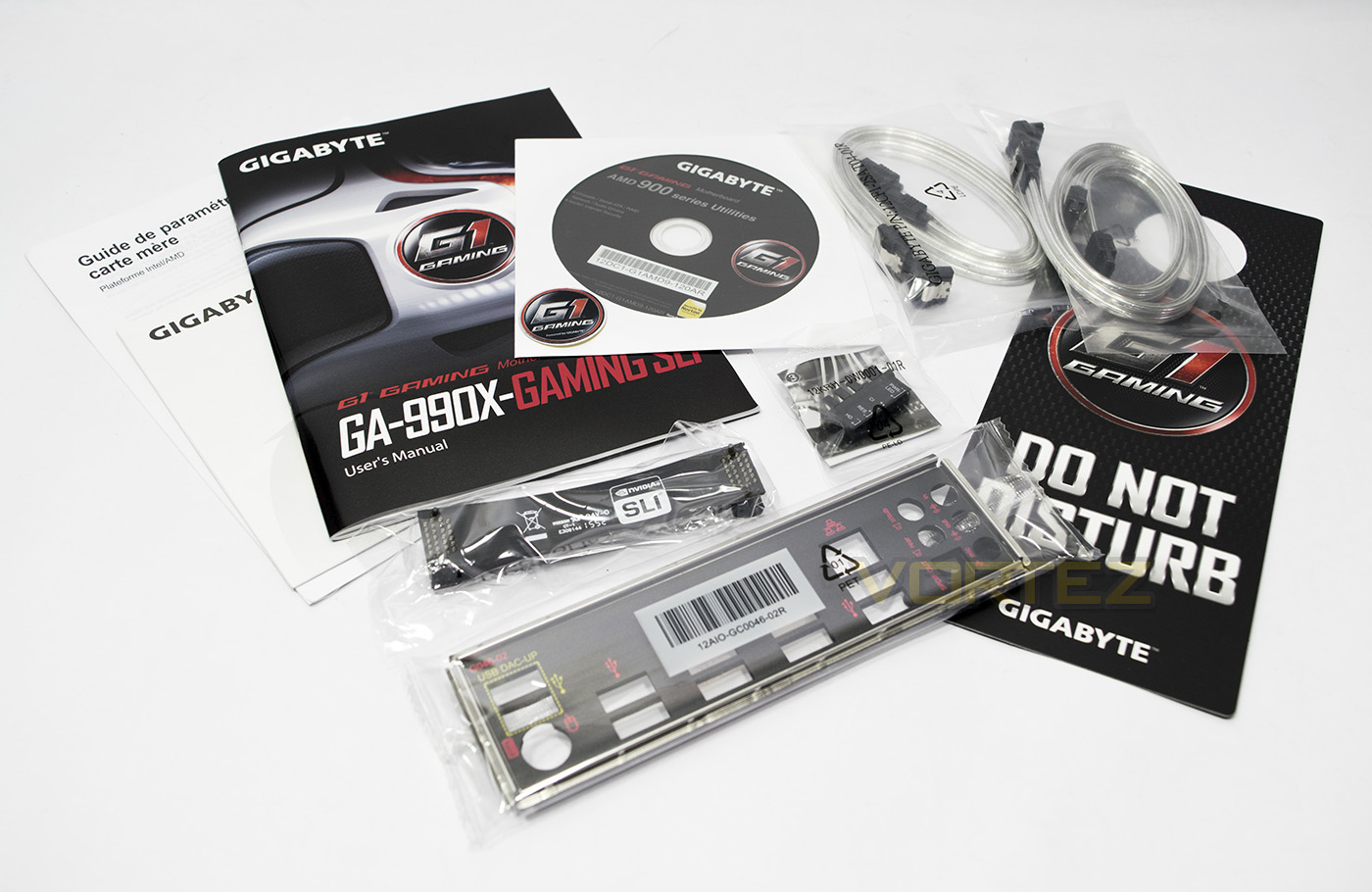
The motherboard comes with a fairly standard selection of accessories, including two pairs of reflective SATA cables, I/O backplate, manual, front header EZ-plug, a G1 sticker, software disc, a door hanger and an SLI bridge.
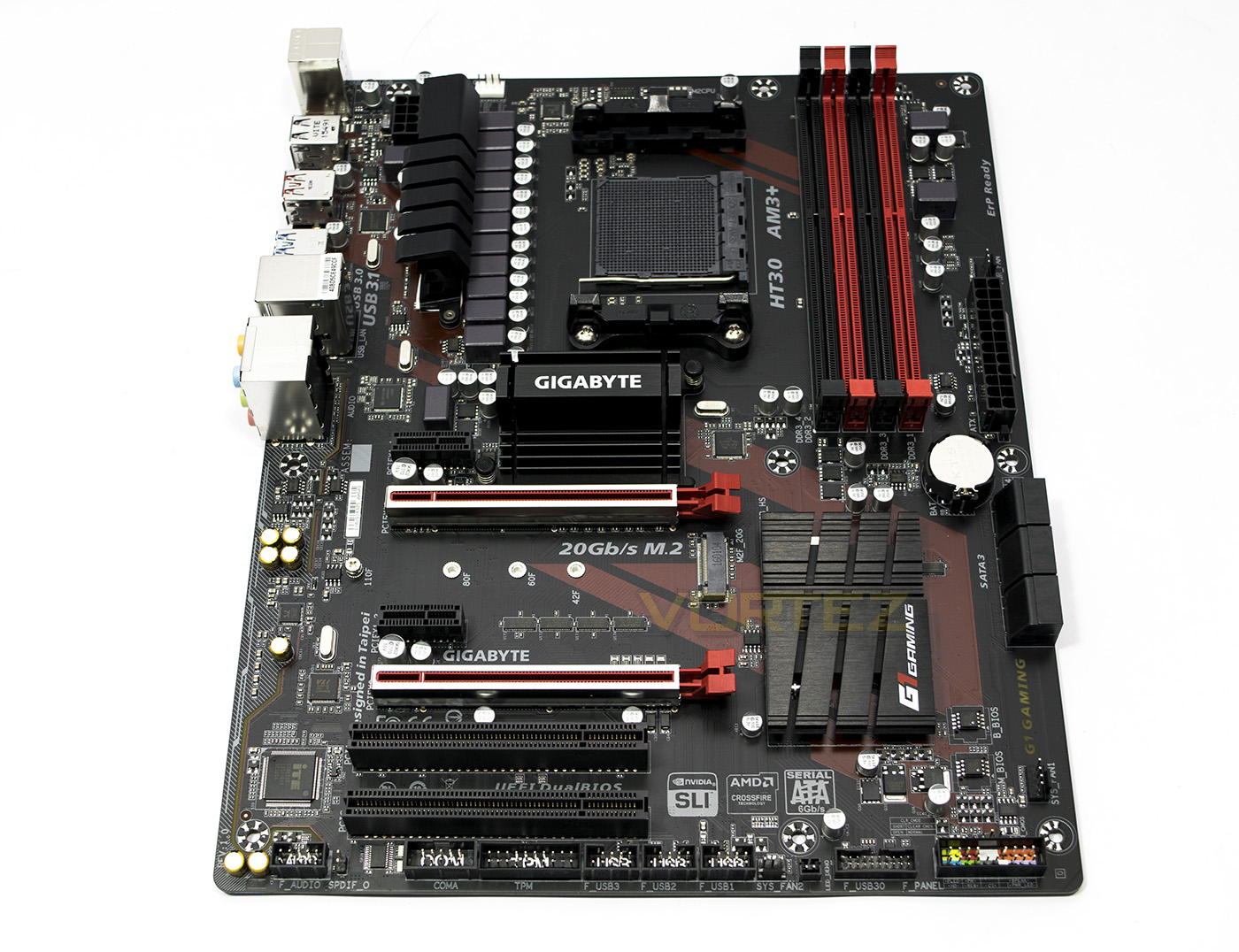
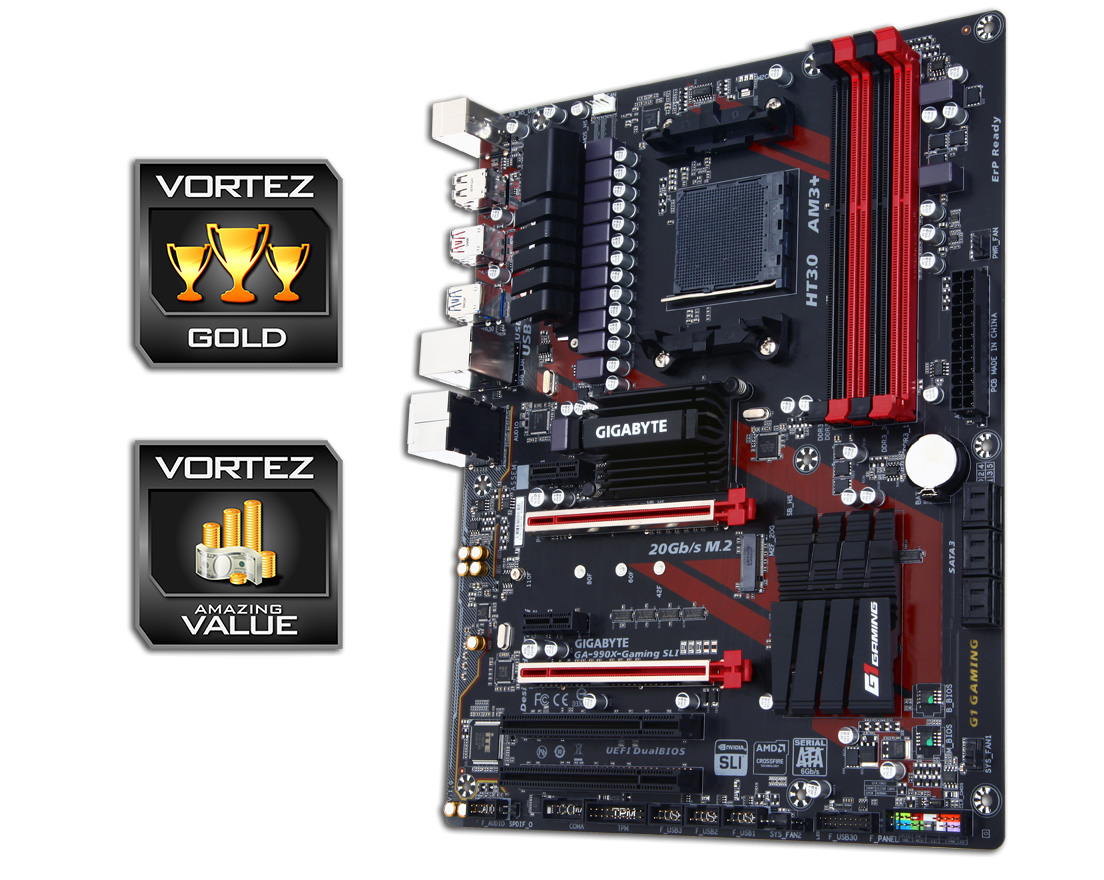
The motherboard itself has a red on black appeal with the two primary PCIe slots reinforced using GIGABYTES Ultra Durable metal shielding. This improves the retention strength for larger, heavy graphics cards. Gamers will be pleased that there is a triple slot spacing between each of the PCIe x16. This is where the primary different between the 990FX and 990X is relevant, that is, the 990FX can run two graphics cards in SLI/XF at x16 speeds, where as the 990X will run them at x8 speeds. This is even more relevant considering that the AM3+ platform is still stuck on PCIe Gen 2.0, not 3.0.
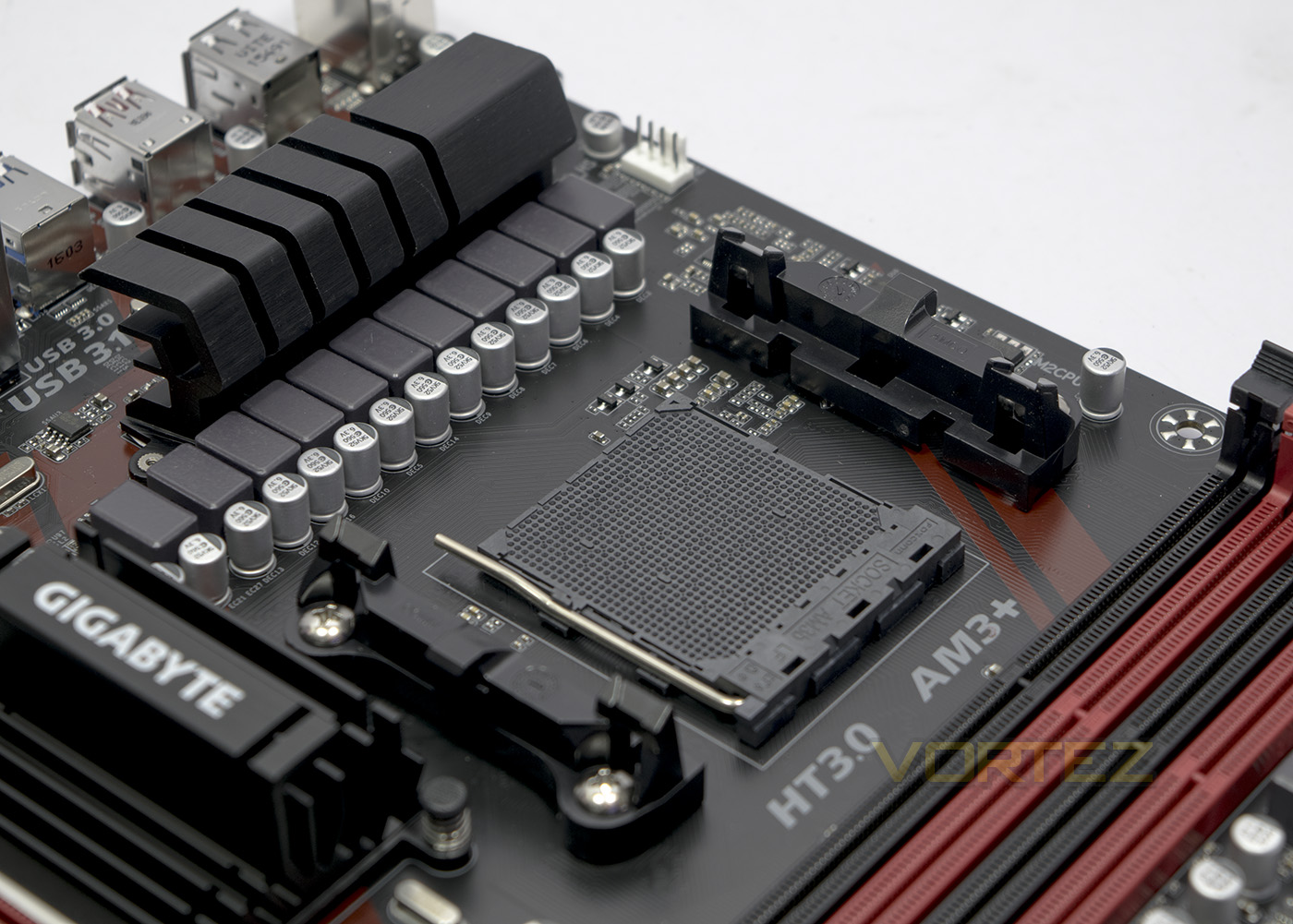
The black AM3+ socket is powered by a 10+1 phase power delivery, and we are disappointed to not see two CPU fan headers for push/pull setups that are common for higher end coolers.
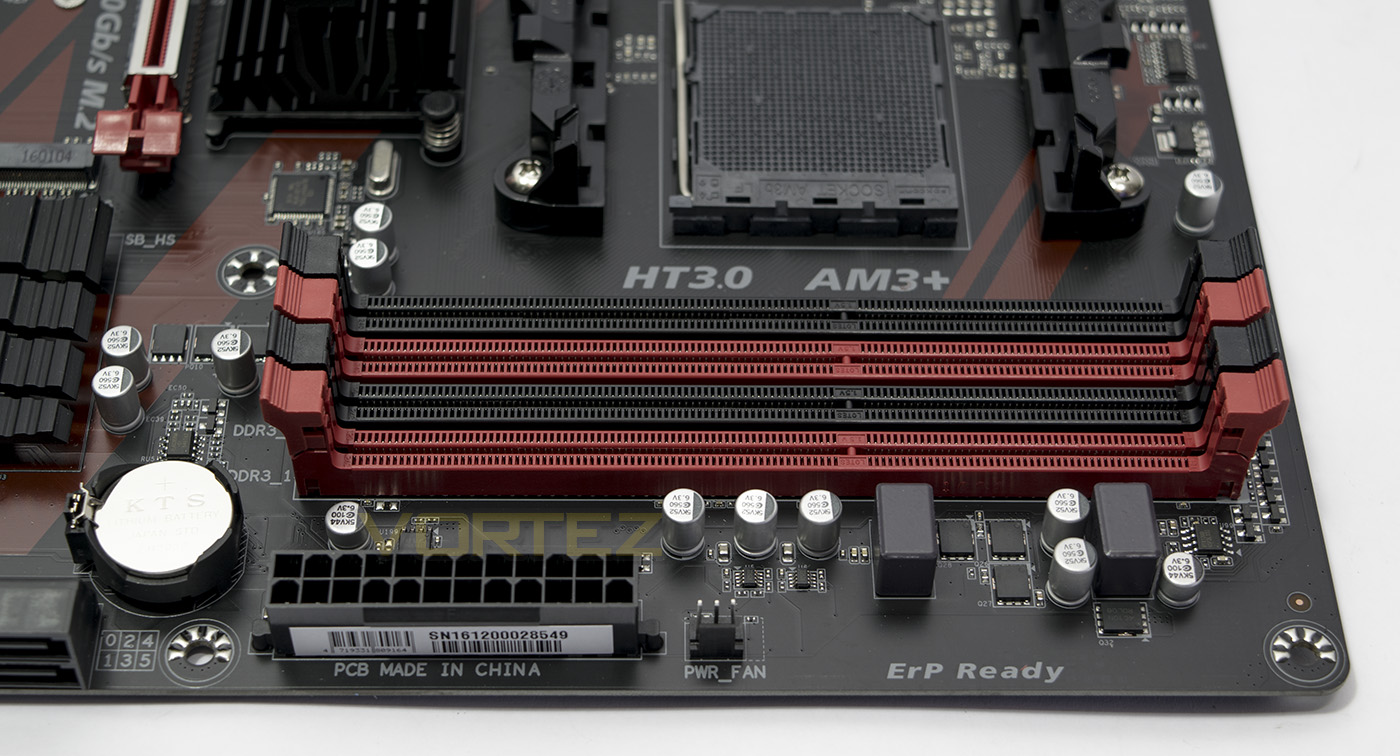
A fairly standard row of DDR3 DIMMS, supporting 1866MHz natively, and OC at 2000+. There is another 3 pin fan header labelled PSU fan, while unlikely to be used for a PSU (not impossible) it will surely find a use anyway.
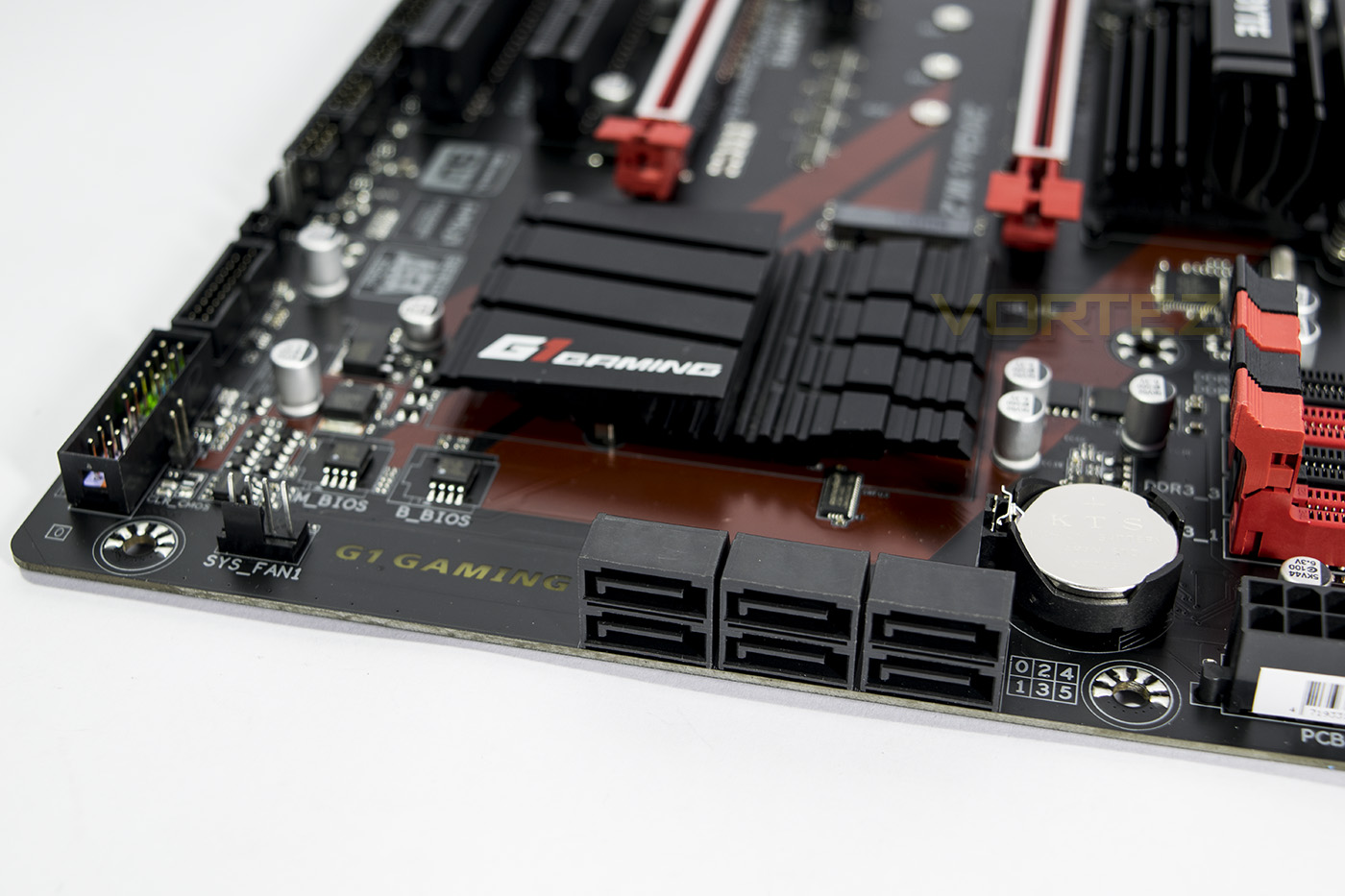
There are 6x SATA 3.0 ports, with an additional 4pin fan header to the left. Between the main 24pin ATX power socket and the SATA ports there is no USB3.0 header to be found, which is normally the more convenient positioning, it does however exist next to the front header ports along the bottom. As this motherboard is more aimed at gaming, than overclocking, there are no onboard controls, buttons or switches.
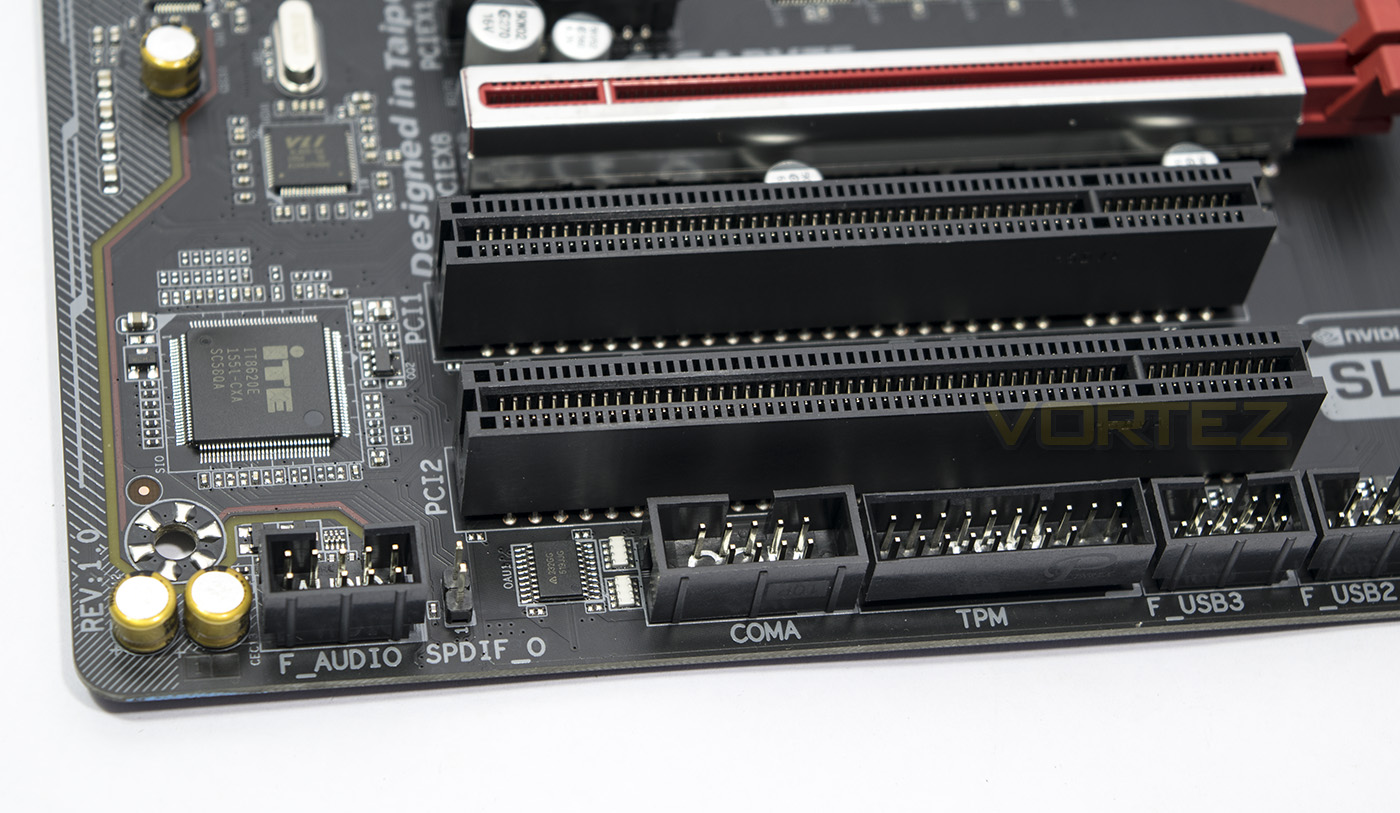
Along the bottom edge you will find headers in their relatively normal places, including the front panel audio headsets, COM and TPM headers.
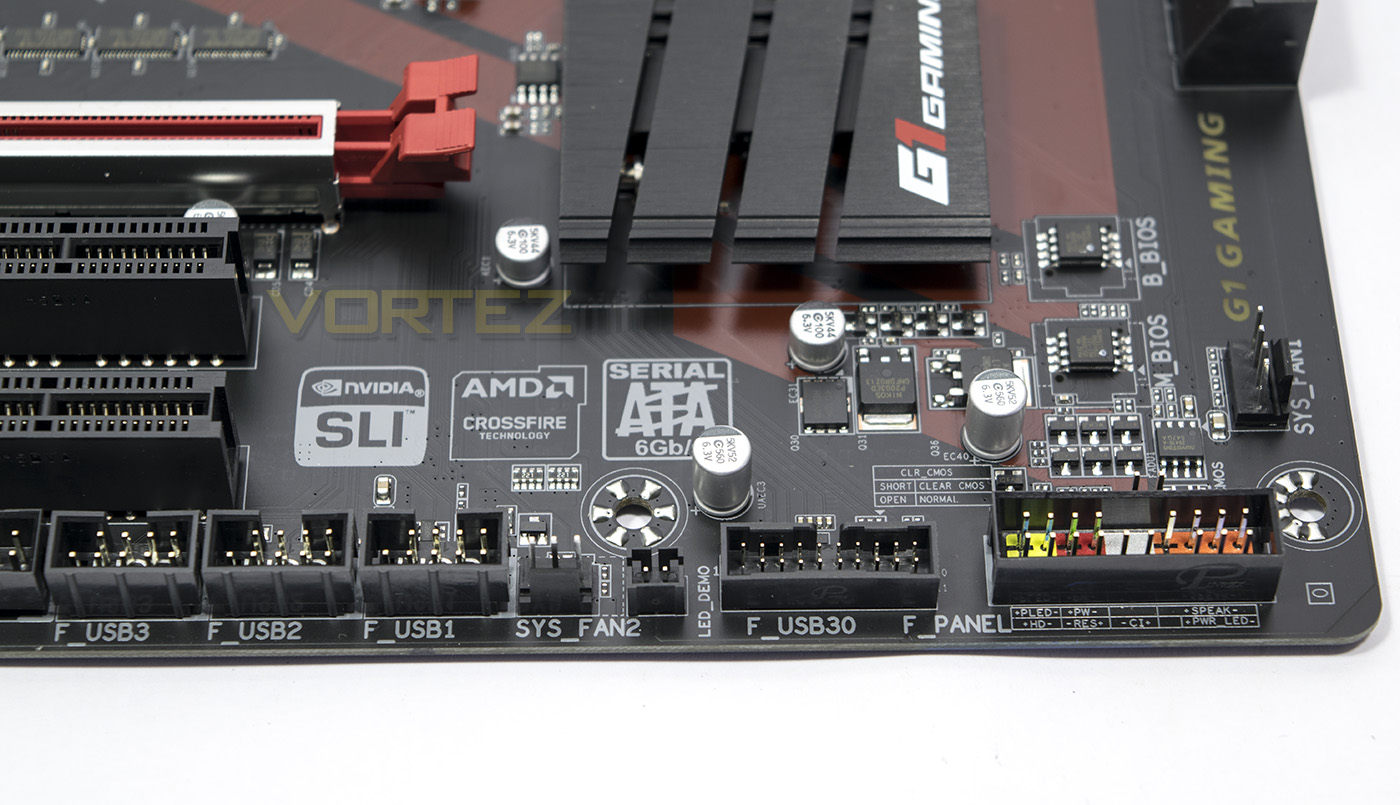
Continuing on, we get and additional 3 x2 USB 2.0 headsets, a 3pin fan headset, LED demo header, and the 2x USB 3.0 header for the front panel. The Front panel connectors have a plastic shroud to enclose the included EZ plug, to which you can connect all the front panel controls to. Behind this sits 2 pins for CMOS clear.
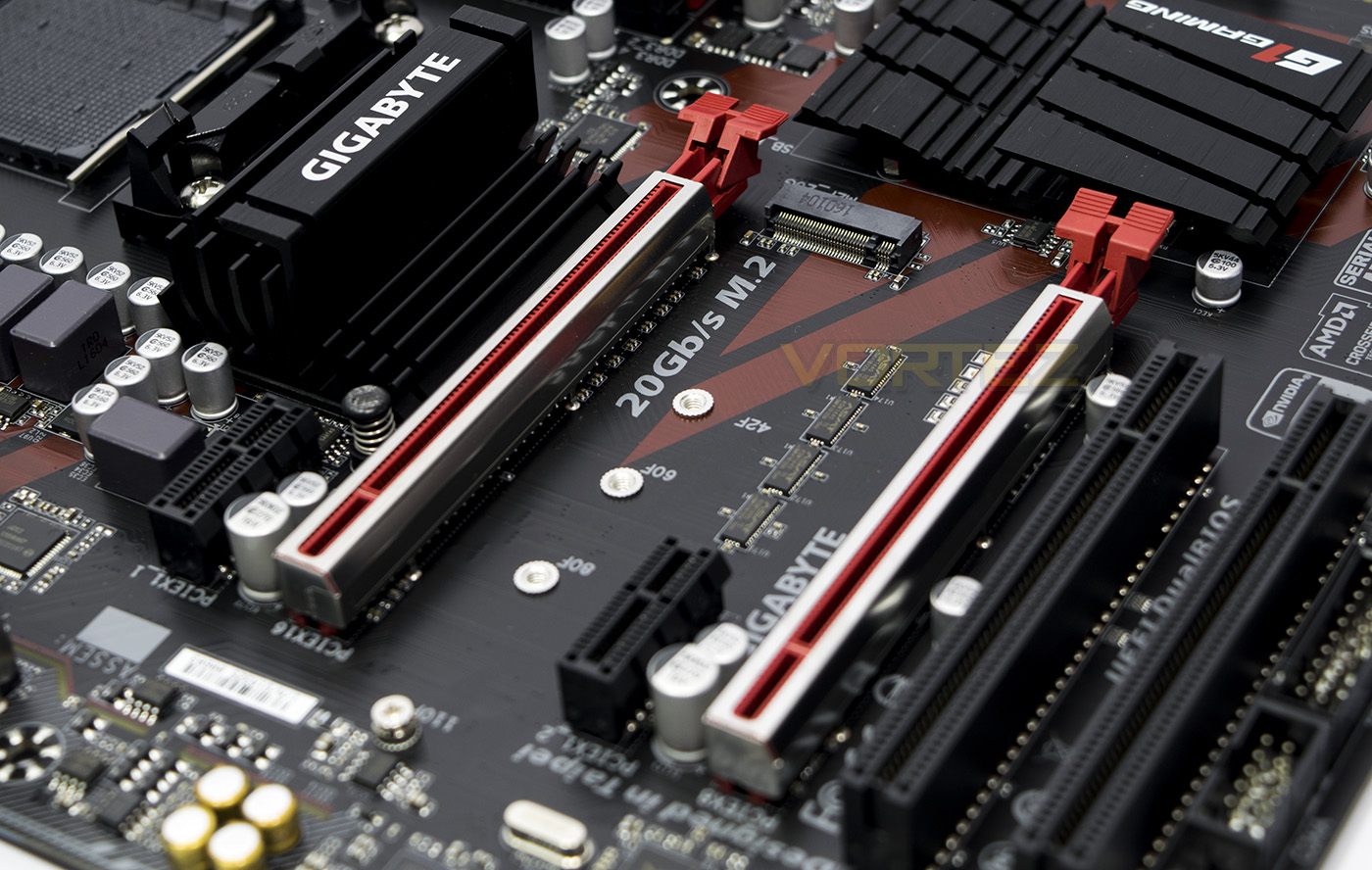
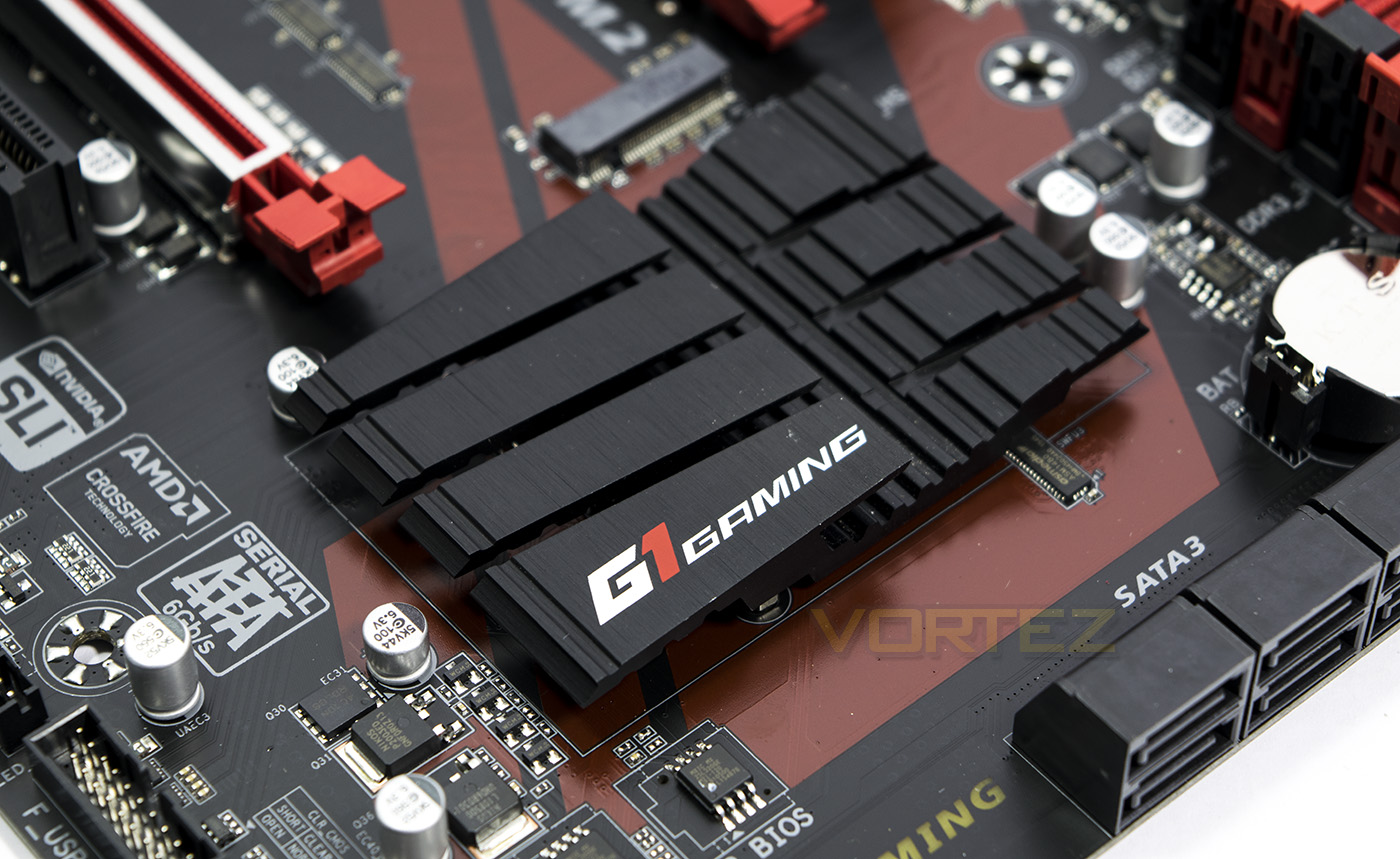
The Gen 2.0 M2 port features screw mounts for a variety of lengths and acts as the fastest onboard storage option on the motherboard.
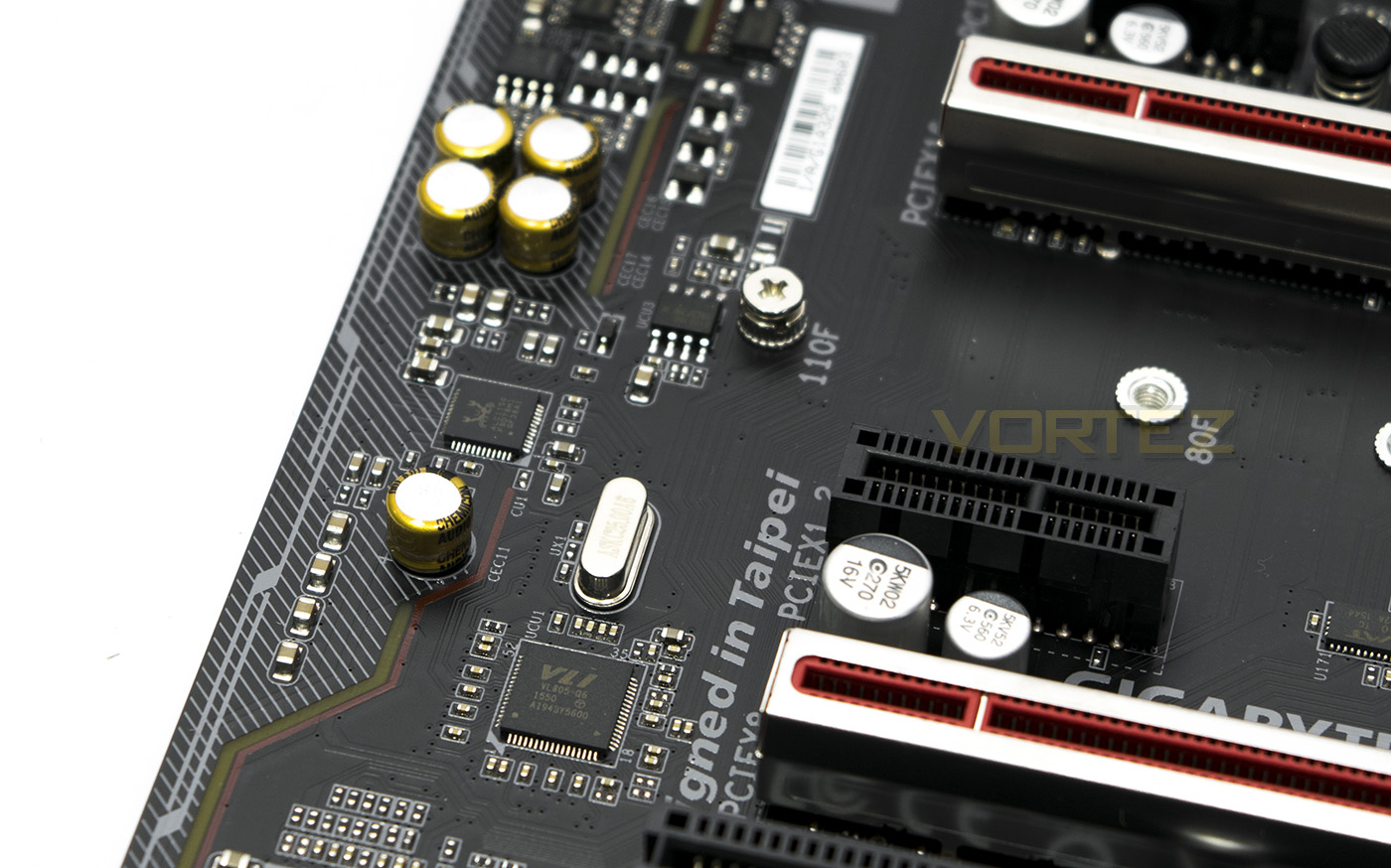
The Realtek ALC 1150 gets some audio grade capacitors to help keep the audio signal clear, and is isolated from the rest of the circuitry.
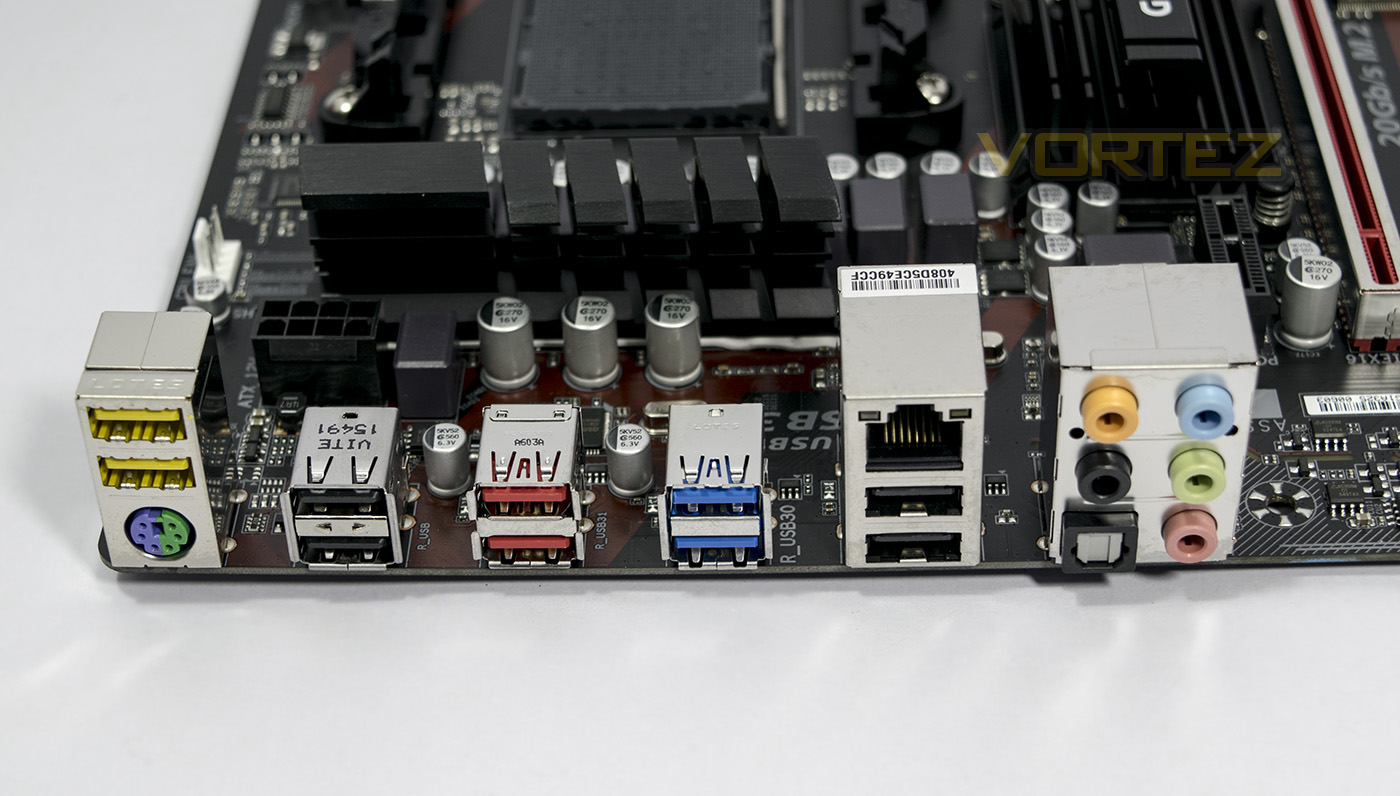
The rear I/O features a universal PS/2 port, 2x DAC UP USB (yellow), 2x USB 2.0, 2x USB 3.1, 2x USB 3.0, an additional pair of USB 2.0 with the Intel powered Rj-45 port, then we get the 8 channel analogue audio jacks along with an optical S/PDIF Out.
BIOS Tour
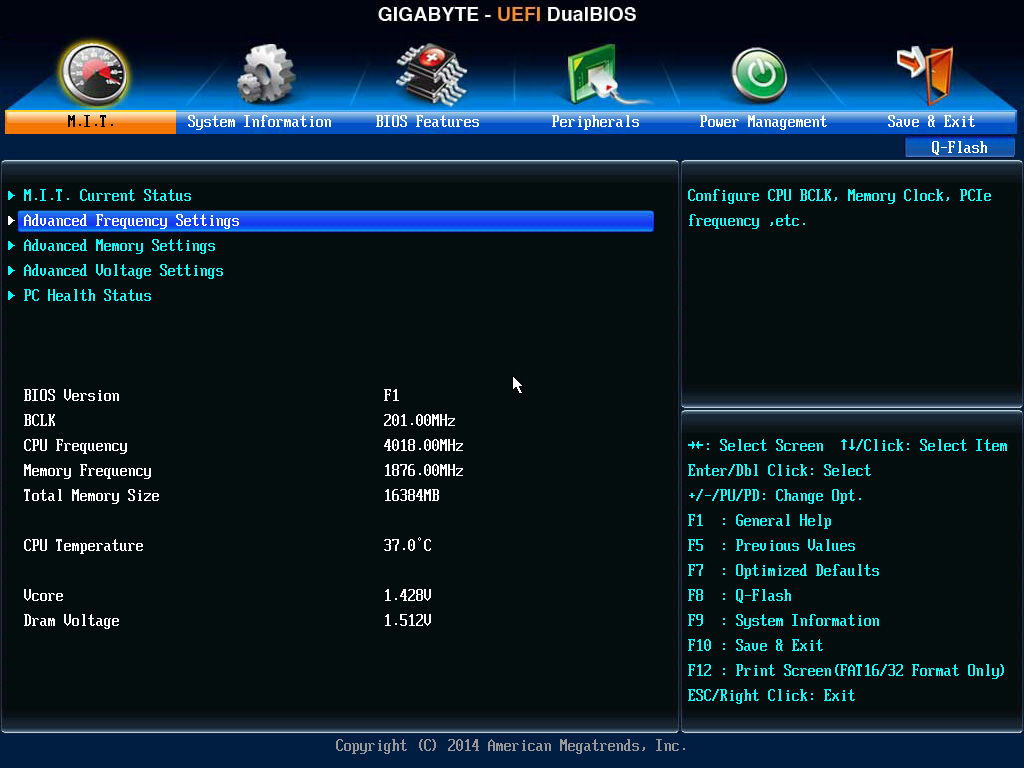
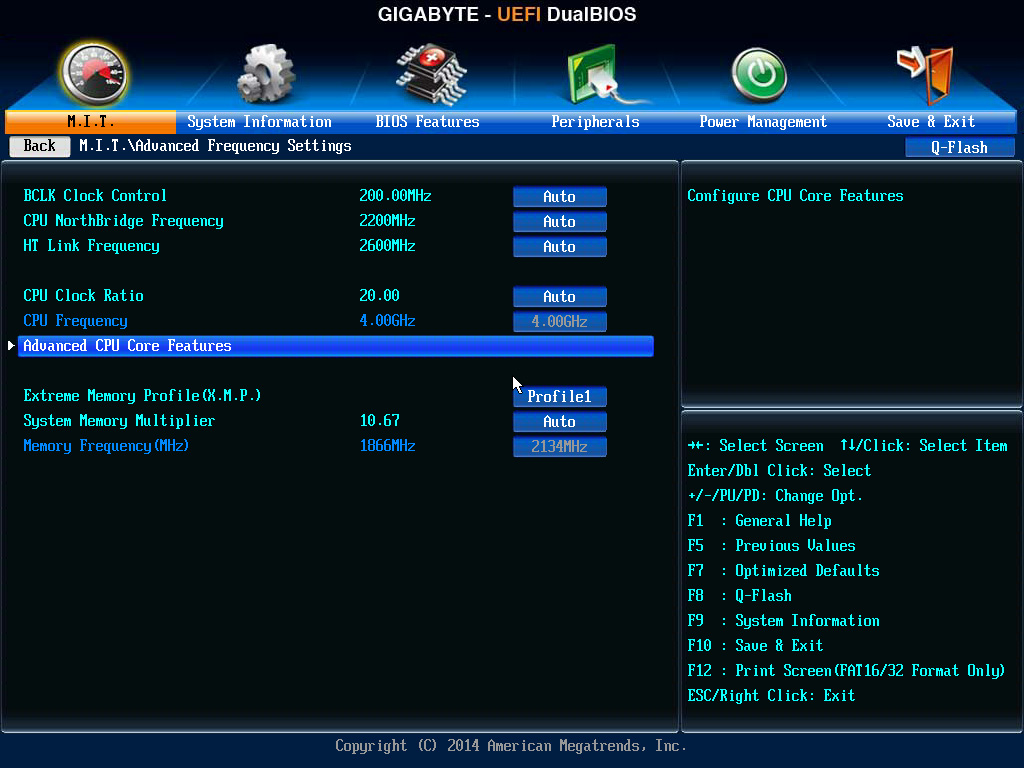
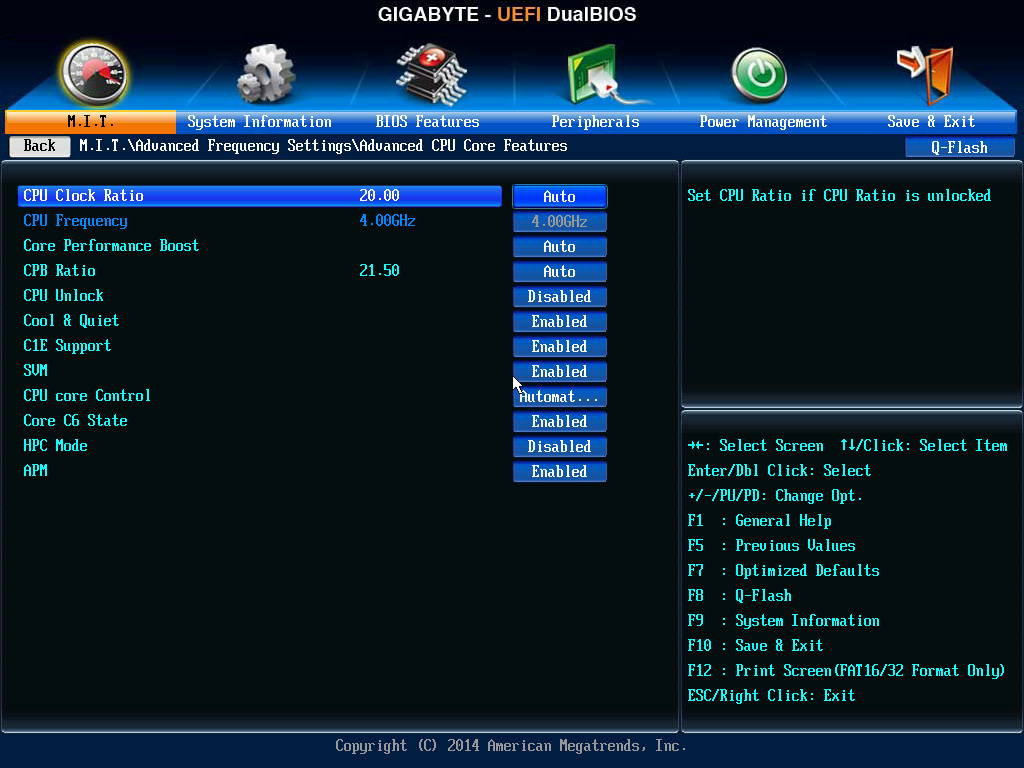
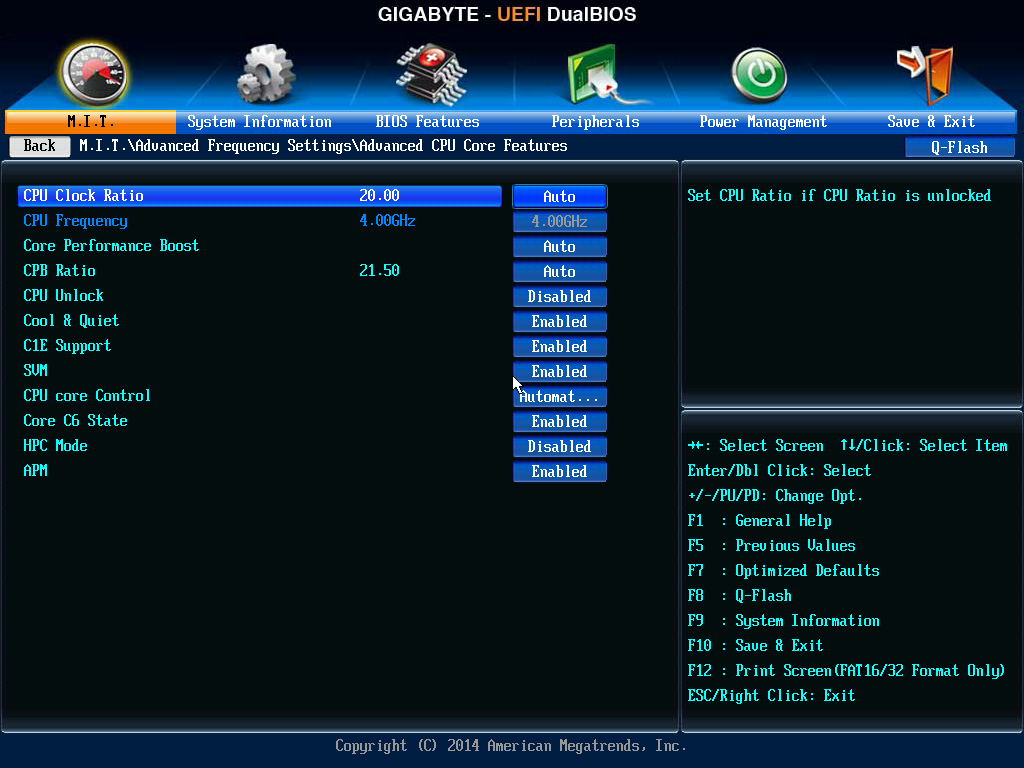
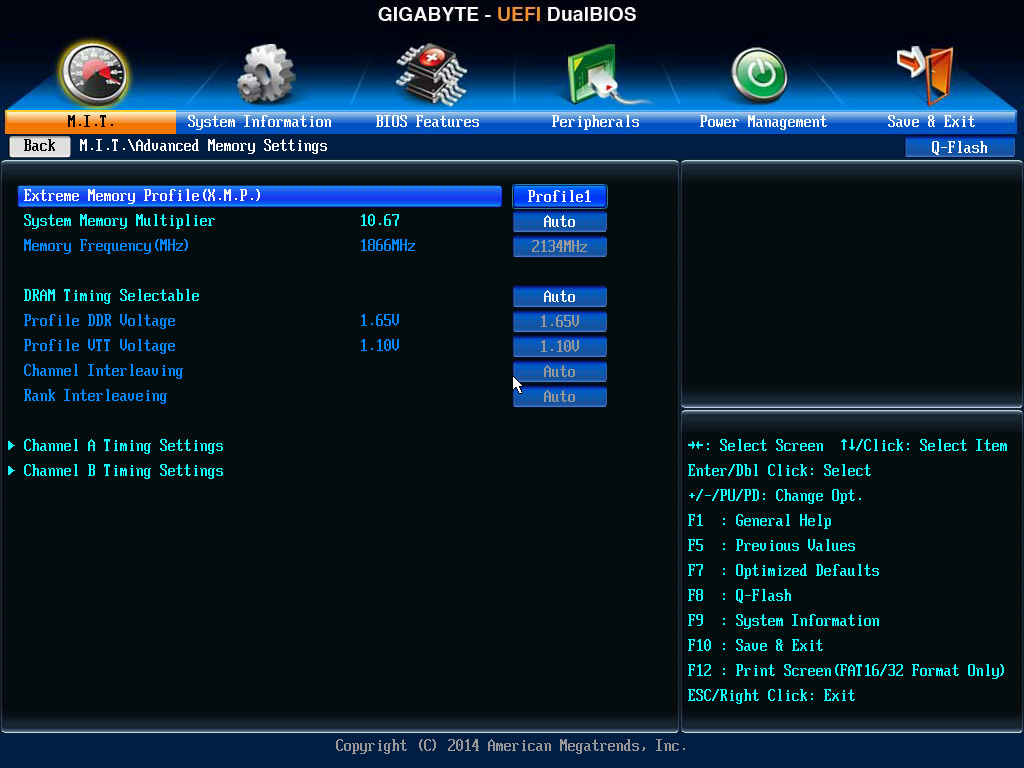
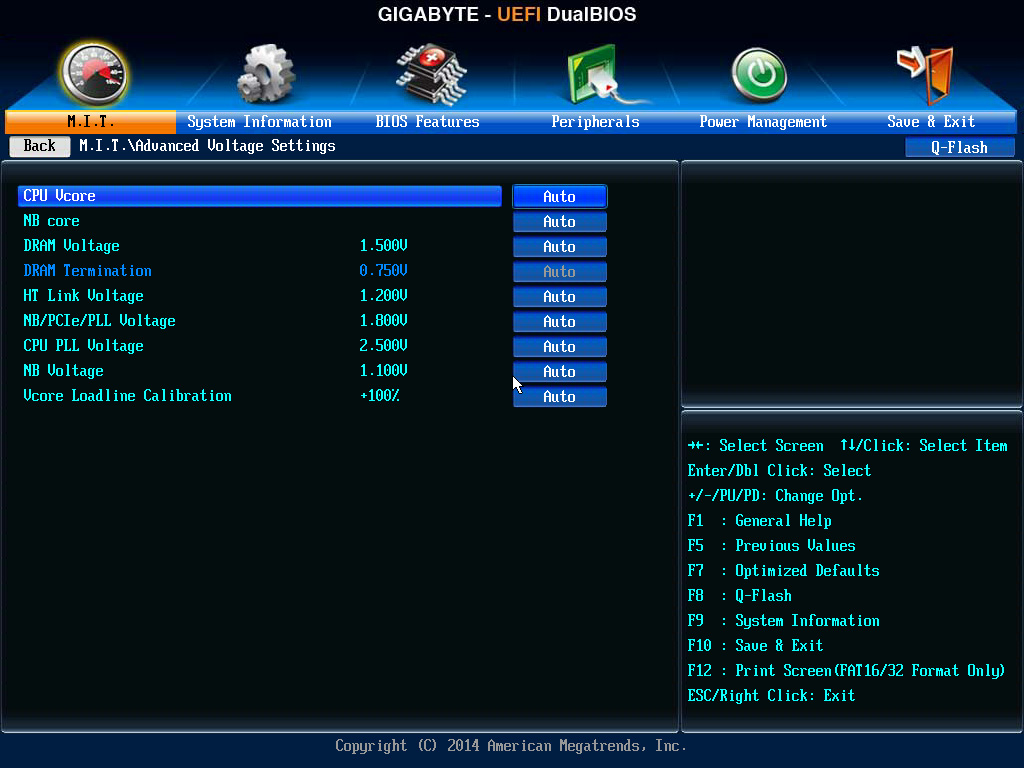
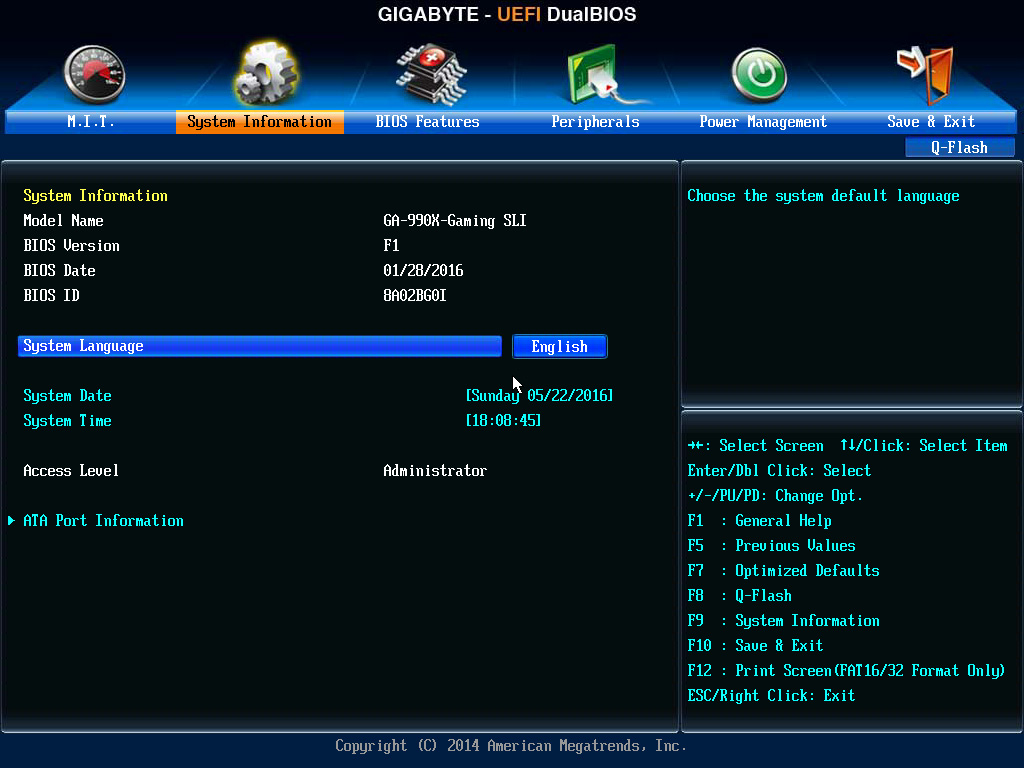
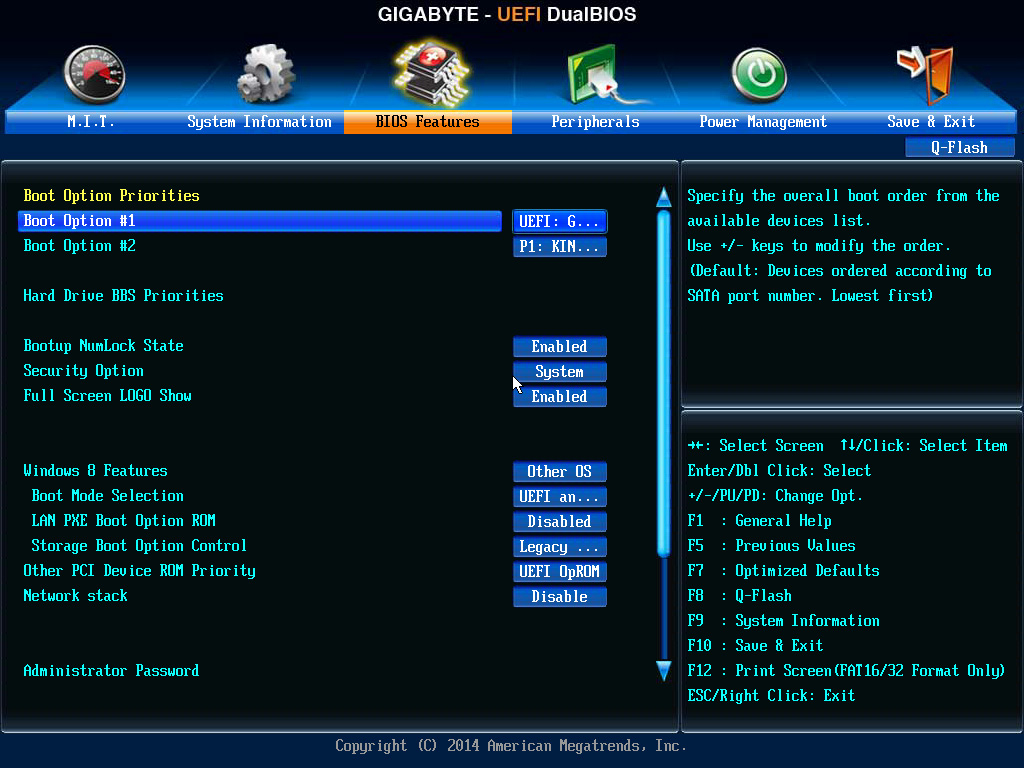
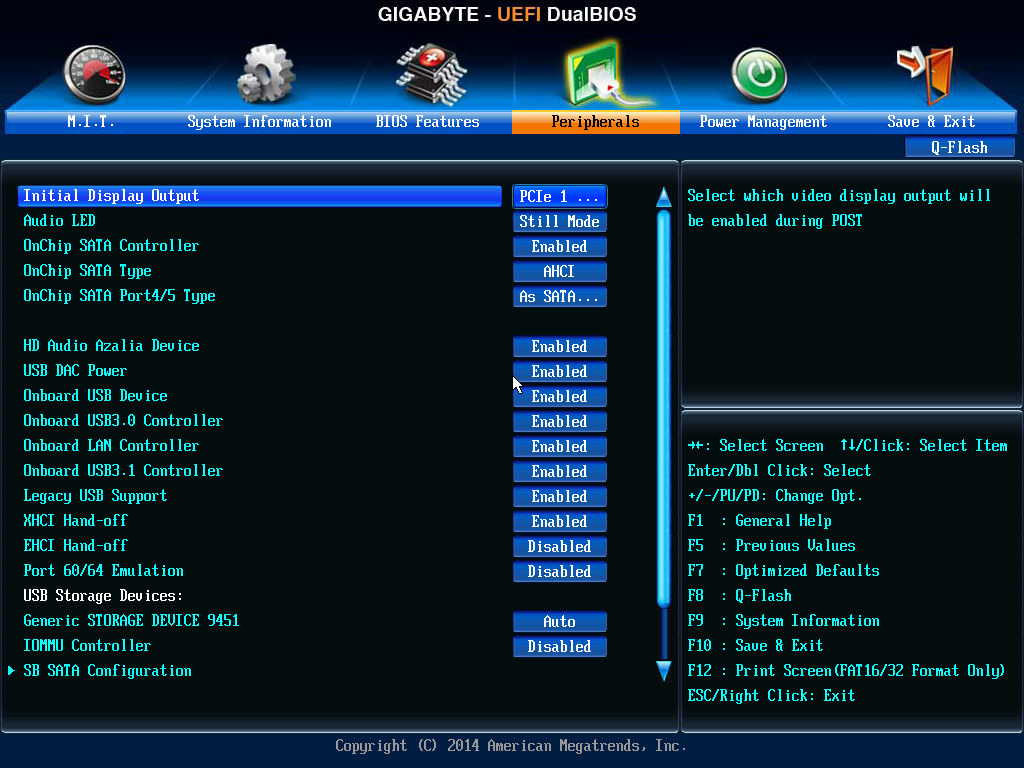
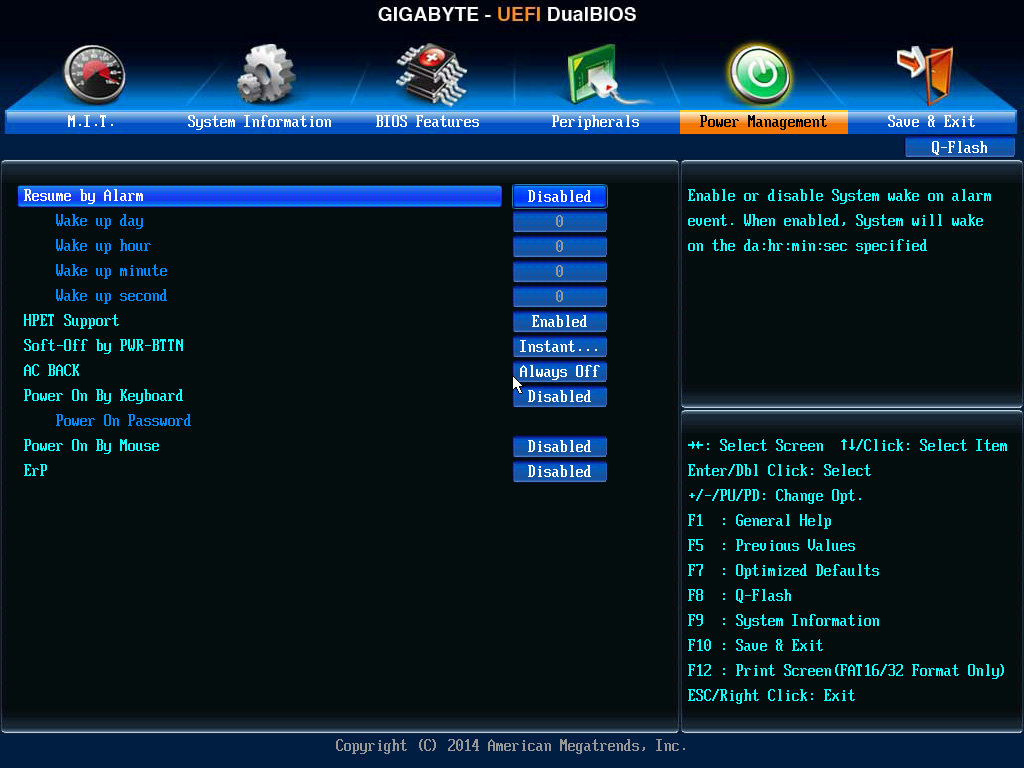
The BIOS screen here isn’t the prettiest, but it is smooth and gives you all the tools you need to control your system. The overclocking settings are a bit jumbled and you have to go back and forth between various tabs just to find all the options you would expect, but considering that this motherboard isn’t necessarily aimed at hardcore overclocking, the features are there to find a sensible performance boost. In regards to memory profiles, the 990X Gaming SLI supports XMP, but not AMP, which is a shame, though is understandable as AMP seems to be more targeting the memory needs of APUs that thrive on higher speeds. It is worth noting that this motherboard has a dual BIOS design, meaning it can be recovered should you brick it with some overzealous overclocking, or if you corrupt the primary BIOS during an update. Though it is worth noting that, there is no safe ‘reboot’ feature as we have observed in some ASUS motherboards which will guarantee a start up after a failed overclock attempt. That is a luxury not seen here, so if you do have a play, keep a 2pin jumper (or a screwdriver) to hand for the CLR-CMOS header, you will need it.
Software
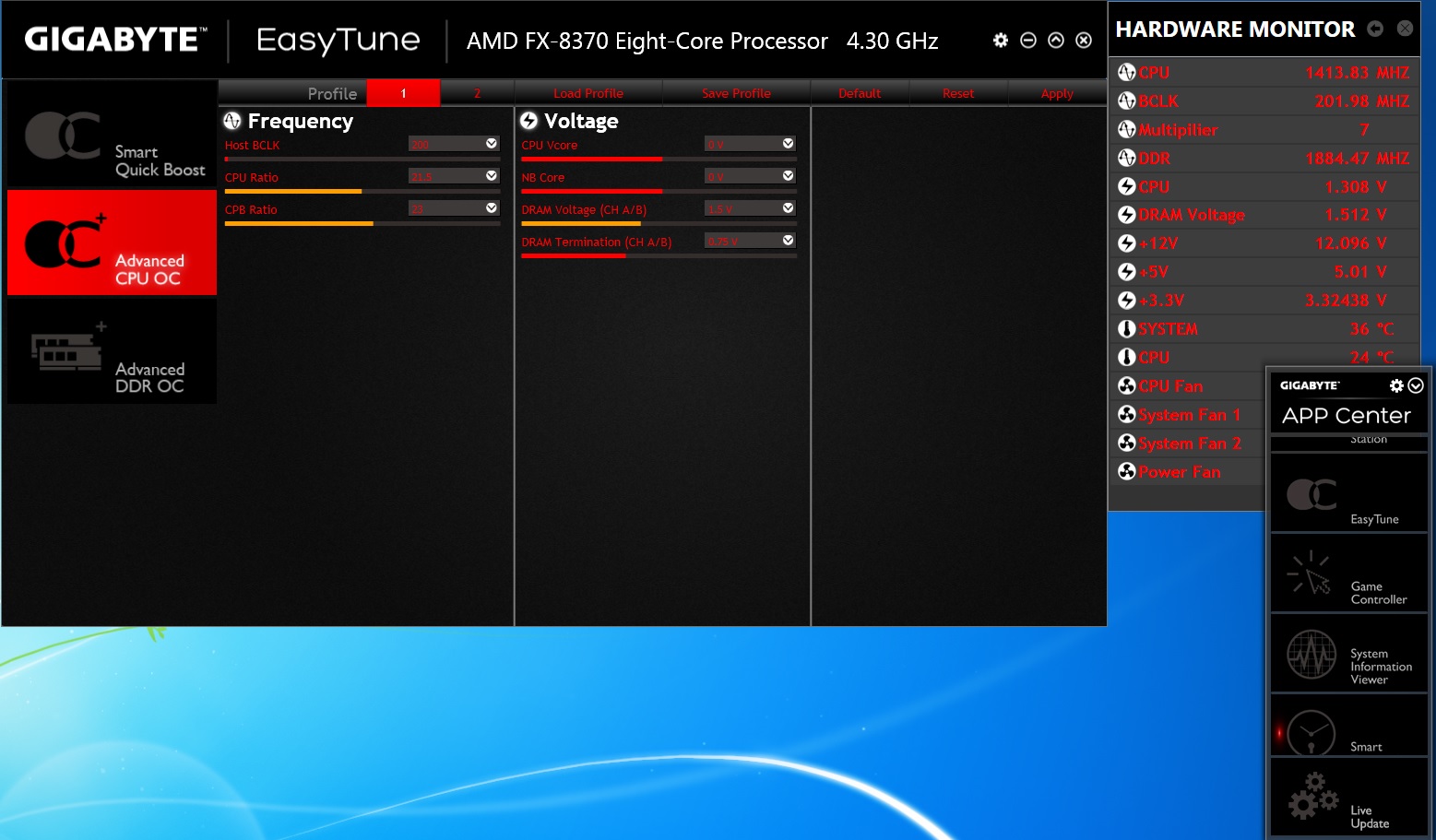
This motherboard supports GIGABYTEs latest incarnation of the APP Center, which organises each of GIGABYTEs software utilities in on handy place. It is a small rectangular app that you can scroll through to open each of the installed GIGABYTE app. A little like ASUS’ AI Suite. Though it isn’t quite yet refined, as each individual app is still modular and you have to install each of the 9+ compatible apps separately which is tedious and time consuming, even if each app is small and takes a short time to download. Maybe there is a way around it for an easier installation, but I couldn’t find it (at least online). It would be great if this software could be unified into a single download.
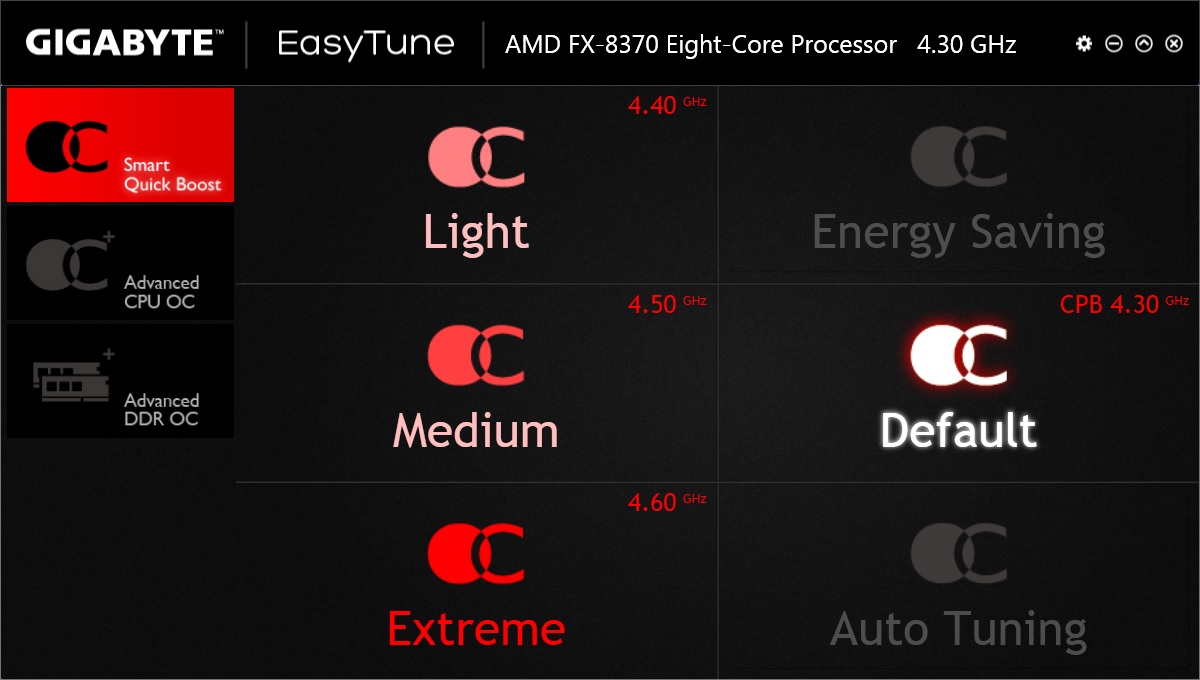
I had a nose at a few apps, some will have a varying degree of usefulness for different people, and it makes for a nice addition to the overall package. I checked out the new version of easytune though I couldn’t work out how to run the auto tune. The quick OC options (light, medium, extreme) are a little deceiving as these actually only overclock the BOOST multiplier not the base multiplier. That doesn’t mean there is no performance gain from an instant and easy step to take.
Test Setup, Methodology & Overclocking
Test Setup
CPU AMD FX-8350, FX-8370
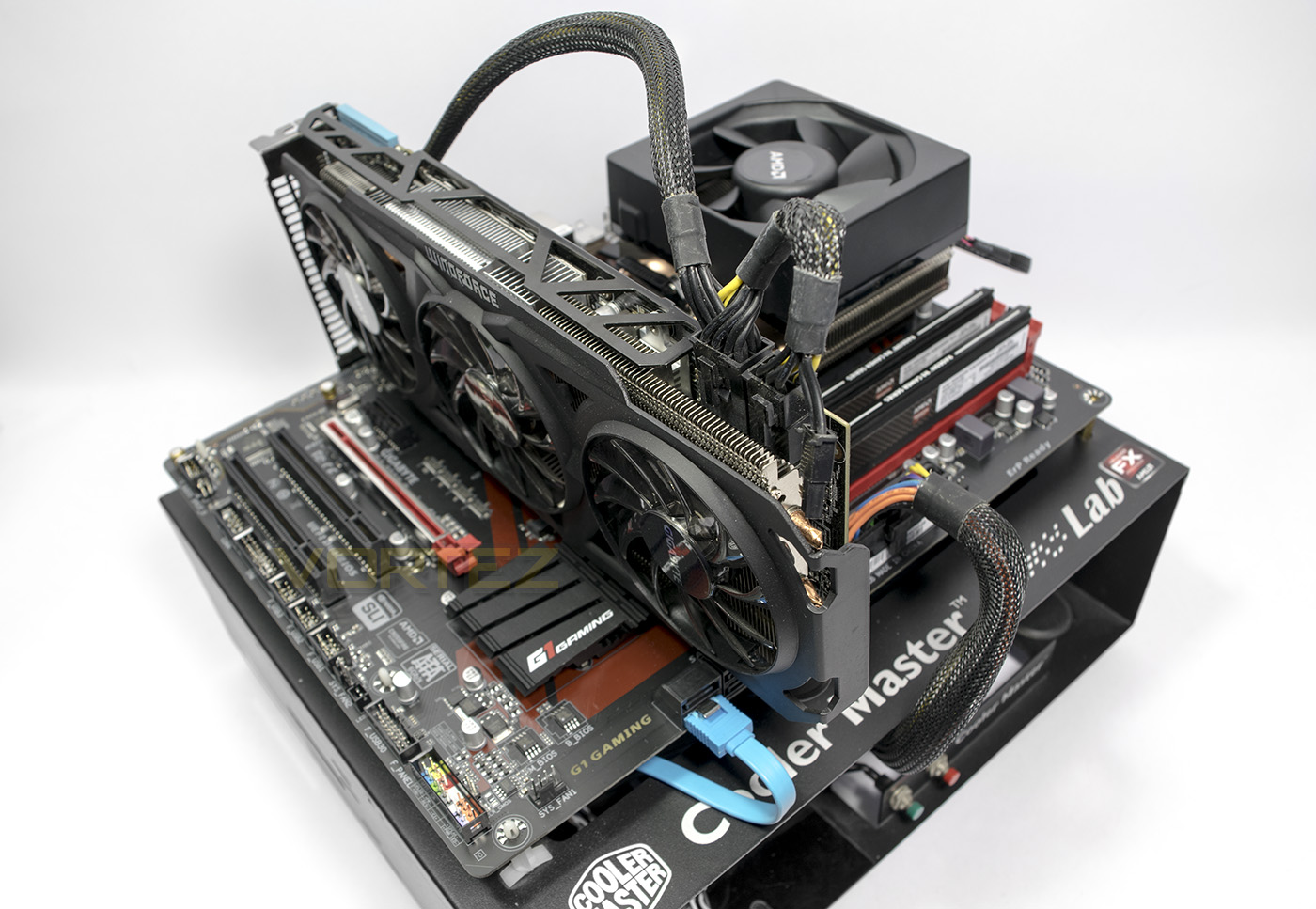
Cooling AMD WRAITH Cooler
Motherboard GIGABYTE GA-990X Gaming SLI
Memory AMD RADEON 2x 8GB DDR3 2400MHz
Graphics GIGABYTE AMD R9 280X
Storage HYPERX 3K 240GB
PSU NZXT HALE 650W
Cooling AMD WRAITH Cooler
Motherboard GIGABYTE GA-990X Gaming SLI
Memory AMD RADEON 2x 8GB DDR3 2400MHz
Graphics GIGABYTE AMD R9 280X
Storage HYPERX 3K 240GB
PSU NZXT HALE 650W
Benchmarks
Cinebench R15 – CPU/OpenGL Score
x264 HD 4.0 – 1st and 2nd pass encoding
SiSoftware SANDRA 2014 – CPU & Memory benchmarks
AIDA64 – CPU benchmarks
PCMark 8 – Home Suite
3DMark FireStrike – DX11 3D Benchmark
Games – Tomb Raider, THIEF
x264 HD 4.0 – 1st and 2nd pass encoding
SiSoftware SANDRA 2014 – CPU & Memory benchmarks
AIDA64 – CPU benchmarks
PCMark 8 – Home Suite
3DMark FireStrike – DX11 3D Benchmark
Games – Tomb Raider, THIEF
Other Software
CPU Specification Monitoring: CPU-Z
Overclocking
With the GA-990X Gaming SLI, we took the opportunity to test it out with the FX-8370 and the latest Wraith Cooler from AMD.
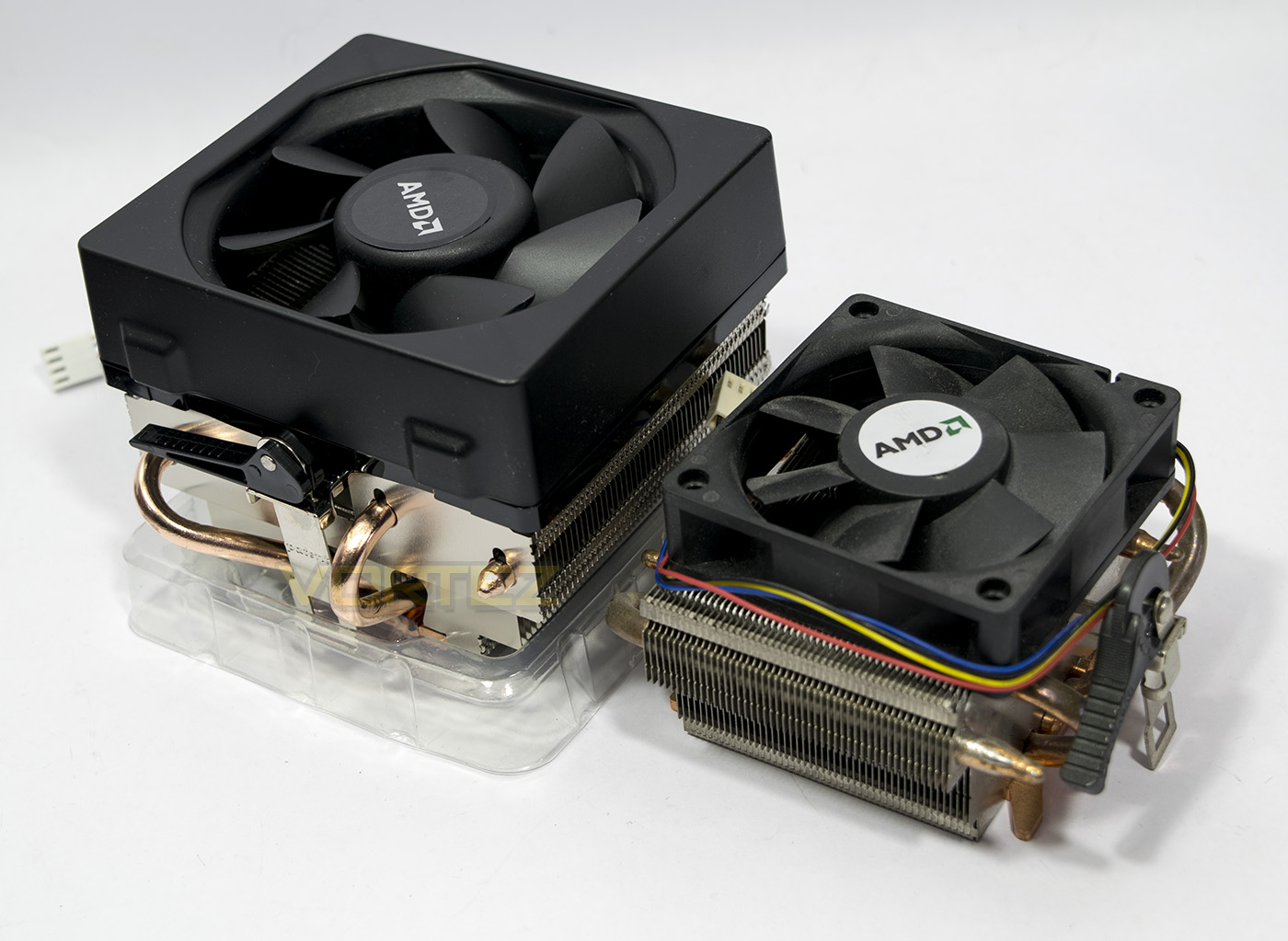
You can see just by the sheer size difference that things should be significantly better than most stock coolers out there. In fact, AMD claim that it is one of the ‘quietest’ coolers for <$50 (that's around £30-35). It's primary aim is to add value to the FX-8370 CPU, and so we check out how well we can overclock using it alone.
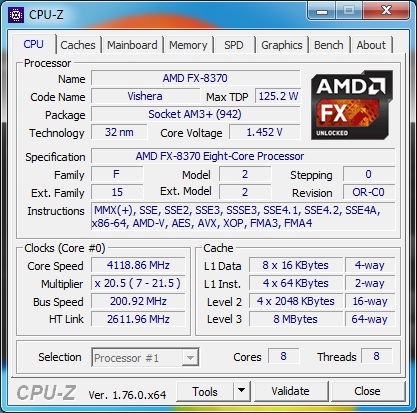
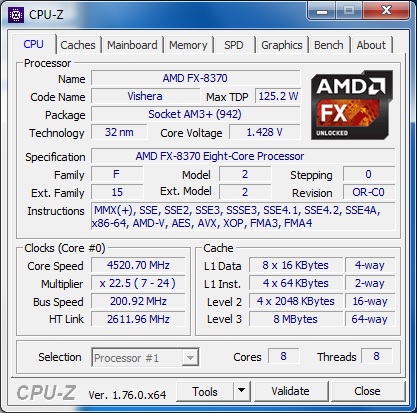
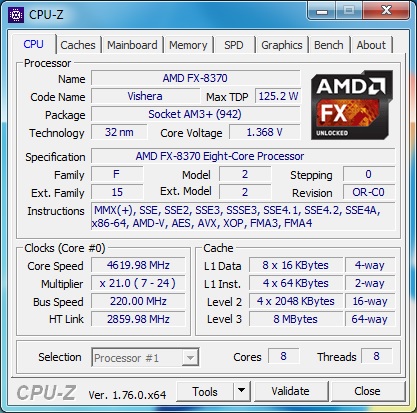
By default, the FX-8370 sits at 4GHz with a turbo that jumps it up to 4.3GHz as and when it has the available TDP for a limited amount of cores. Well, as with any good overclock, you will want to turn off all those power saving options in the advanced CPU Core options, and then out without touching any other setting, I set the base core speed to 4.5GHz just to test things out. Everything seems perfectly fine, temperatures (according to GIGABYTES APP Center ‘Hardware monitor’, were topping out at around 52 degrees C after a run through 3DM Firestrike. I went back into BIOS and wanted to find the optimal overclock without needing a voltage bump, I settled on a 220 Bus and an x21 CPU multiplier for a decent 4.6GHz, and 2860Hz on the HT Link. It is worth noting that AM3+ CPU’s and motherboards are rather limited in regards to memory bandwidth (when you consider that they are running on a 5 year old design), and that the Hyper Transport Technology pretty much tops out with 2133MHz DDR3. This is why the GA-990X Gaming SLI only natively supports 1866MHz memory, though we managed to use our RAMs XMP for 2133MHz. Topping out at 55 degrees in a warm room sitting at 4.6GHz at a reasonable sound level is no small feat, and while this is far from a comprehensive review of the Wraith Cooler, I wouldn’t be surprised to find a stable 4.7GHz FX chip sitting under it too. However, for 4.7GHz in our setup, it required a voltage bump which of course summoned the Joule horses to raise the temperatures a little too much.
Benchmarks: Power Consumption
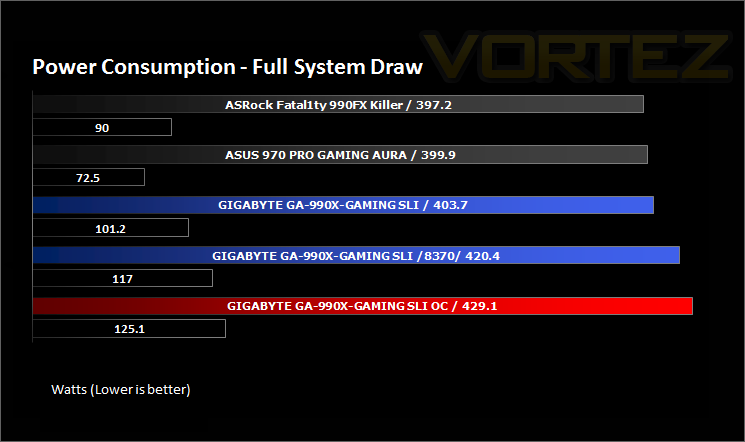
It’s interesting to note the power consumption across all motherboards. Energy results can fluctuate between manufacturers and chipsets due to the features and specifications that are integrated. First of all, for the idle tests the system is cold booted into Windows and no additional applications are executed – the watts are noted on the external energy monitor we use and then the system is loaded with 3DMark FireStrike – watts are again monitored for the duration of the test and the highest rated wattage result is then noted down. Below are the results of this energy test.
Even with the FX-8350, it seems the 990X Gaming SLI is a little power hungry comparatively.
Benchmarks: X264 HD
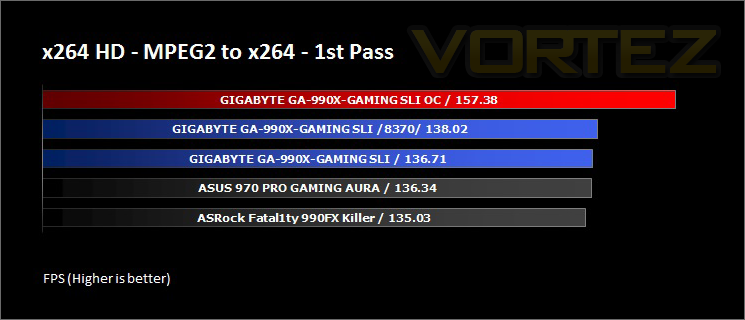
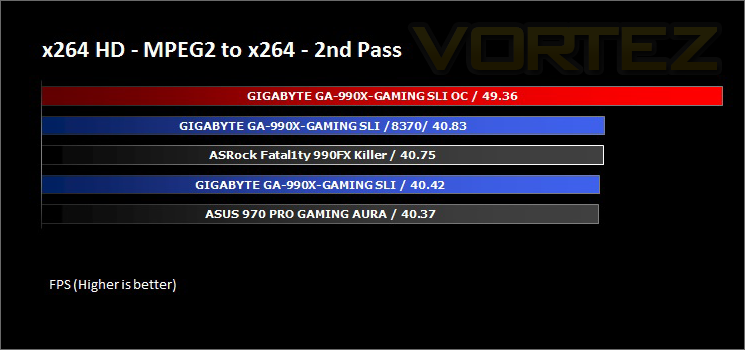
Simply put, this test measures how fast your machine can encode a short, DVD quality MPEG-2 video clip into a high-quality x264 video clip. What’s x264, you ask? It’s more or less the next-generation Xvid/DivX codec. I think it’s ideal for a benchmark because the application (x264.exe) reports fairly accurate compression results (in frames per second) for each pass of the video encoding process, and it uses multi-core processors very efficiently.
As expected, there is little difference in performance to be seen between each system, even with the small bump in performance from the FX-8370, this is where turbo core blurs the lines in performance. Though there is a substantial gain given the decent OC on the humble yet quiet Wraith cooler.
Benchmarks: AIDA64
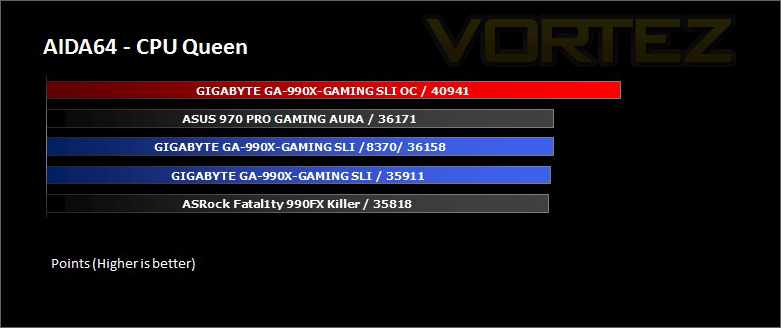
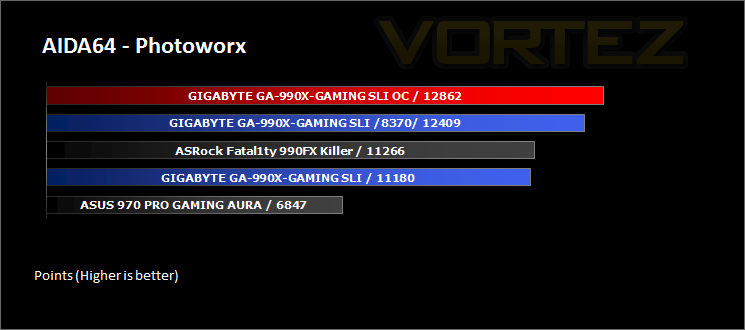
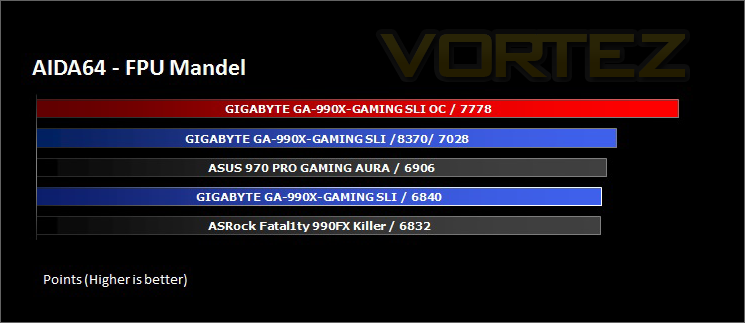
AIDA64 Product PageThis simple integer benchmark focuses on the branch prediction capabilities and the misprediction penalties of the CPU. It finds the solutions for the classic “Queens problem” on a 10 by 10 sized chessboard. At the same clock speed theoretically the processor with the shorter pipeline and smaller misprediction penalties will attain higher benchmark scores. For example — with HyperThreading disabled — the Intel Northwood core processors get higher scores than the Intel Prescott core based ones due to the 20-step vs 31-step long pipeline. CPU Queen test uses integer MMX, SSE2 and SSSE3 optimizations.
Here, the ASUS 970 board puts up a good fight in regards to outright processing, though it seemed to suffer in the Photoworx test. This may have been caused by various reasons, like AIDA64 not recognising the motherboard at the time, or by some software/firmware problem, alternatively, it could also be due to the default 970 chipset HyperTransport 3.0 speed of 4.8GT/s.
Benchmarks: Cinebench R15
CINEBENCH is a real-world cross platform test suite that evaluates your computer’s performance capabilities. CINEBENCH is based on MAXON’s award-winning animation software CINEMA 4D, which is used extensively by studios and production houses worldwide for 3D content creation. MAXON software has been used in blockbuster movies such as Iron Man 3, Oblivion, Life of Pi or Prometheus and many more.
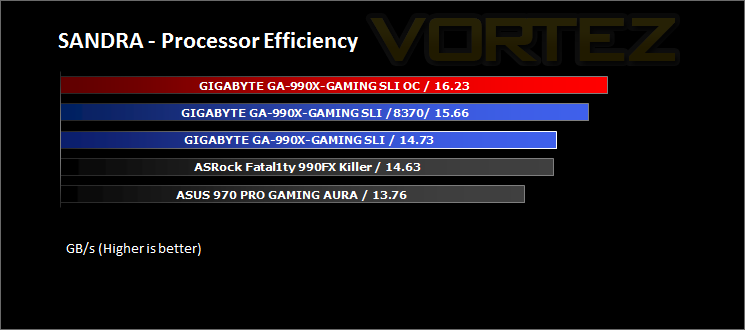
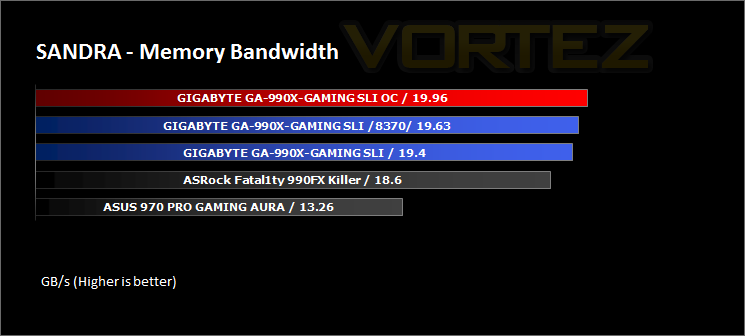
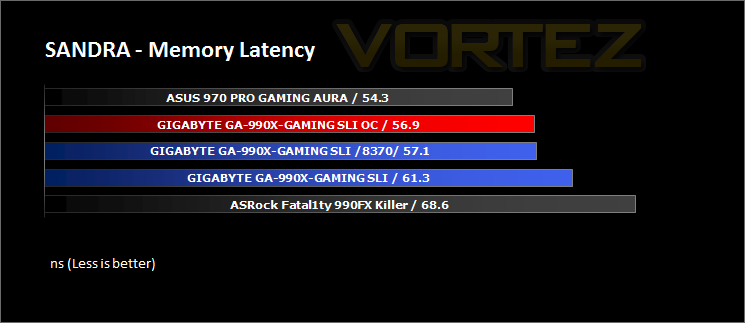
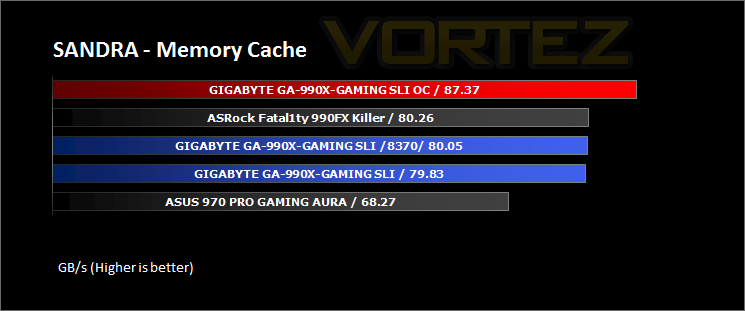
Benchmarks: SiSoftware SANDRA
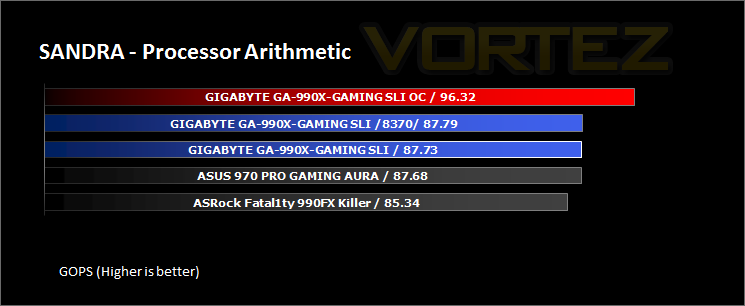
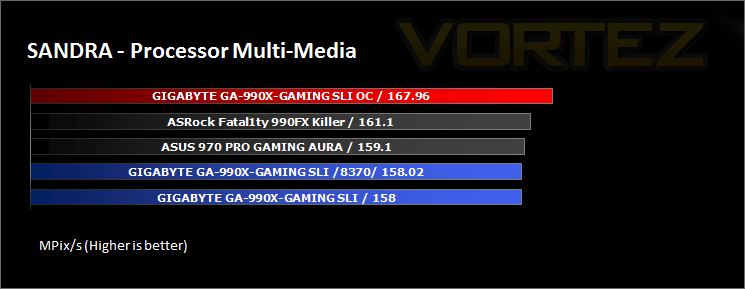
SANDRA isn’t always a benchmark that is included in hardware reviews but I believe it shouldn’t be ignored. SANDRA provides a vigorous package that tests your system in a rather large array of benchmarks. There are many aspects of benchmark that can be executed. We will be considering – CPU and memory tests.
Benchmarks: 3DMark
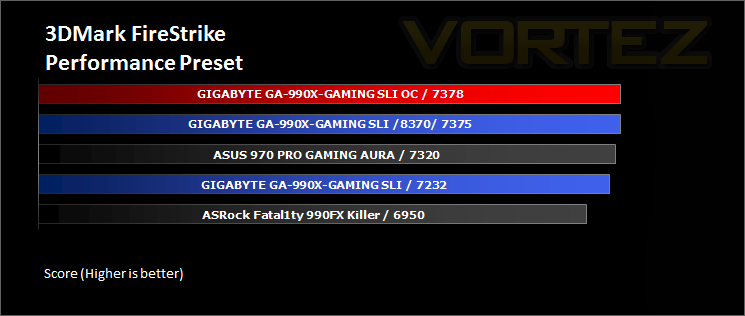
3DMark FireStrike Product PageFire Strike is our new showcase DirectX 11 benchmark designed for high-performance gaming PCs. It is our most ambitious and technical benchmark ever, featuring real-time graphics rendered with detail and complexity far beyond what is found in other benchmarks and games today. Fire Strike will only be available in the Windows editions of 3DMark initially.
Strangely, we didn’t see much performance gains here with the overclock, which may be down to either being unstable, or simply being within marginal performance of the turbo core gains.
Benchmarks: PCMark 8
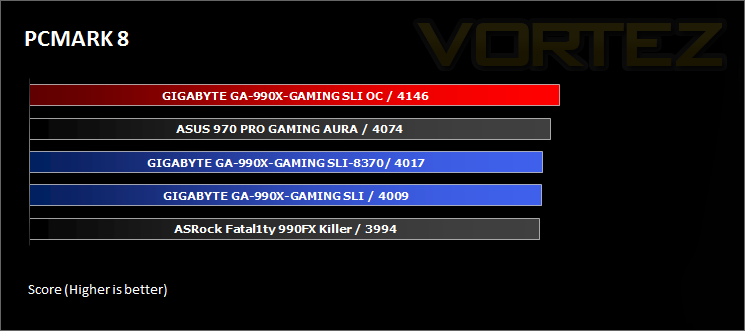
PCMark 8 combines performance benchmarking with battery life measurement and includes tests based on popular Adobe and Microsoft applications. Whether you are looking for long battery life, or maximum power, PCMark 8 will help you find the devices that offer the perfect combination of efficiency and performance for your needs. It’s the complete PC performance benchmark for home and business.
Again we see a marginal performance gain for the OC, though generally, the GA-990X Gaming SLI keeps pace with the others.
Gaming Benchmarks: Tomb Raider & THIEF
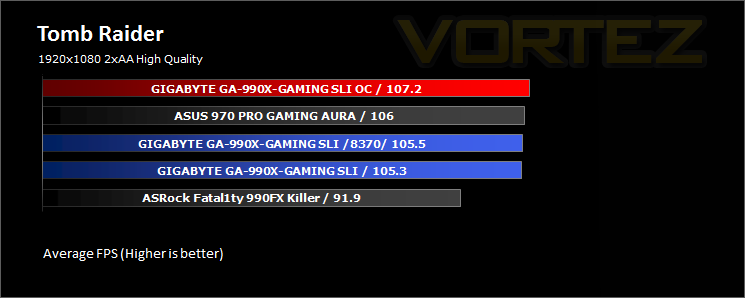
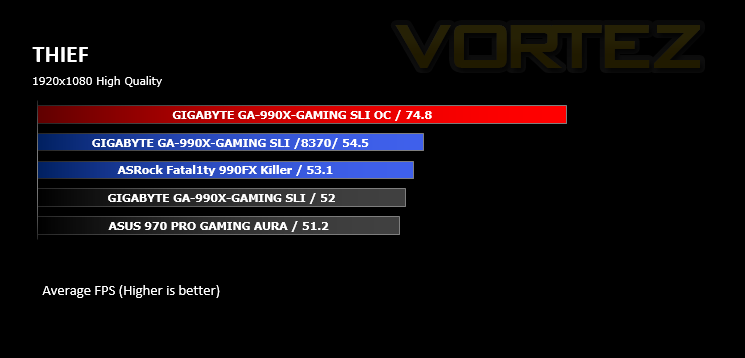
It’s important for us to perform a number of game benchmarks as well as the synthetic tests because gamers will want to know if there are any significant benefits. So here we have two popular and recent gaming titles which feature a dedicated benchmark tool within them to display results.
In our gaming tests we get some interesting results, Tomb Raider seeing little improvement from the OC, while Thief sees a large performance boost. It is worth noting that Mantle was disabled, averaging an extra 15-20fps in Thief across the board.
Conclusion
GIGABYTEs 990X Gaming SLI gives gamers a real choice to consider the AM3+ platform, because it is a feature rich motherboard and costs a meagre £79-85, add that to a FX-8350 and you will have fantastic bang for buck performance at a little over £200. if you choose the FX-8370 instead, you can get the impressive Wraith cooler along with a better binned CPU for some potential performance gains.
There is no illusion about the AM3+ platform and it is certainly showing its age, especially when you consider that they are still tied to PCIe 2.0. As with other limitations, including the unfriendly power use, these are inherent flaws of the platform itself and it isn’t really one to penalise the motherboard for. As far as AM3+ motherboards go, GIGABYTE have done a fantastic job of bringing new standards to the old platform, specifically USB 3.1 and a super fast M.2 port for high speed built-in storage.
Some of the features that may seem superfluous, such as the metal reinforced PCIe slots, however, it is arguably an incredibly good idea considering the weight of many contemporary graphics cards. There is also the DAC UP USB ports, which many may not take advantage of, preferring to use the reasonable onboard solution. However, those that do prefer to use their own external audio equipment may rejoice at the idea of having guaranteed clean, low-noise power delivered to their DAC for perfect audio playback.
There are a few minor considerations to list, for example, only 1x CPU fan header, the position of the internal USB 3.0 header as well as layout of the BIOS, which made overclocking a bit more inconvenient than it needed to be. Though it isn’t to be judged too harshly for these things, because it delivers a solid, all round package that gamers are sure to enjoy. I would like to see a more unified GIGABYTE APP Center, as many of the features seem useful and would be so much more convenient to not have to install everything individually, but it’s latest incarnation is an improvement upon the previous version and is a step in the right direction.
If you are looking at the AM3+ platform, or simply want to upgrade your existing AM3+ motherboard, the GA-990X Gaming SLI provides solid performance, a great feature set and top value, so will come highly recommended.
The GIGABYTE 990X Gaming SLI offers an all-round powerhouse of the latest features for a great price.
Pros
+ High-quality components
+ Solid performance
+ Reinforced PCIe brackets
+ 2x USB 3.1 ports
+ High performance M.2 slot
+ Supports CrossFireX and SLI
+ Audio features (ALC 1150 + DAC UP USB)
+ Price
Cons
– Not quite optimal for overclockers
– Platform is showing its age
+ High-quality components
+ Solid performance
+ Reinforced PCIe brackets
+ 2x USB 3.1 ports
+ High performance M.2 slot
+ Supports CrossFireX and SLI
+ Audio features (ALC 1150 + DAC UP USB)
+ Price
Cons
– Not quite optimal for overclockers
– Platform is showing its age
Click here for an explanation of our awards at Vortez.net.