Packed with features, including: RGB LED lighting, DAC-UP 2, Dual BIOS, and AMP-UP Audio, GIGABYTE reminds us that the B350 chipset is capable of being a strong foundation for an affordable gaming system.

Product on Review: GIGABYTE GA-AB350-Gaming 3
Manufacturer & Sponsor: GIGABYTE
Street Price: £109.99 GBP / $119 USD
The B350 chipset is a platform that could be seen as rather underwhelming. This is not though any fault of its own however but with consideration towards the under utilisation of the native USB 3.1 Gen2. GIGABYTE have finally restored our faith and we are happy to point out that the AB350-Gaming 3 does indeed feature 2x USB 3.1 G2 ports at the rear IO, with a total of 13 USB ports available (directly and indirectly via internal headers). Of these, 3x USB ports feature GIGABYTE’s DAC-UP 2 adjustable voltage to ensure that your peripherals (and DAC’s of course) are supplied with enough ‘clean’ power to ensure stable operation. We are pleased to report the inclusion of other GIGABYTE technologies such as Dual BIOS along with ‘Ultra Durable’ Metal Shielding and Anti-Sulfur resistors.
As expected we find the M.2 slot capable of running the latest high speed PCIe SSDs, though more interestingly, GIGABYTE have including a total of 6x SATA ports, which 2x more than what is natively afforded by the chipset. We speculate that the additional PCIe lanes/SATA functionality afforded by the unused native SATA Express featured on the CPU may be leveraged by additional SATA ports (labelled ASATA), which would explain why these two ports are then unavailable when a PCIe M.2 SSD is installed.
One of the more striking aspects of the AB350-Gaming 3 is that it features the Accent LED Overlay similar to that found on the Aorus motherboards, to which you can download a 3D printable document which can be customised to your own liking. This overlay forms part of the ‘Surround’ RGB lighting experience to which GIGABYTE have included headers for the AMD LED RGB fan, as well as an additional RGBW LED strip header, all of which can then be controlled via the RGB Fusion app.
GIGABYTE on Gaming
GIGABYTE shares the same passion for gaming with all types of gamers. Therefore, we have extended the premium gaming brand – AORUS, the pinnacle of our hardware excellence, to provide a full spectrum of innovative gaming products that deliver the ultimate performance and exemplifies the PC’s capability for bringing gamers unprecedented delights. We will continue to participate in global gaming events, connecting with the community and actively listening to gamers’ desires in order to create marvellous products that are focused on gamers’ needs. AORUS is a team of gamers in the PC industry, looking to side with gamers in their quest for gaming, to challenge the limits, and become legendary.
Technical Specifications
CPU
AM4 Socket:
AMD Ryzen™ processor
AMD 7th Generation A-series/ Athlon™ processor
(Please refer “CPU Support List” for more information.)
Chipset
AMD B350
Memory
4 x DDR4 DIMM sockets supporting up to 64 GB of system memory
* Due to a Windows 32-bit operating system limitation, when more than 4 GB of physical memory is installed, the actual memory size displayed will be less than the size of the physical memory installed.
Dual channel memory architecture
Support for DDR4 3200(O.C.)/2933(O.C.)/2667*/2400/2133 MHz memory modules
* Support for higher than DDR4 2667 MHz may vary by CPU.
Support for ECC Un-buffered DIMM 1Rx8/2Rx8 memory modules (operate in non-ECC mode)
Support for non-ECC Un-buffered DIMM 1Rx8/2Rx8/1Rx16 memory modules
Support for Extreme Memory Profile (XMP) memory modules
(Please refer “Memory Support List” for more information.)
Onboard Graphics
Integrated Graphics Processor:
1 x DVI-D port, supporting a maximum resolution of 1920×1200@60 Hz
* The DVI-D port does not support D-Sub connection by adapter.
1 x HDMI port, supporting a maximum resolution of 4096×2160@24 Hz
* Support for HDMI 1.4 version.
Maximum shared memory of 2 GB
* Actual support may vary by CPU.
Audio
Realtek® ALC1220 codec
High Definition Audio
2/4/5.1/7.1-channel
Support for S/PDIF Out
LAN
Realtek® GbE LAN chip (10/100/1000 Mbit)
Expansion Slots
1 x PCI Express x16 slot, running at x16 (PCIEX16)
* For optimum performance, if only one PCI Express graphics card is to be installed, be sure to install it in the PCIEX16 slot.
* Actual support may vary by CPU.
(The PCIEX16 slot conforms to PCI Express 3.0 standard.)
1 x PCI Express x16 slot, running at x4 (PCIEX4)
* The PCIEX4 slot shares bandwidth with the PCIEX1_2 and PCIEX1_3 slots. The PCIEX4 slot operates at up to x2 mode when the PCIEX1_2/PCIEX1_3 slot is populated. The PCIEX4 slot operates at up to x4 mode when both of the PCIEX1_2 and PCIEX1_3 slots are empty.
* Actual support may vary by CPU.
1 x PCI Express x16 slot, running at x1 (PCIEX1_3)
2 x PCI Express x1 slots
(The PCIEX4 and PCI Express x1 slots conform to PCI Express 2.0 standard.)
Storage Interface
1 x M.2 connector (Socket 3, M key, type 2242/2260/2280/22110 SATA and PCIe x4*/x2 SSD support)
* Actual support may vary by CPU.
6 x SATA 6Gb/s connectors
Support for RAID 0, RAID 1, and RAID 10
* Refer to “1-7 Internal Connectors,” for the installation notices for the M.2 and SATA connectors.
Multi-Graphics Technology
Support for 2-Way AMD CrossFire™ Technology
* Actual support may vary by CPU.
USB
Chipset:
2 x USB 3.1 Gen 2 Type-A ports (red) on the back panel
2 x USB 3.1 Gen 1 ports (available through the internal USB header)
5 x USB 2.0/1.1 ports (1 port on the back panel, 4 ports available through the internal USB headers)
CPU:
4 x USB 3.1 Gen 1 ports on the back panel
Internal I/O Connectors
1 x 24-pin ATX main power connector
1 x 8-pin ATX 12V power connector
1 x M.2 Socket 3 connector
6 x SATA 6Gb/s connectors
1 x CPU fan header
1 x water cooling CPU fan header
2 x system fan headers
1 x system fan/water cooling pump header
1 x front panel header
1 x front panel audio header
1 x S/PDIF Out header
1 x USB 3.1 Gen 1 header
2 x USB 2.0/1.1 headers
1 x Trusted Platform Module (TPM) header
1 x CPU cooler LED strip/RGB LED strip extension cable header
1 x RGB (RGBW) LED strip extension cable header
1 x Clear CMOS jumper
Back Panel Connectors
1 x PS/2 keyboard/mouse port
1 x DVI-D port
1 x HDMI port
4 x USB 3.1 Gen 1 ports
2 x USB 3.1 Gen 2 Type-A ports (red)
1 x USB 2.0/1.1 port
1 x RJ-45 port
1 x optical S/PDIF Out connector
5 x audio jacks (Center/Subwoofer Speaker Out, Rear Speaker Out, Line In, Line Out, Mic In)
I/O Controller
iTE® I/O Controller Chip
H/W Monitoring
Voltage detection
Temperature detection
Fan speed detection
Overheating warning
Fan fail warning
Fan speed control
* Whether the fan (pump) speed control function is supported will depend on the fan (pump) you install.
BIOS
2 x 128 Mbit flash
Use of licensed AMI UEFI BIOS
Support for DualBIOS™
PnP 1.0a, DMI 2.7, WfM 2.0, SM BIOS 2.7, ACPI 5.0
Unique Features
Support for APP Center
* Available applications in APP Center may vary by motherboard model. Supported functions of each application may also vary depending on motherboard specifications.
@BIOS
3D OSD
AutoGreen
BIOS Setup
Cloud Station
Color Temperature
EasyTune
Fast Boot
Game Boost
ON/OFF Charge
RGB Fusion
Smart Backup
Smart Keyboard
Smart TimeLock
System Information Viewer
USB Blocker
USB DAC UP 2
V-Tuner
Support for Q-Flash
Support for Xpress Install
Form Factor
ATX Form Factor; 30.5cm x 23.0cm
AM4 Socket:
AMD Ryzen™ processor
AMD 7th Generation A-series/ Athlon™ processor
(Please refer “CPU Support List” for more information.)
Chipset
AMD B350
Memory
4 x DDR4 DIMM sockets supporting up to 64 GB of system memory
* Due to a Windows 32-bit operating system limitation, when more than 4 GB of physical memory is installed, the actual memory size displayed will be less than the size of the physical memory installed.
Dual channel memory architecture
Support for DDR4 3200(O.C.)/2933(O.C.)/2667*/2400/2133 MHz memory modules
* Support for higher than DDR4 2667 MHz may vary by CPU.
Support for ECC Un-buffered DIMM 1Rx8/2Rx8 memory modules (operate in non-ECC mode)
Support for non-ECC Un-buffered DIMM 1Rx8/2Rx8/1Rx16 memory modules
Support for Extreme Memory Profile (XMP) memory modules
(Please refer “Memory Support List” for more information.)
Onboard Graphics
Integrated Graphics Processor:
1 x DVI-D port, supporting a maximum resolution of 1920×1200@60 Hz
* The DVI-D port does not support D-Sub connection by adapter.
1 x HDMI port, supporting a maximum resolution of 4096×2160@24 Hz
* Support for HDMI 1.4 version.
Maximum shared memory of 2 GB
* Actual support may vary by CPU.
Audio
Realtek® ALC1220 codec
High Definition Audio
2/4/5.1/7.1-channel
Support for S/PDIF Out
LAN
Realtek® GbE LAN chip (10/100/1000 Mbit)
Expansion Slots
1 x PCI Express x16 slot, running at x16 (PCIEX16)
* For optimum performance, if only one PCI Express graphics card is to be installed, be sure to install it in the PCIEX16 slot.
* Actual support may vary by CPU.
(The PCIEX16 slot conforms to PCI Express 3.0 standard.)
1 x PCI Express x16 slot, running at x4 (PCIEX4)
* The PCIEX4 slot shares bandwidth with the PCIEX1_2 and PCIEX1_3 slots. The PCIEX4 slot operates at up to x2 mode when the PCIEX1_2/PCIEX1_3 slot is populated. The PCIEX4 slot operates at up to x4 mode when both of the PCIEX1_2 and PCIEX1_3 slots are empty.
* Actual support may vary by CPU.
1 x PCI Express x16 slot, running at x1 (PCIEX1_3)
2 x PCI Express x1 slots
(The PCIEX4 and PCI Express x1 slots conform to PCI Express 2.0 standard.)
Storage Interface
1 x M.2 connector (Socket 3, M key, type 2242/2260/2280/22110 SATA and PCIe x4*/x2 SSD support)
* Actual support may vary by CPU.
6 x SATA 6Gb/s connectors
Support for RAID 0, RAID 1, and RAID 10
* Refer to “1-7 Internal Connectors,” for the installation notices for the M.2 and SATA connectors.
Multi-Graphics Technology
Support for 2-Way AMD CrossFire™ Technology
* Actual support may vary by CPU.
USB
Chipset:
2 x USB 3.1 Gen 2 Type-A ports (red) on the back panel
2 x USB 3.1 Gen 1 ports (available through the internal USB header)
5 x USB 2.0/1.1 ports (1 port on the back panel, 4 ports available through the internal USB headers)
CPU:
4 x USB 3.1 Gen 1 ports on the back panel
Internal I/O Connectors
1 x 24-pin ATX main power connector
1 x 8-pin ATX 12V power connector
1 x M.2 Socket 3 connector
6 x SATA 6Gb/s connectors
1 x CPU fan header
1 x water cooling CPU fan header
2 x system fan headers
1 x system fan/water cooling pump header
1 x front panel header
1 x front panel audio header
1 x S/PDIF Out header
1 x USB 3.1 Gen 1 header
2 x USB 2.0/1.1 headers
1 x Trusted Platform Module (TPM) header
1 x CPU cooler LED strip/RGB LED strip extension cable header
1 x RGB (RGBW) LED strip extension cable header
1 x Clear CMOS jumper
Back Panel Connectors
1 x PS/2 keyboard/mouse port
1 x DVI-D port
1 x HDMI port
4 x USB 3.1 Gen 1 ports
2 x USB 3.1 Gen 2 Type-A ports (red)
1 x USB 2.0/1.1 port
1 x RJ-45 port
1 x optical S/PDIF Out connector
5 x audio jacks (Center/Subwoofer Speaker Out, Rear Speaker Out, Line In, Line Out, Mic In)
I/O Controller
iTE® I/O Controller Chip
H/W Monitoring
Voltage detection
Temperature detection
Fan speed detection
Overheating warning
Fan fail warning
Fan speed control
* Whether the fan (pump) speed control function is supported will depend on the fan (pump) you install.
BIOS
2 x 128 Mbit flash
Use of licensed AMI UEFI BIOS
Support for DualBIOS™
PnP 1.0a, DMI 2.7, WfM 2.0, SM BIOS 2.7, ACPI 5.0
Unique Features
Support for APP Center
* Available applications in APP Center may vary by motherboard model. Supported functions of each application may also vary depending on motherboard specifications.
@BIOS
3D OSD
AutoGreen
BIOS Setup
Cloud Station
Color Temperature
EasyTune
Fast Boot
Game Boost
ON/OFF Charge
RGB Fusion
Smart Backup
Smart Keyboard
Smart TimeLock
System Information Viewer
USB Blocker
USB DAC UP 2
V-Tuner
Support for Q-Flash
Support for Xpress Install
Form Factor
ATX Form Factor; 30.5cm x 23.0cm
Packaging, Bundle & First Look
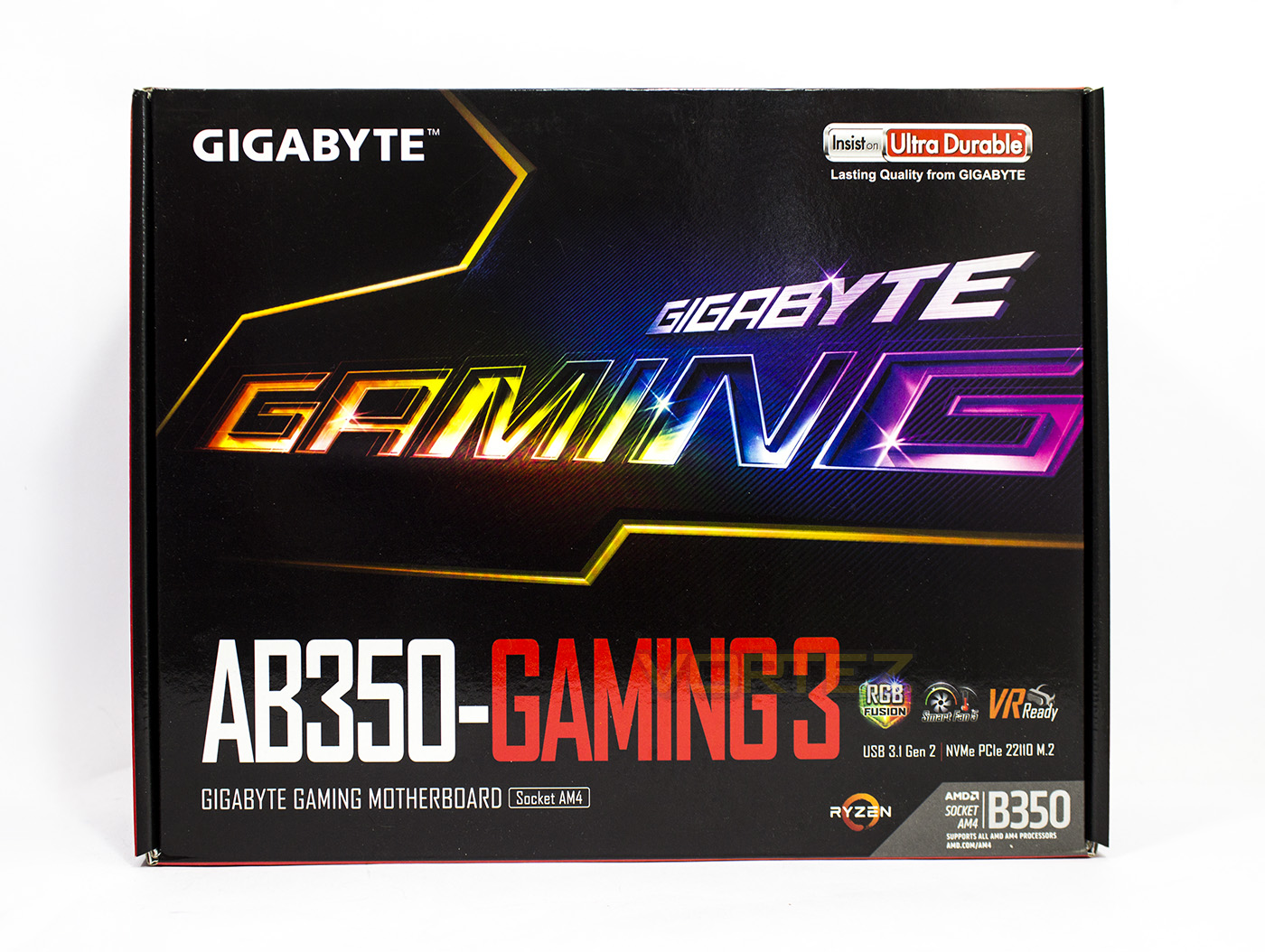
The packaging displays the product name in large, and is strongly suggestive of vivid colouring and RGB lighting.
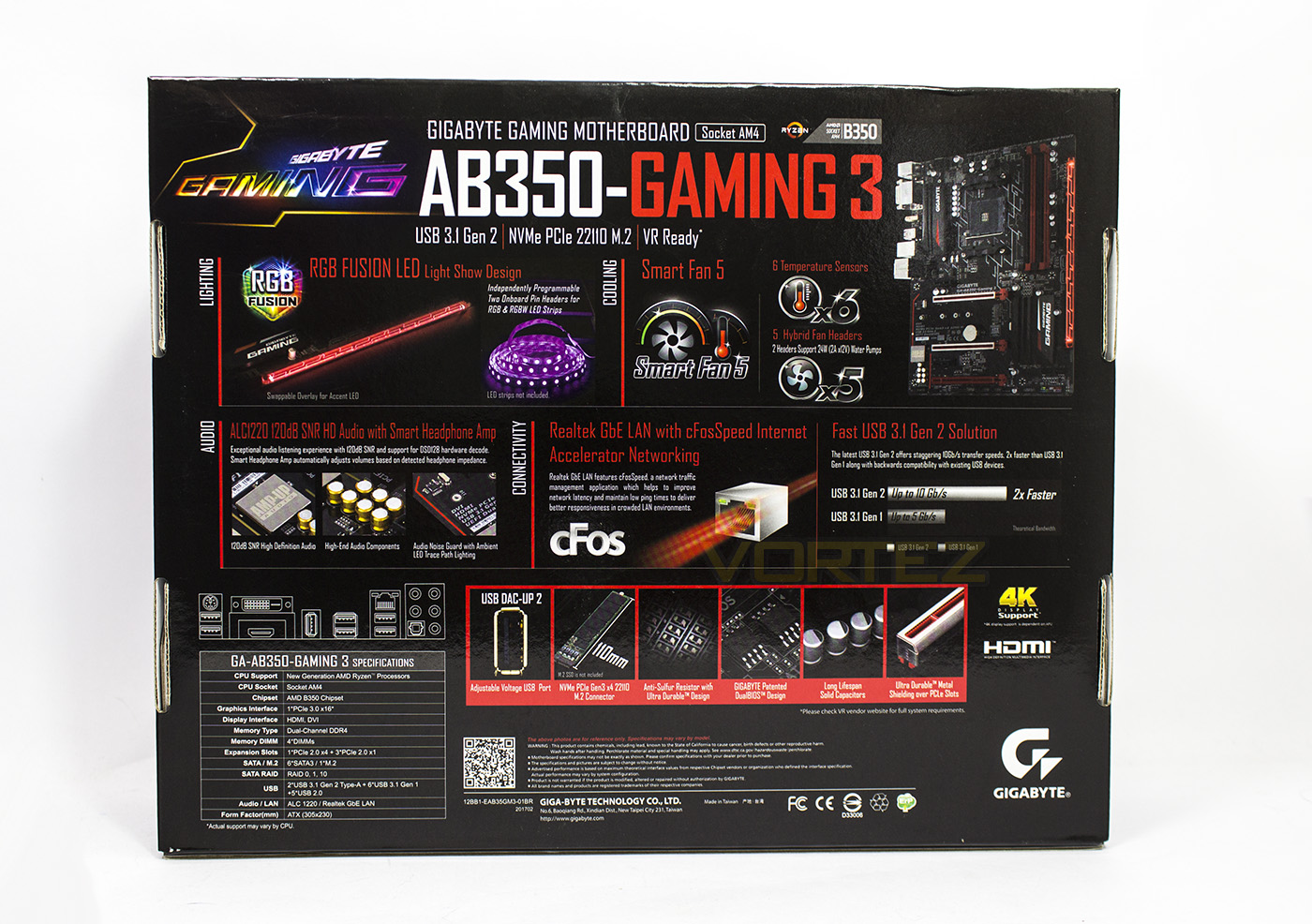
The reverse side gives detailed information about various features including RGB Fusion, Smart Fan 5, AMP-UP audio and more.
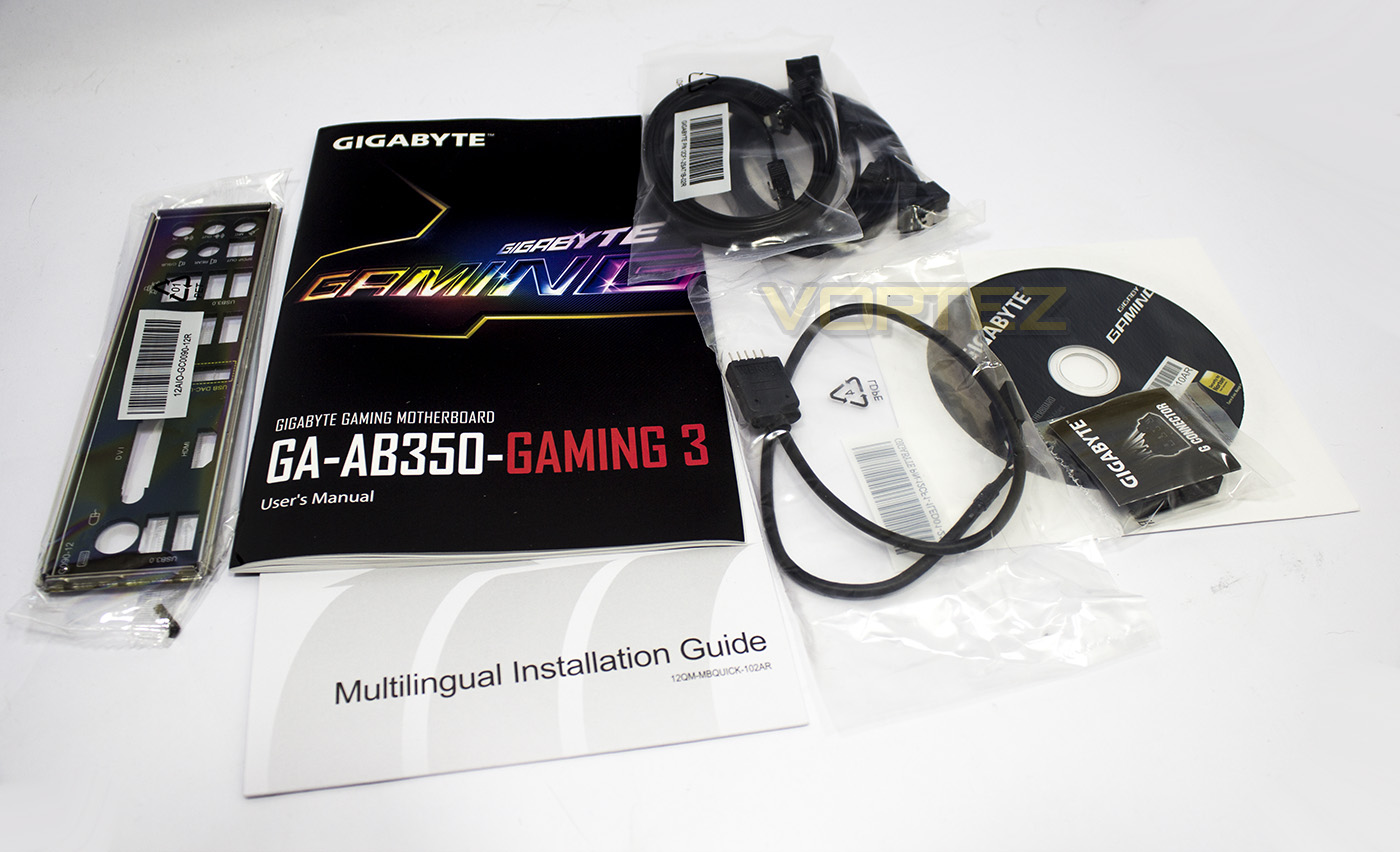
Inside the box we find the manual, installation guide, driver disc, 4x SATA cables, a ‘G-Connector’ (for quick installation of the front panel headers), the rear I/O plate, and an RGBW LED extension cable.
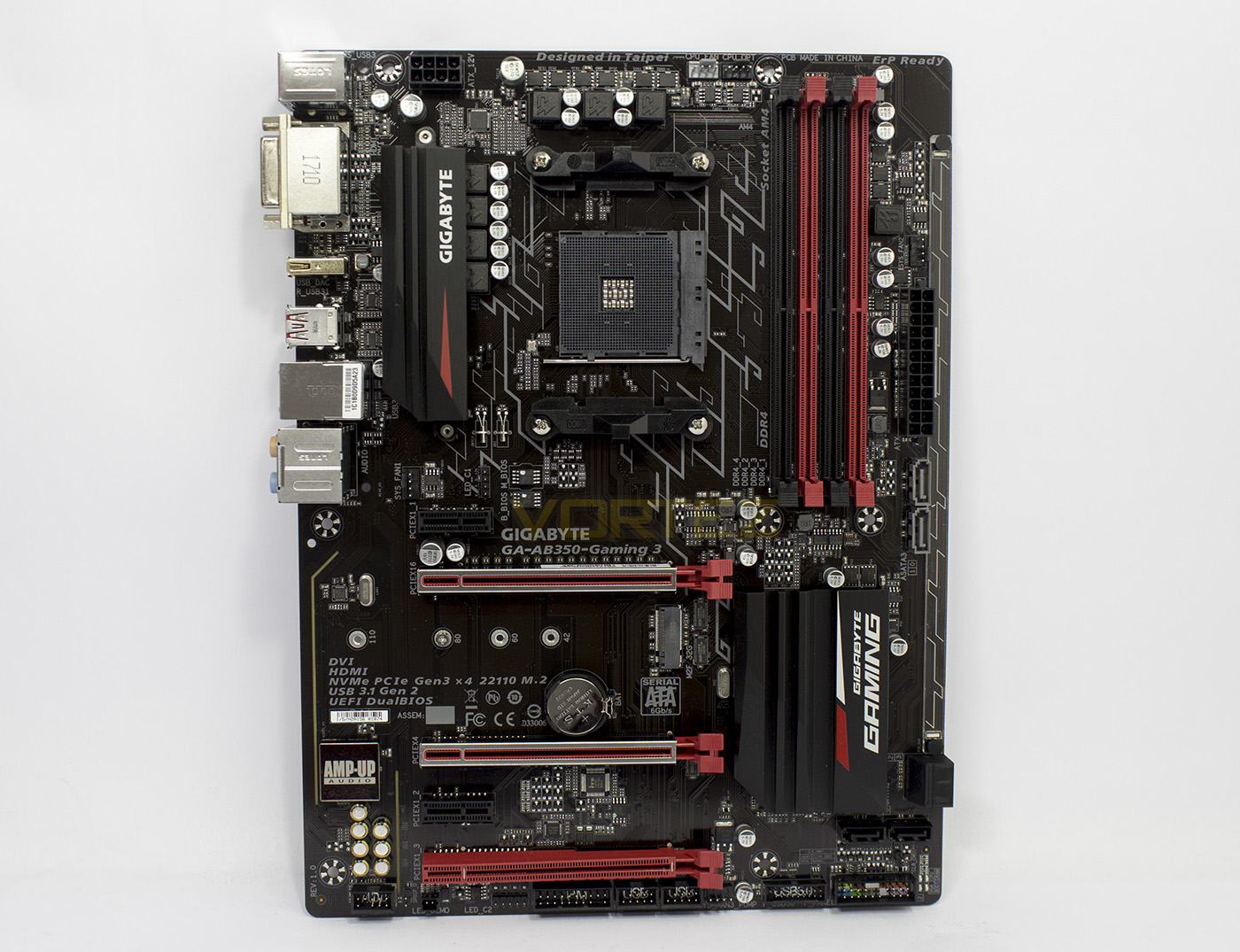
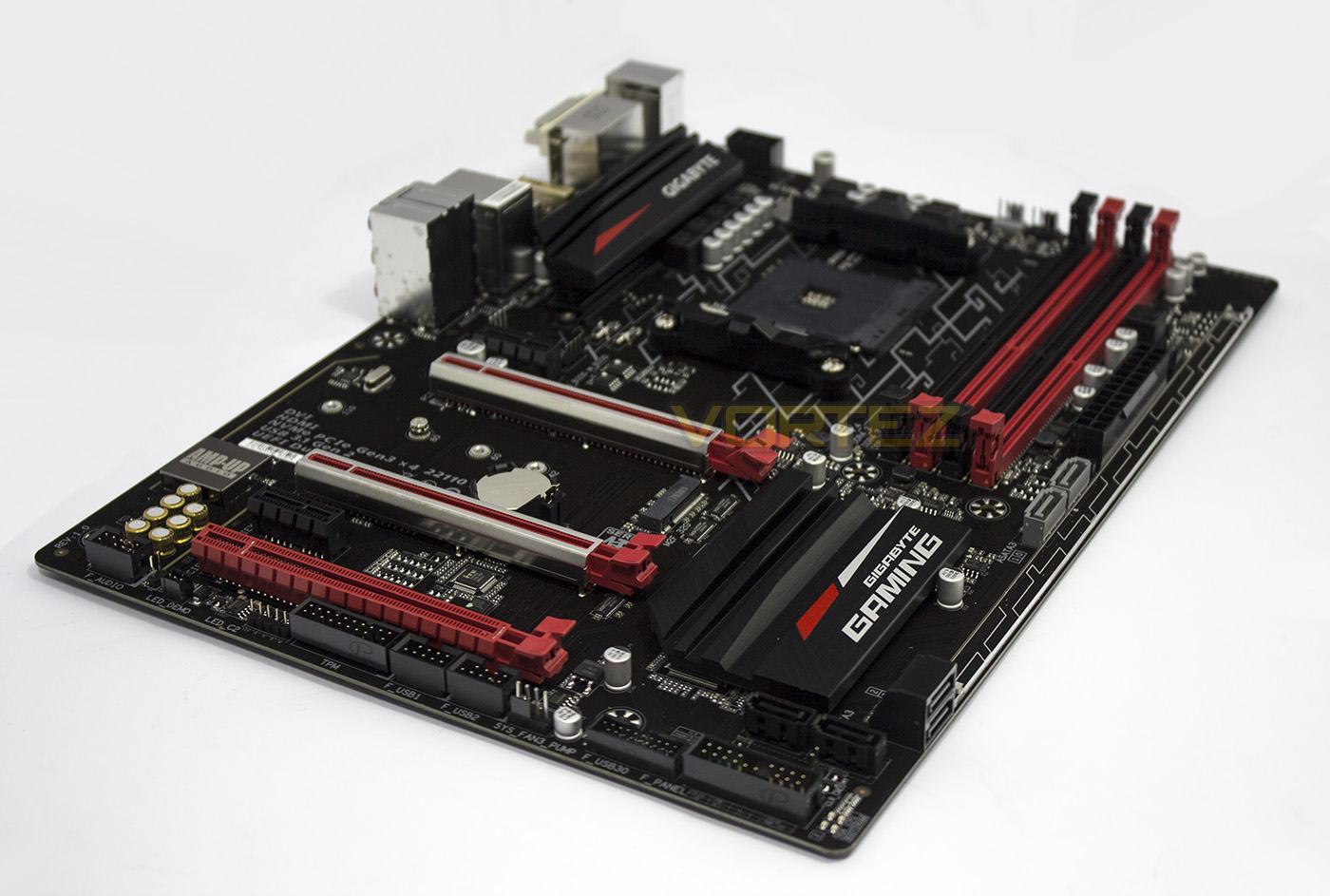
The motherboard itself is coloured in a very dark-brown (near black) with red accents, some would prefer then motherboard to be entirely neutral coloured to allow the RGB LED lighting to add the colour. Though, that doesn’t distract too much from the design of the board which is rather attractive anyway. There is a 1x slot space between the CPU socket and the primary PCIe x16 slot which provides extra clearance for large coolers, and should you wish to use multiple graphics cards, both the primary and secondary PCIe x16 lanes feature the Ultra Durable metal shielding. Though not immediately apparent, it is worth noting that this motherboard is a slim ATX form factor (30.5cm x 23cm vs 30.5cm x 24.5cm), which means that there will be an overhang in regards to the mounting of this motherboard in your chassis. So take care when installing memory and, more importantly, the 24pin ATX power cable, as excess pressure without support could cause unwanted flex/damage. We would recommend holding the underside of the motherboard to give additional support while doing this.
Closer Look
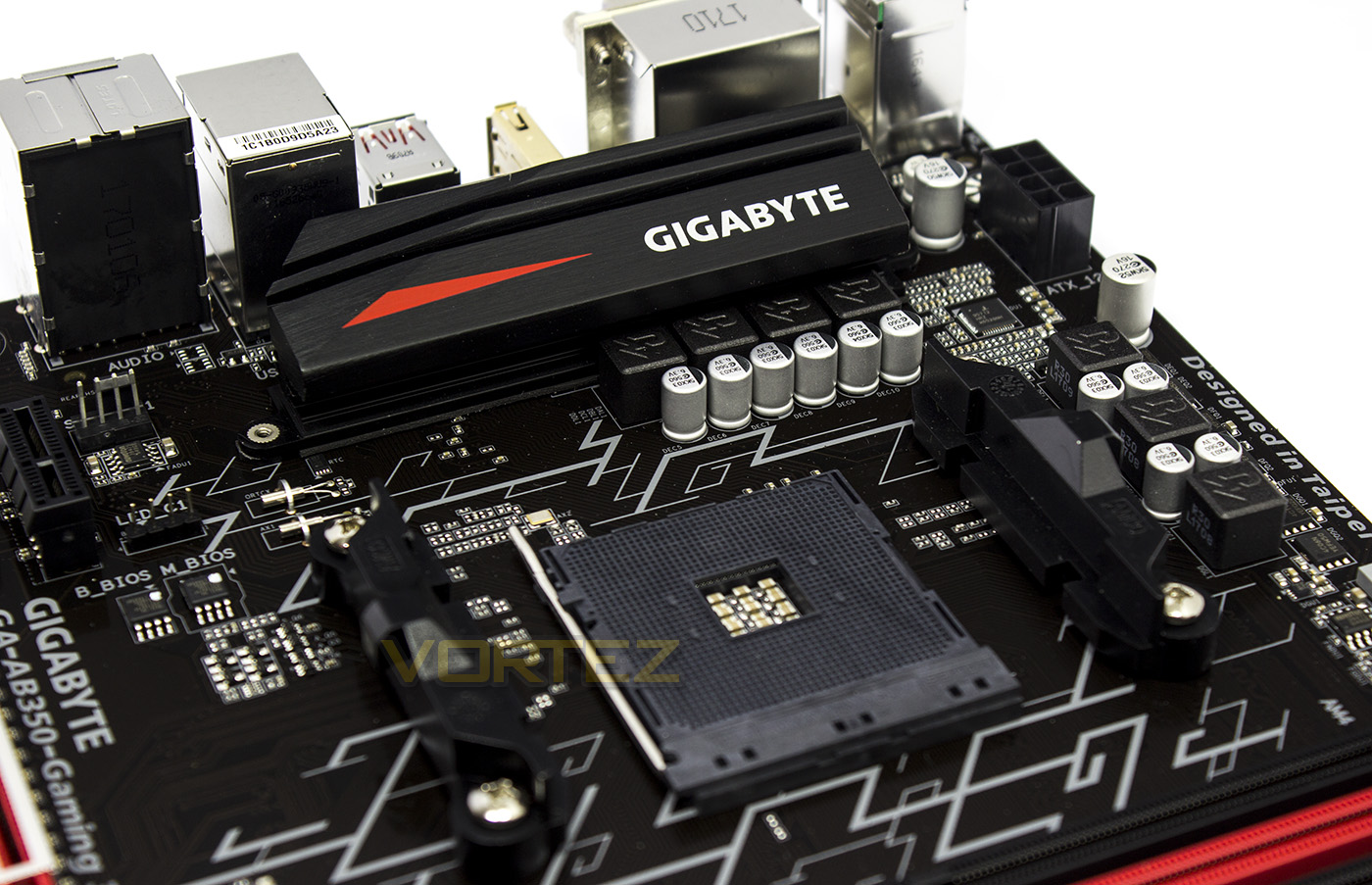
The AM4 socket is powered by a 6 + 1 power phase, which is kept cool by a large heatsink at the rear. On the left side we find the Dual BIOS chips and the CPU RGB LED header, and a 4pin fan header.
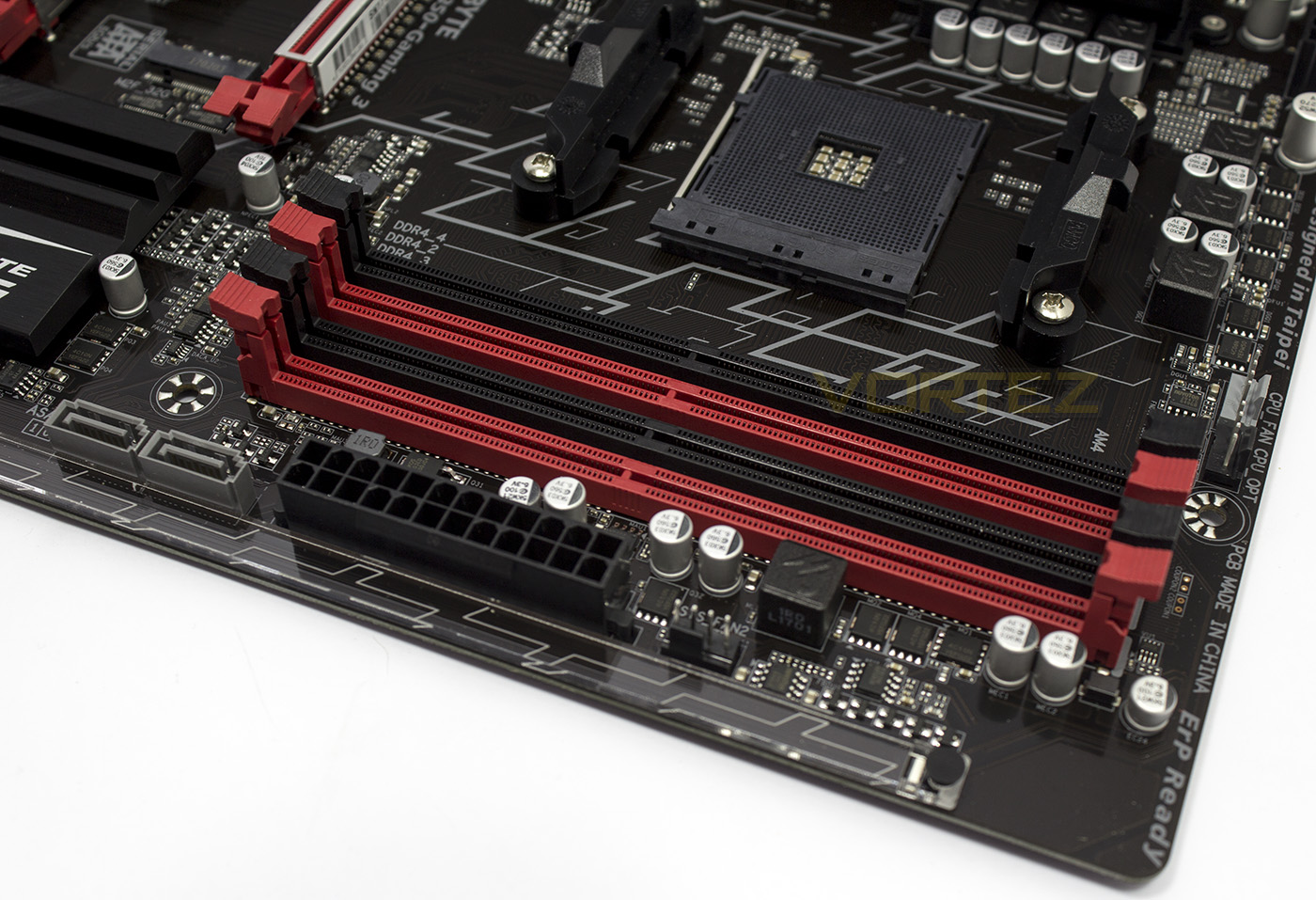
Surrounding the DIMM slots from left to right we find the 2x ASATA ports, the 24pin ATX power socket, another 4pin fan header (all fan headers are hybrid fan headers), and on the far right is the CPU and CPU OPT 4pin fan headers, the CPU OPT header can output 2A (24W) for water pumps. The outer edge features a large strip of plastic (the Accent LED Overlay) which lights up when switched on.
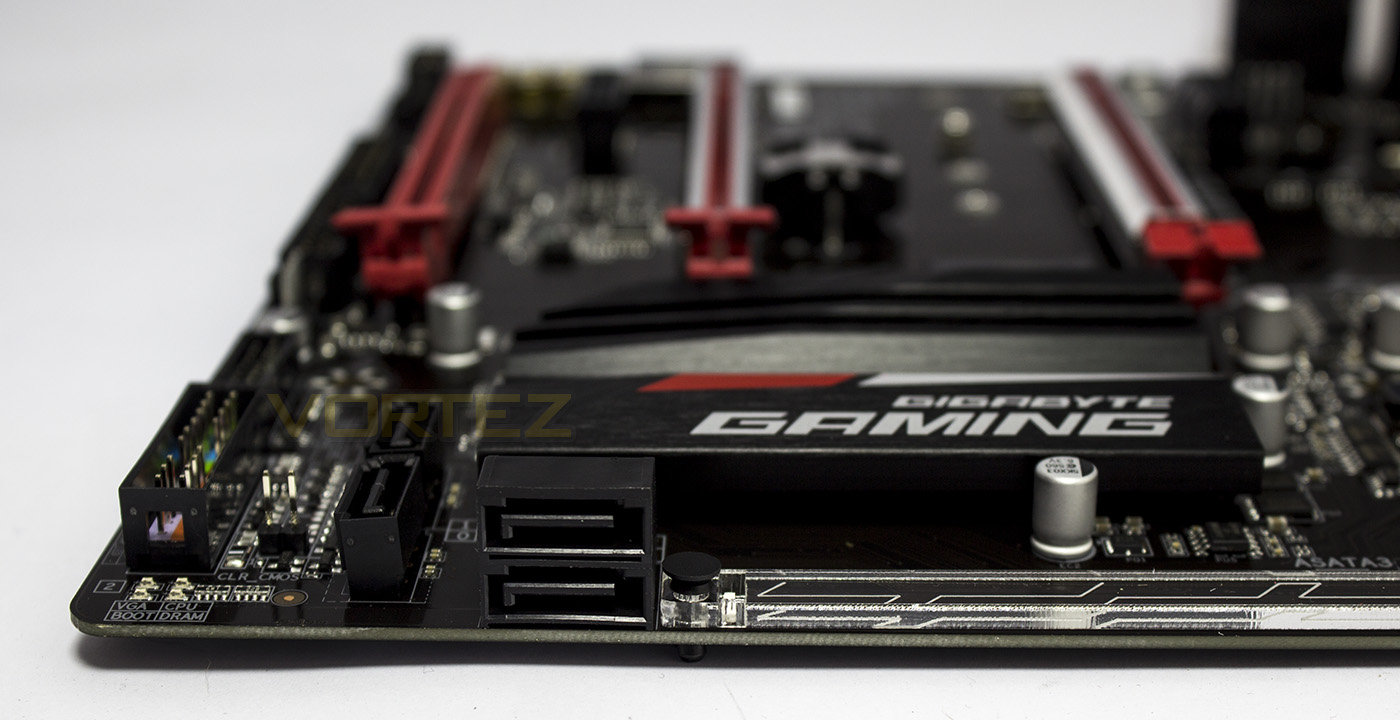
Only 2x SATA ports are at a right angle, with another two fixed directly to the motherboard itself. The very bottom right corner is home two 4x diagnostic LEDs.
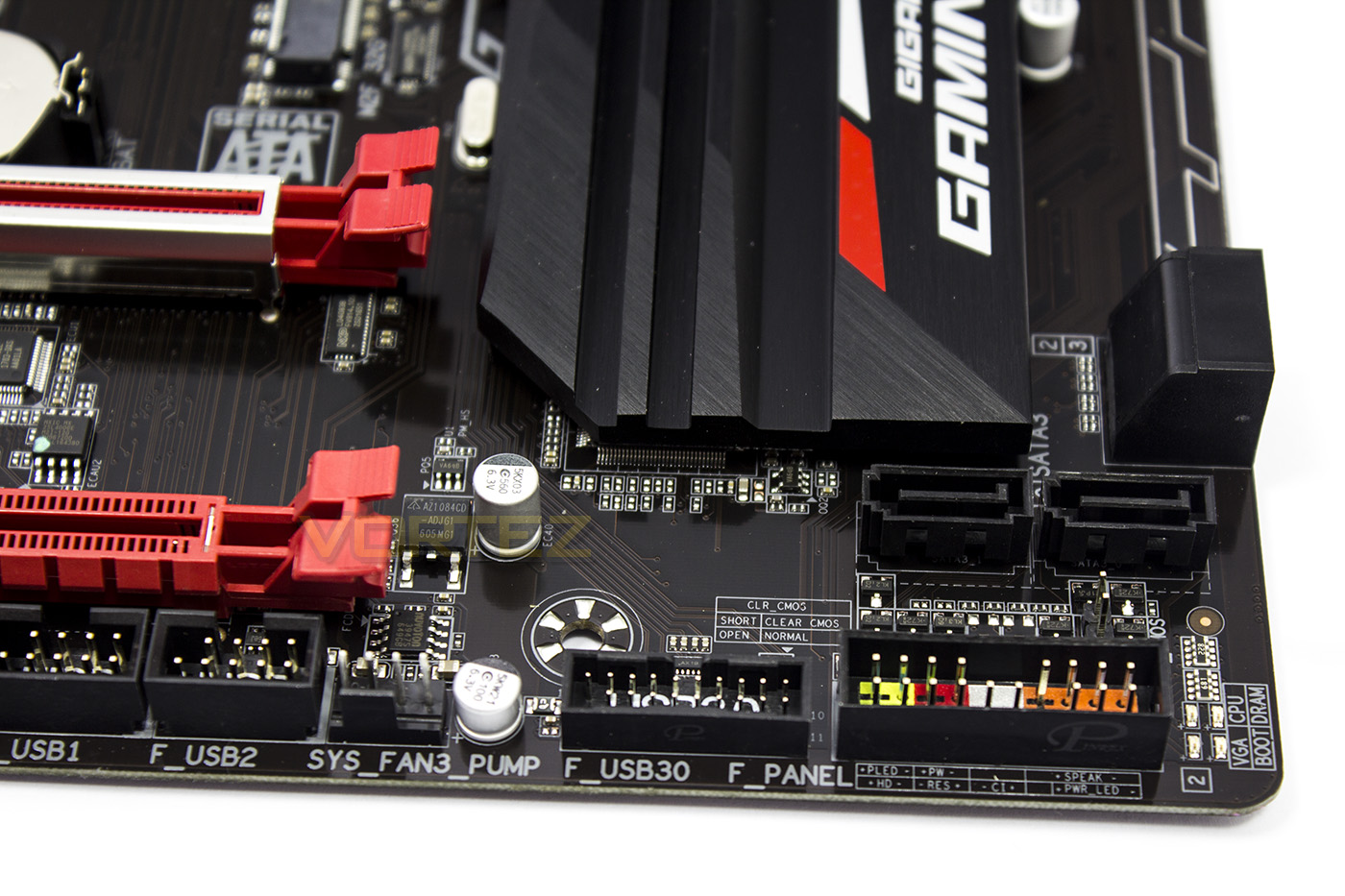
The front panel headers are located where you would traditionally find them and have been sectioned off by a plastic block, helping to fit the G-Connector a little more easily. Between the front panel headers and the SATA ports is a ‘Clear CMOS’ jumper, while on the left is a USB 3.1 G1 header (sporting adjustable voltage/ DAC-UP 2) and another 2A 4pin fan/pump header.
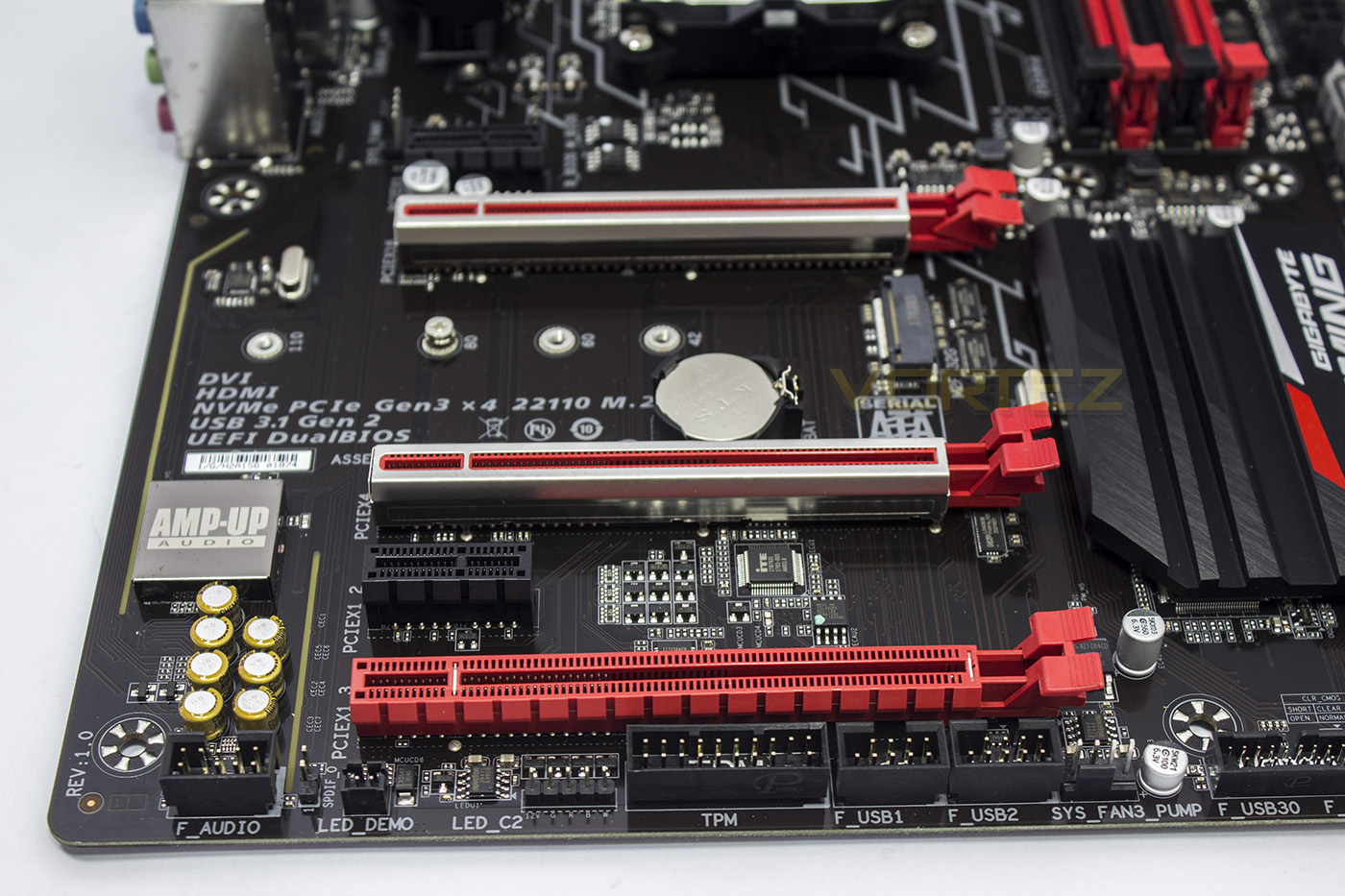
The bottom edge sports the internal expansions/headers including the front panel audio block, SPDIF header, LED DEMO jumper alongside the RGBW LED header, a TPM header, and finally connectors for 2x 2 USB 2.0 ports. Despite baring the AMP-UP name on the EMI shield and Chemicon audio capacitors, there is no swappable OP-AMP within the audio circuitry. Unlike the Tomahawk B350, there is no direct mention of the audio circuitry being physically isolated, or the left/right audio channels having a separate PCB, so maybe GIGABYTE are relying a little too much that the ALC 1220 alone will carry high quality audio for the gamer.
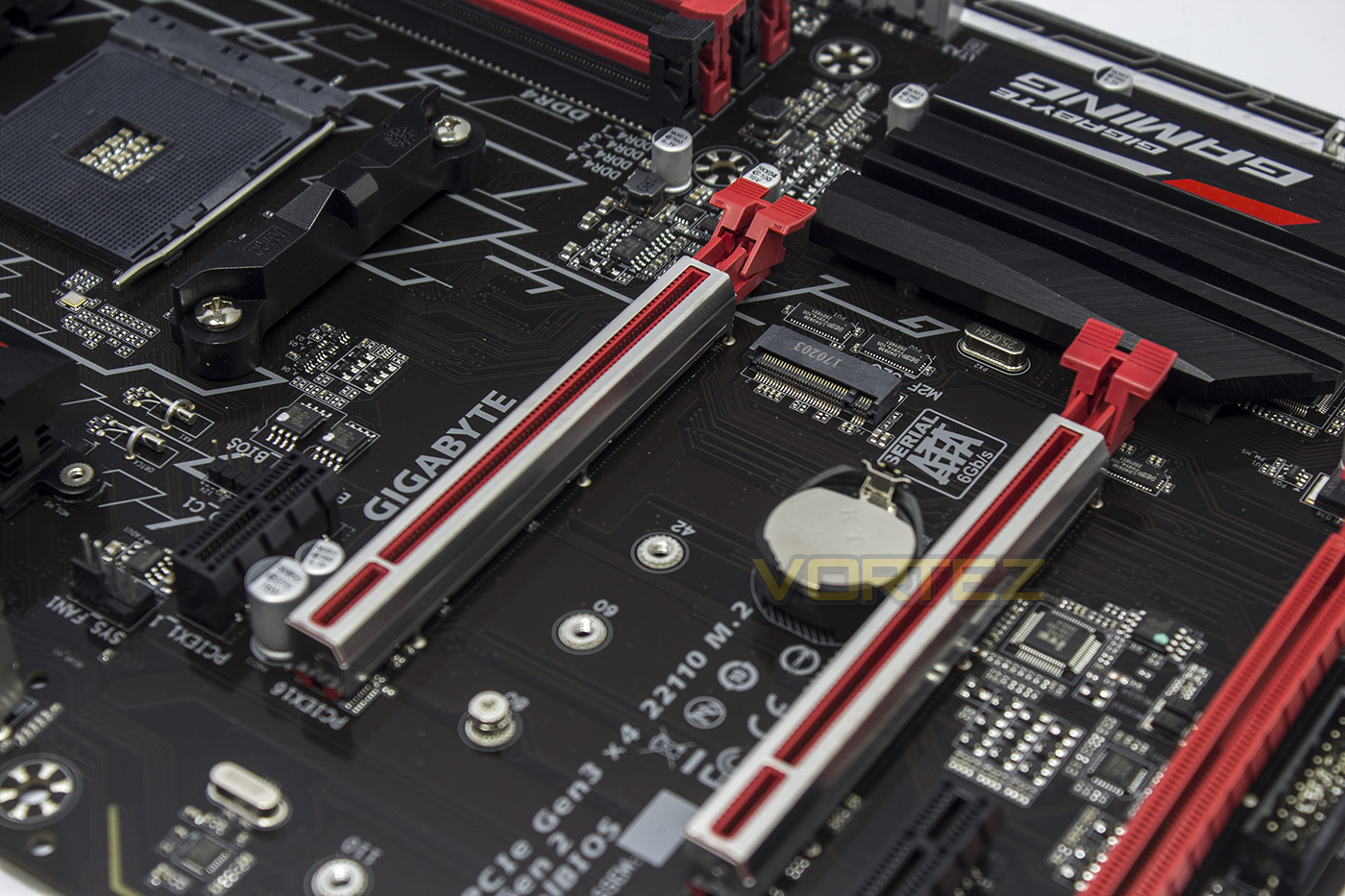
The M.2 slot supports M.2 SSDs up to 110mm in length, and supports either PCIe SSDs or SATA SSDs, if you use a SATA SSD, the ‘SATA port 3’ will become unavailable, while using a PCIe SSD will render both the ASATA ports unavailable.
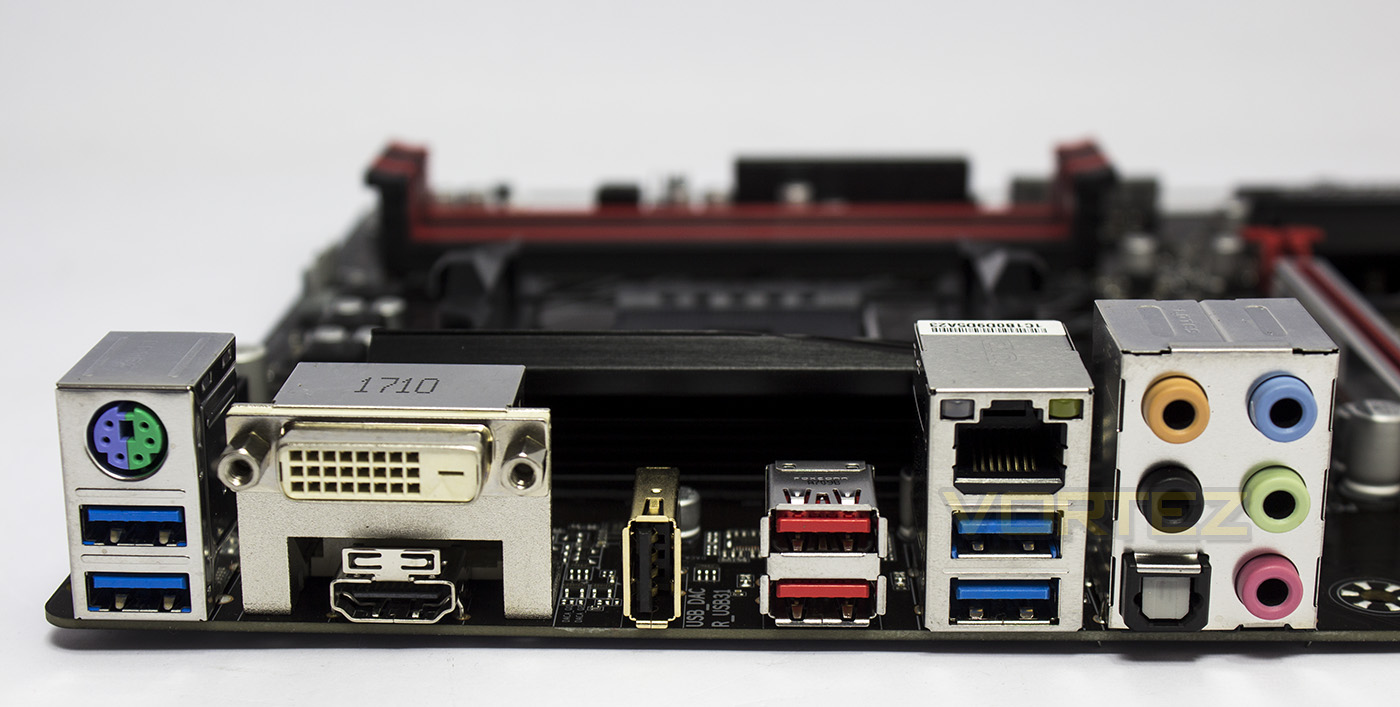
The rear ports afford a universal PS/2, 2x USB 3.1 G1, DVI-D, HDMI 1.4a, USB 2.0 (DAC-UP 2), 2x USB 3.1 G2 (red), 2x USB 3.1 G1, gigabit LAN (Realtek, would have been nice to see an Intel LAN solution), analogue audio ports and an optical S/PDIF out.
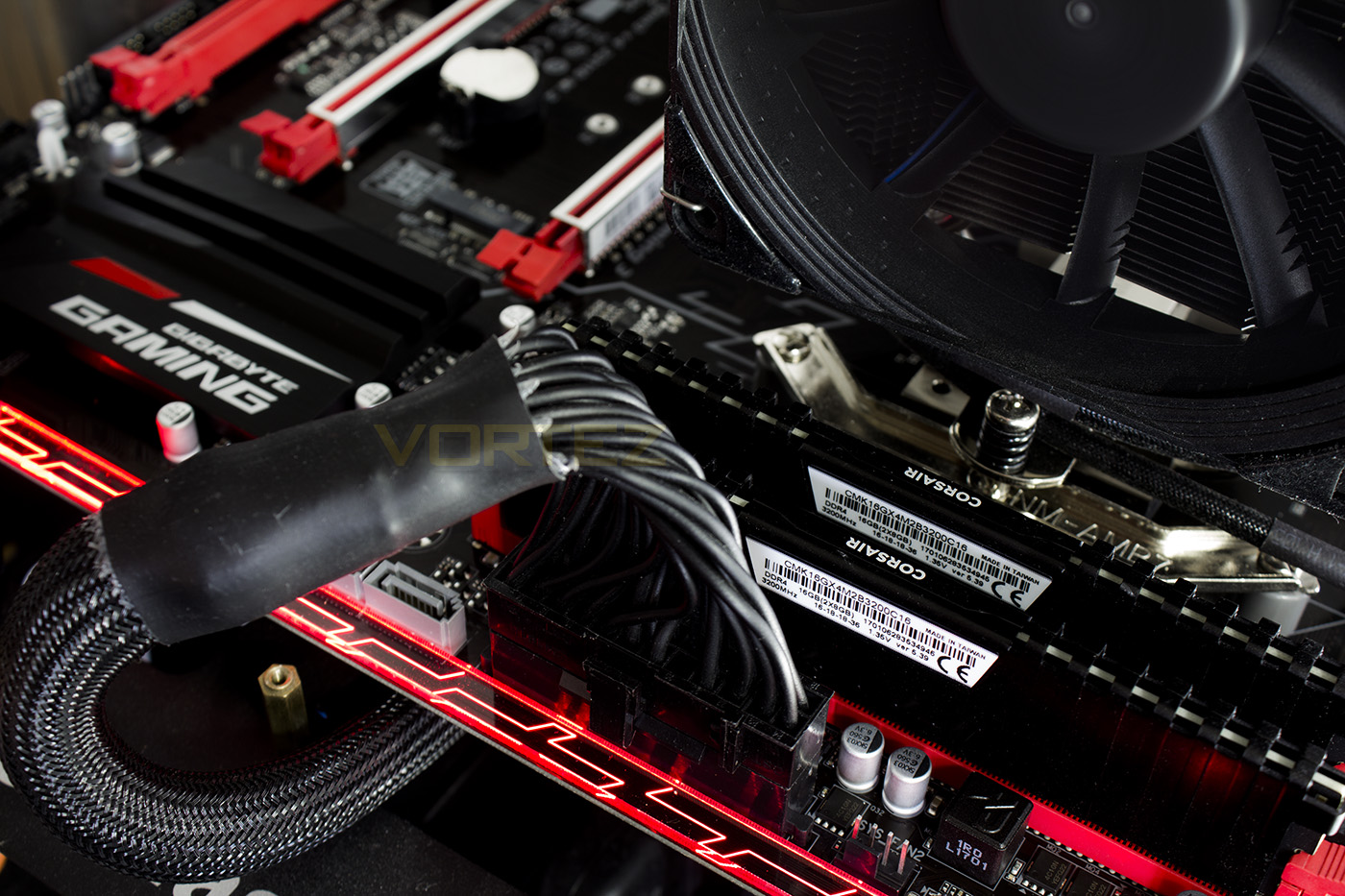
The Accent LED Overlay is red by default, but can be changed with the RGB Fusion app (accessed via the GIGABYTE APP Center) with additional RGB lighting surrounding the audio section also. The lighting can display most primary colours with decent vibrancy (such as Red, orange, yellow, green, cyan, Blue, Purple. violet, magenta) though struggles with in between colours and white. The Colour wheel in app too is not calibrated very well so requires a fair amount of playing around to get the bold colour you desire as orange is still clearly within the red zone, yellow clearly in the orange zone, and green clearly in the yellow zone etc. Overall the LED lighting can look very attractive and features some simple effects such as pulsing, flashing, spectrum cycle (which doesn’t look all that great unfortunately), flashing to the beat of music. There are some more advanced lighting modes including activity indicators (unfortunately not customisable from the standard Green-Orange) such as CPU activity, LAN activity, and temperature, as well as custom colour cycles.
Test Setup & Overclocking
Test SetupCPU AMD Ryzen 7 1800X
Cooling Noctua U12S
Motherboard GIGABYTE GA-AB350 – Gaming 3
Memory 2x 8GB Corsair Vengeance LPX 3200MHz @ 2667MHz
Graphics AMD Radeon RX 480 8GB
Storage Corsair Force LE 480GB
PSU Corsair RM750X 80 Plus Gold Certified PSU
Cooling Noctua U12S
Motherboard GIGABYTE GA-AB350 – Gaming 3
Memory 2x 8GB Corsair Vengeance LPX 3200MHz @ 2667MHz
Graphics AMD Radeon RX 480 8GB
Storage Corsair Force LE 480GB
PSU Corsair RM750X 80 Plus Gold Certified PSU
Benchmarks
Cinebench R15 – CPU/OpenGL Score
x264 HD 4.0 – 1st and 2nd pass encoding
SiSoftware SANDRA – CPU & Memory benchmarks
POV-RAY – CPU benchmarks
TrueCrypt – CPU benchmarks
AIDA64 – CPU benchmarks & Memory
PCMark 8 – Home Suite & Photoshop
3DMark FireStrike – 3D Benchmark
Games – Rise of the Tomb Raider & Total War: WARHAMMER
x264 HD 4.0 – 1st and 2nd pass encoding
SiSoftware SANDRA – CPU & Memory benchmarks
POV-RAY – CPU benchmarks
TrueCrypt – CPU benchmarks
AIDA64 – CPU benchmarks & Memory
PCMark 8 – Home Suite & Photoshop
3DMark FireStrike – 3D Benchmark
Games – Rise of the Tomb Raider & Total War: WARHAMMER
Other Software
Temperature Analysis: Aida64 & Ryzen Master
Stress Testing Software: AIDA64 Stability Test
CPU Specification Monitoring: CPU-Z
Performance Monitoring: MSI Afterburner
Stress Testing Software: AIDA64 Stability Test
CPU Specification Monitoring: CPU-Z
Performance Monitoring: MSI Afterburner
BIOS
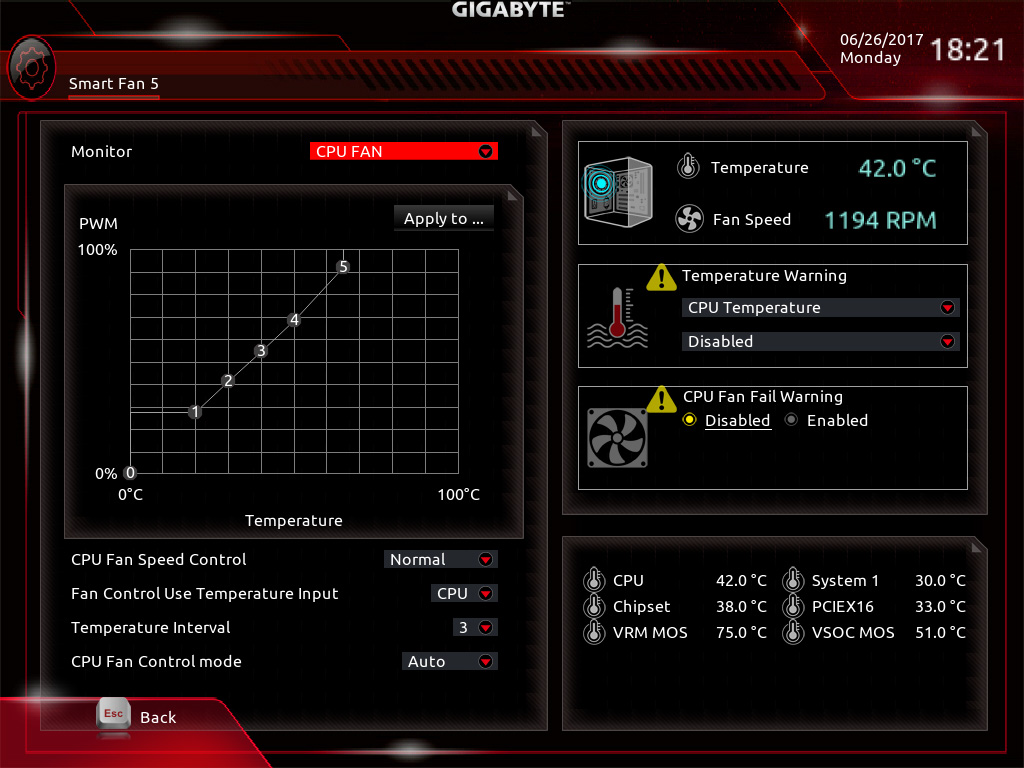
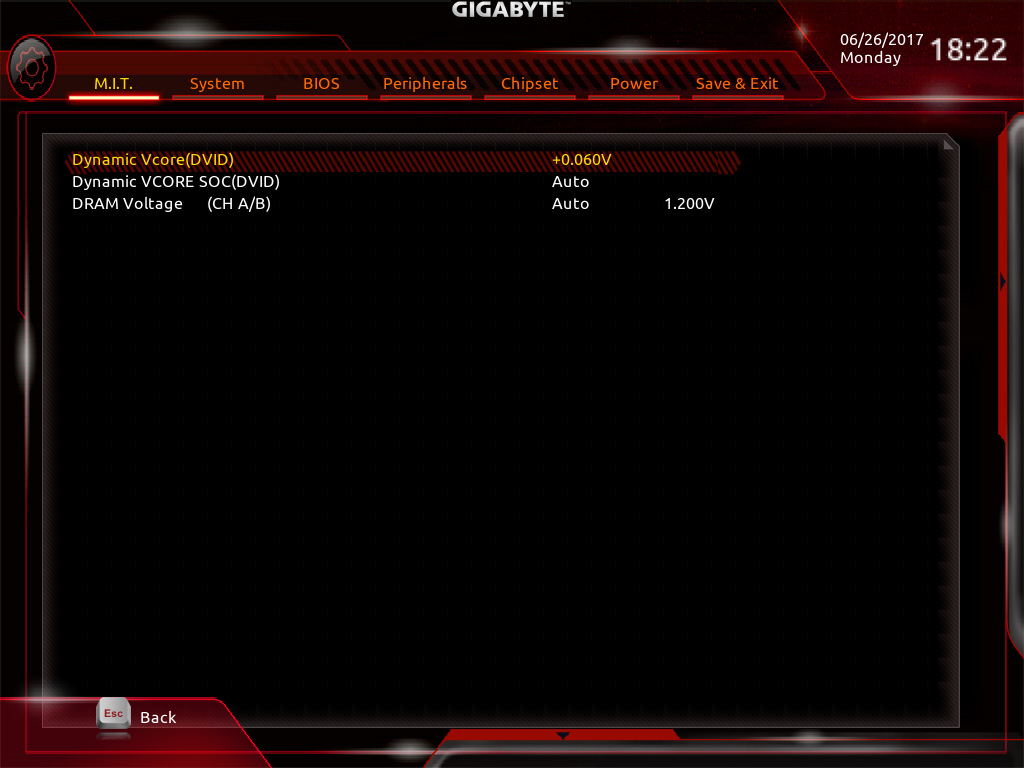
The BIOS is very similar to the X370 Gaming 5/K7 motherboards, featuring a neat layout, and easy mode, and Smart Fan controls, though it would be nicer to have all the overclocking options in one convenient tab. The only real downside that we discovered in the BIOS is the lack of a manual CPU VCORE voltage setting, which means that you can only adjust the CPU voltage by the dynamic offset.
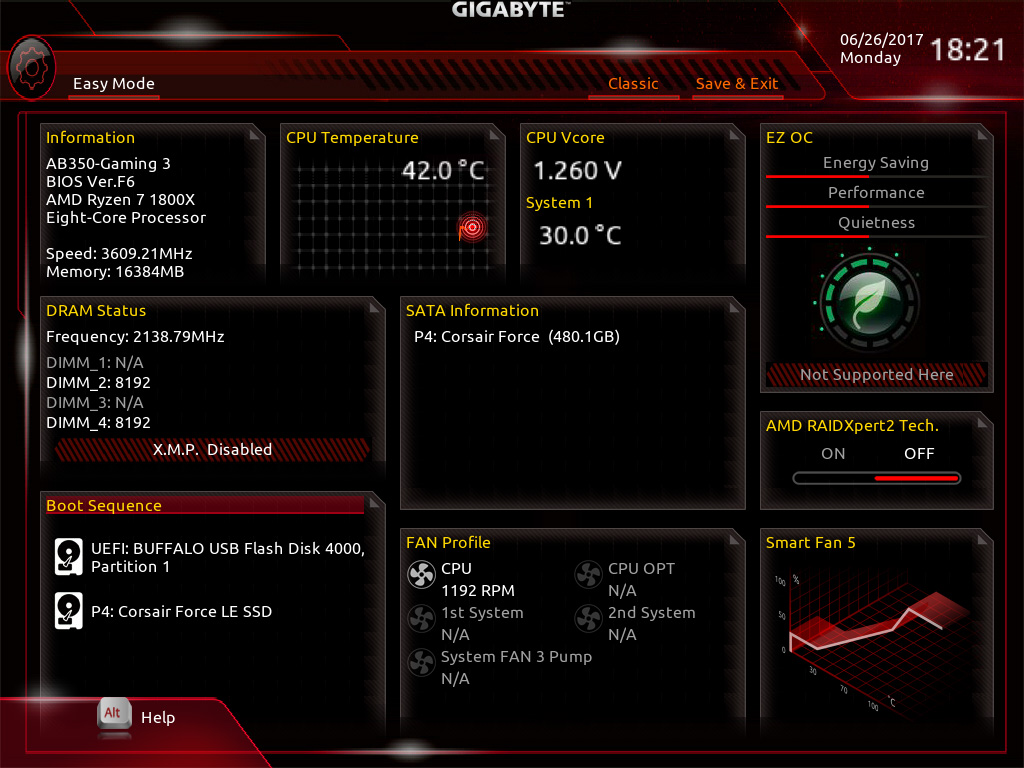
Overclocking
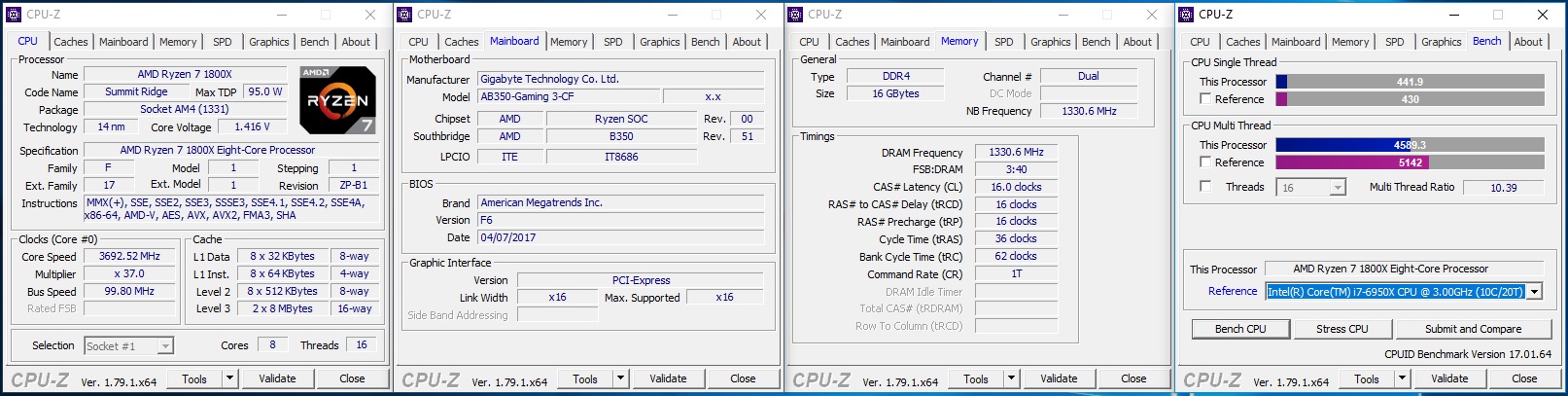
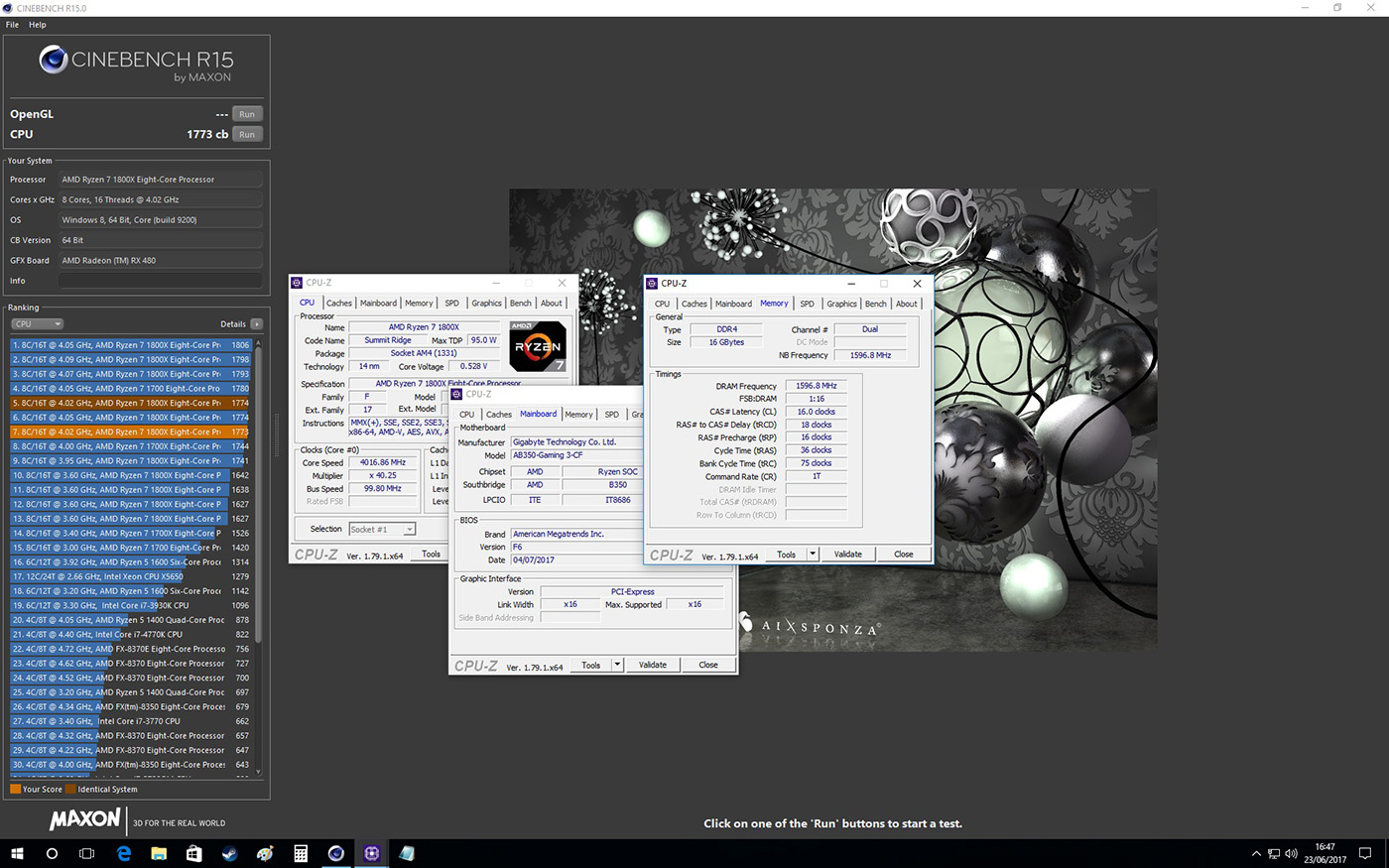
Considering the voltage settings, we were able to get a comfortable 4.02GHz from the AB350-Gaming 3, and with it a decent performance bump. The offset voltage appeared to jump to around 1.47V, which is fine for testing, but may make finding a suitable permanent overclock setting a little more difficult to find. Interestingly however, this board had no problem using the memory XMP for 3200MHz while both at stock and overclocked settings.
Benchmarks: Power Consumption
It’s interesting to note the power consumption across all motherboards. Although they are using the Z270 chipset, energy results can fluctuate between manufacturers due to the features and specifications that are integrated. First of all, for the idle tests the system is cold booted into Windows and no additional applications are executed – the watts are noted on the external energy monitor we use and then the system is loaded with 3DMark FireStrike – watts are again monitored for the duration of the test and the highest rated wattage result is then noted down. Below are the results of this energy test.
Benchmarks: Cinebench R15
CINEBENCH is a real-world cross platform test suite that evaluates your computer’s performance capabilities. CINEBENCH is based on MAXON’s award-winning animation software CINEMA 4D, which is used extensively by studios and production houses worldwide for 3D content creation. MAXON software has been used in blockbuster movies such as Iron Man 3, Oblivion, Life of Pi or Prometheus and many more.
Benchmarks: X264 HD
Simply put, this test measures how fast your machine can encode a short, DVD quality MPEG-2 video clip into a high-quality x264 video clip. What’s x264, you ask? It’s more or less the next-generation Xvid/DivX codec. I think it’s ideal for a benchmark because the application (x264.exe) reports fairly accurate compression results (in frames per second) for each pass of the video encoding process, and it uses multi-core processors very efficiently.
Benchmarks: SiSoftware SANDRA
SANDRA isn’t always a benchmark that is included in hardware reviews but we believe it shouldn’t be ignored. SANDRA provides a vigorous package that tests your system in a rather large array of benchmarks. There are many aspects of benchmark that can be executed. We will be considering – CPU and memory tests.
Benchmarks: POV-RAY
Persistence of Vision Raytracer’s PovRay is a free and open source 3D animator application with versions for computers with different operating systems.
This product allows users to build their custom 3D worlds with excellent quality despite their computer’s hardware. It has adjustable options for levels of radiance, refraction, and reflection. Calculation time may vary depending on the computer model, but PovRay can adapt to many computer builds, and is supported by the open source community.
This product allows users to build their custom 3D worlds with excellent quality despite their computer’s hardware. It has adjustable options for levels of radiance, refraction, and reflection. Calculation time may vary depending on the computer model, but PovRay can adapt to many computer builds, and is supported by the open source community.
Benchmarks: TrueCrypt
TrueCrypt is a discontinued source-available freeware utility used for on-the-fly encryption (OTFE). It can create a virtual encrypted disk within a file or encrypt a partition or (under Microsoft Windows except Windows 8 with GPT) the entire storage device (pre-boot authentication).
Benchmarks: AIDA64
AIDA64 Product PageThis simple integer benchmark focuses on the branch prediction capabilities and the misprediction penalties of the CPU. It finds the solutions for the classic “Queens problem” on a 10 by 10 sized chessboard. At the same clock speed theoretically the processor with the shorter pipeline and smaller misprediction penalties will attain higher benchmark scores. For example — with HyperThreading disabled — the Intel Northwood core processors get higher scores than the Intel Prescott core based ones due to the 20-step vs 31-step long pipeline. CPU Queen test uses integer MMX, SSE2 and SSSE3 optimizations.
Benchmarks: PCMark 8
PCMark 8 combines performance benchmarking with battery life measurement and includes tests based on popular Adobe and Microsoft applications. Whether you are looking for long battery life, or maximum power, PCMark 8 will help you find the devices that offer the perfect combination of efficiency and performance for your needs. It’s the complete PC performance benchmark for home and business.
Benchmarks: PCMark 8 Photoshop
The PCMark 8 Applications benchmark measures system performance using popular applications from the Adobe Creative Suite and Microsoft Office. You can choose which tests to run based on the applications installed on your system. Each test automatically steps through a series of actions such as opening, editing and saving a file. The results are used to calculate the PCMark 8 Applications scores for the system.
Benchmarks: 3DMark
3DMark FireStrike Product PageFire Strike is our new showcase DirectX 11 benchmark designed for high-performance gaming PCs. It is our most ambitious and technical benchmark ever, featuring real-time graphics rendered with detail and complexity far beyond what is found in other benchmarks and games today. Fire Strike will only be available in the Windows editions of 3DMark initially.
VR Performance – VRMark
VRMark Product PageVRMark includes two VR benchmark tests that run on your monitor, no headset required, or on a connected HMD. At the end of each test, you’ll see whether your PC is VR ready, and if not, how far it falls short.
Gaming Performance – Rise of the Tomb Raider & Total War: WARHAMMER
It’s important for us to perform a number of game benchmarks as well as the synthetic tests because gamers will want to know if there are any significant benefits. So here we have two recent gaming titles.
Conclusion
The GIGABYTE AB350-Gaming 3 helps make the case for why you shouldn’t rule out building a competent gaming system on a B350 chipset motherboard. It provides all but one (a single USB 2.0) of the natively afforded USB ports directly/expandable, which is enough to suit most peoples needs, though we would have liked to have seen the full 14 native USB ports to have been made accessible, to which some would have liked to have seen a USB Type C port. Another attractive aspect of this motherboard is the flexible storage options, some people might require 6x SATA ports, and have no real need for an M.2 drive, and despite the speed advantage of an M.2 PCIe SSD, a SATA SSD still provides great performance, and better Price-Per-Gigabyte.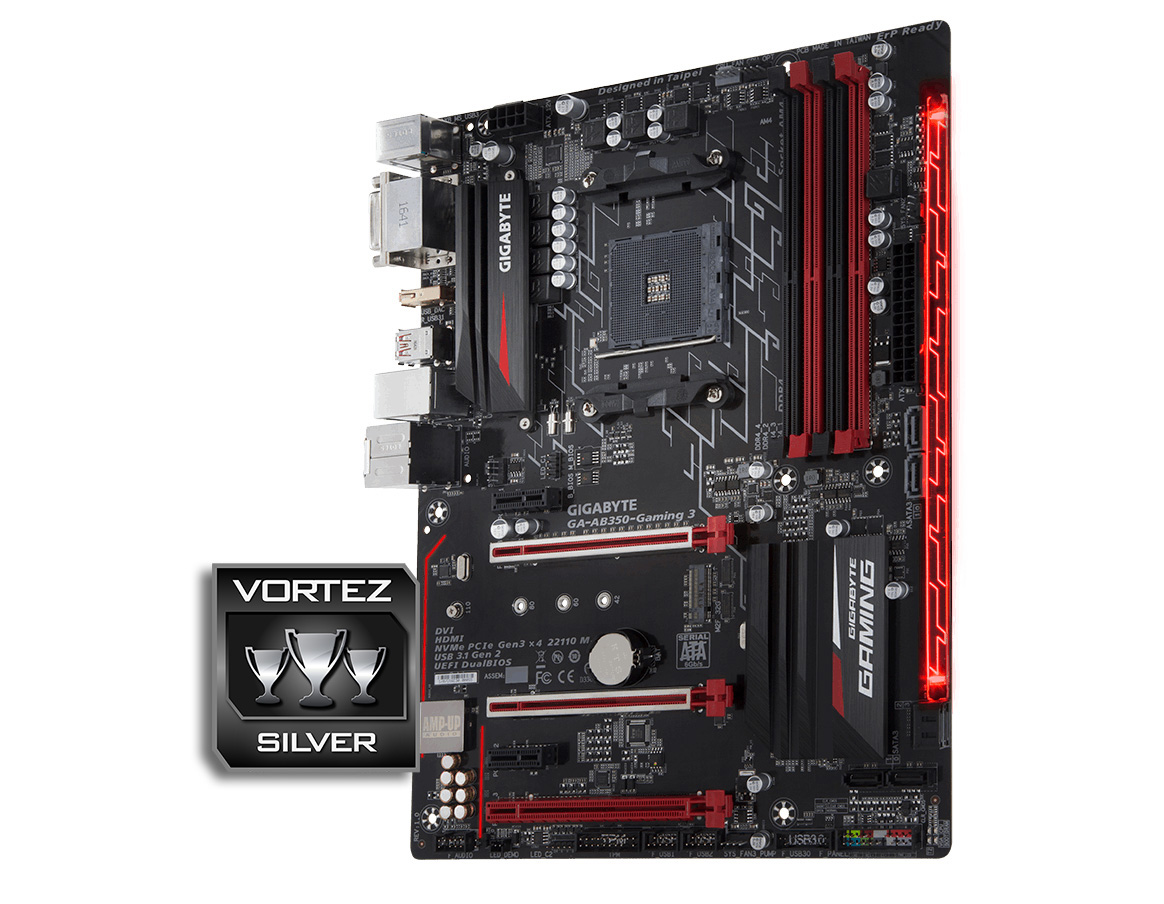
Amongst its features, we are happy to see the Dual BIOS which is normally a God-send for those that update their BIOS regularly, though we would liked to have seen switches/jumpers enabling manual selection. For some, the RGB LED lighting could be a primary attraction, something that is supported by the inclusion of the RGBW LED header extension cable. As LED lighting can be a love/hate for many people, there is nothing to fear as the LED lighting can be switched off. Despite that, as this motherboard does feature RGB lighting, it would have been more appealing to have a more neutral colour theme rather than the use of red PCIe and memory slots.
There is a lot to like about the GIGABYTE AB350-Gaming 3 and it makes an interesting alternative to the similarly priced MSI TOMAHAWK B350. It is supported by a huge list of dedicated software useful for gaming and general home use alike, though GIGABYTE has opted to stick with supplying default Realtek audio drivers as opposed to the more comprehensive Nahimic 2 software supplied by MSI. Arguably these features fade into obscurity in regards to outright performance.
The bottom line is, GIGABYTE have certainly ticked many boxes with the AB350-Gaming 3 motherboard, making it a great choice that is well worth your consideration. In fact, if SLI is of no concern, it could even be a wiser choice when compared to some of the cheaper X370 options available.
The AB350-Gaming 3 is a strong, affordable motherboard capable of creating an attractive, high-performance gaming machine.
Pros
+ Solid performance
+ M.2 socket 32 Gb/s (up to 110mm)
+ Surround RGB Lighting + Customisable LED Overlay
+ 2x RGB LED headers (1x AMD RGB Fan header, 1x additional LED header + included LED strip extension cable)
+ Dual BIOS
+ ‘Ultra Durable’ Metal Shielded PCIe slots + Anti-sulfur resistors
+ 2x USB 3.1 Gen2
+ Realtek ALC 1220
+ DAC UP USB with adjustable voltage (1x Rear, 2x front)
+ 2x 2A/24W fan/pump headers
Mediocre
+- Neutral colouring would be preferred
+- No USB Type C port
+- non-standard ATX size
Cons
– Only allows for CPU Voltage offset in BIOS
– Would have preferred an Intel LAN solution
+ Solid performance
+ M.2 socket 32 Gb/s (up to 110mm)
+ Surround RGB Lighting + Customisable LED Overlay
+ 2x RGB LED headers (1x AMD RGB Fan header, 1x additional LED header + included LED strip extension cable)
+ Dual BIOS
+ ‘Ultra Durable’ Metal Shielded PCIe slots + Anti-sulfur resistors
+ 2x USB 3.1 Gen2
+ Realtek ALC 1220
+ DAC UP USB with adjustable voltage (1x Rear, 2x front)
+ 2x 2A/24W fan/pump headers
Mediocre
+- Neutral colouring would be preferred
+- No USB Type C port
+- non-standard ATX size
Cons
– Only allows for CPU Voltage offset in BIOS
– Would have preferred an Intel LAN solution
Click here for an explanation of our awards at Vortez.net.