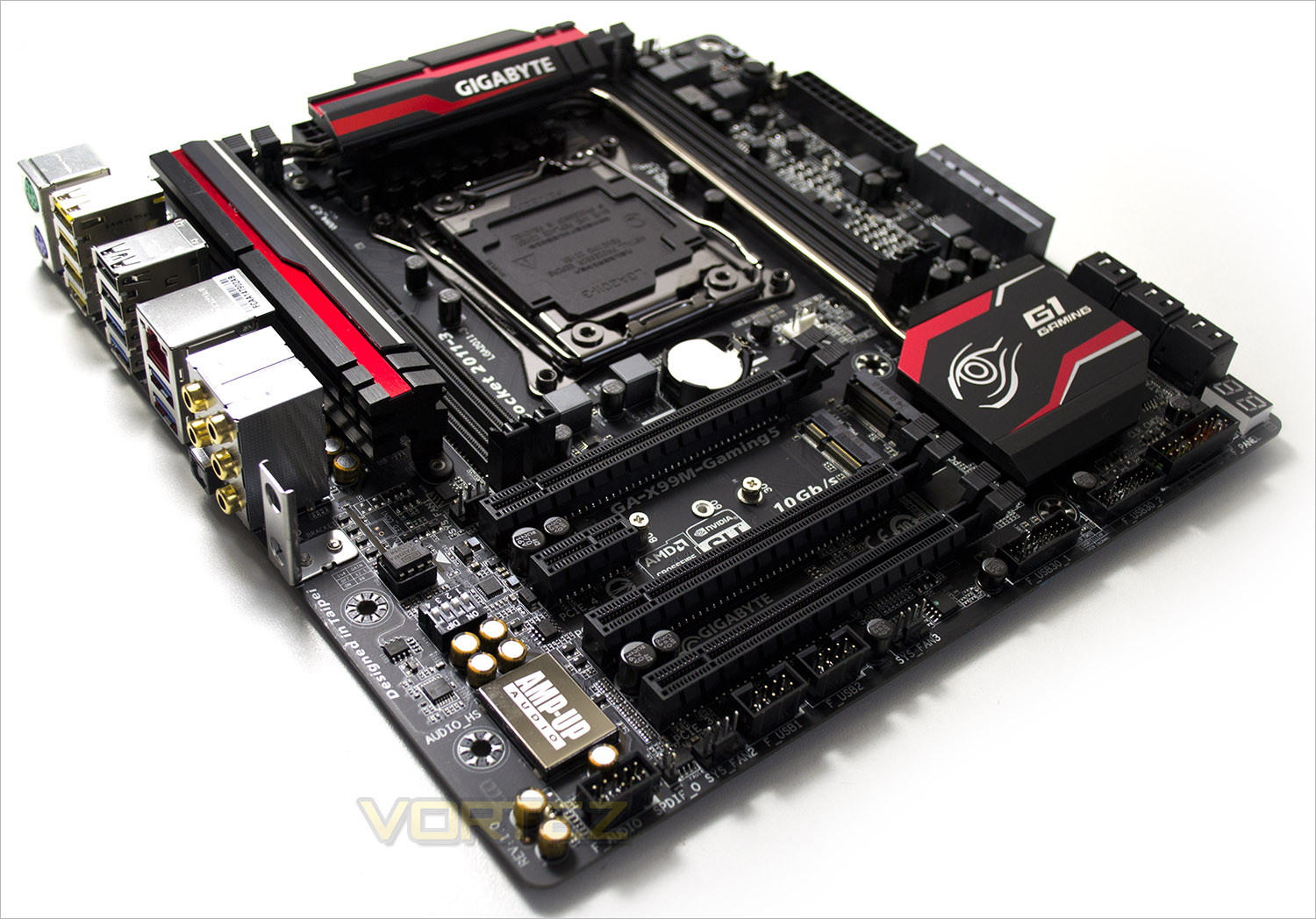
The best things come in small packages so they say. We find out if this is true as we sample GIGABYTE’s matx power house in the form of the GA-X99M-Gaming 5.

Product on Review: GA-X99M-Gaming 5
Manufacturer & Sponsor: GIGABYTE
Street Price: £170.36/$259.99
Today, we get to look at the latest LGA2011-3 Socket X99 motherboard from GIGABYTE only this time it is far from the monolithic SOC Force we reviewed upon release. This time the motherboard is much smaller but still encompasses the Gaming-G1 branding so it will be interesting to see if this mATX motherboard still has what it takes to house Intel’s finest range of processors or it is simply a diminutive but basic motherboard hoping to draw in consumers on the back of previous success and clever marketing.
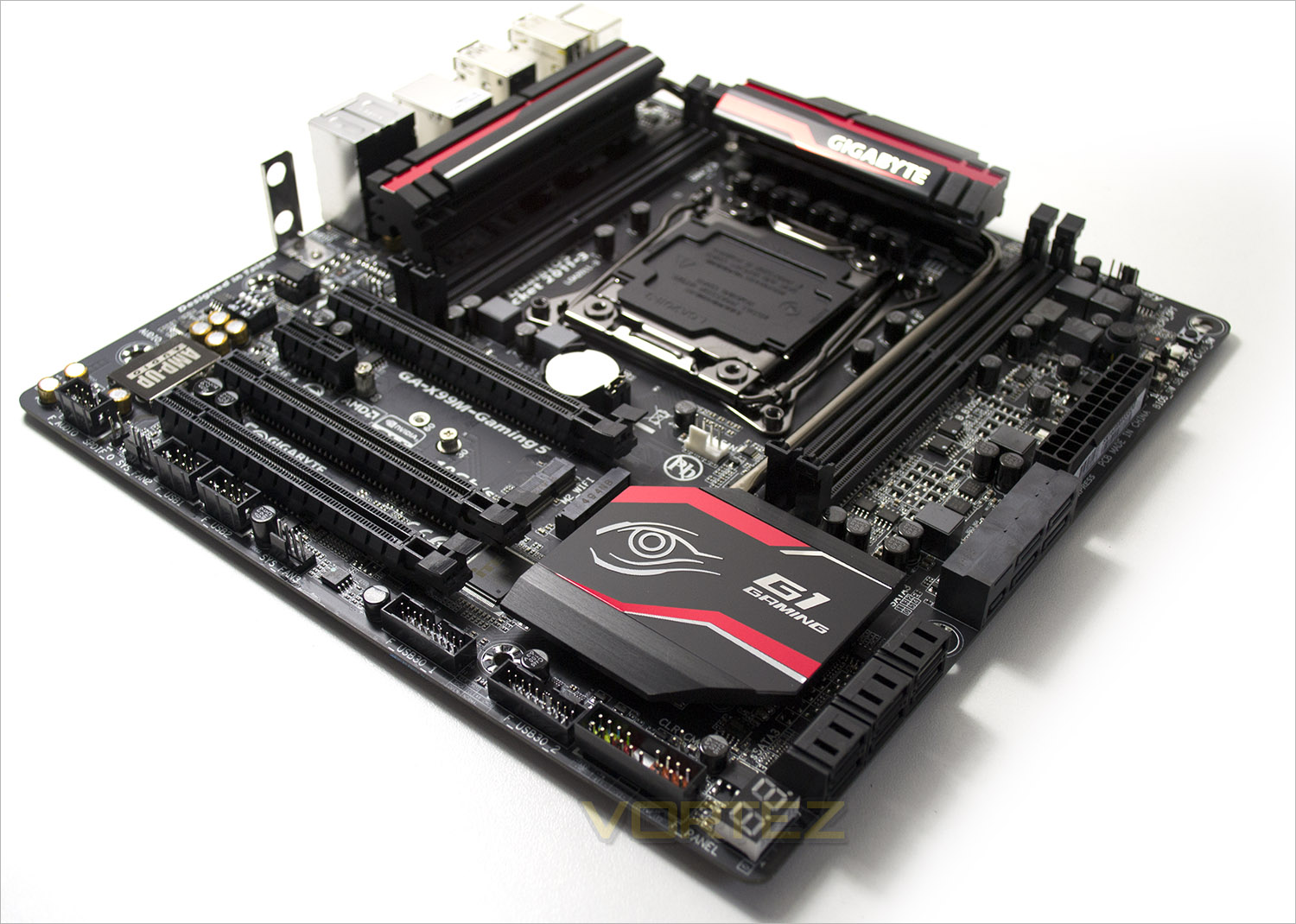
mATX motherboards are certainly at the niche end of the marketplace, especially for enthusiast users. Few beginner system builders would chose to build a small sized PC, not least because they look a little odd but because doing so requires a little more thought when speccing such systems due to the size as it is unlikely you would buy an mATX motherboard only to house it in a full tower case. Small, compact and it is fair to say often cramped conditions are where motherboards like the GA-X99M-Gaming 5 will find themselves. It is also a fair assumption to state that mATX is unlikely to have the very biggest, most powerful GPU setup either due to the real estate required to house such devices. That isn’t to say you can’t if you have the room but the attraction to mATX is size. That said, this shouldn’t necessarily mean that there has to be comprises on computational power. For those that don’t know (where have you been?), Haswell-E processors are serious powerhouses able to multitask a wide veriety of number crunching applications better than ever before so if this is what you crave but just don’t have the space for a ridiculously oversized system then read on because GIGABYTE might just have what you’re looking for.
About GIGABYTE
GIGABYTE was founded in 1986, establishing our uncontested position in continuous technological innovation. By focusing on key technologies and achieving strict quality standards, GIGABYTE has been regarded as an innovative and trusted motherboard leader in the globe. To keep pace in a rapidly changing world, we have offered a comprehensive product line covering Motherboards, Graphics Cards, PC Components, PC Peripherals, Laptops, Slate Devices, Desktop PCs, Network Communications, Servers and Mobile Phones. We are dedicated to building up a full-range digital life, responding promptly and sonorously to consumer needs and desires.
Specification
CPU
Support for Intel® Core™ i7 processors in the LGA2011-3 package
L3 cache varies with CPU
(Please refer “CPU Support List” for more information.)
Chipset
Intel® X99 Express Chipset
Memory
4 x DDR4 DIMM sockets supporting up to 32 GB of system memory
* Due to a Windows 32-bit operating system limitation, when more than 4 GB of physical memory is installed, the actual memory size displayed will be less than the size of the physical memory installed.
4 channel memory architecture
Support for DDR4 2800(O.C.) / 2666(O.C.) / 2400(O.C.) / 2133 MHz memory modules
Support for non-ECC memory modules
Support for Extreme Memory Profile (XMP) memory modules
Support for RDIMM 1Rx8 memory modules (operate in non-ECC mode)
(Please refer “Memory Support List” for more information.)
Audio
Realtek® ALC1150 codec
High Definition Audio
2/4/5.1/7.1-channel
Support for S/PDIF Out
LAN
Qualcomm® Atheros Killer E2201 chip (10/100/1000 Mbit)
Expansion Slots
2 x PCI Express x16 slots, running at x16 (PCIE_1/PCIE_2)
* For optimum performance, if only one PCI Express graphics card is to be installed, be sure to install it in the PCIE_1 slot; if you are installing two PCI Express graphics cards, it is recommended that you install them in the PCIE_1 and PCIE_2 slots.
1 x PCI Express x16 slot, running at x8 (PCIE_3)
* When an i7-5820K CPU is installed, the PCIE_2 slot operates at up to x8 mode and the PCIE_3 operates at up to x4 mode.
(All PCI Express x16 slots conform to PCI Express 3.0 standard.)
1 x PCI Express x1 slot
(The PCI Express x1 slot conforms to PCI Express 2.0 standard.)
1 x M.2 Socket 1 connector for the wireless communication module (M2_WIFI)
Multi-Graphics Technology
Support for 2-Way AMD CrossFire™/NVIDIA® SLI™ technology
Storage Interface Chipset:
1 x M.2 PCIe connector
(Socket 3, M key, type 2242/2260/2280 SATA & PCIe x2/x1 SSD support)
1 x SATA Express connector
6 x SATA 6Gb/s connectors (SATA3 0~5)
Support for RAID 0, RAID 1, RAID 5, and RAID 10
* Only AHCI mode is supported when an M.2 PCIe SSD or a SATA Express device is installed.
(M2_10G, SATA Express, and SATA3 4/5 connectors can only be used one at a time. The SATA3 4/5 connectors will become unavailable when an M.2 SSD is installed in the M2_10G connector.)
Chipset:
4 x SATA 6Gb/s connectors (sSATA3 0~3), supporting IDE and AHCI modes only
(An operating system installed on the SATA3 0~5 ports cannot be used on the sSATA3 0~3 ports.)
USB Chipset:
4 x USB 3.0/2.0 ports (available through the internal USB headers)
10 x USB 2.0/1.1 ports (6 ports on the back panel, 4 ports available through the internal USB headers)
Chipset + Renesas® uPD720210 USB 3.0 Hub:
4 x USB 3.0/2.0 ports on the back panel
Internal I/O Connectors
1 x 24-pin ATX main power connector
1 x 8-pin ATX 12V power connector
1 x M.2 Socket 3 connector
1 x SATA Express connector
10 x SATA 6Gb/s connectors
1 x CPU fan header
1 x water cooling fan header (CPU_OPT)
3 x system fan headers
1 x front panel header
1 x front panel audio header
1 x S/PDIF Out header
2 x USB 3.0/2.0 headers
2 x USB 2.0/1.1 headers
1 x Clear CMOS jumper
1 x power button
1 x reset button
1 x Clear CMOS button
1 x audio gain control switch
2 x BIOS switches
Back Panel Connectors
1 x PS/2 keyboard port
1 x PS/2 mouse port
4 x USB 3.0/2.0 ports
6 x USB 2.0/1.1 ports
1 x RJ-45 port
1 x optical S/PDIF Out connector
5 x audio jacks (Center/Subwoofer Speaker Out, Rear Speaker Out, Line In, Line Out, Mic In)
2 x Wi-Fi antenna connector holes
I/O Controller
iTE® I/O Controller Chip
H/W Monitoring
System voltage detection
CPU/System/Chipset temperature detection
CPU/CPU OPT/System fan speed detection
CPU/System/Chipset overheating warning
CPU/CPU OPT/System fan fail warning
CPU/CPU OPT/System fan speed control
* Whether the fan speed control function is supported will depend on the cooler you install.
BIOS
2 x 128 Mbit flash
Use of licensed AMI UEFI BIOS
Support for DualBIOS™
PnP 1.0a, DMI 2.7, WfM 2.0, SM BIOS 2.7, ACPI 5.0
Unique Features
Support for APP Center
* Available applications in APP Center may differ by motherboard model. Supported functions of each application may also differ depending on motherboard specifications.
@BIOS
Ambient LED
EasyTune
EZ Setup
Fast Boot
Game Controller
Cloud Station
ON/OFF Charge
Smart TimeLock
Smart Recovery 2
System Information Viewer
USB Blocker
V-Tuner
Support for Q-Flash
Support for Smart Switch
Support for Xpress Install
Bundle Software
Norton® Internet Security (OEM version)
Intel® Smart Response Technology
Operating System
Support for Windows 8.1/8/7
Form Factor
Micro-ATX Form Factor; 24.4cm x 24.4cm
X99 Chipset Features
First and foremost, Intel’s latest chipset is aimed at the home ‘power’ user, be this performance enthusiast (read overclocker), extreme gamer or indeed for those who require the ultimate media encoding platform. So whatever your vice, Intel have all the bases covered with their latest chipset. This isn’t, of course, to say the Z97 based chipset is poor by comparison (it’s not), but if you want the ultimate – the very best of the best supporting Intel’s 8 core processor (5960X) – then X99 is the only option.
So what’s new with X99?
DDR4 Quad Channel Memory
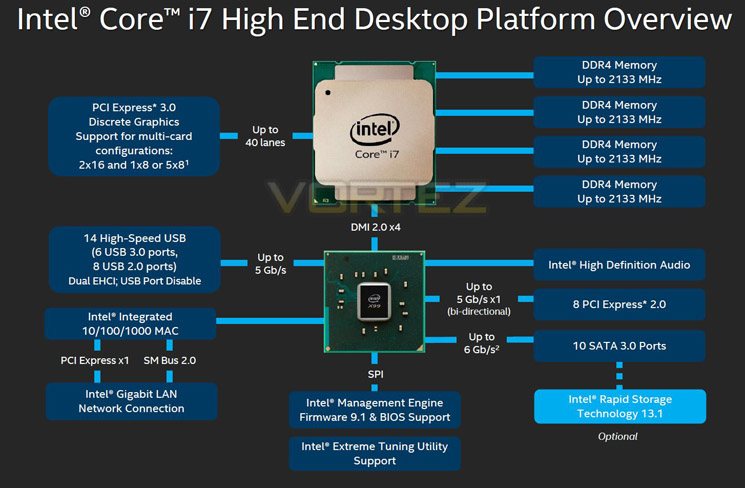
The above block diagram shows us that DDR4 is natively supported. Note that DDR3 is NOT supported (more on this later). While the block diagram shows a rated speed of up to 2133MHz, our test bench happily ran 16GB (4x4GB) Quad channel Corsair Vengeance LPX at 2666MHz. More recently niche 3000MHz and even 3333MHz DDR4 DIMMs are entering the market requiring high voltages and far deeper pocket, but it’s anticipated that eventually 4GHz DIMMs will be the high watermark at retail.
40 x PCI Express (PCIe) Lanes
Depending on CPU choice, the X99 chipset can support up to 40 lanes of PCIe in combinations of 2×16, 1×8 or 5×8. We also expect this figure to increase on some motherboards with the addition of PLX chips given sufficient demand. All of the PCIe lanes are now PCIe 3.0 compliant; while current generation GPU’s rarely saturate PCIe 2.0 it is nice to have that future proofing available, especially for SLI/Crossfire configurations.
USB 3.0
One of the heaviest criticisms of X79 was the lack of natively support USB 3.0 ports, especially when compared to its Z87/97 brethren. We are now happy to report that X99 will support 6 USB 3.0 ports along with 8 USB 2.0 ports. Of course, most motherboard manufacturers will also add the usual ‘aftermarket’ USB 3.0 support from components such as ASMedia and Marvel so transfer speeds of up to 5GB/s and port numbers in the double-digits can theoretically be achieved.
SATA 3.0 And Next Generation Storage
Despite having huge computational benefits, X79 was oft criticised by the lack of high speed SATA 6Gbps ports. This has been rectified with the X99 chipset supporting 10 x SATA 3.0 ports attaining a theoretical speed of 6Gb/s which can be enhanced using the latest Intel Rapid Storage driver to speeds of 10 Gb/s!
SATA of course has its limitations, which is where newer next generation storage technologies come in. First seen in limited quantities on Z87 and more widely on Z97, M.2 and SATA Express technologies unlock transfer speeds far in excess of SATA III. Support for PCIE storage remains sporadic – M.2 is starting to pick up but SATA Express is exceptionally rare – but it’s slowly proving to be a valid alternative to SATA 3 and mSATA. Many X99 motherboards support M.2 X4, which makes use of four PCIE lanes for up to a stunning 32Gbps bandwidth; however few M.2 drives come close to saturating even Gen 1’s ~8Gbps.
We must say that Intel have pulled out all the stops here. Clearly they have taken on board user feedback regarding the deficiencies of X79 by incorporating more modern storage and expansion options. No longer is the Enthusiast flagship the poor I/O brother to Z87/97. Perhaps the biggest draw though is the introduction of DDR4. This will see huge speed gains in almost every aspect of personal computing. With 8x8GB Dimms supported a mammoth 64GB of DDR4 will make the X99 chipset massively future proofed.
We will cover the overclocking capabilities of the new chipset and each motherboard specifically in the overclocking section but this area failed to disappoint too.
Overall, there is little to criticise here. While we would have liked 40 PCIe lanes regardless of CPU, we understand there has to be some compromise to keep costs down for the budget conscious so how many PCIe lanes you have available will be dictated by CPU choice and not the motherboard. The entry level 6 core i7-5820 will have 28 PCIe lanes at a cost of £299 (At the time of release), while the flagship 8 core i7-5960X and 6 core i7-5930K will both have the full blown 40 lanes available. Aside from lanes, cores cache and clockspeed, all of the X99 features will be available regardless of CPU choice and to this end we are grateful. We suspect that future additions to the CPU range will hit the middle ground while the 5960X will receive a speed bump although this is pure speculation at this point.
Which chip would we go for? Obviously if money was no object then the i7-5960X is the way to go, not only does it have the full 40 lanes available but it is a true 8 core (16 threads) CPU. The 5930K would be the obvious choice for the consumer and the CPU that we think will prove most popular due to the balance of speed vs. cost.
Whichever CPU you opt for though, you can be assured that the X99 chipset offers the very best available. It is powerful, feature packed and as you will see, the unrivalled component of choice for enthusiast users.
Packaging & Accessories
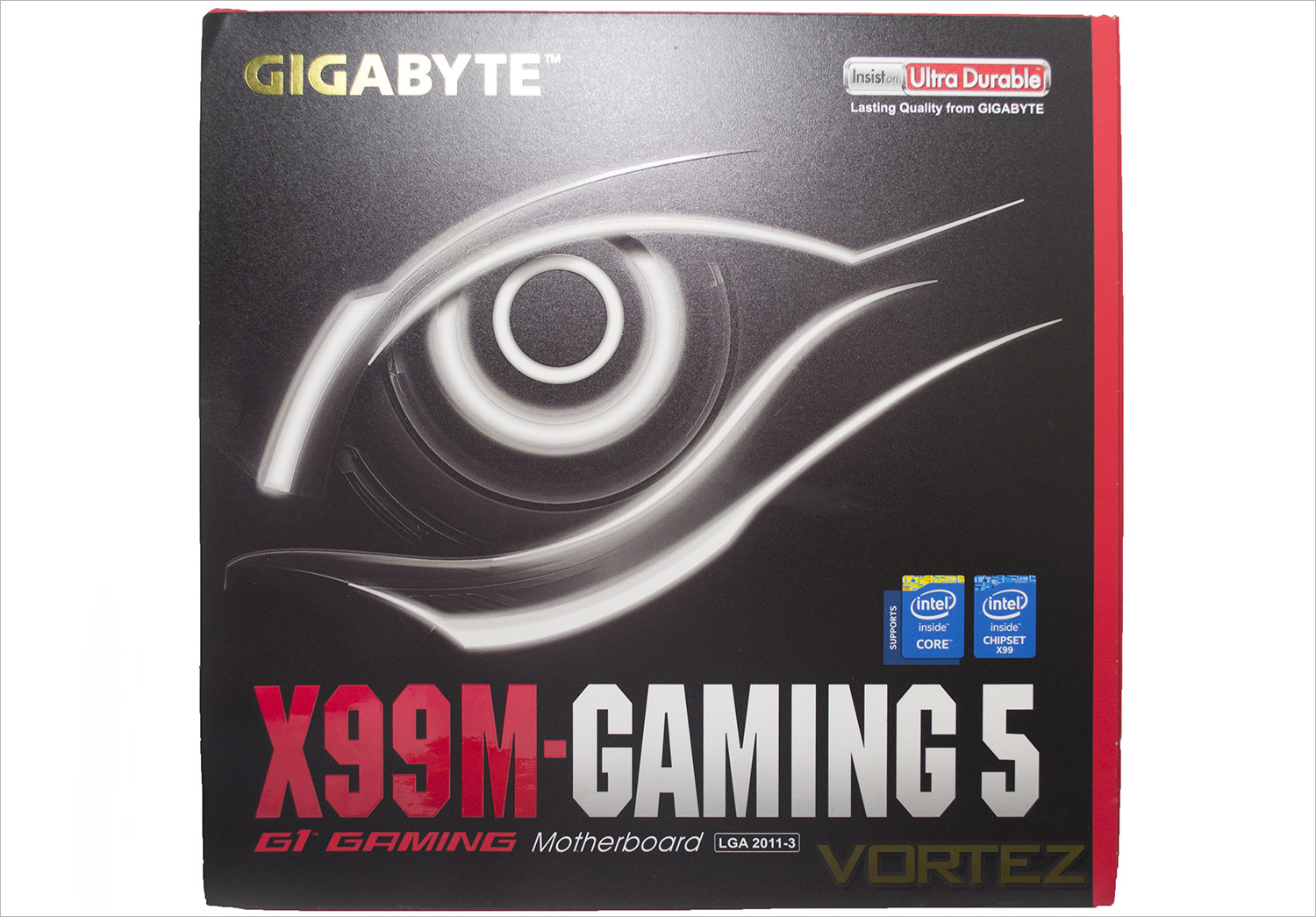
The packaging of a motherboard can usually give us an insight, a first impression if you will that sets the scene. Cheap, flimsy packaging is often used to protect a basic motherboard whereas quality will shine through from beginning to end and hopefully that is what we get here with the GIGABYTE. The front of the design is similar to both their graphics card and previous X99 motherboards using the same font and overall theme.
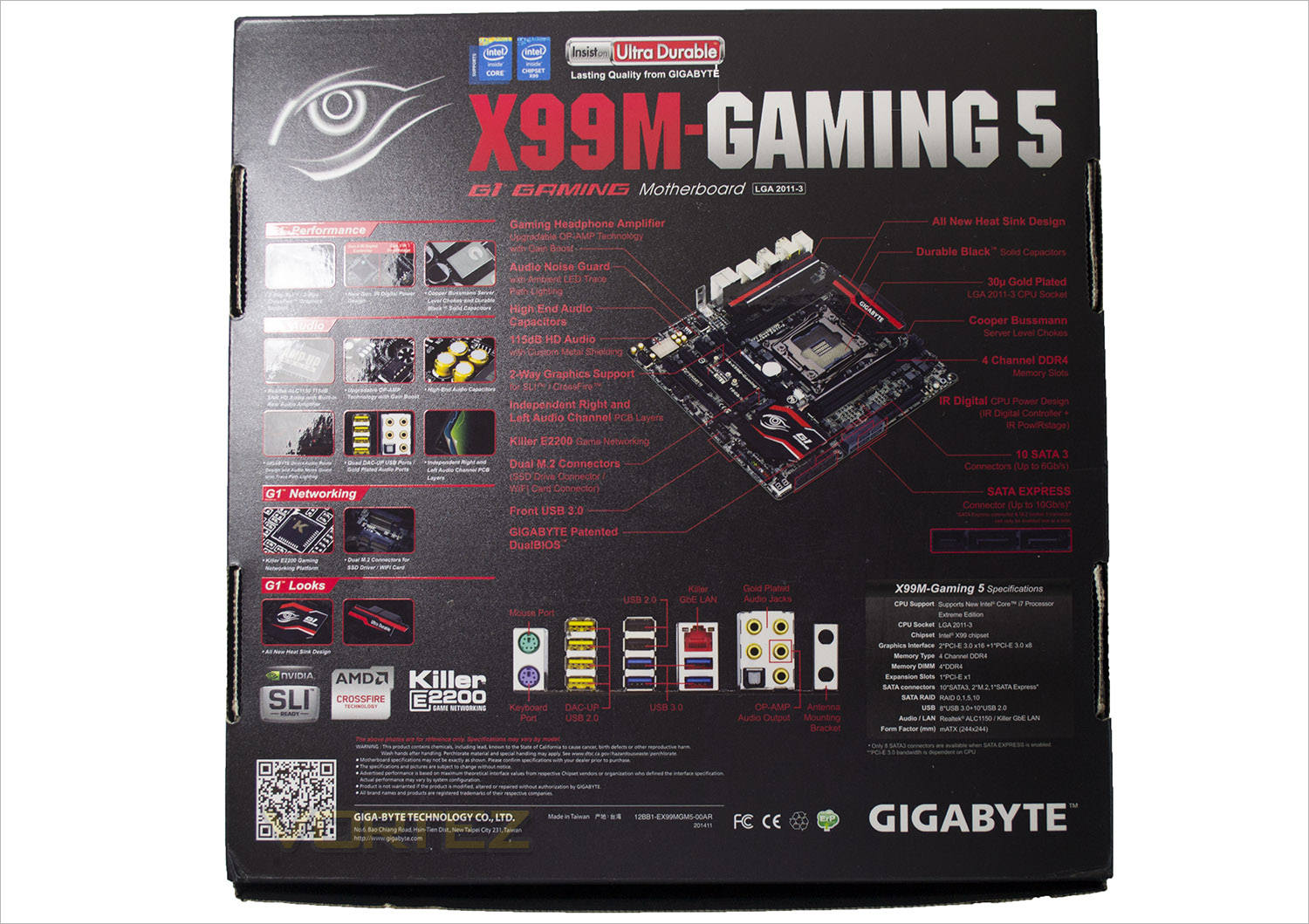
The box features a flip lid which instead of showing us the actual motherboard through a window, we get a hi-res picture. To the back of the package GIGABYTE go to great lengths explaining the main features of this motherboard along with a useful shot of the I/O area.
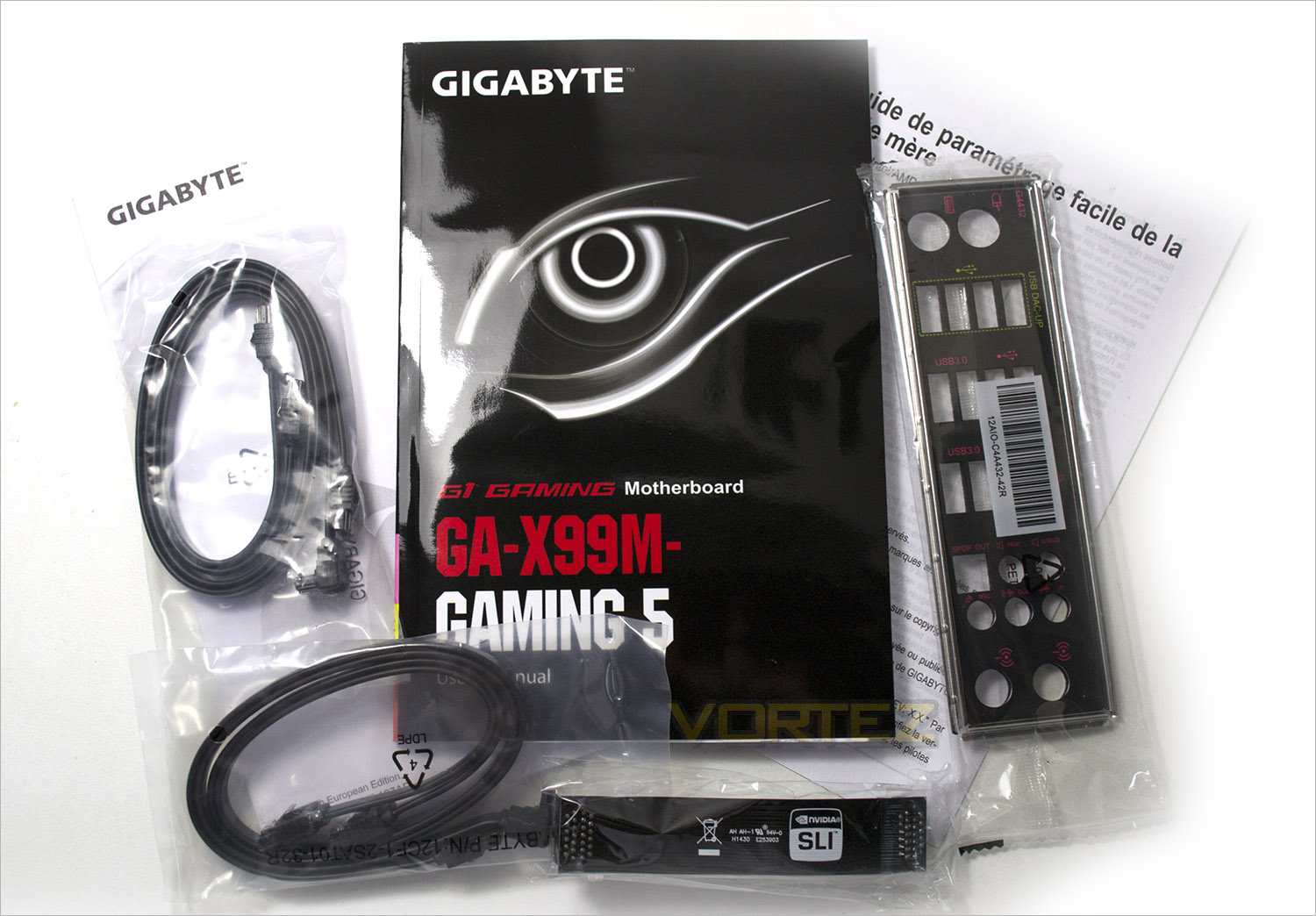
GIGABYTE are rarely known for their exuberance as far as the included accessories go and this product is no different with just the bare essentials provided to get you going. 4x SATA cables (2 straight, 2 angled), utility DVD, manual, quick-start guide, warranty leaflet and an SLI bridge are all you get.
First Look
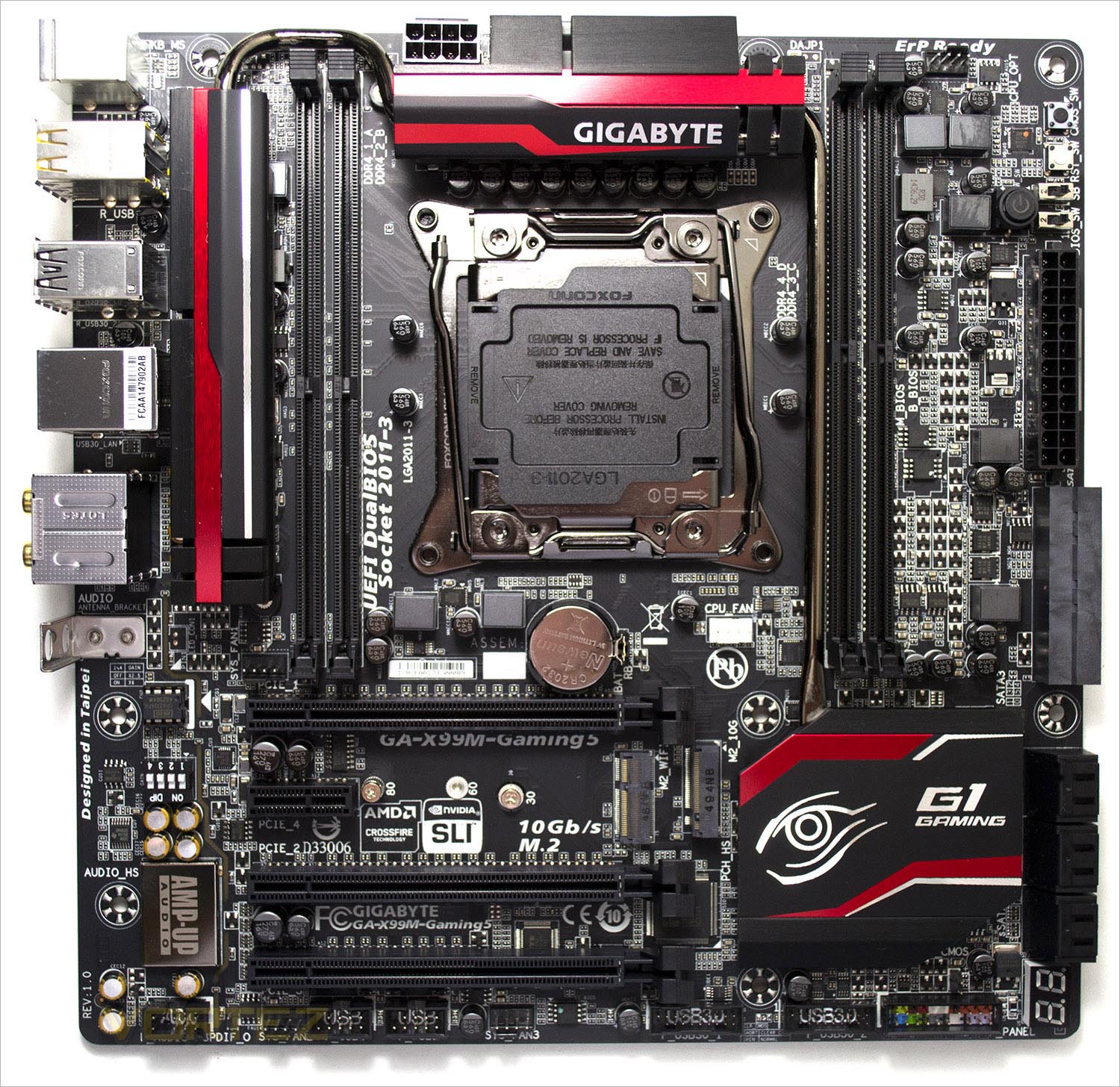
The motherboard looks great with the matt black PCB and red highlighting which is now synonymous with gamers. GIGABYTE have really upped there game of late with the design of their motherboard and GPU range which have to be up there with the best looking PC products available.
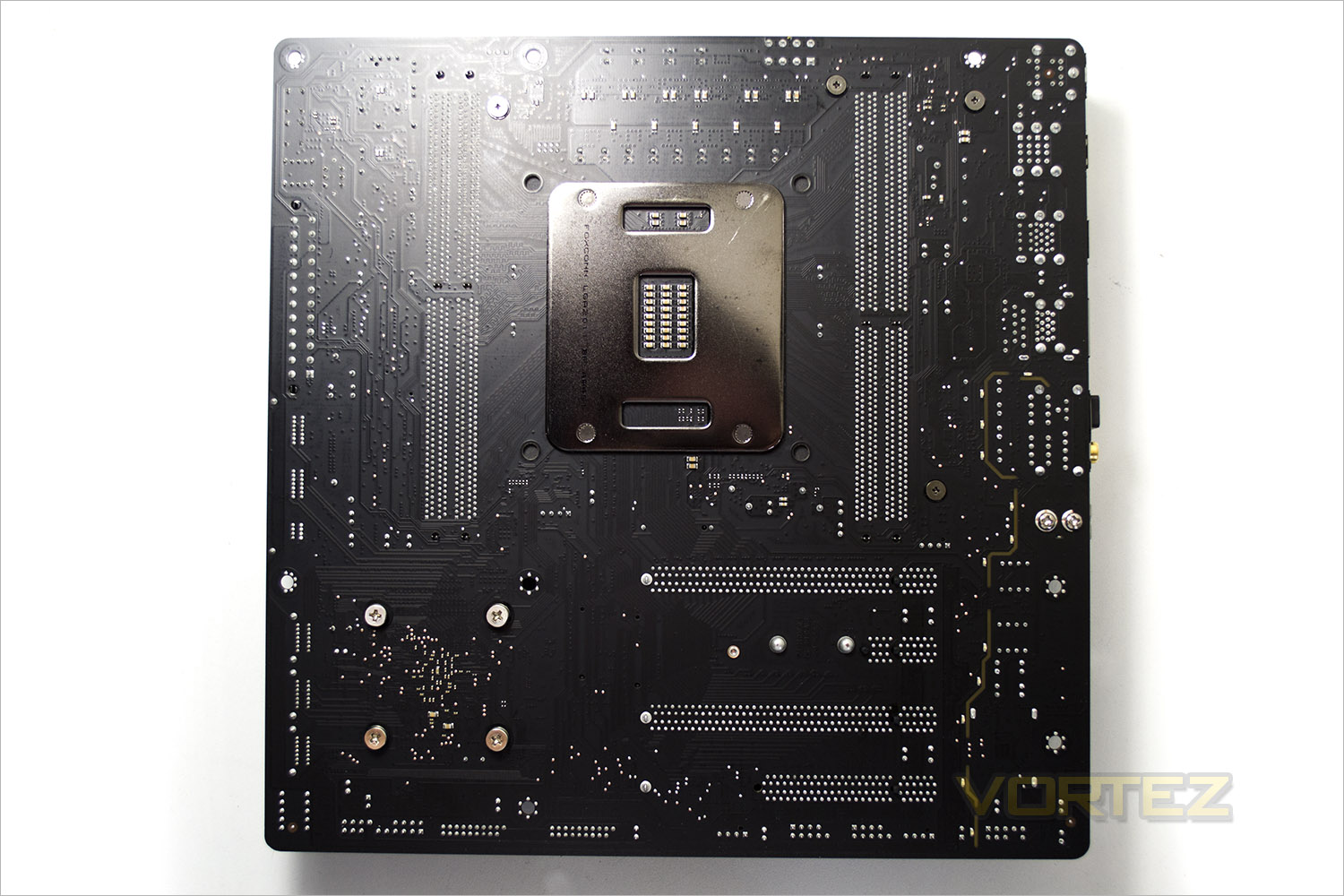
The rear of the board is extremely sparse with no POS caps to be found.
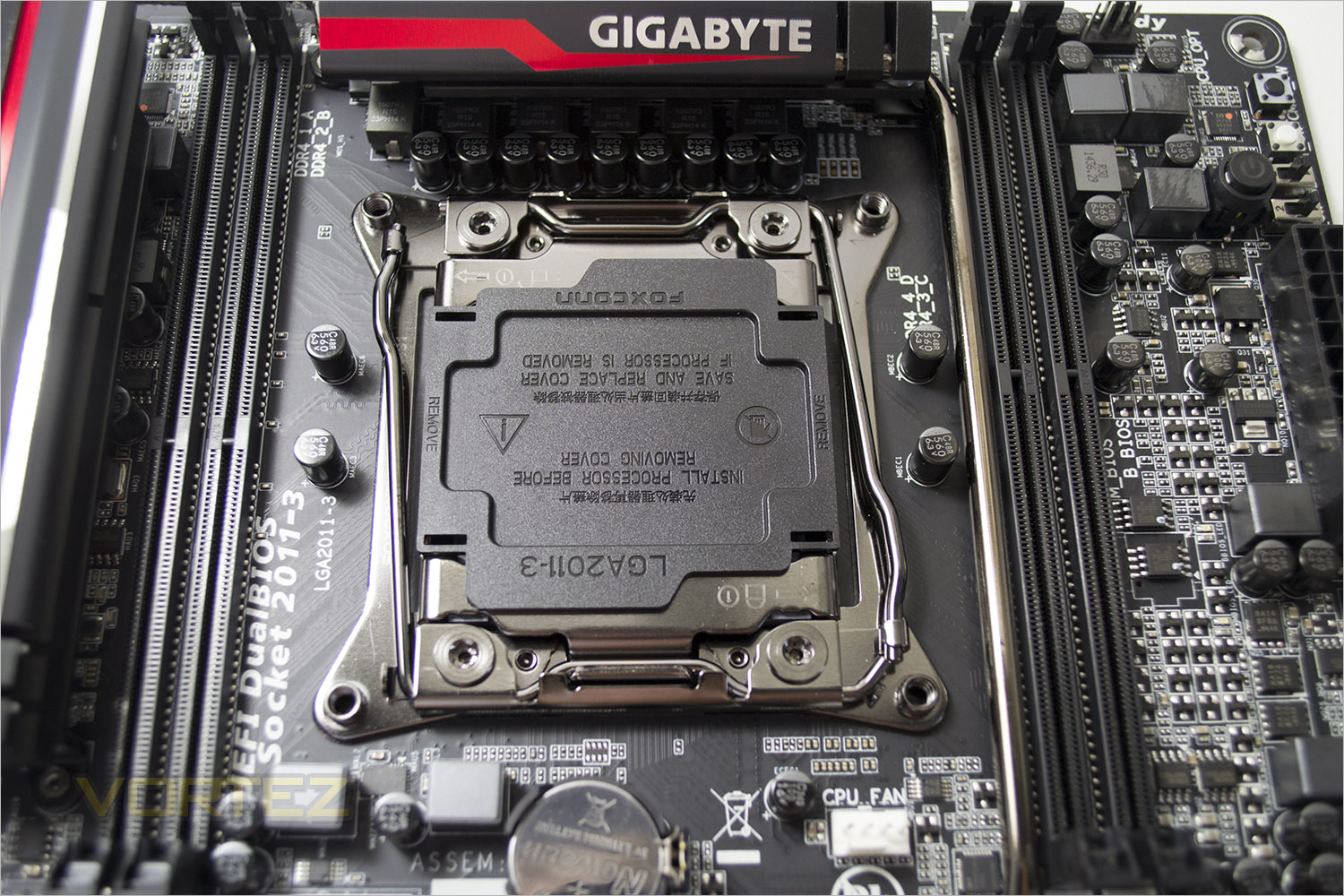
For an mATX motherboard everything looks to be well spaced with the socket area only having a few chokes and capacitors to be found. The memory sinks are however quite close to the socket and while this will be of little concern to those fitting a watercooling block, those with oversized aircoolers and tall memory heatsinks will struggle. Each connectivity tab including the CPU socket, PCIe ports and memory sockets feature 30 micron thick gold plating.
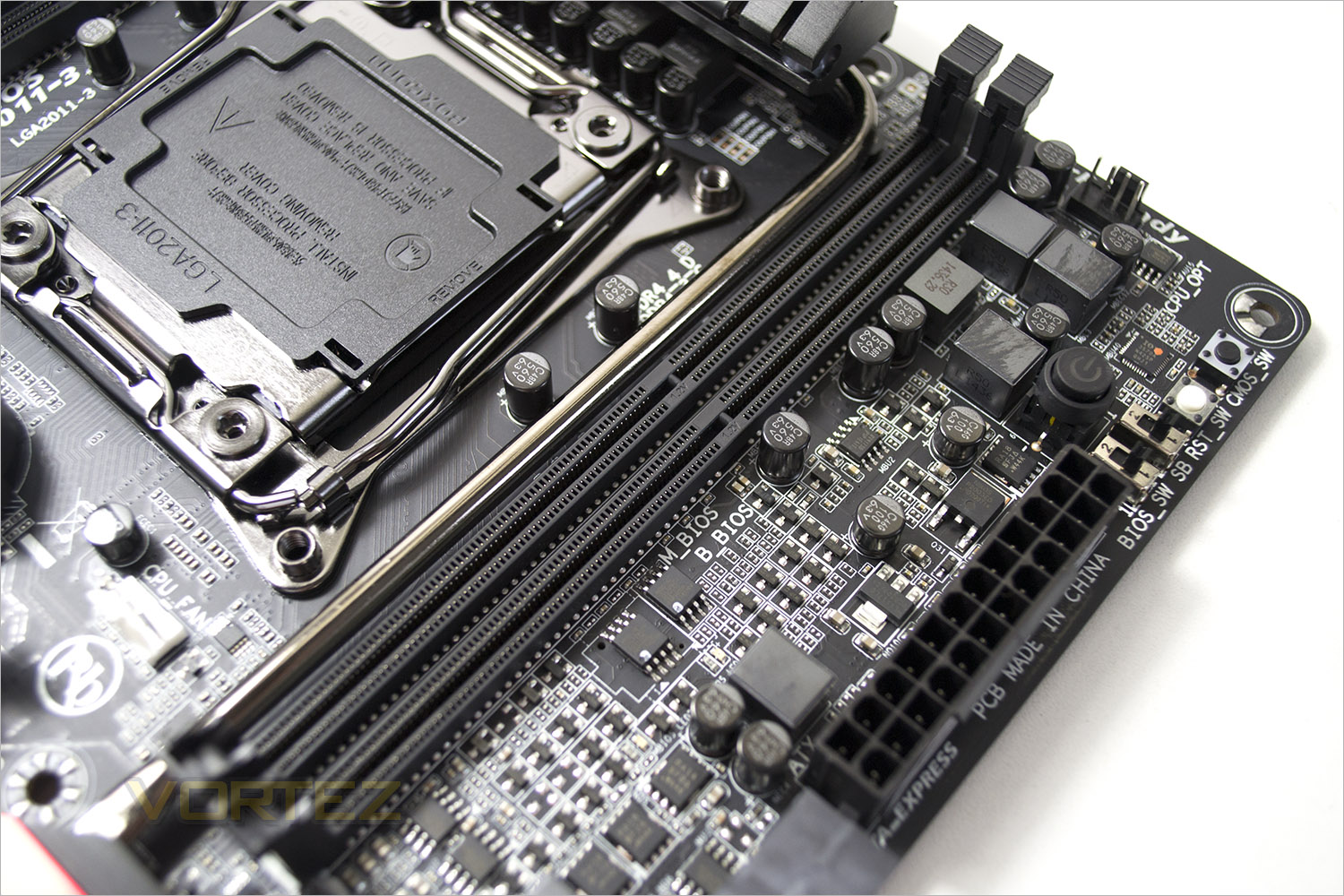
GIGABYTE opted to include only four memory slots rather than the usual X99 of eight. This means you will be ‘limited’ to 64GB of DDR4. The memory is still quad channel though and in fairness, the majority of X99 users are unlikely to fill all eight memory slots on a full size board although it is a nice to have for future upgrades.
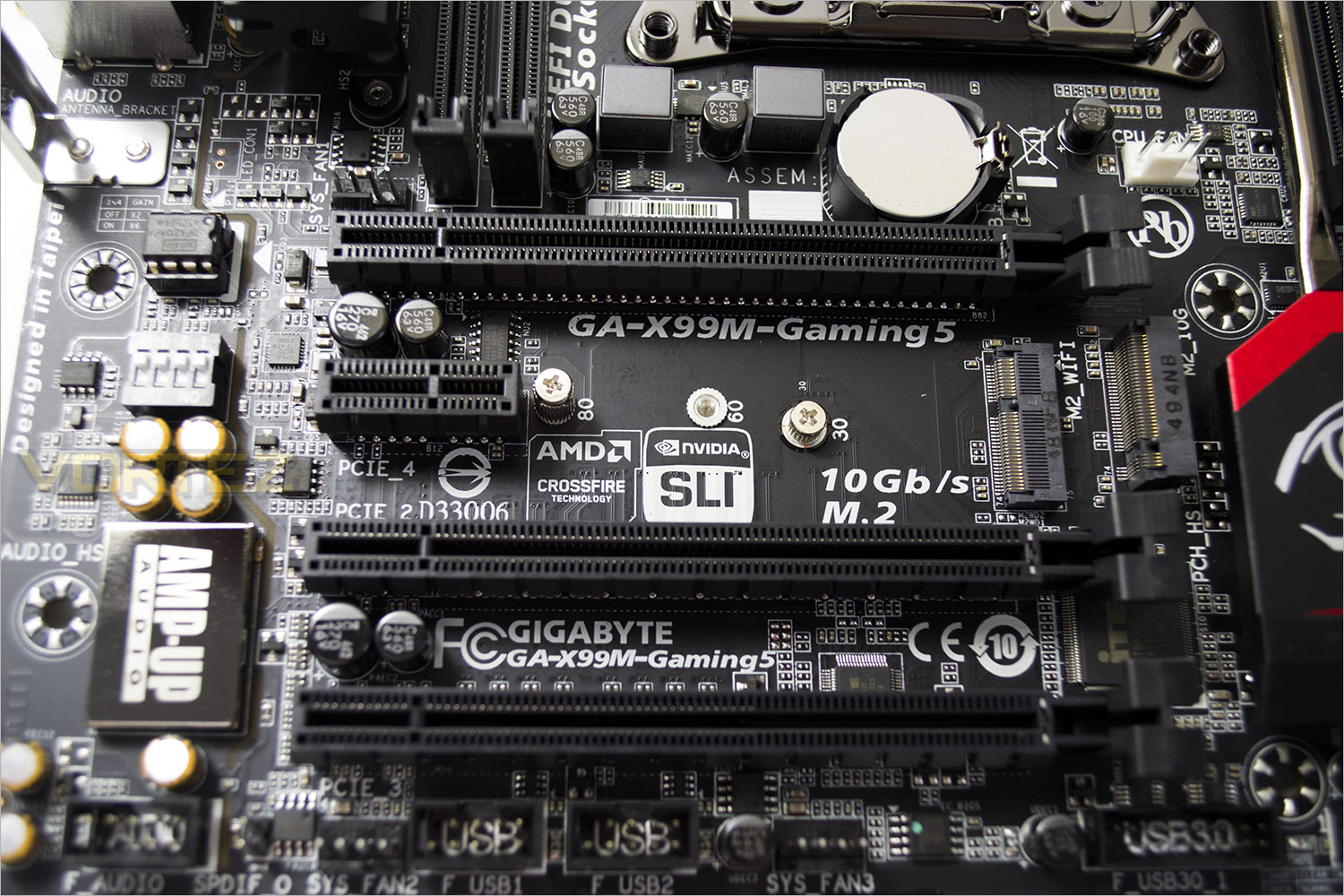
The PCIe capabilities of the GA-X99M-Gaming 5, as you would expect by the ‘gaming’ title allow the use of twin GPU setups supporting both SLI and Crossfire with dual 16x PCIe lanes. Separating these lanes is a PCIe 4x with a further 8x PCIe socket found at the bottom of the stack.
Closer Look
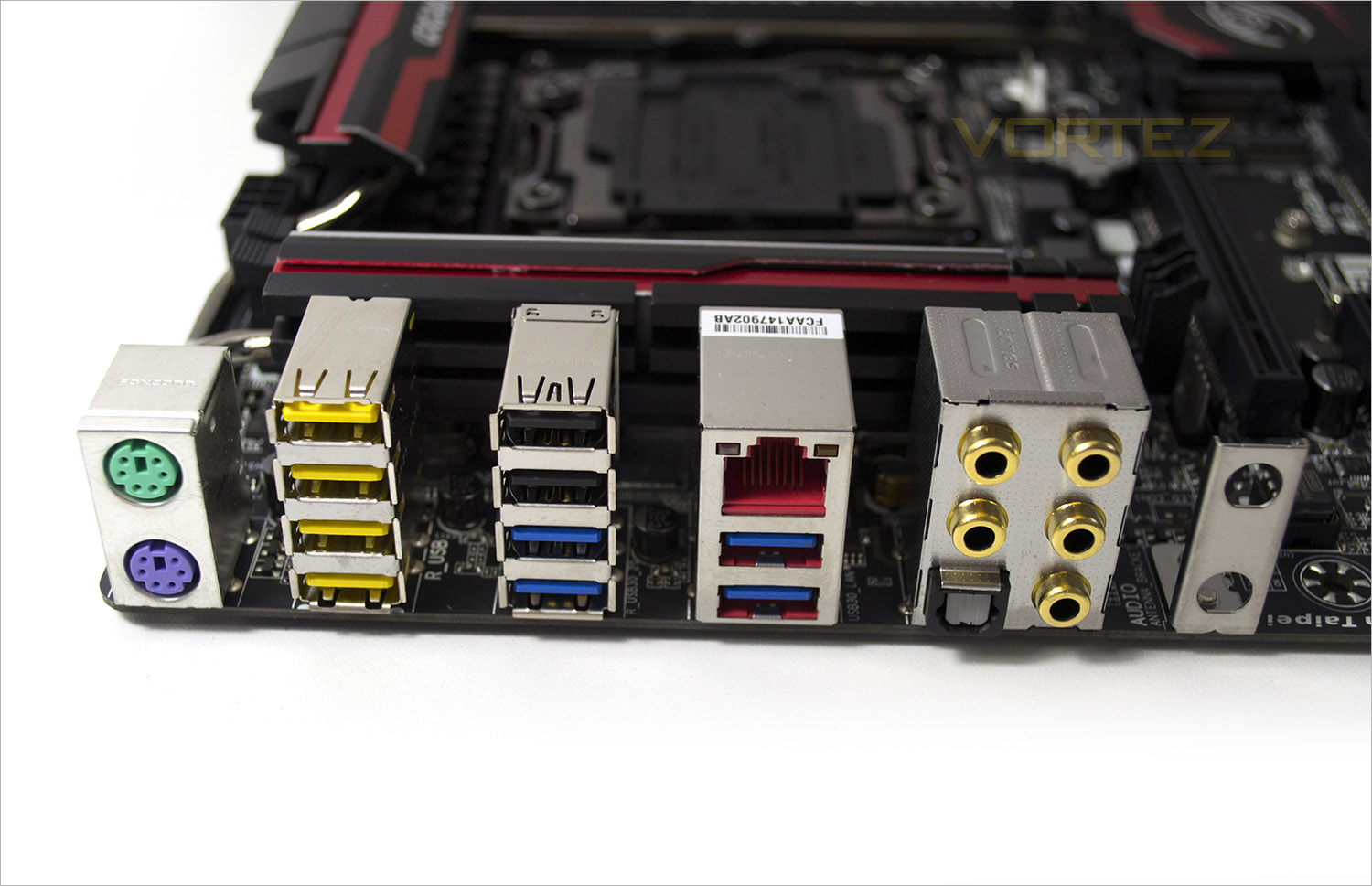
The ipnut/output area of the GA-X99M-Gaming 5 is well specified with (left to right) PS/2 mouse and keyboard support (a rarity on todays motherboards and seemingly out of place on this type of motherboard. Also odd is that GIGABYTe have included 6x USB 2.0 ports (yellow/black) and only four USB 3.0 ports. We get a single RJ-45 LAN port Killer™ E2200 from Qualcomm Atheros and the usual myriad of 3.5mm jack ports (gold plated) for audio along with an optical S/PDIF out connector. Rounding the I/O area off is a metal bracket for line in devices.
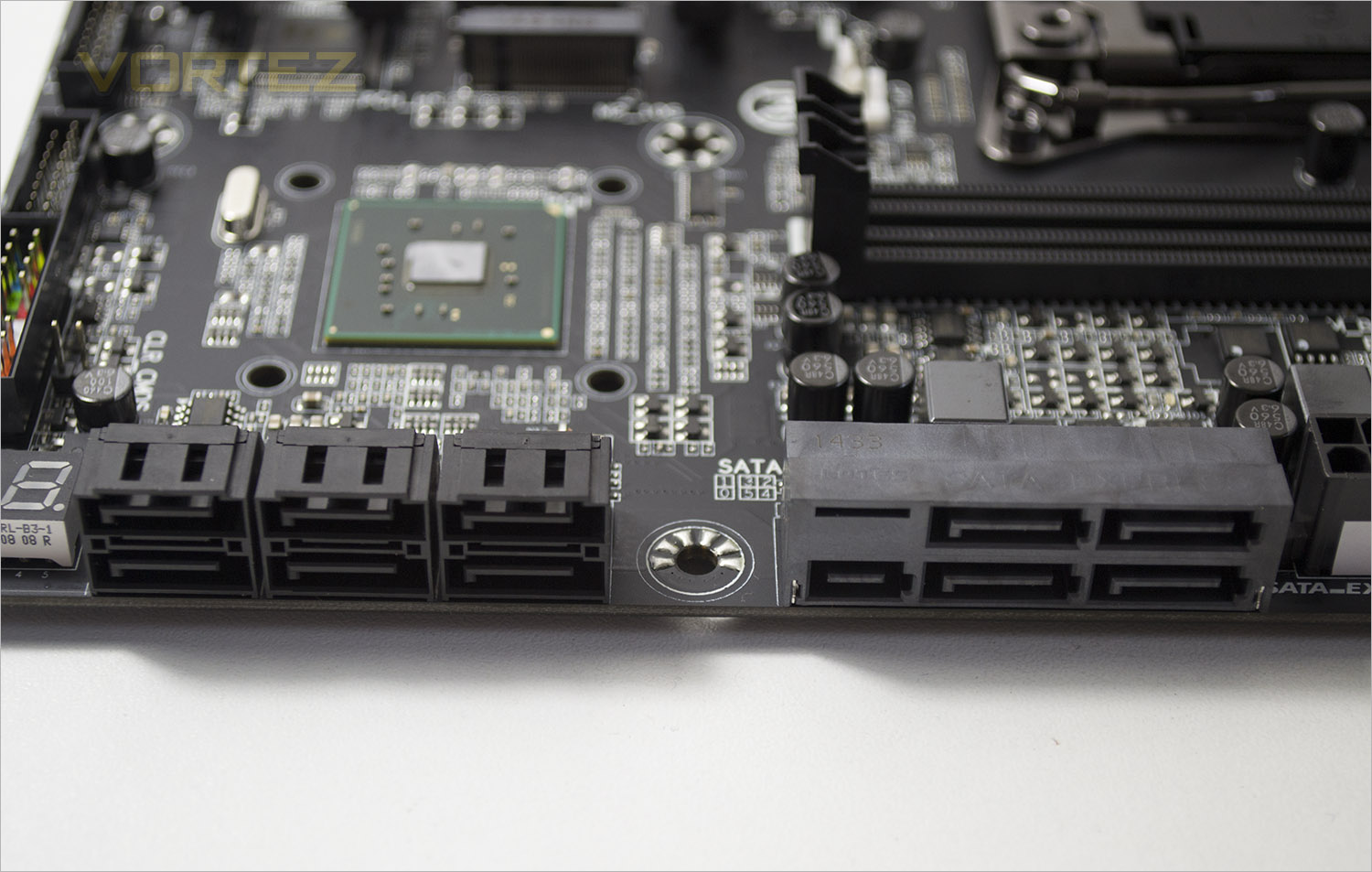
The SATA area is made up of eSATA, SATA Express and SATA 3 ports. RAID 0, 1, 5 and 10 configurations are supported.
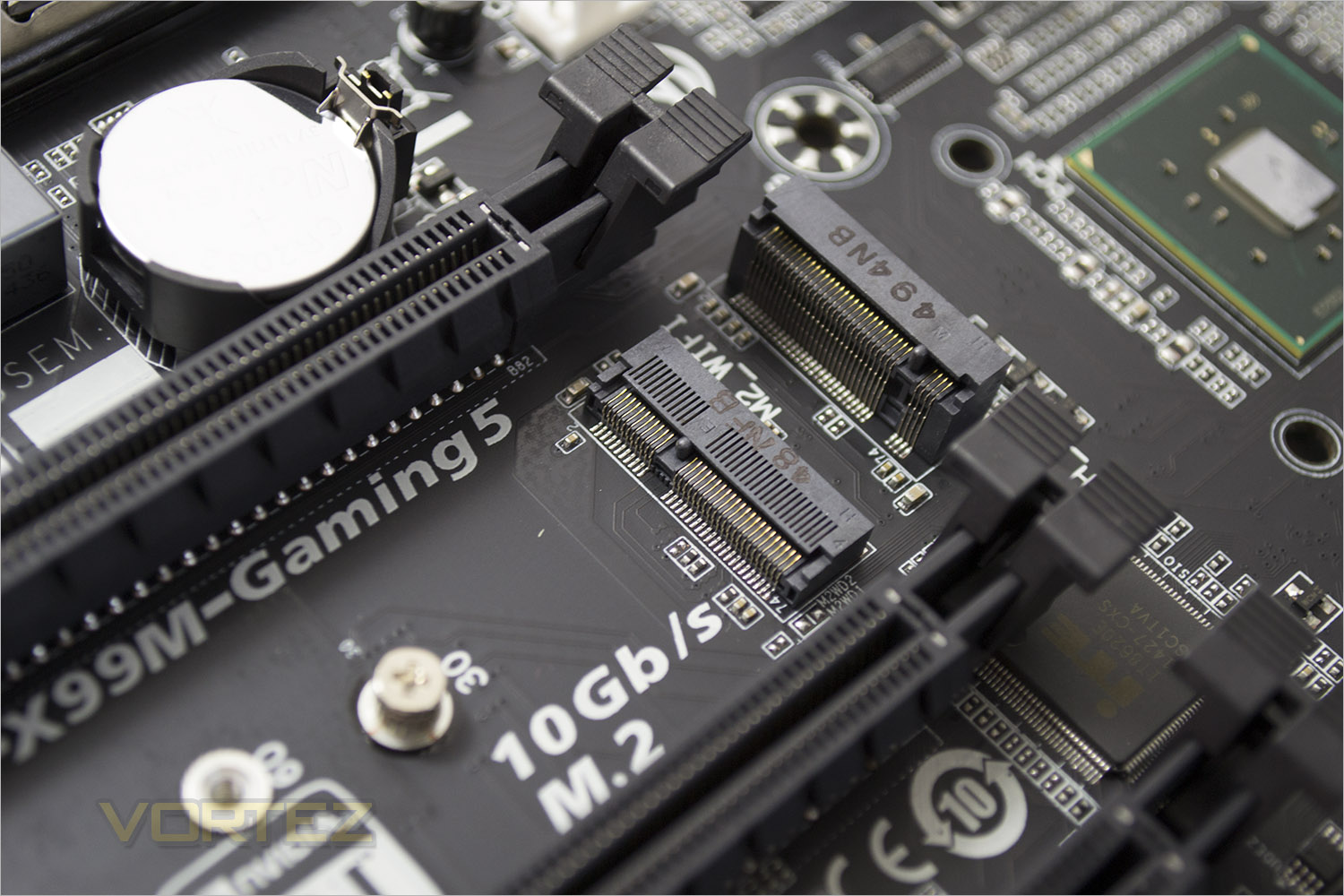
Adding to the storage ports is an M.2 socket 3 connector. With such a device installed, 2 of the SATA 3 ports will become unavailable.
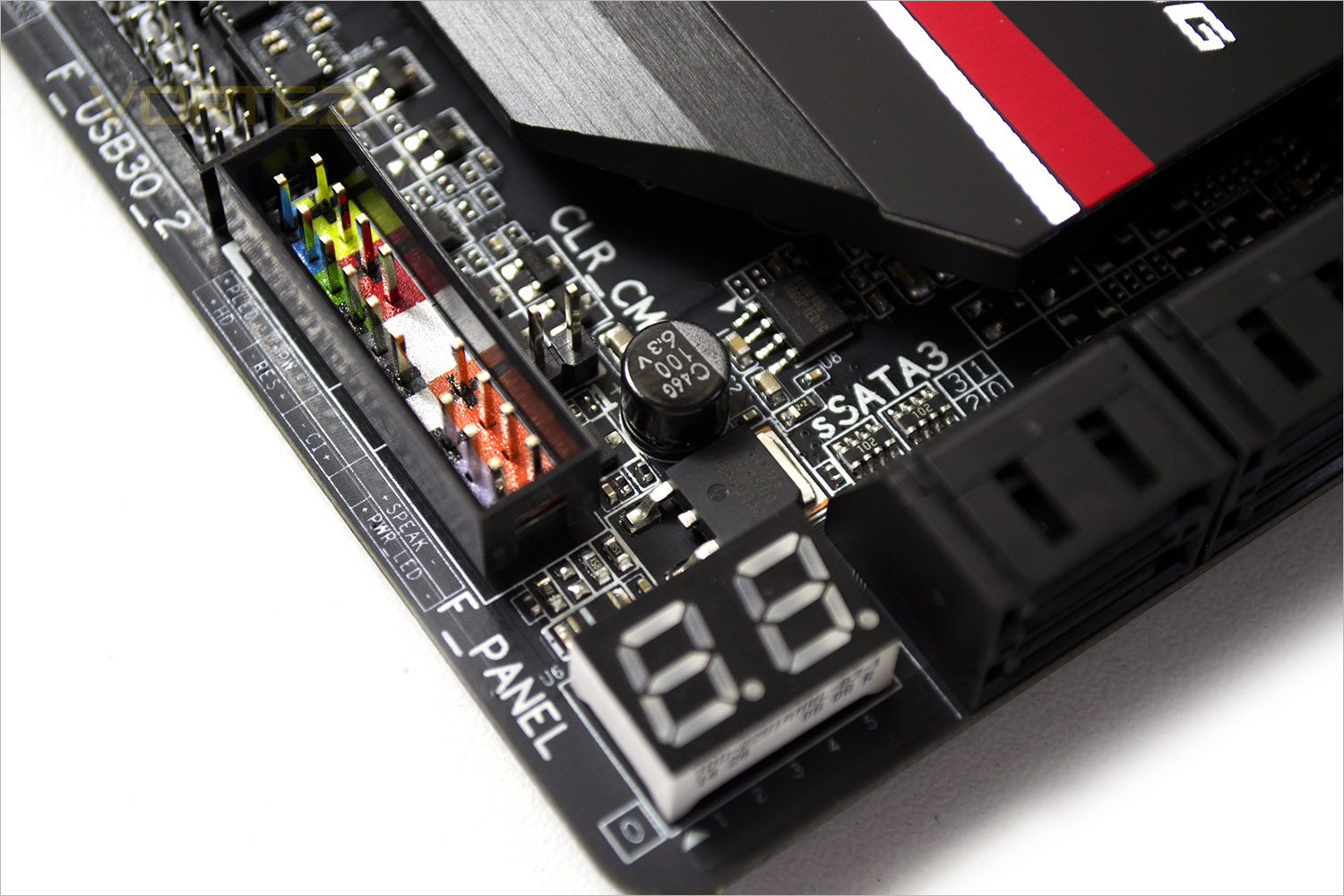
An always on debug LED can be found to the bottom right of the mainboard. While useful in discovering potential boot problems, it doesn’t give us the CPU temp which we found useful on other mainboards. GIGABYTE have however given us a very comprehensive debug code list in the motherboard manual which is a good point of reference should you encounter any issues.
Adding to the colour of the motherboard in low light conditions is a sliver of red light closer to the I/O area. This can be set to pulse/beat/on or off.
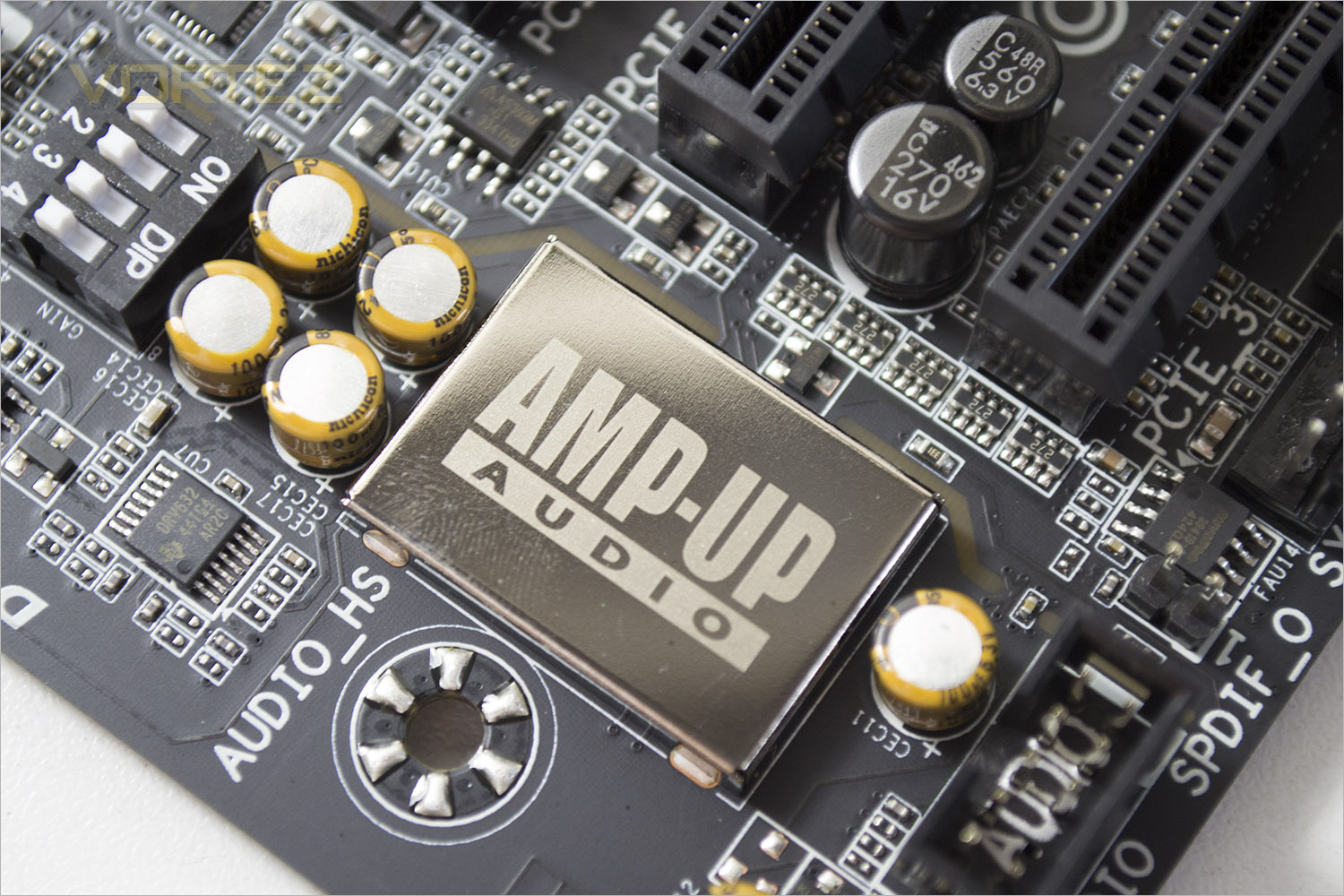
GIGABYTE are obviously very keen to push their ‘AMP-UP’ audio qualities of the GA-X99M-Gaming 5. First they tell us that the left and right channels are built into seprate PCB layers to eliminate crosstalk. The Realtek ALC1150 is a high-performance multi-channel High Definition Audio Codec that delivers an exceptional audio listening experience with up to 115dB SNR, ensuring users get the best possible audio quality from their PC.
The ALC1150 provides ten DAC channels that simultaneously support 7.1-channel sound playback, plus 2 channels of independent stereo sound output (multiple streaming) through the front panel stereo outputs. Two stereo ADCs are integrated and can support a microphone array with Acoustic Echo Cancellation (AEC), Beam Forming (BF), and Noise Suppression (NS) technologies. The ALC1150 incorporates Realtek proprietary converter technology to achieve Front differential output 115dB Signal-to-Noise ratio (SNR) playback (DAC) quality and 104dB SNR recording (ADC) quality.
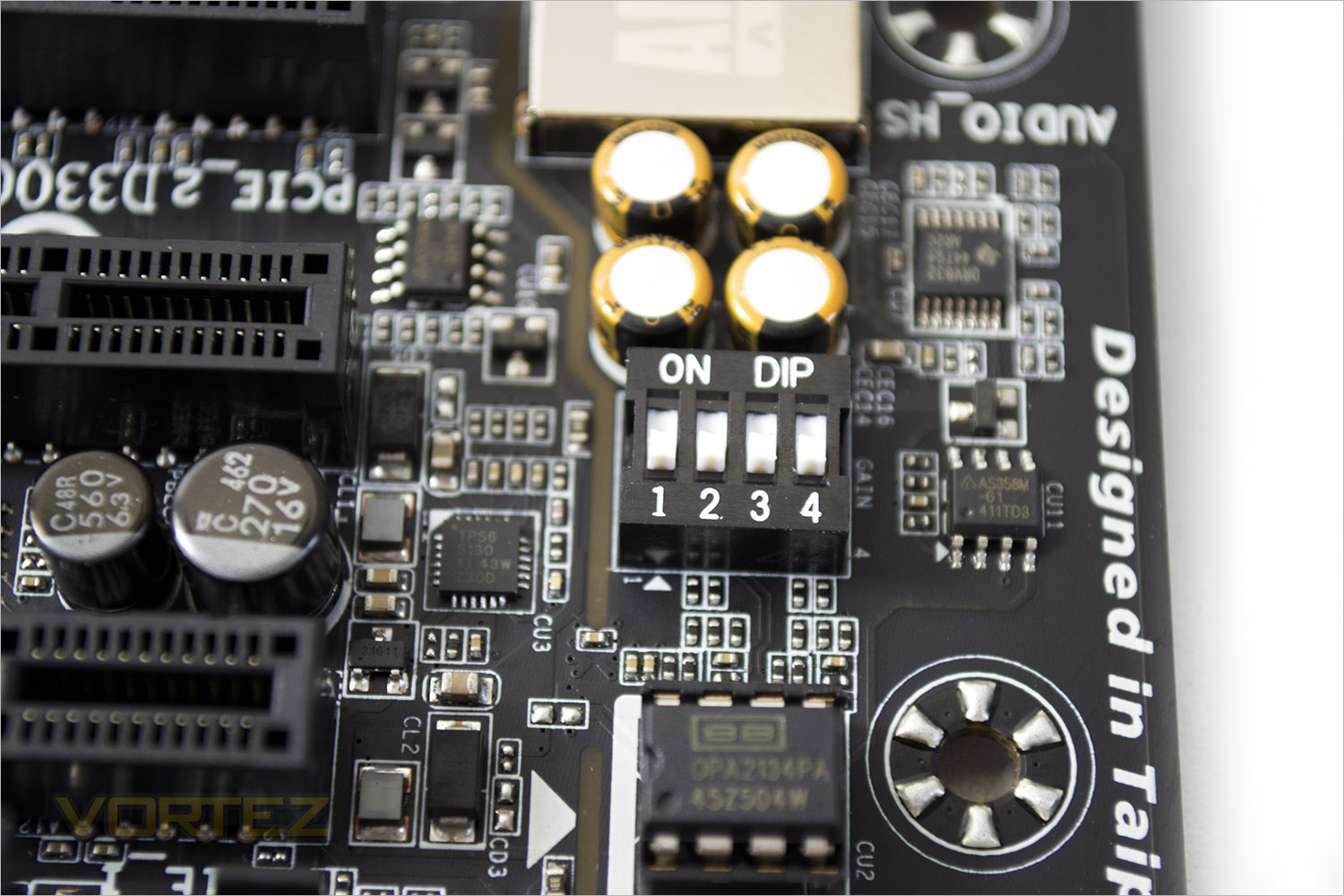
GIGABYTE also allow upgrading thanks to the removeable OP-AMPs. If you need a higher level of output then this can be achieved by flipping the on-board dip switches which is a great option for those with high impedance speakers and headphones.
Detailed Look
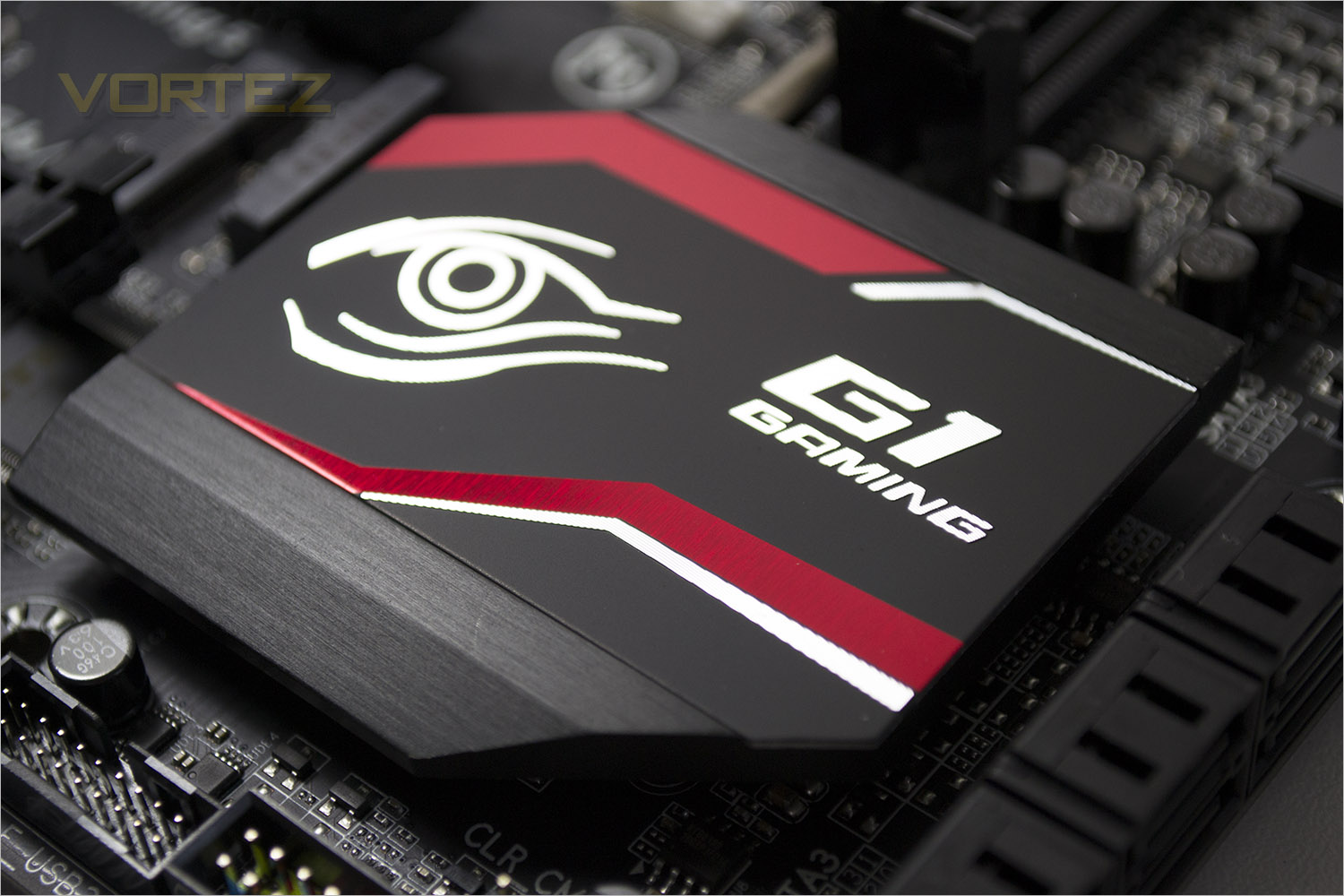
The heatsinks are split into two separate units, the first (pictured above) responsible for cooling the X99 chipset while the remaining two connected via heatpipe are their to wick heat away from the voltage regulation areas.
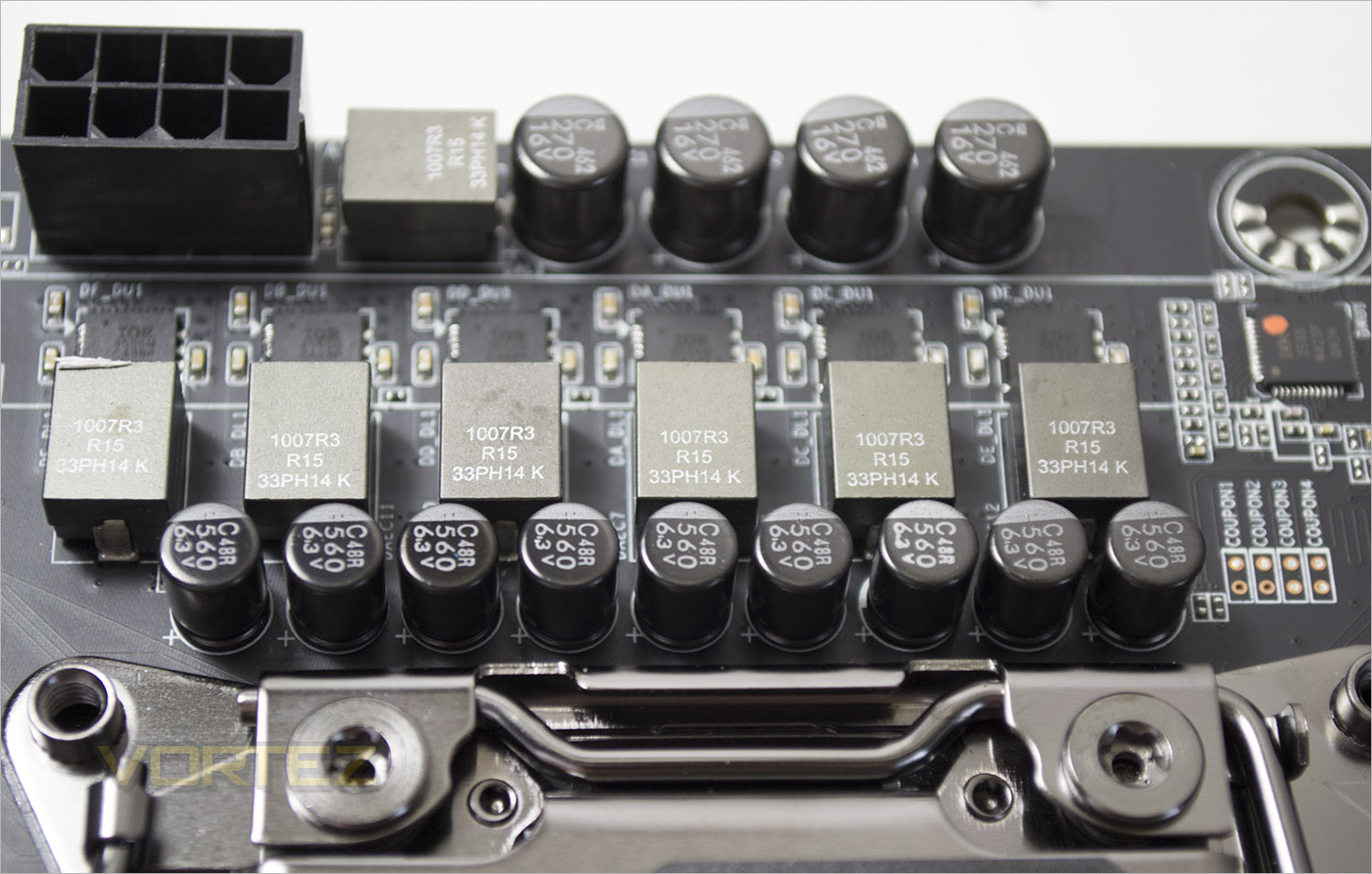
The VRM is a comparatively small 6 phase power design. GIGABYTE X99 series motherboards feature Server Level Cooper Bussmann Chokes for durability and efficiency along with Solid black capicitors with ultra-low ESR. The MOSFETs are provided by IR® in a single package format. IR® has leveraged it’s world class packaging technology developed for the DirectFET®, improving the thermal capability and layout of the PowIRstage® significantly over that of other MCM packages.
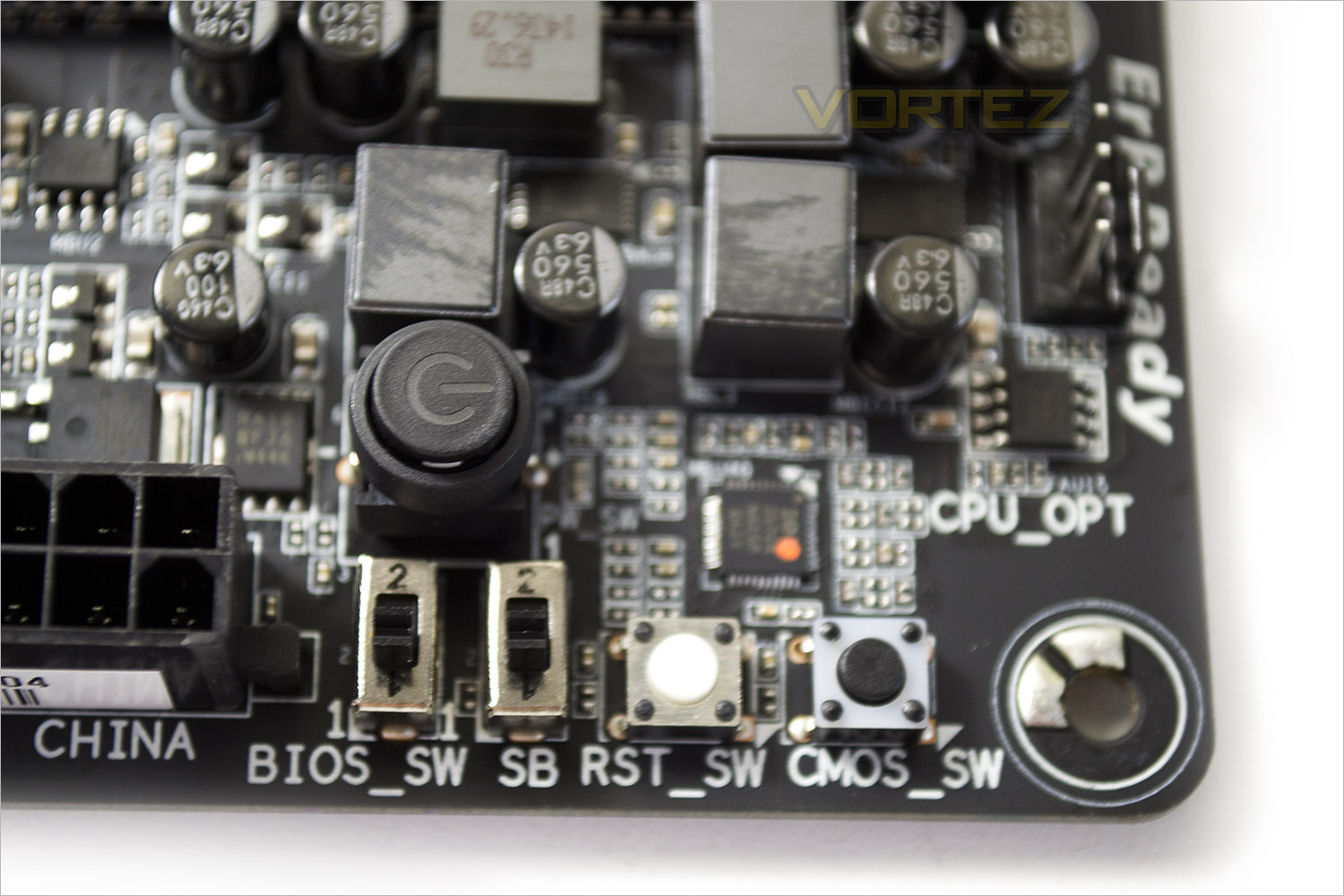
Left to right we get a couple of BIOS switches to switch between dual or single bios and then each BIOS version giving you are great amount of flexibility and reassurance. We then get a reset switch, CMOS clear switch and illuminated power switch above. We would have liked to have seen the reset switch being a little larger than the CMOS switch and positioned slightly away from it because a couple of times we inadvertently cleared the CMOS when we wanted to reset the setup.
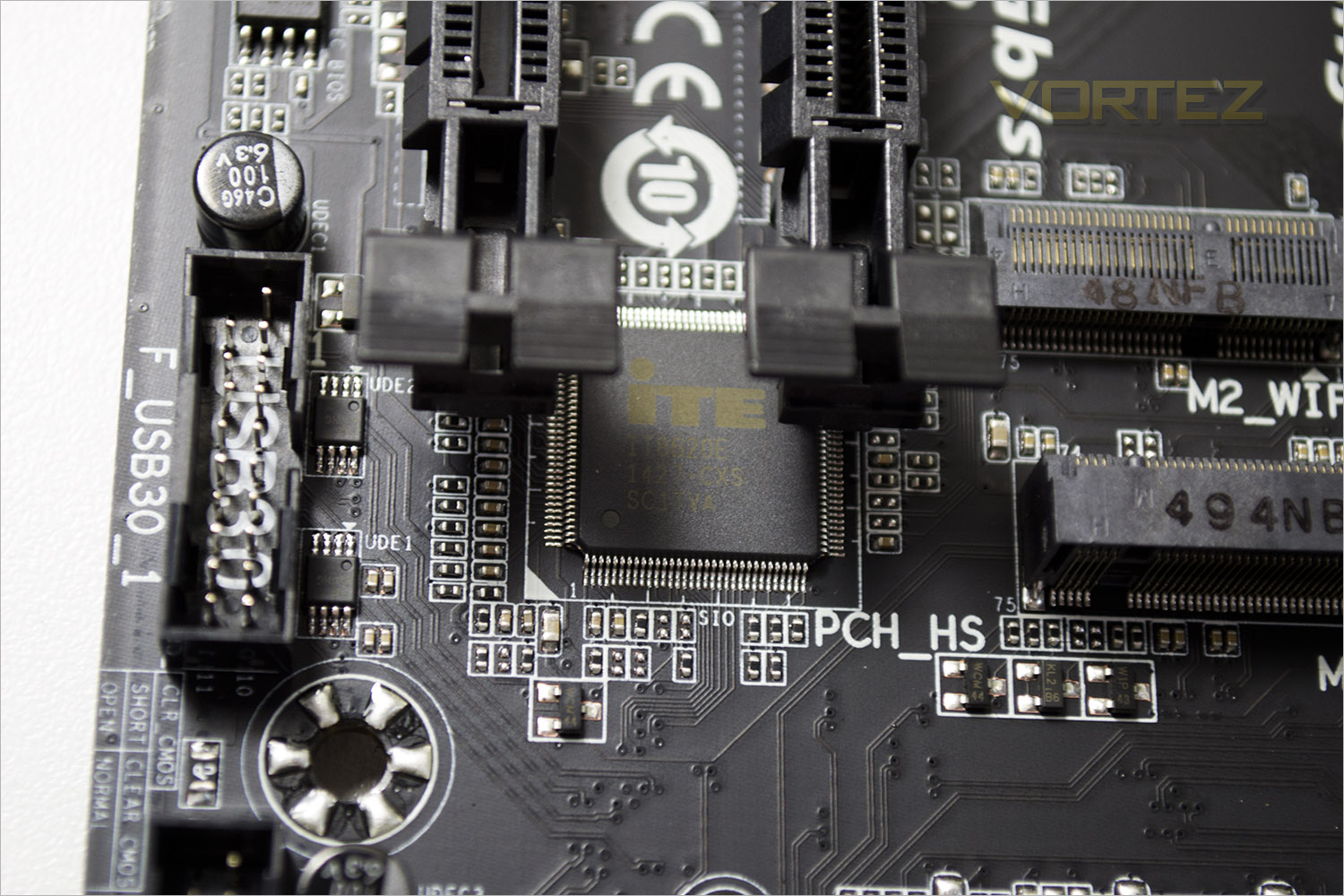
ITE provided the SUPER IO facilities of the GA-X99M-Gaming 5. This chip is a highly integrated, embedded controller with an embedded micro controller and integrated advanced functions. It is targeted for a wide range of portable application that uses the Low Pin Count (LPC) interface.
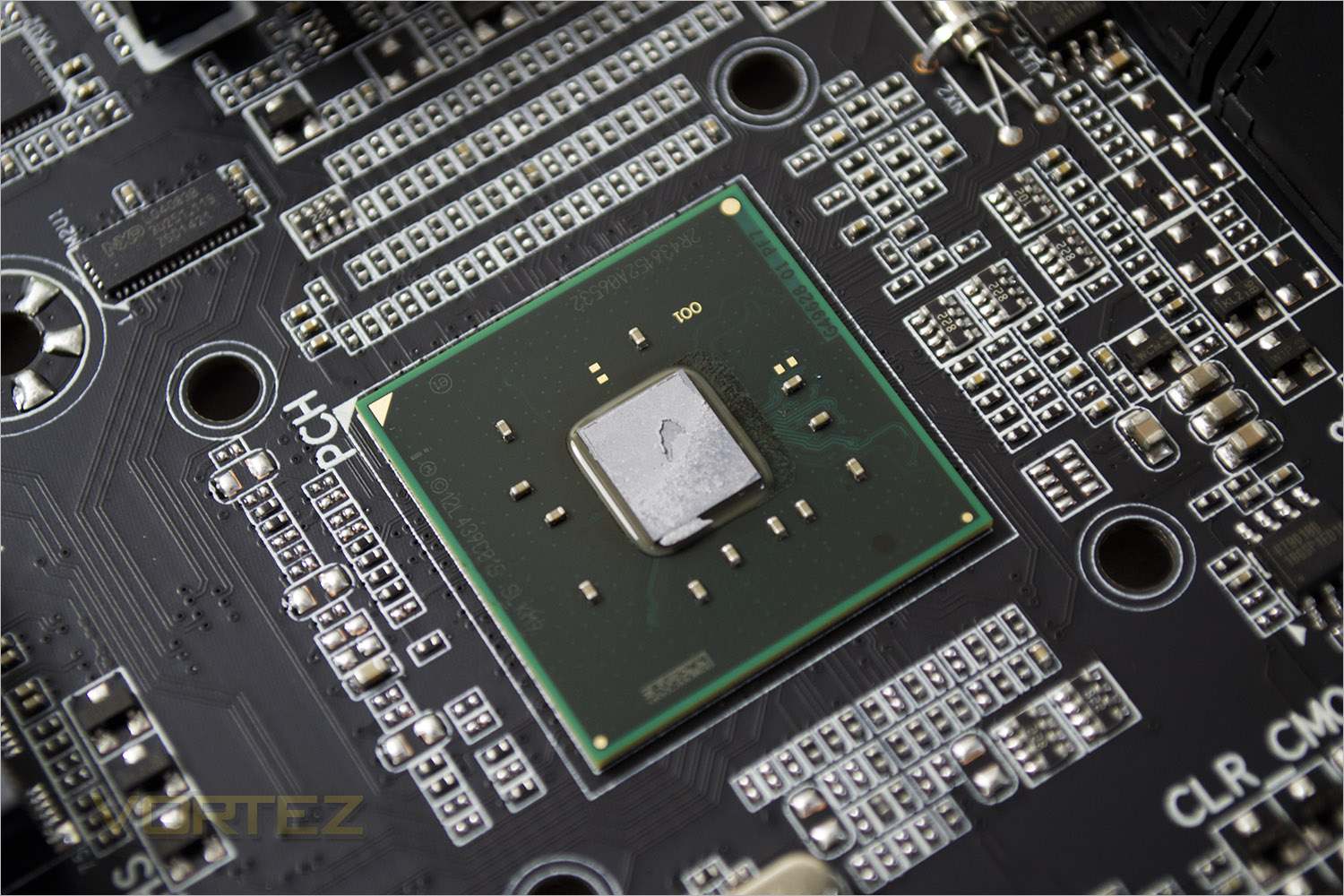
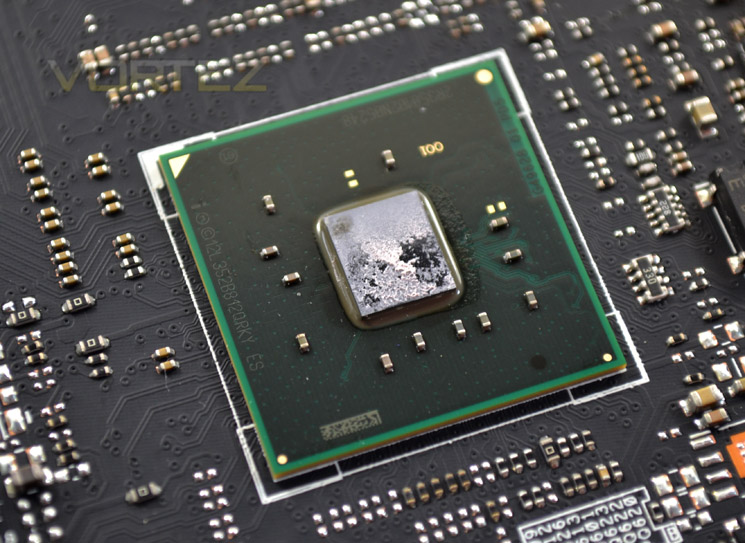
Finally we reach the X99 chipset, the beating heart of the GA-X99M-Gaming 5.
Overall, we are impressed by the amount of components GIGABYTE have managed to cram on-board. While we were a little disappointed about the USB 2.0 implimentations there are still four USB 3.0 ports and further scope for expansion should you need it. We were perhaps most impressed by the audio capabilities of this mainboard, especially the removable OP-AMPs and gain dip switches which will certainly be useful for those who value audio clarity.
Lets see how this motherboard performs in a set of synthetic and real world tests…
Test Setup & Methodology
RAM: 16GB Corsair Vengeance LPX DDR4 @ 2666MHz 16-17-17-35 (CMK16GX4M4A2666C15R)
GPU: NVIDIA GTX 760
Power Supply: Corsair RM1000
Cooler: Corsair H105
Motherboards
ASROCK X99 WS-E/10G
ASROCK X99 Extreme4
GIGABYTE X99 SOC FORCE
ASUS X99 Deluxe
MSI X99S Gaming 9 AC
GIGABYTE GA-X99M-Gaming 5
ASROCK X99 WS-E/10G
ASROCK X99 Extreme4
GIGABYTE X99 SOC FORCE
ASUS X99 Deluxe
MSI X99S Gaming 9 AC
Benchmarks
AIDA 64 – CPU & Memory/Cache Performance
SiSoft Sandra – Compute & Memory Performance
HandBrake – Encoding Performance
Pov-Ray – 3D Image processing Performance
Cinebench R15 – Image processing Performance
AS SSD SATA Performance
Futuremark 3DMark (Firestrike) – Graphical Performance
Futuremark PCMark 8 – Overall PC Performance
Battlefield 4, THIEF, Company Of Heroes 2 & GRID:2 – Gaming Performance
AIDA 64 – CPU & Memory/Cache Performance
SiSoft Sandra – Compute & Memory Performance
HandBrake – Encoding Performance
Pov-Ray – 3D Image processing Performance
Cinebench R15 – Image processing Performance
AS SSD SATA Performance
Futuremark 3DMark (Firestrike) – Graphical Performance
Futuremark PCMark 8 – Overall PC Performance
Battlefield 4, THIEF, Company Of Heroes 2 & GRID:2 – Gaming Performance
Overclocking
BIOSWe pretty much covered the new GIGABYTE BIOS BIOS with the SOC FORCE so we won’t bore you with the details once again as the BIOS for the GA-X99M-Gaming 5 is very close to this BIOS but with less overclocking options available. That said there was plenty of options still in there, especially all of the most important ones used for overclocking with a host of voltage adjustments.
We would state that a minor irritation is that it can be a little cumbersome to use the HD variant of the BIOS and that everytime the CMOS is reset you will automatically have to go through the language selection and then choose which type of BIOS you prefer, HD, BASIC etc before you even get to the actual system settings.
With the BIOS set to defaults we set about seeing what limits we could attain:
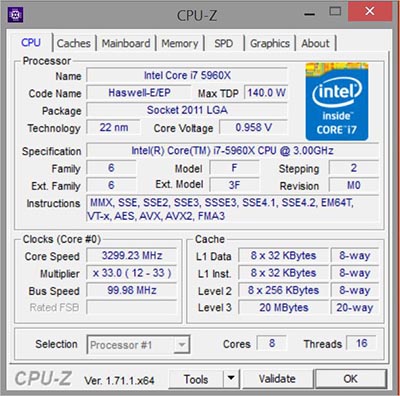
At default, the board posted at 3.3GHz but would throttle back or ‘boost’ dependent on the load conditions along with automatic voltage adjustments to compensate for the increase/decrease in clockspeeds.
As we saw with the much larger ASRock board we reviewed recently, there were some neat pre-overclock settings which allowed 4.0, 4.2 and 4.5GHZ. This will however be CPU dependent for which there are also options. Upon testing, these settings were 100% stable with our own CPU.
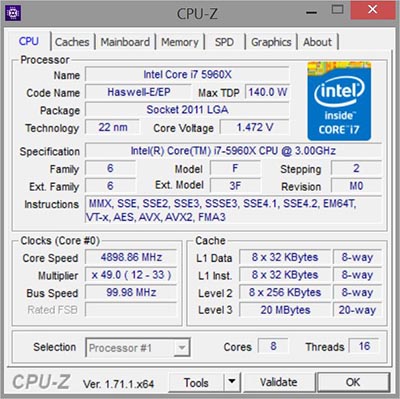
We initially hit a wall at 4.6GHz which was very disappointing as we knew our CPU was capable of much more. Spending a little more time we found that the load line calibration was holding us back and once increased allowed us to post at a stupidly fast (and hot) 5GHz although this setting was far from stable. For 24/7 use we found 4.9GHz was very useable and while it did crash under extreme loading conditions (Prime95) and suffered from high temps well into the 80’s (OCCT) it was relatively stable for all other tasks. For a 12 hour prime95 run we did manage 4.75GHz which is a great result for a motherboard which is not classed as an out-and-out overclocking motherboard.
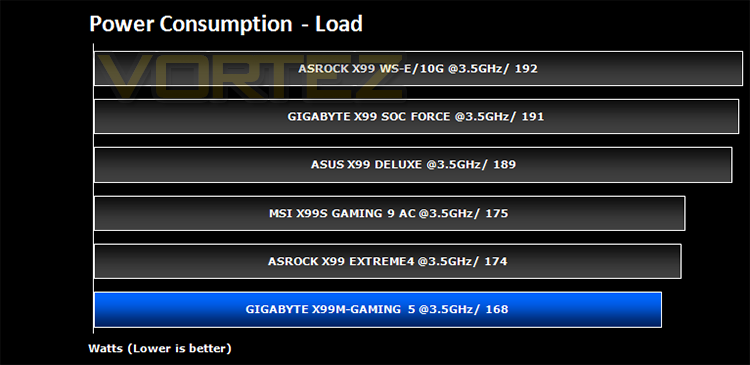
Power Consumption
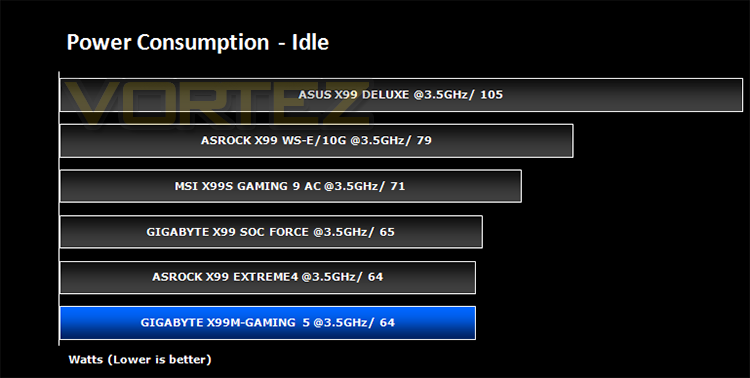
System idle readings were taken by enabling all of the key features on the mainboard and letting the system rest for 10 minutes within a windows environment before taking a reading from the plug to the PSU. To obtain our load results we ran HyperPI (32m) on all cores taking a reading after 5 minutes with all CPU cores loaded to 100%.
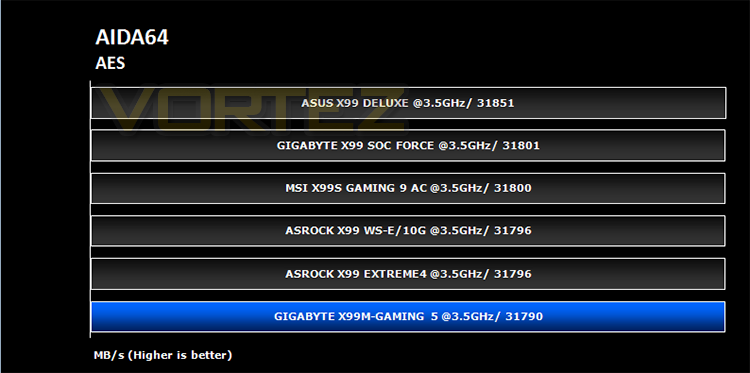
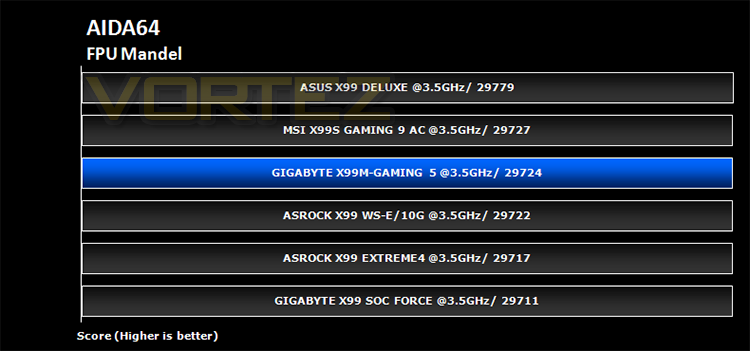
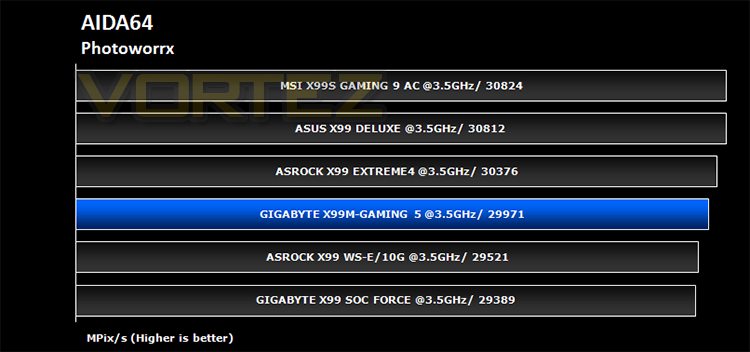
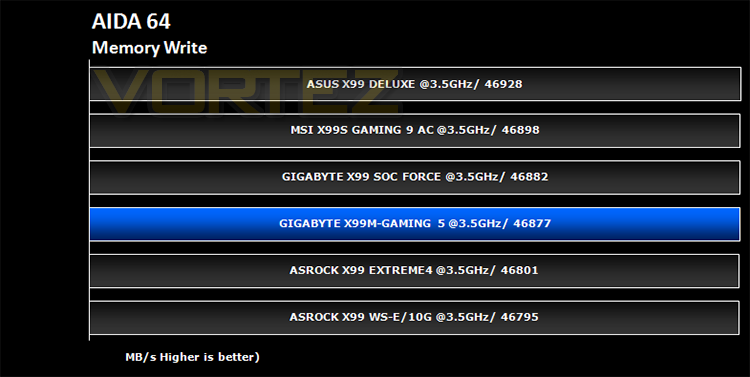
Benchmarks: AIDA64
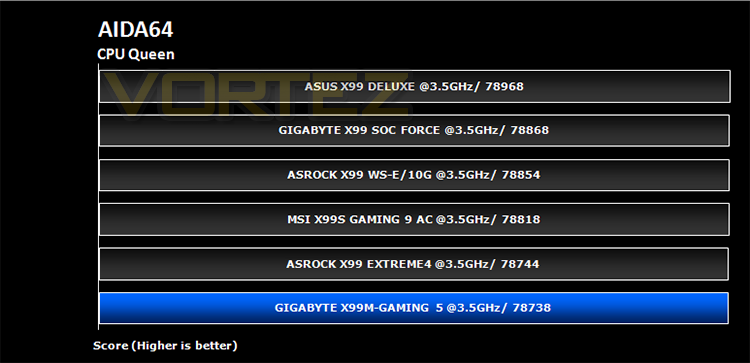
This simple integer benchmark focuses on the branch prediction capabilities and the misprediction penalties of the CPU. It finds the solutions for the classic “Queens problem” on a 10 by 10 sized chessboard. At the same clock speed theoretically the processor with the shorter pipeline and smaller misprediction penalties will attain higher benchmark scores. For example — with HyperThreading disabled — the Intel Northwood core processors get higher scores than the Intel Prescott core based ones due to the 20-step vs 31-step long pipeline. CPU Queen test uses integer MMX, SSE2 and SSSE3 optimizations.
Benchmarks: SiSoft Sandra
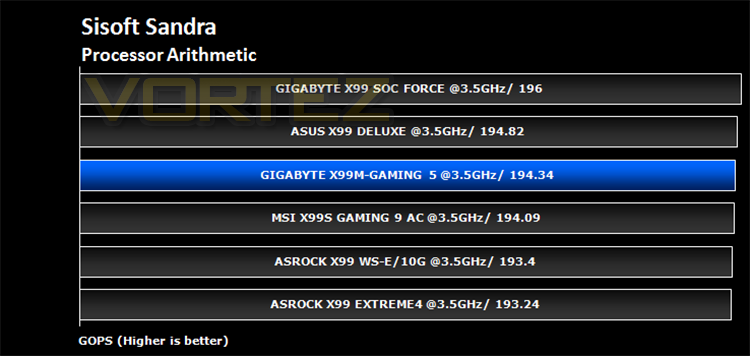
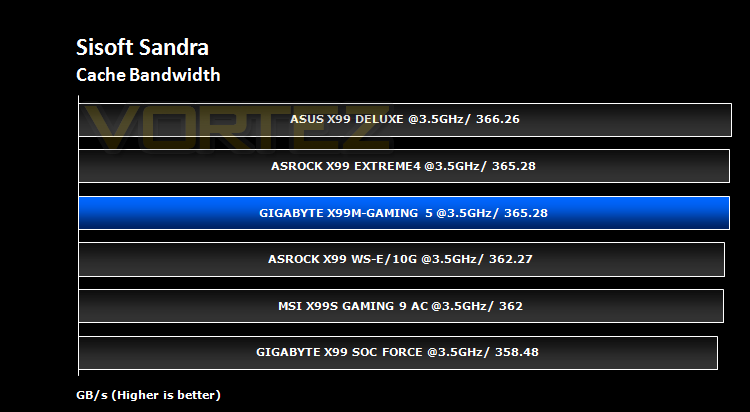
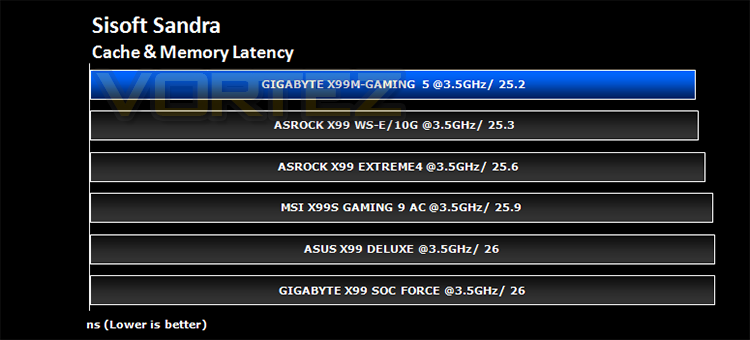
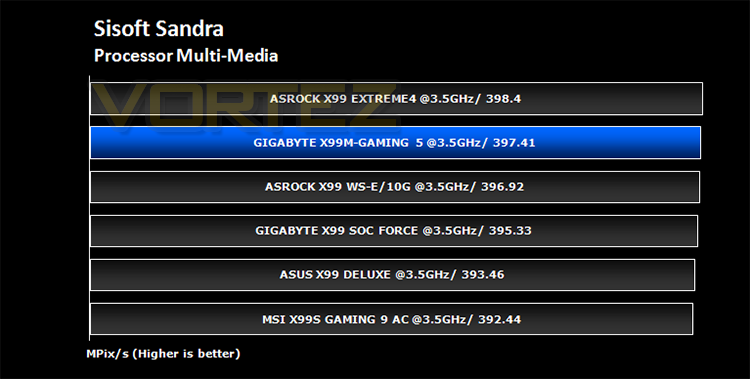
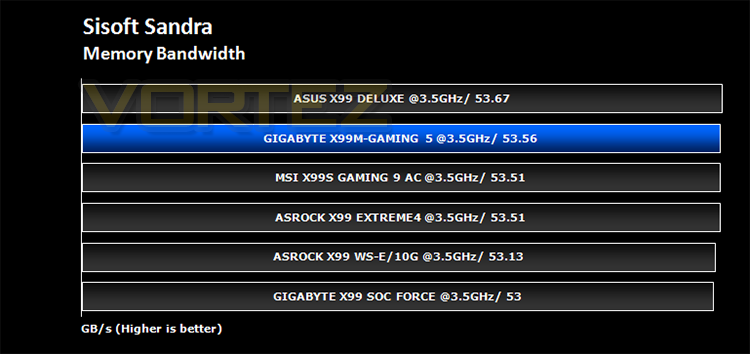
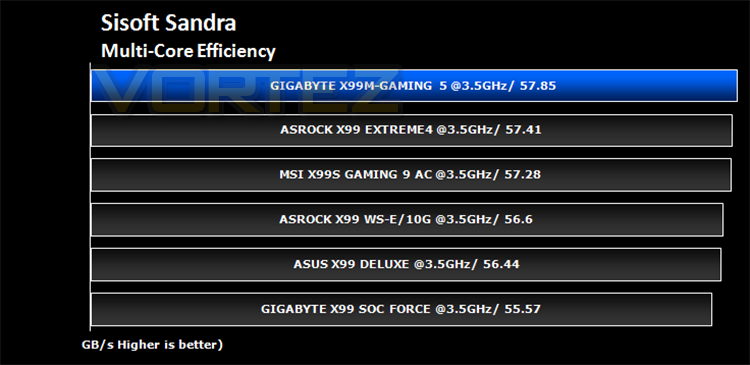
SANDRA isn’t always a benchmark that is included in hardware reviews but I believe it shouldn’t be ignored. SANDRA provides a vigorous package that tests your system in a rather large array of benchmarks. There are many aspects of benchmark that can be executed. We will be considering – CPU and memory tests.
Benchmarks: Cinebench
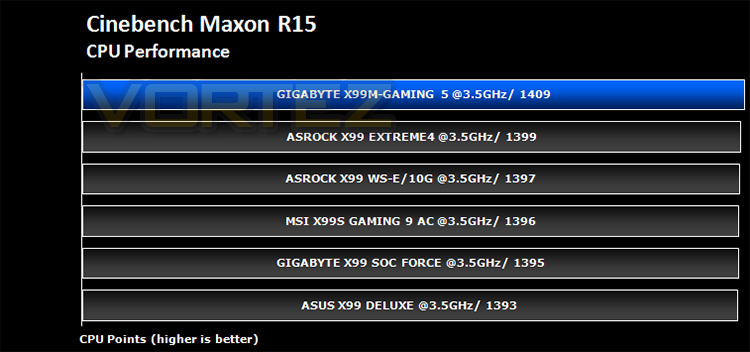
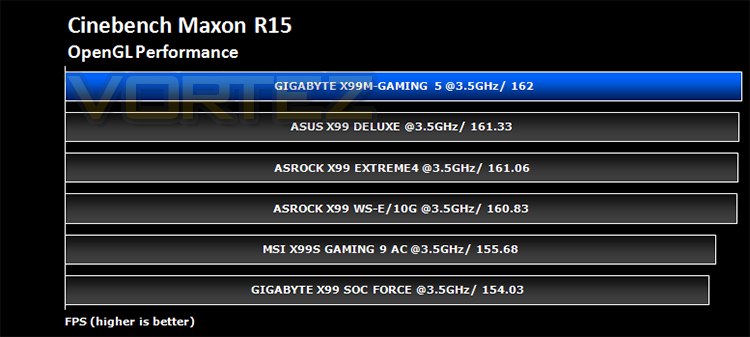
CINEBENCH can measure systems with up to 64 processor threads. This test scene contains approximately 2,000 objects which in turn contain more than 300,000 polygons in total, and uses sharp and blurred reflections, area lights, shadows, procedural shaders, antialiasing, and much more. The result is displayed in points (pts). The higher the number, the faster your processor.
Benchmarks: Pov-Ray
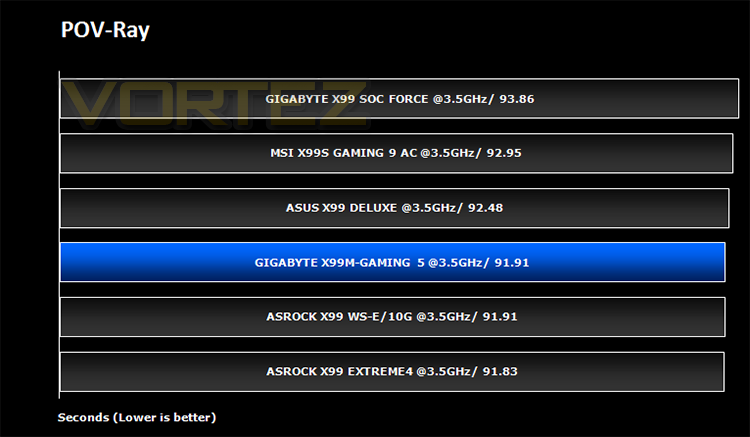
The Persistence of Vision Raytracer, or POV-Ray, is a ray tracing program which generates images from a text-based scene description, and is available for a variety of computer platforms. It was originally based on DKBTrace, written by David Kirk Buck and Aaron A. Collins for the Amiga computers.
Benchmarks: Handbrake
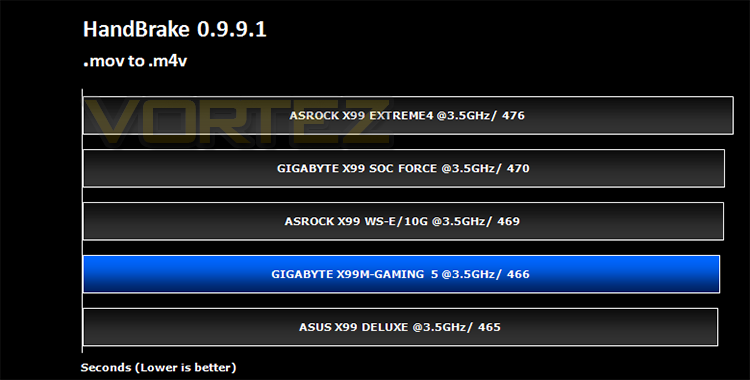
HandBrake is an open source trancoding tool for converting video from nearly any format to a selection of modern, widely supported codecs. Strong multi-threading support tends to favour high core counts and hyperthreading support.
Benchmarks: PCMark 8
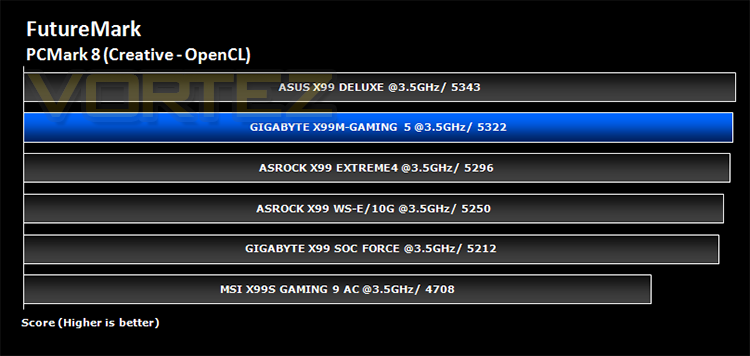
PCMark 8 combines performance benchmarking with battery life measurement and includes tests based on popular Adobe and Microsoft applications. Whether you are looking for long battery life, or maximum power, PCMark 8 will help you find the devices that offer the perfect combination of efficiency and performance for your needs. It’s the complete PC performance benchmark for home and business.
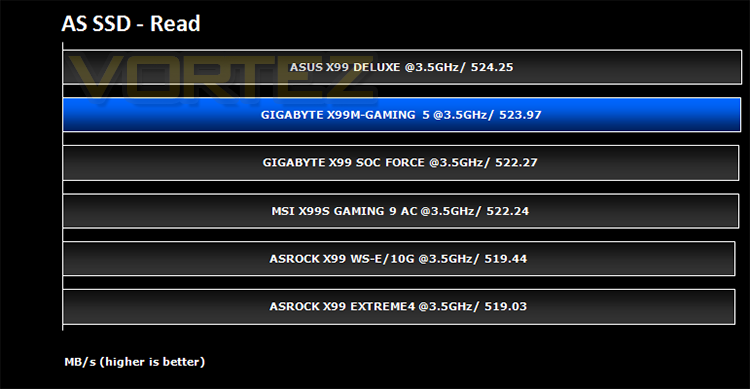
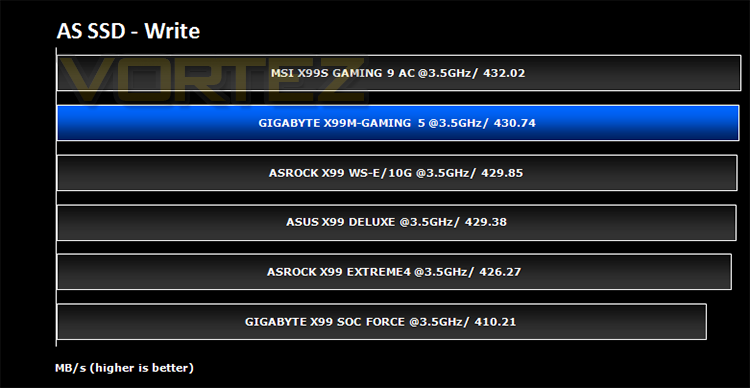
Benchmarks: AS SSD
AS SSD Benchmark is a straightforward tool for measuring the speed of your SSD drive.
Simply launch the program, choose your drive, click Start, and it’ll test your SSD’s read and write speed in a variety of ways, delivering a score for each when it’s done. And if that’s not enough, there are also additional file copy and compression-related benchmarks available from the Tools menu. (The author’s support page is German only, but if you need further English explanations then there’s a thread on the program at the OCZ Technology forum.).
Simply launch the program, choose your drive, click Start, and it’ll test your SSD’s read and write speed in a variety of ways, delivering a score for each when it’s done. And if that’s not enough, there are also additional file copy and compression-related benchmarks available from the Tools menu. (The author’s support page is German only, but if you need further English explanations then there’s a thread on the program at the OCZ Technology forum.).
Benchmarks: Futuremark 3DMark Fire Strike
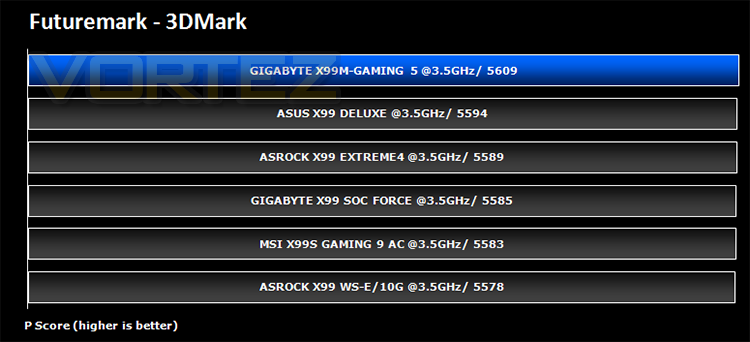
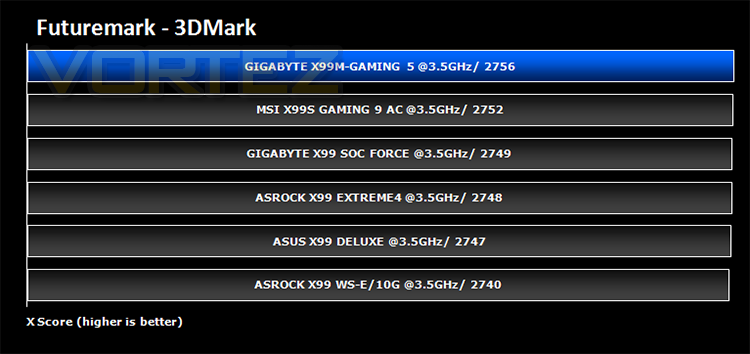
3DMark FireStrike Product PageFire Strike is Futuremark’s new showcase DirectX 11 benchmark designed for high-performance gaming PCs. It is our most ambitious and technical benchmark ever, featuring real-time graphics rendered with detail and complexity far beyond what is found in other benchmarks and games today. Fire Strike will only be available in the Windows editions of 3DMark initially.
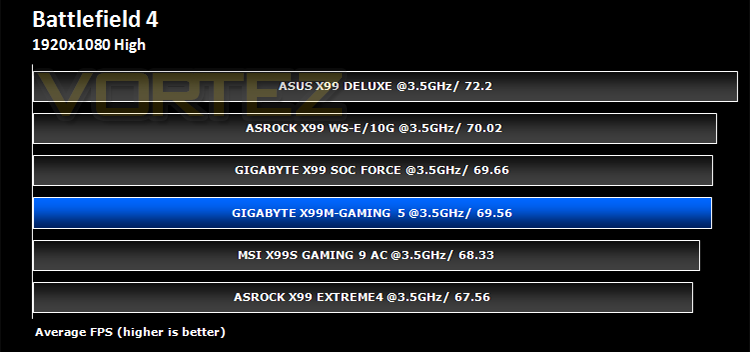
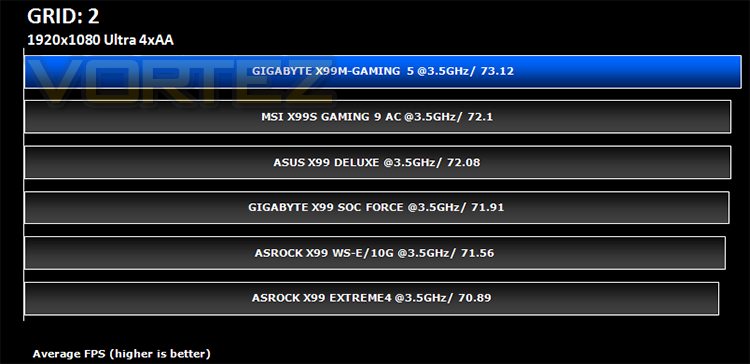
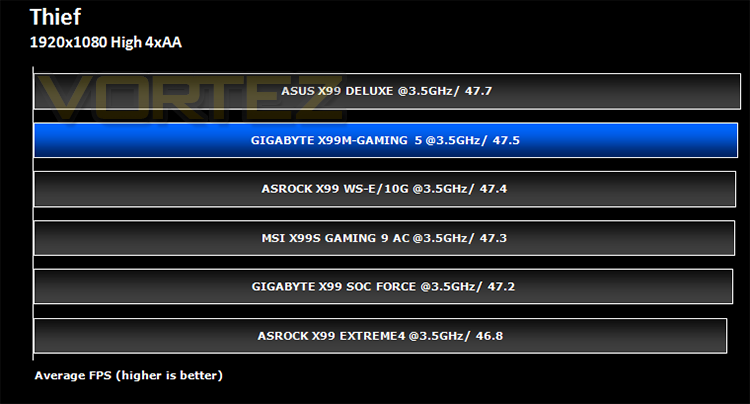
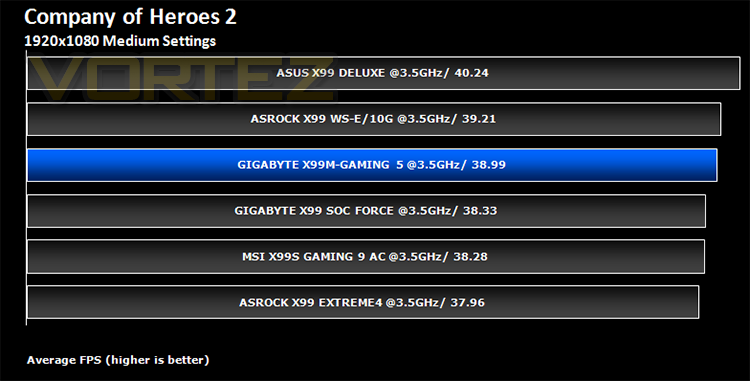
Benchmarks: Battlefield 4, THIEF, Company of Heroes 2, GRID 2
It’s important for us to perform a number of game benchmarks as well as the synthetic tests because gamers will want to know if there are any significant benefits. So here we have a selection of popular gaming titles, critically acclaimed and action-packed.
Conclusion
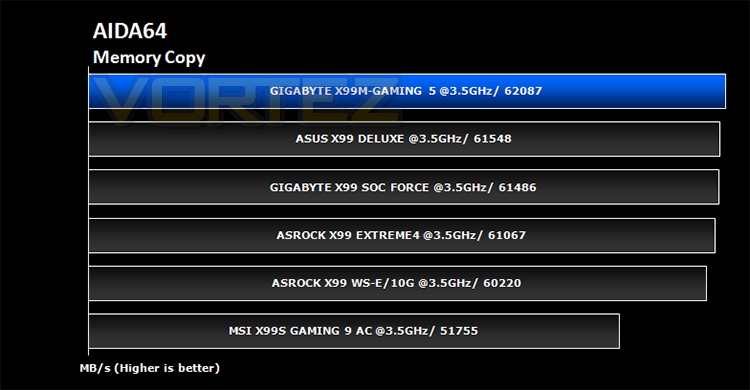
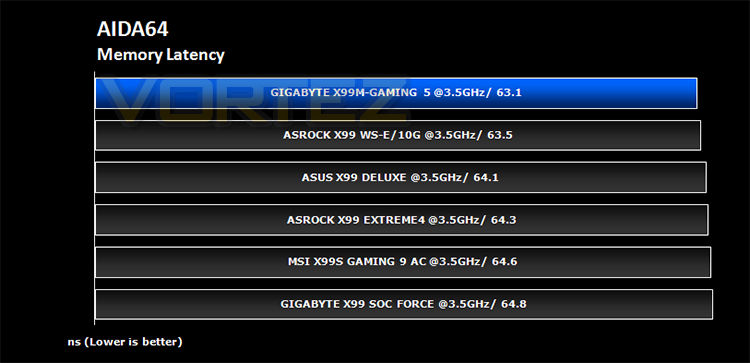
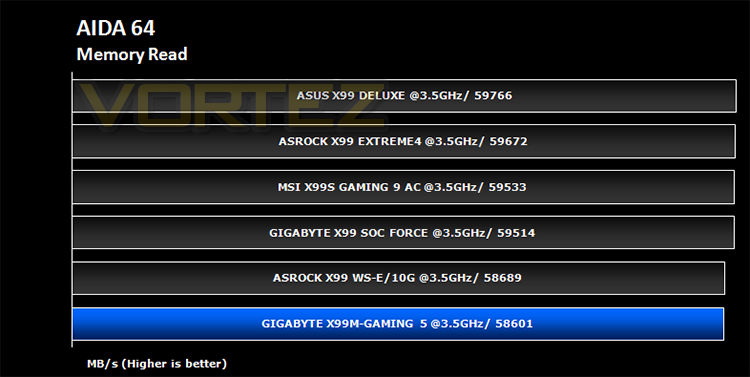
Being a mATX motherboard we were not expecting anything too dramatic with the GA-X99M-Gaming 5 and while it didn’t exactly set the world alight with ground breaking performance it certainly punched above its class. Performance wise, the GA-X99M-Gaming 5 excelled, especially in terms of memory performance where it often led the pack. What surprised us most was the overclocking potential this motherboard possesses. Hitting 4.9GHz and booting at 5.0GHz with less voltage than some of the other dedicated overclocking motherboards we have tested seemed to defy belief given that the power circuitry, while highly specced was not as powerful on paper as some of the other motherboards on test. Nevertheless it did surpass most and this is a truly magnificent effort.
Perhaps the biggest attraction to the GA-X99M-Gaming 5 (other than the size) though is the audio performance. The components used are not exactly top drawer and it is fair to say most audiophiles will have there own dedicated sound cards but, and it is a very big but, GIGABYTE have provided a solid set of upgradeable and adjustable components which for all but the most anal of enthusiasts means this motherboards should not leave you wanting in terms of audio clarity and performance.
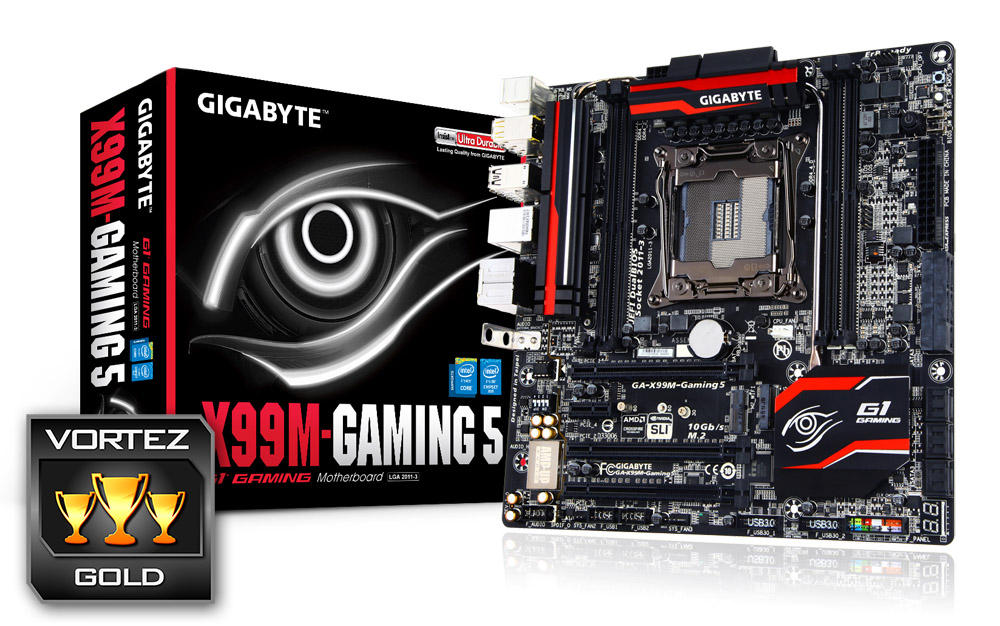
The GA-X99M-Gaming 5 is a solid all round performer belying its size. It can hold its own when pitched against bigger, more expensive motherboards and while its size physically restricts a certain degree of expansion such as memory and PCIe slots it offers a good level of support for all but the very greediest of power hungry users wanting quad SLI and perhaps 128GB of ram. These lucky, affluent users are in the minority though and thus GIGABYTE have appealed to the majority by creating a motherboard that not only looks great, performs great and has audio capabilities to make most green with envy but it also encompasses copious amounts of storage and peripheral expansion. We loved it, not least because at £170 it is one of the cheapest X99 motherboards available but it is truly a pocket rocket that sets the standards for others to follow.
If you like you audio loud, your gaming fast yet prefer your desktop real estate is not the biggest then the GA-X99M-Gaming 5 should be top of your mATX motherboard list.
Pros
+ Excellent audio capabilities
+ Great all round performance
+ Thorough BIOS
+ Good Overclocking potential
Cons
– Cramped PCIe area
– Cramped Socket
– Basic packaging
+ Excellent audio capabilities
+ Great all round performance
+ Thorough BIOS
+ Good Overclocking potential
Cons
– Cramped PCIe area
– Cramped Socket
– Basic packaging

Click here for an explanation of our awards at Vortez.net.
Our thanks to Corsair and Intel for providing some of the components crucial to this review
Our thanks to Corsair and Intel for providing some of the components crucial to this review