







Using the new Windforce 5X, GTX680 SOC looks all set to claim the performance throne to become the king of GPUs.

Product on Review: GV-N680SO-2GD
Manufacturer and Sponsor: GIGABYTE
Street Price: £499inc. VAT (At time of review)
When companies want to promote a product it never hurts to add ‘super’ to the product name. After all, who is going to buy a ‘standard strength cold remedy when there is ‘Super Strength’ available. Bachelors don’t make standard noodles either, they are of course ‘Super Noodles’. Even nappy (diaper) manufacturers are in on the claiming the products ‘super absorbency’. When in actual fact most of the products with the afore mentioned ‘Super’ tagline are usually ‘standard’ with nothing particularly super about them at all! The same can be said of graphics cards and to be honest, most enthusiast PC hardware. ‘Xtreme’, ‘Pro’ Ultra’ are just some of the buzz words manufacturers of our favourite hardware have been using for years. Gigabyte are no different so when we were asked to review their later ‘Super‘ Overclocked graphics card there were a few rolling of eyes around the office.
That was until we realised exactly which card this was.
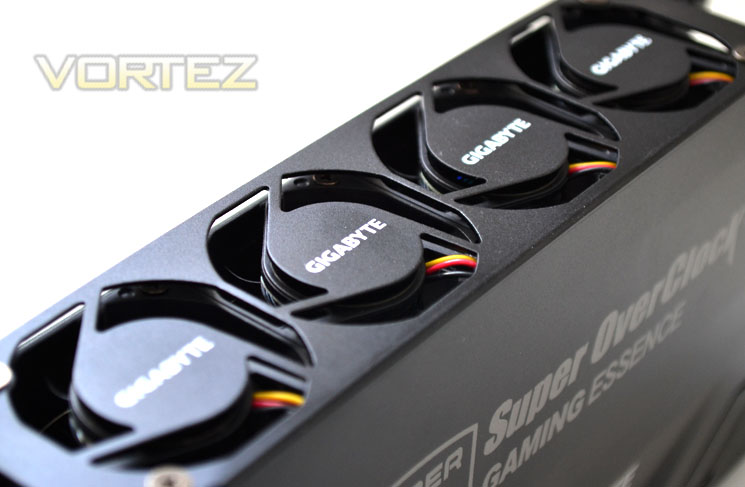
There has been quite the commotion caused by GIGABYTE over their Super Overclock GTX680, not because it is one of the fastest factory overclocked cards available, nor because it is also one of the most expensive single core GPU’s available. The ruffling of many feather came when it was revealed in Taipei to have 5 fans. Yes, that’s right FIVE! Now, I will be the first to admit that when our news reporter first posted this news I assumed it to be some sort of concept that would never see the light of day. Surely GIGABYTE would be insane to release a card which uses 5 small fans to cool a triple slot heatsink, especially when their Windforce x3 card does it so efficiently. Nevertheless, they have released it. It’s available as I type and should you get to see and hold one in person you will appreciate that Super is just one of many adjectives that could be used by GIGABYTE to describe it. Super just doesn’t sit quite right for something so monolithic in appearance. I am relishing this card more than any other at present simply because it promises so much. Can it deliver on those promises though?
Premiun Graphics Cards from GIGABYTE – the Super Overclock SeriesTM
Specification
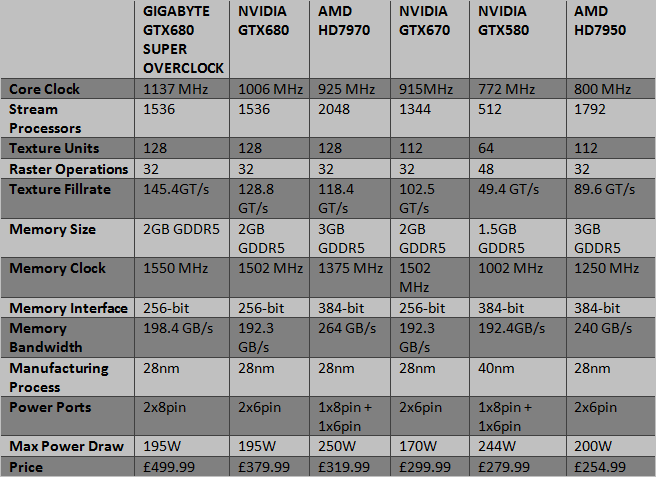
Firstly, comparing the reference GTX680 with its forbear, the GTX580 we see that there are some significant changes. Immediately identifiable are the amount of stream processors which have tripled. from 512 to 1536. The ROPs have however dropped 25% but to compensate the core and memory clockspeeds have been massively increased, with the GTX680 being the clocked slightly above the 1GHz mark and the EVGA version clocked higher still at 1085MHz.
The battle everyone wants to see though is the GTX680 vs. HD7970 and comparing the two cards against one another is a good place to start. On paper at least, the GTX680 appears to have the slight upper hand. Sacrificing a gigabyte of GDDR5 and running with the 256-bit interface, the GTX680 cannot hope to compete in total bandwidth available losing out to both the HD7970 and HD7950 by a fair margin despite having a much higher memory overclock. The tables are however turned when we study the texture fillrate where the GTX680 comes out on top.
One area where NVIDIA are shouting from the rooftops is the power consumption area. with a max power draw of 195W compared to 250W of the HD7970, the GTX680 should save a few more yards of the Brazillian rainforests (and of course cut your electricity bill) than the HD7970.
Price wise there is little to choose between them. The GTX680 is a little more expensive yet only because of the recent price drops of the HD7900 series. At launch, the HD7970 was significantly more expensive.
Overall, looking at the specifications you would be forgiven for thinking that Kepler is not the GPU everyone was hoping for. Sure it has faster clockspeeds but how does that transpire to performance when the core hardware (stream processor count, memory size) is not as impressive as AMD’s?
While the GTX680 did trade blows with the HD7970 in our comparison review, I concluded that ultimately, the GTX680 was the faster card. We have also reviewed factory overclocked HD7970’s which have stole the performance crown back from NVIDIA but overclocked GTX680’s once again saw the crown regained.
Fast forward a few months and we see that AMD have made significant price drops with the HD7970 now around £60 cheaper than the equivalent GTX680. The 7950 is now below the £300 mark too which makes justifying the £400+ for a ever so slightly faster GTX680 ever more difficult. As always though if you want the best then the performance king will always demand a premium.
GIGBAYTE GTX680 Super Overclock
Chipset: GeForce GTX 680
PCB Form: ATX
Base clock: 1137 MHz
Boost clock: 1202 MHz
Memory Clock: 6200 MHz
Process Technology: 28 nm
Memory Size: 2048MB
Memory Bus: 256 bit
Card Bus: PCI-E 3.0
Memory Type: GDDR5
DirectX: 11
OpenGL: 4.2
I/O:
Dual-link DVI-I*1
DVI-D*1
DisplayPort*1
HDMI*1
Digital max resolution: 2560 x 1600
Analog max resolution: 2048 x 1536
Multi-view: 4
Card size: H= 64mm, L=303 mm, W=148 mm
Power requirement: 650 W
The GIGABYTE GTX680 SOC is by far the most expensive card, costing over £100 more than a reference design GTX680 and almost £200 more than a reference HD7970. It is however also by far the fastest (on paper at least) out of the 6 comparable cards in the datasheet. You pay more for a pre-overclocked (and one of the fastest at that) but as we will see, much of the cost is poured into that behemoth of a GPU cooler, the Windforce x5. With such fast pre-overclocked speeds no doubt extra cooling is required but it remains to be seen if this huge cooler has the minerals to do the job. If looks and size are anything to go by then clearly there is no doubt it has but looks are not always everything…
Kepler Architecture
It was two years ago that we saw the introduction of NVIDIA’s Fermi, NVIDIA’s previous architectural change. The GF100 featured 512 stream processors in a 16×32 format built by TSMC in a 40nm process. Sporting OpenGL 4.0 and DirectX 11, enthusiasts climbed over each other to get the latest and greatest GPU from NVIDIA. While the performance was there, power efficiency was very poor with the cards consuming lots of power and running very hot.Enter the 5 series 8 months later and many would say the GTX580 was the card the GTX480 should have been. It was more powerful thanks to the fully unlocked memory controller (6x64bit), ran cooler and thus became a firm favourite among the high end GPU market.
For a little over a year the GTX580 enjoyed sitting atop of the GPU pile (save for dual GPU variants) and it wasn’t until the AMD HD7970 emerged in December 2011 that the GTX580 lost its performance crown. NVIDIA however had not been resting on their laurels…
GTX680 GPU
The successor to Fermi is codenamed Kepler. Listening to feedback of Fermi from gamers around the world, NVIDIA sought to create a graphics card that was not only the best money could buy in terms of performance but crucially it had to run cool and quiet to make for a power efficient model. Kepler addresses these issues in two ways; GPU Boost which we will discuss further in our overclocking section of the review and a redesigned streaming multiprocessor.
Kepler Core
The GTX680 is equipped with a GK104 core which NVIDIA claim is their highest and most power efficient GPU to date. Fabricated on the 28nm process, every component was designed with power efficiency in mind to ensure the GPU gave the best performance-per-watt possible.
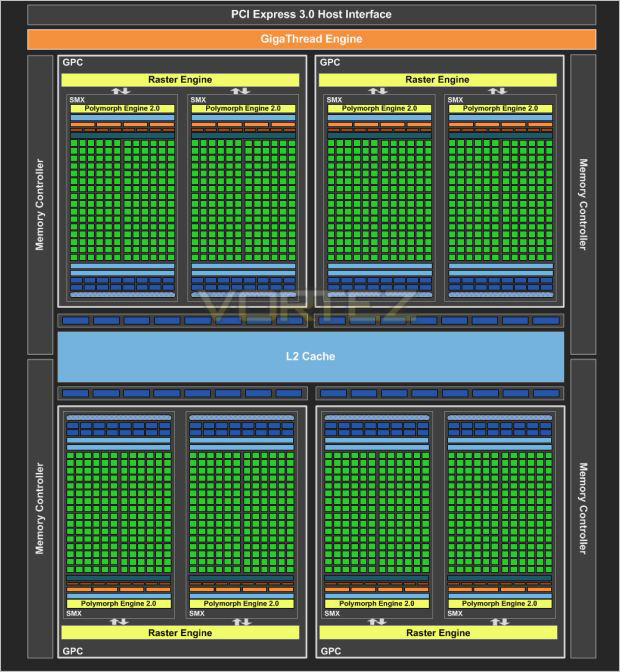
While the 28nm manufacturing process holds the bulk of the power saving features, the way the new architecture works is also key to furthering Kepler’s power reduction. SMX, an evolution of the SM from Fermi is NVIDIA’s new streaming multiprocessor:
The SMX now runs at the graphics clock speed rather than 2x that speed as before but because the GK104 has 1536 CUDA cores (8xSMX), over Fermi’s (GF110) 512 CUDA cores (16xSM), Kepler allows the GTX680 to operate at twice the performance per watt measurement compared to the GTX580.
The clock throughput of FMA2, SFU and texture operations have all been significantly increased and while some operations still retain the same speed as the GTX580, the GTX680’s much higher core clockspeed ensures a substantial increase for all GPU operations.
To feed the new SMX, each unit has four warp schedulers, each capable of firing off two instructions per warp, every clock. With a redesigned scheduling function, the GTX680 is a lot less complex and much more streamlined allowing the compiler to determine which instructions will be issued and can provide this information direct to the hardware block rather than going around the houses using Multi-port decode and a register scoreboard along with the dependency check before the information gets issued. This method is both quicker and more importantly, more power efficient.
Perhaps the biggest change to the processor core is the omission of the old shader clock. The shader clock was getting tired as it was part of the old Tesla architecture which was implemented as an area optimisation. Because of the way Kepler executes instructions at a much more streamlined manner and at a higher clock rate, fewer copies of the execution unit need be made.
Another improvement over Fermi with the introduction of SMX is the redesigned Polymorph engine (2.0). The Polymorph engine takes care of the tessellation workload of the GTX680. The design of the new Polymorph engine is to ensure that the tessellation we see on screen has little (as possible) impact on the rendering performance. What you may find bizarre though is that NVIDIA have cut the Polymorph engine count in half to 8 from Fermi’s 16 yet claim it is almost twice as quick. This is thanks to the improved core an memory clockpeed.
Overall then, it seems NVIDIA have outdone themselves. Higher clockspeeds on both core and memory, 3x the amount of stream processors yet streamlined by eliminating the shader clock to cut the amount of power consumption without compromising overall performance.
The story doesn’t end there though as there are a whole host of features the GTX680 has to offer…
Features
Super Overclock Series™
Serious gamers require serious gear. That’s why we’ve developed the Super Overclock Series. All of the GPUs in these graphics cards have been cherry-picked for top performance, efficiency and reliability. Our innovative GPU Gauntlet™ Sorting selection process ensures that only the highest-performing GPU processors are used in these graphics cards. Coupled with our Ultra Durable VGA boards, users can rest assured that the Super Overclock Series graphics cards won’t let them down as they step onto the digital battleground.
Ultra Durable VGA+
Gigabyte Ultra Durable VGA+ deliver 1.6X purer power than traditional power design and more stable performance.
■ Proadlizer added
■ 2 oz Copper PCB
■ Tier 1 Samsung and Hynix Memory
■ Japenese Solid Capacity
■ Ferrite Core and Metal Chokes
■ Low RDS MOSFET
OC GURU ll
Brand-new instinctive user interface, easier to monitoring and adjusting all important settings. Users can set up MONITORING, GPU CLOCK, MEMORY CLOCK, FAN, GPU VOLTAGE, Memory VOLTAGE, OSD, ONLINE SUPPORT and update driver, BIOS directly.
PhysX Technology
NVIDIA® PhysX™ is the next big thing in gaming!Delivering physics in games is no easy task. It’s an extremely compute-intensive environment based on a unique set of physics algorithms that require tremendous amounts of simultaneous mathematical and logical calculations. The best way to get real-time physics, such as explosions that cause dust and debris, characters with life-like motion or cloth that drapes and tears naturally is with an NVIDIA®PhysX™-ready GeForce® processor. PhysX software is widely adopted by over 150 games, is used by more than 10,000 registered users and is supported on Sony Playstation 3, Microsoft Xbox 360, Nintendo Wii and PC. PhysX™ technology will take gaming to a whole new level.
CUDA Technology
NVIDIA® CUDA™ technology unlocks the power of the hundreds of cores in your NVIDIA® GeForce® graphics processor (GPU) to accelerate some of the most performance hungry computing applications. The CUDA™ technology already adopted by thousands of programers to speed up those performance hungry computing applications.
SLI™ Technology
Delivers up to 2X the performance of a single GPU configuration for unparalleled gaming experiences by allowing two graphics cards to run in parallel. The must-have feature for performance PCI Express graphics, SLI dramatically scales performance on 60 top PC games.
NVIDIA® 3D Vision™
NVIDIA® 3D Vision™ brings a fully immersive stereoscopic 3D experience to the PC. A combination of high-tech wireless glasses and advanced software 3D Vision transforms hundreds of PC games into full stereoscopic 3D. Users can even watch 3D movies and 3D digital photographs in crystal-clear quality.
Microsoft Window7
Microsoft Windows 7 is the next generation operating system that will mark a dramatic improvement in the way the OS takes advantage of the graphics processing unit (GPU) to provide a more compelling user experience. By taking advangate of the GPU for both graphics and computing, Windows 7 will not only make todays’s PCs more visual and more interactive but also ensure that they have the speed and responsiveness customers want.
RoHS Compliant
As a citizen of the global village, GIGABYTE exert ourselves to be a pioneer in environment care. Give the whole of Earth a promise that our products do not contain any of the restricted substances in concentrations and applications banned by the RoHS Directive, and are capable of being worked on at the higher temperatures required for lead free solder. One Earth and GIGABYTE Cares!
Packaging & First Look
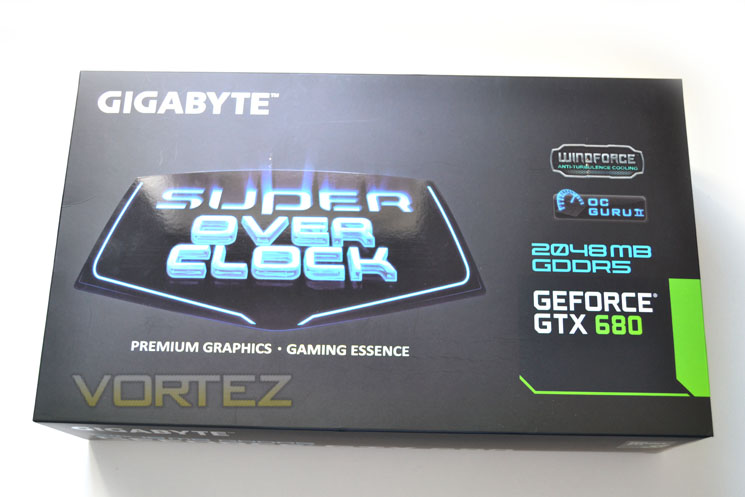
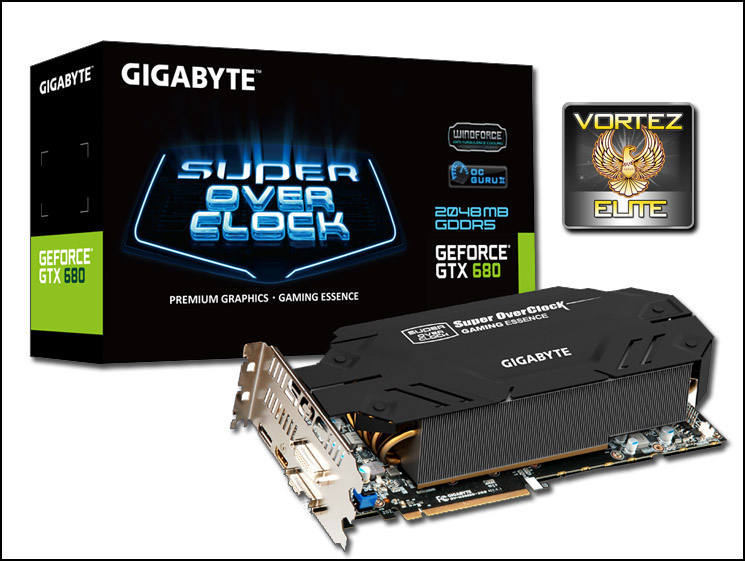
The package comes in the usual inner box and outer sleeve. The front of the sleeve features the re-designed electric blue ‘Super Overclock’ Emblem which dominates proceedings. To the right we see the main features of the card which includes Windforce cooling, OC Guru II and surprisingly only 2GB of GDDR5.
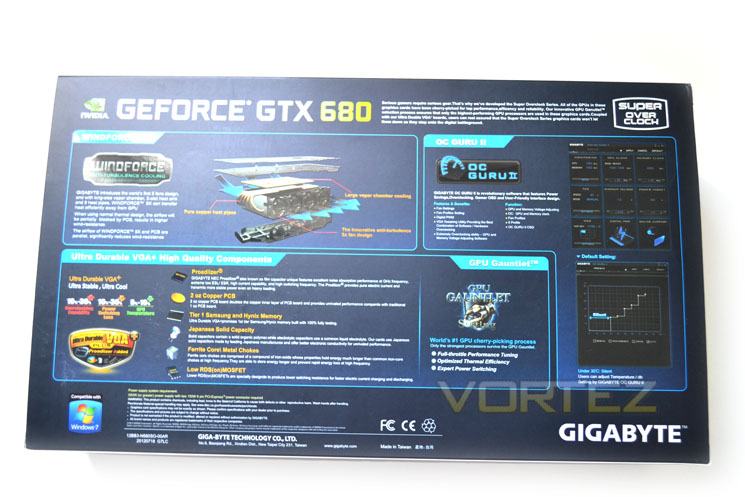
Flipping the box over we see get a good description of the Windforce cooler with a ‘breakout’ diagram. Also shown is the new OC Guru II overclocking software, something we will be looking at later in the review when we set about overclocking the card. As this is a super overclocked card you can expect the best cherry picked silicon thanks to GPU Gauntlet and rounding the product features of is the Ultra Durable VGA+ component feature.
Upon removing the sleeve we find the inner box is a svelt, glossy affair rather than the usual plain cardboard box which goes some way to emphasising that this is not a ‘run of the mill’ product.
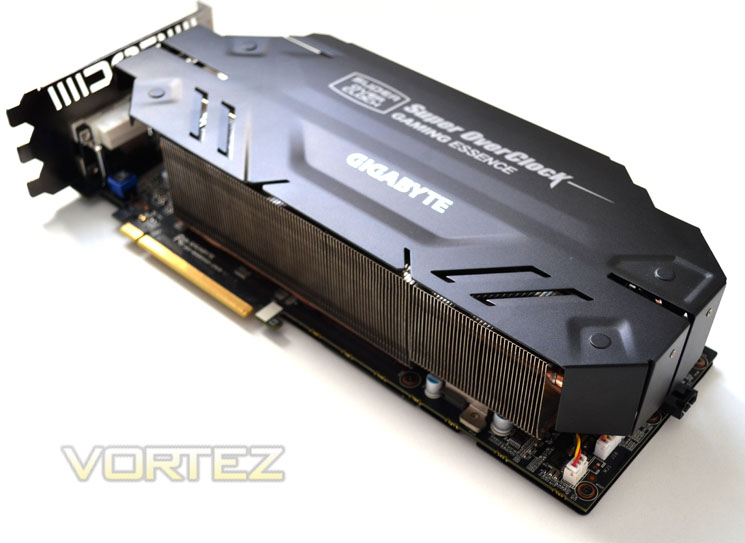
We normally discuss the accessory list on this page however as our sample was an early engineering revision, no accessories were included with our product. Nevertheless, I would expect to see a DVI/VGA adaptor and driver/utility CD and the usual bundle of PCIe power adaptors found in all GIGABYTE VGA products.
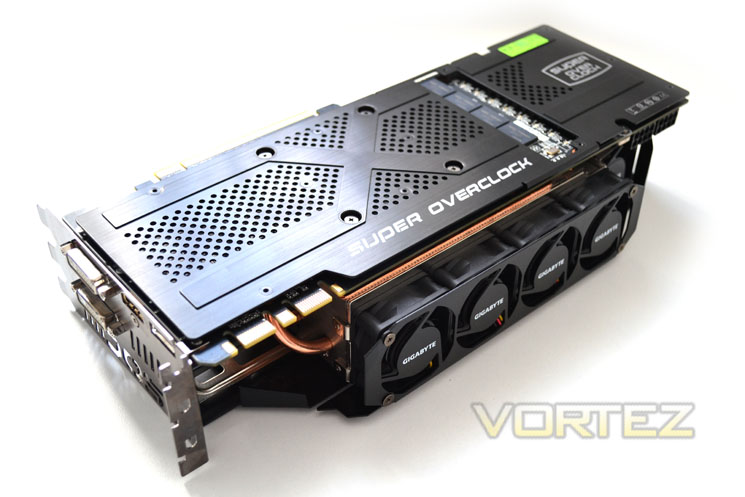
As hinted at already, the card is nothing short of gargantuan! A triple slot cooling design which verges on the bizarre by having 5 small 40mm fans sucking air from the heatsink. Both the backplate and main shroud are coated aluminium (black) which only adds to the domineering presence of this mammoth graphics card.
Time for a closer look…
Closer Look pt.1
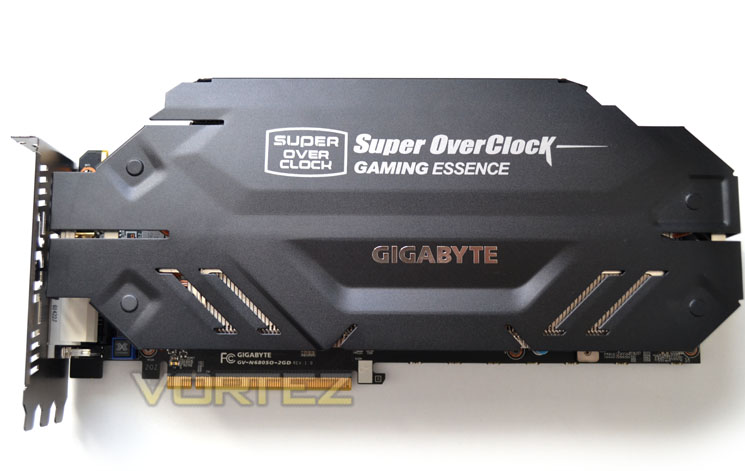
The top of the card features a matt black coated aluminium shroud with cut-outs to assist cooling. As you can see, the card is pretty much ‘full fat’ measuring a chunky H= 64mm, L=303 mm, W=148 mm. Which in laymans terms means this a not only a GPU that will require three PCI spaces but it is also significantly wider due to the cooling design with the fans being placed on the side of the card.
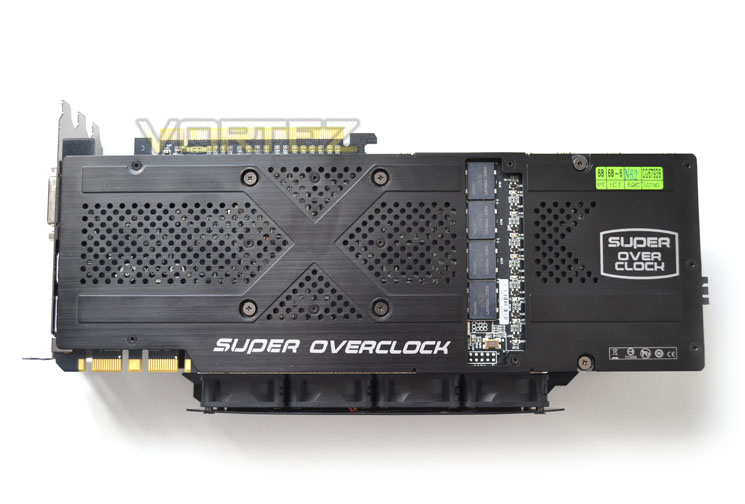
I do like a GPU that has a nice looking backplate and the GIGABYTE GTX680 SOC is one such card which has a full length ventilated affiar. There’s a small cutout to show off those Prodalisers and 8 Phase LED’s (Green) which glow up depending on the amount of load the card is enduring.
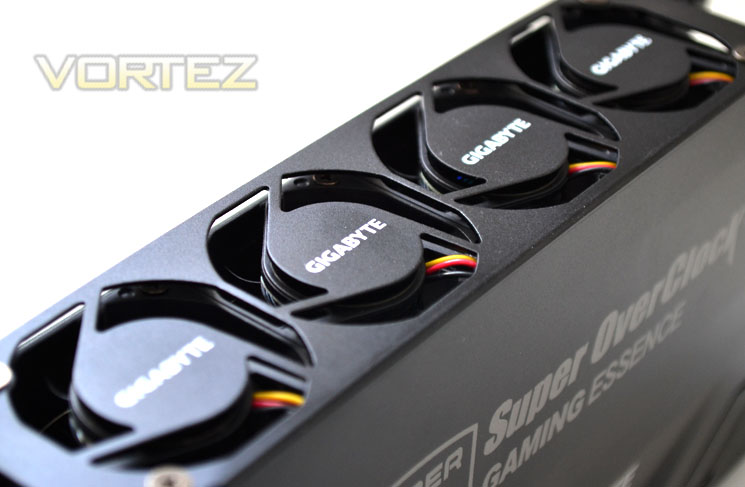
Perhaps the biggest feature of the card is also the most unusual – the Windforce x5 cooling. Instead of having fans which either blow down or suck away from the GPU with the fans positioned uppermost, the GIGABYTE SOC has 5x40mm ‘Anti Turbulance’ fans which draws air away from the cards side – a first that we have seen. I do worry that having 40mm fans will raise the decibels somewhat however judging by the heatsink size, hopefully the rpm won’t be so high that my ears begin to bleed!
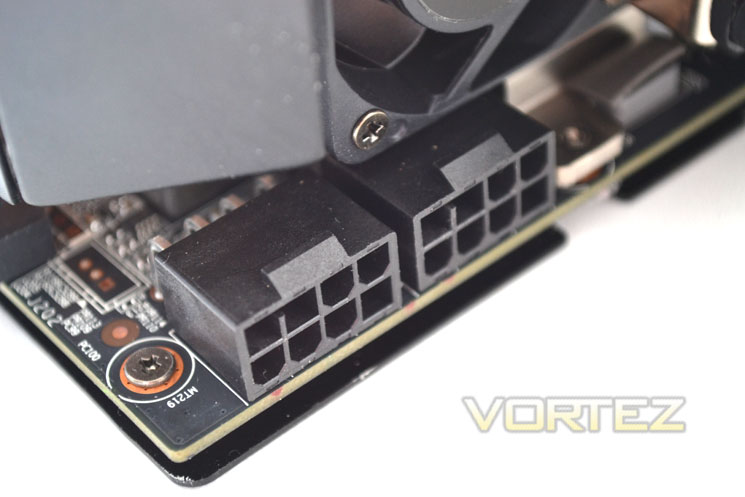
Another oddity is the inclusion of 2x8pin PCIe power ports, especially since the reference design only uses 2x6pin. I would like to think that this card needs 2x8pin power ports but given NVIDIA restrictive voltage control, unless GIGABYTE have found a way to unlock this or flat out disregard NVIDIA’s rigid power specifications then this area certainly seems overkill. Regardless, GIGABYTE recommend a PSU capable of 650W with 2x8pin powers ports. If I have my math right 2x150w + 75w from the PCIe port equates to 375W – surely this card does not consume so much power or require it?
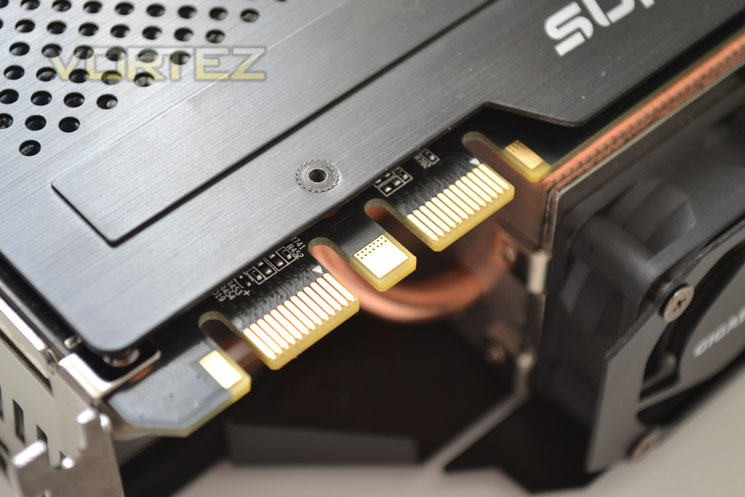
The GTX680 SOC, like every GTX680 is capable of multiple card configuration given that it has 2xSLI tabs.
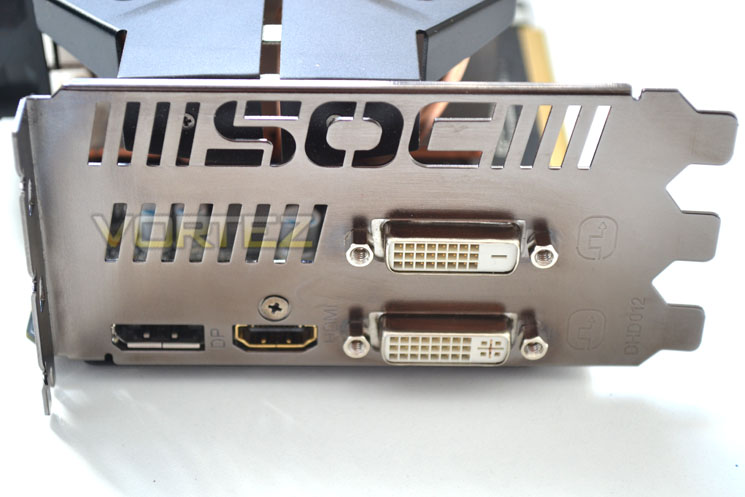
The card features DVI-I and DVI-D ports along with a DisplayPort and HDMI port. Coupled together, 4 screens can be used off this card. A nice touch was the SOC cut-out to assist in ventilation.
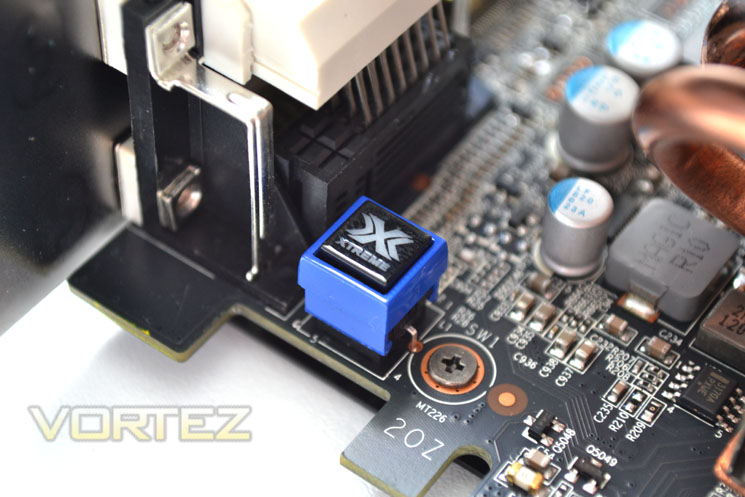
The Xtreme button is hidden away near the PCIe fingers making switching BIOS’ very difficult once the card is installed. Why GIGABYTE placed it here only they can say. Nevertheless, it gives the user two different BIOS configurations should you like to tweak the default settings of the card.
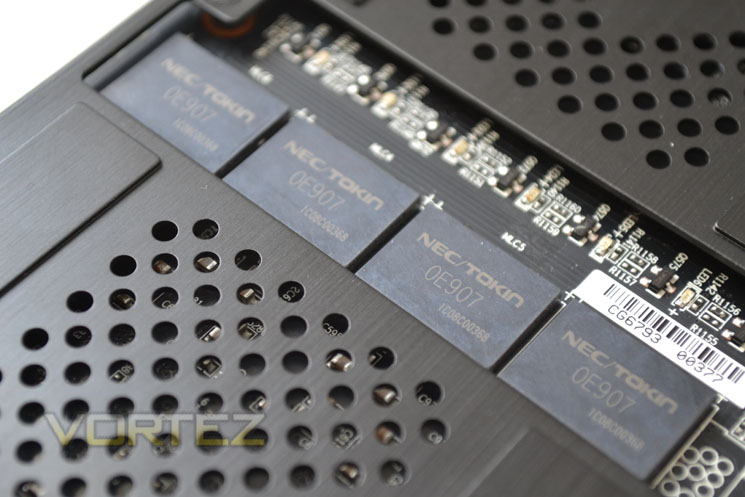
The GTX680 SOC has 4 Proadlizors (film capacitors) which are capable of extremely low ESR/ESL while affording high current/frequency switching.
The Ultra Durable Proadlizors brings us neatly onto the next section of the review – disassembly!
Closer Look pt.2
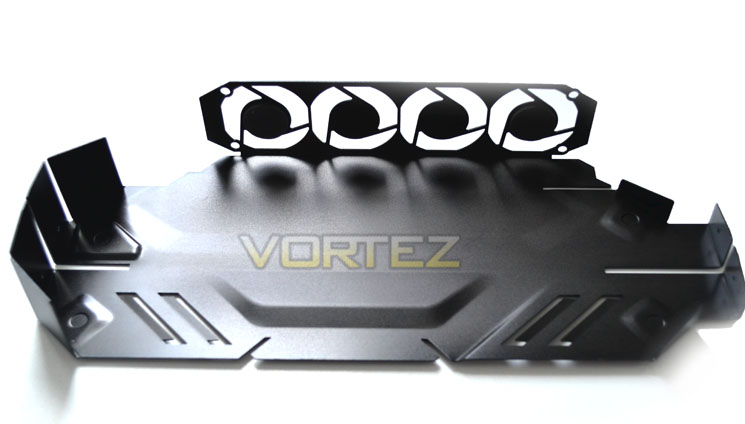
Taking the GPU apart was a little more complex than usual due to the backplate being attached GPU side however if you take your time (which no doubt you will with a £500 card), it is not rocket science. Once you have the shroud off it’s pretty much plain sailing.
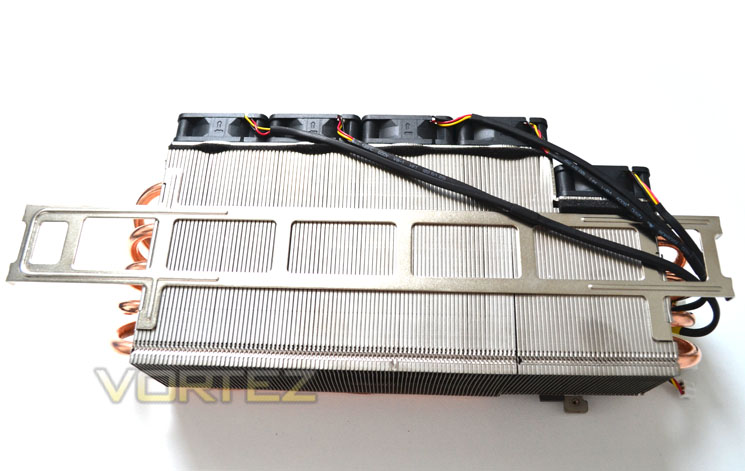
Here we see the top of the heatsink with the fins of the aluminium blades folded over to assist airflow and reduce noise. Nine thick copper sintered heatpipes spread out from both sides of the cooler to assist with heat dissipation.
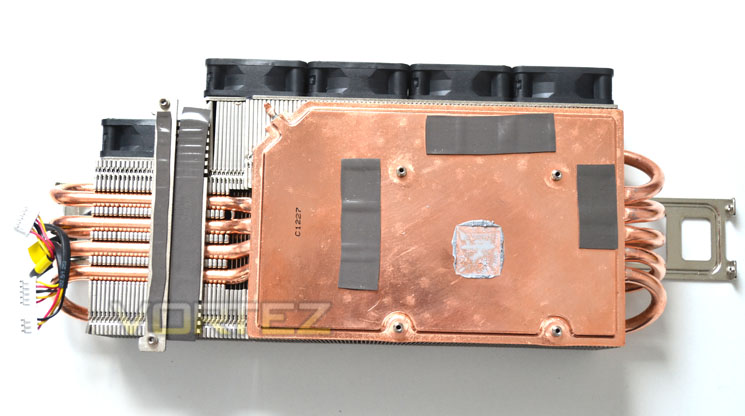
Beneath that huge heatsink sits an oversized, full copper vapor chamber which the heatpipes are soldered to. The cooling works by heat being transfered from the vapor chamber, through the heatipes to be spread out over the aluminium finned heatsink array. The heat is then sucked out from the heatsink by the five 40mm fans, a unique if somewhat unusual design.
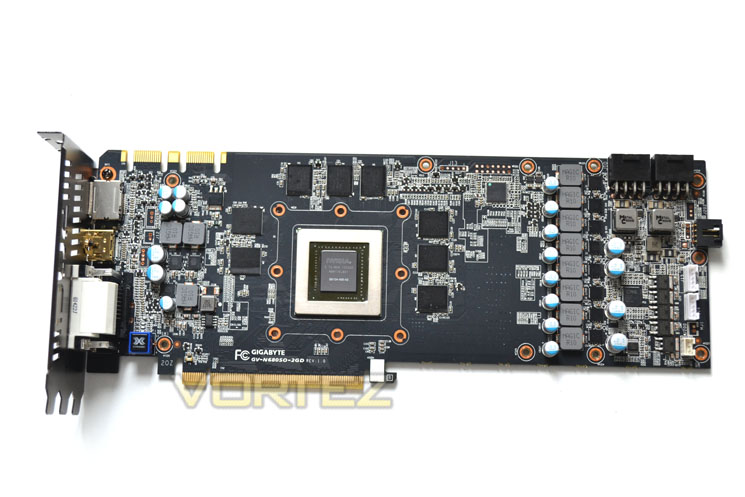
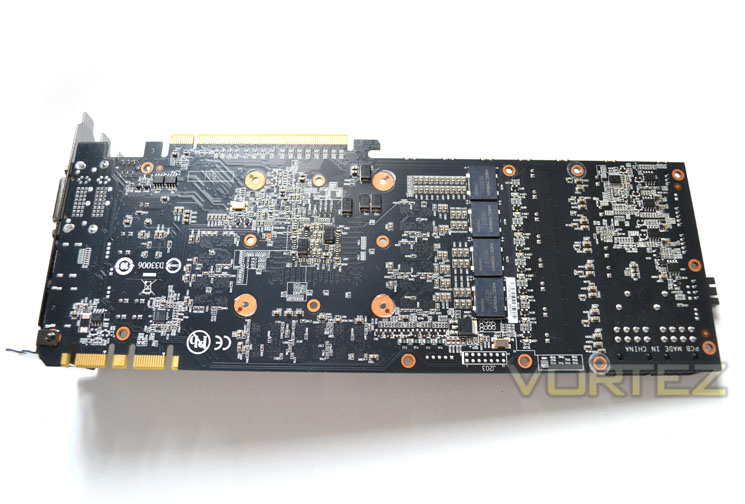
The design of the PCB is excellent. For starters it’s black (not dark brown) which is always a good thing. Hidden beneath the PCB is a 2oz copper layer providing better performance than traditional 1oz copper PCB’s. The main power regulations is right where you want it (closest to the power ports) and the usual affair of having memory chips surrounding the GPU core is no different from any other GTX680.
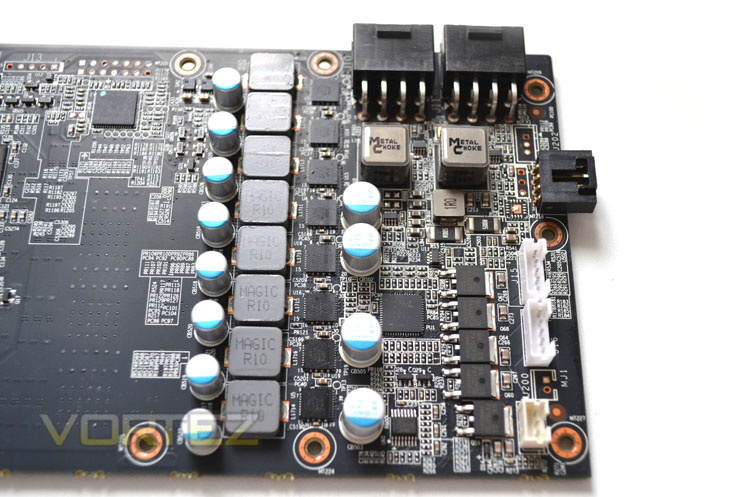
The voltage regulation comes courtesy of an 8+2+1 affair which is the highest we have seen in a GTX680 to date. Ferrite Core chokes are paired with Low RDS(on)MOSFET and solid Japanese capacitors for the very best in power efficiency and durability.
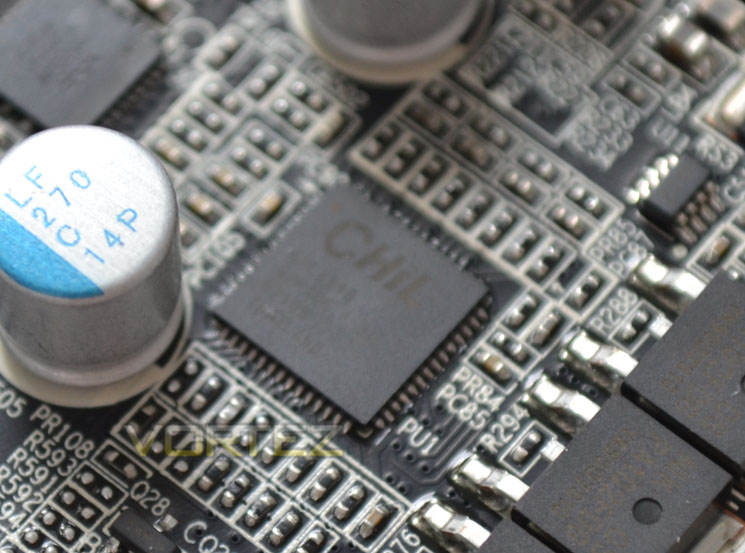
The CHiL controller of this card allows us to change both the frequency and voltage of the GPU core speed along with the frequnecy of the memory. Uniquely, the GIGABYTE GTX680 SOC is the first of its kind that allows us to adjust GPU and memory PWM frequency too from 400-1GHz. All of sudden that extra cooling is starting to make sense!
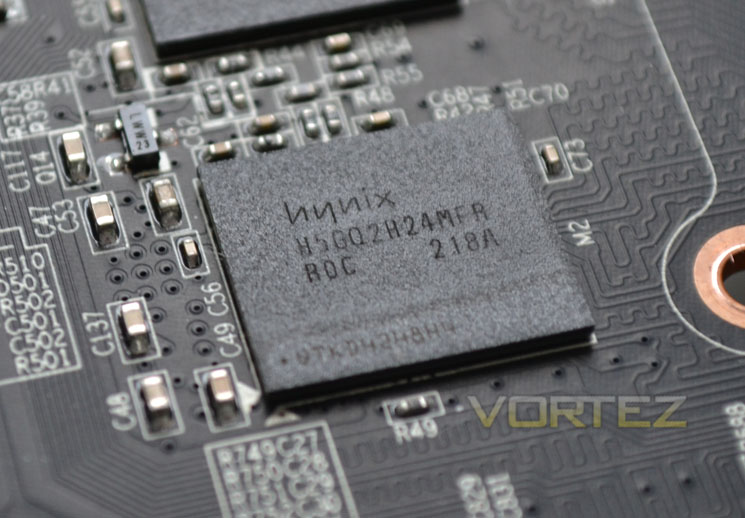
GIGABYTE have chosen HYNIX for their memory provider. The usual H5GQ2H24MFA ROC code is found which equates to 6GBps at 1.6v. I’m sure there is plenty left in the tank their though.
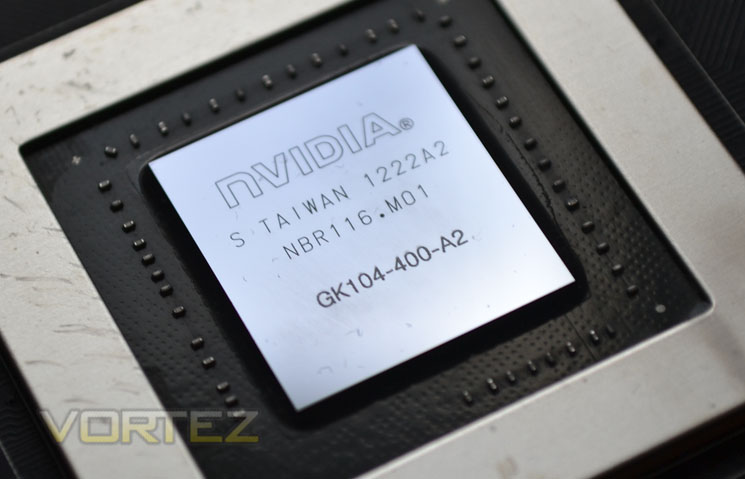
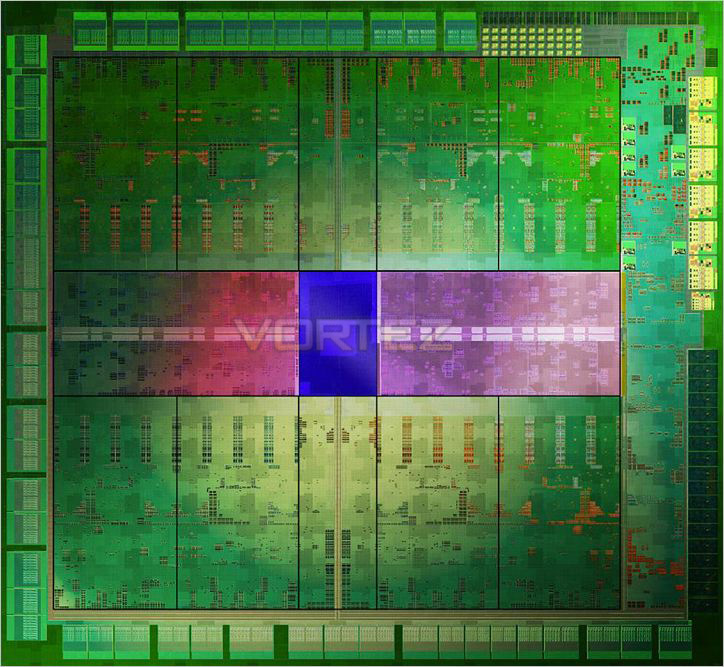
Here we see the core of the GTX680, the flagship Kepler GK104. We have waxed lyrical about this sliver of silicon many times so if you don’t know just how good this core is then feel free to read anyone of the many GTX680 reviews we have written.
Test Setup
With the latest Intel chipset release we decided to update our ageing X58 setup to the new X79 chipset. Not only that but we will be using the flagship Core i7-3960X Extreme Edition processor clocked to 4.5GHz to ensure we have no CPU bottlenecks. With 16GB of ram on board there should be minimal paging so the benchmarks we run today will hopefully give a true reflection of the graphics card’s performance.
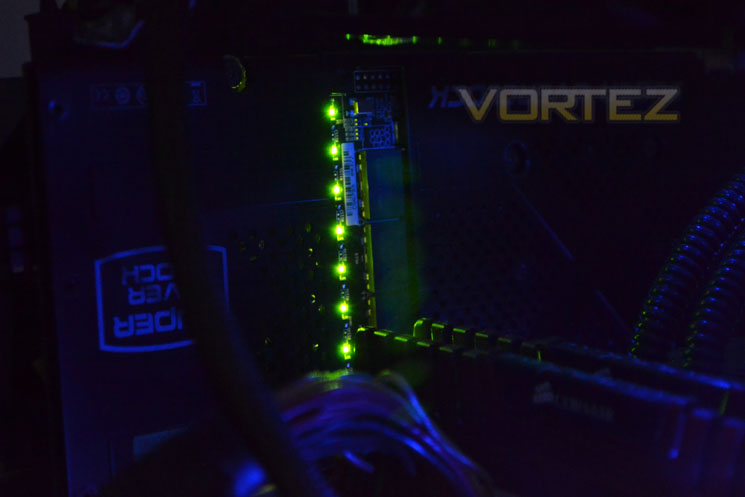
Some of the components for our test bench were kindly donated by CORSAIR who provided the majority of components without whom we would not have been able to bring you this review so a big thanks to them.
Graphics cards on test:
MSI GTX680 Twin Frozr
ZOTAC GTX660Ti AMP! Edition
MSI R7870 Hawk
EVGA GTX680 SuperClocked Signature
GIGABYTE GTX680 Windforce
NVIDIA GTX670
HIS HD 7870 IceQ Turbo
MSI HD 7870 Twin Frozr III OC
GIGABYTE HD7850 OC WindForce x2
ZOTAC GTX680 2GB GDDR5
AMD HD7870 2GB GDDR5
Zotac GTX580 AMP2! 3GB GDDR5
XFX R7970 Black Edition 3GB GDDR5
XFX R7770 Black Edition ‘S’ 1GB GDDR5
AMD HD7750 1GB GDDR5
AMD HD7770 1GB GDDR5
HIS HD7970 3GB GDDR5
XFX DD Radeon R7950 3072MB GDDR5
PowerColor PCS+ Radeon HD7950 3072MB GDDR5
AMD Radeon HD7950 3072MB GDDR5
AMD Radeon HD7970 3072MB GDDR5
ZOTAC GTX570 AMP! 1280MB GDDR5
NVIDIA GTX570 1280MB GDDR5
MSI GTX560Ti-448 Twin Frozr III 1280MB GDDR5
MSI GTX560Ti-384 Twin Frozr III 2GB GDDR5
AMD HD6990 4GB GDDR5
***NOTE*** Pre-release Forceware drivers (305.37) were used with the ZOTAC GTX660Ti.
Motherboard: MSI X79 Big Bang X-Power II
CPU: Intel Core i7-3960X Extreme Edition @ 4.5GHz
RAM – 16GB (4x4GB) Corsair Vengeance (Red) DDR3 @ 1866MHz 9-10-9-27
Power Supply – ANTEC High Current Pro 1200W
Hard Drive – Kingston HyperX 240GB
Cooler – Corsair H100
Benchmarks
We have also updated our range of benchmarks to include the following games which will give the graphics cards a challenge and sort the wheat from the chaff. Each benchmark will be run at both stock and maximum overclock settings and utilise 1920×1080 and 2560×1600 resolutions along with AA at various levels (application dependent):
Crysis 2
Crysis Warhead
Metro 2033
Batman: Arkham City
Elder Scrolls: Skyrim
DiRT 3
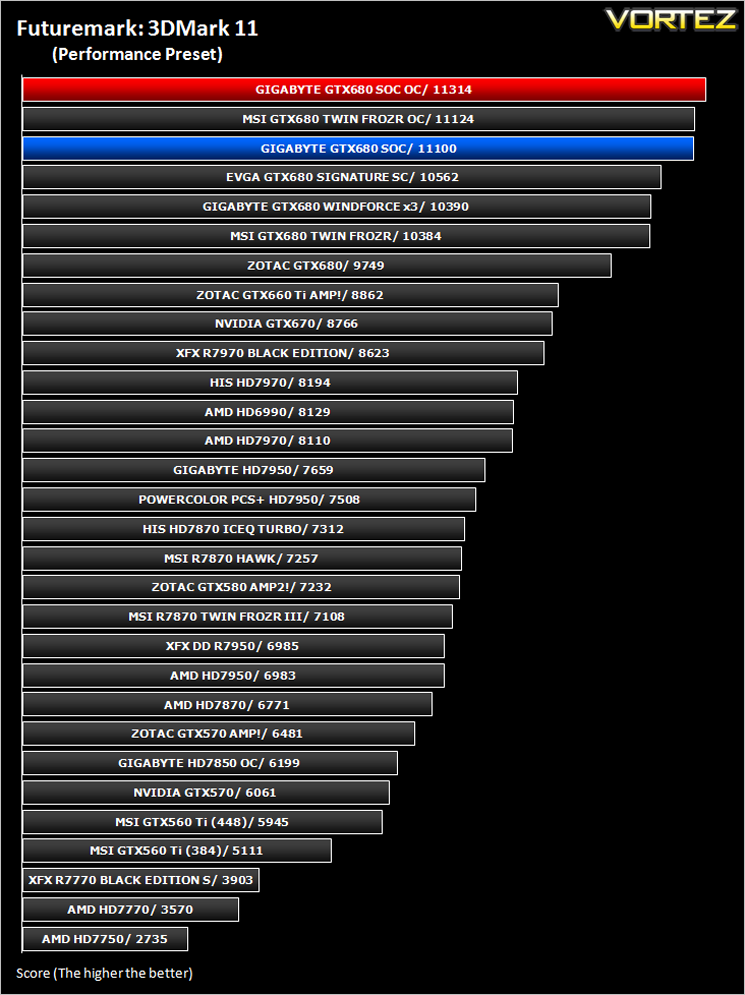
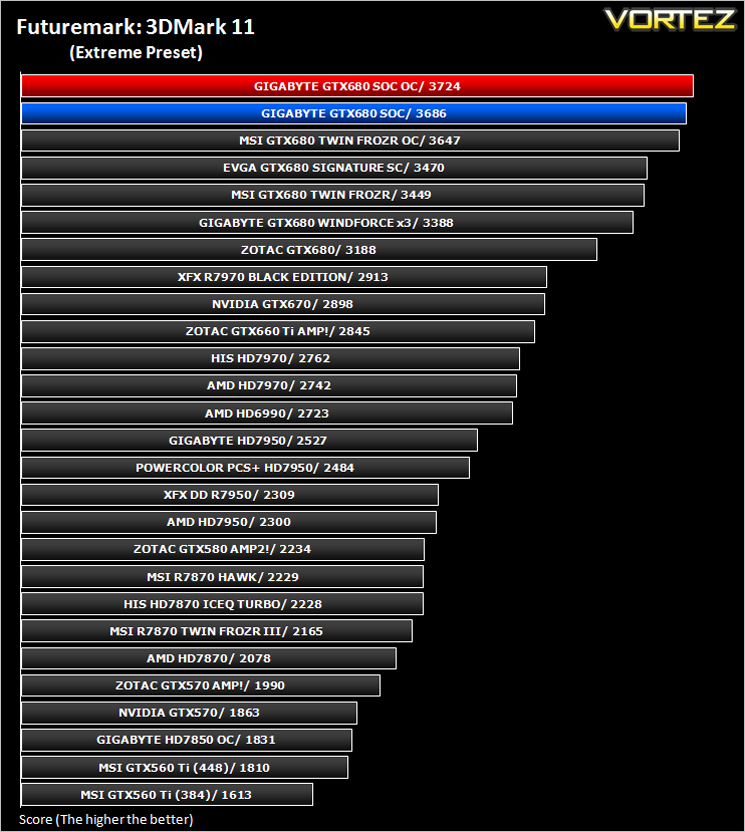
Futuremark 3DMark 2011
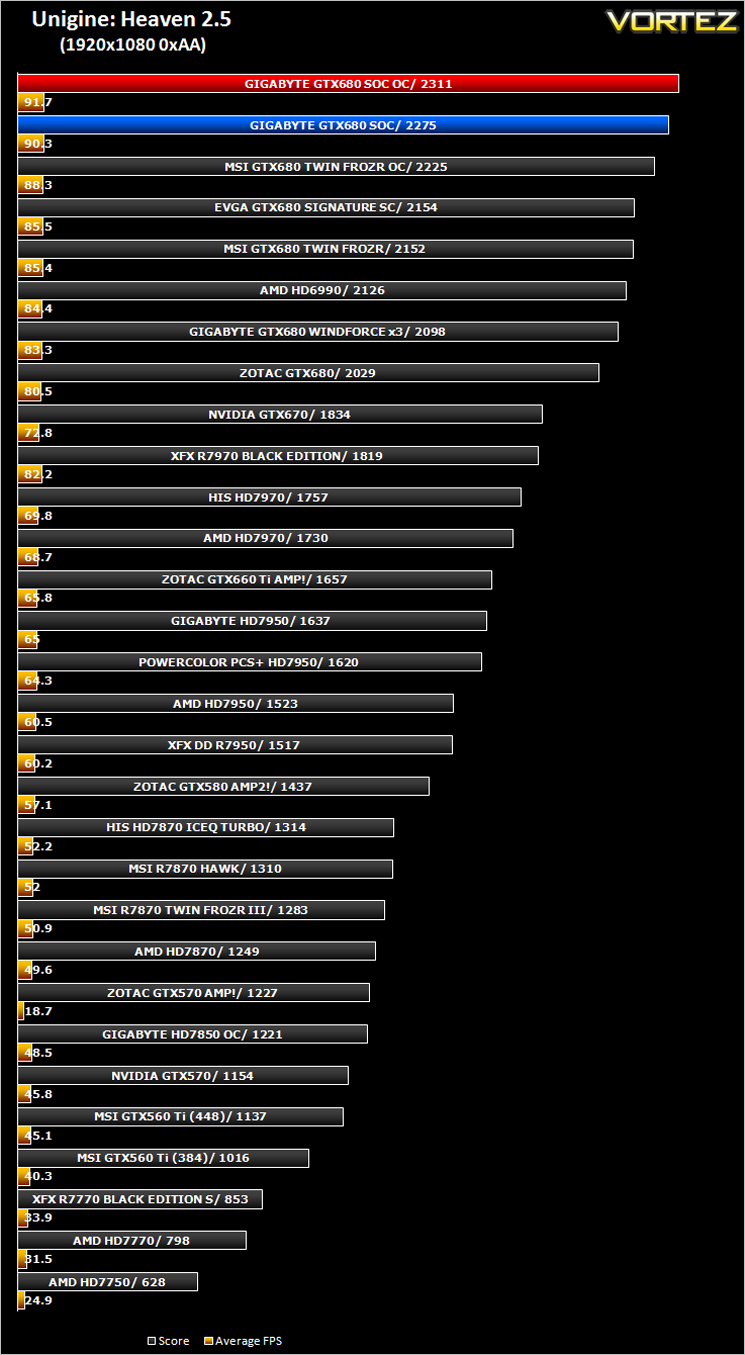
Unigine: Heaven 2.5
Let’s see how today’s graphics card performed…
Overclocking – OC GURU II
VGA @ BIOS
Before cracking on with the overclocking I thought it would be worthwhile to discuss GIGABYTE’s new VGA @BIOS tool.
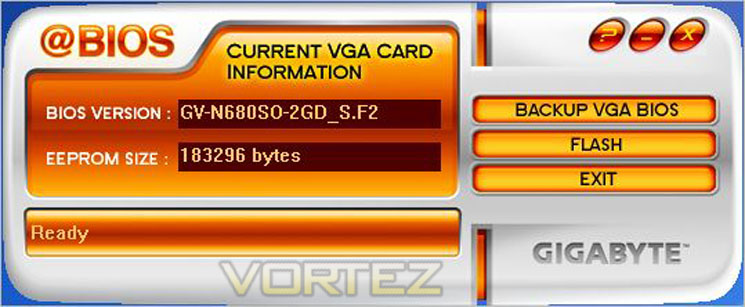
This neat little tool takes the hassle out of using Nibitor and NVFlash to flash a video cards BIOS. While basic and not accepting .rom files it does the job sufficiently. Sadly, there is no force flash option to flash the card to a BIOS of another manufacturer, it easily flashed our card to the latest retail BIOS and ensured the card we were testing was that identical to retail (it shipped with en ES BIOS).
OC GURU II
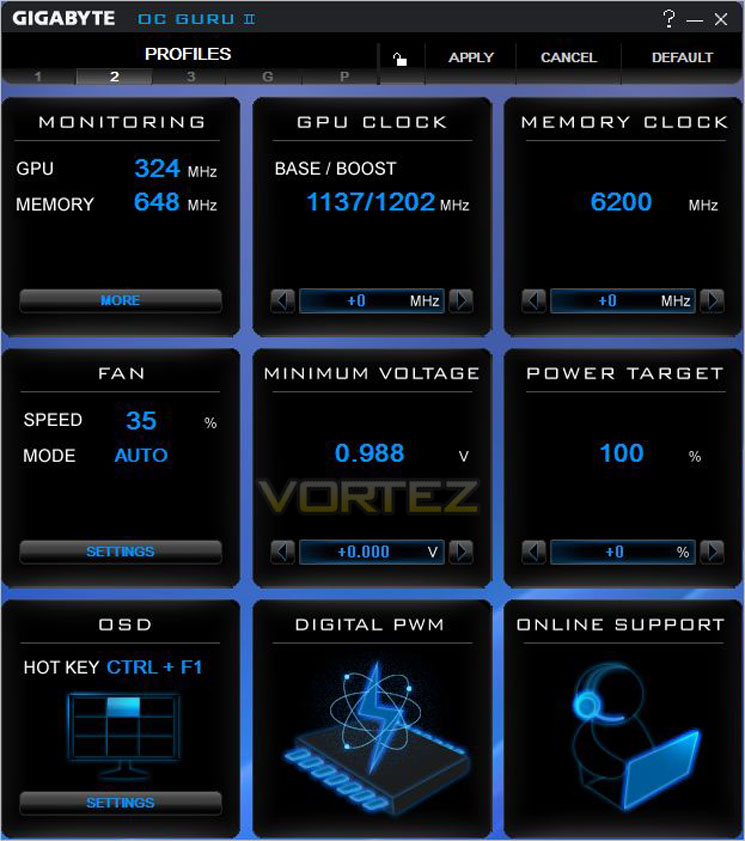
Another new piece of software is GIGABYTE’s updated version of their overclocking utility – OC GURU II. This software works much the same as most other VGA overclocking utilities with sliders to adjust the frequency and voltages and a pop up which shows the current temps, fan speed and load.
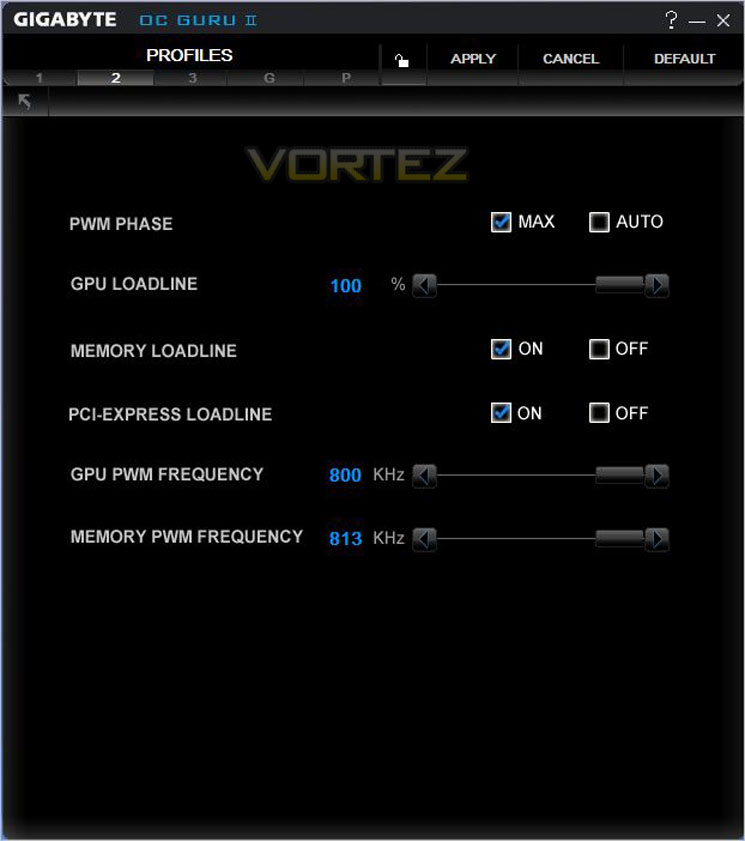
Should your GPU be compatible, you can also adjust the PWM switching frequency which may assist in stabilising overclocks – a first that we have seen!
On with the overclocking. Overclocking via NVIDIA’s GPU Boost was covered in our ZOTAC GTX680 review so I won’t go into detail here on the attributes and pitfalls of using this method to overclock a GPU. Suffice to say it is relatively easy to use if somewhat a little awkward when determining the weak link in an overclock.
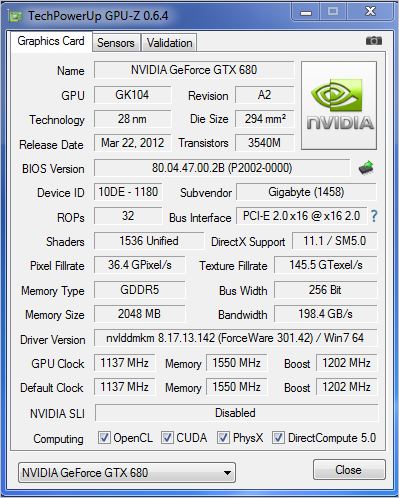
The GIGABYTE GTX680 SOC comes heavily clocked from the factory with the core set at a blistering 1137MHz (1202MHz Boost). The memory has a conservative overclock too, clocked at 6200MHz (effective).
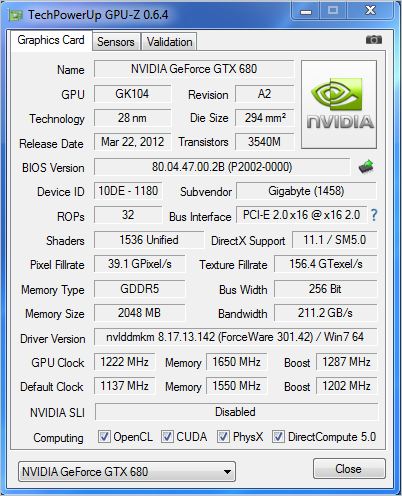
After a considerable amount of time I managed to stabilise the core speed at 1222MHz resulting in a mammoth Boost overclock of 1287MHz! Our fastest yet. The card did hit the magic 1300MHz however the card showed signs of instability in Heaven benchmark sadly so I had to back off a little. Regardless, 1287MHz is a fantastic achievement and as you will see, this clockspeed did little to stress the gigantic cooling capability of the card.
Temperature, Acoustics and Power Consumption
Power Consumption
To test for power consumption we do not use anything too technical, just a wall meter which measures the total system power draw minus the monitor.
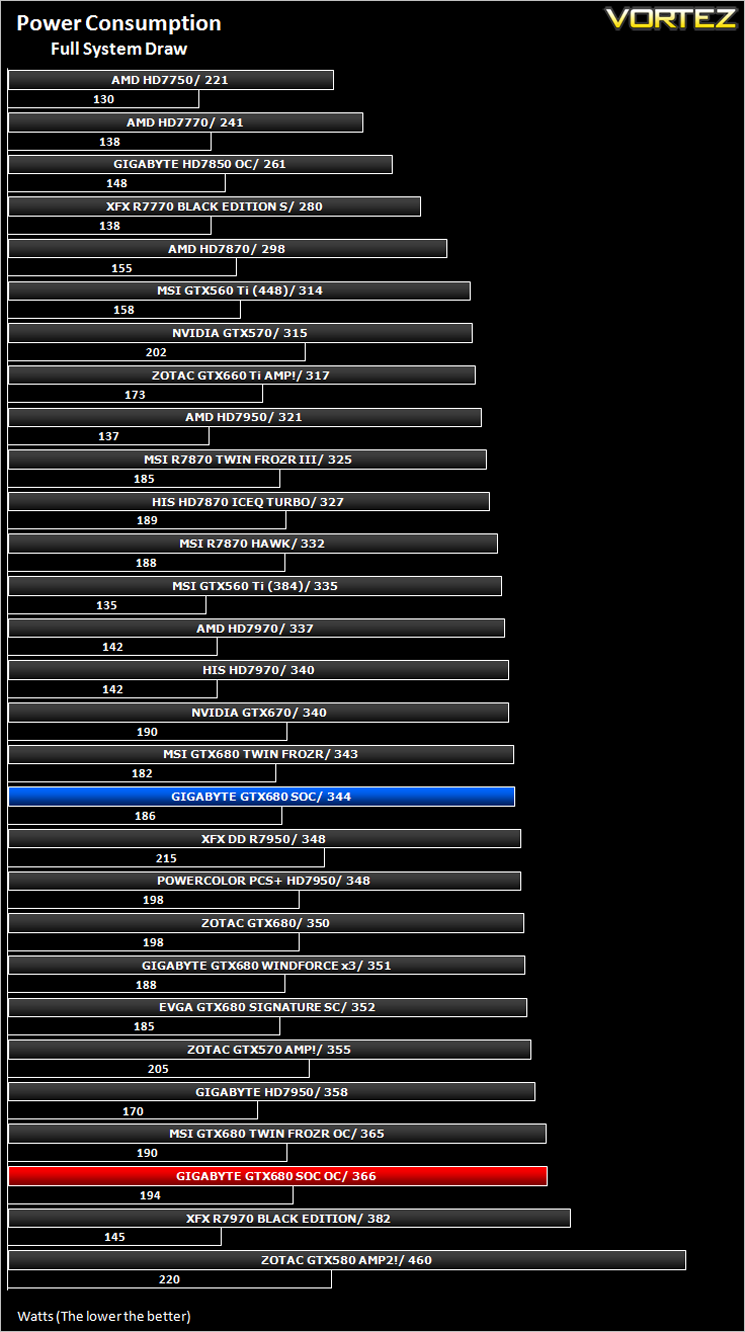
The GIGABYTE GTX680 SOC was mediocre in the power consumption stakes at reference clockspeeds. Thought should be given to the fact that this was the highest clocked GTX680 on test at reference speeds though so it actually compares quite well.
Temperature
To test temperatures we measured idle temperatures after booting windows, letting all applications finish loading and ran a few benchmarks. Once the benchmarks were complete we left the card to reach a cooling plateau where we then took the idle temperatures. For the load tests, we would normally run Furmark for 20 minutes, taking the absolute maximum temperature attained however we found that this throttled the card and resulted in spurious results. So we set Heaven running continuously for 20 minutes and used this as a temperature result as the card did not throttle with this application.
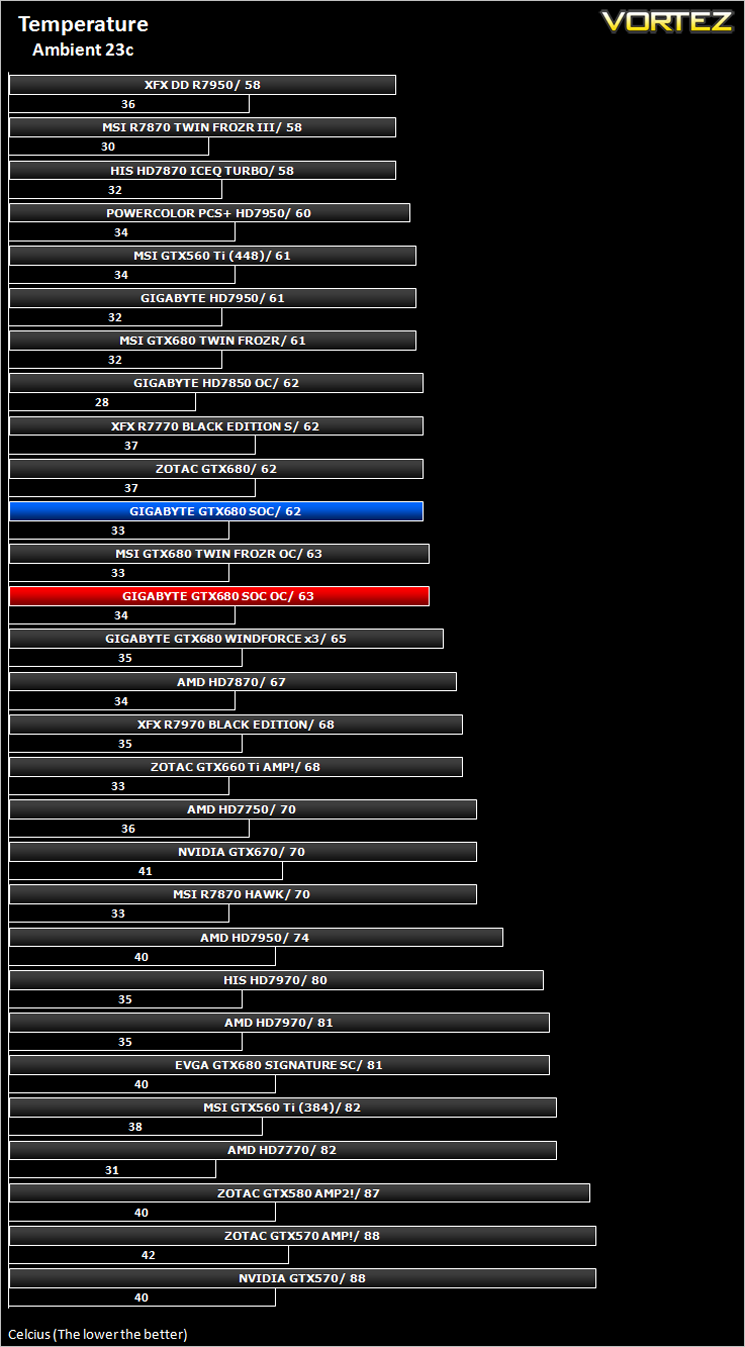
Being by far and away the biggest GPU cooler we have tested to date, the GIGABYTE GTX680 SOC ‘Windforce’ cooler performed extremely well, managing just 62c when under load (Furmark) at reference clockspeeds. This value only increased by a single degree when overclocked which is testament to such a fantastic piece of cooling engineering. It’s not all good news though…
Acoustics
Having 5x40mm fans, the GTX680 SOC is anything but quiet. While it is not too intrusive when idle or load, it is the tone of the noise which begins to grate. The fans sound ‘whiny’ under both idle and load conditions, made worse because when idle, this tone is constantly changing with the automatic speed of the fans. Sure, you can set a permanent figure to eradicate this but you will need to go back in the profile to adjust again for gaming purposes unless you want to experiment with various fan profile settings.
So, the fears are borne true I’m afraid. While this card will not make your ears bleed, it is like a whining child who can’t get their own way so while it may cool very well, it does so at great acoustic cost.
Let’s move on to our suite of gaming and synthetic benchmarks…
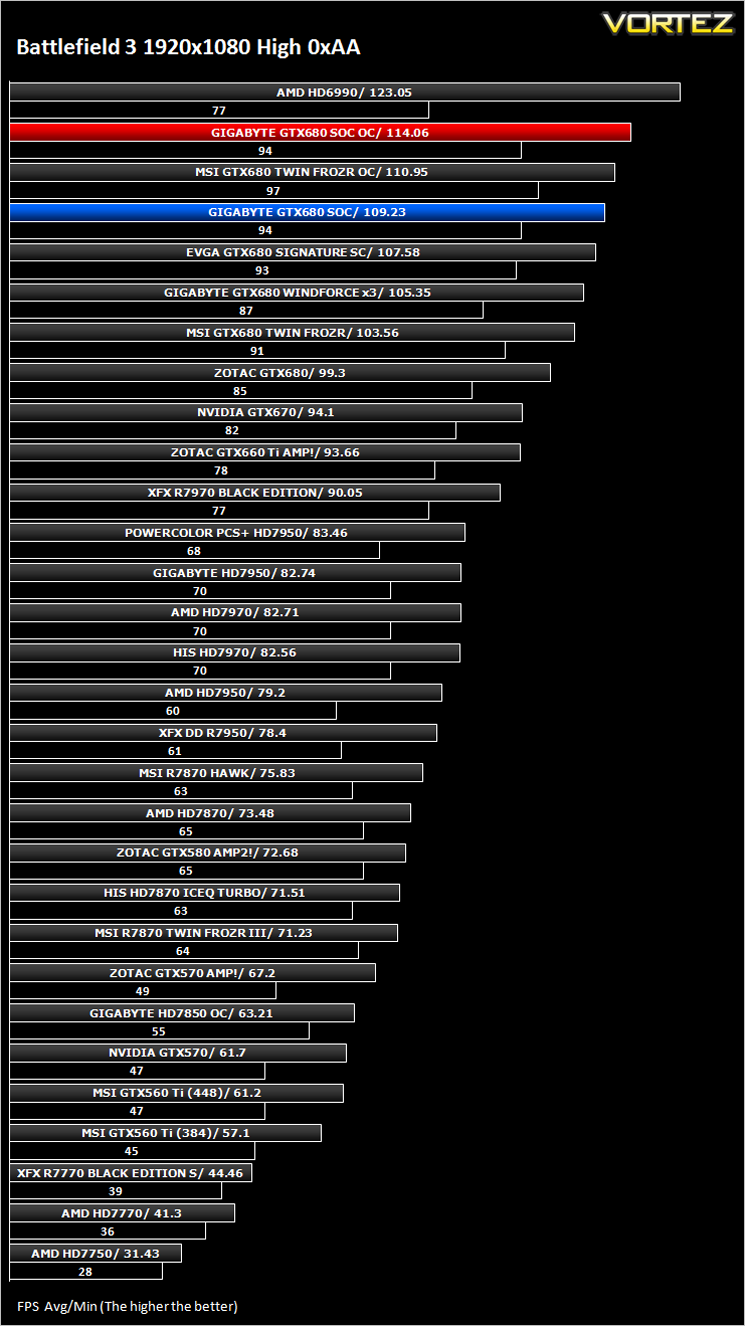
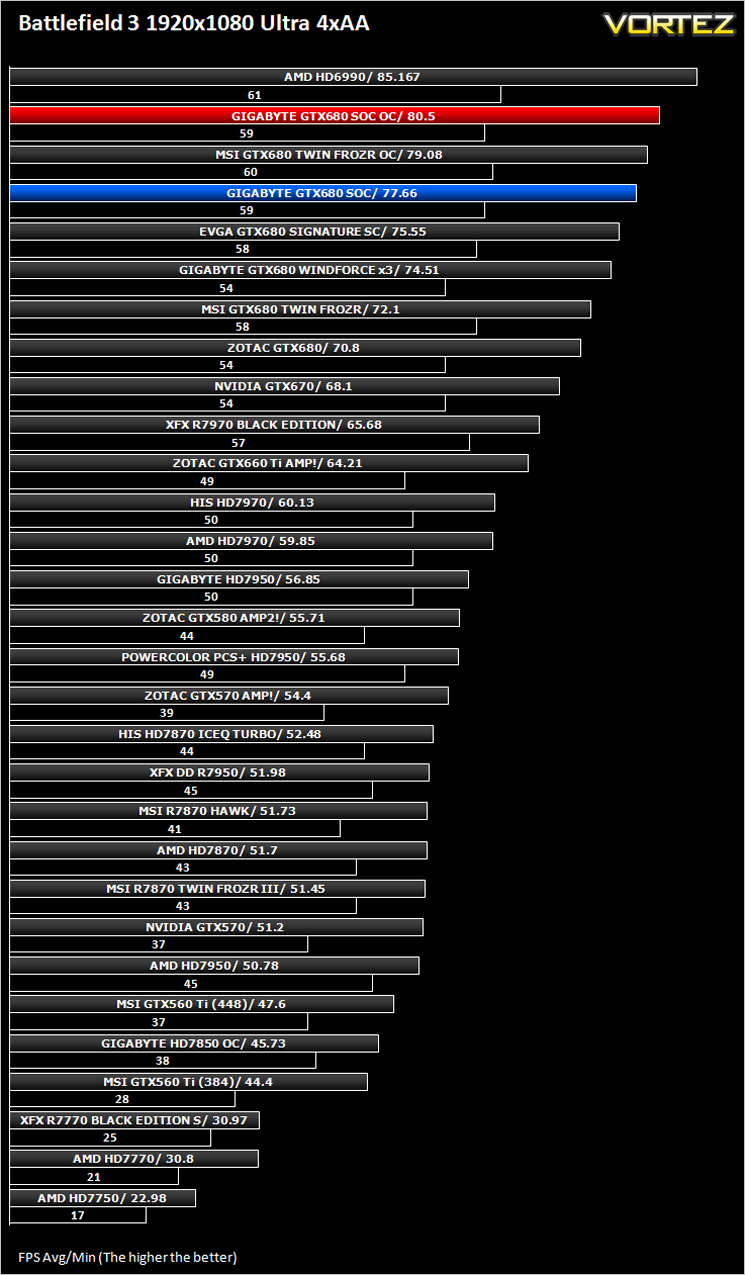
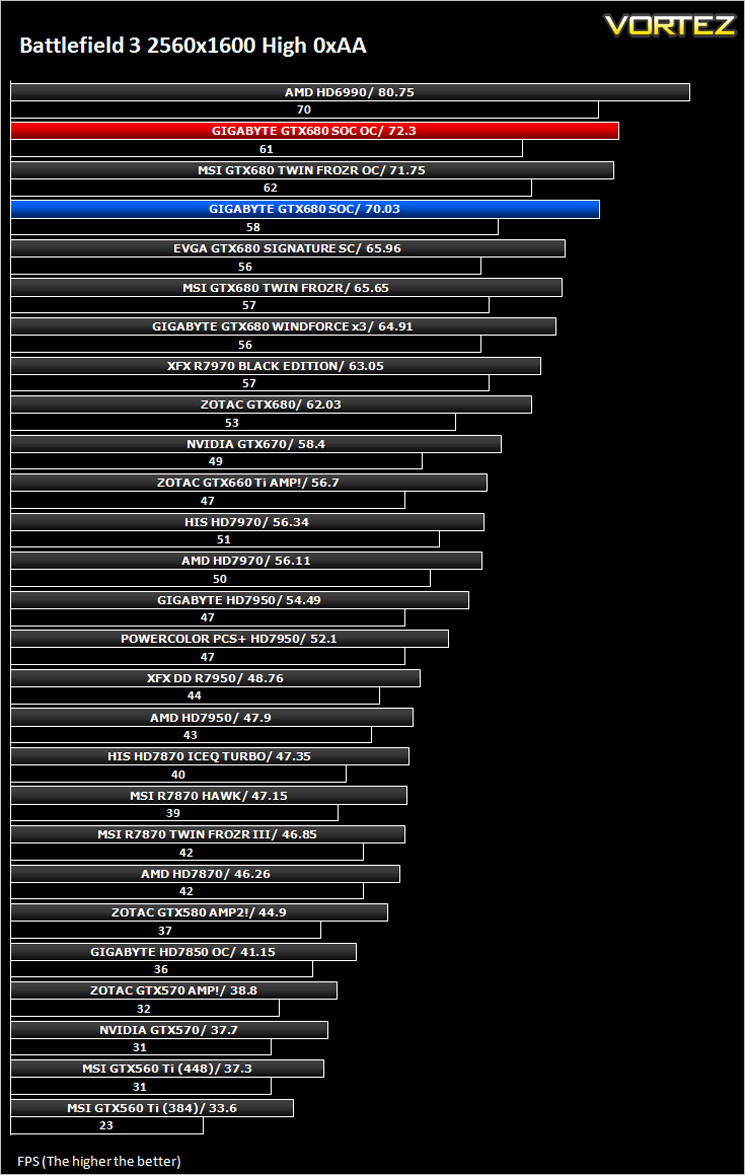
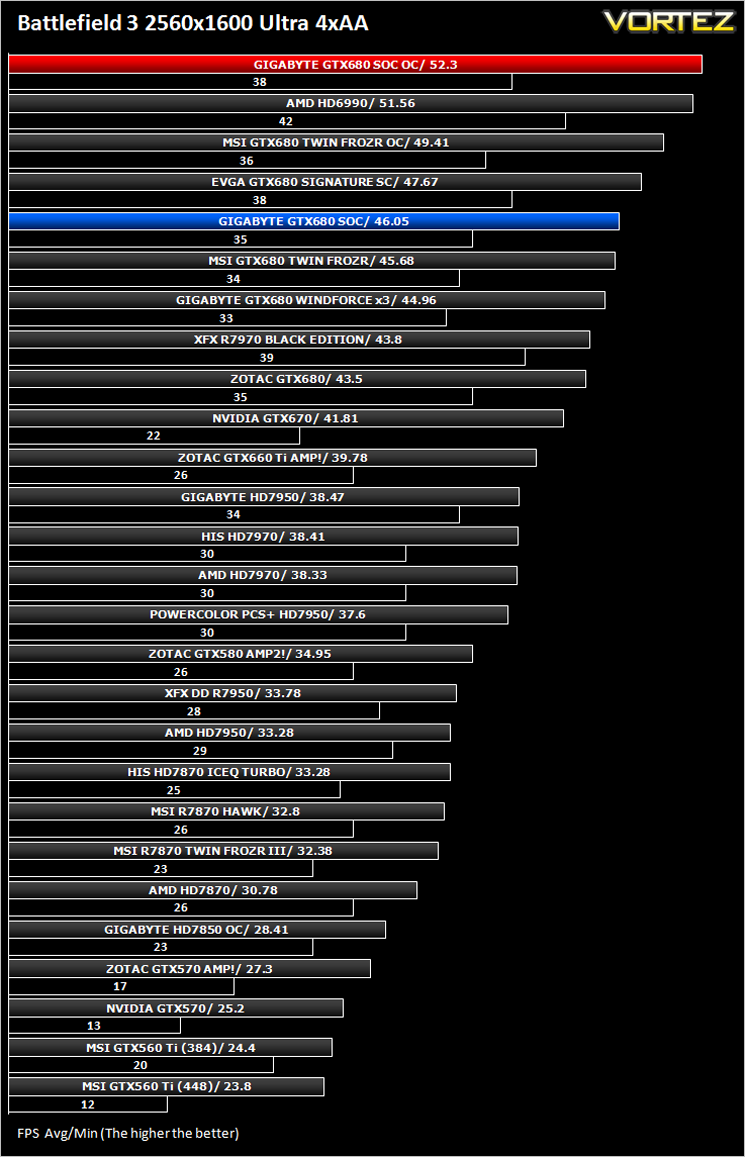
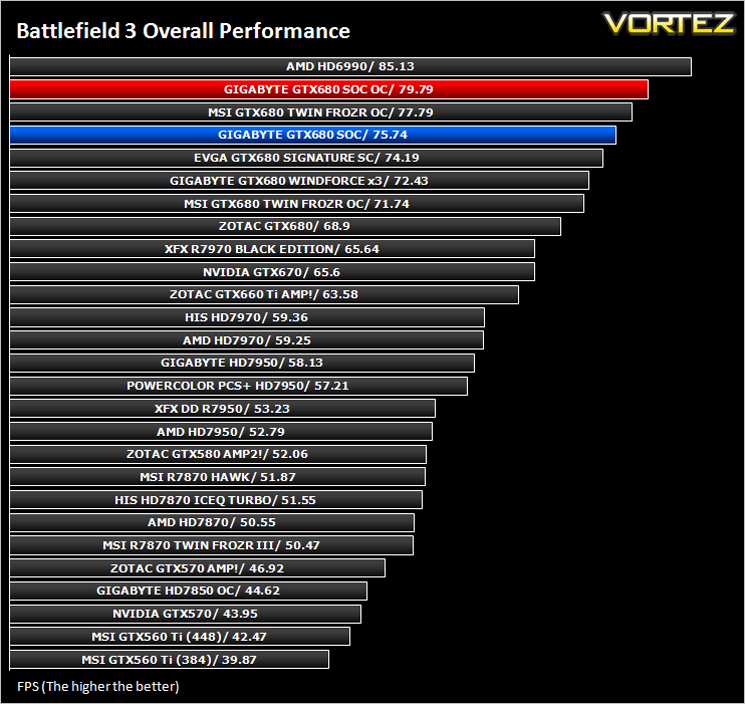
Battlefield 3
Average and minimum frames per second were measured using Fraps during the parking lot scene on Operation Sword Breaker. High and Ultra presets were loaded at both resolutions.
Crysis 2
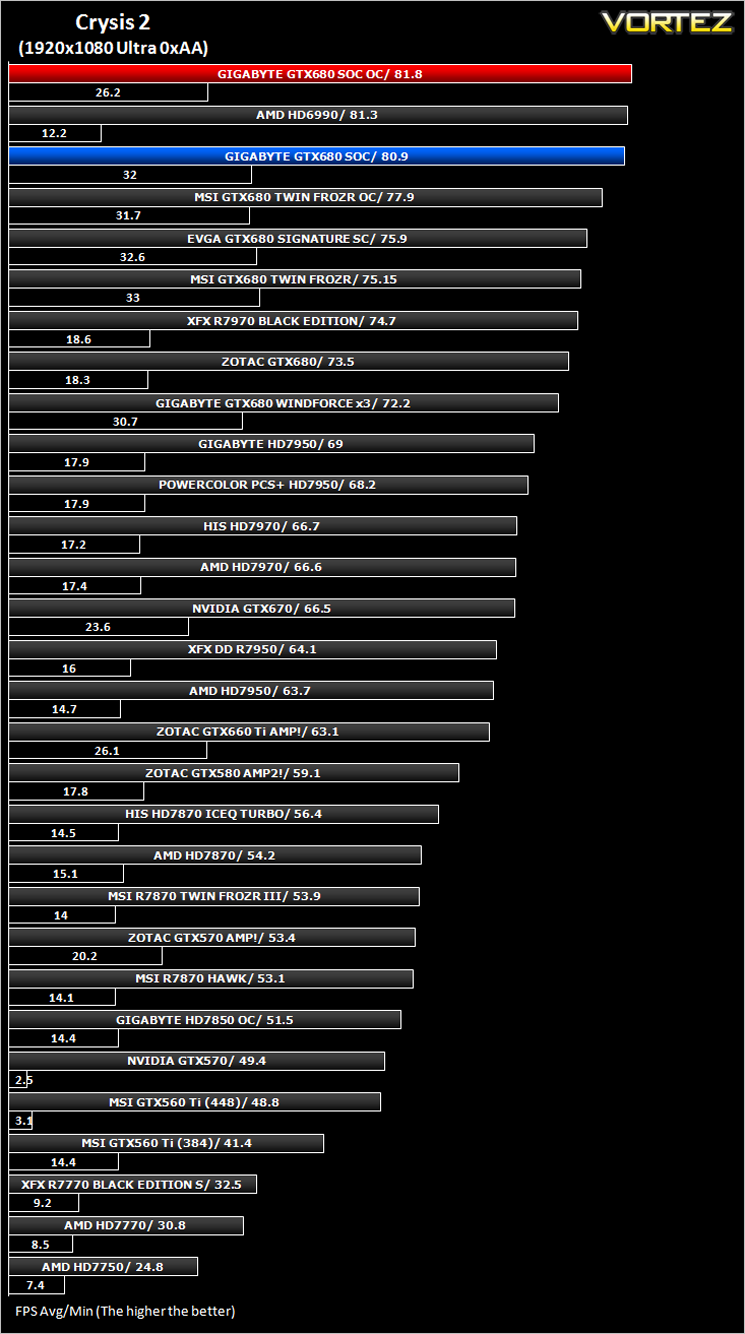
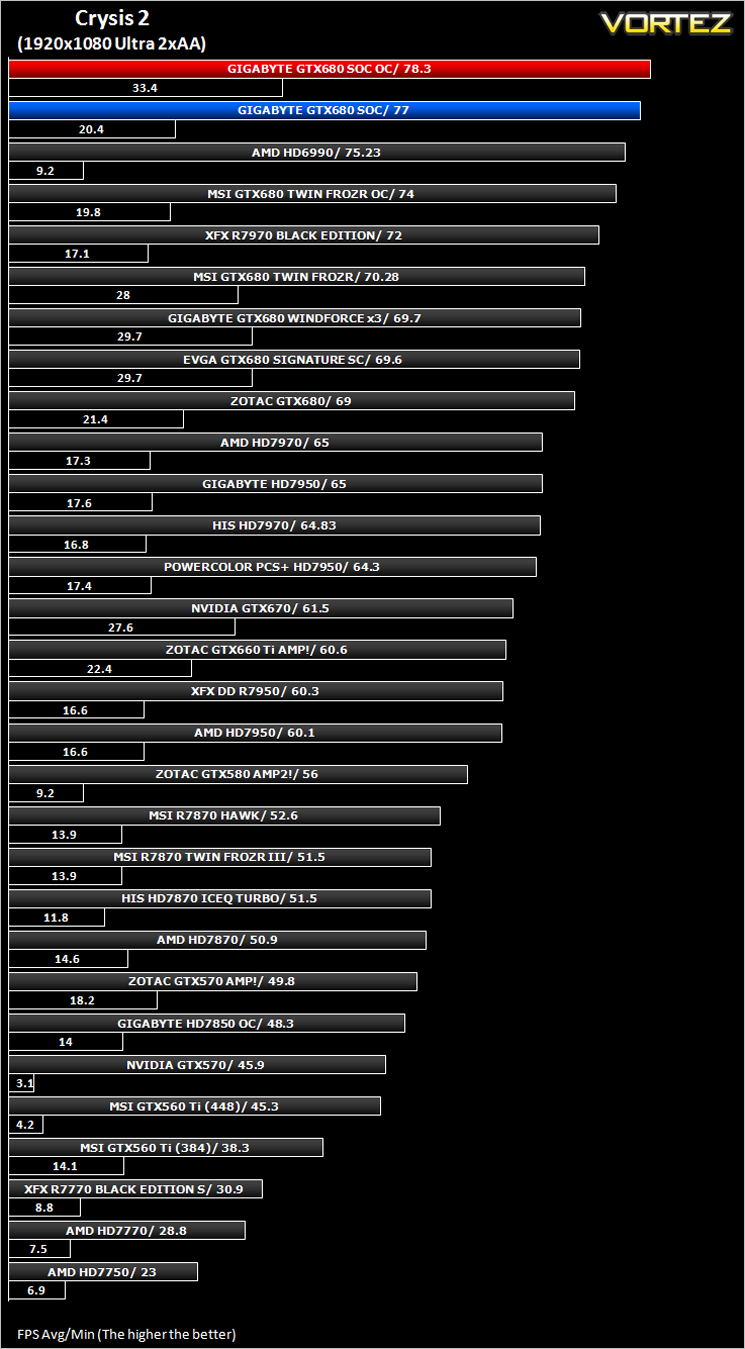
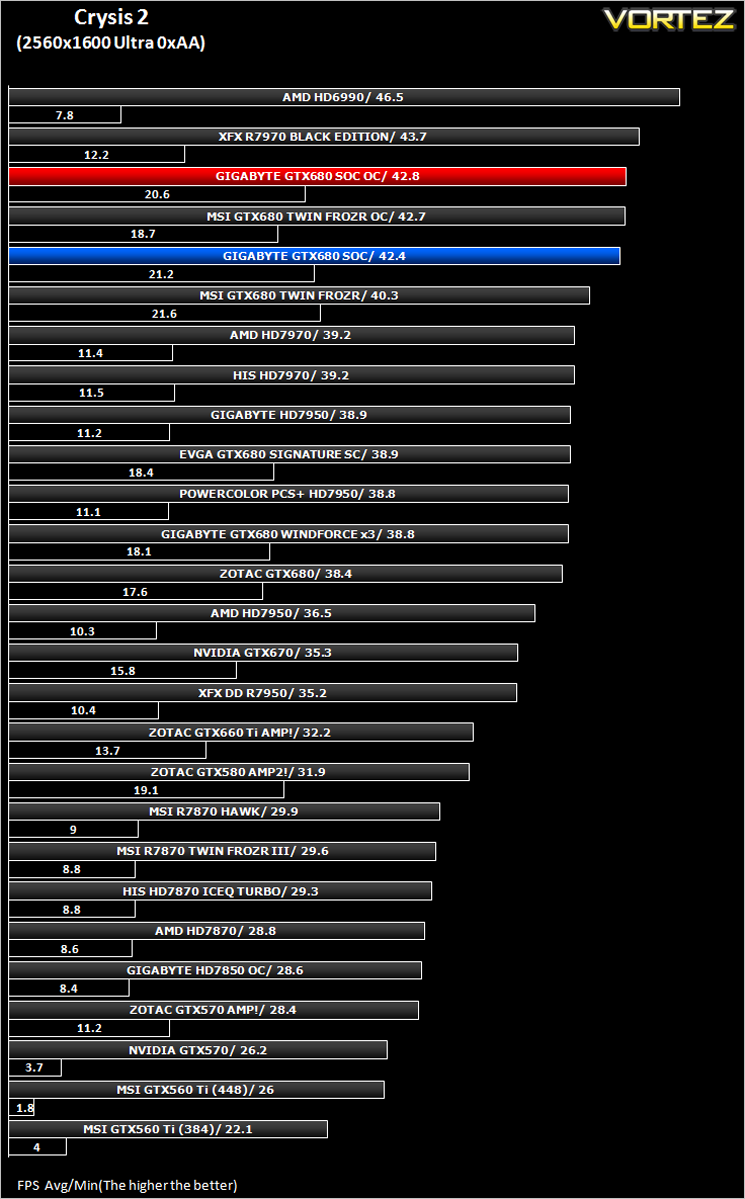
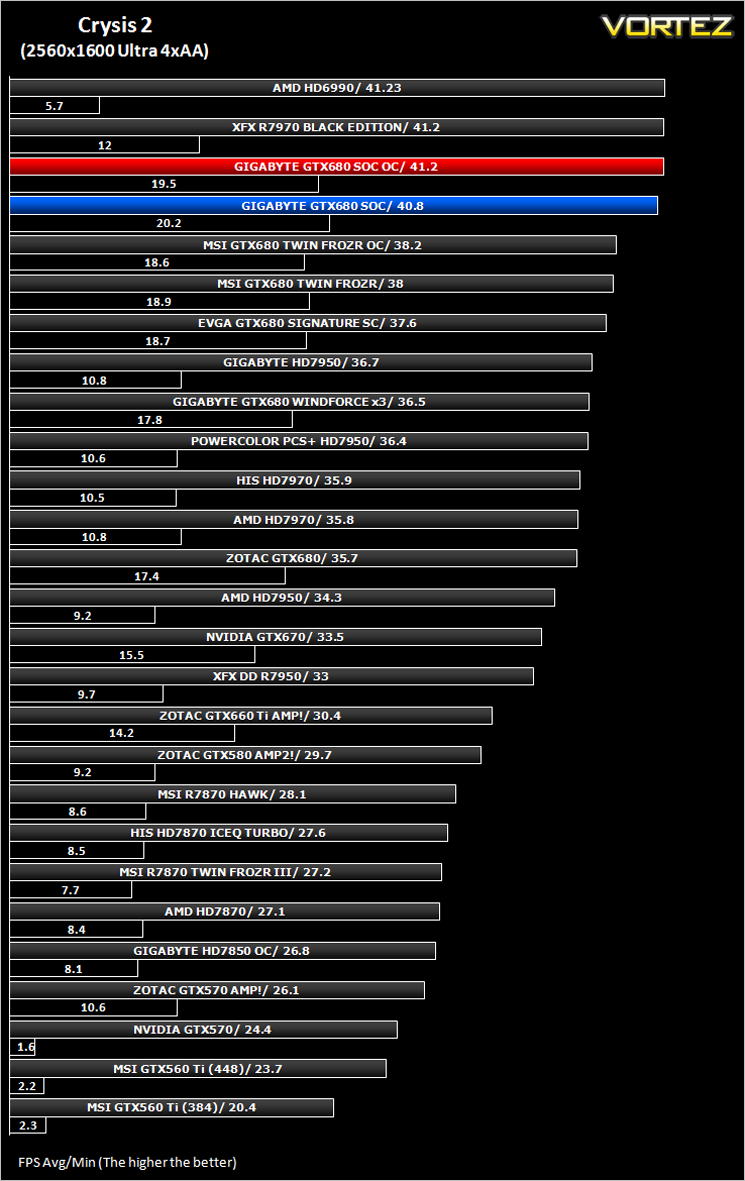
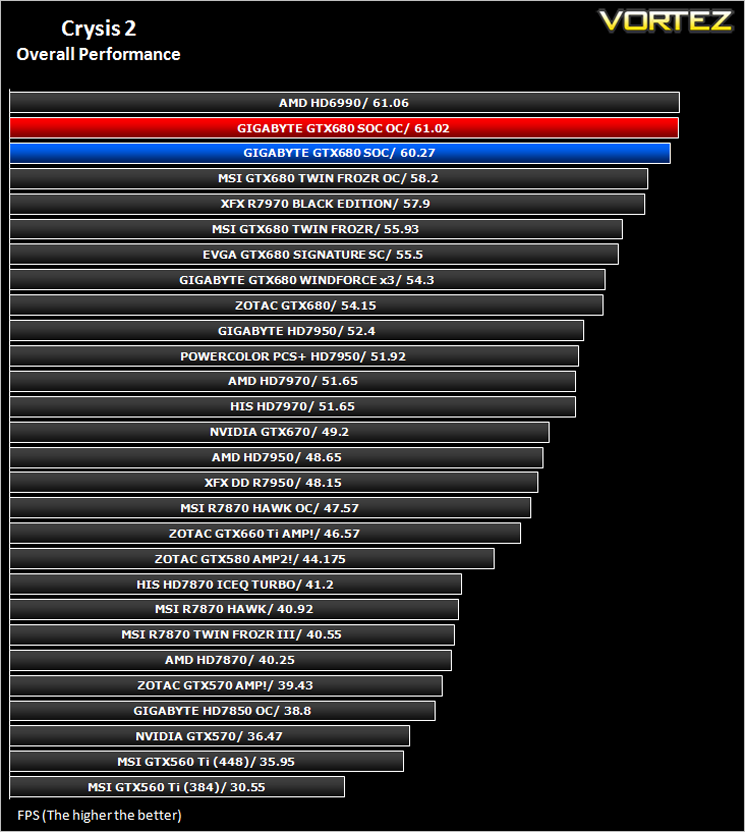
To test the cards we used the Crysis 2 benchmark courtesy of Adrenaline with both the 1.9 patch, DX11 update and Hi-res texture pack. Settings were manually placed to Ultra, DX11 and tessellation enabled with the Central Park map being run 3 times per resolution benchmark test.
Crysis Warhead
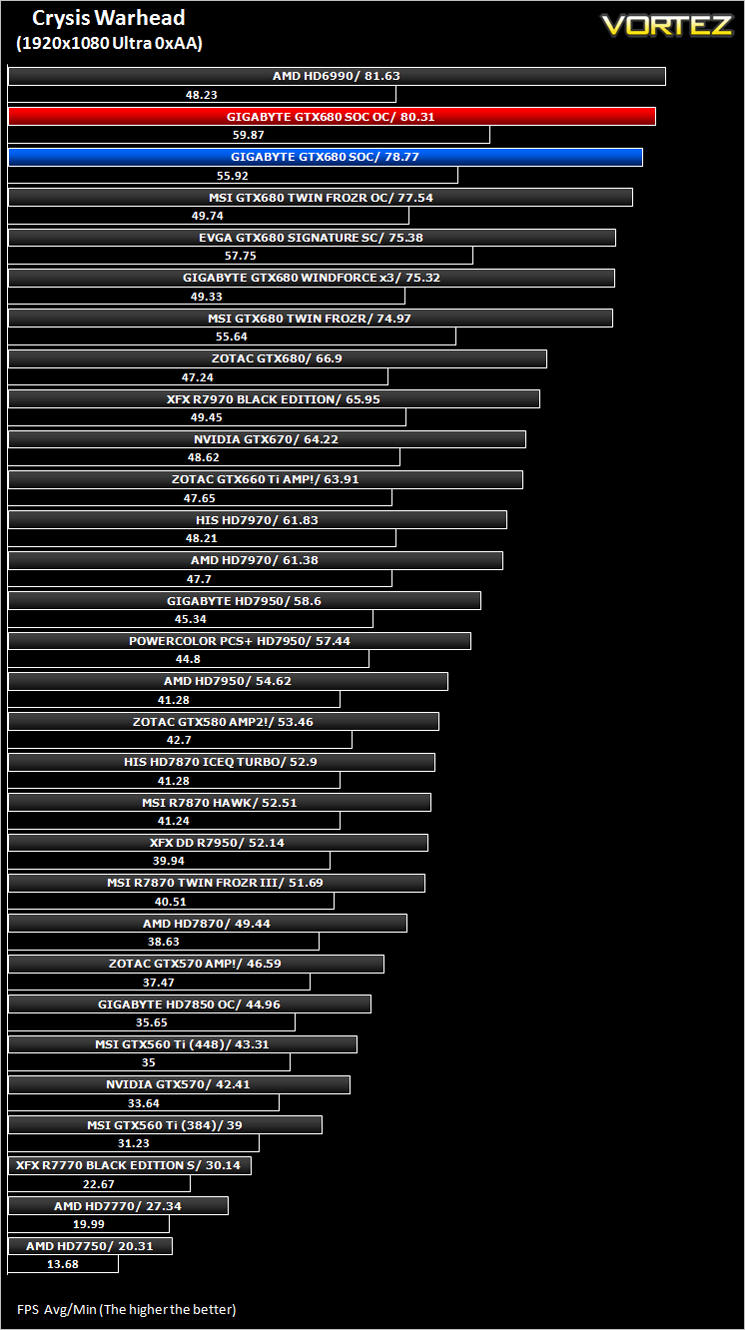
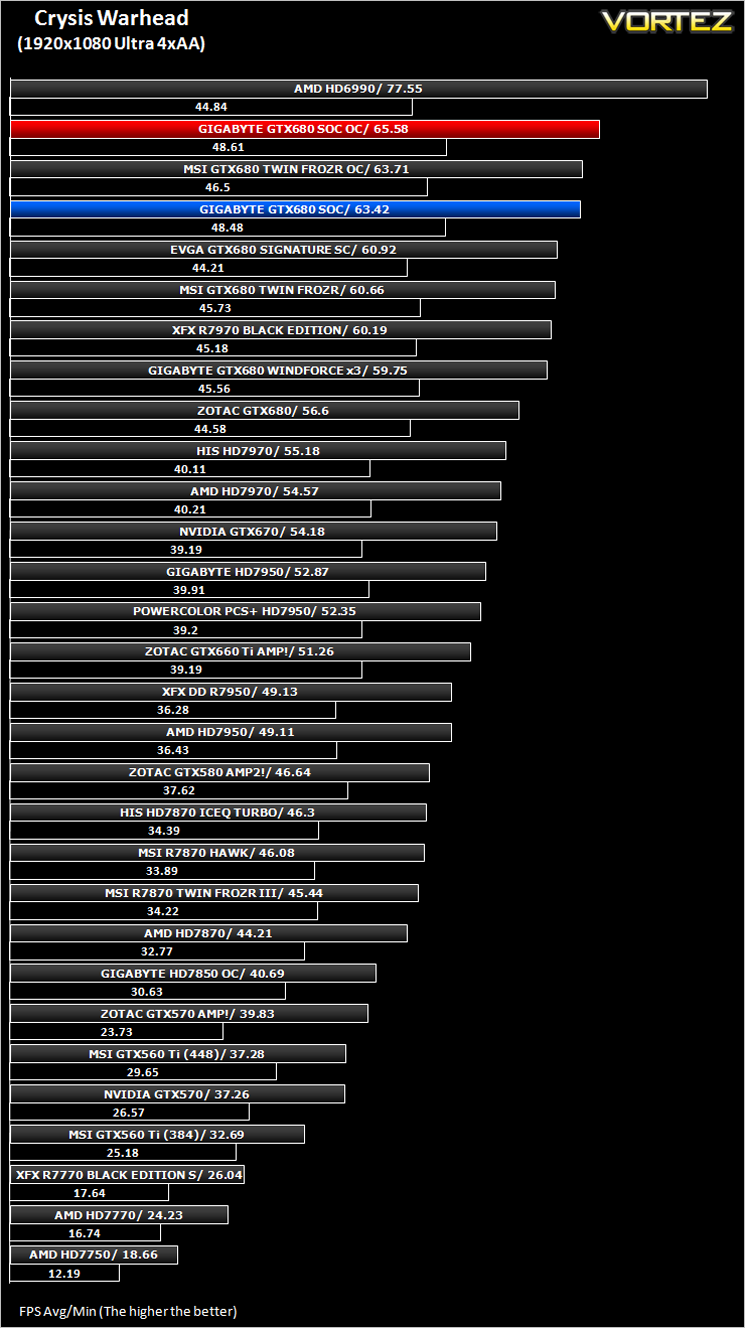
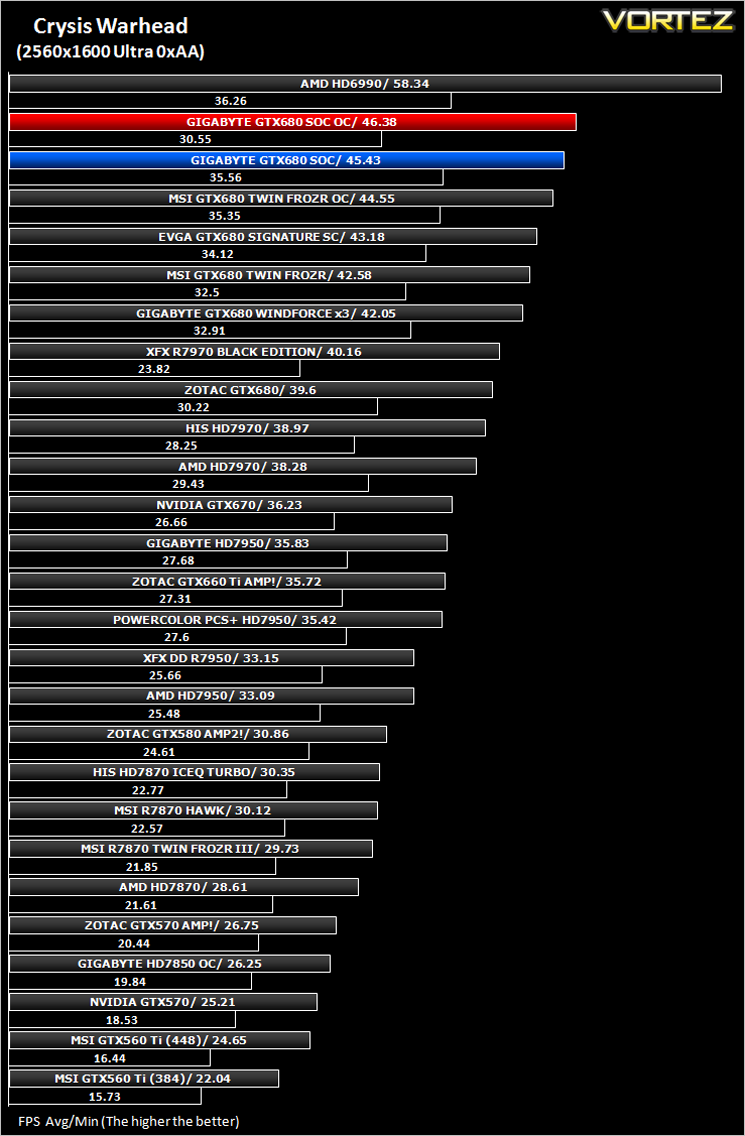
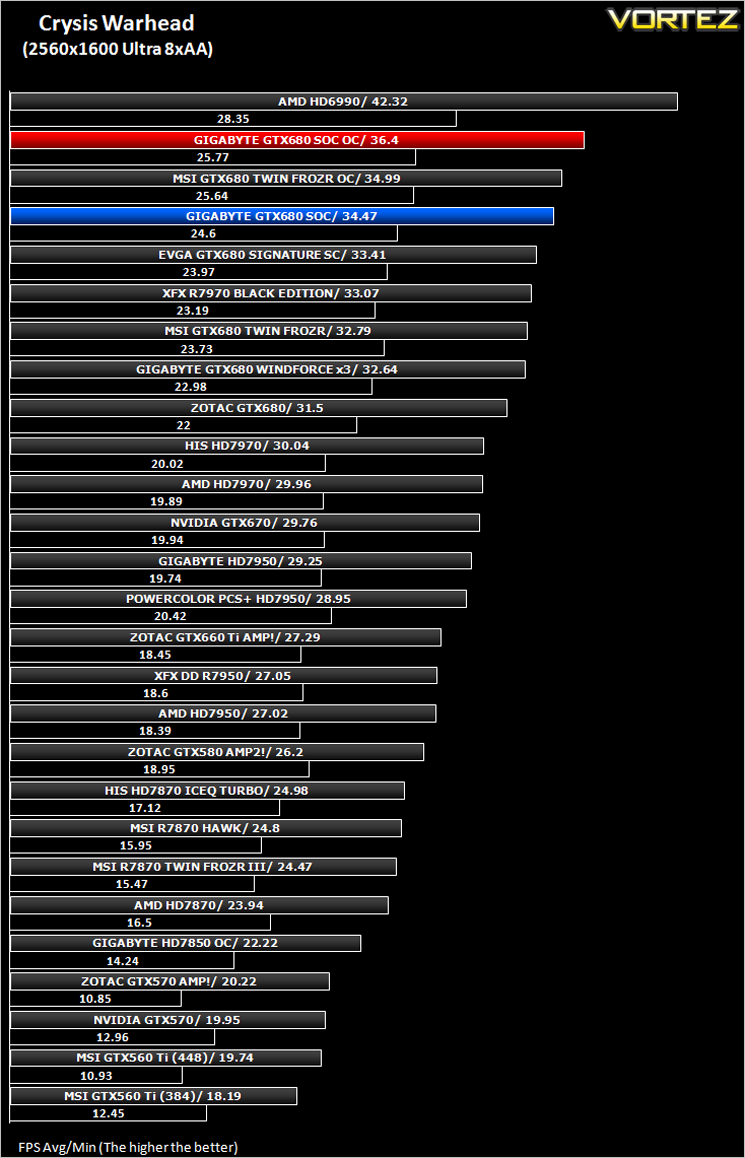
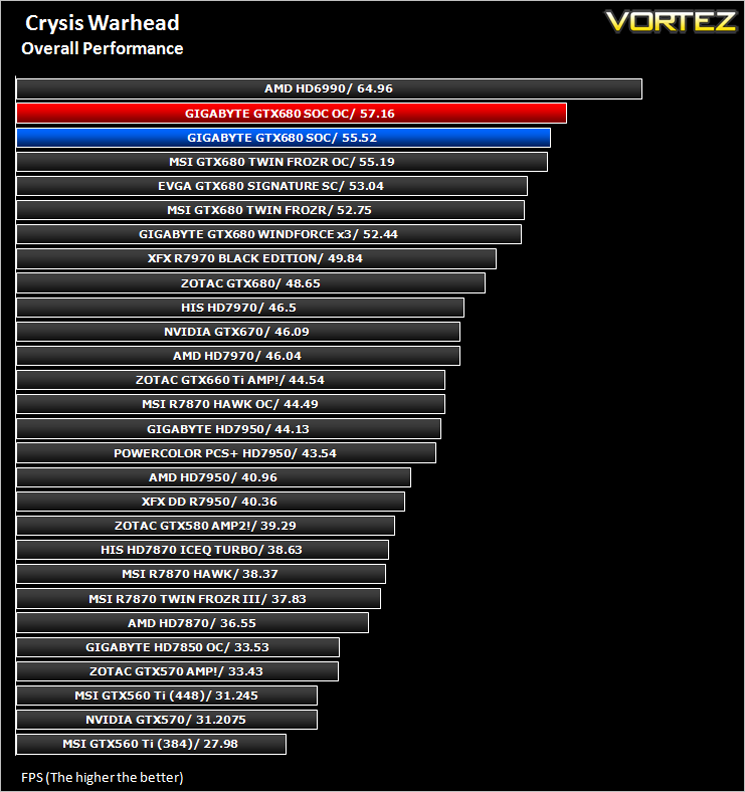
Testing was done using Framebuffer’s Crysis Warhead benchmarking tool. The tests were configured to DirectX 10 at Enthusiast levels. Each test on the Ambush map was looped three times from which the average FPS was recorded.
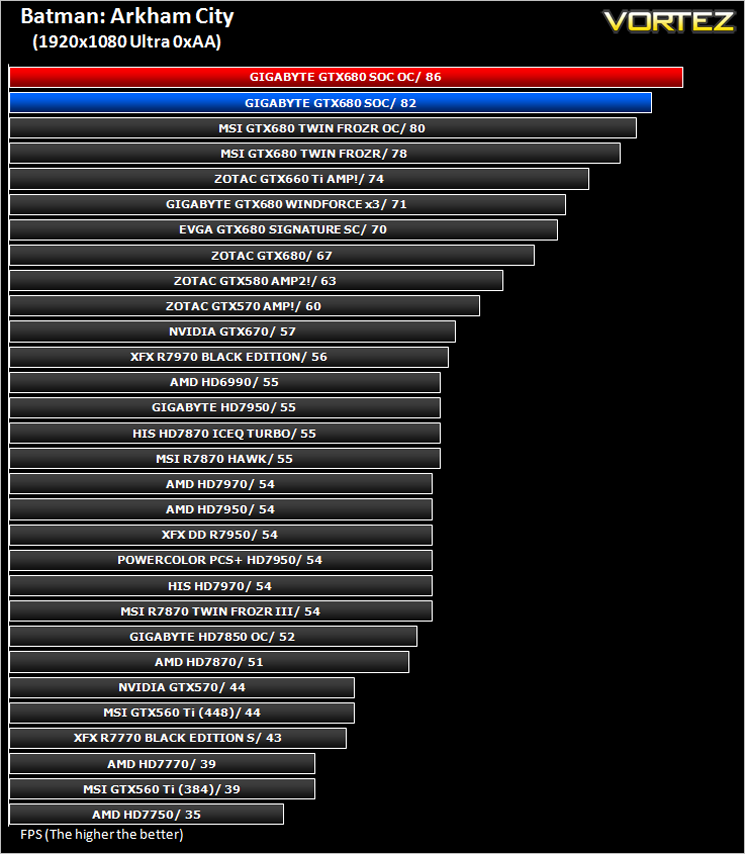
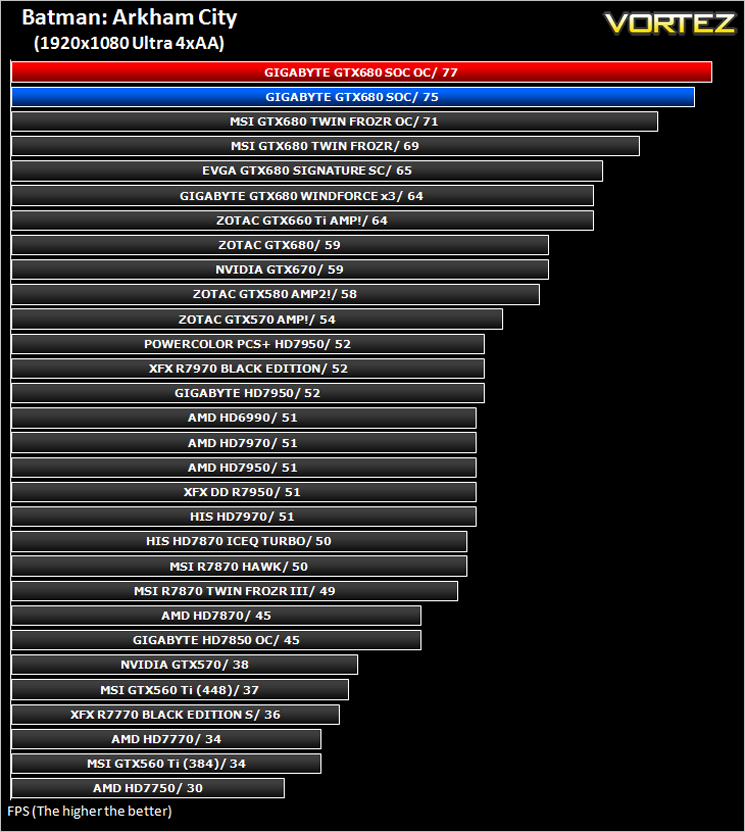
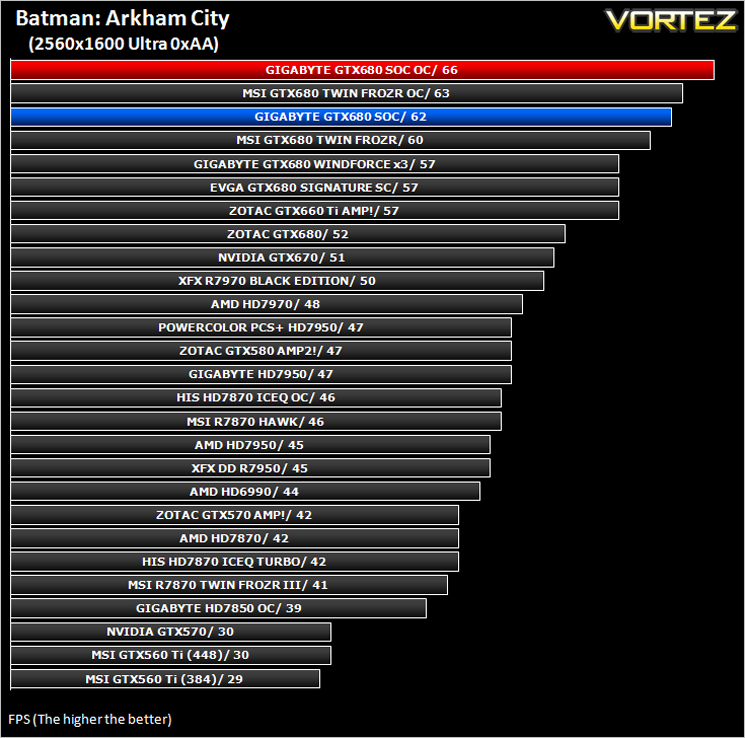
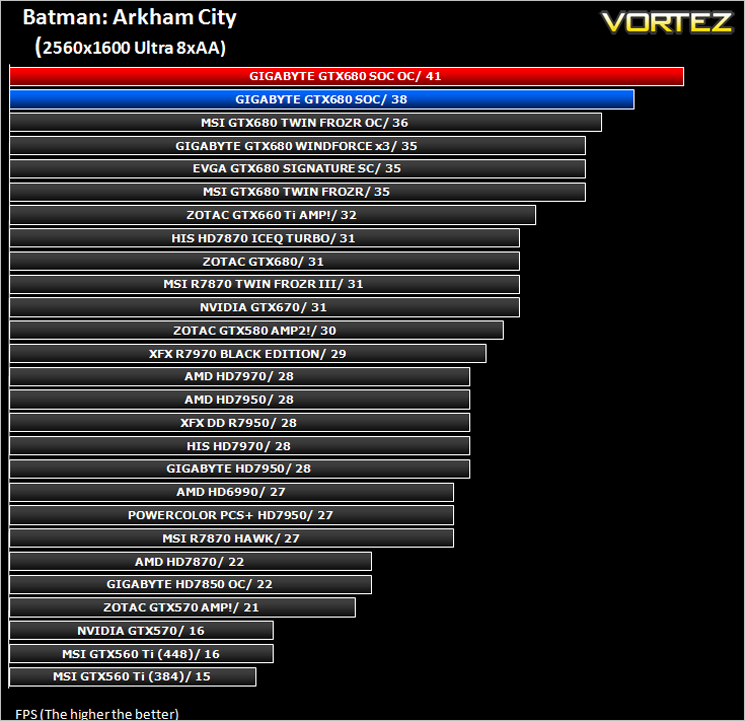
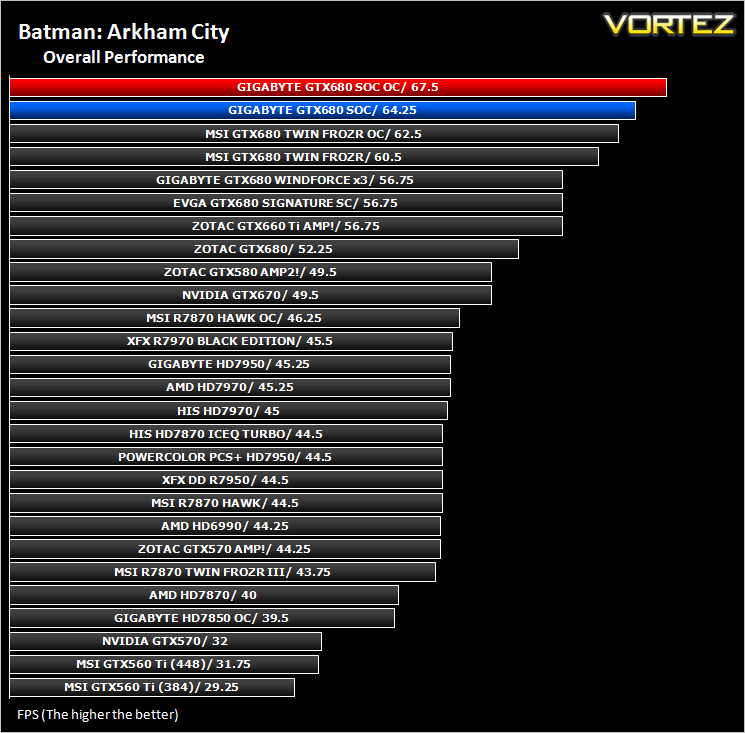
Batman: Arkham City
The results below were obtained from the built-in benchmark utility from the game.
The Elder Scrolls: Skyrim
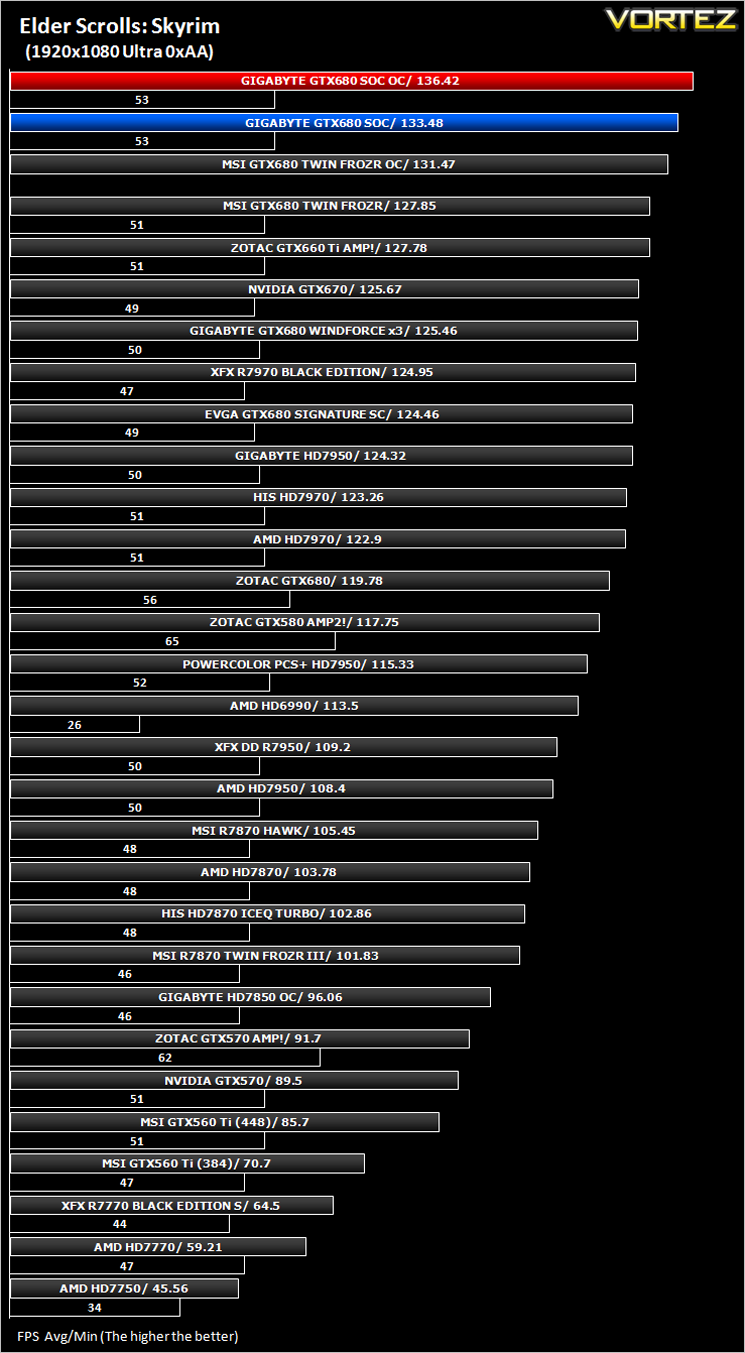
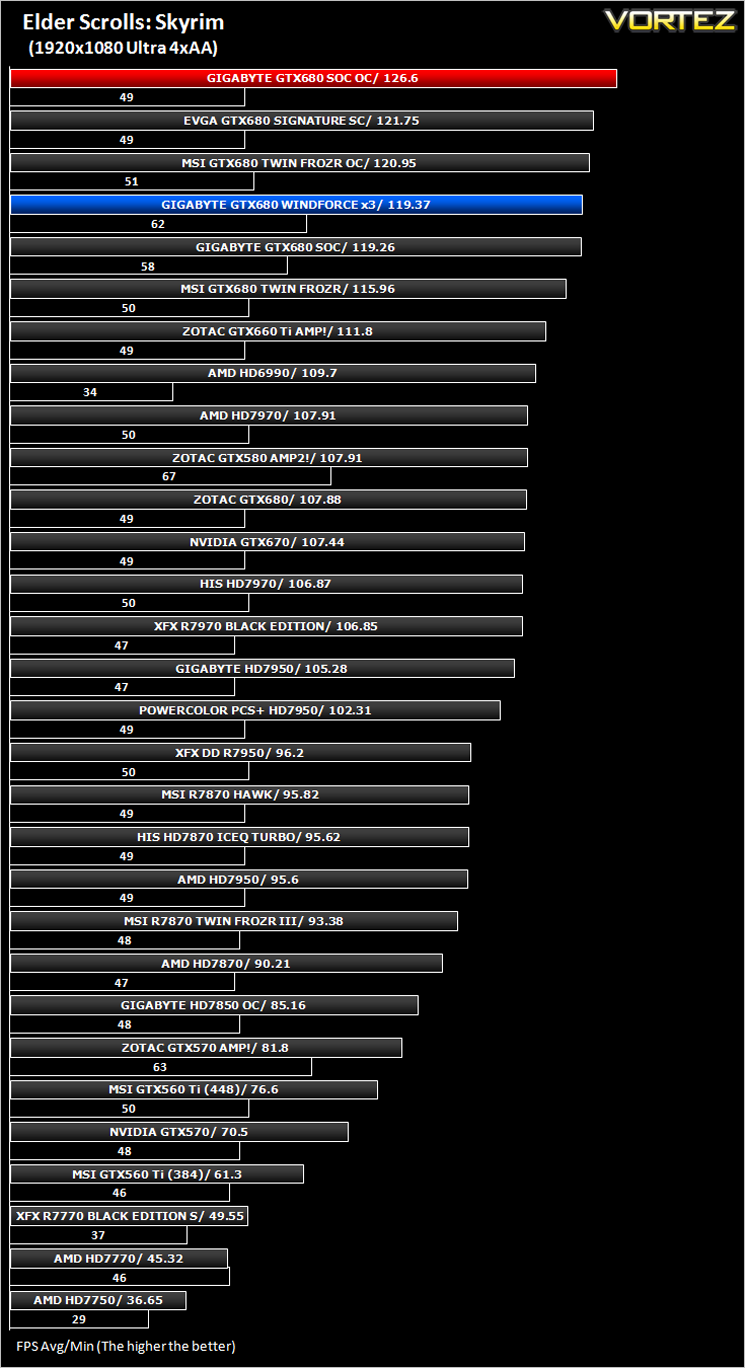
Average and minimum frames per second were measured using Fraps during the drop down passage to Riverwood. V-sync was disabled to allow fluctuating (higher the 60) FPS for these runs. It is however recommended that v-sync is left enabled during normal gameplay due to the games dynamics.
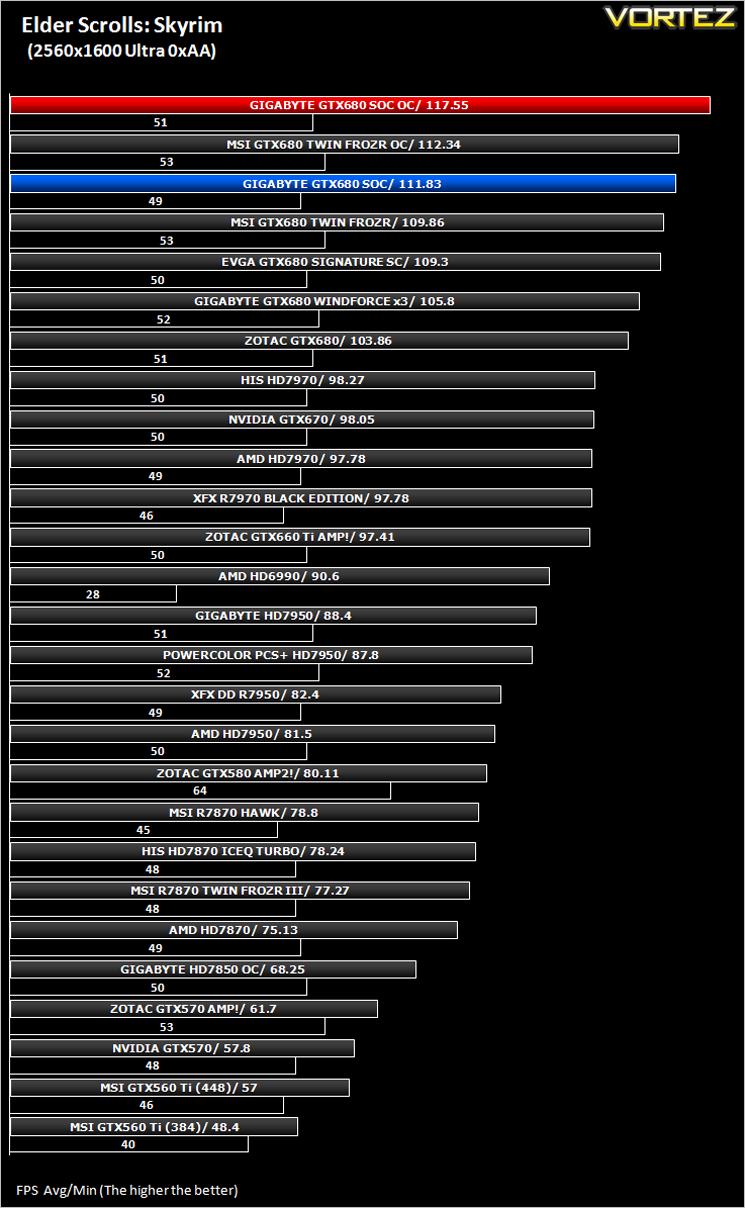
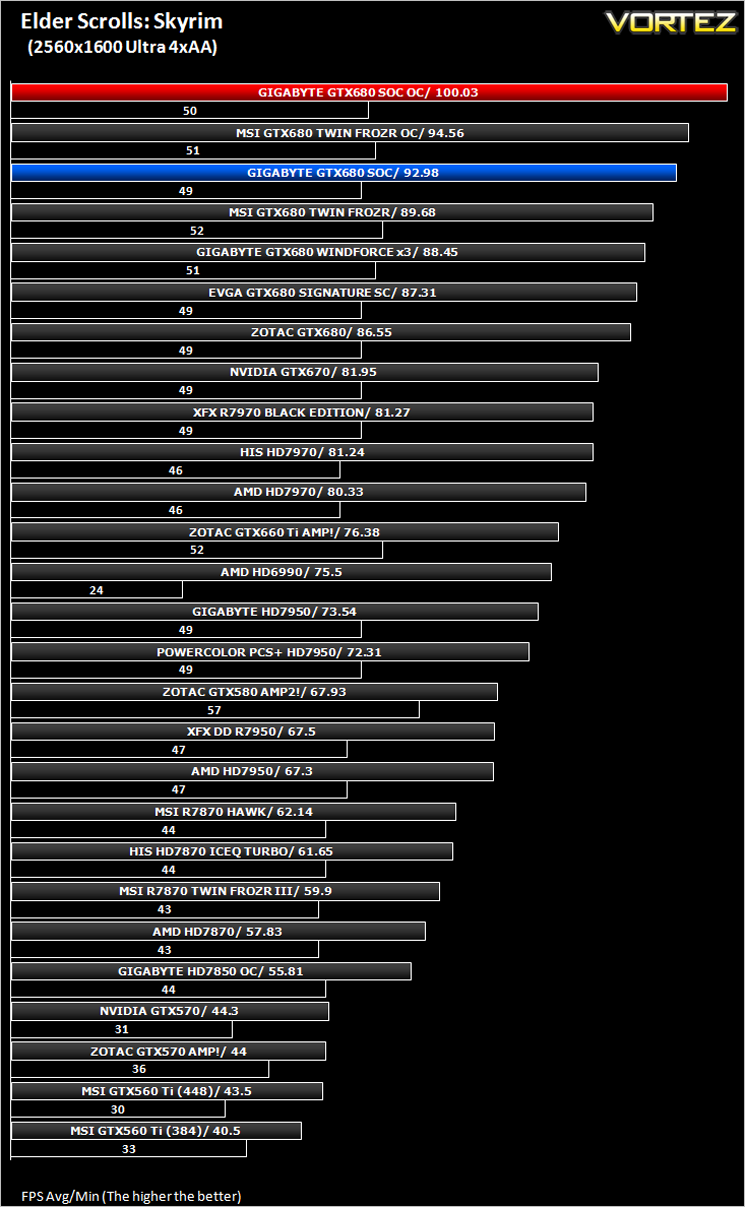
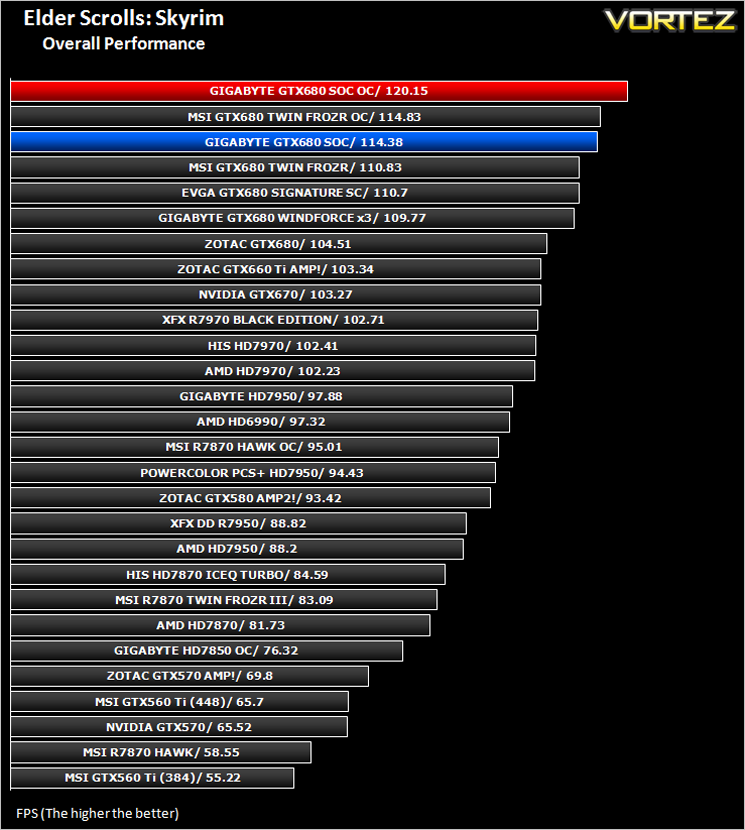
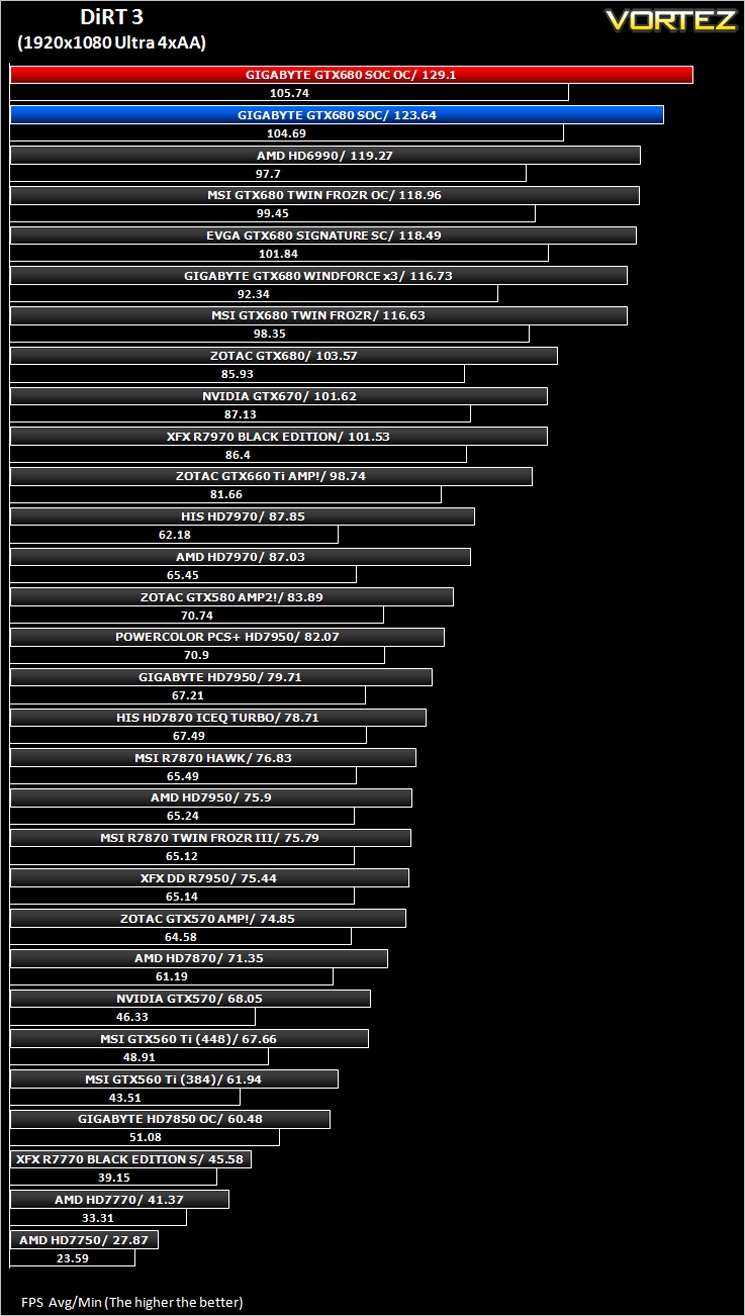
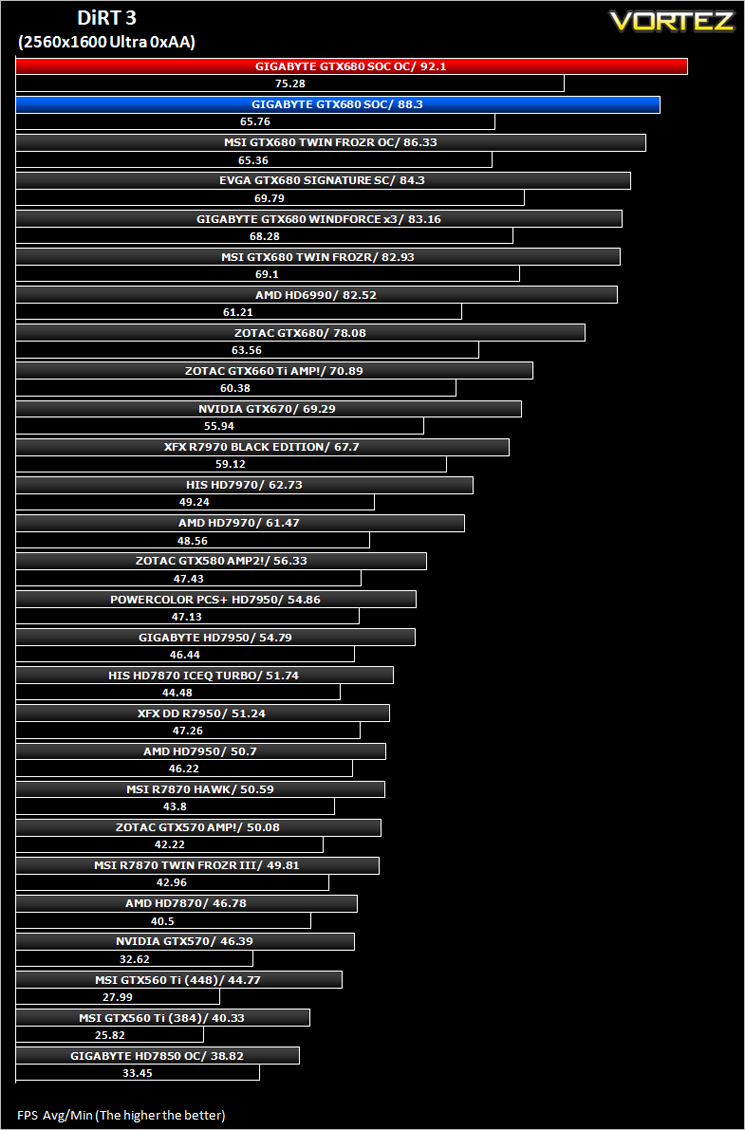
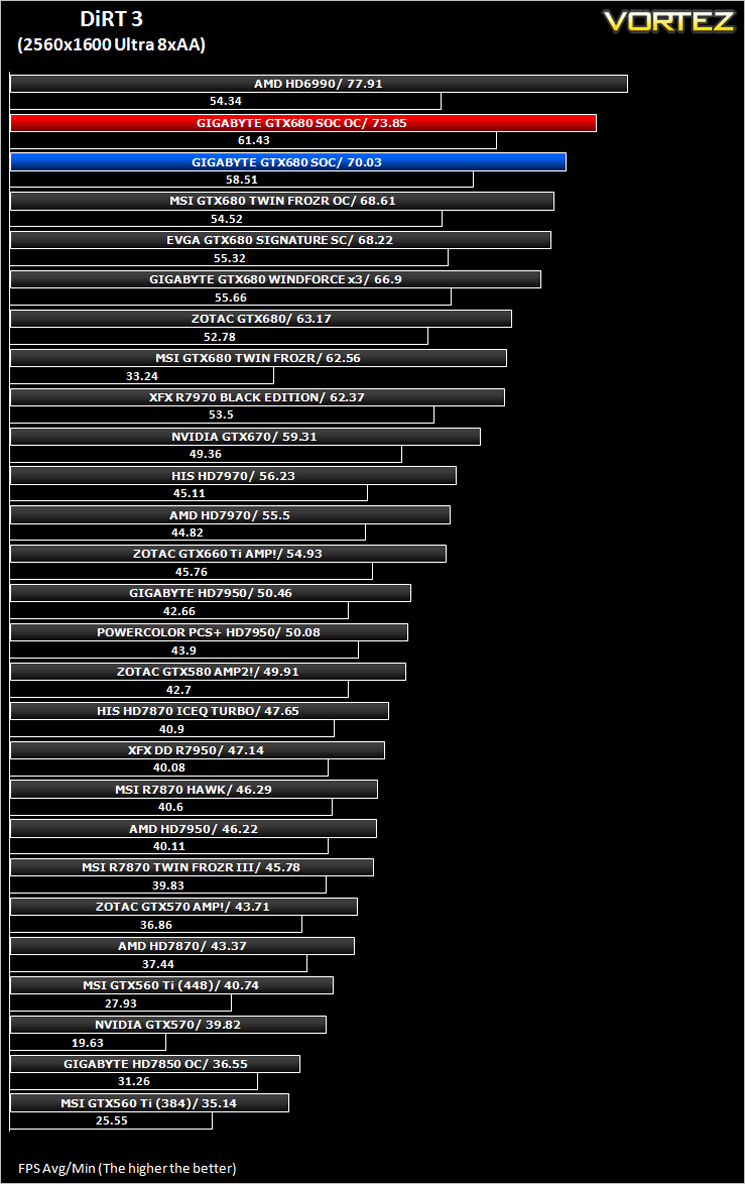
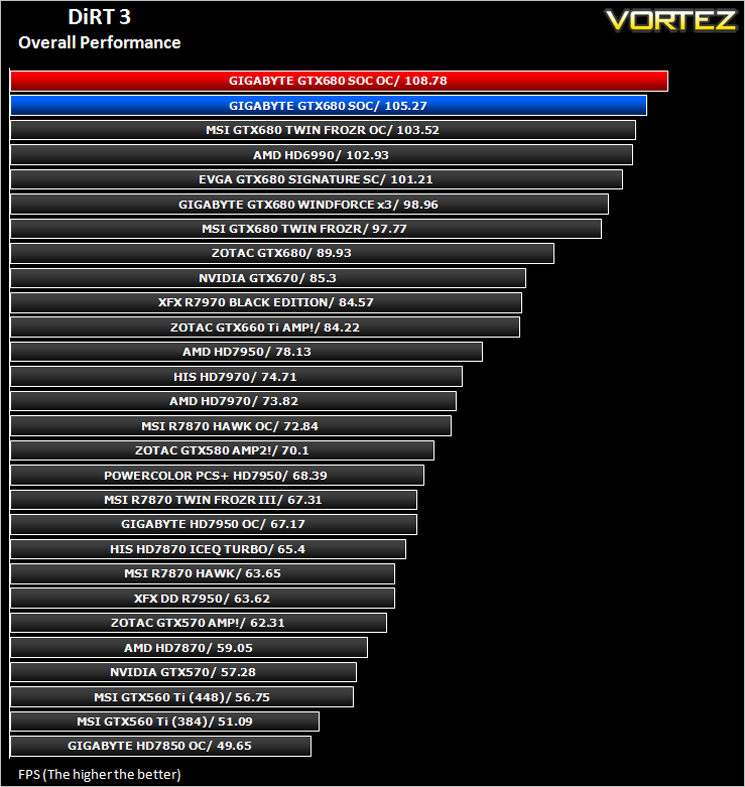
DiRT 3
The in-game benchmarking tool was used to test performance. All the display settings were set to the maximum available and DirectX 11 was applied. The average FPS was recorded at the end.
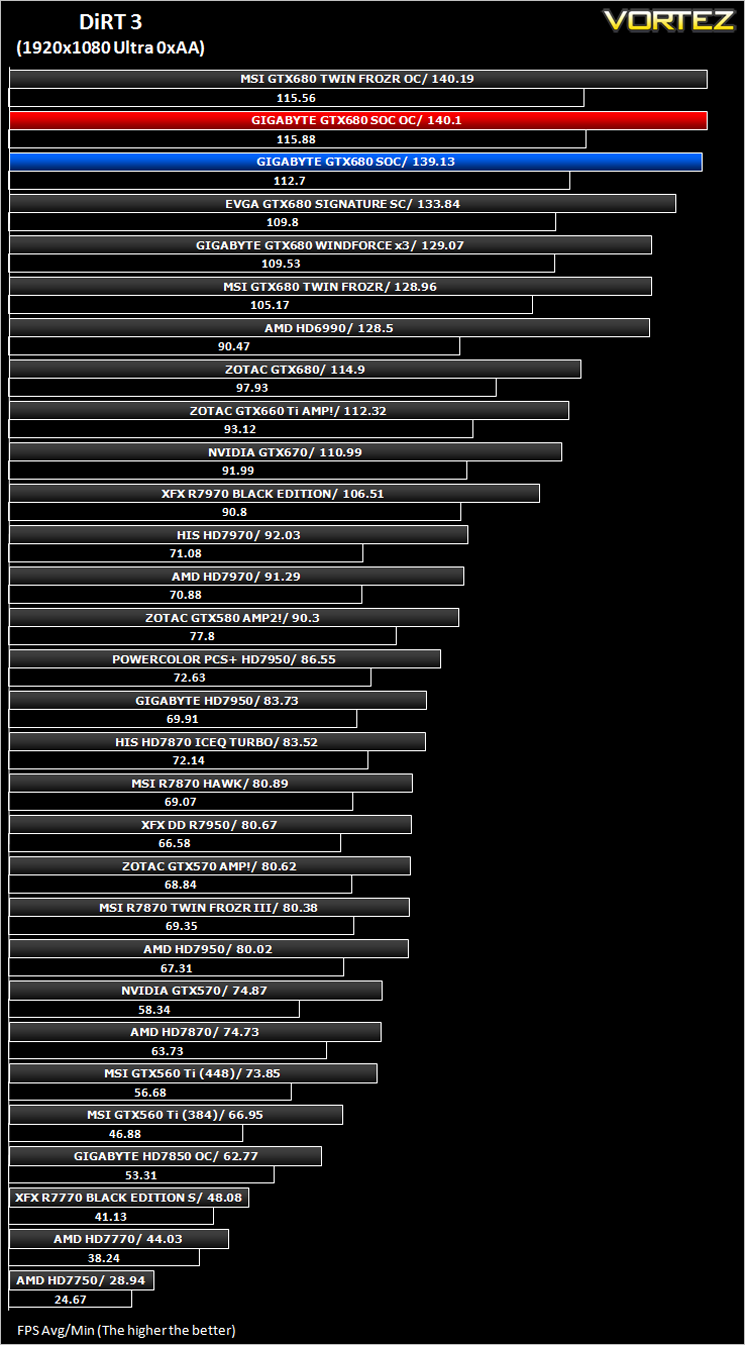
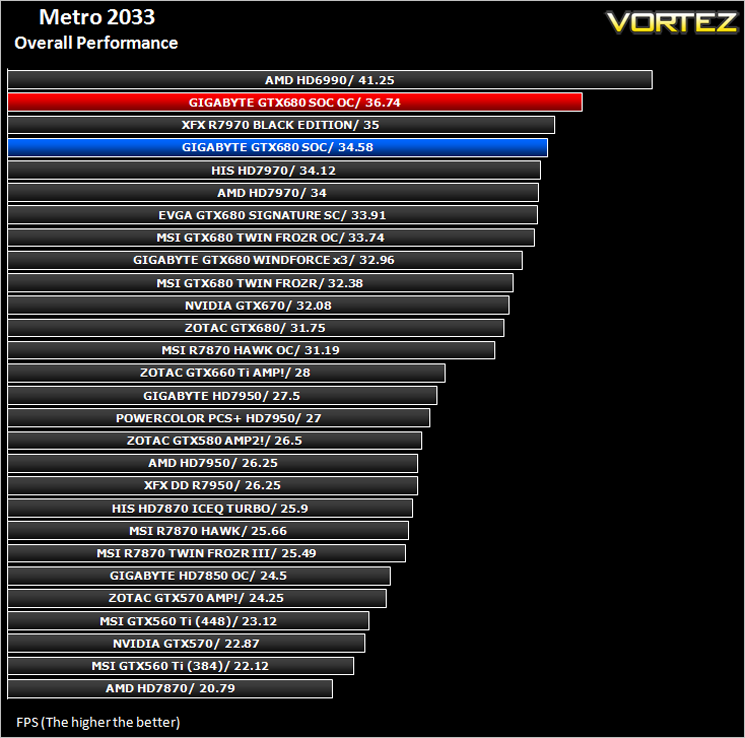
Metro 2033
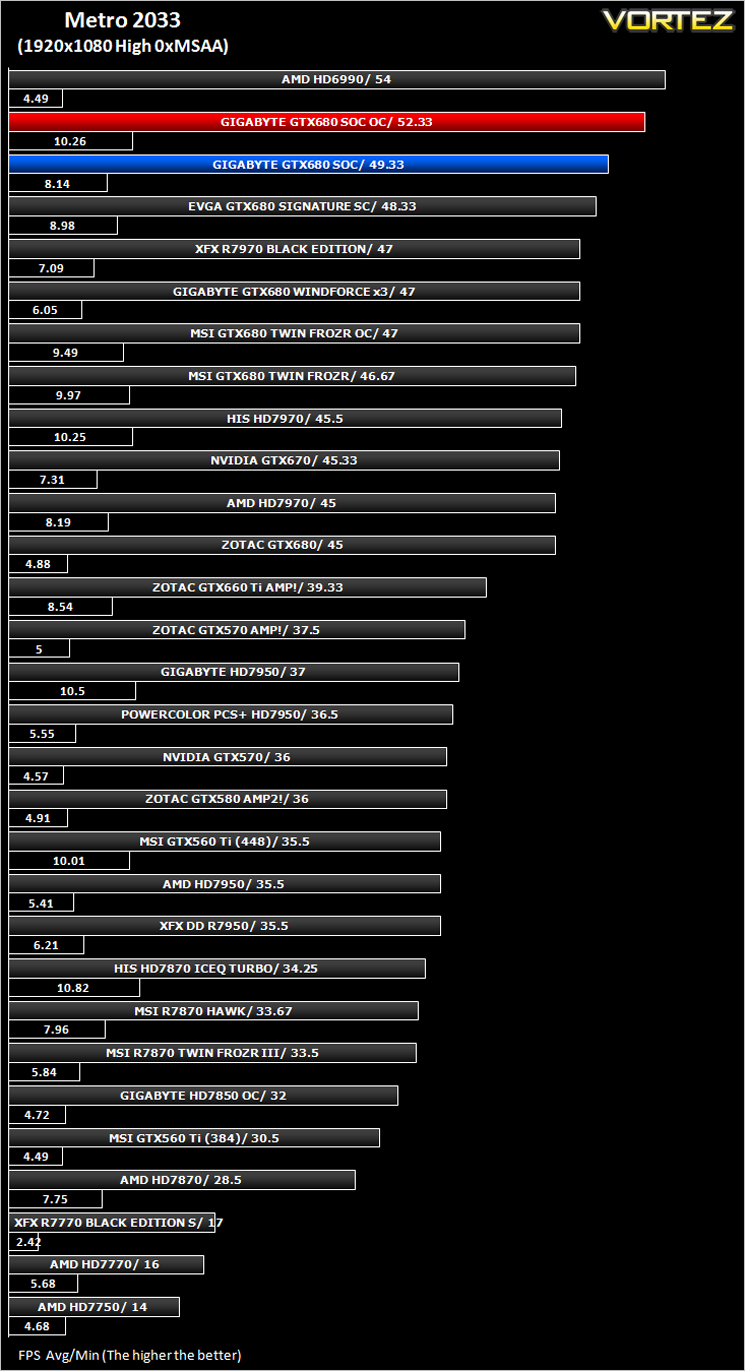
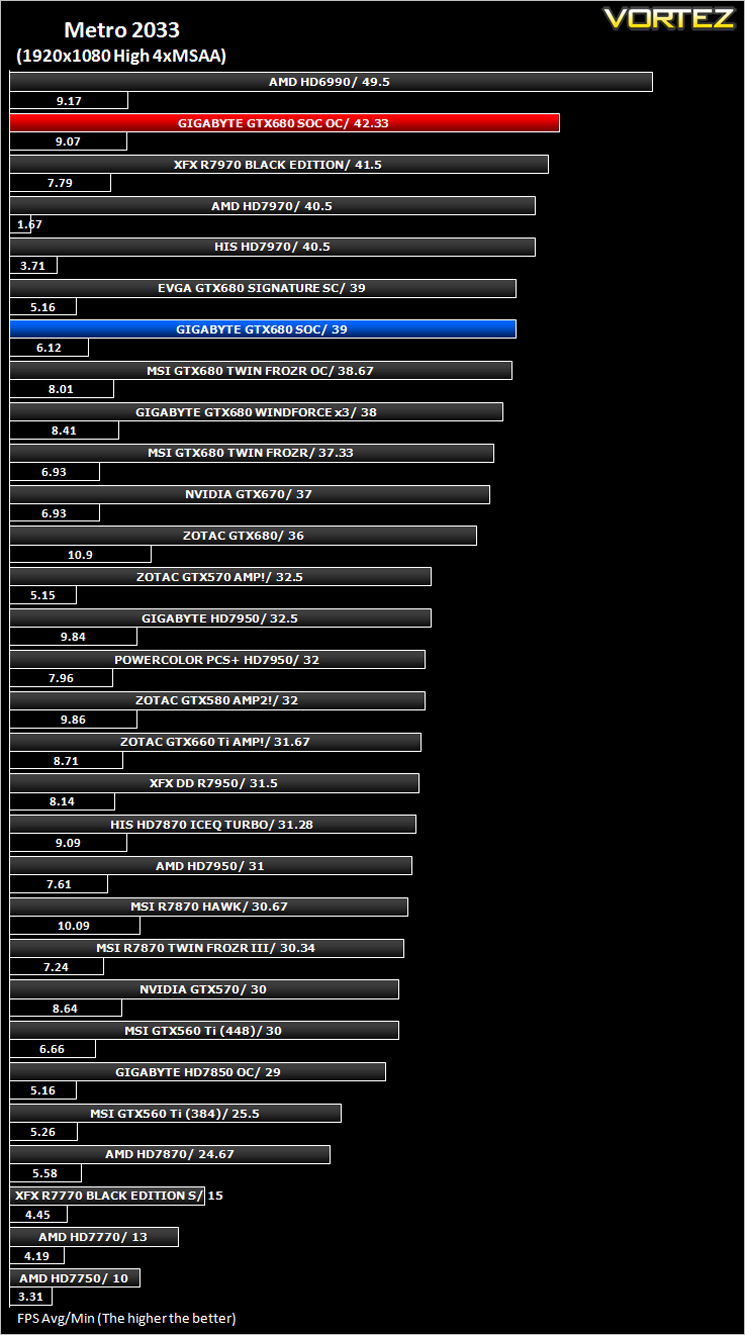
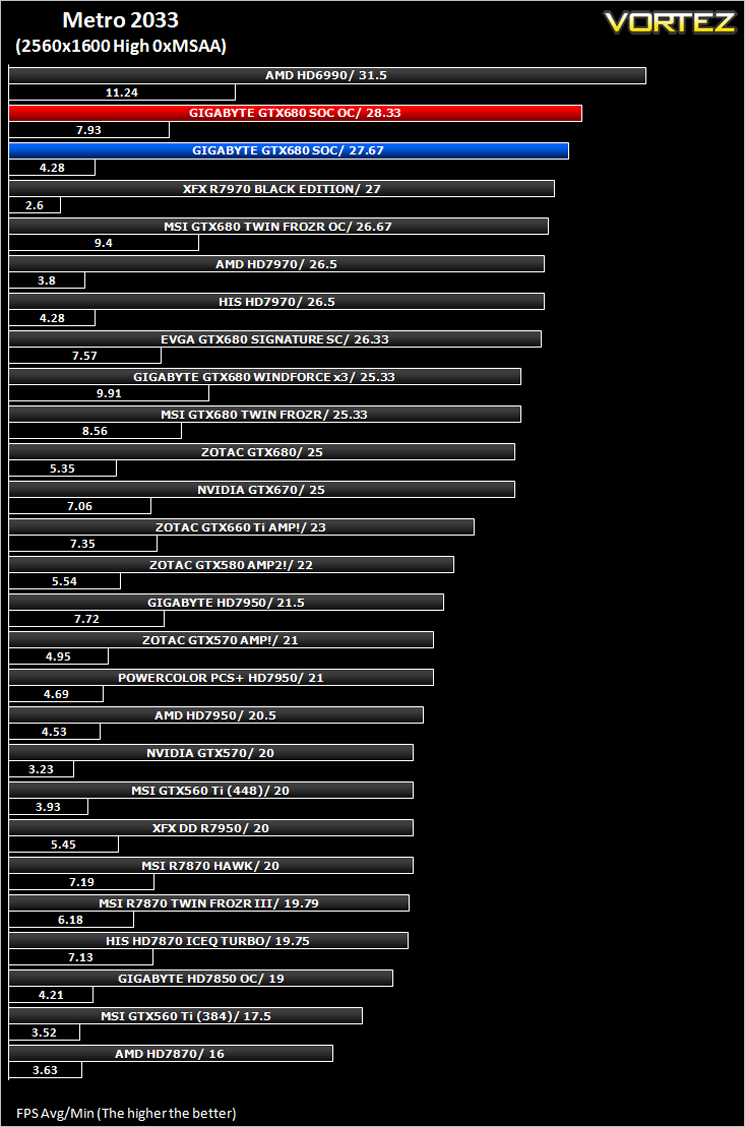
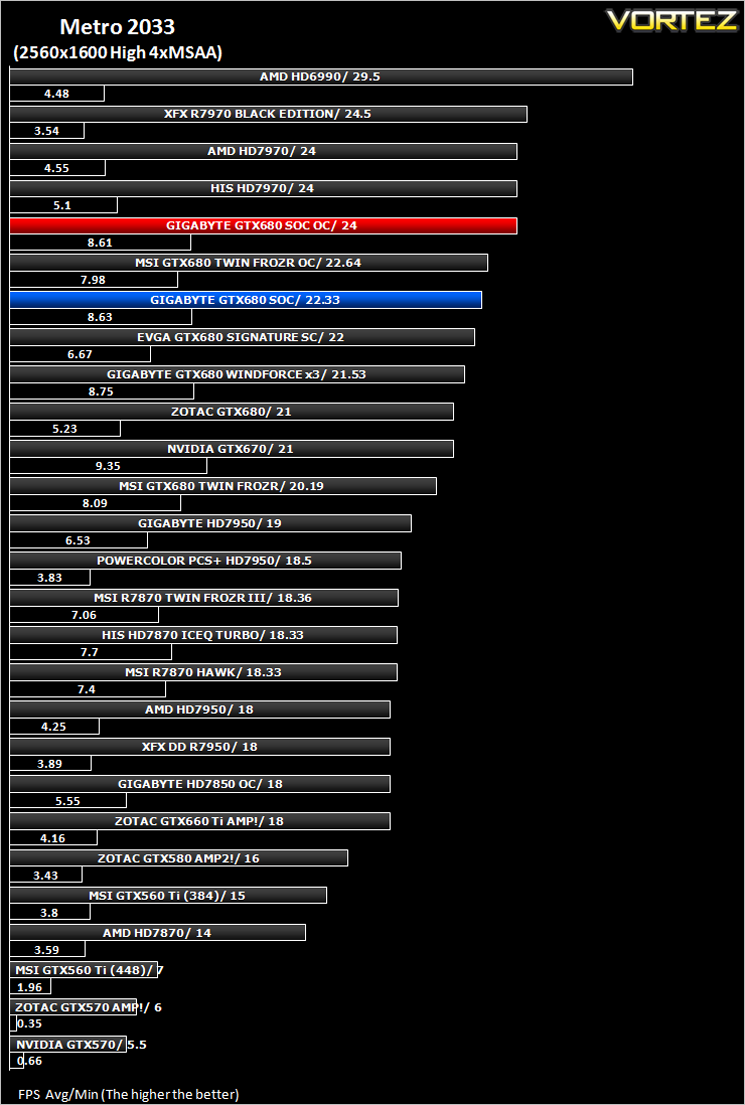
The bundled benchmarking tool was used on Metro 2033, configuring the settings to High and making use of DirectX 11. The frontline scene was looped 3 times for each configuration. The average FPS was recorded at the end.
Futuremark 3DMark 11
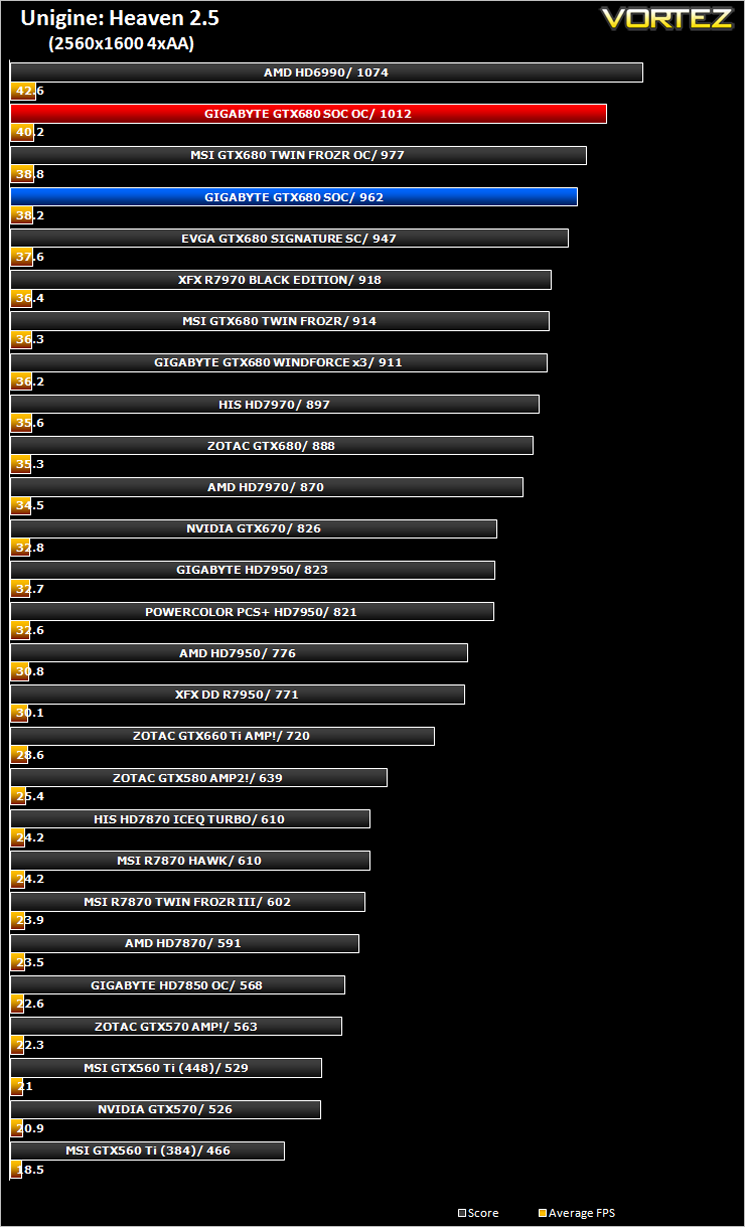
Unigine: Heaven 2.5
Conclusion
When I first cast my eyes over the GTX680 Super Overclock I was aghast that GIGABYTE had chosen to use 5x40mm fans. The GIGABYTE GTX680 Windforce x3 is also a fantastic card so why then did GIGABYTE choose to improve cooling performance, especially at the cost of noise because the Windforce 3 cooler is virtually silent?Competition. With so many manufacturers vying for top spot, it makes sense to be the best, to be at the head of the crowd, to be number 1. The GIGABYTE GTX680 SOC certainly achieved that status because it is the best clocking GTX680 we have had our hands on so far and while it took some time to get there, the tweaking and testing is what true overclockers love. There’s no fun if it just reaches its pinnacle with a few minutes of testing. The added option to tweak the PWM makes overclocking this GPU that little bit more complex and because you don’t have cooling restrictions, you can concentrate on overclocking this card.
So is it Super? Well yes and no. It’s super sized, super heavy and super expensive. Weighing in at £499 it is one of the most expensive GTX680’s this side of watercooled version but for that you get a truly unique cooler and one of the highest factory overclocked flagship NVIDIA GTX680 cards available. I would have expected to see 4GB instead of the included 2GB of GDDR5 which is a real shame, not that it struggled with 2GB but for £500, a little future proofing wouldn’t go amiss. It certainly lives up to its name being a Super Overclocker though reaching a blistering, stable 1287MHz (Boost). Whether this is enough to tempt to part with half a thousand pound only you and your bank manager can decide. Cost and acoustics are perhaps the major considerations to make when making the decision to buy this GPU over the many other pre-overclocked cards on the market. If the high pitched whine from the server grade 40mm fans doesn’t concern you then this card is sure to impress with its super performance.
Me? I have 2 whiny children already so adding another to the household would be too much to bare I’m afraid so I’ll stick with GIGABYTE’s Windforce 3, a compromise on cooling ability, performance and most importantly, noise. If however, the high pitched whine from the server grade 40mm fans doesn’t concern you and performance is a feature you place above all else then this card will not disappoint because out of all the single core cards we have tested to date, this is the fastest and certainly worthy of the ‘Super’ moniker.
+ Fastest performing single core card to date
+ Factory overclocked with overclocking headroom to spare
+ Very cool running
+ Good looking
Cons:
– Whiny noise
– Size
– Bios button poorly positioned
– Price


