







Today we test GIGABYTE’s baby X79 motherboard, the X79-UD3. Is it an entry level failure or bargain bucket performance king?

Product on Review: GIGABYTE X79-UD3
Manufacturer and Sponsor: GIGABYTE
Street Price: £175inc. VAT (At time of review)
The GIGABYTE X79 range initially suffered problems due to some motherboards failing when placed under extreme load conditions. The new BIOS revisions have however rectified these issues and so today we take a look at the baby X79 motherboard, the X79-UD3.
As we saw with the X58 chipset, entry level models can occasionally cause an upset by clocking as good as, if not higher than other so called ‘flagship’ motherboards costing twice as much. The UD3 was one such motherboard and was held in high regard among those who had the pleasure of using the X58 variant. The key to the UD3’s success was less frills but power where it counted allowing GIGABYTE to create a motherboard that retained the essential features of it’s bigger brothers, the UD5, UD7 and UD9 yet because it did not make use of fancy add-on cards and oversized heatsinks it could be priced very competitively.
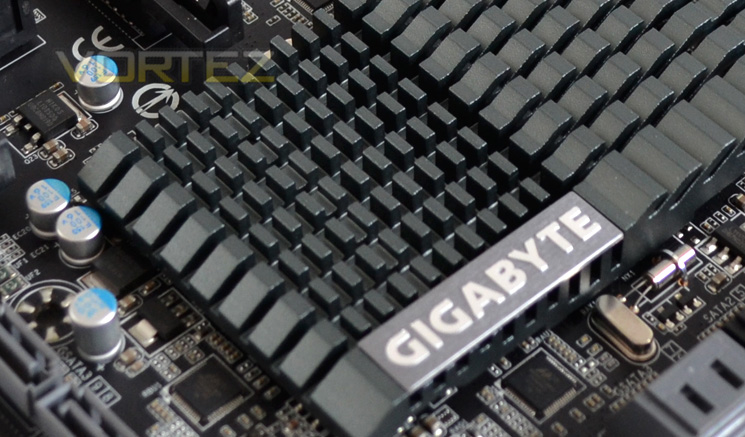
As we will see with the X79-UD3, the same ‘bang-per-buck’ ethos applies to today’s review sample. With top end motherboards rapidly approaching the £500 mark and mid range boards well in excess of £200 it is great to see GIGABYTE have kept the price below that threshold with the UD3 weighing in at a very reasonable £175, one of the cheapest X79 motherboard available to date. Hopefully GIGABYTE have not trimmed too much fat to achieve this price.
Here’s what GIGABYTE had to say about their X79 range:
Specification
Support for Intel® Core™ i7 processors in the LGA2011 package package
L3 cache varies with CPU
(Please refer “CPU Support List” for more information.)
Chipset
Intel® X79 Express Chipset
Memory
4 x 1.5V DDR3 DIMM sockets supporting up to 32 GB of system memory
* Due to Windows 32-bit operating system limitation, when more than 4 GB of physical memory is installed, the actual memory size displayed will be less than 4 GB.
4 channel memory architecture
Support for DDR3 2400/2133/1866/1600/1333/1066 MHz memory modules
Support for non-ECC memory modules
Support for Extreme Memory Profile (XMP) memory modules
(Please refer “Memory Support List” for more information.)
Audio
Realtek ALC898 codec
High Definition Audio
2/4/5.1/7.1-channel
Support for Dolby® Home Theater
Support for S/PDIF Out
LAN
1 x Intel GbE LAN (10/100/1000 Mbit)
Expansion Slots
2 x PCI Express x16 slots, running at x16 (PCIEX16_1, PCIEX16_2)
* For optimum performance, if only one PCI Express graphics card is to be installed, be sure to install it in the PCIEX16 slot.
2 x PCI Express x16 slots, running at x8 (PCIEX8_1, PCIEX8_2)
* The PCIEX8_2 slot shares bandwidth with the PCIEX16_2 slot. When the PCIEX8_2 slot is populated, the PCIEX16_2 slot will operate at up to x8 mode.
(All PCI Express x16 slots conform to PCI Express 3.0 standard.)
2 x PCI Express x1 slots
(All PCI Express x1 slots conform to PCI Express 2.0 standard.)
1 x PCI slot
Multi-Graphics Technology
Support for 4-Way/3-Way/2-Way AMD CrossFireX™/NVIDIA SLI technology.
Storage Interface
2 x SATA 6Gb/s connectors (SATA3 0/1) supporting up to 2 SATA 6Gb/s devices
4 x SATA 3Gb/s connectors (SATA2 2/3/4/5) supporting up to 4 SATA 3Gb/s devices
Support for RAID 0, RAID 1, RAID 5, and RAID 10
* When a RAID set is built across the SATA 6Gb/s and SATA 3Gb/s channels, the system performance of the RAID set may vary depending on the devices being connected.
3 x Marvell 88SE9172 chips:
4 x SATA 6Gb/s connectors (GSATA3 6/7/8/9) supporting up to 4 SATA 6Gb/s devices
2 x eSATA 6Gb/s connectors on the back panel, supporting up to 2 SATA 6Gb/s devices
Support for RAID 0 and RAID 1
USB
Up to 14 USB 2.0/1.1 ports (8 ports on the back panel, 6 ports available through the internal USB headers)
2 x Fresco FL1009 chips:
Up to 4 USB 3.0/2.0 ports (2 ports on the back panel, 2 ports available through the internal USB header)
Internal I/O Connectors
1 x 24-pin ATX main power connector
1 x 8-pin ATX 12V power connector
6 x SATA 6Gb/s connectors
4 x SATA 3Gb/s connectors
1 x CPU fan header
4 x system fan headers
1 x front panel header
1 x front panel audio header
1 x S/PDIF Out header
3 x USB 2.0/1.1 headers
1 x USB 3.0/2.0 header
1 x serial port header
1 x Clear CMOS jumper
1 x Trusted Platform Module (TPM) header
Back Panel Connectors
1 x PS/2 keyboard/mouse port
1 x optical S/PDIF Out connector
1 x coaxial S/PDIF Out connector
8 x USB 2.0/1.1 ports
2 x USB 3.0/2.0 ports
2 x eSATA 6Gb/s connectors
1 x RJ-45 port
6 x audio jacks (Center/Subwoofer Speaker Out/Rear Speaker Out/Side Speaker Out/Line In/Line Out/Microphone)
I/O Controller
iTE IT8728 chip
H/W Monitoring
System voltage detection
CPU/System temperature detection
CPU/System fan speed detection
CPU overheating warning
CPU/System fan fail warning
CPU/System fan speed control
* Whether the CPU/system fan speed control function is supported will depend on the CPU/system cooler you install.
BIOS
2 x 64 Mbit flash
Use of licensed AMI EFI BIOS
Support for DualBIOS™
PnP 1.0a, DMI 2.0, SM BIOS 2.6, ACPI 2.0a
Form Factor
ATX Form Factor; 30.5cm x 24.4cm
Features
GIGABYTE 3D Power
GIGABYTE X79 series motherboards are the first to take advantage of the exclusive GIGABYTE 3D Power, an all new hardware and software-based Digital Power Engine for both the PWM and Memory that delivers unprecedented power delivery control.
All New Digital Power Control for the CPU and Memory
Utilizing a brand new Digital PWM controller, GIGABYTE’s 3D Power features precise Auto Voltage Compensation to deliver a steady flow of power to the CPU and memory no matter the loading. This all new, all digital power system provides enthusiast users with exceptional control over the overclocking potential of their GIGABYTE X79 motherboard.
GIGABYTE is the first in the industry to utilize digital memory controllers for not only the Memory, but VTT and VSA, for real-time monitoring and adjusting. Digital memory control allows users to monitor and record DDR power and current in real-time while gaming, overclocking or at idle. Users can also set OVP (Over Voltage Protection) to safeguard your memory, adjust memory Load-line Calibration to fix memory vdrooping for a quicker response time and adjust memory PWM frequency on-the-fly.
GIGABYTE 3D Power(patent pending) Utility
Users can now enjoy a fully interactive 3D utility that facilitates adjustment of the 3 dimensions that control the power delivery to your CPU and Memory: Voltage, Phase and Frequency. These parameters are crucial to how the digital PWM supplies power to critical areas of the motherboard and can help users quickly obtain the highest, most stable overclock.
-3D Power: Voltage Control
Voltage parameters can be modified within 3D Power, including load line calibration the of CPU. By adjusting load line calibration, Vdrooping can be avoided, maintaining optimal voltages levels despite increasing current levels. OVP (over voltage protection) can also be adjusted to change default protection range of the CPU, memory controller, VTT and system memory.
-3D Power: Phase Control
Users can calibrate OCP (Over Current Protection) for the CPU, integrated memory controller and system memory power levels. This allows the Phase control to deliver even more power to the system when needed.
-3D Power: Frequency Control
GIGABYTE’s digital PWM allows for adjustable frequency control via the International Rectifier (IR3567) PWM controller. 3D Power frequency control allows users to change the PWM controller frequency so that the CPU VRM can adjust power delivery speeds more quickly. Users can also adjust the PWM spectrum or maximum and minimum overall frequencies.
GIGABYTE 3D BIOS
The revolutionary GIGABYTE 3D BIOS application is based on our new GIGABYTE UEFI DualBIOS™ technology and is available to consumers in two new exclusive modes of interaction never before seen in a BIOS environment. GIGABYTE has re-drawn the traditional BIOS experience providing mainstream and enthusiast users with a choice of unique and powerful graphical interfaces.
UEFI DualBIOS™ Technology
At the heart of this exciting 3D BIOS technology is a pair of 8MB physical BIOS ROMs containing GIGABYTE’s exclusive in-house designed UEFI BIOS technology. With a superior graphical interface capable of 32-bit color imaging and fluid user-friendly mouse navigation, UEFI DualBIOS™ makes BIOS configuration a new and exciting experience for novice and experienced users alike. UEFI BIOS also brings native support for large hard drives on 64-bit operating systems.
3D Mode
Designed to provide an extremely streamlined and user-friendly BIOS environment, GIGABYTE’s exclusive 3D mode offers a fully interactive and illustrative GUI that allows users to easily and intuitively make key adjustments to the UEFI BIOS settings for optimum performance. 3D Mode allows novice or casual users to more clearly understand the areas of the motherboard that are being affected through the BIOS settings, gaining a clearer understanding of the BIOS functionality.
Advanced Mode
Advanced mode provides a more comprehensive UEFI BIOS environment that is designed specifically for overclockers and power users who want maximum control over their PC’s hardware. GIGABTYE’s signature M.I.T. tuning technology can be found alongside fully configurable parameters for GIGABTE’s all new digital 3D Power engine. In short, advanced mode combines the signature GIGABYTE BIOS expertise you’ve come to expect, wrapped a slick, new and optimized graphical UEFI interface.
4 Channel Memory Architecture
With a potential data bandwidth of up to 25GB/Sec and 256 Bits memory addressing, the Intel® X79 platform offers unrivalled memory performance. GIGABYTE X79 series motherboards give you the ultimate performance for today’s memory-intensive applications.
Designed for PCI Express Gen.3 Support
The GIGABYTE motherboard is fully configured to provide gamers with the latest Gen.3 PCI Express technology, delivering maximum data bandwidth for forthcoming discrete graphics cards.
* PCIe Gen. 3 is dependent on CPU and expansion card compatibility. Most PCI Express Lanes Ever on the Desktop! GIGABYTE X79 motherboards take advantage of the most comprehensive PCI Express data bus ever seen on a desktop PC platform. The Intel® X79 platform integrates all PCI Express lanes in to the CPU, resulting in lower latency and even faster performance for the latest discrete GPU and multi-GPU configurations.
4 Way Graphics Support
The GIGABYTE X79-UD3 delivers the industry’s most scalable graphics platform, with support for both 4-way ATI CrossfireX™ and Nvidia SLI™. Providing 4 PCI Express 3.0 x8 connectivity, X79-UD3 delivers ultra smooth 3D rendering, blazing-fast frame rates and enhanced graphics capabilities for users wanting to get the highest level of graphics performance from their system.
GIGABYTE 333 Onboard Acceleration
GIGABYTE X79 series motherboards feature GIGABYTE 333 Onboard Acceleration , a range of the latest technologies that are designed help speed up data transfer, including SuperSpeed USB 3.0 technology, SATA Revision 3.0 (6Gbps) technology and an unprecedented 3x USB power boost on all USB ports for more power hungry USB devices.
3x USB Power Boost
GIGABYTE motherboards feature a 3x USB power boost, delivering greater compatibility and extra power for USB devices. GIGABYTE’s unique USB power design is also able to efficiently regulate output over the full voltage range, which greatly enhances USB device compatibility. In addition, dedicated lower resistance fuses ensure lower voltage drops, and provide more stable and plentiful power delivery.
SuperSpeed USB 3.0
GIGABYTE motherboards boast SuperSpeed USB 3.0 technology made possible through an additional onboard host controller. With superfast transfer rates of up to 5 Gbps, users are able to experience a theoretical 10x improvement over USB 2.0. Additionally, backwards compatibility with USB 2.0 assures users of long term use of their legacy USB 2.0 devices.
SATA 6 Gbps
GIGABYTE motherboards are High-Speed SATA Revision 3.0 compatible, delivering superfast 6Gbps link speeds for twice the data transfer rates of SATA Revision 2.0 (3 Gbps). When used in RAID 0 (Stripe) mode, they offer even faster data transfer rates of up to a theoretical 4x the speed of current SATA interfaces.
GIGABYTE On/Off Charge
GIGABYTE X79 series motherboards feature ON/OFF Charge, a unique GIGAYTE technology which allows you not only to charge your iPhone, iPad or iPod Touch, but also allows you to Quick Charge it. As an added bonus, it can even be charged when your PC is turned off, so even if you forget to plug it into your charger after you’ve synced up your music, it will be fully charged when you need it.
GIGABYTE Ultra Durable™ 3
GIGABYTE X79 motherboards are equipped with the highest quality components that guarantee lower system temperatures, improved energy efficiency and enhanced stability for overclocking. GIGABYTE Ultra Durable™ 3 design features 2 ounces of copper for both the power and ground layers which dramatically lower system temperature. GIGABYTE’s Ultra Durable™ 3 also features Japanese made solid capacitors, PowerPAK MOSFETs and Ferrite Chokes which combine to offer lower motherboard temperatures, less wasted power and extended product longevity.
Dolby Home Theater®
Dolby Home Theater® places listeners in the middle of the action, giving their PCs a powerful set of tools to deliver a cinema-style experience in vivid surround sound.
Delivers vivid surround sound for music, movies, and games, using two to eight speakers or any set of headphones
Designed to automatically deliver the best possible listening experience
Packaging & Contents
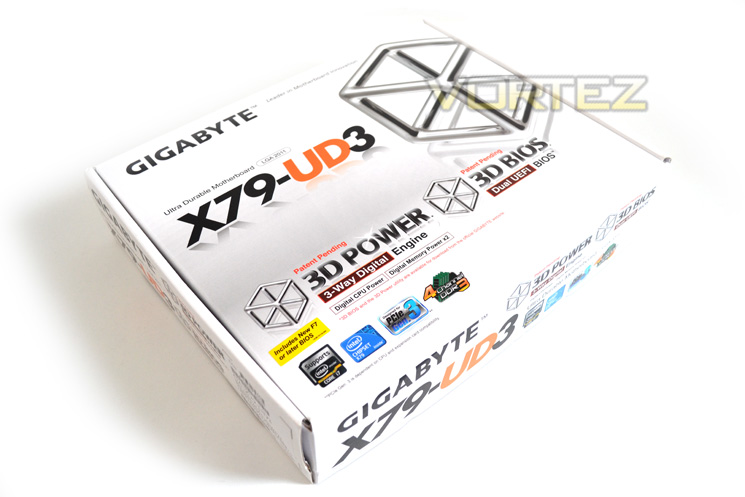
The front of the box is near identical to the UD5 packaging. GIGABYTE place a large emphasis on the 3D Power and BIOS monikers which take pride of place below the product title.
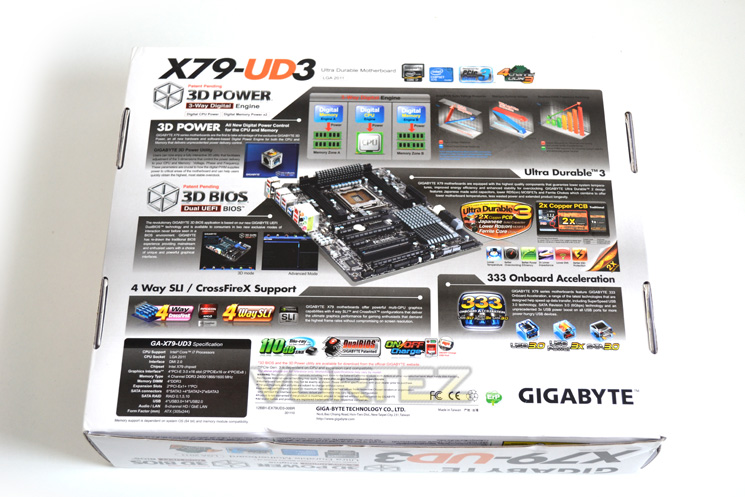
The rear of the package goes into tremendous detail regarding the product features. There is also a small table showing the product specifications but the centre of the package is where we get a first glimpse of the motherboard itself.
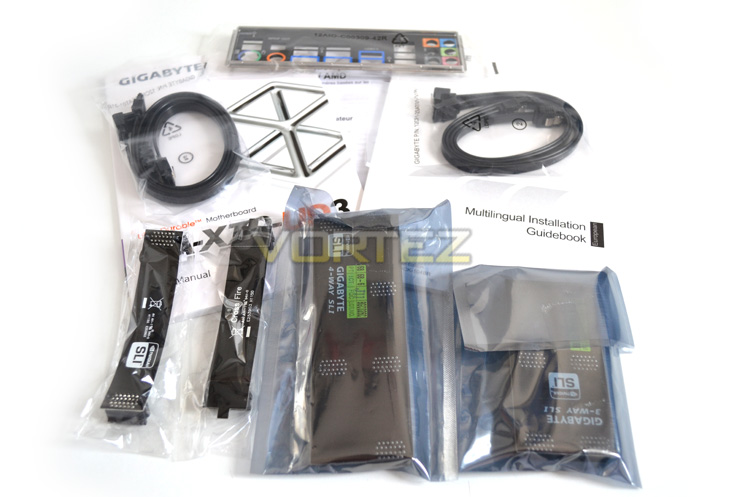
The accessory list is good in that you are provided with both SLI and Crossfire bridges – unusual for a motherboard as it is only normally SLI bridges that are included so a big thumbs up to GIGABYTE here. Sadly there are no expansion ports included (Firewire/USB) which is a real shame and quite odd considering there are ports available on the motherboard.
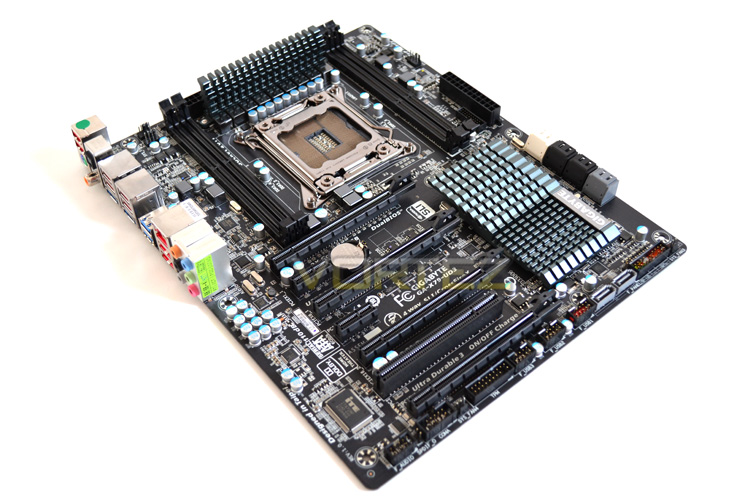
The GIGABYTE X79-UD3 is a great looking piece of kit with block slots and gun metal grey heatsinks which work very well together. It is also great to see GIGABYTE have taken a step away from the blue silk screening process for the PCB, instead opting for black which I’m sure will please many enthusiasts.
Let’s have look at some of the motherboards main on-board features…
First Look
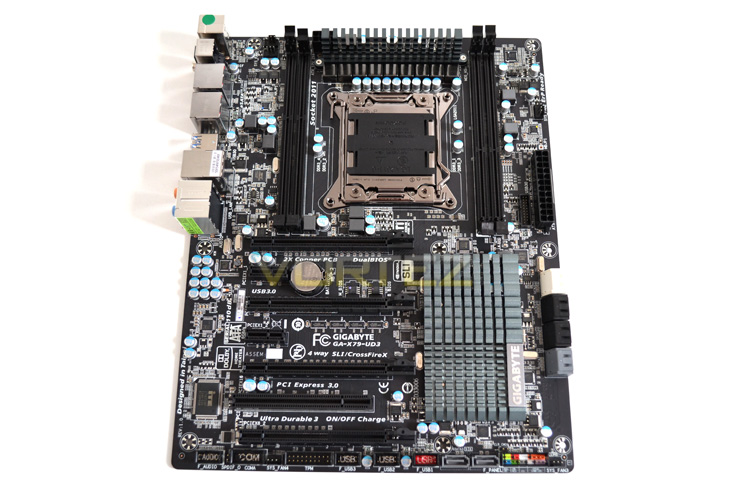
The first thing you may notice about the GIGABYTE X79-UD3 is that it ‘only’ has four memory slots rather than the usual 8 carried by X79 motherboards. While still supporting quad channel memory, GIGABYTE felt that it was unlikely enthusiasts at the entry level would require more and thus only four slot were included. I was puzzled why GIGABYTE had opted to place the memory so close to the CPU socket. While it could be argued that this lowers the trace path it also means that fitting a large heatsink will become more troublesome, especially when you consider that the uppermost PCIe socket is also in close proximity. While this won’t be an issue for those who watercool, those using a large CPU heatsink may find it a very big problem.
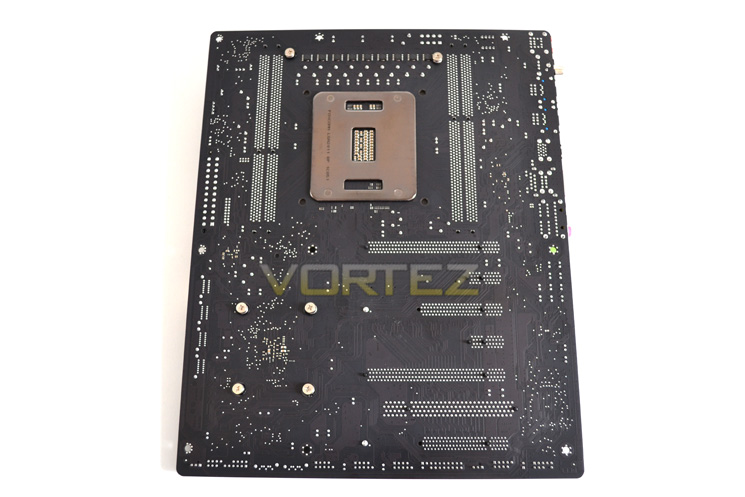
Flipping the board over we find that the mainboard has mosfets (unsinked) on the rear behind the VRM. You may also notice that of the GPU PCIe slots, 2 are x16 and 2 are x8 (maximum).
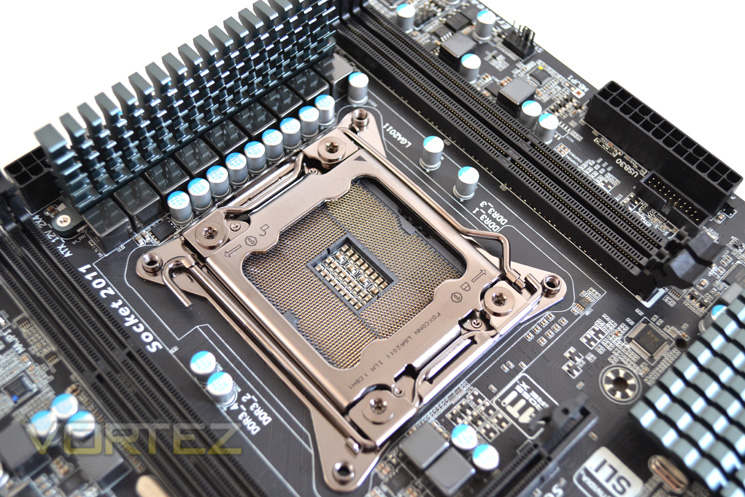
The Socket area is fairly crowded thanks to GIGABYTE’s Ultra Durable components consisting of solid capacitors and Ferrite core chokes. The CPU retention socket is courtesy of Foxconn rather than Lotes.
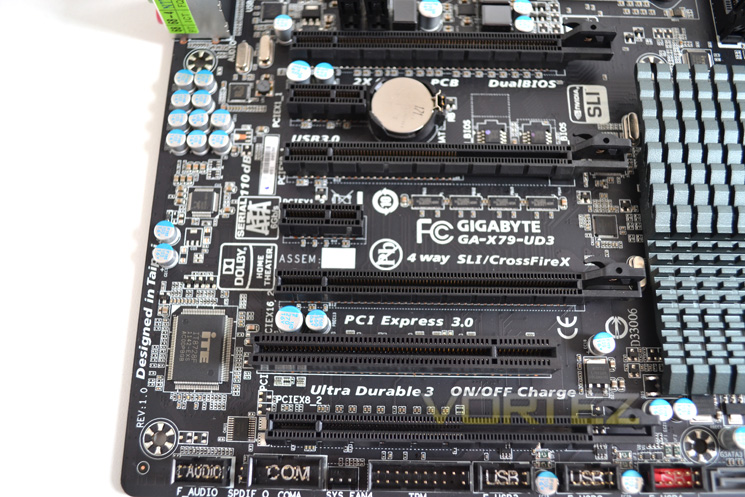
As mentioned above, the PCIe area is very interesting because it can support both QUAD SLI and Crossfire. In triple card configuration the layout would be from top to bottom 16x + 16x + 8x. Adding in a further card will result in the 2nd 16x lane halving to 8x making up a configuration of 16x + 8x + 8x+ 8x. Those who use two cards will have 16 lanes available on each GPU all of the time provided the top and third slot are used. It is also worth pointing out that while there is spacing for 3 double slot cards, the bottom slot will only allow a single slot card unless you have a case capable of supporting 8 PCI slots. OF the 40 lanes available for video, all of them are PCI Express 3.0.
What is nice to see is that GIGABYTE have not forgotten those of us who still make use of the older PCI expansion cards and for this purpose they have placed it in a very usable position near the bottom of the ports.
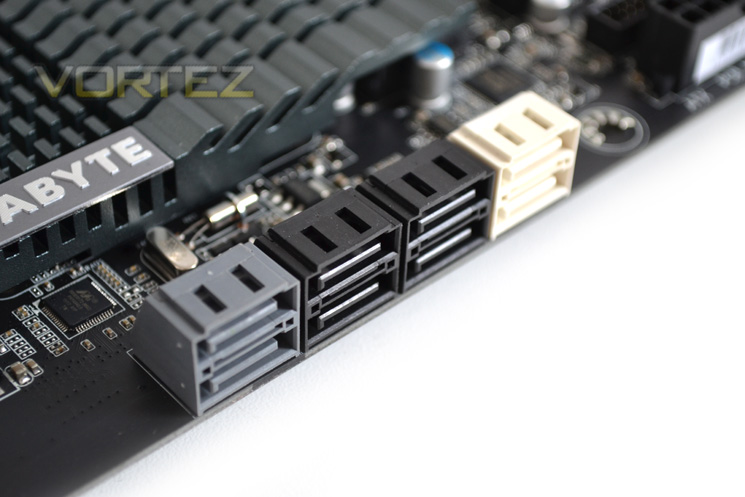
The X79 chipset supports 2 backwards compatible 6GBps Serial-ATA ports (white) and a further four SATA-300 ports (black), each supporting raid 0, 1, 5 and 10). The on-board Marvel controllers allow further expansion by adding a further 4 SATA 6Gbps ports, two positioned with the X79 set (gray) and a further two towads the bottom of the mainboard.
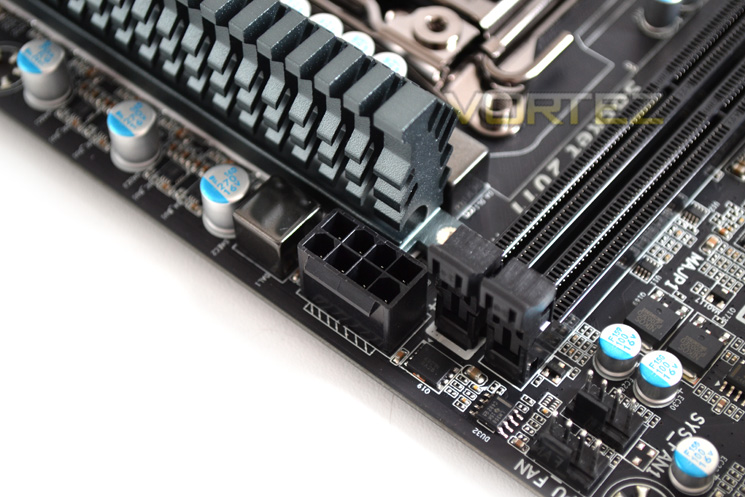
Power for the board comes via a 24pin port located adjacent to the SATA ports and a 12v 8pin port hidden behind the voltage regulation heatsink.
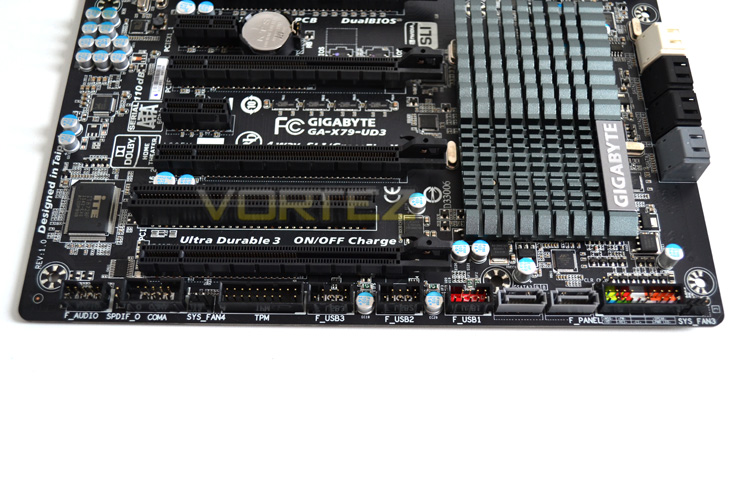
Toward the bottom of the mainboard is the area where you would normally plug in your USB expansion ports. As previously mentioned, the motherboard does not arrive with a backplate to expand your USB connectivity so unless your case has front connectivity cables, this feature will be useless for you.
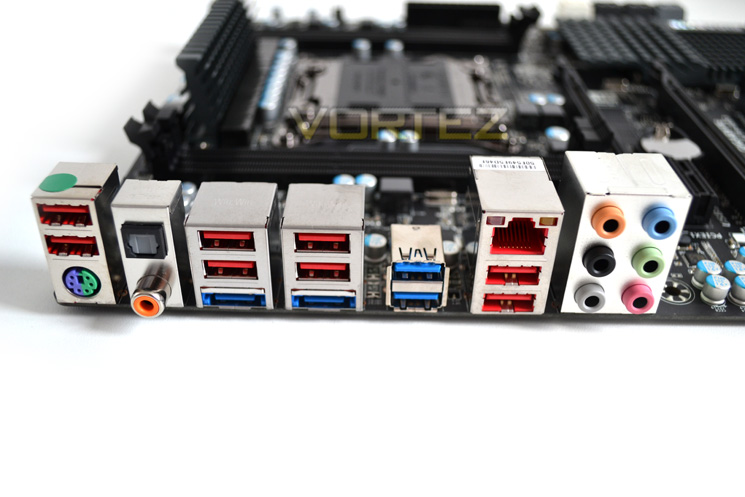
The I/O panel features 6 USB2.0 ports (red) and four USB 3.0 ports making 10 available ports save for the ones mentioned above. A PS2 keyboard/mouse combo port is included which allows for older peripheral connectivity. Realtec 7.1 audio is provided via the 6 3.5mm ports with an S/PDIF and optical out port. A single ethernet port is joined by a couple of e-SATA ports which makes for a very good rear I/O area. MY only complaint is that there isn’t a CMOS clear button which, as we will see later is a major oversight on GIGABYTE’s behalf.
Closer Look
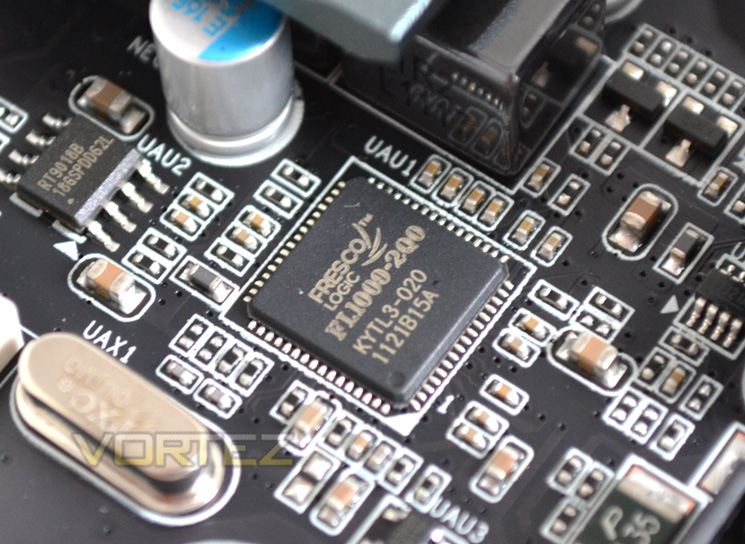
The X79 chipset is capable of controlling 14 USB 2.0 ports but if you want USB 3.0 you will have to use one of the four ports which are controlled by a couple of Fresco FL1009 modules.
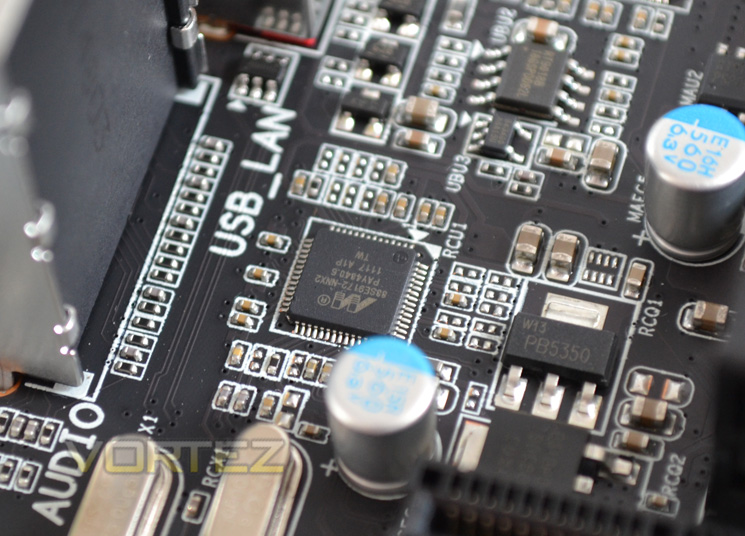
If the six SATA ports controlled via Intel are not enough then GIGABYTE have included a MARVEL chip to allow a further four SATA 6Gbps ports.
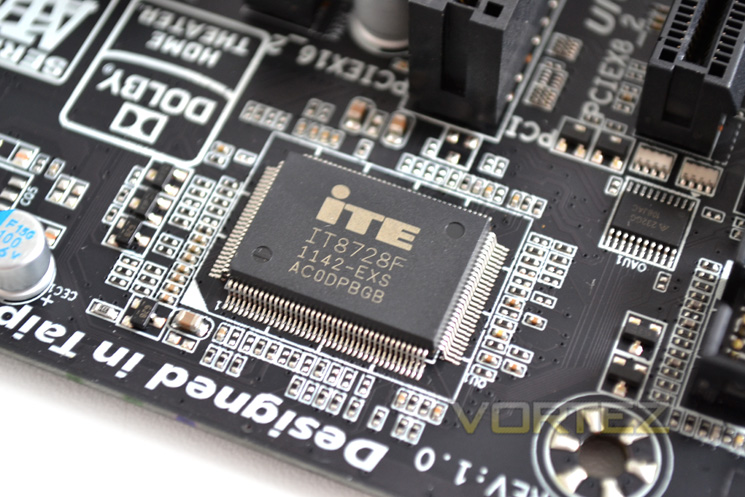
Super IO comes courtesy of the iTE IT8728F which controls temperature reporting and auto fan speeds. This is also compatible with the latest version of SpeedFan.
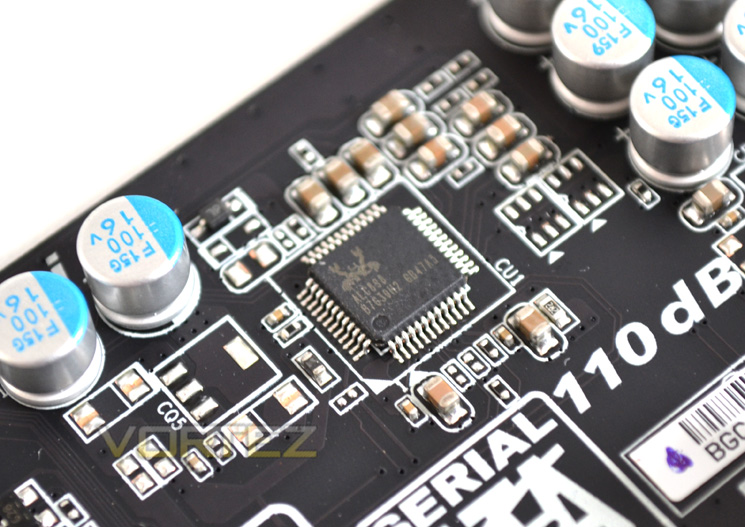
Audio is provided by the Realtec ALC898 chip and supports 2,4, 5 and 7.1 channel audio along with Dolby Digital Home Theatre Sound.
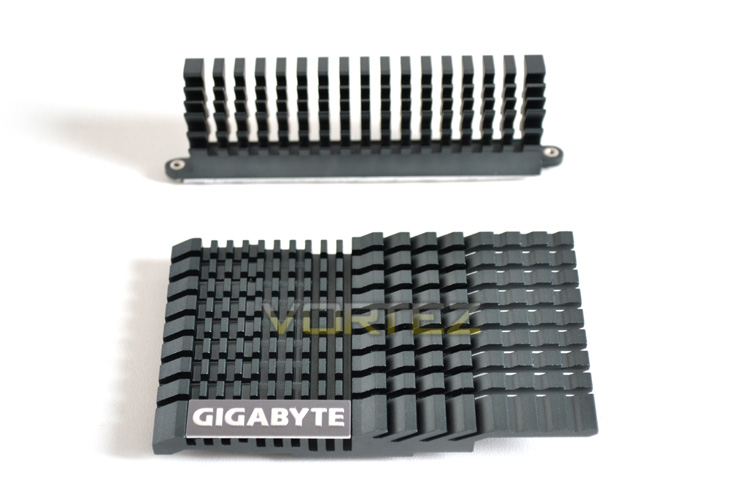
The UD3 heatsink is 25% bigger than that of the UD5 and while the UD5 benefited from a heatpipe, I do prefer the VRM heatsink to be separate from the chipset as this lessons the heat transferred to the chipset by the VRM area.
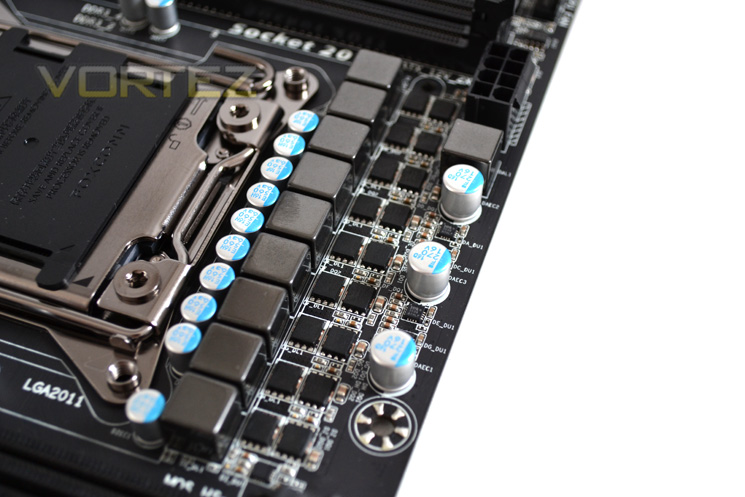
The voltage regulation is made up of ‘Ultra Durable’ components. An 8+1 design powers the CPU (8 for the CPU and one for the integrated memory controller. Each phase has a ferrite core inductor and 3 MOSFETs. 2 sets are cooled via a heatsink while the third set are found on the back of the mainboard.
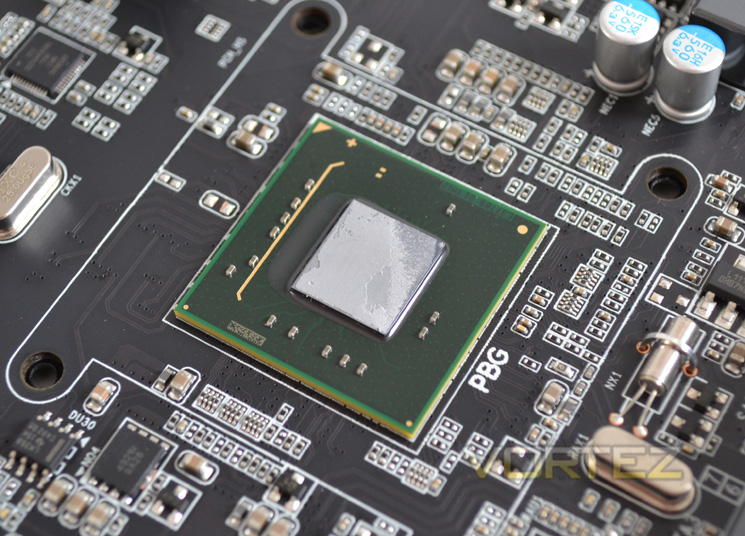
Finally we arrive at the Intel X79 PCH. Our sample was positively glued to the heatsink and took the old ‘hairdryer trick’ to remove. Thankfully you shouldn’t need to do this as the contact was very good although the paste used was more akin to cement than silicon!
Let’s take a look at today’s test setup…
Test Setup
When we decided to put the test bench together for X79 we wanted a system that would not only perform well but also last the test of time given that X58 has been around for some 3 years now so we saw no reason to believe that its successor, X79 would not be able to do the same.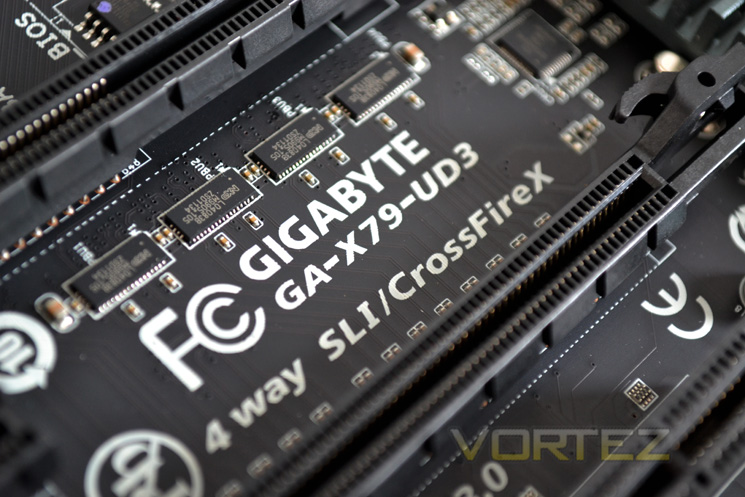
Some of the components for our test bench were kindly donated by CORSAIR who provided the majority of components without whom we would not have been able to bring you this review so a big thanks to them. Thanks also go to MSI who donated their NVIDIA GTX560Ti.
Motherboards on test:
MSI X79 Big Bang XPower II
ASRock X79 Extreme4-M
GIGABYTE X79-UD5
MSI X79A-GD65(8 D)
CPU: Intel Core i7-3960X Extreme Edition
Graphics Card: NVIDIA GTX560Ti
RAM – 16GB (4x4GB) Corsair Vengeance (Red) DDR3 @ 1866MHz 9-10-9-27
Power Supply – Corsair TX750M 750W
Hard Drive – Hitachi SATA II 250GB
Samsung F3 1TB
Cooler – Corsair H100
Benchmarks
Cinebench 11.5 – CPU Score
x264 HD 4.0 – 1st and 2nd pass encoding
SiSoftware SANDRA 2011 – CPU benchmarks
AIDA64 – CPU benchmarks
CyberLink MediaEspresso 6.5 – Convert 145MB MP4 to avi
PCMark 7 – System Benchmark
3DMark 11 – Performance and Extreme preset Overall and Physics Score
Games – Crysis 2, DiRT3, Metro 2033
Other Software
Core Temp 0.99.5
LinX stress Test
CPUID HWMonitor
Overclocking
I had very high hopes for this mainboard considering it grasped the world record, hitting 5.7Ghz on a x57 multiplier, the only mothebroard to have achieved this. While this was achieved using liquid Nitrogen, I knew that our chip was good for 5ghz as proven with other mainboards so if I could crack 5.1GHz I would be thoroughly impressed.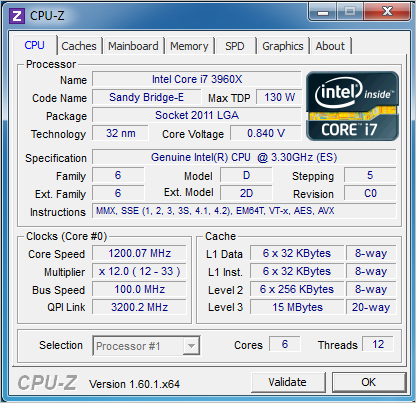
Here is a shot for the board at is reference level with the BIOS set to default values (Speedstep enabled). Under load, our CPU automatically clocked itself to 3.6GHz and dropped back to 1.2GHz using just 0.8v when idle. For our run of benchmarks we ran the CPU at 3.3GHz (100×33) with Speedstep and TurboBoost 2.0 disabled to ensure power saving/auto overclocking features did not interfere with the benchmark results.
Before we get to our overclocking results I feel it necessary to discuss the BIOS. For todays review we used the very latest official BIOS revision available at the time of writing so my findings will be based on this BIOS.
One of my criticisms of the X79-UD5 was GIGABYTE’s UEFI BIOS. It works and it offers a good amount of features and settings, particularly in power management/adjustment but the navigation using a mouse was cumbersome at best and down right frustrating at worst. While mouse control is ‘supported’ by the UEFI BIOS, it doesn’t work particularly well at all. Point and click is percetly adequate, which is an improvement over the UD5 which had horizontal axis issues but the UD3 suffers from scroll wheel problems in that it just doesn’t work. Therefore, once you have clicked on settings, you then have to resort to using the keyboard to either scroll through the available settings or enter the value manually. After a while I found myself simply using the keyboard to tab through the features as I found it to be much quicker than persevering the mouse control method which after all this time I would have hoped GIGABYTE would have resolved.
The BIOS is however very well laid out and once you resign yourself to using the keyboard, it is easy to navigate by having all of the settings and sub menus precisely where you would expect them to be. The voltage ranges are excellent allowing you to easily fry your components should you wish(!) or save a polar bear and underclock. Whatever your preference, the UD3 BIOS has enough features to keep you busy until the early hours and as we have seen , GIGABYTE support is excellent with many regular BIOS updates forthcoming.
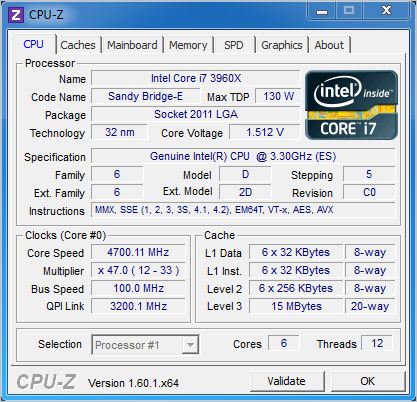
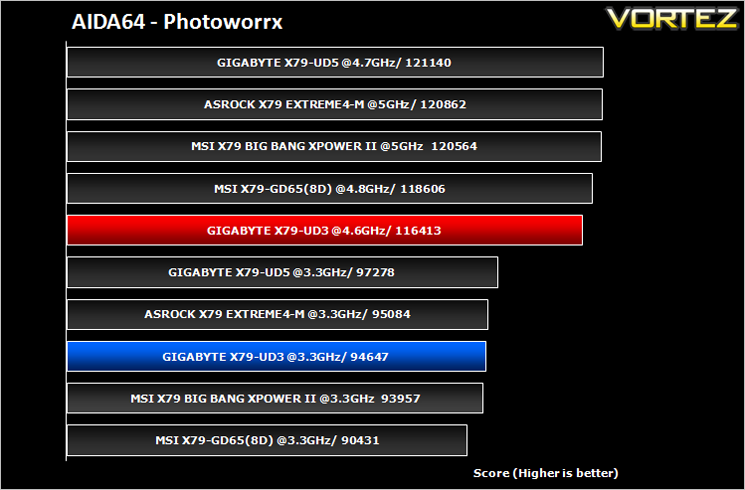
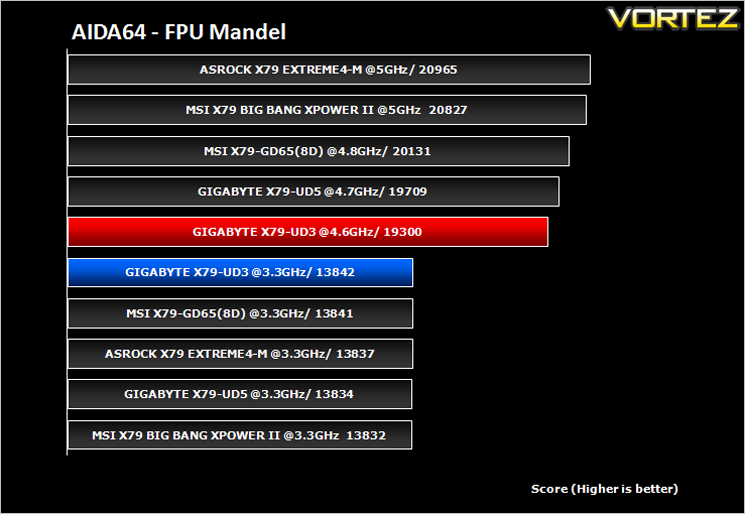
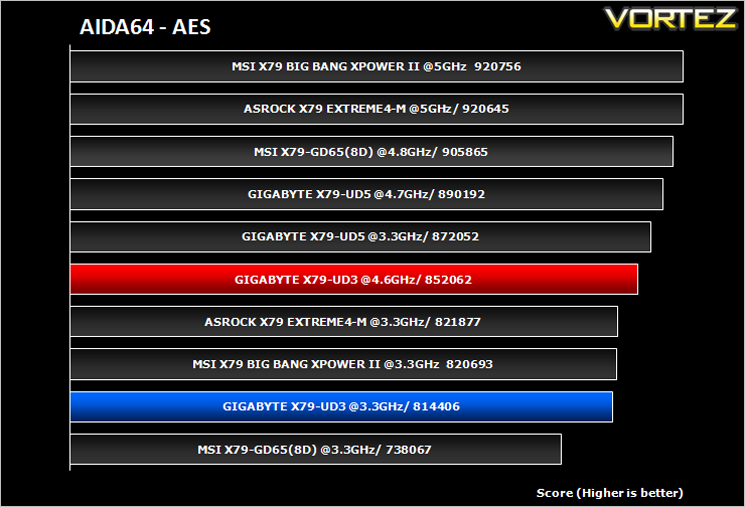
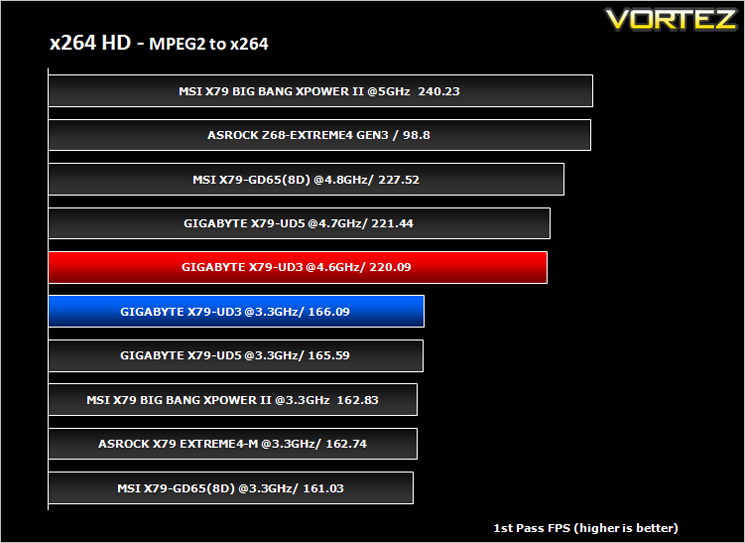
Despite my best efforts and using voltages higher than previously dared, I was unable to push the CPU past 4.7. Anything higher and the system refused to boot. I tried using GIGABYTE’s Easytune 6 but there appeared to be a bug whereby a 47x multiplier could not be used on core 0 which was very odd considering it could be selected via the BIOS. Regardless, I couldn’t get 4.7 stable for more than a few 32m pi runs so I dropped it back to a solid 4.6GHz and at this speed it was stable enough to run all of our benchmarks which included a 4 hour Prime 95 test.
Power Consumption
To test for power consumption we use the same basic components for each motherboard on test. Readings are then taken from the wall both in stock (Optimised defaults loaded) and maximum overclocked (Voltages may vary).
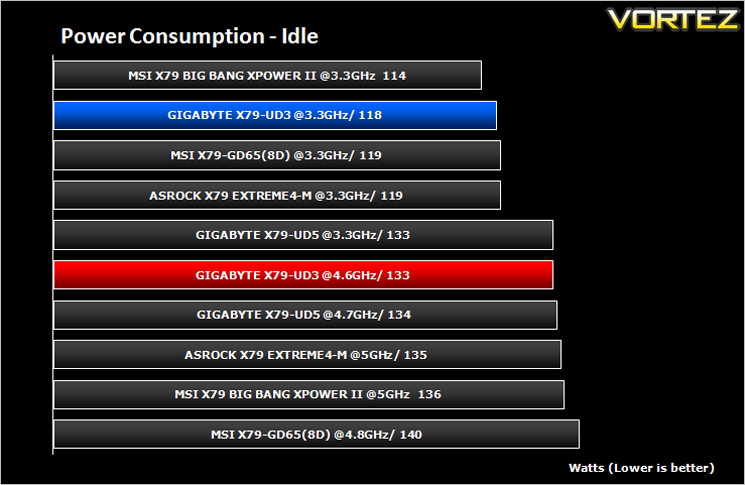
Under idle conditions the UD3 performed in the low-middle of the pack, neither impressing nor disappointing.
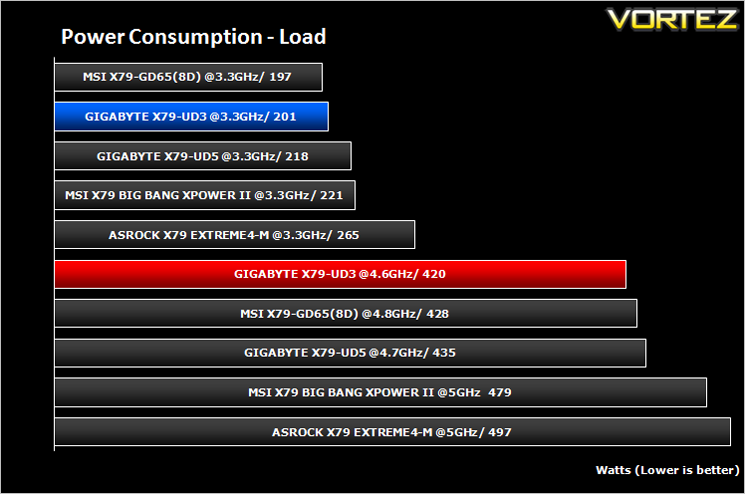
Under 100% load using Prime95, the GIGABYTE X79-UD3 did perform slightly above average but this can be accounted for as the 4.6GHz overclock required less voltage than the higher clocked mainboards so all things considered, the UD3 once again split the results straight down the middle.
Sisoft Sandra 2012
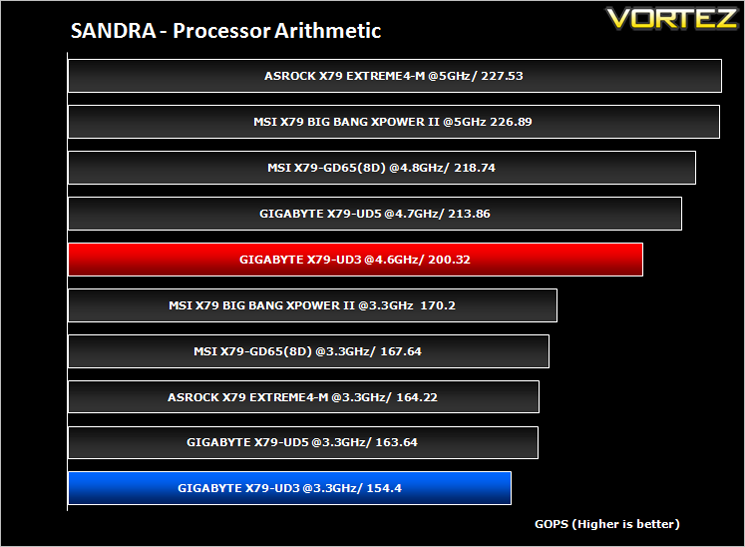
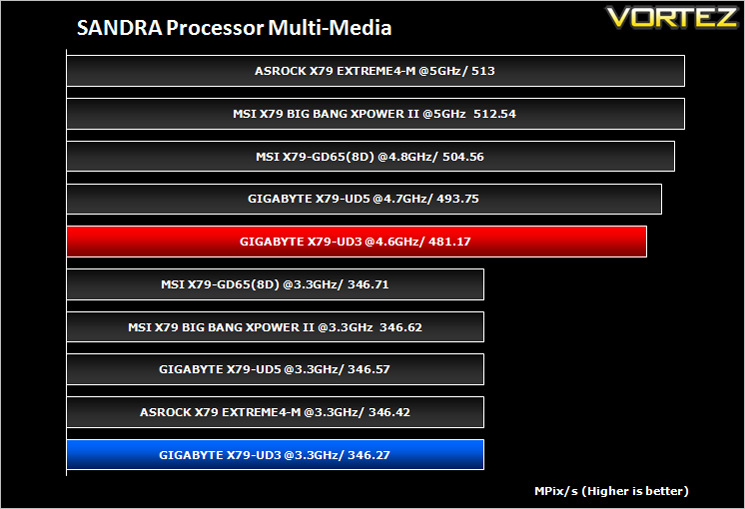
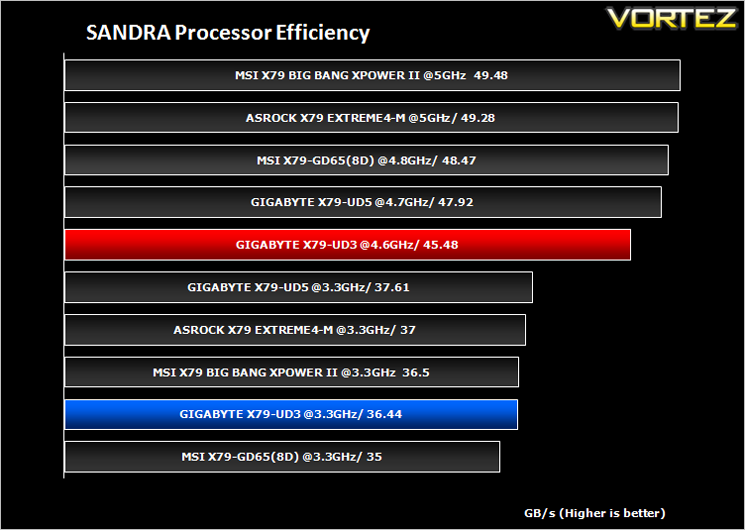
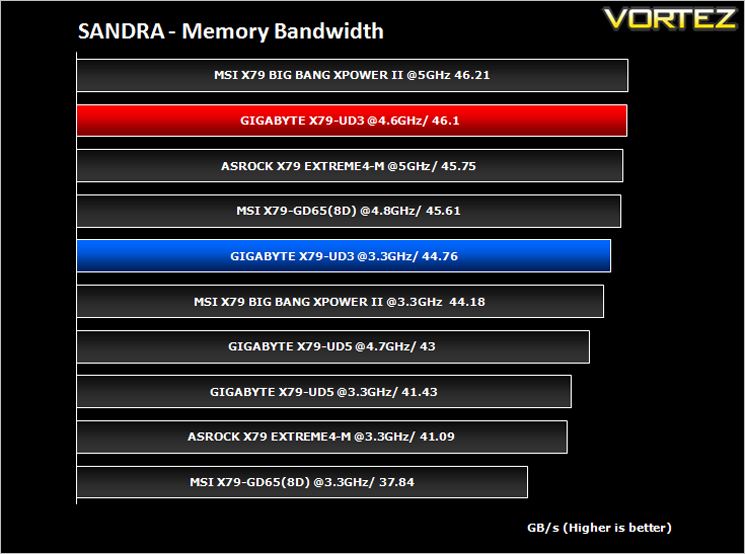
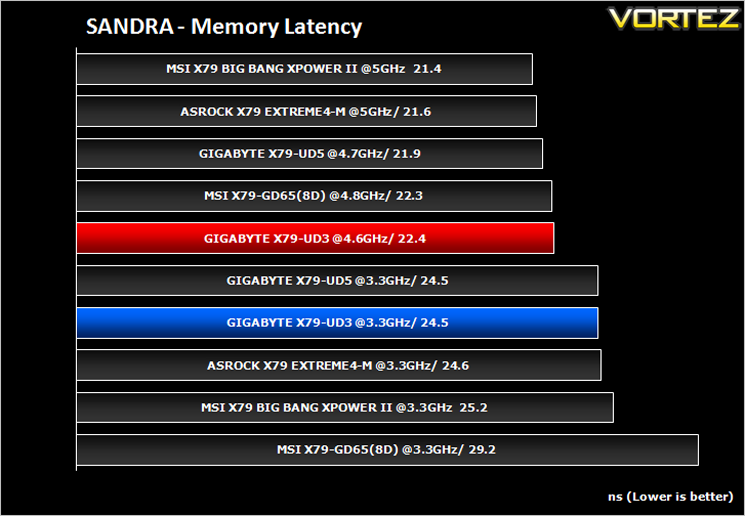
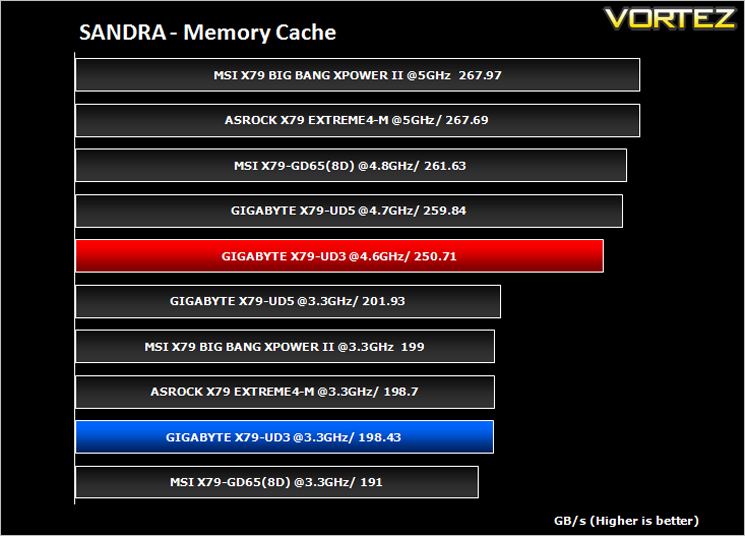
AIDA64
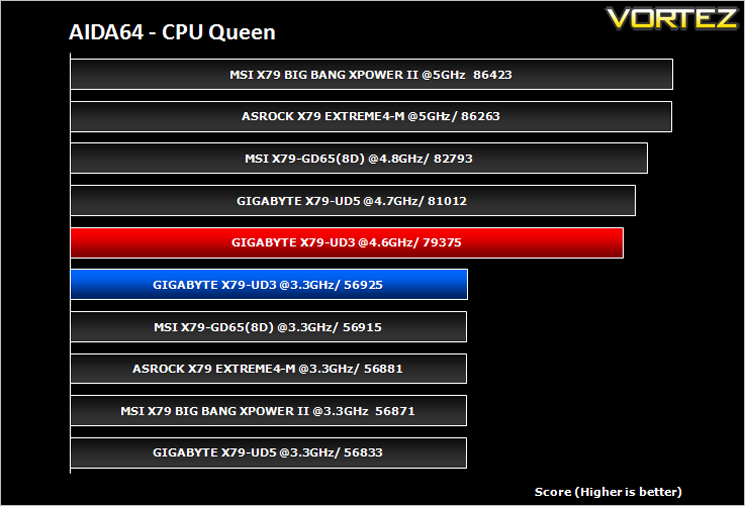
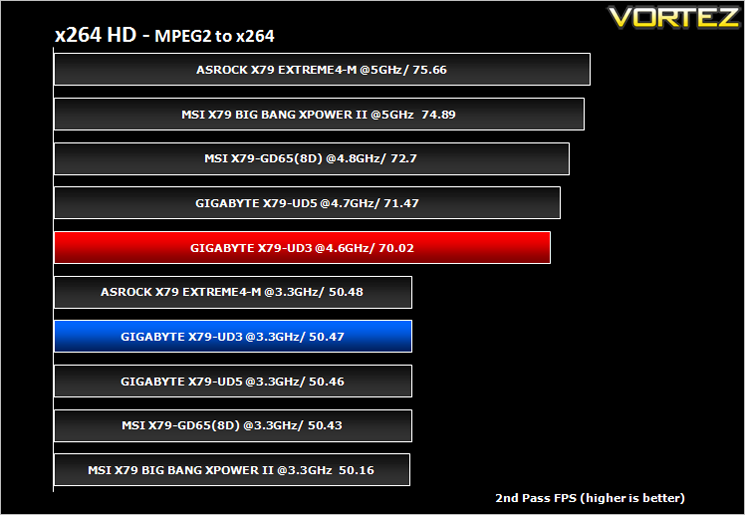
x264 HD V4.0
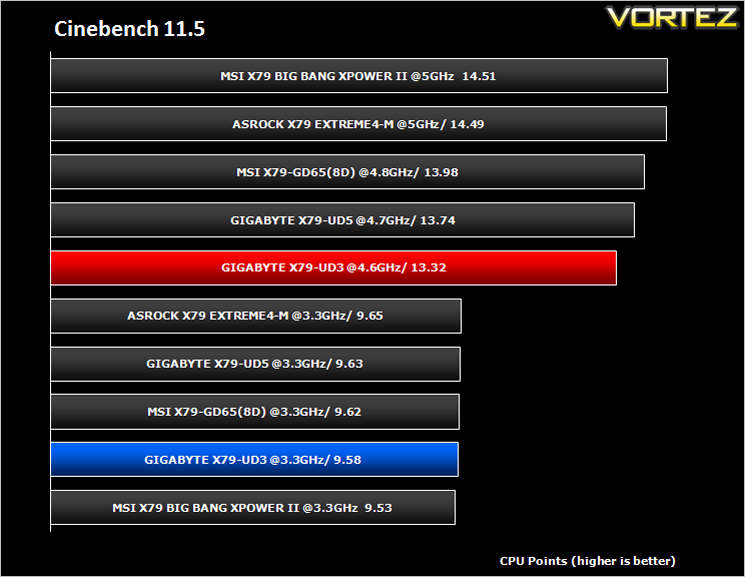
Cinebench 11.5
CINEBENCH can measure systems with up to 64 processor threads. This test scene contains approximately 2,000 objects which in turn contain more than 300,000 polygons in total, and uses sharp and blurred reflections, area lights, shadows, procedural shaders, antialiasing, and much more. The result is displayed in points (pts). The higher the number, the faster your processor.
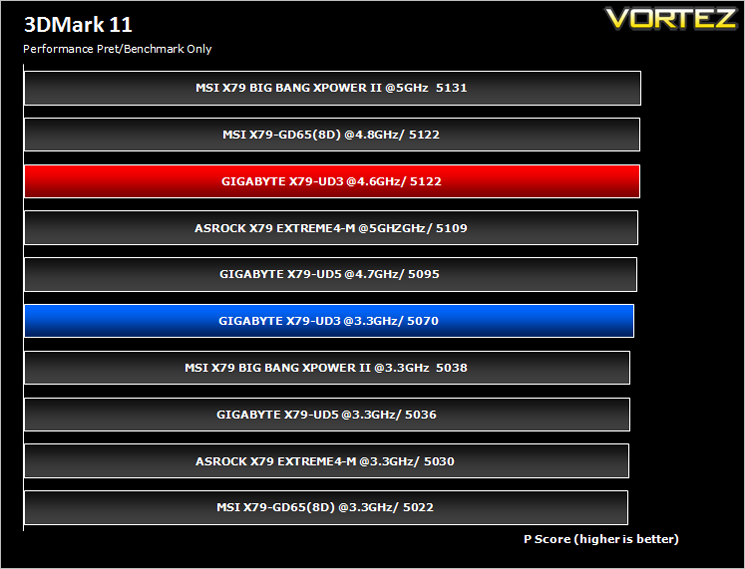
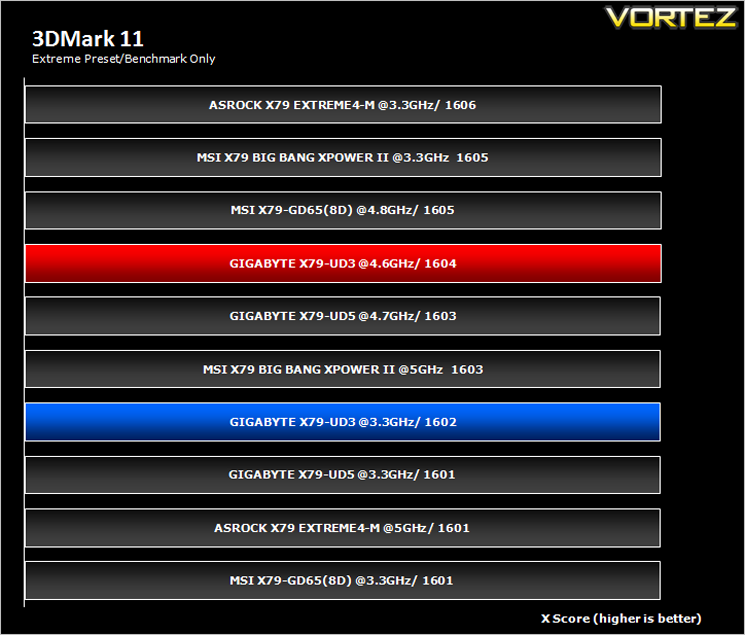
Futuremark 3DMark 11
Futuremark PCMark 7
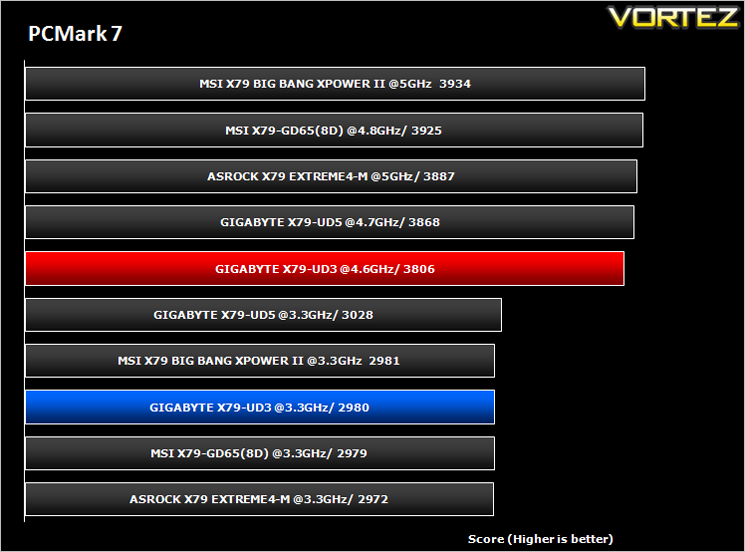
Gaming Benchmarks
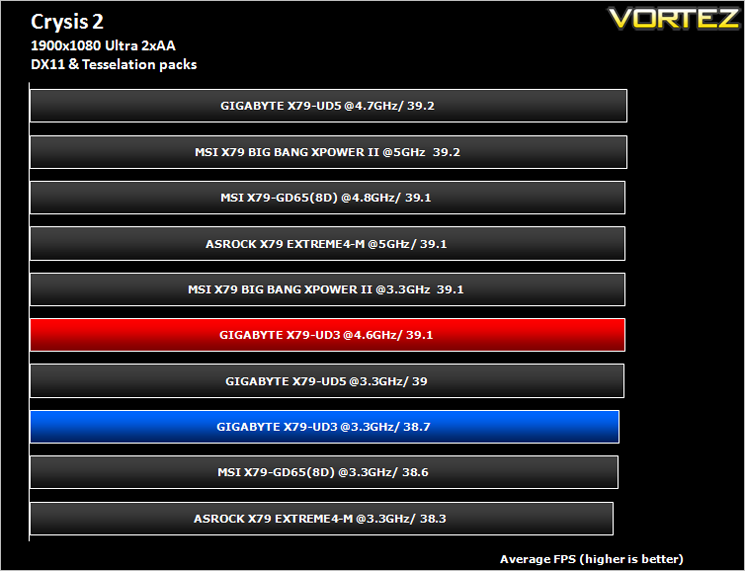
Crytek took an internet beating from its loyal fans due to the fact that they pandered to the console masses and dumbed down the graphics to DirectX 9. Fortunately, fans of the PC version of Crysis managed to force Cryteks hand and they have since developed a DX11 patch and have also enhanced the textures with added tesselation. It is for this reason that we have decided to include it in our suite of benchmarks.
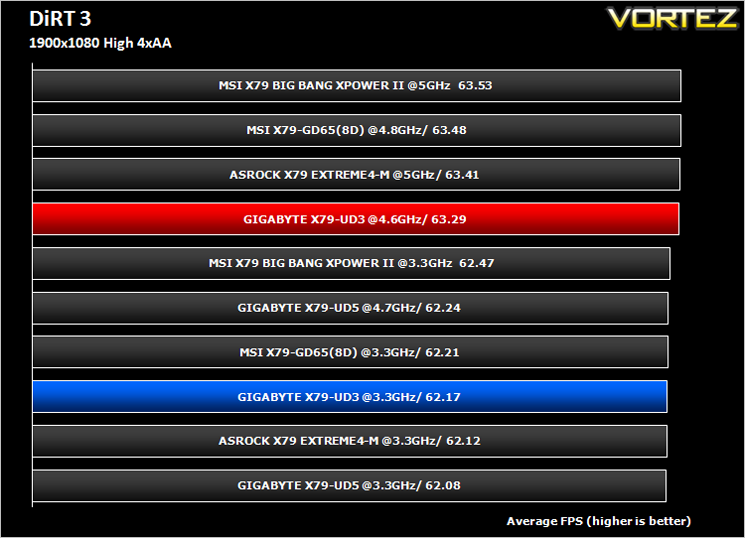
As players race to elevate their global standing, DiRT 3 is back delivering mud, sweat and gears world over: from the intense weather-beaten rally stages of Europe, Africa and the US, to executing performance driving showcases and career challenges where car control is pushed to spectacular limits.
Conclusion
The GIGABYTE UD5 was one of the first X79 motherboards we had the pleasure of testing here at Vortez. Like its X58 brethren, the X79 chipset, while inherently different hardware, provides similar overclocking values and features galore. The UD5’s little brother, the X79-UD3 holds true to these values and features in that it too can overclock well and for an entry level X79 motherboard, has an abundance of features that wouldn’t be out of place on a high-end motherboard. QUAD GPU support, 7.1 audio, USB 3.0, SATA 6Gps along with digital power make up an impressive feature list. There are however a few key features that may deter potential buyers.
The overclocking of the UD3 was good but fell short of being excellent. It managed 4.6GHz stable, a reasonable overclock for our i7-3960X processor. Unfortunately for the UD3, we have seen other motherboards surpass the 5GHz mark with the same CPU. So this mainboard might not be the weapon of choice to get the absolute maximum from your CPU. I was expecting great things from the UD3 in the overclocking department, especially considering this is the board that was used to break the World Record on an x79 chipset. Sadly, our sample could not reach these dizzy heights and while it didn’t exactly disgrace itself, it was nonetheless disappointing. Overclocking was made all the more frustrating because of a lack of CMOS clear button. When the mainboard is in an enclosure, a CMOS clear scenario will entail removing the side panel and fiddling with a jumper which is less than ideal and a large oversight by GIGABYTE. That said, BIOS recovery was very good for the most part, only needing a CMOS clear when baseclock adjustments/memory frequency overclocking was attempted and the inevitable reboot loop ensued.
The CPU socket is a little too close to the uppermost PCIe 3.0 slot which means those who intend running an oversized CPU cooler may have to either use a different PCIe slot or opting for a less efficient CPU cooler. Because the memory slots are also very close to the LGA2011 socket, CPU cooler selection and orientation will be even more important. The BIOS, while perfectly adequate is less refined than the competition, at times feeling very cumbersome to use via mouse and so I inevitably opted for the faster keyboard BIOS navigation.
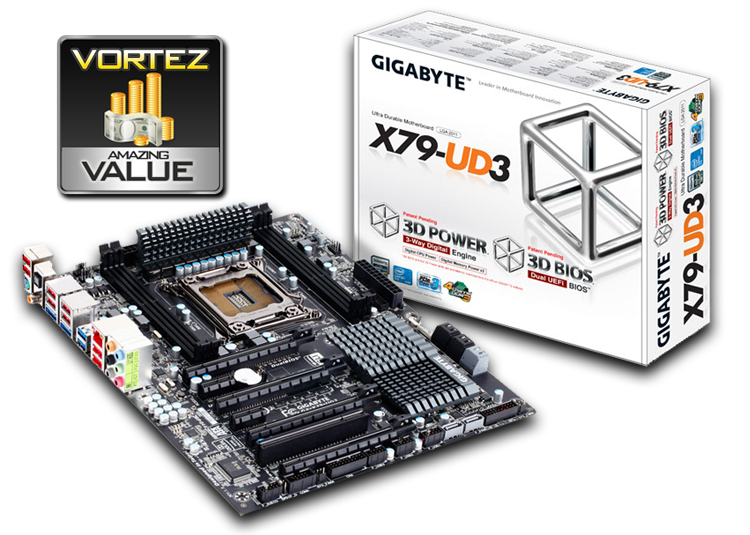
The UD3 looks great with no messy colours spoiling the smart, yet imposing black and grey scheme. It is packaged well with pretty much all you need to get you going. I would have liked to have seen more accessories included such as a USB bracket but other than that, the list is adequate. It sports 4x memory slots, more than enough for a gaming PC and weighing in at £170 it is one of the cheapest X79 motherboards available. At this price point the mainboard fares well and offers a cheaper entry into the superior Intel X79 chipset so those looking to spend their hard earned on a motherboard that supports Quad GPU and Quad channel memory, the UD3 has enough to keep you happy. If however you are looking for a motherboard that can extract the maximum from your CPU then the UD3’s bigger brothers may be more suitable.
+ Very good value
+ Good looking
+ Extensive BIOS power options
+ 4-way SLI/Crossfire
+ Quad Channel Memory
+ Power efficient
Cons:
– No Power/Reset buttons
– No CMOS clear button
– Large air coolers may prove problematic to fit

Click here for an explanation of our awards at Vortez.net. Thanks to GIGABYTE for providing today’s review sample.


