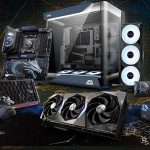

Looking to add some luxury to your AMD configuration? We take a look at GIGABYTE’s new sophisticated X870E AERO X3D DARK WOOD motherboard.

Product on Review: X870E AERO X3D DARK WOOD
Manufacturer: GIGABYTE
Street Price: GBP £385| USD $540 | AUD $700
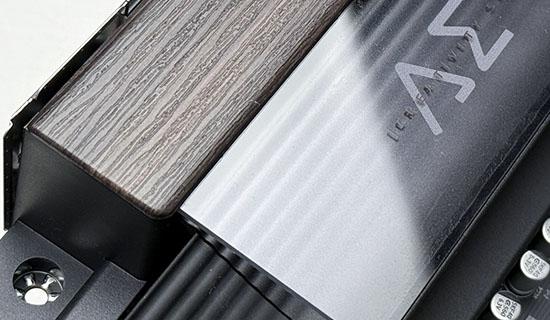
At first glance, you’d be forgiven for thinking the GIGABYTE X870E AERO X3D DARK WOOD belongs in a luxury office rather than at the heart of a high-performance gaming PC. Instead of the usual sharp angles and RGB overload, GIGABYTE has opted for a sophisticated wood-inspired design complemented by metallic accents and a leather pull tab, giving the DARK WOOD a unique identity in a market where most motherboards tend to blend together. Thankfully, there’s far more to it than just good looks, with a premium feature set that caters to enthusiasts, gamers and content creators alike.
Based on AMD’s flagship X870E chipset and AM5 platform, the DARK WOOD is ready for Ryzen 7000, 8000 and 9000 Series processors, with particular attention given to AMD’s X3D lineup through GIGABYTE’s X3D Turbo Mode 2.0. This intelligent optimisation feature is designed to extract additional gaming performance without requiring hours of BIOS tweaking, while support for DDR5 memory beyond 9000MT/s gives enthusiasts plenty of room to push their systems. Backing it all up is a substantial 16+2+2 Twin Digital VRM, premium power stages and an 8-layer 2oz copper PCB, ensuring the hardware is just as serious as its specifications suggest.

There’s no shortage of modern connectivity either. Four M.2 slots, including PCIe 5.0 support, are paired with GIGABYTE’s EZ-Latch and M.2 EZ-Flex cooling solutions to make storage installation quick and painless. Reinforced PCIe 5.0 expansion, dual 5GbE LAN, Wi-Fi 7, dual USB4 Type-C ports, comprehensive thermal protection, Smart Fan 6 and DriverBIOS all contribute to a motherboard that’s designed to make both building and everyday use as straightforward as possible. It’s a thoughtful mix of premium features that goes beyond simply ticking boxes on a specification sheet.
In this review we’ll be taking a closer look at everything the DARK WOOD brings to the table, exploring its design, build quality, BIOS and feature set before moving on to our performance testing. As always, we’ll also be examining power consumption, VRM cooling and storage performance to see whether this premium motherboard delivers on its promises.
Technical Specifications & Features
CPU
AMD Socket AM5, support for:
AMD Ryzen™ 9000 Series Processors/
AMD Ryzen™ 8000 Series Processors/
AMD Ryzen™ 7000 Series Processors
Chipset
AMD X870E
Memory
Support for DDR5 9000(O.C) /8800(O.C) /8600(O.C) /8400(O.C) / 8000(O.C) / 7800(O.C) / 7600(O.C) / 7800(O.C) / 7600(O.C.) / 7200(O.C.) / 7000(O.C.) / 6800(O.C.) / 6600(O.C.) / 6400(O.C) / 6200(O.C) / 6000(O.C) / 5600(O.C) / 5200 / 4800 / 4400 MT/s memory modules.
Support for DDR5 5200/4800 MT/s memory modules
4 x DDR5 DIMM sockets supporting up to 256 GB (64 GB single DIMM capacity) of system memory
Dual channel memory architecture
Support for non-ECC Un-buffered DIMM memory modules
Support for AMD EXtended Profiles for Overclocking (AMD EXPO™) and Extreme Memory Profile (XMP) memory modules
Onboard Graphics
Integrated Graphics Processor with AMD Radeon™ Graphics support+ASMedia USB4® Controller:
– 2 x USB4® USB Type-C® ports, supporting USB4 and DisplayPort video outputs and a maximum resolution of 3840×2160@240 Hz
Integrated Graphics Processor with AMD Radeon™ Graphics support:
– 1 x HDMI port, supporting a maximum resolution of 4096×2160@60 Hz
– 1 x front HDMI port, supporting a maximum resolution of 1920×1080@30 Hz
Audio
Realtek® ALC1220 CODEC
High Definition Audio
2/4/5.1/7.1-channel
Support for S/PDIF Out
LAN
2 x Realtek® 5GbE LAN chips (5 Gbps/2.5 Gbps/1 Gbps/100 Mbps)
Wireless Communication module
MediaTek Wi-Fi 7 MT7927, RZ738
– 802.11a, b, g, n, ac, ax, be, supporting 2.4/5/6 GHz carrier frequency bands
– BLUETOOTH 5.4
– Support for 11be 320MHz wireless standard
Expansion Slots
1 x PCI Express x16 slot (PCIEX16), integrated in the CPU:
AMD Ryzen™ 9000/7000 Series Processors support PCIe 5.0 x16 mode
AMD Ryzen™ 8000 Series-Phoenix 1 Processors support PCIe 4.0 x8 mode
AMD Ryzen™ 8000 Series-Phoenix 2 Processors support PCIe 4.0 x4 mode
1 x PCI Express x16 slot (PCIEX8), integrated in the CPU:
AMD Ryzen™ 9000/7000 Series Processors support PCIe 5.0 x8 mode
Chipset:
– 1 x PCI Express x16 slot, supporting PCIe 4.0 and running at x4 (PCIEX4)
Storage Interface
1 x M.2 connector (M2A_CPU), integrated in the CPU, supporting Socket 3, M key, type 2580/2280 SSDs:
AMD Ryzen™ 9000/7000 Series Processors support PCIe 5.0 x4/x2 SSDs
AMD Ryzen™ 8000 Series-Phoenix 1 Processors support PCIe 4.0 x4/x2 SSDs
AMD Ryzen™ 8000 Series-Phoenix 2 Processors support PCIe 4.0 x4/x2 SSDs
1 x M.2 connector (M2B_CPU), integrated in the CPU, supporting Socket 3, M key, type 22110/2280 SSDs:
AMD Ryzen™ 9000/7000 Series Processors support PCIe 5.0 x4/x2 SSDs
* The M2B_CPU connector shares bandwidth with the ASMedia USB4® controller. When a device is installed in theM2B_CPU connector, both theM2B_CPU connector
and the USB4 port supported by the ASMedia USB4® controller operate at up to x2 bandwidth. When using an AMD Ryzen™ 8000 Series-Phoenix 1 or Phoenix 2
processor, the USB4 port supported by the ASMedia USB4® controller operates at up to x2 bandwidth, and the M2B_CPU connector becomes unavailable.
2 x M.2 connectors (M2C_SB, M2D_SB), integrated in the Chipset, supporting Socket 3, M key, type 22110/2280 PCIe 4.0 x4/x2 SSDs
4 x SATA 6Gb/s connectors
RAID 0, RAID 1, RAID 5, and RAID 10 support for NVMe SSD storage devices
* RAID 5 is only available on AMD Ryzen™ 9000 Series Processors.
RAID 0, RAID 1, and RAID 10 support for SATA storage devices
USB
CPU+ASMedia USB4® controller:
– 2 x USB4® USB Type-C® ports on the back panel
CPU:
– 1 x USB 3.2 Gen 2 Type-A port (red) on the back panel
Chipset+USB 3.2 Gen 1 Hub:
– 4 x USB 3.2 Gen 1 ports available through the internal USB headers
Chipset:
– 2 x USB Type-C® ports, with USB 3.2 Gen 2×2 support (1 port on the back panel, 1 port available through the internal USB header)
– 4 x USB 3.2 Gen 2 Type-A ports (red) on the back panel
– 3 x USB 3.2 Gen 1 ports on the back panel
– 4 x USB 2.0/1.1 ports available through the internal USB headers
Internal I/O Connectors
1 x 24-pin ATX main power connector
2 x 8-pin ATX 12V power connectors
1 x CPU fan header
1 x CPU fan/water cooling pump header
4 x system fan headers
2 x system fan/water cooling pump headers
3 x addressable RGB Gen2 LED strip headers
1 x RGB LED strip header
4 x M.2 Socket 3 connectors
4 x SATA 6Gb/s connectors
1 x front panel header
1 x front panel audio header
1 x USB Type-C® header, with USB 3.2 Gen 2×2 support
2 x USB 3.2 Gen 1 headers
2 x USB 2.0/1.1 headers
1 x noise detection header
1 x Trusted Platform Module header (For the GC-TPM2.0 SPI V2 module only)
1 x HDMI port (Note)
1 x reset jumper
1 x Clear CMOS jumper
2 x temperature sensor headers
(Note) Actual support may vary by CPU.
Back Panel Connectors
1 x Q-Flash Plus button
1 x Clear CMOS button
1 x power button
1 x reset button
1 x HDMI port (Note)
2 x USB4® USB Type-C® ports (DisplayPorts (Note))
1 x USB Type-C® port, with USB 3.2 Gen 2×2 support
5 x USB 3.2 Gen 2 Type-A ports (red)
3 x USB 3.2 Gen 1 ports
2 x RJ-45 ports
2 x antenna connectors (2T2R)
2 x audio jacks
1 x optical S/PDIF Out connector
(Note) Actual support may vary by CPU.
I/O Controller
iTE® I/O Controller Chip
H/W Monitoring
Voltage detection
Temperature detection
Fan speed detection
Water cooling flow rate detection
Fan fail warning
Fan speed control
* Whether the fan (pump) speed control function is supported will depend on the fan (pump) you install.
Noise detection
BIOS
1 x 512 Mbit flash
Use of licensed AMI UEFI BIOS
PnP 1.0a, DMI 2.7, WfM 2.0, SM BIOS 2.7, ACPI 5.0
Unique Features
Support for GIGABYTE Control Center (GCC)
Support for Q-Flash
Support for Q-Flash Plus
Support for Smart Backup
Bundled Software
Norton® Internet Security (OEM version)
Operating System
Support for Windows 11 64-bit
Form Factor
ATX Form Factor; 30.5cm x 24.4cm
AMD Socket AM5, support for:
AMD Ryzen™ 9000 Series Processors/
AMD Ryzen™ 8000 Series Processors/
AMD Ryzen™ 7000 Series Processors
Chipset
AMD X870E
Memory
Support for DDR5 9000(O.C) /8800(O.C) /8600(O.C) /8400(O.C) / 8000(O.C) / 7800(O.C) / 7600(O.C) / 7800(O.C) / 7600(O.C.) / 7200(O.C.) / 7000(O.C.) / 6800(O.C.) / 6600(O.C.) / 6400(O.C) / 6200(O.C) / 6000(O.C) / 5600(O.C) / 5200 / 4800 / 4400 MT/s memory modules.
Support for DDR5 5200/4800 MT/s memory modules
4 x DDR5 DIMM sockets supporting up to 256 GB (64 GB single DIMM capacity) of system memory
Dual channel memory architecture
Support for non-ECC Un-buffered DIMM memory modules
Support for AMD EXtended Profiles for Overclocking (AMD EXPO™) and Extreme Memory Profile (XMP) memory modules
Onboard Graphics
Integrated Graphics Processor with AMD Radeon™ Graphics support+ASMedia USB4® Controller:
– 2 x USB4® USB Type-C® ports, supporting USB4 and DisplayPort video outputs and a maximum resolution of 3840×2160@240 Hz
Integrated Graphics Processor with AMD Radeon™ Graphics support:
– 1 x HDMI port, supporting a maximum resolution of 4096×2160@60 Hz
– 1 x front HDMI port, supporting a maximum resolution of 1920×1080@30 Hz
Audio
Realtek® ALC1220 CODEC
High Definition Audio
2/4/5.1/7.1-channel
Support for S/PDIF Out
LAN
2 x Realtek® 5GbE LAN chips (5 Gbps/2.5 Gbps/1 Gbps/100 Mbps)
Wireless Communication module
MediaTek Wi-Fi 7 MT7927, RZ738
– 802.11a, b, g, n, ac, ax, be, supporting 2.4/5/6 GHz carrier frequency bands
– BLUETOOTH 5.4
– Support for 11be 320MHz wireless standard
Expansion Slots
1 x PCI Express x16 slot (PCIEX16), integrated in the CPU:
AMD Ryzen™ 9000/7000 Series Processors support PCIe 5.0 x16 mode
AMD Ryzen™ 8000 Series-Phoenix 1 Processors support PCIe 4.0 x8 mode
AMD Ryzen™ 8000 Series-Phoenix 2 Processors support PCIe 4.0 x4 mode
1 x PCI Express x16 slot (PCIEX8), integrated in the CPU:
AMD Ryzen™ 9000/7000 Series Processors support PCIe 5.0 x8 mode
Chipset:
– 1 x PCI Express x16 slot, supporting PCIe 4.0 and running at x4 (PCIEX4)
Storage Interface
1 x M.2 connector (M2A_CPU), integrated in the CPU, supporting Socket 3, M key, type 2580/2280 SSDs:
AMD Ryzen™ 9000/7000 Series Processors support PCIe 5.0 x4/x2 SSDs
AMD Ryzen™ 8000 Series-Phoenix 1 Processors support PCIe 4.0 x4/x2 SSDs
AMD Ryzen™ 8000 Series-Phoenix 2 Processors support PCIe 4.0 x4/x2 SSDs
1 x M.2 connector (M2B_CPU), integrated in the CPU, supporting Socket 3, M key, type 22110/2280 SSDs:
AMD Ryzen™ 9000/7000 Series Processors support PCIe 5.0 x4/x2 SSDs
* The M2B_CPU connector shares bandwidth with the ASMedia USB4® controller. When a device is installed in theM2B_CPU connector, both theM2B_CPU connector
and the USB4 port supported by the ASMedia USB4® controller operate at up to x2 bandwidth. When using an AMD Ryzen™ 8000 Series-Phoenix 1 or Phoenix 2
processor, the USB4 port supported by the ASMedia USB4® controller operates at up to x2 bandwidth, and the M2B_CPU connector becomes unavailable.
2 x M.2 connectors (M2C_SB, M2D_SB), integrated in the Chipset, supporting Socket 3, M key, type 22110/2280 PCIe 4.0 x4/x2 SSDs
4 x SATA 6Gb/s connectors
RAID 0, RAID 1, RAID 5, and RAID 10 support for NVMe SSD storage devices
* RAID 5 is only available on AMD Ryzen™ 9000 Series Processors.
RAID 0, RAID 1, and RAID 10 support for SATA storage devices
USB
CPU+ASMedia USB4® controller:
– 2 x USB4® USB Type-C® ports on the back panel
CPU:
– 1 x USB 3.2 Gen 2 Type-A port (red) on the back panel
Chipset+USB 3.2 Gen 1 Hub:
– 4 x USB 3.2 Gen 1 ports available through the internal USB headers
Chipset:
– 2 x USB Type-C® ports, with USB 3.2 Gen 2×2 support (1 port on the back panel, 1 port available through the internal USB header)
– 4 x USB 3.2 Gen 2 Type-A ports (red) on the back panel
– 3 x USB 3.2 Gen 1 ports on the back panel
– 4 x USB 2.0/1.1 ports available through the internal USB headers
Internal I/O Connectors
1 x 24-pin ATX main power connector
2 x 8-pin ATX 12V power connectors
1 x CPU fan header
1 x CPU fan/water cooling pump header
4 x system fan headers
2 x system fan/water cooling pump headers
3 x addressable RGB Gen2 LED strip headers
1 x RGB LED strip header
4 x M.2 Socket 3 connectors
4 x SATA 6Gb/s connectors
1 x front panel header
1 x front panel audio header
1 x USB Type-C® header, with USB 3.2 Gen 2×2 support
2 x USB 3.2 Gen 1 headers
2 x USB 2.0/1.1 headers
1 x noise detection header
1 x Trusted Platform Module header (For the GC-TPM2.0 SPI V2 module only)
1 x HDMI port (Note)
1 x reset jumper
1 x Clear CMOS jumper
2 x temperature sensor headers
(Note) Actual support may vary by CPU.
Back Panel Connectors
1 x Q-Flash Plus button
1 x Clear CMOS button
1 x power button
1 x reset button
1 x HDMI port (Note)
2 x USB4® USB Type-C® ports (DisplayPorts (Note))
1 x USB Type-C® port, with USB 3.2 Gen 2×2 support
5 x USB 3.2 Gen 2 Type-A ports (red)
3 x USB 3.2 Gen 1 ports
2 x RJ-45 ports
2 x antenna connectors (2T2R)
2 x audio jacks
1 x optical S/PDIF Out connector
(Note) Actual support may vary by CPU.
I/O Controller
iTE® I/O Controller Chip
H/W Monitoring
Voltage detection
Temperature detection
Fan speed detection
Water cooling flow rate detection
Fan fail warning
Fan speed control
* Whether the fan (pump) speed control function is supported will depend on the fan (pump) you install.
Noise detection
BIOS
1 x 512 Mbit flash
Use of licensed AMI UEFI BIOS
PnP 1.0a, DMI 2.7, WfM 2.0, SM BIOS 2.7, ACPI 5.0
Unique Features
Support for GIGABYTE Control Center (GCC)
Support for Q-Flash
Support for Q-Flash Plus
Support for Smart Backup
Bundled Software
Norton® Internet Security (OEM version)
Operating System
Support for Windows 11 64-bit
Form Factor
ATX Form Factor; 30.5cm x 24.4cm
Closer Look Video
For this review we’ve produced a video review of DARK WOOD, exploring all of its features. Check our the X870E AERO X3D DARK WOOD video. Or click below:
Test Setup & Methodology
Notes: We’ve revamped our benchmark regime by removing a number of tests which reveal little, to no difference between each motherboard model. Gaming performance is one such area which has been removed due to the inability for each motherboard to offer any advantage over another. Instead, we have focussed on meaningful/tangible analysis which examines the VRM/chipset design, and the storage performance which will be far more informative to the end user.
TEST SETUP
CPU AMD Ryzen 9 9900XCooling: Corsair Hydro Series H110i
Memory: 32GB Kingston FURY Renegade 7600 MHz
Storage: XPGX950 SATA SSD + Silicon Power XPower XS70
PSU: Corsair HX1050 80 Plus Gold Certified PSU
Monitor: AOC U2879VF
BENCHMARKS
PCMark 10 – Overall Extended ScoreSiSoftware SANDRA – SATA/PCIe Storage Tests
SiSoftware SANDRA – Overall System Score
OTHER SOFTWARE
Temperature Analysis: HWMonitorStress Testing Software: AIDA64 Stability Test
CPU Specification Monitoring: CPU-Z
Benchmarks: Power Consumption
In this first test we analyse the power efficiency from the wall for each motherboard (Minus the GPU). While each model uses the same chipset/platform, energy results can fluctuate between manufacturers due to the features and specifications that are integrated. First of all, for the idle tests the system is cold booted into Windows and no additional applications are executed – wattage is noted on the external energy monitor we use and then we open Aida64 stability test and execute a stress test, noting the highest reading on the monitor. Below are the results of this energy test.

Benchmarks: VRM & PCH Cooling
Each motherboard manufacturer designs their board with a unique set of heatsinks to cover key areas like the VRM/mosfets and the chipset itself. We load up Aida64 stability test again and perform a 20 minute run, recording the maximum value for both attributes.


Benchmarks: PCMark 10
PCMark 10 features a comprehensive set of tests that cover the wide variety of tasks performed in the modern workplace. With a range of performance tests, custom run options, and the new Battery Life Profile, PCMark 10 is the complete PC benchmark for the modern office.

Benchmarks: SATA Performance
In order to ascertain the SATA performance for our motherboards we use SiSoftware SANDRA and the File System Bandwidth performance test. This allows us to obtain the sequential read/write transfer rates for the drive being tested – Crucial MX300 SSD.

Benchmarks: PCIe M.2 Performance
In order to ascertain the PCIe M.2 performance for our motherboards we use SiSoftware SANDRA and the File System Bandwidth performance test. This allows us to obtain the sequential read/write transfer rates for the drive being tested – Kingston KC2500.

Benchmarks: Overall Computer Score
In our last test we observe the Overall Computer Score supplied by SANDRA. This test is exhaustive, and is specifically designed for measuring a comprehensive score for the system, measured in kPT.

Conclusion
With the DARK WOOD, GIGABYTE has shown there’s still room for originality in the enthusiast motherboard market. Rather than following the familiar gaming-inspired formula, it has produced a motherboard that places equal emphasis on aesthetics and functionality, wrapped in a sleek, luxurious design that immediately stands apart from the competition. Whether it’s destined for a creator workstation or a premium gaming build, the DARK WOOD leaves the impression that it’s something genuinely different.
Of course, appearances only get you so far, and thankfully the DARK WOOD has the hardware to back them up. Throughout our testing it demonstrated excellent VRM thermal performance, reinforcing confidence in its robust power delivery, while the easy-to-navigate BIOS makes configuring and tuning the system refreshingly straightforward. The Ultra Durable design philosophy is evident across the board too, with quality construction and thoughtful touches that give the impression this motherboard has been built for the long haul rather than simply chasing the latest buzzwords.

Connectivity is another area where the DARK WOOD excels. Between the generous collection of high-speed USB ports, dual USB4, dual 5GbE networking, support for up to four M.2 SSDs with two PCIe 5.0 slots, plentiful fan headers and the ever-useful PCIe EZ-Latch Plus Duo system, it offers just about everything a modern enthusiast could ask for. Even the onboard HDMI output deserves a mention, proving particularly useful for those wanting to integrate an internal LCD display without relying on a graphics card connection.
It’s not entirely without compromise, however. The large heatsink covering the primary M.2 slot may cause clearance issues with some oversized air coolers, so compatibility is worth checking before committing to your build. We’d also have liked to see an additional fan header positioned closer to the rear exhaust location, as it would make cable routing that little bit cleaner. And yes, thanks to its extensive cooling hardware and premium construction, this isn’t exactly a lightweight motherboard either—but we’d rather have a few extra grams than wonder where the heatsinks disappeared to.
Overall, the DARK WOOD delivers far more than just a unique appearance. It combines premium build quality, excellent thermal performance, extensive connectivity and genuinely useful quality-of-life features into a motherboard that’s equally comfortable powering a high-end gaming system or a professional workstation. If you’re looking for something that breaks away from the usual black-and-RGB formula without sacrificing flagship performance or features, the DARK WOOD is an easy motherboard to recommend, and one of GIGABYTE’s most distinctive X870E offerings to date.
Pros:
+ Sleek, luxurious and sophisticated design
+ Offers good thermals for VRM cooling
+ Onboard HDMI for LCDs
+ Ultra Durable features right through the board
+ Excellent supply of USB connectivity
+ Dual USB4
+ Dual Ethernet (5G + 5G)
+ PCIe EZ-Latch Plus Duo
+ Up to 4 M.2 slots (2x PCIe 5.0)
+ Plenty of fan headers
+ Easy to use BIOS
Cons:
– Lacks fan header near rear exhaust fan in computer case
– Top M.2 SSD heatsink can present compatibility issues with large CPU coolers
– Heavy
+ Sleek, luxurious and sophisticated design
+ Offers good thermals for VRM cooling
+ Onboard HDMI for LCDs
+ Ultra Durable features right through the board
+ Excellent supply of USB connectivity
+ Dual USB4
+ Dual Ethernet (5G + 5G)
+ PCIe EZ-Latch Plus Duo
+ Up to 4 M.2 slots (2x PCIe 5.0)
+ Plenty of fan headers
+ Easy to use BIOS
Cons:
– Lacks fan header near rear exhaust fan in computer case
– Top M.2 SSD heatsink can present compatibility issues with large CPU coolers
– Heavy
Click here for an explanation of our awards at Vortez.net.
Stay connected with the Vortez Social Media pages: