







GIGABYTE present to us a premium X99 motherboard with an overiding objective in mind – extreme overclocking. See how it fairs in our latest X99 motherboard review.

Product on Review: GA-X99-SOC Force
Manufacturer: GIGABYTE
Street Price: £299.99
GIGABYTE’s overclocking line of motherboards has a strong tradition of shattered world records and a host of enthusiastic owners. Reaching at least as far back as the days of Intel’s X58 chipset for CPUs based on the Nehelem microarchitecture, the distinctive black and orange motherboards have been a fixture for almost every Intel performance chipset since. From the start they have emphasised pushing the CPU to the highest levels possible, with rock-solid stability and components to match.
Up today is the GA-X99-SOC Force, the latest and greatest of GIGABYTE’s Overclocking Series. Based on Intel’s X99 Express chipset, it’s built to support the new Haswell-E CPUs through the LGA2011-3 socket. However it’s also one of the few to additionally support up to 4-way GPU configurations and has been assembled to GIGABYTE’s own Ultra Durable standard, which they claim gives it the greatest chance for stable operation at high speeds.
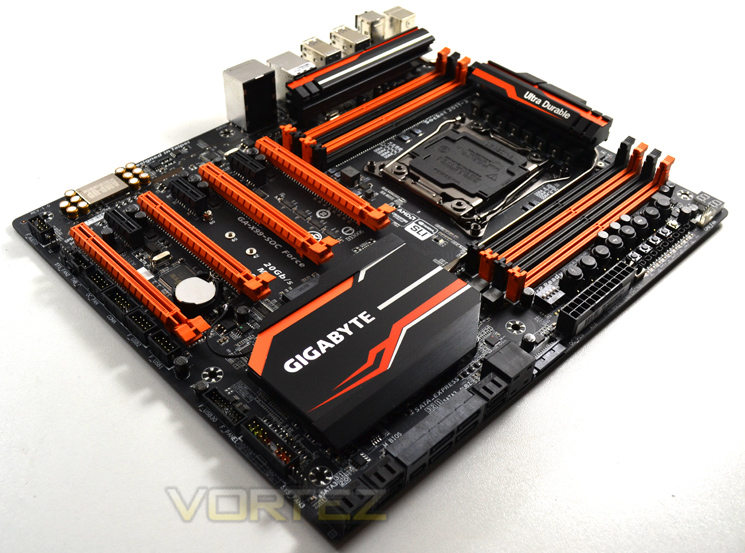
Complementing the rock-solid choice of components is a set of overclocking tools which makes the X99-SOC Force as at home on a test bench as in a PC case (although one should ensure that said case can fit an EATX motherboard). Naturally however there is a tradeoff; immense overclocking potential at the £300 price point comes at the cost of other features you might expect from an X99 motherboard at this price point. That means no WIFI, Thunderbolt, nor secondary LAN chip; in fact a cursory glance reveals a list which is sparse as far as it goes.
From the outset therefore the X99-SOC Force is revealed as a motherboard for the real overclocking enthusiast. Want all-mod-cons to squeeze the most out of your money? There are plenty of other options. This ‘board is for those who are going to push their CPU to the limit, and at times beyond.
About GIGABYTE
GIGABYTE was founded in 1986, establishing our uncontested position in continuous technological innovation. By focusing on key technologies and achieving strict quality standards, GIGABYTE has been regarded as an innovative and trusted motherboard leader in the globe. To keep pace in a rapidly changing world, we have offered a comprehensive product line covering Motherboards, Graphics Cards, PC Components, PC Peripherals, Laptops, Slate Devices, Desktop PCs, Network Communications, Servers and Mobile Phones. We are dedicated to building up a full-range digital life, responding promptly and sonorously to consumer needs and desires.
GIGABYTE was founded in 1986, establishing our uncontested position in continuous technological innovation. By focusing on key technologies and achieving strict quality standards, GIGABYTE has been regarded as an innovative and trusted motherboard leader in the globe. To keep pace in a rapidly changing world, we have offered a comprehensive product line covering Motherboards, Graphics Cards, PC Components, PC Peripherals, Laptops, Slate Devices, Desktop PCs, Network Communications, Servers and Mobile Phones. We are dedicated to building up a full-range digital life, responding promptly and sonorously to consumer needs and desires.
Chipset Features
First and foremost, Intel’s latest chipset is aimed at the home ‘power’ user, be this performance enthusiast (read overclocker), extreme gamer or indeed for those who require the ultimate media encoding platform. So whatever your vice, Intel have all the bases covered with their latest chipset. This isn’t, of course, to say the Z97 based chipset is poor by comparison (it’s not), but if you want the ultimate – the very best of the best supporting Intel’s 8 core processor (5960X) – then X99 is the only option.So what’s new with X99?
DDR4 Quad Channel Memory
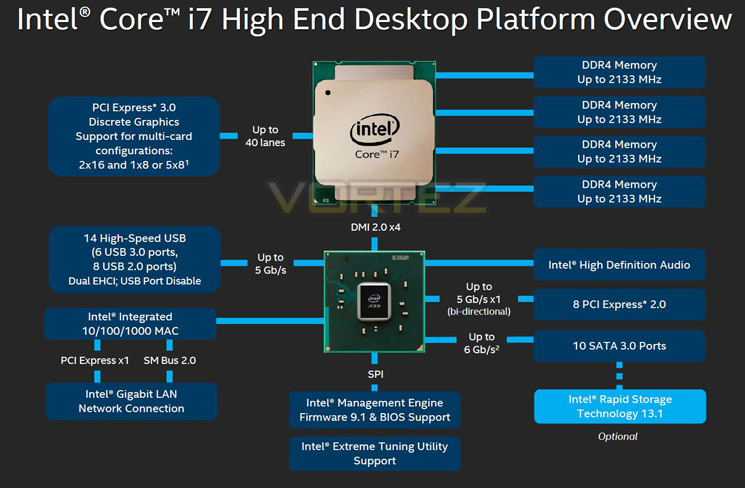
The above block diagram shows us that DDR4 is natively supported. Note that DDR3 is NOT supported (more on this later). While the block diagram shows a rated speed of up to 2133MHz, our test bench happily ran 16GB (4x4GB) Quad channel Corsair Vengeance LPX at 2666MHz. More recently niche 3000MHz and even 3333MHz DDR4 DIMMs are entering the market requiring high voltages and far deeper pocket, but it’s anticipated that eventually 4GHz DIMMs will be the high watermark at retail.
40 x PCI Express (PCIe) Lanes
Depending on CPU choice, the X99 chipset can support up to 40 lanes of PCIe in combinations of 2×16, 1×8 or 5×8. We also expect this figure to increase on some motherboards with the addition of PLX chips given sufficient demand. All of the PCIe lanes are now PCIe 3.0 compliant; while current generation GPU’s rarely saturate PCIe 2.0 it is nice to have that future proofing available, especially for SLI/Crossfire configurations.
USB 3.0
One of the heaviest criticisms of X79 was the lack of natively support USB 3.0 ports, especially when compared to its Z87/97 brethren. We are now happy to report that X99 will support 6 USB 3.0 ports along with 8 USB 2.0 ports. Of course, most motherboard manufacturers will also add the usual ‘aftermarket’ USB 3.0 support from components such as ASMedia and Marvel so transfer speeds of up to 5GB/s and port numbers in the double-digits can theoretically be achieved.
SATA 3.0 And Next Generation Storage
Despite having huge computational benefits, X79 was oft criticised by the lack of high speed SATA 6Gbps ports. This has been rectified with the X99 chipset supporting 10 x SATA 3.0 ports attaining a theoretical speed of 6Gb/s which can be enhanced using the latest Intel Rapid Storage driver to speeds of 10 Gb/s!
SATA of course has its limitations, which is where newer next generation storage technologies come in. First seen in limited quantities on Z87 and more widely on Z97, M.2 and SATA Express technologies unlock transfer speeds far in excess of SATA III. Support for PCIE storage remains sporadic – M.2 is starting to pick up but SATA Express is exceptionally rare – but it’s slowly proving to be a valid alternative to SATA 3 and mSATA. Many X99 motherboards support M.2 X4, which makes use of four PCIE lanes for up to a stunning 32Gbps bandwidth; however few M.2 drives come close to saturating even Gen 1’s ~8Gbps.
We must say that Intel have pulled out all the stops here. Clearly they have taken on board user feedback regarding the deficiencies of X79 by incorporating more modern storage and expansion options. No longer is the Enthusiast flagship the poor I/O brother to Z87/97. Perhaps the biggest draw though is the introduction of DDR4. This will see huge speed gains in almost every aspect of personal computing. With 8x8GB Dimms supported a mammoth 64GB of DDR4 will make the X99 chipset massively future proofed.
We will cover the overclocking capabilities of the new chipset and each motherboard specifically in the overclocking section but this area failed to disappoint too.
Overall, there is little to criticise here. While we would have liked 40 PCIe lanes regardless of CPU, we understand there has to be some compromise to keep costs down for the budget conscious so how many PCIe lanes you have available will be dictated by CPU choice and not the motherboard. The entry level 6 core i7-5820 will have 28 PCIe lanes at a cost of £299 (At the time of release), while the flagship 8 core i7-5960X and 6 core i7-5930K will both have the full blown 40 lanes available. Aside from lanes, cores cache and clockspeed, all of the X99 features will be available regardless of CPU choice and to this end we are grateful. We suspect that future additions to the CPU range will hit the middle ground while the 5960X will receive a speed bump although this is pure speculation at this point.
Which chip would we go for? Obviously if money was no object then the i7-5960X is the way to go, not only does it have the full 40 lanes available but it is a true 8 core (16 threads) CPU. The 5930K would be the obvious choice for the consumer and the CPU that we think will prove most popular due to the balance of speed vs. cost.
Whichever CPU you opt for though, you can be assured that the X99 chipset offers the very best available. It is powerful, feature packed and as you will see, the unrivalled component of choice for enthusiast users.
Technical Specification
Motherboard Model: GA-X99-SOC Force
Chipset:- Intel® X99 Express Chipset
Form Factor
– E-ATX Form Factor; 30.5cm x 26.4cm
CPU:
– Support for Intel® Core™ i7 processors in the LGA2011-3 package
– L3 cache varies with CPU
– (Please refer “CPU Support List” for more information.)
Memory:
– 8 x DDR4 DIMM sockets supporting up to 64 GB of system memory
– 4 channel memory architecture
– Support for DDR4 3000(O.C.) / 2800(O.C.) / 2666(O.C.) / 2400(O.C.) / 2133 MHz memory modules
– Support for non-ECC memory modules
– Support for Extreme Memory Profile (XMP) memory modules
– Support for RDIMM 1Rx8 memory modules (operates in non-ECC mode)
Audio:
– Realtek® ALC1150 codec
– High Definition Audio
– 2/4/5.1/7.1-channel
– Support for S/PDIF Out
LAN:- Intel® GbE LAN chip (10/100/1000 Mbit)
Expansion Slots:
– 2 x PCI Express x16 slots, running at x16 (PCIE_1, PCIE_2)
* For optimum performance, if only one PCI Express graphics card is to be installed, be sure to install it in the PCIE_1 slot; if you are installing two PCI Express graphics cards, it is recommended that you install them in the PCIE_1 and PCIE_2 slots.
– 2 x PCI Express x16 slots, running at x8 (PCIE_3, PCIE_4)
* The PCIE_4 slot shares bandwidth with the PCIE_1 slot. When the PCIE_4 slot is populated, the PCIE_1 slot will operate at up to x8 mode.
* When an i7-5820K CPU is installed, the PCIE_2 slot operates at up to x8 mode and the PCIE_3 operates at up to x4 mode.
All PCI Express x16 slots conform to PCI Express 3.0 standard.
– 3 x PCI Express x1 slots
All PCI Express x1 slots conform to PCI Express 2.0 standard.
Multi-Graphics Technology:
– Support for 4-Way/3-Way/2-Way AMD CrossFire™/NVIDIA® SLI™ technology
* The 4-Way NVIDIA® SLI™ configuration is not supported when an i7-5820K CPU is installed. To set up a 3-Way SLI configuration, refer to “1-6 Setting up AMD CrossFire™/NVIDIA® SLI™ Configuration.”
Storage Interface
Chipset:
– 1 x M.2 PCIe connector
– (Socket 3, M key, type 2242/2260/2280 PCIe x4x2/x1 SSD support)
– 1 x SATA Express connector
– 6 x SATA 6Gb/s connectors (SATA3 0~5); Support for RAID 0, RAID 1, RAID 5, and RAID 10
* Only AHCI mode is supported when an M.2 PCIe SSD or a SATA Express device is installed.
(M2_20G and SATA Express connectors can only be used one at a time. The SATA Express connector becomes unavailable when an M.2 SSD is installed, but the SATA3 4/5 connectors are still functional.)
– 4 x SATA 6Gb/s connectors (SATA3 0~3), supporting IDE and AHCI modes only
(An operating system installed on the SATA3 0~5 connectors cannot be used on the sSATA3 0~3 connectors.)
USB
Chipset:
– 2 x USB 3.0/2.0 ports available through the internal USB header
– 8 x USB 2.0/1.1 ports (4 ports on the back panel, 4 ports available through the internal USB headers)
Chipset + 2 Renesas® uPD720210 USB 3.0 Hubs:
– 8 x USB 3.0/2.0 ports on the back panel
Internal I/O Connectors
– 1 x 24-pin ATX main power connector
– 1 x 8-pin ATX 12V power connector
– 1 x OC PEG Power Connector
– 1 x SATA Express connector
– 1 x M.2 Socket 3 connector
– 10 x SATA 6Gb/s connectors
– 1 x CPU fan header
– 1 x water cooling fan header (CPU_OPT)
– 3 x system fan headers
– 1 x heatsink LED power connector
– 1 x Thunderbolt add-in card connector
– 1 x OC Panel connector (for future expansion)
– 1 x front panel header
– 1 x front panel audio header
– 1 x S/PDIF Out header
– 1 x USB 3.0/2.0 header
– 2 x USB 2.0/1.1 headers
– 1 x serial port header
– 1 x Clear CMOS jumper
– 1 x power button
– 1 x reset button
– 1 x Clear CMOS button
– 1 x Gear button
– 1 x OC Tag button
– 1 x OC Trigger switch
– 1 x CPU BCLK Down button
– 1 x CPU BCLK Up button
– 1 x CPU Ratio Down button
– 1 x CPU Ratio Up button
– 1 x Settings Lock button
– 1 x Direct to BIOS button
– 1 x OC PCIe switch
– 1 x OC Ignition button
– 1 x Clear Battery button
– 1 x DualBIOS switch
– 1 x onboard voltage measurement module
– Temp sensor ports
Back Panel Connectors
– 4 x USB 2.0/1.1 ports
– 1 x PS/2 keyboard/mouse port
– 1 x CPU overclocking button
– 1 x BIOS switch button
– 1 x Clear CMOS button
– 8 x USB 3.0/2.0 ports
– 1 x RJ-45 port
– 1 x optical S/PDIF Out connector
– 5 x audio jacks (Center/Subwoofer Speaker Out, Rear Speaker Out, Line In, Line Out, Mic In)
– I/O Controller
– iTE I/O Controller Chip
H/W Monitoring
– System voltage detection
– CPU/System/Chipset temperature detection
– CPU/CPU OPT/System fan speed detection
– CPU/System/Chipset overheating warning
– CPU/CPU OPT/System fan fail warning
– CPU/CPU OPT/System fan speed control
* Whether the fan speed control function is supported will depend on the cooler you install.
BIOS
– 2 x 128 Mbit flash
– Use of licensed AMI UEFI BIOS
– Support for DualBIOS™
– Support for Q-Flash Plus
– PnP 1.0a, DMI 2.7, WfM 2.0, SM BIOS 2.7, ACPI 5.0
Unique Features
– Support for APP Center
* Available applications in APP Center may differ by motherboard model. Supported functions of each application may also differ depending on motherboard specifications.
@BIOS
– Ambient LED
– EasyTune
– EZ Setup
– Fast Boot
– Cloud Station
– ON/OFF Charge
– Smart TimeLock
– Smart Recovery 2
– System Information Viewer
– USB Blocker
– V-Tuner
– Support for Q-Flash
– Support for Smart Switch
– Support for Xpress Install
– Bundle Software
– Norton® Internet Security (OEM version)
– Intel® Smart Response Technology
– Operating System
– Support for Windows 8.1/8/7
Remark
Due to different Linux support condition provided by chipset vendors, please download Linux driver from chipset vendors’ website or 3rd party website.
Most hardware/software vendors may no longer offer drivers to support Win9X/ME/2000/XP. If drivers are available from the vendors, we will update them on the GIGABYTE website.
Chipset:- Intel® X99 Express Chipset
Form Factor
– E-ATX Form Factor; 30.5cm x 26.4cm
CPU:
– Support for Intel® Core™ i7 processors in the LGA2011-3 package
– L3 cache varies with CPU
– (Please refer “CPU Support List” for more information.)
Memory:
– 8 x DDR4 DIMM sockets supporting up to 64 GB of system memory
– 4 channel memory architecture
– Support for DDR4 3000(O.C.) / 2800(O.C.) / 2666(O.C.) / 2400(O.C.) / 2133 MHz memory modules
– Support for non-ECC memory modules
– Support for Extreme Memory Profile (XMP) memory modules
– Support for RDIMM 1Rx8 memory modules (operates in non-ECC mode)
Audio:
– Realtek® ALC1150 codec
– High Definition Audio
– 2/4/5.1/7.1-channel
– Support for S/PDIF Out
LAN:- Intel® GbE LAN chip (10/100/1000 Mbit)
Expansion Slots:
– 2 x PCI Express x16 slots, running at x16 (PCIE_1, PCIE_2)
* For optimum performance, if only one PCI Express graphics card is to be installed, be sure to install it in the PCIE_1 slot; if you are installing two PCI Express graphics cards, it is recommended that you install them in the PCIE_1 and PCIE_2 slots.
– 2 x PCI Express x16 slots, running at x8 (PCIE_3, PCIE_4)
* The PCIE_4 slot shares bandwidth with the PCIE_1 slot. When the PCIE_4 slot is populated, the PCIE_1 slot will operate at up to x8 mode.
* When an i7-5820K CPU is installed, the PCIE_2 slot operates at up to x8 mode and the PCIE_3 operates at up to x4 mode.
All PCI Express x16 slots conform to PCI Express 3.0 standard.
– 3 x PCI Express x1 slots
All PCI Express x1 slots conform to PCI Express 2.0 standard.
Multi-Graphics Technology:
– Support for 4-Way/3-Way/2-Way AMD CrossFire™/NVIDIA® SLI™ technology
* The 4-Way NVIDIA® SLI™ configuration is not supported when an i7-5820K CPU is installed. To set up a 3-Way SLI configuration, refer to “1-6 Setting up AMD CrossFire™/NVIDIA® SLI™ Configuration.”
Storage Interface
Chipset:
– 1 x M.2 PCIe connector
– (Socket 3, M key, type 2242/2260/2280 PCIe x4x2/x1 SSD support)
– 1 x SATA Express connector
– 6 x SATA 6Gb/s connectors (SATA3 0~5); Support for RAID 0, RAID 1, RAID 5, and RAID 10
* Only AHCI mode is supported when an M.2 PCIe SSD or a SATA Express device is installed.
(M2_20G and SATA Express connectors can only be used one at a time. The SATA Express connector becomes unavailable when an M.2 SSD is installed, but the SATA3 4/5 connectors are still functional.)
– 4 x SATA 6Gb/s connectors (SATA3 0~3), supporting IDE and AHCI modes only
(An operating system installed on the SATA3 0~5 connectors cannot be used on the sSATA3 0~3 connectors.)
USB
Chipset:
– 2 x USB 3.0/2.0 ports available through the internal USB header
– 8 x USB 2.0/1.1 ports (4 ports on the back panel, 4 ports available through the internal USB headers)
Chipset + 2 Renesas® uPD720210 USB 3.0 Hubs:
– 8 x USB 3.0/2.0 ports on the back panel
Internal I/O Connectors
– 1 x 24-pin ATX main power connector
– 1 x 8-pin ATX 12V power connector
– 1 x OC PEG Power Connector
– 1 x SATA Express connector
– 1 x M.2 Socket 3 connector
– 10 x SATA 6Gb/s connectors
– 1 x CPU fan header
– 1 x water cooling fan header (CPU_OPT)
– 3 x system fan headers
– 1 x heatsink LED power connector
– 1 x Thunderbolt add-in card connector
– 1 x OC Panel connector (for future expansion)
– 1 x front panel header
– 1 x front panel audio header
– 1 x S/PDIF Out header
– 1 x USB 3.0/2.0 header
– 2 x USB 2.0/1.1 headers
– 1 x serial port header
– 1 x Clear CMOS jumper
– 1 x power button
– 1 x reset button
– 1 x Clear CMOS button
– 1 x Gear button
– 1 x OC Tag button
– 1 x OC Trigger switch
– 1 x CPU BCLK Down button
– 1 x CPU BCLK Up button
– 1 x CPU Ratio Down button
– 1 x CPU Ratio Up button
– 1 x Settings Lock button
– 1 x Direct to BIOS button
– 1 x OC PCIe switch
– 1 x OC Ignition button
– 1 x Clear Battery button
– 1 x DualBIOS switch
– 1 x onboard voltage measurement module
– Temp sensor ports
Back Panel Connectors
– 4 x USB 2.0/1.1 ports
– 1 x PS/2 keyboard/mouse port
– 1 x CPU overclocking button
– 1 x BIOS switch button
– 1 x Clear CMOS button
– 8 x USB 3.0/2.0 ports
– 1 x RJ-45 port
– 1 x optical S/PDIF Out connector
– 5 x audio jacks (Center/Subwoofer Speaker Out, Rear Speaker Out, Line In, Line Out, Mic In)
– I/O Controller
– iTE I/O Controller Chip
H/W Monitoring
– System voltage detection
– CPU/System/Chipset temperature detection
– CPU/CPU OPT/System fan speed detection
– CPU/System/Chipset overheating warning
– CPU/CPU OPT/System fan fail warning
– CPU/CPU OPT/System fan speed control
* Whether the fan speed control function is supported will depend on the cooler you install.
BIOS
– 2 x 128 Mbit flash
– Use of licensed AMI UEFI BIOS
– Support for DualBIOS™
– Support for Q-Flash Plus
– PnP 1.0a, DMI 2.7, WfM 2.0, SM BIOS 2.7, ACPI 5.0
Unique Features
– Support for APP Center
* Available applications in APP Center may differ by motherboard model. Supported functions of each application may also differ depending on motherboard specifications.
@BIOS
– Ambient LED
– EasyTune
– EZ Setup
– Fast Boot
– Cloud Station
– ON/OFF Charge
– Smart TimeLock
– Smart Recovery 2
– System Information Viewer
– USB Blocker
– V-Tuner
– Support for Q-Flash
– Support for Smart Switch
– Support for Xpress Install
– Bundle Software
– Norton® Internet Security (OEM version)
– Intel® Smart Response Technology
– Operating System
– Support for Windows 8.1/8/7
Remark
Due to different Linux support condition provided by chipset vendors, please download Linux driver from chipset vendors’ website or 3rd party website.
Most hardware/software vendors may no longer offer drivers to support Win9X/ME/2000/XP. If drivers are available from the vendors, we will update them on the GIGABYTE website.
Selected GIGABYTE Features
Exclusive GIGABYTE OC Features
Copper Bussmann server level Chokes and POSCAP™ Capacitor
Temp sensor port
6x(30µ) Gold Plating for CPU socket, Memory DIMMs and PCIe slots
Extreme 4-way SLI™ and CrossFire™ support with OC Brace
2oz copper PCB design
Long lifespan Durable Black™ Solid caps
APP Center including EasyTune™ and Cloud Station™ utilities
GIGABYTE UEFI DualBIOS™ with Q-Flash Plus USB port
Safer design around screw mounting holes
Additionally:
Thunderbolt™ Ready
Copper Bussmann server level Chokes and POSCAP™ Capacitor
Temp sensor port
6x(30µ) Gold Plating for CPU socket, Memory DIMMs and PCIe slots
Extreme 4-way SLI™ and CrossFire™ support with OC Brace
2oz copper PCB design
Long lifespan Durable Black™ Solid caps
APP Center including EasyTune™ and Cloud Station™ utilities
GIGABYTE UEFI DualBIOS™ with Q-Flash Plus USB port
Safer design around screw mounting holes
Additionally:
Thunderbolt™ Ready
The following are some of the key aspects which set the X99-SOC Force apart from the field, along with a brief explanation of their role in the motherboard’s overall design.
Genuine All Digital Power Design
GIGABYTE X99 series motherboards use an all digital CPU power design from International Rectifier® which includes both 4th Generation digital PWM Controllers and industry-leading 3rd Generation PowIRstage® controllers. These 100% digital controllers offer incredible precision in delivering power to the motherboard’s most power-hungry and energy-sensitive components, allowing enthusiasts to get the absolute maximum performance from their new Intel® Core™ i7 Extreme Edition CPUs.
IR Digital PWM & IR PowIRstage® ICs
This new generation of IR® digital power controllers and PowIRstage® ICs feature Isense technology, which provide more precise current sensing accuracy. This helps evenly distribute the thermal loading between the PowerIRstage® ICs, preventing the overheating of each individual PowerIRstage®, resulting in longer lifespan and better reliability.
High Quality POSCAPs for CPU Power Delivery
POSCAP (Polymerized Organic Semiconductor Capacitor) is a high grade product recently which has better ripple current and dissipation factor characteristic. The most commendable of POSCAP is that in all kinds of operating frequencies, this product can maintain low impedance characteristics. So, POSCAP is suitable for motherboards with high-frequency switching power supply.
Long Lifespan Durable Black™ Solid Caps
GIGABYTE X99 series motherboards integrate the absolute best quality solid state capacitors that are rated to perform at maximum efficiency for extended periods, even in extreme performance configurations. This provides peace of mind for end users who want to push their system hard, yet demand absolute reliability and stability, with ultra-low ESR no matter how high the CPU loading.
GIGABYTE X99 series motherboards use an all digital CPU power design from International Rectifier® which includes both 4th Generation digital PWM Controllers and industry-leading 3rd Generation PowIRstage® controllers. These 100% digital controllers offer incredible precision in delivering power to the motherboard’s most power-hungry and energy-sensitive components, allowing enthusiasts to get the absolute maximum performance from their new Intel® Core™ i7 Extreme Edition CPUs.
IR Digital PWM & IR PowIRstage® ICs
This new generation of IR® digital power controllers and PowIRstage® ICs feature Isense technology, which provide more precise current sensing accuracy. This helps evenly distribute the thermal loading between the PowerIRstage® ICs, preventing the overheating of each individual PowerIRstage®, resulting in longer lifespan and better reliability.
High Quality POSCAPs for CPU Power Delivery
POSCAP (Polymerized Organic Semiconductor Capacitor) is a high grade product recently which has better ripple current and dissipation factor characteristic. The most commendable of POSCAP is that in all kinds of operating frequencies, this product can maintain low impedance characteristics. So, POSCAP is suitable for motherboards with high-frequency switching power supply.
Long Lifespan Durable Black™ Solid Caps
GIGABYTE X99 series motherboards integrate the absolute best quality solid state capacitors that are rated to perform at maximum efficiency for extended periods, even in extreme performance configurations. This provides peace of mind for end users who want to push their system hard, yet demand absolute reliability and stability, with ultra-low ESR no matter how high the CPU loading.
OC Ignition
OC Ignition maintains power to the motherboard and connected components while the system is shut down. This means that system fans will continue to provide airflow in cold bug situations, while i-ram drive users will not lose installed data. OC Ignition also allows users to pre-test water cooling setups, and allows case mod demonstrations without having to turn on the PC.
OC Brace
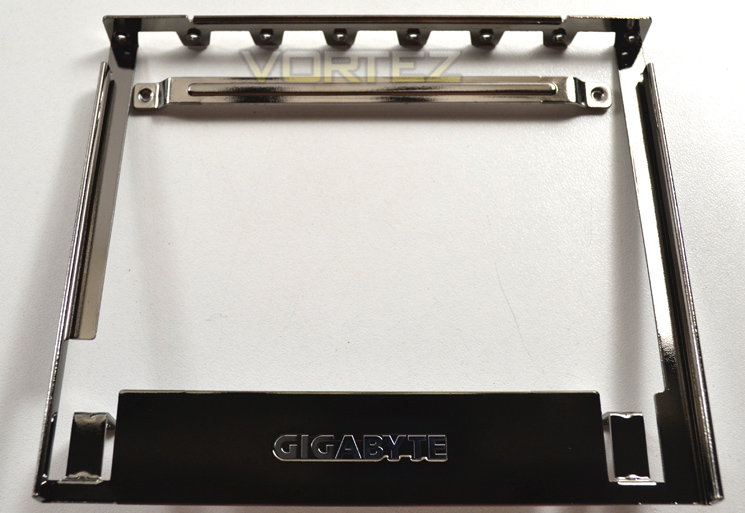
OC Brace allows extreme overclockers and system testers to safely install up to four graphics cards in an open case or test bed without risking PCIe slot damage or preventing cards not showing up in the OS due to poor contact with PCIe slot. OC Brace is a simple and elegant way to give robust installation support to full sized graphics cards in extreme multi-GPU configurations.
OC Ignition maintains power to the motherboard and connected components while the system is shut down. This means that system fans will continue to provide airflow in cold bug situations, while i-ram drive users will not lose installed data. OC Ignition also allows users to pre-test water cooling setups, and allows case mod demonstrations without having to turn on the PC.
• Fans continue to provide airflow in cold bug situations
• Perfect for pre-testing water-cooled system setups
• Case mod demonstrations without having to turn on the PC
• Retains i-ram data
• Perfect for pre-testing water-cooled system setups
• Case mod demonstrations without having to turn on the PC
• Retains i-ram data
OC Brace
OC Brace allows extreme overclockers and system testers to safely install up to four graphics cards in an open case or test bed without risking PCIe slot damage or preventing cards not showing up in the OS due to poor contact with PCIe slot. OC Brace is a simple and elegant way to give robust installation support to full sized graphics cards in extreme multi-GPU configurations.
Long Lifespan Durable Black™ Solid Caps
GIGABYTE X99 series motherboards integrate the absolute best quality solid state capacitors that are rated to perform at maximum efficiency for extended periods, even in extreme performance configurations. This provides peace of mind for end users who want to push their system hard, yet demand absolute reliability and stability. With ultra-low ESR no matter how high the CPU loading, these exclusive capacitors also come in customized jet black, exclusively on GIGABYTE X99 series motherboards.
2x Copper PCB Design(2 oz Copper PCB)
GIGABYTE’s exclusive 2X Copper PCBs design provides sufficient power trace paths between components to handle greater than normal power loads and to remove heat from the critical CPU power delivery area. This is essential to ensure the motherboard is able to handle the increased power loading that is necessary when overclocking.
Independent Right and Left Audio Channel PCB Layers
Locating the right and left audio channels on separate PCB layers, GIGABYTE X99 series motherboards are able to eliminate channel crosstalk and maintain the best audio quality.
Ambient LED
GIGABYTE X99 motherboards feature LED lighting for the audio guard light path, providing a cool, custom look to your rig. These lights are now programmable, so you can have them beat to the rhythm of the music you are listening to, or pulse at a soothing pace to create a great atmosphere to enhance the environment of your game, movie or music.
Ambient LED Modes:
GIGABYTE Patented DualBIOS™ Design
GIGABYTE DualBIOS™ means that you motherboard has both a ‘Main BIOS’ and a ‘Backup BIOS’, making users protected from BIOS failure due to virus attack, hardware malfunction, improper OC settings or power failure during the update process.
Q-Flash Plus
GIGABYTE Q-Flash Plus allows users to update to the latest BIOS using a thumb drive without the CPU or memory needing to be installed.
GIGABYTE X99 series motherboards integrate the absolute best quality solid state capacitors that are rated to perform at maximum efficiency for extended periods, even in extreme performance configurations. This provides peace of mind for end users who want to push their system hard, yet demand absolute reliability and stability. With ultra-low ESR no matter how high the CPU loading, these exclusive capacitors also come in customized jet black, exclusively on GIGABYTE X99 series motherboards.
2x Copper PCB Design(2 oz Copper PCB)
GIGABYTE’s exclusive 2X Copper PCBs design provides sufficient power trace paths between components to handle greater than normal power loads and to remove heat from the critical CPU power delivery area. This is essential to ensure the motherboard is able to handle the increased power loading that is necessary when overclocking.
Independent Right and Left Audio Channel PCB Layers
Locating the right and left audio channels on separate PCB layers, GIGABYTE X99 series motherboards are able to eliminate channel crosstalk and maintain the best audio quality.
Ambient LED
GIGABYTE X99 motherboards feature LED lighting for the audio guard light path, providing a cool, custom look to your rig. These lights are now programmable, so you can have them beat to the rhythm of the music you are listening to, or pulse at a soothing pace to create a great atmosphere to enhance the environment of your game, movie or music.
Ambient LED Modes:
• Still Mode – LEDs stay continuously lit.
• Beat Mode – LEDs will blink to the beat of the music played through the audio jack.
• Pulse Mode – LEDs will blink slowly.
• Off – LEDs will be tuned off.
• Beat Mode – LEDs will blink to the beat of the music played through the audio jack.
• Pulse Mode – LEDs will blink slowly.
• Off – LEDs will be tuned off.
GIGABYTE Patented DualBIOS™ Design
GIGABYTE DualBIOS™ means that you motherboard has both a ‘Main BIOS’ and a ‘Backup BIOS’, making users protected from BIOS failure due to virus attack, hardware malfunction, improper OC settings or power failure during the update process.
Q-Flash Plus
GIGABYTE Q-Flash Plus allows users to update to the latest BIOS using a thumb drive without the CPU or memory needing to be installed.
Packaging & Accessories
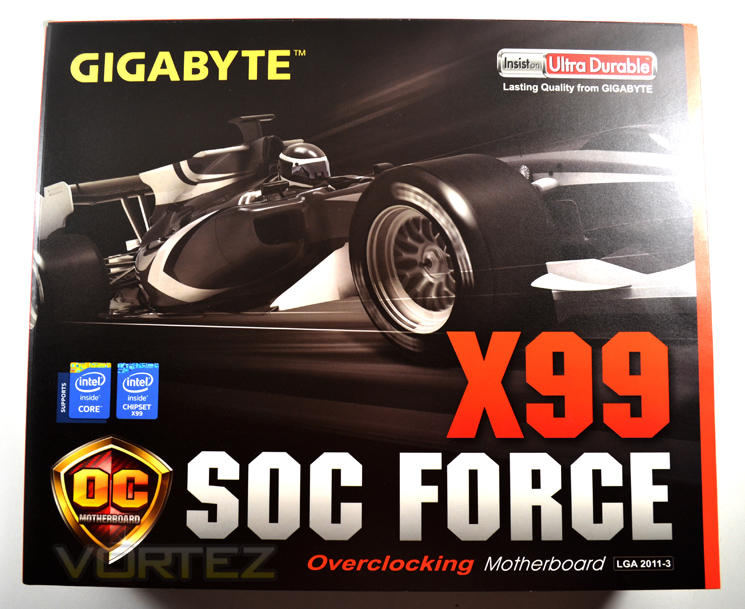
The X99-SOC Force is an unabashed overclocking motherboard, and so it’s unsurprising that GIBABYTE are emphasising speed in their packaging through the use of open wheel racing imagery. Furthermore the orange and black colour-scheme returns, reinforcing the Overclocking Series motherboard branding quite effectively.
A detailed feature list is absent, which as it happens is more than made up for on the box rear, but GIGABYTE do specify support for LGA2011-3 CPUs (i.e. Haswell-E) and assembly to their Ultra Durable standard. That’s probably the bare minimum you can get away with, which is fine so long as the exterior makes up for it otherwise.
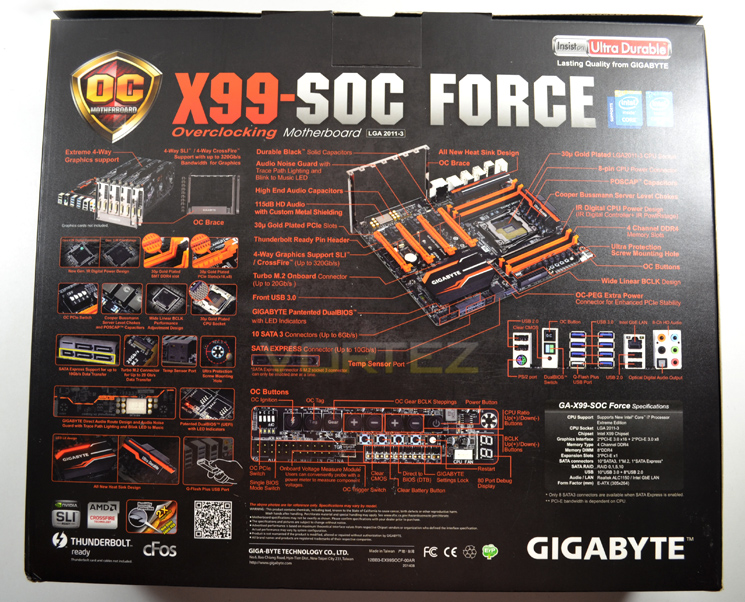
Well, we told you that the features are on the rear. Busy is certainly the watch-word here, but the information is also well laid-out (thankfully) and clearly describes key features and locations on the motherboard through both images and plain text. Another rare addition is the inclusion of the rear I/O port list as a picture rather than simple list, no doubt both to save space and remove as many misconceptions as possible.
One further point we should praise GIGABYTE for is a sensible specifications list, reinforcing the fact that the X99 SOC Force is an EATX motherboard that takes both DDR4 RAM and Intel Haswell-E CPUs. Those purchasing from the internet shouldn’t find this necessary, but anyone who buys from brick-and-mortar retail outlets will appreciate this info being clearly visible.
Among the features shown are support for next generation storage (SATA-Express and M.2), four GPUs, Q-flash and the (frankly daunting) array of OC Buttons. You’d have to say that it goes an excellent idea of the strengths of the motherboard, far more than a simple text list of features would.
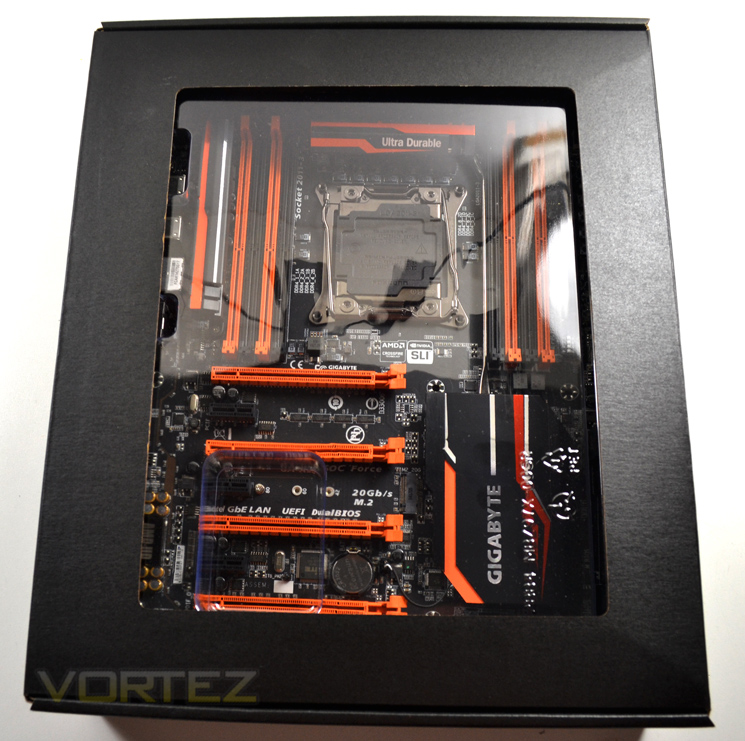
Sliding the internal packaging out of its sleeve reveals a window to the motherboard. Though who enjoy the unboxing experience of premium products should also enjoy this first look.
Accessories
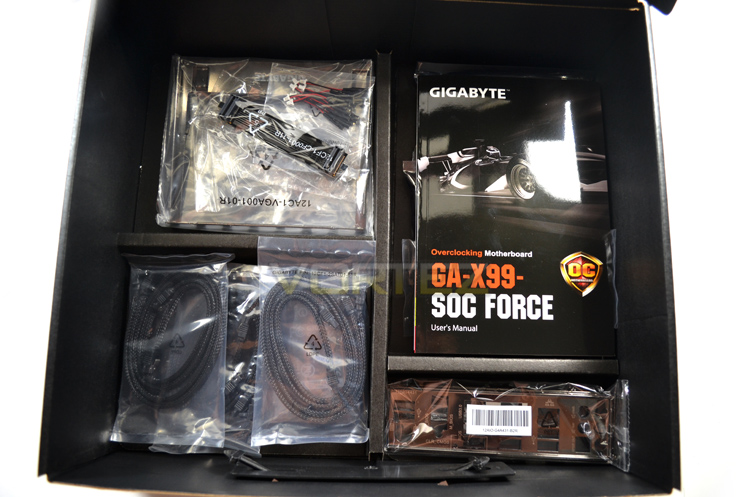
As the X99-SOC Force is designed for high-end overclocking GIGABYTE have tailored their accessory list to this target market. Productivity features such as wireless networking modules, PCIE M.2 SSD adaptors and the list are eschewed for components which aid in overclocking, such as the OC Brace and voltage probes. As a motherboard which supports 4-way GPU configurations GIGABYTE have seen fit to include an SLI Bridge for all seasons. The full list of included accessories is:
– Motherboard driver disk
– User’s Manual
– Quick Installation Guide
– Six SATA cables
– I/O Shield
– One 2-Way SLI bridge connector
– Two 3-Way SLI bridge connectors (GC-3SLI-X99 and GC-3SLI)
– One 4-Way SLI bridge connector
– One 2-Way CrossFire bridge connector
– Eight voltage measurement cables
– One 1 to 3 power cable (2×4 ATX 12V)
– One OC Brace
– User’s Manual
– Quick Installation Guide
– Six SATA cables
– I/O Shield
– One 2-Way SLI bridge connector
– Two 3-Way SLI bridge connectors (GC-3SLI-X99 and GC-3SLI)
– One 4-Way SLI bridge connector
– One 2-Way CrossFire bridge connector
– Eight voltage measurement cables
– One 1 to 3 power cable (2×4 ATX 12V)
– One OC Brace
The fact that the motherboard is a premium product hasn’t escaped the notice of GIGABYTE’s accessory list experts, who have picked fully sleeved SATA cables for the X99-SOC Force. It’s a minor inclusion in the grand scheme of things but shows a solid attention to detail that’s a hallmark of the company.
First Look
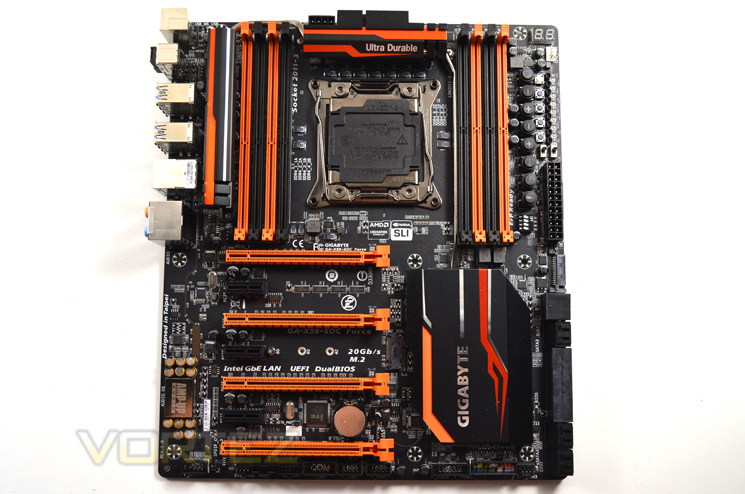
Black and orange livery returns on the X99-SOC Force, not only showing the motherboards lineage but also evoking the similar lime green and black G1.Gaming boards GIGABYTE have released. An exceptional matte-black PCB finish reinforces the quality of the board; it may primarily oriented towards overclocking but GIGABYTE will brook few compromises in aesthetics.
Unlike the recently reviewed ASUS X99-Deluxe and MSI X99S-GAMING the X99-SOC Force doesn’t include a plastic cover around rear I/O components. In all fairness such a feature would just get in the way of the most elaborate cooling, so it’s not really missed.
The X99-SOC Force makes use of the slightly wider than normal EATX form factor. In comparing it with the slimmer ATX ASUS X99-Deluxe it’s clear that the majority of the additional space is taken by switches and monitoring points designed for operation whilst the motherboard is on a test bench. Once again, an extreme overclockers dream.
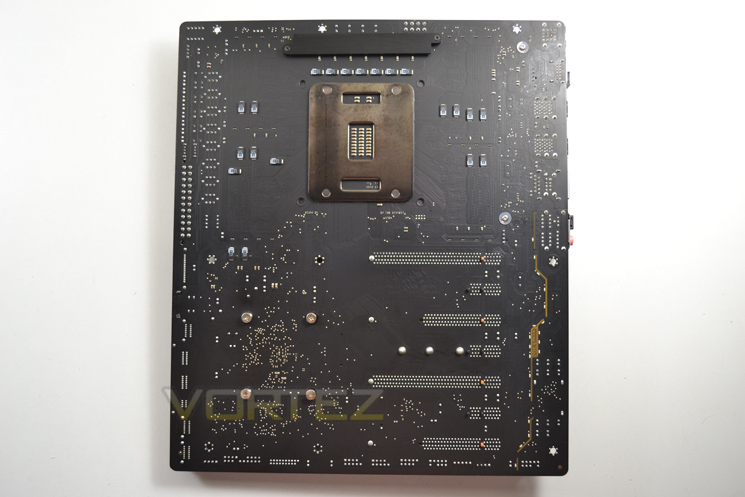
The underside of this motherboard replicates the excellent matte black finish of the top, and once again is a little less busy than other X99 ‘boards we’ve seen thus far. Those intent on sub-zero cooling will want to take note of the area around the socket – a little more cramped than the previous generation’s X79-UD7, but shouldn’t pose a problem for beefy retention places.
It’s always nice to see a screwed metal retention plate for the top-most VRM cooling, and in fact all the chipset heatsinks are attached with screw fittings. This will be exceptionally easy to work with if custom waterblocks are in the motherboard’s future.
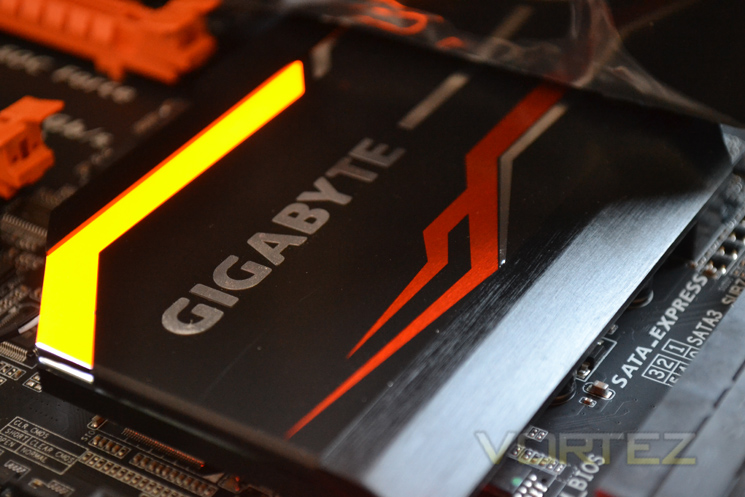
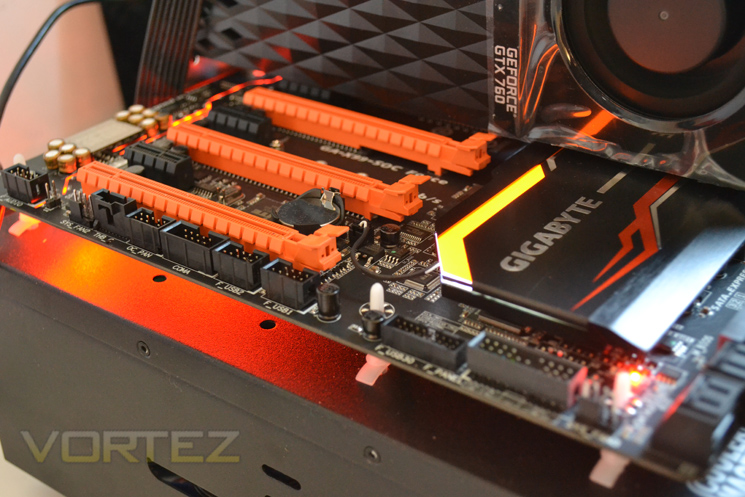
Were it simply black the PCH heatsink would be discrete compared to the competition, however the two hot streaks of orange dispense with the idea that this is a blank canvas for modders. Those who are a fan of the gamer aesthetic will note the orange LED embedded in the heatsink, giving some illumination in dark environments; those adverse can disable it of course.
A single heatpipe runs the length of the X99-SOC Force, linking PCH Heatsink with that for VRM and auxiliary component cooling towards the rear, and should aid in heat dissipation for all of these components. Whilst perhaps not essential, it is sensible as only the heatsink towards the rear I/O ports gets any more than incidental airflow.
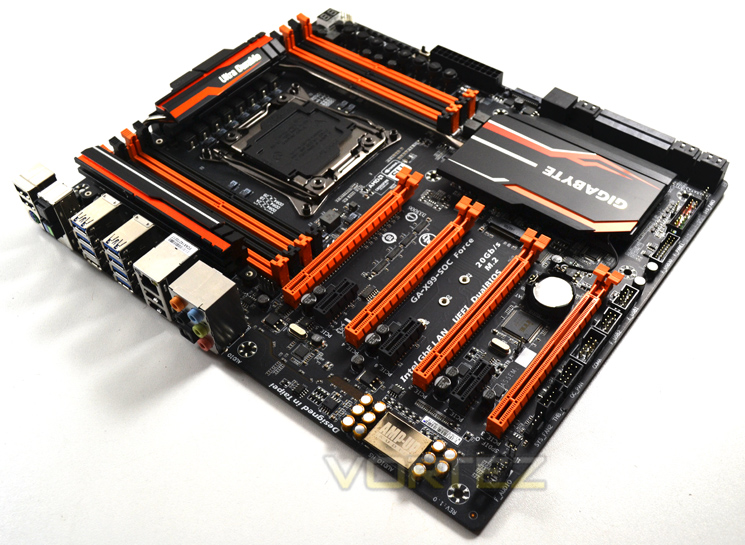
The GIGABYTE X99-SOC Force is an immediately recognisable EATX motherboard with a few nods towards aesthetics (as you might expect given its price point) but an overall emphasis on making setup as simple as possible for anyone seeking to overclock their system. Equally at home in a chassis or on a test bench, it’s nonetheless most suited to those with the equipment to push their system right to the bleeding edge.
Closer Look (Socket Area)
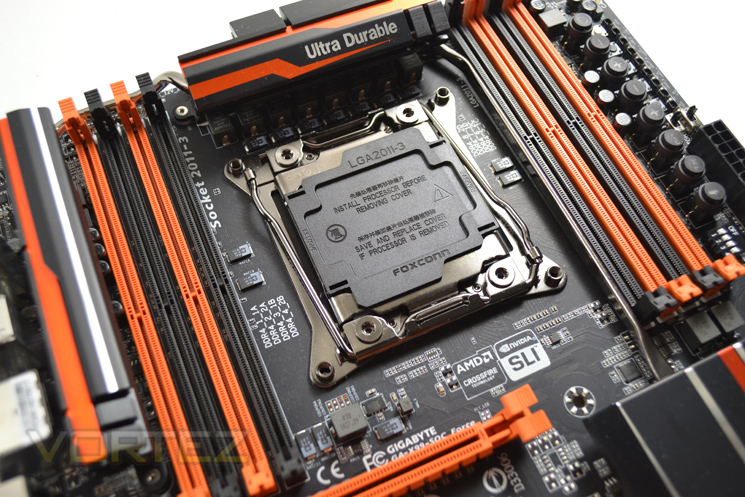
A clean socket area is the hallmark of an outright overclocking board, and the X99-SOC Force doesn’t disappoint. Both high-end coolers and extreme setups with evaporator pots will be inconvenienced more by the choice of RAM than the area nearest the socket thanks to a dearth of tall capacitors, and as usual the Haswell-E CPU will reward these sorts of cooling solutions.
The new LGA2011-3 socket standard is near identical to prior LGA2011 sockets. The twin levers on the v.3 are angled slightly which may look a little odd but helps upon CPU installation. If you are familiar with this type of socket installation should pose no problems, however the relatively high clamping force means that those new to Intel’s enthusiast platform would do well to peruse the manual beforehand to prevent bent pins and broken. GIGABYTE make use of the standard LGA2011-3 socket on the X99-SOC Force rather than a bespoke design as seen on the ASUS boards.
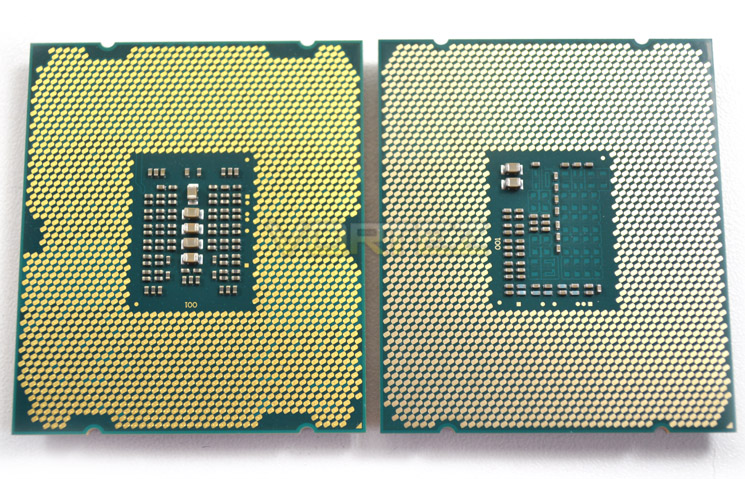
A quick comparison of the pad arrangement of the i7-5960X against the i7-4960X. GIGABYTE’s X99-SOC Force can’t access the additional pads on the i7-5960X but it remains to be seen how much this will affect its overclocking potential.
Closer Look (DDR4 Area)
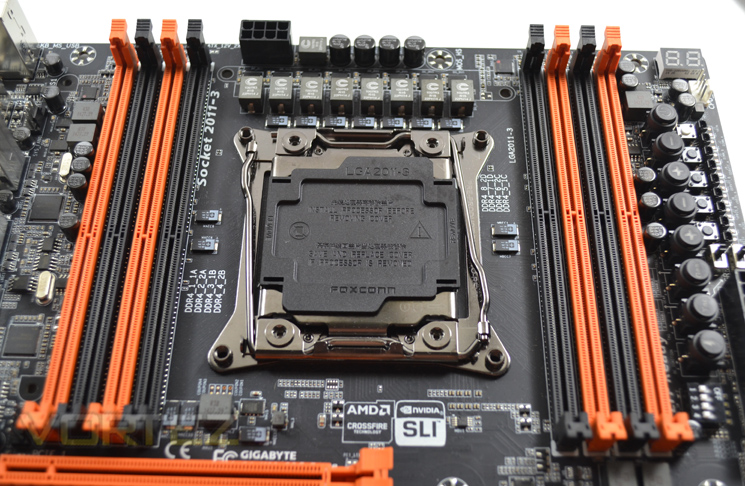
Here you can see the area around the socket, and DDR DIMM slots, without heatsinks obstructing the view. The contrast in clutter between the area immediately around the socket and sections beyond the DIMM slots speak volumes about the lengths GIGABYTE have gone to it keep this zone clear.
Quad-Channel memory is once again the order of the day, but unlike X79 we now need to move to DDR4. These slots aren’t backwards compatible with DDR3 but unique keying will prevent you from using the wrong RAM. GIGABYTE make use of the standard retention clip for RAM DIMMs, so you’ll need to use a little bit of dexterity to install them properly.
Commercial DDR4 DIMMs are currently restricted to 8GB per DIMM and so consequently most consumer motherboards support a maximum of 64GB. 16GB DIMMs are in the works however, and whilst the RAM is currently costly prices will fall over time.
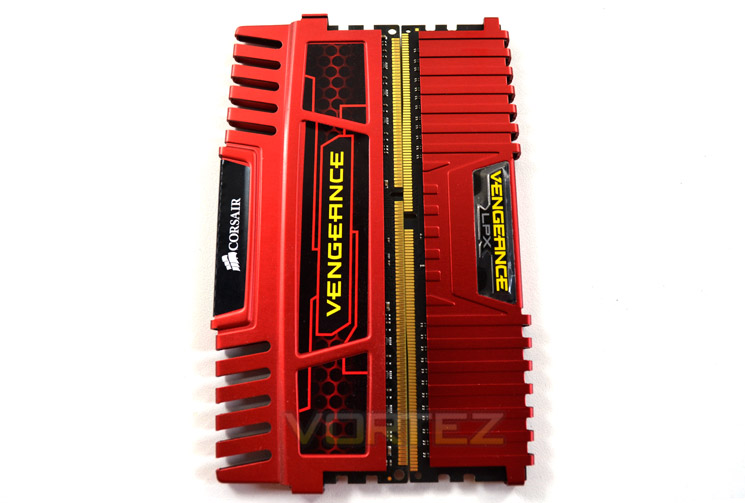
GIGABYTE specify support for DDR4 3000MHz (O.C.), with 2133MHz as the base. In the future DIMMs up to 4000MHz may be possible, but as it stands the listed compatibilities will be more than sufficient for the vast majority. Note also that most X99 motherboards make use of non-ECC, unbuffered DDR RAM and support Extreme Memory Profiles (XMP); the X99-SOC Force can also utilise Registered DIMMs (RDIMM) in non-ECC mode.
Closer Look (Motherboard Features)
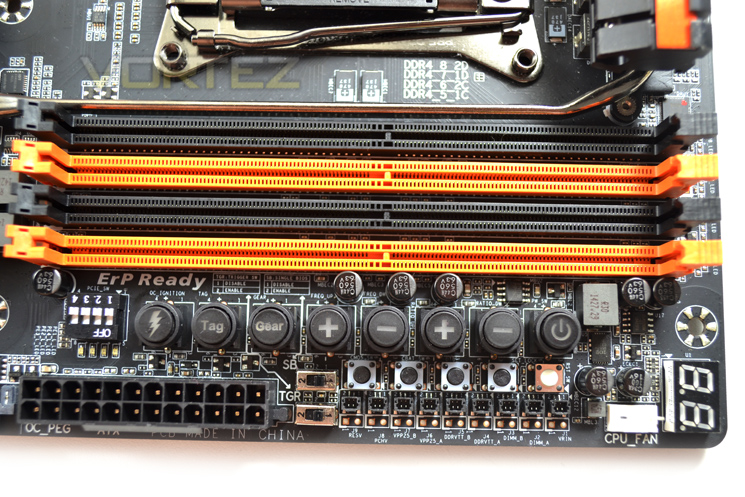
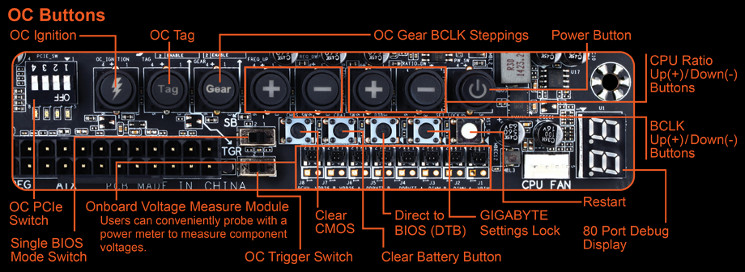
As we noted, top-right of the X99 SOC FORCE is certainly the business end, and perfectly encapsulates its overclocking ethos. Clustered around the 24-pin ATX connector are a swath of overclocking and troubleshooting tools ideal for newcomer and enthusiast alike. Included are a bank of PCIE lane switches (especially useful if you have GPU problems within water cooling loops), voltage probe points, and a plethora of reset/boot options; but that’s just for starters.
A main bank of buttons controls overclocking through incremental BCLK and CPU ratio changes, and BLCK steppings; a button labelled ‘Tag’ (short for OC Tag) automatically loads favourite settings to return to a successful overclock; and the Ignition button (a lightning bolt) enables power to attached devices without initialising boot. A power button and debug display are the final touches to this comprehensive set of tools.
You should also note the wider than usual clearance around the screw holes, providing some added piece of mind on installation.
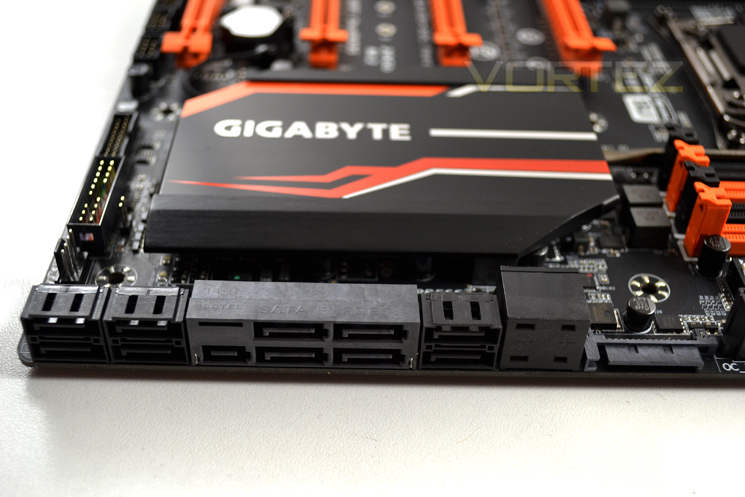
Moving down to storage, the X99 SOC FORCE is fairly well equipped. Eight dedicated SATA 3 6Gbps ports should be ample, whilst a further two are shared with one SATA-Express port. Other X99 boards have included two, but given the lack of drives currently on the market a second one seems redundant at best. Note that SATA-Express and M.2 operation are mutually exclusive with this board (although both SATA 3 ports will operate normally with an M.2 drive connected).
Nestled between the SATA ports is a SATA Power connector. Its role is to provide auxuillary power to the PCI-Express subsystem in multiple-GPU configurations, but typically isn’t required when using less than three high-performance GPUs. Adjacent to it are temperature sensor ports for a K probe cable.
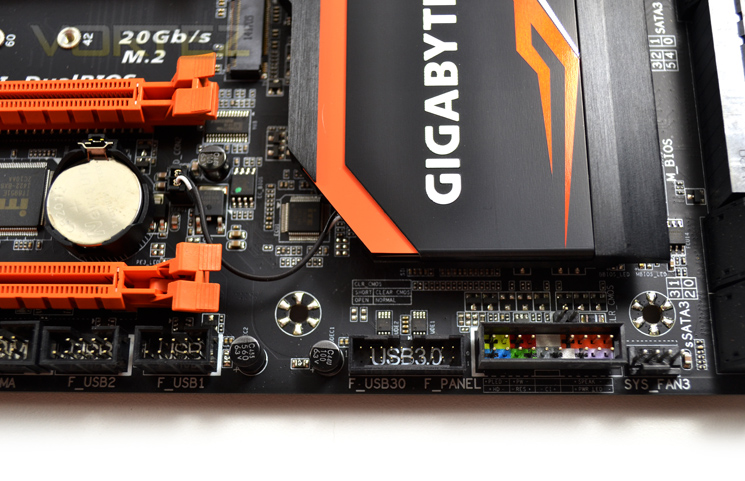
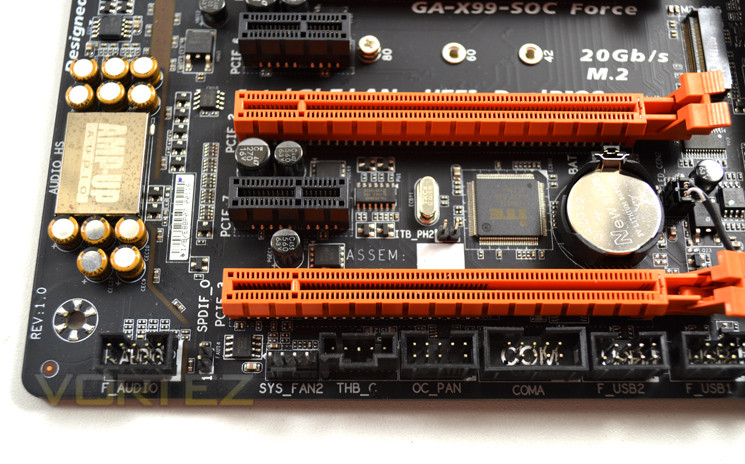
Along the bottom edge of the motherboard we find one USB 3.0 header, two USB 2.0 headers, front panel audio and a couple of four-pin system fan headers. Placement is fine, but does reward a chassis with cable management positions at the bottom of the case.
Of somewhat secondary interest is the connector labelled THB_C, intended for a Thunderbolt Add-in Card. A lack of demand for Thunderbolt accessories explains why these add-in cards are sold separately.
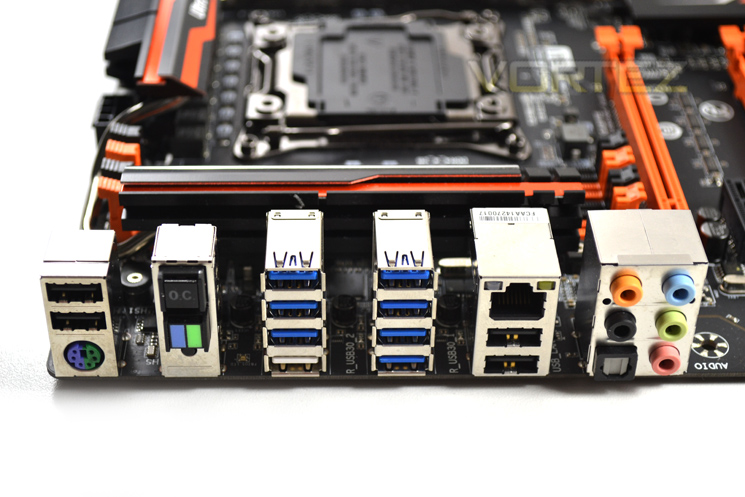
Simplicity is the order of the day in rear I/O. Included are:
– 2 x USB 2.0 & 1 x PS/2 Keyboard/Mouse combination port
– CPU OC Button, BIOS Switch & CLR CMOS Button
– 7 x USB 3.0 ports
– 1 x USB 3.0 port (doubles as Q-FLASH Plus port)
– 2 x USB 2.0 & 1 x Gigabit Ethernet
– 1 x Optical S/PDIF OUT connector
– 5 x OFC audio jacks
– CPU OC Button, BIOS Switch & CLR CMOS Button
– 7 x USB 3.0 ports
– 1 x USB 3.0 port (doubles as Q-FLASH Plus port)
– 2 x USB 2.0 & 1 x Gigabit Ethernet
– 1 x Optical S/PDIF OUT connector
– 5 x OFC audio jacks
A legacy PS/2 port is included to retain high reliability whilst in BIOS, but would also please competitive gamers who appreciate the ports’ low latency. Additional switches allow quick and easy CPU overclocking of a chassis-mounted X99-SOC FORCE, even if the options aren’t quite as comprehensive.
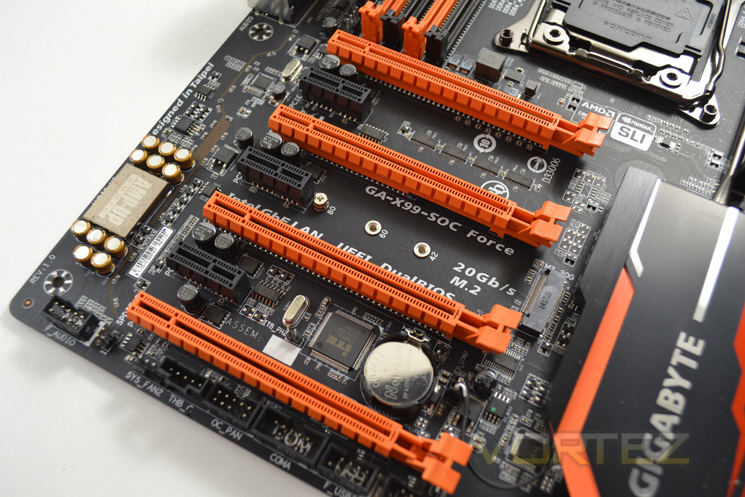
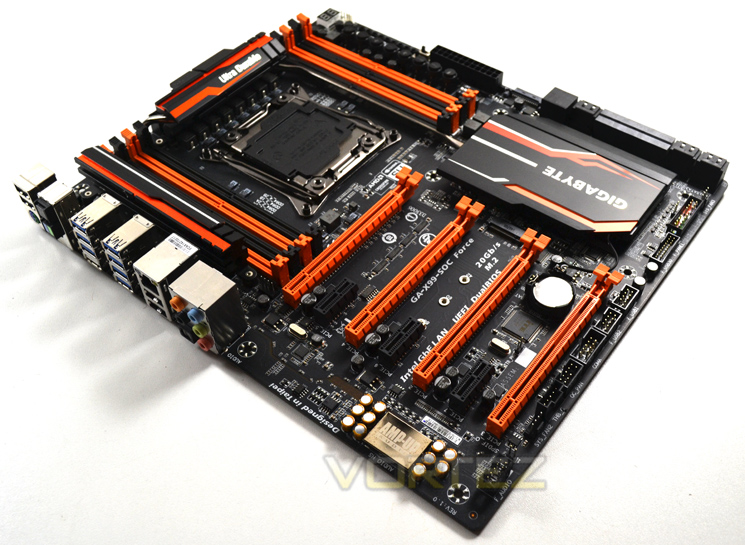
Finally, a look at the wider PCI-Express slot area. GIGABYTE make full use of the length an EATX form factor allows, cramming in four full-length PCIe x16 and three x1 slots and thereby allowing up to 4-way SLI/Crossfire (depending on CPU). Two slots (the first and third) are wired for full x16 operation, whilst the others are limited to x8; in 3-way GPU configurations x8/x16/x16 is typical, whilst 4-way will operate at x8/x16/x8/x8.
Also present is the M.2 slot, accommodating up to the 80mm-long 2280 standard. The slot conforms to the second generation M.2 specs, leveraging up to four PCIe lanes for a maximum storage bandwidth of 20Gb/s, far in excess of SATA 3.
Detailed Look
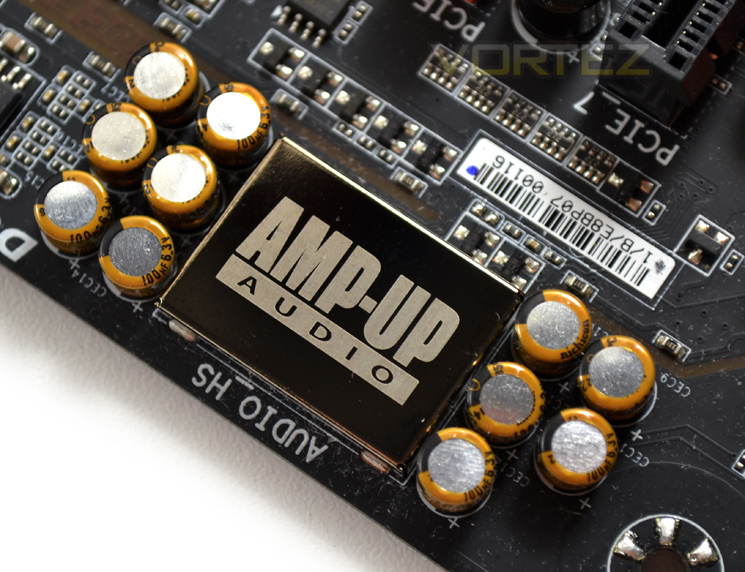
High Definition audio is provided by a Realtek ALC1150 audio chip and signalling that GIGABYTE route though their AMP-UP Audio system. Left and right audio channels are kept separate by routing between two different PCB layers. Additional orange LED lighting with different lighting modes is also present.
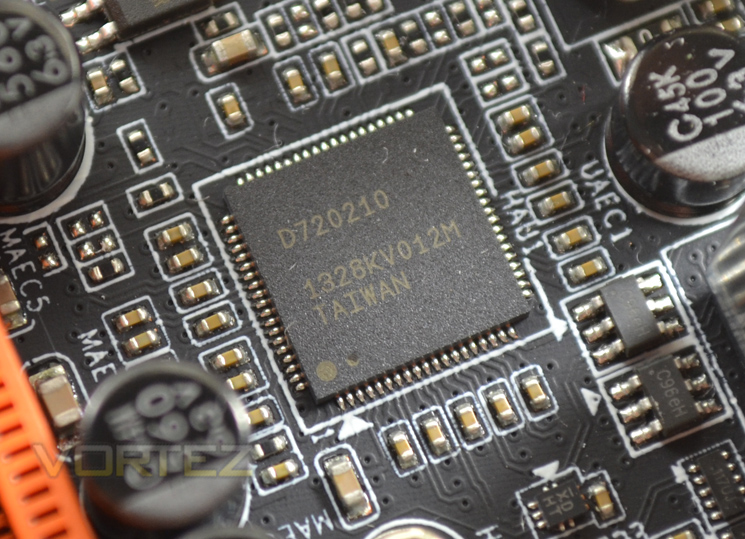
A Renasas D720210 USB 3.0 controller adds additional USB 3.0 options to the already well stocked default chipset.
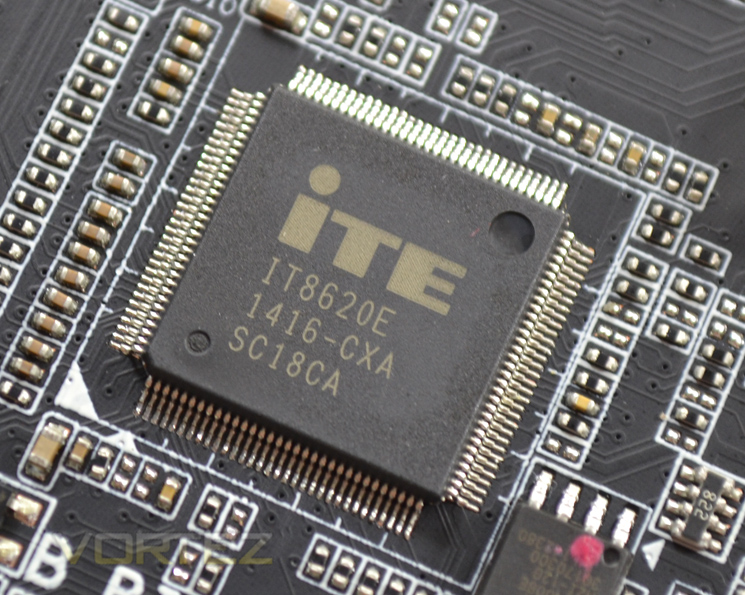
An ITE IT8620e SuperIO chip monitors temperatures, voltages and other key metrics for normal operation and overclocking.
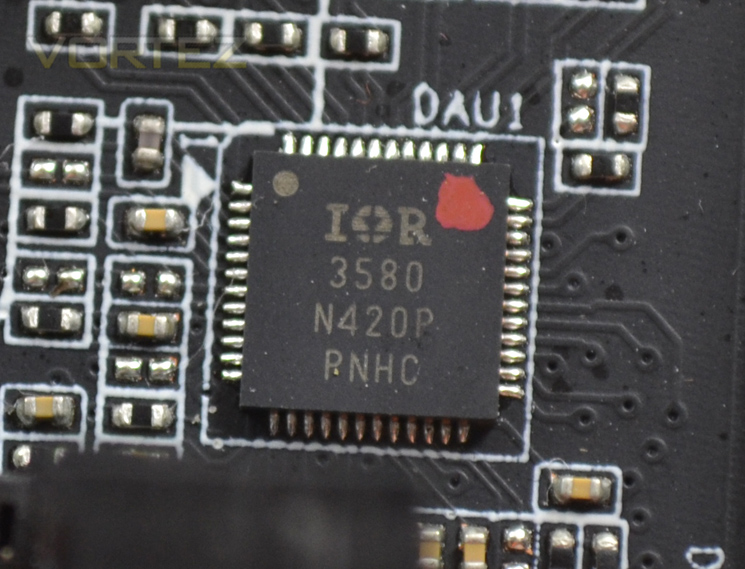
International Rectifier’s IR3580 is an 8-phase PWM designed to provide stable power to components down the chain.
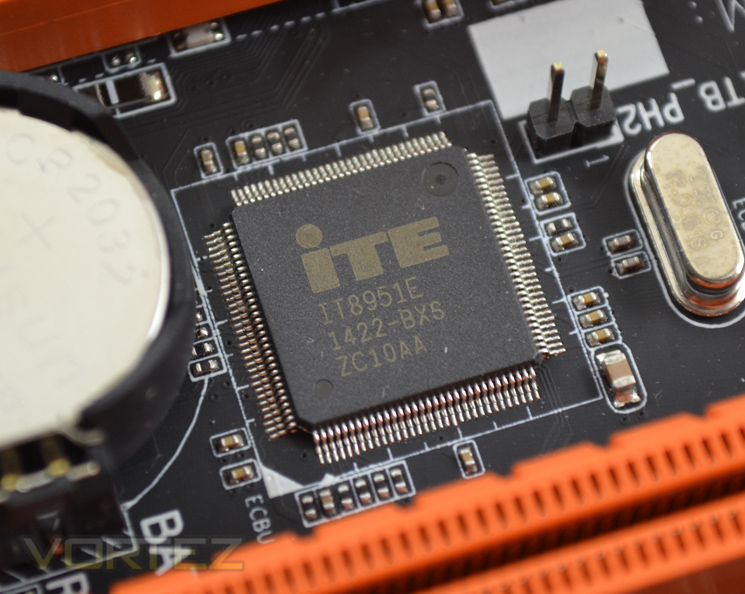
ITE’s IT8951e is the motherboard built-in Q-Flash Plus controller, which allows a BIOS flash to take place even if no RAM or CPU is installed.
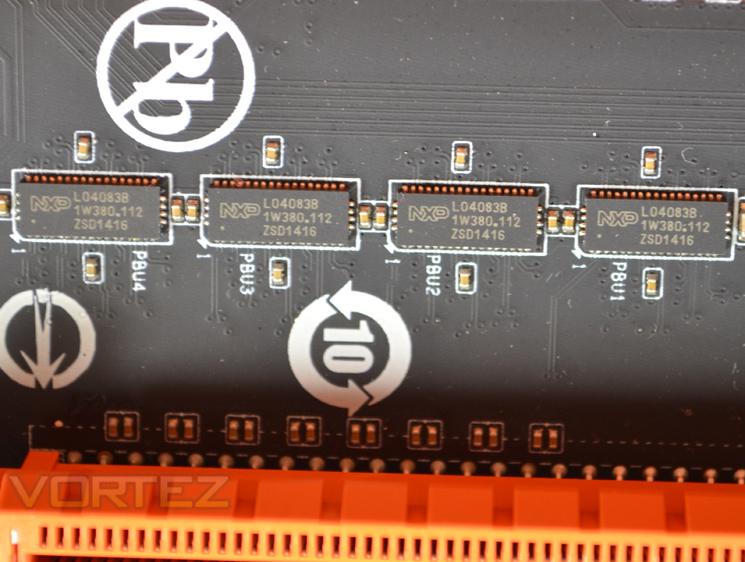
A quartet of NXP L04083B chips handle PCI-Express switching between x16 and lower modes as required, essential for mutli-GPU configurations.
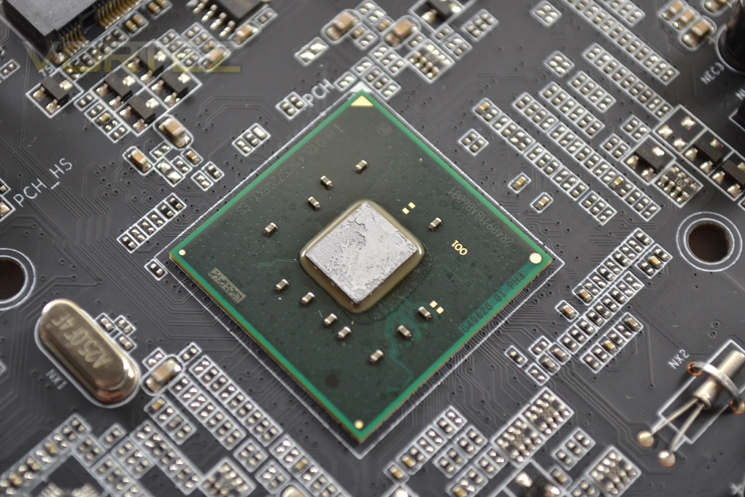
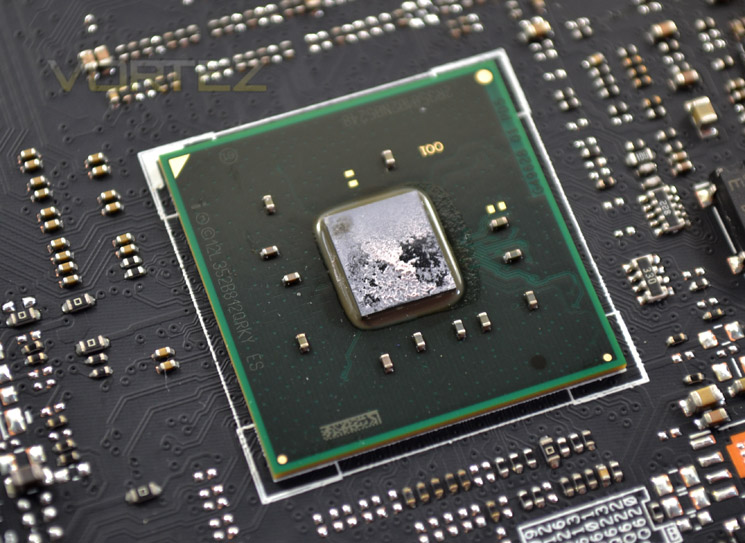
Quick look at the X99 Platform Controller Hub, without its usual heatsink. Note that the area around this socket is pretty clear, potentially making chipset water cooling more feasible.
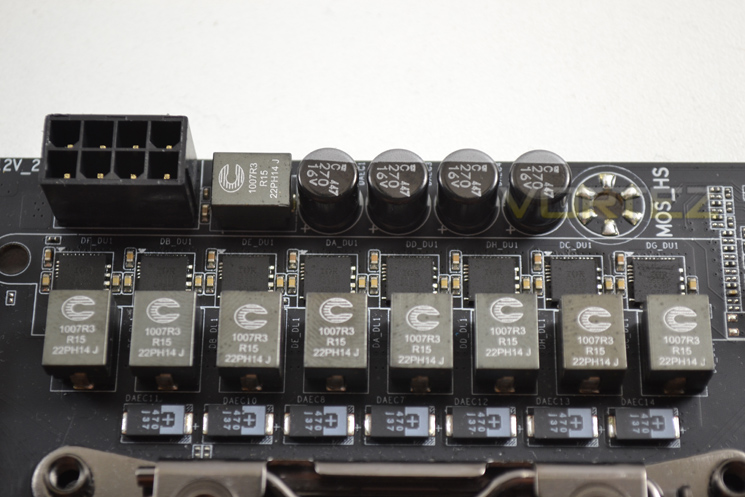
Finally we come to the X99-SOC Force’s power delivery system. This model makes use of 8-phase digital power, server level Cooper Bussmann chokes and Polymerized Organic Semiconductor Capacitors (POSCAPS). Interestingly, the motherboard only makes use of one 8-pin EPS 12V connector for dedicated CPU power; in the past high-end overclocking board have used up to two 8-pin connectors, and this reflects the expected power efficiency of the Haswell-E microarchitecture.
Test Setup & Methodology
RAM: 16GB Corsair Vengeance LPX DDR4 @ 2666MHz 16-17-17-35 (CMK16GX4M4A2666C15R)
GPU: NVIDIA GTX 760
Power Supply: Corsair RM1000
Cooler: Corsair H105
Motherboards
ASUS X99 Deluxe
MSI X99S Gaming 9 AC
GIGABYTE X99 SOC FORCE
ASUS X99 Deluxe
MSI X99S Gaming 9 AC
Benchmarks
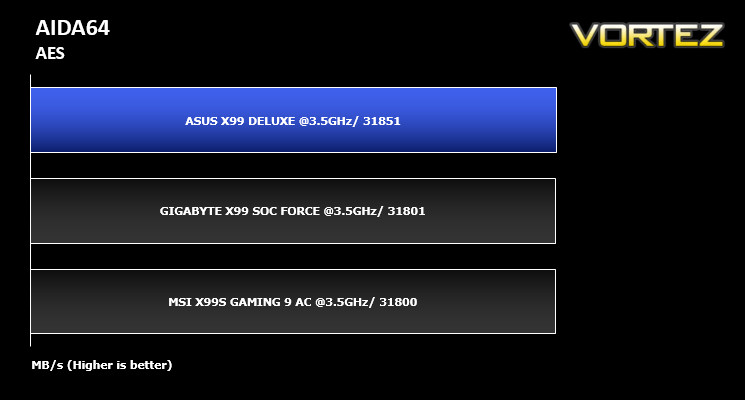
AIDA 64 – CPU & Memory/Cache Performance
SiSoft Sandra – Compute & Memory Performance
HandBrake – Encoding Performance
Pov-Ray – 3D Image processing Performance
Cinebench R15 – Image processing Performance
AS SSD SATA Performance
Futuremark 3DMark (Firestrike) – Graphical Performance
Futuremark PCMark 8 – Overall PC Performance
Battlefield 4, THIEF, Company Of Heroes 2 & GRID:2 – Gaming Performance
AIDA 64 – CPU & Memory/Cache Performance
SiSoft Sandra – Compute & Memory Performance
HandBrake – Encoding Performance
Pov-Ray – 3D Image processing Performance
Cinebench R15 – Image processing Performance
AS SSD SATA Performance
Futuremark 3DMark (Firestrike) – Graphical Performance
Futuremark PCMark 8 – Overall PC Performance
Battlefield 4, THIEF, Company Of Heroes 2 & GRID:2 – Gaming Performance
BIOS Exploration
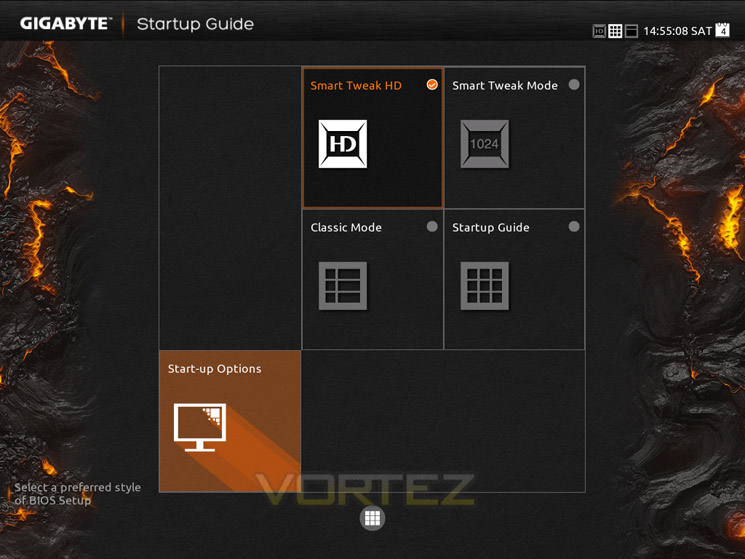
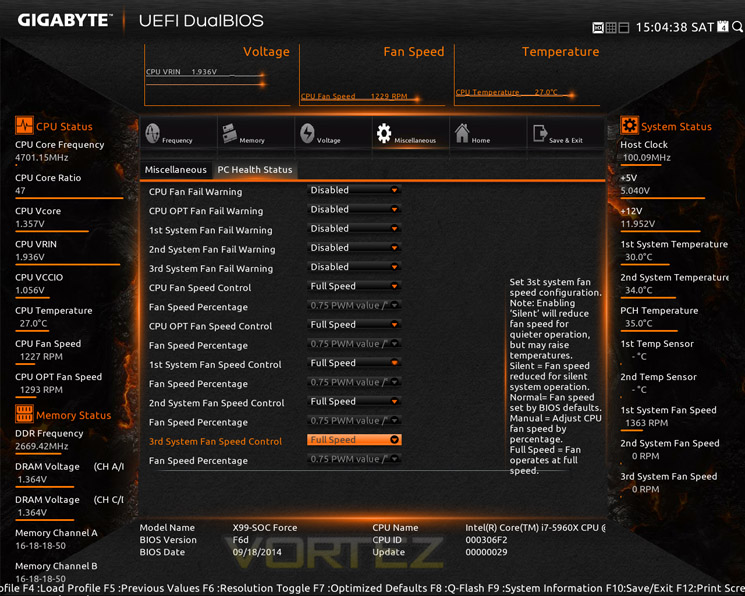
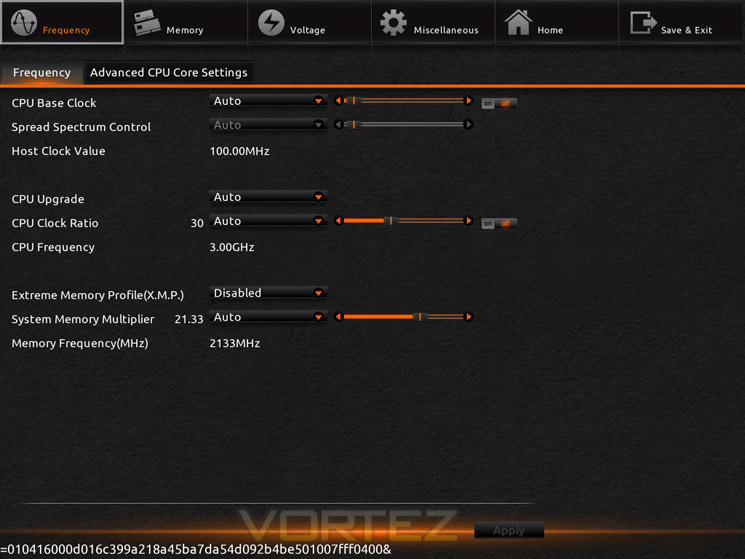
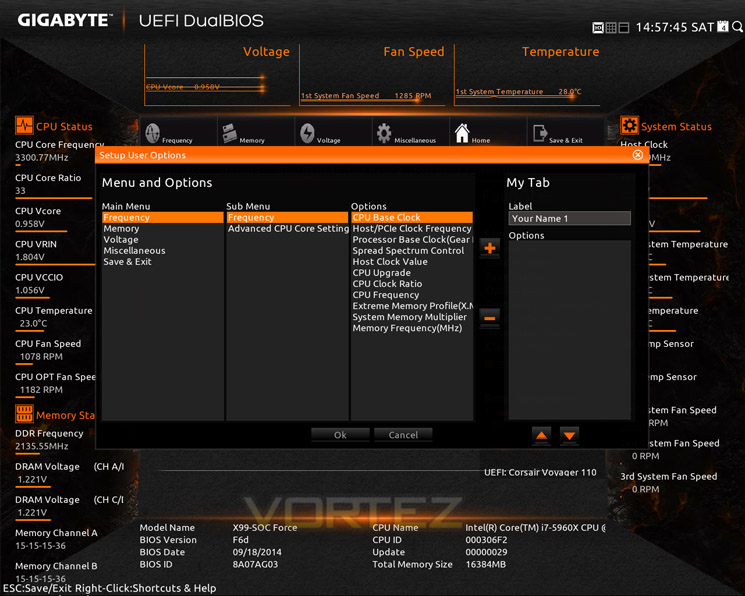
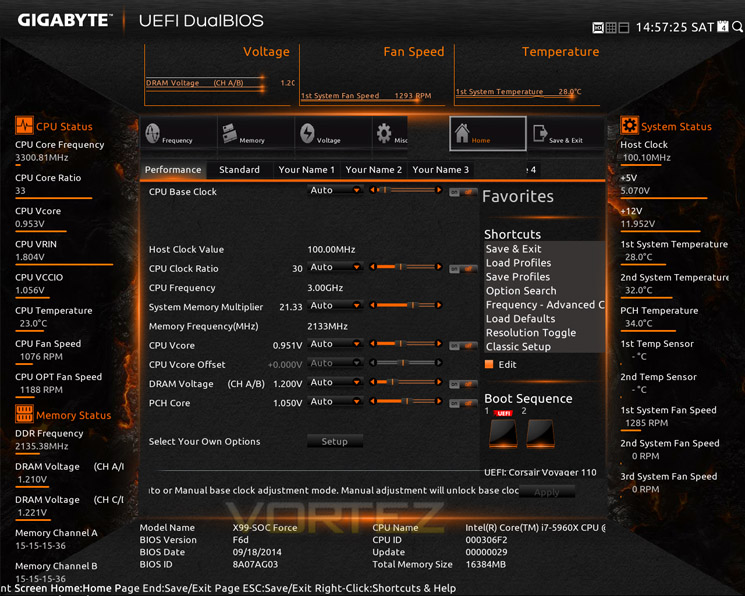
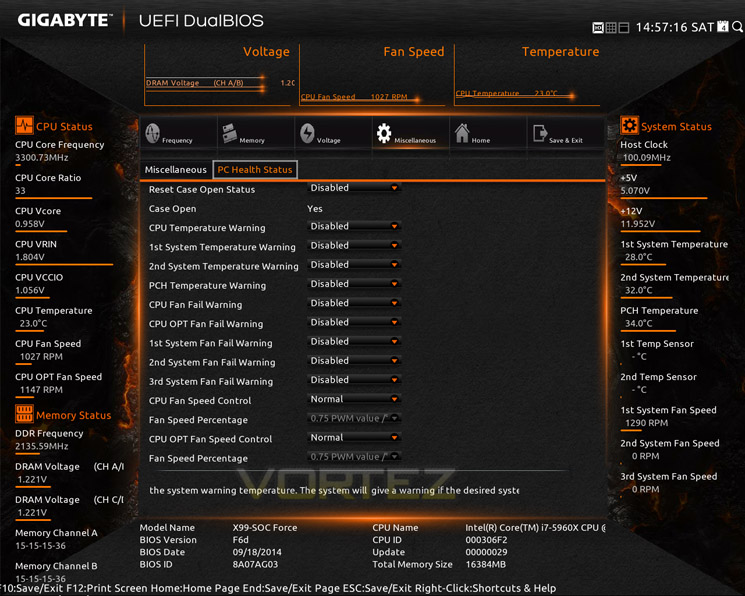
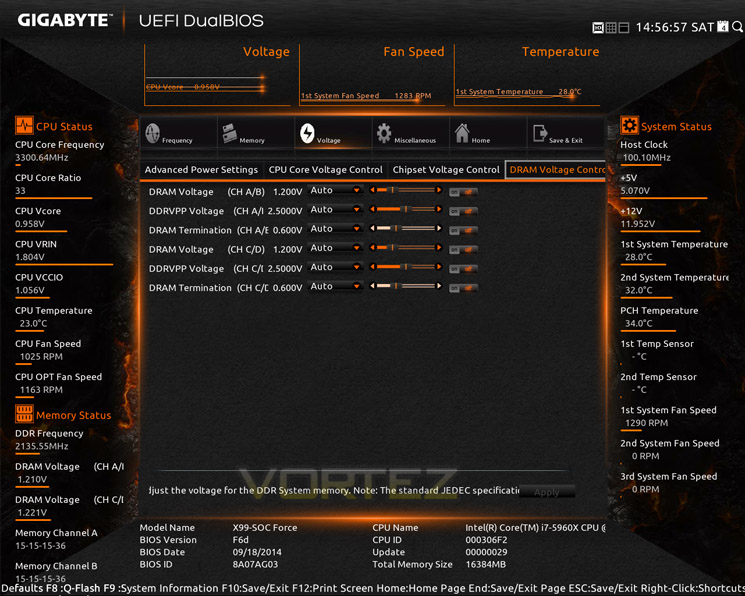
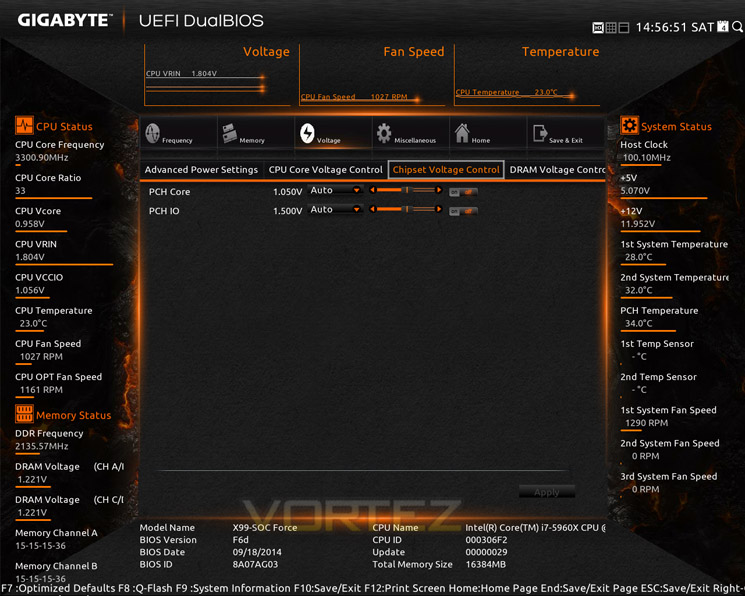
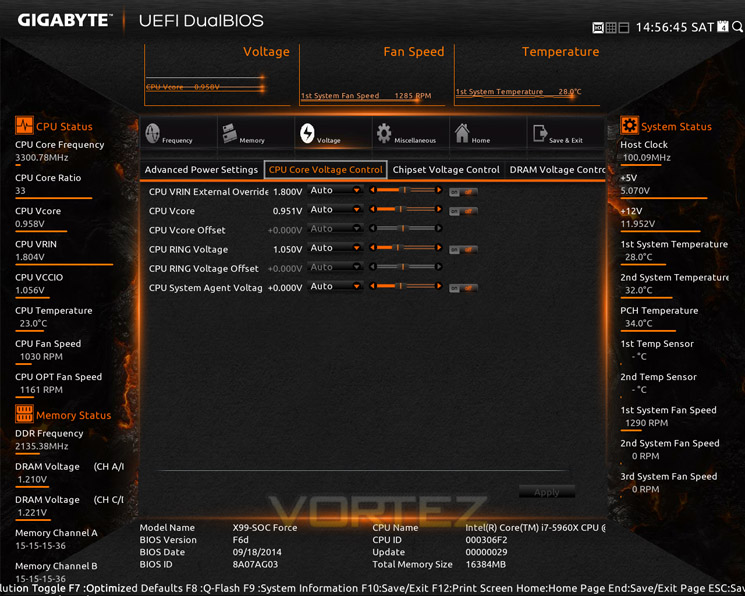
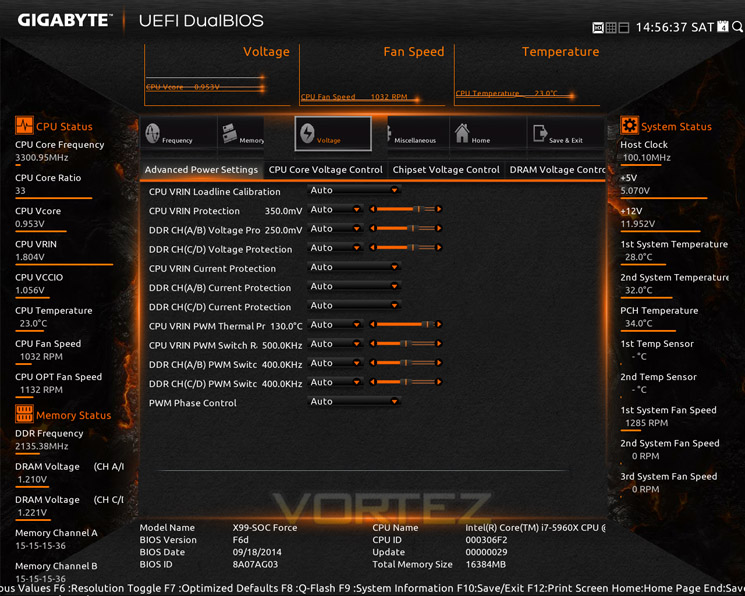
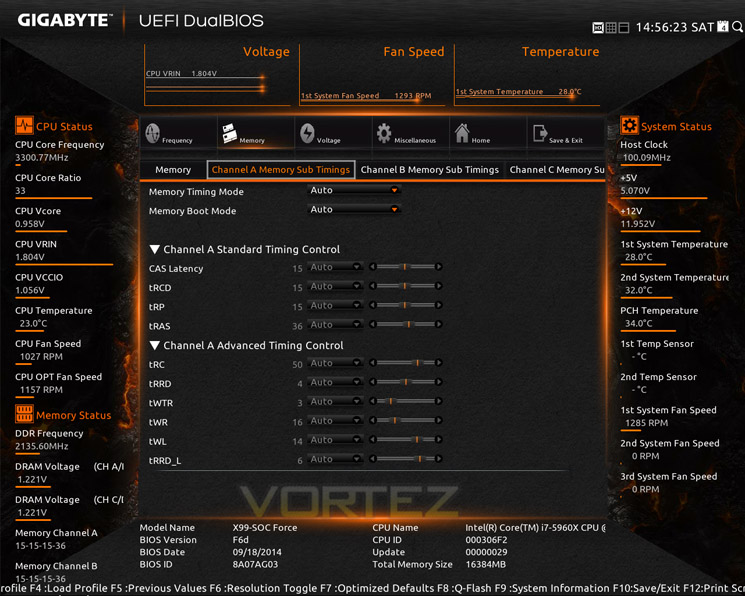
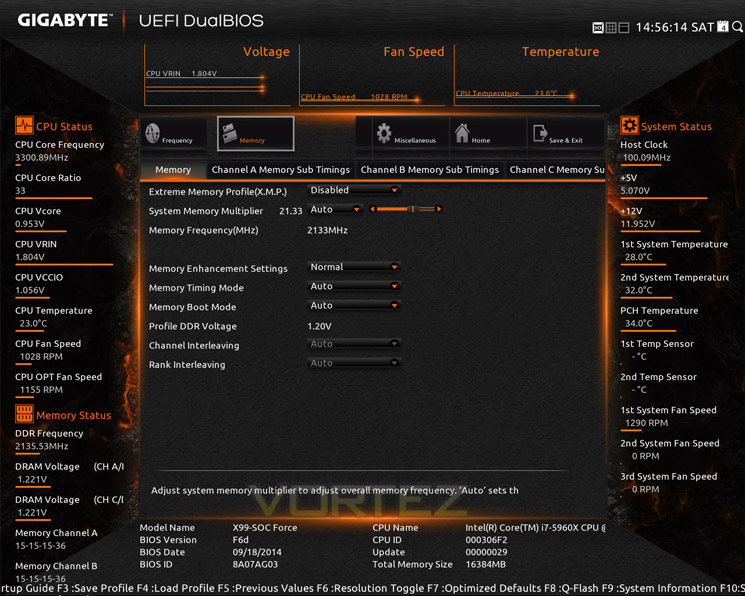
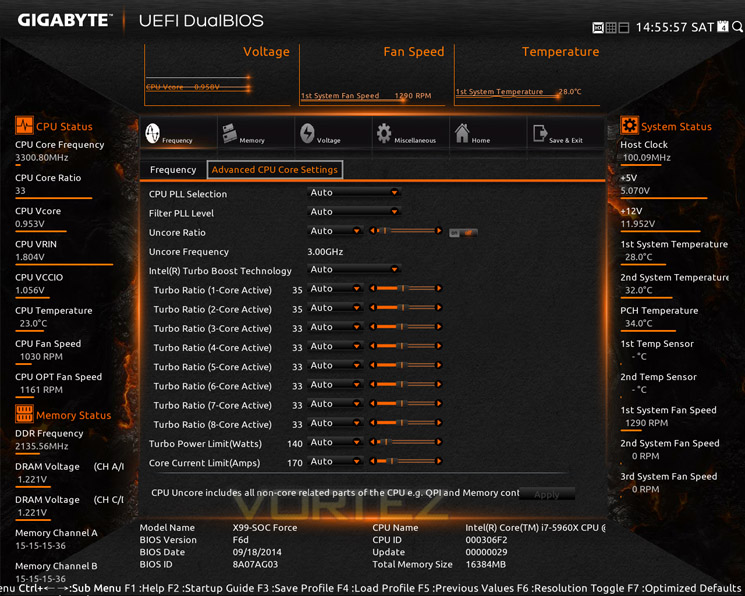
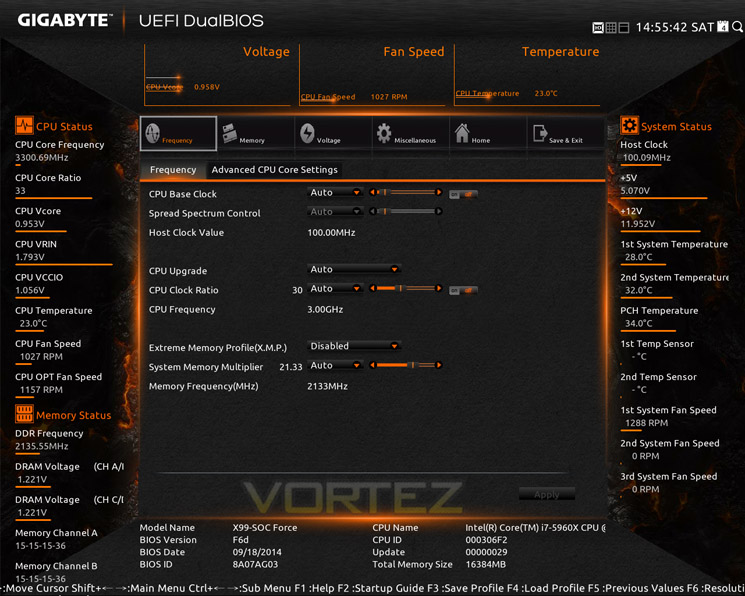
The BIOS can essentially be used via two methods. First and default is the new method which is very awkward to use to begin with but we suggest you persevere as it soon becomes more intuitive and very easy to navigate. While it still requires a little work to make it more user friendly, the additional features such as having the monitoring in constant view is very useful. It also looks extraordinary. Better still you can adjust the UEFI BIOS to your own preference. For example if you only want the overclocking options to appear when you enter the BIOS you can select this, perhaps adding the HW monitoring section and CPU features too if you like. Having a good play around with these features means you can pretty much build your own unique BIOS exactly the way you like it, having all of the options you are likely to use directly at your fingertips without having to scroll through a variety of menu’s thereby speeding up the whole process. To make the whole thing even better you can change the UEFI to hi resolution too, in effect making it look very much like a Windows overclocking utility. It really does look that good, perhaps even better!
Of course, should you not like all of the visual eye-candy, you can revert to a much more basic design that is perhaps much easier to navigate especially for those who yearn to go back to the days of 8-bit BIOS. Both BIOS versions have pretty much all of the same settings and you can switch to either BIOS version without having to reboot meaning the temporary settings made in one version will be ported over to the other. We struggled at first with the layout of the new BIOS version but after a period of time it began to grown on us. So much so that we rarely entered the old style.
The settings within the BIOS are heavily biased towards overclocking as you would expect. There is a huge array of options to tweak from frequencies to voltages down to a huge array of memory sub-timings. We really couldn’t want for more settings. Our only fear is that newcomers to overclocking would perhaps be a little scared off because of the massive lists of settings and one could easily get lost within the submenus or worse, enter a dangerous voltage without knowing. GIGABYTE do for the most part give us a brief explanation of what each settings does however it would also have been nice to indicate in some way what voltage were dangerous and which are deemed ‘safe’.
Clearly, this motherboard and indeed this BIOS is not for the feint hearted nor newbies to overclocking. It is the premium motherboard from a premium brand giving the experienced and extreme overclockers every tool possible to extract the most performance from their components. While there are features making life a little less difficult for the newly initiated, we feel GIGABYTE would have been better positioned for a product like this to concentrate more on the dynamics of the BIOS rather than trying to dumb down some of the visuals by making them look prettier and more ‘app’ like. That said, after a period of time, we came to love this BIOS and it is perhaps the best we have come across to date. It has oodles of features and settings and while it can be a little oppressive at first, it draws you in encouraging you to make those fine adjustments to make a good overclock even better.
Overclocking
At stock default settings, we would normally find our CPU would boost to 3.5GHz when placed under load and this is what we use when running our suite of benchmarks. The only settings we generally change are the memory bandwidth and timings to match our kit. For some reason our Corsair kits XMP profiles either overclock the memory kit past the SPD settings or if we leave it at default the kit is set to 2133MHz. As our kit is rated to run at 2666MHz with timings of 16-17-17-35 we have to manually adjust the BIOS to these settings.
The GIGABYTE SOC FORCE was no different in this respect. However, what we did find was that the CPU rarely boosted to 3.5GHZ, it would only boost to 3.3GHz. A little tweaking in the settings freed up this anomaly but it is something worth remembering should you purchase this motherboard, not that you will keep you CPU at stock speeds with this component of course!!
Overclocking our 5960X with the GIGABYTE SOC FORCE was made as easy or difficult as we wanted the process to be. On the one hand we pretty much knew what basic settings were required to get to our previous maximum and of course, the GIGABYTE motherboard duly obliged, hitting rock solid stability with ease. We then tried lowering the vcore little by little and managed to get it down a full 0.04v on our previous best effort which had a soothing effect on the CPU core temperatures.
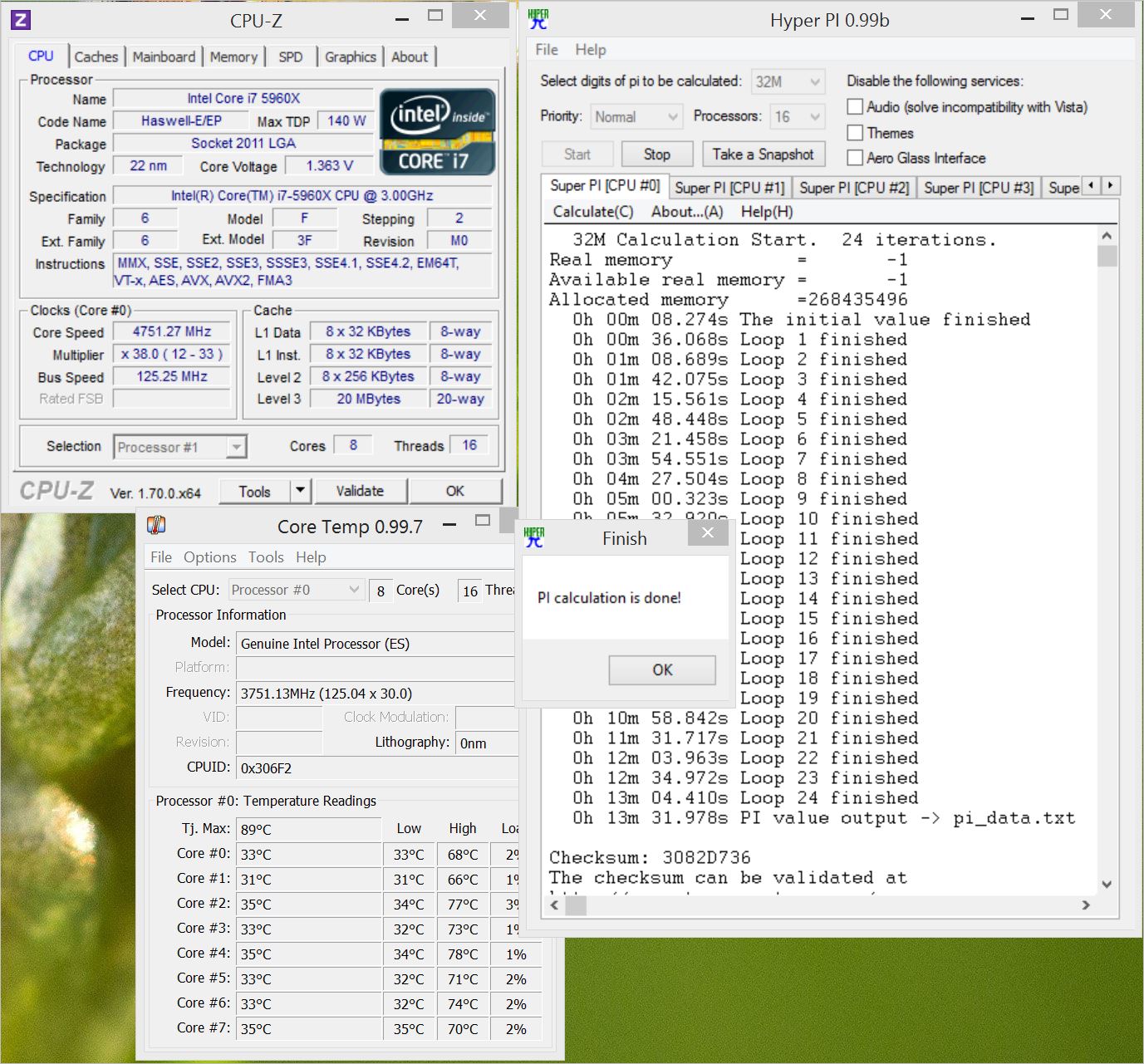
This isn’t the end of the story though. Many benchmarks would run at 4.87 GHz with a little more tweaking and this astounded as as this motherboard allowed us to break through boundaries that were previously impassable. Sadly, our standard HyperPI 32m test failed (albeit much later in the process than previous) so we had to settle for 4.75GHz which was a shame but the signs were definitely there for increasing on our previous best overclock. Given better cooling we are certain that a stable higher overclock could be within our reach.
We did try using the OC Buttons but found it very odd in that to get them to work correctly we had to reset the BIOS to defaults. One would have though it would have been useful to use the buttons, especially the baseclock adjustments for fine tuning to build upon any settings within the BIOS but it seemed in our limited testing that this wasn’t possible. You have to start from scratch in the BIOS and work from there once in windows which is less than ideal, especially if you are adjusting the CPU frequency ratio to say 125 or 166!
Clearly then, the GIGABYTE X99 SOC FORCE has both the onboard components and BIOS capability to extract the absolute maximum from whatever CPU you opt to use. Overclocking with the GIGBAYTE was a pleasure and despite the odd OC button anomaly, we were very impressed indeed with its capabilities. If overclocking is your bag then the the SOC Force will see you pass many hours while tinkering in the BIOS which GIGABYTE have made so much fun to do.
Benchmarks: Power Consumption
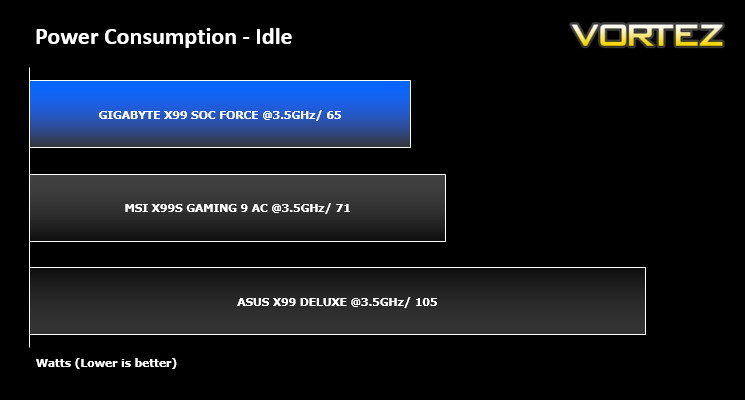
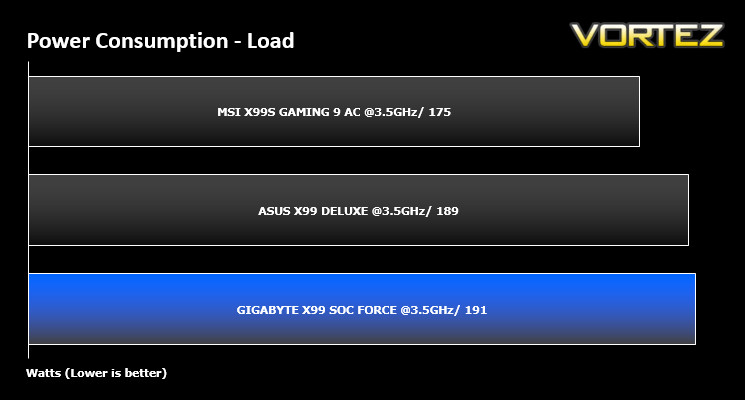
System idle readings were taken by enabling all of the key features on the mainboard and letting the system rest for 10 minutes within a windows environment before taking a reading from the plug to the PSU. To obtain our load results we ran HyperPI (32m) on all cores taking a reading after 5 minutes with all CPU cores loaded to 100%.
Benchmarks: AIDA 64 CPU & Memory
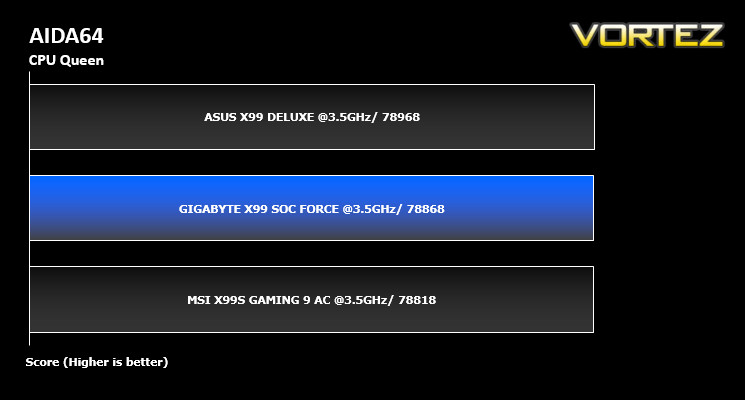
This simple integer benchmark focuses on the branch prediction capabilities and the misprediction penalties of the CPU. It finds the solutions for the classic “Queens problem” on a 10 by 10 sized chessboard. At the same clock speed theoretically the processor with the shorter pipeline and smaller misprediction penalties will attain higher benchmark scores. For example — with HyperThreading disabled — the Intel Northwood core processors get higher scores than the Intel Prescott core based ones due to the 20-step vs 31-step long pipeline. CPU Queen test uses integer MMX, SSE2 and SSSE3 optimizations.
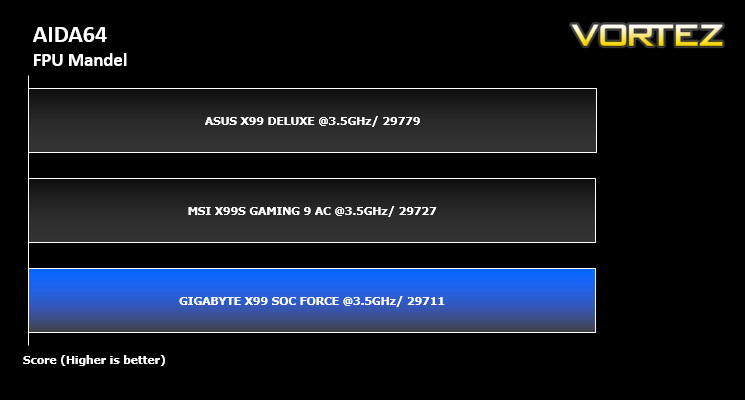
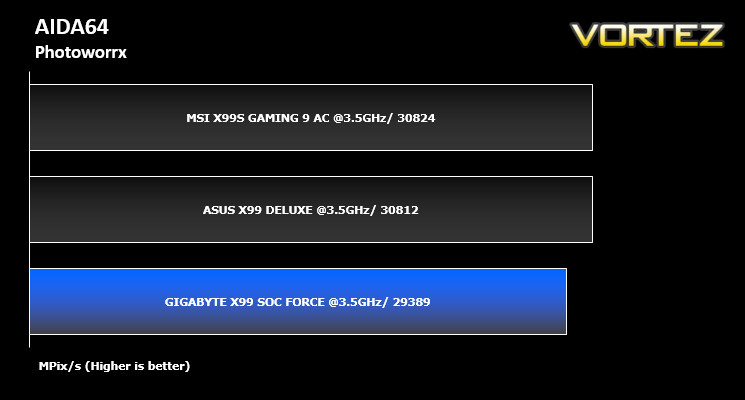
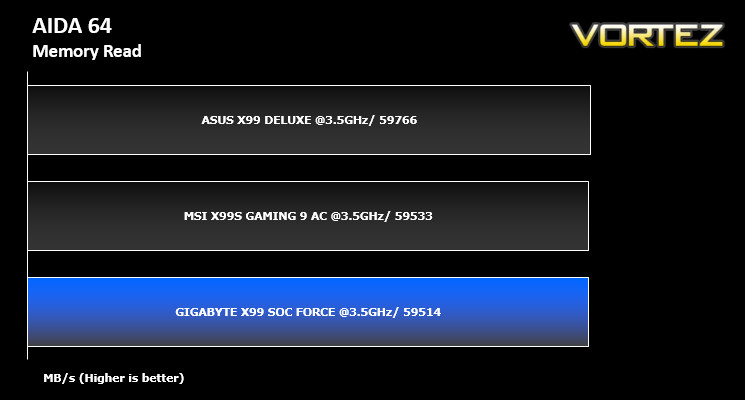
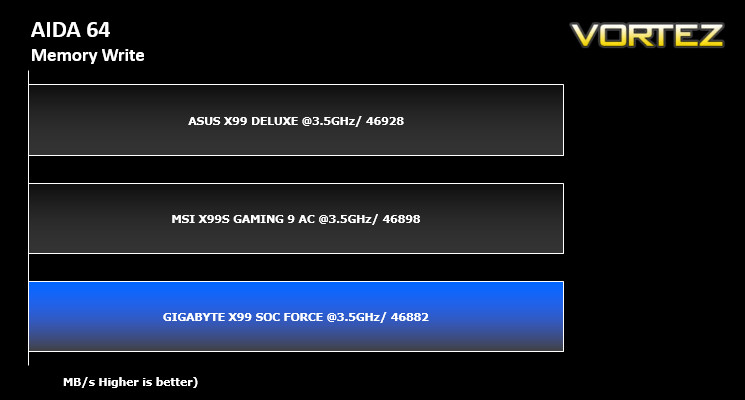
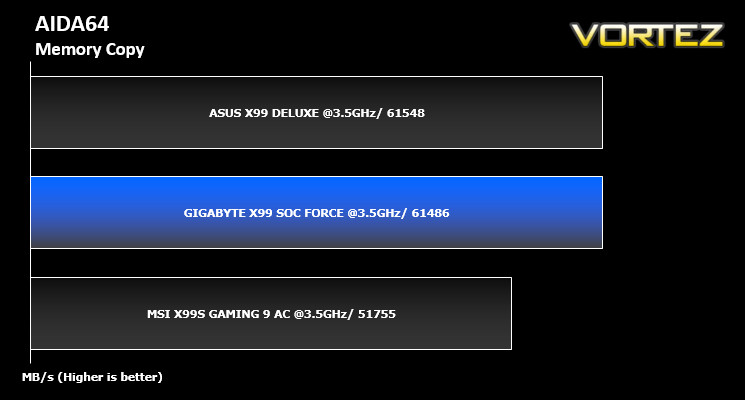
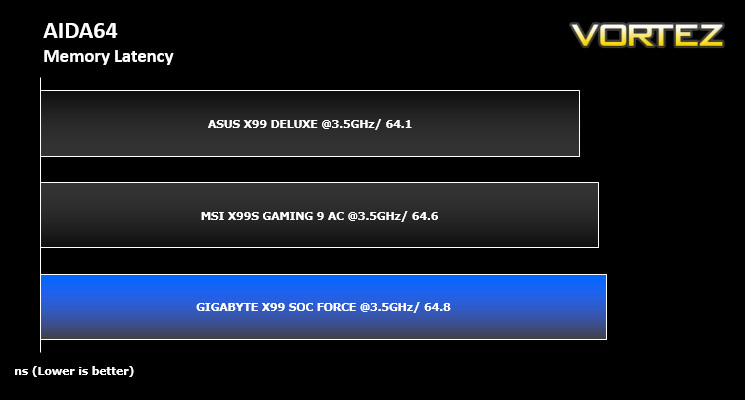
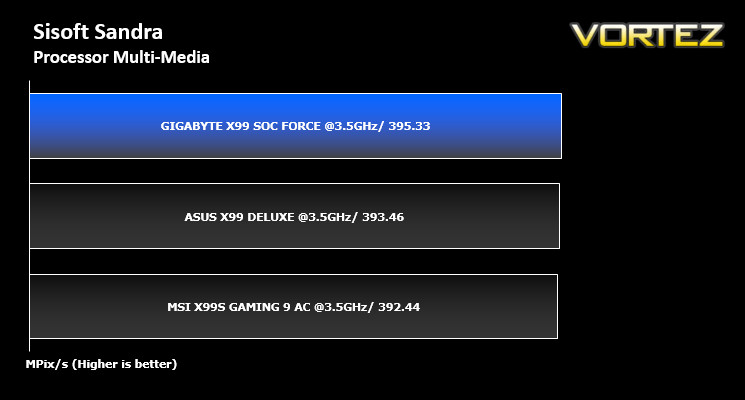
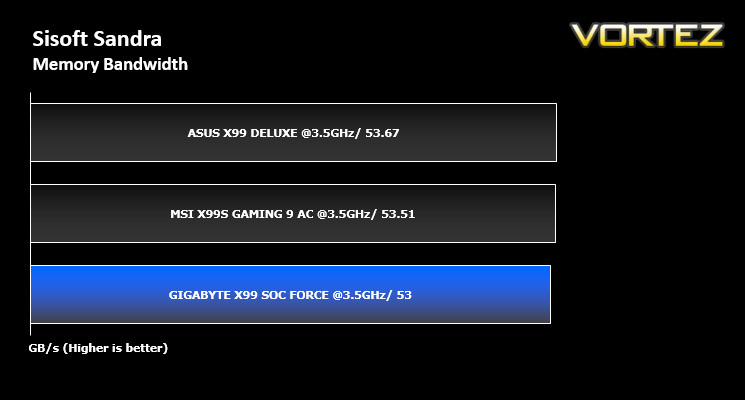
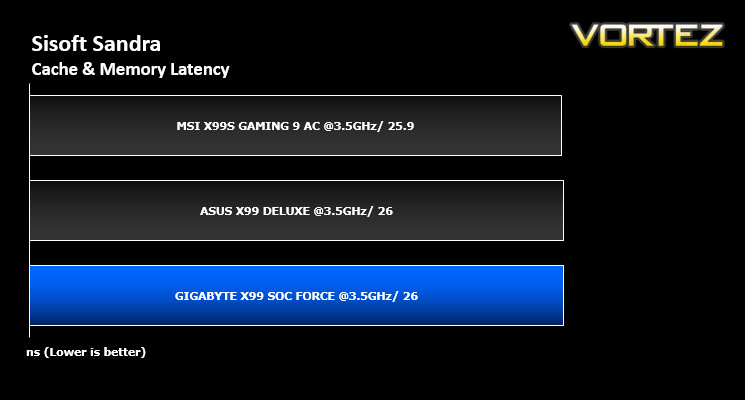
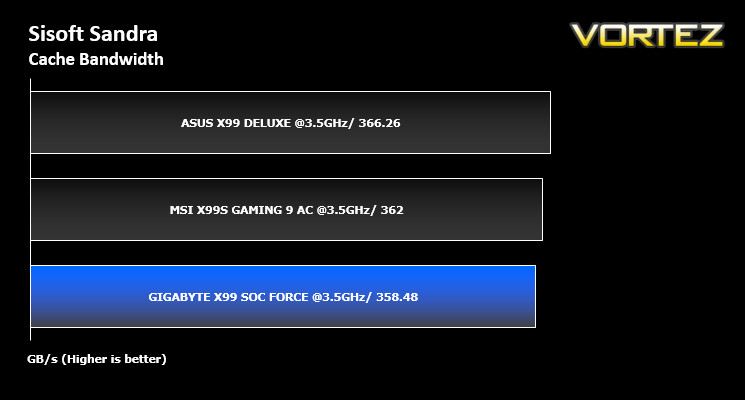
Benchmarks: SiSoft Sandra: CPU & Memory
SANDRA isn’t always a benchmark that is included in hardware reviews but I believe it shouldn’t be ignored. SANDRA provides a vigorous package that tests your system in a rather large array of benchmarks. There are many aspects of benchmark that can be executed. We will be considering – CPU and memory tests.
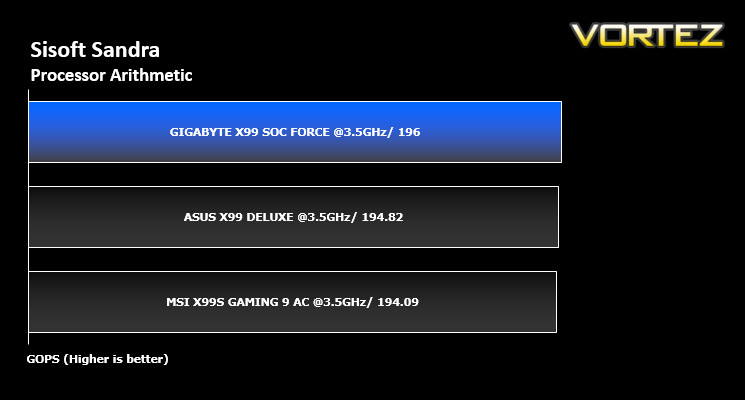
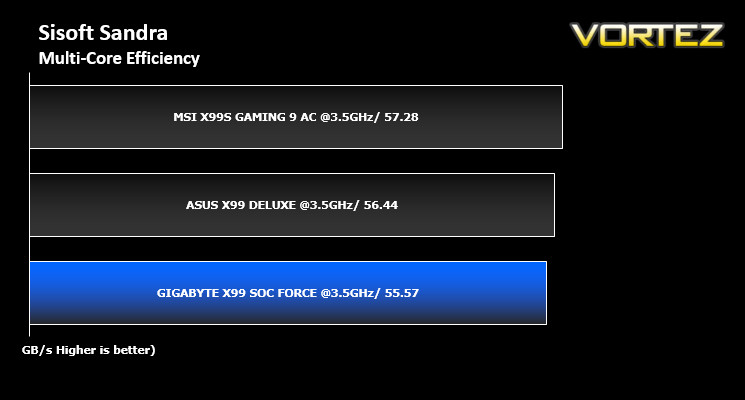
Benchmarks: Cinebench R15
CINEBENCH can measure systems with up to 64 processor threads. This test scene contains approximately 2,000 objects which in turn contain more than 300,000 polygons in total, and uses sharp and blurred reflections, area lights, shadows, procedural shaders, antialiasing, and much more. The result is displayed in points (pts). The higher the number, the faster your processor.
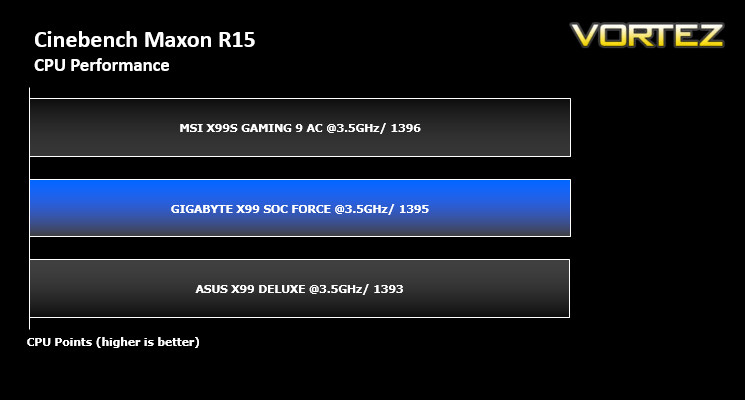
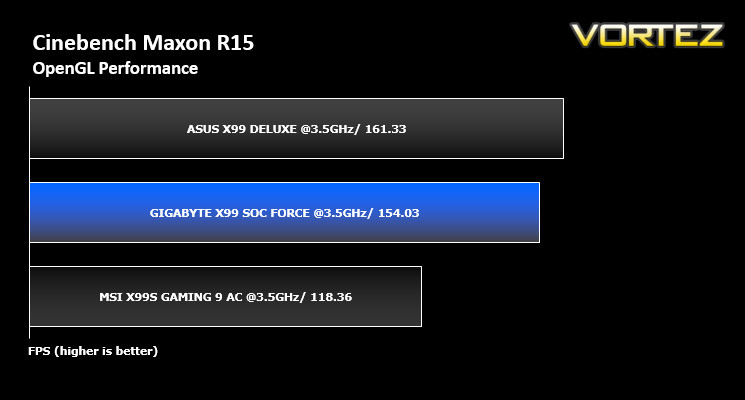
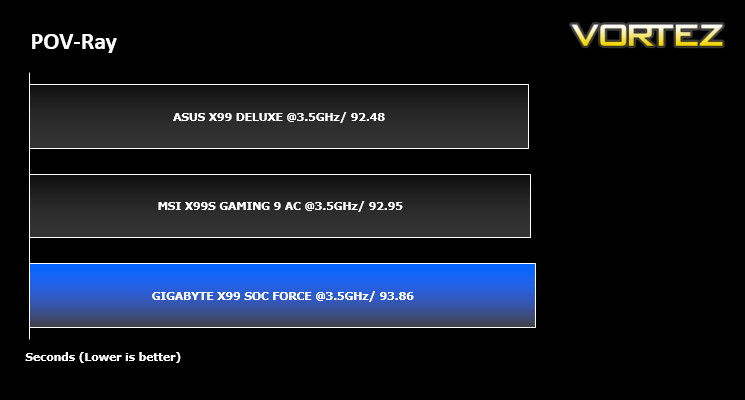
Benchmarks: POV-Ray
The Persistence of Vision Raytracer, or POV-Ray, is a ray tracing program which generates images from a text-based scene description, and is available for a variety of computer platforms. It was originally based on DKBTrace, written by David Kirk Buck and Aaron A. Collins for the Amiga computers.
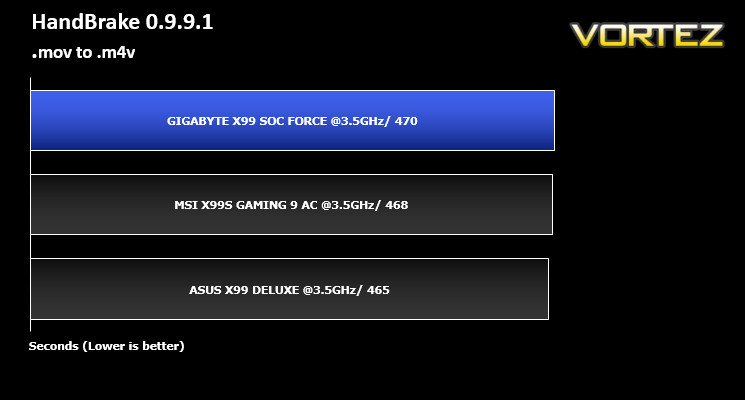
Benchmarks: Handbrake 0.9.9.1
HandBrake is an open source trancoding tool for converting video from nearly any format to a selection of modern, widely supported codecs. Strong multi-threading support tends to favour high core counts and hyperthreading support.
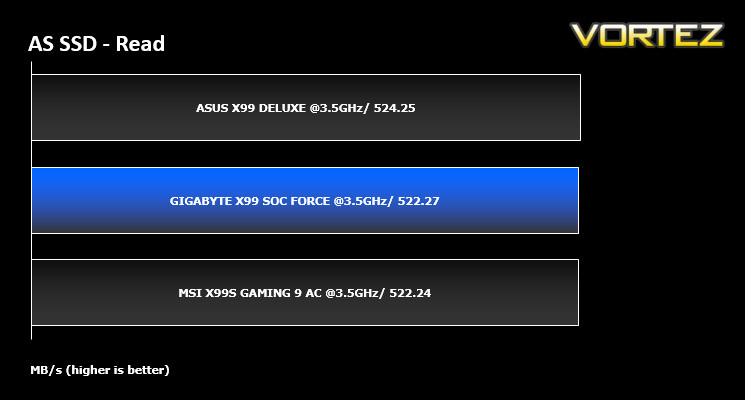
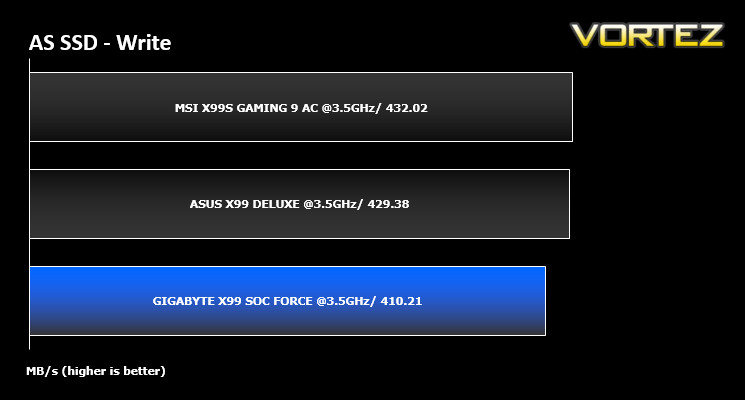
Benchmarks: AS SSD
AS SSD Benchmark is a straightforward tool for measuring the speed of your SSD drive.
Simply launch the program, choose your drive, click Start, and it’ll test your SSD’s read and write speed in a variety of ways, delivering a score for each when it’s done. And if that’s not enough, there are also additional file copy and compression-related benchmarks available from the Tools menu. (The author’s support page is German only, but if you need further English explanations then there’s a thread on the program at the OCZ Technology forum.).
Simply launch the program, choose your drive, click Start, and it’ll test your SSD’s read and write speed in a variety of ways, delivering a score for each when it’s done. And if that’s not enough, there are also additional file copy and compression-related benchmarks available from the Tools menu. (The author’s support page is German only, but if you need further English explanations then there’s a thread on the program at the OCZ Technology forum.).
Benchmarks: Futuremark 3DMark Fire Strike
3DMark FireStrike Product Page
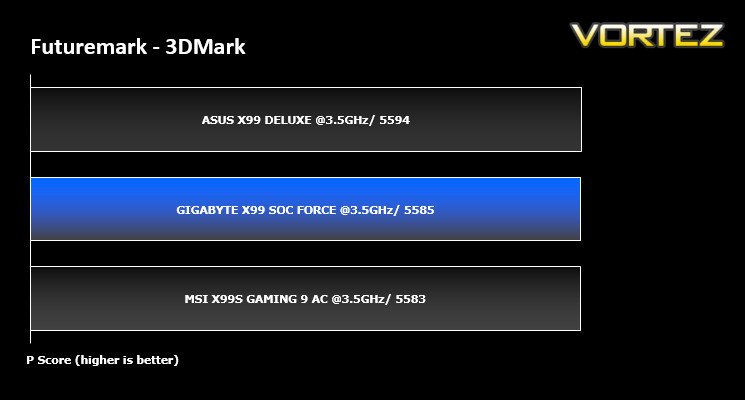
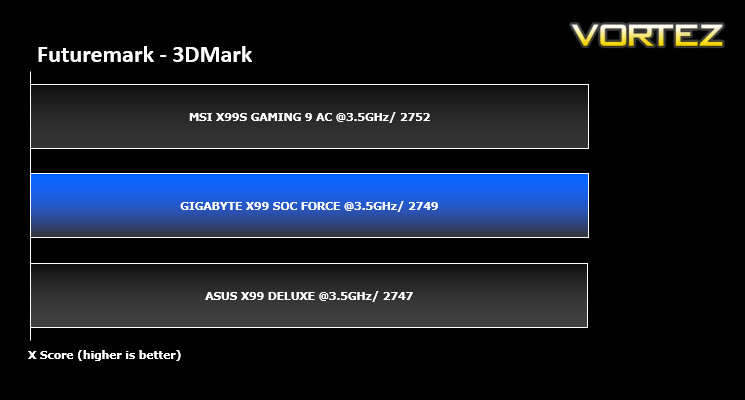
Fire Strike is Futuremark’s new showcase DirectX 11 benchmark designed for high-performance gaming PCs. It is our most ambitious and technical benchmark ever, featuring real-time graphics rendered with detail and complexity far beyond what is found in other benchmarks and games today. Fire Strike will only be available in the Windows editions of 3DMark initially.
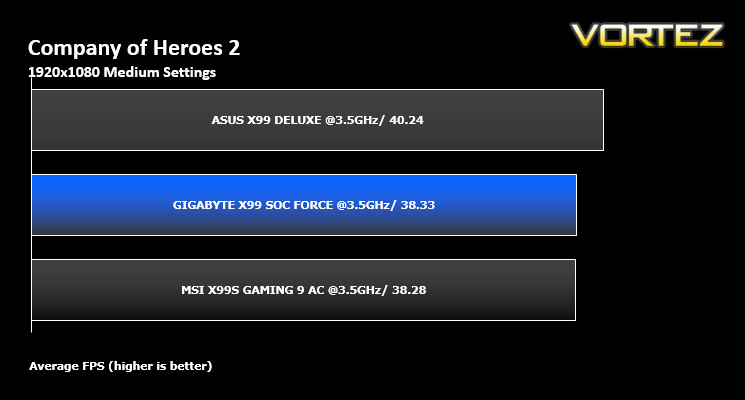
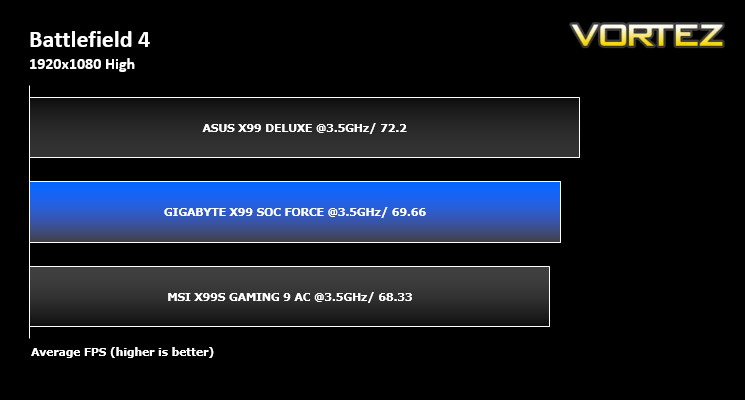
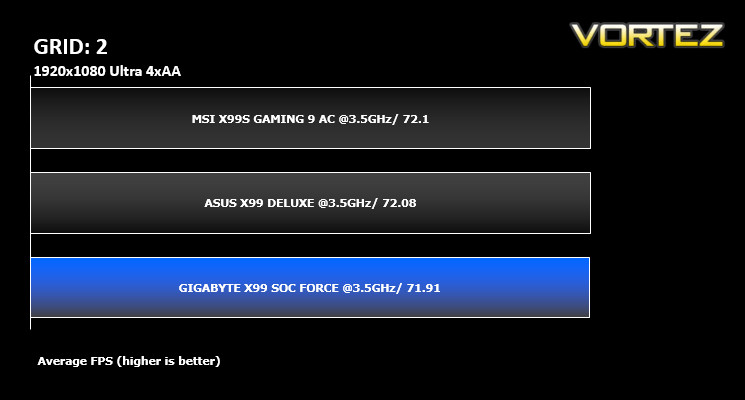
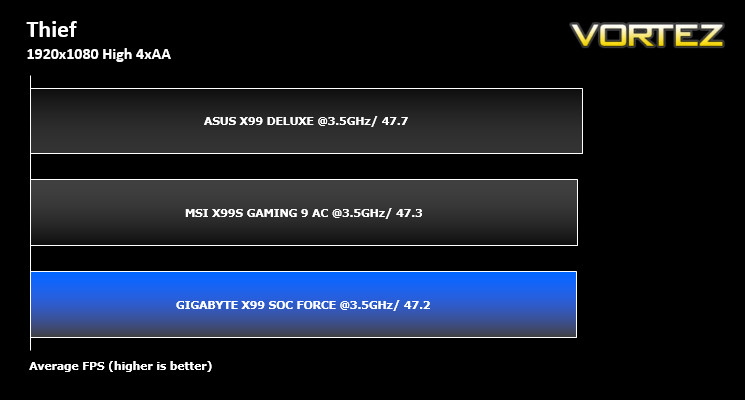
Benchmarks: Battlefield 4, THIEF, Company of Heroes 2, GRID 2
It’s important for us to perform a number of game benchmarks as well as the synthetic tests because gamers will want to know if there are any significant benefits. So here we have a selection of popular gaming titles, critically acclaimed and action-packed.
Conclusion
The GIGABYTE X99 SOC Force is one hell of a good looking motherboard. Form the outset with the Formula 1 themed packaging this motherboard screams speed. When we first saw the X58 orange and black theme we fell in love with the looks and so welcomed a return of these theme but now with extra highlighting and orange LED’s built into the motherboard, the best just got better. It is simply stunning to look at. Beauty can be deceiving though as many motherboard manufacturers put so much thought into the aesthetics that they forget what the purpose of a motherboard is for. GIGABYTE thankfully have not and their purpose is clear: Overclocking.
To this end GIGABYTE have got it covered and by covered we mean absolutely smothered! There really isn’t much more we could want from an overclocking motherboard save for a couple of insulated copper pots and a truck load of LN2. Clearly GIGABYTE have thought about the overclockers needs and that this board will not only be used inside of a case by the regular enthusiast but also by the extreme overclocker. To this end, GIGABYTE have thoughtfully provided a bracket that screws onto the motherboard to hold the GPU straight up so if you are using a test bed or simply a rubber mat, the SOC Force will still have rigidity to prevent the GPU from flopping aroun inside of the PCIe port. Then there is the BIOS. You can even have eye candy or basic but in-depth functionality. Whichever option you choose, the BIOS is as extreme as it is going to get. The on-board switchgear is nice and while we would have preferred better labelling (especially for the reset button) and perhaps better functionality, they will be very welcome to those using a testbed rather than a PC enclosure.
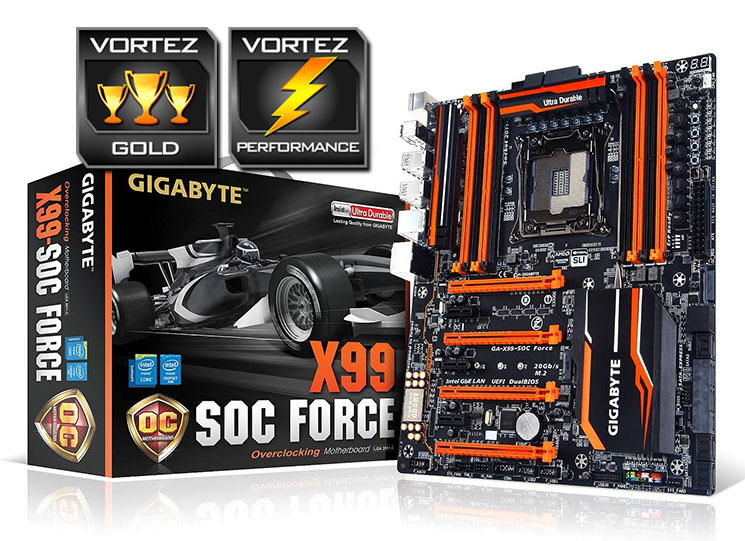
Overclocking may well be the flavour of the day here but that isn’t to say you couldn’t use it as a general PC. It retains pretty much all of the features other X99 motherboards have such as m2 sata, 4 way CrossfireX/SLI, SATA Express, AMP-UP audio capability and a host of other mainstream features so you shouldn’t be left wanting. There are a few feature trade offs such as a single LAN port but nothing that will be terribly missed or inhibit this motherboards ability to function in an ‘everyday’ PC.
To summarise, the X99 SOC FORCE is a massively capable overclocking motherboard that isn’t so much a stripped out Formula 1 race car, it is so much more than this. It is more akin to a Bugatti Veyron: Extremely powerful and extremely fast, stands out from the crowd while retaining most of the toys you would expect from a flagship product. For this reason we are awarding this product our Gold and Performance awards.
If you are serious about overclocking, you need to get this motherboard. You will not be disappointed in what the GIGABYTE X99 SOC FORCE has to offer.
Pros
+ Amazing BIOS (options and features)
+ Stunning Aesthetics
+ Feature packed (overclocking)
+ Braided SATA cables
+ Included PCI Bracket
+ Great all round package
Cons
– OC Buttons can be troublesome to use
+ Amazing BIOS (options and features)
+ Stunning Aesthetics
+ Feature packed (overclocking)
+ Braided SATA cables
+ Included PCI Bracket
+ Great all round package
Cons
– OC Buttons can be troublesome to use

Click here for an explanation of our awards at Vortez.net.
Our thanks to GIGABYTE, Corsair and Intel for providing some of the components crucial to this review
Our thanks to GIGABYTE, Corsair and Intel for providing some of the components crucial to this review


