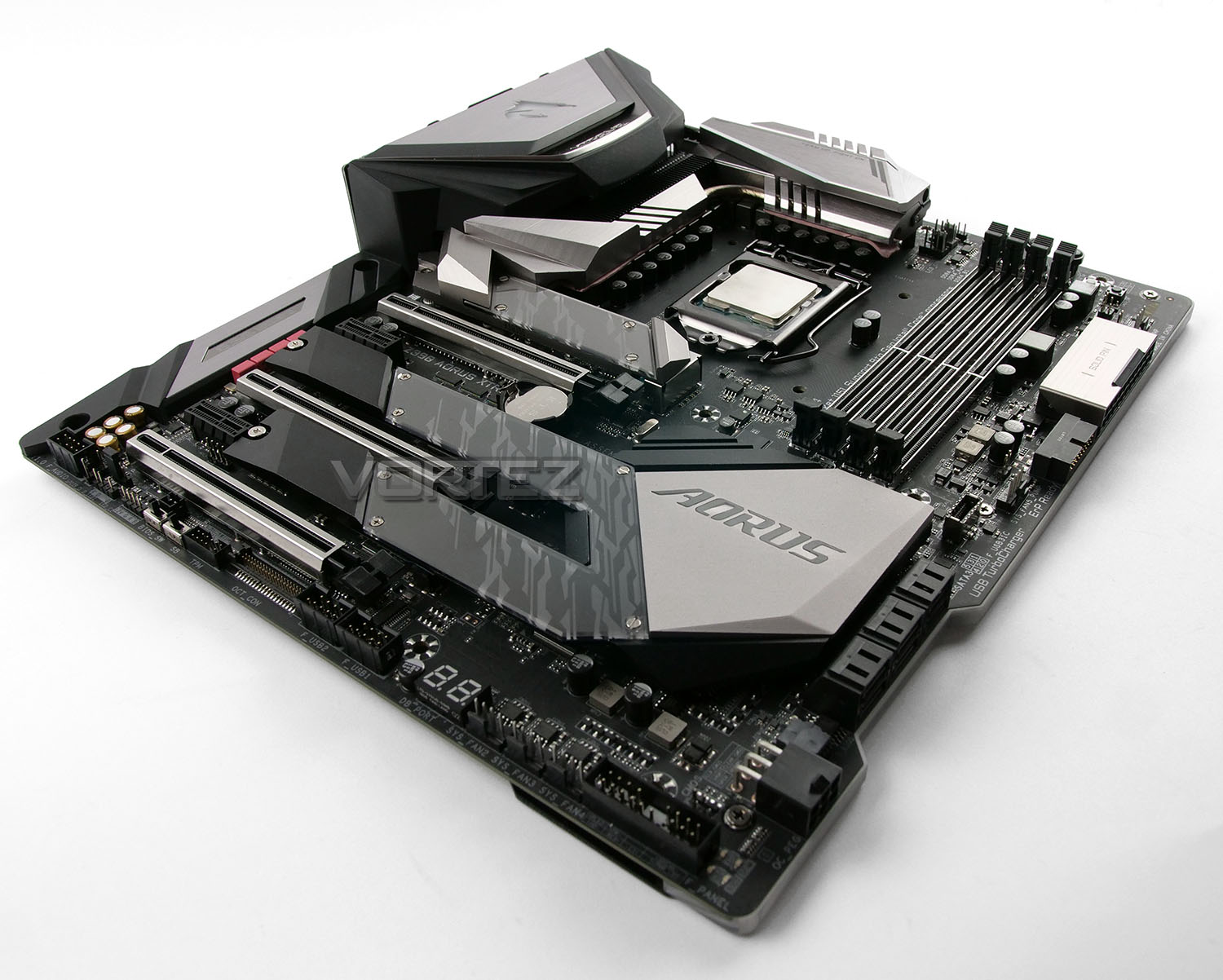
A new flagship is in town – enter GIGABYTE’s Z390 AORUS XTREME. Laden with an outstanding feature-set and hoping to take the Intel Core i9-9900K to new levels.

Product on Review: Z390 AORUS XTREME
Manufacturer & Sponsor: GIGABYTE
Street Price: £630 GBP – $550 USD – $899 AUD
The end of this year has been packed with a number of high-profile/significant hardware launches and the arrival of the new Intel Z390 chipset along with the Intel 9th Generation Processors is one such release which many have been eagerly awaiting. The competition in the CPU/motherboard division has definitely escalated with the return of AMD’s Ryzen platform and this is a great thing for both consumers and reviewers alike.
For those unaware, AORUS is a division of GIGABYTE which is reserved for their high-end products. Under this branding there are a number of different categories of products which extend out to graphics cards and motherboards – today we’ll be exploring one such motherboard.
The Z390 AORUS XTREME follows in the footsteps of other products using the XTREME moniker by offering the very best for overclockers and hardware enthusiasts. Across this motherboard there are an abundance of features regardless of which region is under consideration.
With a whole host of exciting features at our finger-tips, is this the best Intel Z390 money can buy?
AORUS on the XTREME
Innovative design, cutting-edge functionality, state-of-the-art aesthetics, sophisticated thermal design, next generation network connectivity, Hi-Fi level audio system. Z390 AORUS XTREME is the new definition of a flagship motherboard.
Technical Specifications
Below are the technical specifications concerning the Z390 AORUS XTREME:
CPU
• Supports 9th Gen Intel® Core™ i3/i5/i7 processors for Socket LGA1151
Chipset
• Intel® Z390 Chipset
Main Memory
• 4 x DDR4 memory slots, support up to 64GB
– Supports DDR4 Up to 4266MHz
• Dual channel memory architecture
• Supports ECC, un-buffered memory
– ECC UDIMM memory (non-ECC mode)
• Supports Intel® Extreme Memory Profile (XMP)
Slots
• 3 x PCIe 3.0 x16 slots (Modes: 16, 8, 4)
• 2 x PCIe 3.0 x1 slot
Onboard Graphics
• 1 x HDMI™ port
• 2 x Intel Thunderbolt 3 Connector (USB Type-C)
Multi-GPU
• Supports Quad-GPU AMD® CrossFire™ Technology
• Supports Quad-GPU NVIDIA® SLI™ Technology
Storage
• Intel® Z390 Chipset
• 6 x SATA 6Gb/s ports
• 3 x M.2 PCIe Gen3 slots (Supports Intel Optane Memory)
RAID
• Intel® Z390 Chipset
– Supports RAID 0, RAID1, RAID 5 and RAID 10 for SATA storage devices
Audio
• Realtek ALC 1220 Codec
– 7.1-Channel High Definition Audio
– ESS ES9018K2M DAC and TI OPA1622 operational amplifiers
– Supports S/PDIF output
LAN
• 1 x Aquantia GbE LAN chip (10 Gbit/5 Gbit/2.5 Gbit/1000 Mbit/100 Mbit) (LAN1)
1 x Intel® GbE LAN phy (10/100/1000 Mbit) (LAN2)
Wireless
• Intel® CNVi interface 802.11a/b/g/n/ac, supporting 2.4/5 GHz Dual-Band
– BLUETOOTH 5
– Support for 11ac 160 MHz wireless standard
Back Panel I/O Ports
• PS/2 Combo Port
• Gigabit LAN
• HD Audio Connectors
• 2x USB 2.0
• 1x DisplayPort
• 1x HDMI
• 1x USB 3.1 Gen2 Type-A + C
• 3x USB 3.1 Gen2 Type-A
• Optical S/PDIF out
Dimension
• E-ATX Form Factor
• Supports 9th Gen Intel® Core™ i3/i5/i7 processors for Socket LGA1151
Chipset
• Intel® Z390 Chipset
Main Memory
• 4 x DDR4 memory slots, support up to 64GB
– Supports DDR4 Up to 4266MHz
• Dual channel memory architecture
• Supports ECC, un-buffered memory
– ECC UDIMM memory (non-ECC mode)
• Supports Intel® Extreme Memory Profile (XMP)
Slots
• 3 x PCIe 3.0 x16 slots (Modes: 16, 8, 4)
• 2 x PCIe 3.0 x1 slot
Onboard Graphics
• 1 x HDMI™ port
• 2 x Intel Thunderbolt 3 Connector (USB Type-C)
Multi-GPU
• Supports Quad-GPU AMD® CrossFire™ Technology
• Supports Quad-GPU NVIDIA® SLI™ Technology
Storage
• Intel® Z390 Chipset
• 6 x SATA 6Gb/s ports
• 3 x M.2 PCIe Gen3 slots (Supports Intel Optane Memory)
RAID
• Intel® Z390 Chipset
– Supports RAID 0, RAID1, RAID 5 and RAID 10 for SATA storage devices
Audio
• Realtek ALC 1220 Codec
– 7.1-Channel High Definition Audio
– ESS ES9018K2M DAC and TI OPA1622 operational amplifiers
– Supports S/PDIF output
LAN
• 1 x Aquantia GbE LAN chip (10 Gbit/5 Gbit/2.5 Gbit/1000 Mbit/100 Mbit) (LAN1)
1 x Intel® GbE LAN phy (10/100/1000 Mbit) (LAN2)
Wireless
• Intel® CNVi interface 802.11a/b/g/n/ac, supporting 2.4/5 GHz Dual-Band
– BLUETOOTH 5
– Support for 11ac 160 MHz wireless standard
Back Panel I/O Ports
• PS/2 Combo Port
• Gigabit LAN
• HD Audio Connectors
• 2x USB 2.0
• 1x DisplayPort
• 1x HDMI
• 1x USB 3.1 Gen2 Type-A + C
• 3x USB 3.1 Gen2 Type-A
• Optical S/PDIF out
Dimension
• E-ATX Form Factor
Closer Look Video Review
For this review we’ve produced a video showcasing the items included in the box and a detailed rundown of the included features on this motherboard. Please click on this link or watch the video below:
Test Setup & Methodology
Test Setup
CPU Intel Core i9-9900K
Cooling Corsair H100i GTX
Motherboard GIGABYTE Z390 AORUS XTREME
Memory 16GB Corsair Vengeance LPX 3000MHz
Graphics GIGABYTE GTX 1080 G1 Gaming
Storage OCZ Vector 180 240GB SSD
PSU Corsair HX1050 80 Plus Gold Certified PSU
Monitor AOC U2879VF
Capture Device Epiphan AV.iO 4K
Cooling Corsair H100i GTX
Motherboard GIGABYTE Z390 AORUS XTREME
Memory 16GB Corsair Vengeance LPX 3000MHz
Graphics GIGABYTE GTX 1080 G1 Gaming
Storage OCZ Vector 180 240GB SSD
PSU Corsair HX1050 80 Plus Gold Certified PSU
Monitor AOC U2879VF
Capture Device Epiphan AV.iO 4K
Benchmarks
Cinebench R15 – CPU/OpenGL Score
x264 HD 4.0 – 1st and 2nd pass encoding
SiSoftware SANDRA – CPU & Memory benchmarks
POV-RAY – CPU benchmarks
TrueCrypt – CPU benchmarks
AIDA64 – CPU benchmarks & Memory
PCMark 8 – Home Suite & Photoshop
3DMark FireStrike – 3D Benchmark
Games – Rise of the Tomb Raider & Total War: WARHAMMER
x264 HD 4.0 – 1st and 2nd pass encoding
SiSoftware SANDRA – CPU & Memory benchmarks
POV-RAY – CPU benchmarks
TrueCrypt – CPU benchmarks
AIDA64 – CPU benchmarks & Memory
PCMark 8 – Home Suite & Photoshop
3DMark FireStrike – 3D Benchmark
Games – Rise of the Tomb Raider & Total War: WARHAMMER
Other Software
Temperature Analysis: Real Temp
Stress Testing Software: AIDA64 Stability Test
CPU Specification Monitoring: CPU-Z
Stress Testing Software: AIDA64 Stability Test
CPU Specification Monitoring: CPU-Z
Overclocking & VRM Cooling
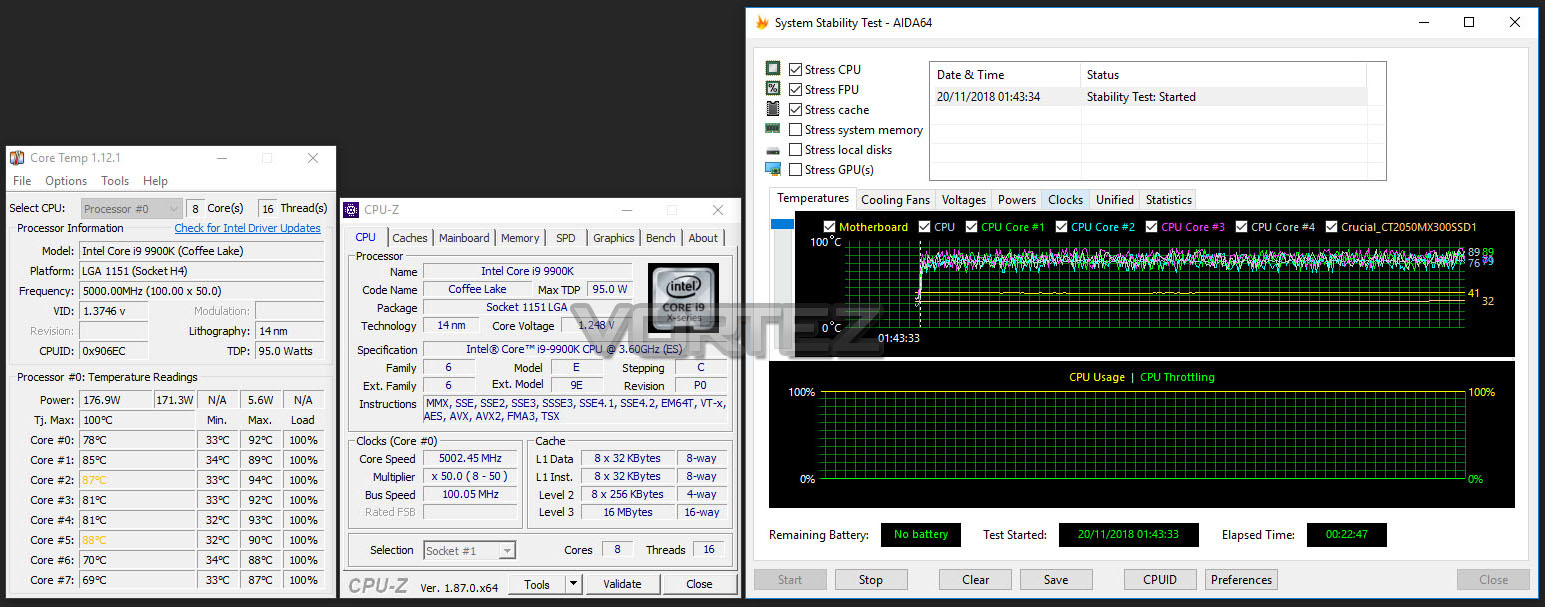
Like previous generations, the Intel Core i9-9900K is unlocked and also has flexible attributes in terms of the BCLK and ratio/multiplier. This makes the job of overclocking much easier.
XTREME is touted as having overclocking prowess. While we were able to nudge up the frequency to 5.2GHz, we were not able to gain stability. 5GHz remained our milestone which allowed stability and the lowest voltage permitted was 1.34v.
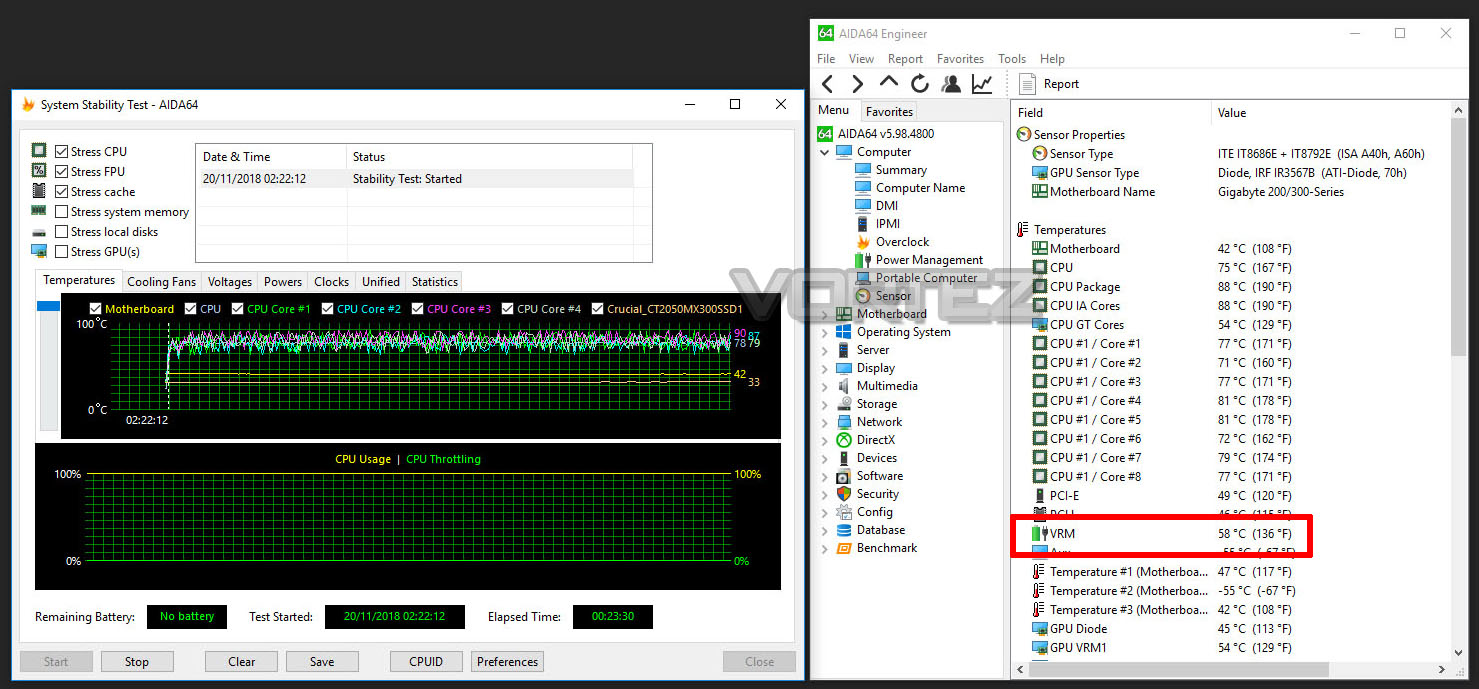
With the 5GHz overclock still applied – above is the result for the VRM temperatures. The VRM cooling solution which AORUS has implemented does a great job at keeping the temperatures under control.
Benchmarks: Power Consumption
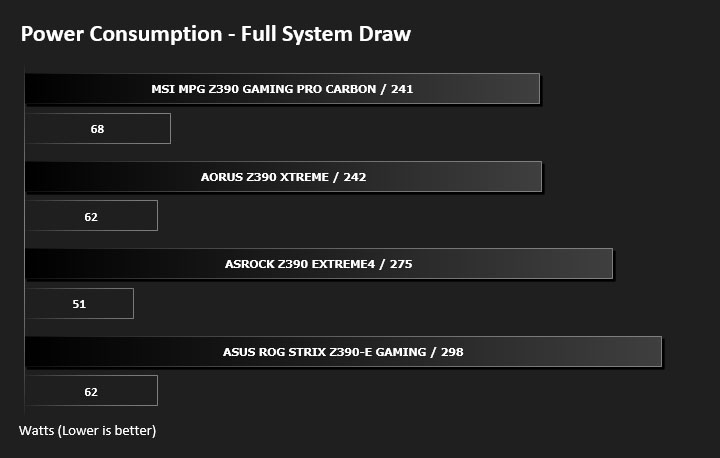
It’s interesting to note the power consumption across all motherboards. Although they are using the Z390 chipset, energy results can fluctuate between manufacturers due to the features and specifications that are integrated. First of all, for the idle tests the system is cold booted into Windows and no additional applications are executed – the watts are noted on the external energy monitor we use and then the system is loaded with 3DMark FireStrike – watts are again monitored for the duration of the test and the highest rated wattage result is then noted down. Below are the results of this energy test.
Benchmarks: Cinebench R15
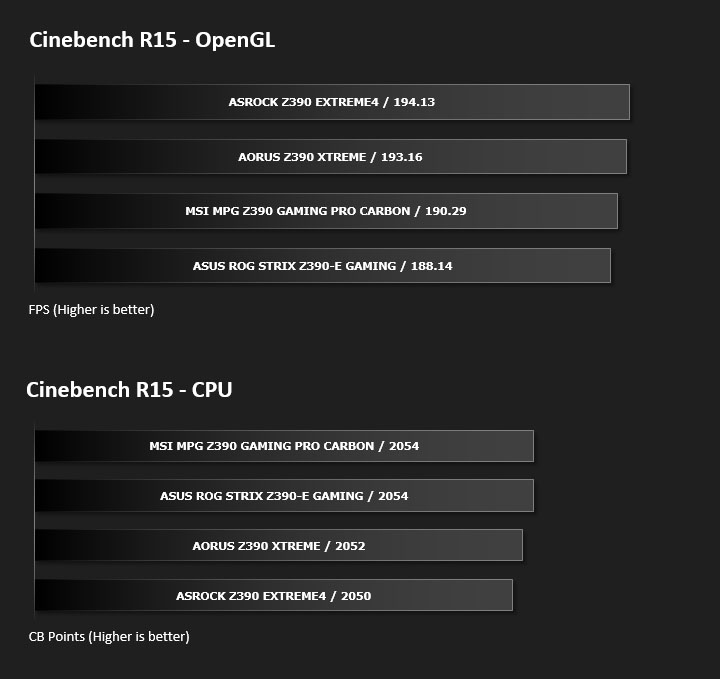
CINEBENCH is a real-world cross platform test suite that evaluates your computer’s performance capabilities. CINEBENCH is based on MAXON’s award-winning animation software CINEMA 4D, which is used extensively by studios and production houses worldwide for 3D content creation. MAXON software has been used in blockbuster movies such as Iron Man 3, Oblivion, Life of Pi or Prometheus and many more.
Benchmarks: X264 HD
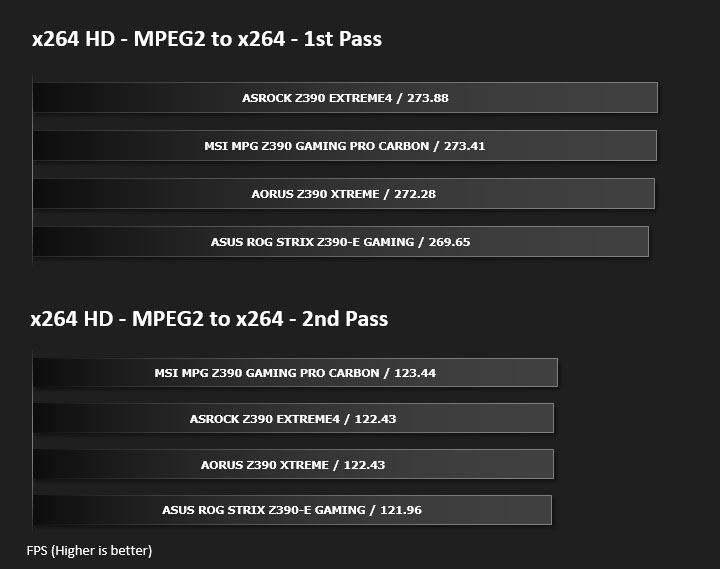
Simply put, this test measures how fast your machine can encode a short, DVD quality MPEG-2 video clip into a high-quality x264 video clip. What’s x264, you ask? It’s more or less the next-generation Xvid/DivX codec. I think it’s ideal for a benchmark because the application (x264.exe) reports fairly accurate compression results (in frames per second) for each pass of the video encoding process, and it uses multi-core processors very efficiently.
Benchmarks: SiSoftware SANDRA
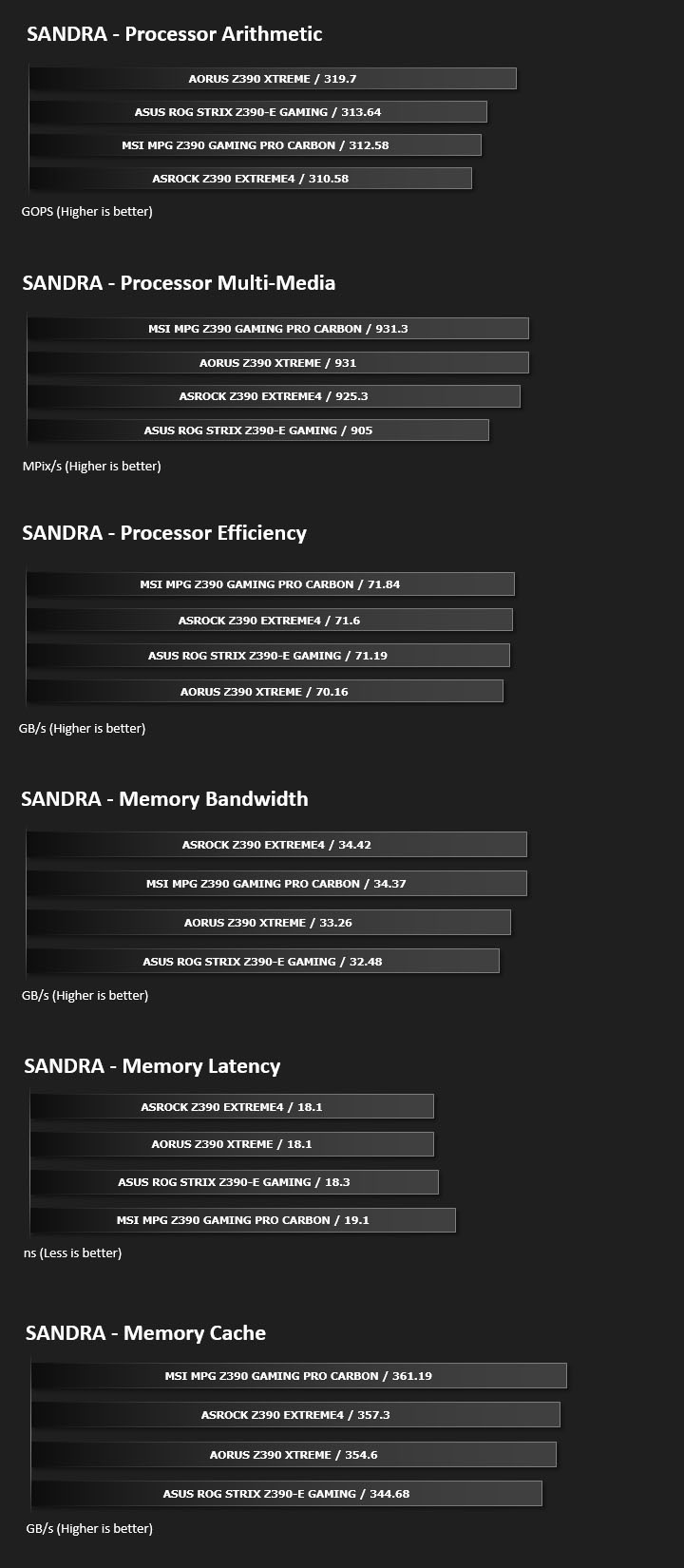
SANDRA isn’t always a benchmark that is included in hardware reviews but we believe it shouldn’t be ignored. SANDRA provides a vigorous package that tests your system in a rather large array of benchmarks. There are many aspects of benchmark that can be executed. We will be considering – CPU and memory tests.
Benchmarks: POV-RAY
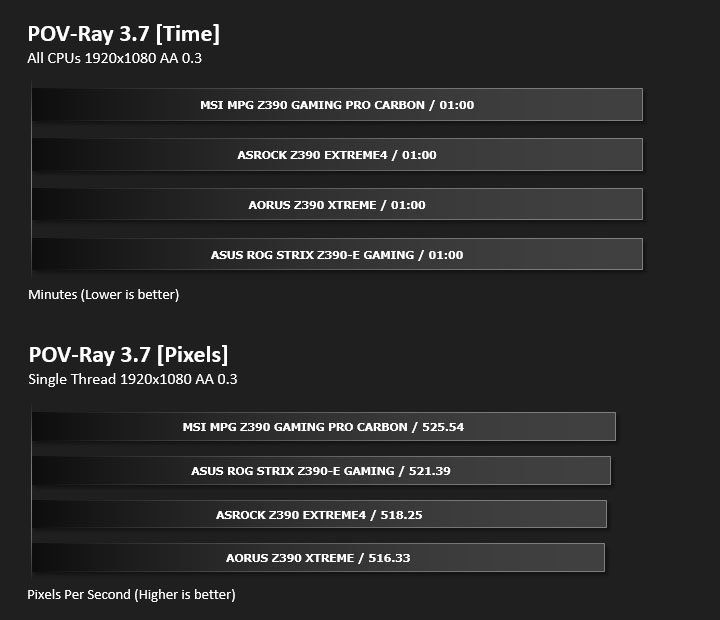
Persistence of Vision Raytracer’s PovRay is a free and open source 3D animator application with versions for computers with different operating systems.
This product allows users to build their custom 3D worlds with excellent quality despite their computer’s hardware. It has adjustable options for levels of radiance, refraction, and reflection. Calculation time may vary depending on the computer model, but PovRay can adapt to many computer builds, and is supported by the open source community.
This product allows users to build their custom 3D worlds with excellent quality despite their computer’s hardware. It has adjustable options for levels of radiance, refraction, and reflection. Calculation time may vary depending on the computer model, but PovRay can adapt to many computer builds, and is supported by the open source community.
Benchmarks: TrueCrypt
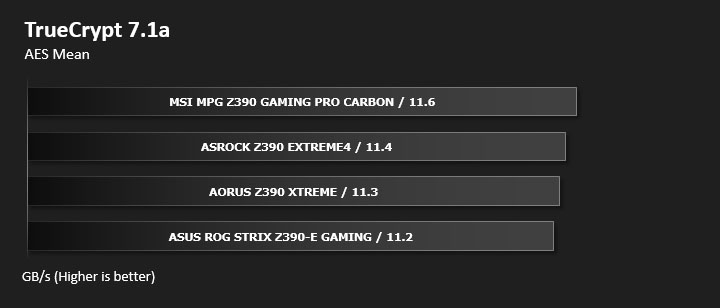
TrueCrypt is a discontinued source-available freeware utility used for on-the-fly encryption (OTFE). It can create a virtual encrypted disk within a file or encrypt a partition or (under Microsoft Windows except Windows 8 with GPT) the entire storage device (pre-boot authentication).
Benchmarks: AIDA64
AIDA64 Product Page
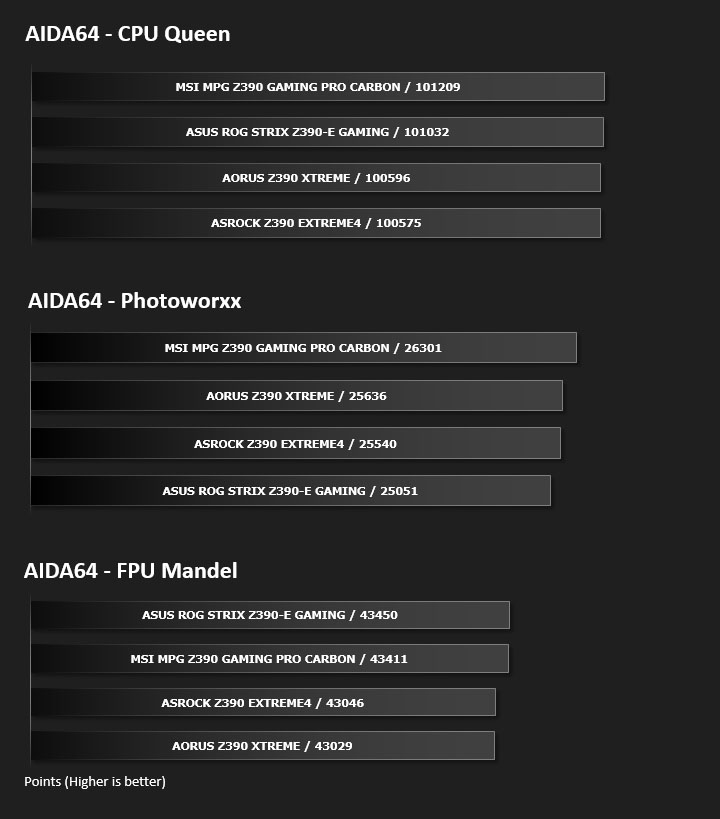
This simple integer benchmark focuses on the branch prediction capabilities and the misprediction penalties of the CPU. It finds the solutions for the classic “Queens problem” on a 10 by 10 sized chessboard. At the same clock speed theoretically the processor with the shorter pipeline and smaller misprediction penalties will attain higher benchmark scores. For example — with HyperThreading disabled — the Intel Northwood core processors get higher scores than the Intel Prescott core based ones due to the 20-step vs 31-step long pipeline. CPU Queen test uses integer MMX, SSE2 and SSSE3 optimizations.
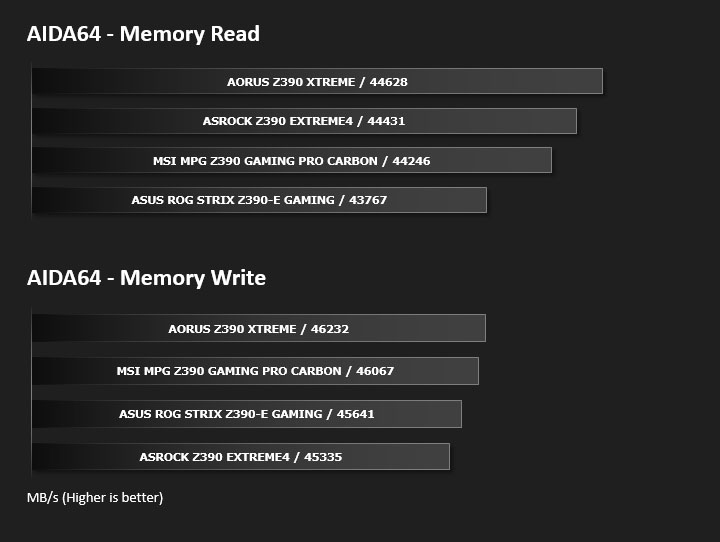
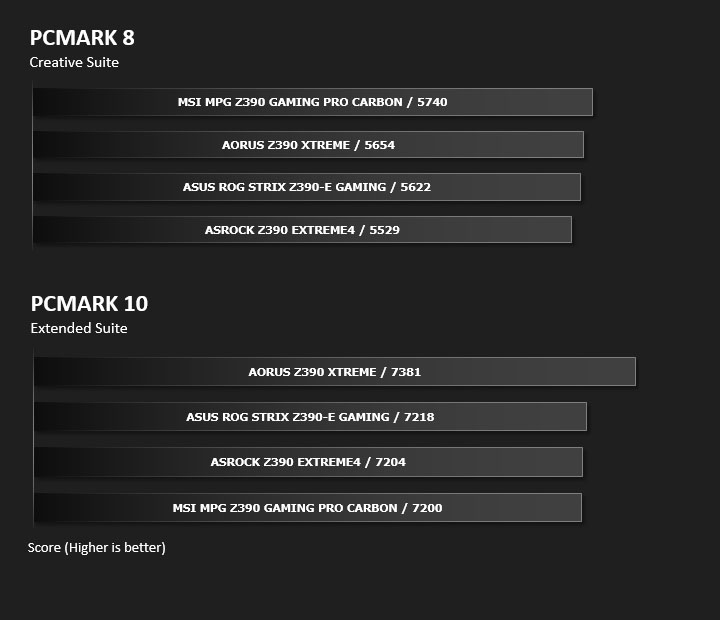
Benchmarks: PCMark 8 & PCMark 10
PCMark 8 combines performance benchmarking with battery life measurement and includes tests based on popular Adobe and Microsoft applications. Whether you are looking for long battery life, or maximum power, PCMark 8 will help you find the devices that offer the perfect combination of efficiency and performance for your needs. It’s the complete PC performance benchmark for home and business.
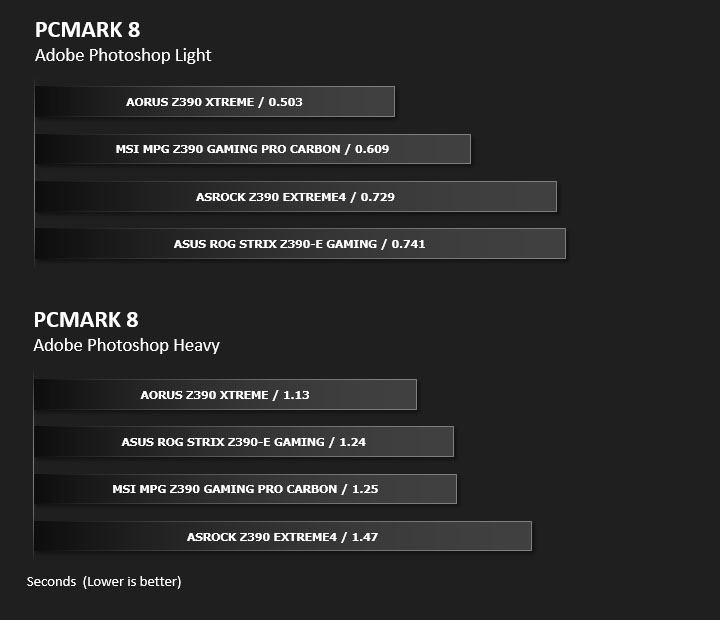
Benchmarks: PCMark 8 Photoshop
The PCMark 8 Applications benchmark measures system performance using popular applications from the Adobe Creative Suite and Microsoft Office. You can choose which tests to run based on the applications installed on your system. Each test automatically steps through a series of actions such as opening, editing and saving a file. The results are used to calculate the PCMark 8 Applications scores for the system.
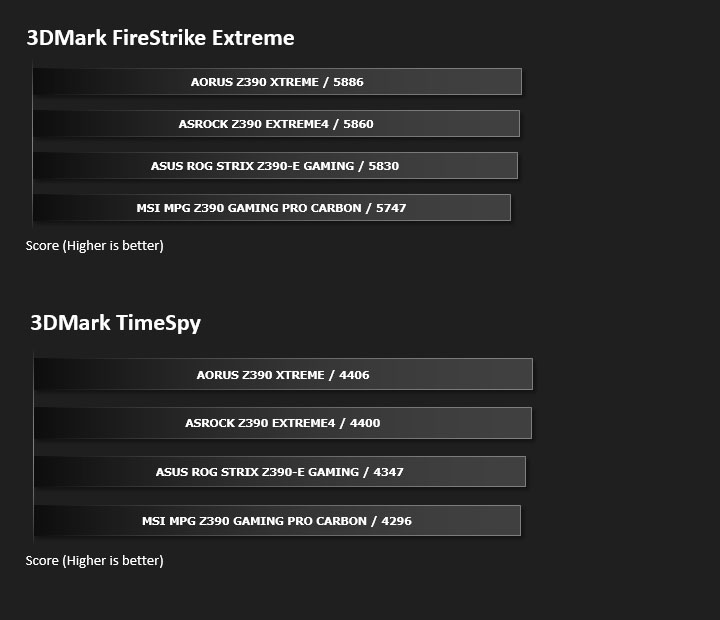
Benchmarks: 3DMark FireStrike & TimeSpy
3DMark FireStrike Product Page
Fire Strike is our new showcase DirectX 11 benchmark designed for high-performance gaming PCs. It is our most ambitious and technical benchmark ever, featuring real-time graphics rendered with detail and complexity far beyond what is found in other benchmarks and games today. Fire Strike will only be available in the Windows editions of 3DMark initially.
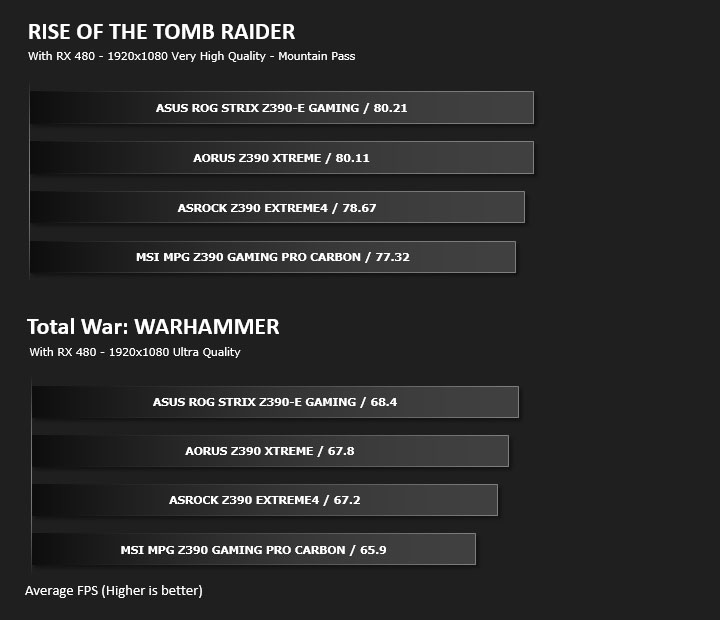
Benchmarks: ROT Tomb Raider & Total War: WARHAMMER
It’s important for us to perform a number of game benchmarks as well as the synthetic tests because gamers will want to know if there are any significant benefits. So here we have two recent gaming titles.
Conclusion
With this season’s Intel Z390 chipset AORUS has completely rebranded their motherboard lineup – uniting their graphics cards. Under their GPU series the XTREME has always represented the pinnacle of what AORUS has to offer and a brief glance at the Z390 XTREME confirms similar traits.
XTREME is unlike any other mainstream solution we’ve encountered. In almost every section under consideration it pushes the boundaries – maximising on the potential. To this end, XTREME is almost certainly designed for avid overclockers and hardware enthusiasts that seek to take their system to the absolute limit.
With the previous Intel Z370 chipset, motherboard manufacturers were under scrutiny from the press for their VRM cooling configurations. Not wanting to submit to such criticism, AORUS has implemented an extensive VRM cooling system on XTREME which adopts front and backside thermal protection. Such a solution works very well to keep temperatures firmly under control, but there is a cost – weight. Additional heatsinks, copper heatpipes and a backplate all contribute to making XTREME rather heavy.
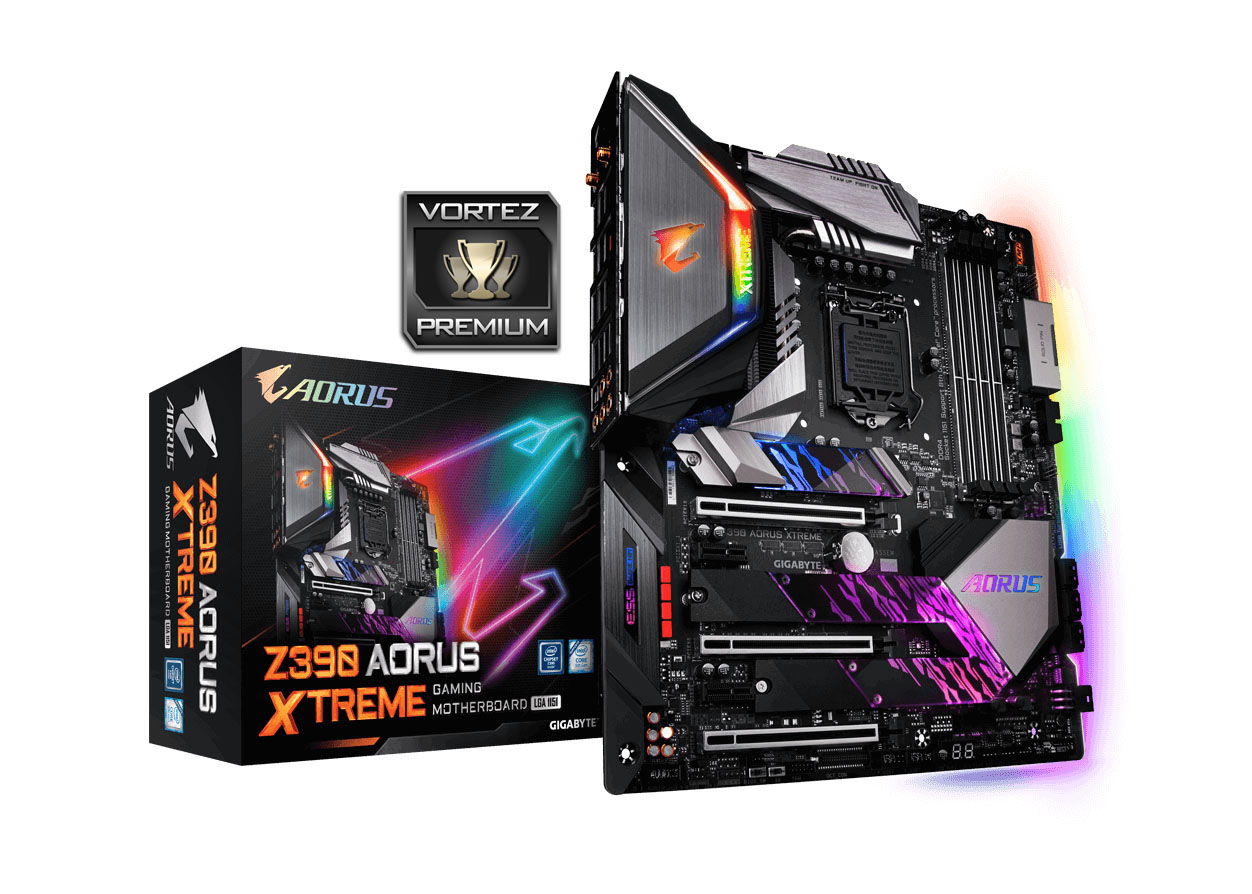
RGB lighting is an area which has taken the industry by storm and whether you love it or hate it, it appears to be here to stay. As such, AORUS has equipped XTREME with plenty of RGB headers for lighting systems but also included an all-encompassing integrated RBG LED system on the heatsinks and between the PCB and backplate. If you’re interested in seeing how this looks – be sure to check out our video review.
Features are something which XTREME does not shy away from – especially in departments like storage and cooling. This motherboard arrives with three M.2 NVMe SSD slots which are all PCI Express X4 Gen3 ready – all of which come arrive with respective heatsinks too. Along with an astounding eight fan headers, AORUS bundle the OC Touch Panel and RGB Fan Commander which extends the cooling configuration. This, along with overclocking buttons/switches found on the OC Touch panel make this motherboard an overclockers dream!
As far as performance goes, XTREME performs just as it should – very well. Against other motherboards with the Z390 chipset, this one delivered consistent results and can certainly be relied upon.
The wealth of features that XTREME offers inevitably hits the wallet, costing the princely sum of $550 USD – $899 AUD – £630 GBP. Granted we get a lot for our money – but would enthusiasts be better advised spending their cash on the HEDT?
XTREME by name and XTREME by nature – Z390 AORUS XTREME leaves no stone unturned and delivers up a prolific solution for hardware enthusiasts.
Pros
+ Appealing design
+ Plenty of integrated RGB features
+ Excellent performance
+ Good for overclocking
+ Angled 24-pin ATX connector
+ Comes bundled with RGB Fan Commander
+ Uses strengthened PCI Express & memory slots
+ Comprehensive selection of fan headers and sensors
+ Features triple-M.2 slots with heatsink
+ Strong audio solution
+ Massive selection of ports on Rear IO panel
+ Low VRM thermals
+ Additional features – OC Touch Connector, USB Turbo Charger
Cons
– Pricey
– Heavy
– Overclocking result similar to mid-range boards
+ Appealing design
+ Plenty of integrated RGB features
+ Excellent performance
+ Good for overclocking
+ Angled 24-pin ATX connector
+ Comes bundled with RGB Fan Commander
+ Uses strengthened PCI Express & memory slots
+ Comprehensive selection of fan headers and sensors
+ Features triple-M.2 slots with heatsink
+ Strong audio solution
+ Massive selection of ports on Rear IO panel
+ Low VRM thermals
+ Additional features – OC Touch Connector, USB Turbo Charger
Cons
– Pricey
– Heavy
– Overclocking result similar to mid-range boards
Click here for an explanation of our awards at Vortez.net.
Stay connected with Vortez social media pages: