Is this the best of the best? We take a look at GIGABYTE’s flagship Intel Z490 motherboard, the XTREME. Does it offer the features it should and does it perform well?

Product on Review: Z490 AORUS XTREME
Manufacturer: GIGABYTE AORUS
Street Price: GBP £750 | USD $799 | AUD $1500
The competition in the CPU/motherboard division has definitely escalated between AMD and Intel which is great news for consumers. Rivalry creates ambition and moves manufacturers to push the boundaries and today we’re set to look at one such product which seeks to go all-out with what it has to offer!
For those unaware, AORUS is a division of GIGABYTE which is reserved for their high-end products. Under this branding there are a number of different categories of products which extend out to graphics cards and motherboards.
The Z490 AORUS XTREME follows in the footsteps of other products using the XTREME moniker by offering the very best for overclockers and hardware enthusiasts. Across this motherboard there are an abundance of features regardless of which region is under consideration.
With a whole host of exciting features at our finger-tips, is this the best Intel Z490 money can buy?
AORUS on the XTREME
Showcasing a state-of-the-art design, excellent functionality, an impressive thermal design, next generation network connectivity, a Hi-Fi level audio system, and AORUS aesthetics, the flagship Z490 AORUS XTREME motherboard dominates the competition.
Technical Specifications
Below are the technical specifications concerning the Z490 AORUS XTREME:
Processor
Supports 10th Gen Intel® Core™ and Pentium® Gold /Celeron® processors for LGA 1200 socket
Chipset
Intel® Z490 Chipset
Memory
4x DDR4 memory slots, support up to 128GB
Supports: 2133-5000 MHz (OC)
Supports Dual-Channel mode
Supports non-ECC mode, un-buffered memory
Supports Intel® Extreme Memory Profile (XMP)
Expansion Slots
3x PCIe 3.0x 16 slots – Modes: x16, x8, x4 (2 from CPU, 1 from PCH)
Multi-GPU
Supports 2-Way NVIDIA® SLI™ Technology
Supports 3-Way AMD® CrossFire™ Technology
Storage
Intel® Z490 Chipset
6x SATA 6Gb/s ports
1x M.2 slots PCIe 3.0 x4 (Key M) 2242/2260/2280/22110
1x M.2 slots PCIe 3.0 x4 (Key M) 2242/2260/2280/22110
1x M.2 slots PCIe 3.0 x4 (Key M) 2242/2260/2280
Intel® Optane™ Memory Ready
Supports Intel® Smart Response Technology for Intel Core™ processors
USB
Rear USB Port ( Total 8 )
– 2 x USB 2.0 ports
– 2 x USB 3.2 Gen 1 ports
– 4 x USB 3.2 Gen 2 Type-A ports (red)
Front USB Port ( Total 9 )
1 x USB 3.2 Gen 2 front panel header
1 x USB 3.2 Gen 1 front panel header
1 x USB 2.0 front panel headers
Audio
– 7.1 CH HD Audio with Content Protection (Realtek ALC1220-VB Audio Codec)
LAN
1 x Aquantia 10GbE LAN chip (10 Gbit/5 Gbit/2.5 Gbit/1 Gbit/100 Mbit) (LAN1)
1 x Intel® 2.5GbE LAN chip (2.5 Gbit/1 Gbit/100 Mbit) (LAN2)
WiFi & Bluetooth
Intel® WiFi 6 – AX201
Supports 802.11 a/b/g/n/ac/ax, MU-MINO Rx, 2.4GHz-5GHz (160MHz) up to 2.4Gbps
Supports Bluetooth® 5.1
Internal connectors
1 x 24-pin ATX main power connector
2 x 8-pin ATX 12V power connectors
1 x CPU fan header
1 x water cooling CPU fan header
4 x system fan headers
2 x system fan/water cooling pump headers
2 x addressable LED strip headers
2 x RGB LED strip headers
6 x SATA 6Gb/s connectors
3 x M.2 Socket 3 connectors
1 x noise detection header
1 x front panel header
1 x front panel audio header
1 x USB Type-C™ header, with USB 3.2 Gen 2 support
1 x USB 3.2 Gen 1 header
1 x USB 2.0/1.1 header
2 x temperature sensor headers
1 x power button
1 x reset button
1 x OC button
2 x BIOS switches
Voltage Measurement Points
Back panel ports
1 x Q-Flash Plus button
1 x Clear CMOS button
2 x SMA antenna connectors (2T2R)
2 x Thunderbolt™ 3 connectors (USB Type-C™ ports, with USB 3.2 Gen 2 support)
4 x USB 3.2 Gen 2 Type-A ports (red)
2 x USB 3.2 Gen 1 ports
2 x USB 2.0/1.1 ports
1 x HDMI port
2 x RJ-45 ports
1 x optical S/PDIF Out connector
5 x audio jacks
Dimensions
E-ATX Form Factor; 30.5cm x 27.1cm
Supports 10th Gen Intel® Core™ and Pentium® Gold /Celeron® processors for LGA 1200 socket
Chipset
Intel® Z490 Chipset
Memory
4x DDR4 memory slots, support up to 128GB
Supports: 2133-5000 MHz (OC)
Supports Dual-Channel mode
Supports non-ECC mode, un-buffered memory
Supports Intel® Extreme Memory Profile (XMP)
Expansion Slots
3x PCIe 3.0x 16 slots – Modes: x16, x8, x4 (2 from CPU, 1 from PCH)
Multi-GPU
Supports 2-Way NVIDIA® SLI™ Technology
Supports 3-Way AMD® CrossFire™ Technology
Storage
Intel® Z490 Chipset
6x SATA 6Gb/s ports
1x M.2 slots PCIe 3.0 x4 (Key M) 2242/2260/2280/22110
1x M.2 slots PCIe 3.0 x4 (Key M) 2242/2260/2280/22110
1x M.2 slots PCIe 3.0 x4 (Key M) 2242/2260/2280
Intel® Optane™ Memory Ready
Supports Intel® Smart Response Technology for Intel Core™ processors
USB
Rear USB Port ( Total 8 )
– 2 x USB 2.0 ports
– 2 x USB 3.2 Gen 1 ports
– 4 x USB 3.2 Gen 2 Type-A ports (red)
Front USB Port ( Total 9 )
1 x USB 3.2 Gen 2 front panel header
1 x USB 3.2 Gen 1 front panel header
1 x USB 2.0 front panel headers
Audio
– 7.1 CH HD Audio with Content Protection (Realtek ALC1220-VB Audio Codec)
LAN
1 x Aquantia 10GbE LAN chip (10 Gbit/5 Gbit/2.5 Gbit/1 Gbit/100 Mbit) (LAN1)
1 x Intel® 2.5GbE LAN chip (2.5 Gbit/1 Gbit/100 Mbit) (LAN2)
WiFi & Bluetooth
Intel® WiFi 6 – AX201
Supports 802.11 a/b/g/n/ac/ax, MU-MINO Rx, 2.4GHz-5GHz (160MHz) up to 2.4Gbps
Supports Bluetooth® 5.1
Internal connectors
1 x 24-pin ATX main power connector
2 x 8-pin ATX 12V power connectors
1 x CPU fan header
1 x water cooling CPU fan header
4 x system fan headers
2 x system fan/water cooling pump headers
2 x addressable LED strip headers
2 x RGB LED strip headers
6 x SATA 6Gb/s connectors
3 x M.2 Socket 3 connectors
1 x noise detection header
1 x front panel header
1 x front panel audio header
1 x USB Type-C™ header, with USB 3.2 Gen 2 support
1 x USB 3.2 Gen 1 header
1 x USB 2.0/1.1 header
2 x temperature sensor headers
1 x power button
1 x reset button
1 x OC button
2 x BIOS switches
Voltage Measurement Points
Back panel ports
1 x Q-Flash Plus button
1 x Clear CMOS button
2 x SMA antenna connectors (2T2R)
2 x Thunderbolt™ 3 connectors (USB Type-C™ ports, with USB 3.2 Gen 2 support)
4 x USB 3.2 Gen 2 Type-A ports (red)
2 x USB 3.2 Gen 1 ports
2 x USB 2.0/1.1 ports
1 x HDMI port
2 x RJ-45 ports
1 x optical S/PDIF Out connector
5 x audio jacks
Dimensions
E-ATX Form Factor; 30.5cm x 27.1cm
Packaging & First Look
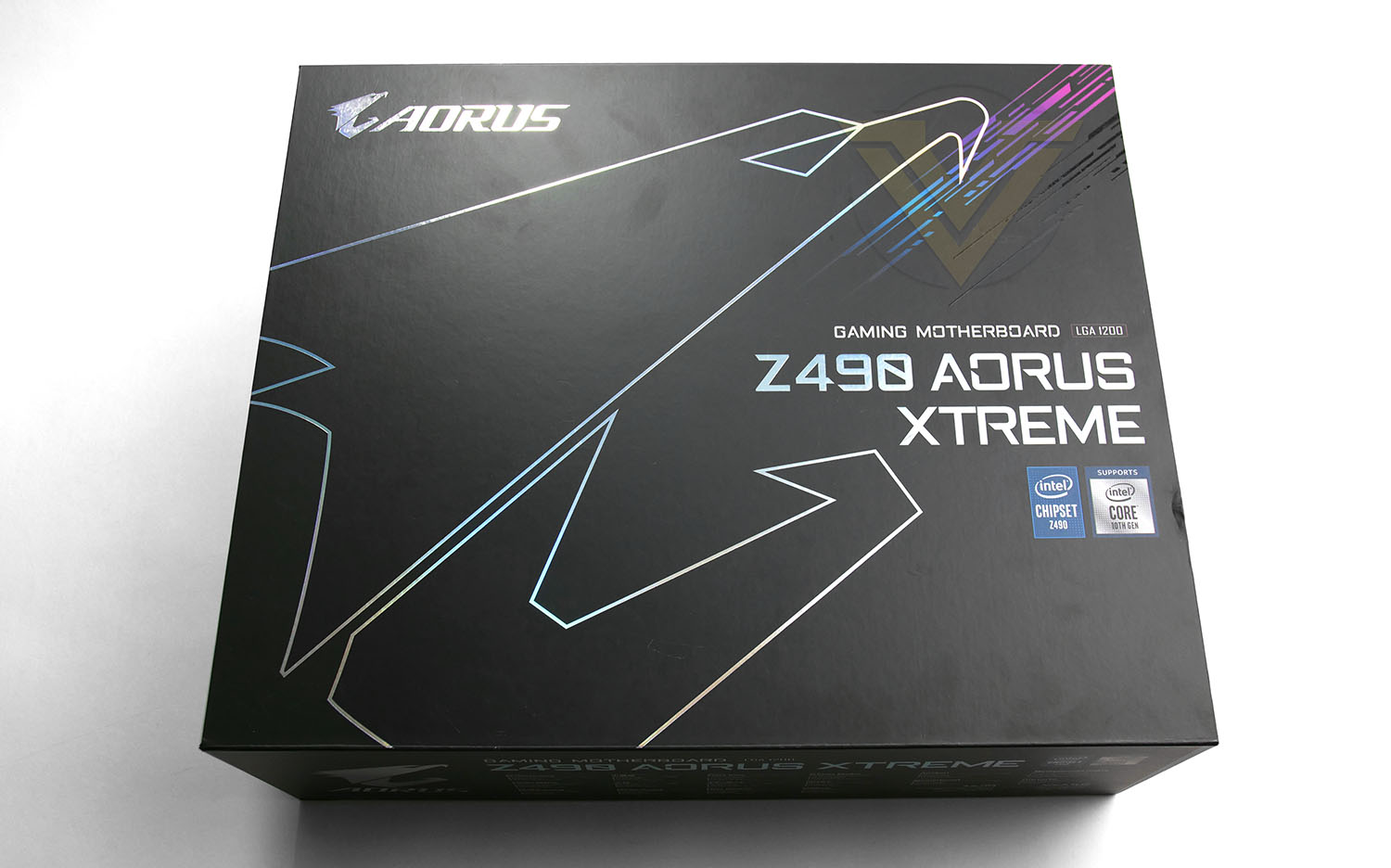
XTREME arrives in a huge box which is partly due to the sheer size of the motherboard within, but also the plethora of accessories that are included. Since this is a premium product, the packaging has been stepped up somewhat to reflect this. The lid of the box opens to provide a sneak preview of the motherboard itself.
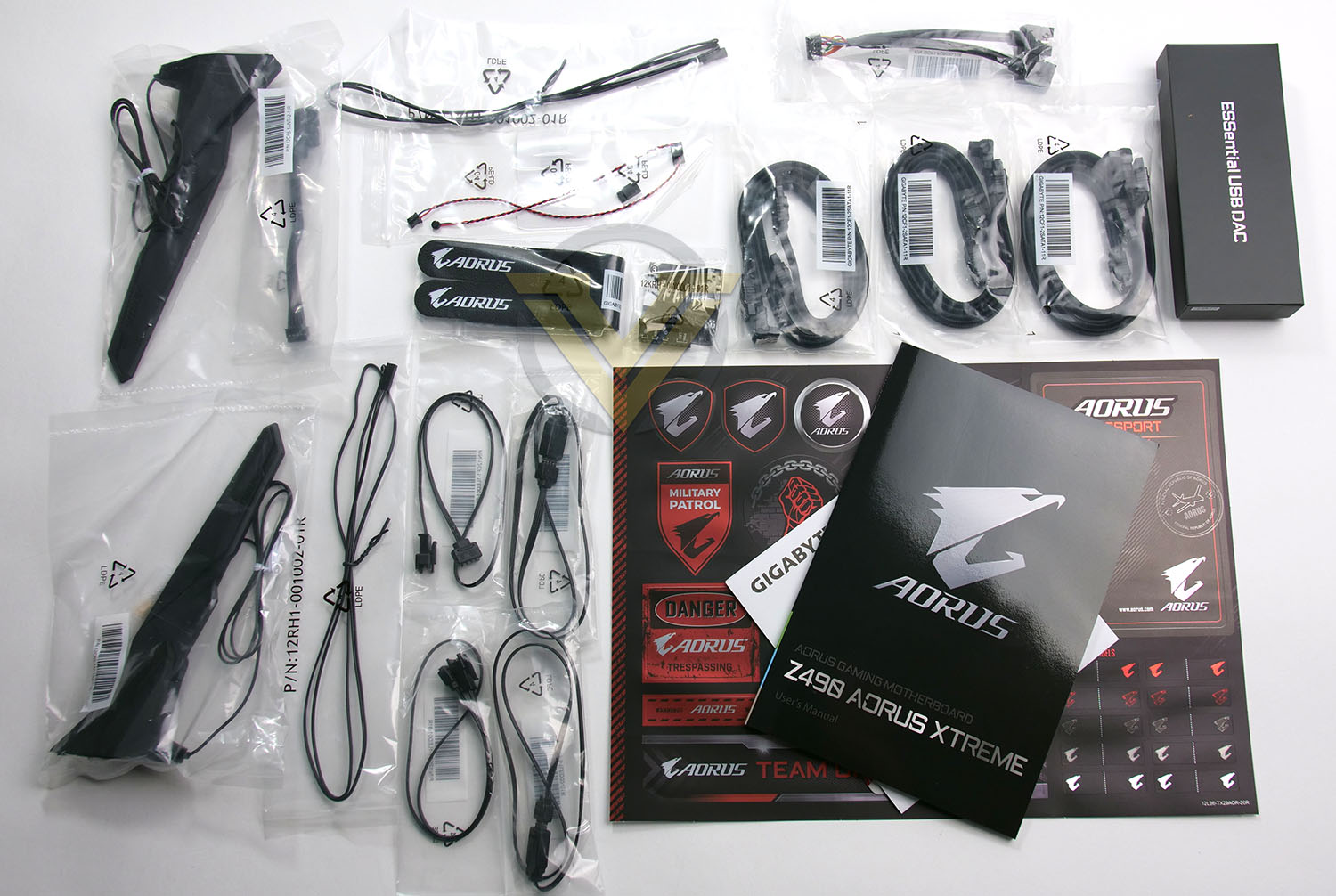
The accessories bundle is packed with included items for you to get the most out of XTREME. From sensor cables to 802.11AX antennas, a comprehensive user manual and sticker/label sheet.
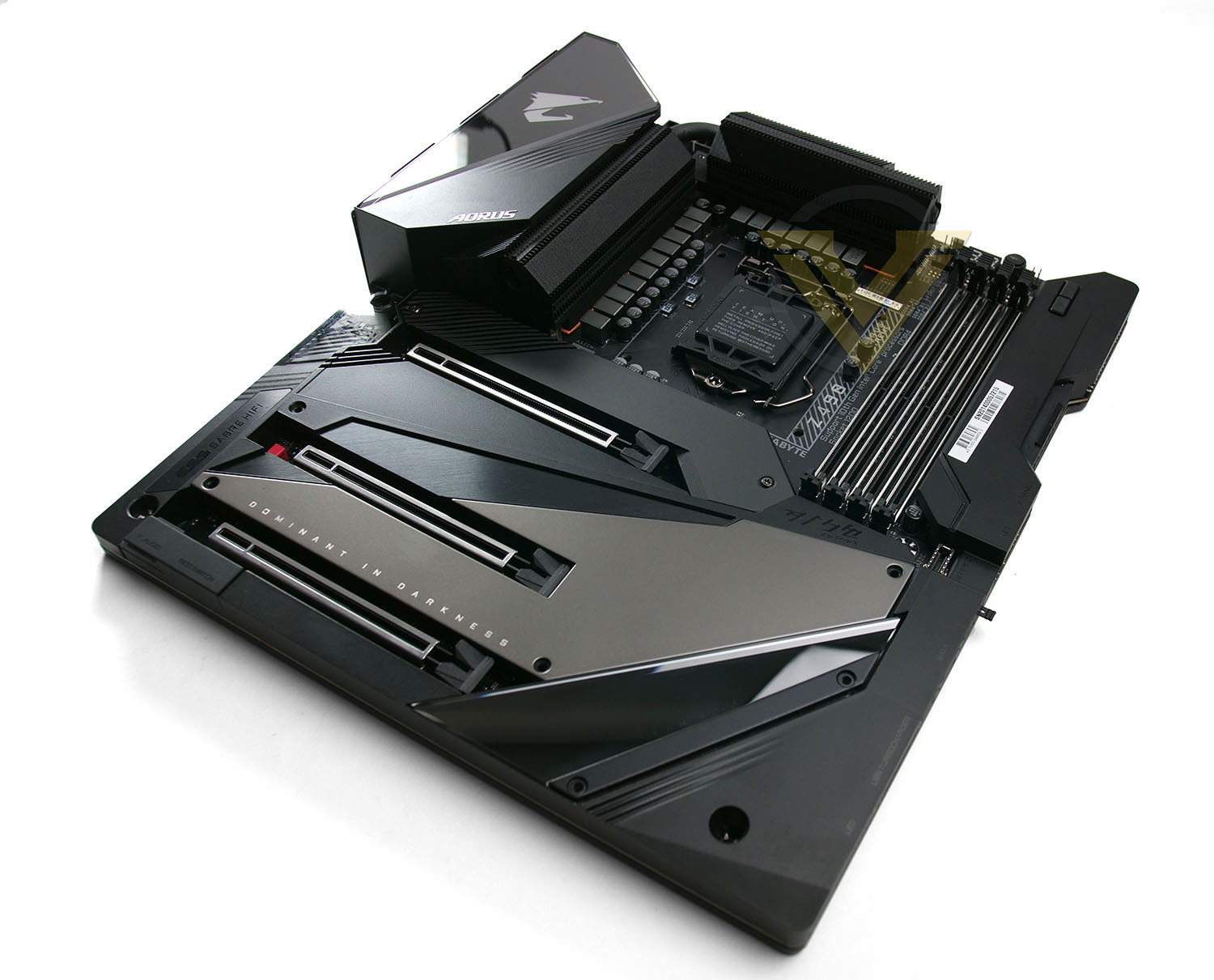
Compared to its Z390 countrerpart, this Z490 XTREME looks significantly different. An overhaul to the theme has been implemented with a black, gunmetal colour scheme used on all major components. The PCIe and M.2 area has been completely enclosed which has a two-fold benefit – a uniform design and thermal characteristics for M.2 SSD storage.
XTREME is larger than most other boards and therefore conforms to the E-ATX form factor – this should be noted for case compatibility!
Closer Look
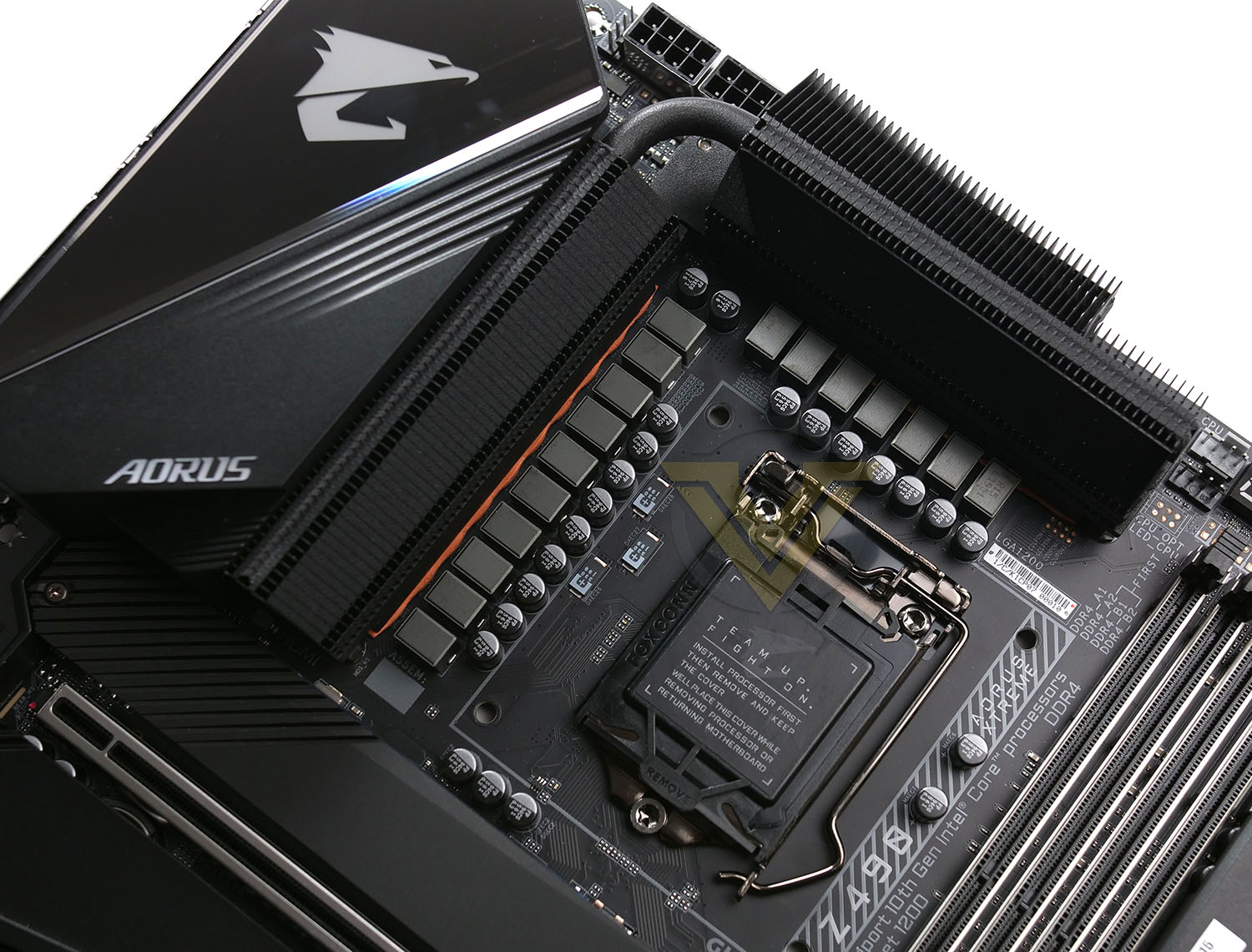
XTREME is specifically designed for Intel’s 10th Gen. Processors and therefore this board uses Socket 1200. Around the socket there is a robust, twin heatsink VRM design which makes use of a thick copper heatpipe. The digital phase design consists of 16-phases, each with 90A stages. Later in the review we’ll see how well the thermal solution performs under stress.
Just behind the heatsinks, at the top of the board we have 2x 8-pin CPU power connectors. Both utilise solid pin connectors with metal shielding for better longevity.
Around the socket we also have the customary CPU fan headers, we should state that there are a plethora of headers across the board:
1 x Water cooling CPU fan header
4 x System fan headers
2 x System fan/water cooling pump headers
2 x Addressable LED strip headers
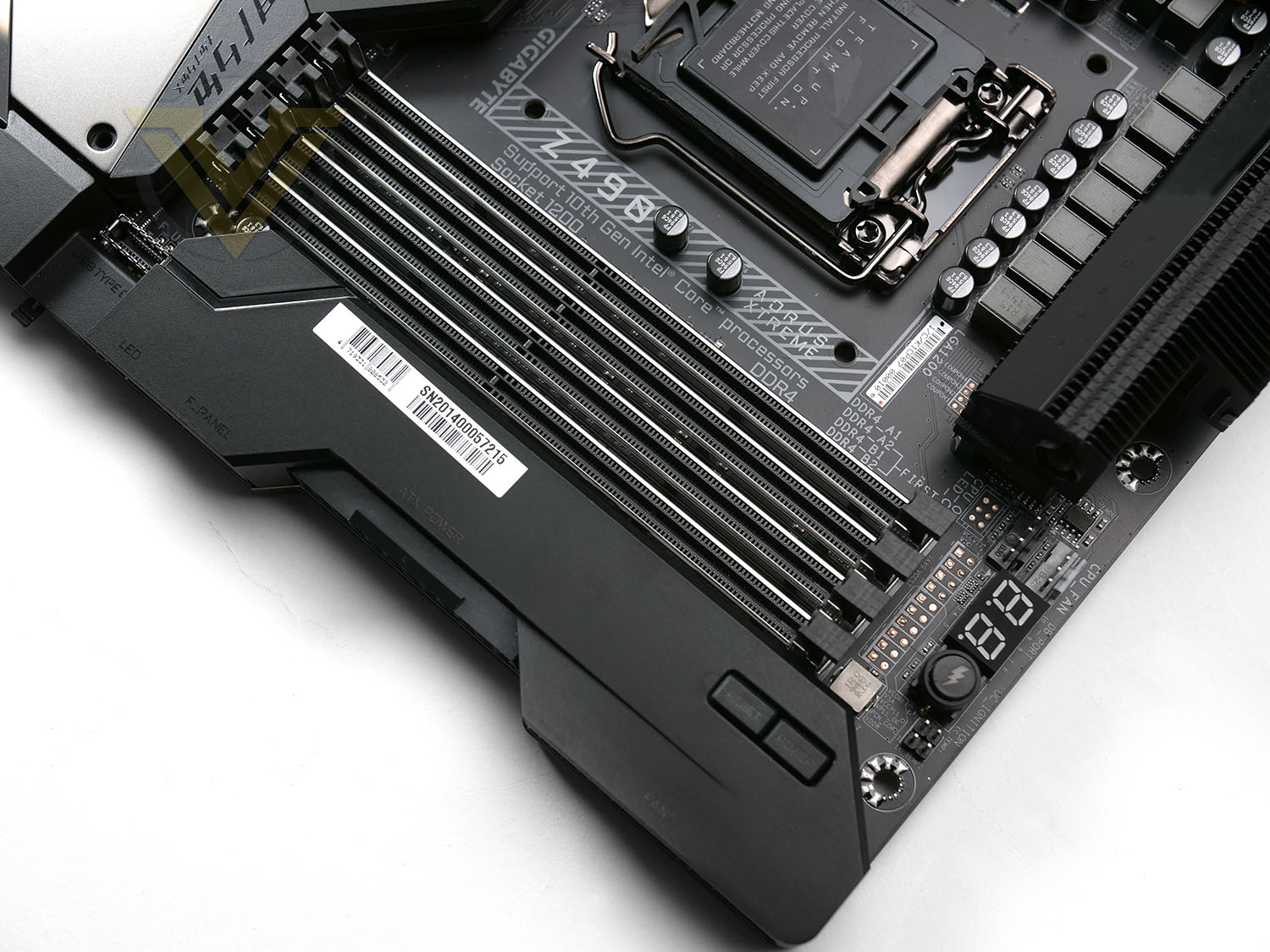
There are four slots for Dual-channel DDR4. Supporting modules from 2133-5000MHz (OC) and up to 128GB. GIGABYTE has equipped XTREME with their steel reinforced slots.
Immediately next to the memory there are plenty of additional features which enthusiasts will definitely find handy. There is Debug LED, OC Ignition (Boosts to a set OC via BIOS) and onboard power/reset buttons which are ideal if you have this board on a test bench.
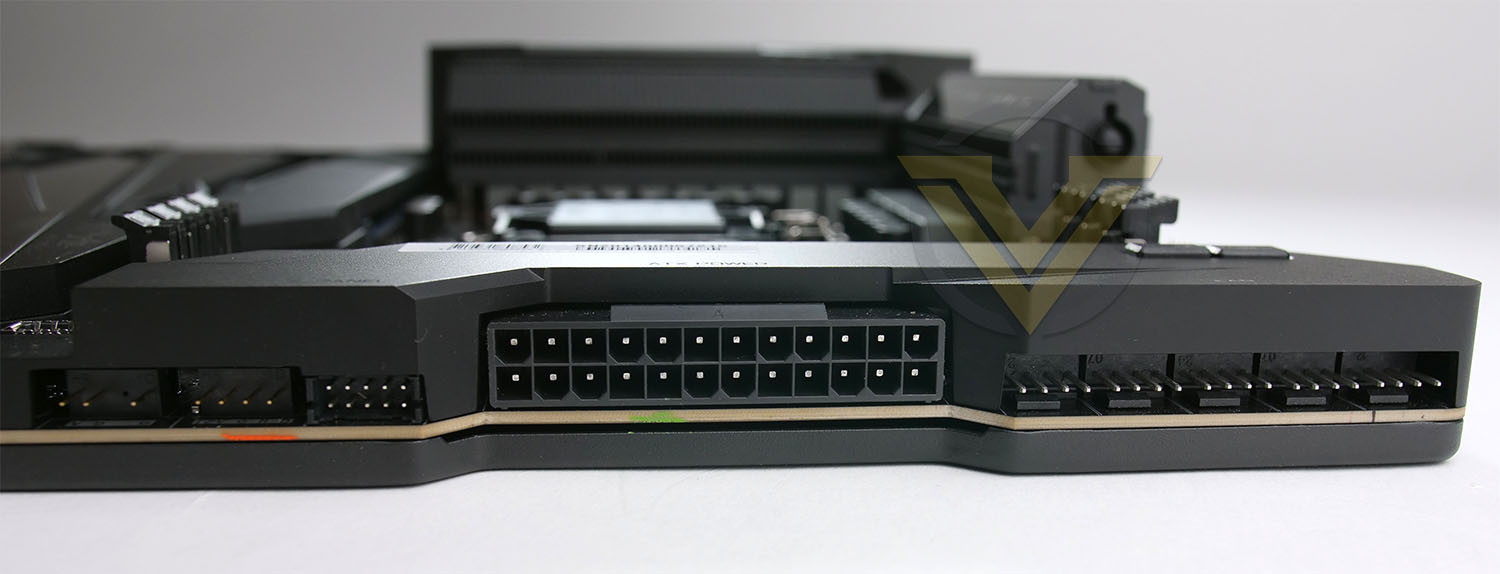
A vast majority of the ports/headers on XTREME are facing the outer edge in a right-angled manner. This should help to create a cleaner aesthetic when system building is in process because cables can be tucked away more discreetly.
The 24-pin ATX, 5x fan headers, RGB headers and USB 3.2 Gen1 headers are all oriented in this manner. An additional USB 3.2 Gen 2 front panel header sits just behind the Gen 1 option but is top-facing.
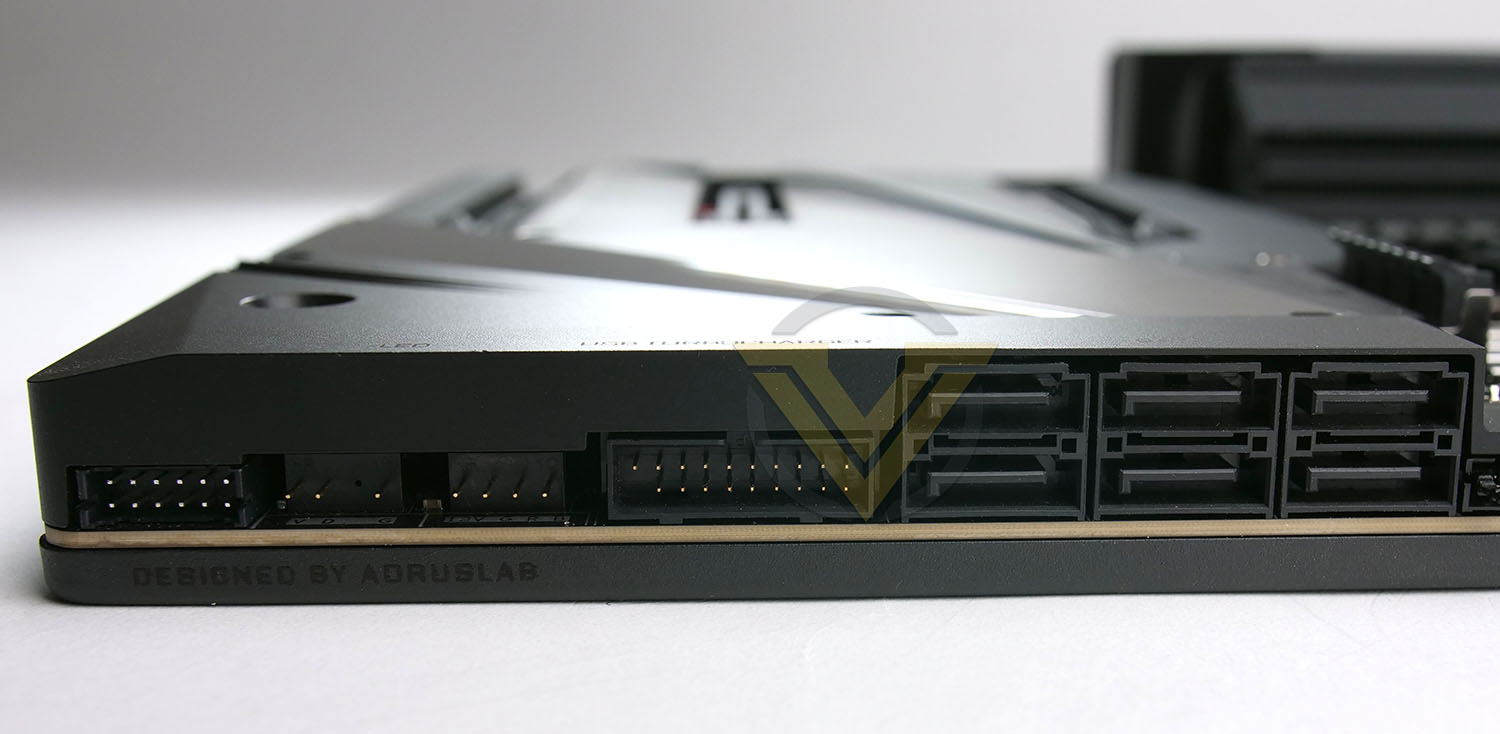
Moving along XTREME, there are yet again more right-angled ports. GIGABYTE has provided 6x SATA (6GB/s) ports, another USB 3.2 Gen 1 front panel header and more fan/RGB headers towards the bottom edge of the motherboard.
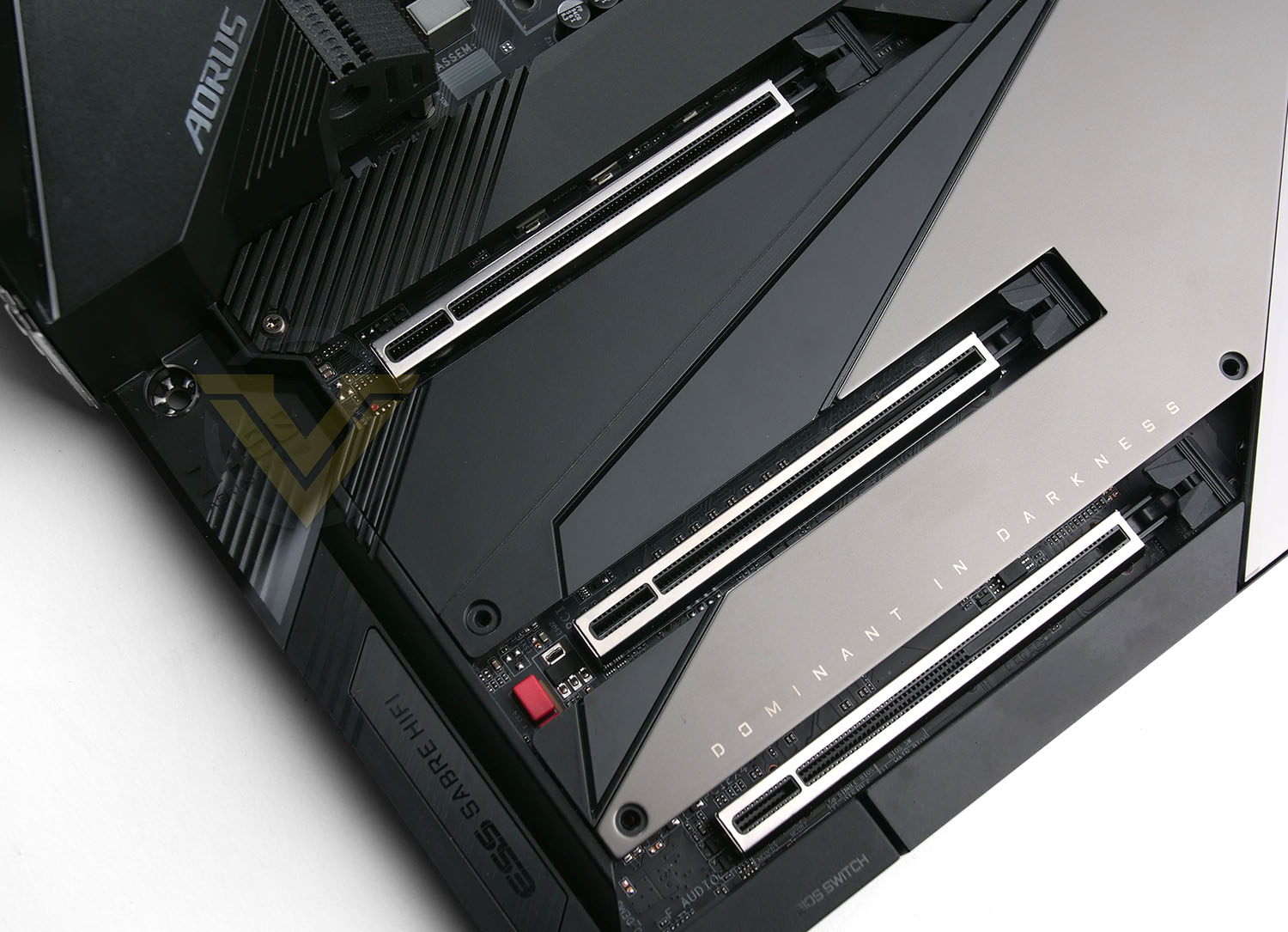
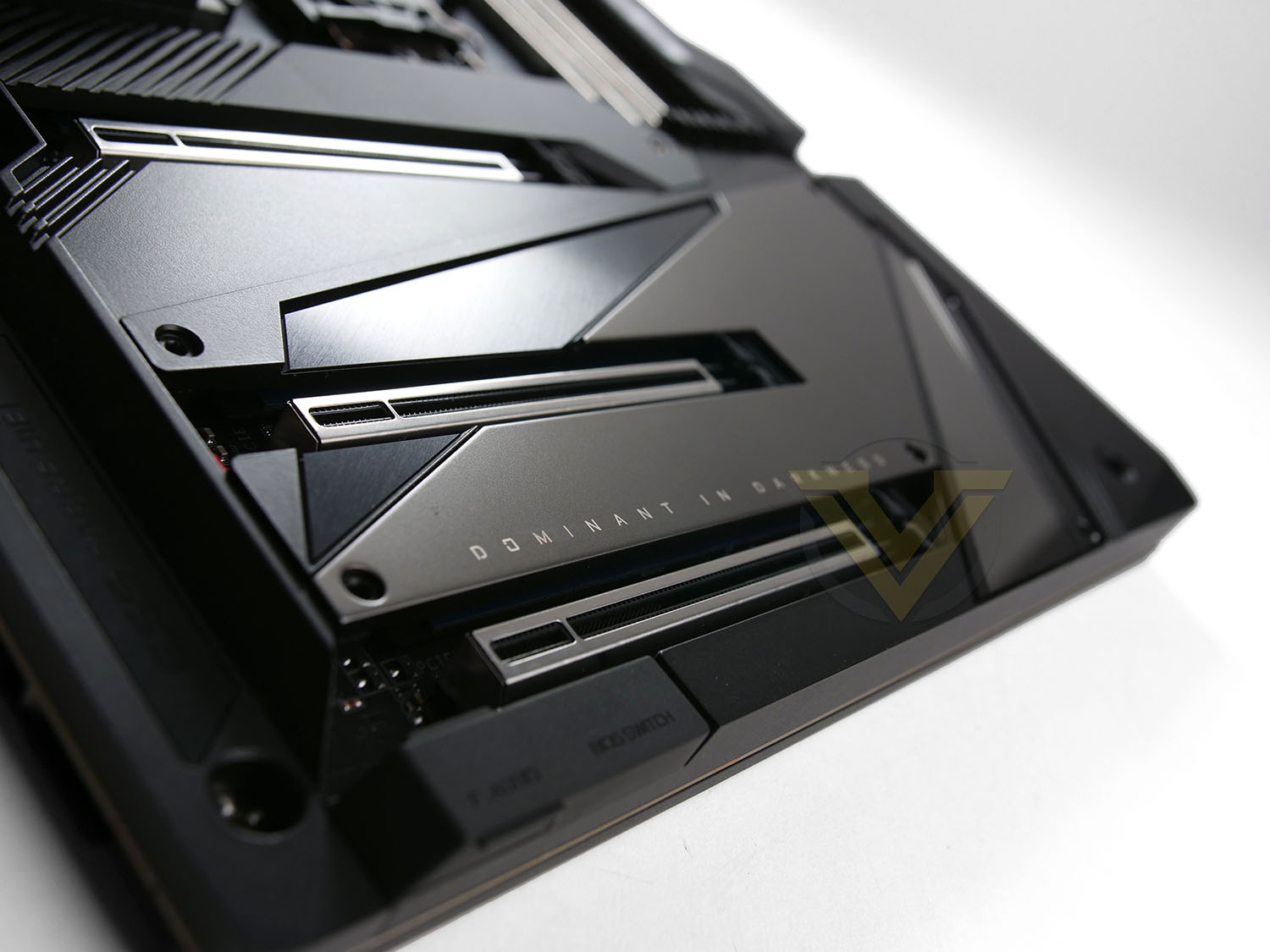
Oddly enough there are no PCIe x1 slots on XTREME – just 3x PCIe Gen 3 X16 slots. They are each wired for 16, 8 and 4 lanes. Each have steel reinforcement for strength and underneath the covers we have 3x M.2 slots which are PCIe driven. Two can accommodate up to 22110 and the other up to 2280.
It should be noted that like other motherboards bearing the Z490 chipset, XTREME has hardware support for upcoming the PCIe 4.0 standard.
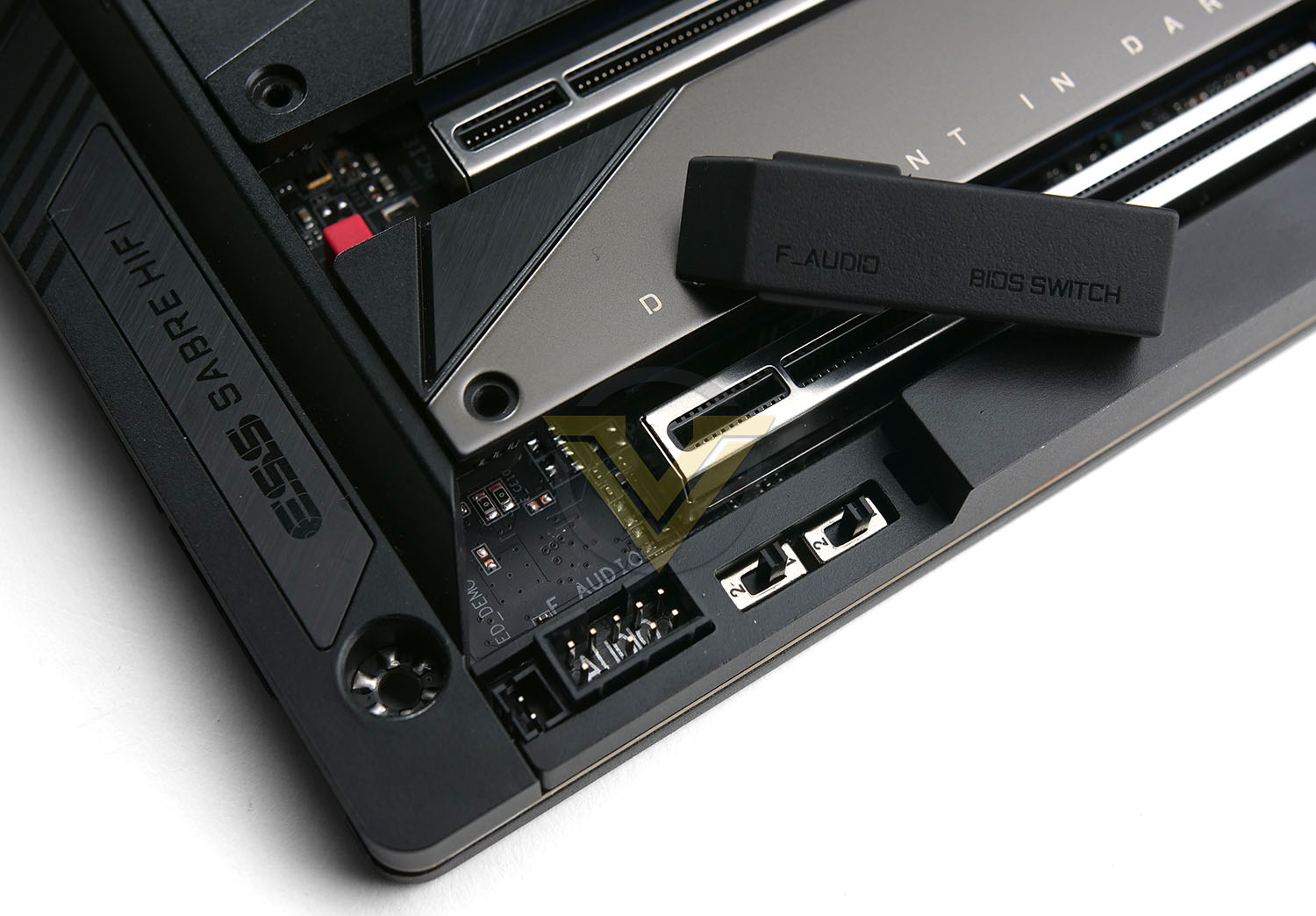
The concept behind XTREME is realised in features as seen above in the bottom left corner. The front panel audio and BIOS switch both have a removable cover to ensure a clean and minimalistic design can be adhered to.
The audio components are found in their usual spot and are based on the Realtek ALC1220-VB Codec. GIGABYTE has gone ‘all out’ with the audio solution by arming it with ESS USB DAC and a flurry of components like Anti-pop circuit, Auto impedance sensing, TXC oscillator, WIMA CAPs, OP AMPs, ESS Sabre, Separated left/right channels and isolated circuitry.
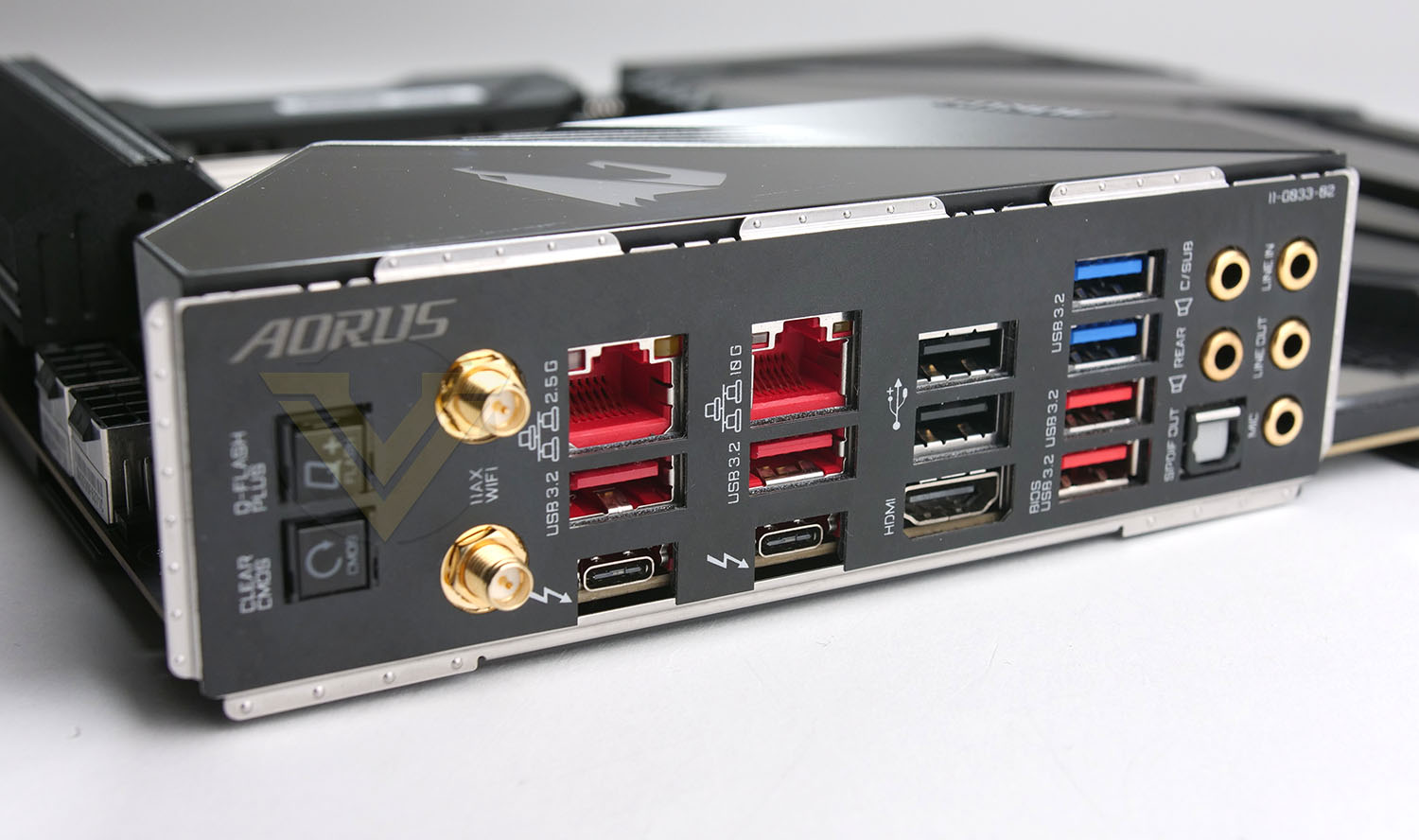
The Rear IO panel is jam-packed with ports to take advantage of. In this area we have the following:
1 x Q-Flash Plus button
1 x Clear CMOS button
2 x SMA antenna connectors (2T2R)
2 x Thunderbolt™ 3 connectors (USB Type-C™ ports, with USB 3.2 Gen 2 support)
4 x USB 3.2 Gen 2 Type-A ports (red)
2 x USB 3.2 Gen 1 ports
2 x USB 2.0/1.1 ports
1 x HDMI port
2 x RJ-45 ports
1 x optical S/PDIF Out connector
5 x audio jacks
It’s great to see that GIGABYTE has included Thunderbolt 3 support on this high-end motherboard. This is one particular feature which seems to be omitted on some motherboards we’ve looked at which are north of the mid-range.
Test Setup & Methodology
Notes: We’ve revamped our benchmark regime by removing a number of tests which reveal little, to no difference between each motherboard model. Gaming performance is one such area which has been removed due to the inability for each motherboard to offer any advantage over another. Instead, we have focussed on meaningful/tangible analysis which examines the VRM/chipset design, and the storage performance which will be far more informative to the end user.
TEST SETUP
CPU Intel Core i9-10900KCooling: Corsair Hydro Series H110i
Motherboard: GIGABYTE Z490 AORUS XTREME
Memory: 32GB Corsair Vengeance LPX 3000MHz
Graphics: AMD Radeon RX 480
Storage: Intel S3500 128GB SATA SSD + Samsung 960 Pro 512GB PCIe 3.0 SSD
PSU: Corsair HX1050 80 Plus Gold Certified PSU
Monitor: AOC U2879VF
BENCHMARKS
PCMark 10 – Overall Extended ScoreSiSoftware SANDRA – SATA/PCIe Storage Tests
SiSoftware SANDRA – Processor Image Processing
OTHER SOFTWARE
Temperature Analysis: HWMonitorStress Testing Software: AIDA64 Stability Test
CPU Specification Monitoring: CPU-Z
Benchmarks: Power Consumption
In this first test we analyse the power efficiency from the wall for each motherboard (Minus the GPU). While each model uses the same chipset/platform, energy results can fluctuate between manufacturers due to the features and specifications that are integrated. First of all, for the idle tests the system is cold booted into Windows and no additional applications are executed – wattage is noted on the external energy monitor we use and then we open Aida64 stability test and execute a stress test, noting the highest reading on the monitor. Below are the results of this energy test.
Benchmarks: VRM & Chipset Cooling
Each motherboard manufacturer designs their board with a unique set of heatsinks to cover key areas like the VRM/mosfets and the chipset itself. In these test we use HWMonitor to identify the minimum values for VRM and chipset and then we load up Aida64 stability test again and perform a 20 minute run, recording the maximum value for both attributes.
Benchmarks: PCMark 10
PCMark 10 features a comprehensive set of tests that cover the wide variety of tasks performed in the modern workplace. With a range of performance tests, custom run options, and the new Battery Life Profile, PCMark 10 is the complete PC benchmark for the modern office.
Benchmarks: SATA Performance
In order to ascertain the SATA performance for our motherboards we use SiSoftware SANDRA and the File System Bandwidth performance test. This allows us to obtain the sequential read/write transfer rates for the drive being tested – Intel S3500 128GB SSD.
Benchmarks: PCIe M.2 Performance
In order to ascertain the PCIe M.2 performance for our motherboards we use SiSoftware SANDRA and the File System Bandwidth performance test. This allows us to obtain the sequential read/write transfer rates for the drive being tested – Samsung 960 Pro 512GB.
Benchmarks: CPU Image Processing
AIDA64 Product Page
In our last test we observe the Image Processing performance from the CPU attached to the motherboard. For this we use SiSoftware SANDRA and the benchmark specifically designed for measuring the common algorithms associated with processing imagery.
Overclocking
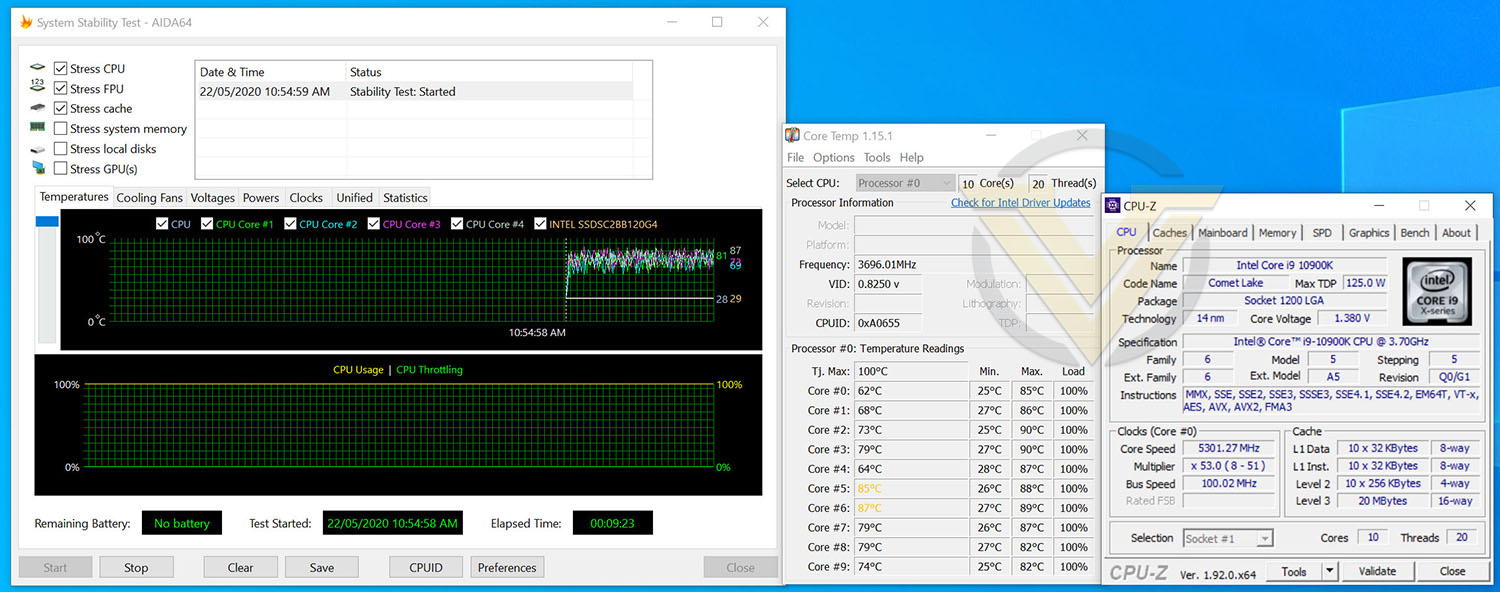
For the overclocking phase, we already know that our CPU (Intel Core i9-10900K) is capable of having all cores operate at 5.3GHz so this is the target which we aimed for with XTREME.
We’re pleased to report that XTREME was able to configure all 10-cores on our 10900K to 5.3GHz, we did need considerable voltage though – at 1.38v. Such voltage nudges up the temperatures to the concerning levels (85-90C). We also experienced some vdroop – which does seem to be common with GIGABYTE motherboards.
Nonetheless, this is still a great achievement!
Conclusion
XTREME is tailored to the enthusiast who need the absolute best features at their fingertips. By its very nature and significantly high price point, it’ll come as no surprise that this offering will be suitable for a very small cohort of users.
Compared to the previous generation, this seasons XTREME is quite a subdued affair in terms of the styling. GIGABYTE has opted for a minimalist-type of approach by keeping things sleek and subtle. The entire board is adorned in a smooth coat and ports/headers are right-angled to ensure cable management is on top form.
Across XTREME there is no shortage of strong features. A variety of fan headers, temperature sensors, on-board power/reset buttons, OC ignition button, and extras like the Q-FLASH function. Although the back panel is loaded with USB 3.2, we expect USB 3.2 Gen2x2 on motherboard commanding such a price-tag and are surprised it is absent. But, on the flipside we are pleased to see Thunderbolt 3 making an appearance – many high-end offerings omit such a feature.
XTREME performs very well in a range of different scenarios. We were also able to nudge up the 10-cores on our 10900K to 5.3GHz (across all cores), however we did need more voltage than rival offerings required. The VRM and chipset temperatures on XTREME are notably low compared to the competition which is testament to GIGABYTE’s engineering.
It won’t be unusual for folk to do a double-take when viewing the pricing on XTREME, it is astronomical at GBP £750 | USD $799| AUD $1500. Which begs the question, if such a class of motherboard is desired, surely the HEDT platform is a better route?
Loaded with features and offering stellar performance, the XTREME is a top-class Z490 motherboard. The asking price is rather difficult to stomach though…!
Pros
+ Sleek and minimalist appearance
+ Jam-packed with features
+ Offers great performance
+ Loaded with fan headers and sensors
+ Includes Q-FLASH functionality
+ Has future support for PCIe 4.0
+ Uses strengthened PCI Express/memory slots
+ Offers triple M.2 slots
Cons
– No PCIe x1 Slots
– Extreme pricing
– Very heavy
+ Sleek and minimalist appearance
+ Jam-packed with features
+ Offers great performance
+ Loaded with fan headers and sensors
+ Includes Q-FLASH functionality
+ Has future support for PCIe 4.0
+ Uses strengthened PCI Express/memory slots
+ Offers triple M.2 slots
Cons
– No PCIe x1 Slots
– Extreme pricing
– Very heavy
Click here for an explanation of our awards at Vortez.net.
Stay connected with Vortez social media pages: