Armed with a plethora of features and with no intention of compromising – the Z590 AORUS MASTER is a top-end motherboard ready to elevate your Rocket Lake experience.

Product on Review: Z590 AORUS MASTER
Manufacturer: AORUS
Street Price: GBP £410 | USD $410 | AUD $699
The competition in the CPU/motherboard division has definitely escalated between AMD and Intel in the last 18 months, which can only be good news for consumers. Rivalry creates ambition and moves manufacturers to push the boundaries and today we’re set to continue on our venture into the world of Intel’s new Z590 chipset, with a look at what AORUS has to offer from one of their high-end models.
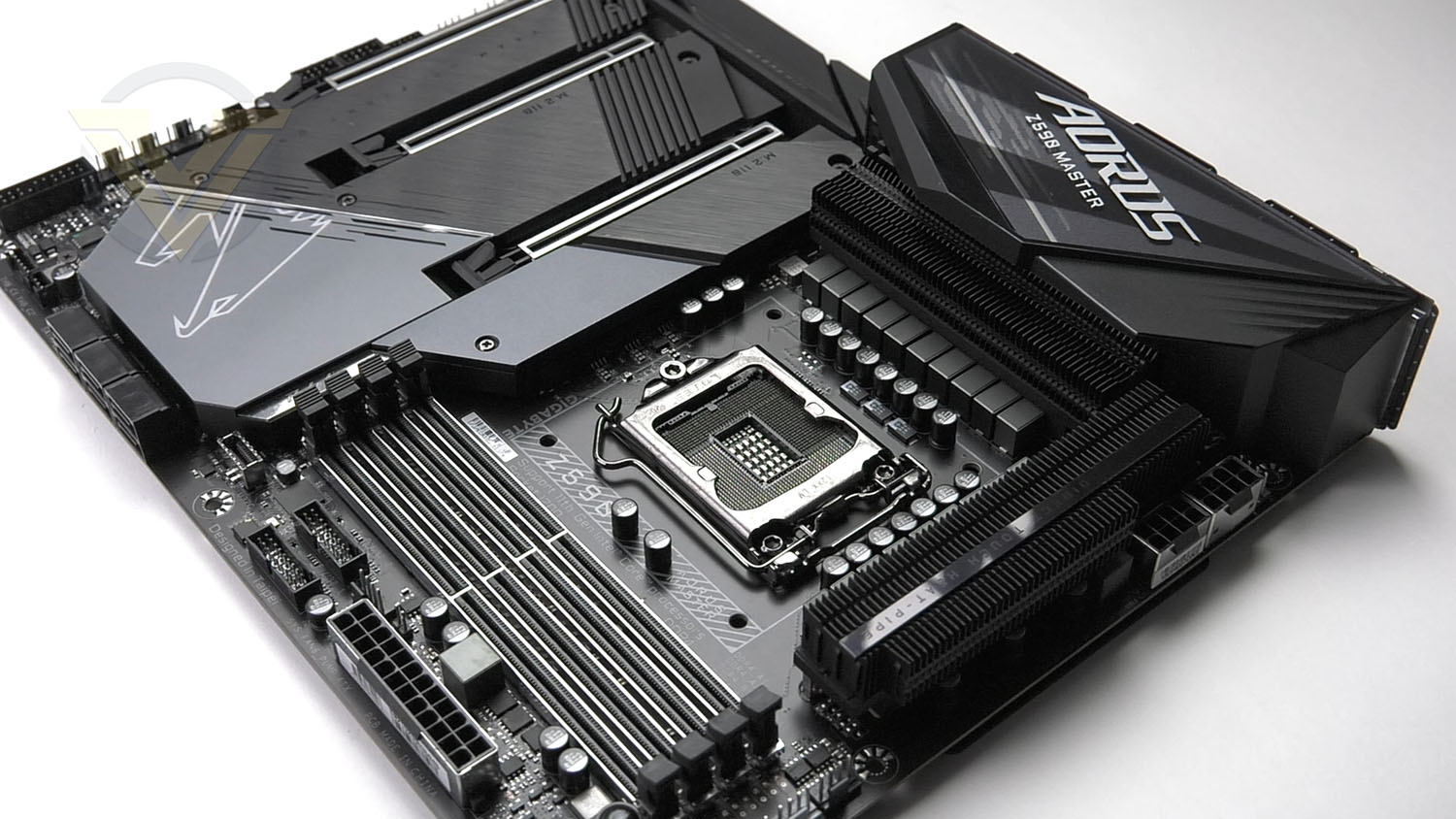
In the spotlight today we have the Z590 AORUS MASTER – a stellar offering which strives to leave no stone unturned in regards to features and outright performance. Boasting support for up to 5400MHz DDR4, a plethora of USB 3.2 connectivity and PCIe 4.0, MASTER is really designed for the tech enthusiast who does not have any intention of comprising.
Should you consider Z590 AORUS MASTER?
AORUS on their Z590 MASTER
The Z590 AORUS MASTER comes with upgraded power solution, all PCIe 4.0 design and outstanding connectivity to elevate your gaming experience to the next level.
Technical Specifications
Below are the technical specifications concerning the MASTER:
CPU
Intel 10th and 11th Generation Core Processors
Chipset
Intel Z590 Chipset
Memory
DDR4 5400 (OC) – 2133 MHz Non-ECC, Un-buffered Memory (11 Gen)
128GB
Graphics
1 x DP 1.4
Expansion Slots
1 x PCI Express x16 slot, running at x16 (PCIEX16)
* For optimum performance, if only one PCI Express graphics card is to be installed, be sure to install it in the PCIEX16 slot.
1 x PCI Express x16 slot, running at x8 (PCIEX8)
* The PCIEX8 slot shares bandwidth with the PCIEX16 slot. When the PCIEX8 slot is populated, the PCIEX16 slot operates at up to x8 mode.
(The PCIEX16 and PCIEX8 slots conform to PCI Express 4.0 standard.)*
* Supported by 11th Generation processors only.
1 x PCI Express x16 slot, running at x4 (PCIEX4)
(The PCIEX4 slot conforms to PCI Express 3.0 standard.)
Multi-GPU Support
AMD CrossfireX
Storage
CPU:
1 x M.2 connector (Socket 3, M key, type 2242/2260/2280/22110 PCIe 4.0 x4/x2 SSD support) (M2A_CPU)*
* Supported by 11th Generation processors only.
Chipset:
1 x M.2 connector (Socket 3, M key, type 2242/2260/2280/22110 SATA and PCIe 3.0 x4/x2 SSD support) (M2P_SB)
1 x M.2 connector (Socket 3, M key, type 2242/2260/2280/22110 SATA and PCIe 3.0 x4/x2 SSD support) (M2M_SB)
6 x SATA 6Gb/s connectors
Ethernet
Aquantia 10GbE LAN chip (10 Gbit/5 Gbit/2.5 Gbit/1 Gbit/100 Mbit)
Wireless & Bluetooth
Intel® Wi-Fi 6E AX210 (Bluetooth 5.2)
USB
Chipset:
1 x USB Type-C® port on the back panel, with USB 3.2 Gen 2×2 support
1 x USB Type-C® port with USB 3.2 Gen 2 support, available through the internal USB header
5 x USB 3.2 Gen 2 Type-A ports (red) on the back panel
Chipset+2 USB 3.2 Gen 1 Hubs:
8 x USB 3.2 Gen 1 ports (4 ports on the back panel, 4 ports available through the internal USB headers)
Chipset+USB 2.0 Hub:
4 x USB 2.0/1.1 ports available through the internal USB headers
Back Panel I/O Ports
1 x Q-Flash Plus button
1 x Clear CMOS button
2 x SMA antenna connectors (2T2R)
1 x DisplayPort
1 x USB Type-C® port, with USB 3.2 Gen 2×2 support
5 x USB 3.2 Gen 2 Type-A ports (red)
4 x USB 3.2 Gen 1 ports
1 x RJ-45 port
1 x optical S/PDIF Out connector
5 x audio jacks
Operating System
Windows 10 64bit
Form Factor
ATX
12 inch x 9.6 inch ( 30.5 cm x 24.4 cm )
Intel 10th and 11th Generation Core Processors
Chipset
Intel Z590 Chipset
Memory
DDR4 5400 (OC) – 2133 MHz Non-ECC, Un-buffered Memory (11 Gen)
128GB
Graphics
1 x DP 1.4
Expansion Slots
1 x PCI Express x16 slot, running at x16 (PCIEX16)
* For optimum performance, if only one PCI Express graphics card is to be installed, be sure to install it in the PCIEX16 slot.
1 x PCI Express x16 slot, running at x8 (PCIEX8)
* The PCIEX8 slot shares bandwidth with the PCIEX16 slot. When the PCIEX8 slot is populated, the PCIEX16 slot operates at up to x8 mode.
(The PCIEX16 and PCIEX8 slots conform to PCI Express 4.0 standard.)*
* Supported by 11th Generation processors only.
1 x PCI Express x16 slot, running at x4 (PCIEX4)
(The PCIEX4 slot conforms to PCI Express 3.0 standard.)
Multi-GPU Support
AMD CrossfireX
Storage
CPU:
1 x M.2 connector (Socket 3, M key, type 2242/2260/2280/22110 PCIe 4.0 x4/x2 SSD support) (M2A_CPU)*
* Supported by 11th Generation processors only.
Chipset:
1 x M.2 connector (Socket 3, M key, type 2242/2260/2280/22110 SATA and PCIe 3.0 x4/x2 SSD support) (M2P_SB)
1 x M.2 connector (Socket 3, M key, type 2242/2260/2280/22110 SATA and PCIe 3.0 x4/x2 SSD support) (M2M_SB)
6 x SATA 6Gb/s connectors
Ethernet
Aquantia 10GbE LAN chip (10 Gbit/5 Gbit/2.5 Gbit/1 Gbit/100 Mbit)
Wireless & Bluetooth
Intel® Wi-Fi 6E AX210 (Bluetooth 5.2)
USB
Chipset:
1 x USB Type-C® port on the back panel, with USB 3.2 Gen 2×2 support
1 x USB Type-C® port with USB 3.2 Gen 2 support, available through the internal USB header
5 x USB 3.2 Gen 2 Type-A ports (red) on the back panel
Chipset+2 USB 3.2 Gen 1 Hubs:
8 x USB 3.2 Gen 1 ports (4 ports on the back panel, 4 ports available through the internal USB headers)
Chipset+USB 2.0 Hub:
4 x USB 2.0/1.1 ports available through the internal USB headers
Back Panel I/O Ports
1 x Q-Flash Plus button
1 x Clear CMOS button
2 x SMA antenna connectors (2T2R)
1 x DisplayPort
1 x USB Type-C® port, with USB 3.2 Gen 2×2 support
5 x USB 3.2 Gen 2 Type-A ports (red)
4 x USB 3.2 Gen 1 ports
1 x RJ-45 port
1 x optical S/PDIF Out connector
5 x audio jacks
Operating System
Windows 10 64bit
Form Factor
ATX
12 inch x 9.6 inch ( 30.5 cm x 24.4 cm )
Closer Look Video Review
For this motherboard review we’ve produced a video which provides you with a highly detailed overview of the board revealing all the features with a verdict. Check out the video review here or watch below:
Test Setup & Methodology
Notes: We’ve revamped our benchmark regime by removing a number of tests which reveal little, to no difference between each motherboard model. Gaming performance is one such area which has been removed due to the inability for each motherboard to offer any advantage over another. Instead, we have focussed on meaningful/tangible analysis which examines the VRM/chipset design, and the storage performance which will be far more informative to the end user.
TEST SETUP
CPU Intel Core i9-11900KCooling: Corsair Hydro Series H110i
Motherboard: GIGABYTE Z590 AORUS MASTER
Memory: 16GB Corsair Vengeance RGB PRO SL 3600MHz
Storage: Crucial MX300 SATA SSD + Kingston KC2500 PCIe 3.0 SSD
PSU: Corsair HX1050 80 Plus Gold Certified PSU
Monitor: AOC U2879VF
BENCHMARKS
PCMark 10 – Overall Extended ScoreSiSoftware SANDRA – SATA/PCIe Storage Tests
SiSoftware SANDRA – Processor Image Processing
OTHER SOFTWARE
Temperature Analysis: HWMonitorStress Testing Software: AIDA64 Stability Test
CPU Specification Monitoring: CPU-Z
Benchmarks: Power Consumption
In this first test we analyse the power efficiency from the wall for each motherboard (Minus the GPU). While each model uses the same chipset/platform, energy results can fluctuate between manufacturers due to the features and specifications that are integrated. First of all, for the idle tests the system is cold booted into Windows and no additional applications are executed – wattage is noted on the external energy monitor we use and then we open Aida64 stability test and execute a stress test, noting the highest reading on the monitor. Below are the results of this energy test.
Benchmarks: VRM & Chipset Cooling
Each motherboard manufacturer designs their board with a unique set of heatsinks to cover key areas like the VRM/mosfets and the chipset itself. In these test we use HWMonitor to identify the minimum values for VRM and chipset and then we load up Aida64 stability test again and perform a 20 minute run, recording the maximum value for both attributes.
Benchmarks: PCMark 10
PCMark 10 features a comprehensive set of tests that cover the wide variety of tasks performed in the modern workplace. With a range of performance tests, custom run options, and the new Battery Life Profile, PCMark 10 is the complete PC benchmark for the modern office.
Benchmarks: SATA Performance
In order to ascertain the SATA performance for our motherboards we use SiSoftware SANDRA and the File System Bandwidth performance test. This allows us to obtain the sequential read/write transfer rates for the drive being tested – Crucial MX300 SSD.
Benchmarks: PCIe M.2 Performance
In order to ascertain the PCIe M.2 performance for our motherboards we use SiSoftware SANDRA and the File System Bandwidth performance test. This allows us to obtain the sequential read/write transfer rates for the drive being tested – Kingston KC2500.
Benchmarks: CPU Image Processing
In our last test we observe the Image Processing performance from the CPU attached to the motherboard. For this we use SiSoftware SANDRA and the benchmark specifically designed for measuring the common algorithms associated with processing imagery.
Overclocking
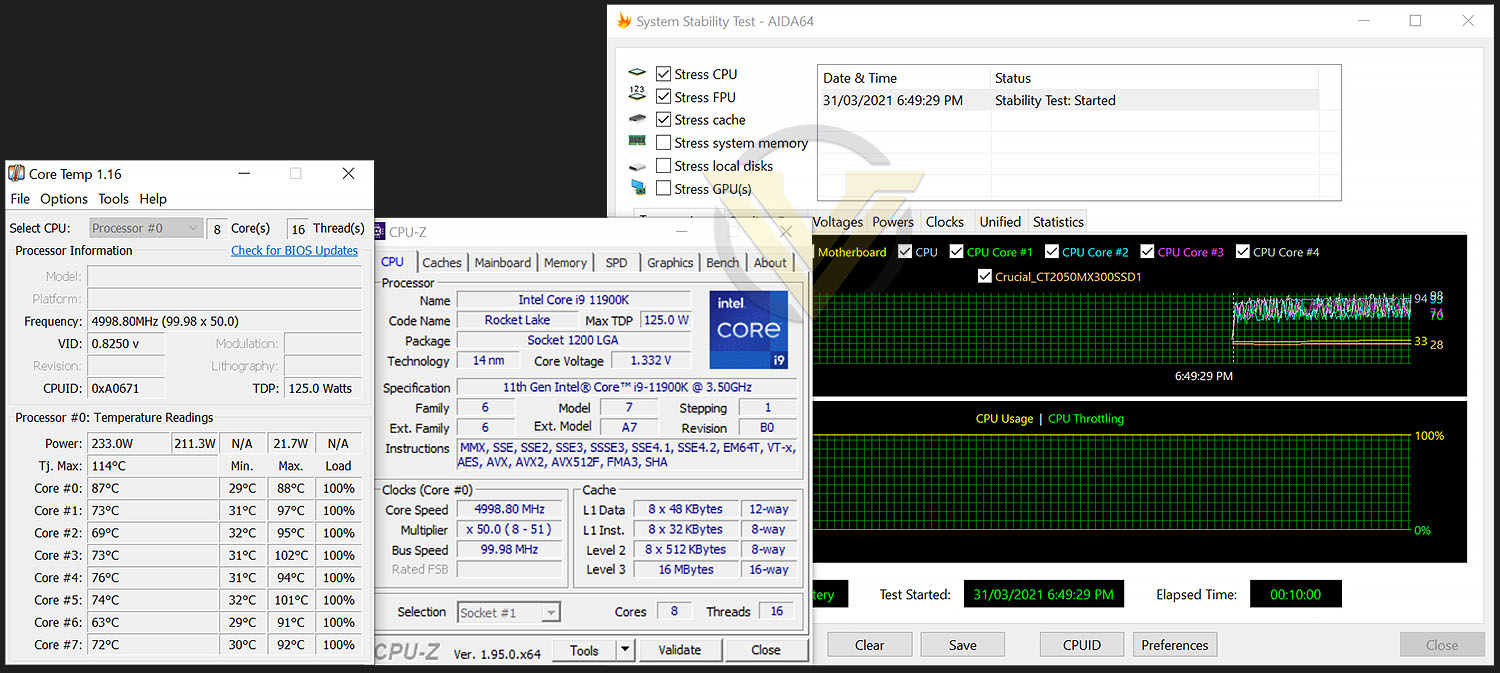
For the overclocking phase, we already know that our CPU (Intel Core i9-11900K) is capable of having all cores operate at 5.3GHz without any stress being applied, and at 5.0GHz with stress/stability test approval, so this is the target which we aimed for with MASTER.
MASTER managed to hit 5GHz on all-cores and required just 1.32v. This is the lowest amount of voltage we’ve been able to use to achieve this milestone.
Conclusion
It’s clear to us from spending considerable time with MASTER that we have a rather special Intel Z590 motherboard in our hands. This new solution is simply a great all-rounder and comes highly recommended by us.
Taking things purely on the aesthetics, we have a soft spot for MASTER – it adopts a sleek design and looks splendid. Many board partners slap oversized heatsinks on their motherboards but bigger doesn’t always mean better – the VRM/chipset heatsinks could confirm this truth. MASTER has lower profile, slim heatsinks which don’t overpower the physical design and yet offer superior thermals than rival offerings.
MASTER delivers a strong feature-set which covers all but one area – there are no Thunderbolt 4 ports. We’d have liked to see such a feature on a high-end solution like this. Regardless of this, we still get a generous selection of USB 3.2, M.2 storage support and DDR4 compatibility up to 5400MHz. For those wanting more than the average slice of features, MASTER supplies voltage checkpoints, LED debug, onboard power/reset buttons and a dual BIOS switch. There is no denying that this is a well-designed motherboard which caters for tech enthusiasts.
In our performance tests we discovered that MASTER offers solid performance and does so while maintaining low power consumption (compared to the competition). Our Intel Core i9-11900K has a maximum all-core overclock of 5GHz and MASTER achieve this with just 1.32v – the lowest voltage from any Z590 thus far. MASTER also enabled us to boot into Windows at 5.3GHz, we just couldn’t sustain stability.
If you’re considering MASTER, you’ll need deep pockets, this board is available at $410 USD | £410 GBP | AUD $699. While this isn’t the most expensive Z590 motherboard, it is getting well on its way towards the upper-end.
If you’re on the hunt for a high-performance Intel Z590 motherboard with oodles of features and great overclocking ability – MASTER should be on that short-list!
Pros
+ Sleek, eye-catching aesthetics
+ Subtle RGB lighting
+ An excellent performer
+ Consumes less power than competition
+ Excellent at overclocking
+ Includes a large selection of USB 3.2 ports
+ Up to 9 fan headers
+ Features two PCIe 4.0 X16 slots
+ Benefits from a protective backplate
+ Offers three M.2 slots
+ Includes additional features – voltage checkpoints, debug, dual bios
Cons
– No Thunderbolt 4 ports
– Expensive!
+ Sleek, eye-catching aesthetics
+ Subtle RGB lighting
+ An excellent performer
+ Consumes less power than competition
+ Excellent at overclocking
+ Includes a large selection of USB 3.2 ports
+ Up to 9 fan headers
+ Features two PCIe 4.0 X16 slots
+ Benefits from a protective backplate
+ Offers three M.2 slots
+ Includes additional features – voltage checkpoints, debug, dual bios
Cons
– No Thunderbolt 4 ports
– Expensive!
Click here for an explanation of our awards at Vortez.net.
Stay connected with Vortez social media pages: