Armed with an exceptional feature-set and performance, can Z690 AORUS PRO make it on to that coveted short list for Intel 12th Gen.?

Product on Review: Z690 AORUS PRO
Manufacturer: AORUS
Street Price: GBP £289 | USD $329 | AUD $579
This quarter, Intel has brought the fight back to the CPU/motherboard division with their next-generation tech via 12th Gen and the Z690 chipset. In our launch day coverage of the new Alder Lake CPUs we were thoroughly impressed and we can certainly see the platform gaining in popularity.
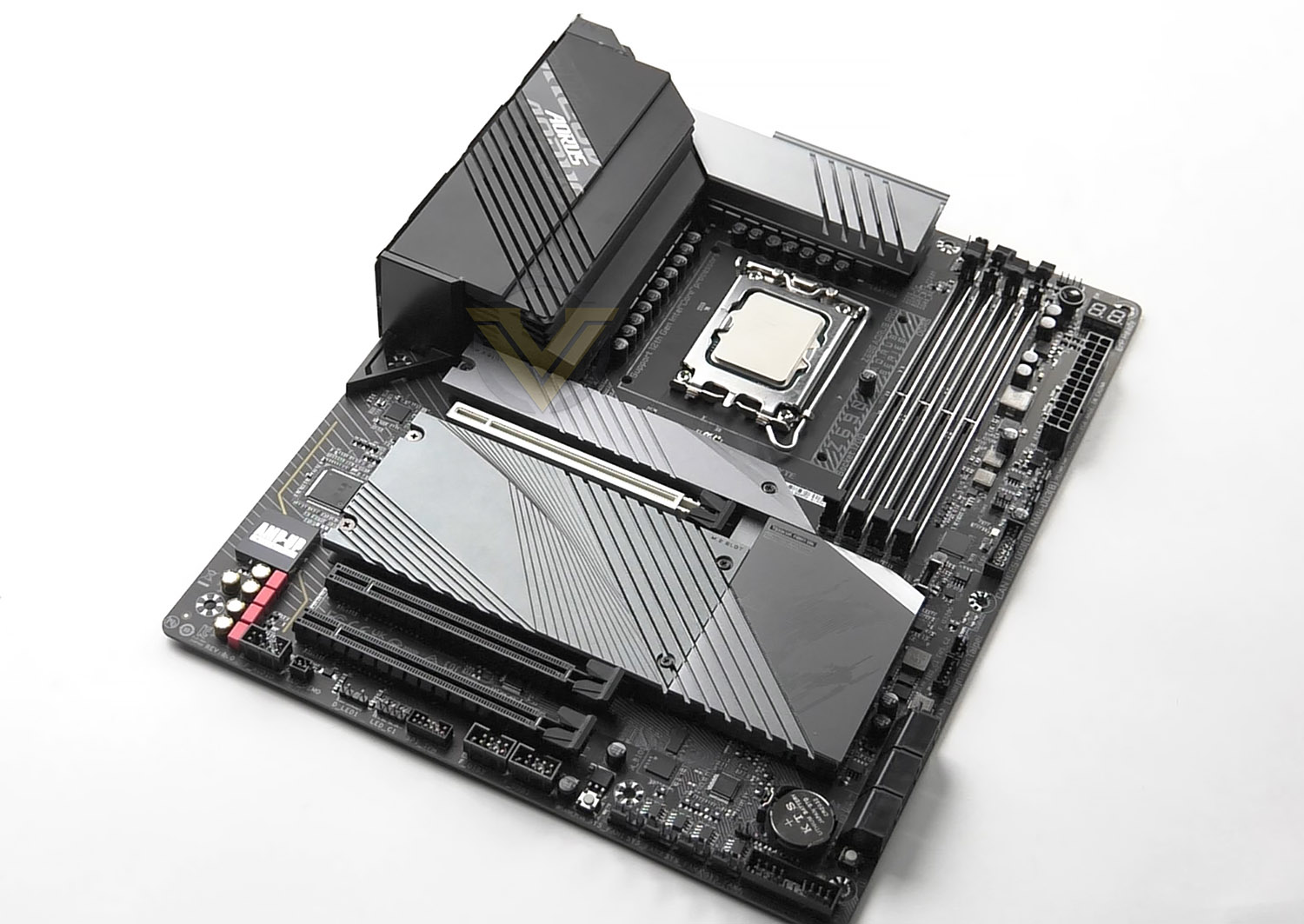
In the spotlight today, we have the Z690 AORUS PRO. Designated as a mid-range model, PRO offers up a blend of top-performance features while seeking to deliver excellent results. Some of the headline features include 4x PCI Express Gen4 M.2 slots and a back panel which is peppered with USB ports – including USB 3.2 Gen2x2.
If you’re planning a move to Alder Lake, Z690 AORUS PRO may be something to pop onto the shortlist.
AORUS on the Z690 PRO
Rule supreme with the Z690 AORUS gaming motherboards. The new king of gaming platform continues the legendary AORUS bloodline with the most robust power delivery and dominant thermal design, glorified with the complete memory overclocking technology to crown your PC with the best Alder Lake’s performance in all its gaming glory.
Technical Specifications
Below are the technical specifications concerning the Z690 AORUS PRO:
CPU
Intel 12th Generation Core Processors
Chipset
Intel Z690 Chipset
Memory
DDR5 4800-6200 MHz
Dual Channel Memory Architecture
Supports Intel® Extreme Memory Profile (XMP)
Graphics
1 x DP 1.4
Expansion Slots
1 x PCI Express x16 slot, running at x16 (PCIEX16)
(The PCIEX16 slot conforms to PCI Express 5.0 standard.)
2 x PCI Express x16 slots, running at x4 (PCIEX4_1, PCIEX4_2)
(The PCIEX4 slots conform to PCI Express 3.0 standard.)
Multi-GPU Support
Supports AMD® CrossFire™ Technology
Storage
CPU:
1 x M.2 connector (Socket 3, M key, type 2260/2280/22110 PCIe 4.0 x4/x2 SSD support) (M2A_CPU)
Chipset:
1 x M.2 connector (Socket 3, M key, type 2260/2280/22110 SATA and PCIe 4.0 x4/x2 SSD support) (M2C_SB)
2 x M.2 connectors (Socket 3, M key, type 2260/2280/22110 PCIe 4.0 x4/x2 SSD support) (M2P_SB/M2Q_SB)
6 x SATA 6Gb/s connectors
Support for RAID 0, RAID 1, RAID 5, and RAID 10
* Refer to “2-8 Internal Connectors,” for the installation notices for the M.2 and SATA connectors.
Intel® Optane™ Memory Ready
* System acceleration with Intel® Optane™ Memory can only be enabled on the M.2 connectors supported by the Chipset.
Ethernet
Intel® 2.5GbE LAN chip (2.5 Gbps/1 Gbps/100 Mbps)
Wireless & Bluetooth
Intel® Wi-Fi 6 AX200
The Wireless module is pre-installed in the M.2 (Key-E) slot
Supports MU-MIMO TX/RX, 2.4GHz/5GHz/6GHz1 (160MHz) up to 2.4Gbps
Supports 802.11 a/ b/ g/ n/ ac/ ax
Supports Bluetooth® 5.2
USB
Chipset:
2 x USB Type-C® ports, with USB 3.2 Gen 2×2 support (1 port on the back panel, 1 port available through the internal USB header)
4 x USB 3.2 Gen 2 Type-A ports (red) on the back panel
Chipset+2 USB 3.2 Gen 1 Hubs:
6 x USB 3.2 Gen 1 ports (4 ports on the back panel, 2 ports available through the internal USB header)
Chipset+2 USB 2.0 Hub:
8 x USB 2.0/1.1 ports (4 ports on the back panel, 4 ports available through the internal USB headers)
Audio
Realtek® ALC4080 CODEC
High Definition Audio
2-channel analog output
Support for S/PDIF Out
7.1-channel digital signals
Back Panel I/O Ports
1 x USB Type-C® port, with USB 3.2 Gen 2×2 support
4 x USB 3.2 Gen 2 Type-A ports (red)
4 x USB 3.2 Gen 1 ports
4 x USB 2.0/1.1 ports
2 x SMA antenna connectors (2T2R)
1 x DisplayPort
1 x RJ-45 port
1 x optical S/PDIF Out connector
2 x audio jacks
Operating System
Windows 10/11 64bit
Form Factor
ATX
12 inch x 9.6 inch ( 30.5 cm x 24.4 cm )
Intel 12th Generation Core Processors
Chipset
Intel Z690 Chipset
Memory
DDR5 4800-6200 MHz
Dual Channel Memory Architecture
Supports Intel® Extreme Memory Profile (XMP)
Graphics
1 x DP 1.4
Expansion Slots
1 x PCI Express x16 slot, running at x16 (PCIEX16)
(The PCIEX16 slot conforms to PCI Express 5.0 standard.)
2 x PCI Express x16 slots, running at x4 (PCIEX4_1, PCIEX4_2)
(The PCIEX4 slots conform to PCI Express 3.0 standard.)
Multi-GPU Support
Supports AMD® CrossFire™ Technology
Storage
CPU:
1 x M.2 connector (Socket 3, M key, type 2260/2280/22110 PCIe 4.0 x4/x2 SSD support) (M2A_CPU)
Chipset:
1 x M.2 connector (Socket 3, M key, type 2260/2280/22110 SATA and PCIe 4.0 x4/x2 SSD support) (M2C_SB)
2 x M.2 connectors (Socket 3, M key, type 2260/2280/22110 PCIe 4.0 x4/x2 SSD support) (M2P_SB/M2Q_SB)
6 x SATA 6Gb/s connectors
Support for RAID 0, RAID 1, RAID 5, and RAID 10
* Refer to “2-8 Internal Connectors,” for the installation notices for the M.2 and SATA connectors.
Intel® Optane™ Memory Ready
* System acceleration with Intel® Optane™ Memory can only be enabled on the M.2 connectors supported by the Chipset.
Ethernet
Intel® 2.5GbE LAN chip (2.5 Gbps/1 Gbps/100 Mbps)
Wireless & Bluetooth
Intel® Wi-Fi 6 AX200
The Wireless module is pre-installed in the M.2 (Key-E) slot
Supports MU-MIMO TX/RX, 2.4GHz/5GHz/6GHz1 (160MHz) up to 2.4Gbps
Supports 802.11 a/ b/ g/ n/ ac/ ax
Supports Bluetooth® 5.2
USB
Chipset:
2 x USB Type-C® ports, with USB 3.2 Gen 2×2 support (1 port on the back panel, 1 port available through the internal USB header)
4 x USB 3.2 Gen 2 Type-A ports (red) on the back panel
Chipset+2 USB 3.2 Gen 1 Hubs:
6 x USB 3.2 Gen 1 ports (4 ports on the back panel, 2 ports available through the internal USB header)
Chipset+2 USB 2.0 Hub:
8 x USB 2.0/1.1 ports (4 ports on the back panel, 4 ports available through the internal USB headers)
Audio
Realtek® ALC4080 CODEC
High Definition Audio
2-channel analog output
Support for S/PDIF Out
7.1-channel digital signals
Back Panel I/O Ports
1 x USB Type-C® port, with USB 3.2 Gen 2×2 support
4 x USB 3.2 Gen 2 Type-A ports (red)
4 x USB 3.2 Gen 1 ports
4 x USB 2.0/1.1 ports
2 x SMA antenna connectors (2T2R)
1 x DisplayPort
1 x RJ-45 port
1 x optical S/PDIF Out connector
2 x audio jacks
Operating System
Windows 10/11 64bit
Form Factor
ATX
12 inch x 9.6 inch ( 30.5 cm x 24.4 cm )
Closer Look Video
For this motherboard review we’ve produced a video which provides you with a highly detailed overview of the board revealing all the features with a verdict. Check out the video review here or watch below:
Test Setup & Methodology
Notes: We’ve revamped our benchmark regime by removing a number of tests which reveal little, to no difference between each motherboard model. Gaming performance is one such area which has been removed due to the inability for each motherboard to offer any advantage over another. Instead, we have focussed on meaningful/tangible analysis which examines the VRM/chipset design, and the storage performance which will be far more informative to the end user.TEST SETUP
CPU Intel Core i9-12900KCooling CORSAIR H150i ELITE LCD
Motherboard Z690 AORUS PRO
Memory 64GB CORSAIR Dominator Platinum RGB 5200MHz DDR5
Graphics ZOTAC RTX 3070 Ti HOLO Extreme
Storage CORSAIR Force LX 512GB SSD
PSU Corsair RM 1000 80 Plus Gold Certified PSU
Monitor AOC U2879VF
BENCHMARKS
PCMark 10 – Overall Extended Score
SiSoftware SANDRA – SATA/PCIe Storage Tests
SiSoftware SANDRA – Processor Image Processing
SiSoftware SANDRA – SATA/PCIe Storage Tests
SiSoftware SANDRA – Processor Image Processing
OTHER SOFTWARE
Temperature Analysis: HWMonitor
Stress Testing Software: AIDA64 Stability Test
CPU Specification Monitoring: CPU-Z
Stress Testing Software: AIDA64 Stability Test
CPU Specification Monitoring: CPU-Z
Benchmarks: Power Consumption
In this first test we analyse the power efficiency from the wall for each motherboard (Minus the GPU). While each model uses the same chipset/platform, energy results can fluctuate between manufacturers due to the features and specifications that are integrated. First of all, for the idle tests the system is cold booted into Windows and no additional applications are executed – wattage is noted on the external energy monitor we use and then we open Aida64 stability test and execute a stress test, noting the highest reading on the monitor. Below are the results of this energy test.
Benchmarks: VRM & Chipset Cooling
Each motherboard manufacturer designs their board with a unique set of heatsinks to cover key areas like the VRM/mosfets and the chipset itself. In these test we use HWMonitor to identify the minimum values for VRM and chipset and then we load up Aida64 stability test again and perform a 20 minute run, recording the maximum value for both attributes.
Benchmarks: PCMark 10
PCMark 10 features a comprehensive set of tests that cover the wide variety of tasks performed in the modern workplace. With a range of performance tests, custom run options, and the new Battery Life Profile, PCMark 10 is the complete PC benchmark for the modern office.
Benchmarks: SATA Performance
In order to ascertain the SATA performance for our motherboards we use SiSoftware SANDRA and the File System Bandwidth performance test. This allows us to obtain the sequential read/write transfer rates for the drive being tested – Crucial MX300 SSD.
Benchmarks: PCIe M.2 Performance
In order to ascertain the PCIe M.2 performance for our motherboards we use SiSoftware SANDRA and the File System Bandwidth performance test. This allows us to obtain the sequential read/write transfer rates for the drive being tested – Kingston KC2500.
Benchmarks: CPU Image Processing
In our last test we observe the Image Processing performance from the CPU attached to the motherboard. For this we use SiSoftware SANDRA and the benchmark specifically designed for measuring the common algorithms associated with processing imagery.
Overclocking
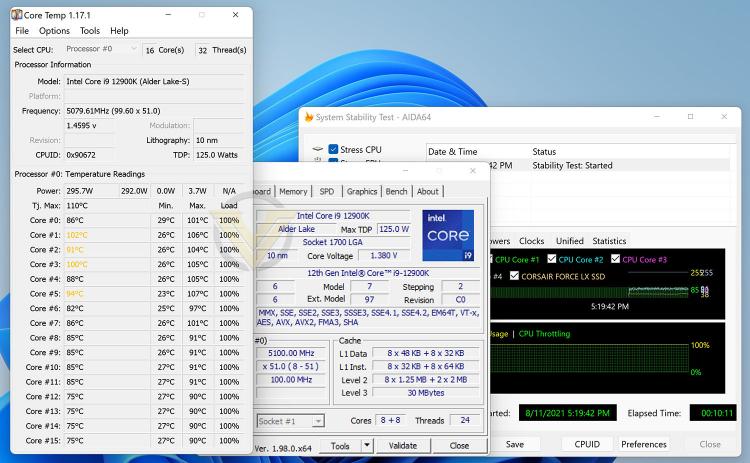
For the overclocking phase, we already know that our CPU (Intel Core i9-12900K) is able to reach 5.2GHz across all cores, and this is the object with each board we test – to pursue a 5.2GHz all-core OC.
PRO managed to climb up to an all-core 5.1GHz overclock with the 12900K and required 1.38v – this is a great result and one of the best we have been able to achieve, however the temps, as you can see, sky rocket!
Conclusion
It’s always exciting to look at the mid-range for any platform/generation, and even more so when a model comes along that mixes a good blend of features with performance for a reasonable price-tag, we’re onto a winner.
Taking PRO purely on its layout and design, we have in our hands quite a unique look. Some would argue the contrast is gaudy but we feel it sets itself apart from the competition and presents something special. RGB is kept to an absolute minimum, which, depending on your stance could be a good or a bad thing.
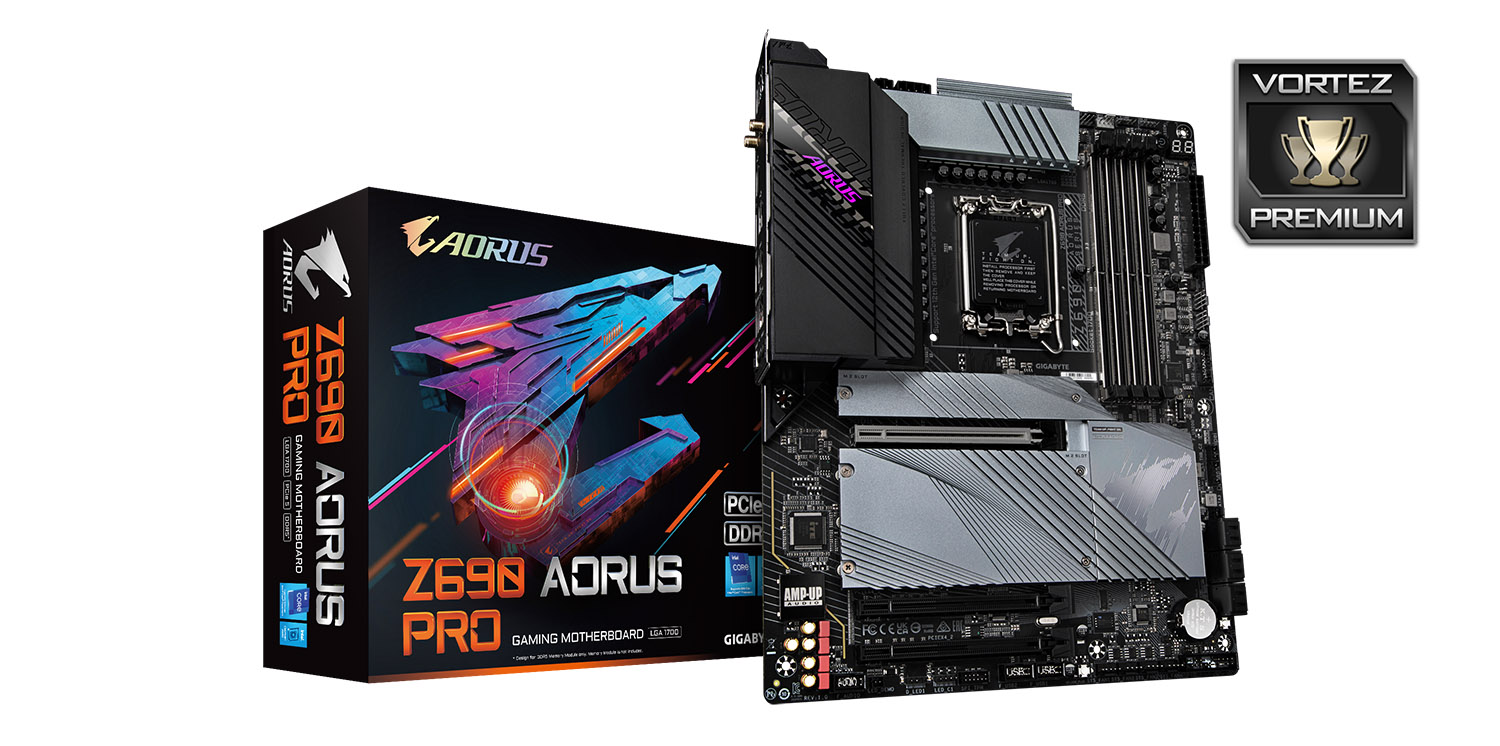
Given the attractive price point of GBP £289 | USD $329 | AUD $579, PRO comes with a generous assortment of features which should satisfy the vast majority of users. There are a whopping 13 USB ports on the back panel, 4x PCI Express Gen4 M.2s and a dedicated PCI Express 5.0 X16 slot.
There are only a few downsides which point to the inclusion of USB 2.0 – why we are getting these ports on such a board and in such volume is frustrating. It would have been nice to occupy the precious space with faster USB. PRO comes with WiFi functionality, but it offers WiFi 6 and not WiFi 6E (which most other boards supply).
Pitting PRO against its foes, it does an admirable job and the overclocking prowess is something to be happy about. We managed to push our 12900K to a 5.1GHz all-core overclock.
PRO is a board which covers all bases and comes in at a very reasonable price-tag. This one should be on your shortlist!
Pros
+ Impressive styling & design
+ Good value for money
+ Solid VRM configuration
+ Overclocks easily
+ Performs very well
+ Massive selection of ports on back panel
+ All PCIe 4.0 M.2 slots
+ PCIe 5.0 X16 slot
+ Up to 8 fan headers
Cons
– Still being supplied with USB 2.0 ports
+ Impressive styling & design
+ Good value for money
+ Solid VRM configuration
+ Overclocks easily
+ Performs very well
+ Massive selection of ports on back panel
+ All PCIe 4.0 M.2 slots
+ PCIe 5.0 X16 slot
+ Up to 8 fan headers
Cons
– Still being supplied with USB 2.0 ports
Click here for an explanation of our awards at Vortez.net.
Stay connected with Vortez social media pages: