







Wouldn’t it be nice if you could mix’n’match AMD with NVIDIA graphics cards? Well now you can with the new HIS HD6970 2GB IceQ MIX – featuring Lucid Hydralogix.
Product on Review: HIS HD6970 2GB IceQ Mix
Manufacturer and Sponsor: HIS
Street Price: £270 excl VAT (GBP)

So what makes this card different then? To put things bluntly, the main attraction of this particular variant of the IceQ family is that this HIS video graphics adapter can be paired with another graphics card. What’s so special about that I hear you ask? Well, up until now, we enthusiasts have had to utilise SLI or Crossfire to pair our GPU’s and even then we were restricted to using cards from the same base manufacturer, NVIDIA or AMD. The difference with the HIS HD6970 2GB Mix is that you can you crossfire the card with another AMD GPU from the same family as per normal Crossfire specifications but (and here’s where it gets interesting), you can also Mix it up with an equivalent card from NVIDIA!
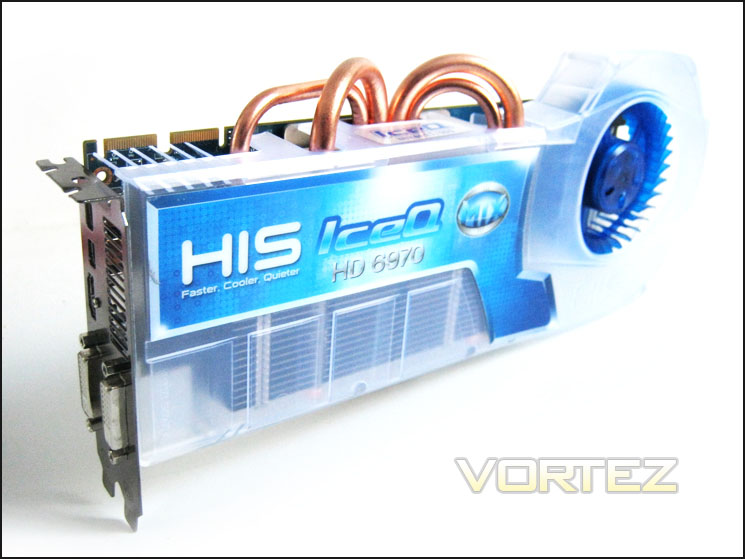
Up until now, the LucidLogix Hydra 200 chip has only been utilised on motherboards, first seen with the MSI P55 ‘Big Bang’ motherboard back in 2009. So while the concept is nothing new, HIS have now utilised the chip by installing it onto the HD6970 PCB design. I won’t go to far into the technology behind the HydraLogix just yet but suffice to say, the small power requirement of the chip should mean that no additional cooling will be required and while the card will still feature crossfire capabilities via AMD’s Catalyst software, the on-board HydraLogix engine should also give the card a very flexible future.
It remains to be seen however if the HydraLogix driver can deliver performance on a par with AMD and NVIDIA as historically, Lucid has had to play third fiddle to the big two. So while Lucid can offer the flexibility of cross platform, multi-gpu gaming, more often than not performance has been lacking which has deterred the gaming community from taking advantage of Lucids flexibility. In today’s review, we will be testing the card on its own using the latest catalyst software but perhaps more importantly, we will pair it up with an NVIDIA GTX580 for some cross-platform shenanigans. We will endeavour to compare HydraLogix drivers against NVIDIA and AMD for multi-GPU cards of the same manufacturer in the future but I feel the most important aspect of the card on test today is it’s capability of cross-platform multi GPU performance.
Is it possible? Does it work? How does it perform? These are the questions I posed myself when testing the HIS HD6970 2GB IceQ Mix which I will endeavour to answer throughout the review. It’s certainly an interesting proposition to be able to mix GPUs both from different manufacturers but also from different generations. If the technology does indeed do ‘what it says on the tin’, Lucid and HIS may well have a winner on their hands as enthusiasts worldwide will be falling over themselves to grab some extra performance from a redundant GPU. Even if the technology is not quite mature, HIS have chosen a platform in the guise of the HD6970 which should still form a solid foundation for any gaming pc.
About HIS
HIS is proud to be AMD’s Authorized 1st Tier AIB Partner, Certified Partner and Launching Partner. Long term and favourable relationship with AMD, enable HIS to work closely with AMD to promote the HIS AMD Graphics Board; and to strive for best value on the marketing and sales of HIS AMD Product Line. In Sept 2003, HIS incorporated the state-of-the art Supreme Cooling Technology in the award winning HIS 9800Pro IceQ, which caught the attention of worldwide media. Since then, HIS IceQ series and the latest IceQ X series has been the limelight in the market for its outstanding performance and features over the other rivals. Today, HIS continues its avid commitment to quality product and service. HIS is certain to be Your Choice of Graphics Board Supplier.
HIS is proud to be AMD’s Authorized 1st Tier AIB Partner, Certified Partner and Launching Partner. Long term and favourable relationship with AMD, enable HIS to work closely with AMD to promote the HIS AMD Graphics Board; and to strive for best value on the marketing and sales of HIS AMD Product Line. In Sept 2003, HIS incorporated the state-of-the art Supreme Cooling Technology in the award winning HIS 9800Pro IceQ, which caught the attention of worldwide media. Since then, HIS IceQ series and the latest IceQ X series has been the limelight in the market for its outstanding performance and features over the other rivals. Today, HIS continues its avid commitment to quality product and service. HIS is certain to be Your Choice of Graphics Board Supplier.
Specification
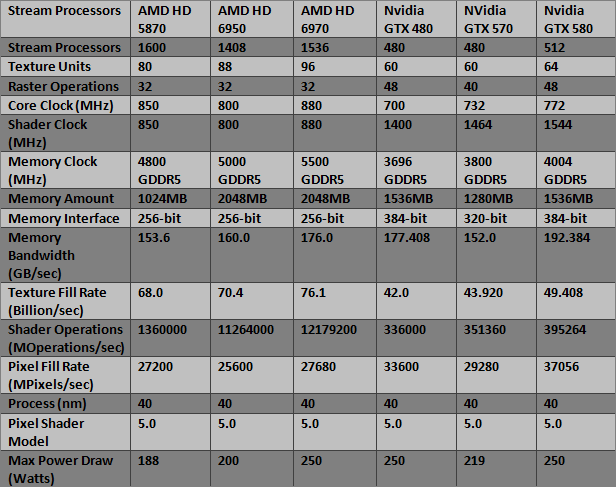
Cayman is the rightful heir to the successful Cypress core. For the most part, the architecture is much the same with some tweaks to increase efficiency and performance per die size. The GPU comes in two variants, Cayman Pro and Cayman XT, the former found on board the HD6950 and the latter on the HD6970. Originally, the Cayman core was poised to be manufactured on the 32nm manufacturing process which would have brought along many new features and possibly better performance in the same package. However, TSMC cancelled the process so Cayman had to resort to the more mature 40nm process, sacrificing many of the new features promised.The biggest change to the architecture is the use of the VLIW4 design instead of the VLIW5 design used since DX9 graphics cards were first introduced. The main reason was to increase efficiency in newer DX10/11 titles and to put more emphasis on GPGPU computing. The VLIW4 architecture introduces a narrower Stream Processing Unit, in which the 5th stream processor named the “t-unit” has been removed leaving just 4. Despite the Unit only being able to process 4 operations instead of 5, the advantage is that the space saved allows the core to have more SIMD clusters. The end result is that Cayman can have up to 24 SIMD clusters (24 on the HD6970 and 22 on the HD6950) whereas Cypress only had up to 20 SIMDs (20 on the HD5870 and 18 on the HD5850), giving Cayman a 10% improvement per mm squared compared to previous VLIW5 architecture (as used on Barts also). The architecture is now more catered towards GPU Compute than before and the higher SIMD count also gives additional texturing performance. Each SIMD from both architectures contains 4 texture units so Cayman now benefits from up to 96 units rather than the 80 available on Cypress.
Cayman: VLIW4, 24 SIMD clusters, 96 texture units
Cypress: VLIW5, 20 SIMD clusters, 80 texture units
Another benefit of the new core is its improved dual 8th generation tessellator that bring up to 3 times the tessellation performance of the HD5870.
As mentioned, Cayman comes in two variants as found on the HD6950 and HD6970. The key difference is that the HD6950 has 22 SIMD clusters instead of 24 on the HD6970, leading to fewer texture units (88 vs. 96) and fewer stream processors (1408 vs. 1536). The GPU boasts an impressive 2.64 billion transistors on a die size 389mm squared. For reference, the mainstream Barts core sports 1.7 billion transistors on a 255mm squared package. A 256-bit GDDR5 memory bus is still supported but this time 2GB of VRAM is provided to compete with Nvidia’s offerings.
Above you can see what the card is stacked up against in terms of specifications. The card we have on test today has a slightly lower clocked GPU clock speed of 880MHz vs. 900MHz along with a slightly lower memory clock speed of 5.5GB/s to the Turbos 5.6GB/s.
Product Specification
Product Code: H697QT2G2M
EAN Code: 4895139005820
Cooler: IceQ
GPU: HD6970
Core Clock: 880 MHz
Memory Clock: 5500 MHz
Memory Size: 2048 MB
Memory Type: GDDR5
Memory Interface: 256 bit
Interface: PCI Express x16 (PCI Express 2.1)
DVI: Upper Single-link DVI-D
2nd DVI: Bottom Dual-link DVI-I
Mini Display Port: 2
HDMI: Yes
Product Code: H697QT2G2M
EAN Code: 4895139005820
Cooler: IceQ
GPU: HD6970
Core Clock: 880 MHz
Memory Clock: 5500 MHz
Memory Size: 2048 MB
Memory Type: GDDR5
Memory Interface: 256 bit
Interface: PCI Express x16 (PCI Express 2.1)
DVI: Upper Single-link DVI-D
2nd DVI: Bottom Dual-link DVI-I
Mini Display Port: 2
HDMI: Yes
Let’s take a look at the cards main features…
Features
Get Immersed with AMD Eyefinity Technology•Enable ultra-high resolution multi-monitor gaming with 2GB of high speed GDDR5 memory.
•Expand your favourite games across up to 4 displays with AMD Eyefinity technology for an expansive field of view.
•See more of the battle than ever before with up to 4 simultaneous displays.
•Get the freedom and flexibility to upgrade. This modular solution enables you to add additional displays.
•Put your productivity into overdrive and let up to 4 displays put all the information you need right before your eyes.
•Don’t choose between play and work. Let up to 4 displays help you enjoy games, movies and the web at the same time.
Get Amazing EyeDefinition Graphics with DirectX 11 Technology
•New and advanced architecture featuring full DirectX® 11 support and scalable geometry processing.
•Featuring a new and advanced architecture with scalable geometry processing, the AMD Radeon HD™ 6900 Series is purpose-built to dominate your games.
•Maximum efficiency & performance. AMD PowerTune technology puts exceptionally intelligent power management under your control.
•Raise the bar for beautifully smooth image quality with Enhanced Quality Anti-Aliasing (EQAA).
•Dual advanced programmable tessellation engines for twice the geometry processing performance of previous generations.
•Play your favourite games in full stereo 3D, and get incredibly rich and interactive gameplay with AMD HD3D technology.
Speed Up Applications and Enjoy Brilliant Video with AMD EyeSpeed Technology
•Unleash the most demanding applications with AMD Accelerated Parallel Processing (APP) technology.
•Supports double precision floating point arithmetic to handle computationally intense workloads.
•Smooth visual quality with AMD EyeSpeed visual acceleration technology.
•Experience Blu-ray 3D as it was intended with AMD HD3D technology.
•Take advantage of AMD Radeon™ HD 6900 Series graphics’ Dolby TrueHD and 3D HDTV support.
Put out Stunning Visual and Unrivalled Audio Experience with HD3D Technology
•Stereo 3D display/glasses support
•Stereo 3D gaming
•Blu-ray™ 3D support
•3rd Party stereo 3D middleware software support
•Launching with AMD Radeon™ 6900 Series GPUs
Microsoft® DirectX® 11 Support
Get intense gaming performance and unrivalled image quality with stunning 3D visual effects, realistic lighting and lifelike imagery, driven by a new and advanced DirectX® 11-capable architecture with scalable geometry processing.
AMD Eyefinity Technology
Enjoy the ultimate immersive gaming experience with AMD’s Eyefinity multi-display capabilities.
AMD Advanced Parallel Processing technology
Accelerate the most demanding applications for improved performance.
Advanced GDDR5 Memory Technology
Delivers more speed and higher bandwidth.
AMD CrossFireX™ Technology
Increase your gaming performance with AMD CrossFireX™ Technology.
3rd Generation TeraScale Engine
Provides increased processing power for the latest games and accelerated applications.
40nm Process Technology
Provides enhanced processor performance while using less power and better transistor efficiency than previous generation technology.
Accelerated Video Transcoding
Helps improve video transcoding performance.
Display Flexibility
More flexibility with maximum connectivity for the latest display technologies.
HDMI 1.4
Helps ensure you get the full Blu-ray and PVR experience from your PC.
Dolby®TrueHD and DTS-HD Master Audio Support
Get a fully immersive high-definition audio experience with the latest Blu-ray movies.
AMD PowerPlay™ Technology
Power draw scales according to activity so when GPU activity is low, the power draw is minimal.
Enhanced Unified Video Decoder (UVD) 3Watch the hottest Blu-ray movies, online video and other HD content beyond 1080p with low power and low noise with GPU acceleration and enhanced Unified Video Decoder (UVD) 3 features.
HIS exclusive features
Faster – Make your overclocking dreams come true! The HIS IceQ Turbo Models are BIOS-overclocked out of the box.
Cooler – HIS HD6970 IceQ is 23c cooler than reference cooler.
Quieter – HIS HD 6970 IceQ is quieter than reference cooler.
Black Hole Impeller – Cool air is drawn from both sides of the fan to enhance the cooling efficiency.
Four Heatpipes– Optimize cooling performance by removing heat from the core area.
Solid State Choke – Durable Iron that can maximize current capacity, power efficiency and stability.
Full Solid State Capacitors – Extend the lifespan and storage capabilities.
Dynamic Phase Control PWM IC – A significant energy saving technique for reducing power consumption.
Faster – Make your overclocking dreams come true! The HIS IceQ Turbo Models are BIOS-overclocked out of the box.
Cooler – HIS HD6970 IceQ is 23c cooler than reference cooler.
Quieter – HIS HD 6970 IceQ is quieter than reference cooler.
Black Hole Impeller – Cool air is drawn from both sides of the fan to enhance the cooling efficiency.
Four Heatpipes– Optimize cooling performance by removing heat from the core area.
Solid State Choke – Durable Iron that can maximize current capacity, power efficiency and stability.
Full Solid State Capacitors – Extend the lifespan and storage capabilities.
Dynamic Phase Control PWM IC – A significant energy saving technique for reducing power consumption.
Mix GPU– Allow running both an AMD and NVIDIA GPU in the same system to enjoy the benefits of both graphics features and performance.
Mix Eyefinity– AMD’s Eyefinity is enabled via HDMI without using expensive Display Port monitors and Active Adapters. Eyefinity is also enabled via HDMI to DVI adapter.
The main talking point of this card would normally be the massive IceQ cooler but we pretty much covered this in the last review of the HIS HD6970 2GB IceQ Turbo and as the cooler is no different on this edition I see little need to go over the same old material, especially when the main feature of this card is the Lucid Technology which deserves a page to itself…
LucidLogix

We have all come to the stage where our current graphics card is feeling the strain a little too much and thus is demoted to a family members pc, sold on or simply retired to GPU Heaven. Wouldn’t it be great if we could utilise that GPU and pair it to your shiny new, all powerful graphics card? Sadly this is rarely possible as for many, the current card will now be obsolete and unable to purchase from any reputable e-tailor so paring it up with the same type would require a bucket full of luck while trawling a popular auction site.
Lucid have therefore seen a niche in the marker to address this issue and introduced the HydraLogix 200 processor to allow flexible scaling of multiple, cross manufacturer, cross family GPUs to maximise performance of new or indeed existing hardware.
The HIS HD6970 2GB IceQ Mix features the LT22102 variant of the HydraLogix 200 SoC. This device is a dedicated PCIe Gen2 chip designed from the ground up to scale graphics performance in a dual GPU environment. It incorporates 48 lanes at PCIe 2.0 performance, PCIe switching connectivity with peer to peer communication and an embedded end point. Also featured are 1×16 upstream port and 2×16 downstream ports making this ideal for dual GPU platforms. The upstream port is connected to the chipset northbridge, or directly to the cpu depending on your individual system make-up. The two downstream ports are linked to the two GPUs. The embedded end point has a RISC processor and DMA engines which are used by Lucid’s propriety algorithms.
While this technology has been utilised on a motherboard it is certainly intriguing to see how well the HydraLogix 200 performs when utilised on-board a GPU. It is fully compliant with Microsoft Vista, Win7 OS and DirectX 9, DirectX 10, and DirectX 11 standard APIs. Effectively, the HydraLogix engine laod balances graphics processing and claim to deliver near-linear performance with multi GPU setups. With more than 30 granted and pending patents for the varying elements of its core real time processing technology, Lucid certainly have faith in their product.
Specifications
PCI Express interfaces
• PCI Express 2.0 compliant
• 48 5 Gbps SERDES lanes
• One x16 upstream port
• Two x16 downstream ports
• Lane reversal on all ports
• Supports PCI Power Management Interface specification
• Unused SERDES are disabled
• Supports Advanced Configuration & Power Interface
Specification, Revision 2.0 (ACPI) supporting active link
State
PCI Express Switch Port
• Three way PCI Express switch ports
• Fully Compliant with PCI Express logical protocol layers,
Data Link Layer and Transaction Layer
• One virtual channel
• Eight Traffic Classes
• Max payload size of 256B
• Legacy PCI INTx emulation
• MSI Support
• Support for PCI Express Advanced Error logging
Embedded RISC
• Tensilica Diamond Architecture 32-bit RISC
• 300 Mhz clock
• 64 Kbytes on-chip instruction memory
• 32 KBytes on-chip data memory
• On chip DMA engine to enable PCIe packet generation
and reception
• Real time control over the switch operation
Other
• 483 FCBGA 23 x 23 mm package with 1 mm pitch
• Two LED outputs per PCIe interface
• Jtag Interface with AC and DC JTAG Support
• Optional four wire EEPROM interface
• Optional I²C bus
• Single 100 Mhz reference clock
• Power consumption: 6 Watts
LucidLogix is a fabless semiconductor company who have developed the only universal multi-GPU solution available to date. The LucidLogix HYDRA engine allows interoperability between different GPU solutions, dramatically simplifying the process of increasing graphics rendering power for consumer gaming and other 3D visual applications.
Contents & Packaging
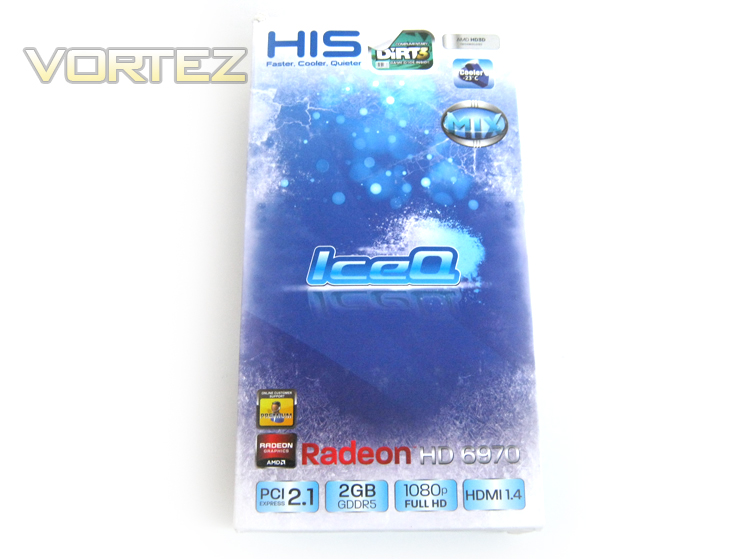
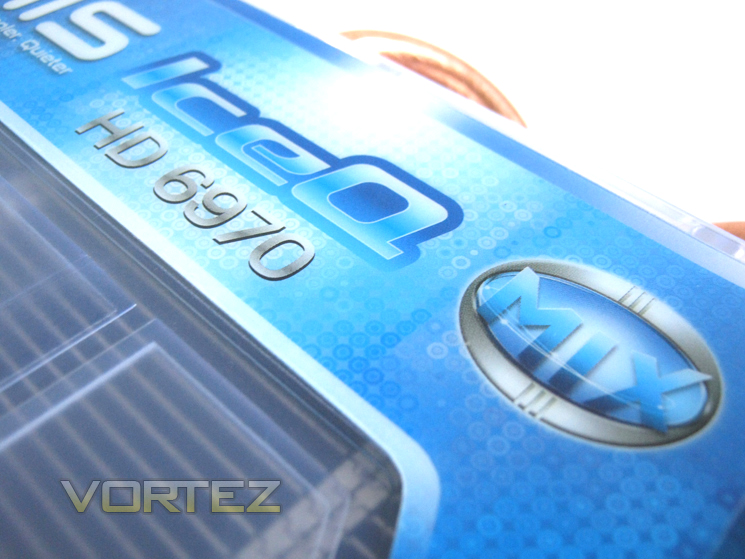
The HIS package is presented in a very stylish box taking up the ice theme of its cooling solution. The front of the box is dominated with the IceQ emblem, glossy embossed on a matt background complete with embossed snowflakes. The attractive theme is joined with product features displayed once again with raised, glossy emblems along with an additional sticker signifying that this product is the Mix variant of the IceQ family.
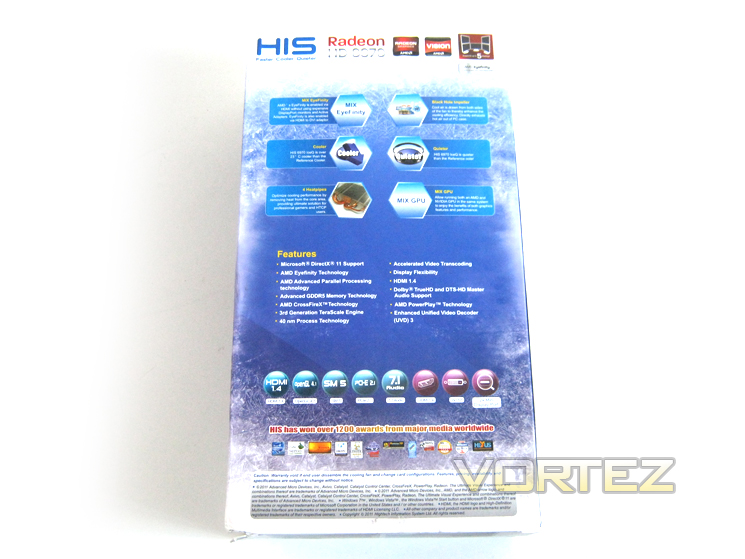
The rear of the box goes into greater details regarding the features of the graphics card highlighting that it is both cooler (up to 23c) and quieter than a reference cooled card. Unlike the HD6950 we reviewed recently, the HIS HD6970 supports up to 6 display panels with Eyefinity at once as opposed to the 4 panel setup support.
High quality components are also a bragging right of HIS with the company using All round solid state capacitors and enhance the lifespan of the card. Along with dynamic phase control (PWM IC), the HIS HD6970 IceQ Mix also features Solid State Chokes (SSC) that maximise power efficiency, cooling capacity and stability, especially important for those wishing to push the card beyond its factory settings.
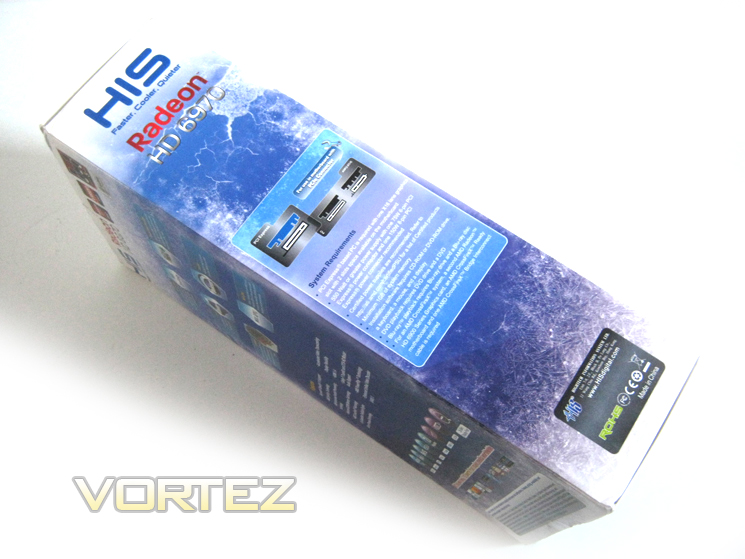
The left side of the box shows the system requirements with the major point being a 550w or greater PSU is requires to run the GPU with 75W 6-pin and 150W 8-pin PCIE power connectors being a minimum requirement.
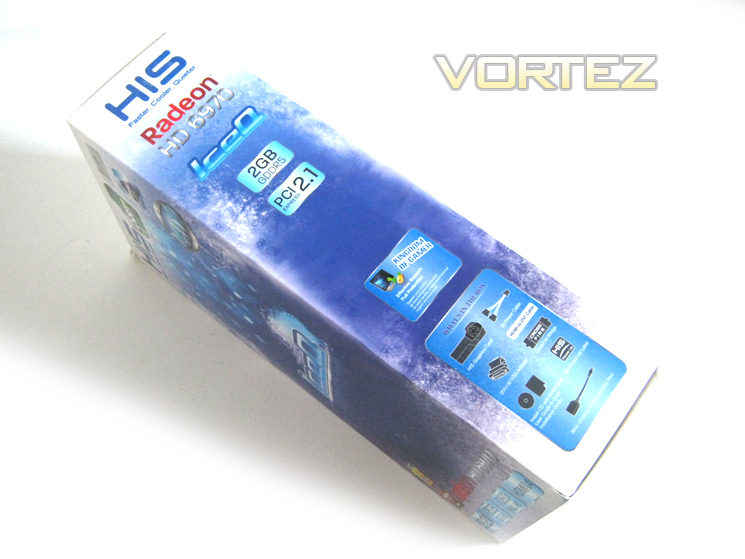
The right side of the box informs us of the package contents and HIS support details.
With the colourful outer sleeve removed we are greeted with the much more sturdy yet bland inner box which houses the graphics card and the accessories.
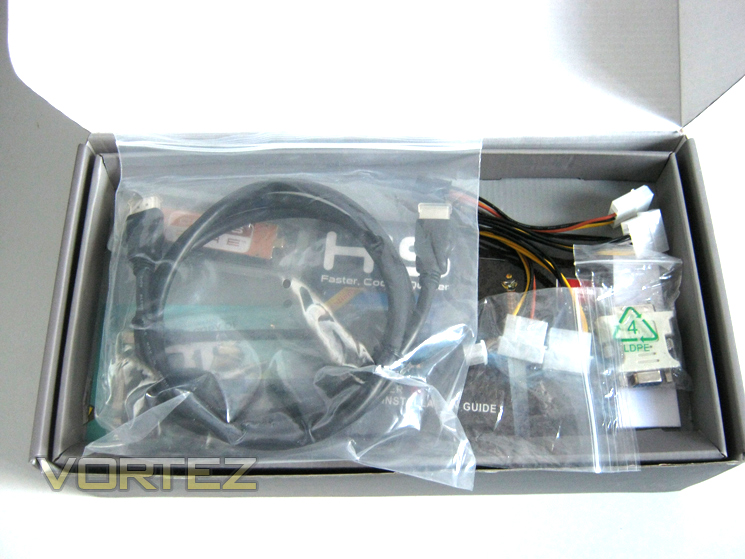
A removable compartment tray separates the accessories from the GPU.
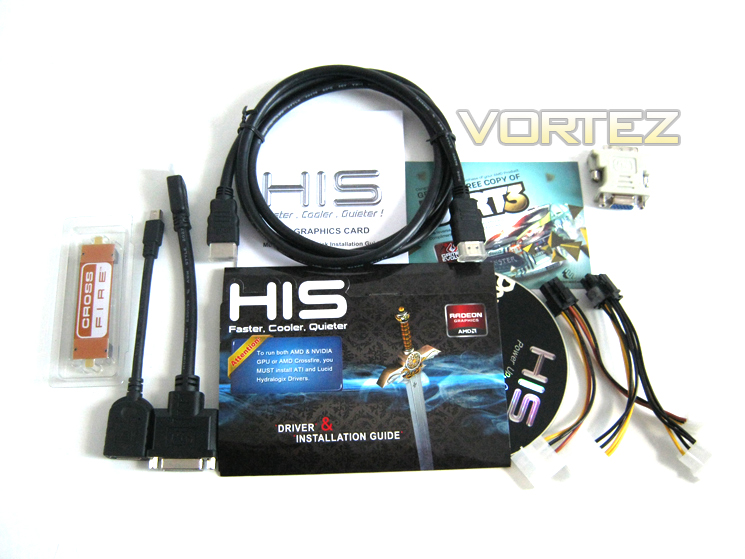
The included accessories are as follows:
– 1 x Dual MOLEX to 6 pin PCIe power cable
– 1 x Dual MOLEX to 8 pin PCIe power cable
– 1 x Crossfire Bridge
– 1 x DVI-to-VGA adaptor
– 1 x Multi-lingual quick-installation guide
– Driver disc
I liked the glossy CD wallet, which is certainly more appealing that the standard white paper affairs often used to bundle software and drivers. I would have liked the power cables to have been braided, possibly to match the blue theme of the card which would serve to promote this package as a premium offering but in all honesty, it is very unlikely that both cables would be used to power the card given that most modern PSU’s have at least a single 6 pin PCIe power cable. I am happy to report that our sample (along with retain versions) came with a DiRT3 voucher code allowing the buyer to download a free, fully licensed copy of the game via Steam.
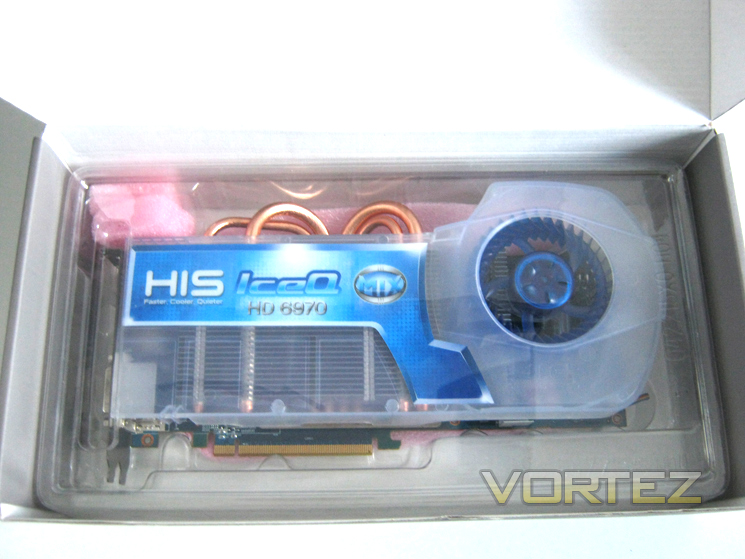
Finally we reach the card itself. The sturdy cardboard box it appears was not sufficient for HIS so they cradled the card in a plastic case, itself padded with Styrofoam to ensure the package reaches you in perfect condition.
Aside from the missing game and bundled software, the overall package is very well designed. The additional plastic casing should protect both from physical damage and static electricity and there was no movement (apart from the accessories) from within the box when doing the ‘shake’ test, testament to HIS’ packing quality.
Let’s take a closer look at the card itself…
Closer Look Pt.1
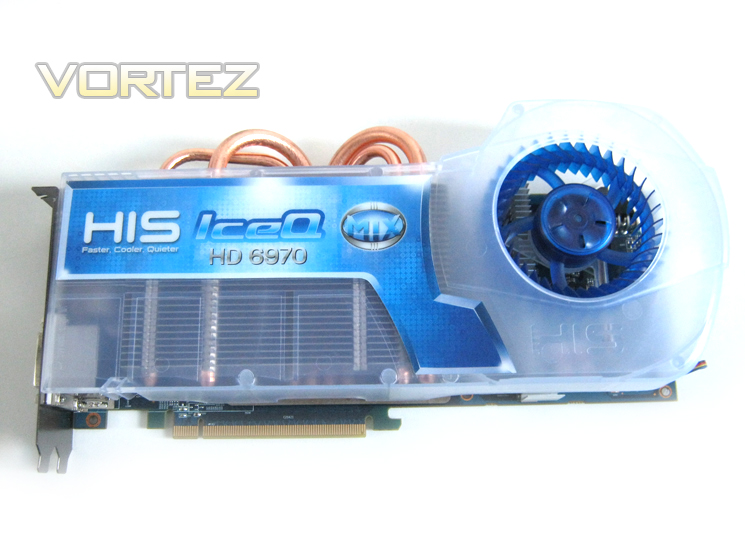
The first thing that strikes you when you first see the card is the mammoth IceQ custom cooler. Hidden beneath the opaque shroud is the main aluminium finned heatsink skewered by four copper heatipies. Following on from the ice themed packaged, the gloss sticker on top of the cooler was well lined up with the heatsink with no signs of peeling. Aside from the sheer size of the cooler, perhaps the most striking aspect of the card was the blue fan, houses traditionally towards the end of the card.
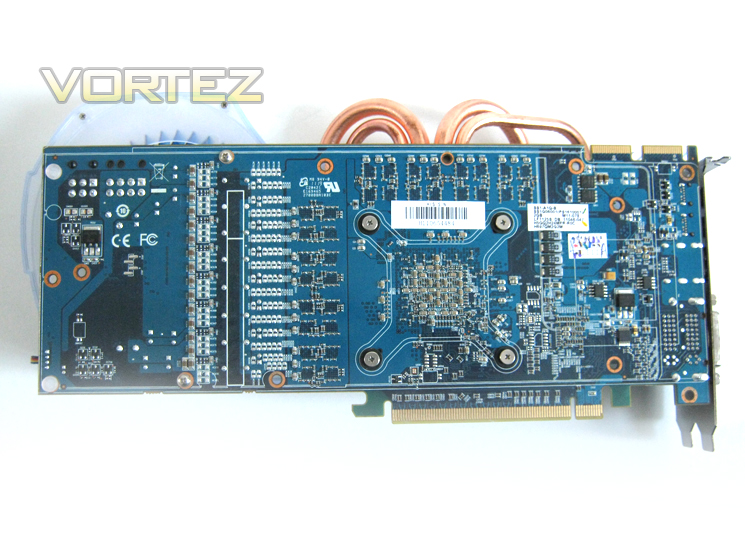
Flipping the card over we see that HIS have used a blue power circuit board to match the colour scheme of the card which enhances the overall aesthetics. While all of those bare transistors on display may hint at the power of the graphics cards, they are susceptible to damage and because of this I tend to prefer graphics cards with a protective backplate. Sadly, the HIS HD6970 IceQ Turbo does not have such a luxury which is a shame given the thought that has gone in to designing the card.
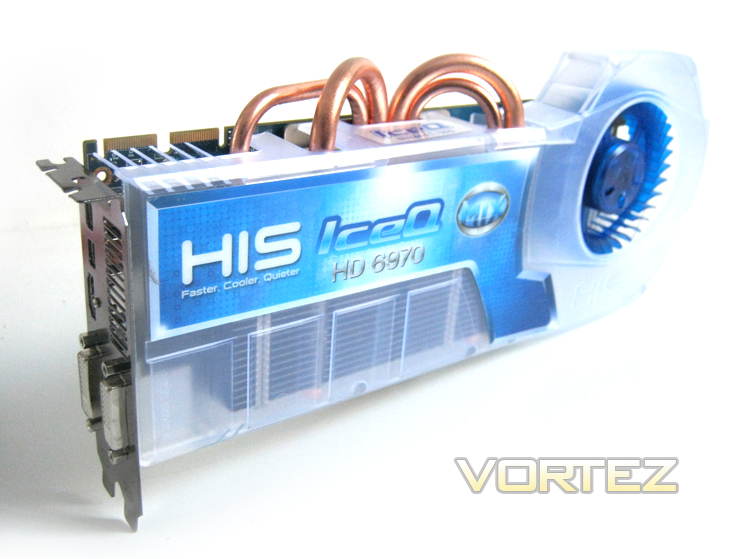
The card is certainly at the ‘full fat’ end of the spectrum, measuring a total 28.5cm (PCB 26.5cm) long and 12.5cm wide (PCB 10cm). The cooler is very attractive and covers the full length of the card. I most stress however that while the plastic shroud covers the majority of the aluminium heatsink, it is not a sealed unit and therefore has the potential to vent some of the exhausted air back into the case.
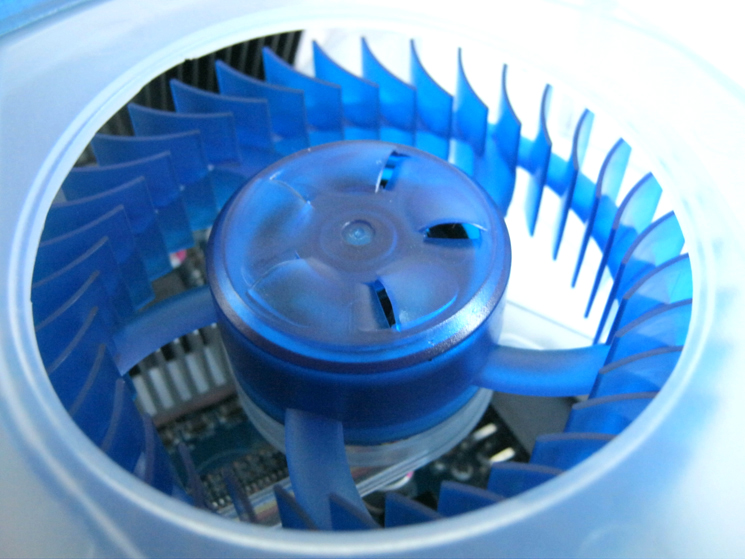
The large blue impeller appears at first glance to be similar to both ATI and NVidia reference fans but HIS are keen to state that their fan features ‘Black Hole’ technology. This design allows the fan blades to draw air from both sides of the fan making for a more efficient cooling solution. The air is then channelled through the heatsink towards the backplate vents and exhausted at the rear of the card.
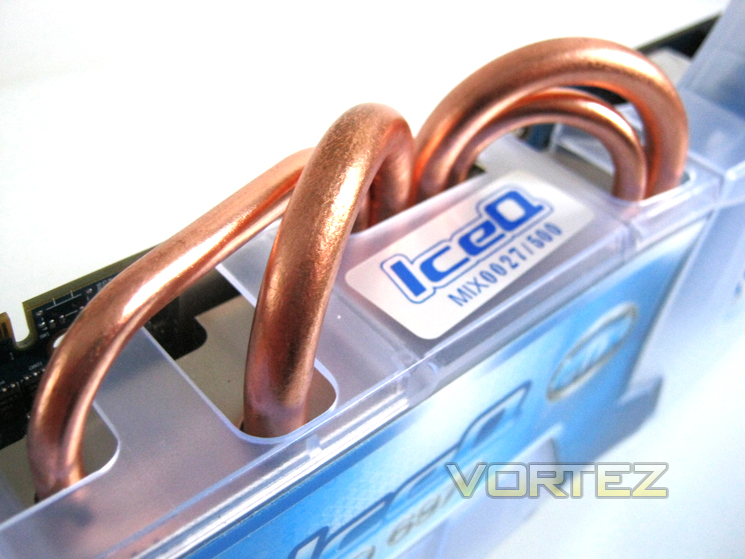
The GPU heatsink is aided by the use of four copper heatpipes in a 2x 6mm and 2 x 8mm configuration. The heatpipes work by drawing heat directly from the GPU core and spreading the heat along the heatsink surface. This makes for a dramatic increase in cooling efficiency and ensures the core is kept under the coolest, most efficient operating conditions throughout its usage.
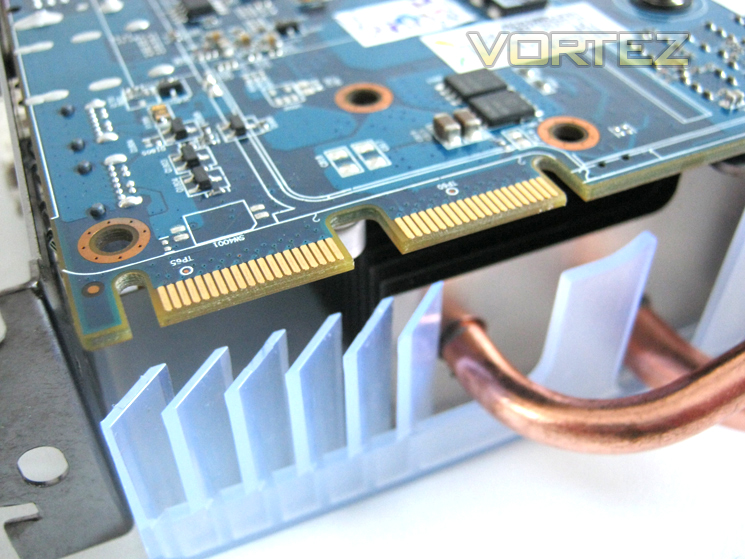
Hidden beneath the finned shroud we find not one but two CrossFire connectors allowing the HD6970 to be used in CrossfireX configuration. Unfortunately because of the sheer size of the GPU cooler adding more than one card to the setup will be extremely difficult as the cards depth almost fills 3 PCI slots! So unless you have a high end motherboard with well spaced out PCIe ports, it is unlikely you will make use of the additional CrossFire tab.
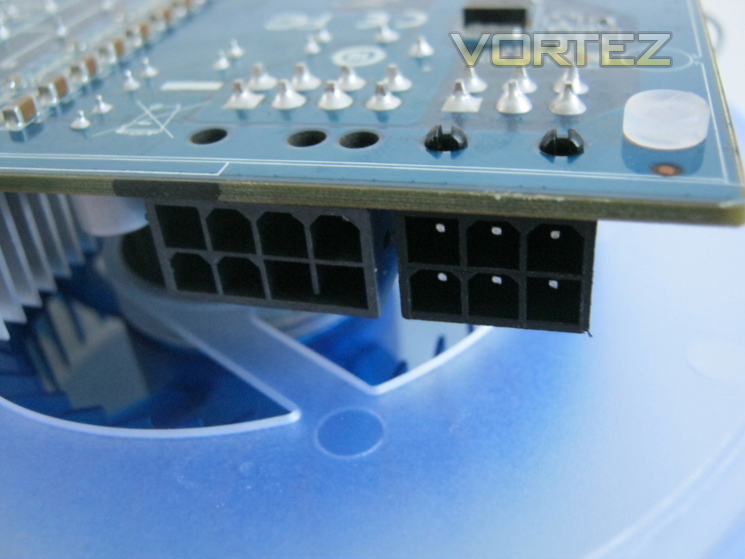
As you can see from the picture above, the cards cooler overhands the PCB by a fair amount (2.9cm) and because the PCIe power ports are below this overhang, adding the cable width and the cooler overhang together (apx 15cm depending on cable type) may present some fitment issues to those with a case that is not very wide.
The card requires 250W maximum to operate under the highest stress so with this in mind HIS have recommended a PSU of at least a 550w power rating. This power will be delivered by the PCIe port along with both 8pin and 6pin PCIe power connectors. Thankfully the included MOLEX adapters should ensure this is possible even if your PSU does not have the available PCIe plugs as standard.
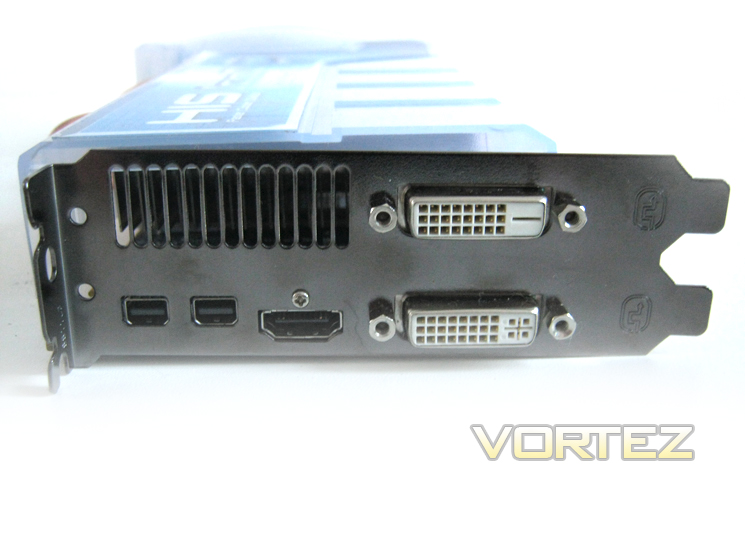
The I/O backplate features a varied selection of connections. To the right there are two Dual Link DVI-I ports capable of displaying up to 2560×1600 on a single display. As stated on the packaging, the HD6970 is also capable of utilising up to 6 displays taking advantage of AMDs Eyefinty multi-display technology. Moving slightly to the left we see the single HDMI 1.4a socket coupled with two mini display ports sporting the latest 1.2 standard. Finally we see that there is a vent allowing hot air to be expelled from the rear of the GPU.
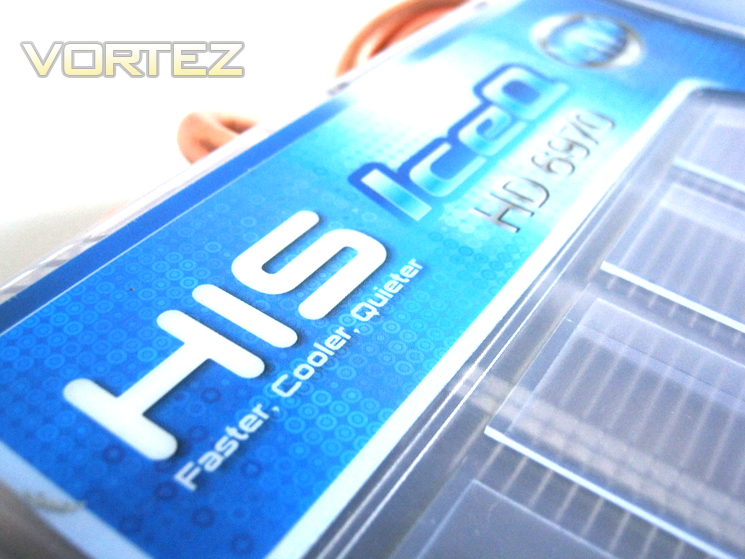
All in all, visually the card is identical to the HIS HD6970 2GB IceQ Turbo we reviewed previously save for the Mix sticker on the heatsink frame. Let’s take a closer look at the card while it is naked…
Closer Look Pt.2
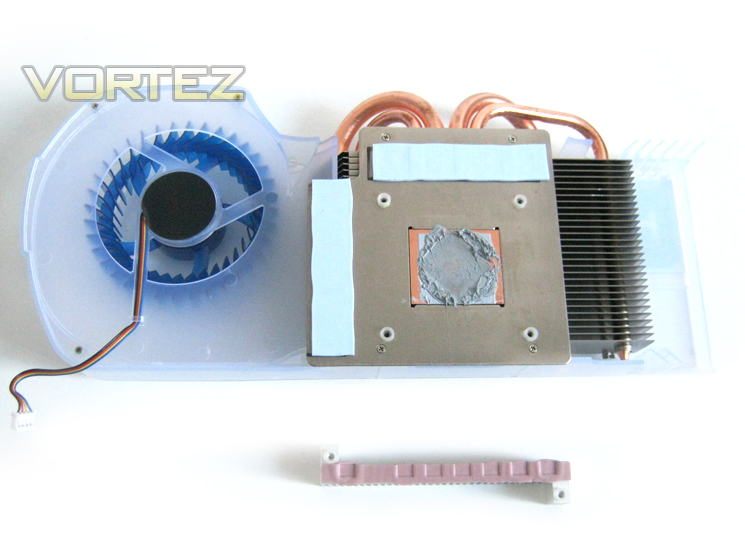
The cooler was very simple to remove with just four spring loaded screws holding the cooler to the card. A further aluminium heatsink is hidden beneath the mean cooler to provide direct cooling to the voltage regulators, attached by two screws with thermal pads used as an interface. The memory modules were also cooled directly with adhesive thermal strips providing contact to the main heatsink base.
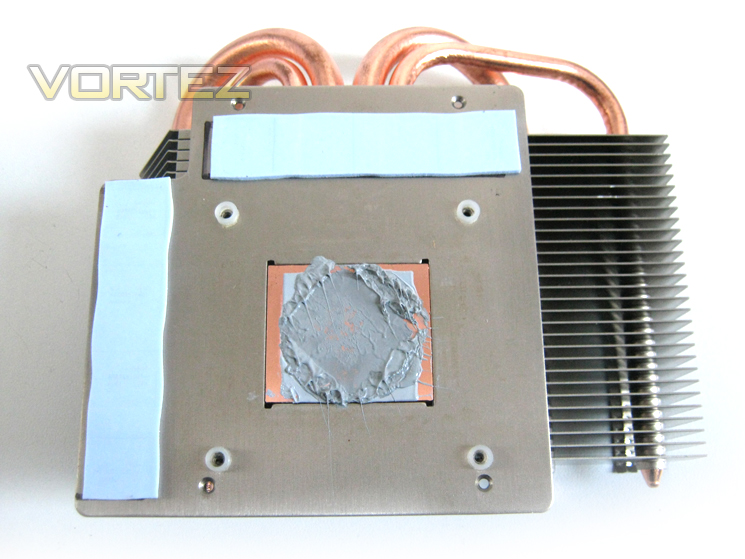
Despite its bulk, the actual heatsink is relatively small in comparison so it is clear the HIS IceQ technology relies heavily on airflow. Four copper heatpipes (2x6mm and 2x8MM) extend out from the baseplate to the aluminium finned array, equalising heatdump along the heatsink for maximum effeciency.
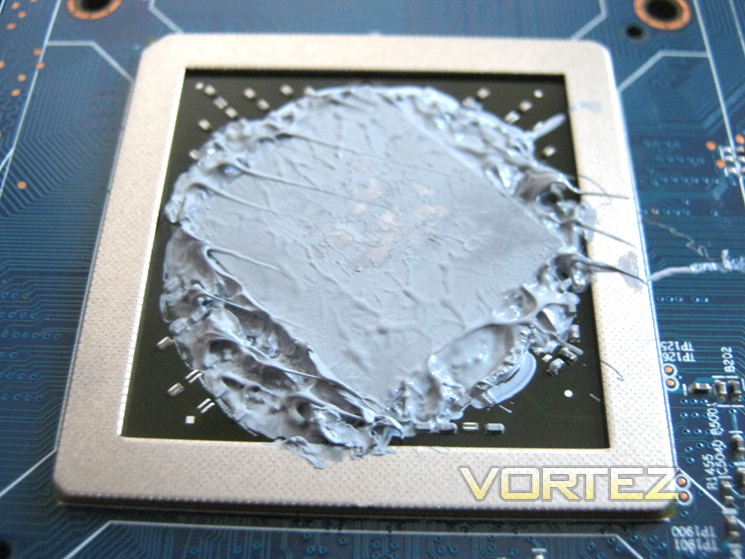
I found the GPU contact to be very good and the paste appeared to be of high quality, certainly not the usual putty like material found on GPU’s today but there did appear to be an excessive amount. I did wonder if this card had been tampered with previously as there appeared to be two types of thermal interface material used. Nevertheless, the spread was even across the core showing an even amount of pressure was applied by the spring loaded screws. The core itself, as per the norm on AMD GPUs, is exposed rather than having its own integrated heatspreader. The advantage of having an exposed core is more efficient cooling due to direct heat transfer to the heatsink. This advantage however can occasionally result in disaster for those clumsy enough to ‘nibble’ the core when replacing the thermal interface material themselves due to their being no protection. The surrounding metal frame on the GPU should however ease any mishaps, providing great stability and offsetting an potential uneven mounts.
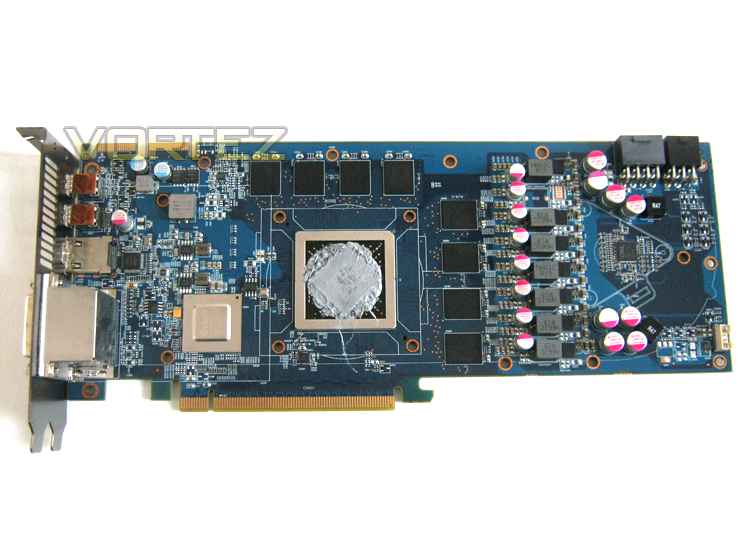
The card has very good yet traditional layout with the GPU core being centralised surrounded by 8 memory modules. If you intend on using the above image for volt mod referencing, please be kind and link back to us.
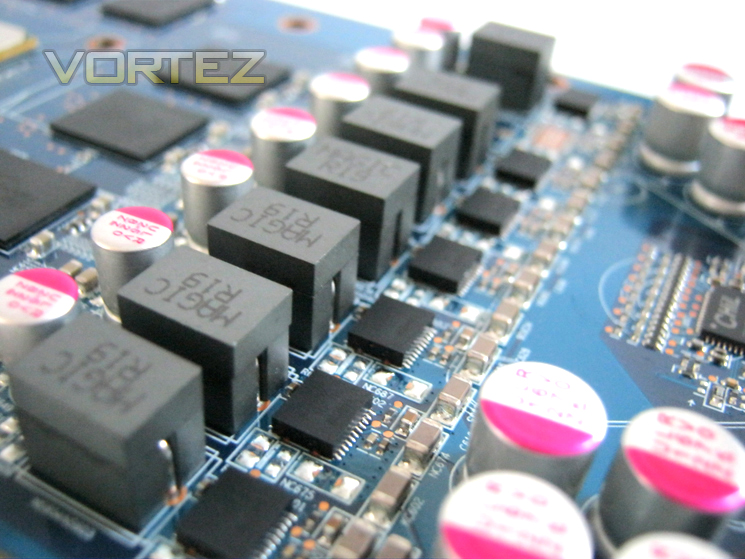
Quality solid state capacitors are used throughout which are coupled with solid state chokes which maximise current capacity will aid any potential overclocking ability the cards has. This card using solid state chokes which will provide excellent power efficiency and hopefully ensure our overclocks remain ultra stable. Couple this with solid state capacitors and you can overclock safe in the knowledge that your card will not go ‘pop’ after the slightest voltage increase.
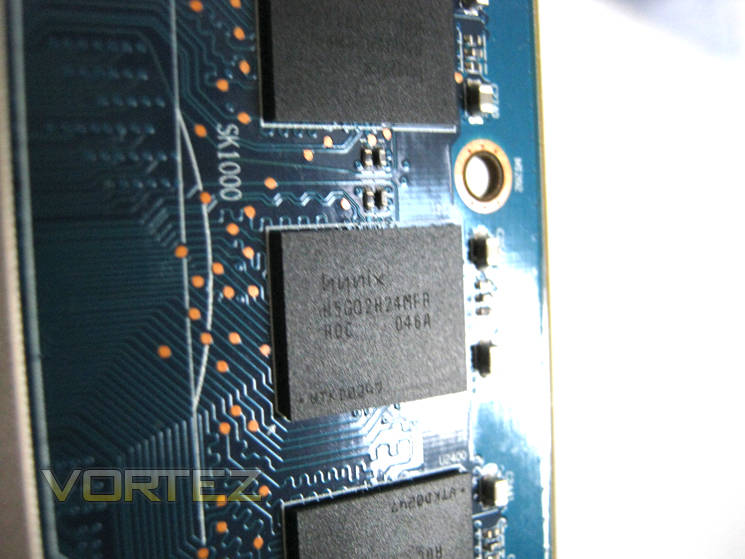
The HIS HD6970 IceQ Mix makes use of eight 256MB modules making up a very satisfying 2GB of GDDR5, perfect for high resolution gaming. The Hyundai (Hynix) H5GQ2H24MFR-ROC memory modules hail from the ROC stable meaning they are much more capable than the T2C variants found in the HD6950 we reviewed previously. The memory is rated to run up to 6.0Gbps with 1.6v so this cards memory speed of 5.5 appears very conservative. We therefore have high hopes of overclocking the memory as this type of module is among the very best GDDR5 available to date.
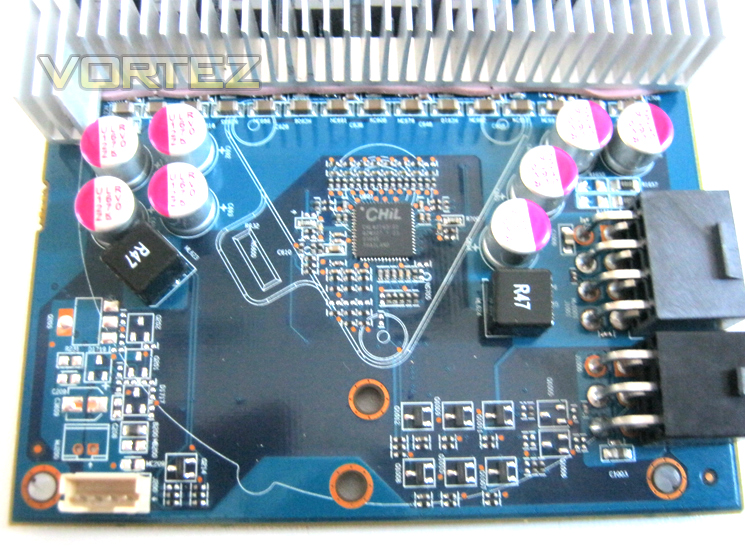
The ‘CHiL’ (CHL8212) dual loop, is a 2+1 multiphase PWM controller which operates from 200kHz to 1.2MHz per phase. It offers overclocking support with I2C voltage override and Vmax setting and efficiency shaping with Dynamic Phase Control(DPC. This enables the card to idle using just 0.9v and when placed under stress, the voltage will jump to 1.175v.
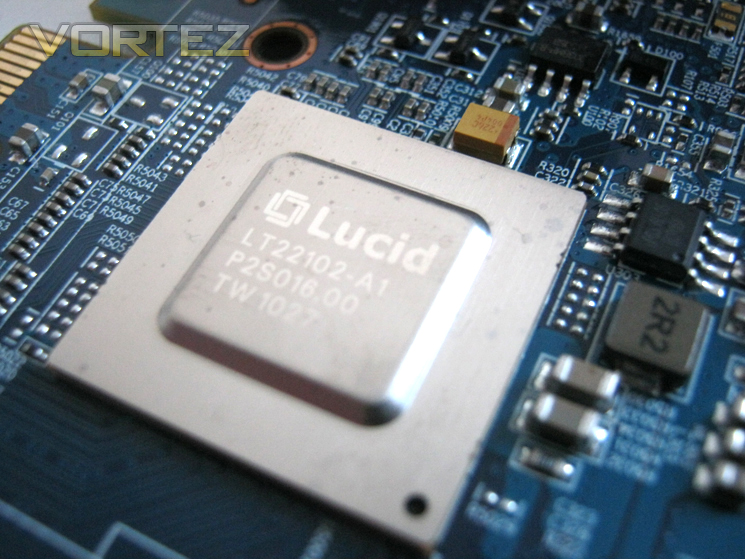
Finally, we come to the defining feature of the HIS HD6970 2GB IceQ Mix, the Lucid HydraLogix 200 SoC. The LT22102 chip itself is sealed behind a nickel coated copper integrated heatspreader but being that it only consumes 2W it doesn’t need any active cooling and the extremely small power footprint will make little difference in the greater scheme of overall power consumption.
I believe that pretty much covers all of the physical aspects of the HIS HD6970 2GB IceQ Mix so it’s time we got this show on the road and gave the card a thorough workout…
Test Setup
We have recently made a slight amendment to our selection of hardware and our test setup. The reason for this is that we felt the current crop of resolutions were not stressing the latest generation of graphics cards enough. With this in mind, we have added a Dell 3007 WFP-HC to our system, allowing us to stress the cards by utilising a 2560×1600 resolution. We will however, still include 1920×1200 results as this is one of the most popular resolutions used by gamers.Display – Dell 3007 WFP-HC
Case – Lian Li PC-P80
CPU Cooler – Prolimatech Super Mega (2xProlimatech 140mm Vortex)
CPU – Intel Core i7 920 @ 4GHz
RAM – 6GB (3x2GB) OCZ Blade DDR3 1600mhz 7-8-7-20 C1
Motherboard – ASUS Rampage III Extreme
Power Supply – Enermax Revolution 85+ 850W
Hard Drive – GSkill Falcon 128GB & Hitachi 250GB
Graphics Cards:
HIS HD6970 2GB IceQ Mix@ 880/5500MHz – ATI Catalyst 11.5
Lucid HydraLogix = HIS HD6970 2GB IceQ Mix & MSI nGTX580 3072MB Lightning Xtreme Edition @ Factory clockspeeds
Lucid HydraLogix = HIS HD6970 2GB IceQ Mix & MSI nGTX580 3072MB Lightning Xtreme Edition @ Factory clockspeeds
MSI nGTX580 3072MB Lightning Xtreme Edition @832/4200MHz & 975/4400MHz Overclocked – Forceware 275.33
ASUS HD6990 @830/5000MHz & AWSUM enabled (pre-overclocked) 880/5500MHz & Further Overclock of 930/6000MHz – ATI Catalyst 11.5
HIS HD6970 2048MB IceQ Turbo @ 900/5600MHz Pre-overclocked & 1000/6000MHz Overclocked – ATI Catalyst 11.5
Gigabyte GTX560 1024MB @ 830/4008MHz & 841/5016MHz Overclocked – Forceware 275.27
MSI R6970 2048MB Lightning @ 940/5500MHz Pre-overclocked & 1010/6000MHz Overclocked – ATI Catalyst 11.4 (8.840.3.0)
Inno3D GTX560Ti 1024MB @ 820/4008MHz & 950/4300MHz Pre-overclocked –Forceware 266.66
Inno3D GTX570 1280MB @ 732/3800MHz, 800/4000MHz Pre-overclocked & 901/4220MHz Overclocked – Forceware 263.09
ASUS GTX580 1536MB @ 782/4000MHz & 903/4220MHz Overclocked – Forceware 262.99
ASUS HD6970 2048MB @ 890/5500MHz & 949/5896MHz Overclocked – ATI Catalyst 11.4 (8.840.3.0)
Driver versions are extremely important when comparing a graphics card. It is however often important to update a driver version, especially when a new GPU is released and thus any change in driver will be clearly stated.
*Please Note*
For Lucid HydraLogix Multi GPU testing, the following drivers were used due to compatability issues:
HydraLogix 200 SoC – HydraLogix Engine 1.7.105
HIS HD6970 2GB IceQ Mix – ATI Catalyst 11.3
MSI nGTX580 3072MB Lightning Xtreme Edition – Forceware 266.58
Overclocking
For today’s review we will use the Afterburner utility from the MSI to overclock the test subject.
Games:
Crysis Warhead
Metro 2033
Dirt 3
Mafia II
Battlefield: Bad Company 2
Far Cry 2
Alien vs. Predator
The games above represent equal bias toward both AMD and NVidia and are among the most demanding games available at present. Future releases will be evaluated for consistency and accuracy and then potentially added to the list when they become available
Synthetic benchmarks:
Futuremark 3DMark 11
Unigine Heaven 2.5
Tessmark 0.2.2
Furmark 1.9.0
Synthetic benchmarks are used to stress each feature of a GPU which may not be present in today’s games. While nothing is certain, the benchmarks above do at least give us an insight into the possible future performance of the graphics card on test, invaluable when evaluating the potential lifespan of a graphics card.
Temperature, power consumption and acoustics:
Furmark 1.9.0
The above application is feared by most manufacturers as it has been known to destroy GPU’s. While it is not indicative of ‘real world’ performance, it does represent the maximum possible stress your GPU could be placed under making it the hardest test to pass. For that reason alone, it is worthy of inclusion in our suite of benchmarks. Power consumption will be evaluated from the wall and will be a total system draw of the specification above.
Sound will be measured from a distance of 20 cm from the actual GPU with the case open. All system fans will be set to their lowest settings. Readings will be taken at both idle and 100% load.
Bundled Software
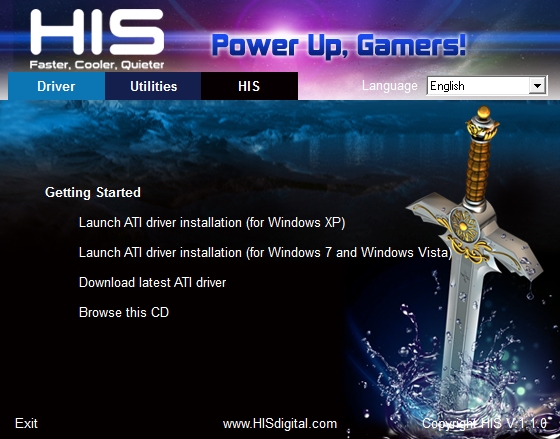
The included utility disc is nothing out of the ordinary with out of date (as expected) GPU drivers for Windows XP, Vista and the latest Windows 7 incarnations. Thankfully, there is also a link which will take you to the AMD support site rather than HIS’ own, ensuring that you have the latest driver available for download.
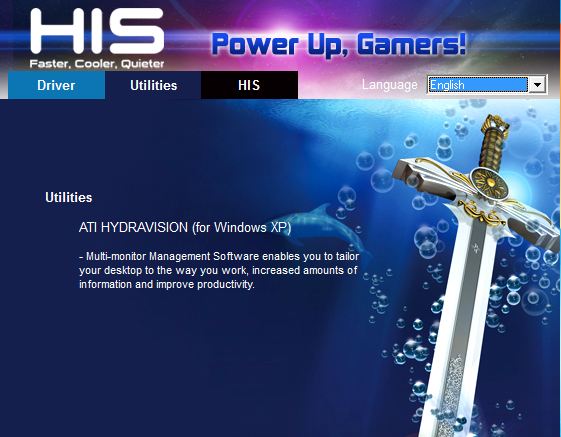
In terms of utilities, HIS bundle a multi-monitor management software known as Hydra-vision. These are already implemented in the Catalyst Control Centre so there is no need to install the utility separately. Sadly there are no overclocking or monitoring utilities included on the CD other than an outdated Catalyst control centre which you would be wise to update along with the included driver. This is a real shame given the graphics card on test and its potential.
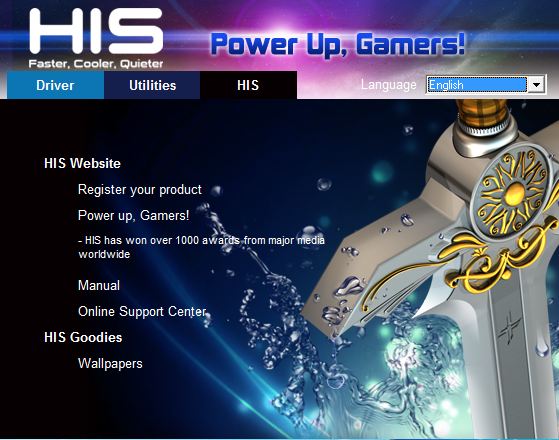
Navigating to the final tab allows you to register the product (Member registration also required). Clicking on the next title down takes you to the HIS awards and Reviews section of their website where they link to reviews of previous hardware which has won critical acclaim.
An area where the HIS does excel is the detailed instruction manual. A downloadable .pdf file describes basic installation and backplate removal in good detail. Below this we find a link to the online support centre, assuming you have taken the time to register both yourself as a member and the product previously.
Lastly, we arrive at the included wallpapers which are of good quality and cater for various resolutions. All of the included wallpapers feature the Excalibur sword, a familiar trademark of HIS digital.
Overall, I was somewhat disappointed there there wasn’t an included overclocking utility other than AMD’s own Overdrive utility included with the Catalyst control centre. To make up for this loss however HIS have sweetened the deal somewhat by including a fantastic game to show off your new hardware, Codemasters Dirt 3 which will certainly make the package a much more appealing to the masses.
While there was no direct link via the software menu, by exploring the driver disk we did manage to find the latest version (1.7.205) of the HydraLogix Engine driver.
Let’s see how far we can push this card in the overclocking section…
Overclocking & Temperature Analysis
Overclocking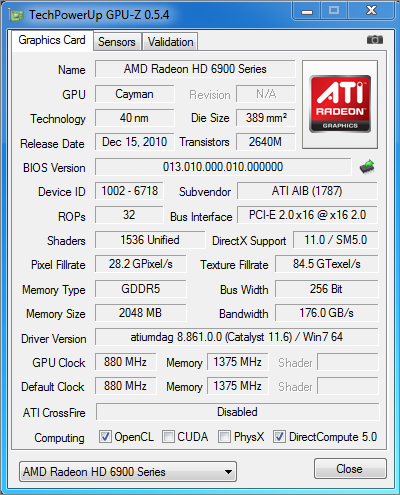
As you can see above, the stock card weighs in at 880MHz on the core and 1375MHz on the memory. This is attained with a VCC of 1.175. Using the Afterburner tool from MSI I began by going for broke, raising the Core Clock and Memory clock options to their maximum values (950/1450). Unfortunately, this made the setup lock up almost instantly as soon as any 3D application was started.
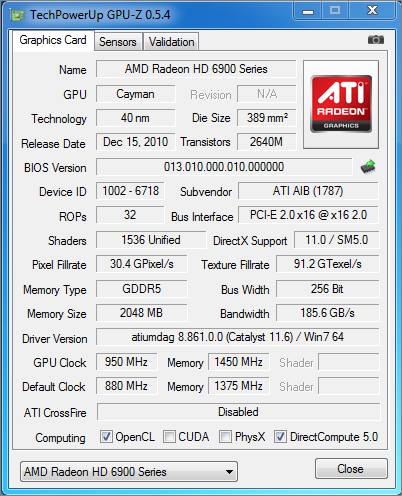
Being a little tamer on the overclocks and spending more time with the overclock settings, I achieved a respectable extra 35MHz on the Core and 52Mhz on the memory with no voltage increase. This wasn’t a bad result but I still felt the card had much more to offer so I raised the VCC from 1.175 to 1.299 which allowed the maximum overclocks of 950Mhz on the Core and 1450 (5800MHz effective) on the memory, an excellent result! Sadly this was as far as Afterburner or Overdrive would allow me to push the card but I have little doubt clocks could be tweaked even further with a little BIOS editing as esentially, the card is the same design as the Turbo Edition which breezed 1000/6000MHz.
Temperature
To measure the temperature of the card we first measure the ambient temperature. Our review station resides in an air conditioned room with the temperature set to a comfortable 23c.
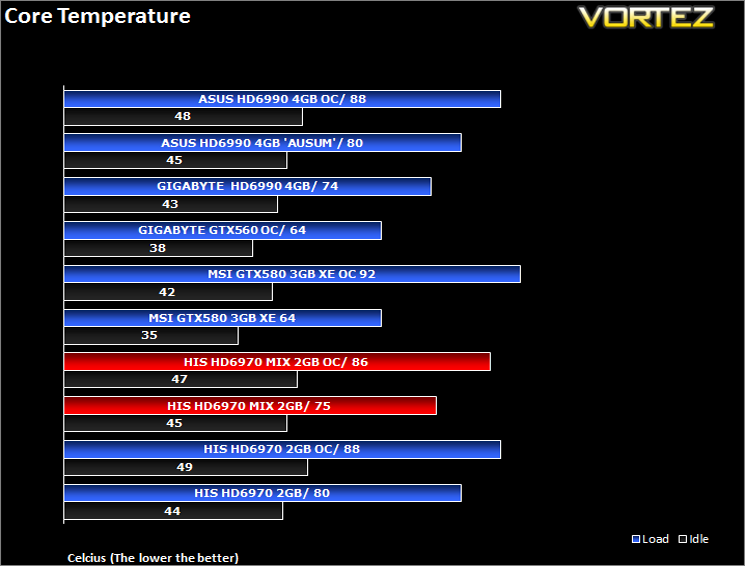
In stock, idle state, the GPU temperature is a hovers at 44c. Not a great results given the size of the cooler but at idle, the GPU is silent. This is with the GPU in its power saving state running @ core:250mhz, memory:150Mhz with a power draw of 4W (0.900v).
Placing the GPU under 100% load and running at its factory settings of 880/1350MHz (Core/Memory) we see the temperature steadily rise along with the fan speed. The highest temperature after 5 minutes reached a plateau at 75c. This was with the fan running automatically (66%) at 2121 rpm.
With the card fully overclocked using the optimised settings found in the overclocking above, the temperatures were slightly higher as expected, settling at a maximum 85c after 5 minutes using the ‘Burn-in test’ of Furmark, returning to an idle 45c in a matter of seconds once the test was complete. In the interests of completeness, I let the Burn-in test run for a further hour and I am happy to report that the temp did not budge from the same 85/86c although the air conditioning in the room was working a little harder that before!
As Furmark was used for this series of tests it is unlikely that your GPU will exceed these temperatures under normal gaming conditions. As such, these results should be interpreted as a ‘worst case’ scenario and are testament that whatever your game, if the card can cope under the immense stresses that Furmark has to offer, it will be able to compete with any gaming scenario.
Power Consumption & Acoustics
AcousticsOften overlooked when purchasing a graphics card is the noise that it emits. We all hear (no pun intended) of graphics cards that run like a jet engine which can have a detrimental effect on a gaming session, regardless of the FPS it churns out. It is therefore extremely important that a graphics card should operate as quietly as possible.
To test for this we will be using a sound meter and microphone setup which will be placed 20cm away from the GPU. The test will take place in a quiet (not sound proof) room with the results for the GPU fan at low (30%) and highest (100%) settings.
Results
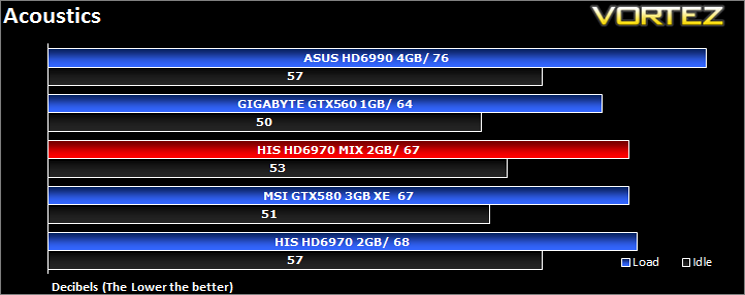
The fan cannot be heard above the system fans at their lowest setting, reaching a peak of 57dB during the 5 minute test. With the fan set to maximum it was certainly more noticeable but it has to be said, much quieter than reference hitting a maximum 67dB and while it would definitely be intrusive using a speaker setup, I could not hear it while gaming and using an enclosed headset.
Power Consumption
For this test, we will be using a wall meter with the test setup plugged in minus the Monitor. Readings were taken at both stock and overclocked conditions each having readings also taken in idle and 100% load (Furmark).
Results
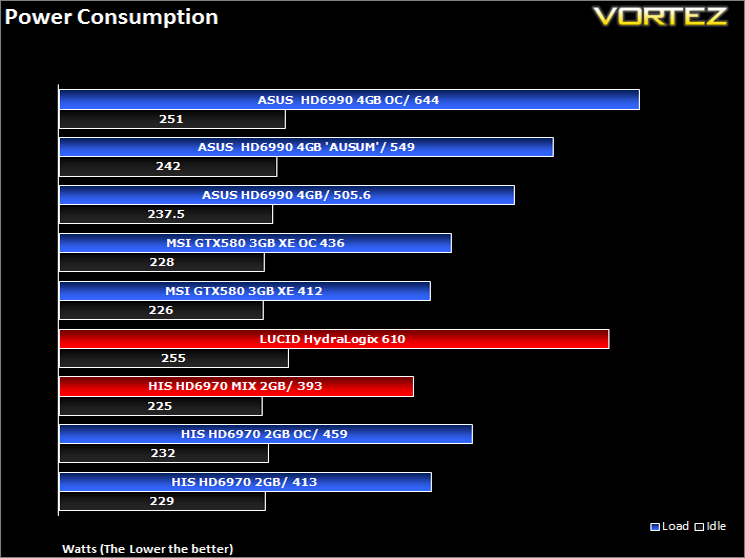
Despite consuming more power than the much less hungry GTX560, the HIS HD6970 IceQ Mix was still surprisingly frugal, even when placed under load. Our test setup is certainly not low end by any stretch of the imagination so with HIS recommending a 550w PSU as a minimum, I believe we have shown that should you not heavily overclock your setup you could perhaps get away with a PSU slightly less powerful and still have a little headroom. The tables are turned however when you add a powerful card such as the GTX580. With both cards running in tandem, power consumption rocketed to over 600W! While I doubt anyone would buy a GTX580 to pair with a HD6970, it certainly shows the power requirements of running two high end cards together will impact heavily on your electricty bill!
Let’s move on with the review and get to the bread and butter; the synthetic and gaming benchmarks…
Crysis Warhead
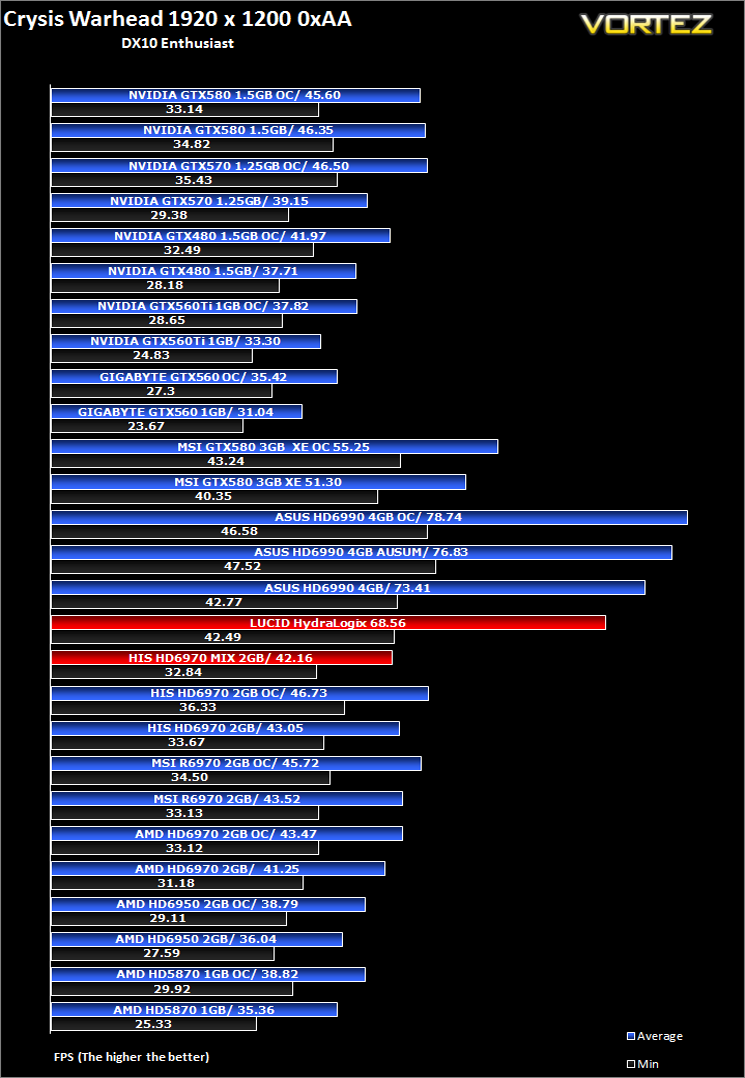
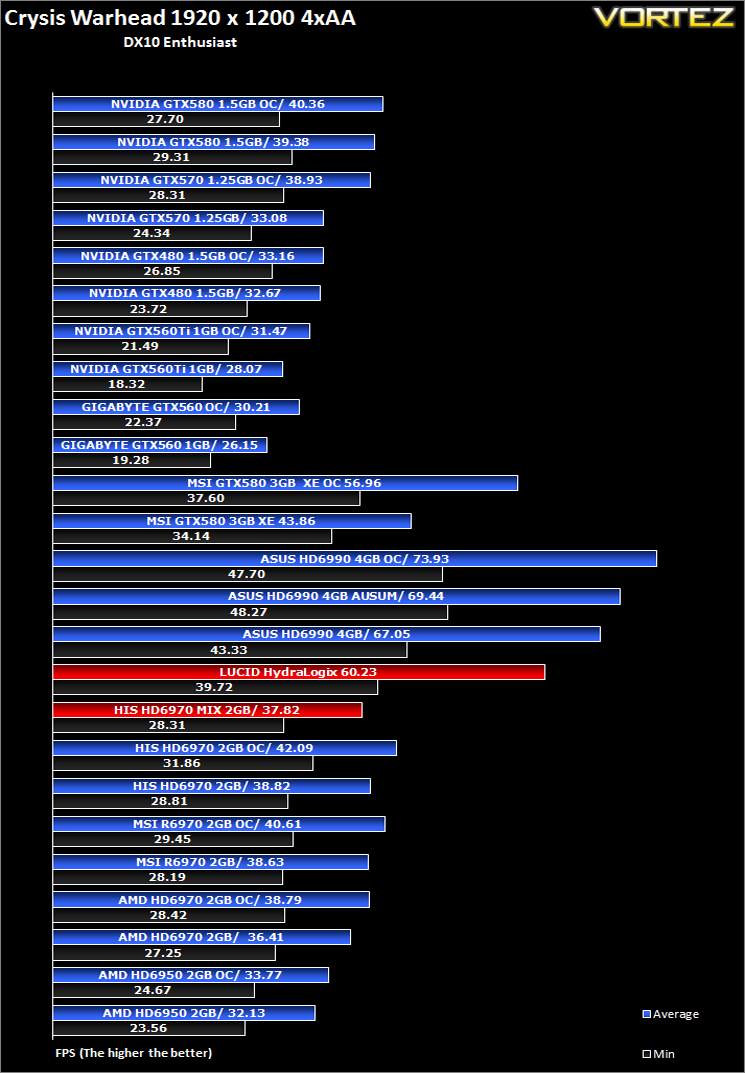
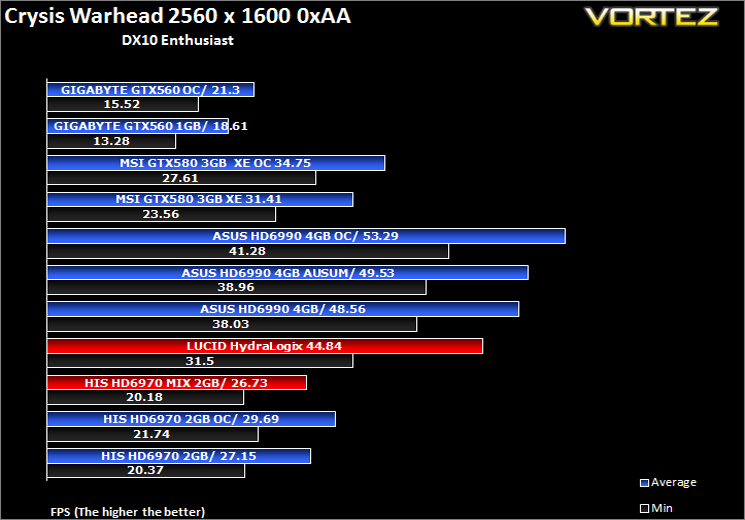
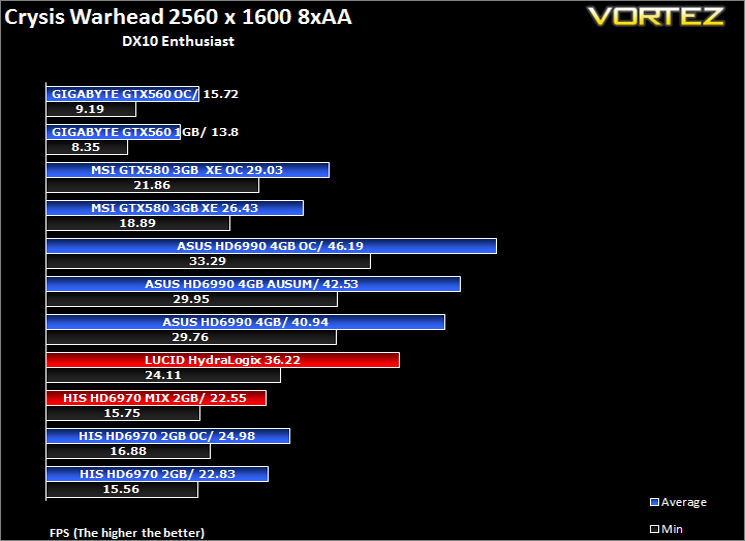
Following the success of Crysis, the stand alone expansion “Warhead” was hotly anticipated to bring more game play, more weapons, improved visuals whilst maintaining better performance, the latter being what gamers wanted most. After all how many people upgraded their rigs just to play this game… In the game, you play as the upbeat Brit Sergeant “Psycho” Sykes, chasing down a Korean nuclear warhead. Throw in some ice shooting aliens and we’re bound to have a great game. It sure delivered.Testing was done using Framebuffer’s Crysis Warhead benchmarking tool. The tests were configured to DirectX 10 at Enthusiast levels. Each test on the Ambush map was looped three times from which the average FPS was recorded.
Far Cry 2
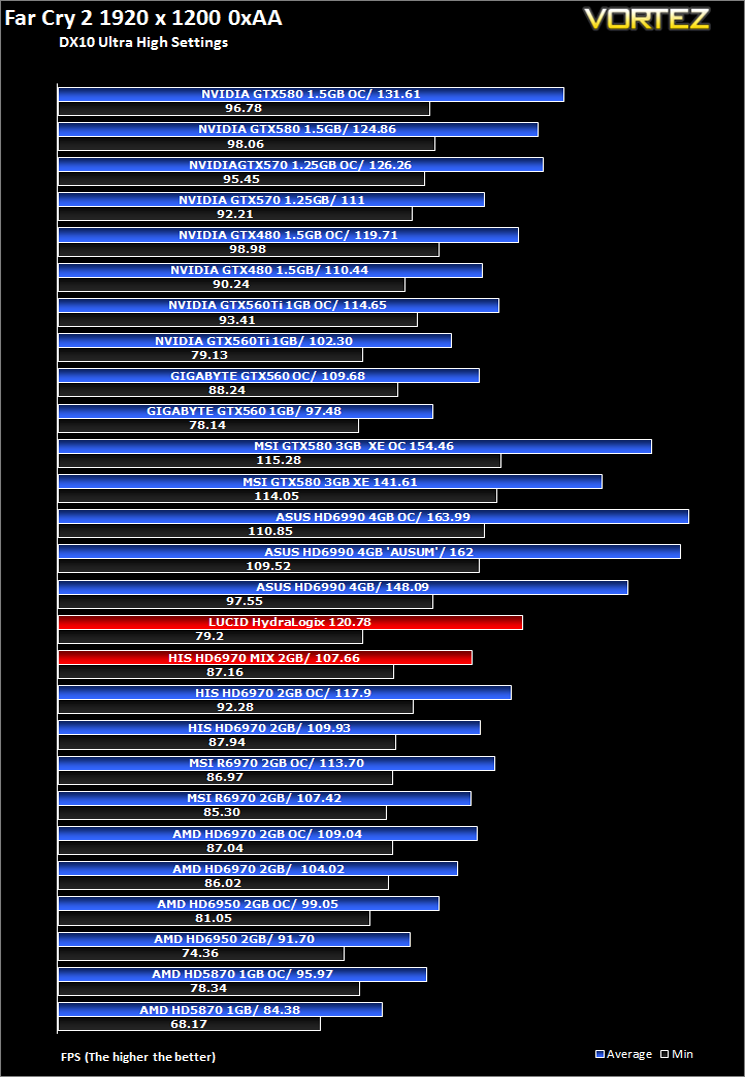
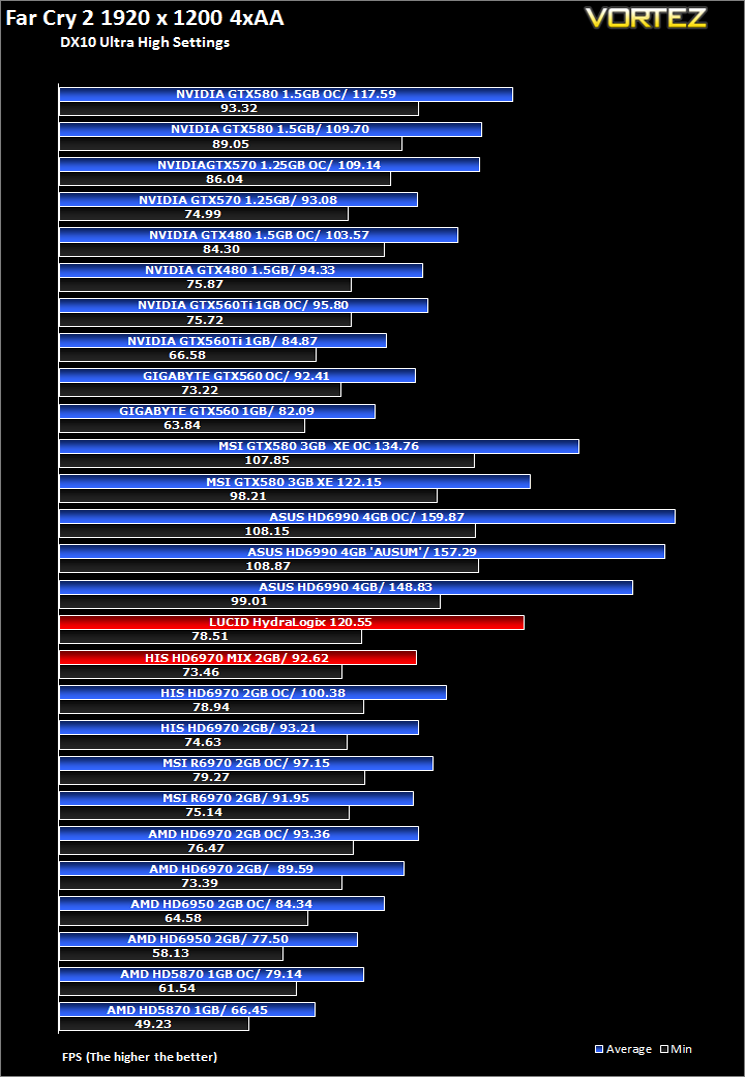
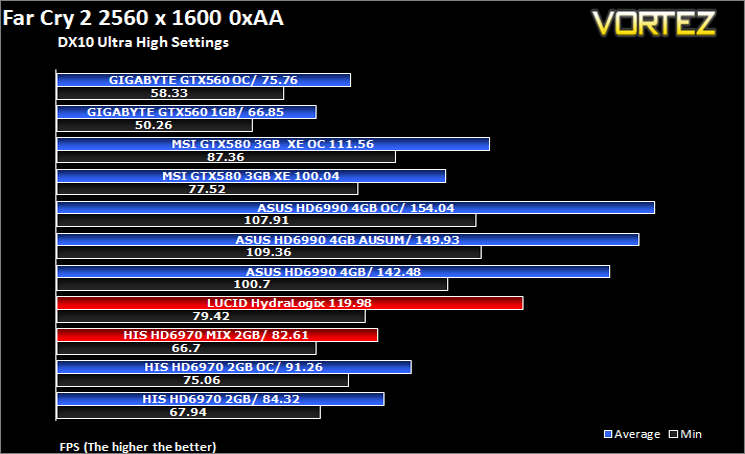
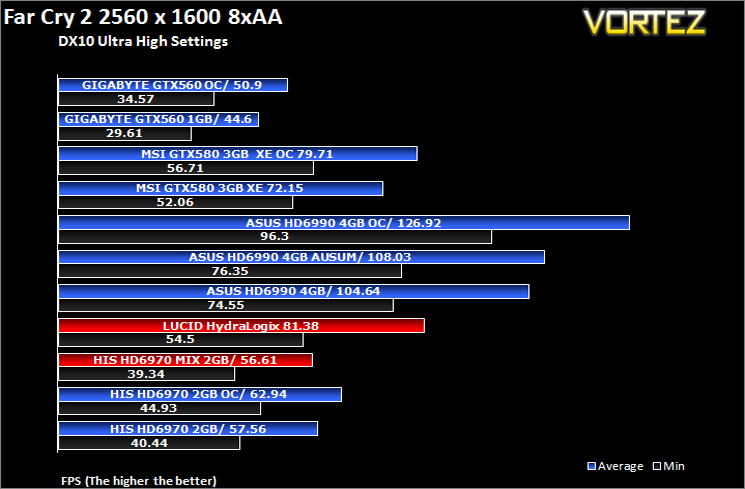
One of the most hyped games of 2008, Far Cry 2 had some big shoes to fill. It was built to be the next best thing since well… Far Cry I suppose. Combining an open-world game play with highly detailed graphics, physics and AI, what more could we possibly want? The game puts us in the body of a malaria inflicted mercenary hunting down the “Jackal” in the heart of Africa, in a bid to stop an on-going conflict between two rival factions. The storyline can be hard to follow sometimes but I’m no game reviewer, so let’s concentrate on the graphics and performance. After all, we all need to know if our hardware will be able to handle the scorching savannah burning at the hands of our flamethrowers.The bundled benchmarking tool was used on Far Cry 2, configuring the settings to Ultra and DX10. The small ranch level was chosen and each configuration was looped three times from which the average FPS was recorded.
Metro 2033
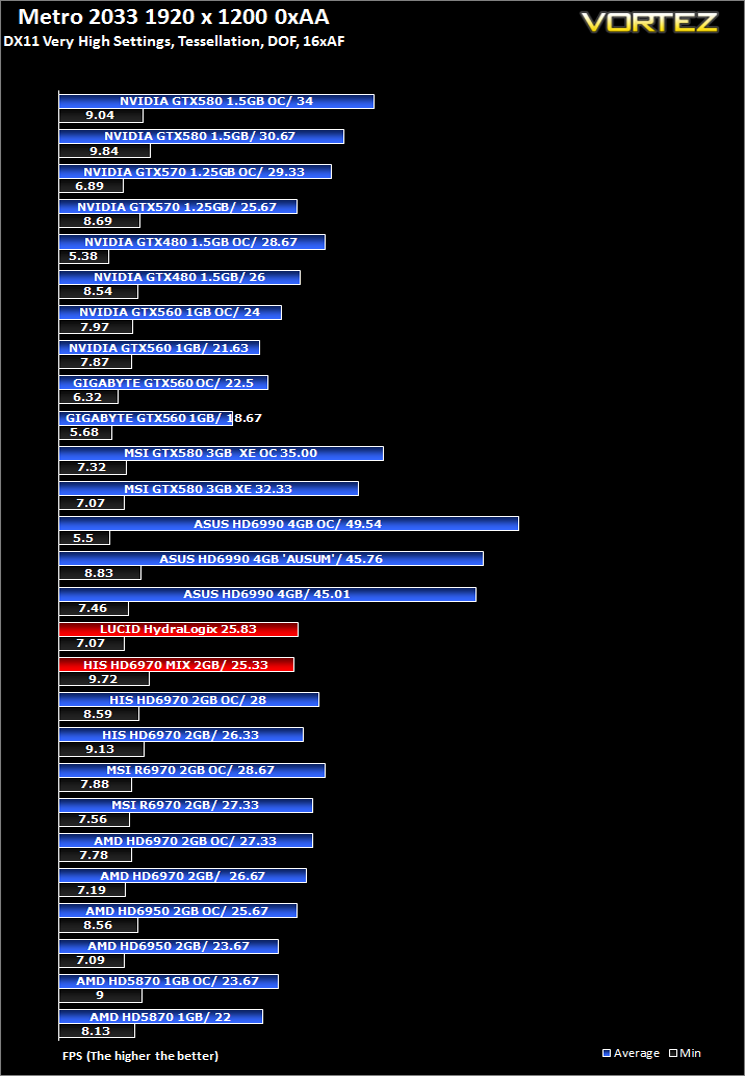
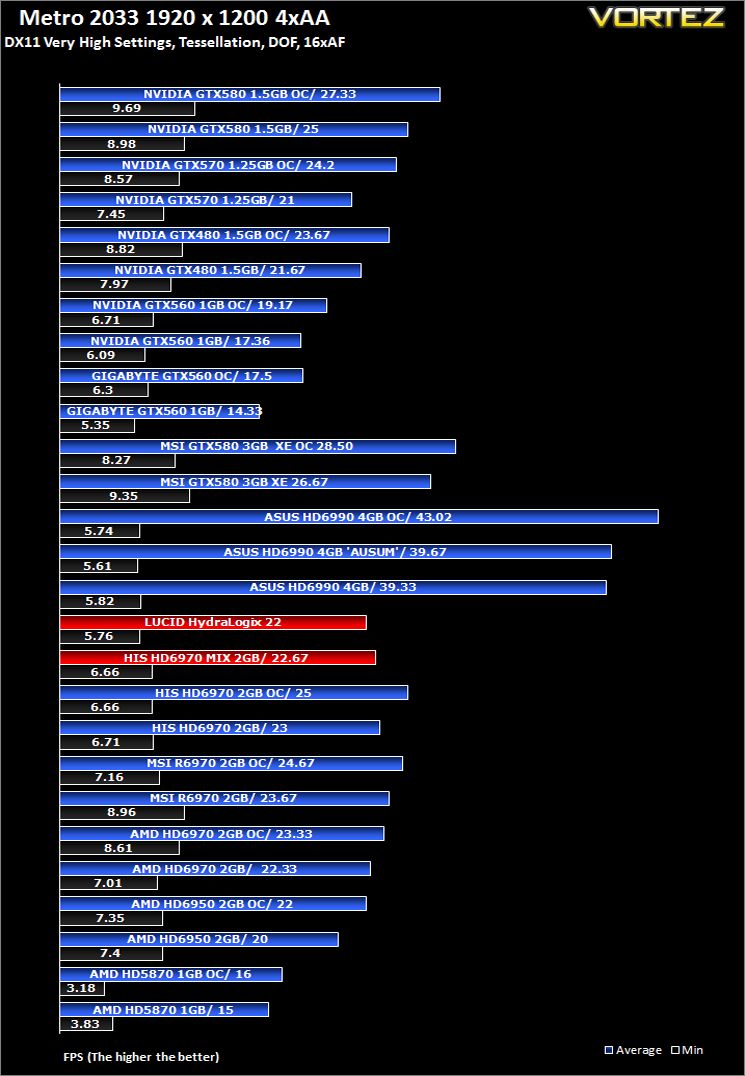
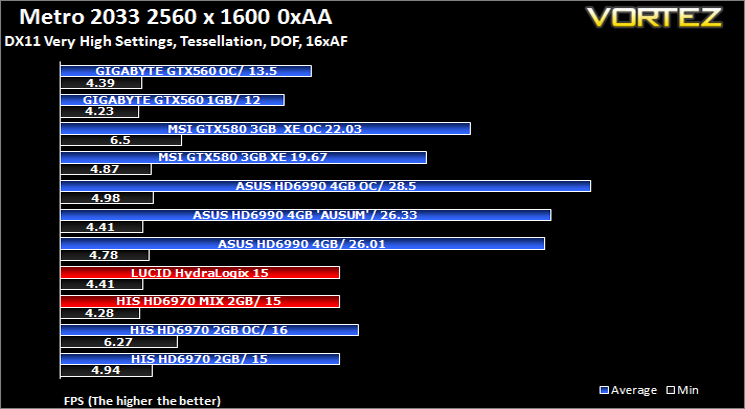
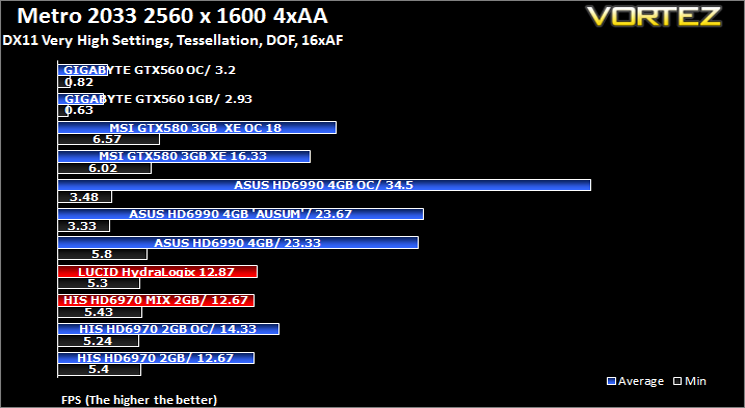
Based on the novel by the same name, Metro 2033 is a first person shooter with elements of survival horror. As Artyom, you trawl through the mutant infested metro systems of post-apocalyptic Moscow. The game delivers presents a grim ambience that reflects on the overall atmosphere of the underground setting. Metro 2033 uses the setting as a back drop to showcase some of the best visuals of any games out now, making it the ideal benchmark for those looking for the best graphics card.The bundled benchmarking tool was used on Metro 2033, configuring the settings to Very High and making use of DirectX 11. The frontline scene was looped 3 times for each configuration. The average FPS was recorded at the end.
Alien Vs. Predator
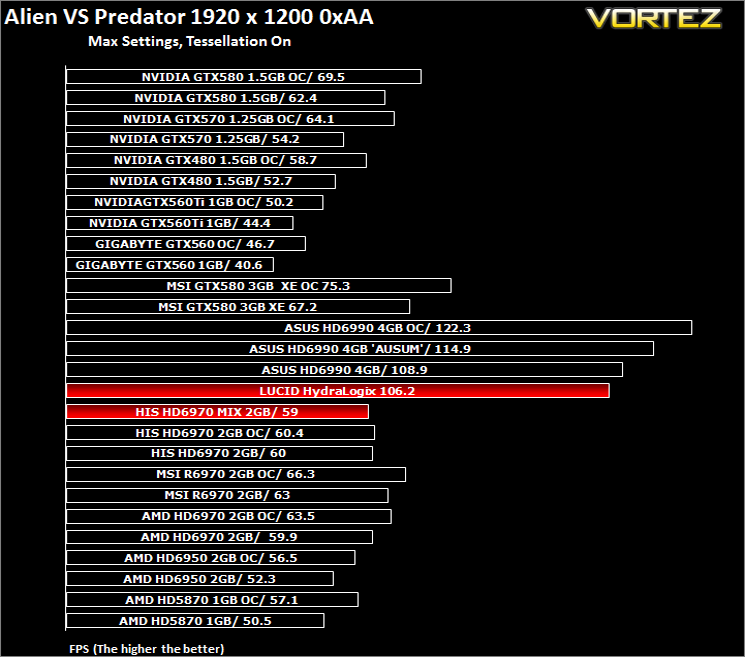
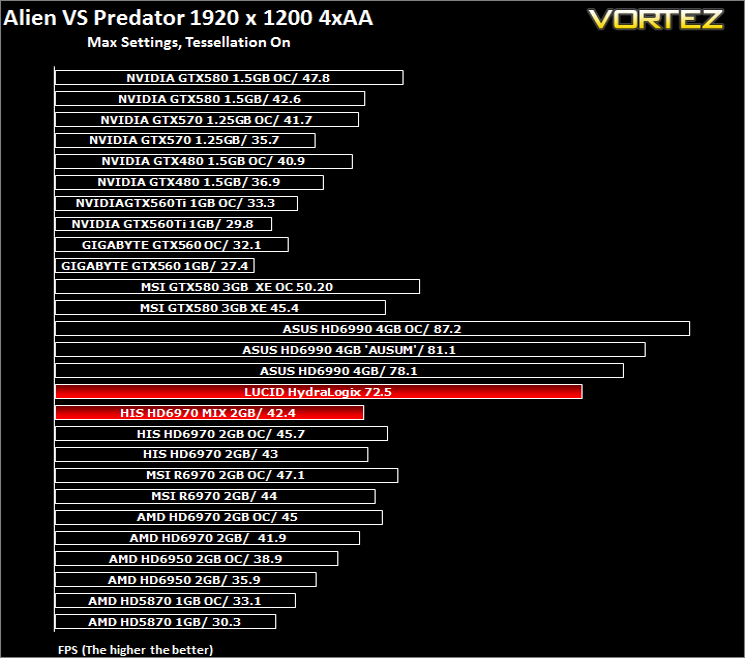
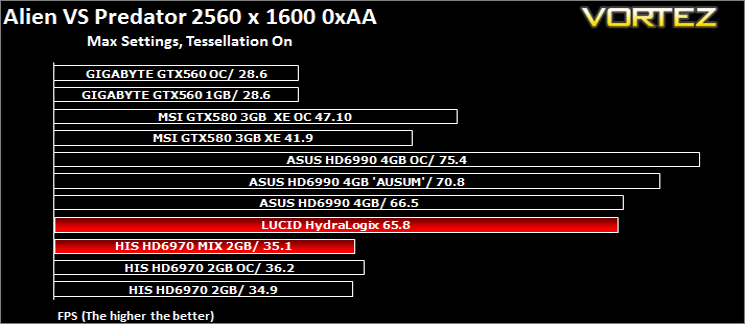
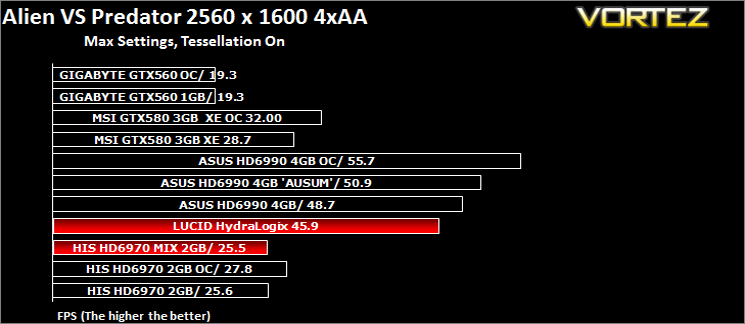
Spawned from the popular Alien and Predator franchises, Rebellion have collaborated to bring the legendary war to us through the medium of a first-person shooter. The game forces you to hunt, prey and most importantly survive in the swamp colony of Freya’s prospect as a Predator, Alien or Marine. The stunning visuals add to the sense of dread and terror that we have become so accustomed to seeing with the series.The stand-alone Alien VS Predator benchmark tool was used for testing here. All the settings were set to very high and Tessellation was applied. The average FPS was recorded at the end.
Battlefield: Bad Company 2
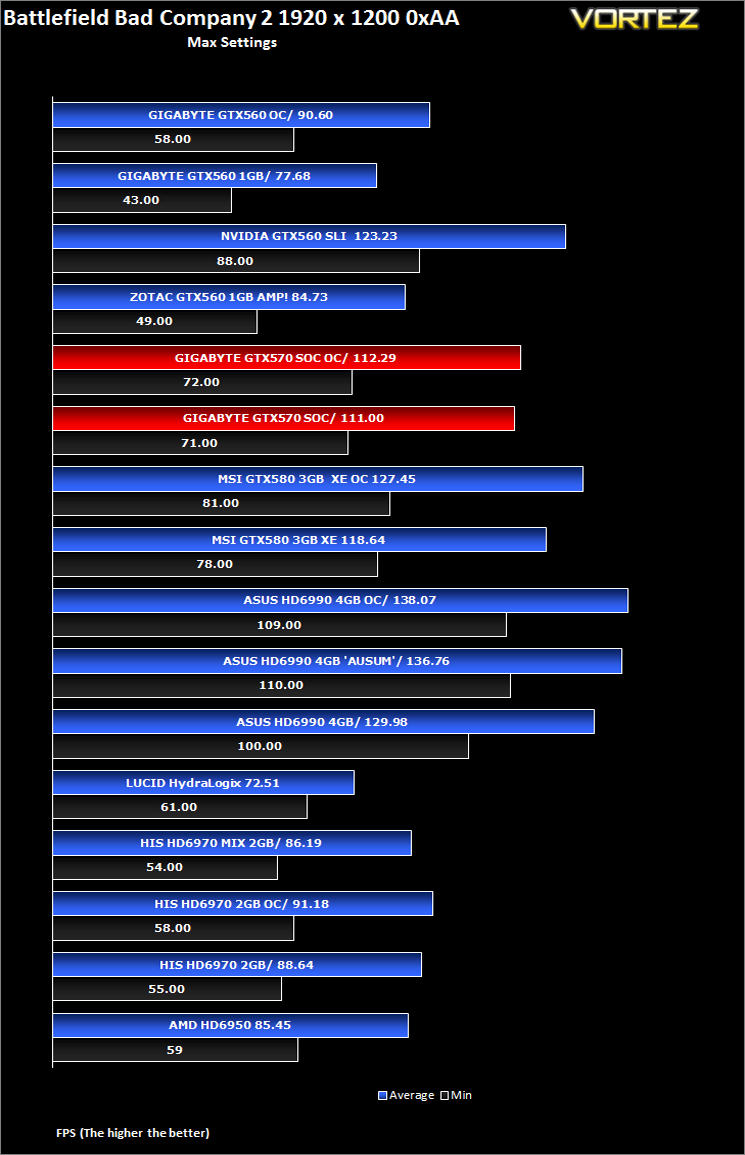
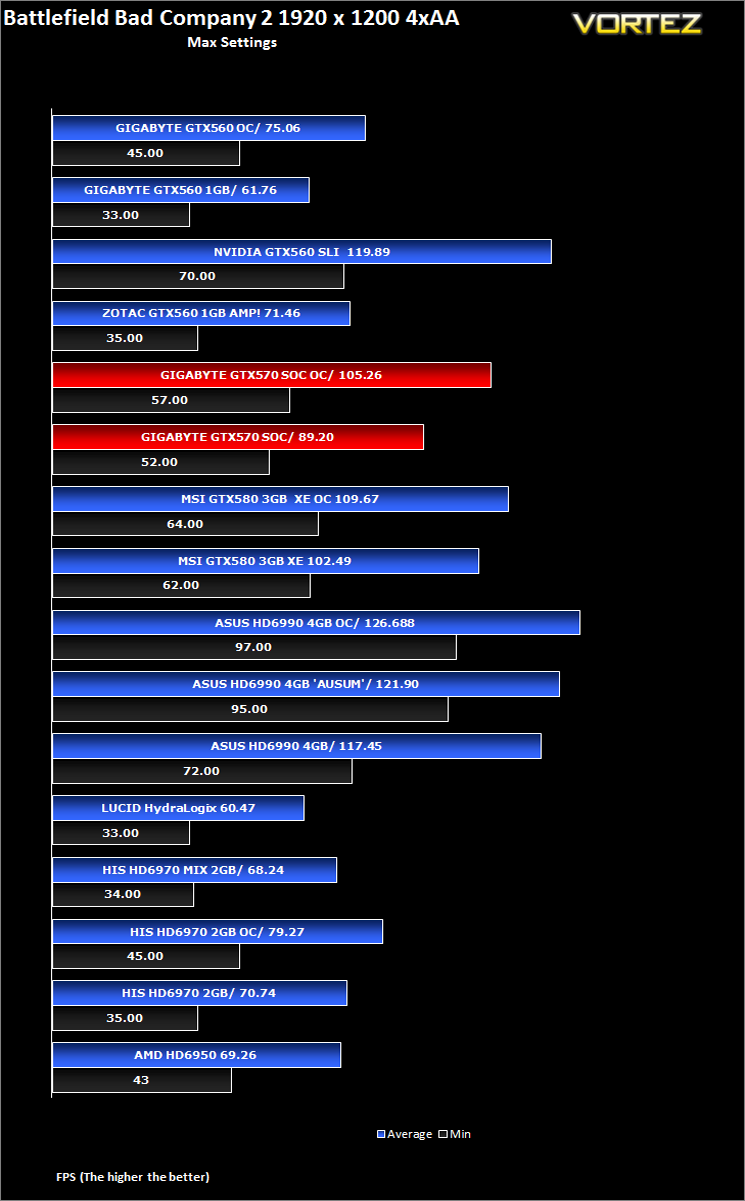
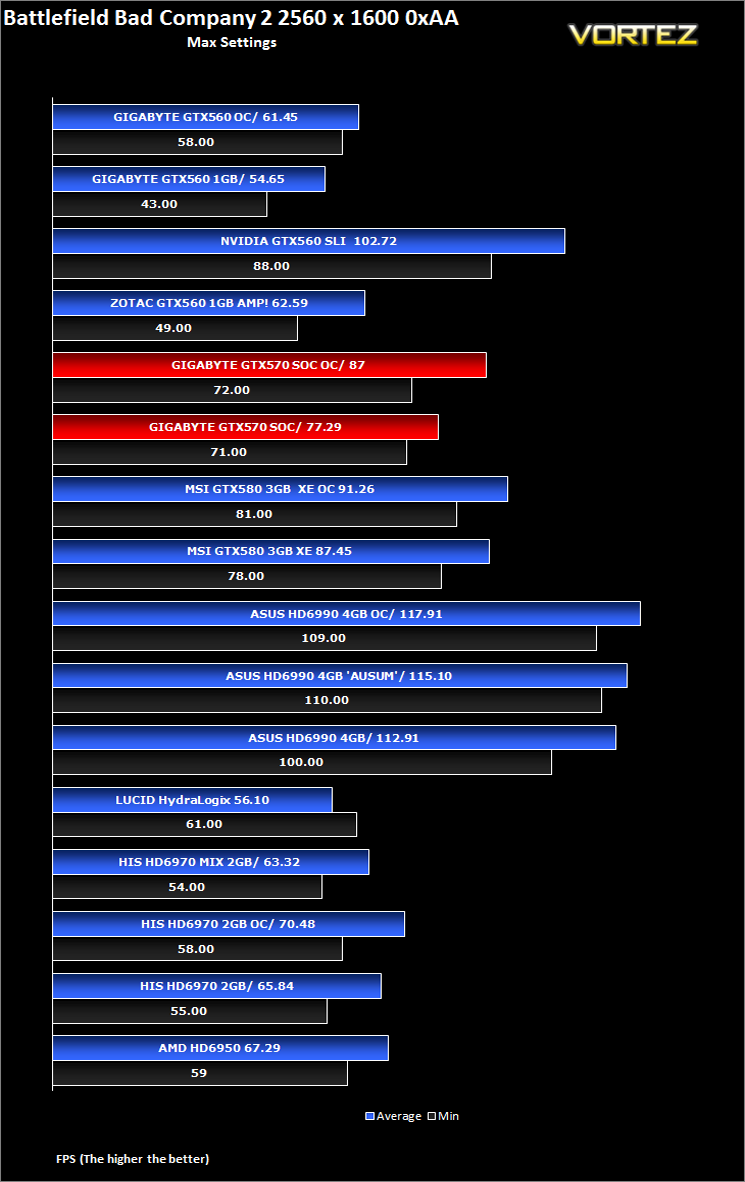
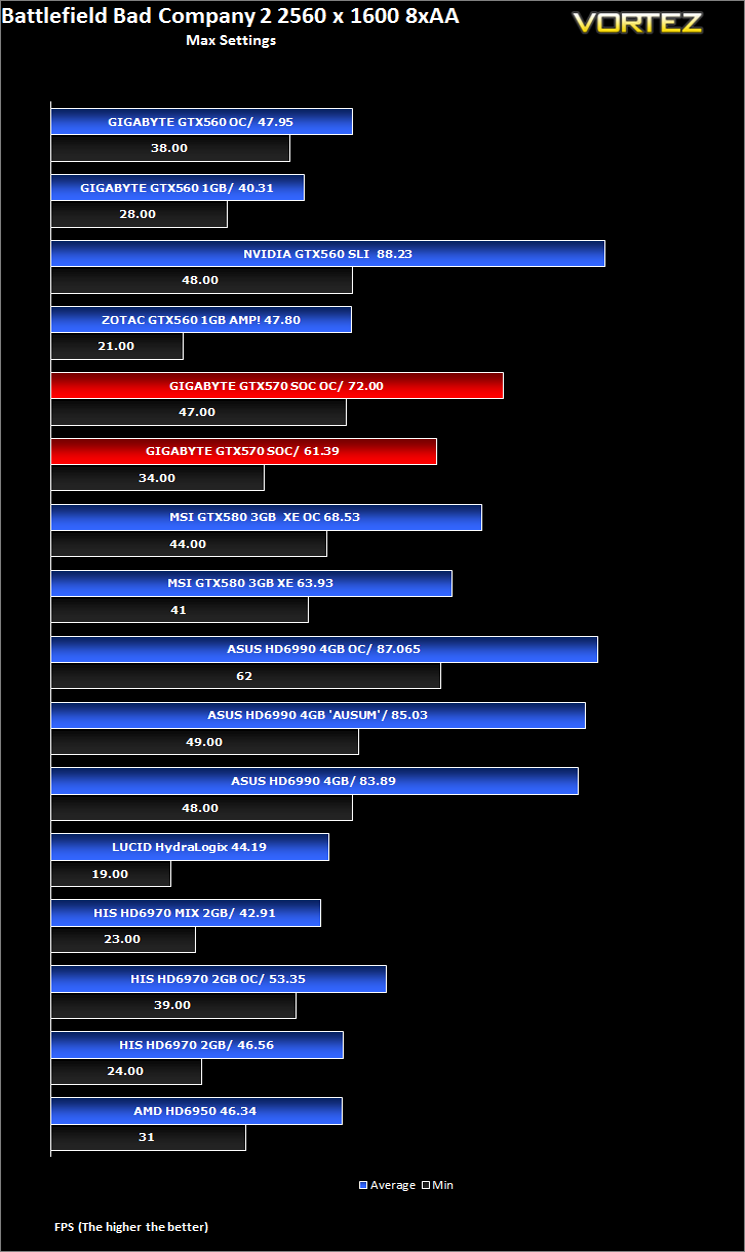
Battlefield Bad Company 2 is the new rendition of the widely successful Battlefield series of game. Having more in common with the console release of Bad Company, the sequel hopes to inject the DNA of the timeless Battlefield 2 online experience with the witty action packed single player shooting adventure of the original. As Private Preston Marlowe, your goal as a member of Bad Company is to once again save the world by securing a scalar weapon device.Fraps was used to test performance. Each test was conducted at the start of the ‘Cold War’ level ensuring that the same actions and paths were taken during the 2 minute sample. All settings were set to the highest available in game with AF set to 16x and HBAO turned on. The average FPS was recorded by FRAPS at the end of each walk through.
DiRT 3
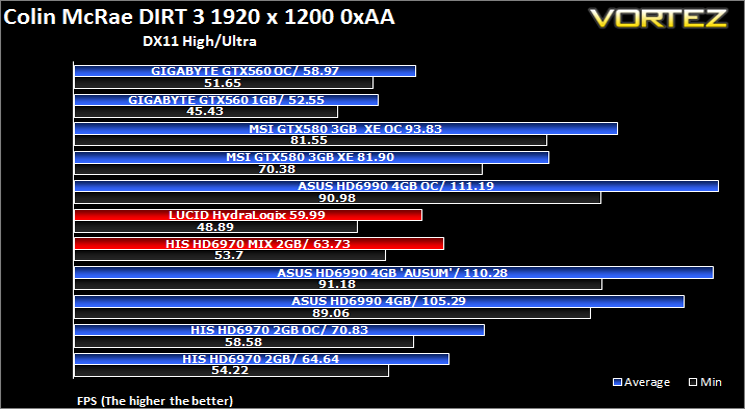
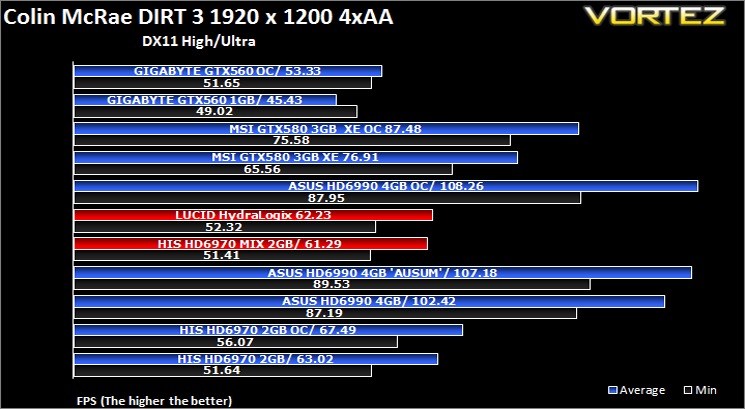
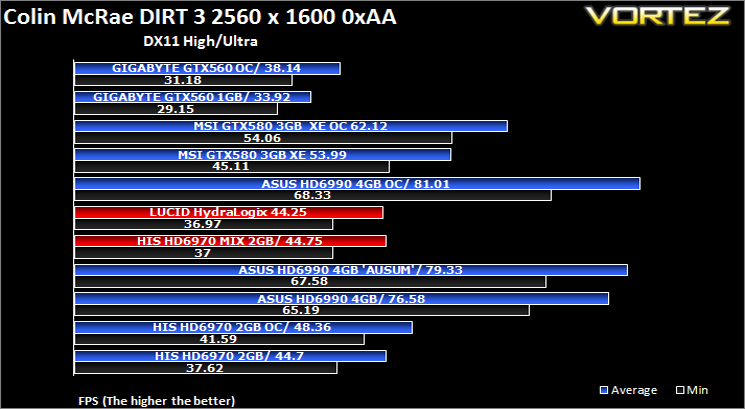
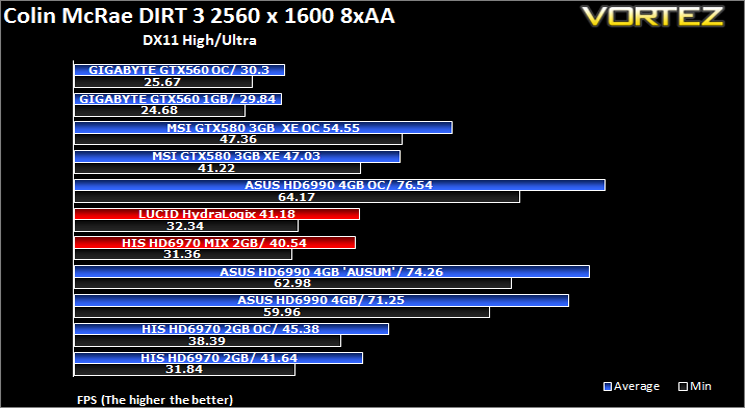
As players race to elevate their global standing, DiRT 3 is back delivering mud, sweat and gears world over: from the intense weather-beaten rally stages of Europe, Africa and the US, to executing performance driving showcases and career challenges where car control is pushed to spectacular limits.The in-game benchmarking tool was used to test performance. All the display settings were set to the maximum available and DirectX 11 was applied. The average FPS was recorded at the end.
Mafia II
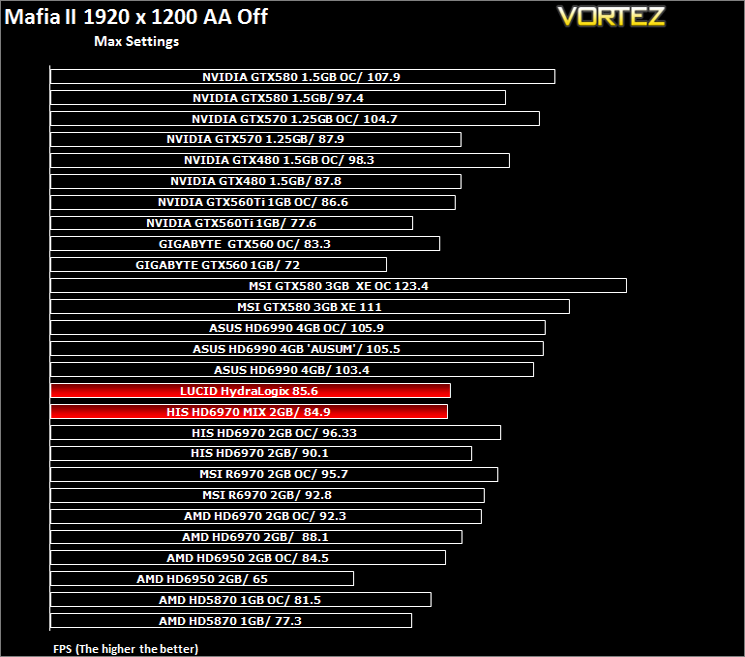
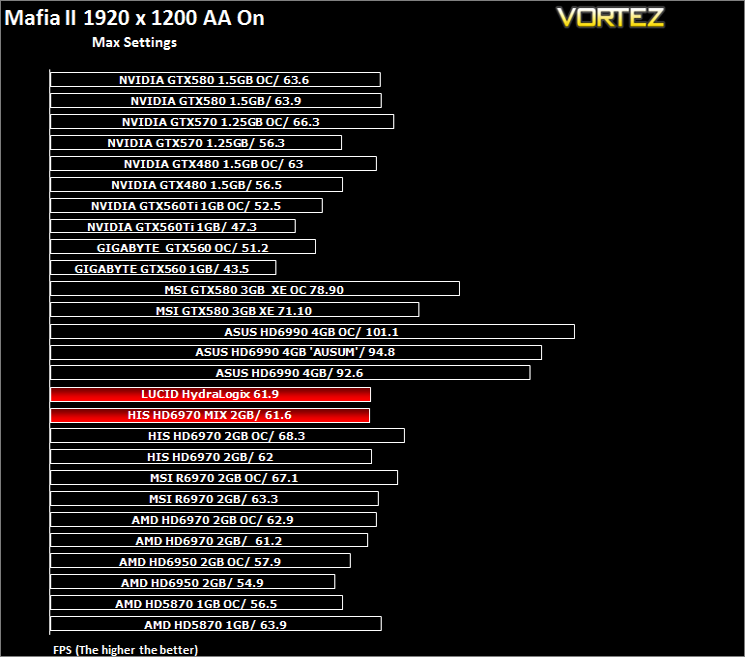
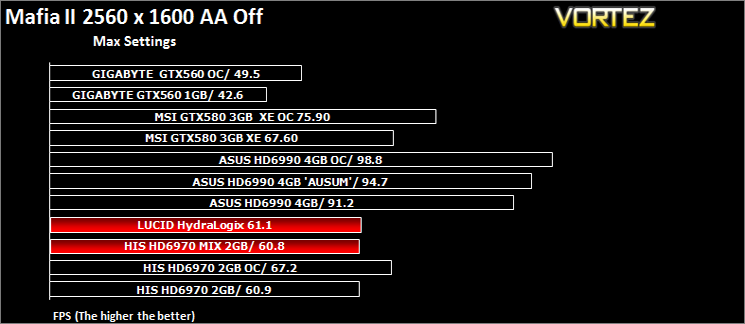
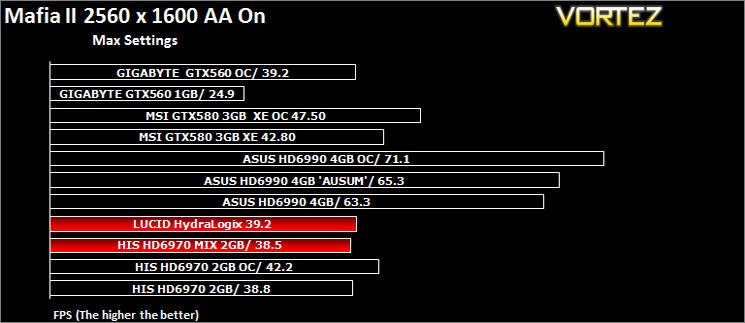
Following the success of Mafia back in 2002, the third person action adventure game is back with a new grittier and darker world. As Vito Scaletta, an aspiring made man, your job is to work through the twist and turns of Mafia lifestyle. The more blood spilt, the more you get in return but the lifestyle was never meant to be an ideal one. Set in the visually stunning Empire City, the wartime references provide the ever present back drop to a rife period in America’s history, in which potential for exploitation becomes Vito’s key focus.The in-game benchmarking tool was used to test performance. All the display settings were set to the maximum available in-game. PhsyX was only enabled if specified in the charts. The average FPS was recorded at the end.
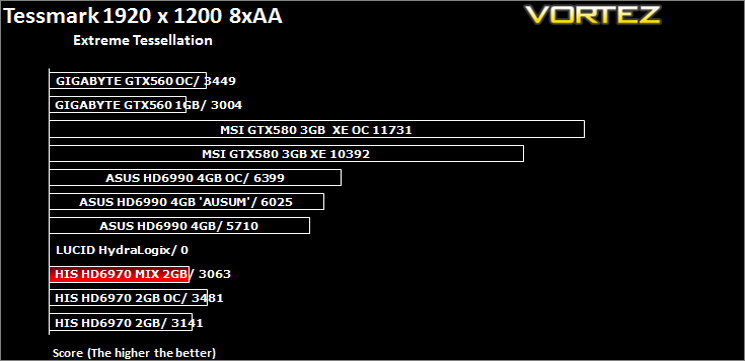
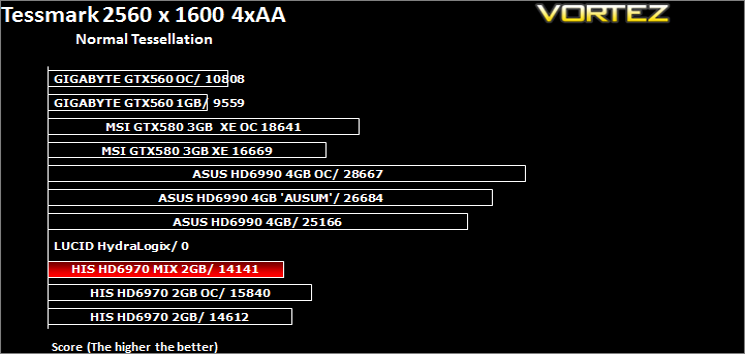
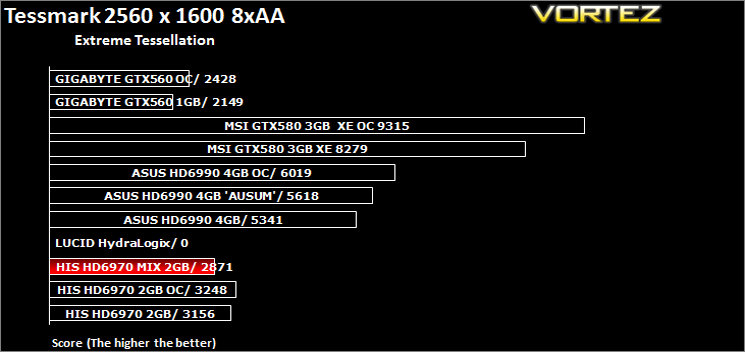
TessMark 0.2.2
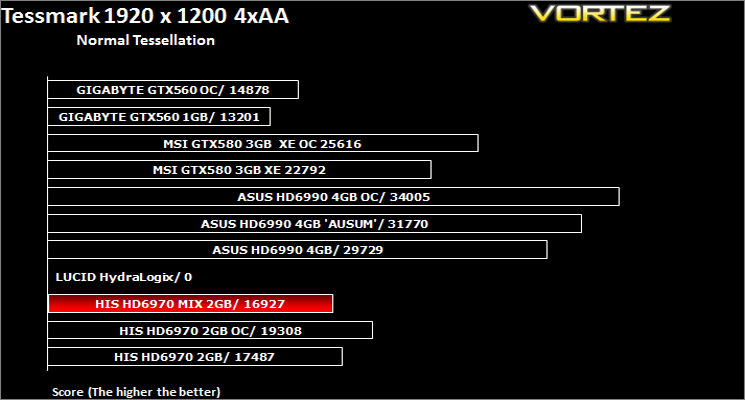
TessMark 0.2.2 is an OpenGL benchmark and tech demo that uses the new hardware tessellation (or GPU tessellation) features exposed by the OpenGL 4 API. Hardware tessellation makes it possible to divide a polygon into smaller ones (according to the tessellation level factor) in order to increase polygons density: the higher the tessellation level, the higher the polygon density. A high tessellation level requires much GPU processing power.TessMark was run in fullscreen, benchmark mode using map set 1 and configured to use OpenGL 4.
3DMark 2011 & Unigine Heaven 2.5
3DMark 11 is the latest version of the world’s most popular benchmark. Designed to measure your PC’s gaming performance 3DMark 11 makes extensive use of all the new features in DirectX 11 including tessellation, compute shaders and multi-threading.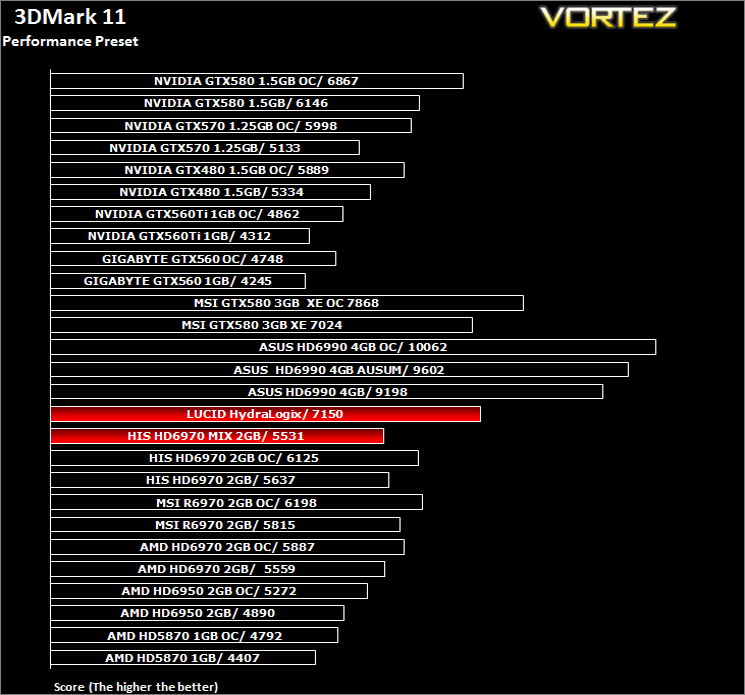
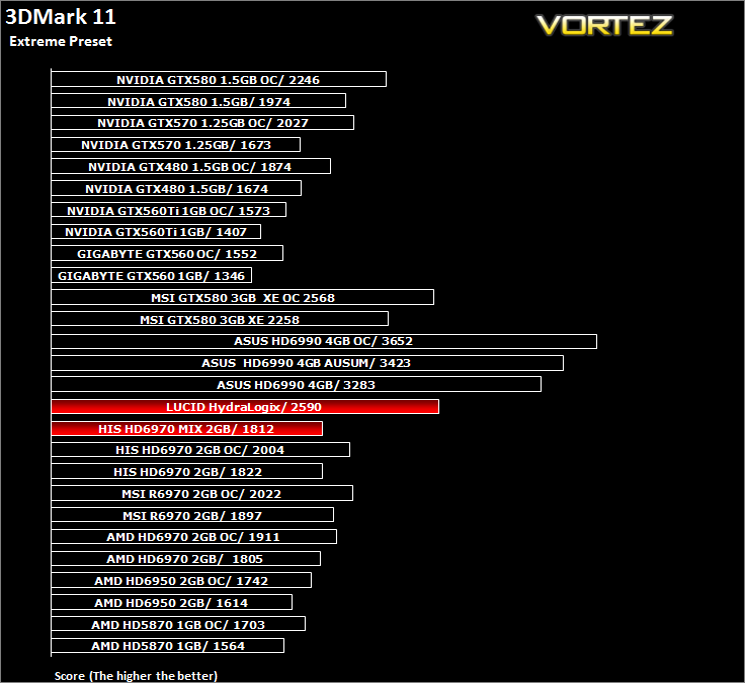
Unigine Heaven 2.5
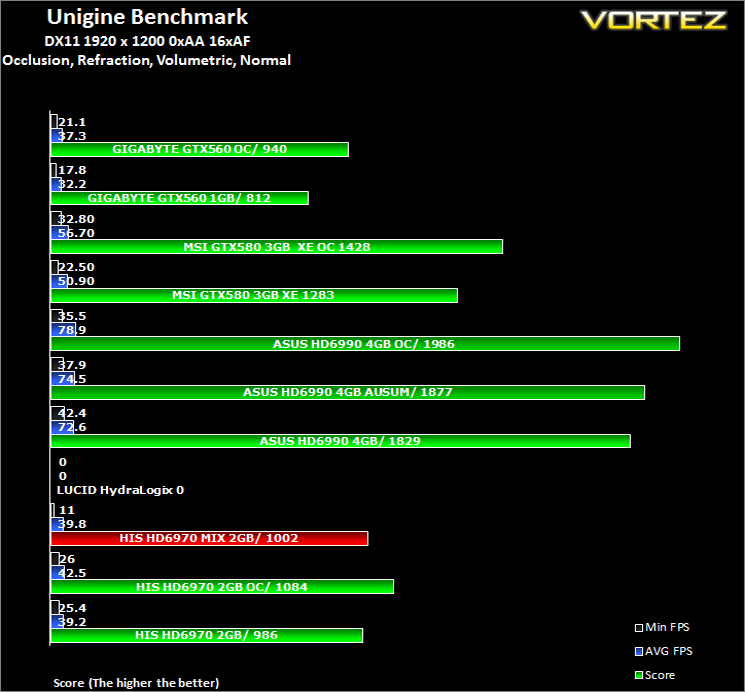
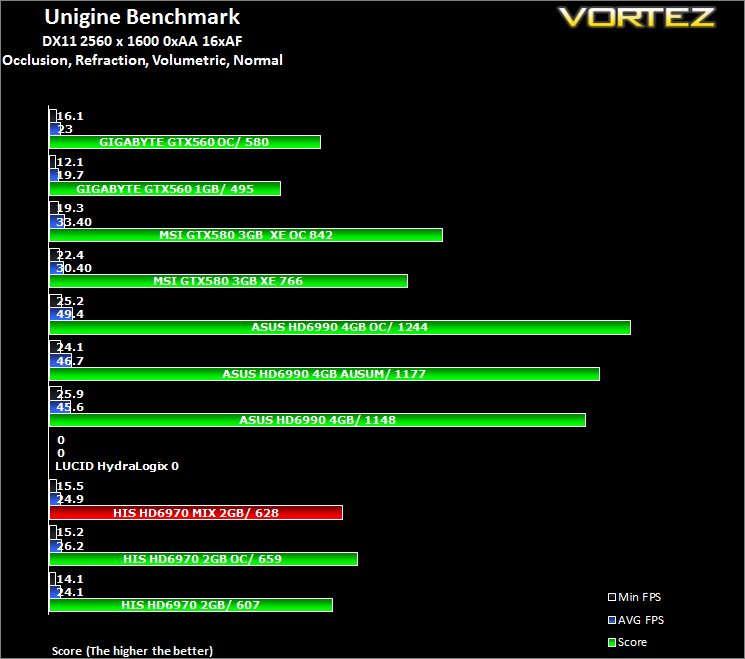
Heaven Benchmark is a DirectX 11 GPU benchmark based on advanced Unigine™ engine from Unigine Corp. It reveals the enchanting magic of floating islands with a tiny village hidden in the cloudy skies. Interactive mode provides emerging experience of exploring the intricate world of steampunk.
Conclusion
The HIS HD6970 2GB IceQ Mix is certainly an interesting proposition. As a standalone card, it performs very well throughout our range of benchmarks. While it wasn’t quite as fast as the Turbo edition, which was to be expected given the slightly lower clockspeeds, it still held its own, especially in AMD favoured tests. It cut through the benchmarks with relative ease, even holding its own against the much more expensive GTX580 in some examples.The card runs quite cool, surprisingly much cooler than the Turbo edition which also allowed the card to run quieter as the fan did not need spin up as much. Power consumption was average for a graphics card of this genre so nothing special to report there other than idle consumption was very good thanks to the CHiL PWM regulation. Overclocking was fantastic causing no issues whatsoever with the voltages raised. This allowed me to clock the card to it’s preset limits and at this speed and voltage setting it was rock solid with no stability issues encountered at all. It’s difficult to put any further spin on a card which for all intents and purposes we have reviewed recently in the guise of the IceQ Turbo. The one area where it differs quite obviously is the Lucid quandry.
I said at the beginning of the review I would be concentrating on this technology and if you can remember I asked myself three questions:
Is it possible?
As I have shown, yes it is possible but it comes at a cost. Along with money, that cost is also time and patience. Getting NVIDIA and AMD to work together is like asking a cat and dog to play nicely. It was never going to be an easy task. Rather than fur flying though it was my hair that was being pulled as it was a very frustrating and cumbersome procedure not helped by the fact that there are no driver installation instructions. I have two cards, both from different manufacturers and three different driver sets (not counting previous driver revisions). Using the latest Catalyst and NVIDIA drivers resulted in some very bizarre results, some games loaded but showed no benefits, some had glitches and tearing making playing the games impossible while others wouldn’t even start. So how did I get it to work?
Does it work?
Yes, but not always. An old dog and an old cat tend to not bother with each other and the same can be said of the drivers for this setup. Using previous revisions of both Catalyst and Forceware seemed to settle the problems down somewhat and while there were still a few issues, the setup began to hum along quite nicely.
How does it perform?
Performance gains in Alien Vs Predator were huge. Crysis Warhead also produced some very good scaling and while Far Cry 2 also benefited from from the HydraLogix Engine, there were some graphical anomolies rearing their ugly heads. I’m afraid that’s where the good news ends because one of the most popular games in our suite, Battlefield: Bad Company 2, while apparently being officially supported by HydraLogix, did not show any benefit whatsoever, in fact performance actually decreased for the most part! The remaining games worked fine with HydraLogix enabled but clearly showed no benefit, this however I can forgive as they are not supported titles.
What I cannot forgive is the poor driver support and lack of updates from Lucid. None of the most recent titles are supported and the most recent driver is dated back to March 2011. This is a real shame as clearly there are some great benefits to be had by having this chip on-board but if Lucid cannot keep up with NVIDIA and AMD in supporting their latest graphics drivers (thereby supporting the latest games), they are wasting what I believe to be a golden opportunity because when it works, the Lucid HydraLogix Engine shows some great results.
Of course, HIS cannot be held responsible for the lack of driver updates from Lucid. They are however, not completely blameless. With little information regarding setup details of the HydraLogix Engine, it made installation very frustrating as it was a huge case of trial and error. Some drivers worked together, others simply flat out refused. One would expect cutting edge hardware to be readily supported but this clearly isn’t the case. I do hope HIS include a comprehensive driver instalation guide in the retail editions of this product, or at least a web based guide as I fear many people will simply give up the process. This would be a real shame as there are some fantastic performance benefits to be had, albeit still hit and miss depending on your personal gaming flavour.
In short, this card has the makings to be something great. As a stand alone product it is fine and I have no reservations in recommending it to anyone looking for a high end graphics card. If on the other hand you are wishing to take advantage of Lucid’s HydrLogix technology, I would purchase this card with trepidation simply because you will need to consider the time and effort you have to invest to get it working correctly. If you have the patience of a saint and perversely enjoy troubleshooting and installing, uninstalling and re-installing drivers from both sets of manufacturers then go for it because should you get the right combination, the performance really is astounding. It’s also worth noting that the HydraLogix engine can easily be disabled through its own control panel should you see no benefit or indeed suffer a performance drop. This will allow the HIS HD6970 2GB IceQ Mix to perform on its own with no interference from other add-on cards so you get the best of both worlds.
Had Lucid worked with no issues and newer games being supported then this product would have easily earned our coveted Vortez Gold award however, the lack of Lucid support both in terms of drivers and installation instructions means it has to take a fall. The cards one saving grace is the fact base unit supporting the crippled Lucid HydraLogix technology is the HIS HD6970 IceQ which on its own is a mighty product. For that reason I believe it deserves our Bronze Award which shouldn’t be looked upon as a failure, it’s just not as good as it should have been.


