







Looking for a custom cooled, value for money mid-range GPU? Look no further than the factory overclocked HIS R9 270X IceQ x2 Turbo…

Product on Review: R9 270X IceQ X2 TURBO 2GB
Manufacturer and Sponsor: HIS
Street Price: £149.99 inc. VAT (GBP)
In these times of austerity, value for money is very much at the forefront of gamer’s minds when seeking out a graphics card. The AMD R9 270X looked to strike a balance between cost and performance and succeeded but like the flagship card, fell short in terms of cooling and acoustic ability. HIS aim to rectify this oversight by using their IceQ x2 cooling solution. Add to this one of the fastest factory overclocks on the 270X and HIS may well have a winner on their hands.
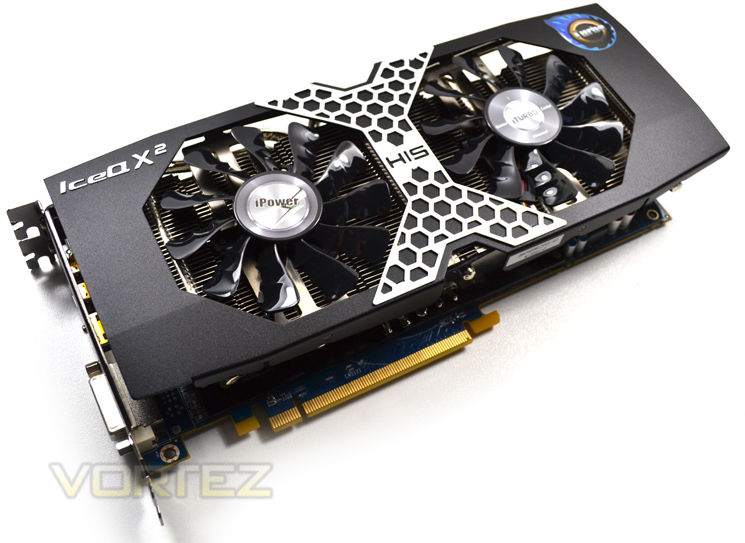
HIS have five different variants of the R9-270X, each with different factory overclock and heatsink. Some have the ICEQ X cooler while others, such as the item we have for evaluation today, have the ICEQ X2. It has a massive 1100MHz clockspeed as standard which is some 200MHz faster than entry level 270X. With the Tahiti LE at it’s heart, the HIS R9 270X ICEQ X2 TURBO might just have enough to topple our current favourite mid-range GPU, the NVIDIA GTX760.
About HIS
HIS is proud to be AMD’s Authorized 1st Tier AIB Partner, Certified Partner and Launching Partner. Long term and favourable relationship with AMD, enable HIS to work closely with AMD to promote the HIS AMD Graphics Board; and to strive for best value on the marketing and sales of HIS AMD Product Line. In Sept 2003, HIS incorporated the state-of-the art Supreme Cooling Technology in the award winning HIS 9800Pro IceQ, which caught the attention of worldwide media. Since then, HIS IceQ series and the latest IceQ X series has been the limelight in the market for its outstanding performance and features over the other rivals. Today, HIS continues its avid commitment to quality product and service. HIS is certain to be Your Choice of Graphics Board Supplier.
Specification
AMD R9 270X Specification
As you can see from the specifications above, the R9 270X features 1280 shaders. It also has 32 ROPs which results in a pixel and texture fillrate of around 33.6GPixel/s and 84 GTexels/s respectively.
Pitcairn
While the 290x heralds the dawn of a new age with a huge 512bit memory controller, the R9 270X retains the 256-bit memory bus found on older cards. We were hoping AMD would see fit to increase this to at least a 384bit controller but alas, the more we look at the specifications of this card, the more we see it as a re-hash of the HD7870. After all, why would it be different? Both cards are based on the Pitcairn core, the 270X has simply been overclocked from the 1GHz HD7870 edition we saw last year to 1050MHz on the core. The memory has also received a healthy 200MHz boost to 1400MHz (5600 effective). The typical board power of 180W is also in line with the HD7870 as this had a typical draw of 175W so it isn’t any more power efficent either.
None of this is bad of course, it’s just we were expecting a little more from AMD. We already know how good the HD7870/50 cards are for the money and after two years we would think AMD would have introduced something a little more innovative for it’s mid range cards. Re-badging cards is not a bad thing if it means the end users is getting last years flagship performance at a cut-down cost but as you can see above, the specifications show us that the 270X is, on the face of it at least, a re-hash of the HD7870, itself a mid-range GPU that is now nearing end of life.
HIS Radeon R9 270X IceQ X2 Boost Specification
Model Name: HIS R9 270X IceQ X² Turbo Boost Clock 2GB GDDR5 PCI-E DLDVI-I/HDMI/2xMini DP
Chipset: AMD Radeon R9 270X
Memory Size: 2048 MB
Memory Type: GDDR5
Core Clock: Up to 1100 MHz (Boost Clock Up to 1140 MHz)
Memory Clock: Up to 5.6 Gbps
Memory Interface: 256 bit
Power Supply: Requirement 500W (or greater) power supply with two 75W 6-pin PCI Express power connector recommended
600W power supply (or greater) with four 75W 6-pin PCI Express power connectors recommended for AMD CrossFire™ technology.
Max. Resolution(per Display):DisplayPort 1.2 – 4096×2160, HDMI – 4096×2160, Dual-link DVI with HDCP – 2560×1600
Interface: PCI Express 3.0 x16
Outputs: DLDVI-I + HDMI + 2xMini DP
Chipset: AMD Radeon R9 270X
Memory Size: 2048 MB
Memory Type: GDDR5
Core Clock: Up to 1100 MHz (Boost Clock Up to 1140 MHz)
Memory Clock: Up to 5.6 Gbps
Memory Interface: 256 bit
Power Supply: Requirement 500W (or greater) power supply with two 75W 6-pin PCI Express power connector recommended
600W power supply (or greater) with four 75W 6-pin PCI Express power connectors recommended for AMD CrossFire™ technology.
Max. Resolution(per Display):DisplayPort 1.2 – 4096×2160, HDMI – 4096×2160, Dual-link DVI with HDCP – 2560×1600
Interface: PCI Express 3.0 x16
Outputs: DLDVI-I + HDMI + 2xMini DP
AMD Zerocore Power Efficiency
ENABLING THE WORLD’S MOST POWER EFFICIENT GPUS
When a discrete GPU is in a static screen state it works to minimize idle power by enabling a host of active power saving functions including (but not limited to); clock gating, power gating, memory compression, and a host of other features. However, GPUs with AMD’s exclusive AMD ZeroCore Power technology can take energy savings to entirely new heights by completely powering down the core GPU while the rest of the system remains active. Nearly all PCs can be configured to turn off their displays after a long period of inactivity. This is known as the long idle state; where the screen is blanked but the rest of the system remains in an active and working power state (ACPI G0/S0).
As soon as the system goes into long idle state and applications are not actively changing the screen contents, the GPU enters the AMD ZeroCore power state. In the AMD ZeroCore power state, the GPU core (including the 3D engine / compute units, multimedia and audio engines, displays, memory interfaces, etc.) is completely powered down. However, one cannot simply remove the GPU and its associated device context completely; particularly when it is the
only GPU in the system as is the case in many enthusiast platforms. The operating system and SBIOS must still be aware that a GPU is still present in the system. For this reason, the AMD ZeroCore Power state maintains a very small bus control block to ensure that GPU context is still visible to the operating system and SBIOS. The AMD ZeroCore power state also manages the power sequencing of the GPU to ensure that the power up/down mechanism is self contained
and independent of the rest of the system.
The enablement of the AMD ZeroCore Power feature is controlled by the driver. The driver monitors the display contents and allows the GPU to enter the AMD ZeroCore Power in the condition that the GPU enters long idle and subsequent work requests are no longer being submitted to the engine. If any applications update the screen contents, AMD ZeroCore Power technology can periodically wake the GPU to update the framebuffer contents and put the GPU
back into the AMD ZeroCore Power state. Furthermore, applications such as Windows 7 desktop gadgets are architected to minimize activity and save power in the long idle state. These applications are active during screen on mode to display dynamic content such as weather, RSS feeds, stock symbols, system status, etc. but also have the intelligence to suspend any updates and activity when the system enters long idle. These applications will not wake the
GPU from the AMD ZeroCore Power state in long idle.
AMD ZeroCore Power technology delivers tremendous energy savings. Many PCs remain in the long idle state for a variety of use cases that are highly relevant to everyday consumers, enthusiasts and professionals. In AMD ZeroCore Power mode, users can still enjoy non‐graphics activities such as file serving/streaming, motherboard audio and music, and remote access while the GPU core is essentially powered off.
GCN Technology
Available on select, high-performance AMD Radeon™ R9 and HD 7000 Series graphics products, the Graphics Core Next (GCN) Architecture is a radically new approach to the design of a consumer GPU.Designed to push not only the boundaries of DirectX® 11.2 gaming, the GCN Architecture is also AMD’s first design specifically engineered for general computing. Equipped with up to 32 compute units (2048 stream processors), each containing a scalar coprocessor, AMD’s 28nm GPUs are more than capable of handling workloads-and programming languages-traditionally exclusive to the processor. Coupled with the dramatic rise of GPU-aware programming languages like C++ AMP and OpenCL™, the GCN Architecture is truly the right architecture for the right time.
Performance
In simple terms, increasing the number of transistors in a GPU has a big impact on the potential performance of a graphics card-but transistors alone are not enough. It takes a truly great design, like the GCN Architecture, to effectively utilize that potential for real-world performance.
Below you will find just a few examples of how this truly next-generation architecture delivers on one very simple design goal: enable the world’s most powerful graphics cards.1
Starting with GPU utilization, AMD has taken great strides to ensure that the GCN Architecture is capable of efficiently using its hardware resources. This seems like such a simple idea, but designing a GPU to frequently approach its peak theoretical performance is a challenge the GCN Architecture tackles with ease.
The GCN Architecture is designed for improved utilization, which ensures that the GPU is making optimal use of its resources for maximum performance.
The GCN Architecture also benefits from dramatically improved tessellation performance. Games featuring this DirectX® 11 technology are considerably faster than they were on the previous generation of AMD Radeon™ products. There is also the new Mantle API which promises to dominate NVIDIA, especially in titles such as Battlefield 4. Project Mantle is one of AMD’s most innovative and game-changing features, delivered with the Radeon™ R9 and R7 Series product line. Mantle is a new application programming interface (API), leveraging the commonality between the next-gen consoles and Radeon™. It enables game developers direct communication to our GPUs, unlocking the true potential of GCN and resulting in significantly higher gaming performance at all segments. We will be looking at Mantle in a separate article but if what we hear is correct, Microsoft (who are responsible for DirectX) should be very worried.
Every gamer knows that the GPU’s clockspeed also has a big impact on the performance of a graphics card, and the GCN Architecture keeps that in mind.
But what many don’t know is that every graphics card is designed to draw only a certain amount of power from your PC’s power supply. This is called the Thermal Design Profile, or TDP, and it’s critical that the GPU architecture is capable of making the most of every watt. The GCN Architecture can do that thanks to a technology called AMD PowerTune technology.
AMD PowerTune is an intelligent system that performs real-time analysis of the games and applications that utilize a GPU. Examples of such software might include Battlefield 3 or Furmark. In the event that an application is not making the most of the power available to the GPU, AMD PowerTune can improve that application’s performance by raising the GPU’s clockspeed by up to 30%! Best of all, this technology is completely automatic and is designed specifically to improve gaming performance.
Available on all 28nm AMD Radeon™ products, AMD PowerTune is designed to enable significantly higher clockspeeds in your favorite games-automatically!
Image Quality
But performance is not enough for today’s demanding gamers. Image quality, or the clarity and accuracy of textures and effects, is equally important. The GCN Architecture is equipped with three key technologies that dramatically raise the bar in this regard.
Partially Resident Textures (PRT)
Even in the latest titles, gamers may have noticed that games often re-use or repeat textures, particularly on the ground or in background scenery such as mountains or trees. This is because increasing the physical size or number of textures in a game can have a negative impact on the performance of a GPU. PRT is a radical new technology that hopes to break this cycle.
PRT can utilize absolutely enormous texture files, up to 32 terabytes large, with minimal performance impact. PRT accomplishes this by streaming small bits of these massive textures into the GPU as needed, giving compatible games a virtually endless supply of unique texture data it can apply to the game world. The GCN Architecture in 28nm AMD Radeon™ products is the first GPU design to feature a hardware implementation of this technology.
Partially Resident Textures (PRT) enables future games to utilize ultra-high resolution textures with the same performance as today’s small and often repetitive textures.
Improved Anisotropic Filtering (AF)
Available on every modern GPU, anisotropic filtering is a technique that assists the GPU in making sure textures in your favorite games remain razor sharp, even at a distance. Most games now offer the ability to enable this feature, and the AMD Catalyst™ driver suite has long provided players with the option to force enable anisotropic filtering for all of their games.
Where every GPU design differs, however, is in the way the anisotropic filtering is actually executed. The GCN Architecture has been specifically optimized to produce superior results when AF is enabled.
Improved anisotropic filtering in products like the AMD Radeon™ HD 7900 Series ensure gamers get sharper, better textures when this technology is enabled.
Improved DirectX® 11 Tessellation
As DirectX® 11 titles become more mature, game developers are naturally pushing the envelope of realism by utilizing a greater degree of special rendering effects. One such effect is tessellation, which can dynamically generate additional detail in a scene on the fly.
A wireframe scene of a rally car in DiRT 3 driving through water. On the left, notice there are no ripples. On the right, after tessellation, there is new and dynamic detail in the game.
As with anisotropic filtering, tessellation is not new to GPUs, but the manner in which tessellation is executed can have a large impact on the gaming experience. Because of this, the GCN Architecture has again been optimized to deliver up to 4x the performance of the AMD Radeon™ HD 6000 Series in heavily-tessellated games.
Packaging & Accessories
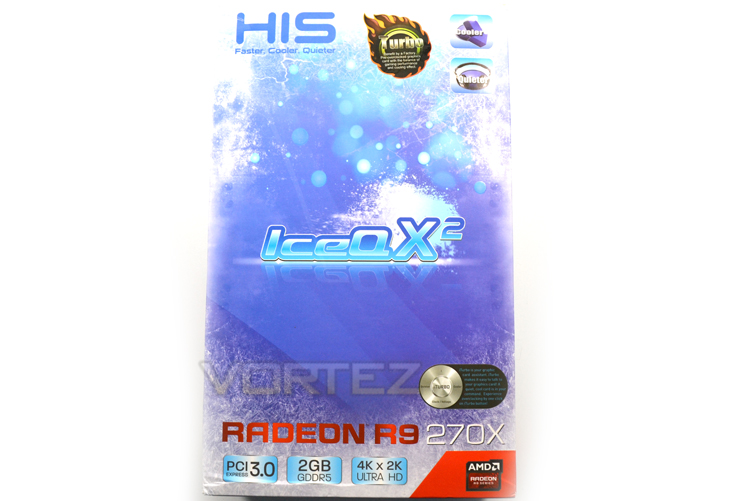
The packaging is nearly identical to ICEQ cards we have seen in previous generations with the frozen aesthetics of the outer sleeve acting as a background to the variety of icons depicting the graphics cards basic features.
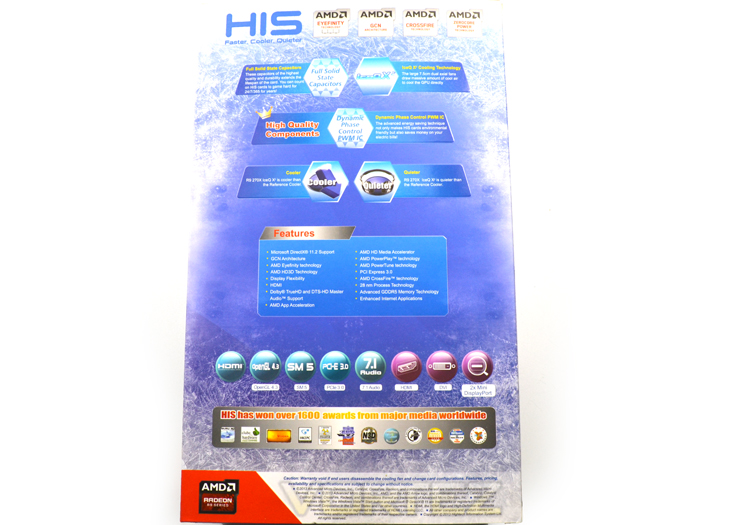
Flipping the box over we find more icons which go into greater depth depicting some of the graphics cards more special features such as dynamic phase control.
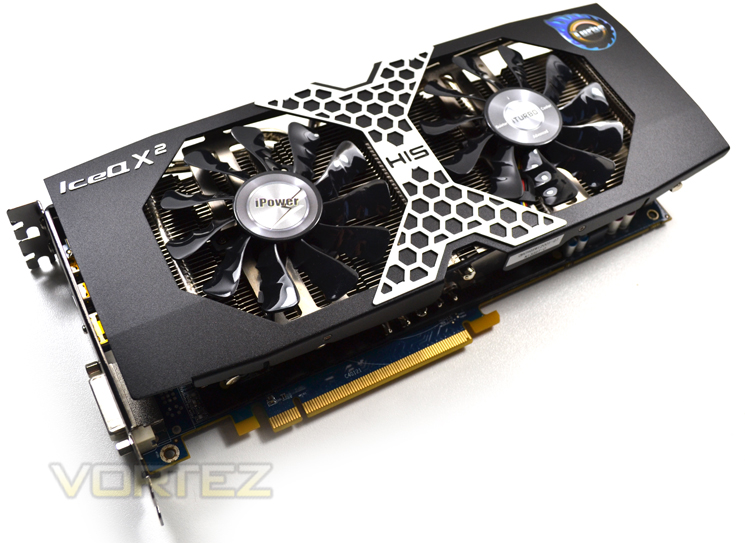
The graphics card itself is held steadfast in a stiff foam brace and protected by an anti-static bag so there is no reason why the GPU should not reach you in perfect condition. The accessories that are included in the card include a DVI-VGA adaptor, Crossfire bridge and driver CD – basic but all you should really need to get you going. Perhaps the only thing missing is a twin Molex to six pin power adaptor as this card will require two 6 pin power plugs which not every PSU is capable of providing.
Onto the card itself…
First Look
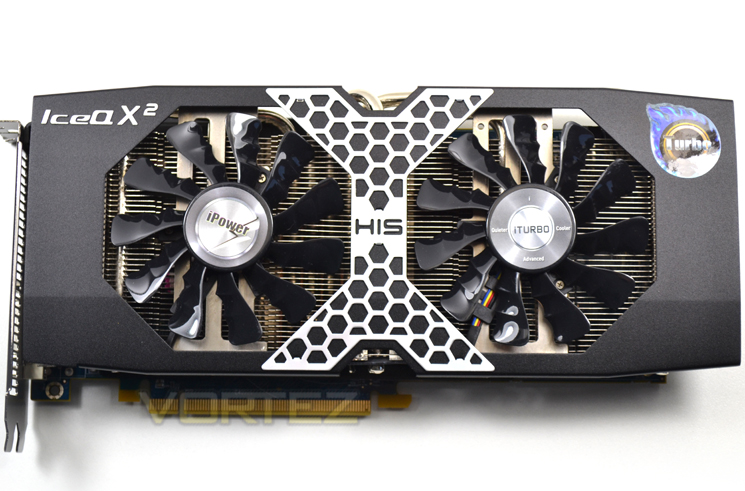
The massive cooler dominates proceedings not that that is a bad thing because the cooler is very well made and appealing to look at. The metal cross drilled X at the centre is very fetching while the shroud it covers houses the twin fans which make up the ‘x2’ in the products name.
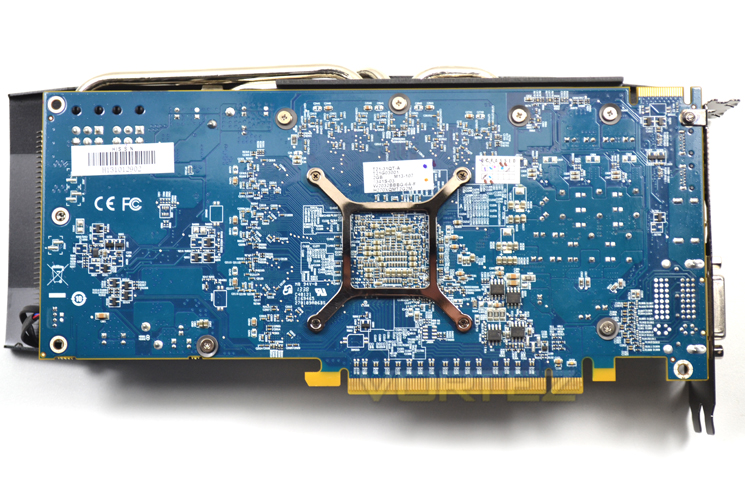
HIS have chosen to stick with their trademark blue PCB. While this is individual we can’t help feeling the product would look so much more appealing had it been afforded a black PCB.
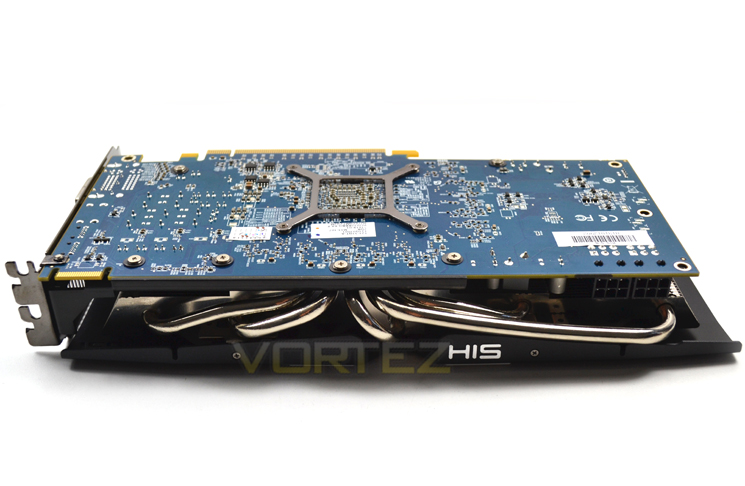
The heatsinks sprouting out from the side resemble that of a high performance 80’s muscle car. Out only hope is that it is not as loud as one!
The card measures 22.4 x 3.7 x 12.6 cm which will mean there is a slight overhang on a standard ATX sized motherboard.
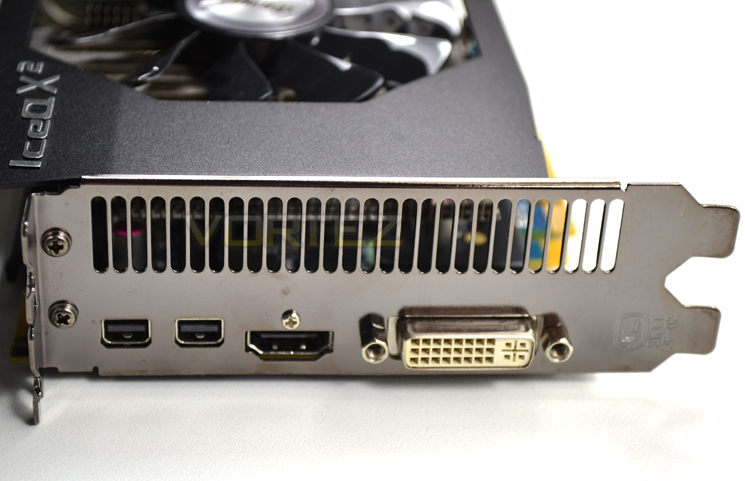
The I/O area features DVI-I, DVI-D, HDMI and DisplayPort. The card can support up to 6 displays with an additional DisplayPort 1.2 MST multihub. It can also use 3 different ports simultaneously so if you have 3 monitors, you can use any of the ports and theoretically, the card will be able to display from whichever of the four ports you choose.
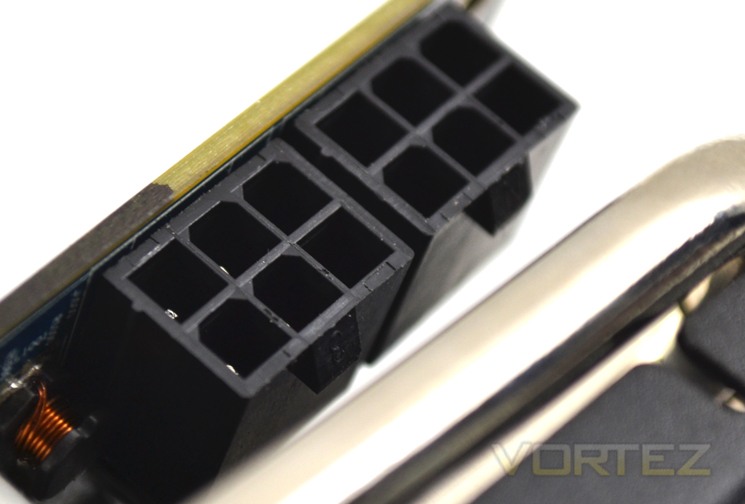
As the picture above shows, twin 6pin PCIe Power plugs will be required for the card. The power requirements of the R9 270X are 500W (600W for Crossfire).
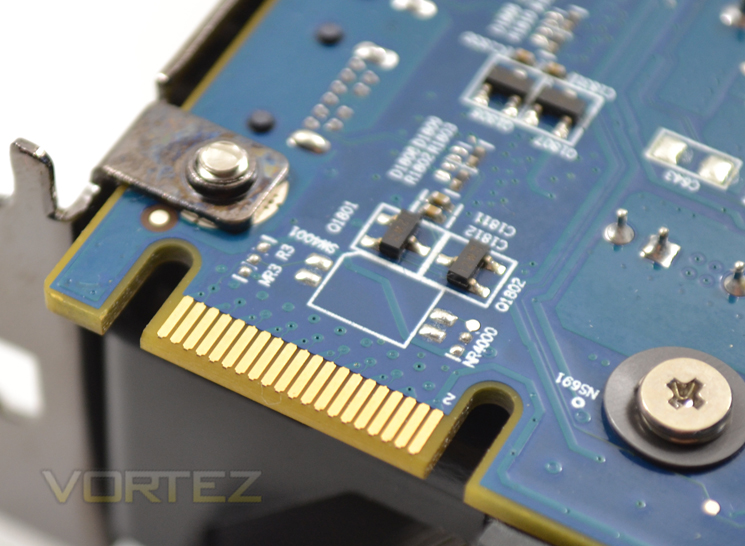
As with the 7800 series of graphics cards, the R9 270X has a single Crossfire tab meaning it can be paired up to another single AMD card from the same family.
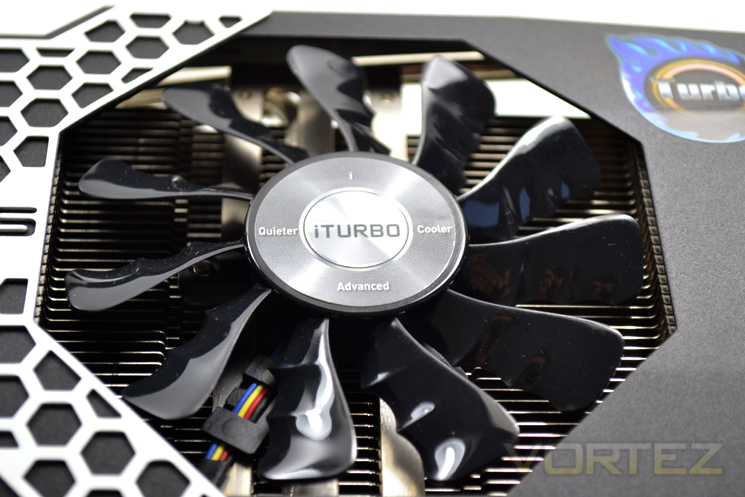
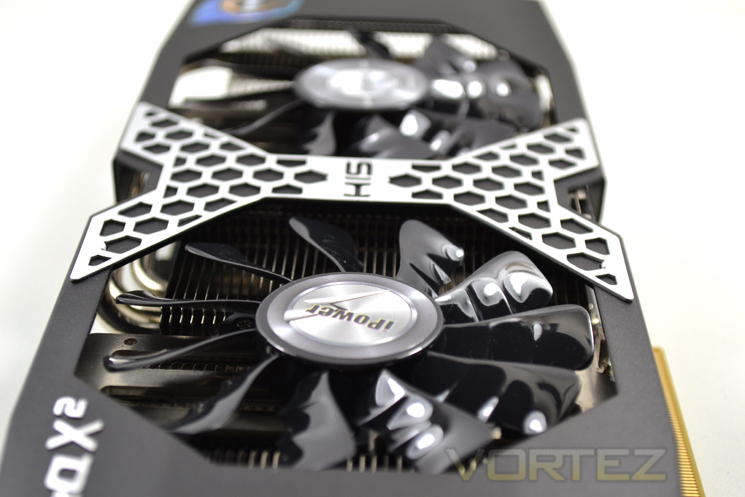
The fans on the IceQ X2 are a break from the norm with the 2x 86mm dual axial fans having angled blades which increase air turbulence without sacrifices acoustics.
Let’s take a closer look…
Closer Look
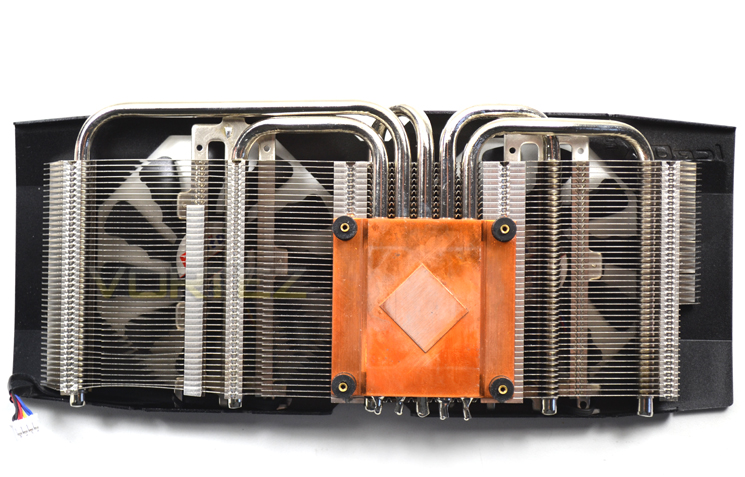
For what is in effect a mid range graphics card, the heatsink is typical of a cooling design we would expect to find on a high end model. Large, heavy and engineering quality is the order of the day here so HIS we salute you for this design – simply stunning.
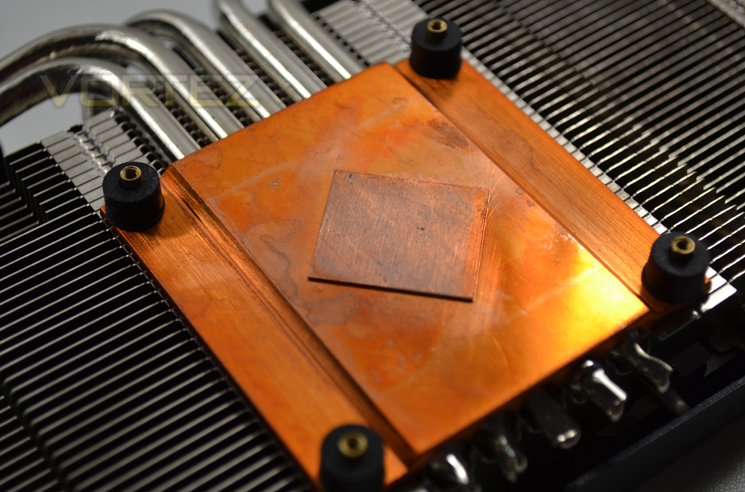
The baseplate is full copper and is soldered to 5 heatpipes which sprout out from the centre, stretching out across the aluminium finned array to dissipate heat efficiently and effectively.
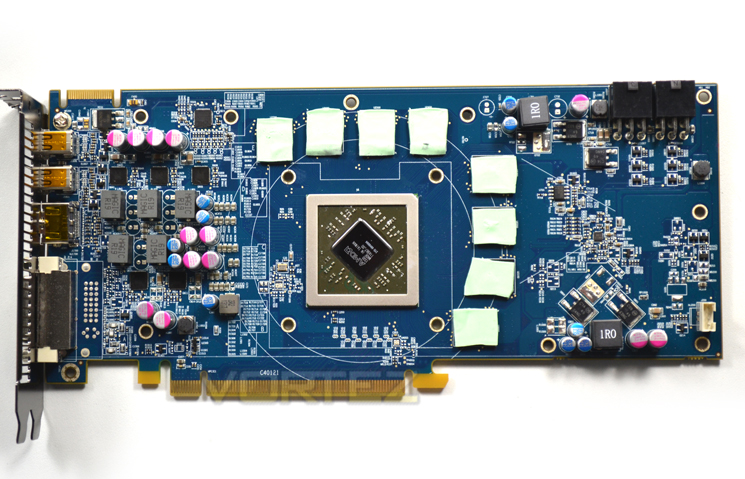
Removing the heatsink was relatively easy with just four screws holding the PCB to the cooler however there is also a mid-plate to help prevent bowing of the card in the heatsinks weight.
Above we can see that the PCB has repositioned power regulation with 8x256MB GDDR5 modules framing the main GPU core.
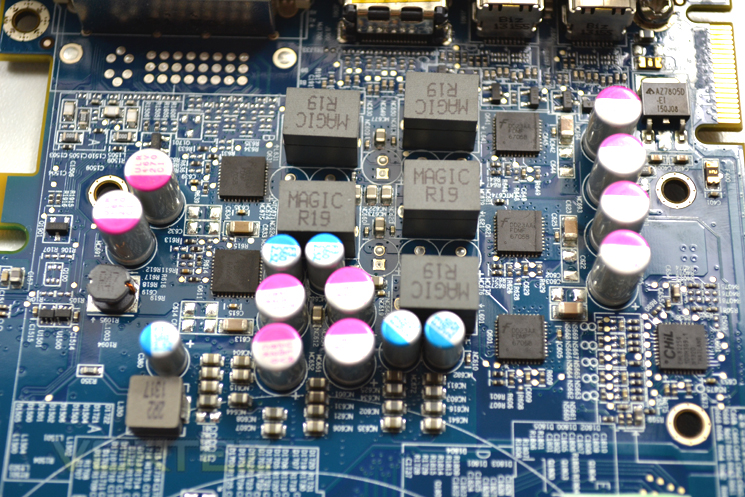
The inductors come courtesy of MAGIC and while repositioned make up a reference 5+1 power phase design.
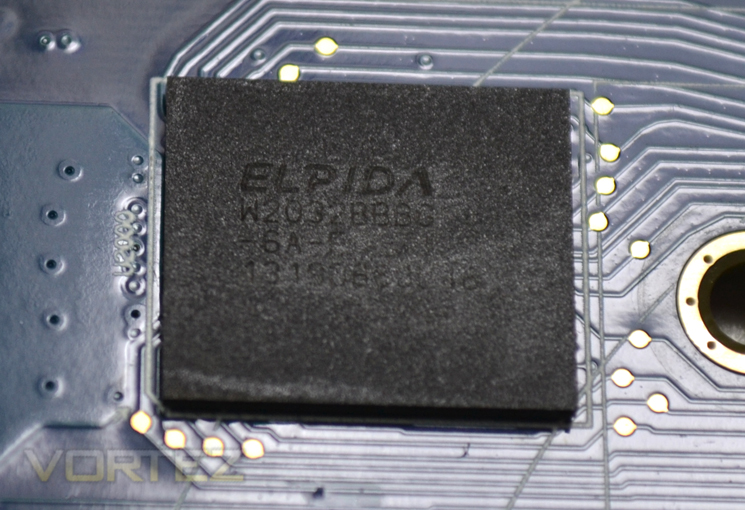
The memory hails from Elpida which doesn’t seem to overclock as good as Hynix in our tests. We will, however attempt to push this memory past the 1400MHz (5600MHz effective) clockspeed.
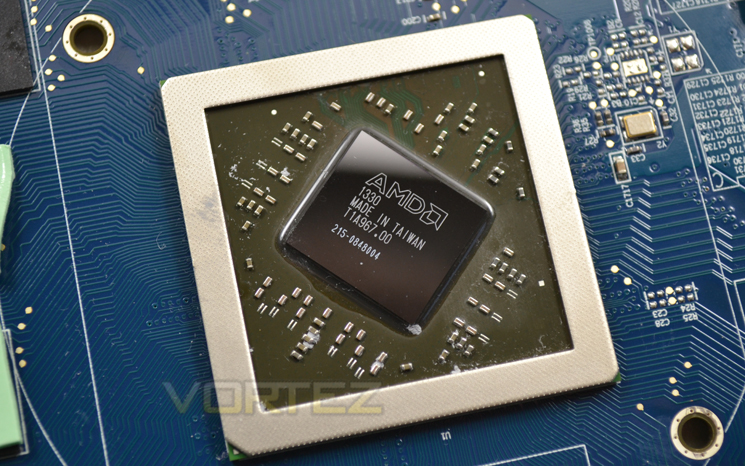
Finally we reach the core of the card, the Tahiti LE which has some 2800 million transistors and 1280 shaders contained within.
Let’s take a closer look…
Test Setup & Methodology
How we test graphics cards
Testing a graphics card is an extremely lengthy process. We sometimes see reviews where a graphic card has been tested using out of date equipment, out of date games and out of date drivers. While the latter can be excused due to the sheer amount of driver updates making a thorough review impossible we will however notify the reader when we have used a different driver to the normal for example a pre-release driver. For the most part however we will always use the same hardware and where possible the same drivers unless a newer driver rectifies an issue we have encountered or significantly improves performance to such an extent that continuing with an outdated driver is not feasible.
Frame Time Analysis
We have also seen the emergence of frame time analysis. We covered this in a separate article here: GPU Reviews: Why Frame Time Analysis is important so we won’t go into the reasoning again but to summarise, our testing comprises both FPS testing and perhaps arguably more importantly, frame time analysis. We also look at overall performance by equating averages across the games and finally before concluding our review we take a look at value for money.
HardwareWith the latest Intel chipset release we decided to update our ageing X58 setup to the new X79 chipset. Not only that but we will be using the flagship Core i7-3960X Extreme Edition processor clocked to 4.5GHz to ensure we have no CPU bottlenecks. With 16GB of ram on board there should be minimal paging so the benchmarks we run today will hopefully give a true reflection of the graphics card’s performance.
Mid-Range Graphics cards on test:
HIS R9 270X ICEQ X2 TURBO2GB GDDR5
(AMD CAT 13.11 beta 9.2)GIGABYTE Windforce OC R9 270X 2GB GDDR5(AMD CAT 13.11 beta 9.2)
AMD R9 270X 2GB GDDR5(AMD CAT 13.11 beta 5)
NVIDIA GTX760 2GB GDDR5(Forceware 320.39)
SAPPHIRE HD7950 3GB GDDR5(AMD CAT 13.3 beta)
HIS HD7850 IceQ X 1GB GDDR5(AMD CAT 13.3 beta)
HIS HD7790 IceQ Turbo 1GB GDDR5 (AMD CAT 13.3 beta)
MSI GeForce GTX 650Ti BOOST OC 2GB GDDR5 (Forceware 314.22)
Motherboard: ASUS P9X79 Pro
CPU: Intel Core i7-3960X Extreme Edition @ 4.5GHz
RAM – 16GB (4x4GB) Corsair Vengeance (Red) DDR3 @ 1866MHz 9-10-9-27
Power Supply – Thortech Thunderbolt Plus 1200W
Hard Drive – Kingston HyperX 240GB
Cooler – Corsair H100
CPU: Intel Core i7-3960X Extreme Edition @ 4.5GHz
RAM – 16GB (4x4GB) Corsair Vengeance (Red) DDR3 @ 1866MHz 9-10-9-27
Power Supply – Thortech Thunderbolt Plus 1200W
Hard Drive – Kingston HyperX 240GB
Cooler – Corsair H100
Benchmarks
If you are a regular reader of our reviews you will know we like to test the latest hardware with the latest games and benchmarks on the market. Here are the games we have chosen:
Battlefield 3
Crysis 3
Far Cry 3
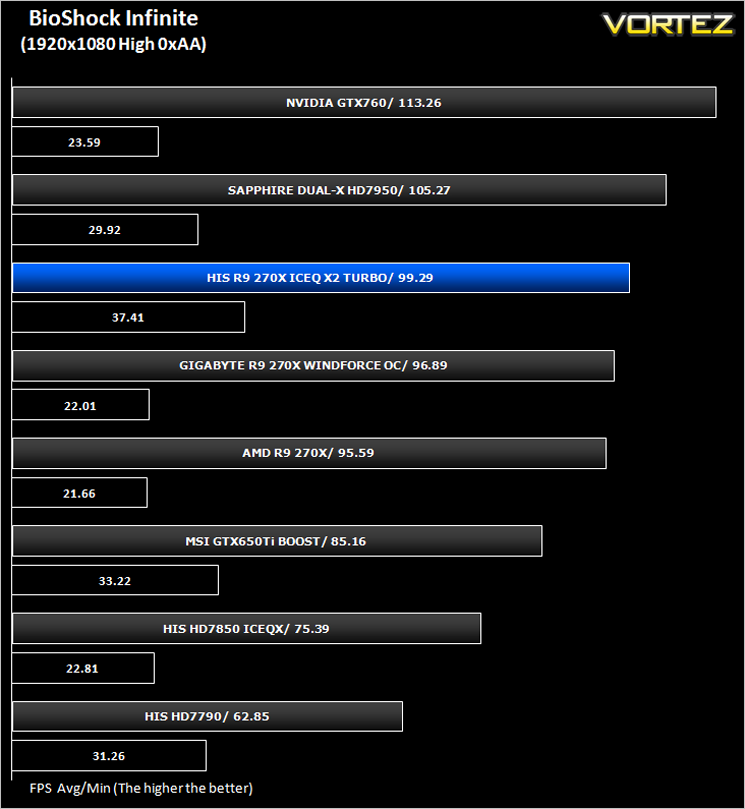
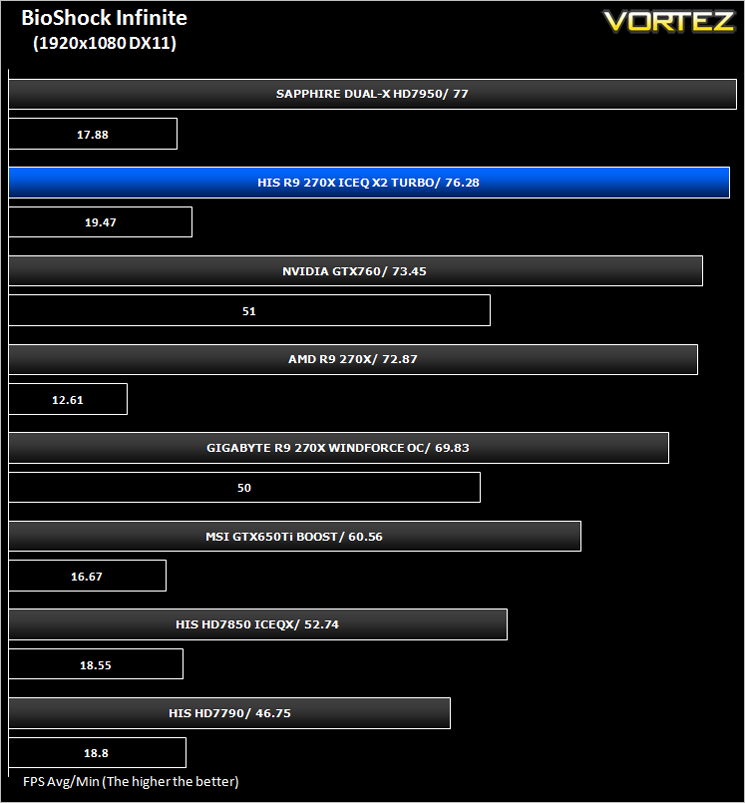
BioShock Infinite
DiRT: Showdown
The Elder Scrolls: Skyrim
Crysis 3
Far Cry 3
BioShock Infinite
DiRT: Showdown
The Elder Scrolls: Skyrim
We also take into consideration the benchmarkers out there so have included 3 of the more popular synthetic benchmarks available:
Unigine: Valley
Unigine: Heaven 4
Futuremark 3DMark Firestrike
Unigine: Heaven 4
Futuremark 3DMark Firestrike
Let’s see how today’s graphics card performed…
Temperature, Acoustics and Power Consumption
Power Consumption
To test for power consumption we use the included iPower Meter found with our Thortech PSU. As system load figures obviously differ from idle it is extremely difficult to get an accurate figure of system draw and then simply take this figure away from the overall amount because each game will generate varying levels of CPU and hard drive activity. Dynamic power adjustments which fluctuate in game will also affect accurate power figures thus rendering any such power consumption calculations redundant at worst and approximate at best.
We will therefore take our system readings averaged over a benchmark run of Tessmark (100% load) and after 20 minutes of being idle in Windows 7. These can then be used as a comparison to other graphics cards to determine how much more or less power you can expect a GPU to consume.
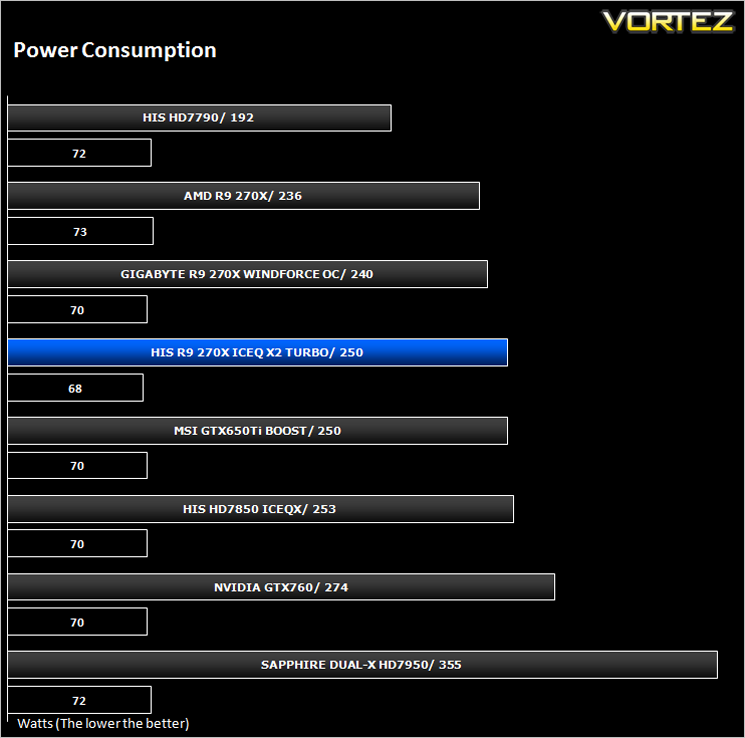
Consuming just a little more than the reference design we found that all of the comparable cards at these level appear to consume pretty much the same amount of power under both idle and load conditions.
Temperature
To test temperatures we measured idle temperatures after booting windows, letting all applications finish loading and ran a few benchmarks. Once the benchmarks were complete we left the card to reach a cooling plateau where we then took the idle temperatures. For the load tests, we would normally run Furmark for 20 minutes, taking the absolute maximum temperature attained however we found that this throttled the card and resulted in spurious results. So we set Heaven running continuously for 20 minutes and used this as a temperature result as the card did not throttle with this application.
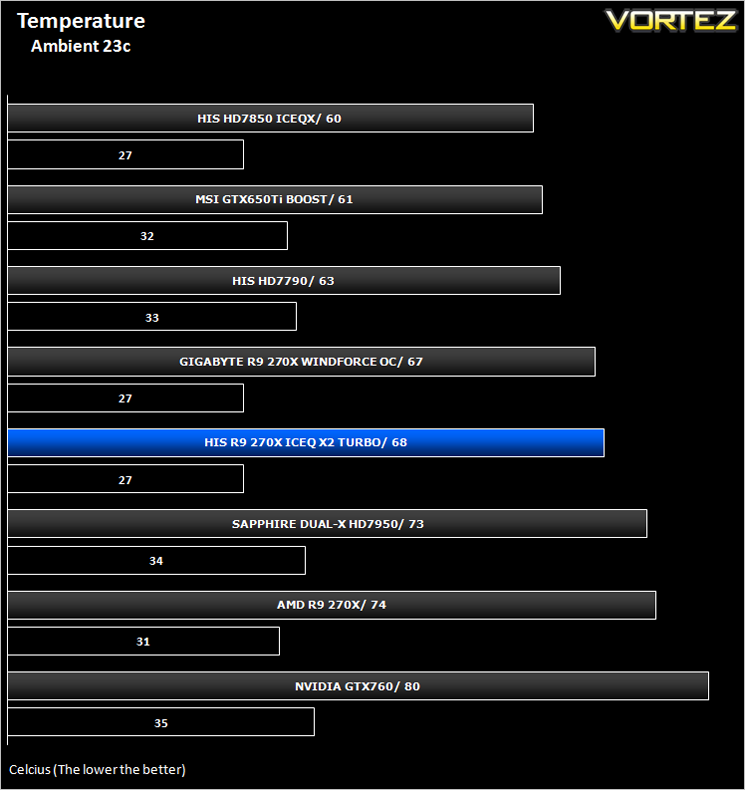
With a product title containing the word Ice you would expect the card to run cool. It certainly didn’t disappoint. While it wasn’t our coolest card on test, it easily coped with the heatload from the 270X core ensuring maximum overclocks can be extracted from the silicon.
Acoustics
Perhaps the biggest complaint of the new range of AMD cards is the new cooler and more specifically the noise it generates. It is far from quiet and while one can adjust the fan profiles to suit your own tastes, it is still audible, often loud regardless of the settings applied.
The HIS is far removed from what you would describe as a noisy card. The IceQ X2 cooler is extremely quiet humming along at barely above murmur level. While it clearly becomes audible with the fan running at 100%, throughout our testing the HIS R9 270X ICEQ X2 TURBO was pretty much silent – certainly inaudible above average case cooling fans set to medium which is an excellent result for HIS.
Gaming Experience (Frame Time Analysis)
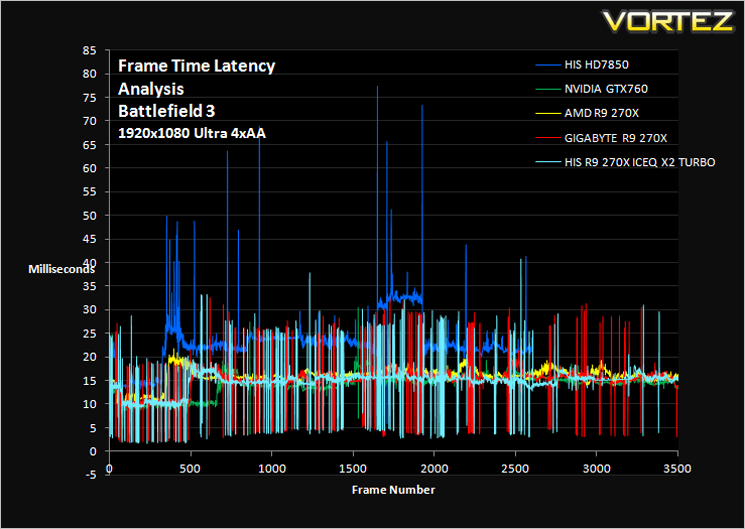
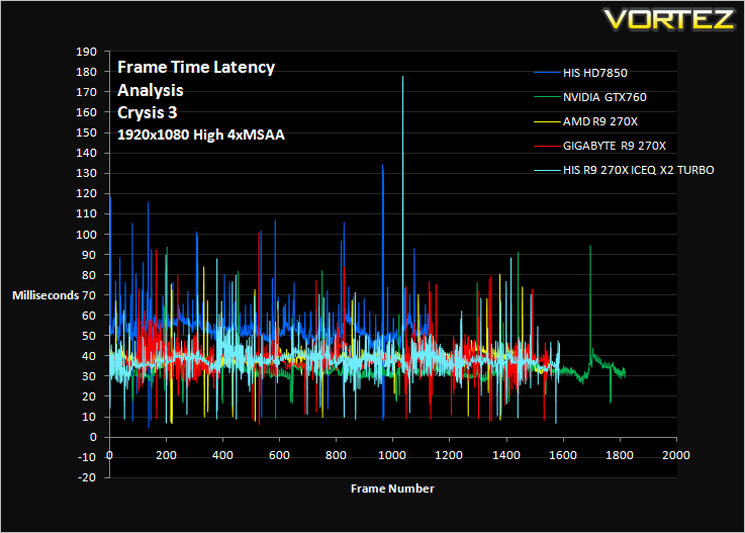
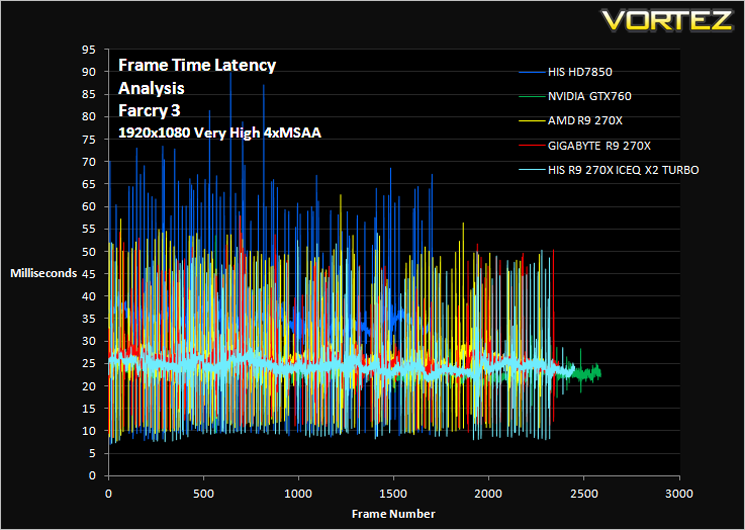
Gaming experience is what we like to refer to as the Laymans term for Frame Time analysis. Frame time analysis is in its most basic sense how smooth your gameplay will be. Ever had a powerful card rendering at 100FPS with ease for it to stall for a split second before resuming? This is what Frame Time Analysis shows us: The peaks during an otherwise smooth gaming experience. This is presented to you in two ways, by showing you a line graph of a 60 second FTA capture using FRAPS and then by deducing the average and 99th percentile response times.
Some claim this should be the way graphics cards are tested and we won’t argue here because there is little point in having a card which churns out an average 100FPS if it has micro stutters lasting 50ms (GPU response time) which spoils the fluidity of the game.
Some claim this should be the way graphics cards are tested and we won’t argue here because there is little point in having a card which churns out an average 100FPS if it has micro stutters lasting 50ms (GPU response time) which spoils the fluidity of the game.
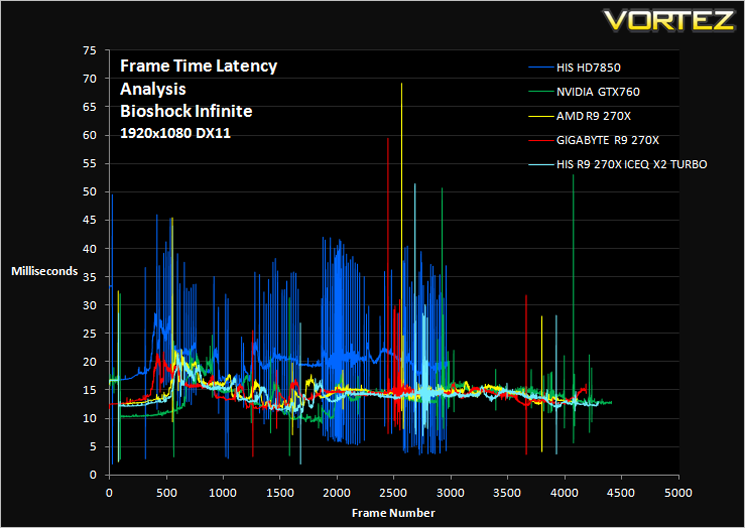
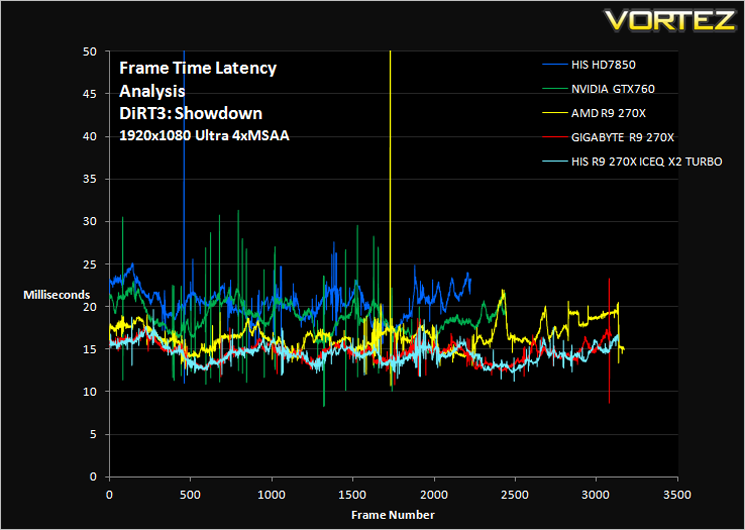
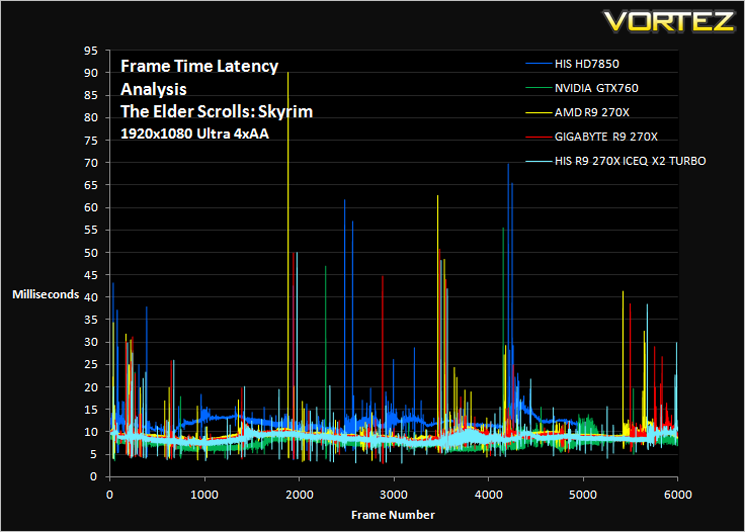
Comment
The graphs above may appear very daunting however, what you want to see is a smooth line (not fuzzy) with very few peaks and troughs. While you are unlikely to notice peaks and troughs below 30ms, any peak above 30ms may be seen as a stutter during gameplay. This will however depend greatly on your own perceptions.
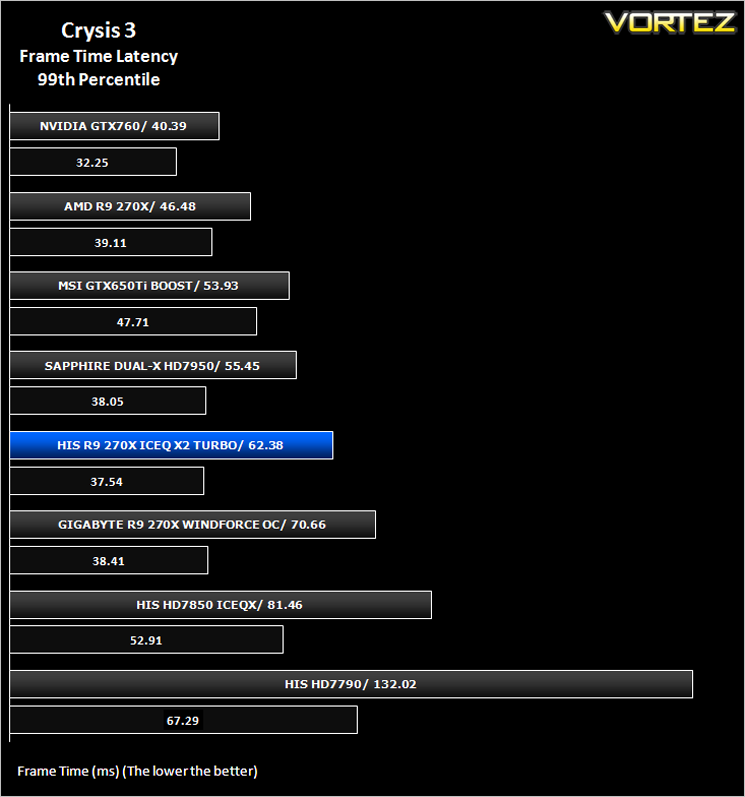
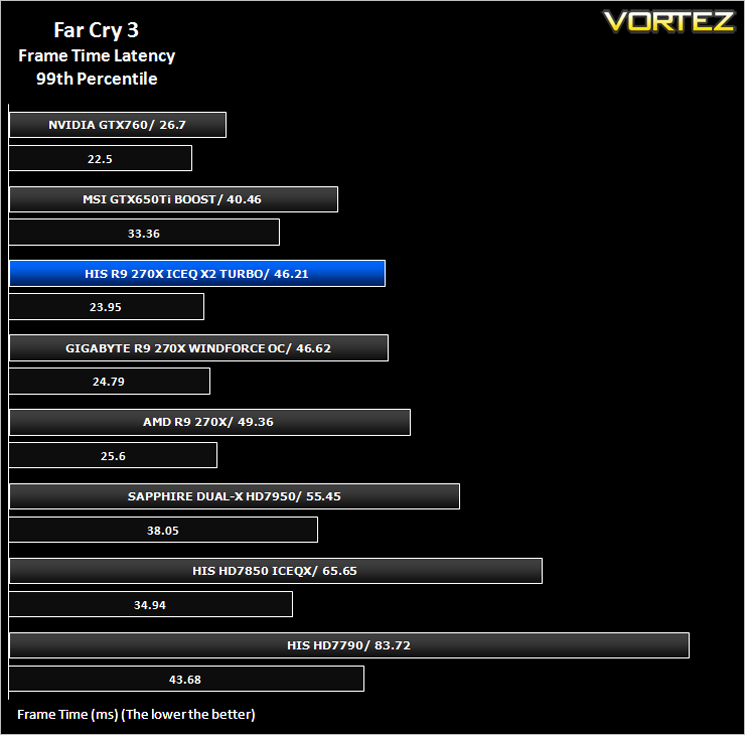
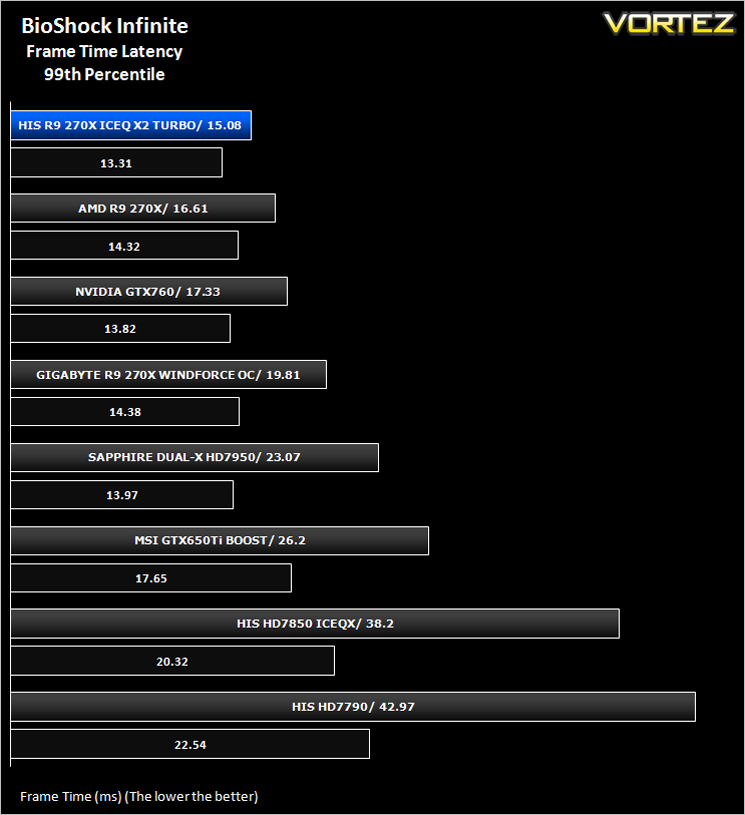
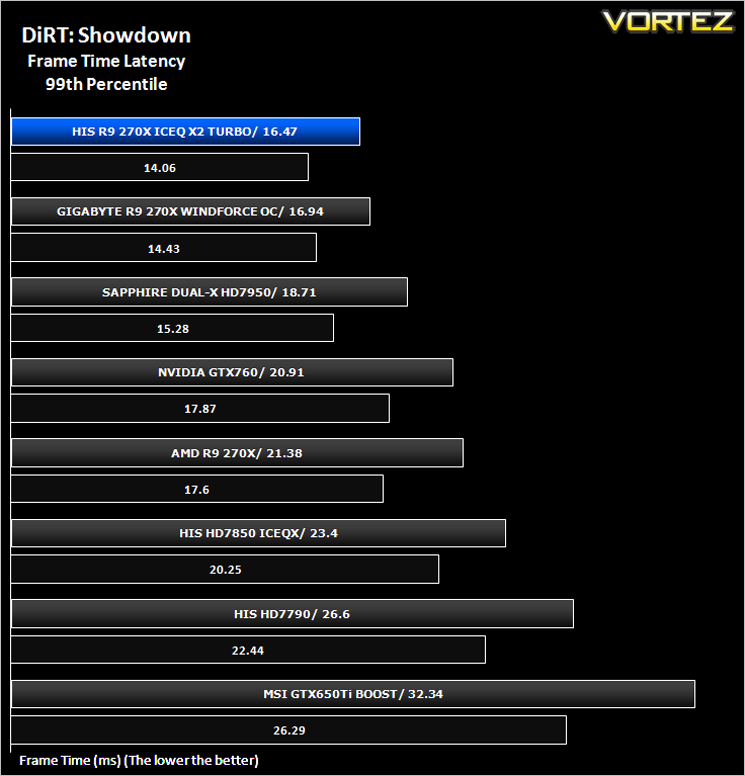
Average and 99th Percentile response times (Frame Time Analysis)
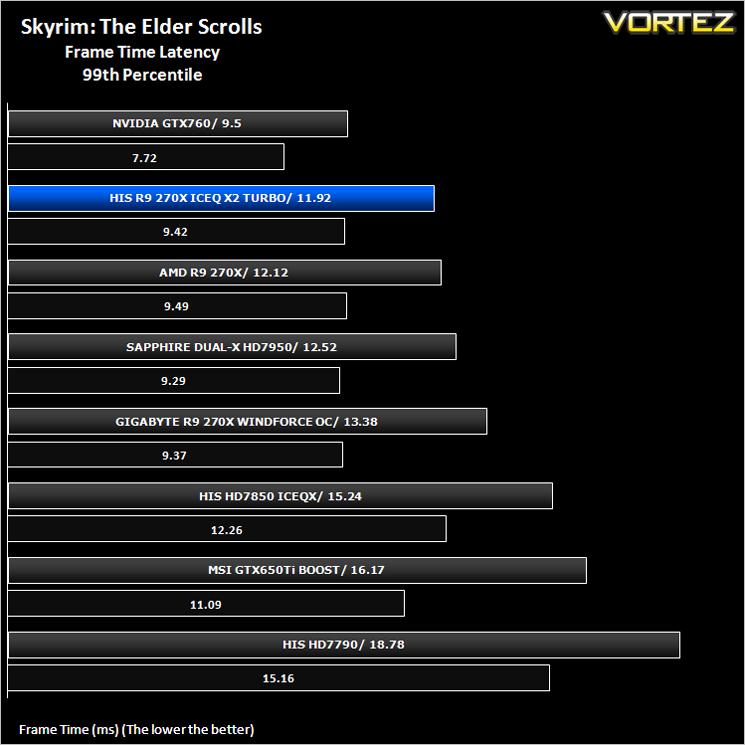
Here we take a look at both average (black) and 99th Percentile (coloured) response times of the graphics cards. It is highly unlikely a user will notice any micro stutter (also incorrectly referred to as lag but the effect can be interpreted to be similar) at anything below 30ms but every gamers perception differs.
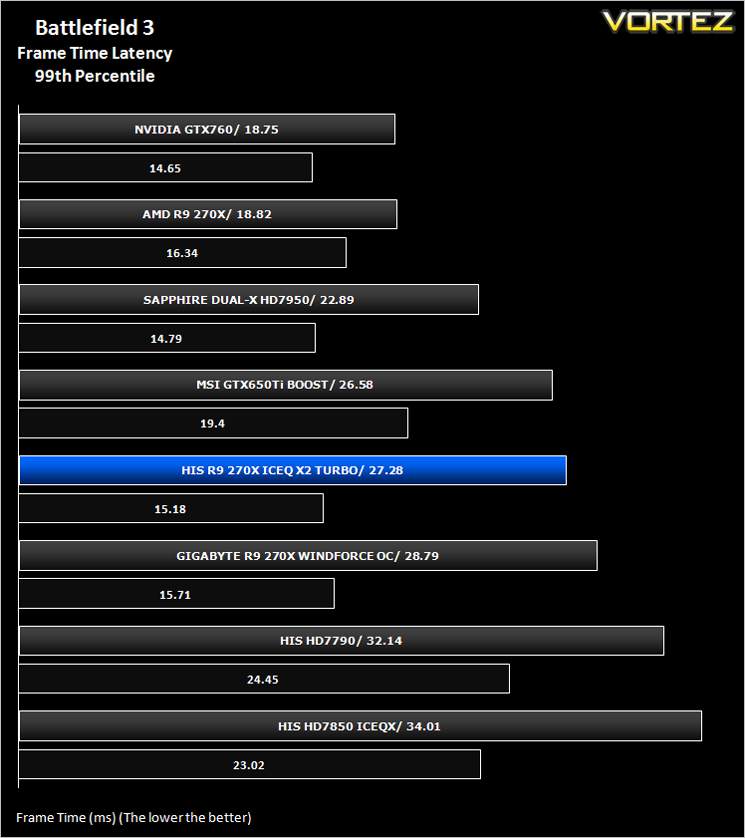
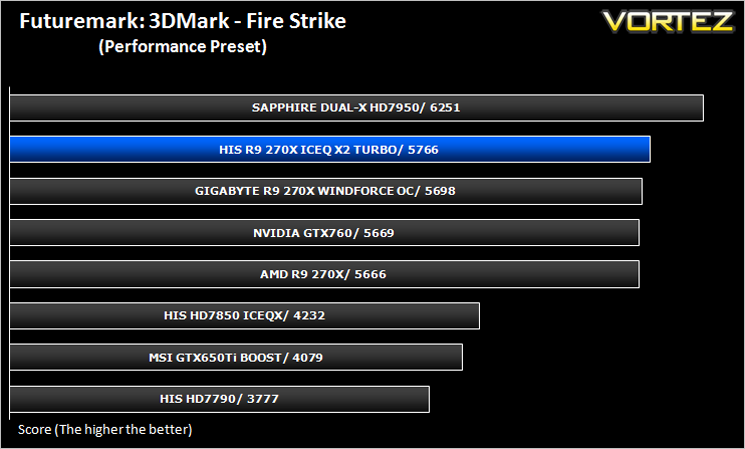
Futuremark 3DMark Fire Strike (Synthetic)
Fire Strike is the new showcase DirectX 11 benchmark designed for high-performance gaming PCs. It is Futuremark’s most ambitious and technical benchmark ever, featuring real-time graphics rendered with detail and complexity far beyond what is found in other benchmarks and games today.
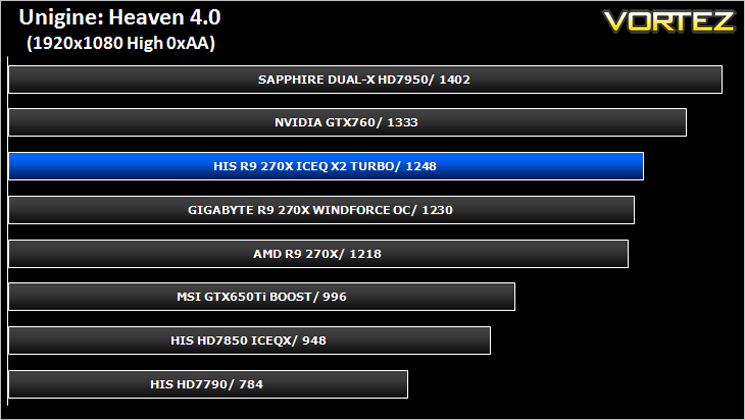
Unigine: Heaven 4 (Synthetic)
Heaven Benchmark with its current version 4.0 is a GPU-intensive benchmark that hammers graphics cards to the limits. This powerful tool can be effectively used to determine the stability of a GPU under extremely stressful conditions, as well as check the cooling system’s potential under maximum heat output. It provides completely unbiased results and generates true in-game rendering workloads across all platforms.
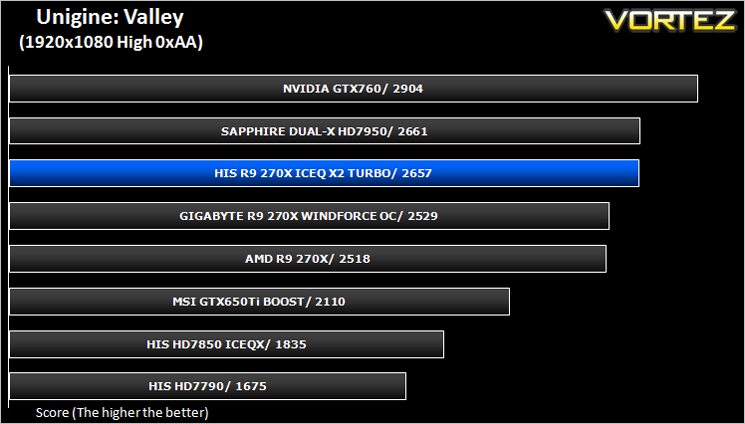
Unigine: Valley (Synthetic)
Valley Benchmark is a new GPU stress-testing tool from the developers of the very popular and highly acclaimed Heaven Benchmark. The forest-covered valley surrounded by vast mountains amazes with its scale from a bird’s-eye view and is extremely detailed down to every leaf and flower petal. This non-synthetic benchmark powered by the state-of-the art UNIGINE Engine showcases a comprehensive set of cutting-edge graphics technologies with a dynamic environment and fully interactive modes available to the end user.
Battlefield 3 (FPS)
Battlefield 3 leaps ahead of its time with the power of Frostbite™ 2, the next instalment of DICE’s cutting-edge game engine. This state-of-the-art technology is the foundation on which Battlefield 3 is built, delivering enhanced visual quality, a grand sense of scale, massive destruction, dynamic audio and incredibly lifelike character animations. As bullets whiz by, walls crumble, and explosions throw you to the ground, the battlefield feels more alive and interactive than ever before. In Battlefield 3, players step into the role of the elite U.S. Marines where they will experience heart-pounding missions across diverse locations including Paris, Tehran and New York.
Average and minimum frames per second were measured using Fraps during the parking lot scene on Operation Sword Breaker. High and Ultra presets were loaded at both resolutions.
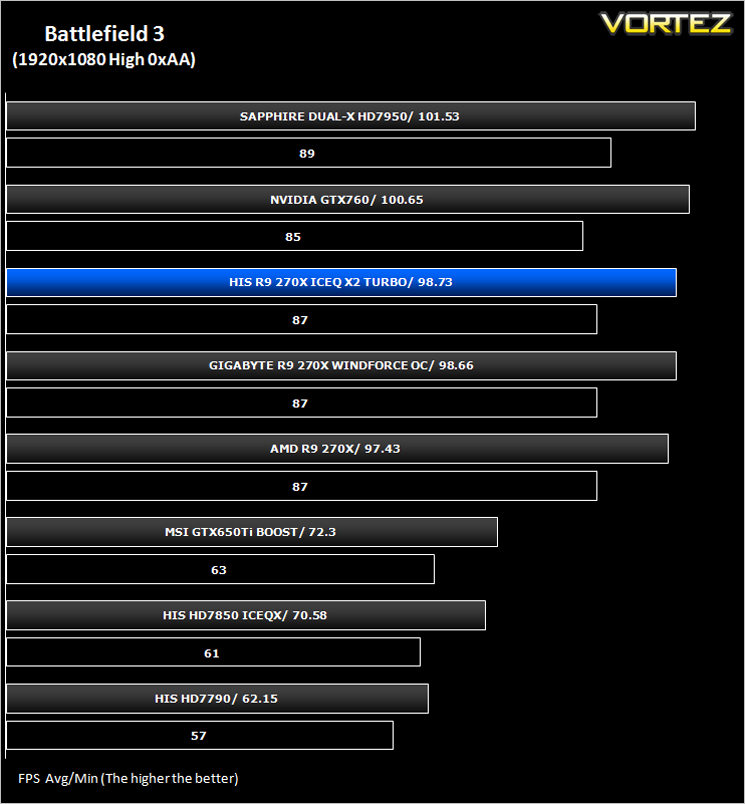
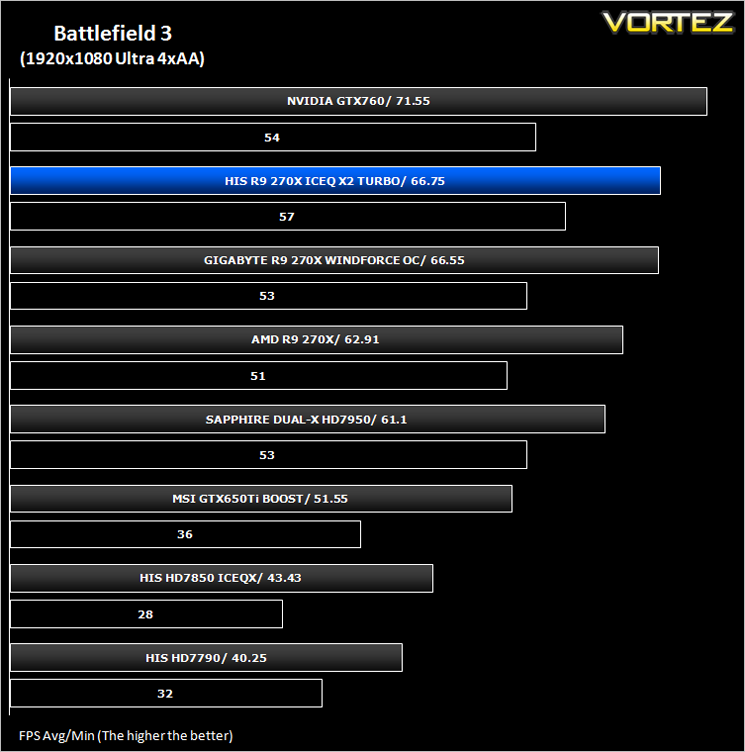
Crysis 3 (FPS)
Crysis 3 from Electronic Arts is the fourth instalment of the Crysis franchise and sequel to Crysis 2. It uses the CryEngine 3 gaming engine which is perhaps the most advanced gaming engine to date and therefore the most demanding. The meme ‘Can it run Crysis’ has never been so apparent…
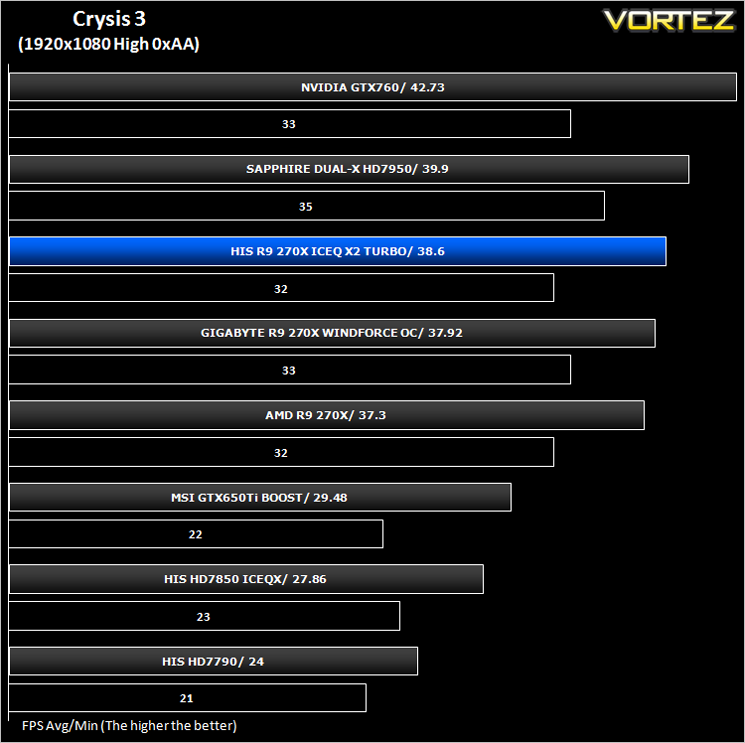
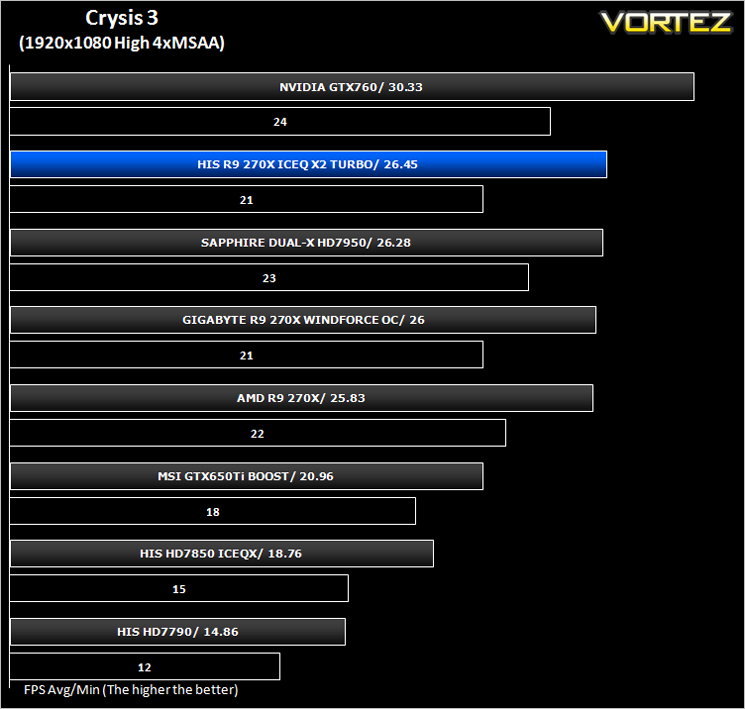
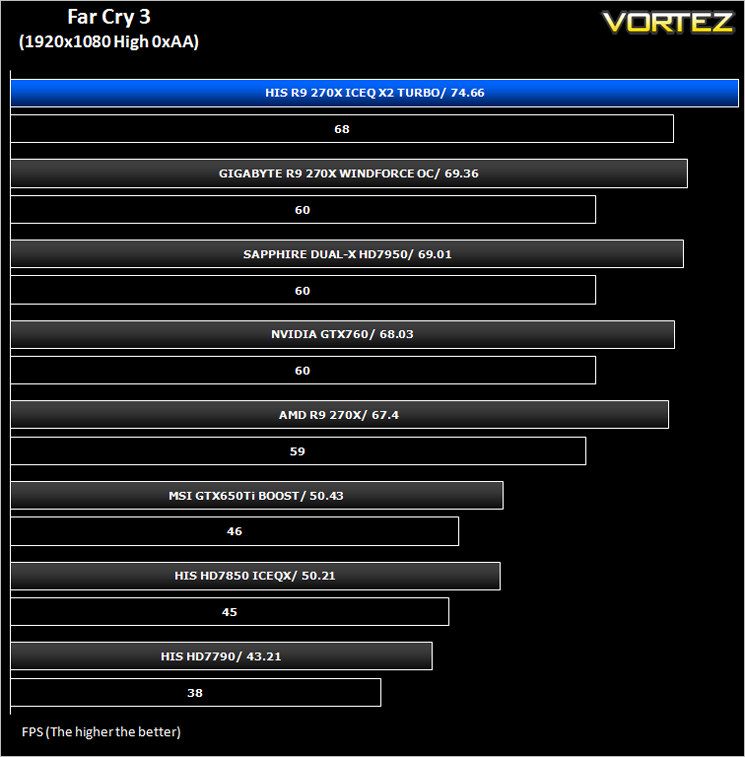
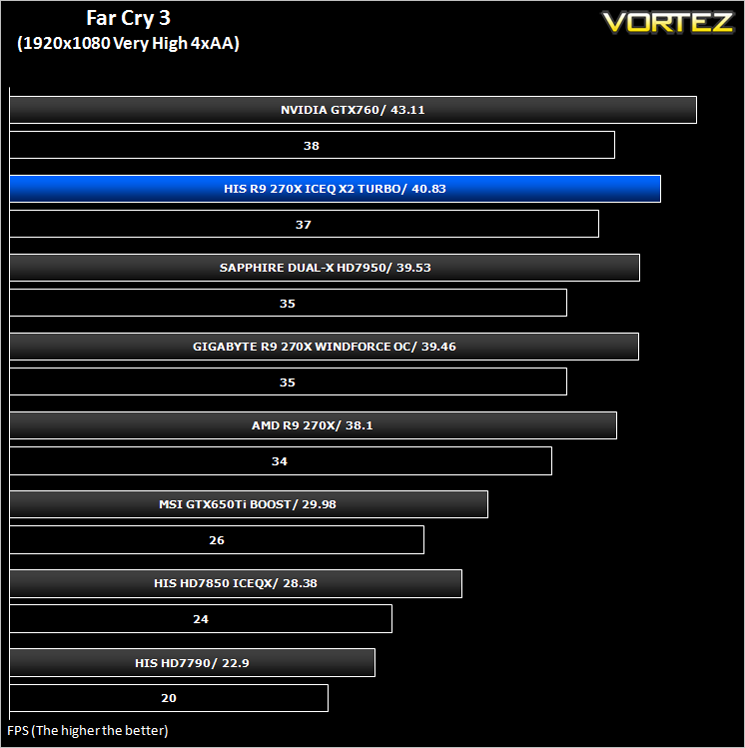
Far Cry 3 (FPS)
Far Cry 3 is a tropical survival shooter video game from Ubisoft Montreal and Massive studios. It’s open world design has similar traits to it’s forbear Far Cry 2 but it does it all so much better. With stunning visuals and settings to bring a PC to it’s knee’s, this game is so much more than the ‘just another console port’ it was reported to be.
BioShock Infinite (FPS)
Set in 1912 during the growth of American exceptionalism, BioShock Infinite is a thrid person shooter developed by Irrational games and published by 2K Games. It is the third instalment of the BioShock franchise. the game utilises the Unreal Engine 3, modifying it with their own lighting engine to present a visually stunning experience like no other.
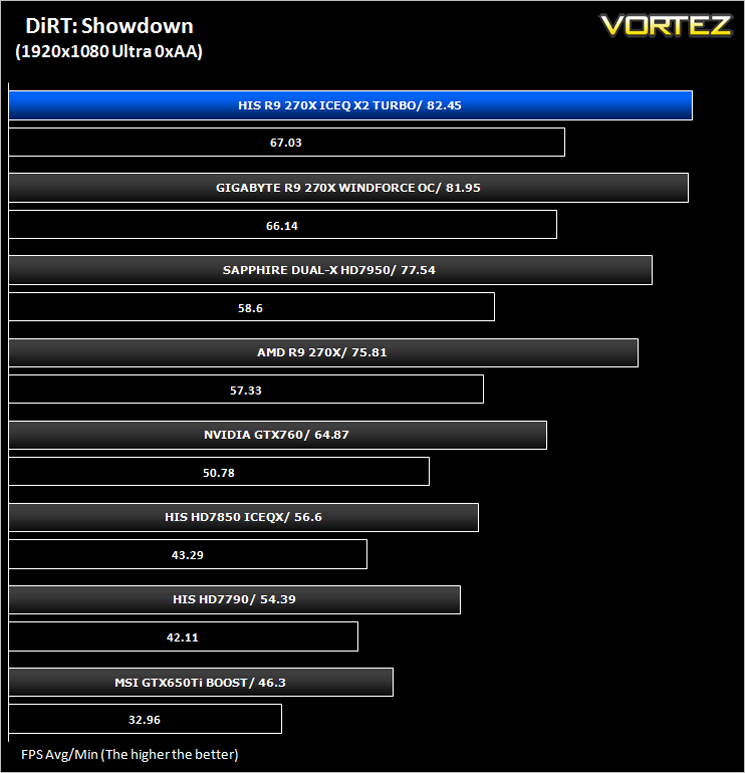
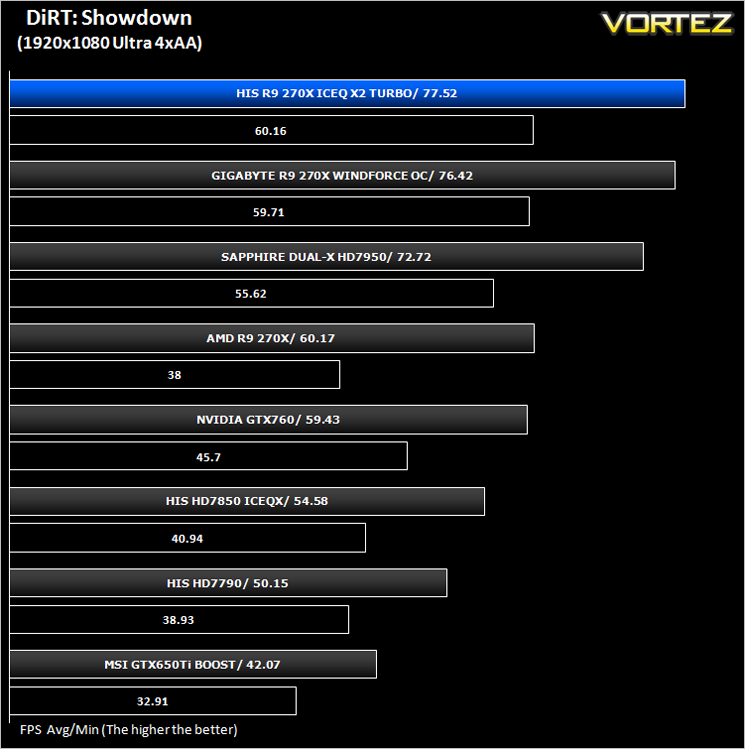
DiRT: Showdown (FPS)
DiRT Showdown is the new arcade racing game from the team that brought you the award-winning DiRT series, uncaged in 2012. Pick up and play controls combine with electrifying events, frenzied crowds and stunning graphics to deliver high octane, dive in and drive thrills from event one.
The Elder Scrolls: Skyrim (FPS)
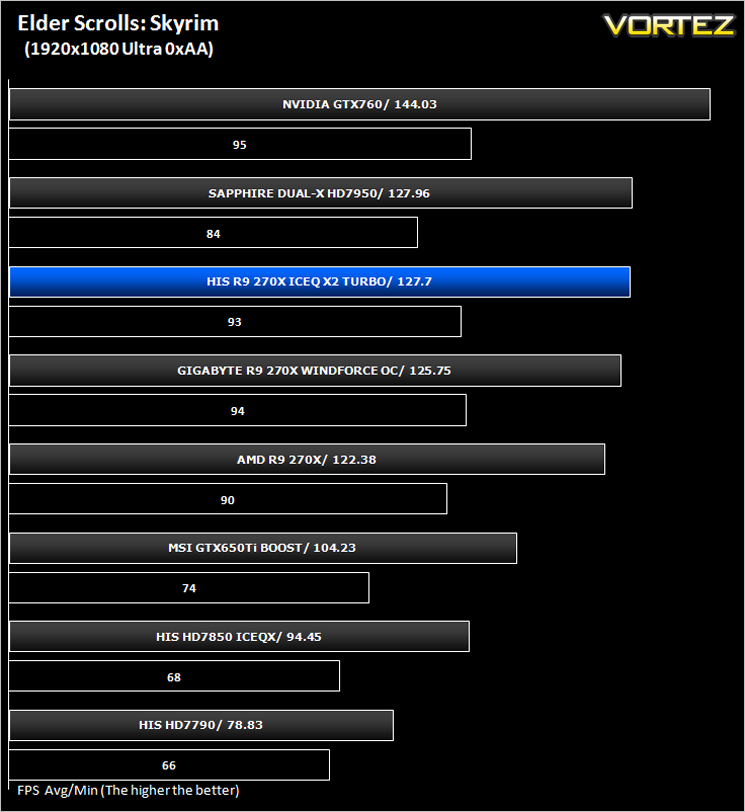
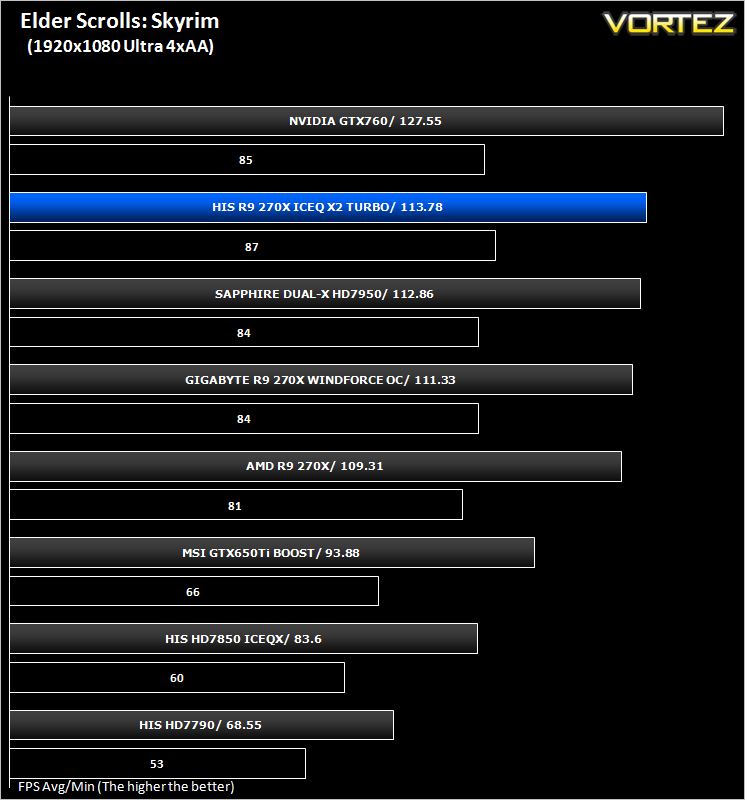
Skyrim is not a direct successor to the very popular Oblivion. Instead it takes place 200 years after the events of Oblivion. The non-linear playing that made the Elder Scrolls such a popular series does however make a return along with the beautiful scenery the encompasses the world of Skyrim.
Average and minimum frames per second were measured using Fraps during the drop down passage to Riverwood. V-sync was disabled to allow fluctuating (higher the 60) FPS for these runs. It is however recommended that v-sync is left enabled during normal gameplay due to the games dynamics.
Value For Money
For those on a budget, this is perhaps the most important section of a graphics card review. For everyone else it will certainly make you think twice before calling the bank manager for an overdraft request. We calculate Value for money by taking the cost of the product and then dividing that figure by the overall performance figure which gives us a result in the guise of £ per frame – in effect how much every frame per second will cost you.
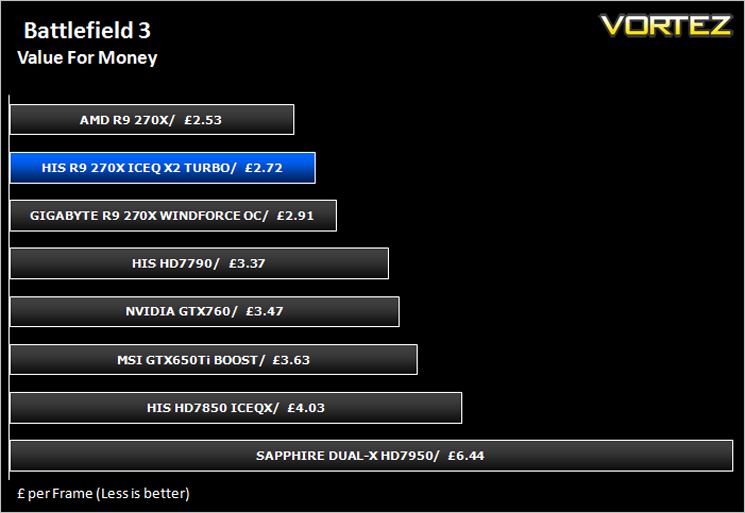
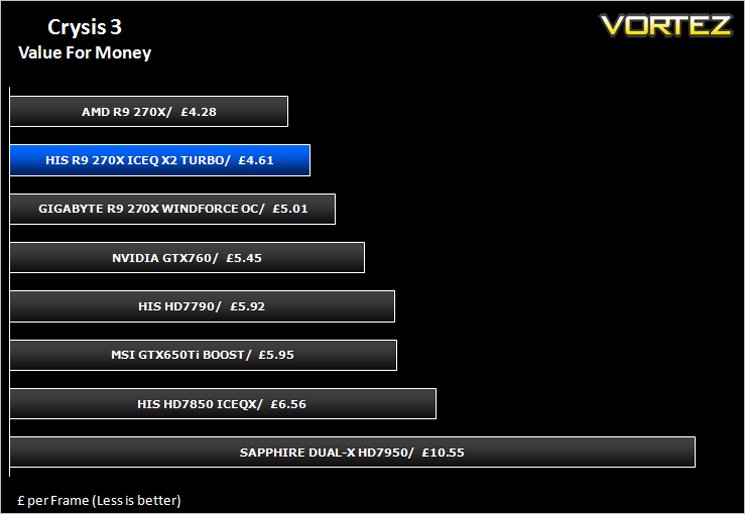
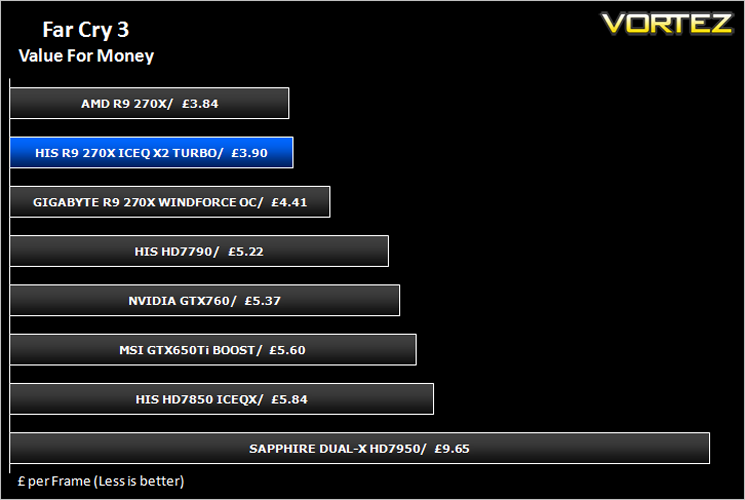
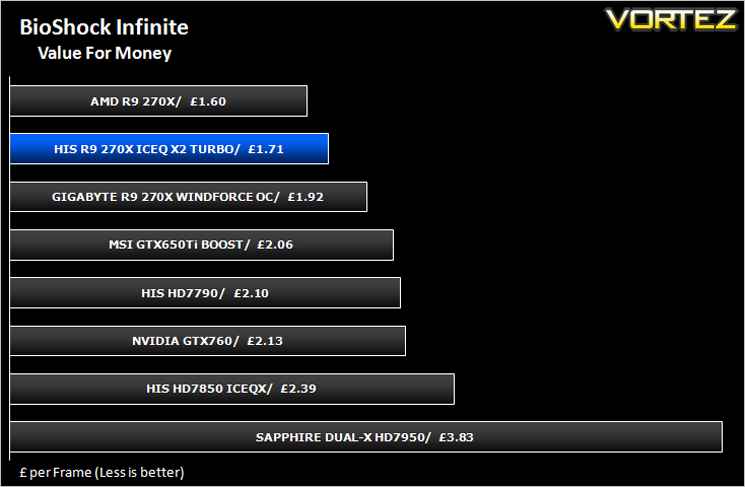
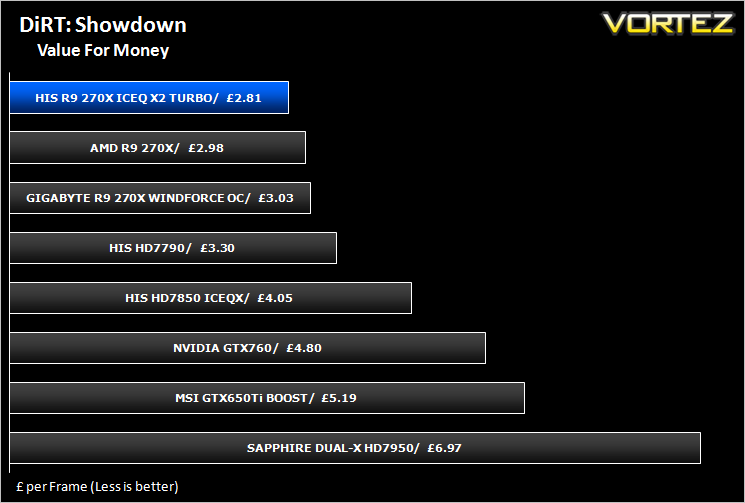
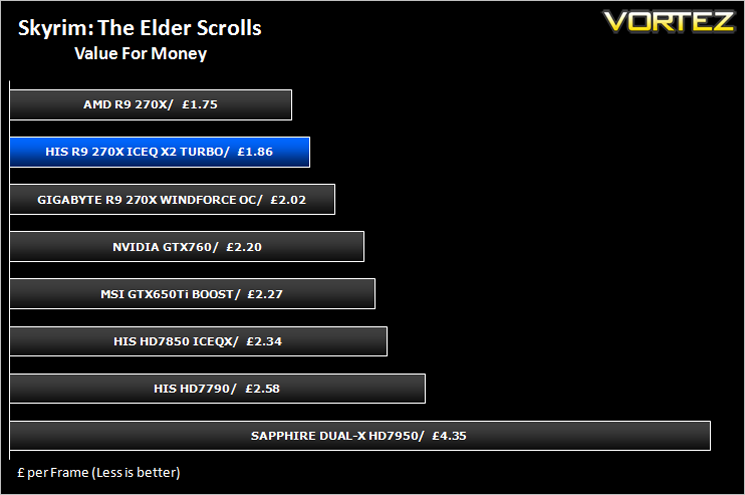
Overall Performance
Here we take a look at the overall performance of the graphics card. This figure is determined by finding the average FPS across all of the settings used in a particular benchmark(game) to give us an overall value.
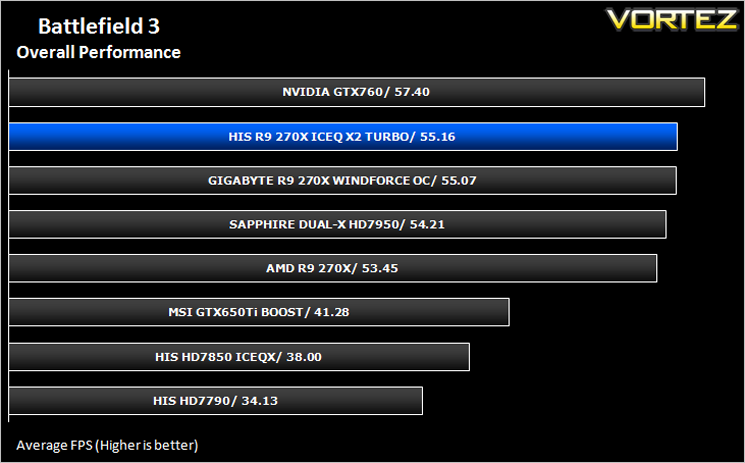
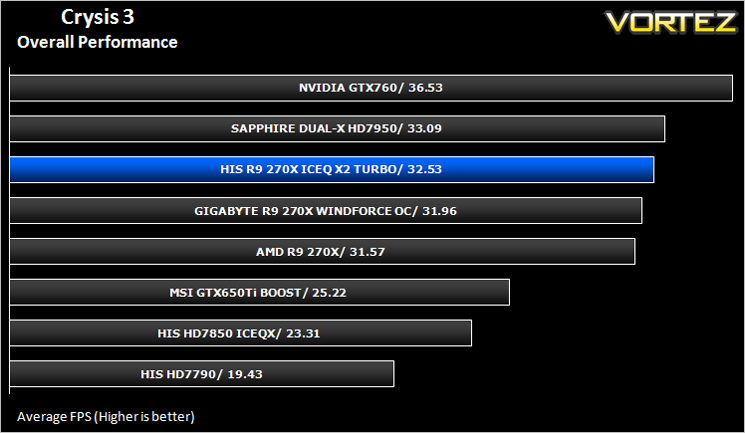
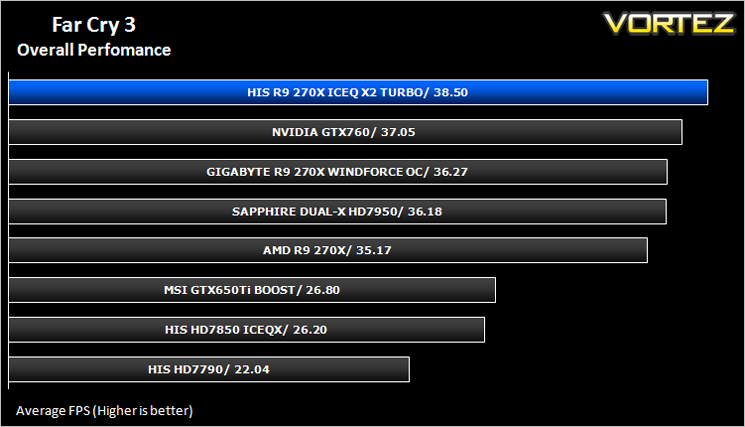
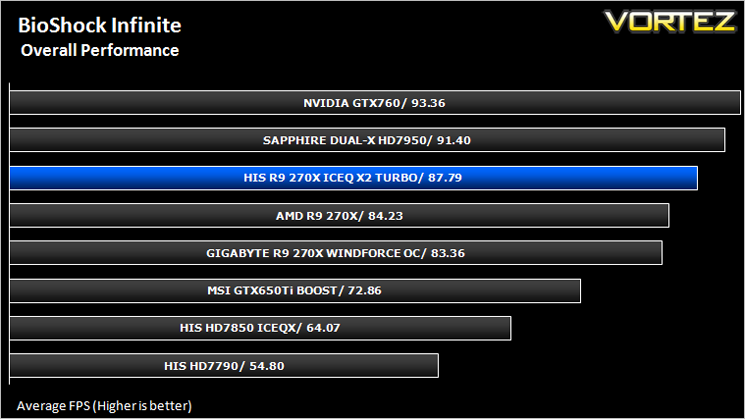
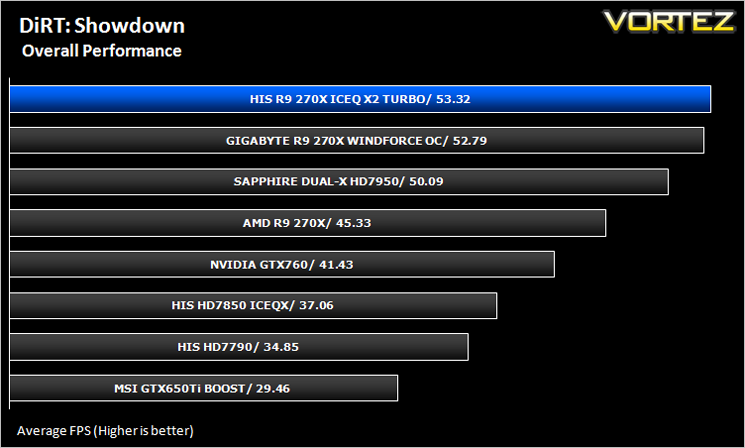
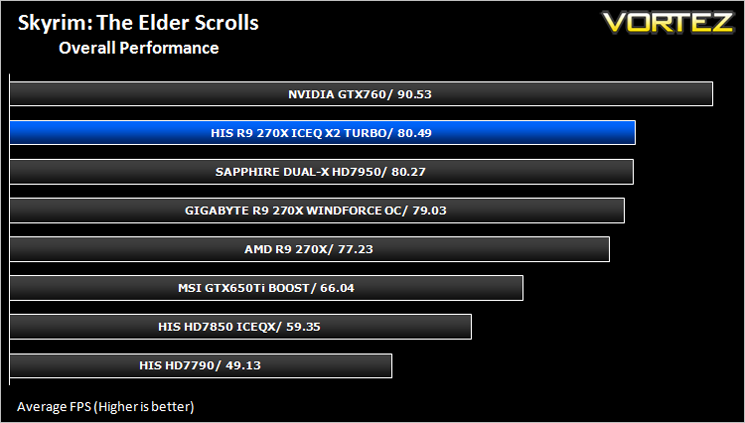
Overclocking
For overclocking our AMD cards we will be using MSI Afterburner as this gives us all of the options we require.
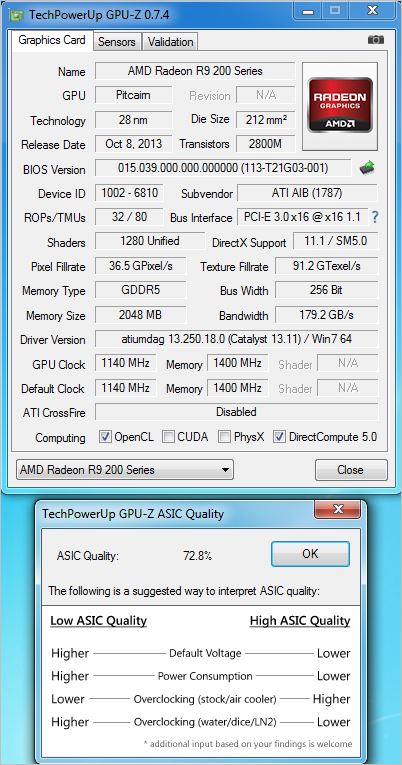
Above is a screenshot of GPU-Z showing the factory overclock of our sample.
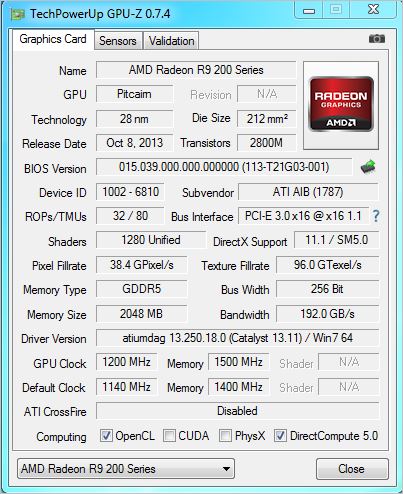
With the factory overclock set so high we were not expecting any further leaps and while we did manage to increase the clockspeed a little, it was far from impressive. We originally set the core clockspeed to 1200MHz which the reference design is capable of and while this card too, managed a few benchmarks at this speed it was far from stable. We had to drop the clockspeed back to 1160MHz until 24/7 stability was attained.
So on the one hand, overclockers will be disappointed but those looking for one of the fastest factory overclocks on this range will be impressed.
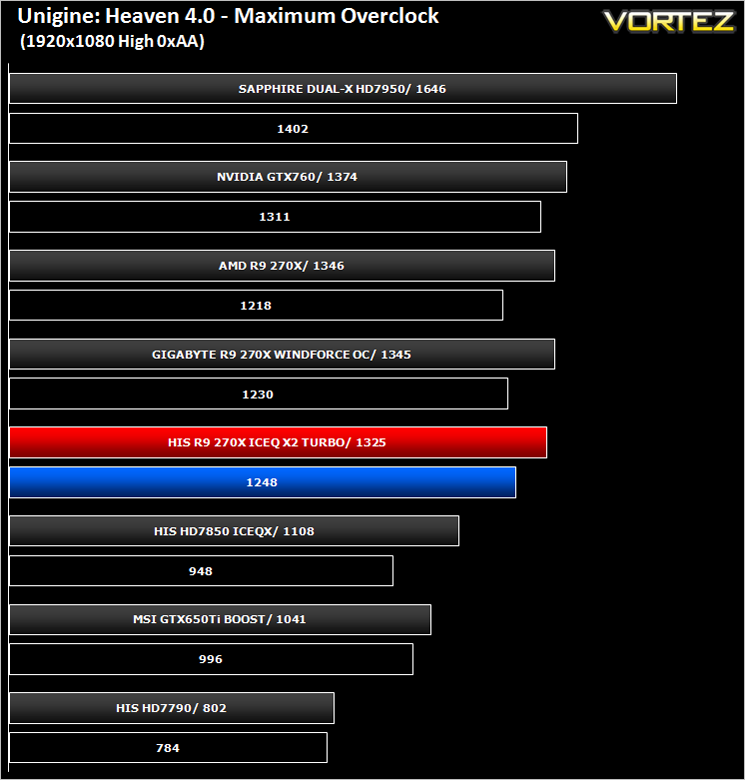
Above you can see the effects the overclock (red) had on the stock score (blue).
Conclusion
The HIS R9 270X IceQ x2 is a two sided coin if ever the was one. As an overall package it impressed us. While the included accessories were sparse and we are still undecided on the blue PCB, the card itself was very good. It had excellent cooling capabilities, ran very quiet and looks the business. Couple this with one of the fastest factory overclocks available for a R9 270X and HIS would appear to have a winner.One of our major negatives of this card was it’s inability to overclock past that, or even match, the overclock of the reference design, let alone a competitors custom design. While we have no complaints about the card in standard form because it is faster than both, it overclocked like a three legged donkey. Despite our very best efforts, the core appeared to already be overclocked to it’s maximum clockspeed because with a measly 60MHz over the 1100MHz ‘stock’ speed it was 40MHz short of the reference design’s overclock. In the greater scheme of things, 40MHz will not break any records so we won’t be losing any sleep over it but we felt that the excellent cooling afforded to this design was wasted because of such a small overclock. Generally speaking, enthusiasts will plump for a custom cooled, pre-overclocked GPU because generally speaking, these are speed binned to provide the better silicon. It appears this wasn’t the case with our sample.
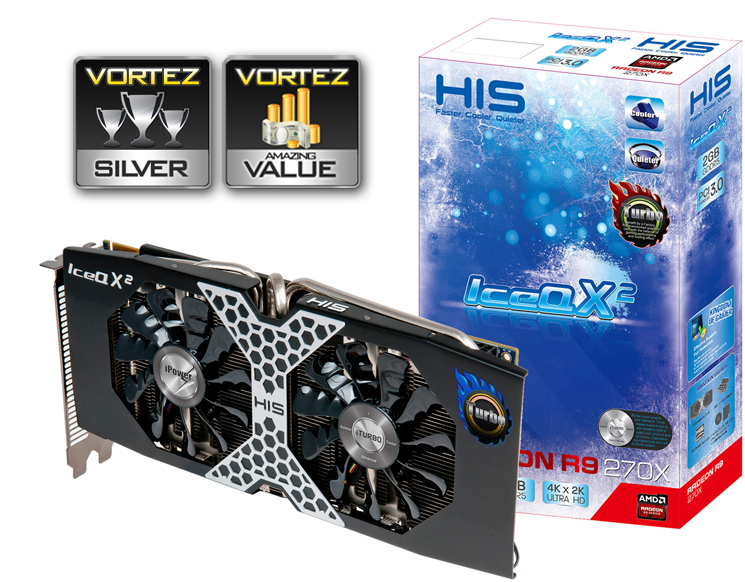
Other than that the card is very good indeed and comes highly recommended. Were it a capable overclocker too, this card would be Gold worthy but sadly, like the AMD reference design it will have to settle for Silver. We do however feel the card represents very good value for money costing just £150 and while it cannot quite compete with the NVIDIA GTX760 in terms of raw performance figures, it is over £50 cheaper which is quite a saving at this highly competitive level of the market.
To summarise:
With a supremely fast factory overclock, the HIS card performed at the forefront of our benchmarks. Cost, cooling and stock performance were all excellent with only manual overclocking ability found wanting. A great mid-range graphics card worthy of consideration.
Pros
+ Very fast mid-range card
+ Surprisingly quiet
+ Factory overclocked
+ Great looking
Cons
– Poor overclocking results
– Sparse accessories
+ Very fast mid-range card
+ Surprisingly quiet
+ Factory overclocked
+ Great looking
Cons
– Poor overclocking results
– Sparse accessories

Click here for an explanation of our awards at Vortez.net.


