With all of the RGB memory kicking around, sometimes it’s refreshing to take a look at something a little more subtle. Here we have the HyperX Predator DDR4 clocked at 3200MHz.

Product on Review: HyperX Predator DDR4
Manufacturer: HyperX
Street Price: 4x 8GB – 3200MHz (kit tested) GBP £379.99 / USD $414.99 / AUS $498.00
Amongst today’s DDR4 memory releases, it’s difficult to last two minutes without hearing the words “RGB” or “Gaming”, but today we look at something a little bit different. HyperX have launched their Predator DDR4 memory, and while it is available with RGB strips on the top edge, they’ve also realised that many people aren’t such a big fan of RGB lighting and colourful PCs, giving those seeking a more subtle PC the option to go, dare we say it, RGB-less.
Available in capacities ranging from 8GB all the way up to 128GB and with speeds up to 4133MHz, the HyperX Predator means business. There’s also Intel-XMP support and optimisations to ensure the best compatibility; furthermore, each stick is 100% factory tested at its advertised speed and is backed up by a lifetime warranty for total piece of mind.
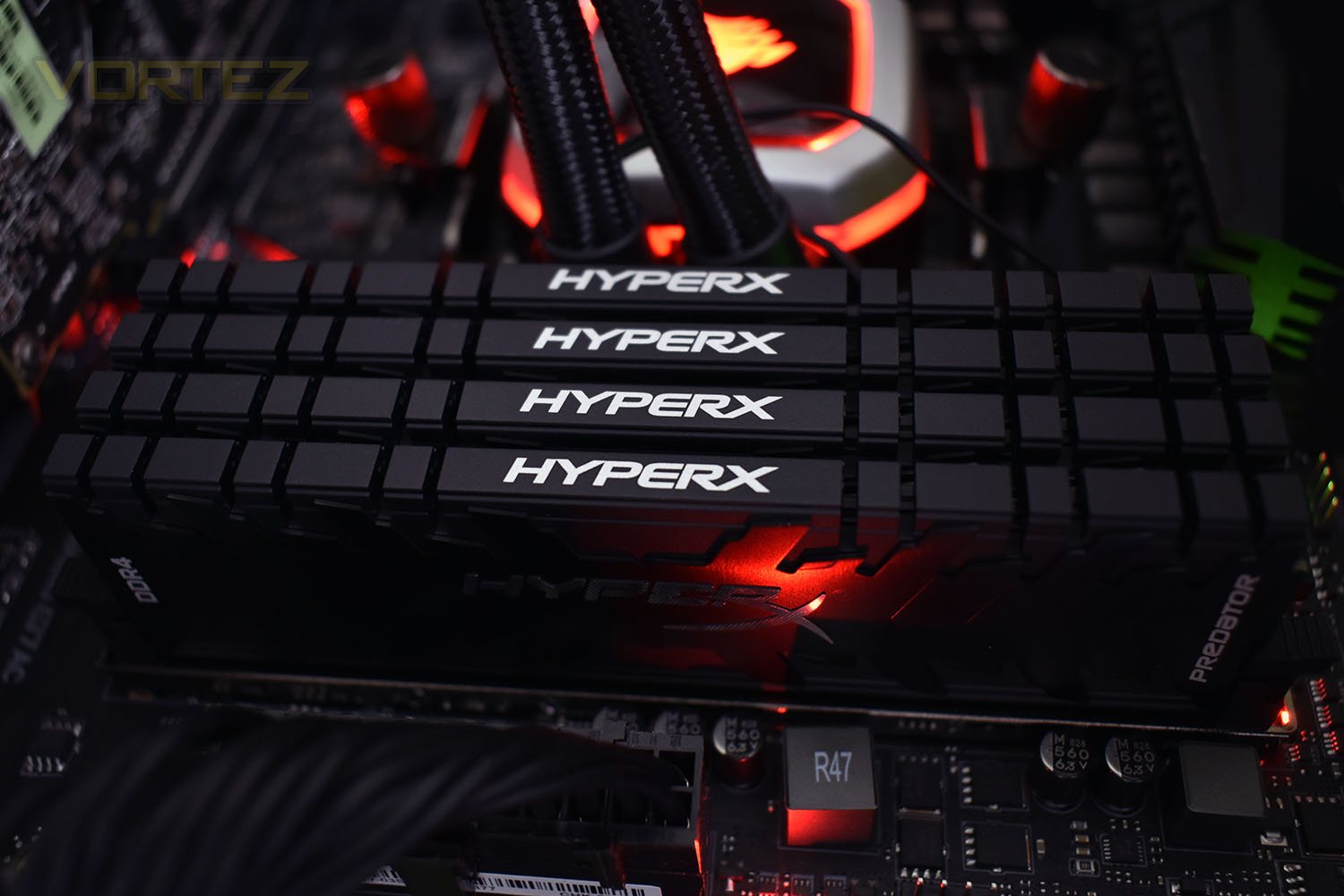
The HyperX Predator DDR4 DIMMs use a large, thick metal heatsink to help keep temperatures in check when running the memory at its 3200MHz speeds, roughly 1034MHz over the JEDEC standard. We also have 4 individual sticks, all packed together tightly, so ensuring the heat can be dissipated quickly is important.
Let’s throw this into our test rig and see how it performs.
HyperX on the Predator DDR4:
If you’re looking for the edge, you need to stay at the top of the food chain. Ultra-fast HyperX Predator DDR4 can provide the performance1, while brilliant Predator DDR4 RGB will upgrade both your system’s speed and style. Set up2 your unique look and keep it synchronised with HyperX Predator DDR4 RGB’s Infrared Sync technology, no cables required. Predator DDR4’s aggressive black heat spreader ensures that it both looks and stays cool. Boost your frame rate, keep your streams smooth and power through your highlight reel rendering with speeds of up to 4133MHz3 and low CL12–CL19 latencies. It’s available in 4GB–16GB single modules and kits of 2, 4 and 8 with capacities of 8GB–128GB. The Intel XMP-ready and certified profiles are optimised for Intel’s latest chipsets and are compatible with many of AMD’s latest chipsets – just select the profile and you’re ready to go. 100 per cent factory tested at speed, and backed by a lifetime warranty, dependable Predator DDR4 RGB gives you the best of both worlds: extreme performance and maximum peace of mind.
Technical Specifications
Form Factor: UDIMM
Pins: 288
XMP Ready: Yes
Plug N Play: No
Speeds: 2400, 2666, 3000, 3200, 3333, 3600, 4000, 4133
CAS Latencies: 12, 13, 15, 16, 17, 19
Voltage: 1.35V
Module Capacities: 4GB, 8GB, 16GB
Kit Capacities: 8GB, 16GB, 32GB, 64GB, 128GB
Kit Configurations: Dual Channel, Quad Channel
Operating Temperature: 0°C to +85°C
Storage Temperature: -55°C to +100°C
PCB Colour: Black
Heat Spreader Colour: Black
Module Dimensions: 133.35mm x 42.2mm x 8.3mm
Warranty: Lifetime
Pins: 288
XMP Ready: Yes
Plug N Play: No
Speeds: 2400, 2666, 3000, 3200, 3333, 3600, 4000, 4133
CAS Latencies: 12, 13, 15, 16, 17, 19
Voltage: 1.35V
Module Capacities: 4GB, 8GB, 16GB
Kit Capacities: 8GB, 16GB, 32GB, 64GB, 128GB
Kit Configurations: Dual Channel, Quad Channel
Operating Temperature: 0°C to +85°C
Storage Temperature: -55°C to +100°C
PCB Colour: Black
Heat Spreader Colour: Black
Module Dimensions: 133.35mm x 42.2mm x 8.3mm
Warranty: Lifetime
Packaging & Product
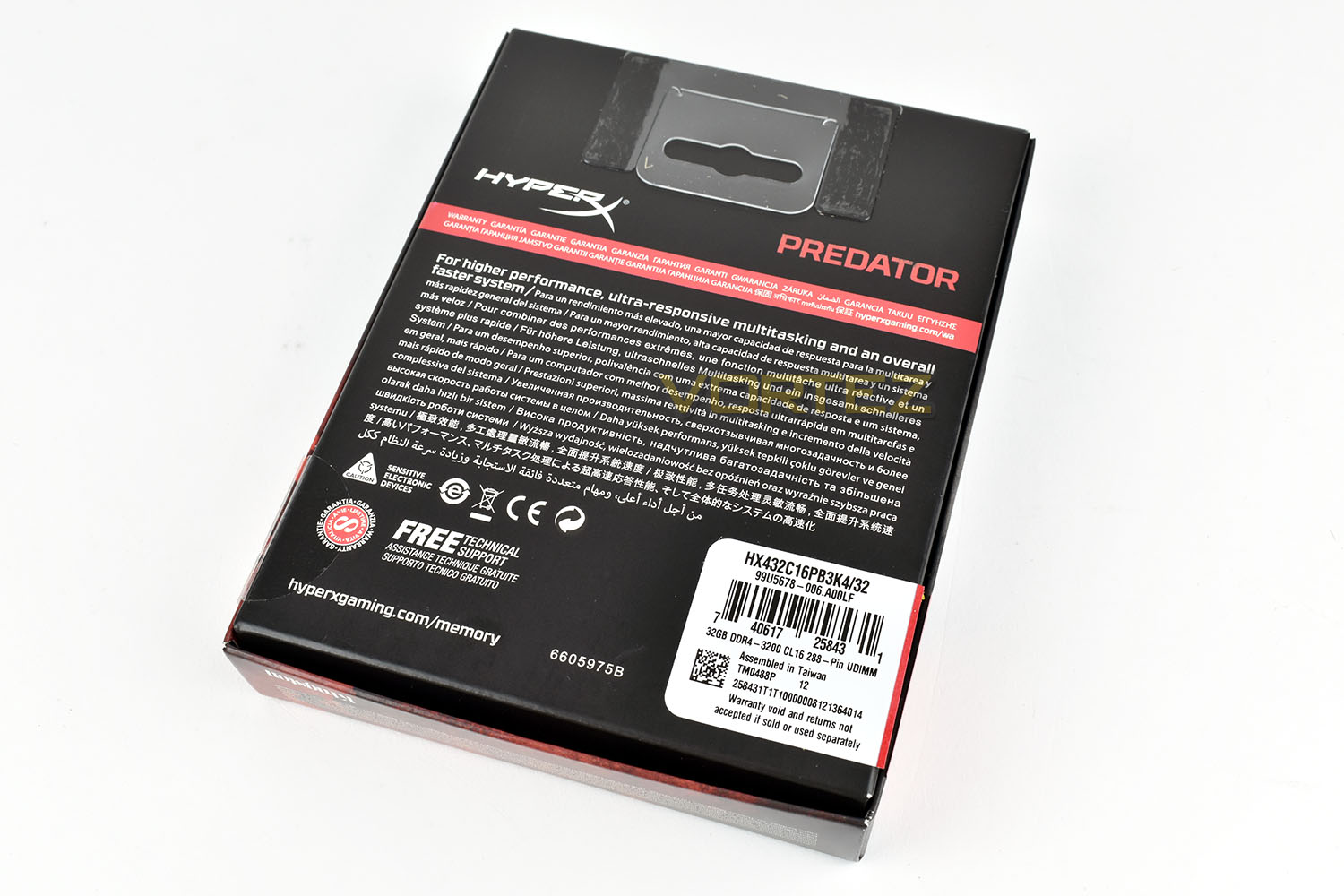
HyperX follow the black and red theme on their products and packaging, with the Predator DDR4 being no exception. The large sticker on the front ensures you pick up the exact capacity and speed that you require.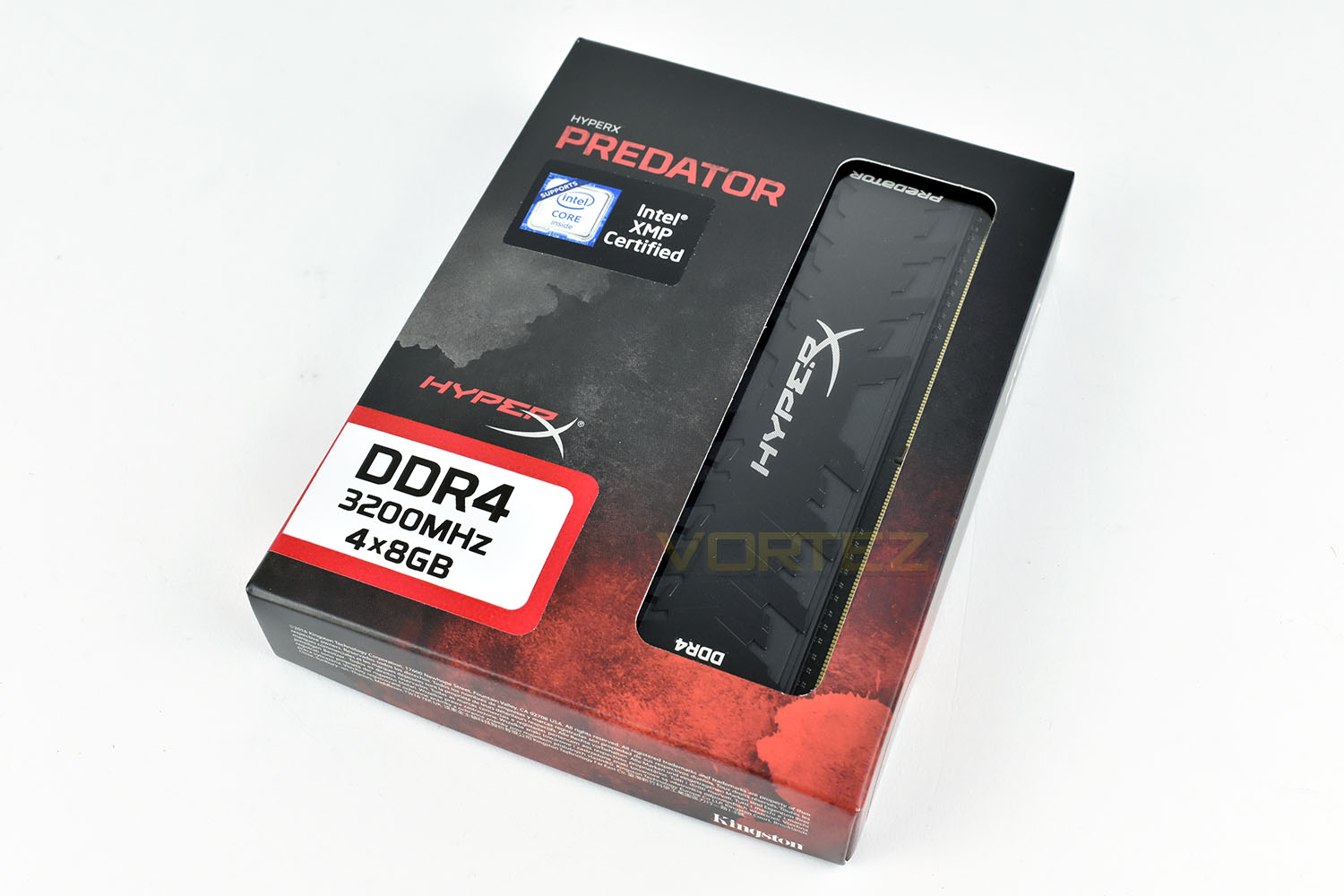
On the reverse side there are many many languages but not a lot of information overall. But how much can you really say about some sticks of RAM? Free tech support is always nice though.
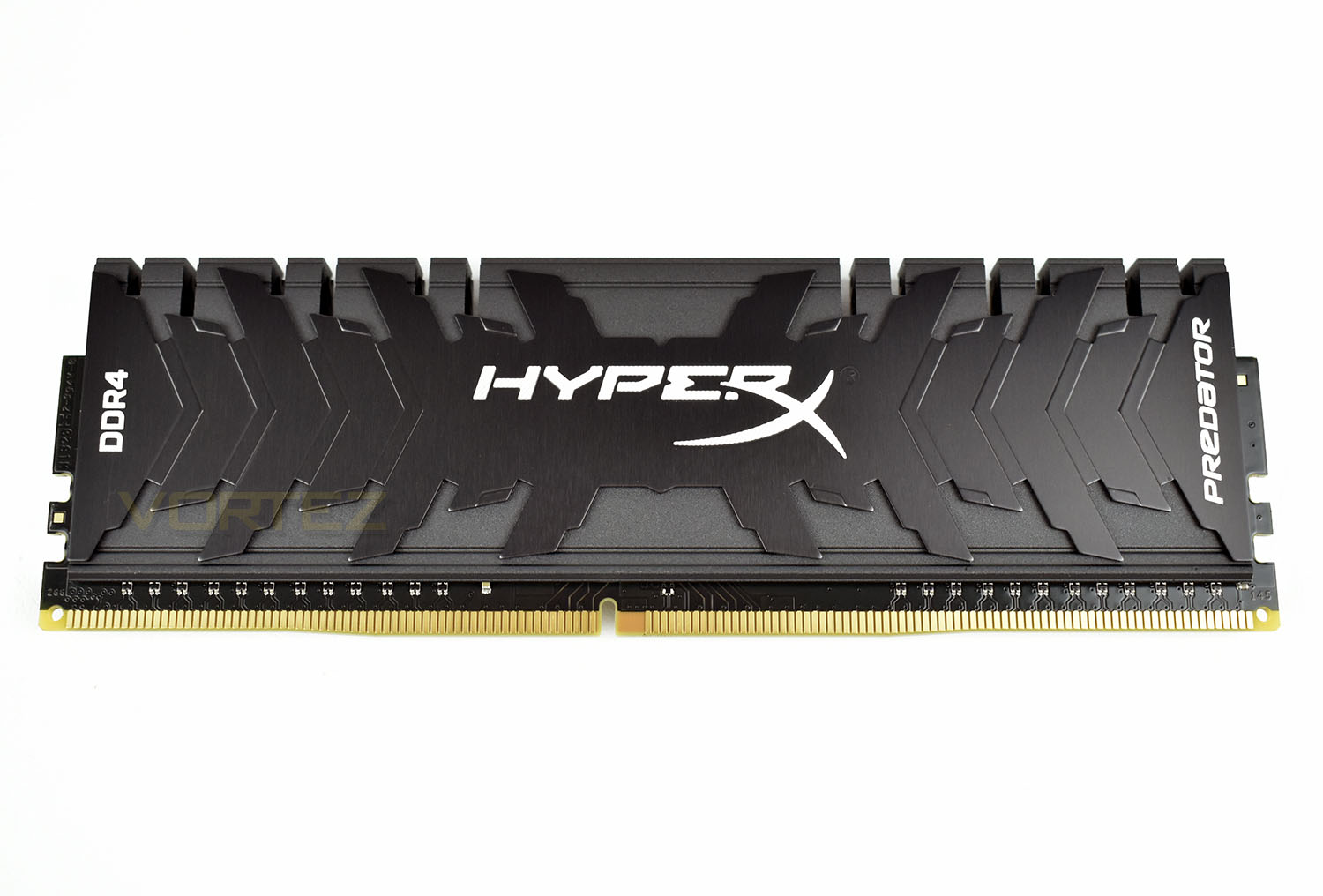
The heatspreaders are made of two separate pieces of metal that are bonded together. The two-tone effect looks brilliant with the HyperX, DDR4 and Predator sections contrasting in white.
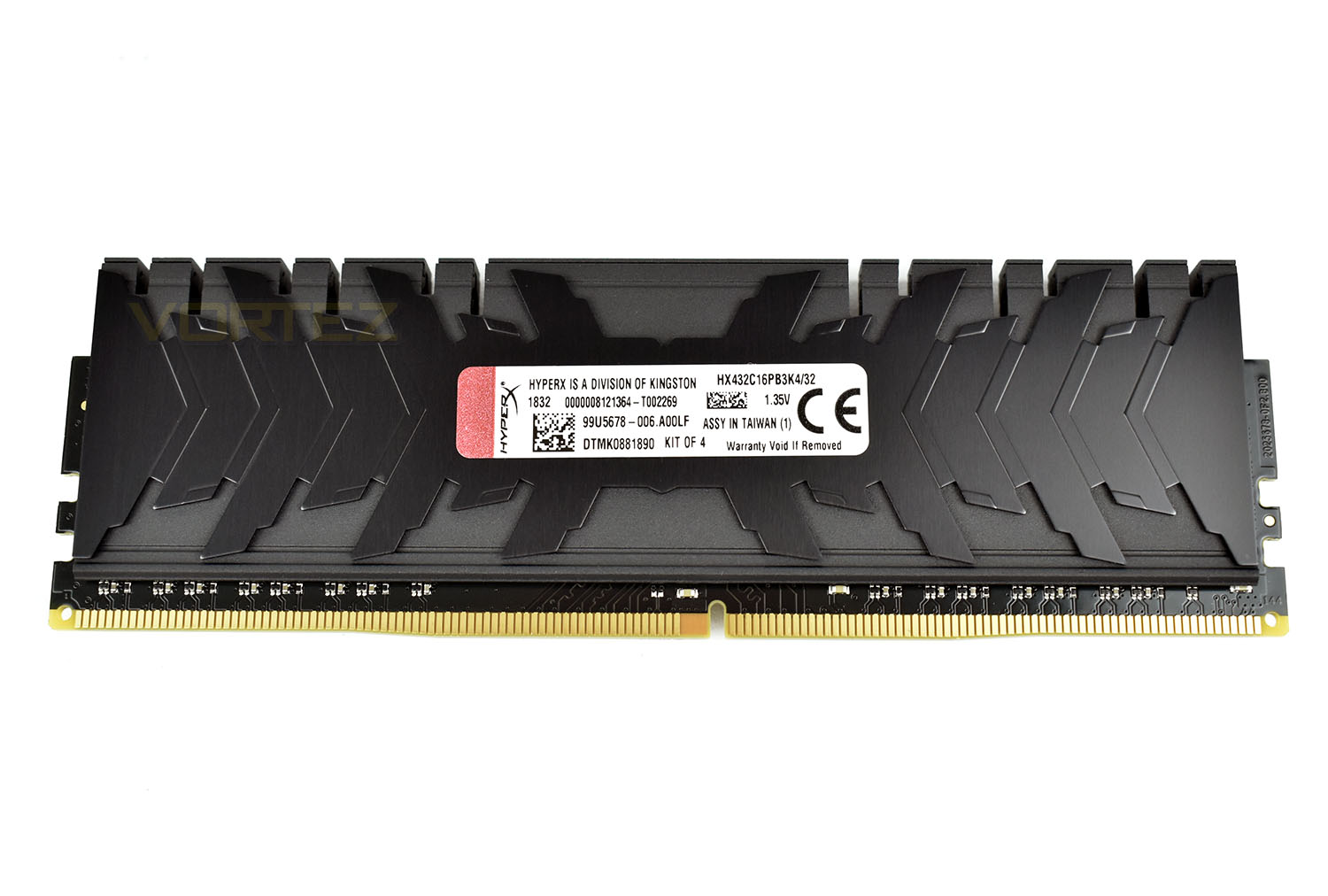
The reverse side is the same but without the white writing. The warranty sticker is found on all four of the modules, and all four must be used in unison.
Overclocking
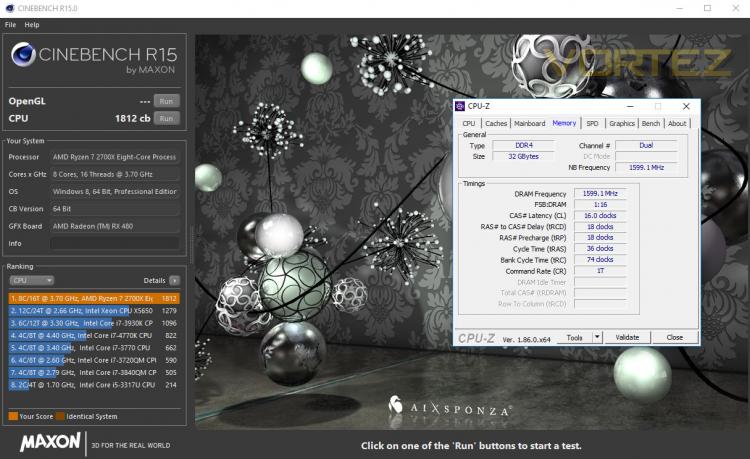
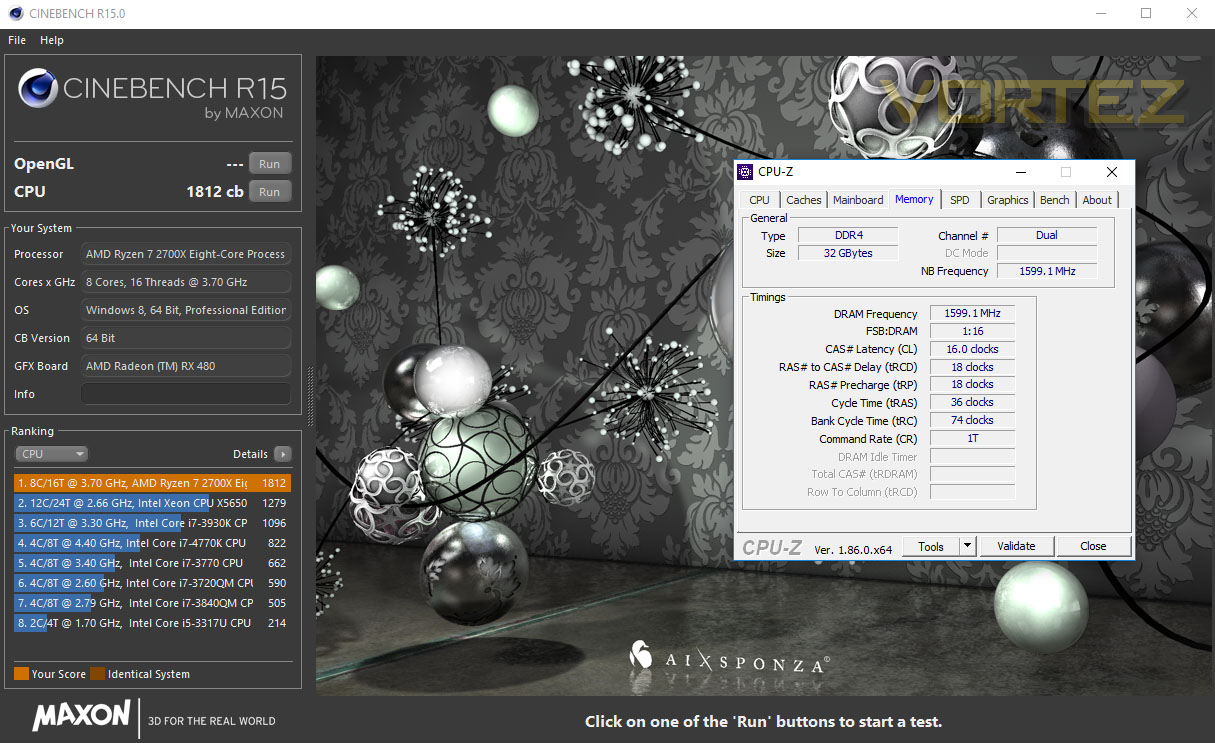
With the HyperX Predator kit already running at 3200MHz, we felt like we needed to reach at least 3500MHz to warrant the term “overclock”, anything less than that would be too insignificant.We began by pushing the clock speed to 3400MHz and ran our tests, they went without a hitch at the standard XMP latencies and voltage.
Same again at 3500MHz, with no problems on the XMP latencies and voltage.
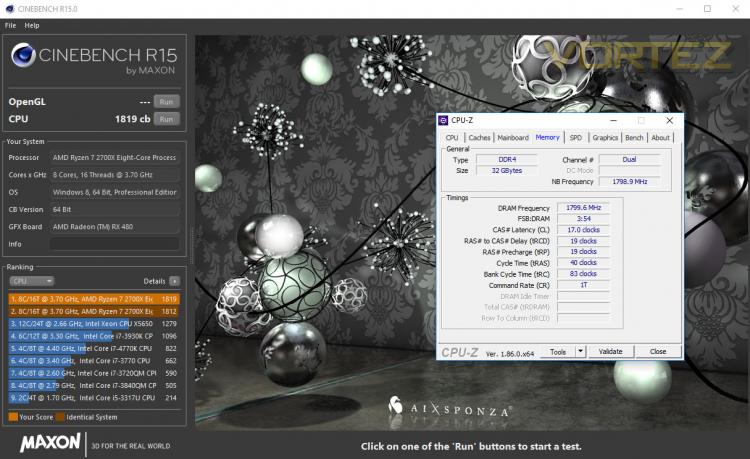
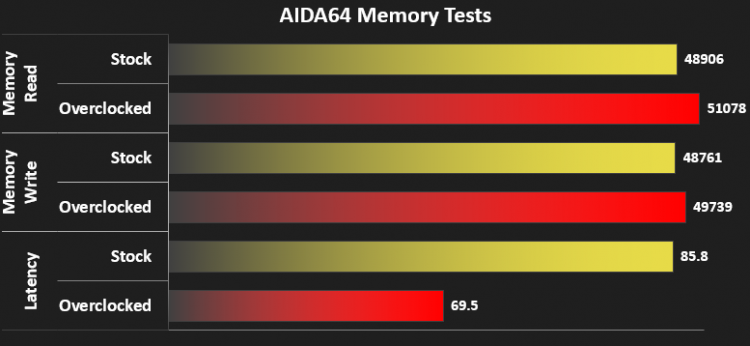
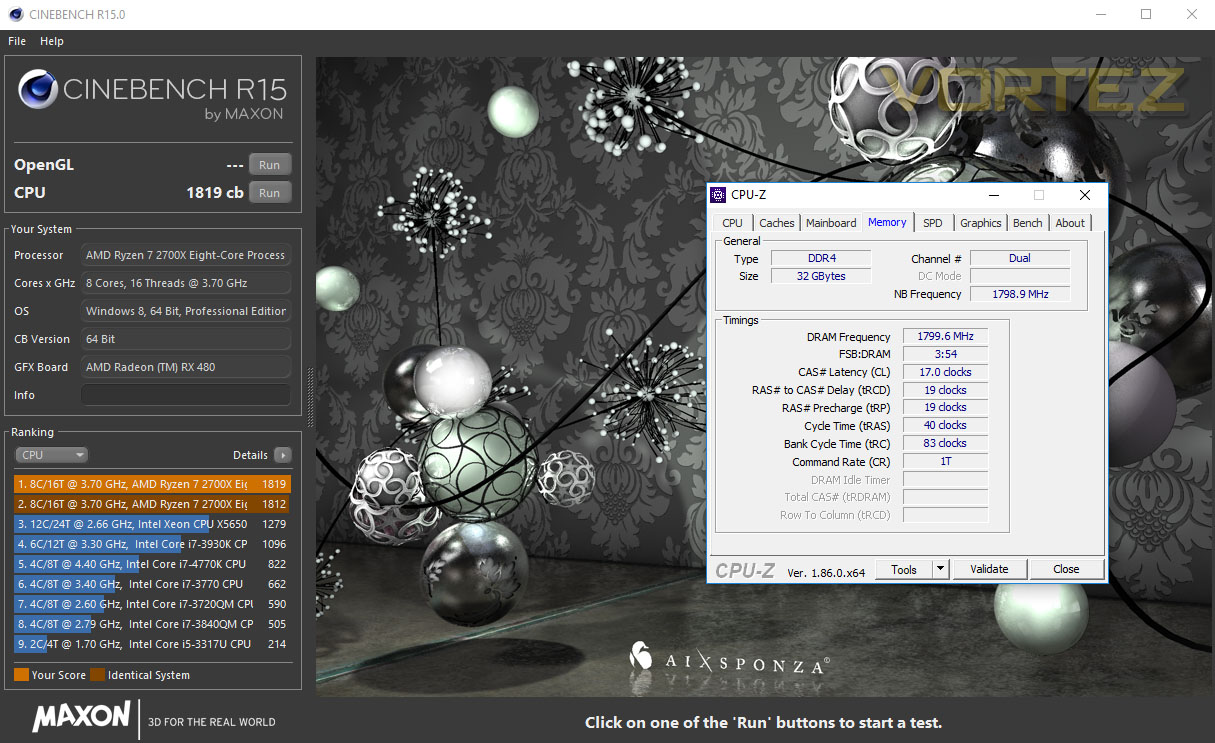
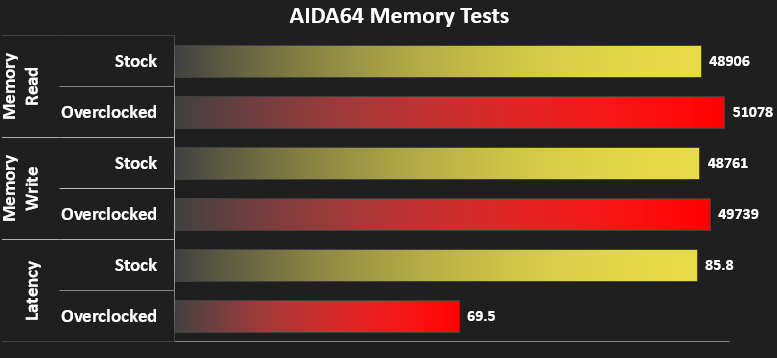
We then tried for 3600MHz but found some instability. We pushed the latencies up a touch, to counter the increase in speed and found we had reached stability and noticed an increase in Cinebench results as well as AIDA64 tests.
Below are our results with the timings required.
Stock
Overclocked
Overclocked
Test Setup
Memory Configurations
HyperX Predator DDR4
3200MHz @ 16-18-18-18-36-74-1T – XMP 2.0
3600MHz @ 17-19-19-19-40-83-1T – Highest reached frequency
Test Setup
Cooling Corsair H150i Pro RGB
Processor Ryzen 7 2700X
MotherboardMSI X470 Gaming M7 AC
Graphics Radeon RX 480 8GB
Storage Samsung 970 EVO 1TB
PSU Corsair RM 750X 80 Plus Gold Certified PSU
Compared against
Corsair Vengeance LPX 3000MHz (2x 8GB)
Crucial Ballistix Tactical Tracer RGB 3000MHz (4x 8GB)
G.SKILL Sniper X 3400MHz (2x 8GB)
XPG Spectrix D41 RGB 2400MHz (4x 8GB)
HyperX Predator DDR4
3200MHz @ 16-18-18-18-36-74-1T – XMP 2.0
3600MHz @ 17-19-19-19-40-83-1T – Highest reached frequency
Test Setup
Cooling Corsair H150i Pro RGB
Processor Ryzen 7 2700X
MotherboardMSI X470 Gaming M7 AC
Graphics Radeon RX 480 8GB
Storage Samsung 970 EVO 1TB
PSU Corsair RM 750X 80 Plus Gold Certified PSU
Compared against
Corsair Vengeance LPX 3000MHz (2x 8GB)
Crucial Ballistix Tactical Tracer RGB 3000MHz (4x 8GB)
G.SKILL Sniper X 3400MHz (2x 8GB)
XPG Spectrix D41 RGB 2400MHz (4x 8GB)
Benchmarks
Cinebench R15 – CPU
SiSoftware SANDRA – Memory bandwidth
AIDA64 – Memory Benchmarks
PCMark 8 – Photoshop
Games – Dawn of War III
SiSoftware SANDRA – Memory bandwidth
AIDA64 – Memory Benchmarks
PCMark 8 – Photoshop
Games – Dawn of War III
Other Software
Temperature Analysis: Aida64/Ryzen Master
System Monitoring and Stress Testing: AIDA64 Stability Test
CPU Specification Monitoring: CPU-Z
System Monitoring and Stress Testing: AIDA64 Stability Test
CPU Specification Monitoring: CPU-Z
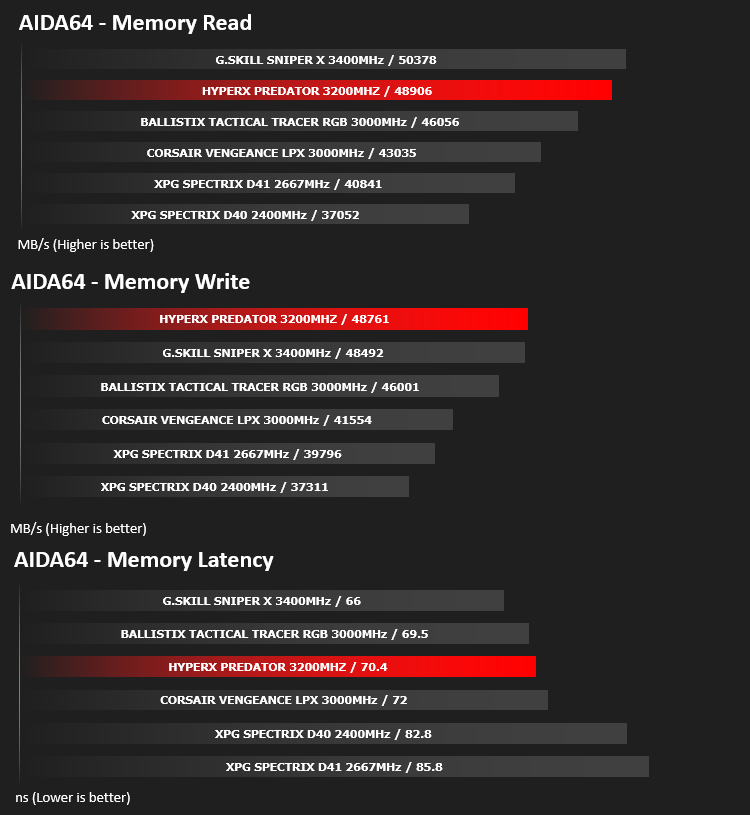
Memory Transfer Performance – AIDA64
AIDA64 Product PageMemory bandwidth benchmarks (Memory Read, Memory Write, Memory Copy) measure the maximum achiveable memory data transfer bandwidth. The code behind these benchmark methods are written in Assembly and they are extremely optimized for every popular AMD, Intel and VIA processor core variants by utilizing the appropriate x86/x64, x87, MMX, MMX+, 3DNow!, SSE, SSE2, SSE4.1, AVX, and AVX2 instruction set extension.
The Memory Latency benchmark measures the typical delay when the CPU reads data from system memory. Memory latency time means the penalty measured from the issuing of the read command until the data arrives to the integer registers of the CPU.
The Memory Latency benchmark measures the typical delay when the CPU reads data from system memory. Memory latency time means the penalty measured from the issuing of the read command until the data arrives to the integer registers of the CPU.
Bandwidth Performance – SiSoftware SANDRA
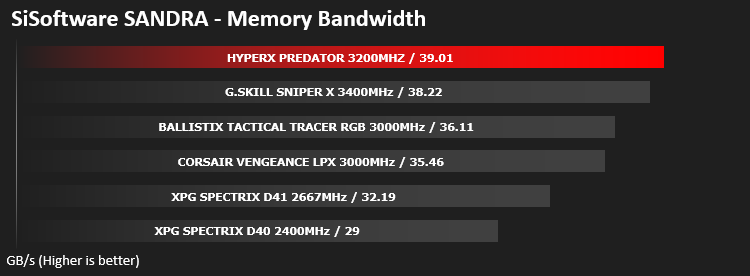
SANDRA isn’t always a benchmark that is included in hardware reviews but I believe it shouldn’t be ignored. SANDRA provides a vigorous package that tests your system in a rather large array of benchmarks. There are many aspects of benchmark that can be executed.
Processing Power Performance – Cinebench R15
CINEBENCH can measure systems with up to 64 processor threads. This test scene contains approximately 2,000 objects which in turn contain more than 300,000 polygons in total, and uses sharp and blurred reflections, area lights, shadows, procedural shaders, antialiasing, and much more. The result is displayed in points (pts). The higher the number, the faster your processor.
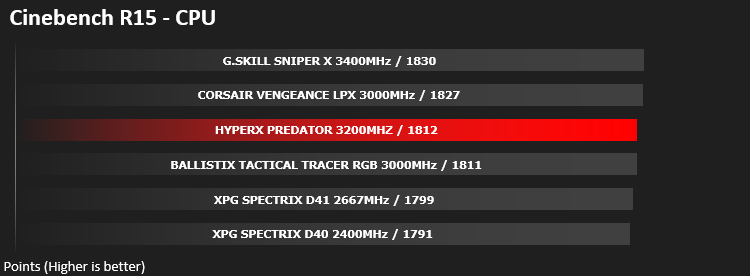
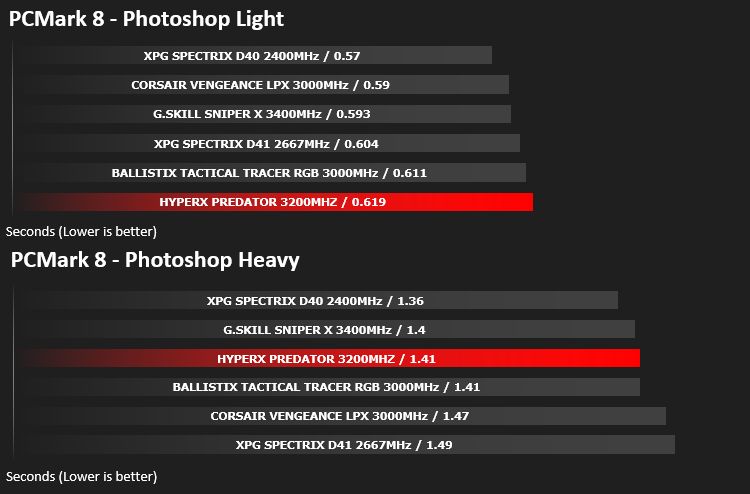
Image Editing Performance – PC Mark 8 Photoshop
PCMark 8 Product Page Developed in partnership with Benchmark Development Program members Acer, AMD, Condusiv Technologies, Dell, HGST, HP, Intel, Microsoft, NVIDIA, Samsung, SanDisk, Seagate and Western Digital, PCMark 8 is the latest version in FutureMark’s popular series of PC benchmarking tools. Improving on previous releases, PCMark 8 includes new tests using popular applications from Adobe and Microsoft.
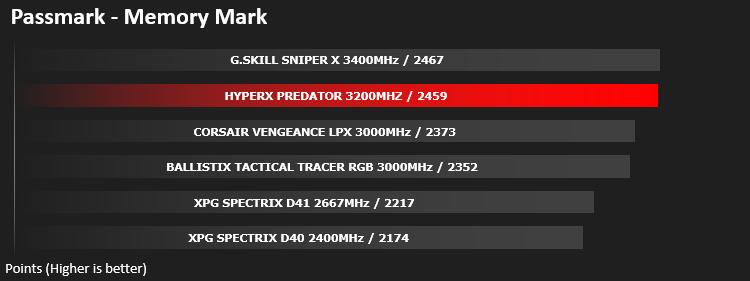
PassMark – Memory Mark
PassMark Performance Test. Fast, easy to use, PC speed testing and benchmarking. PassMark PerformanceTest allows you to objectively benchmark a PC using a variety of different speed tests and compare the results to other computers.
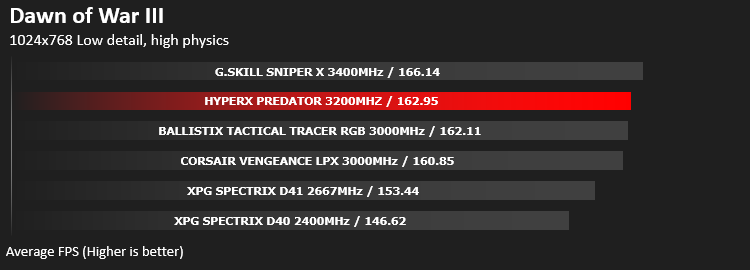
Gaming Performance – Dawn of War III
To test out the benefit of faster memory in a real world scenario, we have taken a recent game and created a CPU limited scenario by reducing the resolution and graphics settings to minimum, while setting the CPU dependent settings at their highest.
Conclusion
It’s a little while since we tested any memory that wasn’t plastered with RGB, but it made for a refreshing change. HyperX haven’t lost any style or design points by leaving the RGB off this model, though they do offer the same memory modules with lighting on top, if that’s your bag. We really liked the gunmetal colour of the DIMM sticks, they looked fantastic in our build with the aggressive angles and two-tone colour.Performance was exactly where we expected it. Slightly slower than the 3400MHz G.SKILL Sniper X and higher than the rest. There’s not much more to memory than the latencies and the MHz, unless you plan on overclocking or require them to fit a specific build-style.
In terms of overclocking, we’re perfectly happy with an increase from 3200MHz to 3600MHz with a small bump in latency timings. 3500MHz was fine at the XMP Timings, however.
At today’s pricing, the 32GB kit that we tested is GBP £379.99 / USD $414.99 / AUS $498.00 which is there or there-about with other kits of similar speed but there are cheaper kits on the market.
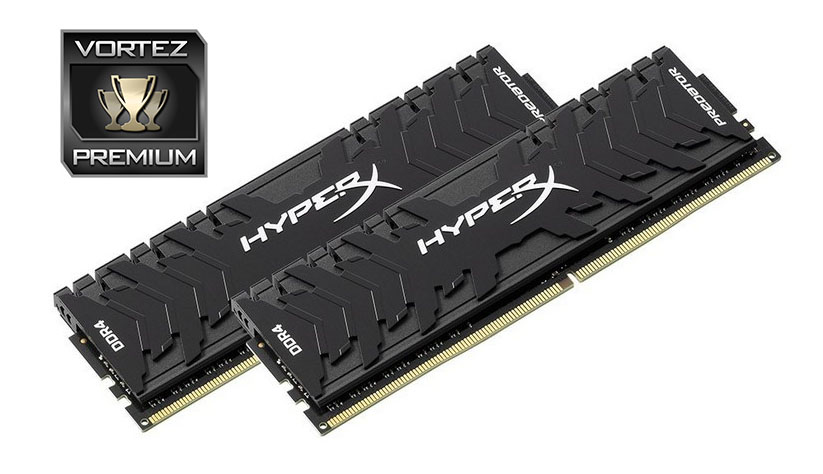
There’s not much which sets one set of RAM apart from any other, but this stuff looks fantastic and gave us a decent overclock.
Pros
+ Good performance
+ Modules look excellent
+ Colour scheme should fit almost any build
+ Decent overclocking
Cons
– Price
+ Good performance
+ Modules look excellent
+ Colour scheme should fit almost any build
+ Decent overclocking
Cons
– Price
Click here for an explanation of our awards at Vortez.net.
Stay connected with the Vortez Social Media pages:
Join in with the discussions on Discord