







ICY DOCK’s latest internal storage solution offers more features than ever. We take a look at just how good it really is.
Product on Review: ICY DOCK MB974SP-B
Manufacturer and Sponsor: ICY DOCK
RRP: £140+VAT

The ICY DOCK brand has been around since 2004 and in this time they have built up a reputation of providing useful storage solutions for a variety of uses. Their selection has continued to expand, and many readers will already be familiar with their backplane modules such as the MB-454SPF. Today, we’re taking a look at their latest 4 in 3 SATA backplane module, the MB974SP-B which offers, amongst other things, tray-less installation, SATA 6 Gb/s support and front panel connectivity.
The MB974SP-B is aimed at a wide audience, from professionals looking to increase their server storage capacity to enthusiasts with high storage requirements or simply those looking to manage their hard drives in a more sensible and accessible fashion. This review will attempt to discover if the ICY DOCK’s latest addition performs well and whether it’s worth you parting with your hard-earned.
At this point I would usually show you what the manufacturer have to say about their product, but it turns out ICY DOCK have an awful lot to say, so rather than overwhelming you with text, here’s another link to their product page, where the product is described in lots of detail. However, pictures say a thousand words, so keep reading here and you’ll quickly see what the MB974SP-B is all about.
For what initially seems like a fairly straightforward product, the MB974SP-B has many features. They are listed below:
Fits 4 x 3.5” SATA HDD into 3 x 5.25” Device Bays
* Screw-less, tool-less design for genuine plug &play and hot swap use
* Compatible with SATA 6 Gb/sec
* Stylish aluminium construction for durability and heat dissipation
* 80mm cooling fan for maximum air flow
* On-demand power system – Fan power only when a drive is powered on
* Fan is replaceable with aftermarket fans that use 2-pin or 3-pin connectors
* 3 speed fan control including Smart Cooling Technology providing temperature
* Front and rear ventilation slots
* Front side USB and eSATA ports for convenient external storage connections
* Individual power switches and LEDs for each drive
* Child-proof power buttons to avoid accidental power shut down
* Multi-locking door latches to prevent accidental drive ejection
* Internal SATA cable and USB header cable built into rear of device
* Screw-less, tool-less design for genuine plug &play and hot swap use
* Compatible with SATA 6 Gb/sec
* Stylish aluminium construction for durability and heat dissipation
* 80mm cooling fan for maximum air flow
* On-demand power system – Fan power only when a drive is powered on
* Fan is replaceable with aftermarket fans that use 2-pin or 3-pin connectors
* 3 speed fan control including Smart Cooling Technology providing temperature
* Front and rear ventilation slots
* Front side USB and eSATA ports for convenient external storage connections
* Individual power switches and LEDs for each drive
* Child-proof power buttons to avoid accidental power shut down
* Multi-locking door latches to prevent accidental drive ejection
* Internal SATA cable and USB header cable built into rear of device
ICY DOCK have also put together a great overview image of the device and features. You can view it by clicking here.
Packaging and Bundle
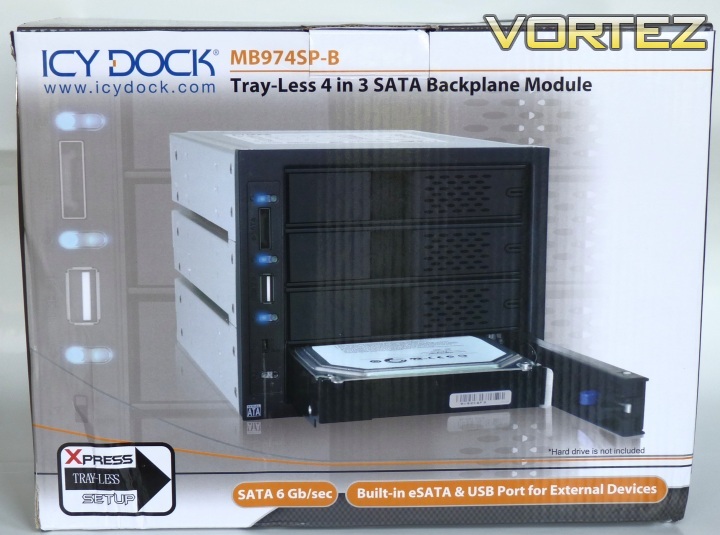
The packaging immediately indicates what to expect
The MB974SP-B comes in a large box, certainly much larger than the product itself, which indicates that the packaging should be sufficient.
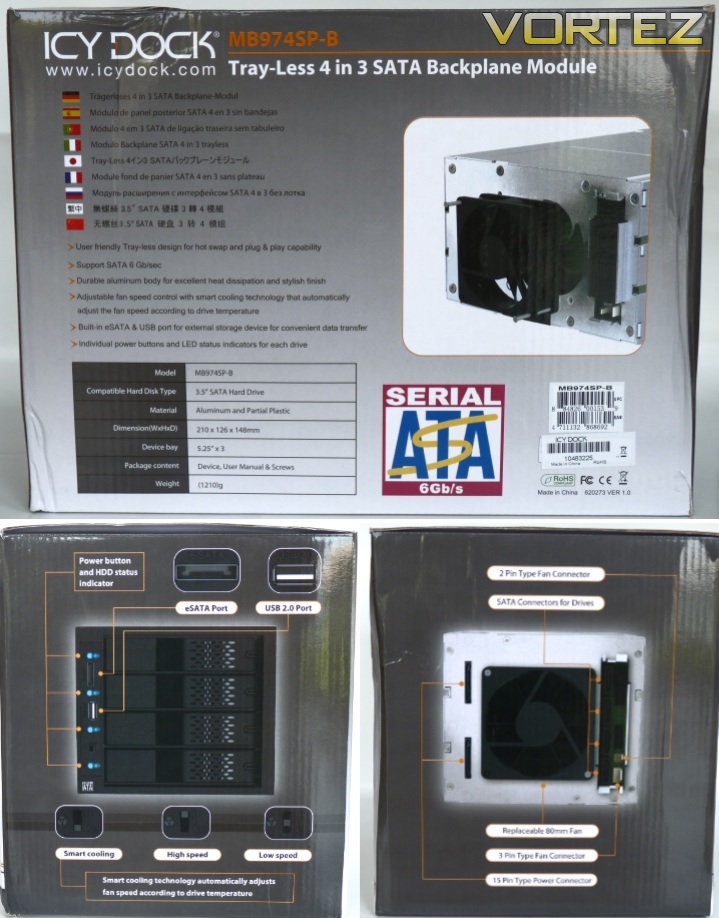
The features are outlined well on the box
You can clearly see what you’re getting, so if you’re buying from a shop there’s no problem selecting the right model. The only less than average part of the packaging is strangely the Serial ATA logo on the rear, which is obviously very low resolution. The packaging inside consists of two foam inserts that put the main unit in the middle of the box, well protected.
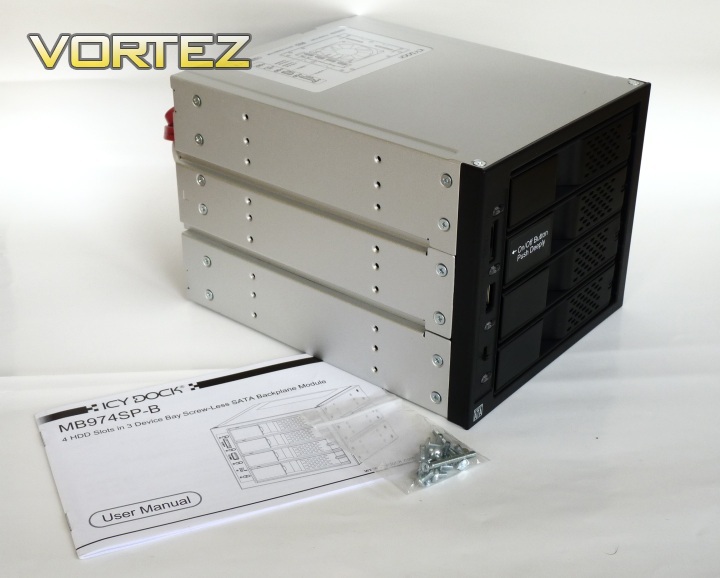
The bundle
With the MB974SP-B you get a very small selection of extras:
ICY DOCK MB974SP-B unit
12 x screws for unit mounting in 5.25” bay
2x replacement screws for 80mm fan mounting
Printed users manual
12 x screws for unit mounting in 5.25” bay
2x replacement screws for 80mm fan mounting
Printed users manual
So there is everything you need there, except for perhaps some SATA cables, but these are usually bundled with your motherboard and would only serve to inflate the cost of the MB974SP-B, so I’m not going to count that against it.
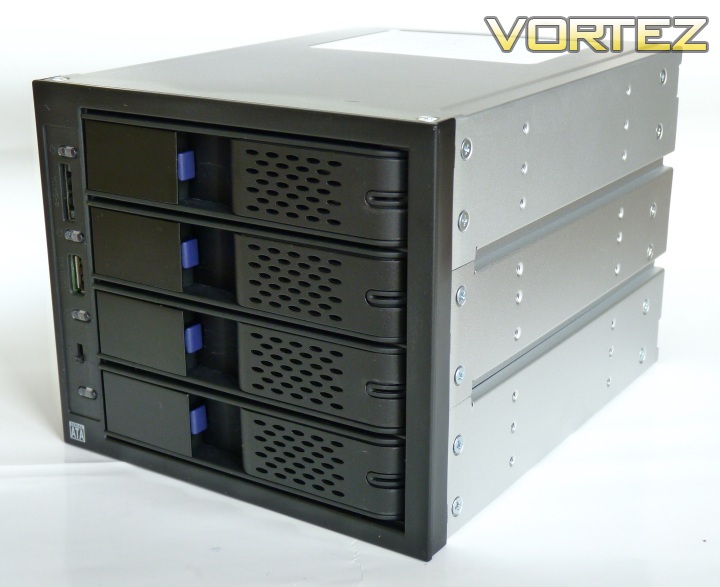
Sturdy build is apparent from the start
The unit itself is of aluminium construction, which makes it more lightweight that you would perhaps expect. The front is plastic and feels very solid and durable. It’s dark grey in colour, so it will match plastic-fronted cases of that type, but will likely not suit other colours and metal finishes perfectly. The aluminium also aids heat dissipation.
Closer Look
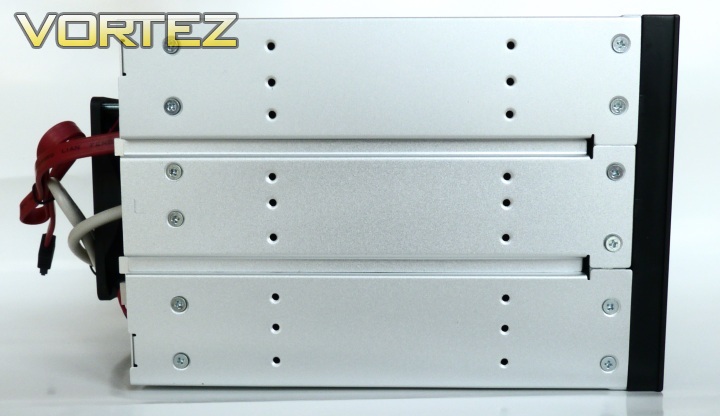
The unit slots into three 5.25” drive bays
The side of the unit is fairly unremarkable, being just aluminium with grooves recessed to allow any existing drive rails in cases to slide between. You can also see the regular screw holes used in 5.25” devices, which are used to secure the unit. There is plenty of choice here, catering for different cases and their different configurations, and there are 12 screws provided to secure the unit how you see fit. All function over form here, you can tell this is a professional product.
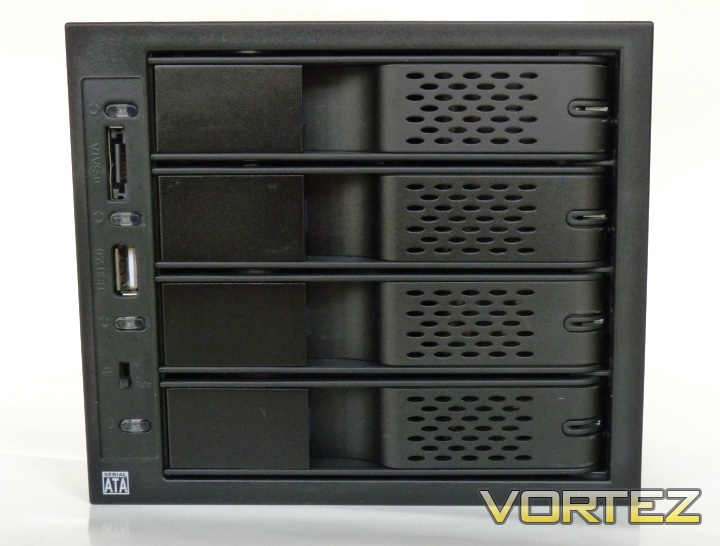
The 4 bays are clearly visible, along with USB 2.0 and eSATA connections
The front of the unit shows the 4 bays where 3.5” hard disks are housed. There is no option to mount 2.5” drives (which includes most SSDs) in this device. However, you can purchase an adapter from ICY DOCK such as this one that will allow you to put 2.5” HDDs and SSDs into the bays, so it is possible at extra cost, circa £15 for the above adapter.
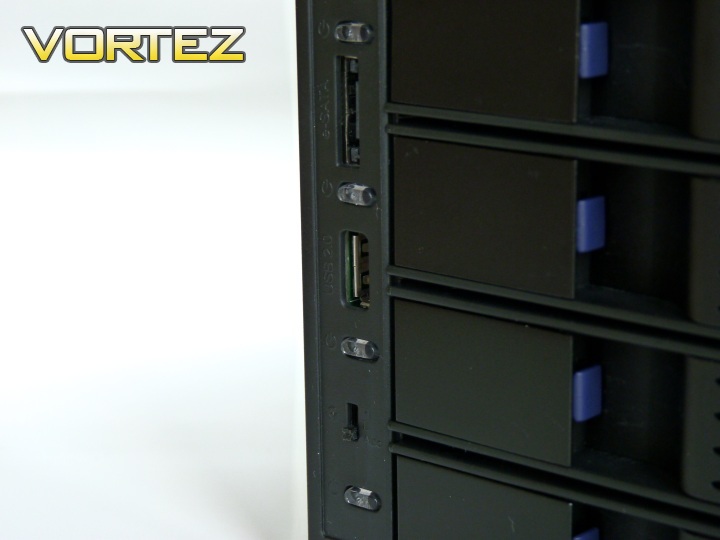
The selection of functionality besides drive bays
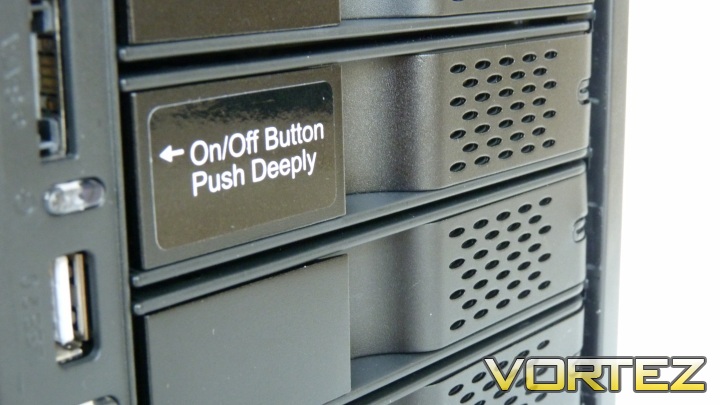
Also on the front we have the USB 2.0 port, that connects to an internal motherboard header, and eSATA port, which, like the USB, connects to an internal SATA port. These are convenient and welcome additions to any front bay device, especially one that takes up 3 5.25” drive bays, which for most cases would be all of them bar a space for an optical drive. There is also a switch that controls the cooling fan. We’ll see how that works later in this review. Additionally, there is a HDD LED indicator for each drive that comes on when the drive is installed and powered up, as well as showing activity on supported hard disks, which should include almost all models available today. This indicator is also the ‘child-proof’ switch to turn each drive independently on or off. This amazing functionality is defined by the switch having to be depressed particularly far before it activates.
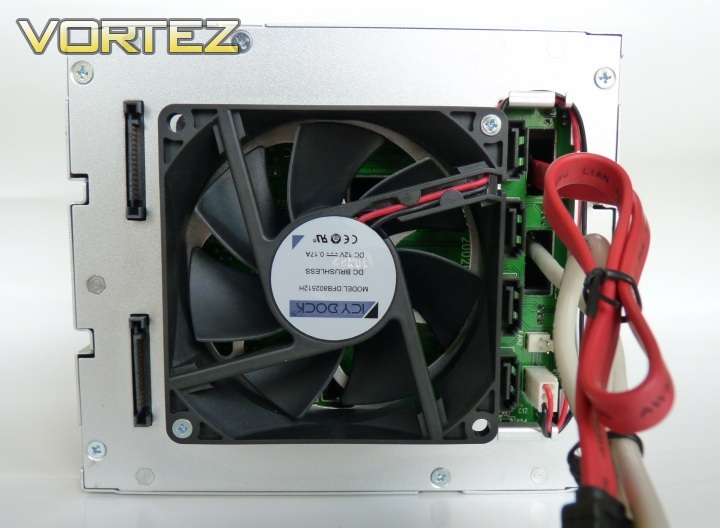
The rear of the unit
Moving to the rear of the device, your attention is first drawn to the 80mm cooling fan. This is activated once a drive has been installed and is controlled by the switch on the front of the unit. The fan can be removed and easily replaced with another with 2 or 3 pin connection as both are catered for. There is also a rudimentary routing system for excess fan cable – a surprisingly thoughtful addition. There are also two standard 15-pin SATA power connections (the same as used on 3.5” and 2.5” SATA hard drives) to the left of the fan. To the right of the fan you can see four SATA connections for each installed drive, and the SATA and USB cables emerging from the front panel connections.
Installation
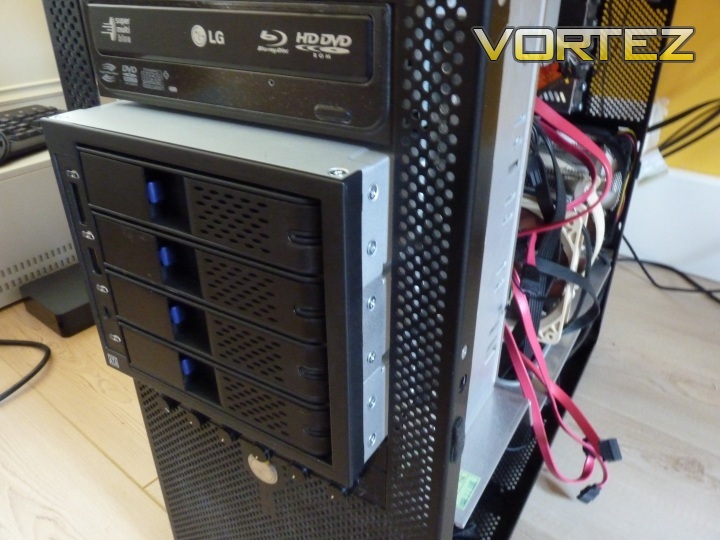
That’s not flush…
Sliding the unit into the case is technically as straightforward as any other 5.25” device, and depending on your case, you may have the choice of a tool-less installation here. There are no considerations for external vibration dampening, but this is not something usually seen in 5.25” devices, perhaps somewhat surprisingly. However, as seen above, we meet our first real issue here. Although the unit is of comparable length to an optical drive (+the cooling fan) at 210mm, it interferes with long graphics cards and cables, depending on your case size and layout. There are also quite a few cables to deal with – in total, two power connections, five SATA connections and a USB header.
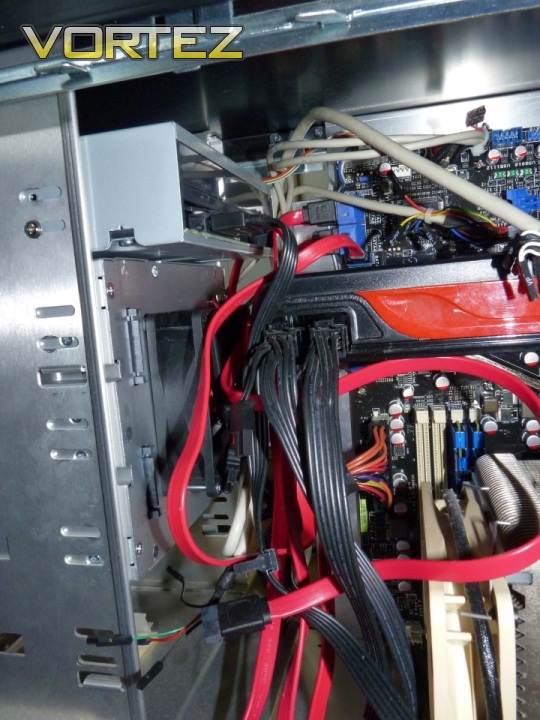
Some re-arrangement is in order as there’s little room to play with
There’s not much else to describe this cable management challenge other than chaotic, especially with longer cables than necessary, as in a typical case the routing is going to be a lot shorter than usual. You can also see there is next to no clearance to the graphics card, an AMD Radeon HD 5870 at 28cm. I must stress, these limitations strongly depend on the case you’re using, so your experience may vary. Do the measurements first.
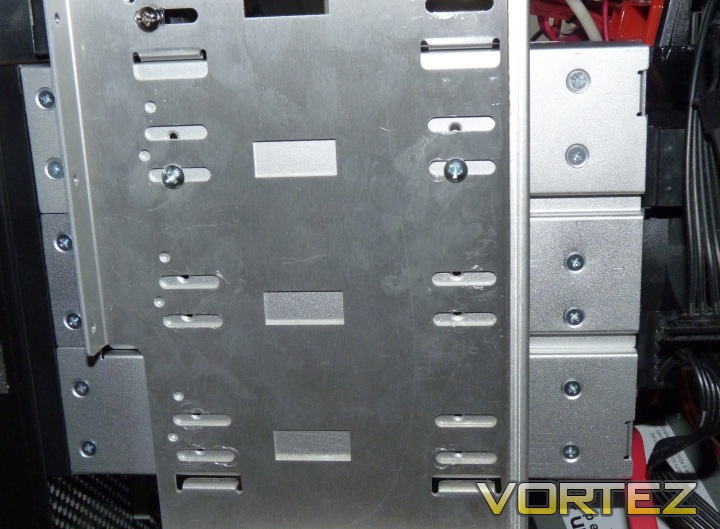
Aren’t they supposed to line up?
And so we now meet the second issue encountered – mounting the whole module inside the 5.25” drive bays. Only two of the screw holes on each side could be screwed in, resulting in some unpleasant metallic vibrations being heard on boot of the drives. As you can see, not many of the large number of screw holes actually line up well in this case, and I can only assume this is a fairly standard design, at least for Lian Li cases. Frankly, this discrepancy is quite baffling, as if the screw pitch is off consistently in other cases as well, this is a real howler of an oversight. This is something I intend to test soon, and will update this article with the results.
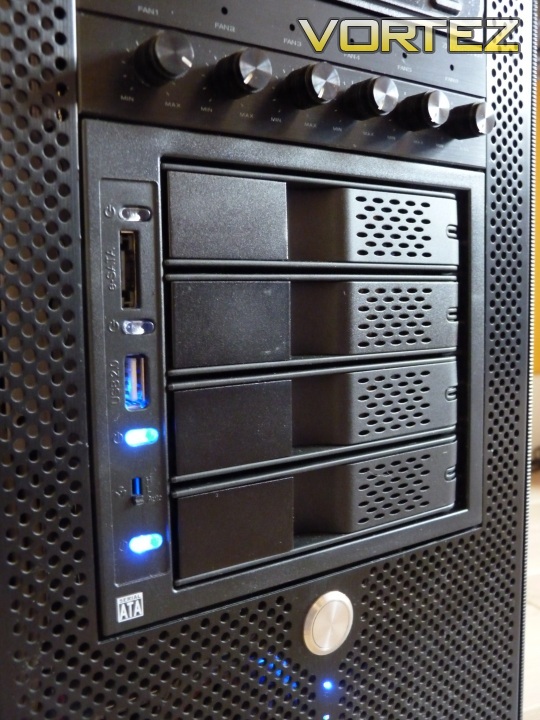
The unit installed into a Lian Li V1000 Plus II case
Finally installed, the internal aluminium finish matches the case the unit has been installed into here, but for cases with black internals it’s not going to look perfectly integrated. This is a small point of aesthetics, but for those with performance machines who like to showcase the internals, via a window or similar, it’s a necessary consideration. As for the externals, as shown above, I was pleasantly surprised that the black colour is indeed quite black, unlike some devices with plastic fascias, which can appear a dull grey.
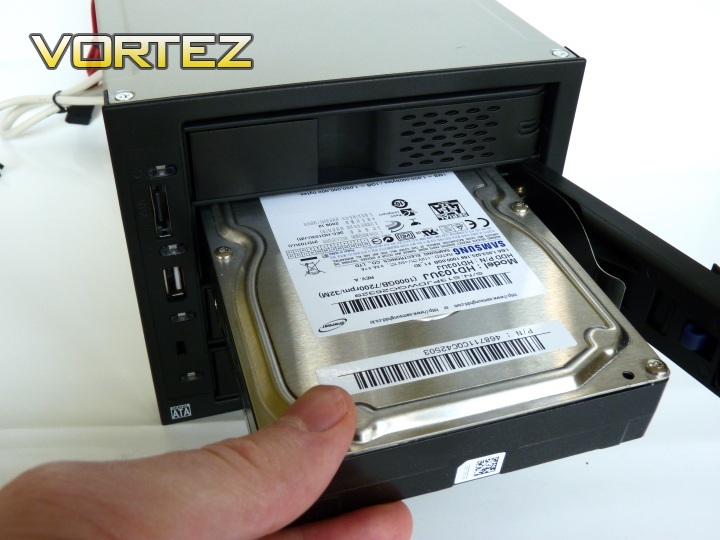
HDDs slide into the front quite effortlessly
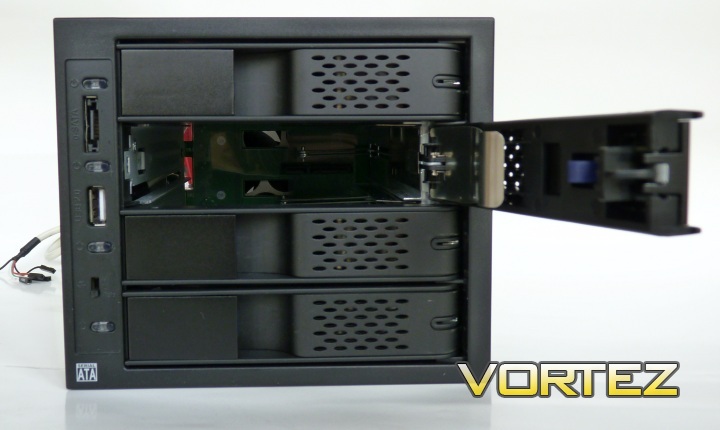
Depressing the button and pulling back the cover on the front of each drive bay opens it up for installation of a drive. Drives then slide into the device and are locked into place by pushing the front cover back and locking it back into position. Drives can then be turned on by depressing the LED/switch, at which point it behaves as a normal drive would once turned on. Note that hot-swap functionality will require a compatible motherboard with AHCI support, of which almost every new motherboard has supported for a number of years now. You’ll also need to be running the drives in AHCI mode. There are plenty of guides on the internet to do this with recent operating systems, and with Windows 7 it can be done without reinstalling the whole operating system.
It may not be so obvious to grasp the installation method at first, so here is a short video illustrating how it’s done:
]
As you can see, swapping and removal of drives is very simple, and the design is totally tool-less and there are no mounting drives into caddies or installing screws, you simply slide in a bare drive. ICY DOCK could not have made this simpler and I really think this is a great feature that sets it apart from the crowd.
One observation however, is that the locking mechanism and doors are not as solid as you may expect. Also, when installing a drive, sometimes the door above can pop open (though this does not switch off any installed drives immediately by design). In addition to this, one of the doors was often stubborn to open. So despite the professional finish, the build quality of the mechanism, although functional, is disappointing for a product in this price range.
Performance
The device supports SATA 6 Gb/s, as long as you have a compatible hard drive and motherboard, which should provide plenty of longevity in performance terms, as well as being able to satisfy SSD setups if you choose to install them in here with a mount or caddy. The transfer throughput was tested using a direct connection and through the unit itself, and there was no perceivable difference in performance there, so it’s doing its job in that respect.
Now let’s talk about noise. Remember that 80mm fan on the rear of the unit? Well the fan doesn’t look that expensive, and ICY DOCK repeatedly mention on their website specifications and user manual that it is replaceable. The reason becomes clear when you first turn on one of your hard drives. The fan was easily the loudest part of the entire test system (including the graphics card whilst gaming), which is a massive drawback for a lot of people intending to use this on an everyday machine and not a loft server or in a processional environment. The fan is adjustable to three settings via the front of the unit; these are Low, Auto and High. High is far too loud for everyday use, Auto is bearable, but still fairly loud, and low barely quieter than Auto, though that will depend on drive temperatures. I really like that ICY DOCK have built in automatic temperature control, but the loud fan negates this somewhat. Don’t get me wrong, the fan is not as loud as a whiny 40mm chipset fan of old, or a high RPM Delta model, but it’s certainly a chunk louder than your everyday 120mm of 140mm case fans that are commonplace in enthusiast systems such as the test setup. So, you do have the option to replace the fan yourself, but once again we’re talking about additional cost to the initial purchase, albeit small for a quiet 80mm fan (circa £5).
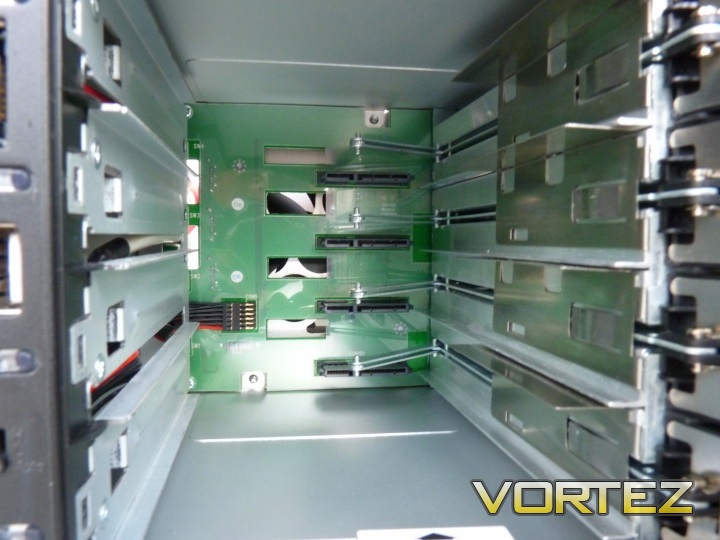
A green PCB covers most of the rear interior
Perhaps an explanation for part of the fan noise is the turbulence of the air being pulled through. As you can see above, there is a large green PCB obstructing clean flow (though remember drives will be installed too), so the air must move around this and out of the cut-out on the rear beneath the fan. Not the most efficient cooling design, but this is clearly a limitation of the layout of any backplane device of this kind.
Performance cont'd
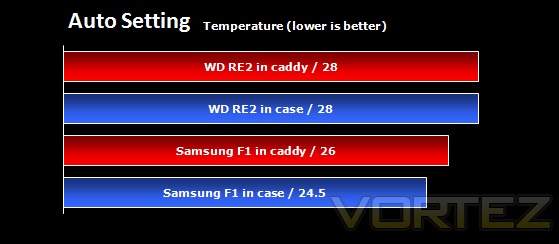
With an actively cooled and quite enclosed system, it would seem apt to compare the temperatures of the hard drives installed. For the test, 3 hard drives were installed, 2x Samsung F1 1TB and 1x Western Digital RE2 250 GB. The system was allowed to reach equilibrium after 20 minutes of running before readings were taken using the HDTune software. The auto setting on the fan controller of the backplane module was used. In the case, drives were simply installed into a drive cage in the lower section of a Lian Li V1000 Plus II, which is fed by a 120mm 1200RPM Nexus fan, with the PSU exhausting. The temperatures for the Samsung drives were averaged to produce one result.
Not much to pick and choose between the two
As you can see, the in-case mounting of hard drives is cooler than the backplane module, but neither are anywhere near to being even remotely warm. This result isn’t unexpected, the ventilation in the case is far superior to that of the backplane module, and in fact, the module does well to stay so cool considering how cramped it is. The front ventilation holes and active cooling are clearly doing their job well enough.
An observation also noted was that the HDD LEDs reacted differently to different hard disks. Both the Samsung drives showed a constantly on blue light whilst turned on, which flashed on and off on access. The Western Digital drive LED did not illuminate unless the drive was being accessed. This could mean you may erroneously deduce that the drive were turned off, when in fact it would be on. I suspect this may be a quirk of the hard drive type, and words to this loose effect are stated in the users manual.
Conclusion
The ICY DOCK MB974SP-B is the first product from ICY DOCK that Vortez have had the opportunity to look at. Personally speaking, I really liked this product despite its numerous shortfalls.
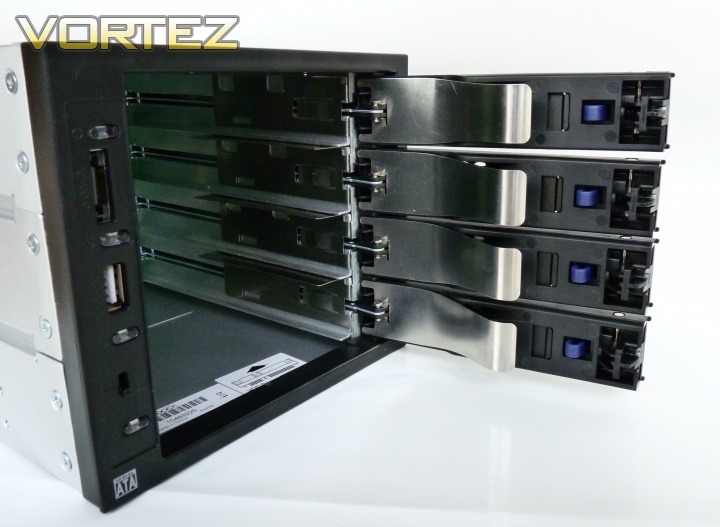
The good points that have come out of this review include the looks and general build quality. The unit certainly looks good in a case, yet still retains total functionality. The aluminium build (ignoring the door locks for now) is very good, and the product feels solid and durable. The feature set is also more packed than almost all backplane modules seen so far. Automatic temperature control, front panel connections, independent drive power switches and more really set this apart from other storage solutions. Finally, by far the best feature of this module is the ability to install and remove ‘naked’ hard drives with no fuss whatsoever. This simplifies the process of swapping hard disks in a machine considerably and is worthy of being put to use in a storage, backup or recovery machine context and it will excel in all.
If you’ve read the rest of the review, you’ll know it’s not all plain sailing with the MB974SP-B unfortunately. The main issues come with the installation process. If the module fits in your case, it will make cable management more challenging and perhaps starve some other components of airflow, depending on their position. You may also have trouble mounting it correctly in your 5.25” bays using screws, as it appears not to line up perfectly in all cases. In addition to this, once it’s up and running you’ll have to contend with a louder than average 80mm fan and possibly sticking doors and locks.
What the MB974SP-B really does brilliantly is simplify the installation, removal and replacement of 3.5” hard drives in your case. Similar ‘hot-swap’ designs have been introduced on high end PC cases for the home market, such as the Corsair Obsidian 800D, and these capture almost the same simplicity with less drawbacks but are not an option on all cases, nor do they offer as much flexibility as a dedicated module. It may be a matter of time before we see more widespread adoption of such designs in more PC chassis, and this is very much welcomed, but for now, products such as this one fit the bill very well indeed.
Pros
+Easiest method to manage HDDs ever
+Independent control of each HDD
+Automatic temperature monitoring
+Front panel additions
+Easiest method to manage HDDs ever
+Independent control of each HDD
+Automatic temperature monitoring
+Front panel additions
Cons
-Installation problems
-Louder than average cooling fan
-No SSD support out the box
-Some build issues with doors and locks
-Not cheap
-Installation problems
-Louder than average cooling fan
-No SSD support out the box
-Some build issues with doors and locks
-Not cheap
To sum up, the MB974SP-B is an impressive first look at a product from ICY DOCK, but it still has areas for improvement. When it’s all installed and working, this is the best way to manage HDDs, full stop. Vortez look forward to seeing what other useful products ICY DOCK can bring to market in the future. The module works so well when up and running that I believe it is worthy of a Vortez Bronze award and I hope that in the next incarnation the problems are dealt with and we can happily serve up an even higher accolade.


