Inno3D have sent us their pre-overclocked take on the Nvidia GTX570. Can it match up to the competition?
Product on Review: Inno3D GeForce GTX 570
Manufacturer and Sponsor: Inno3D
MSRP: $350
Street Price: £279.99 (Non overclocked)
Nvidia have been on a streak in the past two months. Having released three graphics cards in their GTX 500 series of cards to compete against AMD, they have become very desirable and for good reason. It wasn’t too long ago that Nvidia’s future was being debated across all hardware discussion forums on the net. Their Fermi based GF100 core was plagued with delays prior to release and when it finally hit the retail market in the form of the GTX480 and GTX470, they had to be cut down from the initially promised 512 CUDA cores to meet thermal and power regulations. Despite the stellar performance they provided, both GF100 variants were expensive, hot, noisy and power hungry while AMD basked in the success of the HD5000 series of cards. The latter had none of the issues of the Nvidia graphics cards and yet had all the performance within reach.
But times change and the end of last year saw a dramatic shift in the consumer market. The announcement of AMD’s new generation of HD6900 series of graphics cards triggered a price war and Nvidia didn’t want to feel left out of the hype surrounding imminent launches. Out of nowhere, they released the GF110 GPU based on the same Fermi architecture as its predecessor and addressing all of the latter’s issue. The core was no longer limited or locked and had all 512 CUDA cores to boot. The first 500 series graphics card came in the form of the GTX580 and not only did it bring 20% better performance over the GTX480 but it did so without sacrificing thermals, power consumption and noise. Price still made it a very exclusive purchase for most so Nvidia decided to release a cut down version in the form of the GTX570 at a price point competitive with the AMD HD6970 at under £300/$350.
The GTX570 appears to be an amalgamation of several graphics cards in one on first impressions. Firstly, it features the tweaked GF110 core found in the GTX580. Like the GTX480, it has one stream multiprocessor disabled for a total of 480 CUDA cores and 60 texture units. And lastly, it sports the same memory bus and memory/ROP count of the GTX470, the latter feature being intrinsically to the memory. To compensate for the cut down core, the clock speeds have been increased to 732MHz on the core and 3800MHz on the memory. It is officially destined to be the spiritual successor to the GTX470, fitting in the same power envelope but from a performance standpoint, it is equivalent to the GTX480 without the drawbacks.
The card being reviewed here today is courtesy of Inno3D. It follows the reference design but more interestingly, it comes pre-overclocked. As mentioned above, the reference GTX570 is clocked at 732/3800MHz but Inno3D have taken the effort of overclocking into their own hands by settings their card to 800/4000MHz, an impressive 9% boost over the stock core speed and 5% boost over the memory speeds. Typically, most manufacturers only apply a mild overclock, such as ASUS with their standard 10MHz overclock on all of their high end cards so it is refreshing to see a manufacturer setting a speed worthy of the overclock tag.
A bit about Inno3D:
InnoVISION Multimedia Limited is a pioneering developer and manufacturer of a diverse range of cutting-edge multimedia PC hardware products established in 1998 Hong Kong. Our manufacturing operations have been set up since 1990 in Shenzhen, China. In this short period of time we focus on manufacturing OEM/ODM products as well as contracting out extensive production and research facilities to specialist companies. We have accomplished international recognition by PC’s top reviewers as becoming an outstanding success and one of the most fast growing companies in Asia.
InnoVISION boasted a significant rate and increase in the market share of graphics card sales over the past years. To maintain InnoVISION highly respected image we will continuously focus to achieve a competitive advantage by maintaining constant product quality by continuous research and advance technical support to target customer needs.
InnoVISION boasted a significant rate and increase in the market share of graphics card sales over the past years. To maintain InnoVISION highly respected image we will continuously focus to achieve a competitive advantage by maintaining constant product quality by continuous research and advance technical support to target customer needs.
Inno3D may not be a household name here in the UK but they have the experience and know how to break into this tough market. Differentiating themselves from the competition will be key to their effort so let’s see how their GTX570 fares in our rigorous test suite.
Specifications
The GF110 chip shares a lot of its roots with the GF100 core. The GPU still packs an impressive 3.2 billion transistors in a die seize 520mm squared. Its default internal configuration has been ported from GF100 in that the GPU features 512 CUDA cores or shader processors as we are more accustomed to. There are organised in a 4x16x32 block where 16 denotes the number of stream multi-processors (SM) and 32 being the number of cores on each SM. Each SM has its own L1 Cache and a common L2 Cache is shared by all 16. The GPU is still manufactured on the 40nm process.

The GTX570 has 15 out of the total 16 SM enabled for a final 480 CUDA core count. Similarly to the GTX480, it also shares the same number of texture units, which in this case is 60. These represent 32 fewer cores than the fully unlocked GTX580 and 4 texture units less. The size of the L2 Cache is reminiscent of the GTX470 coming at 640KB rather than 768KB as found on the flagship GTX580. Directly related to Cache is the number of ROPs which has been reduced from 48 to 40 on the GTX570. On the other hand, the GTX570 has been presented with a significant clock boost over both the GTX470 and the GTX480 in core and memory clock speeds to avoid “crippled” performance. Consequently, the ROPs are also clocked higher which should minimise the gap between the GTX480 and itself. Thanks to the GF110 GPU, the GTX570 also benefits from the GF104’s superior texture filtering capabilities and further enhancements have been made to the tessellation engine for improved performance in an area where Nvidia already reigns supreme.
The memory subsystem on the GTX570 is more akin to the GTX470 with its 5 memory controllers each sporting a 256MB GDDR5 framebuffer to give 1280MB of available memory. The memory interface is composed of ten 32-bit channels for a 320-bit interface.
GTX580: 16 SMs x 32 = 512 Core, 16 SMs x 4 = 64 texture units
32-bit channel x 12 = 384-bit interface, 256MB x 6 memory controllers = 1536MB memory
GTX570: 15 SMs x 32 = 480 Core, 15 SMs x 4 = 60 texture units
32-bit channel x 10 = 320-bit interface, 256MB x 5 memory controllers = 1280MB memory
The GTX570 looks to be very competitive against the GTX480, with 4.6% better texture fill rate and shader operation. Conversely, it is let down by its memory subsystem to generate lower bandwidth than all the cards in the table and its pixel fill rate falls short of the GTX480’s by 8.7%. Compared to the mighty GTX580, the GTX570 features 12% lower texture fill rate and shader operation, and lower pixel fill rate by 26.5%. For a fraction of the cost ($500 VS $350), the GTX570 is still better value for money but it remains to be seen how real life performance stacks up.
Product Specifications
Graphics Engine: GeForce GTX570
Model: Inno3D GeForce GTX570
Bus Standard: PCI Express x16 2.0 (Compatible with 1.1)
Memory Size(MB): 1280 GDDR5
Memory Interface: 320-bit
Core Clock Speed (MHz): 800
Stream Processors: 480
Shader Clock (MHz): 1600
Memory Clock Speed (MHz): 4000
3D API: Direct X 11 & OpenGL 4.1
DVI Output: 2
HDMI: 1
VGA: Supported using DVI-to-VGA adapter
Display Output (Max Resolution): 2560 x 1600
HDCP Support: Yes
Dual Link DV1: Yes
HDMI Support: Yes
SLI/3-Way SLI support: Yes
Card Dimension (mm): 268 x 115mm
Graphics Engine: GeForce GTX570
Model: Inno3D GeForce GTX570
Bus Standard: PCI Express x16 2.0 (Compatible with 1.1)
Memory Size(MB): 1280 GDDR5
Memory Interface: 320-bit
Core Clock Speed (MHz): 800
Stream Processors: 480
Shader Clock (MHz): 1600
Memory Clock Speed (MHz): 4000
3D API: Direct X 11 & OpenGL 4.1
DVI Output: 2
HDMI: 1
VGA: Supported using DVI-to-VGA adapter
Display Output (Max Resolution): 2560 x 1600
HDCP Support: Yes
Dual Link DV1: Yes
HDMI Support: Yes
SLI/3-Way SLI support: Yes
Card Dimension (mm): 268 x 115mm
The most impressive feature of the Inno3D card is the sheer speed at which it comes overclocked at. The 9% overclock on the core is one of the highest pre-overclock available to consumers, beaten only by Point Of View’s TGT Ultra Charged Edition.
Features
Nvidia GeForce GTX500 series is the world’s fastest DirectX 11 GPU. With screaming performance and an innovative new thermal design, GeForce GTX500 series rips through the latest games while running quieter than the previous generation.
3D Graphics
•Full Microsoft® DirectX® 11 Shader Model 5.0 support: o NVIDIA PolyMorph Engine with distributed HW tessellation engines
•BC6H and BC7 texture compression formats
•Gather4 extensions
•OpenGL 4.1 support
•Advanced image quality features: o 32× coverage sample antialiasing
•Transparent multisampling and transparent supersampling
•16× angle independent anisotropic filtering
•128-bit floating point high dynamic-range (HDR) lighting with antialiasing; 32-bit per-component floating point texture filtering and blending
•Interactive ray tracing support
•Full-speed frame buffer blending
•Full-speed FP16 texture filtering
•Advanced lossless compression algorithms for color, texture, and zdata
•Support for normal map compression
•Adaptive z-cull
•Early-Z
GPU Computing
•NVIDIA CUDA™ technology—allows the GPU cores to provide performance improvements for applications such as video transcoding, gaming, ray tracing, and physics. API support includes: o CUDA C
•CUDA C++
•DirectCompute 5.0
•OpenCL
•Java, Python, and Fortran
•Third Generation Streaming Multiprocessor (SM) o 32 CUDA cores per SM
•Dual Warp Scheduler simultaneously schedules and dispatches instructions from two independent warps
•64 KB of RAM with a configurable partitioning of shared memory and L1 cache
•Second Generation Parallel Thread Execution ISA o Unified Address Space with Full C++ Support
•Optimized for OpenCL and DirectCompute
•Full IEEE 754-2008 32-bit and 64-bit precision
•Full 32-bit integer path with 64-bit extensions
•Memory access instructions to support transition to 64-bit addressing
•Improved Performance through Predication
•Improved Memory Subsystem o NVIDIA Parallel DataCacheTM hierarchy with Configurable L1 and Unified L2 Caches
•Greatly improved atomic memory operation performance
•NVIDIA GigaThreadTM Engine o 10x faster application context switching
•Concurrent kernel execution
•Out of order thread block execution
Nvidia Technology
•NVIDIA SLI® technology—patented hardware and software technology allows up to four NVIDIA GeForce GPUs to run in parallel to scale performance and enhance image quality on today’s top games.
•NVIDIA PhysX™ technology—allows advanced physics effects to be simulated and rendered on the GPU.
•NVIDIA 3D Vision™ Ready— GeForce GPU support for NVIDIA 3D Vision, bringing a fully immersive stereoscopic 3D experience to the PC.
•NVIDIA 3D Vision Surround™ Ready—scale games across 3 panels by leveraging the power of multiple GPUs in an NVIDIA SLI configuration. Combine with 3D Vision technology for the ultimate 3 panel stereoscopic 3D gaming experience.
Advanced Display Functionality
•Two pipelines for dual independent display
•Two dual-link DVI outputs for digital flat panel display resolutions up to 2560×1600
•Dual integrated 400 MHz RAMDACs for analog display resolutions up to and including 2048×1536 at 85 Hz
•HDMI 1.4a support including GPU accelerated Blu-ray 3D support, x.v.Color, HDMI Deep Color, and 7.1 digital surround sound. See www.nvidia.com/3dtv for more details.
•DisplayPort 1.1a support
•HDCP support up to 2560×1600 resolution on all digital outputs
•10-bit internal display processing, including support for 10-bit scan out
•Underscan/overscan compensation and hardware scaling
Video
• NVIDIA® Pure Video® HD technology with VP4 programmable video processor
•Decode acceleration for MPEG-2, MPEG-4 Part 2 Advanced Simple Profile, H.264, MVC, VC1, DivX (version 3.11 and later), and Flash (10.1 and later)
•Blu-ray dual-stream hardware acceleration (supporting HD picture-in-picture playback)
•Advanced spatial-temporal de-interlacing
•Noise reduction
•Edge enhancement
•Bad edit correction
•Inverse telecine (2:2 and 3:2 pull-down correction)
•High-quality scaling
•Motion Compensation
•Video color correction
•Dynamic contrast enhancement and color stretch
Digital Audio
•Support for the following audio modes: o Dolby Digital (AC3), DTS 5.1, Multi-channel (7.1) LPCM, Dolby Digital Plus (DD+), MPEG2/MPEG4 AAC
•Data rates of 44.1 KHz, 48 KHz, 88.2 KHz, 96 KHz, 176 KHz, and 192 KHz
•Word sizes of 16bit, 20bit, and 24bit
Power Management Technology
•Advanced power and thermal management for optimal acoustics, power, and performance based on usage:
•ASPM power management
•Adaptive Clocking
•Adaptive Power States
•Advanced fan control
•Power and temperature monitoring
Packaging and Content
The front of the box
Being the first Inno3D card to enter our “labs” (my room), it was pleasant to be met by a visually striking packaging whose size is understated to the bundle that comes included. On initial impressions, the front of the packaging appears very busy with information dispersed all around. Nonetheless, it is still an appealing design that balances substance with style. Apart from the model name, the most notable feature is the inclusion of a mouse mat and a StarCraft II trial key. Other features we can expect from the card are the standard PhysX, CUDA and 3D Vision Surround support.
The back of the box
The back of the box is rich in information detailing the benefits of the features the Nvidia card supports. Illustrations of DirectX 11, surround gaming and 3D are shown to depict what users can expect. The features are also listed in 9 languages, showcasing Inno3D’s global presense.
Overclocked
As mentioned already, the Inno3D graphics card comes overclocked out of the box although the specific speeds aren’t listed. The overclock is fairly substantial but the graphics card still retains the reference cooler and PCB design as we will see later on. No overclocking utility is bundled but users can always rely on third party applications to further tweak their cards.
The inside of the box
Inside the main outer packaging is a standard brown card board box housing the graphics card is yet another one closed off with foam at the end. Next to it is another thinner box containing the mouse mat and the accessories. All the relevant documentations and discs can be found at the bottom. Upon opening the box, users will be immediately attracted to the yellow bag in which the graphics card is wrapped and this shouldn’t be overlooked.
The bundle
Bundled with the graphics card are:
– 1 x Dual Molex to 6 Pin power adapter,
– 1 x DVI to VGA adaptor
– 1 x Application Disc containing the advanced version of 3DMark 11
– 1 x Driver Disc
– The Mousemat (30cm x 22.5cm)
– The StarCraft II Trial Key
The bundle is certainly a very healthy one, unlike many of the recent graphics cards we have seen so it makes for a welcoming change. The mouse mat is a high quality cloth mat with smooth and glide friendly upper surface, and gripping lower surface, making it ideal for gaming. In fact, it proves to be favourable against my own Razer Goliathus mouse mat. It has been branded with the iChill gaming logo, a sub-division of Inno3D focussed on high performance and targeting enthusiast gamers. The mouse mat is a brilliant addition to the bundle.
The graphics card wrapped up
It is always important to heed warnings printed on packaging, especially when it comes in the form of a big yellow sticker with a “ATTENTION” boldly printed across the top. The warning is to ensure that users plug in the appropriate power connectors prior to booting the PC and it also warns against touching the graphics card when it is being used for thermal reasons. Most importantly, the anti-static bag is sealed with a warning stating that Power Virus applications will cause abnormal vdroop and instability. Damages attributed to loading programs such as Furmark will not be covered by warranty. Such programs have plagued both AMD and Nvidia in the past so both have implemented power saving features that throttle the graphics cards under heavy load. I would personally recommend testing overclock stability in games rather than stress testing using these other applications.
Closer Look
The Graphics card
The Inno3D GTX570 follows Nvidia’s reference design, sporting a black shroud with green accents signifying their accustomed colours. Inno3D have opted to use the same box cover design on their graphics card rather than leaving the shroud blank like ASUS. Nonetheless, it is a vibrant design which doesn’t detract it from its performance pedigree. The front end of the shroud is slightly slanted and lowered to accommodate the fan and to allow more air to flow through in tight SLI configurations. Unlike the Nvidia GTX480, the top of the metal heatsink has not been left exposed, most like because of the new cooler type being employed, which we will look at later on. The card is approximately 26.8cm in length, 6mm shorther than AMD’s HD6970.
The back of the card
The back of the card reveals the black PCB that has become favoured for its greater appeal in recent times. There is no backplate installed for additional cooling, indicating Nvidia’s confidence in a cooler and more efficient running card. Part of the VRM circuitry can also be seen at the back, making greater use of space to place the MOSFETs. The shroud below is attached using torx screws, shying away from the traditional ones used. The heatsink on the other hand is secured using spring loaded screws.
The fan
The fan uses a finned blower design to push air towards the rear of the card and hence out of the case. The fan supports PWM functionality and can be controlled by users or temperature based profiles. The fan is similar to those found on most blower style cooler, even ones from AMD such as that used on the reference HD6970. Inno3D have placed a sticker on the fan rotor to signify that it is pre-overclocked.
The SLI connectors
On the side of the card are two SLI connectors. The GTX580 can be used in a quad-SLI setup should the motherboard permit (NF200 chipset required). If not tri-SLI is also supported.
The PCIe connectors
Unlike the GTX580, the GTX570 only requires two 6 pin PCIe power connectors, immediately suggesting lower power draw than its sibling. It also has to be noted that the HD6970, this card’s direct competitor, requires one 6 pin and one 8 pin PCIe connectors, making it more power hungry than the GTX570. These are conveniently situated on the side rather than at the end to ensure that the cables do not get in the way of HDD cages or other components. One dual Molex to 6 pin adapter has been provided in addition.
The I/O plate
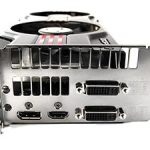
Nvidia are not as generous as AMD when it comes to connectivity. The Inno3D card has two DVI connectors on the I/O panel and a single mini-HDMI port supporting the latest 1.4a standard. The ports also support Nvidia Surround technology, without requiring DisplayPort, as long as another GTX570 is used in SLI.
AMD HD6970 VS Inno3D GTX570 VS Inno3D GTX560
As mentioned previously, the GTX570 is shorter than AMD’s reference HD6900 series of cards, coming at 26.8cm, allowing compatibility in all mid tower cases. The reference GTX560 Ti is even shorter at 22.5cm.
Closer Look (Continued)
The bare PCB
The shroud is attached to a metal bracket that is screwed onto the PCB so to remove the whole thing, it is necessary to undo the torx screws at the back of the card and the spring loaded screws that secures the heatsink itself. Below the metal bracket, we can see that thermal pads have been used to provide a better surface for heat transfer from the memory modules and the power circuitry. It is also possible to remove the shroud from the metal bracket to reveal the heatsink and fan.
The PCB uses the same layout as the GTX580 but lacks some of the components, most notably two less memory modules, chokes and capacitors at the end of the card. Another difference is the substitution of an 8 pin power connector for a 6 pin one.
The GF110 core
The GF110 core is a monster of a chip, with a 520mm squared die size packing over 3 billion transistors. If anything, the integrated heat spreader is indicative of the core underneath, creating a large enough surface area for maximum heat dissipation. The cut down GPU found on the GTX570 has the model name GF110-275-A1 compared to the GF110-375-A1 name on the GTX580.
The K4G10325FE-HC05 memory modules
There are a total of 10 128MB memory modules for 1.25GB of on-board GDDR5 memory. The modules have been sourced from Samsung and carry the model name K4G10325FE-HC05. These are rated at 0.5ns for a rated speed of 4Gbps. The memory on the Inno3D GTX570 comes clocked at 4004MHz from the default 3800MHz, the limit of what they are rated at.
The VRM power circuitry
The GTX570 boasts a 4 phase power design as indicated by the removal of two chokes and the associated PWM circuitry. The memory is still supported by a two phase design. Furthermore, two capacitors have been removed from the corner of the PCB. Thermal pads have been employed to provide additional cooling to the power circuitry. The design may not seem as robust as the GTX580’s but it highlights the efficiency of the GPU.
CHiL CHL 8266 voltage controller
The CHiL CHL 8266 voltage controller enabled voltage control and monitoring, making it an excellent addition for overclockers. Voltage tweaking is supported by third party applications such as MSI Afterburner.
The vapour chamber cooler
One of the ways Nvidia have attempted to tackle the heat generated by the core is a vapour chamber cooler. The copper heat plate contains liquid in the base (the raised middle portion of the plate that is in contact with the GPU). The liquid evaporates and absorbs further latent heat through its phase transition to vapour. The vapour rises and condenses on the outside upper part of the heat plate releasing heat which is then transmitted to the overlying fin array. The condenser fluid circulates around the outside of the heat plate. This type of cooler was first used by Nvidia on the GTX580, who have traditionally opted for heat pipe based heatsinks. The advantage of the vapour chamber is the larger surface area of the heat plate for greater heat transfer. The main difference is the deeper copper heat plate at the base to ensure better transfer of heat.
Heat that is transferred to the heat sink across the fins is dissipated by airflow from the fan towards the exhaust port on the rear. The design is very efficient but it is yet to be seen how practical it is in real life applications.
Test Setup
CPU – Intel Core i7 920
RAM – 6GB (3x2GB) OCZ platinum DDR3 1333MHz
Motherboard – ASUS Rampage III Extreme
Power Supply – Enermax Revolution 85+ 850W
Hard Drive – OCZ Vertex 2E 120GB
Samsung F3 1TB
Samsung F1 320GB
Cooler – Noctua NH-C14
Graphics Cards:
Inno3D GTX570 1280MB @ 732/3800MHz, 800/4000 Pre-overclocked & 901/4220MHz Overclocked – Forceware 263.09
ASUS GTX580 1536MB @ 782/4000MHz & 903/4220MHz Overclocked – Forceware 262.99ASUS HD6970 2048MB @ 890/5500MHz & 949/5896MHz Overclocked – ATI Catalyst 10.12a (8.790.6.2)
HIS HD6950 2048MB @ 800/5000MHz & 865/5500MHz Overclocked – ATI Catalyst 10.11 (8.790.6.0, 8.790.6.2 & 8.800)
Nvidia GTX480 1536MB @ 700/3696MHz & 799/3906MHz Overclocked – Forceware 260.99
MSI R6870 2PM2D1GD5 1024MB @ 900/4200MHz – ATI Catalyst 10.10
XFX HD5870 1024MB @ 850/4800MHz & 942/5200MHz Overclocked – ATI Catalyst 10.10
Benchmark Suite
MSI Afterburner & Kombustor
GPU-z
Crysis Warhead using the FRAMEBUFFER Crysis benchmark tool
Far Cry 2
Metro 2033
Resident Evil 5
Street Fighter IV
Unreal Tournament 3 using the HOC Bench tool
Colin McRae DIRT 2
Batman: Arkham Asylum
Battlefield Bad Company 2
Mafia II Demo
Colin McRae DIRT 2
Alien VS Predator
H.A.W.X 2
3DMark 11
3DMark Vantage
Unigine V2.1 DX 11 Benchmark
The Software Bundle & Power Monitoring
On top of 3DMark11 Advanced Edition and the StarCraft II trial key, Inno3D have bundled several trial software alongside the drivers.
vReveal
Easily stabilise, brighten, and sharpen your high-definition videos using powerful enhancement technology with vReveal. Harnessing the power of NVIDIA CUDA technology and ZOTAC GeForce series graphics cards, vReveal processes videos up to 5x faster than with a CPU.
Badaboom
Badaboom eliminates the frustration of video conversion by providing users with speed, efficiency, quality, and a sleek new interface. In a practice that used to take several hours, Badaboom converts feature-length movies in a matter of minutes while keeping the videos looking crisp and clear.
By harnessing the power of graphics hardware from NVIDIA and soon Intel, Badaboom maximizes system resources, which makes transcoding high-quality video fast, easy, and painless.
Loiloscope
“Super LoiLoScope” is a software where you can edit and share your videos freely. Being the world’s first video editing software that eliminates waiting time during editing, you can add text, images, music, and add effects while your video is playing. It’s soo easy, first time users can edit like a pro!
Power Monitoring
Overclocking is nothing without stability and for most enthusiasts; applications such as Furmark, OCCT or MSI Kombustor have been the stress test of choice to truly load graphics cards. However, both AMD and Nvidia have voiced their concerns against the use of such applications due to the number of cards killed as a result of high temperatures and unforgiving load. They believe that stress tests are not representative of gaming loads and should therefore not be used as an indicator for stability.
Previously we saw AMD implementing PowerTune to keep their cards’ TDP in line. Nvidia have to be given credit for being the first of the two manufacturers to actually deploy these power saving features on their new series of cards. They have taken the hard line approach of making sure that the GTX570 doesn’t draw more than 300W of power by throttling the clock speeds under high load. Typically, such high power consumption can only be expected from stress testing applications such as Furmark, so games will continue to work without any throttling occurring. The main disadvantage compared to AMD’s implementation is that users have no control over the TDP at which the card will throttle and more annoyingly, clock speed changes are not recorded by any monitoring programs, making it harder to visualise any throttling. AMD also fall culprit to the latter issue. With regards to this, overclockers will find it hard to distinguish if their final clock speeds still fall within the limit of the TDP.
In this case, the benefits far outweigh the negatives, the positive being that the GTX570 will have a much longer life expectancy than the power hungry GTX480.
Temperature & Overclocking
The GTX570 from Inno3D features more than meets the eye. It may look like every other reference designed card but it comes with a substantial pre-overclock. By default, Nvidia’s GTX570 is clocked at 732/3800MHz. At idle, the card operates at 0.988V and due to vdroop, the stock load voltage is 0.963V. The low voltage allows the card to run very cool.
Reference speed
Inno3D have taken the bold step of overclocking their card to 800/4000 representing a 9%/5% boost on the core and memory respectively. One slight issue is that those were attained at stock volts, creating a slight degree of instability when gaming. Increasing the core voltage by 25mV solved the problem, leaving the idle voltage at 1.012V and the load voltage at 0.988V. It would have been better if Inno3D had ensured stability themselves to avoid potential buyers from scratching their heads should they run into problems.
Pre-overclocked
Overclocking further was a very easy task. The GTX580 gave us a first indication as to what the GF110 core could achieve with reduced leakage so all I had to do was use MSI Afterburner and raise the voltage to the maximum safe figure of 1.1V. In the end, a final clock speed of 901/4200 was achieved, similar to those attained by the ASUS GTX580. The voltage translated to 1.086V at idle and 1.063V under load. The final overclock represents a 23%/10.5% boost over the core and memory clocks. Further overclocking was limited by the core rather than temperatures. Stability was testing with a combination of gameplay and MSI Kombustor.
Overclocked
The 23% overclock represents the same increase in shader operation and texture fill rates and the memory bandwidth has increased by 10.5%. The overclocked Inno3D GTX570 becomes very competitive against the GTX580 at this point and leaps ahead of the GTX480. On paper, the AMD HD6970 generates much better shader and texture through put but it all comes down to the way each is calculated based on the number of stream processors which differ greatly across different architectures. In real world situations, i.e. gaming, the final clocks provided an average 13% boost in performance, not quite the linear pattern we expected. This may be down to memory limitations or power usage throttling. Nonetheless, it is still a significant achievement that will give the GTX570 an advantage against the poor overclocking results yielded on the HD6970s we have tested.
Temperatures & Noise
It is immediately noticeable that the GTX570 is a very cool running card even with the reference vapour chamber cooling solution. At the reference GTX570 speeds, the temperature delta was a mere 62C, lower than even the HD6870 and GTX460. The only cards to run cooler were the ASUS HD5850 and HD6850 which came with the aftermarket DirectCU coolers. The high idle temperatures are due to the card not clocking down in 2D mode when using dual screens. Noise wise, the fan operated at a barely audible 49% at idle and somewhat audible 67% under load. At the Inno3D pre-overclocked speeds, the delta temperature was 1C higher and the only change in noise was under load where the fan cranked up to 70%. At that point, the fan was audible through a soft whirring noise of hot air being pushed out. Counter-intuitively, at the highest overclock, the temperature was lower despite the higher voltages and the fan speed ended up at 65% under full load.
Crysis Warhead
Following the success of Crysis, the stand alone expansion “Warhead” was hotly anticipated to bring more game play, more weapons, improved visuals whilst maintaining better performance, the latter being what gamers wanted most. After all how many people upgraded their rigs just to play this game… In the game, you play as the upbeat Brit Sergeant “Psycho” Sykes, chasing down a Korean nuclear warhead. Throw in some ice shooting aliens and we’re bound to have a great game. It sure delivered.
Testing was done using Framebuffer’s Crysis Warhead benchmarking tool. The tests were configured to DirectX 10 at Enthusiast levels. Each test on the Ambush map was looped three times from which the average FPS was recorded.
Performance Analysis
The overall performance analysis looks at the relative performance between all the cards on test across all the settings and resolutions used in-game.
Far Cry 2
One of the most hyped games of 2008, Far Cry 2 had some big shoes to fill. It was built to be the next best thing since well… Far Cry I suppose. Combining an open-world game play with highly detailed graphics, physics and AI, what more could we possibly want? The game puts us in the body of a malaria inflicted mercenary hunting down the “Jackal” in the heart of Africa, in a bid to stop an on-going conflict between two rival factions. The storyline can be hard to follow sometimes but I’m no game reviewer, so let’s concentrate on the graphics and performance. After all, we all need to know if our hardware will be able to handle the scorching savannah burning at the hands of our flamethrowers.
The bundled benchmarking tool was used on Far Cry 2, configuring the settings to Ultra and DX10. The small ranch level was chosen and each configuration was looped three times from which the average FPS was recorded.
Performance Analysis
The overall performance analysis looks at the relative performance between all the cards on test across all the settings and resolutions used in-game.
Metro 2033
Based on Novel by the same name, Metro 2033 is a first person shooter with elements of survival horror. As Artyom, you trawl through the mutant infested metro systems of post-apocalyptic Moscow. The game delivers presents a grim ambience that reflects on the overall atmosphere of the underground setting. Metro 2033 uses the setting as a back drop to showcase some of the best visuals of any games out now, making it the ideal benchmark for those looking for the best graphics card.
The bundled benchmarking tool was used on Metro 2033, configuring the settings to Very High and making use of DirectX 11. The frontline scene was looped 3 times for each configuration. The average FPS was recorded at the end.
Performance Analysis
The overall performance analysis looks at the relative performance between all the cards on test across all the settings and resolutions used in-game.
Resident Evil 5
Resident Evil 5 is the sequel to the Resident Evil series, exploring the life of main protagonist, Chris Redfield. You play as either Chris Redfield or Sheva Alomar in an African desert area in Kijuju. In true Resident Evil fashion, your main objective is to investigate a terrorist bio-organic weapon threat whilst killing infected “Majinis” on your way.
The Resident Evil 5 benchmark tool was used to test performance. All settings were set to the maximum possible and the average FPS was recorded at the end.
Performance Analysis
The overall performance analysis looks at the relative performance between all the cards on test across all the settings and resolutions used in-game.
Street Fighter IV
Street Fighter is back in its 4th iteration and it’s bigger and better than ever. Combining fluid, fast based sparring with stunning artistic visuals, the game delivers tremendous game play. Be reacquainted with some of the most popular characters in video game history while you battle your way to the top, be it with Ryu or the mighty Bison. The game might be frustratingly hard in some cases but there’s nothing like the satisfaction of K.O’ing your opponent with a well stringed death bringing combo.
The Street Fighter IV benchmark tool was used to test performance. All settings were set to the maximum possible and the average FPS was recorded at the end.
Performance Analysis
The overall performance analysis looks at the relative performance between all the cards on test across all the settings and resolutions used in-game.
Unreal Tournament 3 & Batman Arkham Asylum
Unreal Tournament
Built around the unreal 3 engine, Unreal Tournament is all about mindless fast paced shooting, decapitation with a plethora of game modes to so in. Not much else can be said really except that it promises hours of enjoyment on multiplier whether it be against bots, your friends at a LAN or online. It was one of the more popular games out there to adopt PhysX in the form of partially destructible maps, tornadoes and hail.
The Hardware OC UT3 benchmarking tool was used to test the game. The maximum in game settings were used including motion blur. Anistropic filtering was set to 16x and no Anti-Aliasing was used. The Containment was benchmarked and the average FPS recorded at the end.
Performance Analysis
The overall performance analysis looks at the relative performance between all the cards on test across all the settings and resolutions used in-game.
Batman Arkham Asylum
The Dark Knight takes on his greatest challenge yet when he becomes trapped with all of his most dangerous villains inside the insane asylum of Gotham City – Arkham Asylum. The game exposes you to a unique, dark and atmospheric adventure that takes you to the depths of Arkham Asylum, Gotham’s psychiatric hospital for the criminally insane.
The in-game benchmarking tool was used to test performance. All the display settings were set to very high. No AA was used and PhsyX was only enabled if specified in the charts. The average FPS was recorded at the end.
Performance Analysis
The overall performance analysis looks at the relative performance between all the cards on test across all the settings and resolutions used in-game.
Colin McRae DIRT 2
DIRT is back and it’s bigger than ever. With an onslaught of famous X-Games competitors such as Ken Block and Dave Mirra, extreme is being brought back to rally. The game not only delivers outstanding gameplay in lush environments but also stunning visuals in the form of Direct X 11 implementation. If you want some fast paced, arcade style racing, then look no further than Colin McRae DIRT 2.
The in-game benchmarking tool was used to test performance. All the display settings were set to the maximum available and DirectX 11 was applied. The average FPS was recorded at the end.
Performance Analysis
The overall performance analysis looks at the relative performance between all the cards on test across all the settings and resolutions used in-game.
Battlefield Bad Company 2
Battlefield Bad Company 2 is the new rendition of the widely successful Battlefield series of game. Having more in common with the console release of Bad Company, the sequel hopes to inject the DNA of the timeless Battlefield 2 online experience with the witty action packed single player shooting adventure of the original. As Private Preston Marlowe, your goal as a member of Bad Company is to once again save the world by securing a scalar weapon device.
Fraps was used to test performance. Each test was conducted at the start of the ‘Upriver’ level ensuring that the same actions and paths were taken during the 2 minute sample. All settings were set to the highest available in game with AF set to 16x and HBAO turned on. The average FPS was recorded by FRAPS at the end of each walk through.
Performance Analysis
The overall performance analysis looks at the relative performance between all the cards on test across all the settings and resolutions used in-game.
Mafia II Demo
Following the success of Mafia back in 2002, the third person action adventure game is back with a new grittier and darker world. As Vito Scaletta, an aspiring made man, your job is to work through the twist and turns of Mafia lifestyle. The more blood spilt, the more you get in return but the lifestyle was never meant to be an ideal one. Set in the visually stunning Empire City, the wartime references provide the ever present back drop to a rife period in America’s history, in which potential for exploitation becomes Vito’s key focus.
The in-game benchmarking tool was used to test performance. All the display settings were set to the maximum available in-game. PhsyX was only enabled if specified in the charts. The average FPS was recorded at the end.
Performance Analysis
The overall performance analysis looks at the relative performance between all the cards on test across all the settings and resolutions used in-game.
Alien VS Predator
Spawned from the popular Alien and Predator franchises, Rebellion have collaborated to bring the legendary war to us through the medium of a first-person shooter. The game forces you to hunt, prey and most importantly survive in the swamp colony of Freya’s prospect as a Predator, Alien or Marine. The stunning visuals add to the sense of dread and terror that we have become so accustomed to seeing with the series.
The stand-alone Alien VS Predator benchmark tool was used for testing here. All the settings were set to very high and Tessellation was applied. The average FPS was recorded at the end.
Performance Analysis
The overall performance analysis looks at the relative performance between all the cards on test across all the settings and resolutions used in-game.
H.A.W.X 2
Tom Clancy’s H.A.W.X. 2 is an arcade-style flight action game from Ubisoft. H.A.W.X.2 is DX11 ready and therefore like other simulators such as DIRT2 has stunning scenery and a truly breath-taking visual experience. Using hardware terrain tessellation, H.A.W.X.2 relies on raw GPU power because a series of detailed triangles are required to be rendered. This surely has to be one of the most taxing benchmarks all our featured games, H.A.W.X.2 presents some of the best tessellation execution in any title to date.
The in-game benchmark from the demo was used fort testing. All the maximum settings were used throughout testing. The average FPS was recorded at the end.
Performance Analysis
The overall performance analysis looks at the relative performance between all the cards on test across all the settings and resolutions used in-game.
3DMark 11 & Vantage
3DMark Vantage
This Vantage benchmark suite from Futuremark introduces DX 10 & PhysX support. Despite being on the verge of DX 11 games arriving, Vantage still proves a popular testing ground for enthusiasts.
Performance Analysis
The overall performance analysis looks at the relative performance between all the cards on test across all the settings and resolutions used in-game.
3DMark 11
Finally here is the latest Futuremark benchmark suite, bringing DX11 and tessellation to benchmarkers. Will it bring your computers to their knees?
Performance Analysis
The overall performance analysis looks at the relative performance between all the cards on test across all the settings and resolutions used in-game.
Unigine V2.1 Benchmark & Analysis
Unigine’s benchmark is to showcase the benefits of DX 11 and the use of tessellation as opposed to normal rendering techniques. The demo has impressive visuals that give an insight into what we can expect from gaming in the future.
Performance Analysis
The overall performance analysis looks at the relative performance between all the cards on test across all the settings and resolutions used in-game.
Overall Performance Analysis
The overall performance analysis looks at the relative performance between all the cards on test across all the settings used in our benchmark suite. For an explanation of our benchmarking procedure, have a look at the descriptions on each test page.
The GTX570 is nothing short of impressive at stock speeds. The reference card has a marginal 1.8% advantage over the GTX480 overall and more importantly; it breaks away from the HD6970 by 3.8%. Inno3D’s card, which comes clocked by 9%/5% on the core/memory respectively yields approximately 6.5% better performance, thus closing the gap with the much more expensive GTX580.
When looking at the overclocked results, we see the same trend. Due to the HD6970 achieving poorer relative overclocking speeds, the difference between itself and the GTX570 increases to a staggering 16.7%! The most notable observation is that it does so without sacrificing noise, heat and power consumption. Even when compared to the GTX580, the Inno3D card only lags behind by 5.2%.
Power Consumption
Power consumption is one of the highlights of the GF110 GPU. Compared to the GTX480, power consumption has been greatly reduced such that the GTX570 uses around 70W less power. The latter even compares favourably to the HD6970, its nearest competitor. The higher than usual idle power consumption is due to the card not clocking down at idle with the dual screen setup being used. Otherwise the clock speed would be reduced dramatically for even cooler and less power hungry operation. Nvidia set their goal to provide better performance at reduced power consumption with their GF110 derivatives and it is clear that they have achieved that. The slightly lower power consumption when fully overclocked leads me to think that Nvidia’s power saving feature was kicking in to limit the TDP when stress testing.
Tessellation
DX 10
DX 11 Tessellation off
DX 11 Tessellation off – wireframe mode
DX 11 Tessellation on
DX 11 Tessellation on – wireframe mode
Let’s focus on a few characteristics of tessellation in the first image. Firstly, when we compare the wireframe mode, it is clear that tessellation, triangular in this case, is adding a lot more features and details, which may at first not be recognisable. The surfaces are divided in many more triangles, allowing the objects to replicate more complex structures. The ground for example is one of the features that benefits from it. To make it as efficient as possible, tessellation becomes a function of distance, generating more polygons closer to the viewer.
Now let’s look at the application of this. If we gaze at the rock pillar closest to us, we can immediately notice that with tessellation, they are not just mere square blocks but instead have irregular surfaces, more representative of a natural rock. Now, let’s move on to the stairs, which again is a notable improvement on past rendering methods. Rather than being flat, they have depth, giving the impression of real steps as opposed to a slide. The same applies to the cobbled road although the compressed/downsized pictures make it hard to judge. The last thing I’ll point out are the tiled roofs. With tessellation, the individual tiles form a more complex/realistic shape instead of appearing flat with repeated textures. You’ll have to take my word for it if you don’t notice them or try the demo for yourself!
Nvidia Sled Demo
It has always been customary of both Nvidia and ATI do showcase their latest technology with some sort of tech demo. For the Fermi generation of card, Nvidia have opted for a mini game in which a character on a homemade rail restricted sled has to speed its way to the finish line without destroying the vehicle. It demonstrates several aspects of the DX11 API, namely tessellation, and also PhysX.
Tessellation off- Wireframe Mode
Tessellation on- Wireframe Mode
In wireframe mode, it is clearer the effect that tessellation has on the visuals. The last picture is able to outline the small crater to the left, thanks to the superior triangulation.
Physics Mode
Physics plays a big part in the demo, with each component of the sled interaction with regards to the velocity at which the vehicle is travelling. It makes the game an interesting balance between speed and stability, prompting the player to race to the end without allowing the sled to disintegrate on the rails. Switching on the velocity vectors, we can see exactly how all the separate components are interacting, both in magnitude and direction.
Conclusion
The GTX570 is a truly fantastic product. Nvidia has succeeded in achieving what they set out to fix on the GF110 core and the result is a high performance graphics card with low thermals, power consumption and noise levels. Its closest competitors on the market today are the GTX480, at significantly reduced pricing to reflect its EOL status, and the AMD HD6970. In both cases, the GTX570 does a great job out competing both despite the fact that on paper; the latter has much lower memory bandwidth, a lower framebuffer and shares a lot in common with its GTX470 predecessor. It highlights the tweaks that Nvidia has done to the GPU internally to allow it to match other cards with slightly higher specifications.
If we first take a look at the comparison between the GTX570 and the GTX480, we can observe the subtle difference that has given the GTX570 the advantage. Overall, the reference clocked GTX570 was a mere 1% ahead of the GTX480, a significant victory given the other advantages of the GF110 core. It is important to note that in many cases, the GTX480 does end up the superior card thanks to its larger framebuffer. In games reliant on the on-board memory such as Metro2033, Resident Evil 5 and Unreal Tournament 3, the GTX480 manages to claim a win over the reference GTX570. In other situations, the use of AA closes the performance margin between the two cards, often allowing the GTX480 to leap ahead of its cousin. Far Cry 2, Crysis Warhead and Battlefield Bad Company 2 are some of the examples where this is the case. However, the sheer speed of the GTX570 gives it the overall lead at resolutions 1920×1200 and below. Inno3D’s card has been overclocked to alleviate some of its memory deficiency and the result is a card that is approximately 7.4% ahead of the GTX480. It can be argued that the GTX480 can also be overclocked but looking at both graphics cards overclocked to their maximum reveals the same trend. The performance gap is reduced to 6.2% but Inno3D’s card still stays ahead.
Nvidia’s battle against AMD on our battleground reveals Nvidia to be the victor. The reference Nvidia GTX570 manages to take a 3% lead over its main rival, the HD6970. Taking a closer look at all the games, it becomes clear that although the GTX570 is the better card overall, the 2GB framebuffer on the HD6970 allows it to close performance gaps in most games. This doesn’t necessarily mean that the framebuffer advantage is enough to beat the GTX570 outright, thanks to the raw power of the Nvidia card. Crysis Warhead, Metro2033, Battlefield Bad Company 2, Mafia with AA on and 3DMark are some of the instances where the GTX570 loses out. Thankfully, Inno3D addresses the issue by overclocking this particular card out of the box. Looking at overclocked results, AMD simply can’t compete with the sheer headroom available on the GF110 core and the HD6970 loses by a staggering 13% in overall performance.
Inno3D have done an excellent job with their GTX570. It boasts one of the highest pre-overclocks out of the box compared to other vendors and they have decided to stick with the mightily good vapour chamber cooler to avoid added expenses. Unfortunately, we don’t have the pricing information for the overclocked model but the reference card, which will be no doubt capable of such speeds, can be obtained for £279.99. The price is very competitive against the HD6970 and my personal choice out of the two would be Nvidia’s card for it raw performance, low power consumption, thermal performance and overclockability. For the 6-7% difference between the GTX570 and GTX580, it also represents much better value for money. Another viable option is to get the HD6950 at a lower price point and unlocking it to HD6970 levels. The only complaint I have with the Inno3D card is the instability produced by their overclock but a small voltage increase was all that was needed to alleviate the problem. Overall, it’s a worthy replacement to the GTX480.
Pros
+Brilliant performance
+Substantial Pre-overclocked
+Excellent overclocking headroom
+Excellent tessellation performance
+Efficient and cool operation
+CUDA and PhysX support
+Well packaged
+Good bundle
Cons
-Slight instability at stock voltage
-Lower framebuffer than competitors
+Brilliant performance
+Substantial Pre-overclocked
+Excellent overclocking headroom
+Excellent tessellation performance
+Efficient and cool operation
+CUDA and PhysX support
+Well packaged
+Good bundle
Cons
-Slight instability at stock voltage
-Lower framebuffer than competitors
Inno3D’s GTX570 rightly deserves the Vortez Silver Award. Had they addressed the stability issue, it would have received the Gold Award.