







Over a month ago we got to sample Intel’s latest SSD. Now we see how it performs when a second identical drive is added to make a Raid 0 volume.

Product on Review: Intel 730 240GB SSD x2 (Raid 0)
Manufacturer : Intel
Street Price: £359.98
When we first reviewed the Intel 730 SSD we had mixed feelings. While read speeds were certainly good, write performance was below par for a drive of this calibre. Intel were keen to push the benefits of setting these drives up into a striped volume (Raid 0), indeed their own comparison showed the Raid 0 volume compares favourably with a single 480GB drive.
The 2 x 240GB Raid 0 volume will cost you just £30 more than a 480GB drive (£359.98 vs. £329.99) yet should offer significantly higher read speeds compared to the 480GB model while also upping the write speeds, an area which let the single drive down in our previous assessment of this drive. Obviously Raid 0 is not as robust as a single drive with regard to data integrity because should one drive fail, you will lose all of your data however it has to be said that with today’s improvements in Raid hardware and software, a striped volume is much more reliable than it was 10 years ago.
With this in mind then, we will present our results of these drives in Raid 0 but do not forget to check out our in-depth review of the 730 Series which goes into greater detail regarding each drive.
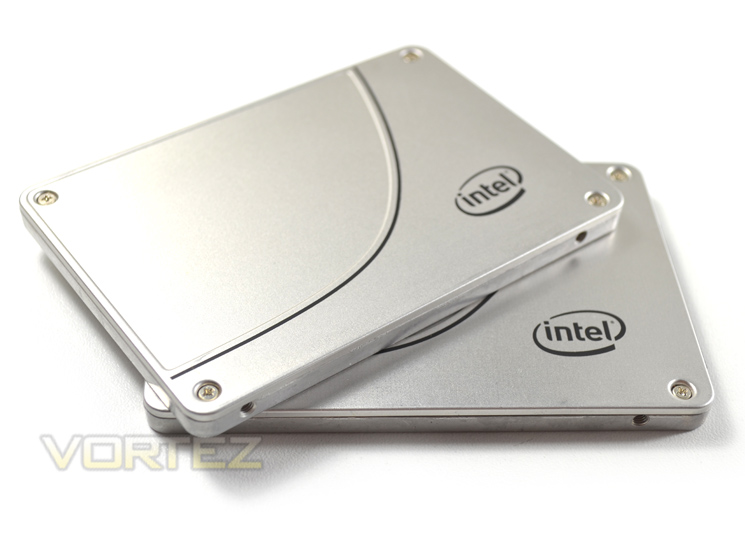
Intel’s take on the 730 series
The Intel® Solid-State Drive 730 Series combines enthusiast-grade performance with the endurance and dependability that has traditionally been reserved for data center storage products. In other words, it’s the best of both worlds, and what that means to you is freedom from compromise.
Test Setup & Methodology
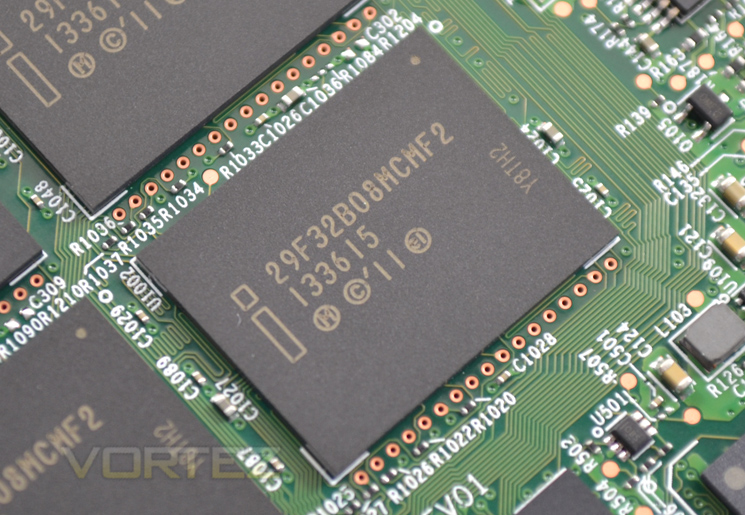
Our test system is formatted and a fresh version of Windows is installed with just drives in place – no additional applications. Windows is then updated to the latest release and the drivers are installed. Included in the list of benchmarks are the following applications:
Benchmarks
ATTO Disk Benchmark v2.46
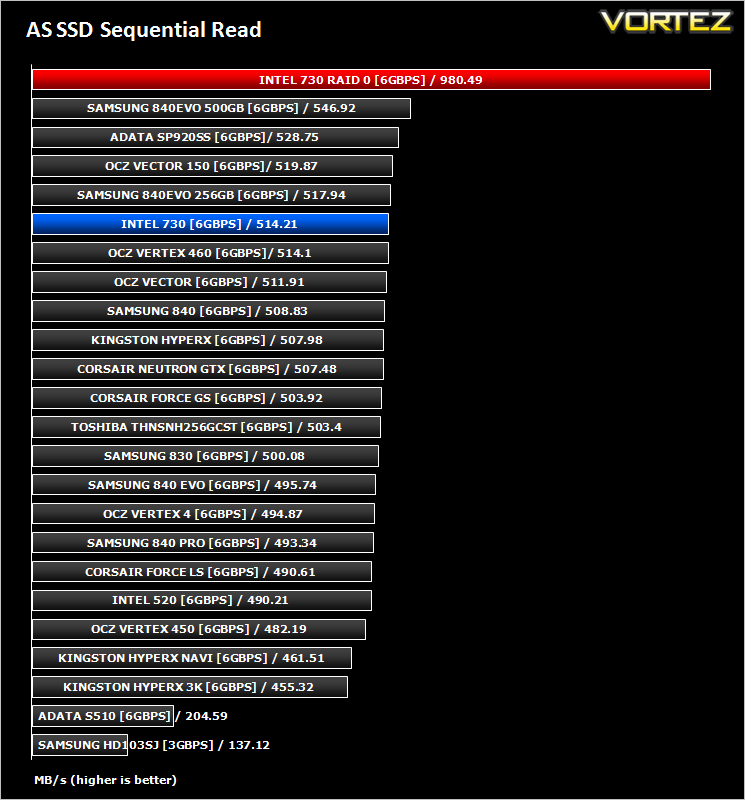
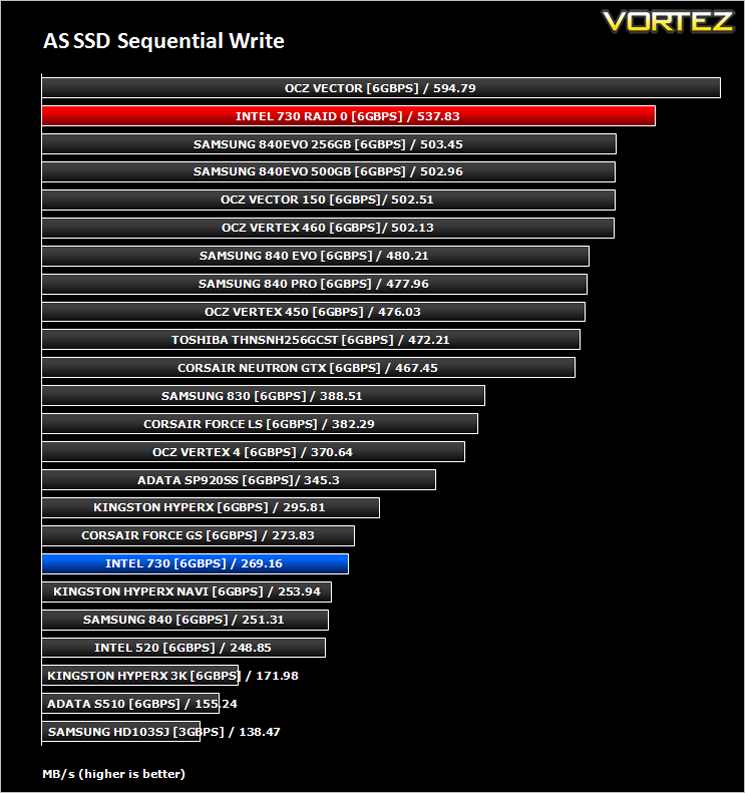
AS SSD
CrystalDiskMark 3.0
Iometer
AS SSD
CrystalDiskMark 3.0
Iometer
Test system
CPU Intel Core-i7 4770K
Motherboard GIGABYTE Z87X-OC
Graphics MSI R7970 Black Edition
Memory 16GB Corsair Vengeance Pro (2400MHz) CL10
HDD
– Intel 730 240GB x2 Raid 0 (Sata 6Gbps)
– Intel 730 240GB (Sata 6Gbps)
– ADATA Premier Pro SP920SS 256GB (Sata 6Gbps)
– OCZ Vertex 460 240GB (Sata 6Gbps)
– OCZ Vector 150 240GB (Sata 6Gbps)
– Samsung 840 EVO mSATA 500GB (Sata 6Gbps)
– Samsung 840 EVO mSATA 250GB (Sata 6Gbps)
– Kingston HyperX 3K Na’Vi 240GB (Sata 6Gbps)
– OCZ Vertex 450 256GB (Sata 6Gbps)
– Samsung 840 EVO 750GB (Sata 6Gbps)
– Samsung 840 Pro 256GB (Sata 6Gbps)
– Samsung 840 256GB (Sata 6Gbps)
– Toshiba 256GB THNSNH256GCST (Sata 6Gbps)
– OCZ Vector 256GB (Sata 6Gbps)
– Corsair Neutron GTX 240GB (Sata 6Gbps)
– Corsair Force GS 240GB (Sata 6Gbps)
– OCZ Vertex 4 128GB (Sata 6Gbps)
– Kingston HyperX 3K 120GB (Sata 6Gbps)
– Kingston HyperX 240GB (Sata 6Gbps)
– ADATA S510 120GB (Sata 6Gbps)
– Intel 520 480GB (Sata 6Gbps)
– Samsung 830 Series 256GB (Sata 6Gbps)
– Samsung HD103SJ 1TB (Sata 3Gbps)
PSU Corsair HX1050 Gold
OS Microsoft Windows 7 Professional 64-Bit
Motherboard GIGABYTE Z87X-OC
Graphics MSI R7970 Black Edition
Memory 16GB Corsair Vengeance Pro (2400MHz) CL10
HDD
– Intel 730 240GB x2 Raid 0 (Sata 6Gbps)
– Intel 730 240GB (Sata 6Gbps)
– ADATA Premier Pro SP920SS 256GB (Sata 6Gbps)
– OCZ Vertex 460 240GB (Sata 6Gbps)
– OCZ Vector 150 240GB (Sata 6Gbps)
– Samsung 840 EVO mSATA 500GB (Sata 6Gbps)
– Samsung 840 EVO mSATA 250GB (Sata 6Gbps)
– Kingston HyperX 3K Na’Vi 240GB (Sata 6Gbps)
– OCZ Vertex 450 256GB (Sata 6Gbps)
– Samsung 840 EVO 750GB (Sata 6Gbps)
– Samsung 840 Pro 256GB (Sata 6Gbps)
– Samsung 840 256GB (Sata 6Gbps)
– Toshiba 256GB THNSNH256GCST (Sata 6Gbps)
– OCZ Vector 256GB (Sata 6Gbps)
– Corsair Neutron GTX 240GB (Sata 6Gbps)
– Corsair Force GS 240GB (Sata 6Gbps)
– OCZ Vertex 4 128GB (Sata 6Gbps)
– Kingston HyperX 3K 120GB (Sata 6Gbps)
– Kingston HyperX 240GB (Sata 6Gbps)
– ADATA S510 120GB (Sata 6Gbps)
– Intel 520 480GB (Sata 6Gbps)
– Samsung 830 Series 256GB (Sata 6Gbps)
– Samsung HD103SJ 1TB (Sata 3Gbps)
PSU Corsair HX1050 Gold
OS Microsoft Windows 7 Professional 64-Bit
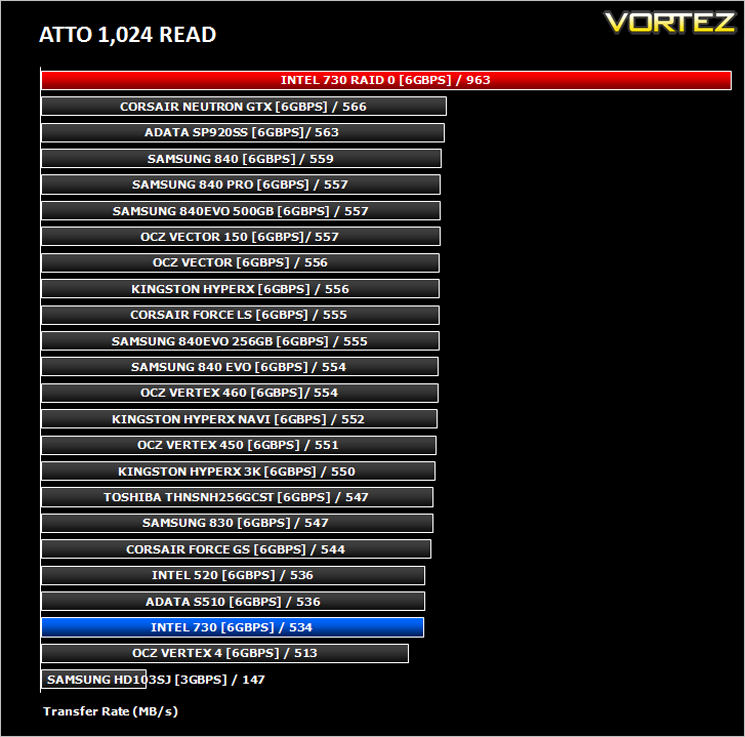
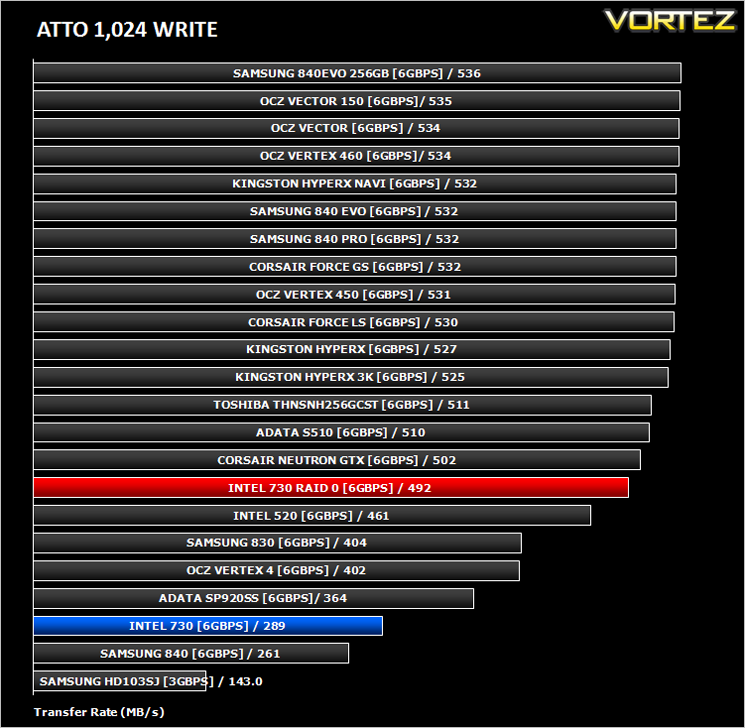
Benchmarks: ATTO
The ATTO Disk Benchmark performance measurement tool is compatible with Microsoft Windows. Measure your storage systems performance with various transfer sizes and test lengths for reads and writes. Several options are available to customize your performance measurement including queue depth, overlapped I/O and even a comparison mode with the option to run continuously. Use ATTO Disk Benchmark to test any manufacturers RAID controllers, storage controllers, host adapters, hard drives and SSD drives and notice that ATTO products will consistently provide the highest level of performance to your storage.
Benchmarks: AS SSD
AS SSD Benchmark is a straightforward tool for measuring the speed of your SSD drive.
Simply launch the program, choose your drive, click Start, and it’ll test your SSD’s read and write speed in a variety of ways, delivering a score for each when it’s done. And if that’s not enough, there are also additional file copy and compression-related benchmarks available from the Tools menu. (The author’s support page is German only, but if you need further English explanations then there’s a thread on the program at the OCZ Technology forum.).
Simply launch the program, choose your drive, click Start, and it’ll test your SSD’s read and write speed in a variety of ways, delivering a score for each when it’s done. And if that’s not enough, there are also additional file copy and compression-related benchmarks available from the Tools menu. (The author’s support page is German only, but if you need further English explanations then there’s a thread on the program at the OCZ Technology forum.).
Benchmarks: CrystalDiskMark 3.0
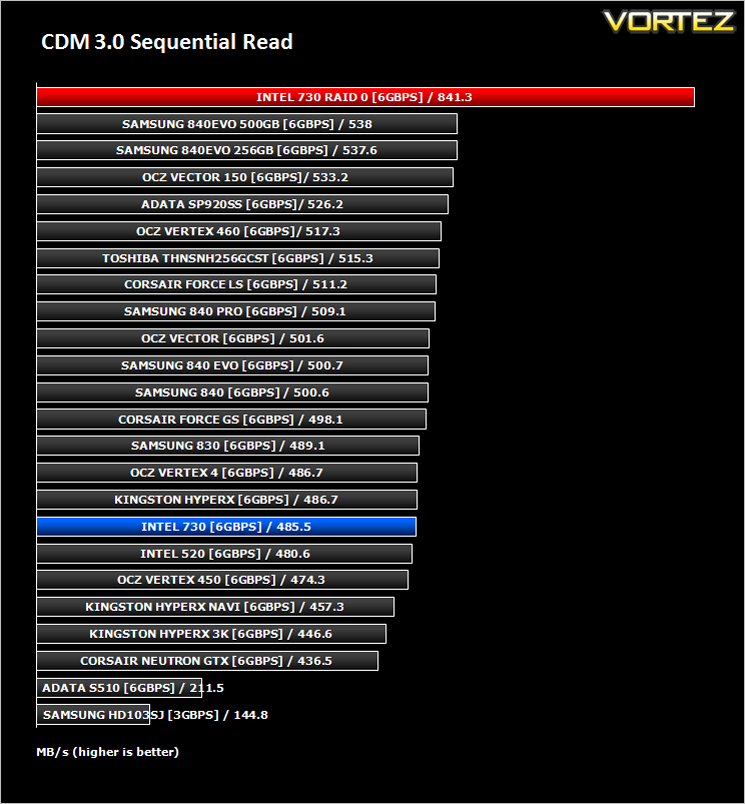
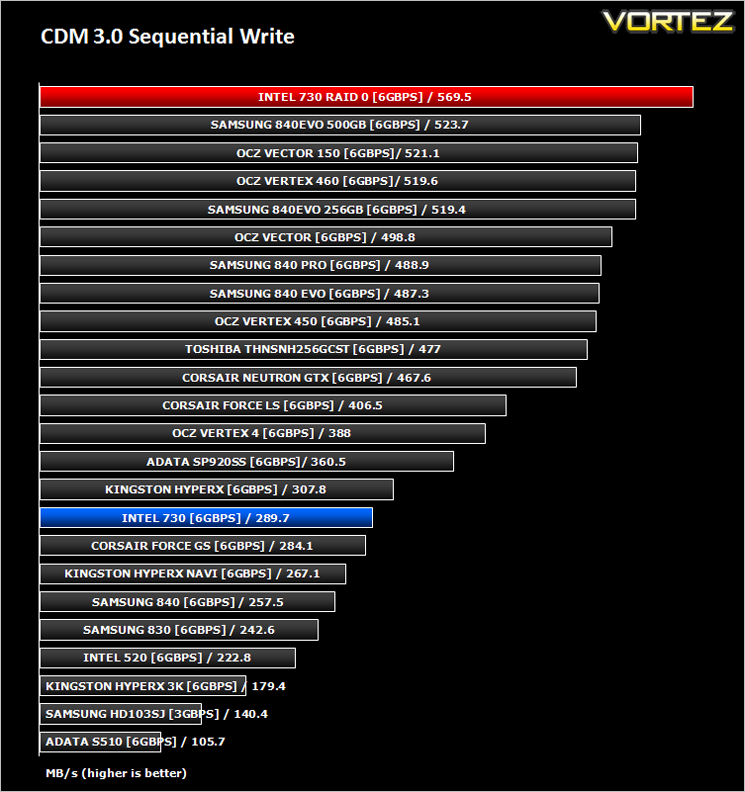
CrystalDiskMark is a disk benchmark software that analyses different types of hard drive. Giving sequential benchmark write and read statistics in MB/s. A simple program that is very useful.
Benchmarks: Iometer
Iometer is based on a client–server model, where one instance of the Iometer graphical user interface is managing multiple ‘workers’ (each one representing a separate Dynamo.exe process) which are doing the I/O. Iometer performs Asynchronous I/O – accessing files or block devices (later one allowing to bypass the file system buffers).
Iometer allows the configuration of disk parameters such as the ‘Maximum Disk Size’, ‘Starting Disk Sector’ and ‘# of Outstanding I/Os’. This allows a user to configure a test file upon which the ‘Access Specifications’ configure the I/O types to the file.
Iometer allows the configuration of disk parameters such as the ‘Maximum Disk Size’, ‘Starting Disk Sector’ and ‘# of Outstanding I/Os’. This allows a user to configure a test file upon which the ‘Access Specifications’ configure the I/O types to the file.
For the purpose of this test. The 4K 50%/50% read/write file will be under the examination with 100% Random Distribution – reporting back on IOPS and MBs per Second.
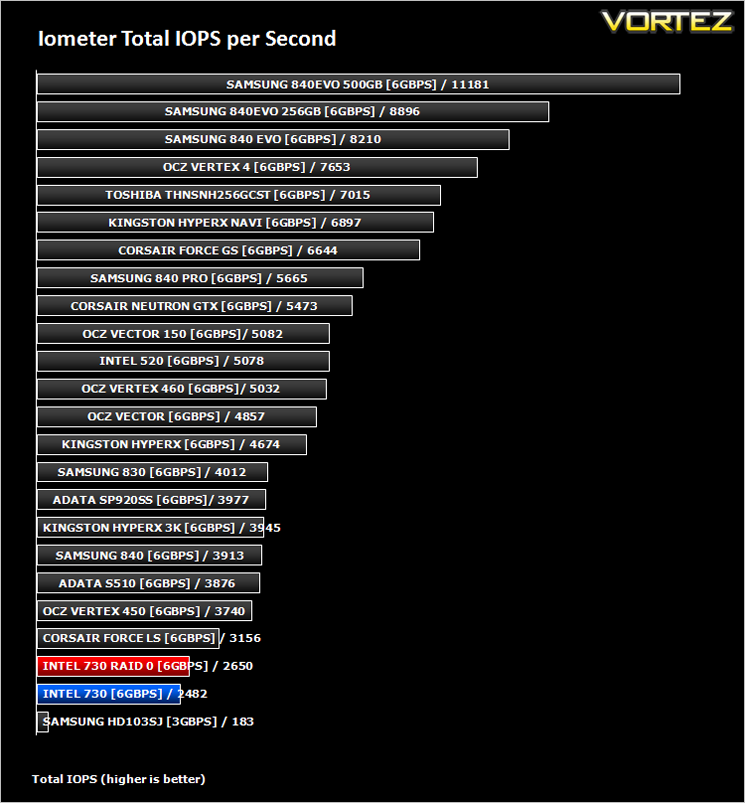
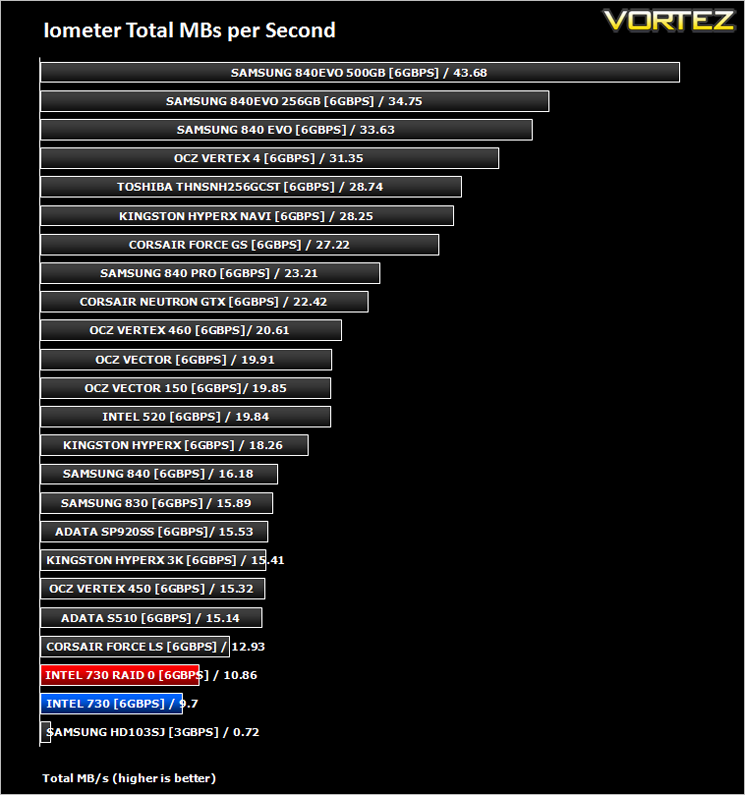
Benchmarks: Iometer (Sustained Test)
This is a new test for us but we have found that over a period of time, performance of SSDs slows down dramatically. For many of us this won’t be such a problem as it is unlikely we will be dedicating our PCs to small write over such a long period of time on a sustained basis however, it is a very valuable test which shows the sustainable performance of the drives with continuous small (4K)random writes in mind.For this test we again run IOmeter only this time we set it to 4K Random Write but over a 12 hour period. IOP readings are taken at 15 minute intervals throughout the 12 hour test to see how durable and sustainable the performance of the drives on test really are.
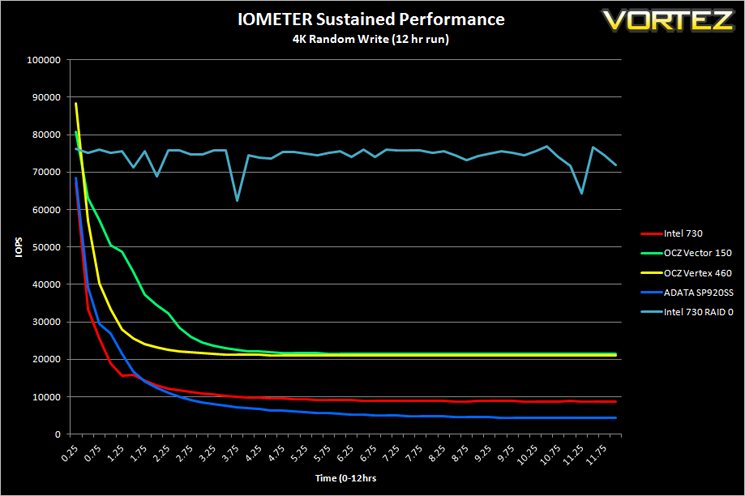
*Note* as this is a new test we have not had time to add all of the drives on test however more drives will be added when time allows.
Conclusion
Matching up a pair of already quick SSD’s was always going to show massive leaps in performance. Read speeds almost topped 1000 MB/s while write speeds also showed a fair increase in speed. The blistering pace of the read speed was however surpassed by the Intel 730’s star quality, sustained speed over long periods. Looking at the IOMETER test where we asked the drives to write small chunks of data (4k) continuously over a 12 hour period it is clear that RAID 0 had a major impact. The drive started out quick and unlike the single drives, the level of performance was as good at the end of the 12 hour period as it was at the beginning.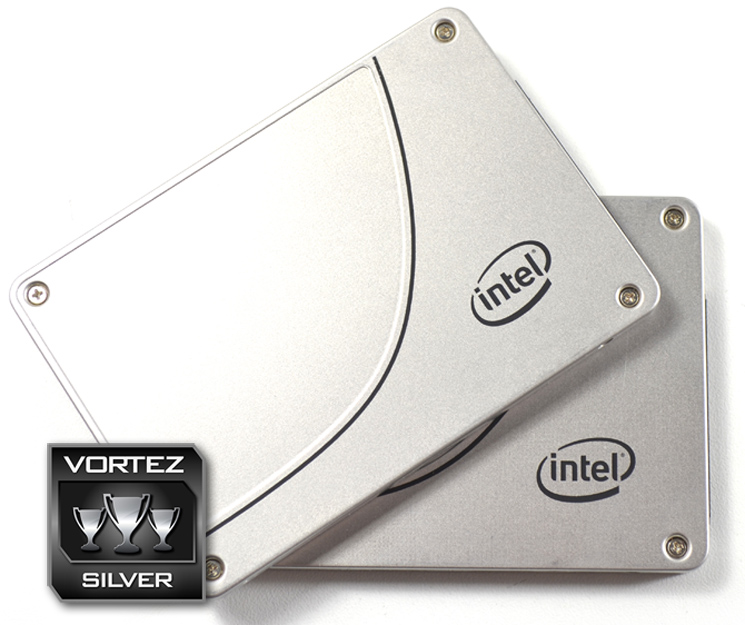
Aside from the average write speeds, our main gripe with the Intel 730 is the price. At £180 it is far from cheap and pairing two together only exasperates this issue. Most of Intel’s SSD competitors offer slightly faster drives for less. Intel themselves have a faster drive codenamed Wolfsville but this is more expensive still. So yes, having a pair of Intel 730’s will offer very fast read speeds and fantastic sustainable writes but even in Raid 0, write speed of two drives falls behind the very best single drive offerings. A buyer of the Intel drives would likely be someone who has lots of trust in the brand and who is looking for a very durable service offering reliable sustained write speeds that can compete with enterprise devices.
To summarise:
The Intel 730 Jackson Ridge is a good drive on its own, better in Raid 0 but ultimately, unless sustained write speed is of extreme importance to you there are faster, cheaper alternatives available.
Pros
+ Blistering read speed
+ Highly durable and sustained write speed
+ Metal casing
Cons
– Mediocre burst Write speed
+ Blistering read speed
+ Highly durable and sustained write speed
+ Metal casing
Cons
– Mediocre burst Write speed

Click here for an explanation of our awards at Vortez.net.


