







Earlier than expected Intel move their NDA on the next lineup of Sandy Bridge processors. We review the Intel 6 series.

A little over a year ago now we saw the introduction of the Intel Core i7, i5 and i3 LGA 1156 processors which replaced the Core 2 Duo and Core 2 Quad predecessor. These chips paved the way for the mainstream market. Delivering excellent performance to enthusiasts who are perhaps on a budget. LGA1156 basically offers excellent performance at a lower price-point compared to the LGA 1366 Core i7. But, some 15 months on and we have a successor to the short-lived LGA1156 Core i7, i5, i3.
The new 2nd Generation 6 Series Intel Core i7, i5, i3 are with us. They are named with the 2xxx suffix – at this current moment in time there is Core i5 2300, 2400, 2500 and 2500K and Core i7 2600 and 2600+.
The K indicator signifies that the chip has an unlocked multiplier and therefore is ideal for those wishing to performance tune the processor by overclocking. The Core i5 series fits into the mainstream market of processors whilst the Core i7 the performance market.
Each of our new family of processors are 32nm. Previous LGA1156 processors from the Core i5 series (Lynnfield) are 45nm and (Clarkdale) 32nm.
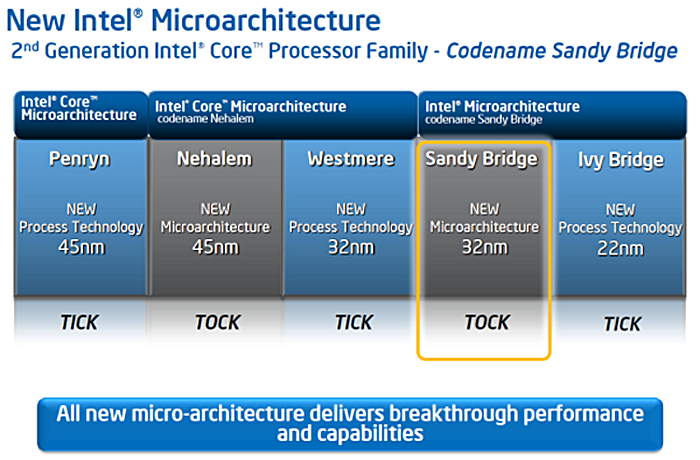
Over a year ago we saw Intel integrate graphics cores to their Clarkdale processors. They were largely separate entities that happened to be on the same die. With Sandy Bridge, Intel have taken it one step further. The actual cores themselves and the integrated GPU are married together meaning the ring bus which they are connected to and semiconductor die they are inside share resources. Enhancements like these have meant that Intel have verified these new processors as next generation.
This will almost certainly be aimed at competing with AMD’s Fusion concept – combining CPU and GPU capabilities to deliver HD, 3D and data-intensive performance.
With this new graphics core moving to 32nm die fine tuning is now possible. Clock speeds can be modified easily and we will see that the graphics core integrated on our Sandy Bridge processors may even compete with low-end graphics solutions because of the performance results in real-world applications. Integrated graphics is certainly moving forward with Intel’s Sandy Bridge integrated graphics core, I can imagine that due to the significance of the performance being likened to entry level graphics solutions both NVIDIA and AMD will be keeping a close eye on things.
Technologies
Intel’s 2nd Generation 6 series Core i7, i5, i3 codenamed Sandy Bridge is set to revive Intel’s current LGA1156 platform. It certainly won’t be making LGA1366 redundant by any means but will instead be sliding below that platform to really engage with those wanting quad core support at competitive pricing.
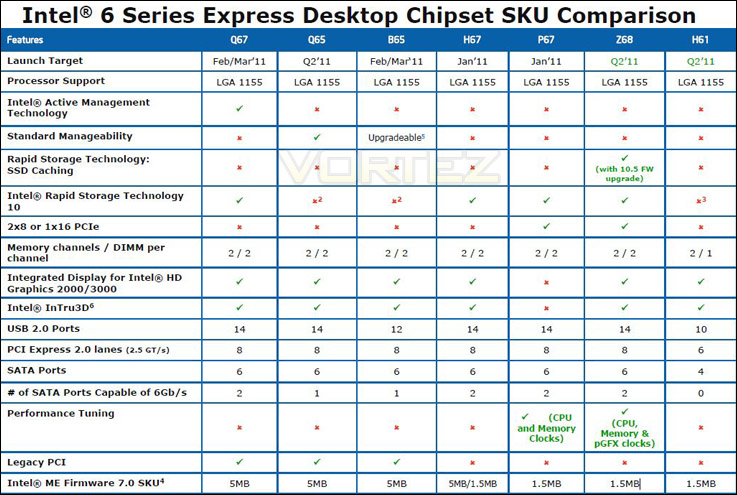
The new chipset has been given a new socket – LGA1155 and will come in a range of variants the two fundamental chipsets are P67 and H67. The latter being concerned with a budget approach to computing, providing onboard graphics but with no overclocking abilities whatsoever. CPU and memory clock speeds will be locked on H67, so P67 is going to appeal far greater to hardware enthusiasts looking to tweak performance and get the most out of their hardware.
Architecture
Transfer/Controllers
Sandy Bridge brings 6Gbps (6G) SATA support and whilst most boards will be shipped with USB3 support, this isn’t native. Available on LGA1155 is up to 14 USB2.0 ports which most manufacturers will be taking advantage of – consumers will have plenty of options this way.
Regarding the memory controllers, there are typically 4 DIMM slots each providing dual channel DDR3. So similarly to the LGA1156 platform, LGA1155 will also incorporate dual channel memory configuration.
PCI-E 2.0 has full support for 2.5GT/s through 8 lanes, which is encouraging to see. This allows more bandwidth to the USB 3.0 and SATA 6GBps controllers, double that of 1156, but all the lanes will be used for the aforementioned features, in an integrated manner. High end gamers may find the 16 PCI-E lanes to the CPU limiting as this allows 1 PCI-E x16 slot, or two PCI-E x8 slots for multi-GPU setups. So if you’re running Crossfire or SLI you may run into this bottleneck with Sandy Bridge.
Some of you may have read that the PCI-E 3.0 specification has been finialised but are wondering why it’s not supported in these latest boards – it will take a long time to be implemented and we shouldn’t expect it to be mainstream until next year at the earliest, most likely beyond Ivy bridge.
Integrated graphics H67
The H67 chipset allows users to make use of the integrated graphics in the Sandy bridge CPU core, whereas the P67 chipset does not. Depending on the board, expect to see VGA, DVI, HDMI and even displayport connectors for connections to monitors and TVs. The graphics performance is not aimed towards the enthusiast, with the Intel HD Graphics 2000 supporting just 6 shader units and the Intel HD 3000 Graphics just 12. The number of shader units depends on which CPU you choose to go with your H67 motherboard. This performance is certainly good enough for most non-gamers.
Intel InTru3D
This new technology is supported on all boards implementing the new integrated graphics solution (i.e. not the P67 chipset) and allows for 3D Blu-Ray playback over a HDMI 1.4 interface. Great news for HTPC builders and others besides. For more information on this technology, Intel have a website here
Closer Look
The processors we receieved were not retail and so we cannot show a representation of the retail packaging but below there is a comparison between an LGA1156 i5 processor (left) and LGA1155 i5 (Sandy Bridge) processor pictured on the right. Here we can see the difference in pin configuration.
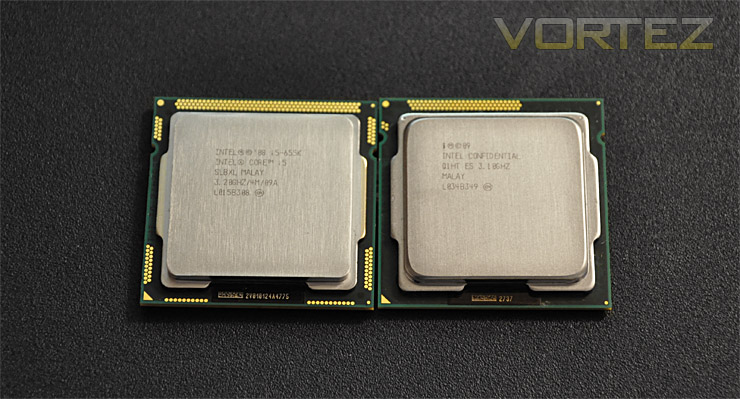
LGA1156 i5 on the left and new LGA1155 i5 on right
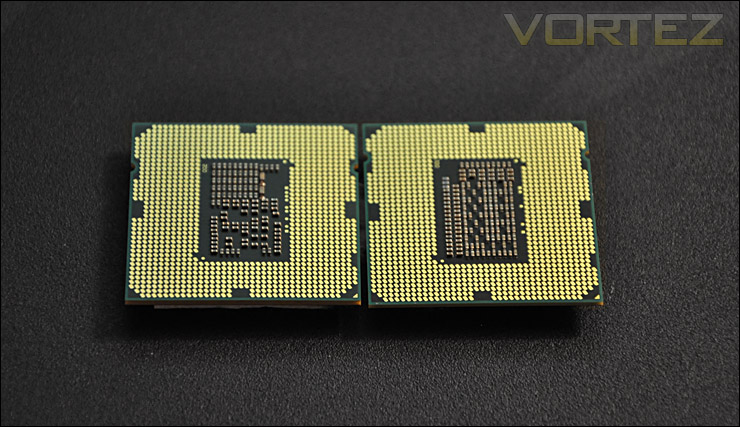
The rear of the chips
Test Setup
Intel Core i5 2300 (2.6GHz)
Intel Core i5 2400 (3.10GHz)
Intel Core i5 2500K (3.3GHz)
Intel Core i7 920 (2.6GHz)
Motherboards
ASUS P8P67 (LGA1155)
ASUS Rampage III Formula (LGA1366)
Memory 4GB OCZ Reaper 1600MHz 8-8-8-26
CPU Cooler Alpenfohn Matterhorn
Graphics ZOTAC GTX 460
PSU OCZ Fatal1ty 750W
All 6 Series Sandy Bridge chips will be benchmarked on the ASUS P8P67 motherboard. To compare against the 2300, 2400 and 2500K we have the Core i7 920 setup on an ASUS Rampage III Formula. The same memory, graphics card and PSU will be used to keep system variables consistent and therefore give the most accurate results even though we are testing across different architecture and chipsets.
Overclocking
Now, with previous chipsets enthusiasts have become accustomed to not only modifying the ratio or multiplier but also the BCLK but with the new Sandy Bridge architecture we only alter the ratio.
Whilst the none-K chips generally aren’t going to be considered as overclocking CPUs because their ratio/multiplier is at maximum and BCLCK should stay at 100MHz, applying turbo ratio to the chip will squeeze out 7% overclock nudging the clock speed by100MHz.
Our 2500K whilst being in the mainstream bracket can still be considered a performance chip because of its “K” status. This means it has an unlocked multiplier and can be overclocked unlike the non-K chips.
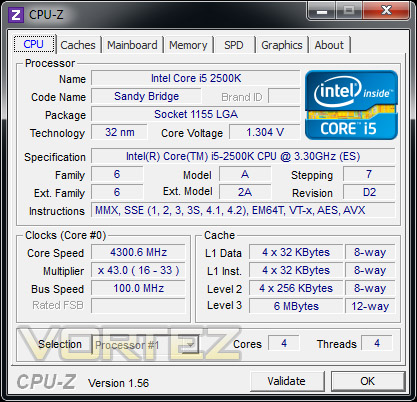
With overclocking simplified on Sandy Bridge, this means that achieving the best overclock couldn’t be easier. CPU voltage and multiplier just need to be modified accordingly. I began slowly nudging up the multiplier from 33 (3.3GHz). Ultimately I managed to overclock the 2500K by 1000MHz giving a clock-speed of 4.3GHz. Please bear in mind that at this stage many of the motherboards we have been using to test the chips are premature and some are even beta BIOS versions. So, whilst we did hit a wall with 4.3GHz this isn’t the end of the road by any means.
Power Consumption
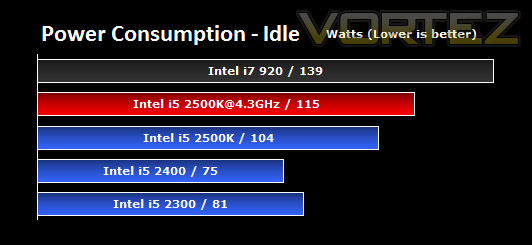
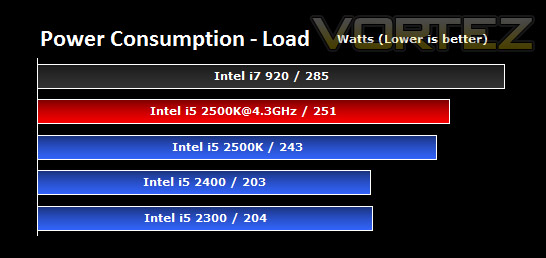
As you can see from the graphs the Sandy Bridge chips are indeed fair on their wattage output. Given their stock values for clock speed this is quite surprising. For those concerned about how much power they use then surely the Sandy Bridge chips below are a worthwhile consideration. Compared to our Intel Core i7 920 they are much less power hungry.
AIDA64
CPU Queen
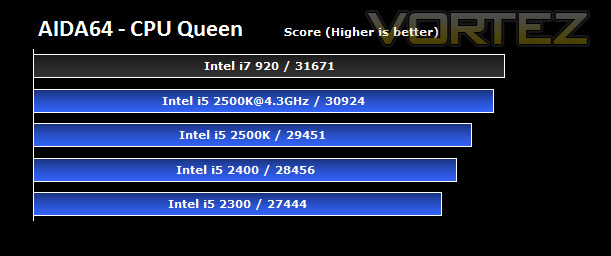
With the CPU Queen benchmark we see that the new 6 series chips which are classified as mainstream, manage to provide similar results to the high-end Core i7 920 performance chip.
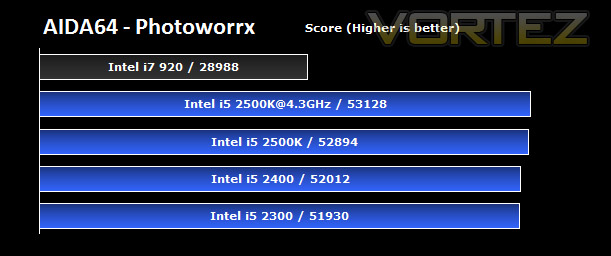
CPU Photoworrx
Our 6 series Intel chips accelerate past the current LGA1366 Core i7 920 with the arithmetic and multiplication units being uttilised. Clearly they are leaps and bounds ahead of the architecture on the LGA1366.
CPU AES
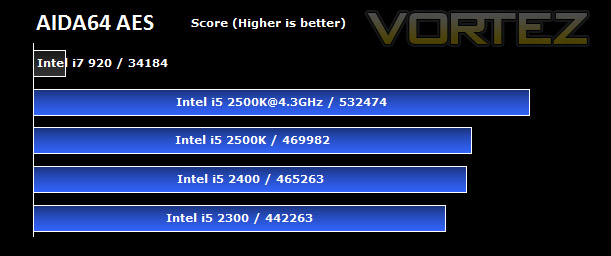
CPU AES test uses only the basic x86 instructions, and it’s hardware accelerated on VIA PadLock Security Engine capable VIA C3, VIA C7 and VIA Nano processors; and on Intel AES-NI instruction set extension capable processors. The test is HyperThreading, multi-processor (SMP) and multi-core (CMP) aware.
In the most significant of all the benchmark tests performed under AIDA64 here we see quite remarkable results. The Intel 6 Series chips crush the LGA1366 chip. The encryption techniques used within this type of benchmark as stated above are found with 7z, RAR and WinZip. So this is something that most people use everyday. So far, the 6 series chips are showing some very pleasing results.
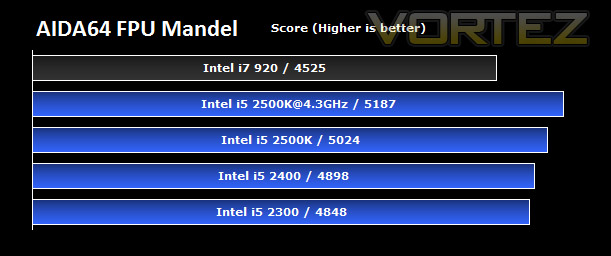
FPU Mandel
Once again, our 6 Series chips excel and output results that are greater than the current Core i7 LGA1366 performance chip. This is encouraging to see and with all of the AIDA64 tests showing the Sandy Bridge chips as being superior the other benchmarks will be intriguing to see.
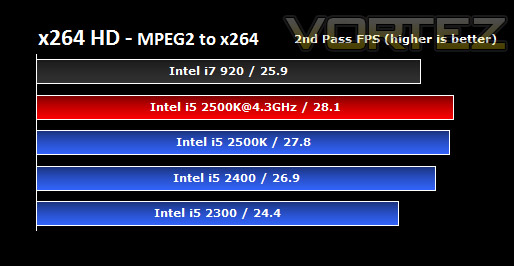
x264 HD
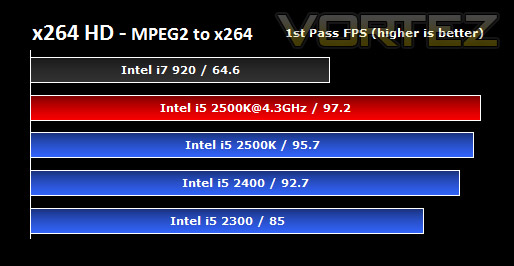
x264 HD gives results for 2 passes when compressing an MPEG-2 clip into x264. It presents 4 seperate results for each pass giving a total of 8 – all results are given in FPS. For each pass I have averaged out the results. The results reveal that the P8P67 can handle video encoding slightly better than its rivals. Although there isn’t very much in it, its another clear win for the ASUS P8P67.
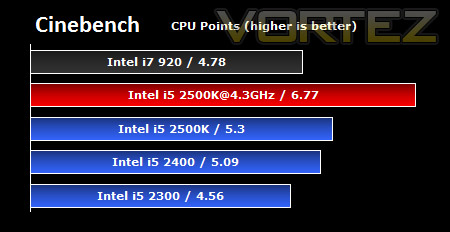
Cinebench
Overclocked, the Intel Core i5 2500K presents us with some outstanding points. The Core i7 920 fits in between the Intel Core i5 2300 and 2400 chips.
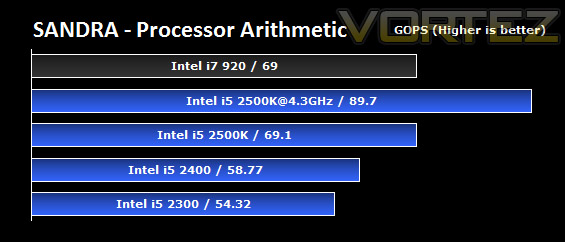
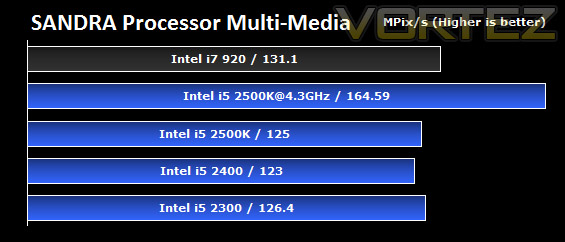
SiSoftware SANDRA
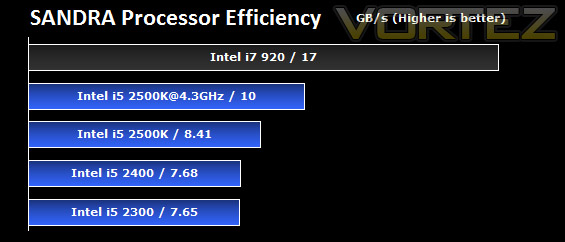
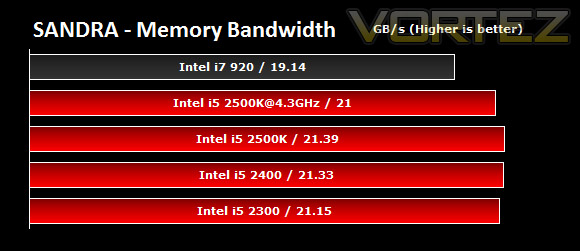
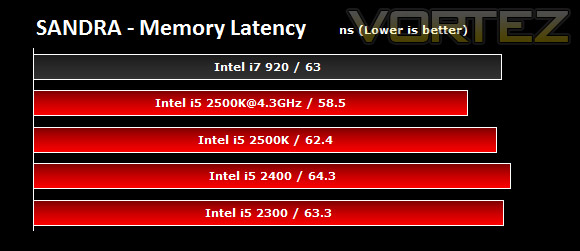
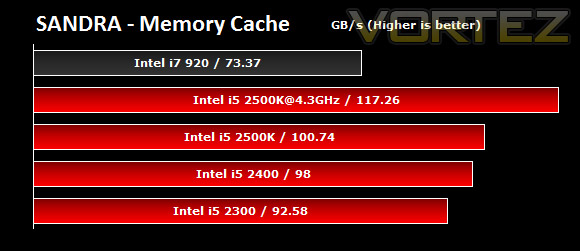
Sheer clock speed seems to be working in the Sandy Bridge chips favour. In each of the SANDRA tests we can see that even the lowest rated chip the 2300 performs just as well as the Core i7 920. CPU efficiency may well be working better with the LGA1366 representative but even in the memory bandwidth, latency and cache benchmarks the LGA1155 chips stand their ground. The 2500K overclocked shows its superiority over the Core i7 chip and gives some rather significant results.
3DMark 11
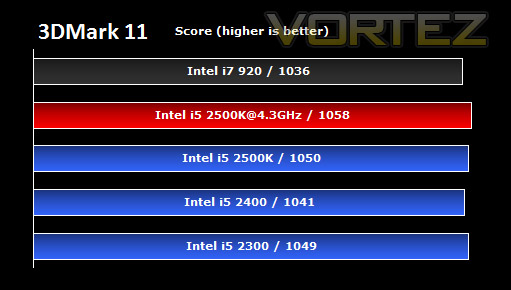
3DMark 11 was released at the end of last year and needs little introduction. For the test settings the Extreme preset is run with ‘benchmark only’ being selected.
Suprisingly all of the Sandy Bridge chips beat the Intel Core i7 920 in the 3DMark 11 benchmark test proving that these processors are capable of handling 3D rendering, including all the special effects such as volumetric lighting and tesselation. So far, our Intel 6 Series chips have proven to be outstanding when up against the LGA1366 Core i7 920. In the next phase of testing we will be considering a range of popular gaming titles.
DIRT 2
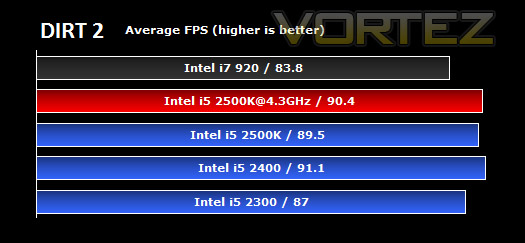
Here we can see the average frames per second for each processor tested. The game was tested in maximum settings at 1680×1050 with 0xAA and 0xAF.
The i7 920 (Socket 1366, Bloomfield) is beaten by all the Sandy Bridge offerings seen today at these settings. We must remember that the i7 920 ships with relatively low clockspeed of 2.66 GHz, but this is an impressive feat non the less, especially since the similarly clocked i5 2300 beats the i7 920 too, even if only by 4.2 frames.
We can also see that overclocking the i5 2500K yields further improvements in its score, though not by a great margin at these settings, suggesting the real bottleneck of performance for DiRT 2 most likely lies with the GTX460 graphics card.
Curiously, the i5 2400 wins out over its bigger brother, the i5 2500K, despite having a lower clock speed, and even beats the overclocked 2500K in this test. This further suggests that DiRT 2 is more GPU limited at these settings.
Call of Duty Black Ops
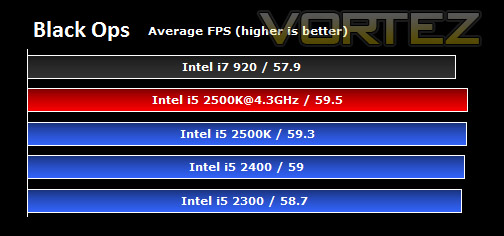
The game was tested on the highest settings at 1680×1050 0xAA 0xAF.
Once again, we can see that the i7 920 is beaten by all the new CPUs, and the results are in line with exactly what you’d expect from the relative clock speeds from there on. The lowest clocked 2.6Ghz i5 2300 comes in as the next fastest, then the 3.1 GHz i5 2400, followed by the 3.3 GHz unlocked multiplier i5 2500K, then overclocked at 4.3 GHz.
Overclocking the i5 2500K by a massive 30% only gives back a 0.2 FPS performance gain, suggesting that the graphics card is doing most of the work here at these settings. Never the less, all of the CPUs keep the game fluid and very playable, with the potential for AA or AF to be applied whilst keeping a good level of performance.
Metro 2033
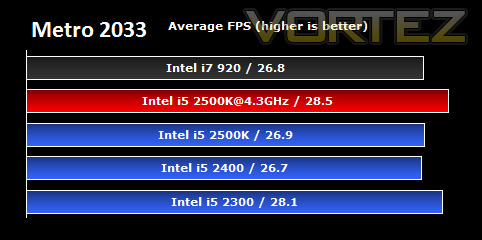
Tests were run at 1680×1050 0xAA 0xAF on the highest settings possible.
How did the CPUs fare with this title? The frame rates at these settings are not very playable, and would not provide a great experience to the user. This is primarily down to the incredibly intensive nature of the game on the graphics card and CPU, and as such the GTX 460 was struggling to cope.
For the first time we see the older Bloomfield i7 920 eek out a 0.1 FPS gain over the i5 2400 (surprisingly not the lower clocked i5 2300), but I think it would be safe to say that this result will fall into the margin of error for these tests.
Also, for the first time we can see a game taking advantage of that large overclock on the i5 2500K, giving roughly a 6% increase in absolute FPS.
Unreal Tournament 3
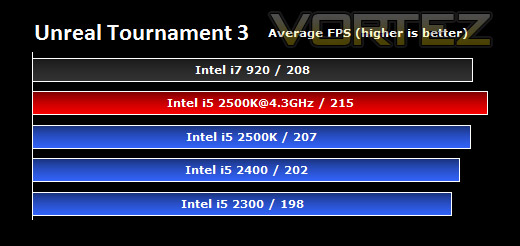
Immediately you’ll notice that at the highest settings at 1680×1050 0xAA 0xAF the frame rates are extremely high, so even the lowest end Sandy Bridge CPU here with a GTX 460 can happily max out this game.
Being more CPU-limited, we see a better separation of the performance figures, with the expected increase in performance over the 3 Sandy Bridge CPUs being shown clearly. Overclocking the i5 2500K results in a good increase in FPS at these settings, and then, interestingly, puts it ahead of the much lower clocked i7 920. Therefore, we can say, clock for clock, the Bloomfield CPU wins out well over the Sandy Bridge offerings here.
Conclusion
You may have noticed that the Sandy Bridge reviews have gone up earlier than expected across the web. Intel moved the NDA to 3 days earlier and a lot of sites including ourselves have had to quickly pull things together in order to get reviews online. I would like to thank Alex Hull our news editor and reviewer for assisting with the publishing of this review.
So where do we begin? Our new Intel 6 Series Sandy Bridge chips have presented us with some astounding results across the board. We have great performance, matched with excellent efficiency. In particular the 2500K, which is considered a mainstream processor tackled the Intel Core i7 920 with ease. Being overclocked further enhances that performance far beyond what an LGA1366 chip is capable of producing both in and out of the gaming environment.
Being considered as a mainstream processor, we tested on a mainstream P67 board provided by ASUS. Many of the BIOS on P67 boards at the current time are premature and do need fine tuning, I am sure as soon as this has been resolved higher overclocks will be possible. But for now 4.3GHz remains our highest overclock on the 2500K. Overclocking has been simplified, all that is needed is a modification to the multiplier and perhaps CPU voltage and we are there in overclocking paradise. 4.3GHz gives very pleasing results.

Whilst the lower end chips – 2300 and 2400 aren’t capable of overclocking by way of altering the multiplier we can still channel in to excellent performance with stock CPU clock speeds. The benchmarks we ran clearly show that even the 2300 is capable of giving excellent results without even being overclocked. If you are going to head in the non-K direction, then its worth considering the H67 chipset of motherboards as this range will focus mainly on entry-level performance.
Those looking to upgrade in Q1 should look no further if they are on a budget as Sandy Bridge within the i5 realm certainly offers outstanding performance. The 2500K is there for the taking, and will appeal to enthusiasts on a budget. Combine it with a mainstream motherboard and you are the envy of your LGA1366 friends at around £250.
Plenty of headroom for overclocking, performance and efficiency right out of the box – the new Sandy Bridge Core i5 range is a no-brainer for enthusiasts on a budget.
+ Excellent performance out of the box
+ Overclocking is easy and effective
+ Affordable
+ Low power consumption
+ Strong IGP
Cons
– None apparent


