Intel strikes back with a new CPU architecture, socket and flagship processor for desktop PCs, but can Arrow Lake take the fight to Zen 5?

Product on Review: Core Ultra 9 285K
Manufacturer: Intel
MSRP: $589 USD
Competition is hotting up in the desktop PC space this week as Intel end their protracted Arrow Lake tease and take the wraps off the Core Ultra 200-series CPUs. A new set of performance processors for gaming and enthusiast platforms, the Ultra 200-series will go head-to-head with AMD’s ‘Zen 5’ Ryzen 9000-series this holiday season.
A fresh naming scheme is far from the only new aspect to these designs. A new processor architecture, socket, motherboard chipset and featureset are all key parts of this autumn launch that for the first time also integrates discrete hardware to accelerate AI workloads known as an ‘NPU’. In other ways the launch will be familiar, particularly to those who have kept their knowledge of Intel’s 12th-14th gen processors up-to-date.
A new CPU architecture doesn’t always come with a new socket layout but it has in this case. LGA 1851 takes over from LGA 1700 as the new Intel desktop socket, cooler-compatible with the older design but boasting a new ILM that should eliminate some of the issues present for 12th, 13th and 14th Gen chips. As we’ll see later, that’s going to be critical for Arrow Lake’s long-term durability as well as temperature-limited frequency-boosting performance.
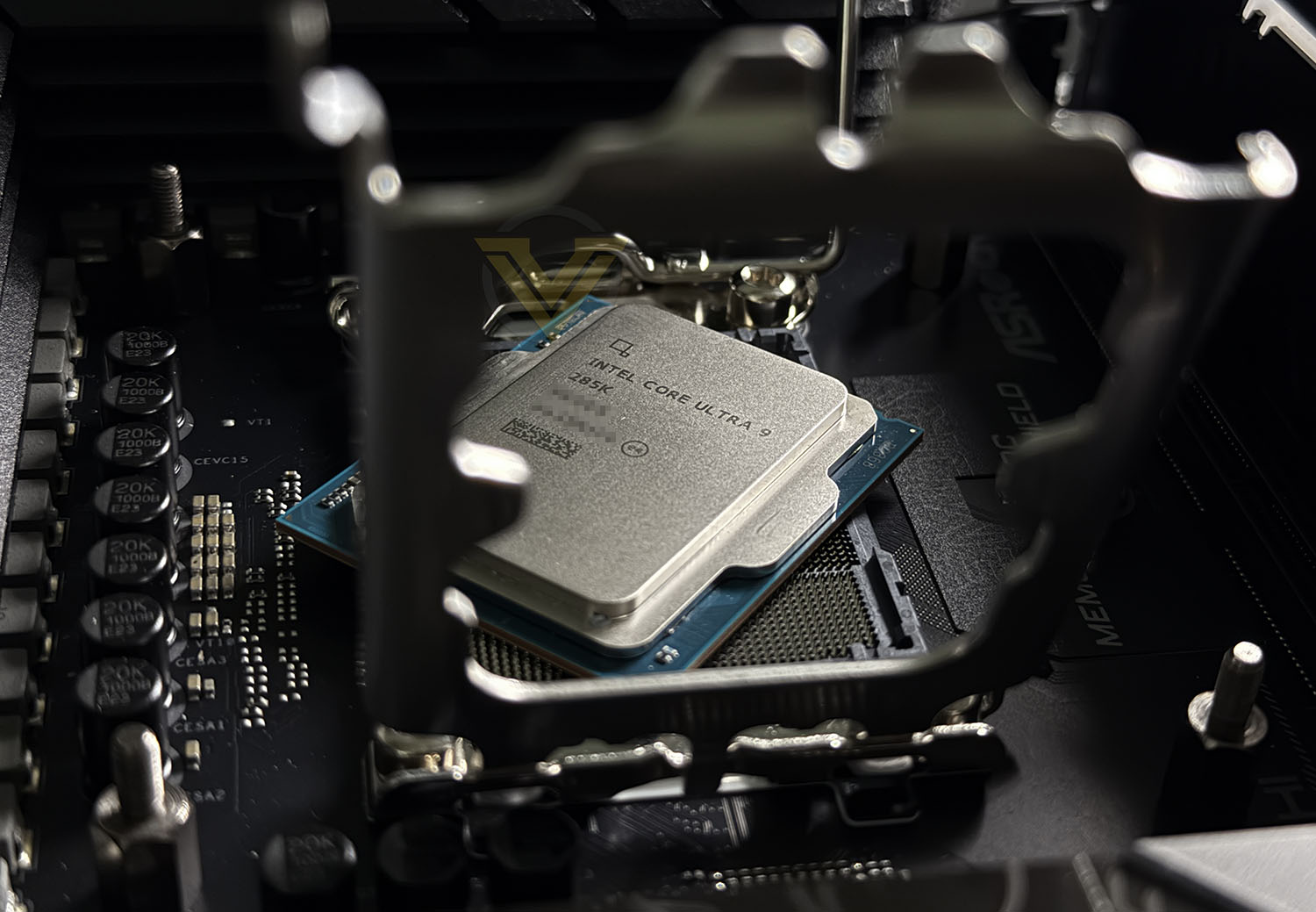
Intel are launching Arrow Lake on desktop with five SKUs representing three discrete performance tiers with and without iGPU. While we’re reviewing the flagship Core Ultra 9 285K, the Core Ultra 7 265K/F and Core Ultra 245K/F models will also be available as mainstream and enthusiast gaming options at considerably lower price points. Ultra 7 models will fuse off an E-core cluster but retain 8 P-cores, while the Ultra 5 model also reduces the number of P-cores by two.
The Ultra 9 285K is a 24-core, 24-thread processor composed of 8 Performance Cores (P-Cores) and 16 Efficiency-Cores, similar to the previous generation flagship. Both core types have been redesigned however, optimising for a new CPU packaging process and the retirement of Hyperthreading technology.
Intel are signalling a focus on processor power efficiency for the new generation following concerted criticism of the 13th and 14th Generations power demands (and the eventual pitfalls that brought). Performance is intended to be on-par with the 14th Generation predecessors (and by implication similar to 13th and 12th gen counterparts) while drastically reducing power draw and associated temperatures. Part of that is possible thanks to the adoption of TSMC’s 3nm production process over Intel’s in-house node, but as much or more will be due to the re-engineered cache structures and data handling in the new architecture.
As well as the new socket, Intel Z890 motherboards bring optional support for WiFi 7, Thunderbolt 5 and 2.5GbE in addition to the overclocking tools necessary to push the new K-class chips to their limit. This launch also coincides with the reveal of new CUDIMM packaging for DDR5, high-speed memory with an on-board clock driver and improved voltage regulation. This new memory may be clocked at over DDR5-8000MT/s (some models boast as much as 10000MT/s) for greatly improved memory bandwidth.
Neither CPU nor motherboard is backwards compatible with the prior generations of chips, and Intel have made no move to assure end-users of platform longevity. We should probably expect to see at least two generations from LGA1851 but, unlike AMD’s AM5, Intel have no explicit or implied obligation to maintain socket compatibility across generations going forward.
At $589 the Core Ultra 9 285K will stack up against AMD’s Ryzen 9 9950X – recently reduced in price to a post-launch MSRP of $599 – with the 9900X also likely to offer stern competition. AMD’s 7800X3D is a fading wild card due to ballooning prices and low stock levels, but the red team have yet to play their Ryzen 9000X3D-embossed joker. Expect that bombshell to land in early November.
Suitably introduced, let’s take a closer look at the Intel Core Ultra 9 285K.
Technical Specifications
Total Cores: 24
Core Topology: Tiled big.little via Foveros packaging
P-Cores:8
E-Cores: 16 (4 per Cluster)
Threads: 24
P-Core Base Freq.: 3.7 Ghz
P-Core Max Turbo: 5.5 GHz
P-Core TVB Freq.: 5.7 GHz
E-Core Base Freq.: 3.2 GHz
E-Core Max Turbo: 4.6 GHz
Total L2 Cache: 40MB (8 x 3MB + 4 x 4MB)
Total L3 Cache: 36MB
Power: 125W / 250W Max.
CPU PCIe Lanes: 24 PCIe 5.0 Lanes (4 reserved for chipset comms)
Memory: DDR5-6400
Channels: 2ch
Max. Capacity: 192GB (48 GB per DIMM)
Core Topology: Tiled big.little via Foveros packaging
P-Cores:8
E-Cores: 16 (4 per Cluster)
Threads: 24
P-Core Base Freq.: 3.7 Ghz
P-Core Max Turbo: 5.5 GHz
P-Core TVB Freq.: 5.7 GHz
E-Core Base Freq.: 3.2 GHz
E-Core Max Turbo: 4.6 GHz
Total L2 Cache: 40MB (8 x 3MB + 4 x 4MB)
Total L3 Cache: 36MB
Power: 125W / 250W Max.
CPU PCIe Lanes: 24 PCIe 5.0 Lanes (4 reserved for chipset comms)
Memory: DDR5-6400
Channels: 2ch
Max. Capacity: 192GB (48 GB per DIMM)
Intel and AMD’s approach to CPU design has diverged considerably since the introduction of Ryzen in 2016. AMD opted for a chiplet style with homogeneous cores on discrete Core Complex Dies. Intel meanwhile introduced the concept of big and little cores with Alder Lake’s hybrid architecture, dubbed Performance and Efficiency Cores, on a single monolithic die. As their names suggest, E-cores are for background and lower priority tasks, whereas P-cores are tailored to high-priority heavy compute workloads that warrant more juice.
While P-Cores operate semi-independently, E-Cores are organised in clusters of four with shared L2 cache. This makes them ideal for handling multiple similar threads with cached data relevant to all of those threads.
Unlike prior generations however Arrow Lake is notable for its lack of Hyperthreading. This technology – a proprietary implementation of simultaneous multithreading (SMT) that’s been part of Intel’s desktop strategy since 2002’s Pentium 4 era – allowed for better load scheduling in system configurations with relatively few high-performance cores. With the introduction of up-to 16 E-cores to handle much of the heavily threaded load, Hyperthreading was deemed to be a waste of valuable silicon area and power resources.
There will be a trade-off to this approach. The most heavily multithreaded applications and software configurations will suffer, i.e. those that generate and optimally process more than 24 threads in parallel. Other workloads should benefit however, particularly lightly-threaded ones that scale with faster individual cores.
As a ‘K’ processor the Core Ultra 9 285K is fully unlocked for overclocking, with much greater flexibility on the platform compared to Raptor Lake-R and other recent Intel processors. The tools available suit both casual and enthusiast overclockers alike, and include both automated ‘activate and forget’ systems as well as means for bypassing platform voltage limits. Even low temperature overclocking gains enhancements in the form of voltage limitation bypassing as temps reduce.
While we’re reviewing the Ultra 9 285K today, each member of the 200S-series fits an intriguing niche. At an MSRP of almost $400 the Ultra 7 265K specialises less towards the raw multithreaded performance of the 285K but, by retailing all 8 P-cores it should have plenty of horsepower for premium gaming content while also operating a plethora of background tasks. A significant step down for content creators but likely only a minor deduction for all others.
At around the $300 mark the Ultra 5 245K is the most affordable of the CPUs launching today. It boasts just 6 P-cores and 8 E-cores as well as a significantly reduced maximum turbo of just 5.2GHz. This model is very much aimed at mainstream gamers and potentially gameplay streamers, particularly as (like all Arrow Lake designs) it supports hardware encode/decode of relevant video codecs including the nascent AV1 codec.
Finally, the platform costs are not out of step with Intel’s rivals. At the time of writing AMD’s cheapest X870 motherboard is $199 from Newegg.com whereas the equivalent Z890 is just $175.99. Features including I/O will differ a little between the two in this configuration but the take-home is that Intel look to be offering marginally better bang for your buck, particularly if the mainstream Arrow Lake SKUs can live up to their billing.
Features
Arrow Lake-S replaces Raptor Lake-R (Raptor Lake Refresh AKA the 14th Gen Desktop platform). It is manufactured using a mixed process of TSMC’s 3nm and 5nm production methods, packaged as tightly packed tiles using Intel’s Foveros technology. By utilising tightly packed chiplet tiles rather than discrete chiplet dies the chip’s latency characteristics should be significantly lower than AMD’s implementation, but may also be more expensive to manufacture.
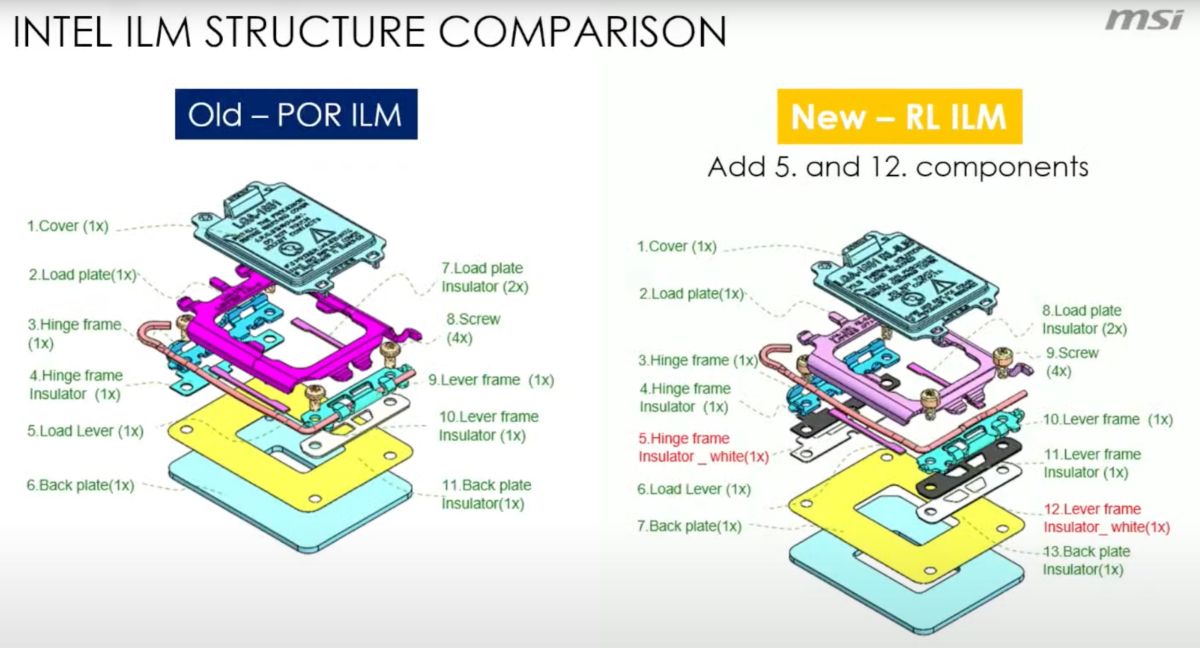
Arrow Lake’s packaging style makes maintaining the rigidity of the CPU package essential. LGA1700’s ILM was known to deform the CPU heatspreader and substrate, so much so that CPU cooler manufacturers began shipping replacement contact frames which maintained their rigidity under pressure and didn’t cause the CPU to deform. LGA 1851 motherboards are fitted with the revised RL-ILM, an updated design with more structural rigidity that should also reduce operating temps by offering better heatspreader-to-cooler contact despite a lower contact force.
The Arrow Lake S architecture is a significant generational update over Raptor Lake. P-Cores, E-Cores and GPU compute tiles are all significantly improved over their predecessor, and the design also makes room for a dedicated Neural Processing Unit (NPU).
New to Arrow Lake: Skymont E-Cores. Replaces Gracemont E-Cores from Raptor Lake.
– 4MB Shared L2 (4 core block)
– Double L2 Cache Bandwidth
– up-to 32% IPC improvement
– Deeper Queues
– Greater throughput thanks to 4 128-bit FP & SIMD vector
– Double L2 Cache Bandwidth
– up-to 32% IPC improvement
– Deeper Queues
– Greater throughput thanks to 4 128-bit FP & SIMD vector
New to Arrow Lake: Lion Cove P-Core. Replaces Raptor Cove
– up-to 9% improved IPC
– 3MB L2 Cache (up from 2MB)
– up-to 36MB Shared LLC (L3 Cache, shared with E-cores, same as RC).
– Wider Scheduling and Predict
– Finer clock increments of 16.7 MHz
– ‘AI-based power management’
– 3MB L2 Cache (up from 2MB)
– up-to 36MB Shared LLC (L3 Cache, shared with E-cores, same as RC).
– Wider Scheduling and Predict
– Finer clock increments of 16.7 MHz
– ‘AI-based power management’
In quite a departure from Intel’s marketing claims of the past, Arrow Lake S processors are expected to be only modestly faster than their predecessor. Comparing the Ultra 9 285K vs the i9-14900K in gaming for instance is basically a wash according to internal testing, while it should generally outperform the Ryzen 9 9950X in both gaming and well-suited multi-threaded productivity tasks. It might lag compared to the 7950X3D in gaming but handily beats it in Content Creation, which focuses on multi-core performance.
Where Arrow Lake apparently excels is power efficiency. Intel boast an average of 73W lower total system power usage compared to the i9-14900K and up to 165W less in some scenarios, despite maintaining performance broadly on par with the chip it replaces. This should also compare favourably with the Ryzen 9000-series, though that should be a sterner test.
With lower power draw comes lower temperatures, and the Ultra 9 285K should run considerably cooler than its predecessor. While this might not mean you run less beefy coolers, it should allow cooling fans to operate at significant lower RPM (and thus generate much less noise).
New to Arrow Lake: Updated Xe iGPU
– Xe-LPG graphics architecture
– 4 Xe-Cores
– 4 RT Units
– Xe Vector Engines
– Up-to 8 TOPS
– XeSS AI-enhanced Upscaling Support
– Xe Media Engine with support for AVI Encode/Decode and 8K transcode capabilities
– DP4a AI accelerated instructions
– DX12 Ultimate support
– 4 Xe-Cores
– 4 RT Units
– Xe Vector Engines
– Up-to 8 TOPS
– XeSS AI-enhanced Upscaling Support
– Xe Media Engine with support for AVI Encode/Decode and 8K transcode capabilities
– DP4a AI accelerated instructions
– DX12 Ultimate support
Intel’s integrated GPU continues to be an underappreciated gem. While you’re unlikely to use it for gaming directly, its immense encode and transcode capabilities will continue to be the envy of their competition. Being the first iGPU to integrate hardware AV1 encode as well as decode is the cherry on top, a cherry that will prove to be almost essential to content creators if/when Twitch.tv and Youtube implement streaming in that format as the defacto standard.
New to Arrow Lake: Neural Processing Unit (NPU)
– NPU 3 architecture
– 2 Neural Compute Units
– 4MB scratchpad RAM
– Up-to 13 int8 TOPS
– 2 Neural Compute Units
– 4MB scratchpad RAM
– Up-to 13 int8 TOPS
The jury is still out on the need for hardware-accelerated AI processing on desktop CPUs, particularly in the enthusiast class where they’re most likely to be paired with a far more capable dGPU. On paper Intel’s implementation isn’t quite as robust as AMD’s, but with the technology still largely unused it remains to be seen if it’s a killer feature or expensive boondoggle. In total, when combining CPU, iGPU and NPU, the Arrow Lake S desktop processor range hits up-to 36 int8 TOPS. Strictly speaking that’s not sufficient for Microsoft Copilot+ certification that requires a minimum of 40 TOPS, but nor does it reckon with the >100 TOPS likely offered by a discrete GPU.
Finally, when it comes to the SoC and standard I/O, Intel are far less boastful than AMD despite arguably a more complete package. PCIe 5.0 lane allocation is identical at 20 off-CPU, up-to two Thunderbolt 4 ports are supported (broadly equivalent to a ‘better’ USB 4 that’s backwards compatible), WiFi 6E and Bluetooth 5.3 is standard, and 1Gbit Ethernet is available at a minimum. The Z890 chipset optionally offers even more, including Thunderbolt 5, WiFi 7, Bluetooth 5.4 and 2.5GbE depending on how their partner configures the design.
Test Setup & Testing
For the purpose of testing the ULTRA 9 285K we used the ASRock Z890 TAICHI since it is placed as a high-end motherboard, this should give us the capabilities of showing the true potential of this chip.
Note that Intel i9 and i7 results are not reflective of the 0x129 microcode update. AMD 9000-series results taken prior to Windows 24H2 update.
CPU being tested
Intel Core ULTRA 9 285KTEST SETUP
Cooling CORSAIR H150i ELITE LCDMotherboard ASRock Z890 TAICHI
Memory 64GB CORSAIR Dominator Platinum RGB 5200MHz DDR5
Graphics ZOTAC RTX 3070 Ti HOLO Extreme
Storage CORSAIR Force LX 512GB SSD
PSU Corsair RM 1000 80 Plus Gold Certified PSU
Monitor AOC U2879VF
BENCHMARKS
Cinebench R23 – Single/Multi-core CPU Renderingx264 HD 4.0 – 1st and 2nd pass encoding
SiSoftware SANDRA – CPU & Memory benchmarks
POV-RAY – CPU Ray Tracing
TrueCrypt – CPU Encryption Read/Write
AIDA64 – CPU benchmarks & Memory
PCMARK 10 – CPU Productivity
Davinci Resolve – Puget Benchmark
Blender – Classroom Benchmark
Games – Assassin’s Creed Odyssey & Total War: WARHAMMER II
OTHER SOFTWARE
Temperature Analysis: CoreTempStress Testing Software: AIDA64 Stability Test
CPU Specification Monitoring: CPU-Z
Temperatures
Below are the temperatures for each of the CPUs – without any overclock applied. We’ve also compared to previously released AMD and Intel counterparts (which we’ve also benchmarked against on the subsequent pages too):
Power Consumption
It’s interesting to note the power consumption across all processors. Although they are using a combination of different motherboard chipsets, energy results can fluctuate between manufacturers due to the features and specifications that are integrated. First of all, for the idle tests the system is cold booted into Windows and no additional applications are executed – the watts are noted on the external energy monitor we use and then the system is loaded with 3DMark FireStrike – watts are again monitored for the duration of the test and the highest rated wattage result is then noted down. Below are the results of this energy test.
Ray Tracing Performance – POV-Ray 3.7
Persistence of Vision Raytracer’s PovRay is a free and open source 3D animator application with versions for computers with different operating systems.
This product allows users to build their custom 3D worlds with excellent quality despite their computer’s hardware. It has adjustable options for levels of radiance, refraction, and reflection. Calculation time may vary depending on the computer model, but PovRay can adapt to many computer builds, and is supported by the open source community.
This product allows users to build their custom 3D worlds with excellent quality despite their computer’s hardware. It has adjustable options for levels of radiance, refraction, and reflection. Calculation time may vary depending on the computer model, but PovRay can adapt to many computer builds, and is supported by the open source community.
AES Encryption Performance – TrueCrypt 7.1a
TrueCrypt is a discontinued source-available freeware utility used for on-the-fly encryption (OTFE). It can create a virtual encrypted disk within a file or encrypt a partition or (under Microsoft Windows except Windows 8 with GPT) the entire storage device (pre-boot authentication).
Encoding Performance – X264 HD
Simply put, this test measures how fast your machine can encode a short, DVD quality MPEG-2 video clip into a high-quality x264 video clip. What’s x264, you ask? It’s more or less the next-generation Xvid/DivX codec. I think it’s ideal for a benchmark because the application (x264.exe) reports fairly accurate compression results (in frames per second) for each pass of the video encoding process, and it uses multi-core processors very efficiently.
x264 HD gives results for 2 passes when compressing an MPEG-2 clip into x264. It presents 4 separate results for each pass giving a total of 8 – all results are given in FPS. For each pass I have averaged out the results.
Processing Features Performance – AIDA64
AIDA64 Product Page
This simple integer benchmark focuses on the branch prediction capabilities and the misprediction penalties of the CPU. It finds the solutions for the classic “Queens problem” on a 10 by 10 sized chessboard. At the same clock speed theoretically the processor with the shorter pipeline and smaller misprediction penalties will attain higher benchmark scores. For example — with HyperThreading disabled — the Intel Northwood core processors get higher scores than the Intel Prescott core based ones due to the 20-step vs 31-step long pipeline. CPU Queen test uses integer MMX, SSE2 and SSSE3 optimizations.
Memory Transfer Performance – AIDA64
AIDA64 Product Page
This simple integer benchmark focuses on the branch prediction capabilities and the misprediction penalties of the CPU. It finds the solutions for the classic “Queens problem” on a 10 by 10 sized chessboard. At the same clock speed theoretically the processor with the shorter pipeline and smaller misprediction penalties will attain higher benchmark scores. For example — with HyperThreading disabled — the Intel Northwood core processors get higher scores than the Intel Prescott core based ones due to the 20-step vs 31-step long pipeline. CPU Queen test uses integer MMX, SSE2 and SSSE3 optimizations.
Processing Power Performance – Cinebench R23
CINEBENCH can measure systems with up to 64 processor threads. This test scene contains approximately 2,000 objects which in turn contain more than 300,000 polygons in total, and uses sharp and blurred reflections, area lights, shadows, procedural shaders, antialiasing, and much more. The result is displayed in points (pts). The higher the number, the faster your processor.
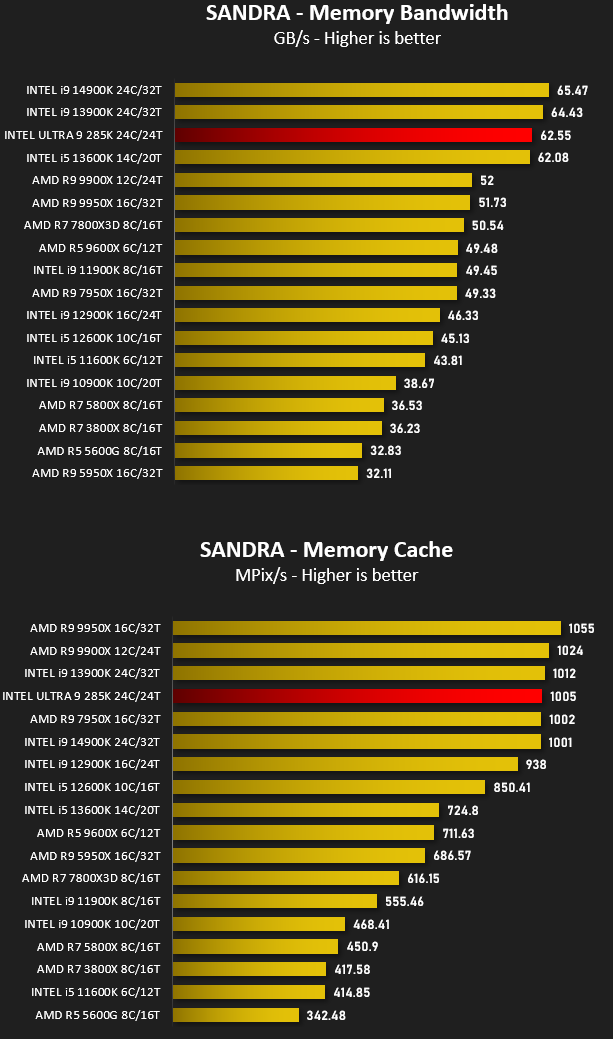
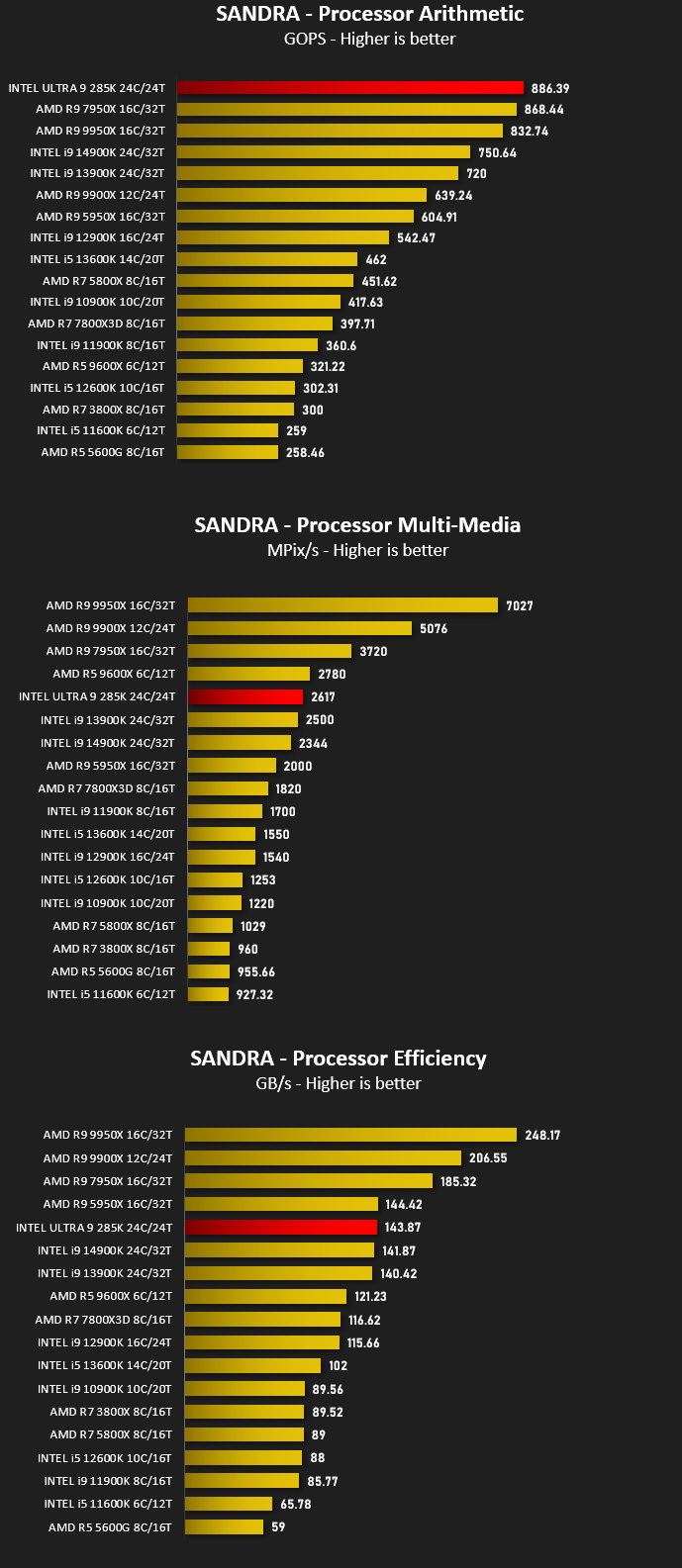
Bandwidth Performance – SiSoftware SANDRA
SiSoftware Product Page
SANDRA isn’t always a benchmark that is included in hardware reviews but I believe it shouldn’t be ignored. SANDRA provides a vigorous package that tests your system in a rather large array of benchmarks. There are many aspects of benchmark that can be executed. We will be considering – CPU and memory tests.
Overall System Performance – PCMark 10
PCMark 10 Product Page
Developed in partnership with Benchmark Development Program members Acer, AMD, Condusiv Technologies, Dell, HGST, HP, Intel, Microsoft, NVIDIA, Samsung, SanDisk, Seagate and Western Digital, PCMark 10 is the latest version in FutureMark’s popular series of PC benchmarking tools. Improving on previous releases, PCMark 10 includes new tests using popular applications from Adobe and Microsoft.
4K Editing Performance – DaVinci Resolve PugetBench
DaVinci Resolve is not only an industry-standard coloring tool, but also includes features for video editing, VFX, and more. While we also have benchmarks for Premiere Pro, After Effects, and other creative applications, every application will utilize the hardware in a computer in very different and unique ways which can make it extremely difficult to determine exactly what hardware will give the end user the best possible performance.
Rendering Performance – Blender
Blender is a free and open-source 3D computer graphics software toolset used for creating animated films, visual effects, art, 3D printed models, motion graphics, interactive 3D applications, virtual reality, and computer games. Blender’s features include 3D modeling, UV unwrapping, texturing, raster graphics editing, rigging and skinning, fluid and smoke simulation, particle simulation, soft body simulation, sculpting, animating, match moving, rendering, motion graphics, video editing, and compositing.
Please note: Blender has recently been updated and the metric for results has changed with the new update, rendering our historical benchmarks void – hence why we have less results for this benchmark, taking on the new samples per minute metric.
Gaming Performance – AC: Odyssey & Total War: WARHAMMER II
It’s important for us to perform a number of game benchmarks as well as the synthetic tests because gamers will want to know if there are any significant benefits. So here we have two recent gaming titles benchmarked with the RTX 3070 Ti. Both gaming titles are CPU-intensive – AC Odyssey is the last AC title in the series to be CPU-bound. Valhalla uses DX12 API.
Conclusion
In retrospect AMD’s ‘Zen 5’ Ryzen 9000-series proved to be one of the most divisive launches of recent years, filled with suspect marketing and performance claims which simply didn’t match the tests conducted by independent outlets. Intel’s Core Ultra 200S series is unlikely to cause quite so much spilled ink as its chief rival but that doesn’t mean everything is going its own way.
The first aspect of a flagship CPU’s launch that all eyes will turn to is raw performance, particularly leadership over the competition and prior generations. With the Core Ultra 9 285K Intel simply haven’t achieved a clear victory. They’re nip and tuck with both the current Zen 5 flagship and prior generation top performers, winning on a few but losing out in the most heavily threaded tests, but at no point is a clear picture available. But then again, in a blow for realistic if deflating marketing, Intel didn’t claim they would achieve outright leadership.
So, has there been progress over Raptor Lake? Undoubtedly. Performance per watt metrics are significantly better for the Ultra 9 285K compared to both the i9-14900K and i9-13900K despite broadly similar results in all but the most heavily threaded workloads. Temperatures too are lower, though perhaps not quite as chilly as Intel might have hoped. Both metrics are competitive with the Ryzen 9 9950X.
Where Intel might start to pull ahead is in features, both CPU-specific and platform-wide. On-board hardware video encode performance continues to be game-changing and the ability to offload AV1 encode/decode onto the iGPU has enormous potential for content creation and streaming. I/O on Z890, while being only slightly better than X870E’s platform standard loadout, is much more comprehensive down the range and could be a real highlight for mainstream gaming builds that would otherwise opt for X870.
Perhaps the biggest concern for end-users adopting the Core Ultra 200S platform with Z890 will be its longevity. AMD have pledged to support AM5 until 2027, Intel however don’t appear to be keen on making a multi-generational commitment. That really could be the difference between the two going forward.
The Intel Core Ultra 9 285K is a significant technological improvement over the previous generation that nonetheless fails to exceed it in raw performance. Much like Zen 5, the market may view it as only a marginal upgrade; unlike AMD’s offering however there will be no suggestion of making a retrograde step of opting for the older platform. It is competitive in its $600 price tier
Pros
+ Exceptional gaming + prosumer performance
+ Improved operating temperatures to prev. gen.
+ Improved power efficiency
Cons
– Upgrade path requires new motherboard platform/chipset
– Lower total thread count than counterparts
+ Exceptional gaming + prosumer performance
+ Improved operating temperatures to prev. gen.
+ Improved power efficiency
Cons
– Upgrade path requires new motherboard platform/chipset
– Lower total thread count than counterparts
Click here for an explanation of our awards at Vortez.net.
Stay connected with the Vortez Social Media pages:
Join in with the discussions on Discord