Intel has finally unveiled their 6th Generation processors codenamed Skylake. We take a look at the new unlocked 6600K and 6700K CPUs to see what improvements have been made.

Product on Review: Core i5-6600K & Core i7-6700K
Manufacturer: Intel
Street Price: £199 GBP / $243 USD + 269.99 GBP / $350 USD
The 6th generation of Intel’s Core architecture, codenamed ‘Skylake’, is the latest in a line of CPUs which began with the Nehalem microarchitecture in 2008. Since then Intel followed a ‘tick-tock’ development strategy – alternating smaller fabrication process nodes and large architectural revisions in each new release – which has been hugely successful in keeping them ahead of the game and the competition.
As the 6th generation Core architecture, Skylake is classed as a ‘tock’. Utilising the same 14nm fabrication process node as Broadwell, in Skylake Intel have taken what they’ve learned from a year of Broadwell and focussed on advancements in architecture to make the CPU both more power-efficient and powerful. Furthermore Skylake brings high-bandwidth DDR4 memory to mainstream computing, one year after Haswell-E brought it to the enthusiast and workstation segment.
It’s been clear for the past year that Broadwell’s release was delayed, perhaps due to problems with 14nm fabrication or some other factor. Last year the Devil’s Canyon Haswell refresh took the place of Broadwell performance SKUs, bringing performance benefits to underserved enthusiasts. Meanwhile most Broadwell designs have only made it into the mobile product stack, rolling out in laptops and All In One desktop models that took advantage of major steps forward in power efficiency (from moving to 14nm) and integrated graphics horsepower (thanks to advances in Intel HD and Iris Graphics).
Although Broadwell was important for mobile products due to the node shrink to 14nm production, especially all-in-one designs, desktop releases were minor. This was especially the case in the enthusiast segment, where the Core i7 5775C/R and Core i5 5675C/R focussed on the introduction of Iris Pro graphics to the mainstream and performance segments rather than raw speed and overclocking potential. Broadwell, it appears, is being rather hurriedly supplanted.
Skylake also comes with a new motherboard chipset, codenamed ‘Sunset Point’. This new 10-series chipset makes use of an LGA1151 socket, and as a consequence it’s clear that both Skylake and Sunset Point are incompatible with the previous motherboard and CPU generations respectively. This brings to an end the era of 8- and 9-series motherboards, but also ushers in new designs with features now set to be mandatory rather than optional extras.
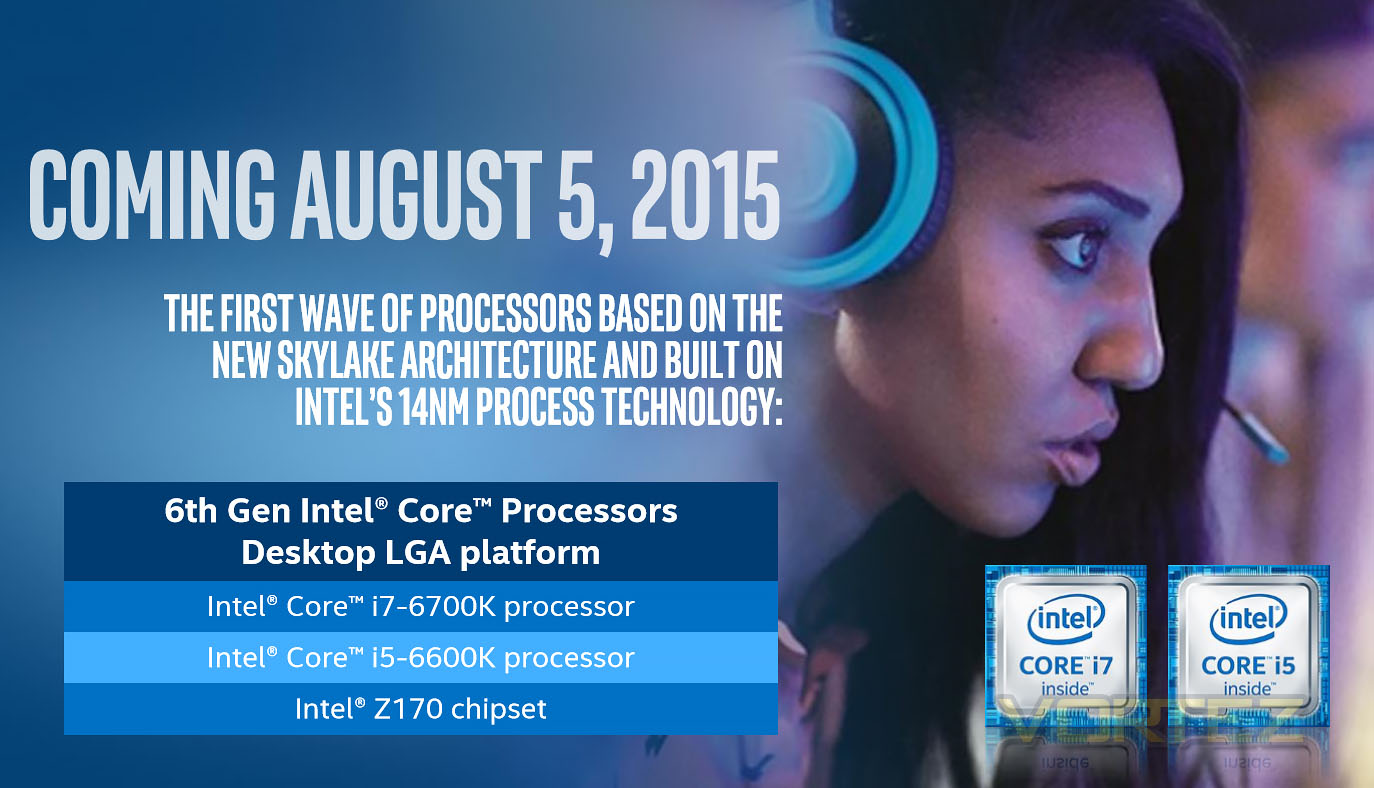
In a departure from other generational releases Skylake’s is phased. Arriving today are only two SKUs – the Core i7 6700K and Core i5 6600K, models from the Performance and Mainstream line which cater primarily to overclocking enthusiasts thanks to the use of a fully unlocked multiplier. The timing coincides with the release of Windows 10, with Intel feeling that they need to provide compelling options for early adopters and college-goers who will upgrade their whole system on the launch of Microsoft’s new OS. Furthermore launching on the first day of GamesCom isn’t happy coincidence; Europe’s largest games convention has the audience that Intel needs to push these processors out of niche categories and into the hands of mainstream gamers looking for the next big thing.
Complementing the release of the Skylake overclocking SKUs is the release of Z170 motherboards through Intel’s partners ASUS, MSI, GIGABYTE et al. In contrast to mainstream ‘H-series’ design, ‘Z-series’ motherboards are capable of overclocking and generally feature far more robust power infrastructure and UEFI BIOS functionality. We’re reviewing two of these launch designs in separate articles you can read alongside this one.
So, who does Intel have in mind with the new CPUs? Internal assessments puts 3-5 years as the target upgrade window, i.e. those still utilising Ivy Bridge and Sandy Bridge CPUs. Their own benchmarks, utilising tools which tax CPUs to the limit place them rather than place them in the context of their likely workload, pegs them as approximately 30% faster than equivalent Ivy Bridge products (although not, it must be stressed, on a clock-for-clock basis). However Intel still face an uphill battle amongst users caught in the question of whether their Sandy Bridge 2500K or 2700K remains sufficient.
With that introduction out the way, it’s time to move on to the features of the new CPU generation.
Skylake Features & Specifications
We want to preface this section with a short statement. Intel’s initial release schedule for Skylake was planned well in advance, long before Microsoft officially announced the launch date of Windows 10. Most of August was set aside for conferences and seminars including the Intel Developers Forum in San Francisco, all with the aim of taking the wraps off and going deep into the technology within this new CPU architecture. Unfortunately bringing forward the release date of ‘K-series’ SKUs has meant that they’re unable to furnish detailed technical info to reviewers and members of the press, and won’t be releasing this information until IDF. The following is information which has been released thus far.
Technical Specs
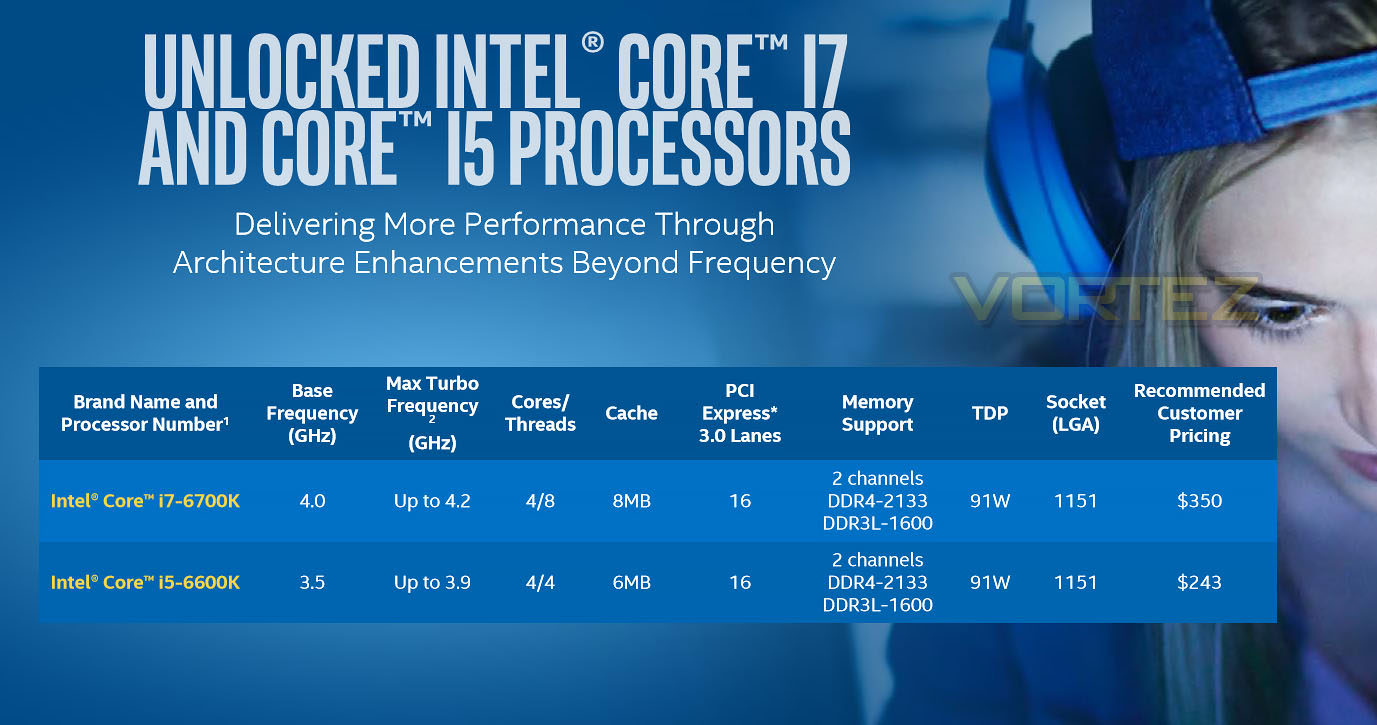
Intel Core i7 6700K
– 4 Physical Skylake cores, supporting Hyperthreading (8 logical cores)
– 4 GHz Base Clock, 4.2 GHz Turbo Mode
– 8 MB L3 cache
– Intel HD 530 Graphics
– Socket LGA1151
– Fully Unlocked Multiplier
– DDR4 and DDR3L support
– Supports DDR4-2133 and DDR3L-1600 (non-OC)
– 16 PCI-Express 3.0 lanes
– 91W TDP
– Hardware support For DirectX 12
– H.265 Encode/Decode
Intel Core i5 6600K
– 4 Physical Skylake cores (4 logical cores)
– 3.5 GHz Base Clock, 3.9 GHz Turbo Mode
– 6 MB L3 cache
– Intel HD 530 Graphics
– Socket LGA1151
– Fully Unlocked Multiplier
– DDR4 and DDR3L support
– Supports DDR4-2133 and DDR3L-1600 (non-OC)
– 16 PCI-Express 3.0 lanes
– 91W TDP
– Hardware support For DirectX 12
– H.265 Encode/Decode
– 4 Physical Skylake cores, supporting Hyperthreading (8 logical cores)
– 4 GHz Base Clock, 4.2 GHz Turbo Mode
– 8 MB L3 cache
– Intel HD 530 Graphics
– Socket LGA1151
– Fully Unlocked Multiplier
– DDR4 and DDR3L support
– Supports DDR4-2133 and DDR3L-1600 (non-OC)
– 16 PCI-Express 3.0 lanes
– 91W TDP
– Hardware support For DirectX 12
– H.265 Encode/Decode
Intel Core i5 6600K
– 4 Physical Skylake cores (4 logical cores)
– 3.5 GHz Base Clock, 3.9 GHz Turbo Mode
– 6 MB L3 cache
– Intel HD 530 Graphics
– Socket LGA1151
– Fully Unlocked Multiplier
– DDR4 and DDR3L support
– Supports DDR4-2133 and DDR3L-1600 (non-OC)
– 16 PCI-Express 3.0 lanes
– 91W TDP
– Hardware support For DirectX 12
– H.265 Encode/Decode
Skylake is the second of Intel’s CPU architectures to make use of a 14nm fabrication process, but unlike Broadwell includes far more significant revisions to the underlying microarchitecture when compared with the previous generation. Due to these revisions, both on the CPU and motherboard chipset, it makes use of a new LGA socket specification (LGA 1151).
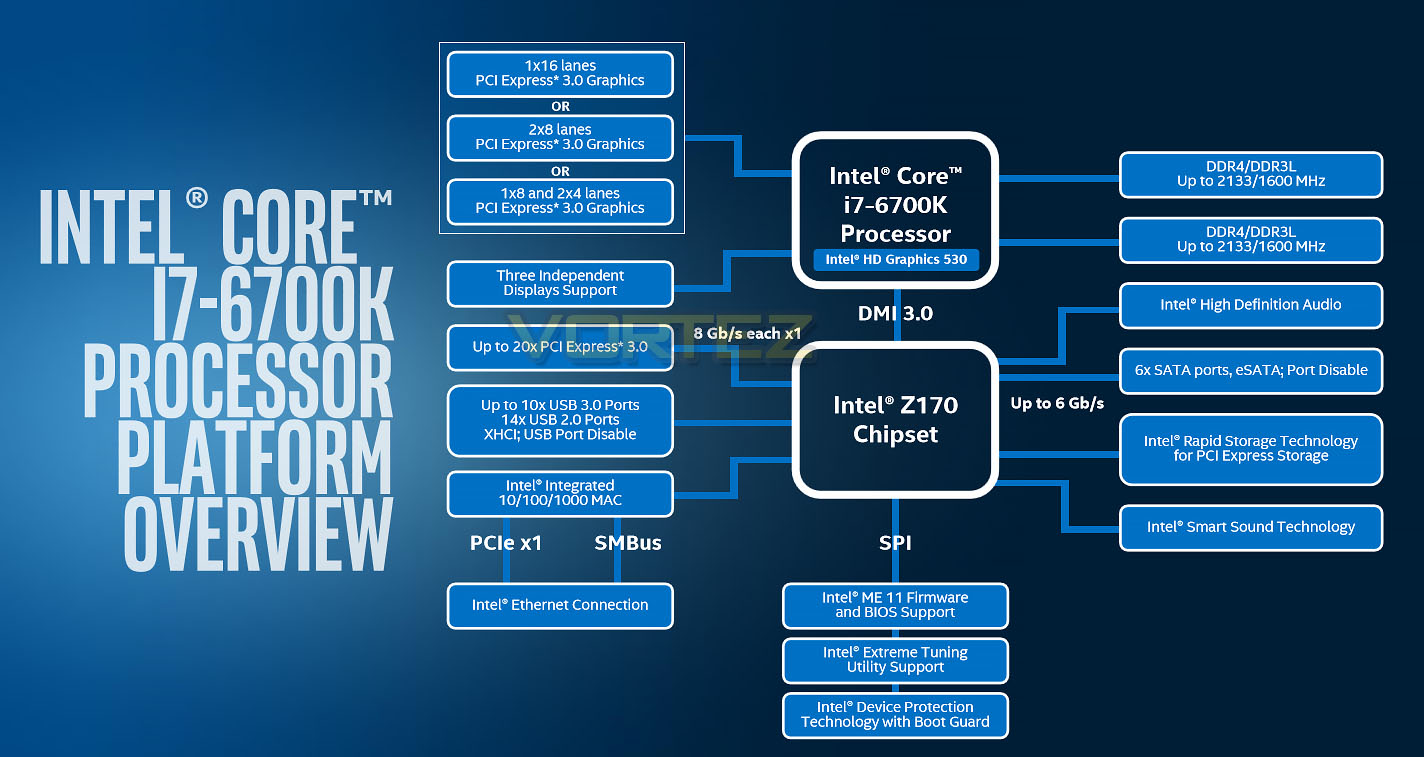
Perhaps the most significant change from a user perspective will be the use of DDR4 memory on the mainstream desktop platform. Skylake features a memory controller capable of operating with either DDR4 or DDR3L, but Intel belive that only DDR4 is likely to be a part of 3rd party vendor implementations on desktop motherboards. DDR4 brings with it far greater bandwidth (4133 MT/s, as compared with 2666 MT/s in comparable DDR3 configurations) at a lower operating voltage (1.2V vs 1.5/1.65V) and so is more power efficient than the previous standard. This does mean that, in contrast to previous Intel Core generations, new Skylake systems will not be able to inherit DDR3 DIMMs from the older systems they will replace.
Complementing support for DDR4 memory is a substantial revision to how Intel approach overclocking with K-series CPUs. Limited to multiplier adjustments since Sandybridge – a very simple by effective means for everyone to get more out of their CPU – Skylake returns to Base Clock (BCLK) overclocking in a big way. By no longer tying the subsystem clock directly to the BCLK (and hence requiring that it stay fixed) Skylake systems are free to adjust the BCLK in 1ms increments, translating to direct memory overclocks without coarse ratios. Novice overclockers can still go down the route of only adjusting the multiplier, but more adventurous users are now free to tinker to their hearts content.
TDP has risen with Skylake compared to Devil’s Canyon, but only fractionally. It’s likely that most of this is down to the more robust GPU within Skylake compared to the Haswell-era models, but may also indicate other underlying changes which we haven’t been briefed on. The most notable consequence is that the Fully Integrated Voltage Regulator (FIVR) has been removed (citing TDP issues), and once against the platform chipset controls most CPU voltages. A boon for overclockers, we really should make best use of it while it lasts; an FIVR may well once again be implemented in the shrink to 10nm.
Finally, moving to the chipset features, it’s notable that the PCI-Express lanes provided by the PCH have been upgraded to PCI-Express 3.0. The chief cause is new generations of PCI-Express SSD storage that are beginning to saturate two lanes of PCIe 2.0 through either M.2, SATA-Express or direct PCI-Express slot interfaces. Further bolstering the throughput is an upgrade to DMI 3.0 on desktop SKUs of the Skylake platform, a standard which is likely necessary to handle NVMe drives in Raid configurations. Speaking of, many next-generation drives are now RAID-able when used in multiples, depending on the exact level of implementation on the motherboard itself.
Closer Look (Core i5-6600K Core i7-6700K)
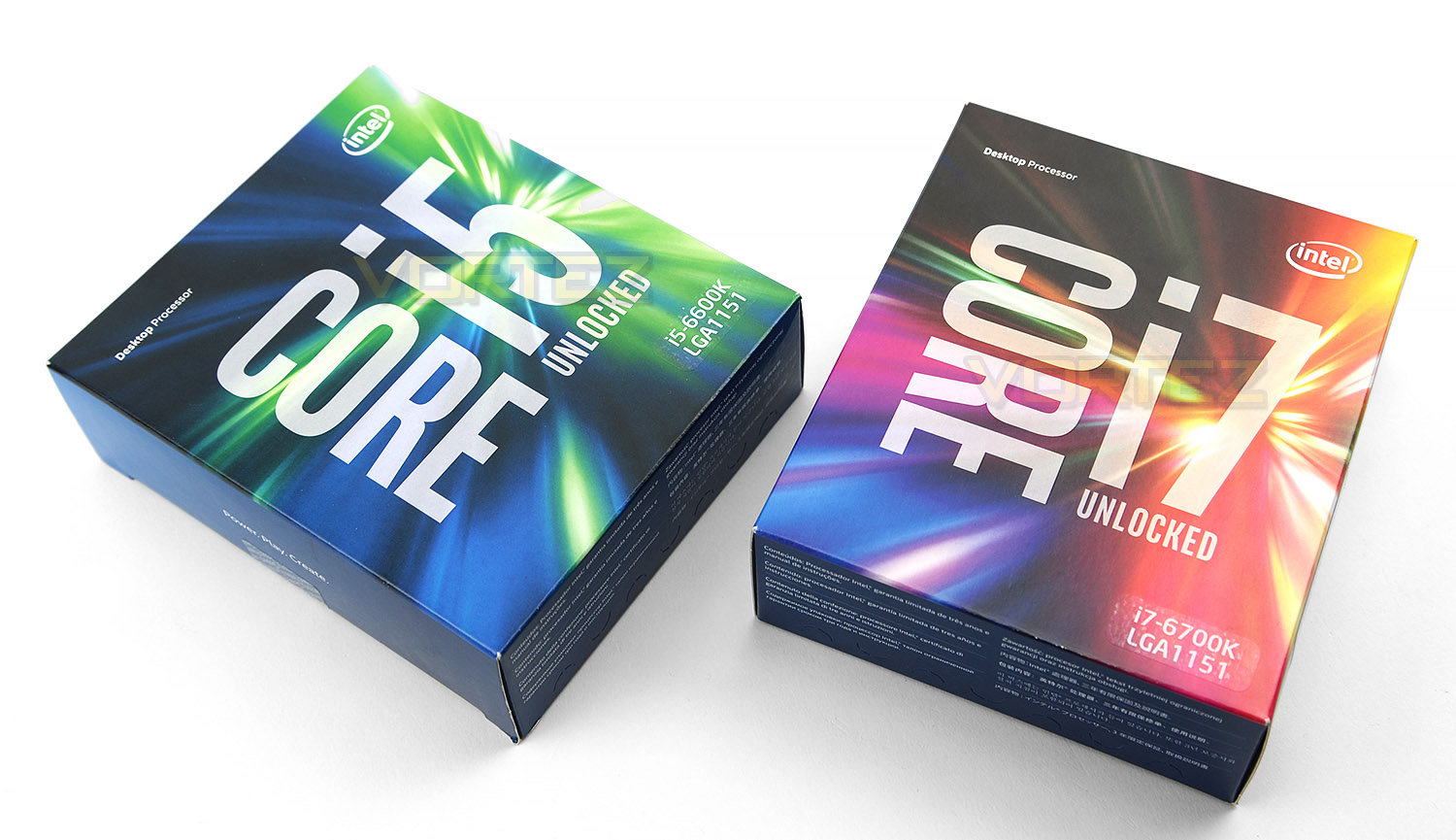
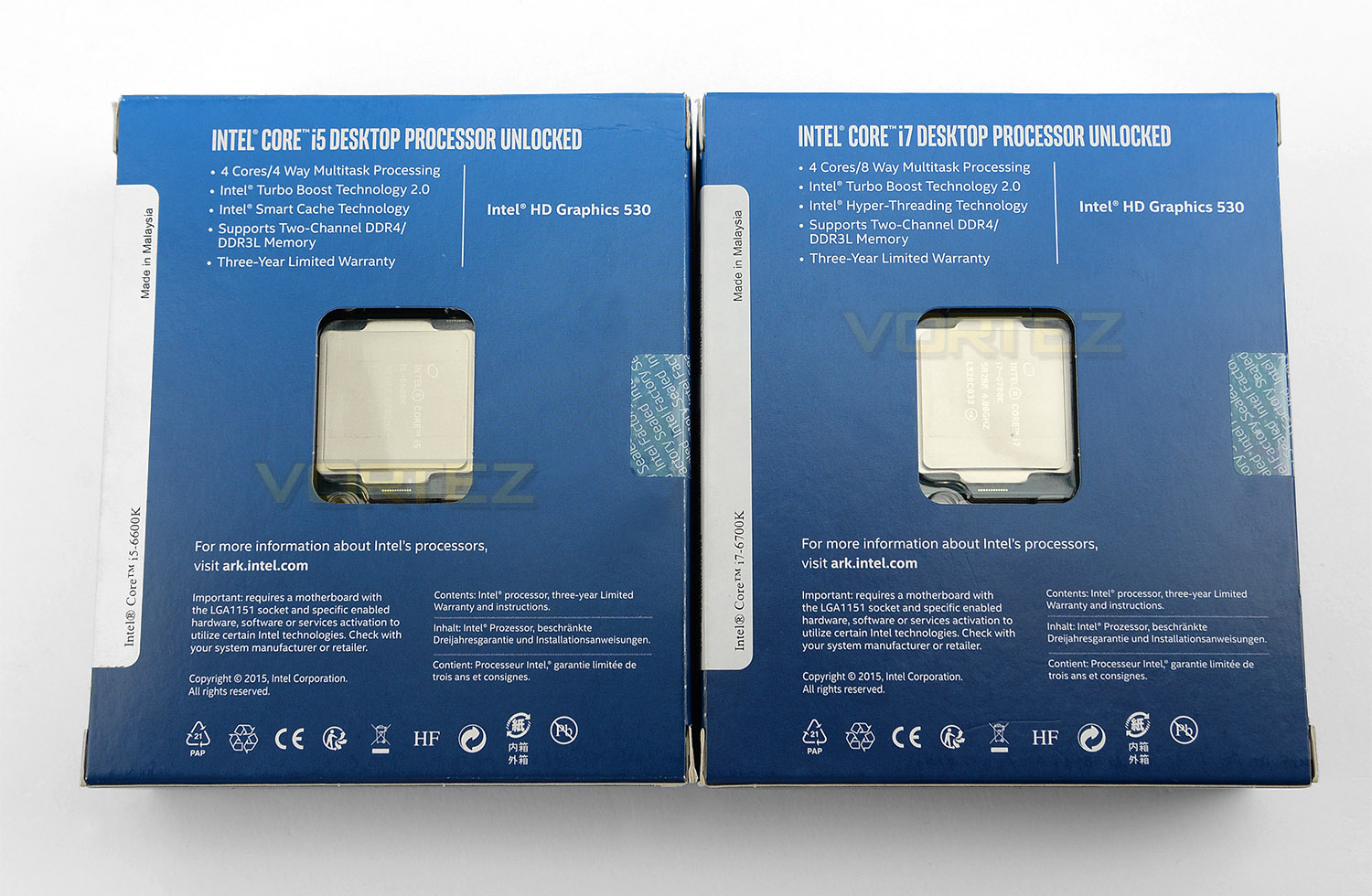
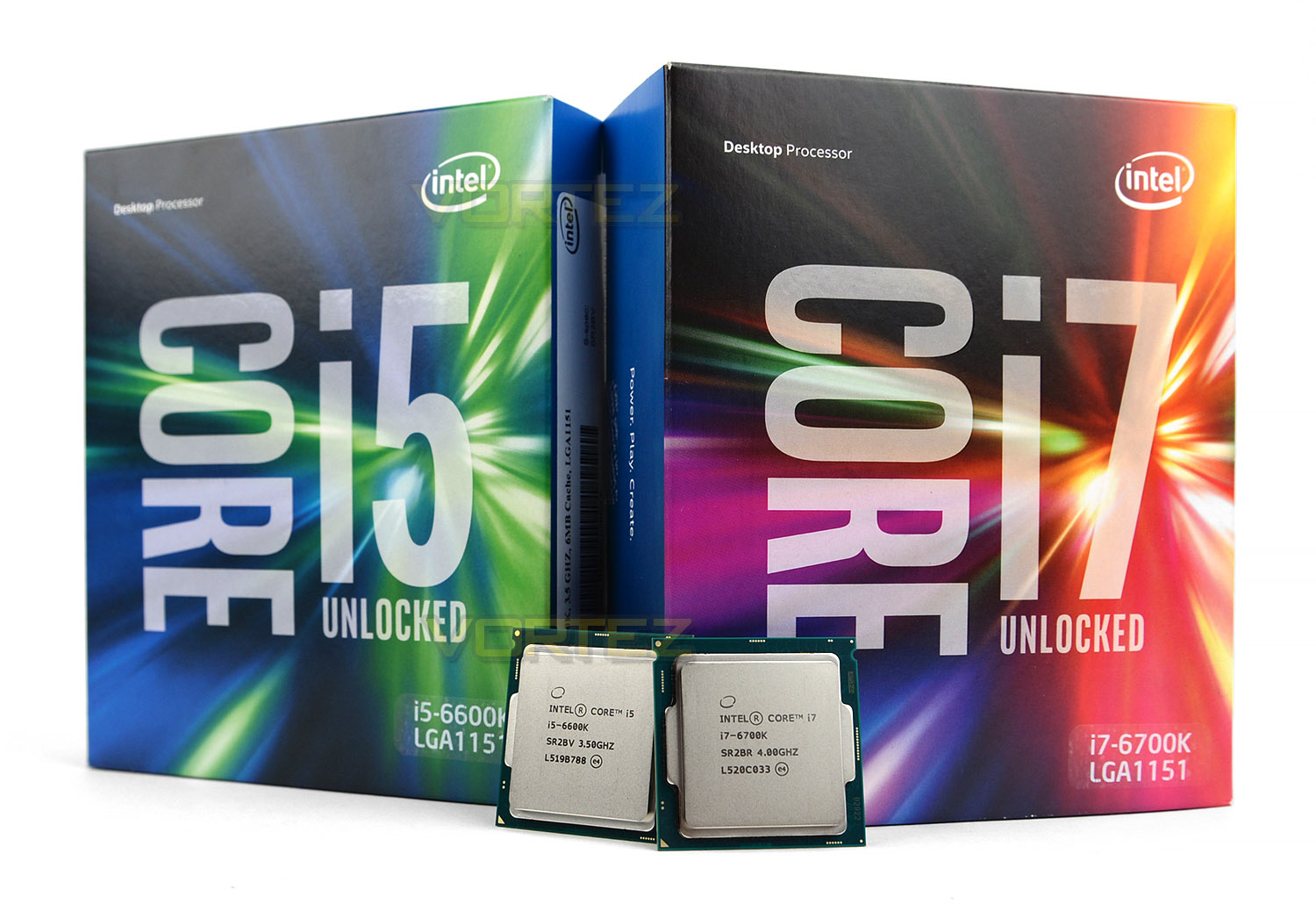
Intel has revamped their packaging for the Skylake processors, showcasing a lively, eye-catching design using plenty of colour. As usual the reverse of the boxes highlight the key features and provide a sneak preview of the chips inside.
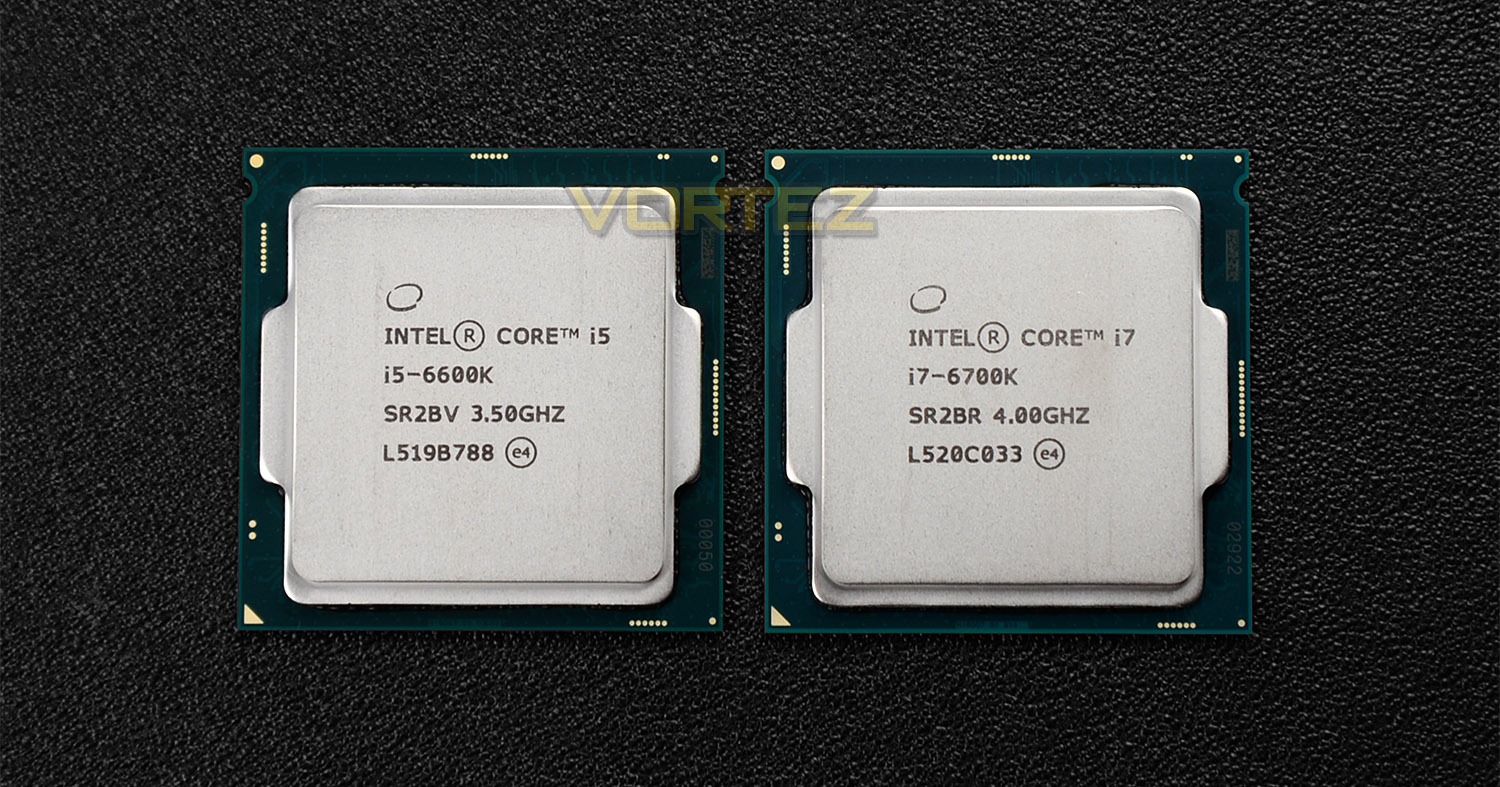
Intel’s new Skylake processors are the 6th Generation to enter the family of the Core i5 and i7 product line. Although the socket type has changed from LGA 1150 to the new LGA 1151, all the processors remain the same physical size as previous generations from Haswell, Ivy Bridge and Sandy Bridge. With Skylake the manufacturing process has moved to from 22nm with Haswell, to 14nm and since we now have a new socket, all Skylake processors are designed to work with Intel 100 series motherboards, using the Z170 chipset. The processors use a tri-gate transistor design similar to Ivy Bridge.
The 6600K comes with four cores, four threads, 6MB cache and a base clock of 3.5GHz – moving up to 3.9GHz via Turbo Boost Technology 2.0. Whereas the 6700K arrives with four cores, eight threads, 8MB cache and a base clock of 4GHz – Turbo boosting to 4.2GHz. By default, with Turbo Boost technology enabled, both chips will idle at 800MHz – thus encouraging good thermal and energy efficiency.
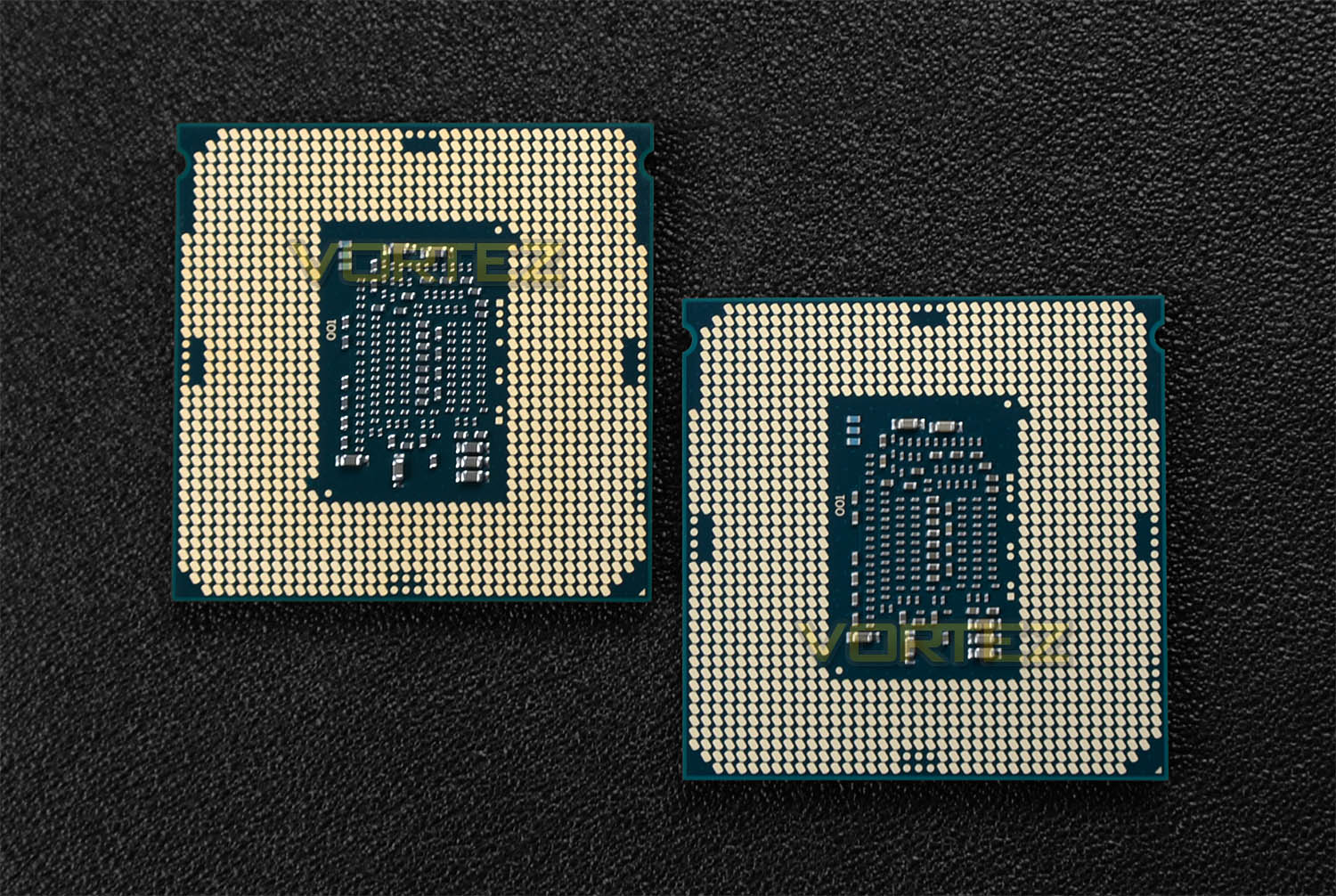
Both our 6600K and 6700K have integrated graphics via Intel HD 530 which operates at 1150MHz. Later on we’ll see how this iGP performs against predecessor solutions.
Test Setup & Overclocking
CPUs
Intel Core i5 2500K (3.3GHz) Sandy Bridge
Intel Core i5 3570K (3.40GHz) Ivy Bridge
Intel Core i7 3770K (3.50GHz) Ivy Bridge
Intel Core i5 4670K (3.40GHz) Haswell
Intel Core i7 4770K (3.50GHz) Haswell
Intel Core i7 4790K (4GHz) Haswell Refresh
Intel Core i5 6600K (3.50GHz) Skylake
Intel Core i7 6700K (4GHz) Skylake
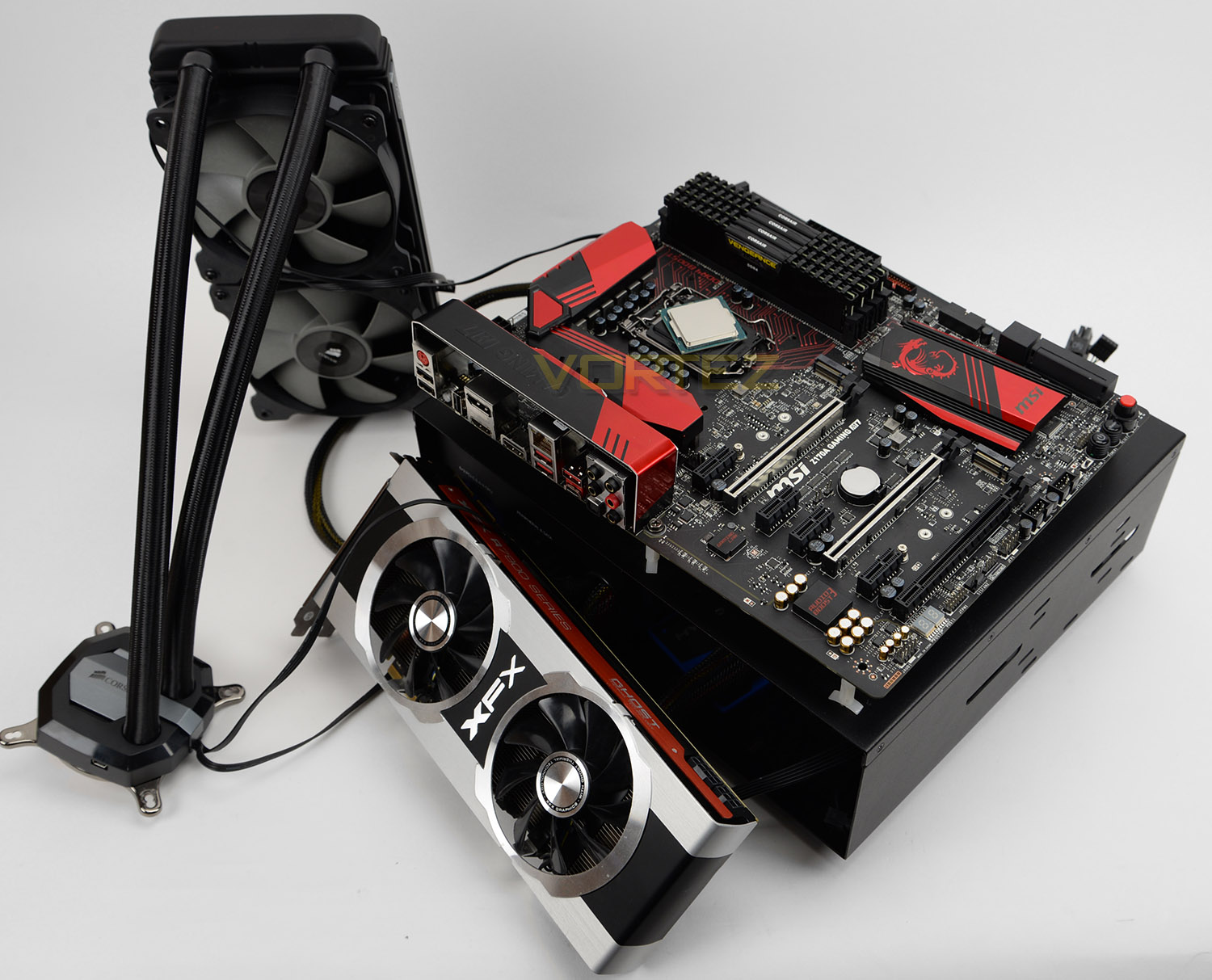
Cooling Corsair Hydro Series H100i GTX
Motherboard MSI Z170A
Memory 16GB Corsair Vengeance LPX 3200MHz DDR4
Graphics XFX R7970 Black Edition
Storage OCZ Vector 180
PSU Corsair HX1050 (GOLD)
Intel Core i5 2500K (3.3GHz) Sandy Bridge
Intel Core i5 3570K (3.40GHz) Ivy Bridge
Intel Core i7 3770K (3.50GHz) Ivy Bridge
Intel Core i5 4670K (3.40GHz) Haswell
Intel Core i7 4770K (3.50GHz) Haswell
Intel Core i7 4790K (4GHz) Haswell Refresh
Intel Core i5 6600K (3.50GHz) Skylake
Intel Core i7 6700K (4GHz) Skylake
Cooling Corsair Hydro Series H100i GTX
Motherboard MSI Z170A
Memory 16GB Corsair Vengeance LPX 3200MHz DDR4
Graphics XFX R7970 Black Edition
Storage OCZ Vector 180
PSU Corsair HX1050 (GOLD)
Benchmarks
Cinebench R15 – CPU/OpenGL Score
x264 HD 4.0 – 1st and 2nd pass encoding
SiSoftware SANDRA 2014 – CPU & Memory benchmarks
AIDA64 – CPU benchmarks
PCMark 8 – Home Suite
3DMark FireStrike – DX11 3D Benchmark
Games – Tomb Raider, THIEF
x264 HD 4.0 – 1st and 2nd pass encoding
SiSoftware SANDRA 2014 – CPU & Memory benchmarks
AIDA64 – CPU benchmarks
PCMark 8 – Home Suite
3DMark FireStrike – DX11 3D Benchmark
Games – Tomb Raider, THIEF
Other Software
Temperature Analysis: Real Temp
Stress Testing Software: AIDA64 Stability Test
CPU Specification Monitoring: CPU-Z
Stress Testing Software: AIDA64 Stability Test
CPU Specification Monitoring: CPU-Z
NOTE: Some benchmarks do not have full comparative models because we have since introduced new testing applications to expand analysis and are not able to re-test older chips.
Also, the CPUs being compared use different sockets so it isn’t possible for us to use the same motherboard unfortunately. Throughout testing we’ve used a combination of Z77 and Z97 motherboards and the same DDR3 kit in previous generation platforms. Since Skylake now uses DDR4 we are forced to test using this type of memory kit over DDR3 with other CPUs.
Temperatures & Overclocking
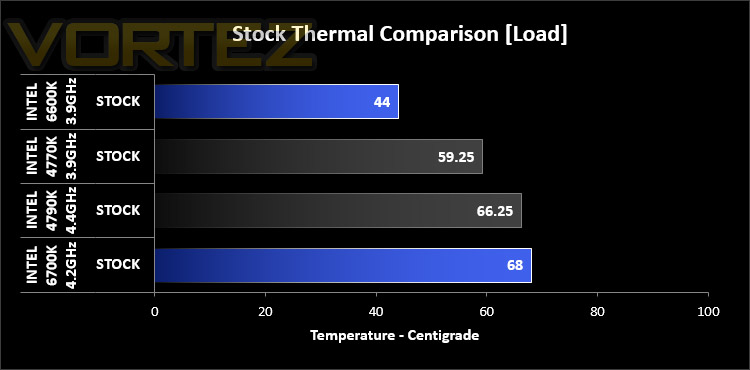
It’s widely accepted that Intel’s Core i7-4770K can get rather hot, especially when the chip is fully loaded and an overclock is applied. Since the inauguration of Devil’s Canyon, temperature and TIM quality has certainly improved. Skylake also benefits from a better thermal solution too.
The 6600K demonstrates great thermal performance and the 6700K is also fairly efficient too. Although the overall temperature is higher, it’s important to note the clock speed of 6700K which turbo boosts to around 4.2GHz.
Overclocking
The introduction of Skylake sees a return to great control for overclocking, allowing users to access full range Base Clock (BCLK) tuning granularity. With other CPUs such as the Core i7-4790K the overclocking is ratio-based meaning the ratio or multiplier is the only component which can be adjusted but now both the BCLK and ratio can be tweaked for even more flexibility and a return to “old skool” overclocking.
It’s important to note we are not using Engineering Samples (ES) for our testing/overclocking. Our CPUs are retail and haven’t been cherry picked or optimised for performance. This is therefore a representation of what end-users can expect when they buy off the shelf.
For this part of the review the maximum overclocked was achieved by using the Corsair Hydro Series H100i GTX.
The objective here is to obtain the best result by either altering just the ratio or altering both the ratio and BCLK. For us, just adjusting the ratio and leaving the BCLK on auto (100MHz) realised the best results.
To simulate maximum load we use AIDA64. Unlike games and other benchmarks which only push the system to a certain point, AIDA64 stability test pushes temperatures to the absolute maximum.
Intel Core i5-6600K
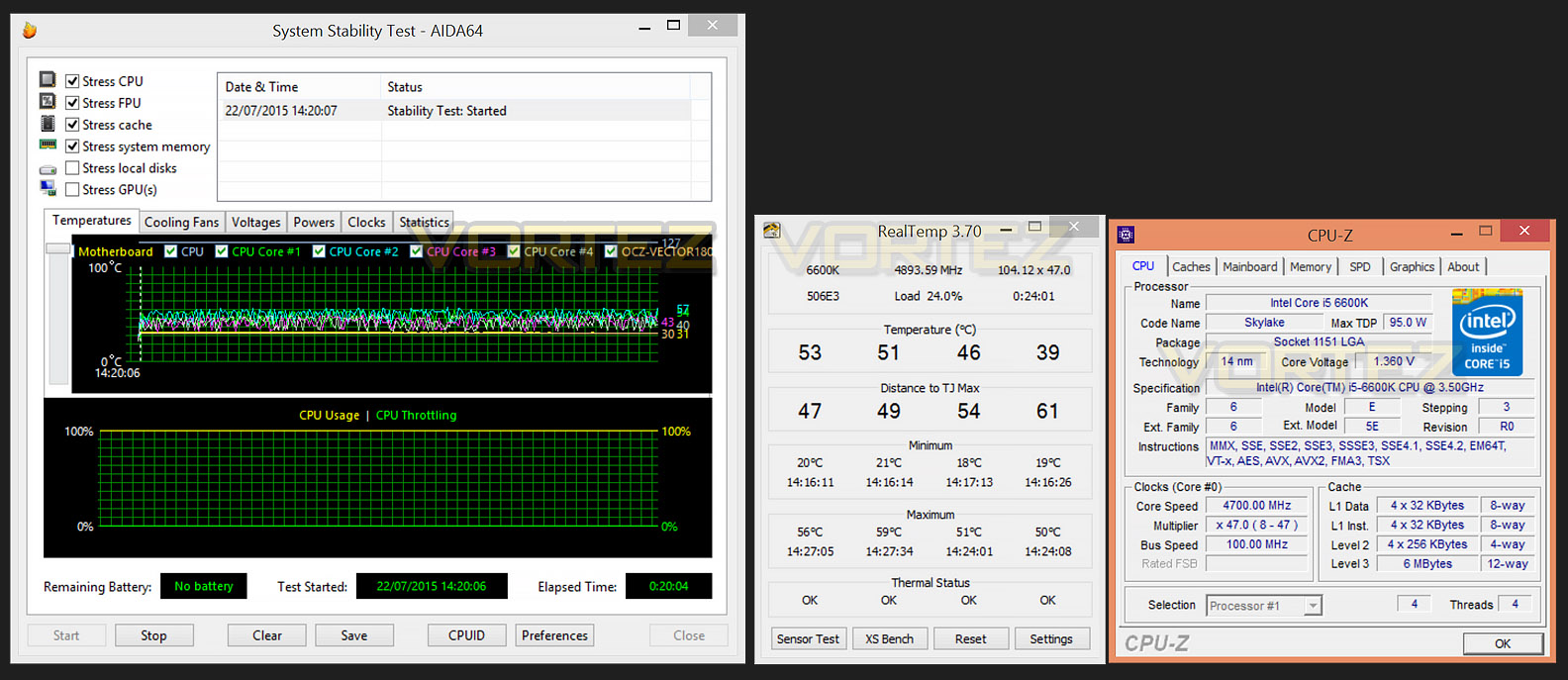
We managed to overclock 6600K from 3.5GHz to 4.7GHz by adjusting the ratio/multiplier to 47 – a 34% overclock. This is a considerable achievement and represents a very good result. Furthermore, this milestone only required 1.35v which kept the temperatures within the realms of ‘acceptable’. It’s quite clear that Intel has greatly improved the TIM solution on this chip.
Intel Core i7-6700K
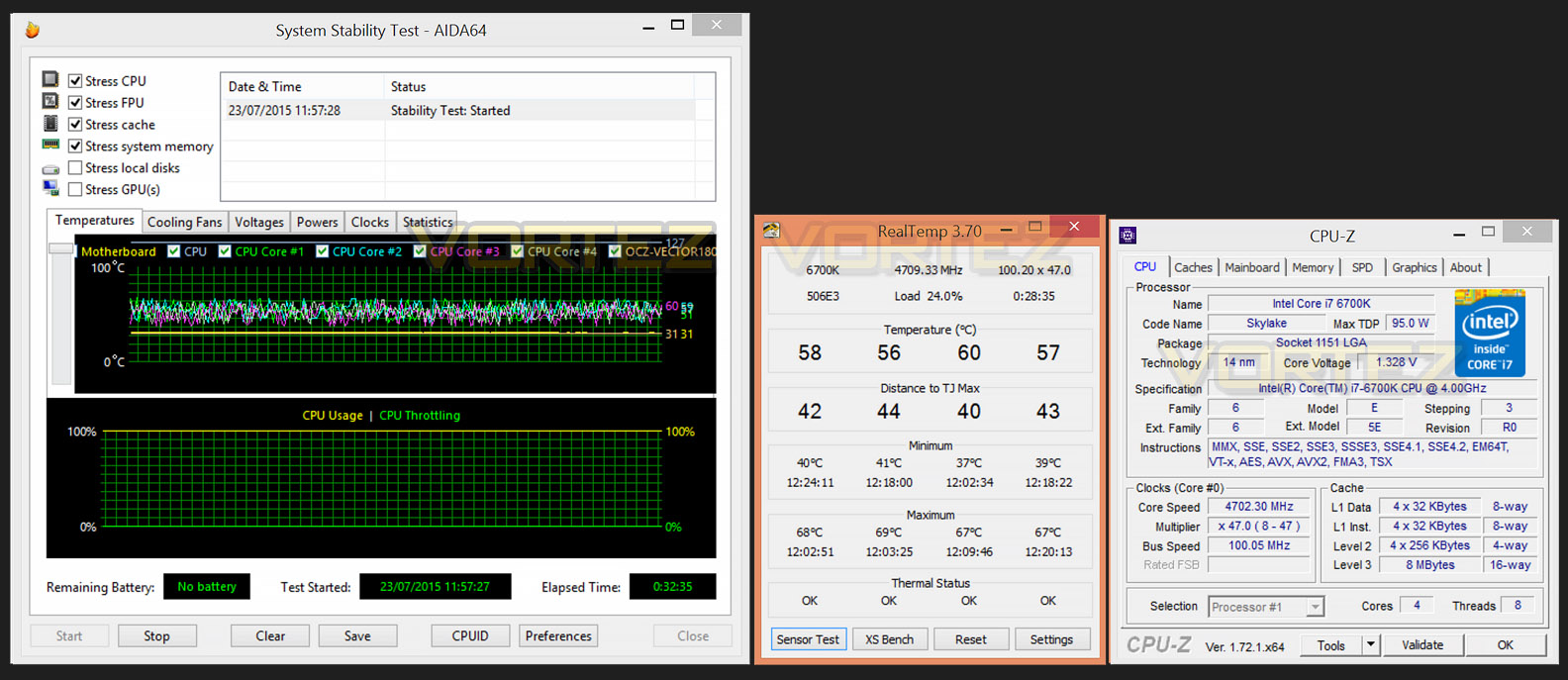
Turning to the Core i7 6700K, we once again hit the 4.7GHZ mark as a maximum overclock – 17% increase. The lowest voltage required for this overclock was 1.34v. Unfortunately, no amount of boost in CPU voltage would assist in pushing the 6700K beyond the 4.7GHz mark. Nevertheless this is still a decent result and the temperatures once again remained relatively low compared to previous generations of Intel CPUs.
On the subsequent pages we’ll be benchmarking both CPUs at stock and overclocked settings, showing you what you can expect out of the box and what can be assumed with a substantial overclock applied.
Power Consumption
It’s interesting to note the power consumption across all processors. Although they are using a combination of different motherboard chipsets, energy results can fluctuate between manufacturers due to the features and specifications that are integrated. First of all, for the idle tests the system is cold booted into Windows and no additional applications are executed – the watts are noted on the external energy monitor we use and then the system is loaded with 3DMark FireStrike – watts are again monitored for the duration of the test and the highest rated wattage result is then noted down. Below are the results of this energy test.
It’s worth mentioning that the Skylake CPUs idle at 800MHz and then boost in frequency/clock speed. It’s good to see these new chips still maintaining good energy efficiency.
iGP Performance Analysis
An interesting feature that first appeared on the desktop environment with the Sandy Bridge architecture was the integrated graphics on the CPU. This meant that regardless of if you had a discreet graphics solution you always had the ability to use “Built in” processing power to encode videos, watch movies, view 3D content and take part in some casual gaming.
With Skylake, we now have Intel HD graphics 530 and there is a significant bump in performance against previous iterations. To the end user this should translate to great performance for playback of movies, more complex gaming titles and even more intense 3D renders.
Testing procedure
Now, in order to test the effectiveness of the iGP on both 6600K and 6700K there are a variety of benchmarks we can test but we have decided upon 3DMark 11 – performance preset 720p and DIRT 3 @ 1680×1050 with low settings and 4xMSAA. In times past we have tested both these applications with Sandy Bridge, Ivy Bridge and Haswell, so it makes sense to continue using them for comparison reasons. For this test AMD’s A8-3870K iGP along with Intel’s 2500K, 3570K and 3770K will be compared plus we will observe the performance advantage to combining integrated graphics with a discreet solution – XFX 7970 Black Edition.
With 3DMark 11 being DX11 only – the 2500K results could not be obtained, hence no score.
As you can see from the results, both tests highlight a significant benefit in performance – it’s great to see Intel pushing integrated graphics. (This benchmark was performed numerous times to confirm accuracy.)
Encoding Performance – X264 HD
Simply put, this test measures how fast your machine can encode a short, DVD quality MPEG-2 video clip into a high-quality x264 video clip. What’s x264, you ask? It’s more or less the next-generation Xvid/DivX codec. I think it’s ideal for a benchmark because the application (x264.exe) reports fairly accurate compression results (in frames per second) for each pass of the video encoding process, and it uses multi-core processors very efficiently.
x264 HD gives results for 2 passes when compressing an MPEG-2 clip into x264. It presents 4 separate results for each pass giving a total of 8 – all results are given in FPS. For each pass I have averaged out the results.
Both Skylake CPUs do well in the encoding tests. Both 1st and 2nd passes reveal improvements against previous solutions however marginal.
Processing Features Performance – AIDA64
AIDA64 Product PageThis simple integer benchmark focuses on the branch prediction capabilities and the misprediction penalties of the CPU. It finds the solutions for the classic “Queens problem” on a 10 by 10 sized chessboard. At the same clock speed theoretically the processor with the shorter pipeline and smaller misprediction penalties will attain higher benchmark scores. For example — with HyperThreading disabled — the Intel Northwood core processors get higher scores than the Intel Prescott core based ones due to the 20-step vs 31-step long pipeline. CPU Queen test uses integer MMX, SSE2 and SSSE3 optimizations.
In the AIDA64 tests there is no real advantage at stock settings, however applying an overclock dramatically improves the processing performance.
Processing Power Performance – Cinebench
CINEBENCH can measure systems with up to 64 processor threads. This test scene contains approximately 2,000 objects which in turn contain more than 300,000 polygons in total, and uses sharp and blurred reflections, area lights, shadows, procedural shaders, antialiasing, and much more. The result is displayed in points (pts). The higher the number, the faster your processor.
Again, there are marginal advantages for the processing power within Cinebench too. Applying an overclock will increase performance and achieve better results.
Bandwidth Performance – SiSoftware SANDRA
3DMark 11 Product PageSANDRA isn’t always a benchmark that is included in hardware reviews but I believe it shouldn’t be ignored. SANDRA provides a vigorous package that tests your system in a rather large array of benchmarks. There are many aspects of benchmark that can be executed. We will be considering – CPU and memory tests.
Processor tests – In this series of tests both CPUs do well but the 6700K more particularly shines. In this arena the 6700K achieves some fantastic results and overclocking only serves to enhance this.
Memory tests – Since we’ve used DDR3 for previous CPU benchmarks the result its very similar. Adding DDR4 with Skylake does appear to be beneficial – especially for memory bandwidth.
Overall System Performance – PCMark 8
PCMark 8 Product Page Developed in partnership with Benchmark Development Program members Acer, AMD, Condusiv Technologies, Dell, HGST, HP, Intel, Microsoft, NVIDIA, Samsung, SanDisk, Seagate and Western Digital, PCMark 8 is the latest version in FutureMark’s popular series of PC benchmarking tools. Improving on previous releases, PCMark 8 includes new tests using popular applications from Adobe and Microsoft.
3D Performance – 3DMARK FireStrike
3DMark FireStrike Product PageFire Strike is our new showcase DirectX 11 benchmark designed for high-performance gaming PCs. It is our most ambitious and technical benchmark ever, featuring real-time graphics rendered with detail and complexity far beyond what is found in other benchmarks and games today. Fire Strike will only be available in the Windows editions of 3DMark initially.
Haswell handles FireStrike well but the gulf between the CPUs in the graphics test in particular shows little difference whilst the overall score gives marginal gains over previous generations.
Gaming Performance – Tomb Raider, THIEF
It’s important for us to perform a number of game benchmarks as well as the synthetic tests because gamers will want to know if there are any significant benefits. So here we have a selection of popular gaming titles, critically acclaimed and action-packed.
Settings
Tomb Raider
– 1920×1080 2xAA – Very High Quality *Benchmark tool*
THIEF
– 1920×1080 2xAA – High Quality *Benchmark tool*
The gaming titles selected demand GPU power over CPU power – in each test the difference is rather marginal. VSync is disabled in all titles.
Conclusion
So, are the new Skylake CPUs a worthwhile investment? Well that will almost certainly depend on your current configuration. A move to Skylake from Sandy Bridge or Ivy Bridge will be advantageous while those still using Haswell may find the benefits quite marginal.
We first saw DDR4 with the Intel X99 chipset but now with Skylake, mainstream users can take advantage of the benefits that dual-channel DDR4 brings with bigger capacities, bigger bandwidth and faster frequencies.
In this review we have examined the new, unlocked Core i5 and Core i7 flagships – 6600K and 6700K. Throughout the benchmarks it’s clear to see a consistent trend of improved performance against previous generations. The 6700K with its 8MB of cache and higher clock speed tackled the wide-selection of testing very well, revealing great performance in a variety of different scenarios.
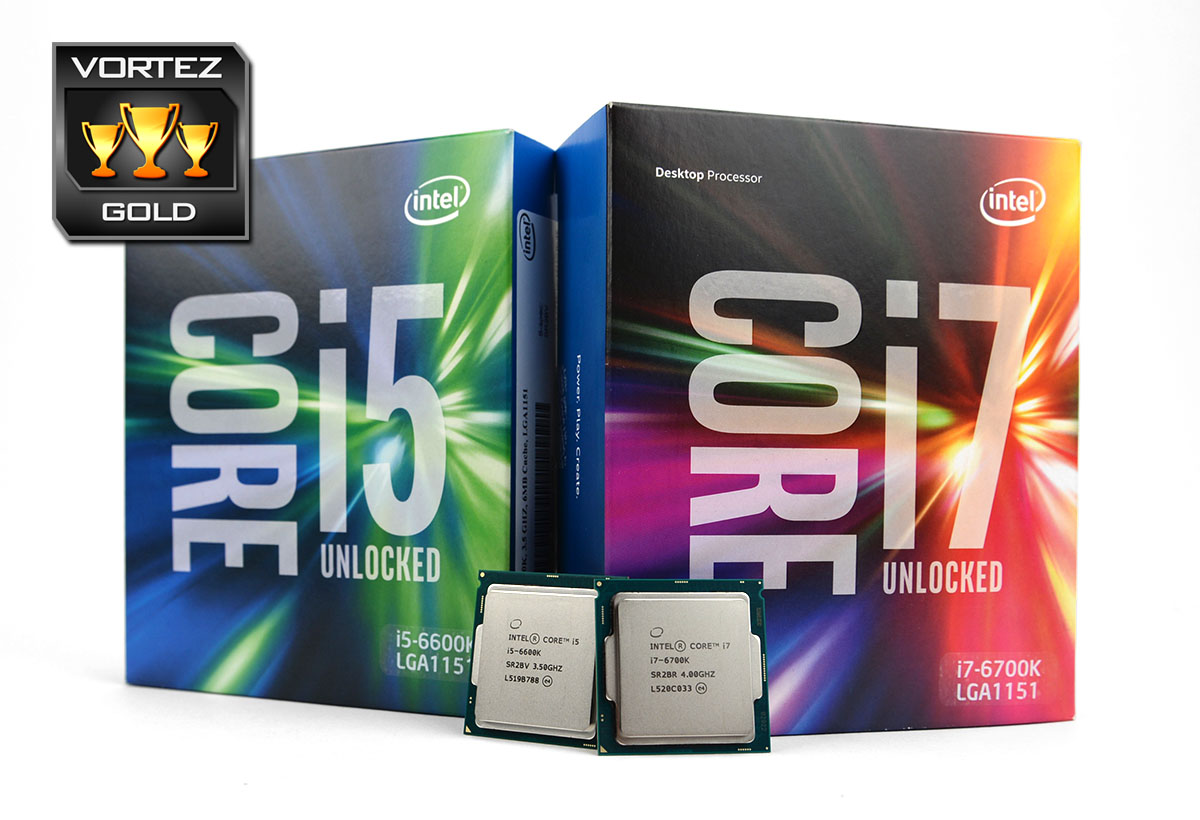
Ratio-based overclocking with previous generations of Intel processors has taken much of the fun out of overclocking but we’re pleased to report that full range Base Clock (BCLK) tuning granularity is back – allowing a greater number of variables available to modify the clock speed. Both our retail Skylake CPUs achieved good results when overclocking was applied. Very little voltage is required and this translates to low temperatures. The 6600K and 6700K were able to reach 4.7GHz – 34% and 17% respective overclocks.
We’re pleased to see that Intel has introduced the 6600K and 6700K at similar price-marks as previous launches. The 6600K being £199 GBP / $243 USD and the 6700K being 269.99 GBP / $350 USD. Bear in mind though, that a new LGA 1151 motherboard and DDR4 dual-channel kit are also required – making this quite a costly upgrade path for consumers.
Intel’s Skylake Core i5-6600K and Core i7-6700K offer a generous boost in performance over the previous generations of processors and we are pleased to see that in the overclocking arena more control has been handed down to the end-user.
VIDEO REVIEW – VORTEZ TV
Pros
+ Good performance boost across benchmarks
+ Both CPUs overclock well, especially 6600K
+ Overclocking is flexible – BCLK adjustments
+ Overclocking realises significant performance improvements
+ iGP offers improved performance from previous generations
Cons
– New socket/motherboard and memory required
+ Good performance boost across benchmarks
+ Both CPUs overclock well, especially 6600K
+ Overclocking is flexible – BCLK adjustments
+ Overclocking realises significant performance improvements
+ iGP offers improved performance from previous generations
Cons
– New socket/motherboard and memory required