







A 6-bay NAS from digital storage giants Iomega is in our midst. Powered by Intel Atom, can this home/small office network device leave us impressed?

Product on Review: PX6-300D
Manufacturer and Sponsor: Iomega
Street Price: £1100 approx. (with 6x1TB HDDs) (at time of review)
Established in the 1980s, Iomega has been a forerunner for digital storage in both the consumer market and business sector. Back in 2008 EMC acquired Iomega but still maintained the Iomega branding. Earlier this year Lenovo teamed up for a joint venture to create LenovoEMC and their products now abstain from using the Iomega name. But today we will be taking a look at a device which came to market before all of these acquisitions…
Today we will be taking a look at the Iomega PX6-300D – a network storage device capable of housing up to six HDDs and coming equipped with a software UI to even the most demanding of requirements for the home/small office network.
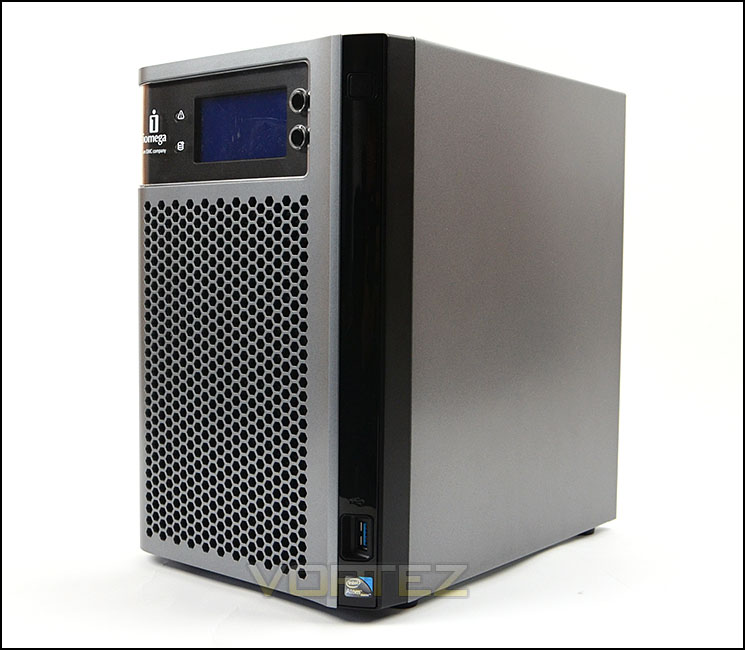
Iomega on their PX6-300D
The Iomega® px6-300d Pro is a high performance business class desktop device, ideal for small-to medium sized businesses and distributed enterprise locations like branch and remote offices, for content sharing and data protection. Powered by EMC® storage technology and with up to 18TB of storage capacity, including a diskless option, the px6-300d Pro device is easy to setup and manage, and affordable to own. The px6-300d Pro provides cross-platform file sharing and simultaneous iSCSI block access. High performance I/O is achieved through dual GbE connections with port bonding and link aggregation capabilities. The Iomega Personal Cloud technology offers unparalleled simplicity and versatility for data protection and access. Business users will appreciate the robust data protection features such as multiple RAID levels with hot swap drives, UPS support, print serving, user quotas, device-to-device data replication and certification for most virtualization environments. The easy-to-use interface provides no-hassle management. Active Directory support and remote access round out the comprehensive business features. The px6-300d also embeds the Axis® Video Hosting System solution and can support up to 10 Axis IP security cameras for video surveillance applications. RSA® BSAFE® encryption for protected installs and upgrades along with support for PC, Mac® and Linux® clients.
Technical Specifications
Specifications
• Desktop form factor
• Intel Atom Dual Core CPU at 1.8GHz with 2GB RAM
• 6 x 3.5″ Hot swap SATA-II Hard Disk Drives – 7200 RPM if purchased with the px6-300d
• RAID Levels: RAID 0, 1, 10, 5, and 5+1 (hot spare), 6
• 2 x RJ45 10/100/1000Mbps (GbE) Ethernet ports. LAN standards: IEEE 802.3, IEEE 802.3u
• 1 x USB 3.0 and 2 x USB 2.0 ports (to connect external HDD, printers, UPS, Bluetooth dongle)
• iSCSI LUNs – up to 256 LUNs
• Client computers for file system access—Windows PC, Mac OS, Linux
• AC Voltage 100-240 VAC
• Acoustic noise – 33 dBA maxiumum
• User interface localized for English, French, Italian, German, Spanish, Brazilian Portuguese, Russian, Traditional Chinese, Simplified Chinese, Korean, Japanese, Arabic, Hebrew, Turkish, Swedish, Polish.
Operating System
EMC LifeLine™ – A fully-developed Linux operating environment and suite of applications
Physical Dimensions
• Width: 6.94 in (176mm)
• Length: 10.125 in (257mm)
• Height: 10.625 in (270mm)
• Weight: 19.42 lbs (8.81 kg) with HDDs
• Desktop form factor
• Intel Atom Dual Core CPU at 1.8GHz with 2GB RAM
• 6 x 3.5″ Hot swap SATA-II Hard Disk Drives – 7200 RPM if purchased with the px6-300d
• RAID Levels: RAID 0, 1, 10, 5, and 5+1 (hot spare), 6
• 2 x RJ45 10/100/1000Mbps (GbE) Ethernet ports. LAN standards: IEEE 802.3, IEEE 802.3u
• 1 x USB 3.0 and 2 x USB 2.0 ports (to connect external HDD, printers, UPS, Bluetooth dongle)
• iSCSI LUNs – up to 256 LUNs
• Client computers for file system access—Windows PC, Mac OS, Linux
• AC Voltage 100-240 VAC
• Acoustic noise – 33 dBA maxiumum
• User interface localized for English, French, Italian, German, Spanish, Brazilian Portuguese, Russian, Traditional Chinese, Simplified Chinese, Korean, Japanese, Arabic, Hebrew, Turkish, Swedish, Polish.
Operating System
EMC LifeLine™ – A fully-developed Linux operating environment and suite of applications
Physical Dimensions
• Width: 6.94 in (176mm)
• Length: 10.125 in (257mm)
• Height: 10.625 in (270mm)
• Weight: 19.42 lbs (8.81 kg) with HDDs
Closer Look
The PX6-300D arrived with us without any packaging and only the essentials for the accessories bundle. For such a high-end network solution we are surprised that there isn’t an internal power supply – instead there is an external power pack which uses a triple clover adapter. Also accompanying the power is a CAT5 network cable to get the unit up and running as quickly as possible.
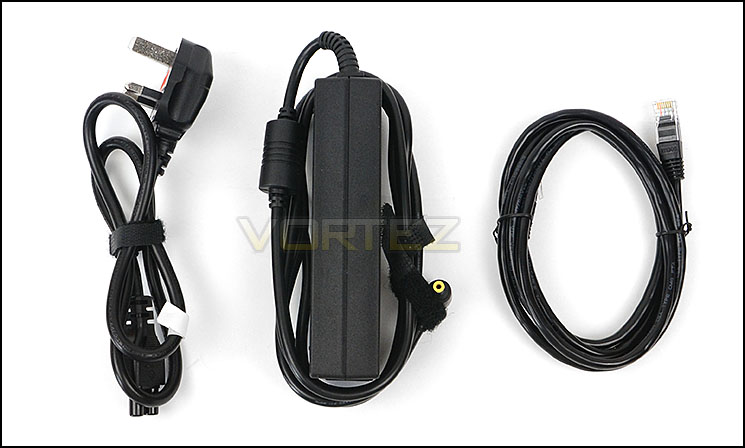
Power adapter and CAT5 network cable
PX6-300D certainly oozes quality. Its external design looks and feels robust although the front door which has hinges on the left is built of plastic construction. Due to the colour configuration this unit will likely combine well with other devices within the home/small office.
On the right side of the unit there is a single USB 3.0 port for fast access to USB media.
Other detailing on the PX6-30-0D are plastic and steel. The dimensions and weight are as follows:
• Width: 6.94 in (176mm)
• Length: 10.125 in (257mm)
• Height: 10.625 in (270mm)
• Weight: 19.42 lbs (8.81 kg) with HDDs
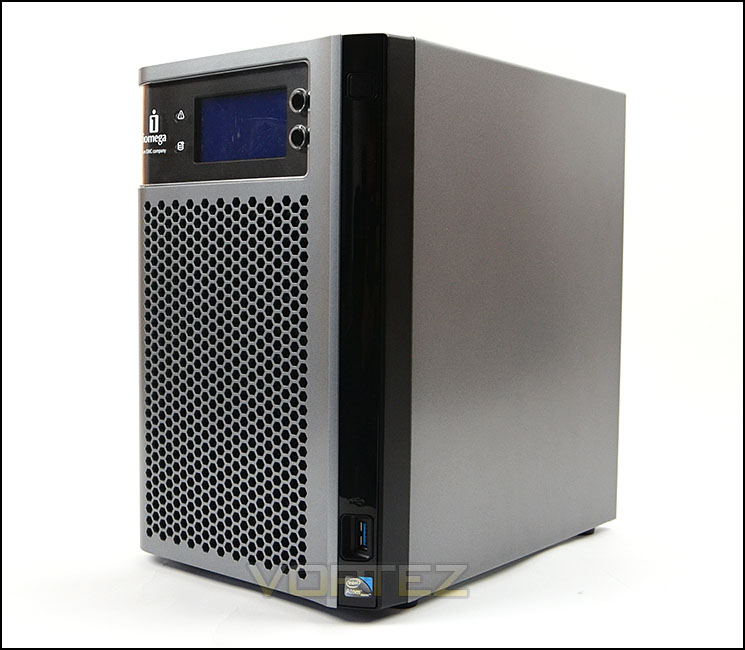
An overview of PX6-300D
Opening the door we are immediately met with a handy LCD screen which displays essential information such as the date/time and current capacity usage. It’s possible to tweak this via the software interface. The power button is also located in a similar area but on the outer edge towards the right.
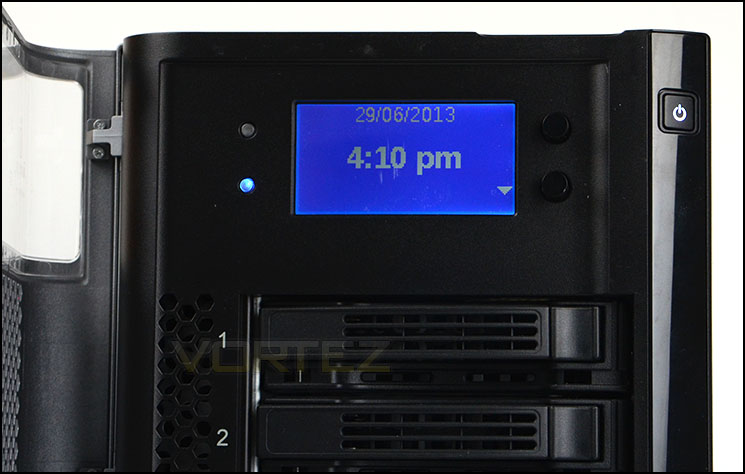
An LCD screen displays critical information
There is a total of six interchangeable HDD trays on PX6-300D. These trays are plastic and allow the drives to be hot swapped without the need to connect any cables whatsoever. On a unit of this cablibre we would expect some sort of locking device for each drive but these drivers simply click in and out without any security features.
The model version we are reviewing features six Hitachi 7200RPM 1TB drives which assist with giving a large volume for data storage. There are other options available including one which is diskless so that consumers can use their own specific HDDs.
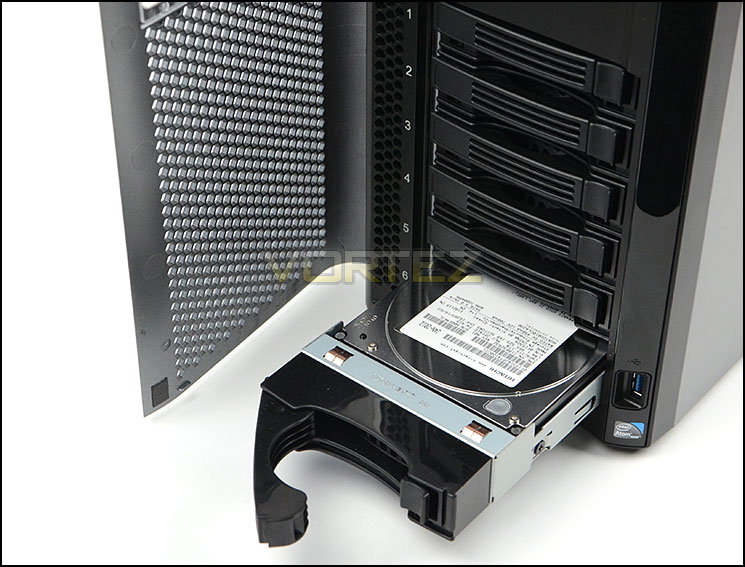
Six Hitachi 7200RPM 1TB drives with hotswap functionality
Moving round to the rear of PX6-300D the rear panel uses steel construction to provide yet more good build quality. As well as a honeycomb perforated section at the top there are two 90mm cooling fans to help alleviate any heat from the inner workings of the unit and drives.
Also on the back of PX6-300D there are two USB 2.0 ports and two gigabit LAN ports for networking the unit.
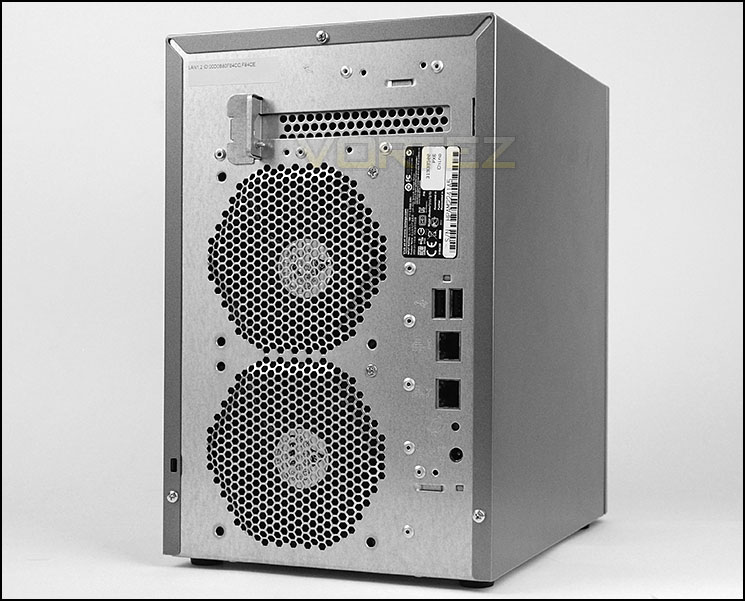
Dual USB, Dual Gigabit LAN around the back
Inside, it isn’t possible to see the front side of the PCB with CPU and memory components due to the design of the steel chassis. Although we can’t see the key elements, we can confirm that an Intel Atom 1.8GHz CPU and 2GB of DDR2 are used to deliver plenty of power for multi-tasking.
Oddly, the cooling fans which are found within PX6-300D are not fixed in place with screws, instead they are loose – hopefully this doesn’t create any vibration noises.
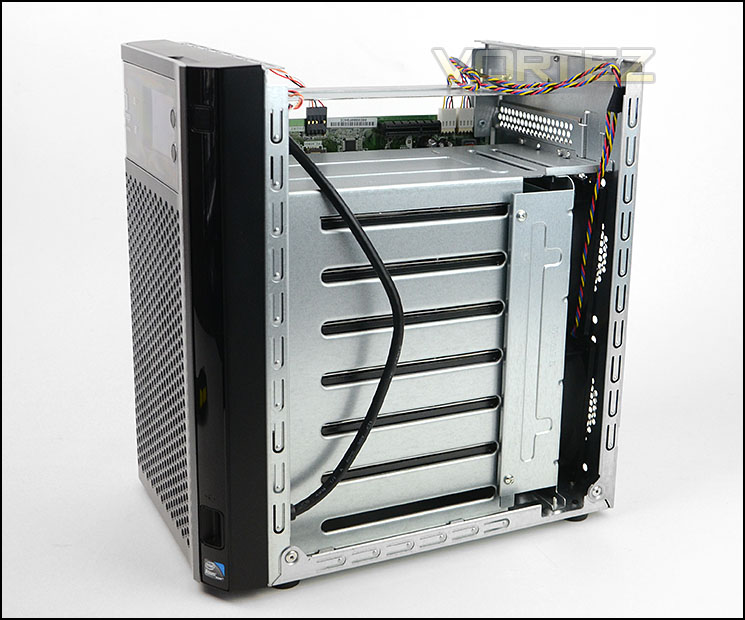
Protective cover off – a look inside PX6-300D
Software UI
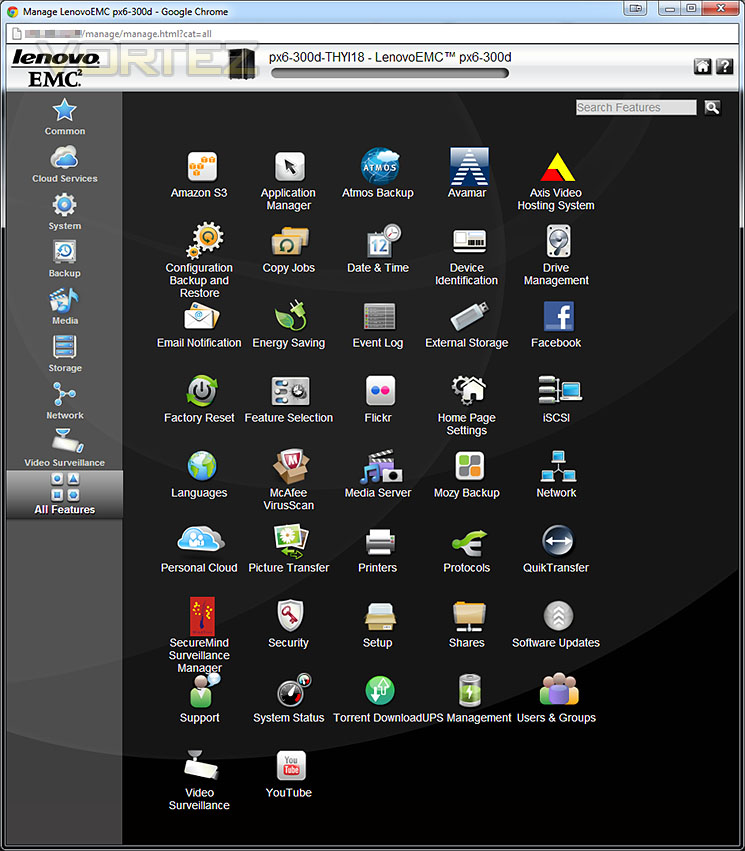
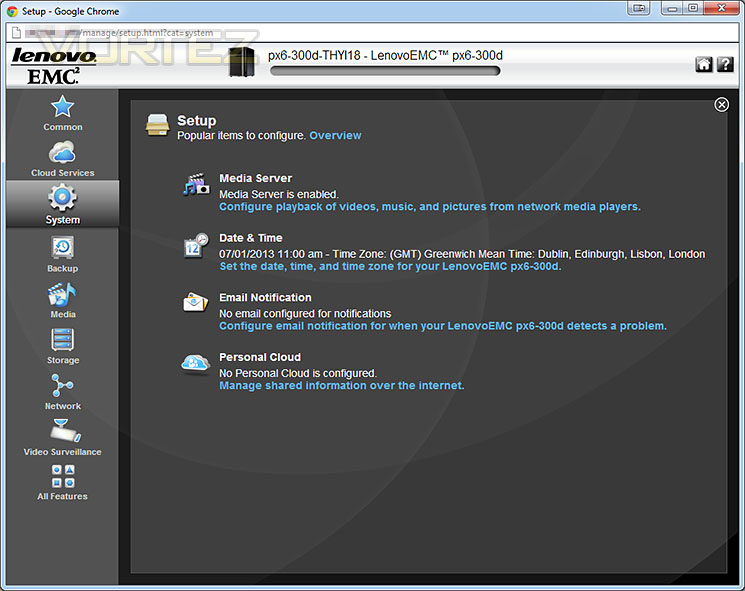
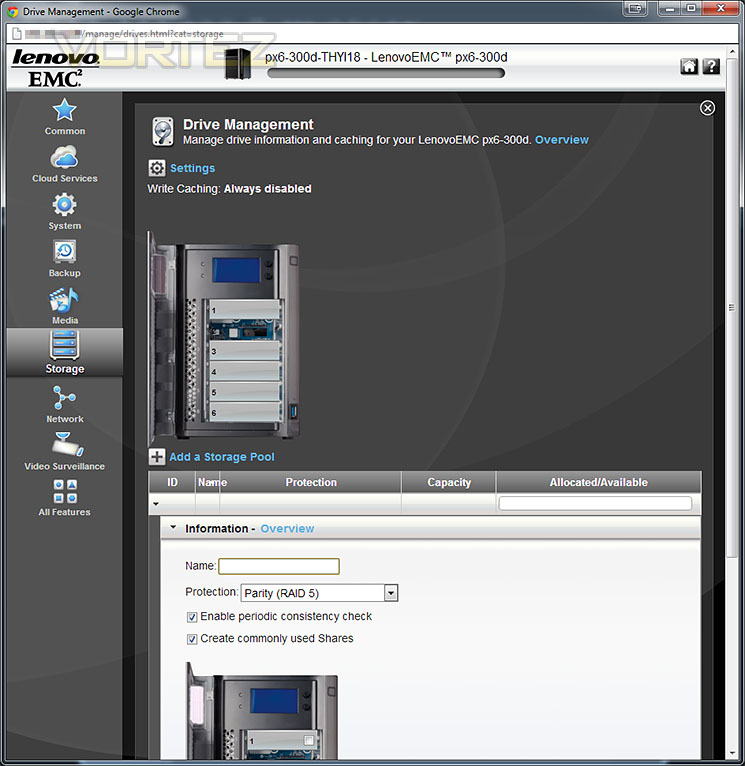
To get up and running with PX6-300D the unit simply needs power and a connection to a router. Once connected to the router an IP address can be obtained for the unit and then this simply needs typing into a web browser. The software interface is quite extensive, it gives typical settings customisation and access to popular applications that most users will be familiar with such as Facebook/YouTube integration.
On top of the usual features and applications you expect from a NAS type device, 3rd Party applications can be installed too which is extremely useful for consumers that want to tailor the unit to their own requirements.
We have been accustomed to Synology’s DSM in times previous to this and we have to say whilst Iomega’s solution may not be as streamlined and interactive it still does the job and it isn’t long before everything is set up.
File Transfer & Power Consumption
Test System Specifications
CPU Intel Core-i7 4770K
Motherboard Intel Z87KLT-75K
Memory 16GB Corsair Vengeance Pro 2400MHz CL10
Graphics GIGABYTE GTX 680 OC
PSU Thermaltake Toughpower Grand 750W
Motherboard Intel Z87KLT-75K
Memory 16GB Corsair Vengeance Pro 2400MHz CL10
Graphics GIGABYTE GTX 680 OC
PSU Thermaltake Toughpower Grand 750W
Devices
– Belkin N1 Gigabit Router
– Synology DS213air
– Synology DS213
– Synology DS411
– Synology DS411j
– Synology DS211
– Synology DS410
– Toshiba STORE Steel USB
– Synology DS213air
– Synology DS213
– Synology DS411
– Synology DS411j
– Synology DS211
– Synology DS410
– Toshiba STORE Steel USB
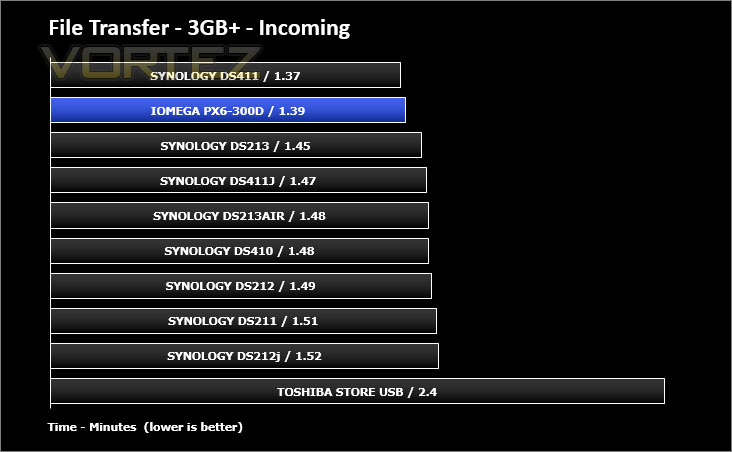
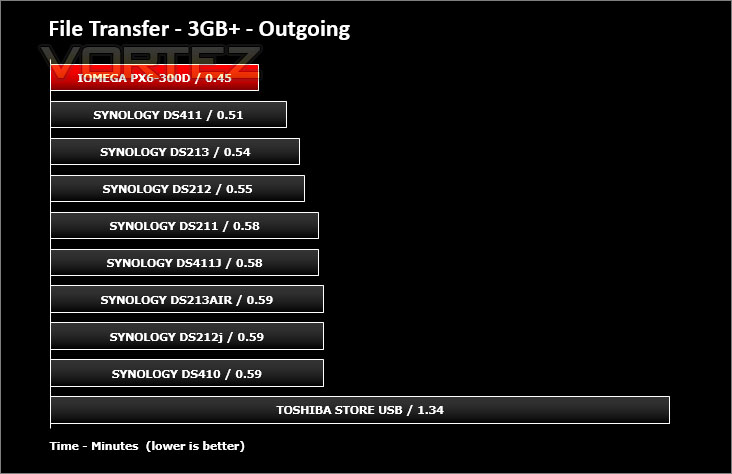
First of all, for the purpose of real world testing we bundled together 6 files which were in 2 folders amounting to 3.2GB. We wanted to discover the incoming and outgoing transfer times between the PX6-300D and the computer – against other devices on a Gigabit network. Here are the results.
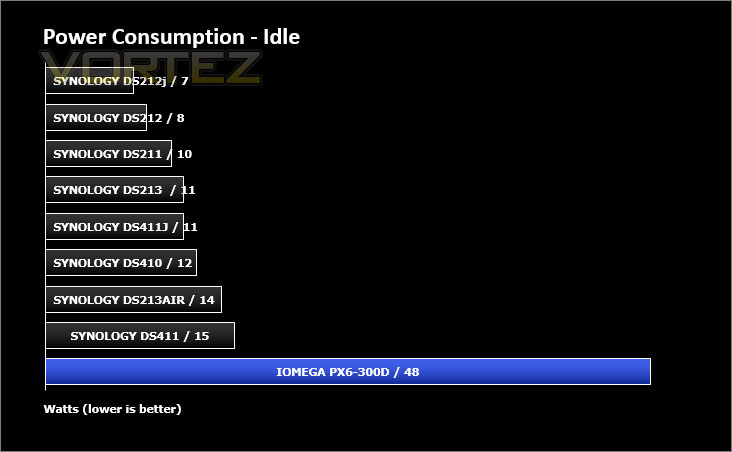
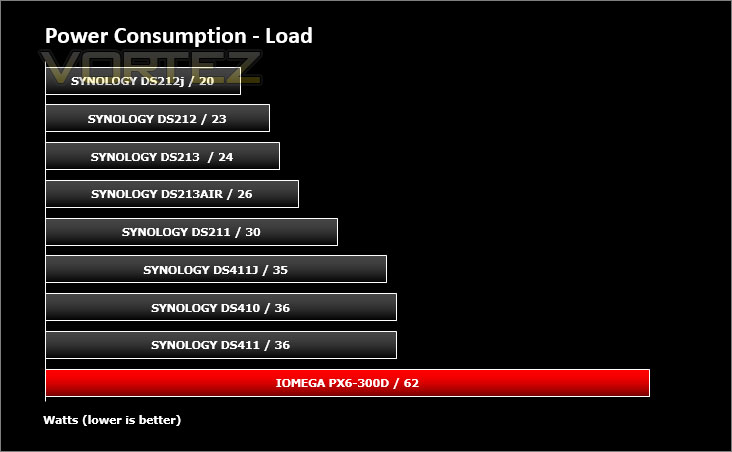
Whilst performing these tests load power consumption was monitored. The power consumption was also monitored whilst being in an idle state.
Intel NAS Performance Toolkit
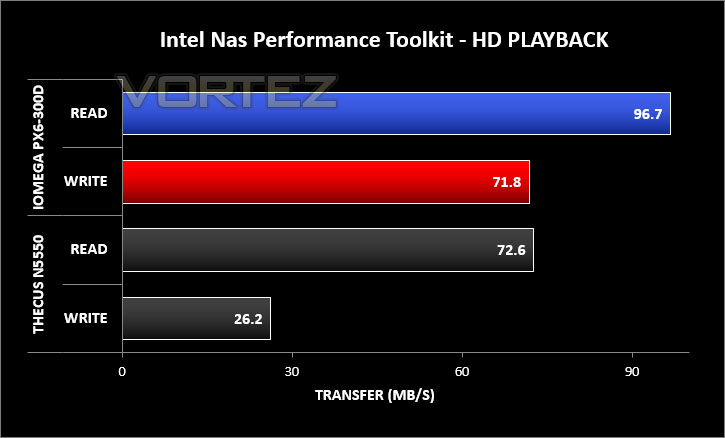
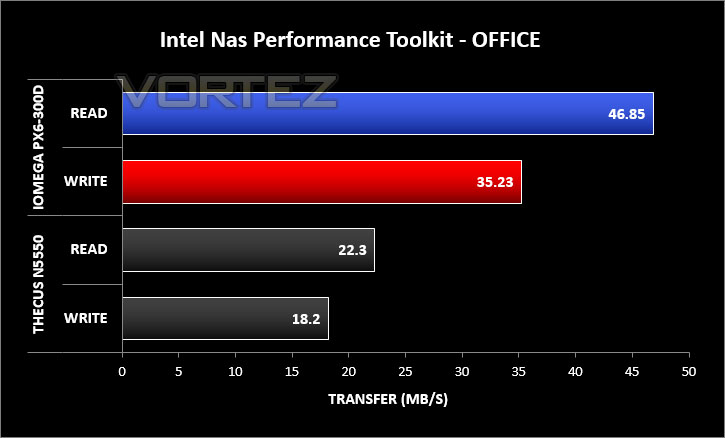
The Intel® NAS Performance Toolkit (Intel® NASPT) is a file system exerciser and analysis tool designed to enable performance comparisons between network attached storage (NAS) devices. Intel NASPT focuses on user level performance using real world workload traces gathered from typical digital home applications.
Conclusion
This is the first time we have had the pleasure of taking a look at anything from Iomega and we have to say the PX6-300D is a brilliant product.
Designed as a home and small office network solution the PX6-300D comes with a plethora of features and functionality that will help manage data and improve productivity. We found the software interface easy to use and the feature-set extensive.
The tests we put the PX6-300D through revealed a strong candidate in the network arena and we are left no doubt that this unit is certainly very capable. Noise levels from the unit aren’t too bad – though we expect this type of product to be stored away somewhere unconscious anyway.
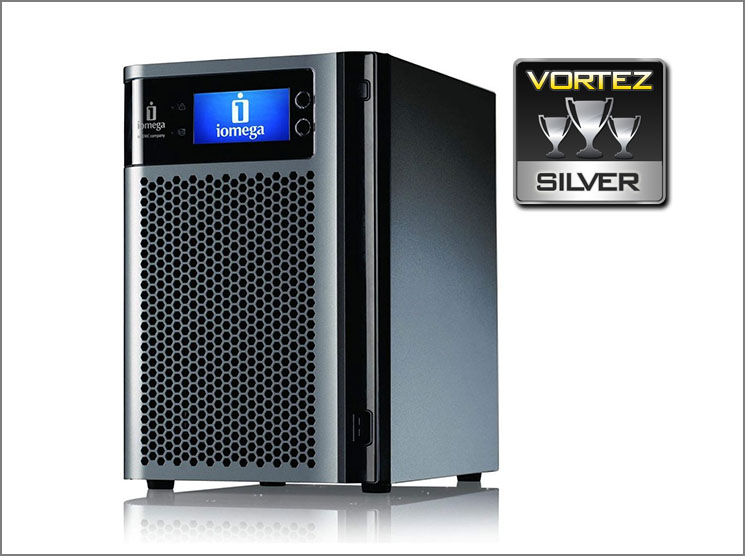
The cost of the unit under review today is over £1000 which upon initial consideration is very expensive but the bulk of price is due to amount of included drives – having six 1TB HDDs will push the price right up. There is a diskless option if only 1, 2 or 3 drives are required and this will obviously help to keep the costs down but even so – a barebones unit will cost in the region of £500.
PX6-300 is a very capable device and will be a welcome addition to any home or small office. Its software interface is flexible and we can confidently recommend this unit to feature as the integral device for any small network.
Pros
+ Good quality, robust chassis
+ Good network performance
+ Easy to use software UI
+ Dual gigabit LAN ports
+ Plenty of useful features
Cons
– Cost
– Clumpy external power supply
– Thing, plastic front door
– No locking mechanisms on drives
+ Good quality, robust chassis
+ Good network performance
+ Easy to use software UI
+ Dual gigabit LAN ports
+ Plenty of useful features
Cons
– Cost
– Clumpy external power supply
– Thing, plastic front door
– No locking mechanisms on drives

Click here for an explanation of our awards at Vortez.net.


