Kingston’s A2000 NVMe SSD aims to be an affordable solution that can provide excellent drive performance for the masses. Featuring a single-sided layout and no-frills design to keep costs down and heat to a minimum.

Product on Review: Kingston A2000
Manufacturer: Kingston
Street Price:
250GB: GBP £38.49 / USD $39.99 / AUS $65.00
500GB: GBP £61.99 / USD $59.99 / AUS $98.00
1000GB: GBP £112.99 / USD $112.99 / AUS $159.00
Kingston began out in 1987 with a single product and have gone on to redefine the memory market as we know it, growing into one of the largest independent memory manufacturers. Using that expertise, Kingston have released the A2000 NVMe 3.0 SSD which we’ll look at today.
The SSD market has undergone quite a transformation in the last two or three years, with many users now opting for ultra fast NVMe options which are multiple times faster than a traditional SATA SSD, not to mention how far they exceed a spinny drive. Kingston, able to produce their own NAND flash, have full control of all aspects of the design process which we hope will transfer into a competitive product.
Aimed at entry-level users, purpose-built machines and DIY system builders who seek to revitalise their machines, the A2000 offers read and write speeds of up to 2200MB/s and 2000MB/s respectively, but thanks to the wonders of the NVMe interface, data queueing and random access times are massively improved over competing SATA models. Random 4K read and write figures are quoted at 250,000 IOPS and 220,000 IOPS.
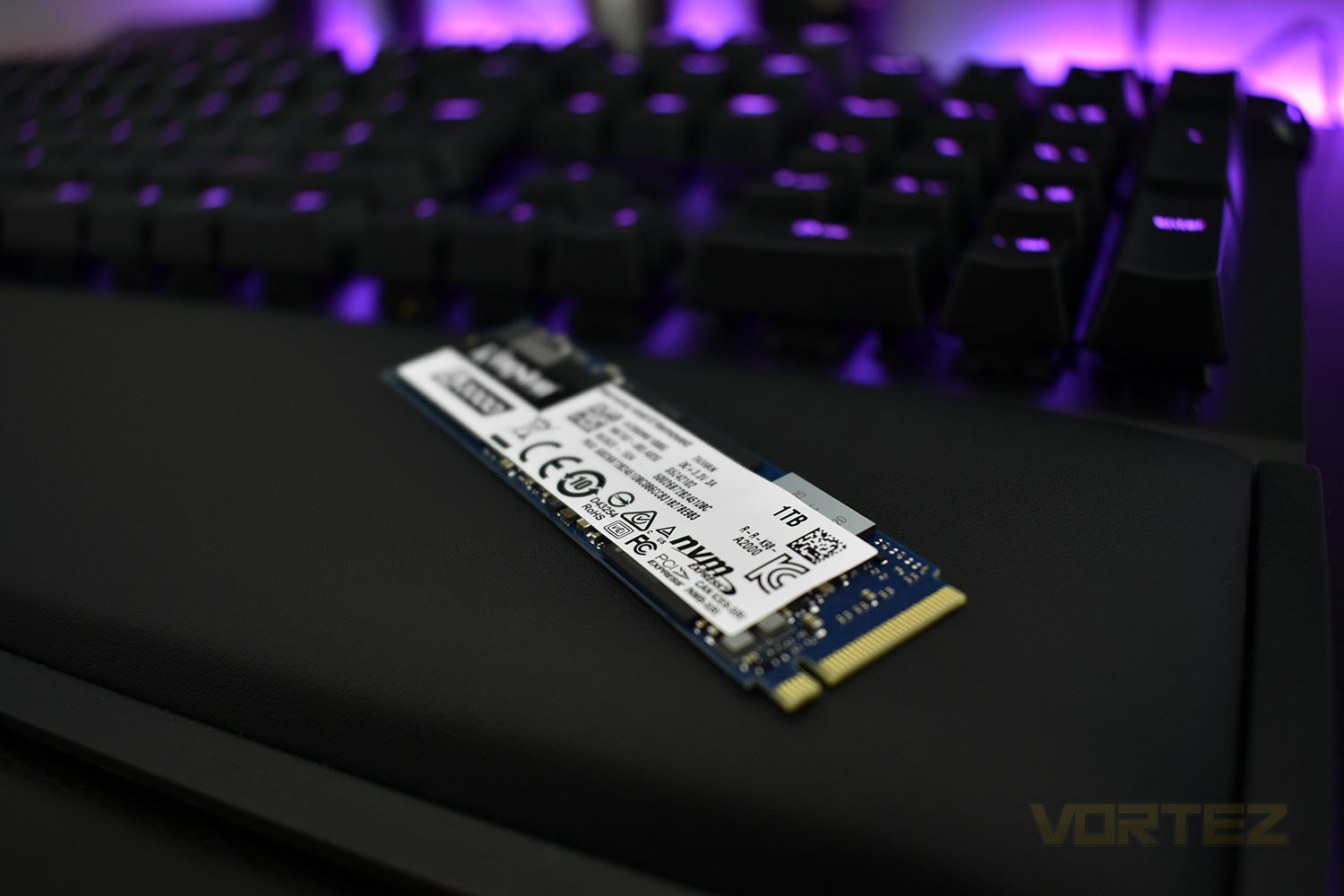
Available in capacities of 250GB, 500GB and 1TB and with end-to-end 256-bit XTS-AES encryption, the A2000 offers a capacity for all budgets as well as peace of mind that your data’s safe. Speaking of which, wear ratings are specified at 150TBW, 350TBW and 600TBW for the three capacities, equating to roughly 600 full drive writes for each device.
As an entry-level NVMe, pricing ought to be keen, and it is, the pricing can be seen at the top of our intro. Less than £40 in the UK for an NVMe drive is fantastically competitive and should allow more people to enjoy the performance improvements that PCI-E storage can offer.
Kingston on the A2000 NVMe SSD:
Kingston’s A2000 NVMe PCIe SSD is an affordable storage solution with impressive performance. Boasting read/write speeds of up to 2,200/2,000MB/s1, A2000 delivers 3x the performance of a SATA SSD with quicker loading times, less power consumption and lower heat. A2000 SSD is designed for the entry-level user, purpose-built system manufacturer, DIY system builder and those seeking to upgrade their PC. With a single-sided slim M.2 design, A2000 works to its full potential when installed in an Ultrabook or a small-form-factor PC (SFF PC) system.
Technical Specifications
Form factor M.2 2280
Interface NVMe™ PCIe Gen 3.0 x 4 Lanes
Capacities 250GB, 500GB, 1TB
NAND 3D
Encrypted XTS-AES 256-bit Encryption
Sequential Read/Write
250GB – up to 2,000/1,100MB/s
500GB – up to 2,200/2,000MB/s
1TB – up to 2,200/2,000MB/s
Random 4K Read/Write
250GB – up to 150,000/180,000 IOPS
500GB – up to 180,000/200,000 IOPS
1TB – up to 250,000/220,000 IOPS
Total Bytes Written (TBW)
250GB – 150TBW
500GB – 350TBW
1TB – 600TBW
Power Consumption .0032W Idle / .08W Avg / 1.7W (MAX) Read / 4.5W (MAX) Write
Storage temperature -40°C ~ 85°C
Operating temperature 0°C ~ 70°C
Dimensions 80mm x 22mm x 3.5mm
Weight
250GB – 6.6g
500GB – 6.8g
1TB – 6.6g
Vibration operating 2.17G Peak (7-800Hz)
Vibration non-operating 2.17G Peak (7-800Hz)
MTBF 2,000,000 hours
Warranty/support Limited 5-year warranty with free technical support
Interface NVMe™ PCIe Gen 3.0 x 4 Lanes
Capacities 250GB, 500GB, 1TB
NAND 3D
Encrypted XTS-AES 256-bit Encryption
Sequential Read/Write
250GB – up to 2,000/1,100MB/s
500GB – up to 2,200/2,000MB/s
1TB – up to 2,200/2,000MB/s
Random 4K Read/Write
250GB – up to 150,000/180,000 IOPS
500GB – up to 180,000/200,000 IOPS
1TB – up to 250,000/220,000 IOPS
Total Bytes Written (TBW)
250GB – 150TBW
500GB – 350TBW
1TB – 600TBW
Power Consumption .0032W Idle / .08W Avg / 1.7W (MAX) Read / 4.5W (MAX) Write
Storage temperature -40°C ~ 85°C
Operating temperature 0°C ~ 70°C
Dimensions 80mm x 22mm x 3.5mm
Weight
250GB – 6.6g
500GB – 6.8g
1TB – 6.6g
Vibration operating 2.17G Peak (7-800Hz)
Vibration non-operating 2.17G Peak (7-800Hz)
MTBF 2,000,000 hours
Warranty/support Limited 5-year warranty with free technical support
Packaging, Bundle & Closer Look
Kingston have wrapped their SSD in a hybrid style package, kind of like a blister package but much less frustrating. However, due to the way you need to open this, it’s much more difficult to re-use the package if you ever wished to sell the SSD at a later date, or return it under the warranty. Otherwise, the information provided on the front does its job just fine.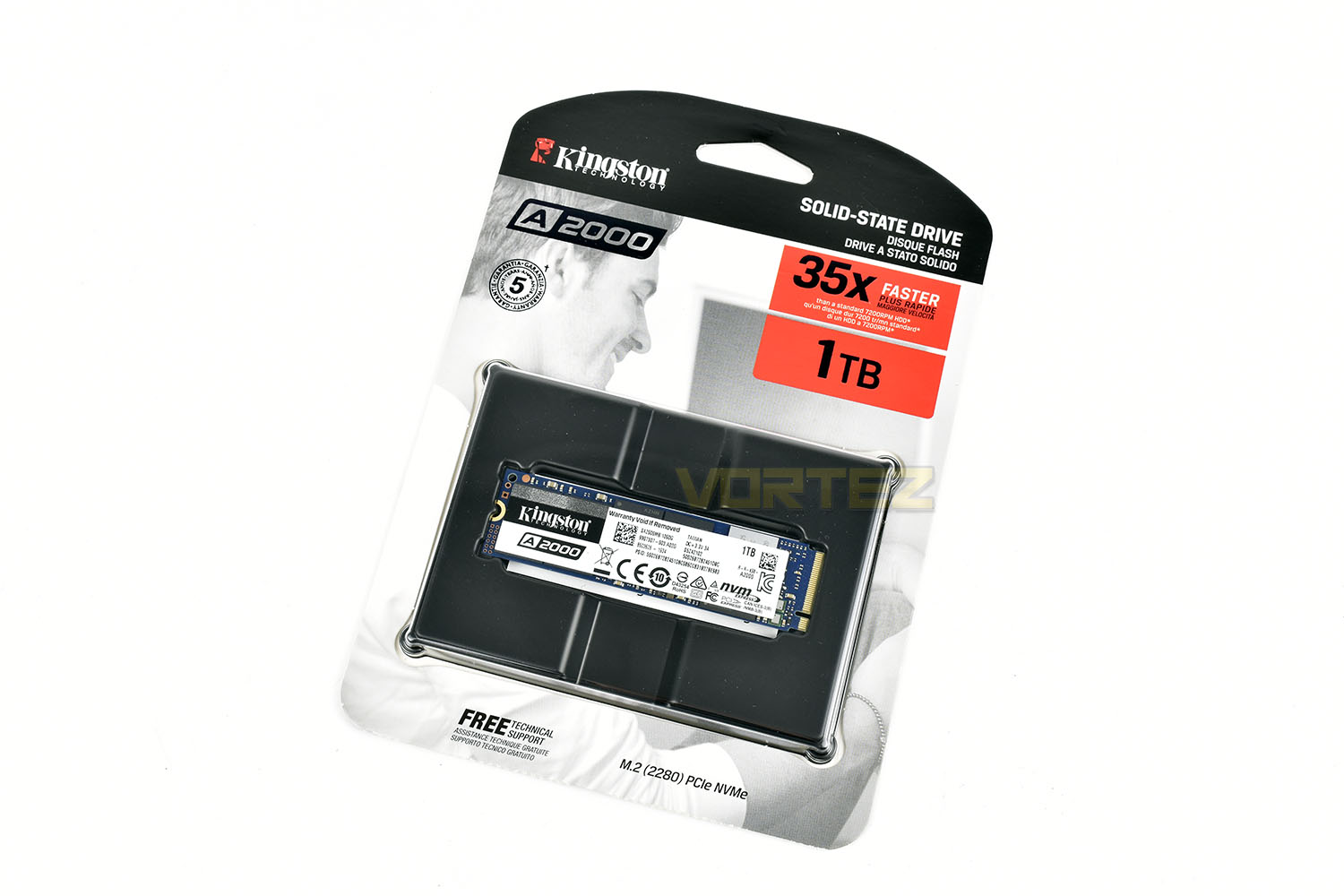
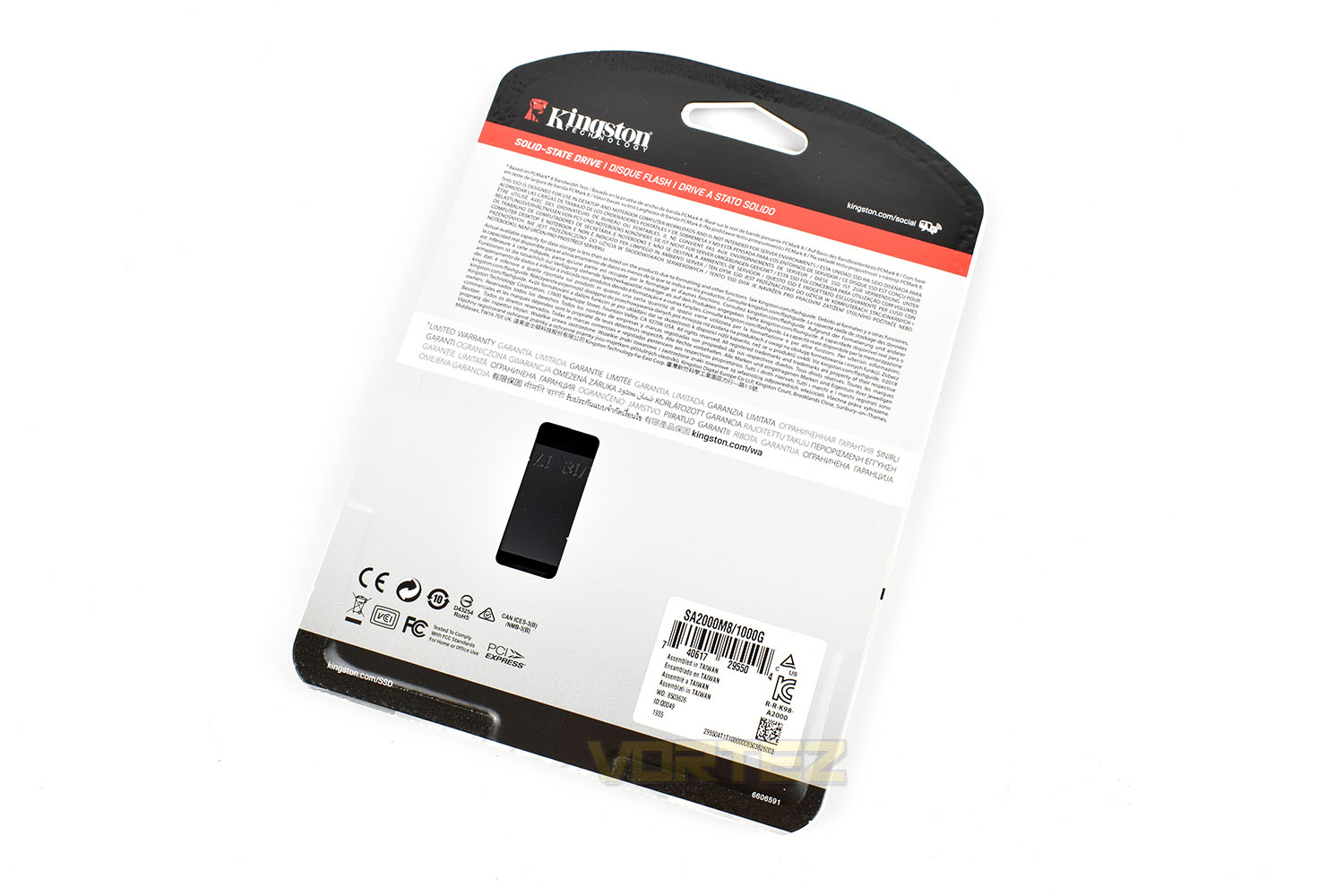
The reverse side is full of jargon that few people will ever read.
In terms of a bundle, there’s nothing included with the A2000, but that helps to keep the price down further, and let’s be honest, what could you really expect?
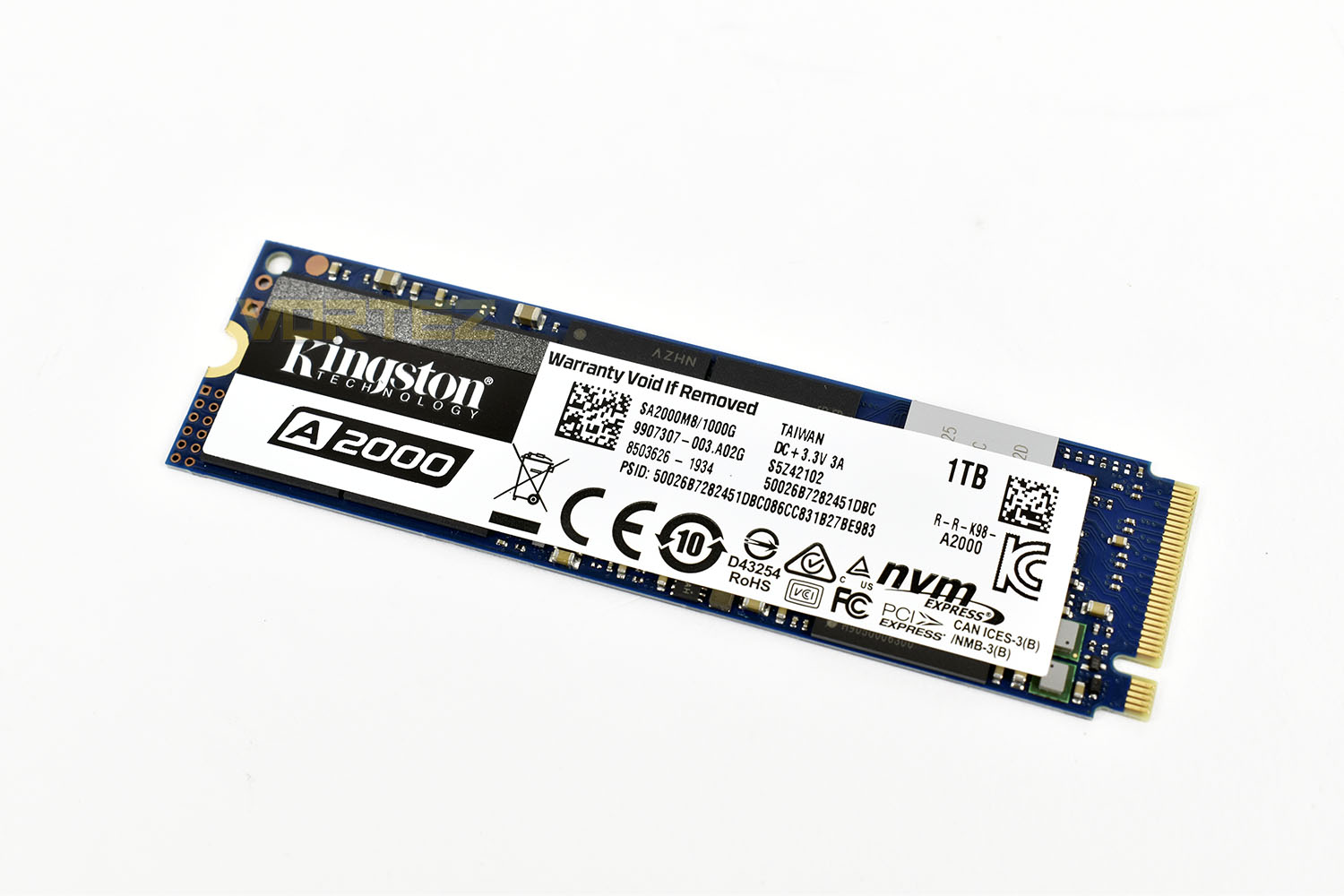
Being a single-sided drive, the SSD will be easier to cool and should be easier to fit into incredibly tight machines such as ultrabooks and gaming laptops where space is at a premium. M.2 motherboard cooling solutions which are becoming commonplace should also benefit from the single-sided approach too.
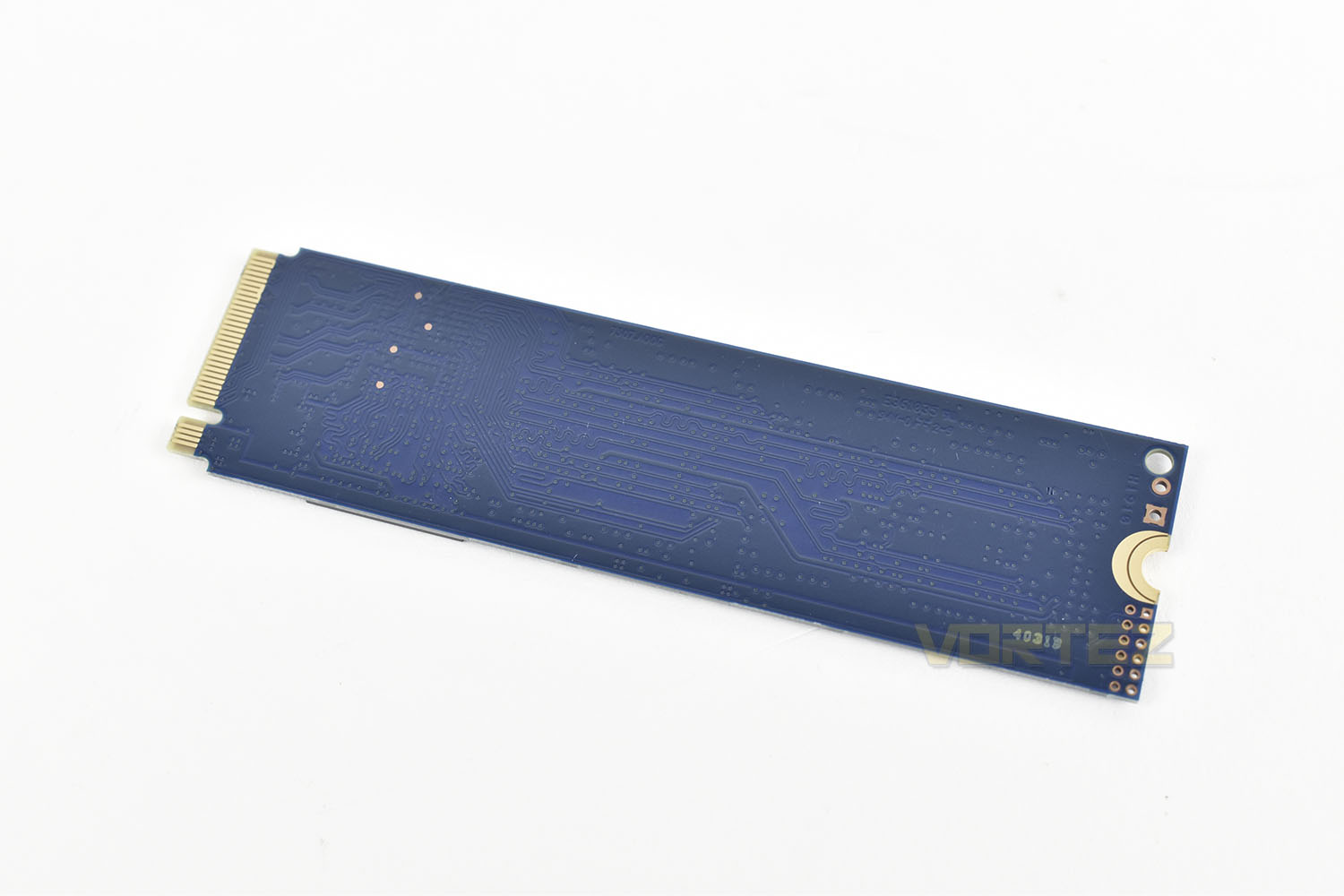
The other side isn’t all that interesting, unless you find the PCB traces fascinating.
Test Setup & Methodology
Our test system is formatted and a fresh version of Windows is installed with just drives in place – no additional applications. Windows is then updated to the latest release and the drivers are installed.Included in the list of benchmarks are the following applications:
Benchmarks
Anvil Pro
AS SSD
ATTO Disk Benchmark v2.46
AIDA64
CrystalDiskMark 6.0.2 x64
AS SSD
ATTO Disk Benchmark v2.46
AIDA64
CrystalDiskMark 6.0.2 x64
Test Setup
CPU AMD Ryzen 7 3800X
Cooling Corsair H150i Pro RGB – Balanced Profile
Motherboard
Memory 16GB Corsair Vengeance LPX 3000MHz @ 3000MHz @ 15-17-17-38-58
Graphics AMD Radeon RX 480 8GB
Storage Corsair Force LE 480GB
PSU Corsair RM750X 80 Plus Gold Certified PSU
Cooling Corsair H150i Pro RGB – Balanced Profile
Motherboard
Memory 16GB Corsair Vengeance LPX 3000MHz @ 3000MHz @ 15-17-17-38-58
Graphics AMD Radeon RX 480 8GB
Storage Corsair Force LE 480GB
PSU Corsair RM750X 80 Plus Gold Certified PSU
Benchmarks: Anvil Pro
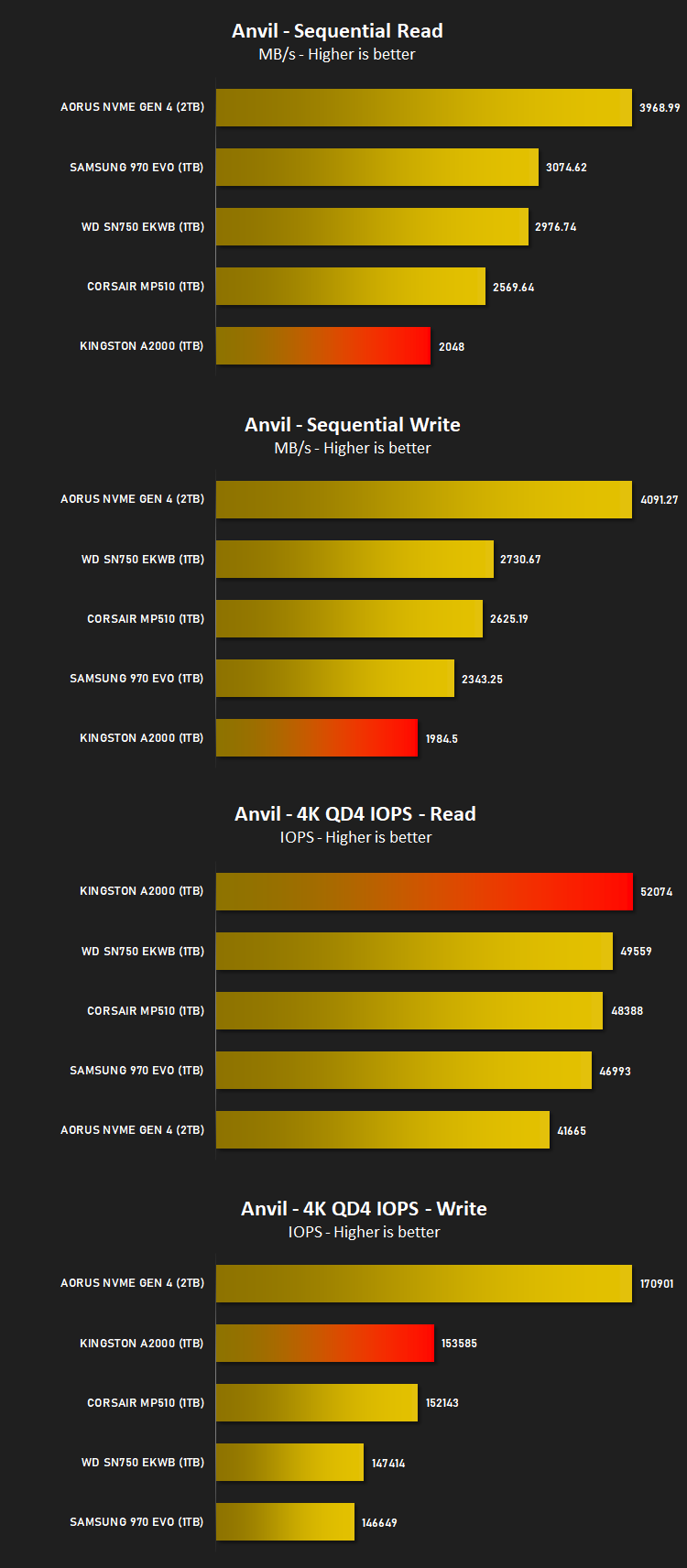
Anvil Pro from Anvil Storage utilities is one of the most popular storage benchmarking utilities today thanks to the large suit of tests available. You can test pretty much anything from Read/write Speed to IOPs with many variables to tweak allowing you to get either a single or host of results to compare with other likeminded enthusiasts. In our test we ran the standard suite 5 times, subtracting both the highest and lowest scores and determined the final result from the average of the remaining three results.
Benchmarks: AS SSD
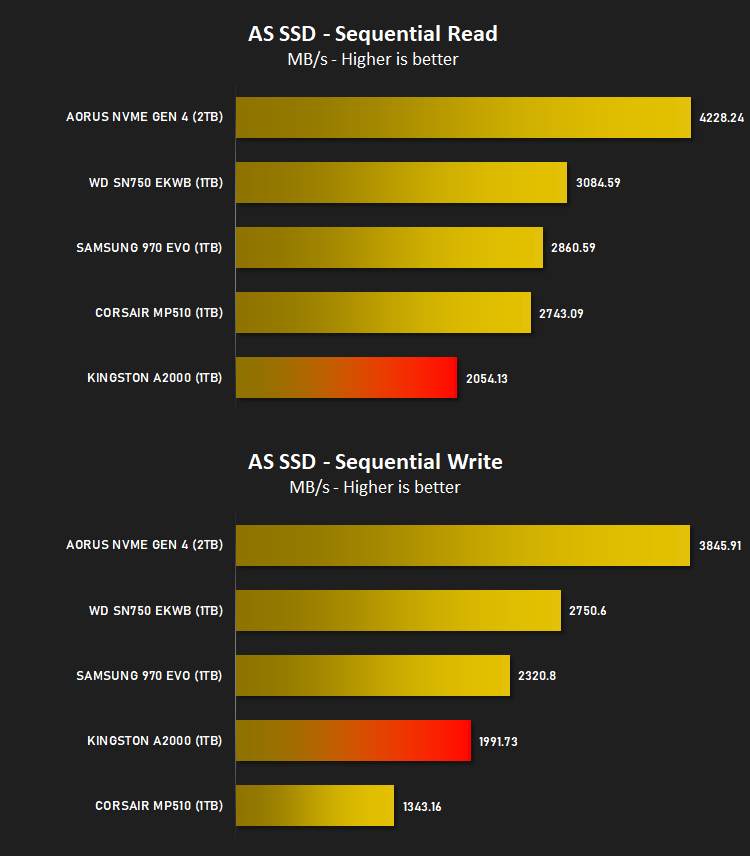
AS SSD Benchmark is a straightforward tool for measuring the speed of your SSD drive.
Simply launch the program, choose your drive, click Start, and it’ll test your SSD’s read and write speed in a variety of ways, delivering a score for each when it’s done. And if that’s not enough, there are also additional file copy and compression-related benchmarks available from the Tools menu. (The author’s support page is German only, but if you need further English explanations then there’s a thread on the program at the OCZ Technology forum.).
Simply launch the program, choose your drive, click Start, and it’ll test your SSD’s read and write speed in a variety of ways, delivering a score for each when it’s done. And if that’s not enough, there are also additional file copy and compression-related benchmarks available from the Tools menu. (The author’s support page is German only, but if you need further English explanations then there’s a thread on the program at the OCZ Technology forum.).
Benchmarks: ATTO
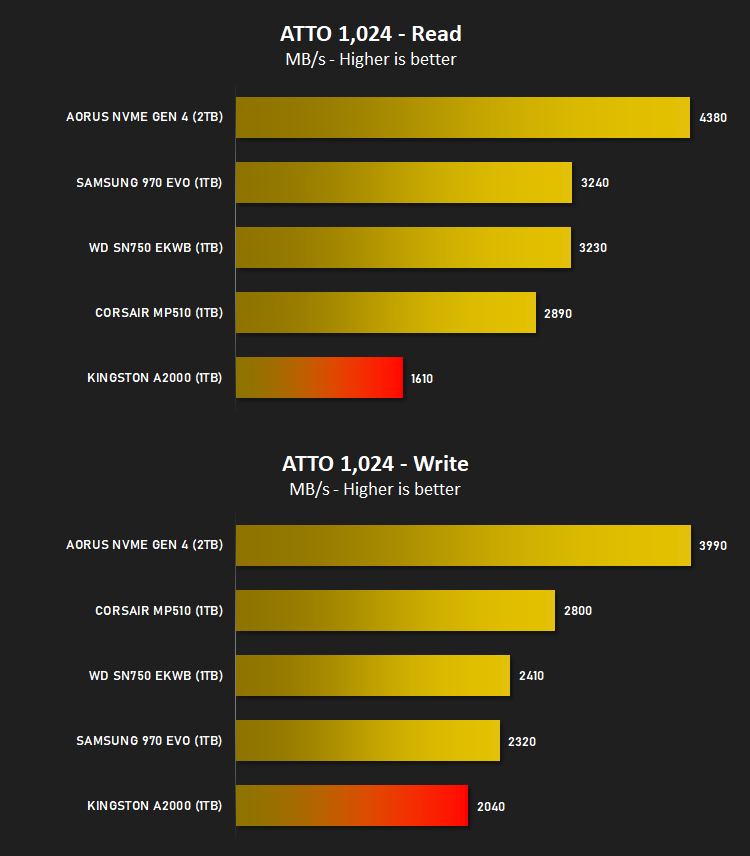
The ATTO Disk Benchmark performance measurement tool is compatible with Microsoft Windows. Measure your storage systems performance with various transfer sizes and test lengths for reads and writes. Several options are available to customize your performance measurement including queue depth, overlapped I/O and even a comparison mode with the option to run continuously. Use ATTO Disk Benchmark to test any manufacturers RAID controllers, storage controllers, host adapters, hard drives and SSD drives and notice that ATTO products will consistently provide the highest level of performance to your storage.
Benchmarks: AIDA64
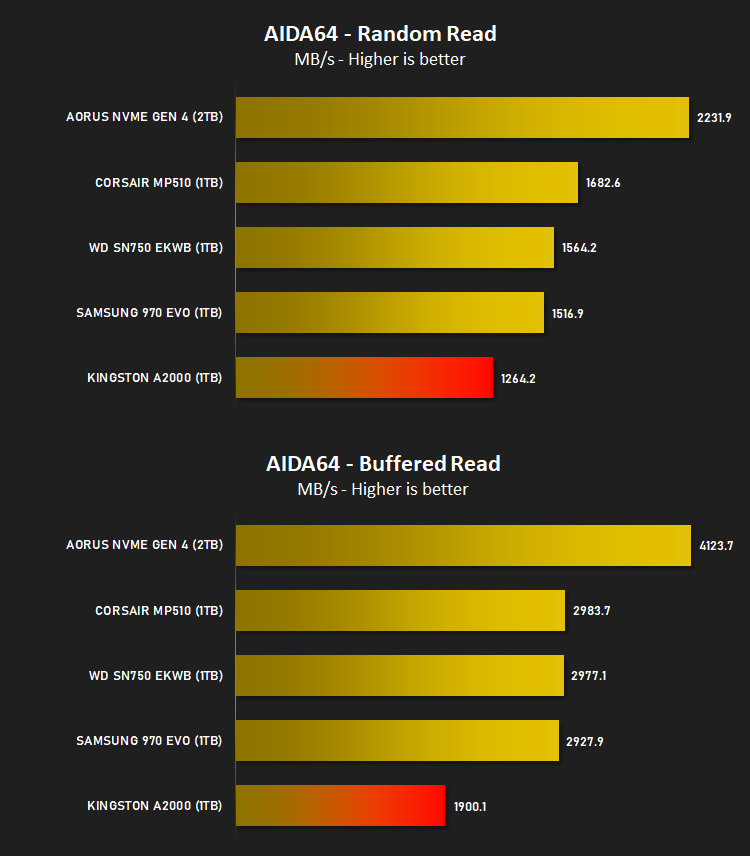
With this module, we can measure the performance of the PC’s storage devices, including (S)ATA or SCSI hard disk drives, RAID arrays, optical drives, solid-state drives (SSD), USB drives and memory cards. It also allows us to perform write tests, which helps us detect fake products and errors on the devices. In order to attain reliable benchmark results we have to make sure to close all background applications.
Benchmarks: CrystalDiskMark
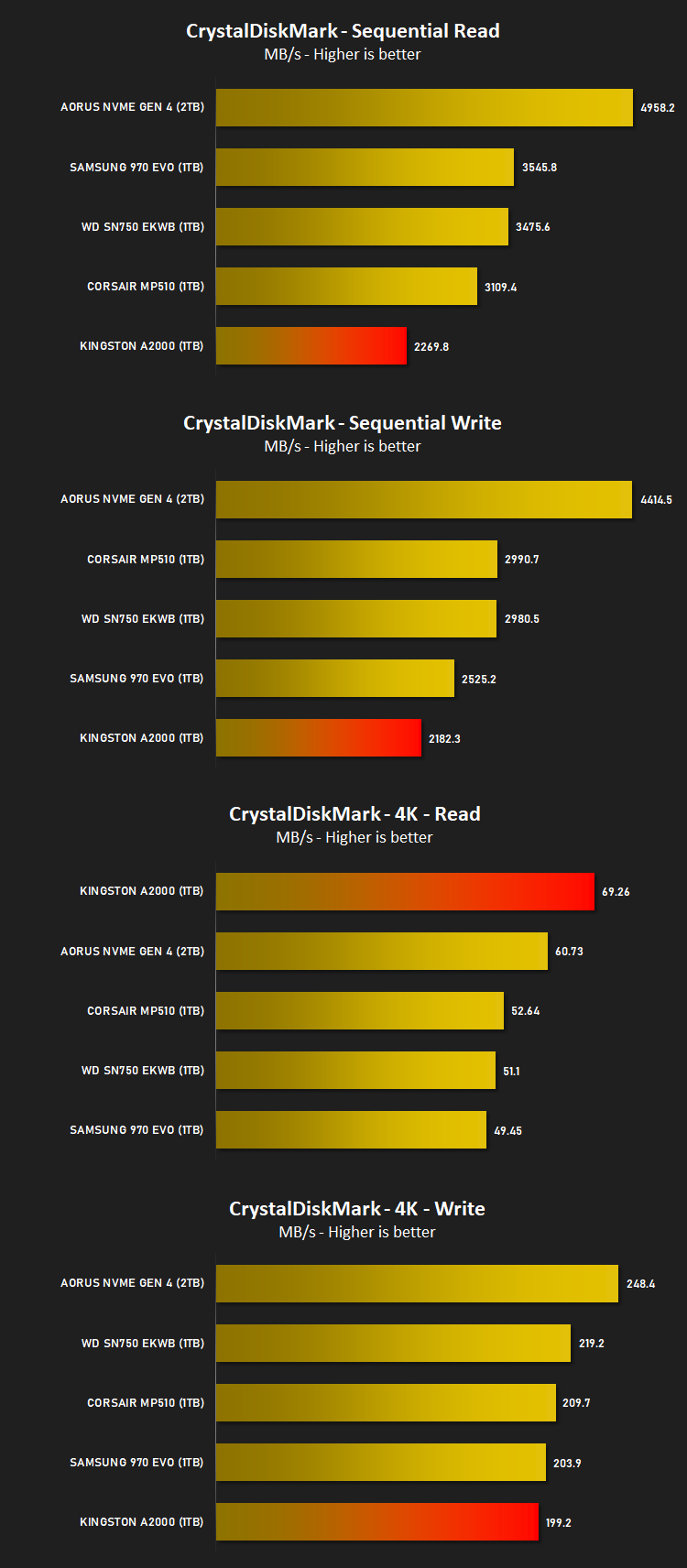
CrystalDiskMark is an open source disk drive benchmark tool for Microsoft Windows. Based on Microsoft’s MIT-licensed Diskspd tool, this graphical benchmark is commonly used for testing the performance of solid-state storage. It works by reading and writing through the filesystem in a volume-dependent way. It generates read/write speeds in sequential and random positions with varying numbers of queues and threads.
Conclusion
Until now, NVMe storage has been out of the reach of a lot of people because of high pricing against a sense of diminishing returns over SATA solutions. However, as we progress into higher core count CPUs, larger games with longer loading times and increased demand from applications, the NVMe interface is definitely beginning to make more sense with its advanced data requesting processes and its ability to deliver data in a much faster manner.The Kingston A2000 has been compared against some of the best drives from the PCI-E 3.0 generation but it certainly isn’t a poor performer. Read and write speeds in excess of 3000MB/s is all well and good but the number of programs that can genuinely take advantage of that are so few and far between that they’re hardly worth thinking about.
Enthusiasts, of course, will still want the best of the best and will search for just that, but budget-conscious users who want to add some fast storage to their machine will be very well served by the Kingston A2000. The 250GB and 500GB drives are easily useable by a good majority of people who don’t load their machines up with hundreds of games while the 1TB offers spades of capacity for plenty of applications and games.
This is definitely one of the best value NVMe SSDs on the market at the moment, at all three capacity levels, which is exactly what Kingston have aimed for; they’ve got their KC2000 SSD for those who need a little more oomph, but really, the majority of people won’t need that. Additionally thanks to Kingston’s expertise within the industry, the 5-year warranty and competitive wear ratings help give an even greater peace of mind.
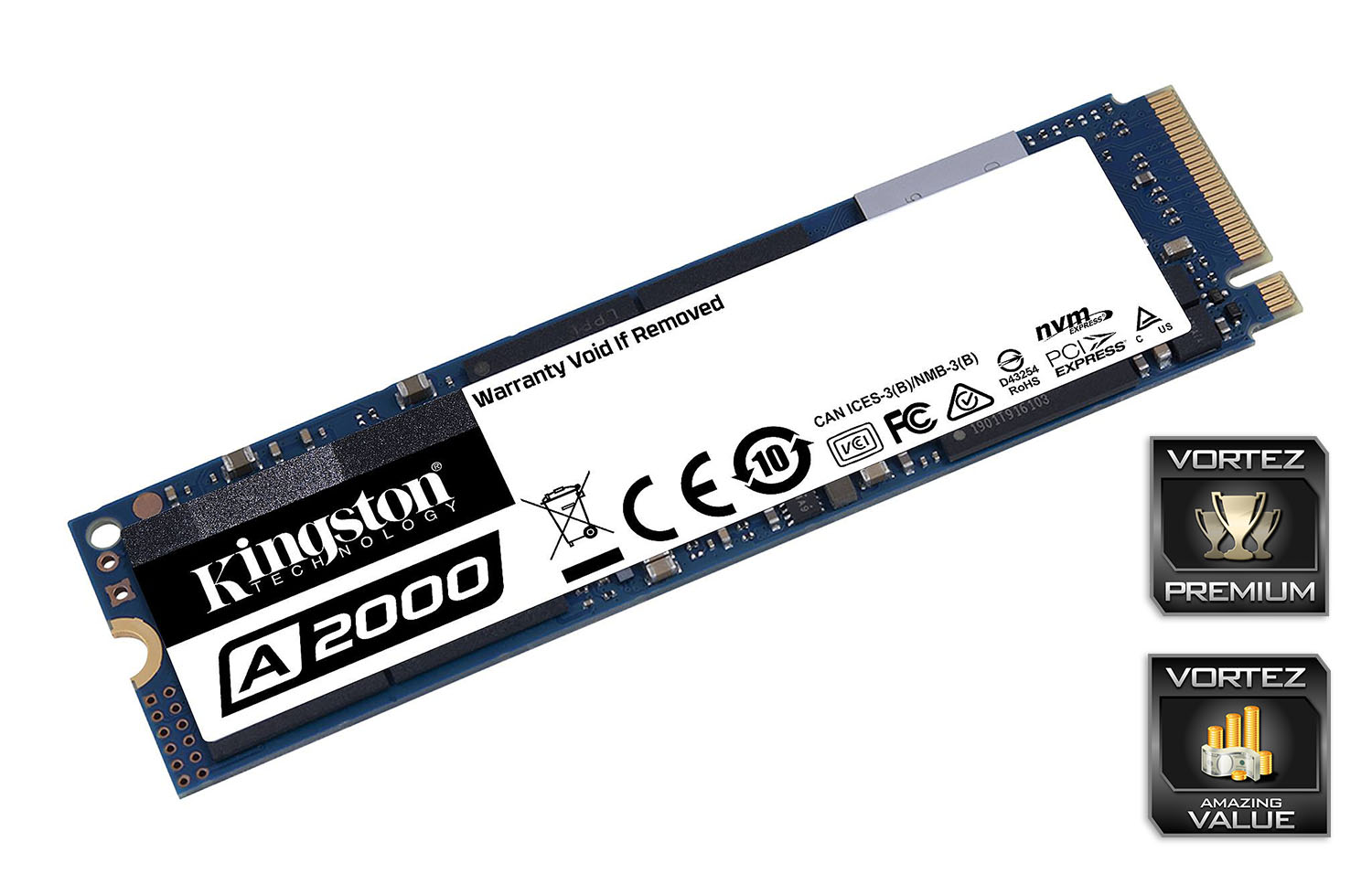
If you’re currently in the market for a storage upgrade with an itch for the faster NVMe interface, the Kingston A2000 gets a whole-hearted approval from us.
Pros
+ Excellent pricing
+ Good everyday performance
+ Easy to install
Cons
– Awkward packaging
+ Excellent pricing
+ Good everyday performance
+ Easy to install
Cons
– Awkward packaging
Click here for an explanation of our awards at Vortez.net.
Stay connected with the Vortez Social Media pages:
Join in with the discussions on Discord