Featuring a stylish black heatsink and guaranteed clock speeds from 2400MHz to 3600Mhz+, in a huge range of capacities, will you find the flavour you are looking for?

Product on Review: HyperX Predator DDR4
Manufacturer: HyperX
Street Price: £145-216 (for 2x 8GB Dual Channel kits)
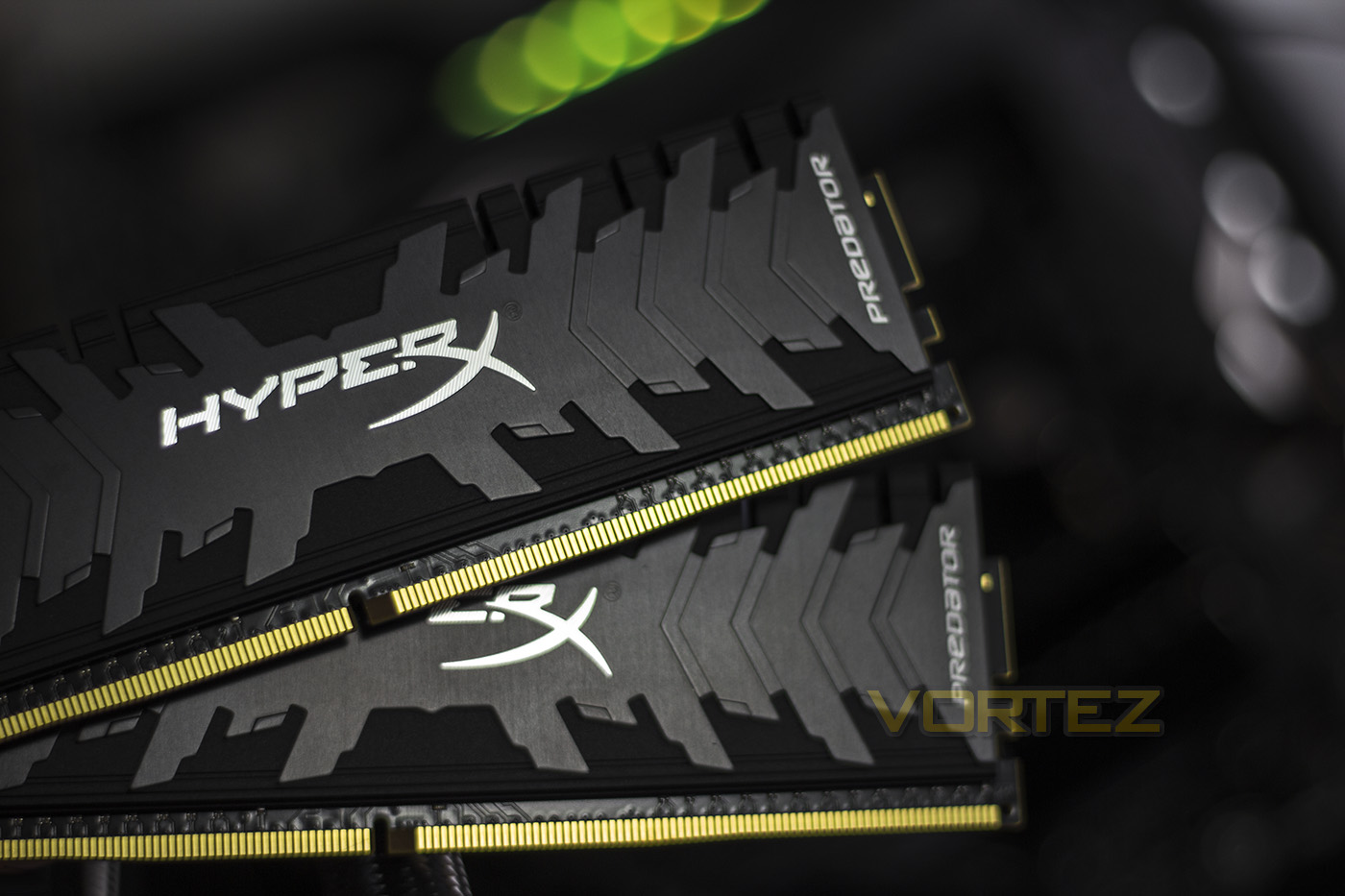
Kingston/HyperX are historically known for their lofty heatsinks on their performance memory, thankfully, they have taken a step back from that and have instead presented us with a memory kit with some very unique styling. Sitting at a very reasonable 42.2mm tall, ensuring a broad compatibility with performance air coolers, yet they have retained an edgy or ‘fierce’ aesthetic. Aside from the looks, this series of DDR4 memory offers 100% tested performance ranging from 2400MHz CL12 all the way to the cherry picked 4000MHz CL19 (which is unfortunately rare/sold out at time of writing). Having a broad range of guaranteed speeds/timings makes life easier for those that prefer to have guaranteed frequencies/performance rather than chancing it with the silicon lottery, or for those that have no time/no confidence to overclock. By default, HyperX have made their Predator DDR4 conform to the JEDEC 2400MHz CL17 standard, rather than 2133MHz CL15, do even if you do not go into the BIOS to enable the XMP setting, you will be sat at a higher frequency than what is commonly found, and you will of course have the peace of mind of a lifetime warranty backed by those awesome HyperX guys.
The kit we are looking at today is the 3200MHz CL16 which is priced at around £165, with the 3600MHz dual channel kit priced around £179, and the quad Channel kit at £379.
Overview by HyperX
Get your AMD- or Intel-based system the performance needed to stay atop the food chain with ultra-fast HyperX Predator DDR4. Beat the heat and strike fear into the hearts of your foes with Predator DDR4’s aggressive, stylish black heat spreader. Boost your frame rate, keep your streams broadcasting smooth, and plow through your highlight reel editing with speeds up to 4000MHz paired with quick CL12–CL19 timings. It’s available in single module capacities of 8GB–16GB and kits of 2, 4, and 8 with capacities of 8GB–128GB. The Intel XMP-ready profiles are optimized for Intel’s latest chipsets – just select the profile and you’re ready to go. 100-percent factory tested at speed, and backed by a lifetime warranty, dependable Predator DDR4 gives you the best of both worlds: extreme performance and maximum peace of mind.
Technical Specifications
Power Supply: VDD = 1.2V Typical
VDDQ = 1.2V Typical
VPP – 2.5V Typical
VDDSPD = 2.25V to 3.6V
On-Die termination (ODT)
16 internal banks; 4 groups of 4 banks each
Bi-Directional Differential Data Strobe
8 bit pre-fetch
Burst Length (BL) switch on-the-fly BL8 or BC4(Burst Chop)
Height 1.661” (42.20mm)
XMP TIMING PARAMETERS
JEDEC: DDR4-2400 CL17-17-17 @1.2V
XMP Profile #1: DDR4-3200 CL16-18-18 @1.35V
XMP Profile #2: DDR4-3000 CL15-17-17 @1.35V
VDDQ = 1.2V Typical
VPP – 2.5V Typical
VDDSPD = 2.25V to 3.6V
On-Die termination (ODT)
16 internal banks; 4 groups of 4 banks each
Bi-Directional Differential Data Strobe
8 bit pre-fetch
Burst Length (BL) switch on-the-fly BL8 or BC4(Burst Chop)
Height 1.661” (42.20mm)
XMP TIMING PARAMETERS
JEDEC: DDR4-2400 CL17-17-17 @1.2V
XMP Profile #1: DDR4-3200 CL16-18-18 @1.35V
XMP Profile #2: DDR4-3000 CL15-17-17 @1.35V
Packaging & Product
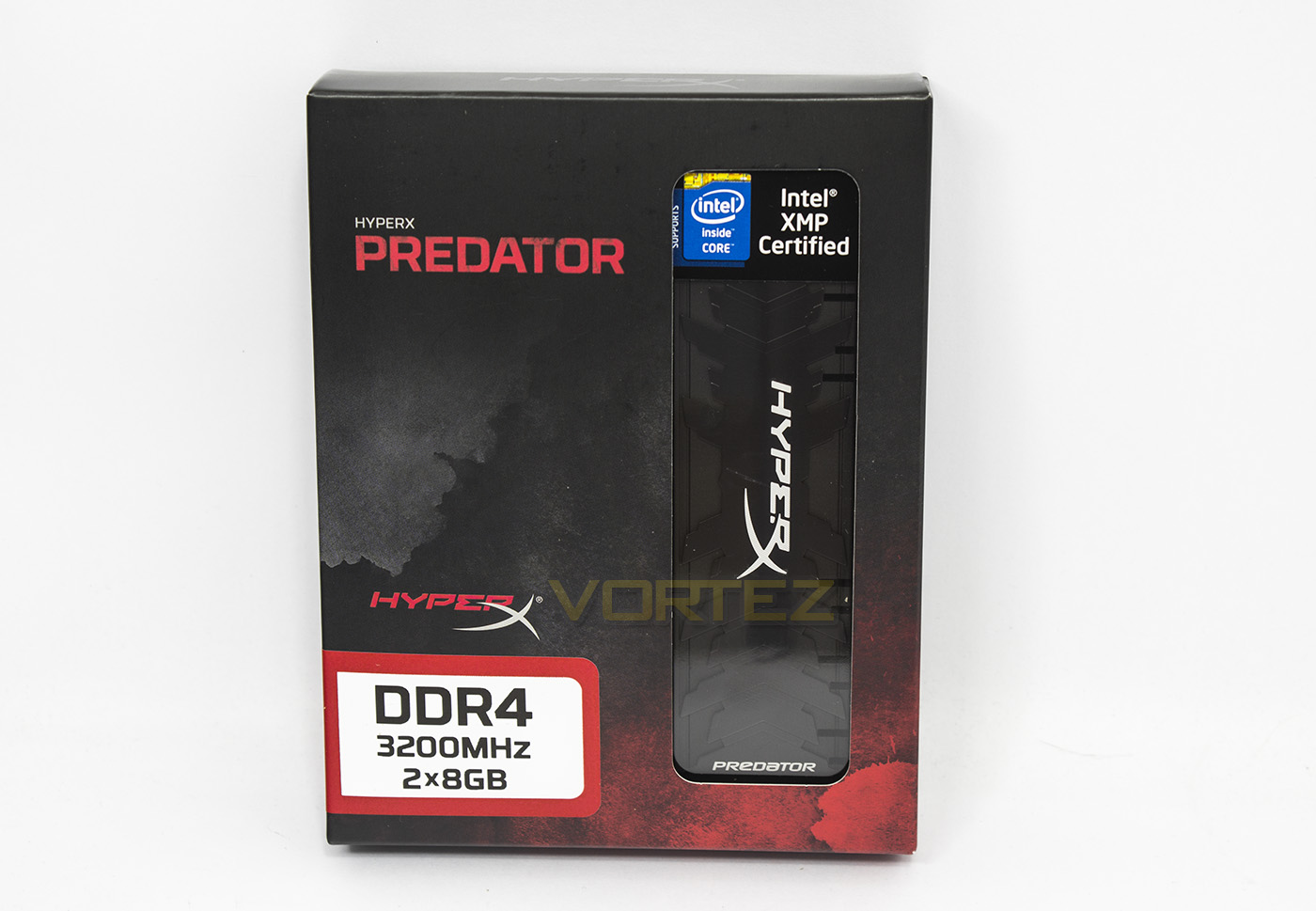
The packaging is similar to other HyperX products, with a grey/red grungy background which looks attractive and interesting. The product name and variety is clearly labelled as to avert any confusion.
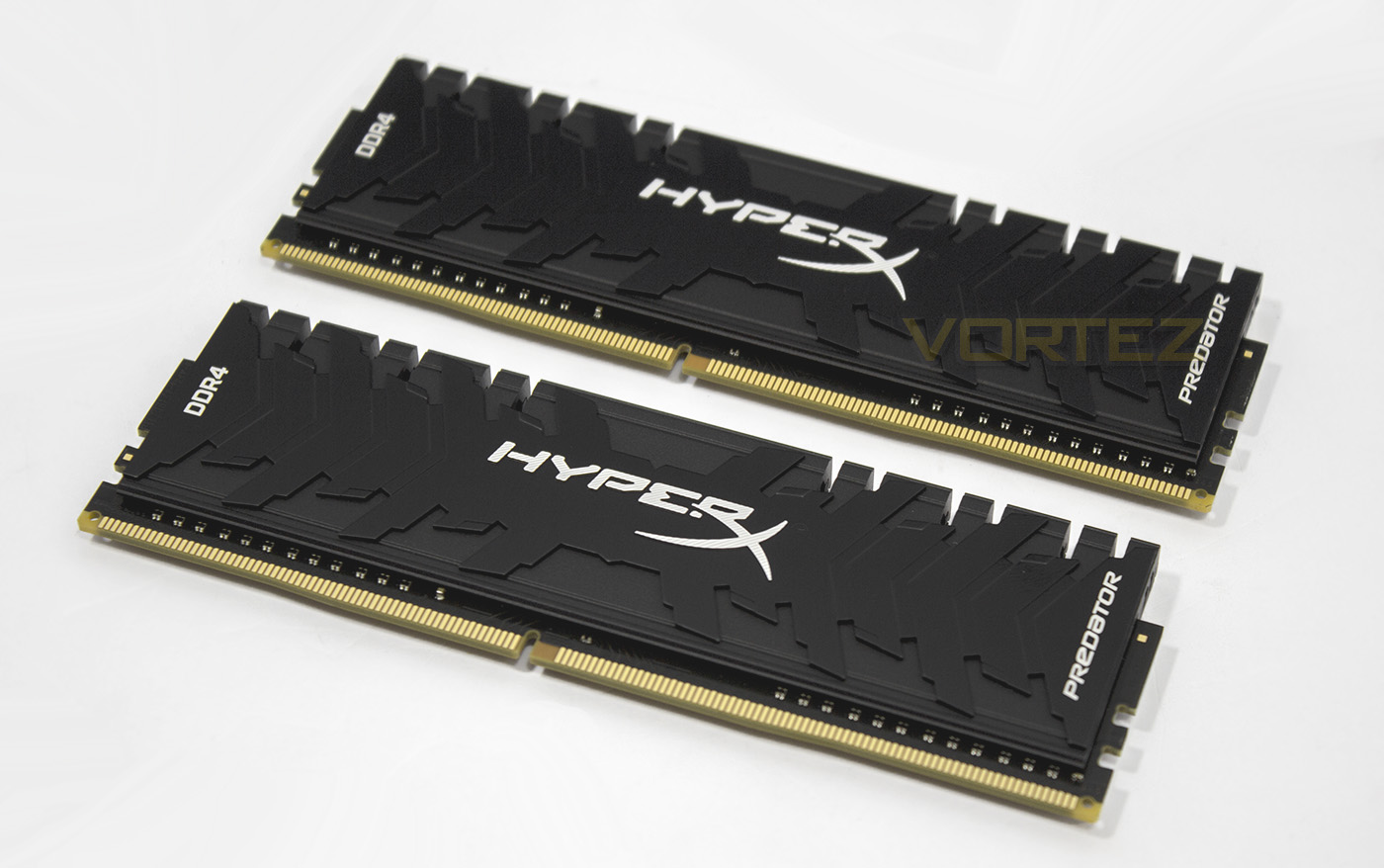
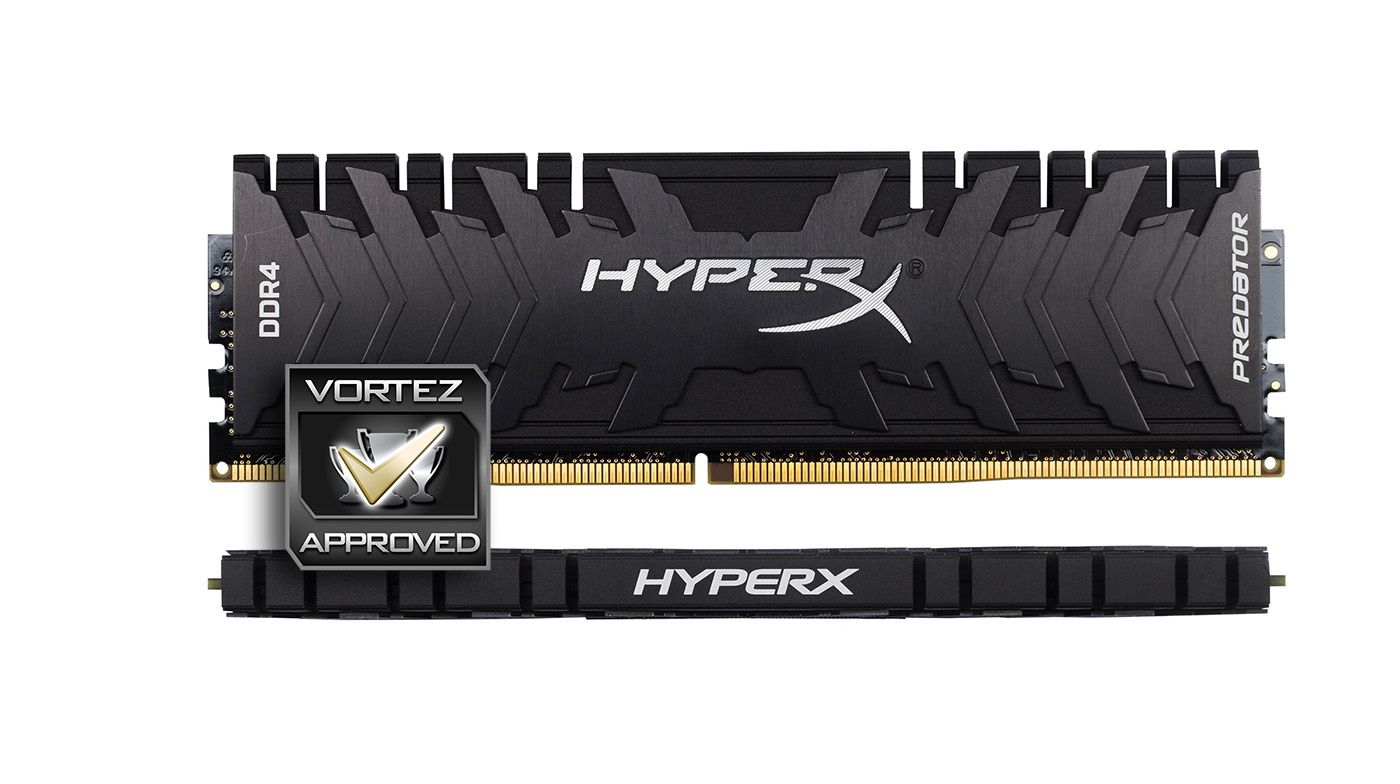
The memory itself is all black aside from the ‘HyperX’ ‘DDR4’ and ‘Predator’ letting, while the heatsink is composed of thick aluminium, with an additional stylised metal plate fixed to it, creating an interesting visual effect.
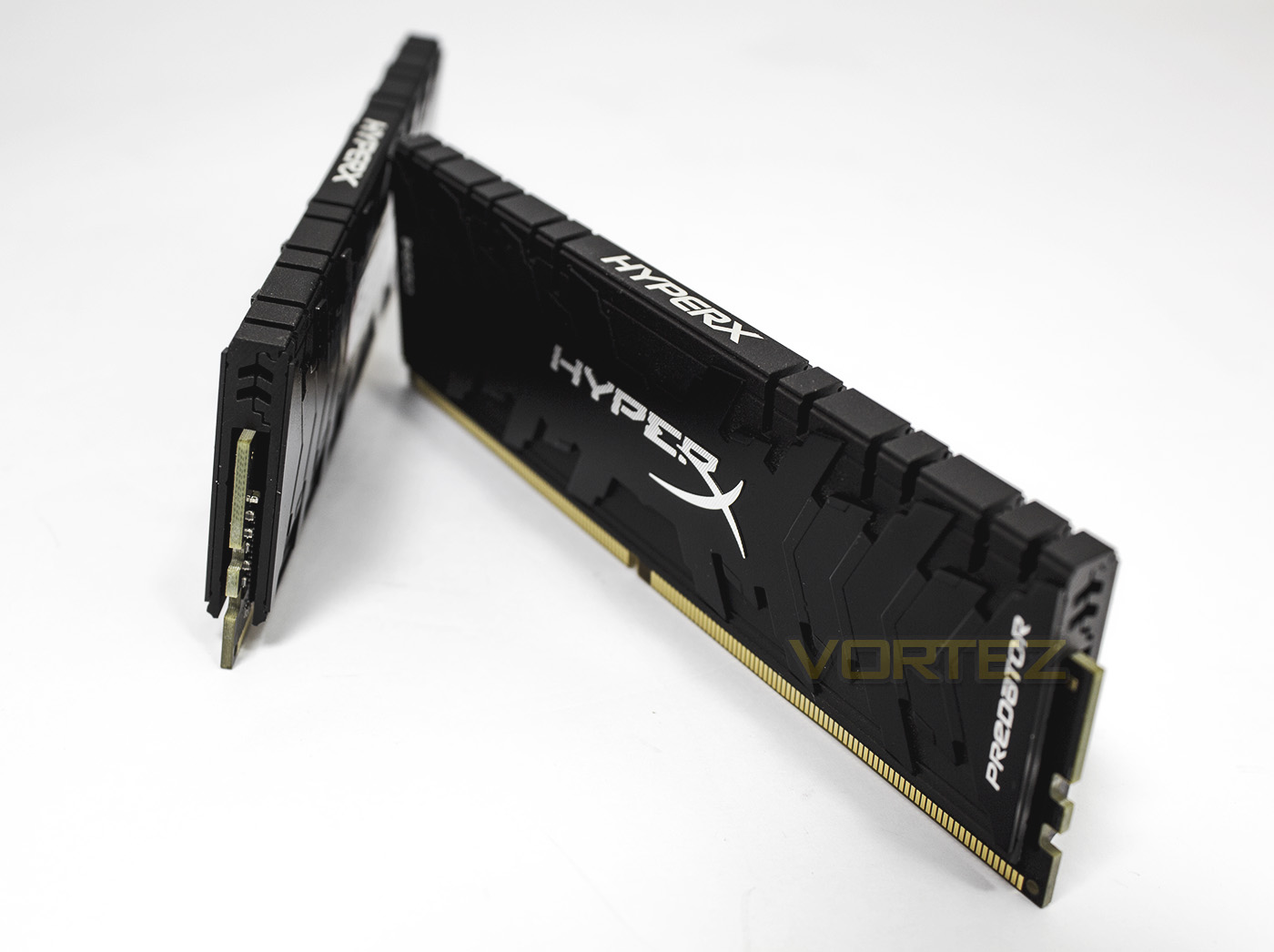
The heatsinks are designed to clamp together ensuring excellent contact for cooling, however this makes them very difficult to remove. It appears that HyperX Predators are using SK Hynix ICs, Though the 3600-4000MHz variants are likely cherry picked, or an alternative.
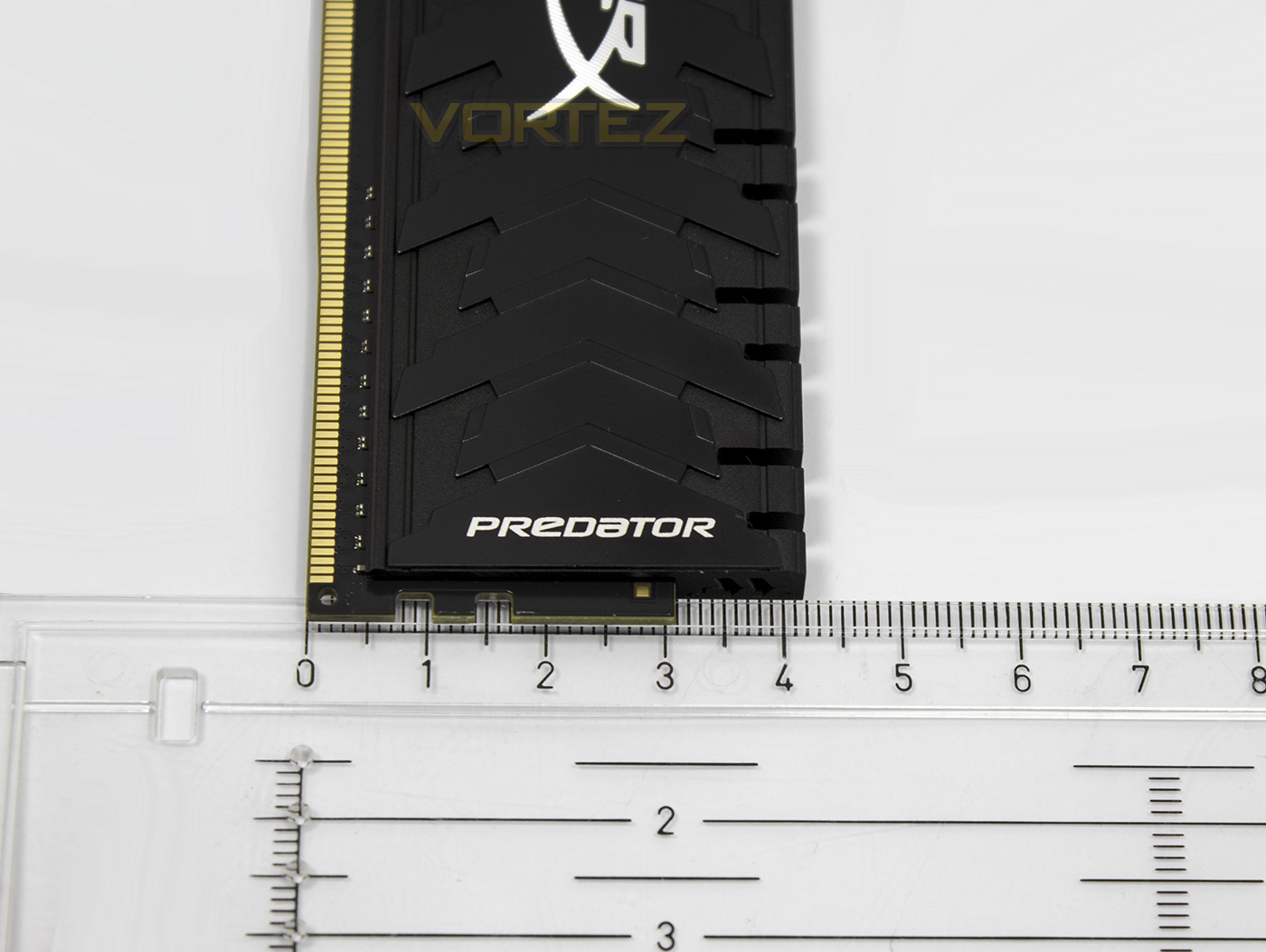
As previously discussed, HyperX memory has a long tradition of ridiculously tall heatsinks, fortunately, the latest line of DDR4 Predator is a very sensible 42.2mm tall.
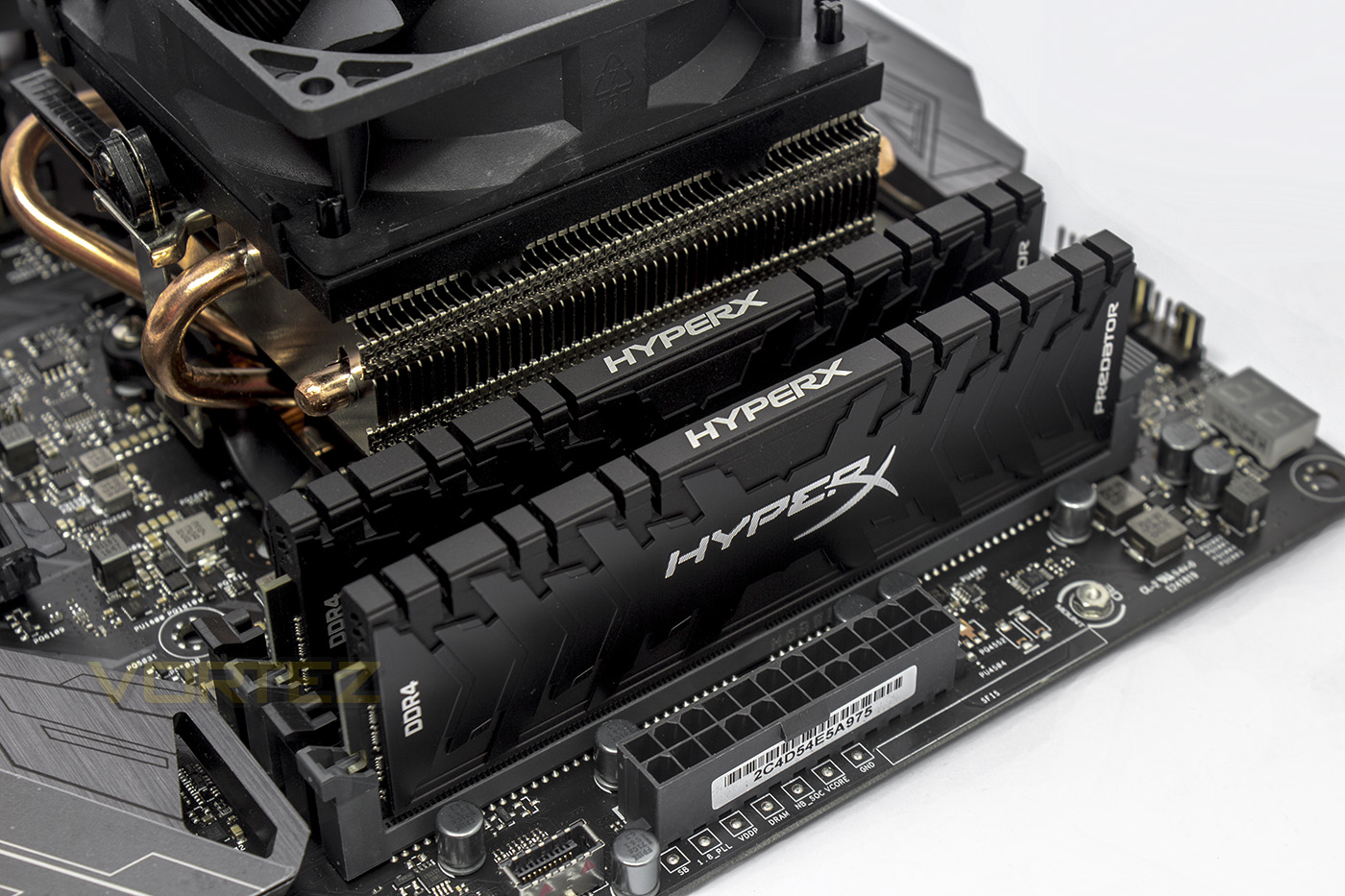
Installed in our system, the HyperX Predator stands out yet compliments the overall aesthetic.
Test Setup
Memory Configurations
‘HyperX Predator DDR4 3200MHz’
2666MHz @ 14-14-14-14-32-69-1T
2800MHz @ 14-14-14-14-32-69-1T – Highest C14 Frequency (Not tested)
2666MHz @ 16-16-16-16-36-62-1T
2933MHz @ 16-16-16-16-36-62-1T
3200MHz @ 16-16-16-16-36-62-1T – Failed
3200MHz @ 16-18-18-18-36-69-1T – XMP 2.0 (Highest reached frequency)
Test Setup
Cooling Corsair Hydro H115i
MotherboardASUS ROG Crosshair VI Hero
Graphics Radeon RX 480 8GB
Storage Corsair Force LE 480GB
PSU Corsair RM 750X 80 Plus Gold Certified PSU
Compared against
Corsair Vengeance LPX
Team Dark Pro
Team Delta RGB
‘HyperX Predator DDR4 3200MHz’
2666MHz @ 14-14-14-14-32-69-1T
2800MHz @ 14-14-14-14-32-69-1T – Highest C14 Frequency (Not tested)
2666MHz @ 16-16-16-16-36-62-1T
2933MHz @ 16-16-16-16-36-62-1T
3200MHz @ 16-16-16-16-36-62-1T – Failed
3200MHz @ 16-18-18-18-36-69-1T – XMP 2.0 (Highest reached frequency)
Test Setup
Cooling Corsair Hydro H115i
MotherboardASUS ROG Crosshair VI Hero
Graphics Radeon RX 480 8GB
Storage Corsair Force LE 480GB
PSU Corsair RM 750X 80 Plus Gold Certified PSU
Compared against
Corsair Vengeance LPX
Team Dark Pro
Team Delta RGB
Benchmarks
Cinebench R15 – CPU
SiSoftware SANDRA – Memory bandwidth
AIDA64 – Memory Benchmarks
PCMark 8 – Photoshop
Games – Dawn of War III
SiSoftware SANDRA – Memory bandwidth
AIDA64 – Memory Benchmarks
PCMark 8 – Photoshop
Games – Dawn of War III
Other Software
Temperature Analysis: Aida64/Ryzen Master
System Monitoring and Stress Testing: AIDA64 Stability Test
CPU Specification Monitoring: CPU-Z
System Monitoring and Stress Testing: AIDA64 Stability Test
CPU Specification Monitoring: CPU-Z
Overclocking
It appears that HyperX have created a memory module that is stable and reliable at its guaranteed frequencies, rather than giving any leeway in regards to overclocking. Without having to make any adjustments at all, the HyperX predator boots in at the JEDEC 2400MHz CL17 standard, however if you want tighter timings, we were able to boot in at 2666MHz and 2800MHz with timings of 14-14-14-14-36. Our memory kit was fine between 2666MHz and 3000MHz with CL 16-16-16-16-36-62, over 3000MHz failed using these timings. The XMP frequency and timings gave the highest frequency, being 3200MHz @ CL16-18-18-18-36, and despite what we tried, we were unable to squeeze any more out of it.
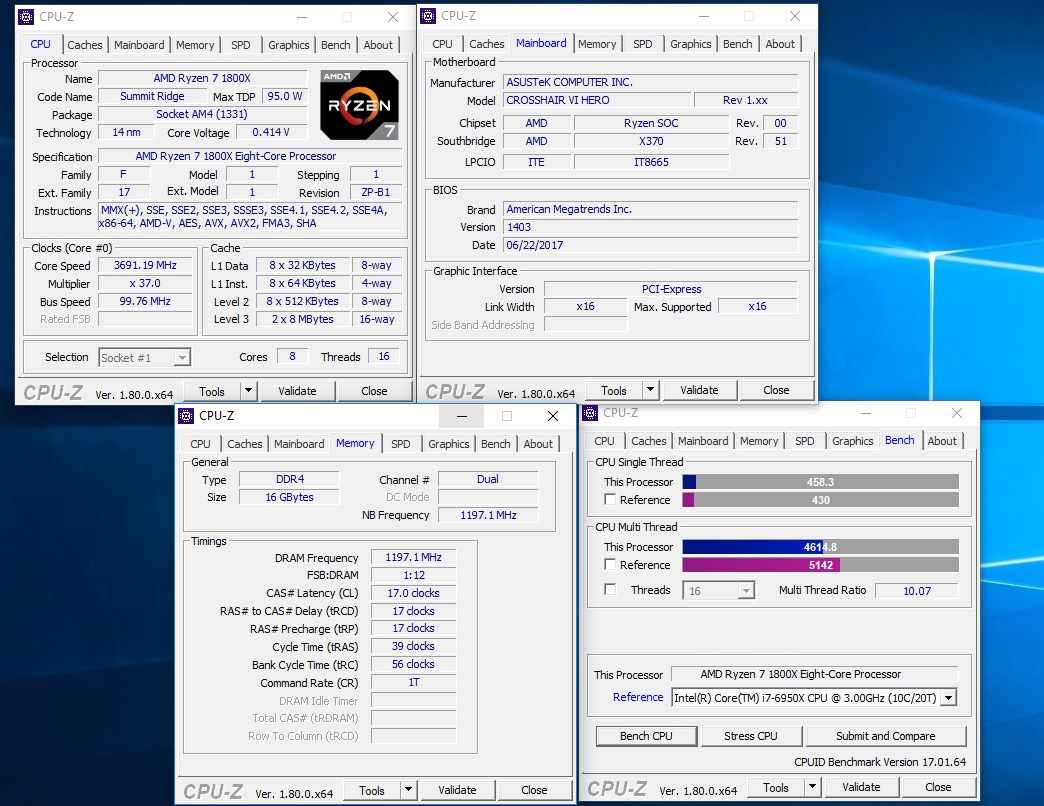
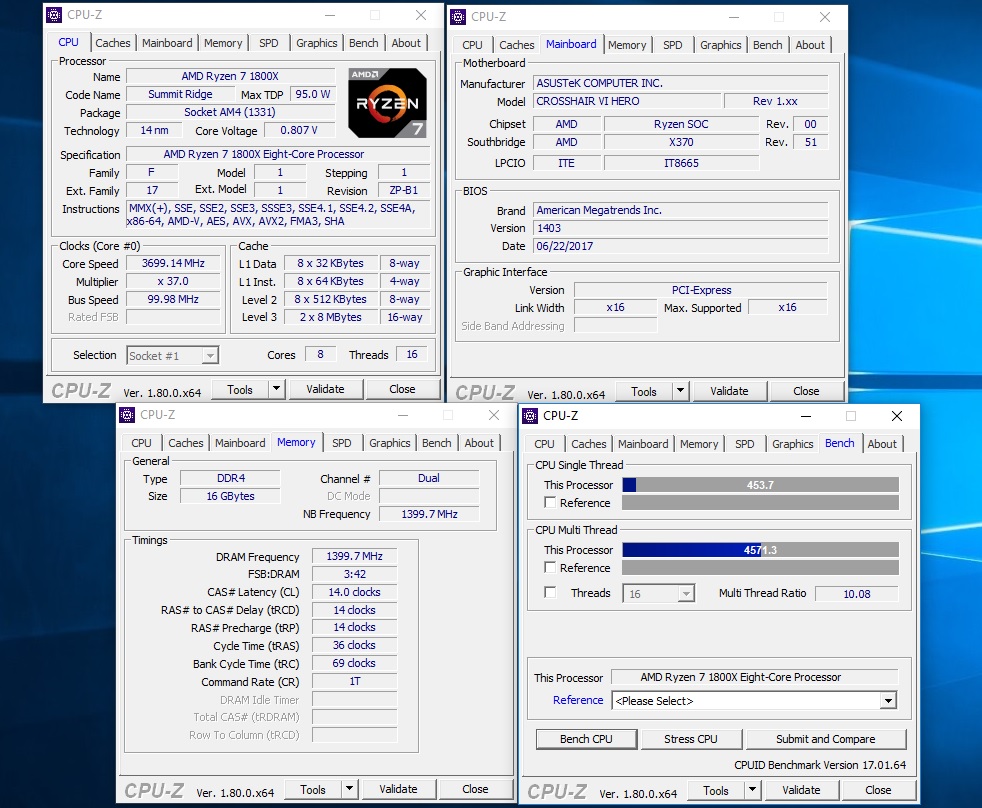
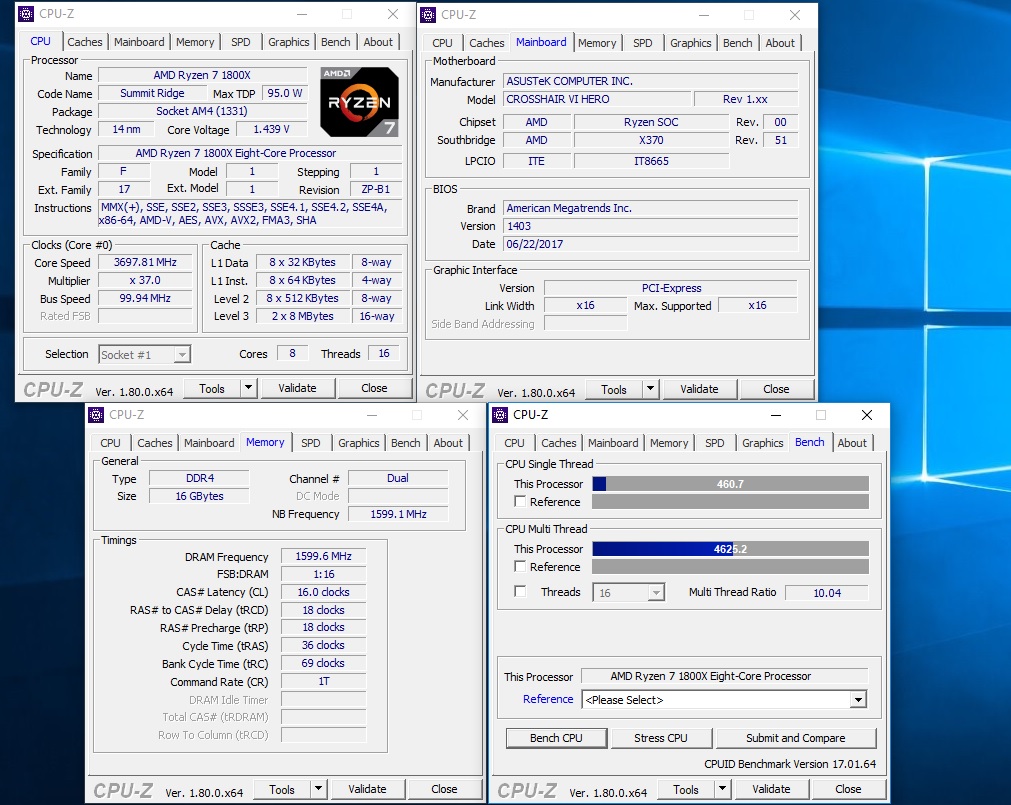
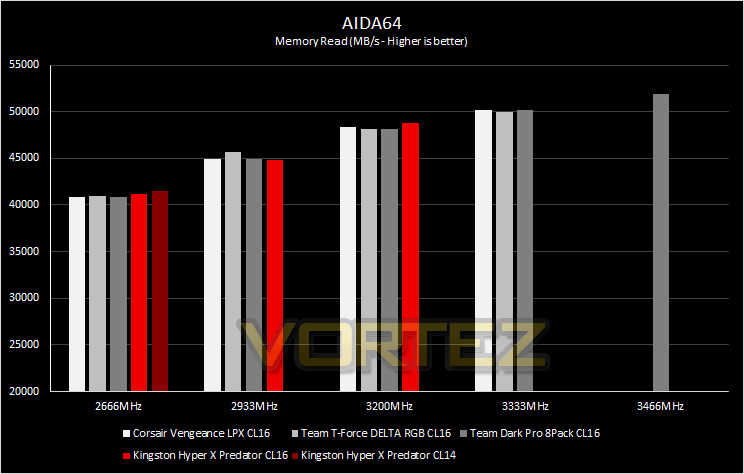
Memory Transfer Performance – AIDA64
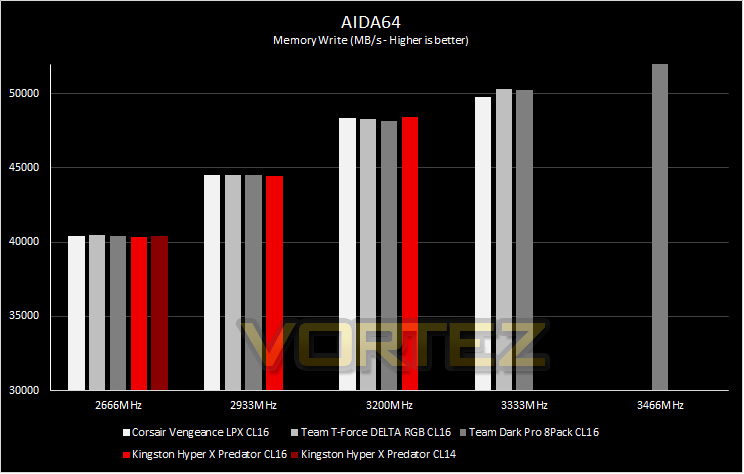
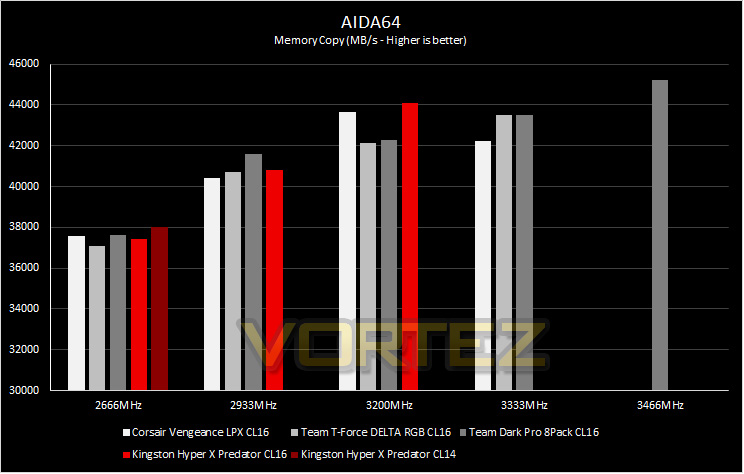
AIDA64 Product PageMemory bandwidth benchmarks (Memory Read, Memory Write, Memory Copy) measure the maximum achiveable memory data transfer bandwidth. The code behind these benchmark methods are written in Assembly and they are extremely optimized for every popular AMD, Intel and VIA processor core variants by utilizing the appropriate x86/x64, x87, MMX, MMX+, 3DNow!, SSE, SSE2, SSE4.1, AVX, and AVX2 instruction set extension.
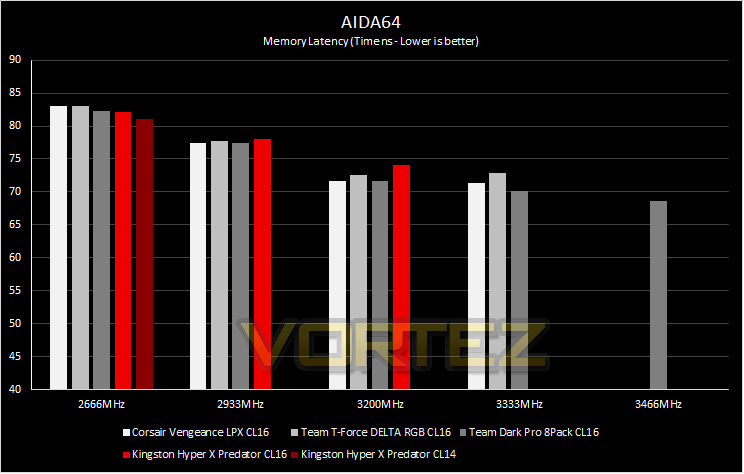
The Memory Latency benchmark measures the typical delay when the CPU reads data from system memory. Memory latency time means the penalty measured from the issuing of the read command until the data arrives to the integer registers of the CPU.
The Memory Latency benchmark measures the typical delay when the CPU reads data from system memory. Memory latency time means the penalty measured from the issuing of the read command until the data arrives to the integer registers of the CPU.
Bandwidth Performance – SiSoftware SANDRA
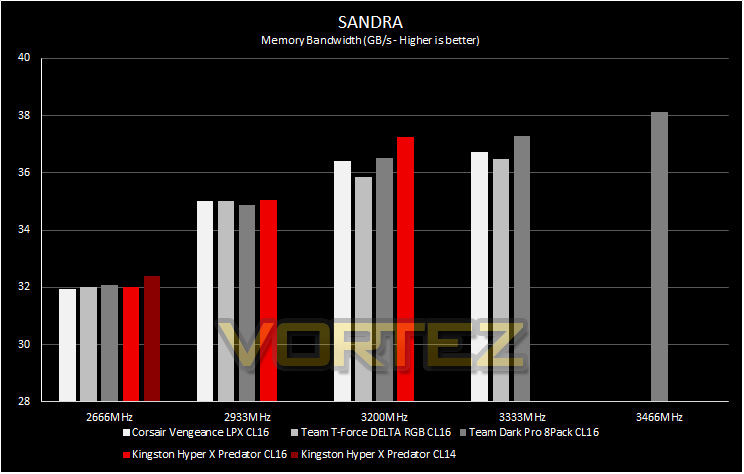
SANDRA isn’t always a benchmark that is included in hardware reviews but I believe it shouldn’t be ignored. SANDRA provides a vigorous package that tests your system in a rather large array of benchmarks. There are many aspects of benchmark that can be executed.
Processing Power Performance – Cinebench R15
CINEBENCH can measure systems with up to 64 processor threads. This test scene contains approximately 2,000 objects which in turn contain more than 300,000 polygons in total, and uses sharp and blurred reflections, area lights, shadows, procedural shaders, antialiasing, and much more. The result is displayed in points (pts). The higher the number, the faster your processor.
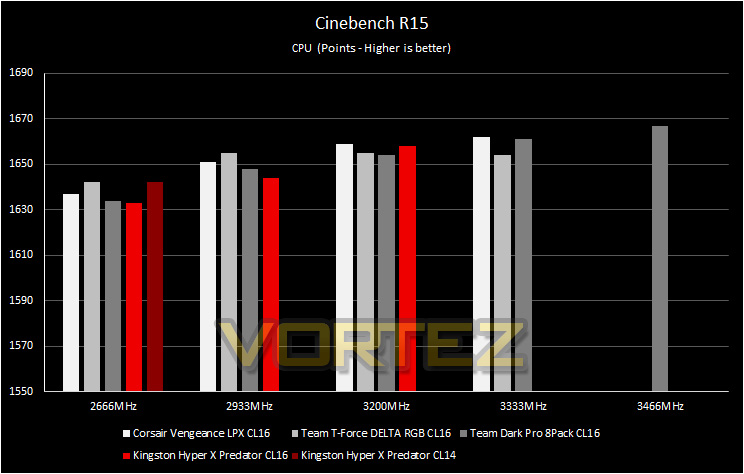
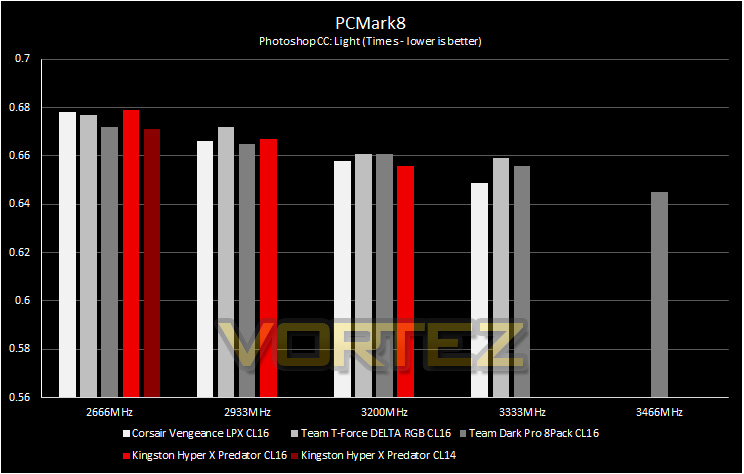
Image Editing Performance – PCMark 8 Photoshop
PCMark 8 Product Page Developed in partnership with Benchmark Development Program members Acer, AMD, Condusiv Technologies, Dell, HGST, HP, Intel, Microsoft, NVIDIA, Samsung, SanDisk, Seagate and Western Digital, PCMark 8 is the latest version in FutureMark’s popular series of PC benchmarking tools. Improving on previous releases, PCMark 8 includes new tests using popular applications from Adobe and Microsoft.
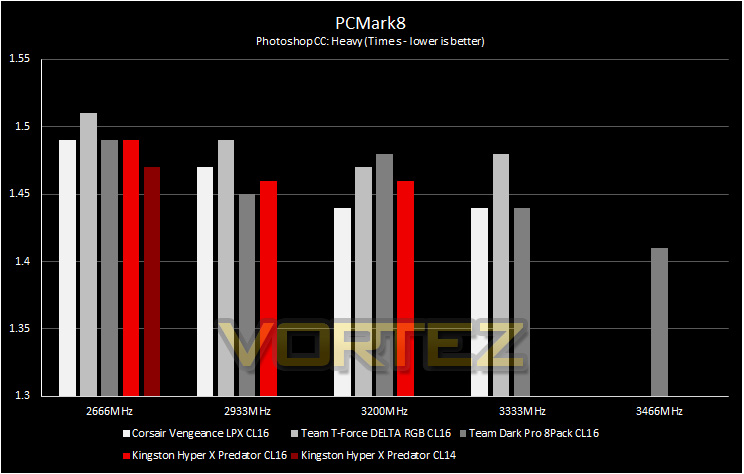
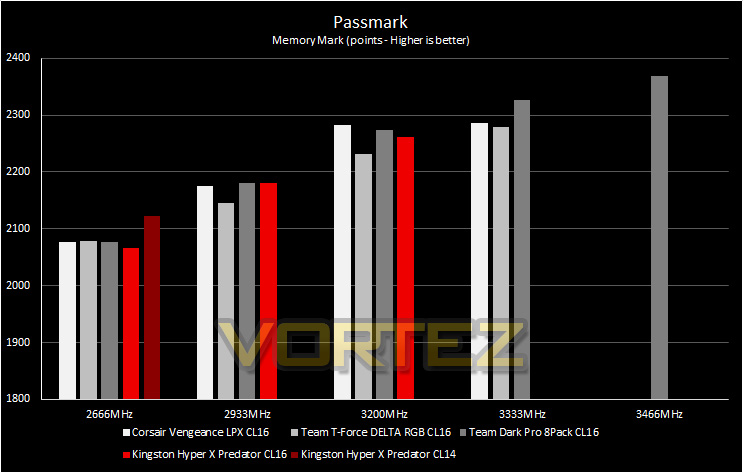
PassMark – Memory Mark
PassMark Performance Test. Fast, easy to use, PC speed testing and benchmarking. PassMark PerformanceTest allows you to objectively benchmark a PC using a variety of different speed tests and compare the results to other computers.
Gaming Performance – Dawn of War III
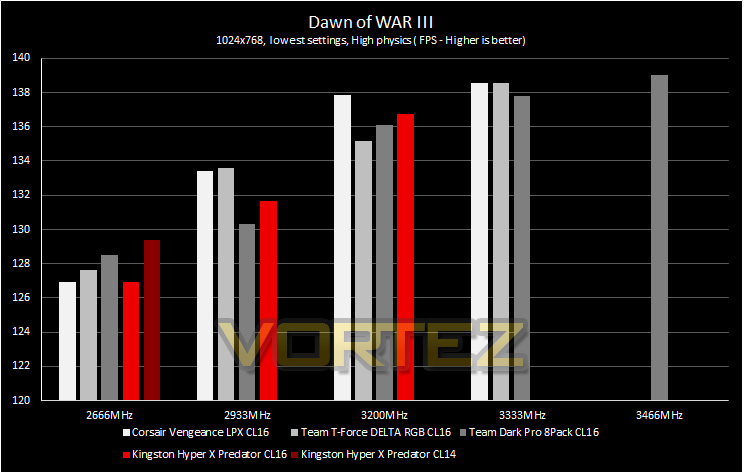
To test out the benefit of faster memory in a real world scenario, we have taken a recent game and created a CPU limited scenario by reducing the resolution and graphics settings to minimum, while setting the CPU dependent settings at their highest.
Conclusion
High performance memory can help you get every last bit of performance out of your system, and with the huge variety of memory kits available from the HyperX Predator line, you can be sure that there is a flavour guaranteed to hit the spot for your system. If you aren’t fond of RGB lighting, then the beautifully crafted ‘fierce’ heatsink will compliment any system without being obnoxious. Though considering the price, there are some great RGB alternatives available at a similar cost, almost by default creating a WIN for camp RGB.
We were a little disappointed by the lack of OC headroom in our testing, (we are using the 3200MHz kit) and there wasn’t much flexibility in tightening the timings also, resulting in the out-the-box XMP settings being the best you will get from this memory kit. After looking at some other memory kits that have huge OC headroom over the XMP rating, the HyperX Predator DDR4 kits should be taken at face value. Fortunately they have provided the option of 3600MHz kits, and if you are lucky, you may find the rare 4000MHz kits too (if they aren’t completely sold out yet). This will give users peace of mind, knowing that their memory will perform exactly as advertised using the XMP setting with minimal fuss.
As we have tested on the Ryzen platform, you can be confident that using the latest BIOS for your motherboard, there are no lingering compatibility issues, however, you may want to stick to 3200MHz DDR4, as anything higher will be a bit of a gamble, while Intel systems could benefit more from the higher frequencies.
HyperX have created a beautiful memory module that is available in a wide range of low latency, high-frequency flavours that can be relied upon to bring solid performance to your system.
Pros
+ Uses JEDEC 2400MHz Standard
+ Attractive, low heatsink design
+ High compatibility
+ Available as single, dual, and quad Channel kits
+ High performance 3600MHz+ available (If you can find them)
+ Lifetime Warranty
Cons
– Price
– No Overclock headroom
+ Uses JEDEC 2400MHz Standard
+ Attractive, low heatsink design
+ High compatibility
+ Available as single, dual, and quad Channel kits
+ High performance 3600MHz+ available (If you can find them)
+ Lifetime Warranty
Cons
– Price
– No Overclock headroom
Click here for an explanation of our awards at Vortez.net.