Want to dramatically improve the performance of your machine? We test the V+ from Kingston.
Product on Review: Kingston SSDNow V+ 128GB
Manufacturer and Sponsor: Kingston
MSRP: £215

With prices slowly dropping on SSDs, never has there been a better time to invest in a rapid storage device for your windows boot drive. Being lower in capacity compared to the traditional hard drive has meant that many abstain from investing in 30-60GB for their boot drive which is understandable. But since 100GB+ is now available at a much more affordable price, there is a keen attraction to making the move.
Incorporating the Toshiba internals (SNVP325-S2) this drive is the 2nd generation supporting TRIM . So there is no need to flash firmware to get TRIM support, it comes as standard on this 128GB unit I am reviewing today. The V+ series boasts some speedy performance gains over the original V series of SSD using MLC NAND Flash and a claim of 1,000,000 hours MTBF (mean time before failure) which translates to 114 years just in case you wanted to try and out live the Guinness World record holder.
Kingston’s Take:
| Kingston® introduces the new SSDNow V+ solid-state drive to help consumers and organisations of all sizes enhance the performance and lifecycle of computers that have a Serial ATA (SATA) interface. Faster and more reliable than a standard hard disk drive, SSDNow V+ is now available in 64 GB, 128 GB, 256 GB and 512 GB capacities. |
Specifications
• Sequential Read Throughput — 230MB/s
• Sequential Write Throughput — 180MB/s
• Form Factor — 2.5″
• Interface — SATA 1.5 Gb/sec. and 3.0 Gb/sec
• Capacity — 64 GB, 128 GB, 256 GB, 512 GB
• Storage temperatures — -40 – 85°C
• Operating temperatures — 0 – 70°C
• Dimensions — 69.85 x 100 x 9.5 mm
• Weight — 84 gram
• PCMARK® HDD 2005 Score — 64 GB — 38,177
128 GB — 38,065
256 GB — 38,272
512 GB — 37,974
• Vibration operating — 2.17G
• Vibration non-operating — 20G
• Power specs — 2.6 W – active / 0.15W Idle
• Life expectancy — 1,000,000 Hrs mean time before failure
• Operating shock — 1500G
Closer Look
The design of the packaging for the Kingston SSDNow V+ follows similar suite to other SSD products they have released. On the front some very brief details and around the back a more in-depth look at the technical specifications. Essentially this is box inside a box.
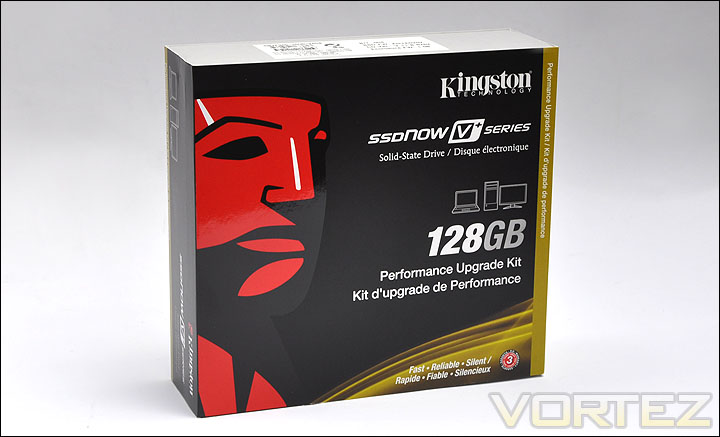
The SSDNow V+ Packaging
Within the plastic casing inside, there are an impressive assortment of bundled extras to get you well on your way. Firstly, there are the provided cables: USB (for use with the enclosure), SATA cable and molex-to-SATA cable. There is also a set of brackets included for you to mount the drive inside the computer case – this bracket allows 3.5″ to 2.5″ fixing. Underneath the bracket in the photo below you can see the SSD enclosure. This allows you to not only keep the drive protected, but will also transform the drive into a USB device. With the SSD inside the enclosure, the USB can be connected between the drive and a computer. A very novel idea, as not everyone wants to keep their SSD in a permanent spot. Bundled with the V+ drive is cloning software enabling you to get well on your way to transferring data or even building your new boot drive.
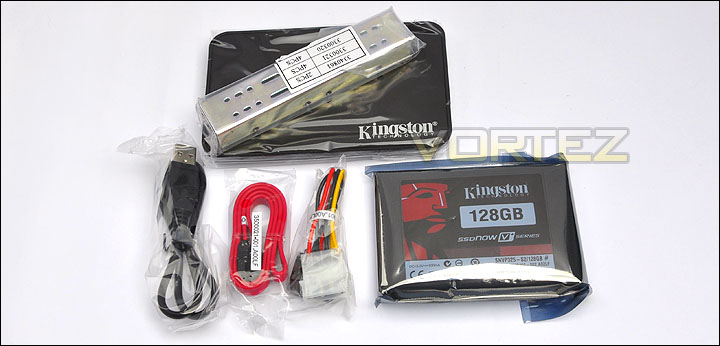
The included accessories with the SSDNow V+
Taking the SSD out of its anti-static sealed sleeve there is no mistaking who the manufacturer is or what the capacity we are dealing with here. The imagery and arrangement on the sticker is similar to the packaging we just took a look at. The important thing to note here on the sticker is the product code number, because this tells us that this SSD is the SNVP325-S2 meaning this has been revised. So its the 2nd generation with updated firmware and a different controller from the 1st generation SSDs. No longer are these drives utilising the Samsung controller, but a Toshiba chip has been its successor.
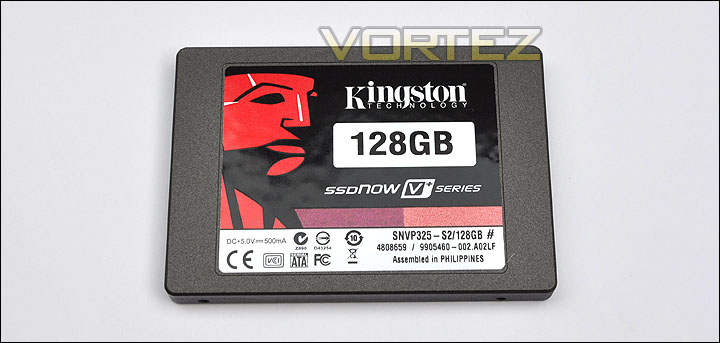
Kingston SSDNow V+ drive
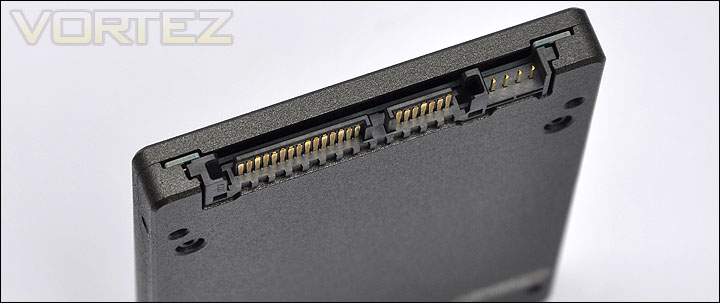
Taking a quick look at the back of the SSD it is evident the drive uses SATA for its connectivity. A SATA power connector and SATA cable will be required to use this drive – unless of course you slide the drive into the provided enclosure. In this instance the USB cable will be required.
SATA ports on the back of the drive
Lastly, the surface of this SSD has a rough, grainy feel to it. Incidentally, on the underside there are 4 screw holes, on the sides there are also a further 4 screw holes. Giving you plenty of options for installing this into a computer chassis.

The surface texture on the drive, with mounting holes
Testing Methodologies
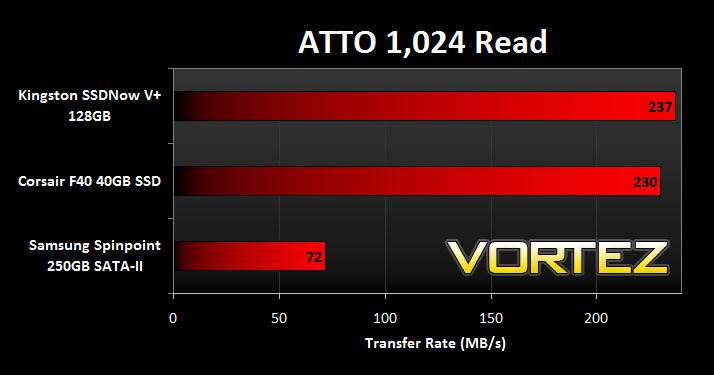
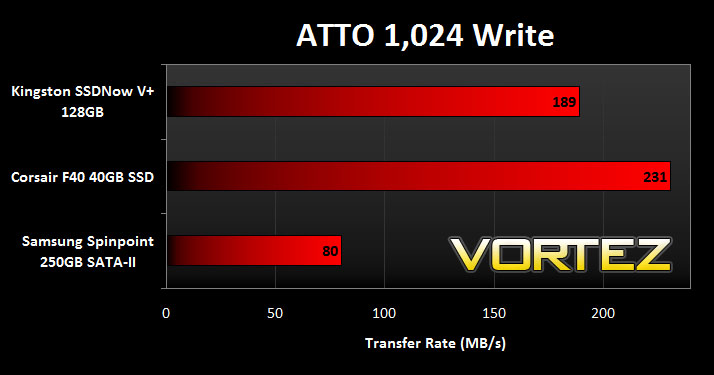
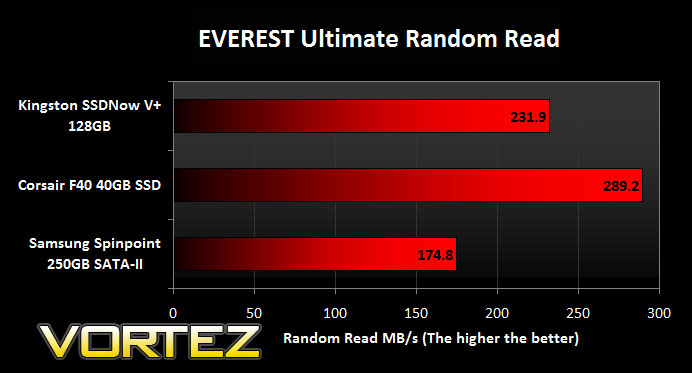
With only having tested one SSD previously, when testing the Kingston SSD I will be comparing it against a Corsair F40 and a traditional SATA-II HDD. The comprehensive list of benchmarking tools should provide comprehensive and conclusive results.
The benchmarks to be considered are as follows
ATTO Disk Benchmark v2.46
EVEREST Ultimate 5.50
CrystalDiskMark 3.0
Iometer
SiSoftware SANDRA
Windows 7 Boot Time Test
Test system
CPU AMD Phenom II X6 1055T 2.8GHz
Motherboard ASUS M4A89TD PRO (890FX)
Graphics XFX HD5870
Memory 4GB Mushkin EM3-10666 DDR3
HDD Samsung Spinpoint 250GB SATA-II
PSU Enermax Revolution85+
OS Microsoft Windows 7 Professional 64-Bit
The above tests will be conducted by putting the Kingston SSDNow V+ against the Corsair F40 and the Samsung Spinpoint 250GB SATA-II. Read over the following pages to discover results in this interesting battle.
ATTO Disk Benchmark v2.46
“The ATTO Disk Benchmark performance measurement tool is compatible with Microsoft Windows. Measure your storage systems performance with various transfer sizes and test lengths for reads and writes. Several options are available to customize your performance measurement including queue depth, overlapped I/O and even a comparison mode with the option to run continuously. Use ATTO Disk Benchmark to test any manufacturers RAID controllers, storage controllers, host adapters, hard drives and SSD drives and notice that ATTO products will consistently provide the highest level of performance to your storage.”
EVEREST Ultimate 5.50
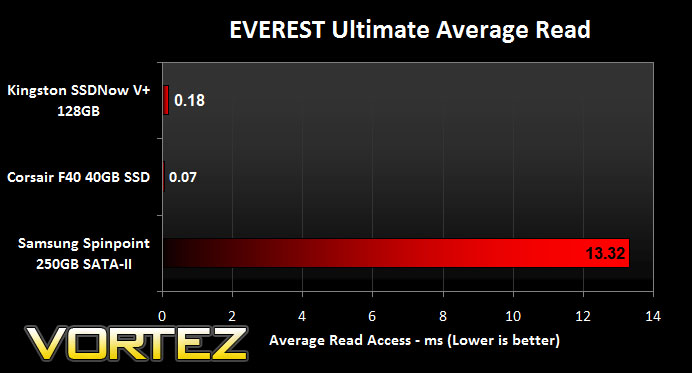
EVEREST Ultimate Edition is an industry leading system diagnostics and benchmarking solution for enthusiasts PC users, based on the award-winning EVEREST Technology. During system optimizations and tweaking it provides essential system and overclock information, advanced hardware monitoring and diagnostics capabilities to check the effects of the applied settings. CPU, FPU and memory benchmarks are available to measure the actual system performance and compare it to previous states or other systems.
CrystalDiskMark 3.0
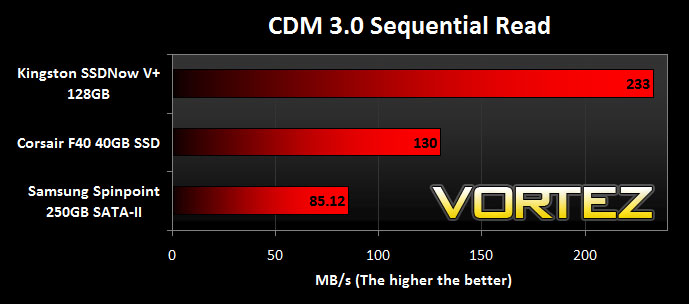
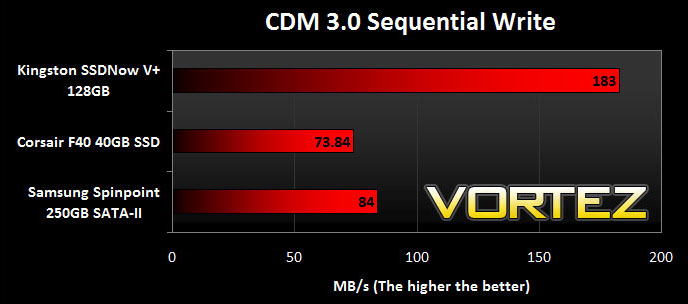
CrystalDiskMark is a disk benchmark software that analyses different types of hard drive. Giving sequential benchmark write and read statistics in MB/s. A simple program that is very useful.”
Iometer
Iometer is based on a client–server model, where one instance of the Iometer graphical user interface is managing multiple ‘workers’ (each one representing a separate Dynamo.exe process) which are doing the I/O. Iometer performs Asynchronous I/O – accessing files or block devices (later one allowing to bypass the file system buffers).
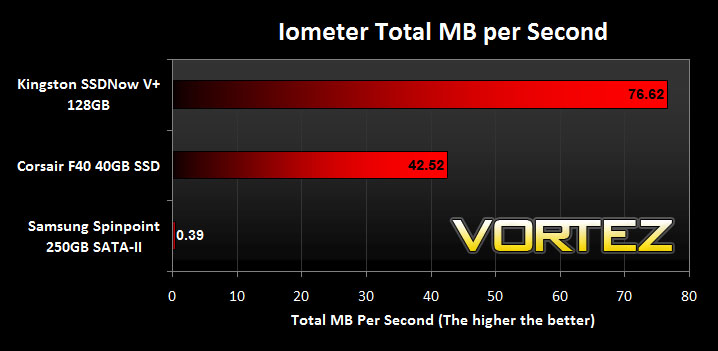
Iometer allows the configuration of disk parameters such as the ‘Maximum Disk Size’, ‘Starting Disk Sector’ and ‘# of Outstanding I/Os’. This allows a user to configure a test file upon which the ‘Access Specifications’ configure the I/O types to the file.
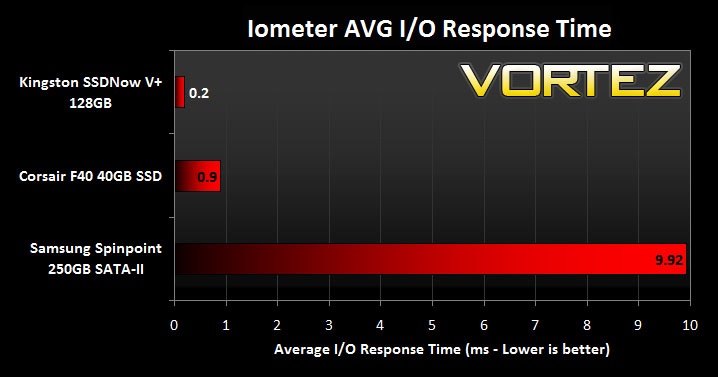
For the purpose of this test. The 4K 50%/50% read/write file will be under the examination – reporting back on MBs per Second and Average Response Time.
SiSoftware SANDRA
SiSoftware Sandra (the System ANalyser, Diagnostic and Reporting Assistant) is an information & diagnostic utility. It should provide most of the information (including undocumented) you need to know about your hardware, software and other devices whether hardware or software.
Sandra is a (girl) name of Greek origin that means “defender”, “helper of mankind”. We think that’s quite fitting.
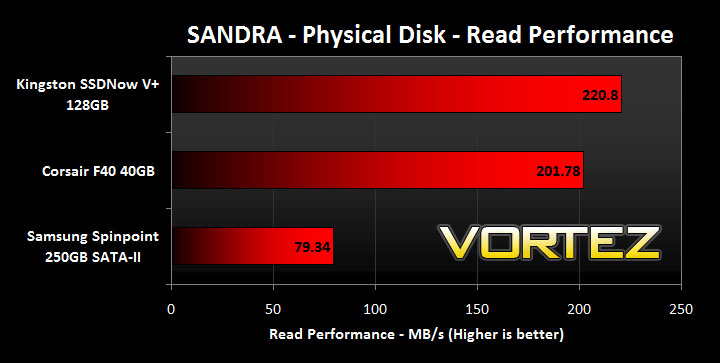
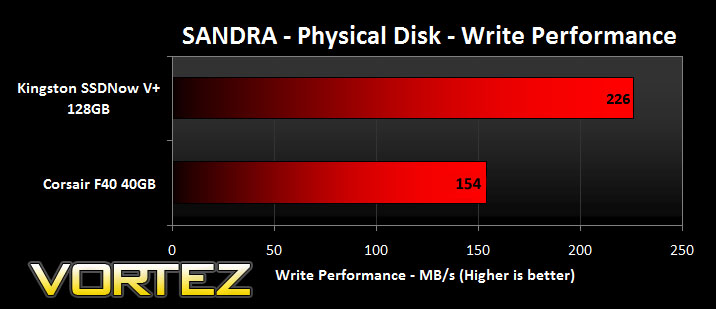
It works along the lines of other Windows utilities, however it tries to go beyond them and show you more of what’s really going on. Giving the user the ability to draw comparisons at both a high and low-level. You can get information about the CPU, chipset, video adapter, ports, printers, sound card, memory, network, Windows internals, AGP, PCI, PCI-X, PCIe (PCI Express), database, USB, USB2, 1394/Firewire, etc.
Real World – Windows 7 Boot Time
Synthetic testing is valuable in the examination of Solid State Drives. But some of the tests may not mean all that much to some readers so the final test in this review is a real world test showing the Windows 7 boot time.
In order to perform this test, a fresh install of Windows 7 Professional was run on a clean drive – the image of this install with no additional applications or drivers was exported for importing onto each drive at the time of testing. This will provide a clean and fair environment for comparing the boot times on each of the drives. The times were monitored using a stopwatch.
30 seconds for a cold boot into Windows 7 is mightily impressive. The Kingston drive beat the Corsair by 2 seconds, it might not be very much but enough to crown it the winner of the 3 drives on the test bench. Comparing the traditional drive to the SSDs shows a clear advantage in boot time, showing why SSDs provide exceptional speeds for boot drives and therefore proving why they are a good investment.
Conclusion
In the last 6 months SSD prices have dropped significantly giving over to an increase in sales. As with all new technology you will pay a premium, but as we have seen SSDs mature and the increase in demand this has meant consumers can invest without having to sell body parts.
The 128GB drive I have looked at today is ideal for an OS drive due to its size, and its performance too. The synthetic tests revealed some very encouraging results. Comparing it to the traditional SATA-II HDD there are massive gains to be had by upgrading to SSD. So far in our SSD tests, its the drive to beat.
6 months ago you would have been paying over £280 for this drive but latest prices reveal the Kingston SSDNow V+ 128GB drive to sit comfortably at around the £215 mark making it a good buy. The bundle the V+ comes in gets you well on your way to using the drive, most SSD manufacturers don’t go to such lengths to equip you with such extras but its a very good idea from Kingston. The cloning software in particular is a nice touch.
Pros
+ Ideal for an OS drive
+ TRIM Support
+ Great performance
+ 3 Years Warranty
Cons
– Similar speed drives are a little cheaper