







LEPA enter the cooling market with a stylish CPU cooler which is available in black or white and with a three-mode 120mm cooling fan.

Product on Review: LV12
Manufacturer and Sponsor: LEPA
Street Price: £30 GBP / $45 USD
LEPA may not be as well-known as other cooling brands but since their arrival in 2010 their focus has been on power supplies and computer cases but today we’ll be taking a look at their very first attempt at designing a CPU cooler. LEPA are from the same group as Enermax and therefore we expect good things from this new product today.
LV12 is LEPA’s first CPU cooler and it certainly arrives in style. Available in matt black or matt white, this cooler is stunning in its visual appearance and comes with a three-mode adjustable 120mm cooling fan – allowing the user to choose specific speed zones and finding that balance of silence or performance.
LEPA’s take on LV12
The CPU cooler LV12 is the result of extensive research and development. The engineers designed a slim and compact heat sink which avoids compatibility issues with higher RAM modules while maintaining a high performance capability. Therefore, LEPA relies on a new technique for efficient air stream conduction: Small air vents improve the air circulation inside the heat sink and increase the heat dissipation rate. The heat pipes rest directly on the CPU so that hot spots can be eliminated quickly. Due to these techniques, LEPA engineers were able to lower down the thermal resistance of the cooler to just 0.095°C/W.
Technical Specifications
Model Name
LPALV12
Compatible Sockets
Intel® LGA 775/1155/1156/1366/2011/1150
AMD®AM2/AM2+/AM3/AM3+/FM1/FM2/FM2+
Dimension
138(L)×85(W)×160(H)mm
Heat Sink Dimension
138(L)×60(W)×160(H)mm
Heat Sink Weight
460g
Heat Pipe
4 x Ø6mm
Heat Sink Material
Copper Heat Pipes/Aluminum Fins /Coating
Thermal Resistance
0.095°C/W
Thermal Grease
Dow Corning® TC-5121
Fan Dimension
120 x 120 x 25 mm
Fan Speed
800~1500/1800/2200r.p.m.
Fan Air Flow
40.7~76.6/91.6/112 CFM
69.2~130.2/174.4/213.1m3/h
Fan Static Pressure
0.83~1.8/2.43/3.64mmH2O
FAN MTBF
>160000
Fan Noise
8~17/20/23dBA
Fan Bearing Type
BOL Bearing
Fan Connector
4 pin PWM
LPALV12
Compatible Sockets
Intel® LGA 775/1155/1156/1366/2011/1150
AMD®AM2/AM2+/AM3/AM3+/FM1/FM2/FM2+
Dimension
138(L)×85(W)×160(H)mm
Heat Sink Dimension
138(L)×60(W)×160(H)mm
Heat Sink Weight
460g
Heat Pipe
4 x Ø6mm
Heat Sink Material
Copper Heat Pipes/Aluminum Fins /Coating
Thermal Resistance
0.095°C/W
Thermal Grease
Dow Corning® TC-5121
Fan Dimension
120 x 120 x 25 mm
Fan Speed
800~1500/1800/2200r.p.m.
Fan Air Flow
40.7~76.6/91.6/112 CFM
69.2~130.2/174.4/213.1m3/h
Fan Static Pressure
0.83~1.8/2.43/3.64mmH2O
FAN MTBF
>160000
Fan Noise
8~17/20/23dBA
Fan Bearing Type
BOL Bearing
Fan Connector
4 pin PWM
Packaging, Bundle & Fans
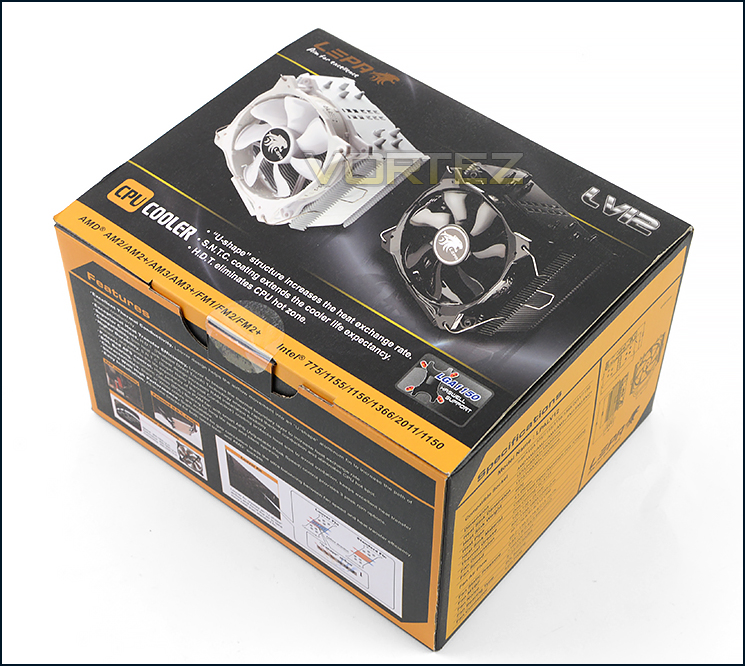
Packaging for LV12
LEPA present LV12 in a small black and amber box. This box has depictions of the cooler in both white and black variants – we’re reviewing the black version today. There is plenty of information surrounding the technical specifications for those who are interested in reading.
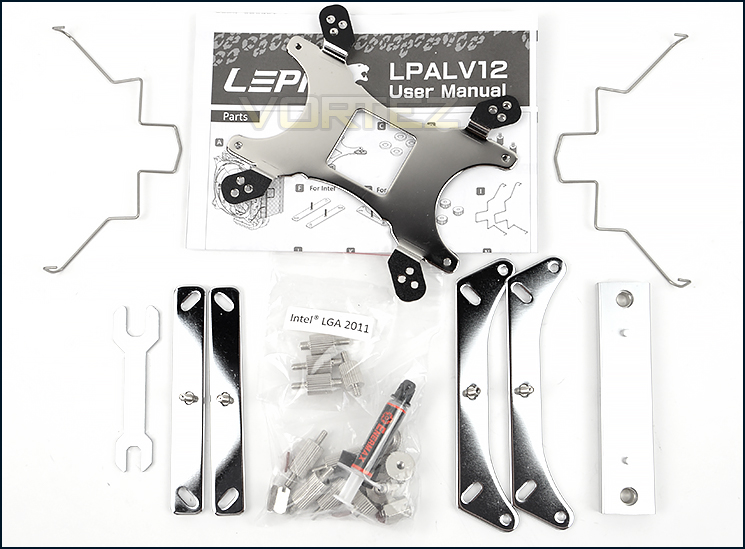
Bundled parts come packaged within individual boxes
Opening the box up there are a selection of items and components included within the bundle. LEPA include two fan clips for attaching an additional fan and include a small tube of Enermax thermal paste which is actually Dow Corning® TC-5121. LV12 has support for multiple socket types which include:
• Intel® LGA 775/1155/1156/1366/2011/1150
• AMD®AM2/AM2+/AM3/AM3+/FM1/FM2/FM2+
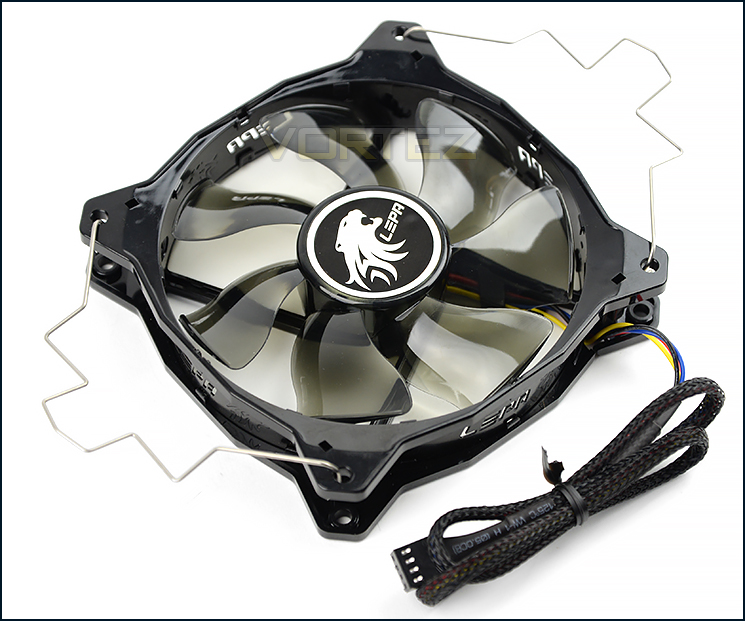
120mm cooling fan included
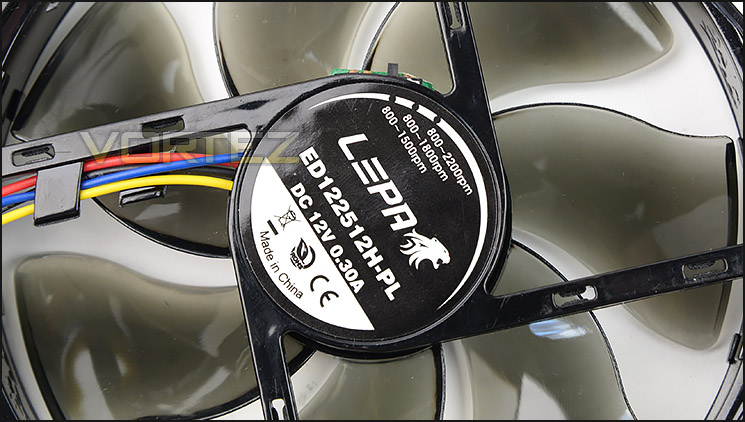
Three different modes for RPM
Bundled with LV12 is a 7-blade 120mm cooling fan (ED122512H-PL) which has a nicely braided cable. Since LEPA is from the same parent company as Enermax we can rest assured this fan is premium quality. Furthermore, there are three different modes for this fan to operate in; Silent (800-1500RPM), Performance (800-1800RPM) and Overclock (800-2200RPM). There is a small switch which allows you to adjust between each of the fan speeds, so this can be tweaked to the user’s requirements.
Closer Look
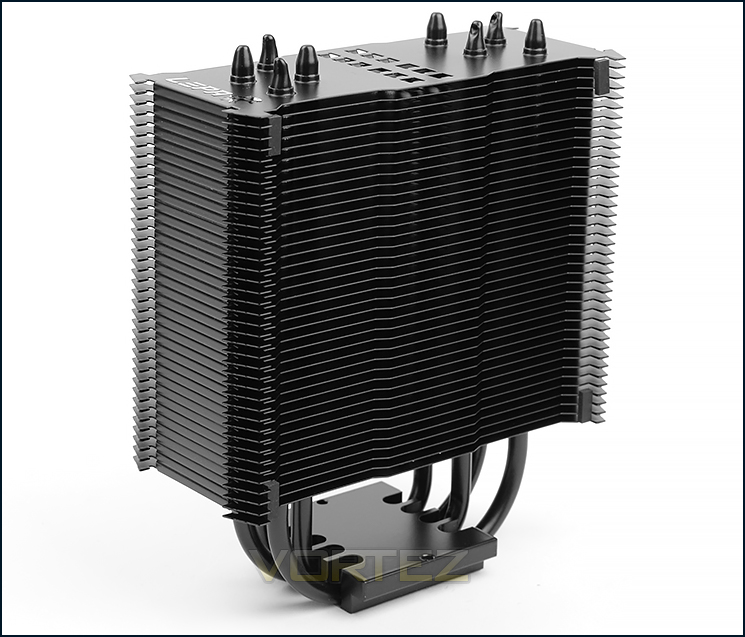
Super sleek and pleasing to the eye
LV12 uses a single heatsink design and weighs a mere 460g.
The biggest standout feature with LV12 is unquestionably the aesthetics. LEPA has given the blank variant a coating of matt black which not only looks very sleek but also protects it from corrosion.
Looking so stylish and being neutral in its theme, LV12 will coordinate with various system configurations, especially popular motherboard options which are black/grey in appearance.
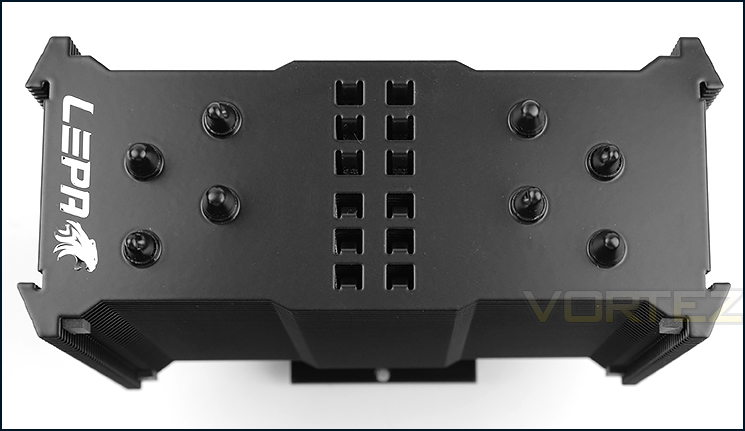
Four copper heatpipes pass through aluminium fins
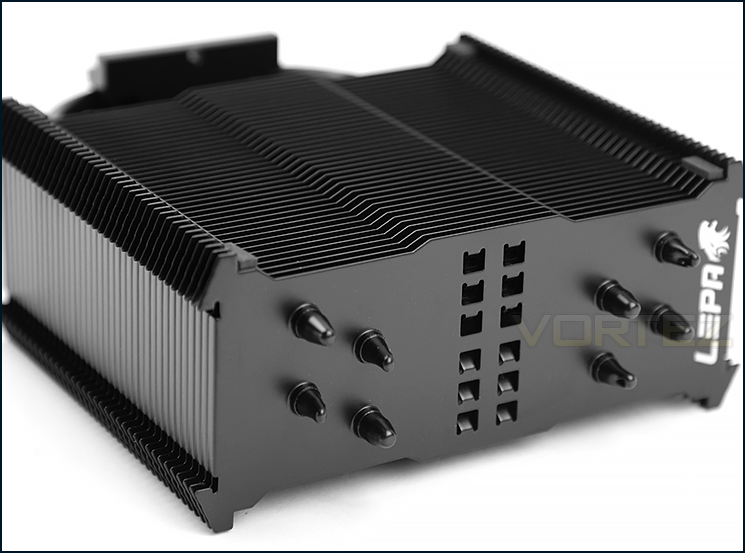
The contours of the aluminium fins
LV12 incorporates four copper heatpipes which as traditional CPU cooler heatsinks follow, pass through the aluminium fins. LEPA has placed a shiny metallic impression of their logo on one particular side of the uppermost fins.
This heatsink uses what LEPA term “Louver fins” which have small openings to encourage better air conduction.
The profile and contour of LV12 features a middle section which is convex and edges which step out.
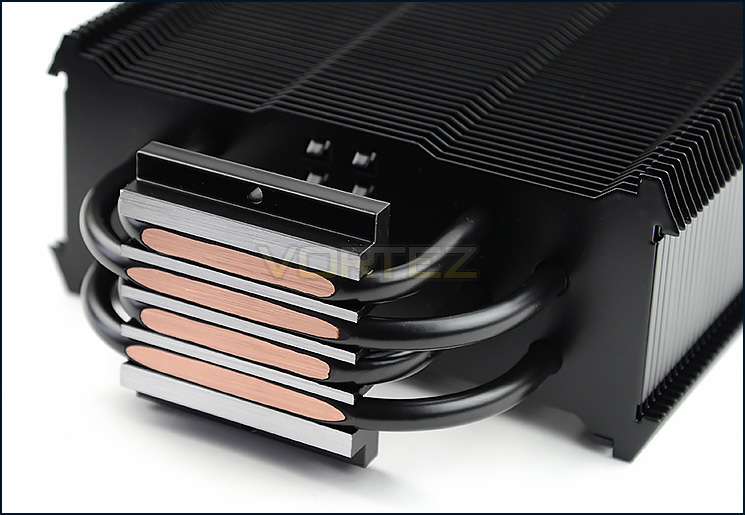
Direct touch base plate
Rather than have the heatpipes pass through the upper section of the baseplate, LEPA has given LV12 direct touch technology called H.D.T (Heatpipe Direct Touch). The intention behind this is to transfer heat more efficient and eliminate CPU hot spots.
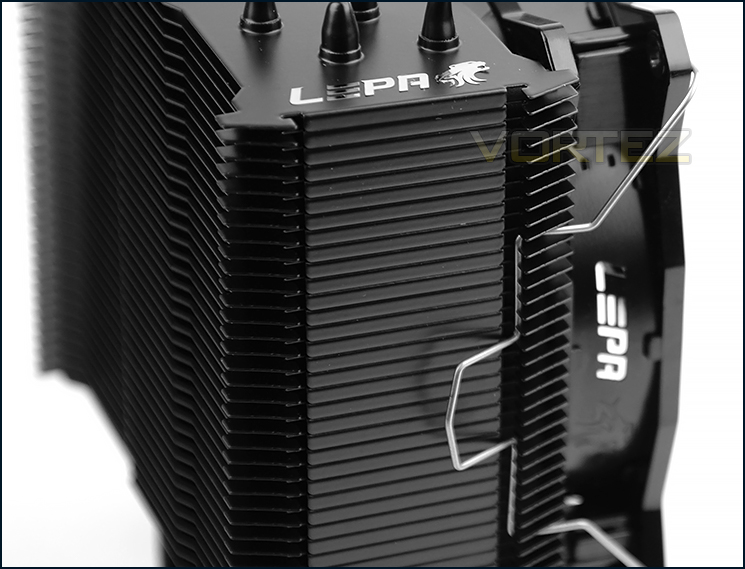
Fans can be clipped to either side of tower
Accompanying LV12 is a single 120mm cooling fan and four clips which allows both sides of the heatsink to have cooling fans attached. The clip fixes behind the hooked fins for a secure fitment and it’s easy to attach/detach fans thanks to the manufactured design.
If the fan is moving around slightly – LEPA supply pads which sit within the recess to provide a snug fit.
Installation
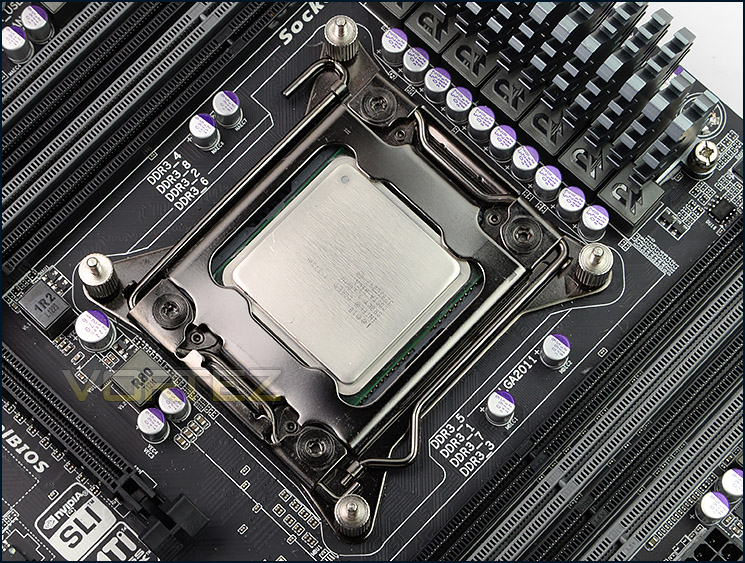
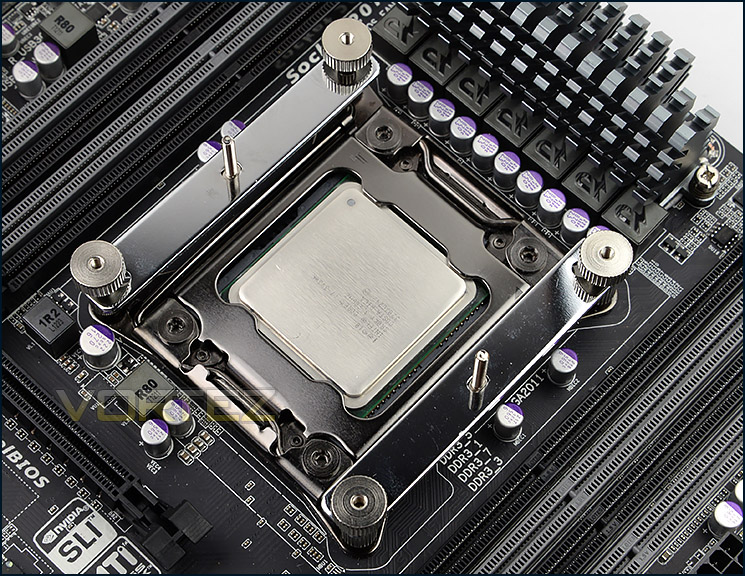
In order to demonstrate the installation process for LV12 we are installing the cooler on the Intel LGA2011 socket.
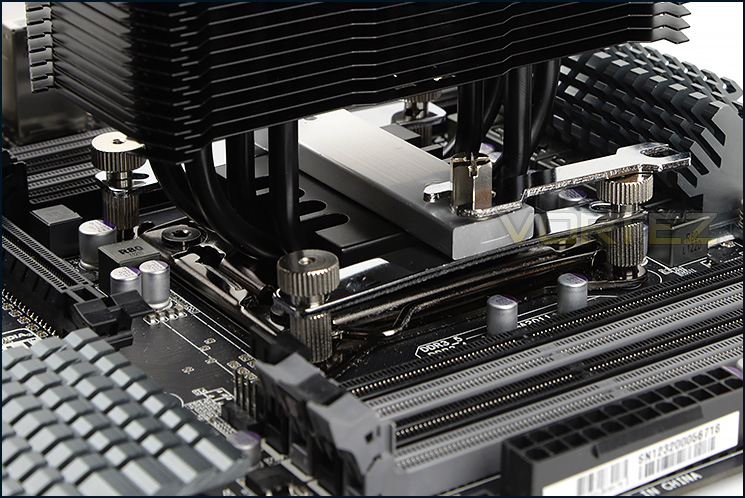
The first step in the installation of LV12 is to apply four standoff screws to the corners of the socket. Once these are tight, two brackets need to be place over the top and respective thumbscrews need to be screwed into place as pictured. In order to achieve traditional orientation of having the cooling fan facing and blowing heat through the rear exhaust of a computer chassis its necessary to have the brackets aligned vertically as pictured below. Lastly, thermal paste is applied to the CPU, the central bar is slotted over the middle of the baseplate and then two screws/nuts are tightened with either a screwdriver or the supplied spanner. Care should be taken when tightening both of these screws as it’s important to apply even pressure to the CPU.
This process and the components used are altogether very easy to use and we can vouch for it being a secure method of attaching a CPU cooler to the motherboard.
Installed – Memory Clearance
LV12 installed, without cooling fan attached
Memory clearance is something which many system builders and enthusiasts are eager to discover since this will ascertain whether a memory kit will be compatible with the CPU cooler or not. To demonstrate this, a low profile memory kit is used.
A perfect match!
Since LV12 uses a single heatsink design there are no issues whatsoever with memory compatibility. Even if you plan to use a memory kit which has tall heatsinks which extend beyond the actual PCB there is clearly no issue at all because the fins do not overlap the memory slots.
No obstructions for memory slots
Test Setup & Methodology
Test System
CPU – Intel Core i7-3930K (3.6GHz)
Motherboard – GIGABYTE X79-UP4
Memory – 8GB Corsair Vengeance LP 1600MHz CL9
Graphics – Sapphire Radeon HD 6850 1GB
PSU – NZXT Hale90 650W
Hard Drive – Kingston HyperX 240GB SATA III SSD
Case – Corsair Carbide 500R White
Motherboard – GIGABYTE X79-UP4
Memory – 8GB Corsair Vengeance LP 1600MHz CL9
Graphics – Sapphire Radeon HD 6850 1GB
PSU – NZXT Hale90 650W
Hard Drive – Kingston HyperX 240GB SATA III SSD
Case – Corsair Carbide 500R White
CPU Coolers
Alpenföhn Matterhorn Pure(120mm Wingboost: 300-1200RPM)
Alpenföhn K2 (120mm Wingboost: 500-1500RPM, 140mm Wingboost: 300-1100RPM)
Alpenföhn Gotthard (140mm Wingboost: 300-1100RPM)
Noctua NH-D14 (120mm NF-P12 PWM + 140mm NF-P14 PWM: up to 1200RPM)
Thermalright SilverArrow SB-E Extreme (Dual TY-143 fans – 600-2500RPM)
Corsair Hydro H100 (Dual 120mm fans – low: 1300RPM, mid: 2000RPM, high: 2600RPM Push Config)
SilverStone HE01 (140mm PWM fan – 500RPM-1200RPM – 500RPM-2000RPM)
be quiet! Dark Rock Pro 2 (135mm + 120mm PWM Fans – up to 1500RPM and 1700RPM)
Thermaltake Water 2.0 Pro (Dual 120mm PWM fans – up to 2000RPM)
Corsair Hydro Series H100i (Dual 120mm fans – up to 2700RPM Push Config)
Be Quiet! Shadow Rock TopFlow(1x 135mm PWM fan – up to 1500RPM)
SilverStone HE02 (Passive – optional fan used: Noctua NF-F12 120mm PWM)
Corsair H55 (Single 120mm fan – 1700RPM Exhaust Push)
Cooler Master Seidon 120M (Single 120mm fan – Up to 2500RPM Exhaust Push)
Zalman CNPS11X Extreme (Single 120mm fan – Up to 1950RPM)
Phanteks PH-TC12DX (Dual 120mm fans – 600-1800RPM)
Noctua NH-U14S (Single 140mm cooling fan – 300-1500RPM)
SilverStone TD03 (Dual 120mm fans – 1500-2500RPM)
Thermaltake]Thermaltake NiC C5 (Dual 120mm fans – 1000RPM – 2000RPM)
Raijintek EreBoss (Single 140mm fan – 1100RPM – 1600RPM)
GamerStorm Lucifer (Single 140mm fan – 800-1500RPM)
Cooler Master V8 GTS (Dual 140mm fans – 600-1600RPM)
Antec KUHLER H2O 1250 (Dual 120mm cooling fans – 600-2400RPM)
Corsair H75 (Dual 120mm cooling fans – 600-2000RPM)
CRYORIG R1 Ultimate (Dual 140mm cooling fans – 700-1400RPM)
Corsair Hydro Series H105 – (Dual 120mm fans – up to 2700RPM Push Config)
Noctua NH-D15 (Dual 140mm cooling fans – 300-1500RPM)
LEPA LV12 (Single 120mm cooling fan – 300-2200RPM)
Program Suite
Real Temp – Maximum temperature analysis
LinX 0.6.4 – Applies thorough stress test to CPU
CPU-Z – Confirmation of CPU frequency/voltage
AIDA64 Extreme Edition – Confirmation of temperatures/fan speeds
Testing methodology
Testing will be based on temperatures recorded by Real Temp after 20 passes of LinX stress test. The maximum absolute temperatures will be recorded after the test and averaged over the 6 cores. The delta is then calculated by subtracting the temperature recorded near the intake fans from the average temperature calculated. Tests are conducted with the Intel i7 3930K at its default 3.6GHz stock speed and overclocked to 4.6GHz @ 1.42V. The tests are done inside the Corsair Carbide 500R chassis to simulate real world conditions. To keep the tests standardised we are using Noctua’s NT-H1 thermal paste on all coolers.
CPU coolers are reviewed as they come out of the box – with their factory cooling fans, as the manufacturer intended and as the consumer expects.
Additional tests include a passive test where the cooling fans are taken away from the heatsink and a comparison between the cooler used with stock thermal paste against our Noctua NT-H1 paste. Note: This test will be omitted from this review since the D15 already comes with Noctua NT-H1
A kind thank you to Noctua for supplying us with NT-H1 thermal compound.
Results – Stock Performance
With the CPU sat at the stock settings the LV12 does a reasonable job in cooling the chip. Although it can be found quite far down the cooling chart, it isn’t a far cry from some of the dual-tower designs such as the D14 or K2.
Fan Speed: Remained at 1800RPM throughout stock testing – noticeable but by no means disturbing.
Results – Overclocked Performance
Applying a substantial overclock to the CPU, things are intensified. Again in similar fashion to the stock performance test, we see LV12 at the lower end of the cooling league and the gap widens. We suggest LV12 is ideal when the CPU is left at stock settings or when a small overclock is applied – using the cooler on a heavily overclocked chip exceeds the limitations.
Fan Speed: Remained at 2200RPM throughout overclocked testing – surprisingly low-noise for such speed.
Results – Passive Performance
The passive test is an interesting one as it relies heavily upon heatsink design and airflow within the computer chassis. Since LV12 has just four copper heatpipes and a single tower design it struggled to compete versus some of the dual-tower designs but still managed to do a sufficient job without any cooling fans attached.
Results – Thermal Paste Comparison
Most CPU coolers come accompanied with thermal paste provided by the manufacturer. For our CPU cooling tests we use Noctua’s NT-H1, so to offer up some interesting analysis we test the thermal paste given with LV12 against NT-H1 to see which gives the best results during stock and overclocked performance and the results really aren’t that much different, the Noctua paste is only ever so slightly better – the results are nominal.
Conclusion
LV12 is LEPA’s first attempt at bringing to market a CPU cooler and we certainly approve of their efforts. Styling is an important factor in many different sectors of computer hardware design and this has even filtered through to coolers. Visual appearance is critical for system builders which are intending to configure a new setup whilst combining and coordinating all hardware.
A definite attribute which shines through is LV12’s stunning aesthetics. Having the choice between matt black or matt white is an enthusiasts dream because most hardware, especially the trusty motherboard are now adorned in black/grey heatsinks and componentry. All too often we’re accustomed to shiny silver aluminium fin stacks and an overhaul of the styling is well overdue. The finish and build quality of LV12 is second to none.
Throughout the installation process we encountered no issues and we were up and running soon after we began. The option to modify the fan speed to specific limits is useful but we actually found the 120mm fan very quiet – even when it ramped up to full speed it was by no means loud or disruptive.
Observing the performance of LV12 with the CPU under stock conditions we are left with a superior solution over the Intel reference cooler. Although we found LV12 at the lower end of our cooling league, reading the actual figures reveals reasonable performance. However, applying a substantial overclock changed things somewhat – it highlighted that LV12 isn’t really intended for such intense usage and is better suited to stock or even light overclocks.
Priced at £30 / $45, LV12 is an affordable cooling solution which really holds its value when you consider the benefits that can be taken advantage of. If you are however wanting to apply a significant overclock to the CPU then there are better performers out there for the money.
LV12 is an admirable first attempt for LEPA at designing a CPU cooler. In the styling department they have pushed the boundaries because the aesthetics on this cooler are nothing short of spectacular and it’s mainly down to this, along with build quality and ease of use that we can hand out our silver award.
Pros
+ Stunning aesthetics
+ Will pair up with other hardware easily
+ Stress-free installation
+ Great build quality and finish
+ Reasonably priced
Cons
– Struggles with heavy overclocks
+ Stunning aesthetics
+ Will pair up with other hardware easily
+ Stress-free installation
+ Great build quality and finish
+ Reasonably priced
Cons
– Struggles with heavy overclocks

Click here for an explanation of our awards at Vortez.net.


