Portable storage are vital for users who are on-the-go. Today we look at two of Lexar’s latest portable SSDs – SL100 Pro and SL200.

Product on Review: SL100 Pro & SL200
Manufacturer & Sponsor: Lexar
Street Price:
SL100 Pro 1TB Model – UK: £195 GBP | US: $169 USD
SL200 1TB Model – UK: £174 GBP | US: $159 USD
When it comes to portable storage, traditional drives can be susceptible to data loss from vibration and inadequate performance due to the limitations of the interface. This is where portable solid state drives come into play – not only do they offer undeniable reliability by having no moving parts, but they are also capable to tapping into much faster transfer rates, which definitely comes in handy for transferring large amounts of data.
Lexar have been in this sector for many years and are therefore no stranger to producing storage solutions for those on-the-go. Today we are set to take a look at two of their most recent releases which are name SL100 Pro and SL200. Both drives are portable SSDs, are compact, lightweight and make use of the USB Type-C interface.
Although you may interpret the SL200 as the faster drive, it isn’t – the SL200 is capable of speeds of up to 550MB/s whereas the SL100 Pro is slated for 950MB/s. Will these numbers hold true? Let’s find out!
About Lexar
For more than 20 years, Lexar® has been trusted as a leading global brand of memory solutions – so we know first-hand just how quickly data is transforming our world. Our award-winning lineup performs second-to-none and includes memory cards, USB flash drives, readers, and solid-state drives for retail and OEM customers. Whether shooting photos, capturing video, or simply transferring and sharing files on the go, Lexar memory solutions provide the performance and reliability needed to get the most from your digital device.
Technical Specifications
Below are the technical specifications surrounding the SL100 Pro and SL200:
SL100 PRO
Capacity
500GB, 1TB
Interface
USB 3.2 Type-C
Speed
Up to 950MB/s read and up to 900MB/s Write
Operating Temperature
0° to 70° C
Storage Temperature
-40° C to 85° C
Dimension (L x W x H)
73.4 x 55 x 10.8 mm / 2.89” x 2.165” x 0.425”
Weight
70.5g / 0.155lbs (Without Cable)
500GB, 1TB
Interface
USB 3.2 Type-C
Speed
Up to 950MB/s read and up to 900MB/s Write
Operating Temperature
0° to 70° C
Storage Temperature
-40° C to 85° C
Dimension (L x W x H)
73.4 x 55 x 10.8 mm / 2.89” x 2.165” x 0.425”
Weight
70.5g / 0.155lbs (Without Cable)
SL200
Capacity
512GB, 1TB, 2TB
Interface
USB 3.2 Type-C
Speed
Up to 550MB/s read and up to 400MB/s Write
Operating Temperature
0° to 70° C
Storage Temperature
-40° C to 85° C
Dimension (L x W x H)
86 mm x 60 mm x 9.5 mm / 3.39” x 2.36” x 0.37”
Weight
40.6 g / 0.09 lbs (Without Cable)
512GB, 1TB, 2TB
Interface
USB 3.2 Type-C
Speed
Up to 550MB/s read and up to 400MB/s Write
Operating Temperature
0° to 70° C
Storage Temperature
-40° C to 85° C
Dimension (L x W x H)
86 mm x 60 mm x 9.5 mm / 3.39” x 2.36” x 0.37”
Weight
40.6 g / 0.09 lbs (Without Cable)
Closer Look
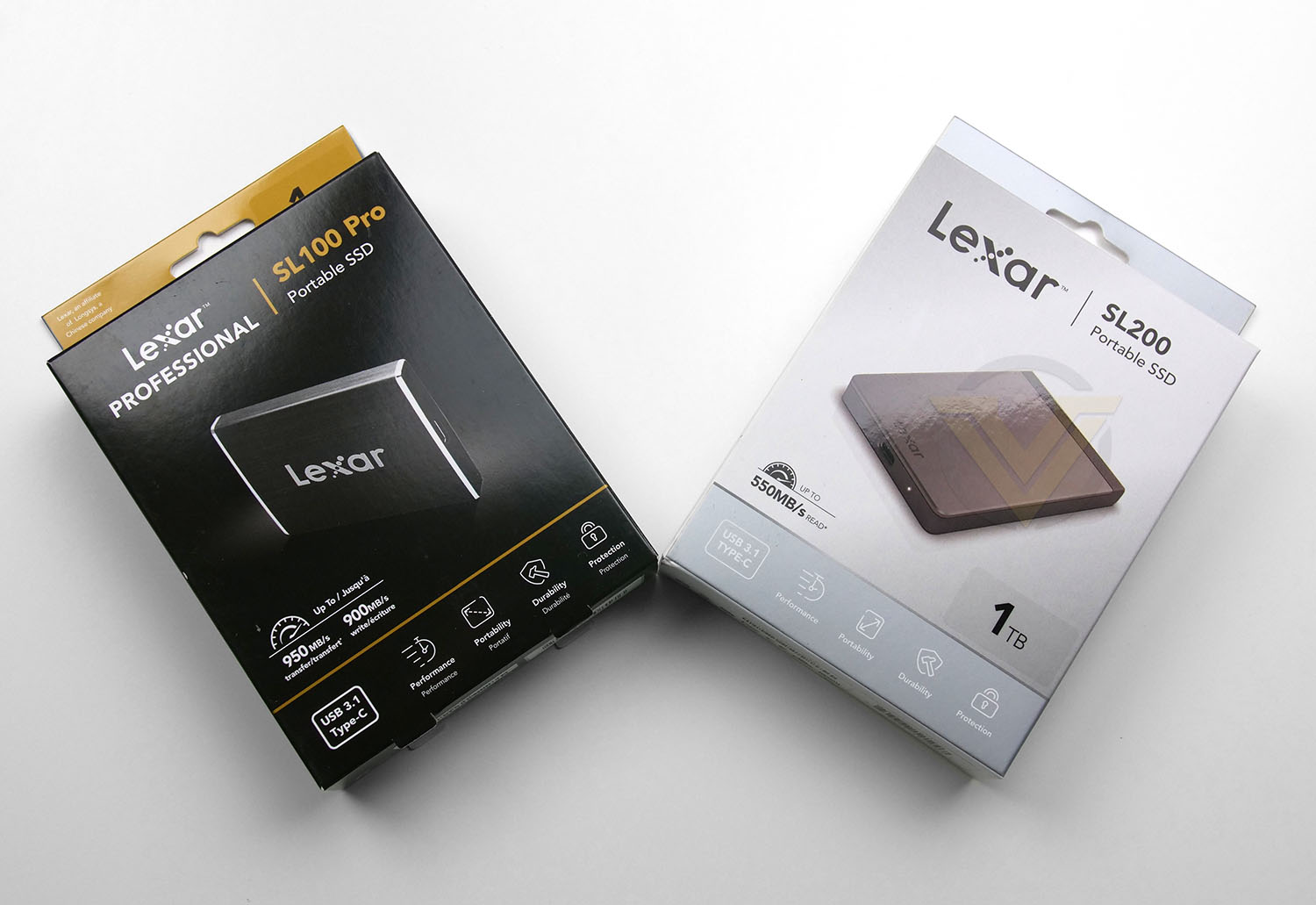
Both our portable SSDs arrive in almost identical packaging (apart from the colour). As is standard for Lexar, there is a depiction of the drive with fundamental features such as capacity, estimated speeds and interface.
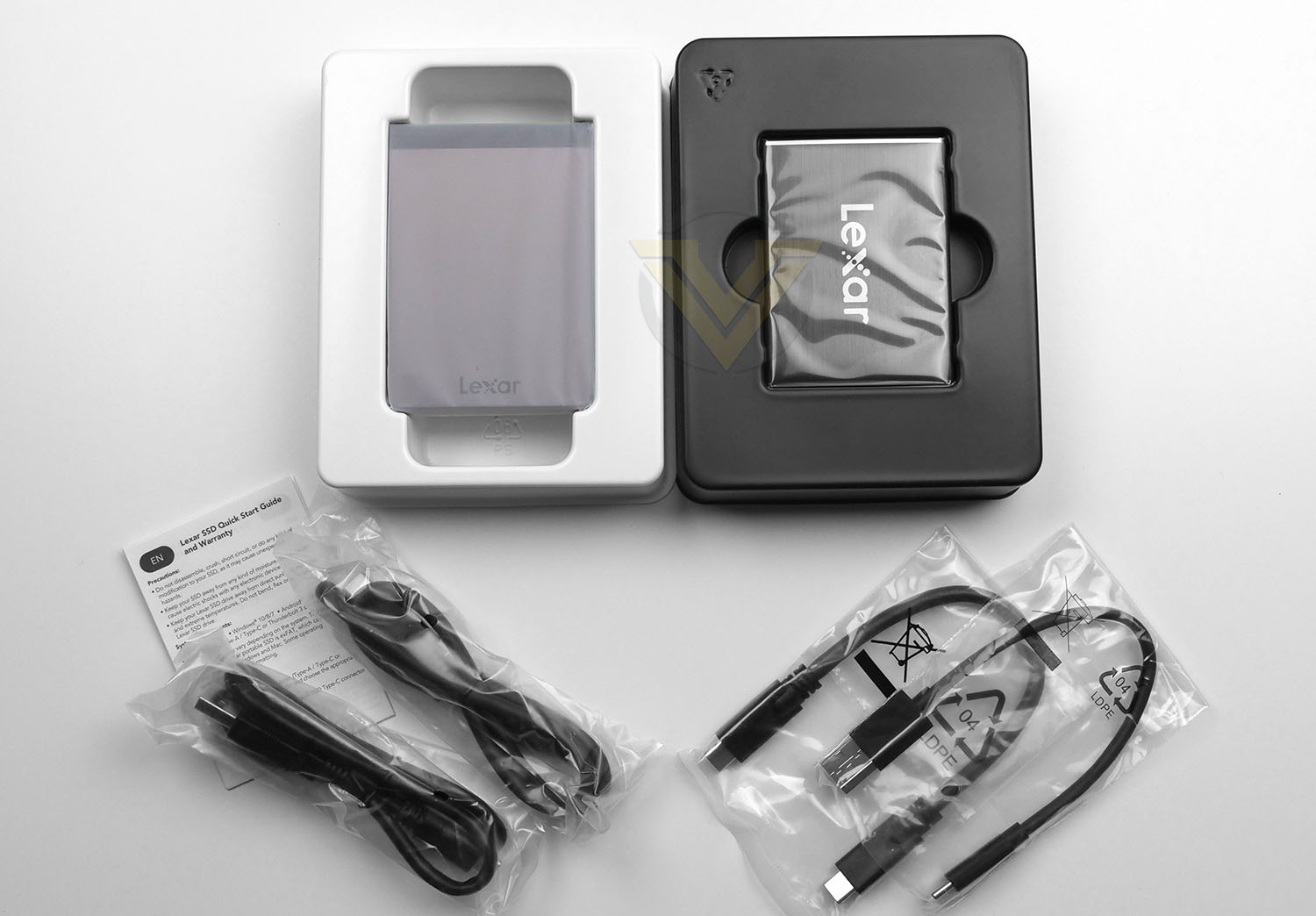
Within each box the drives are concealed in a plastic wrapper and placed into a protective tray. In terms of bundled accessories there are just two items – USB Type-C to USB Type-C and USB Type-C to Type-A. This provides flexibility depending on the ports you have available on your device.
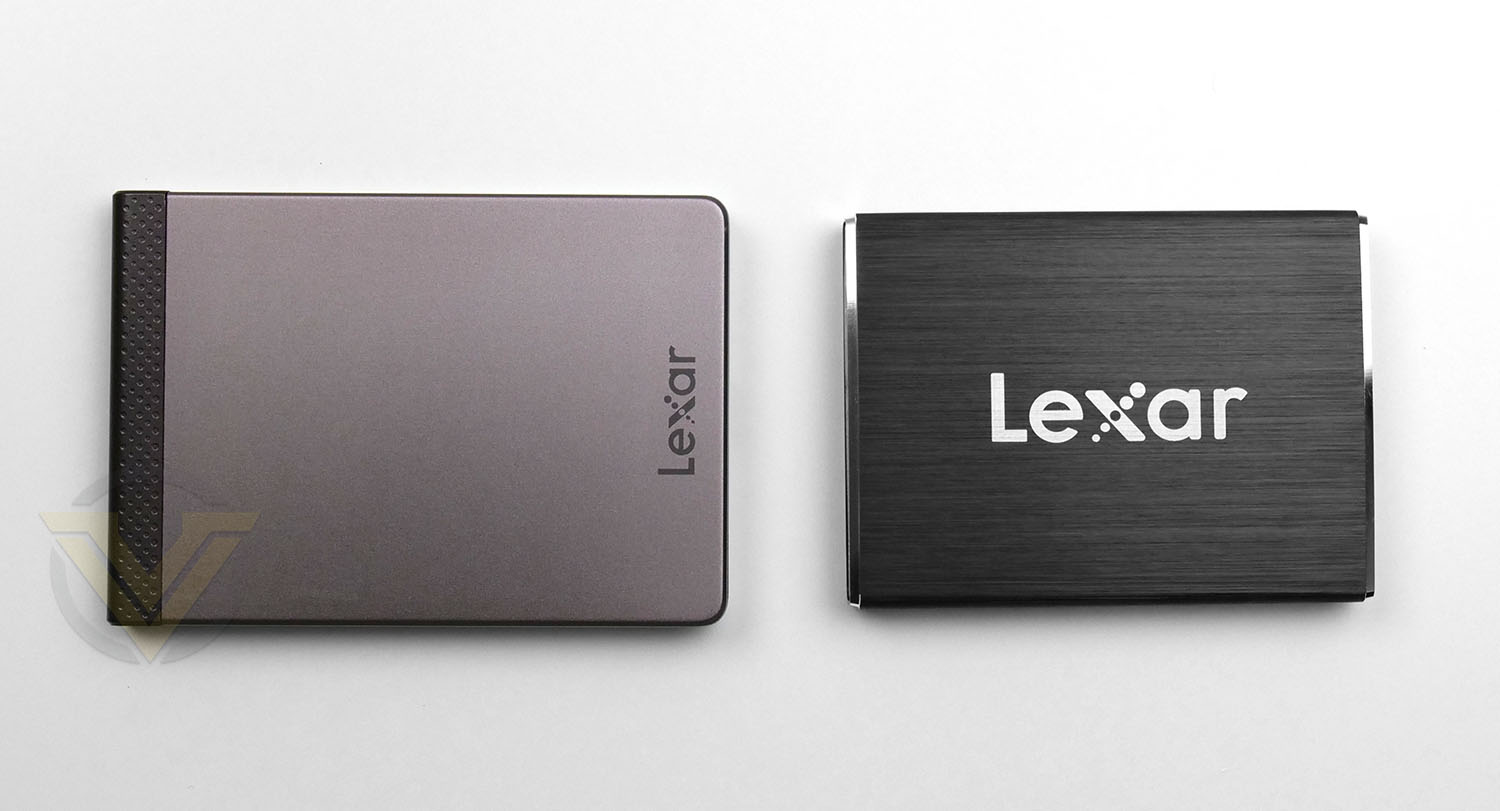
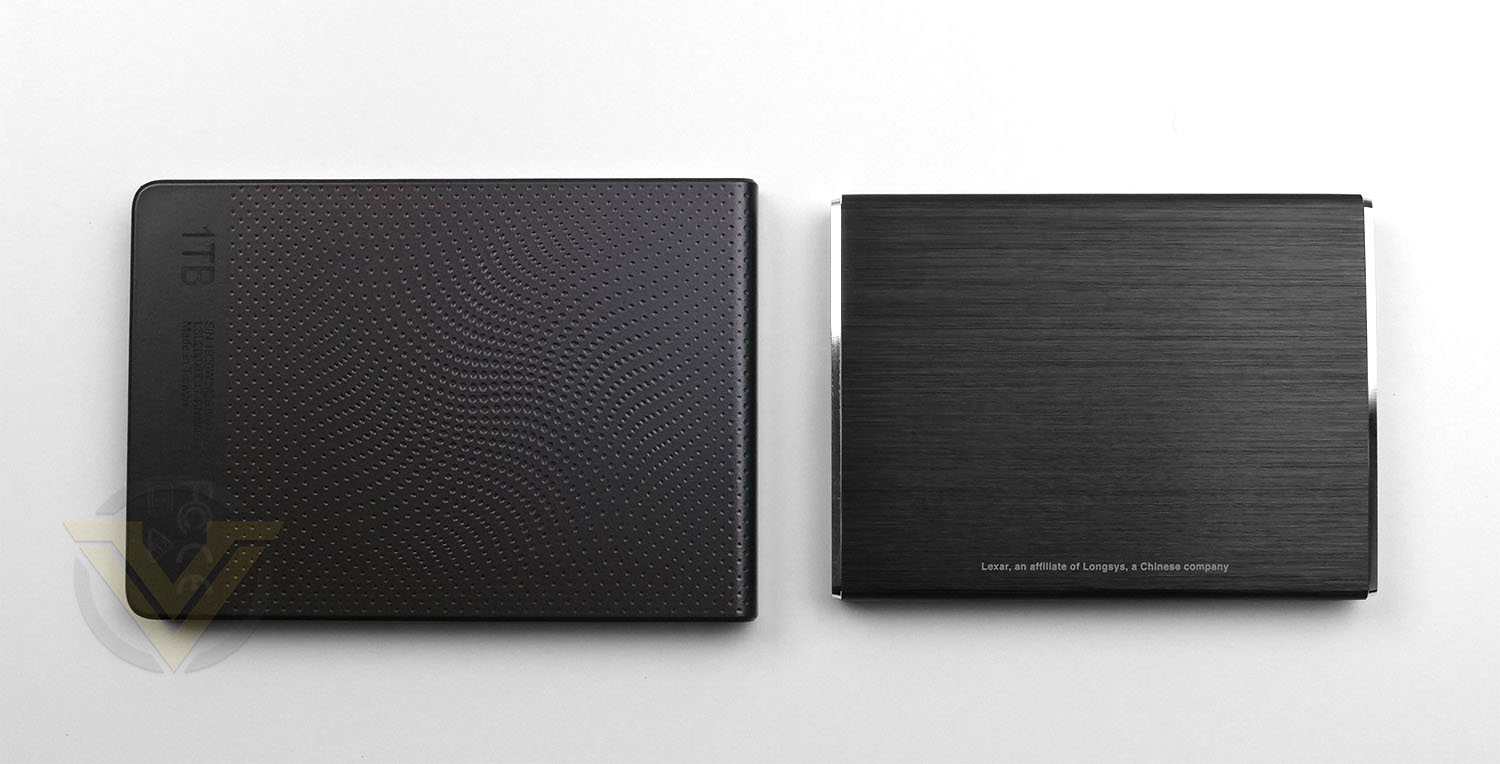
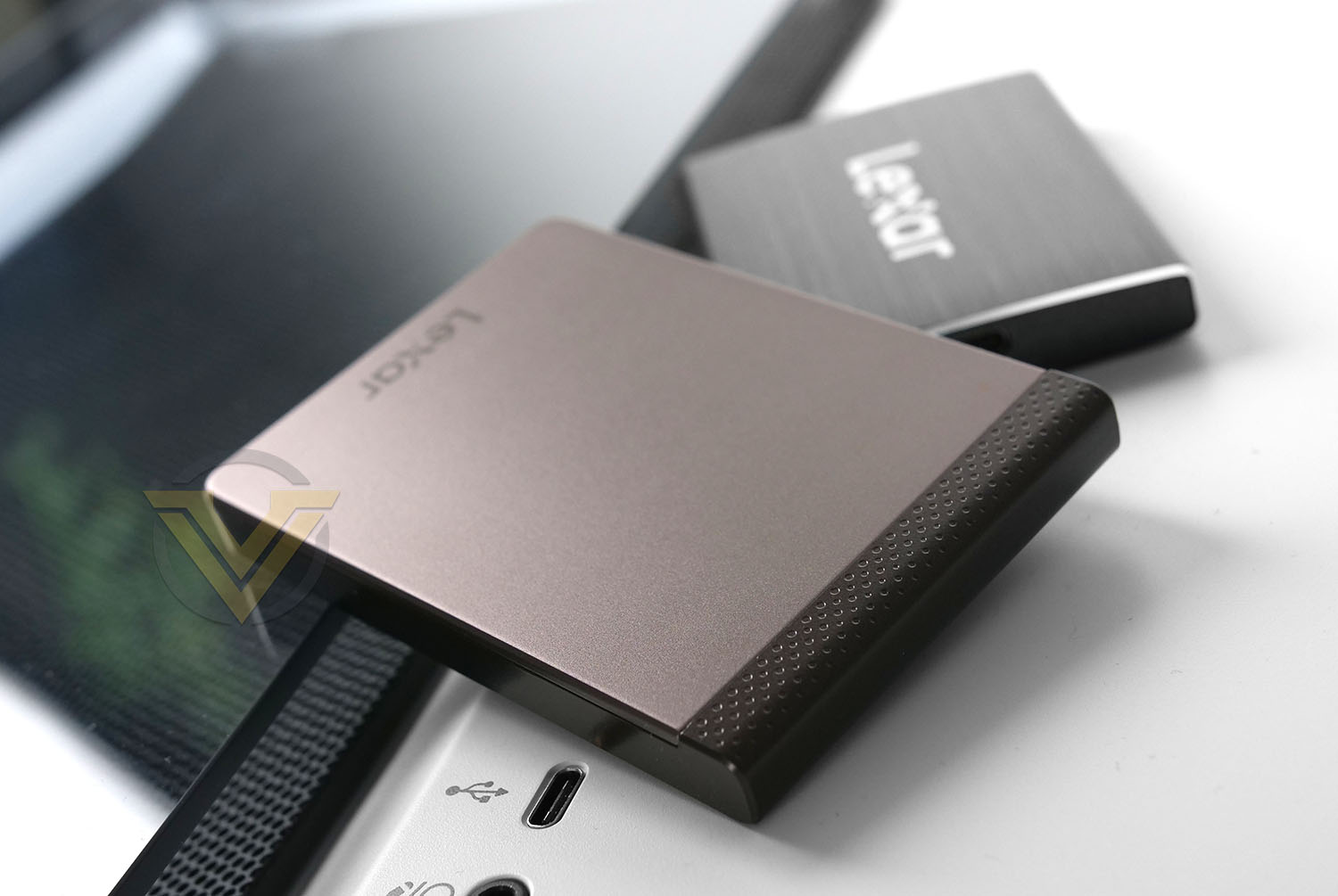
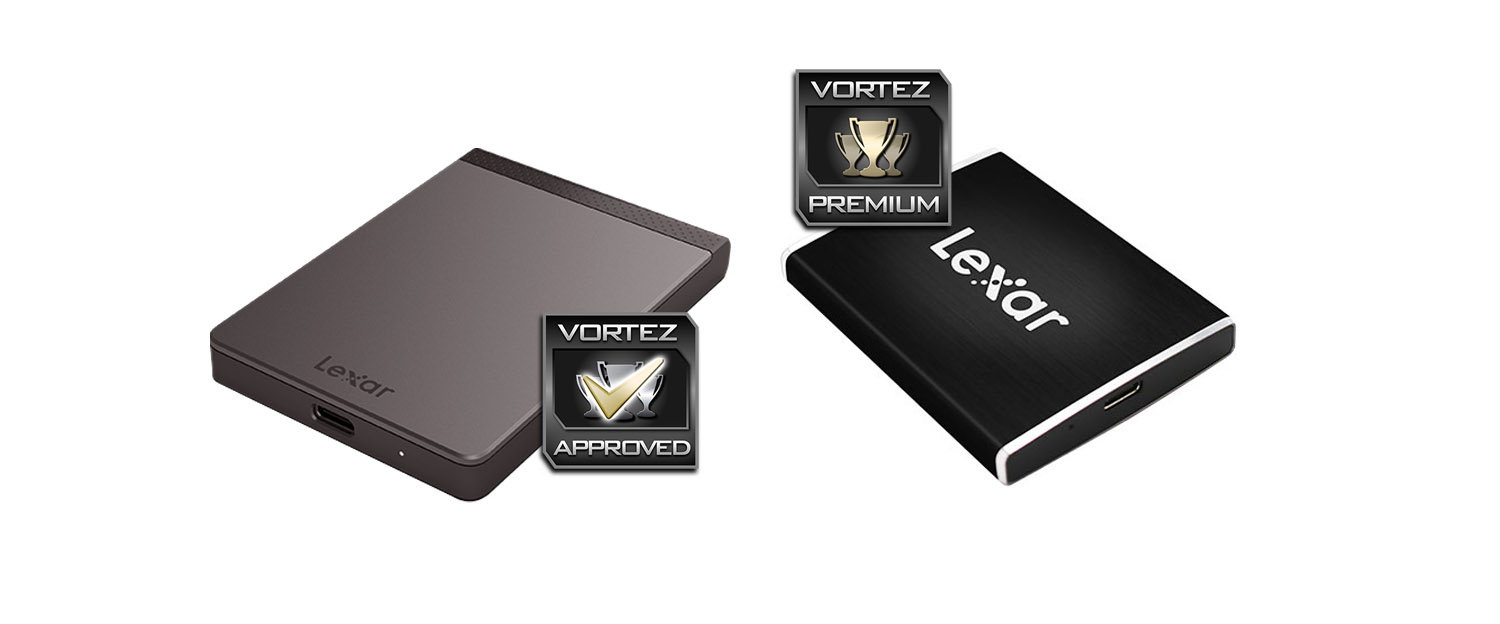
The SL100 Pro and SL200 vary in shape, size and aesthetics. The SL200 (on the left) adopts more of an understated design, where as the SL100 Pro (on the right) is smaller and features a large Lexar insignia which we feel does ruin the design somewhat. Our preference would be the SL200 because it is subtle, features appealing textures and definitely looks more stylish.
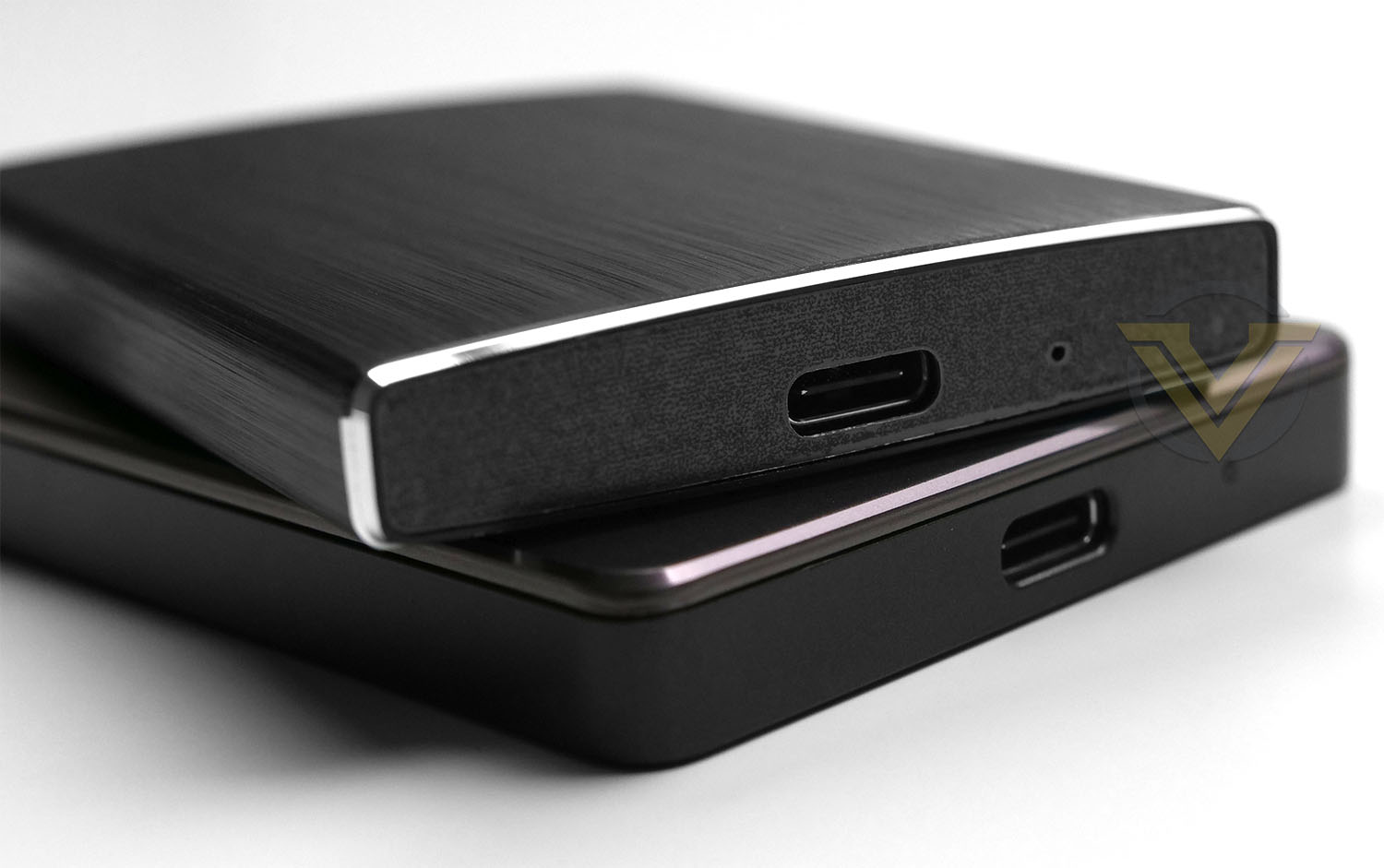
At the bottom of each drive there is just a single Type-C port for connectivity – so it is necessary to use one of the supplied cables.
The SL100 Pro is the faster drive of the two, being rated as offering up to 950MB/s Read and 900MB/s Write, whereas the SL200 is capable of up to 550MB/s Read and 400MB/s Write. So the transfer rates should be significantly different.
Over the next pages we’ll be putting both drives under examination to see what you can expect in terms of performance.
Test Setup & Methodology
Our test system is formatted and a fresh version of Windows is installed with just drives in place – no additional applications. Windows is then updated to the latest release and the drivers are installed.
Included in the list of benchmarks are the following applications:
BENCHMARKS
Anvil Pro
AS SSD
ATTO Disk Benchmark v2.46
Futuremark PCMark 8
AIDA64
AS SSD
ATTO Disk Benchmark v2.46
Futuremark PCMark 8
AIDA64
TEST CONFIG
CPU Intel Core i9-10900K
Motherboard MSI Z490 UNIFY
Graphics MSI RX 5700 XT GAMING X
Memory 32GB Corsair Vengeance LPX 3200MHz DDR4
Storage Lexar SL100 Pro & SL200
PSU Corsair HX1050 Gold
OS Microsoft Windows 10 Professional 64-Bit
Motherboard MSI Z490 UNIFY
Graphics MSI RX 5700 XT GAMING X
Memory 32GB Corsair Vengeance LPX 3200MHz DDR4
Storage Lexar SL100 Pro & SL200
PSU Corsair HX1050 Gold
OS Microsoft Windows 10 Professional 64-Bit
Benchmarks: Anvil Pro
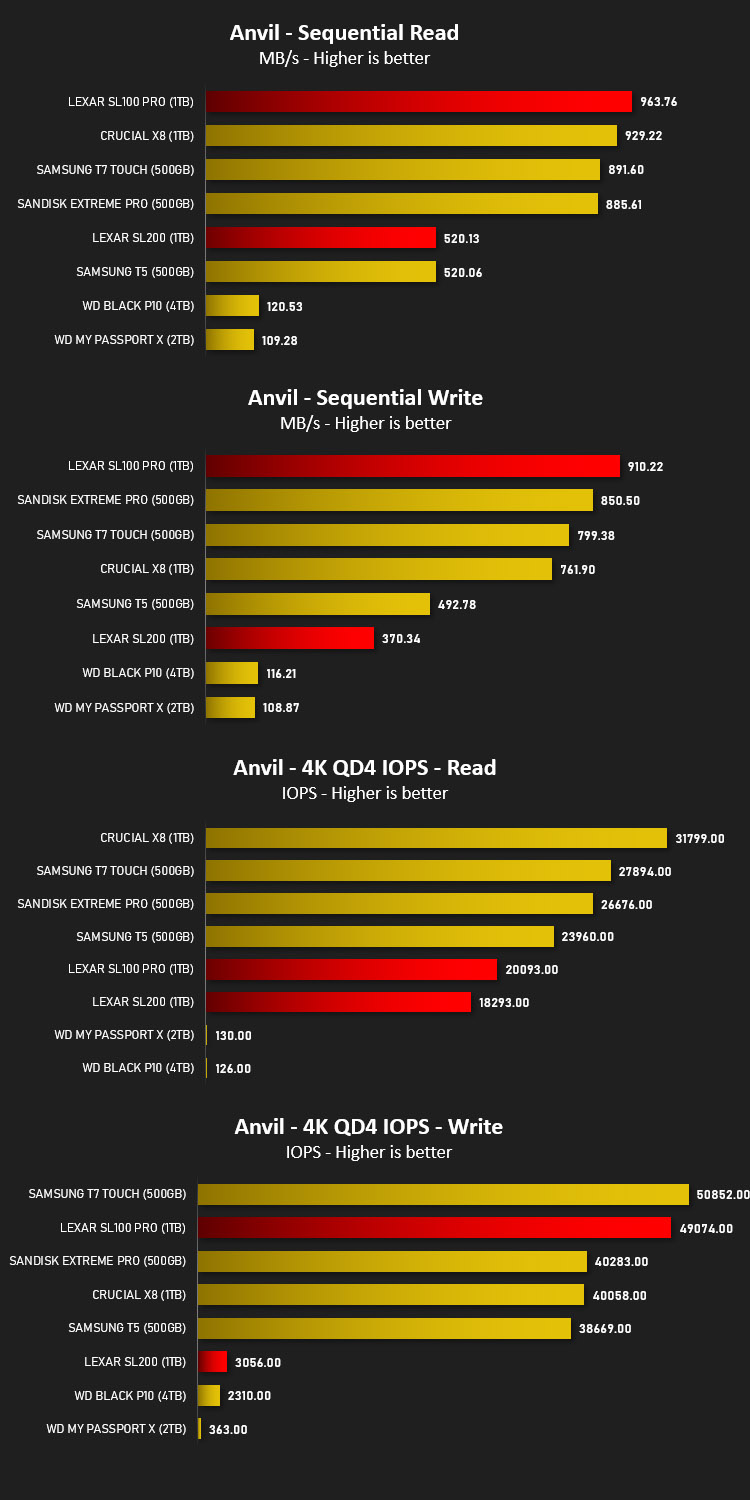
Anvil Pro from Anvil Storage utilities is one of the most popular storage benchmarking utilities today thanks to the large suit of tests available. You can test pretty much anything from Read/write Speed to IOPs with many variables to tweak allowing you to get either a single or host of results to compare with other likeminded enthusiasts. In our test we ran the standard suite 5 times, subtracting both the highest and lowest scores and determined the final result from the average of the remaining three results.
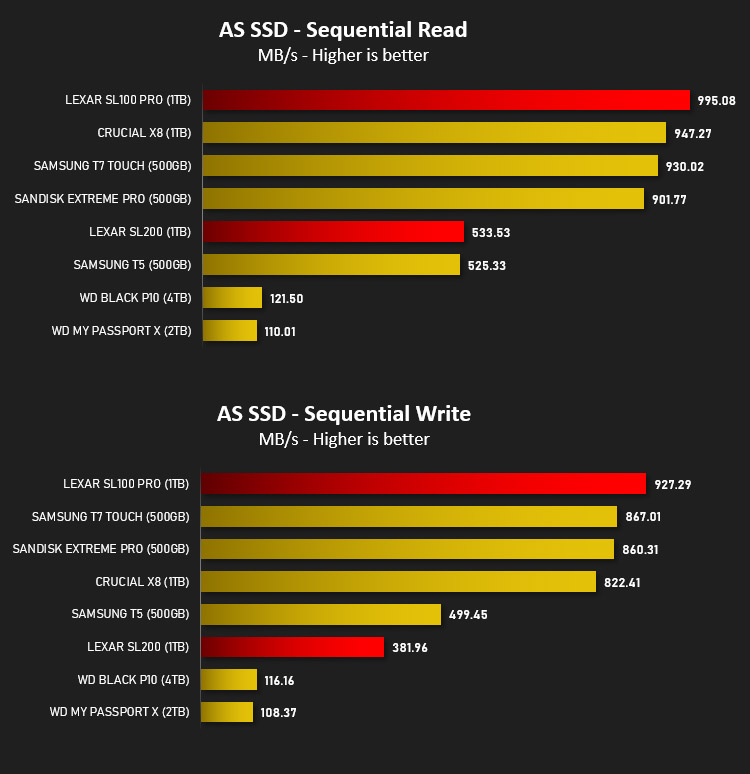
Benchmarks: AS SSD
AS SSD Benchmark is a straightforward tool for measuring the speed of your SSD drive.
Simply launch the program, choose your drive, click Start, and it’ll test your SSD’s read and write speed in a variety of ways, delivering a score for each when it’s done. And if that’s not enough, there are also additional file copy and compression-related benchmarks available from the Tools menu. (The author’s support page is German only, but if you need further English explanations then there’s a thread on the program at the OCZ Technology forum.).
Simply launch the program, choose your drive, click Start, and it’ll test your SSD’s read and write speed in a variety of ways, delivering a score for each when it’s done. And if that’s not enough, there are also additional file copy and compression-related benchmarks available from the Tools menu. (The author’s support page is German only, but if you need further English explanations then there’s a thread on the program at the OCZ Technology forum.).
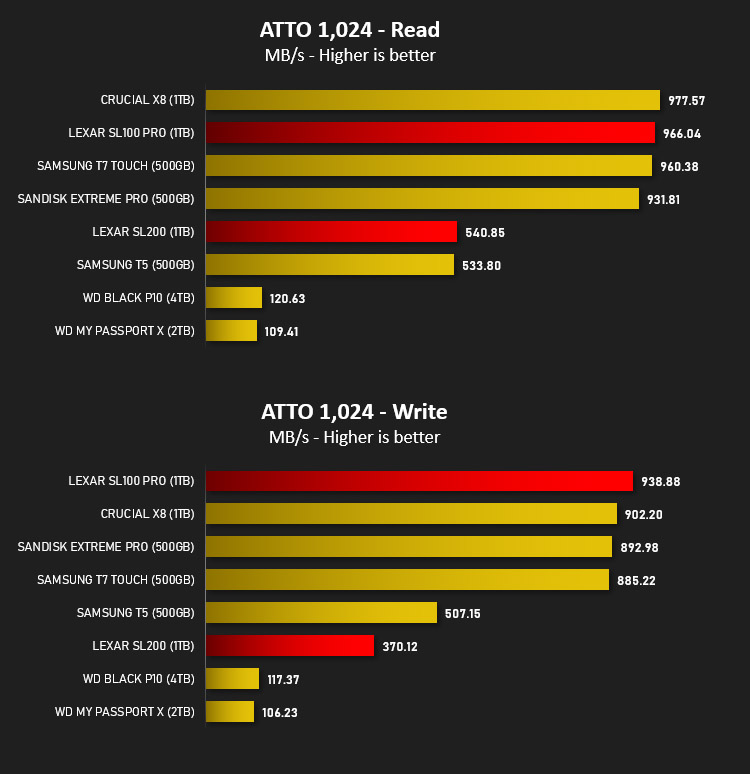
Benchmarks: ATTO
The ATTO Disk Benchmark performance measurement tool is compatible with Microsoft Windows. Measure your storage systems performance with various transfer sizes and test lengths for reads and writes. Several options are available to customize your performance measurement including queue depth, overlapped I/O and even a comparison mode with the option to run continuously. Use ATTO Disk Benchmark to test any manufacturers RAID controllers, storage controllers, host adapters, hard drives and SSD drives and notice that ATTO products will consistently provide the highest level of performance to your storage.
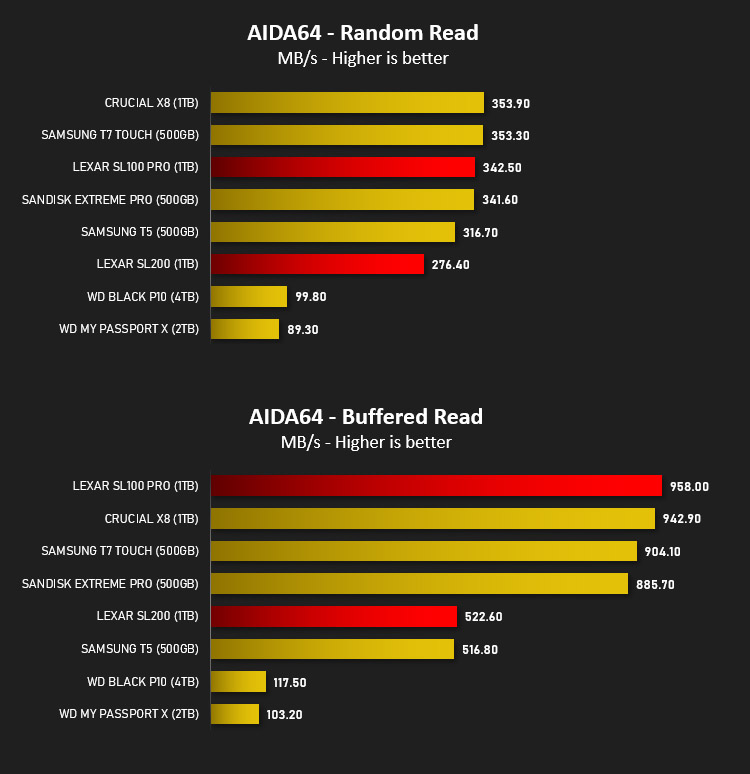
Benchmarks: AIDA64
AIDA64 Product PageThis simple integer benchmark focuses on the branch prediction capabilities and the misprediction penalties of the CPU. It finds the solutions for the classic “Queens problem” on a 10 by 10 sized chessboard. At the same clock speed theoretically the processor with the shorter pipeline and smaller misprediction penalties will attain higher benchmark scores. For example — with HyperThreading disabled — the Intel Northwood core processors get higher scores than the Intel Prescott core based ones due to the 20-step vs 31-step long pipeline. CPU Queen test uses integer MMX, SSE2 and SSSE3 optimizations.
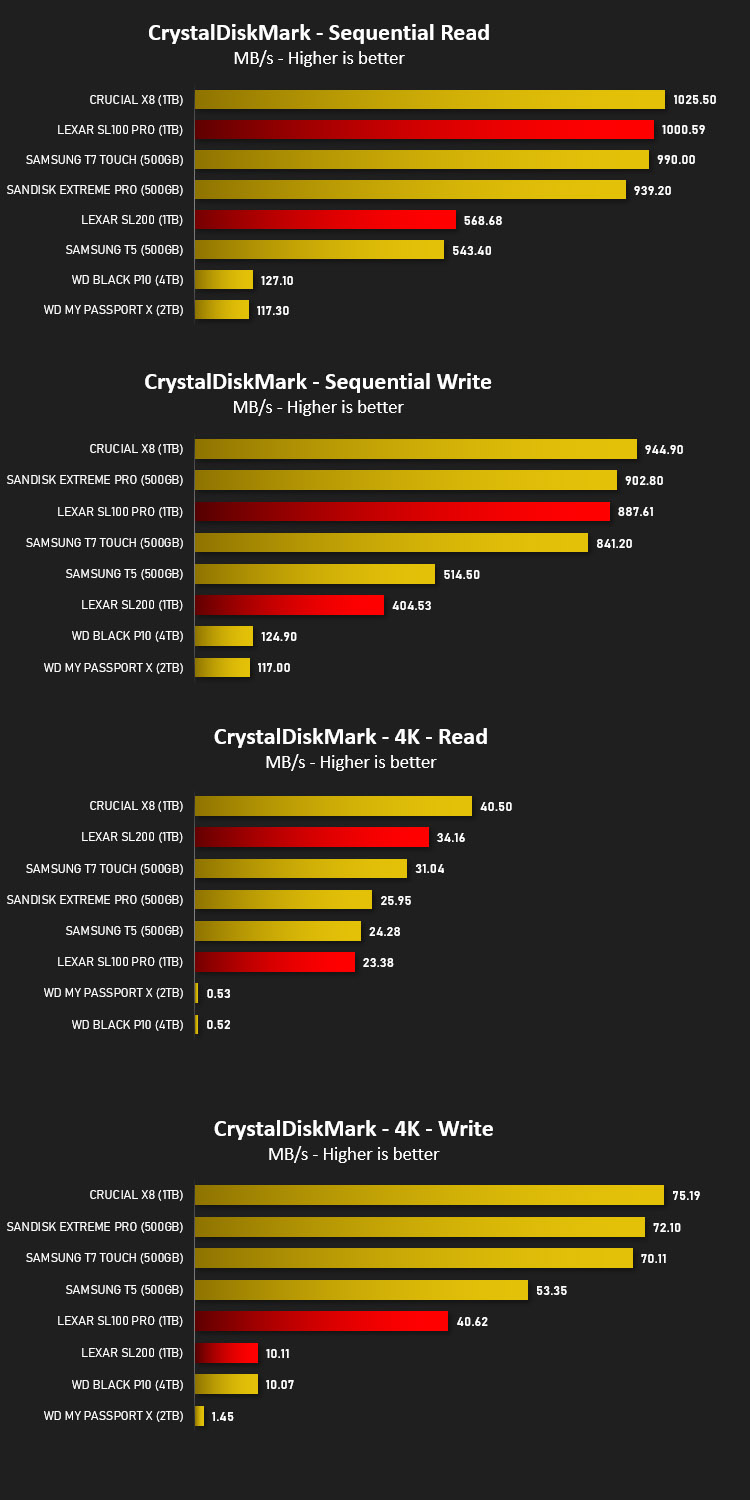
Benchmarks: CrystalDiskMark
CrystalDiskMark is an open source disk drive benchmark tool for Microsoft Windows. Based on Microsoft’s MIT-licensed Diskspd tool, this graphical benchmark is commonly used for testing the performance of solid-state storage. It works by reading and writing through the filesystem in a volume-dependent way. It generates read/write speeds in sequential and random positions with varying numbers of queues and threads.
Conclusion
Portable storage is a much-needed thing for those who need to access their data on-the-go and adding in the reliability and performance of an SSD only works to improving the entire experience.
Both of Lexar’s portable SSDs that we’ve been examining today are small, lightweight and utilise the same interface – USB Type-C. There is however a huge difference in performance between the SL100 Pro and SL200. The latter appears to operate at SATA-based SSD transfer rates, whereas the SL100 Pro takes full advantage of Type-C by ramping up to transfer speeds which in some cases exceed 950MB/s.
Sequential read/write performance on both drives are very good, but IOPS performance against the competition does see Lexar fall behind. For drives of this nature and their typical usage (hosting data) IOPS won’t be that critical.
In the last few years its become commonplace for portable SSDs to be used with mirrorless cameras like the Black Magic Pocket Cinema 4K – because they rely on external storage. Recording directly from a camera at 4K 10bit is especially demanding but with the transfer rates being offered by the SL100 Pro, it is more than adequate for such a purpose.
Pricing between the SL100 Pro and SL200 isn’t that dissimilar. In fact, in some cases the SL100 Pro is just $10 extra for comparable capacity. The SL100 Pro 1TB Model is UK: £195 GBP | US: $169 USD, while the SL200 is UK: £174 GBP | US: $159 USD. So the obvious choice would be to obtain the faster SL100 Pro, It’s just unfortunate we aren’t able to obtain this drive in capacities beyond 1TB.
Lexar’s portable SSDs (SL100 Pro and SL200) offer outstanding performance for those on-the-go. The SL100 Pro in particular was able to climb above the performance offered by rival Samsung offerings!
Pros
+ Excellent performance
+ Easy to transport
+ Reasonably priced
+ Two cables supplied
+ 256-bit AES encryption
Cons
– SL100 Pro maximum capacity 1TB
– Cables are quite short
+ Excellent performance
+ Easy to transport
+ Reasonably priced
+ Two cables supplied
+ 256-bit AES encryption
Cons
– SL100 Pro maximum capacity 1TB
– Cables are quite short
Click here for an explanation of our awards at Vortez.net.
Stay connected with the Vortez Social Media pages: