Lian Li are without-doubt best known for their computer cases but they produce much more than that – today we look at their 120mm RGB system fans, the Bora Digital.

Product on Review: Lian Li Bora Digital
Manufacturer: Lian Li
Street Price: GBP £44.99 / USD $54.99 / AUS $89.00
Lian Li are a family-owned technology firm based in Taiwan, specialising in computer chassis and accessories. They pride themselves on producing high quality items for over 25 years and believe you should be able to feel the difference when handling a Lian Li product.
Today we look at Lian Li’s latest 120mm fans, featuring, you guessed it, RGB lighting; supported by ASUS Aura Sync, MSI’s Mystic Light Sync, ASRock’s Polychrome Sync and GIGABYTE’s RGB Fusion Ready synchronisation systems, they’re ready to be plugged into almost any system, but there’s also an in-line RGB controller included for those without RGB headers on their motherboard.
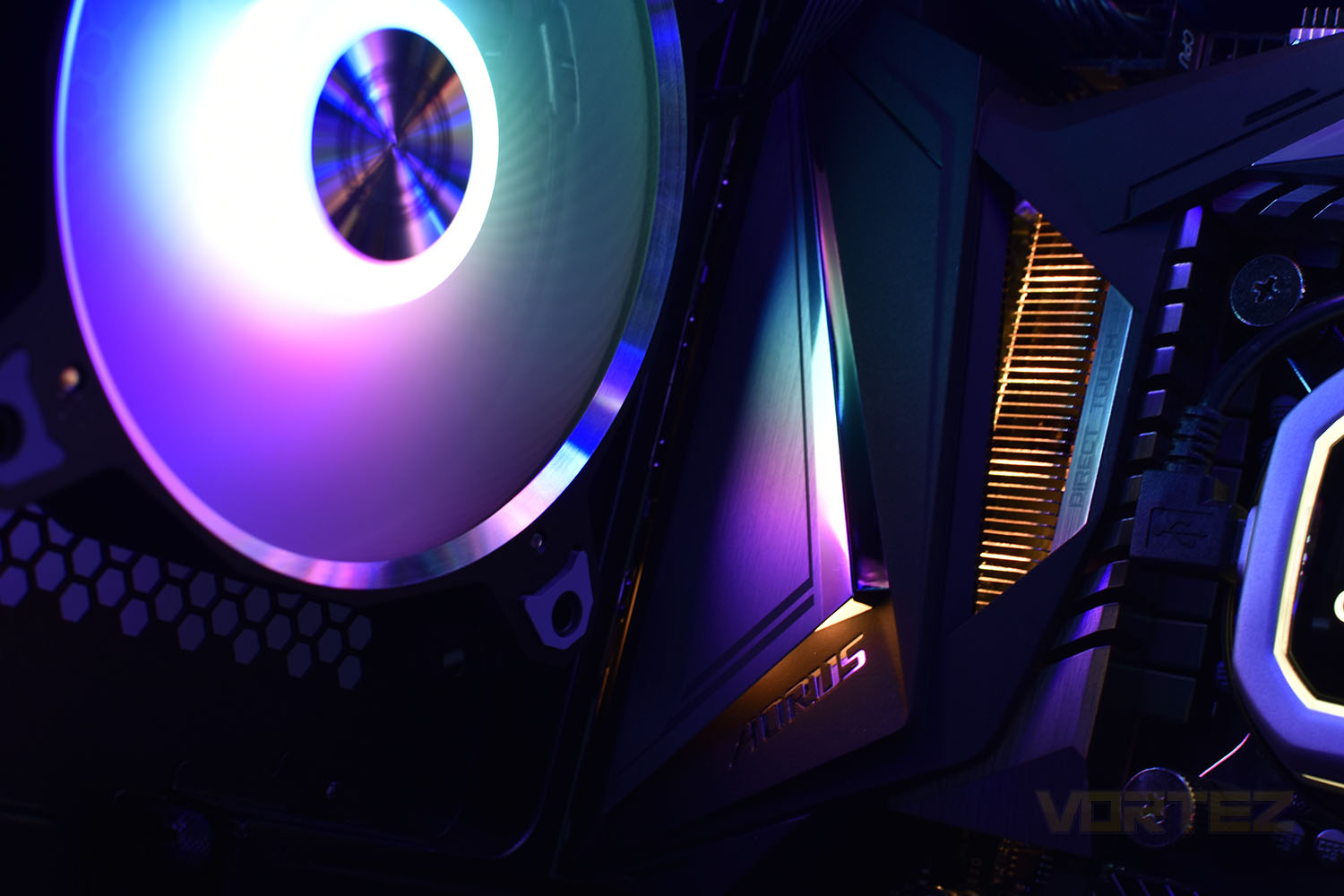
The Bora Digital is available in three colours, black, space grey or silver; we’ll be reviewing the black model today. While the plastic frame colour changes, the aluminium ring surrounding the fan blades stays put.
Utilising fluid dynamic bearings, Lian Li promise and unbeatable silent cooling solution via the PWM connection, where fan speeds can be adjusted between 900 and 1800 RPM.
Priced at £44.99/$54.99/$89.00, they land at a much lower pricepoint than most triple-packs of RGB-enabled 120mm fans. Let’s see if they’re cheap for a reason or if they just offer excellent value for money.
Technical Specifications
Model:
Lian Li Bora Digital
Fan Dimension:
120mm x 120mm x 27mm
Rated Voltage:
DC 12V (LED Voltage 5V)
Fan Speed:
900~1800 RPM
Max. Air Pressure:
1.46 mm-H2O
Max. Air Flow:
57.97 CFM
Acoustical Noise (Min-Max.):
19.4 ~ 29 dBA
Insulation Type:
Class A
Locked Current:
0.2 A
Bearing Type:
Fluid Dynamic Bearing
Operation Voltage:
10.8V—13.2V
Start-up Voltage:
≥ 6V (Duty Cycle 100%)
Input Current:
Max. 0.45A
Input Power:
Max. 5.4W
Lian Li Bora Digital
Fan Dimension:
120mm x 120mm x 27mm
Rated Voltage:
DC 12V (LED Voltage 5V)
Fan Speed:
900~1800 RPM
Max. Air Pressure:
1.46 mm-H2O
Max. Air Flow:
57.97 CFM
Acoustical Noise (Min-Max.):
19.4 ~ 29 dBA
Insulation Type:
Class A
Locked Current:
0.2 A
Bearing Type:
Fluid Dynamic Bearing
Operation Voltage:
10.8V—13.2V
Start-up Voltage:
≥ 6V (Duty Cycle 100%)
Input Current:
Max. 0.45A
Input Power:
Max. 5.4W
Packaging & Bundle
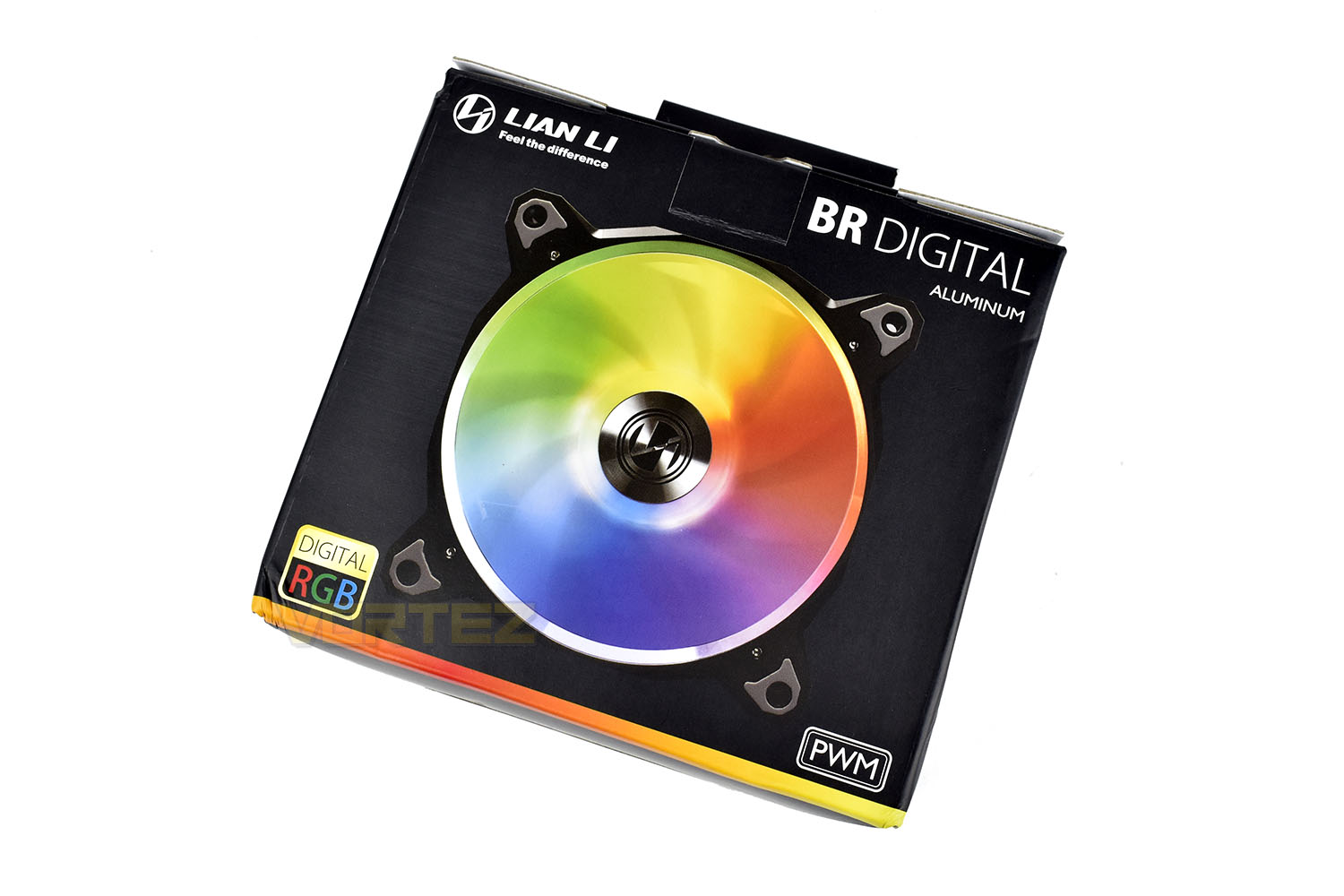
The packaging around the is a little cheap feeling compared to our usual standards, but we’re going into this review with full knowledge of the pricetag attached, which is much lower than most competing products.On the front it shows a large picture of the included fans and describes its RGB credentials briefly. One odd choice is having the fastening latch on the front of the packet instead of it facing the rear.
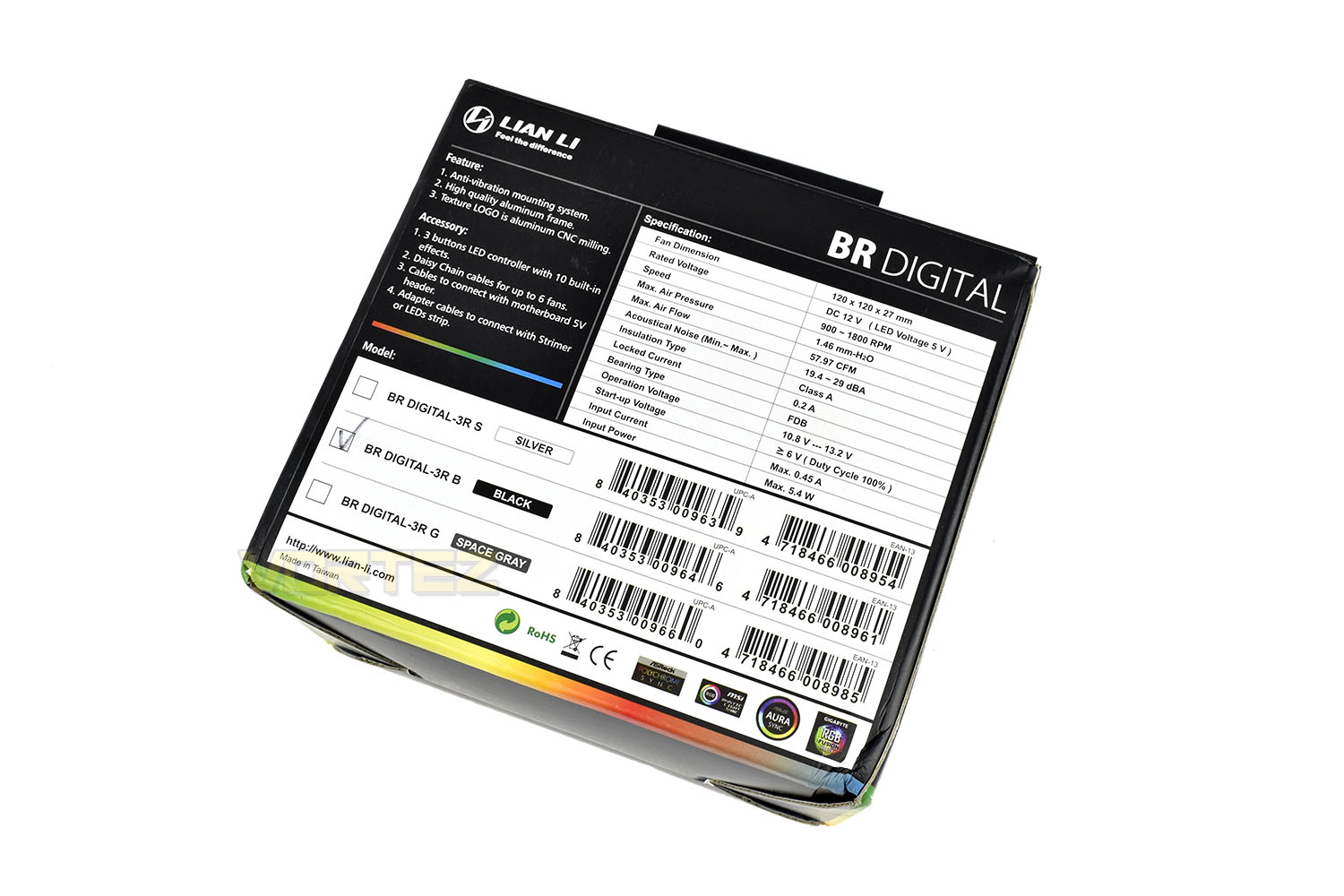
Turning the packet over, the reverse side gives a breakdown of features and an easy to read technical specifications section.
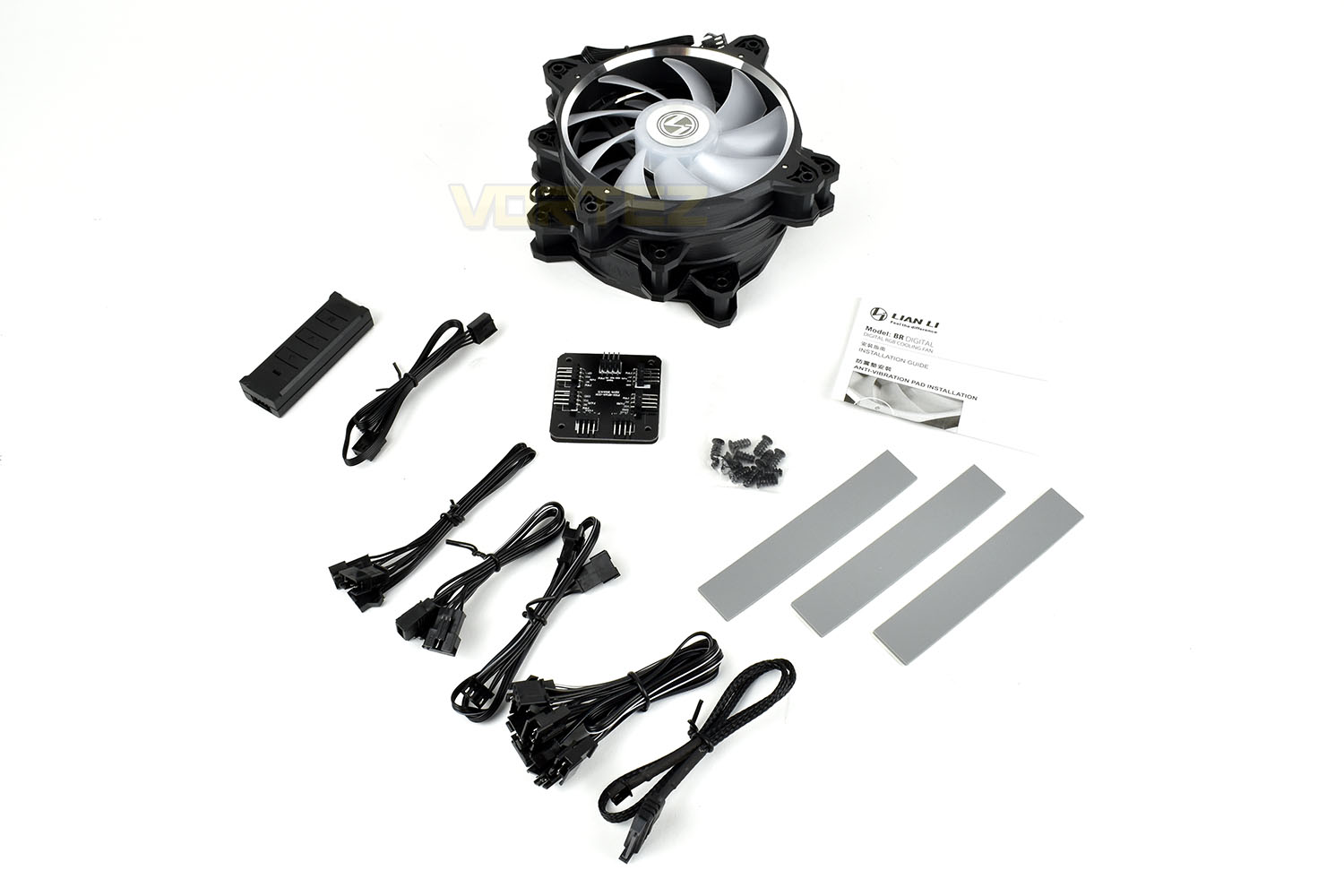
Included with the triple fan pack is a 6-fan PWM splitter, with connecting cable. A pair of RGB lighting splitters for up to 6 fans (or other Lian Li RGB-enabled products), an RGB controller with SATA power connector, 5v RGB connector cable and mounting hardware.
Closer Look
The black outer frame is constructed from a very tough plastic with an aluminium insert around the internal perimeter. Inside that is a 9-blade translucent blade arrangement with the 12 fully addressable RGB LEDs located behind the central hub. In the centre is a shiny Lian Li logo.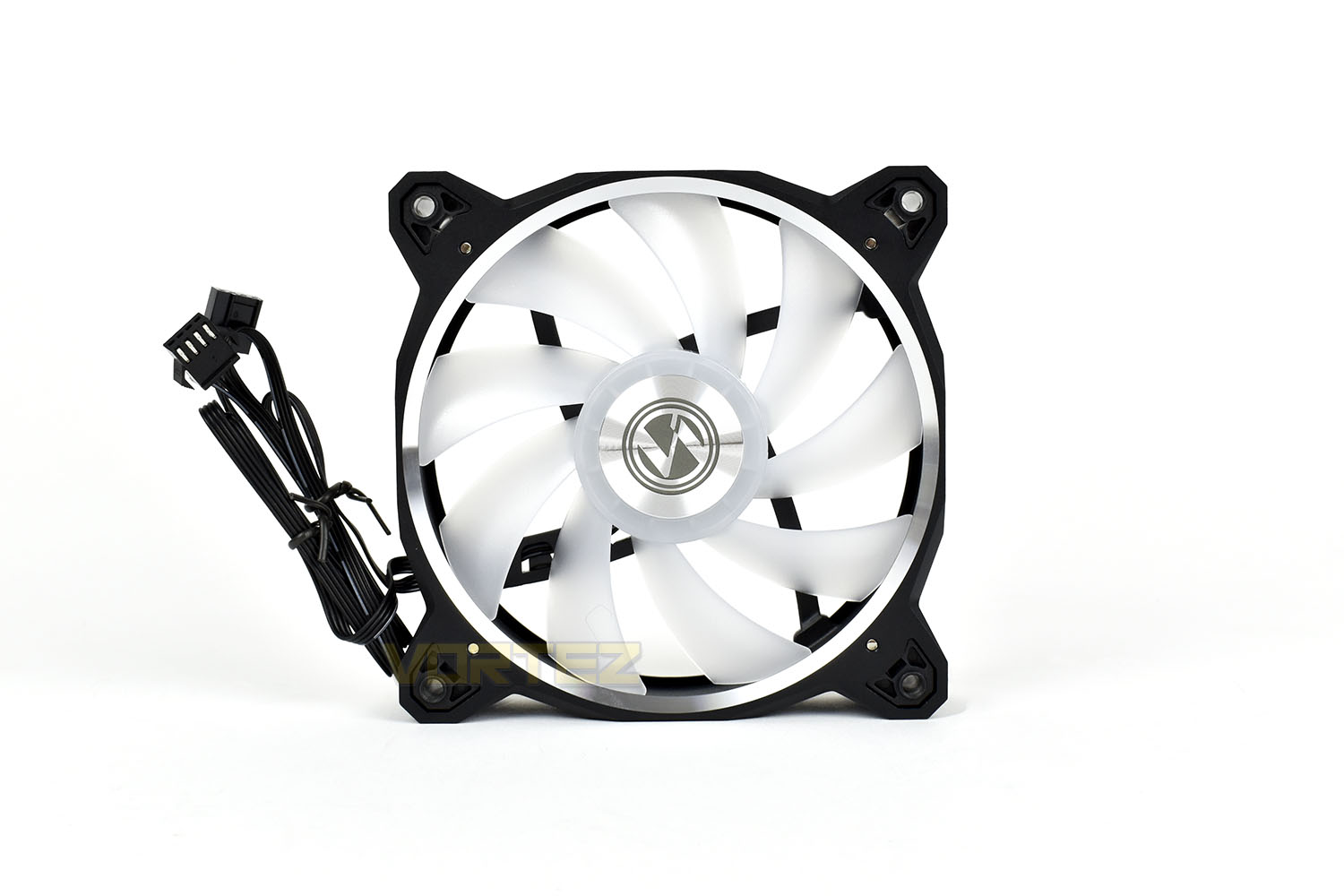
The rear is only different in the way of having spokes to hold the fan hub in place.
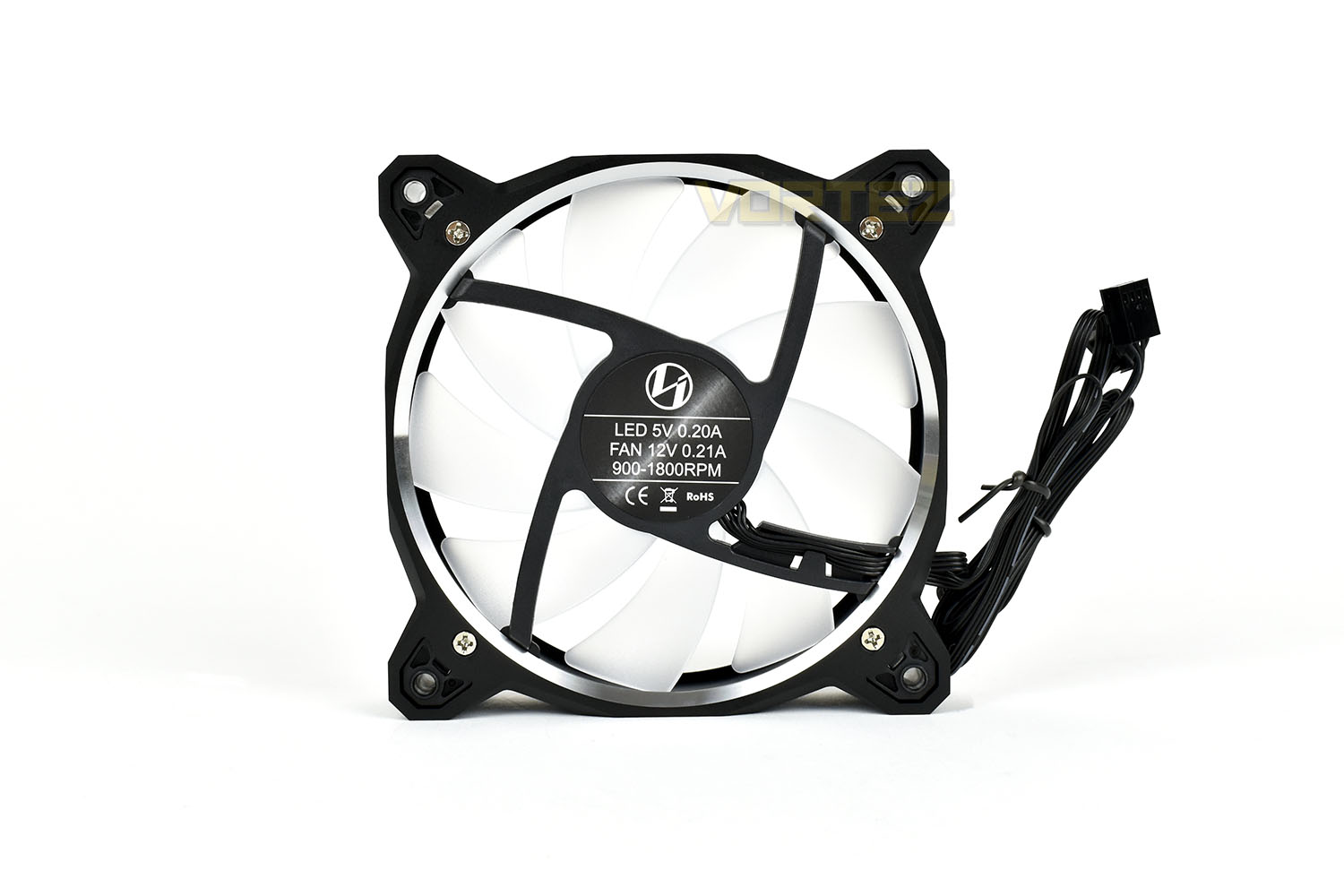
In all 4 corners of the fan, on both sides, Lian Li have provisioned the installation of rubber pads to help reduce vibrations being transmitted into the chassis or cooler, however, something that we’ve not seen before is these arriving on rubber strips that you apply yourself.
This was somewhat of an unexpected test that was much fiddlier than it sounds; the 3M glue was incredibly sticky and one wrong move meant the small rubber pad was then glued to your fingernail, the carpet or the dog. We’d much prefer they arrived pre-installed.

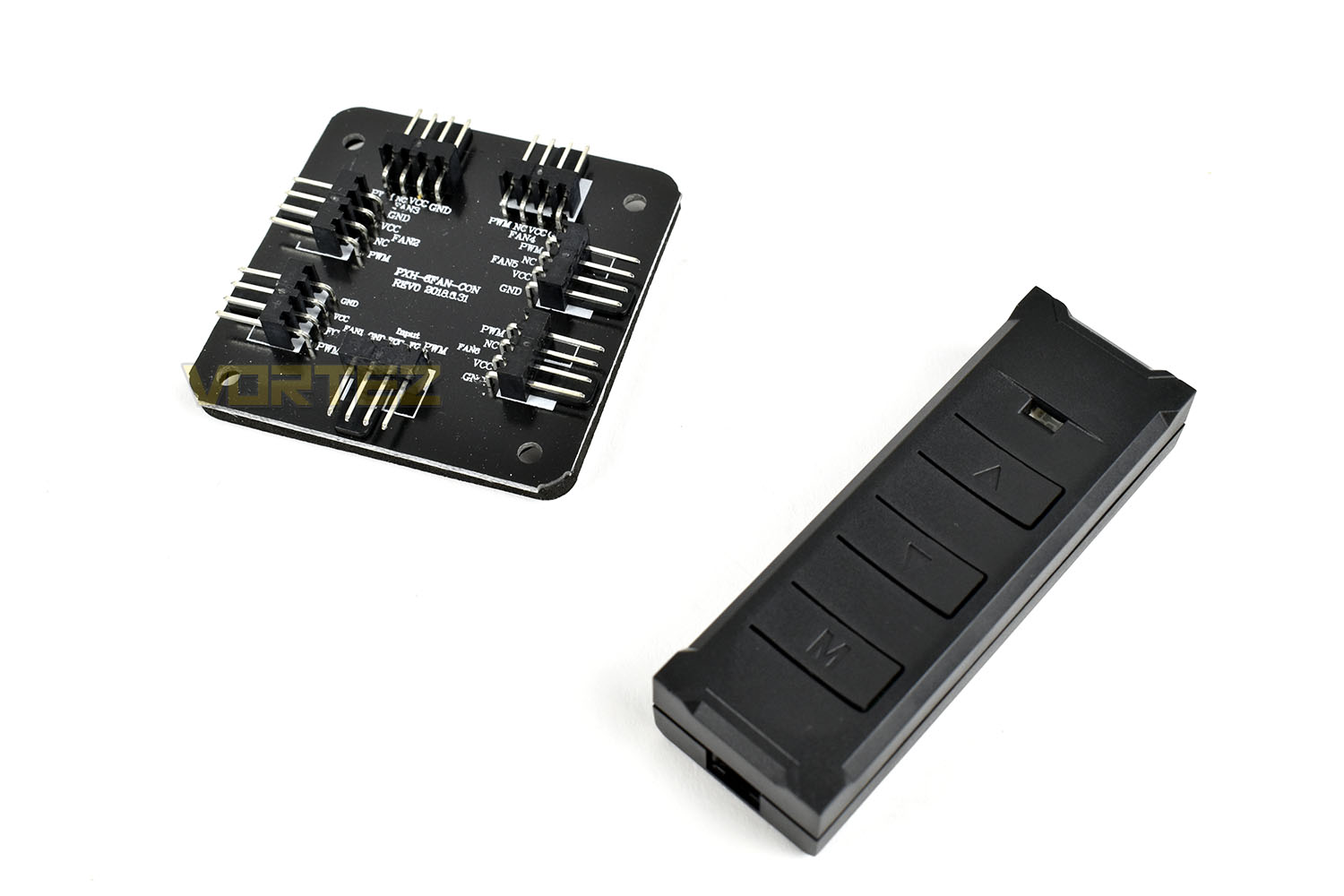
Taking a more in-depth look at the PWM controller, this can be used to power up to 6 PWM fans from a single motherboard/fan controller output. Think of this as a simple six-way splitter with some double-sided tape on the back.
There’s also an in-line RGB controller for adjusting the lighting in older systems without a motherboard RGB header, or if you prefer to do things manually. This can adjust the speed and the effects on up to 6 RGB enabled Lian Li devices, including their Strimer RGB lighting for your cables.
RGB Lighting
Check out the video below for a short demo of the RGB lighting you can expect with the included RGB controller.Test Setup & Methodology
Due to popular demand, we have retired the long-standing cooling rig that we once used and replaced it with a shiny new system with an Intel Core i7 9700K at its heart. This should benefit you, the reader, in a couple of ways. The first being it can provide you with results on a CPU that is currently available to buy and secondly, the mounting instructions on our installation page will be far more relevant than the outgoing LGA 2066 was, with its pre-installed backplate.We perform two individual testing routines with each CPU cooler that we receive – temperatures and acoustics. The system used is as follows and all tests are performed at stock frequencies.
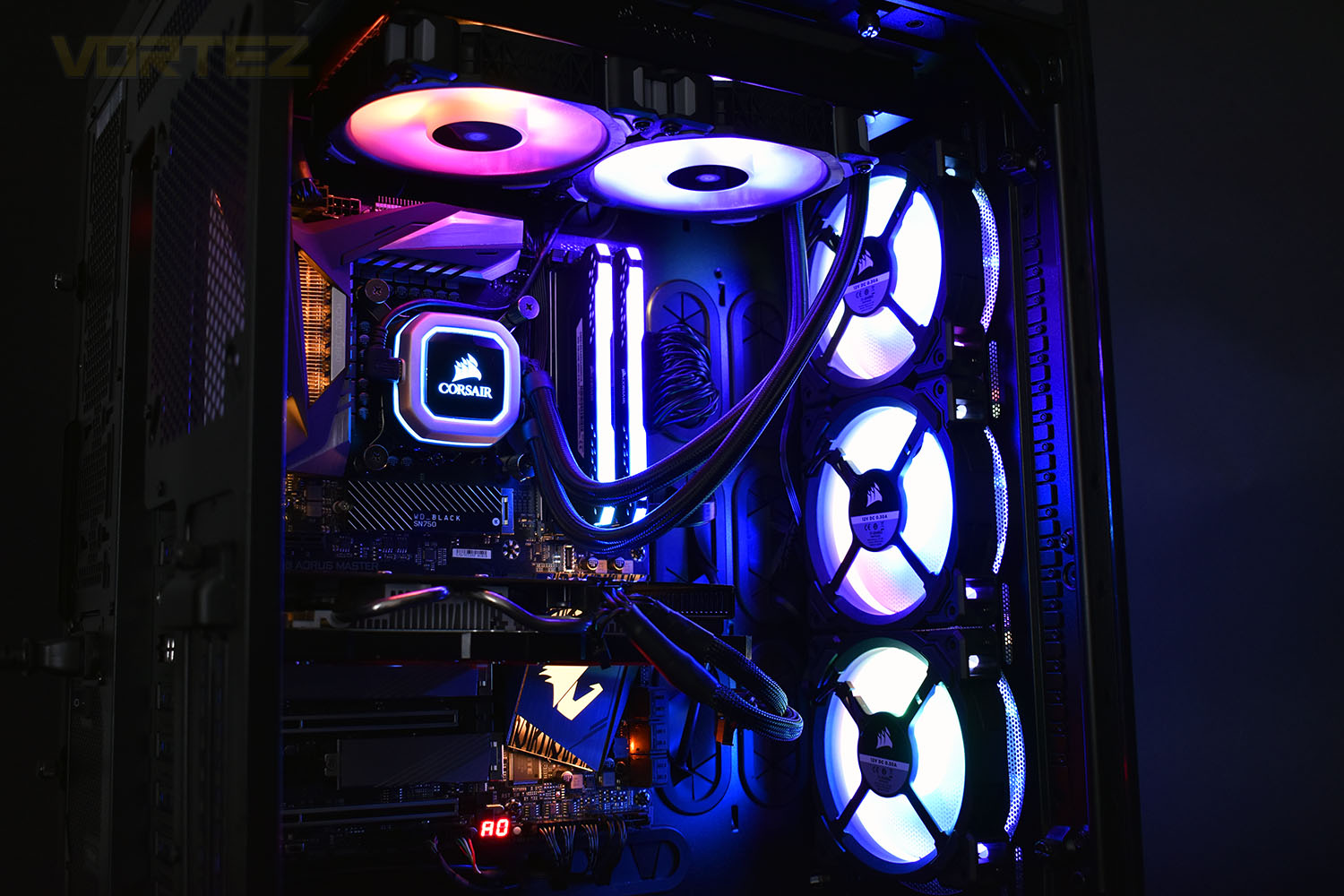
Processor – Intel Core i7 9700K
Motherboard – GIGABYTE Z390 AORUS MASTER
Memory – Corsair Vengeance RGB PRO 16GB – 2666MHz – C16
Video Card – XFX AMD Radeon RX560
Power Supply – Corsair RM650x
Storage Drive – Western Digital Black SN750 1TB NVMe SSD
Case – Corsair Crystal Series 280X RGB
Monitor ASUS ROG SWIFT PG278Q
Motherboard – GIGABYTE Z390 AORUS MASTER
Memory – Corsair Vengeance RGB PRO 16GB – 2666MHz – C16
Video Card – XFX AMD Radeon RX560
Power Supply – Corsair RM650x
Storage Drive – Western Digital Black SN750 1TB NVMe SSD
Case – Corsair Crystal Series 280X RGB
Monitor ASUS ROG SWIFT PG278Q
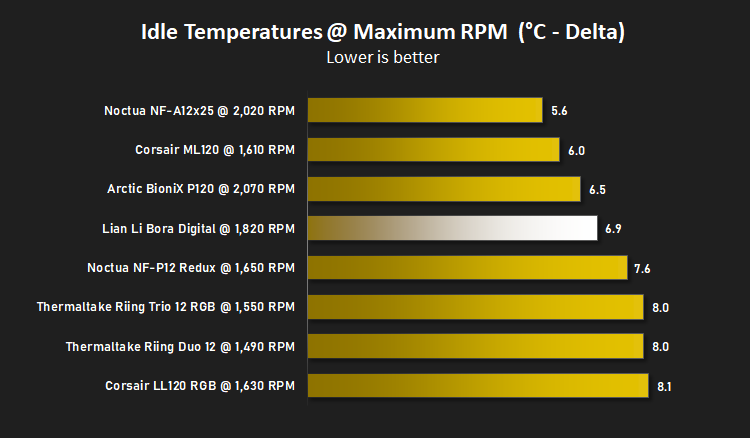
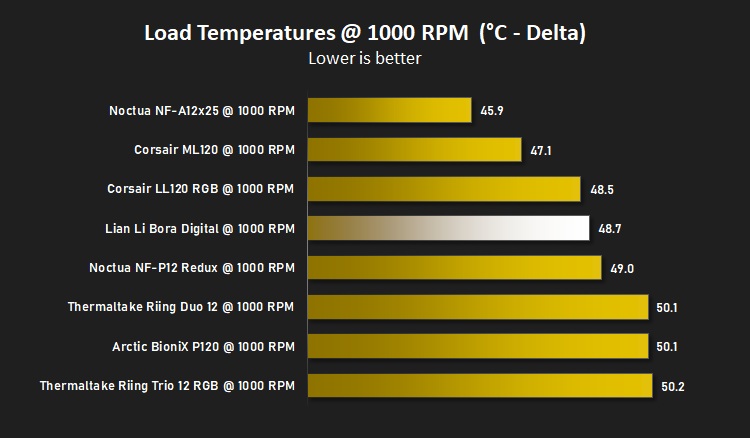
We test our fans at both 1000 RPM and maximum RPM, or if the fan only has one setting, it’s only included in the maximum RPM graphs.
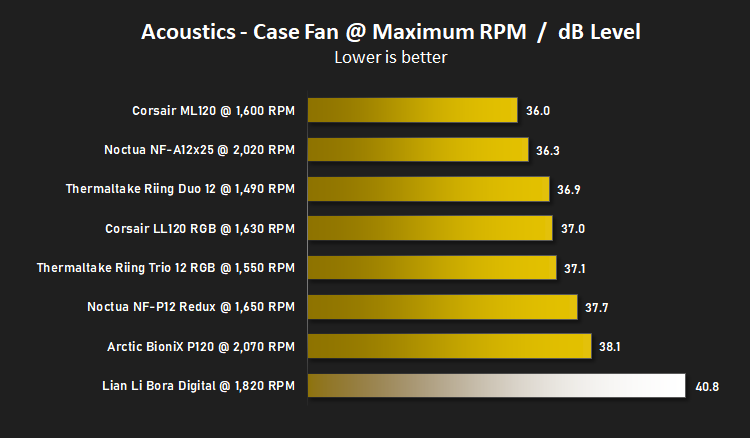
Firstly, we’ll test acoustics, both as a case fan, mounted on the rear of our Corsair Graphite 760T chassis, and as a radiator fan on the Corsair H100i Pro RGB. (with the pump turned down to 1,100 RPM and all other case fans disabled). We measure the average dB(A) noise levels over 60 seconds in a quiet room with an ambient noise level of around 24dB(A). Acoustics are measured from the same point within the case (20cm from the fan), with every effort taken to ensure test parameters are as close as possible during every test.
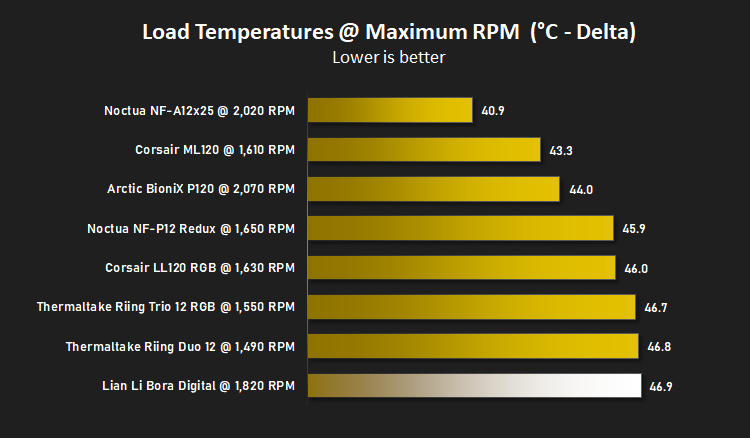
We then test the fan’s performance both at 1000 RPM and maximum RPM by running an AIDA64 20-minute stress test while running only a single 120mm fan on the 240mm radiator of the Corsair H100i Pro RGB. This allows us to test single fans as well as multi packs by only relying on a single 120mm fan. We mount the fan under the radiator, inside the case, blowing through the radiator. We measure the average core temperature over a 60-second period and minus the ambient room temperature from this. That leaves us with a Delta °C measurement which is applied to the graphs. Our average room temperature is kept as close to 21°C as possible, roughly the room temperature of most homes and offices. Obviously, if you live in a warmer climate with warmer room temperatures, you can expect higher temperatures.
To ensure the fans RPM are measured consistently, we use the Noctua NA-FC1 fan control unit, allowing the speed of our fans to be infinitely adjusted and monitored via a nearby header on the motherboard.
Benchmarks – Thermal Results
For thermal results we have all case fans running and only a single 120mm fan on our Corsair H100i Pro RGB radiator. We then measure the thermal results at idle, both at 1000 RPM and maximum RPM: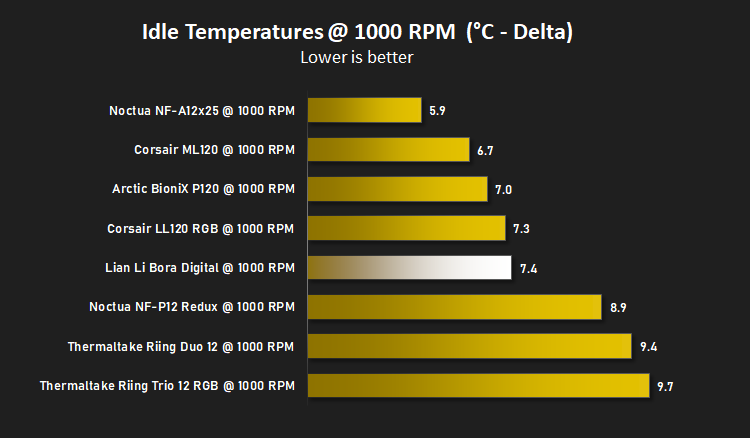
And then again after a 20 minute Stability Test within AIDA64:
Benchmarks – Acoustic Results
For our acoustic results, all other fans in the case are disabled and the Corsair’s H100i Pro RGB’s pump is turned down to quiet (roughly 1100 RPM) and measure the fan noise at 1000 RPM, both as a case fan and as a radiator fan: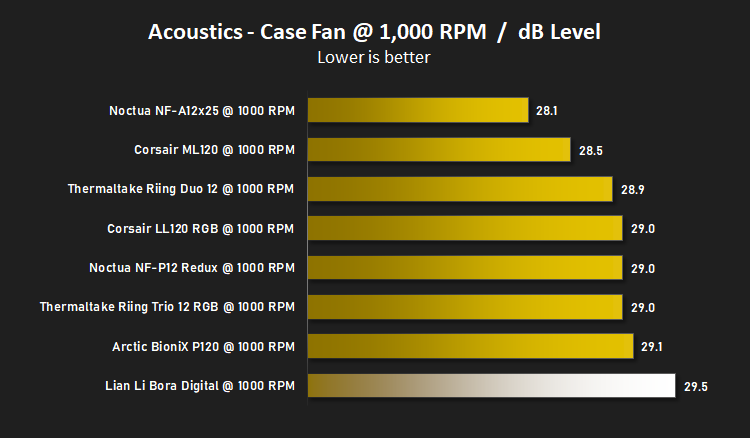
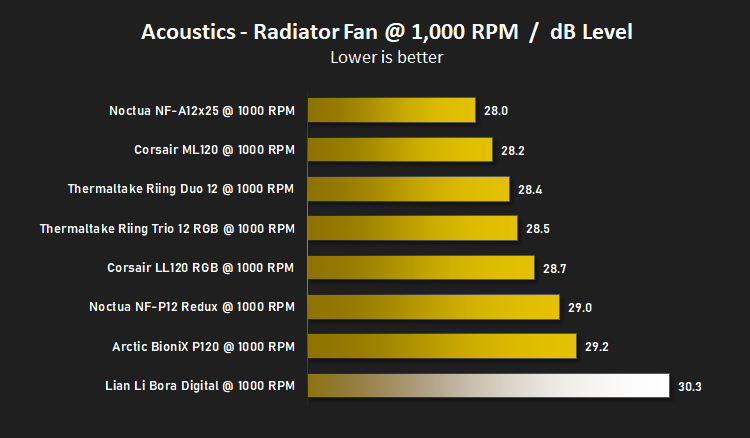
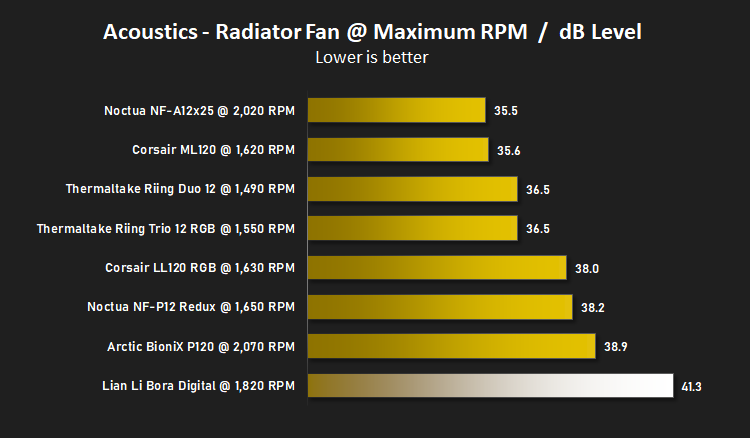
And then again at maximum RPM:
Conclusion
Going into the review, we had previously been impressed by products from Lian Li, particularly with the robustness and clever design built into this computer cases, but the Bora Digital fans have left us feeling quite the opposite.While the RGB lighting is ok, it isn’t the brightest RGB lighting we’ve seen and the effects aren’t particularly smooth with a “one LED at a time” feel to the transitions, but for the price bracket that the triple pack sits in, it really isn’t too bad.
In the middle of each fan is a silver sticker with the Lian Li logo in the centre. This sticker hasn’t been properly centred on any of the fans we’ve received, so when they rotate, the off-centre sticker couldn’t be any more obvious. While aiming for an up-market feel with the aluminium rings and sturdy frame, centering the sticker shouldn’t then be overlooked.
However, where things are bad, is acoustics and overall performance. They don’t seem to push much air and make a lot of noise while doing so. Lian Li’s claims of the only thing louder than their fans being the RGB lighting might actually be correct.
Build quality is somewhere the fans definitely excel, they feel very rigid and the aluminium rings around the blades look great, giving them a much more premium appearance, but having to apply the rubber fan mounts yourself was a pain in the neck.
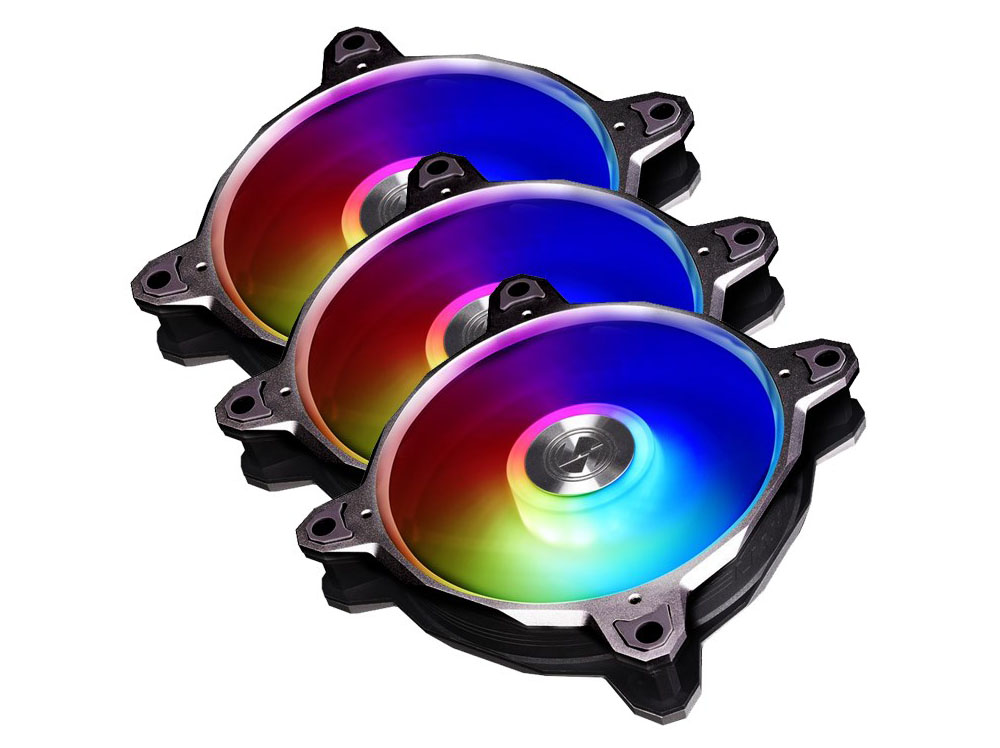
Overall, the Bora Digital RGB fans look decent and they’re cheap but their performance needs some work.
Pros
+ Cheap
+ Included PWM and RGB controllers
+ Fans look and feel premium
+ No software needed
Cons
– Loud
– Lian Li sticker isn’t centred
– Stuttery feel to RGB lighting effects
– No longer screws included for radiator mounting
– Have to mount the rubber corners yourself
+ Cheap
+ Included PWM and RGB controllers
+ Fans look and feel premium
+ No software needed
Cons
– Loud
– Lian Li sticker isn’t centred
– Stuttery feel to RGB lighting effects
– No longer screws included for radiator mounting
– Have to mount the rubber corners yourself
Click here for an explanation of our awards at Vortez.net.
Stay connected with the Vortez Social Media pages: