







There are many headsets available on the market today at all different prices, let’s see how the Logitech fares.
Product on Review: Logitech Clearchat Pro USB HeadsetManufacturer and Sponsor: Logitech
MSRP: £34.77
Street Price: £25
Internet communication has boomed in the past few years. It allows for people to talk to each other around the world, the best thing being that it’s all free! Programs such as Windows Live Messenger, Skype and other VoIP programs have rendered this possible for us. To meet this demand, many audio companies have taken this opportunity to give consumers the right headset for their needs. Logitech is amongst those.
They have had years of experience in the audio business so let’s see if they can deliver the same quality we’re used to with the ClearChat Pro USB.

Some background on Logitech:
Focused on innovation and quality, Logitech designs personal peripherals to help people enjoy a better experience with the digital world. We started in 1981 with mice, which (new at the time) provided a more intuitive way of interacting with a personal computer. We became the worldwide leader in computer mice, and have reinvented the mouse in dozens of ways to match the evolving needs of PC and laptop users.
Since those early days, we have expanded our expertise in product design beyond the computer mouse, with a broad portfolio of interface devices that are the “last inch” between you and your computer or your console game, digital music or home-entertainment system.
With products sold in almost every country in the world, Logitech’s leadership in innovation now encompasses a wide variety of personal peripherals (both cordless and corded), with special emphasis on products for PC navigation, gaming, Internet communications, digital music and home-entertainment control.
For each of our product categories, we study how our customers use their digital devices, and then our designers and engineers set their sights on how we can create a better experience with those devices – richer, more comfortable, more fun, more productive, more convenient, more delightful.
This reminds us why many people flock to Logitech when it comes to buying new peripherals.
Packaging

The headset comes in a rather conventional semi-circular plastic packaging, fthe headset fitted in nicely.

The back reveals some of the features of the headset in 6 languages with accompanying pictures.

The package is very secure and easy to open and access.
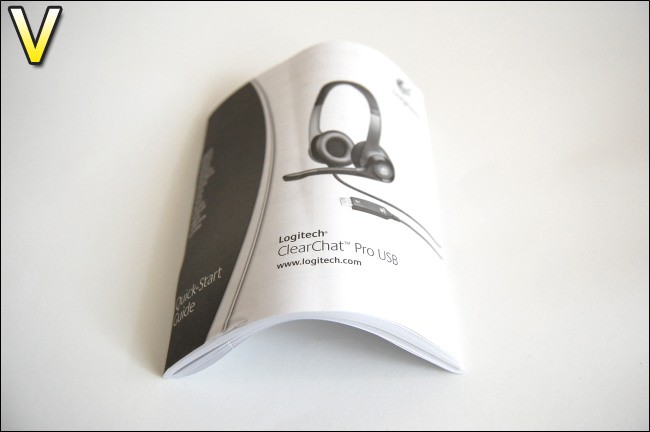
The bundled manual is a bit thick but that’s only because it’s in so many languages. You can’t expect less from a company with such global popularity.
Closer Look

The headset uses a binaural ear cup design and the microphone piece can turn 90 degrees to be hidden away.

The outside casing is made of plastic unlike the actual earpiece which is a much softer cloth material to avoid pain. The ear pieces adjust to fit the ears and both sides are extendable to fit the head.

The controls are situated on the right cup. On the grey head band, we find the three equalizer settings for games, music and web calling. The outer ring acts as a volume control by pressing up or down and the middle Logitech labelled button is for muting the microphone.

The 6.5cm long USB connection also includes the sound drivers for maximum compatibility.
Features and Specifications
Performance:
•Laser-tuned audio drivers: Advanced laser design technology maximizes acoustic performance.
•SoundSwitch™ equalizer: Instantly optimizes EQ settings for Internet communications, music, or PC gaming. Convenient control switch located on headset.
Control and Convenience:
•Noise-canceling microphone: Reduces background noise for clear conversation and voice commands.
•Flexible boom: Allows precise positioning. Microphone rotates out of the way when you’re listening to music or watching a movie.
•Mute indicator: Microphone emits soft, red glow when muted.
•Quick-access audio controls on the headset: Instantly adjust the volume or mute the microphone.
•Digitally enhanced USB audio: Experience premium sound clarity with the simplicity of a single USB, plug-and-play connection.
Ideal for:
•PC voice and video calling
•Music and movies
•PC gaming
System Requirements
PC
•Windows® 2000, Windows® XP, Windows Vista™
•USB port
Mac
•Mac OS® X (10.2.8 or later)
•USB port
Technical Specifications
•Frequency response:
Headset: 20 Hz–20 kHz
Microphone: 100 Hz–10 kHz
•Input sensitivity: -62 dBV/µbar, -42 dBV/Pa +/- 3 dB
•Cable ength: 8 feet
•Connections: USB compatible (1.1 and 2.0)
Package Contents
•Logitech® ClearChat Pro USB™
•Quick-Start Guide
•2-year limited hardware warranty
Testing
Installing the headset was a piece of cake. The benefit of the USB connection is that you can just plug it in and use it. No software is required and the USB has its own inbuilt sound drivers so there’s nothing to worry about. The 8 feet long cable also does not restrict you to being in close to your PC. If you have speakers connected to your motherboard or sound card, the headset prioritises itself over them, so sounds will start playing immediately from it. However if you were already playing a track before plugging it in, all you have to do is stop and start the music playback. On a plus side, it also works via my Logitech G15 USB port without any issues!
Music
To test it, decided to test a variety of music while using the music equalizer. First off, I played “Need to Feel Loved” by Reflekt. The baseline was very punchy and the vocals were quite clear although slightly muffled compared to my sound card solution. Even at maximum volume, there wasn’t any crackling or distortion. Overall it was quite pleasant to listen to.
Next up was “Beat it” by Michael Jackson. Again, the quality of the sound was pretty good and managed to pick out quiet background vocals. The positioning of the instruments were accurate with regards to both ear cups. There were no distinguishable distortion even at high volumes.
Lastly, I tried “LAX” by Xzibit. The song makes use of heavy bass throughout and the ClearChat Pro coped surprisingly well. It is slightly distorted when the first explosive beat kicks and in the higher frequencies. The vocals on the other hand did not get detracted by the heavy bass, to present a clear response.
Gaming
For this I thought the best course of action was to play a first person shooter, where accurate position and detecting even the faintest is the difference between life and death. So I fired up Call Of Duty: Modern Warfare. The gaming equalizer setting certainly helped during game play, making for fairly accurate sounds coming from most directions. I managed to discern where sounds were coming most of the time although distinguishing where a helicopter was overhead proved much harder. Hearing the rustle of your gear while running, gun in hand, and the rapid thuds from helicopter fire certainly shows the quality of the headset.
Voice Chat
Using the ClearChat Pro on Skype gave a very clear response. The voice response was very clear through the microphone and there was minimal background noise.
On Steam chat however, there was enough background noise to make it seem as if I was standing outside in strong winds! Despite this, my voice could still be heard on the other hand above the background noise.
Changing from the music equalizer to the one dedicated to web calls did improve the background noise issue on Steam.
Comfort and build quality
On the whole, thanks to the heavily padded ear cups, the ClearChat Pro USB were comfortable to use, even after hours of wearing them. The pads are soft, and the ear cups adjust to shape the ears. The top of the headset is also padded and the frame supporting both cups can be extended/retracted so they didn’t feel tight on my head but still felt secure. Despite the plastic construction, at no point did I find it flimsy or about to spontaneously fall to pieces in my hand, which quite frankly can be expected from many products these days.
Observations
One of the things I noticed with the ClearChat Pro USB is the amount of sound leakage at mid-high volumes. Whilst not a big problem, it can be distracting to others around you. Volume control is also done through Windows rather than a separate manual one as found on most other headset. On the one hand, the volume control on the headset is very conveniently placed but on the other hand, it prevents you from knowing what the actual volume is without bringing up the Windows sound icon.
Conclusion
Once again we have an excellent product from Logitech. The USB connection allows for very convenient connectivity to any computer or laptop without requiring a sound card or reaching to the back of your case while breaking your back. The quality of sound being outputted is also quite good delivering immersive music across a variety of artists and genres, and not too forget fast action games. Its main purpose is for web calling and on that front, it sure provides a good experience. Chatting on steam may have been like talking on a cliff with waves crashing at the foot but my voice could still be heard and none of this problem was present in Skype.It has a solid build quality and the volume buttons are well placed. The small details really are testament to the amount of thought Logitech put into their products such as the red glow on the microphone when it is muted. Best of all, following the same trend as the Cordless Desktop EX 100, no installation is required.
Pros:
•No installation required
•Good sound quality with preset equalizers
•USB connectivity for convenience
•In built sound drivers
•Comfortable and solid build
•Price is only around £25
Cons:
•Sound is not crystal clear
•Volume controlled through operating system
The Logitech ClearChat Pro USB reviewed today earns Vortez Hardware\\\’s Silver Award.
To discuss this review, please visit our forum.


