







We review the latest high performance gaming mouse from Swedish company Mionix. It has 128kb built in memory, customizable colours and a balanced weight system.
Product on Review: Mionix Naos 5000 High Performance Gaming MouseManufacturer and Sponsor: Mionix
MSRP: £64.99
Street Price: £59.99

Mionix announced the release of the latest addition to their High Performance Gaming Mouse range just a few weeks ago and it is with great pleasure we bring you the Mionix Naos 5000. Mionix only entered the market in 2007, and have already received wide acclaim for their high quality gaming peripherals. The Naos 5000 is aimed squarely at the top end of the gaming mouse market and is a bold step forward.
Here’s what Swedish company Mionix have to say about the Naos 5000:
| Ergonomically designed and stuffed with new and innovative features, Mionix Naos 5000 not only stands out from the crowd, it sets new standards when it comes to comfort, tracking capacity and customization options. “When we started this project our goal was to create a fully adjustable and innovative gaming mouse with unique features. It has been very challenging and we put in a lot of effort to archieve our goals. Mionix Naos 5000 is a big step forward to become one of the world’s leading manufacturer of gaming accessories with a wide range of gaming products that gamers can identify themselves with. We are very proud to be the first Swedish manufacturer of gaming accessories to develop a gaming mouse”, says Carl Conradsson, Mionix. |
| “A passioned hunt for perfection has come to an end. Mionix Naos 5000 has seen its first light of day. Get ready to meet a gaming mouse with an incredible ergonomic comfort and stunning technology that offers an outstanding gaming experience. Mionix Naos 5000 features a new innovative weight tuning system for an optimal weight distribution of the mouse, carefully selected high-end components and leading laser technology. Stunning features such as adjustable lift-distance, 5 onboard profiles, extensive macro settings and customizable LED-lights give you the opportunity to customize the mouse exactly to your liking.” |
We have previously reviewed the Mionix Saiph 1800 Gaming Mouse and gave it high praise.
So how does the Naos 5000 differ? Read on to find out.
Features and Specifications
TECHNICAL SPECIFICATIONS
• Truly ergonomic design with support for all five fingers
• Maximum grip ensured by the rubber coating
• Balanced unique weight tuning system for an optimal weight distribution
• 128kb built-in memory – bring your settings and recorded macros with you stored into one of the 5 profiles
• Customizable LED light system allows you to personalize your mouse with extensive colour options – 6 integrated LEDs
• 3 steps customizable dpi adjustment easily switched in-game
• In-game profile switching
• 7 programmable buttons can be assigned to any key, mouse command or macro
• Adjustable polling rate can be tuned all the way up to 1000Hz through the software
• Completely Plug n Play, software needed only for configuration
• Large Teflon feet for super smooth glide
• Gold-plated USB connection
• 2m Braided cable for durability
SENSOR SPECIFICATIONS
• 5040 dpi gaming laser sensor
• S.Q.A.T – Surface Quality Analyser Tool
• Adjustable lift distance
• 1 ms response time
• 12,000 frames/sec
• Tracking speed: 5.1 m/sec (200ips)
• 10.6 mega-pixels/sec image processing
• Acceleration: 30g
• 40,000 Hz sampling rate
• True 16-bit data rate
DIMENSIONS & WEIGHT
• 130.84 x 84.72 x 38.67 mm
• Weight (w/o cable): 106 g
• Weight (cable inc): 158 g
• Weight tuning: up to 40 g
SYSTEM REQUIREMENTS
• Windows 2000 / XP / Vista / 7
• Available USB port
• 40 mb free space on hard drive
Packaging and Contents
Following the theme of their earlier gaming mice the Naos 5000’s packaging is refreshingly clean and subtly understated. The simple black box has very little clutter to draw the eye away from the life-size image of the mouse itself. Mionix are clearly happy to let their product do the talking, and when it looks as good as this does – why not!
The box’s is opened by it’s bottom flap which is magnetically held shut – a nice touch as you don’t have to cut or damage the packaging at all to get inside, unlike so many of the plastic ‘blister’ packed devices available today. The reverse of the front cover has an explanation of Mionix’s choice of name, following their convention of naming products after stars.
Mionix’s minimal clutter theme is continued inside the box.
That’s it – the total contents of the box are the mouse itself, a neat tin of weights and a leaflet detailing where to download the driver software.
A quick first look at the mouse shows the superb attention to detail that Mionix have lavished on the Naos 5000. A 2m braided cable ends in a gold-plated USB connector for ultimate quality.
A Closer Look
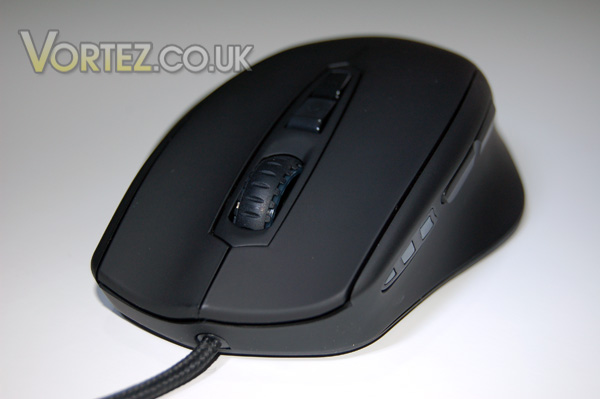
One area where the Naos 5000 differs significantly from it’s earlier cousins is in the ergonomically designed shape – no longer are you left with a couple of fingers dangling as this mouse’s shape accommodates those ‘spare’ fingers nicely!
Another change is that of the 7 buttons ALL of them are programmable via the very well laid out and comprehensive downloadable software. The mouse is fully plug & play so you don’t need to use the software if you don’t want to – the buttons all have default settings which makes it very usable straight out of the box.
The three leds in front of the side buttons are to indicate what level the dpi adjustment is currently set at.
Underneath the Naos we see 4 very large Teflon glide pads which give the mouse a super silky feel, even on a less than perfect surface. Either side of the laser sensor you can see the two doors for the customisable weight system.
Adjustable Weight System
The weights are securely housed in a sturdy tin emblazoned with the Mionix name so there’ll be no misplacing them!
Each of the 8 provided weights is 5g and has a groove running down either edge to locate them securely into the housings, and each is embossed with the Mionix logo. The attention to detail on every little part of the Naos 5000 is simply stunning!
Slide the little button forward to release the cover, insert weights as required into any of 4 positions on either side of the mouse and click the cover back into place to secure it all. Mionix have used clever design to allow for the positioning of the weight housings to be either side of the sensor which makes for a very good weight distribution and hence it’s very easy to get it set up exactly as the user requires.
Software
As already stated Mionix don’t supply a disk with the Naos 5000 which some may think a little odd, but let’s be honest here – who actually uses drivers which come with a mouse anyway? They are almost always long out of date and so needing a update to be downloaded. If you are buying a high performance gaming mouse such as this you would want to ensure you are using the latest and best drivers and firmware so downloading is the only way to go.When you run the Naos 5000 software setup it will first check the Naos 5000’s firmware and update it if required – a process which is totally automated and took only a few seconds – and then load the driver and configuration software.
Above we see the main screen showing the first tab of 5 – Mouse Settings.
Here we can control what each of the 7 buttons does where you can choose from a preset drop-down list. The polling rate can also be adjusted, as can several other basic settings. Each setting can be adjusted for each of the 5 onboard profiles stored in the Naos’ 128kb onboard memory, which can be a very useful feature as once setup you can pretty much forget the software and just get on with the gaming!
On the second tab we see all the settings and adjustments for the laser sensor.
Dpi can be set for X and Y axis together or at the click of a button you can set them independently should you so wish – a feature which could be useful for some widescreen gaming where the ability to track across the screen really fast could be useful. You will also find the S.Q.A.T (Surface Quality Analyser Tool) here along with Pointer Speed and Lift Distance settings.
On the third tab we get to play with all the colour settings.
Here you can adjust the colour of all the led zones together or selectively, and the choice of colours is quite extensive allowing you to customize your Naos to truly be a one of a kind device! Again, the 5 onboard profiles can store different colour schemes so you can easily switch between them as the occasion demands!
On the fourth tab we find the Macro Setting screen where we can record any combination of keystrokes and mouse clicks.
On the final tab we have Support and Software Update options.
Overall the software presents a very comprehensive array of configurable options, it is clearly laid out and intuitive to use so that it is easy to get the Naos 5000 set up and running exactly as the user requires in only a few minutes.
Performance and Conclusion
As soon as you plug the Naos 5000 in it comes to life, the leds glowing in Mionix\’s default green colour scheme.
The Naos 5000 has a very nice feel to it with the ergonomic shape and rubber coating being really very comfortable indeed. The added rubber coating on the wheel is also a nice touch and the wheel itself has a very smooth and precise motion without being either too loose or stiff. All the buttons have a satisfyingly smooth \’click\’ and it is clear that Mionix have invested in the very best components to ensure that the Naos 5000\’s operation is second to none.
Desktop Usage
The Naos 5000 performs very well as a general desktop mouse. The \’on-the-fly\’ adjustment of dpi is just as useful here as when gaming. Reading email and web browsing at a relatively low dpi was absolutely fine, but add in the ability to quickly switch up dpi when doing delicate editing in Photoshop and the Naos 5000 quickly showed it\’s colours! It\’s comfort and precision just made it a joy to use for any task.
Gaming Performance
I tested the Naos using a couple of games from different genres.
Crysis Warhead allowed for great testing of the on-the-fly dpi adjustment as when sniping it was superb to be able to step up the dpi to get a much more accurate shot, and the general fluidity that the Naos 5000 gave the game was amazing – it was like adding a few fps which in Warhead is no mean feat!
World In Conflict was also an improved experience with the Naos 5000, as again the ability to quickly up the dpi to move around maps faster really gave an extra edge to the gameplay which a cheaper mouse couldn\’t hope to emulate. I felt no strain at all in prolonged gaming sessions as the glide and comfort of the Naos 5000 put next to no strain on fingers, hand and wrist! Overall, after more than a few hours of intense play it was obvious that in the Naos 5000 Mionix have hit the mark.
Conclusion
Mionix have crafted a superb gaming mouse in the Naos 5000. They have clearly taken what was best from their earlier designs and added both functionality and performance whilst maintaining their fantastic level of quality. The Naos 5000 has a superb feel straight out of the box, but add to that it\’s customisable weight system and infinitely configurable software options and you truly have a mouse for any and every occasion.
So, we like it. We like it lots in fact – that should be pretty obvious by now! There is however, one little thing we\’re not quite so keen on… the price! It is a pricey mouse, even for a high performance gaming mouse. But consider this – it is without a doubt amongst the best gaming mice available today and it should last and last given the clear quality of the components used, so if you are after the ultimate in gaming mice the Mionix Naos 5000 is definitely one not to miss!
The Mionix Naos 5000 is a deserving winner of Vortez Hardware\’s Gold Award!
+ Superb ergonomic design
+ All 7 buttons fully programmable
+ Infinitely customisable via software
+ Onboard memory for stored profiles with on-the-fly switching
+ Weight adjustment system
+ 5040 dpi
Cons
– Price
