With the release of AMD’s latest chipset, B450, the world’s motherboard manufacturers have been busy preparing their offerings. Today we look at MSI’s flagship, the B450 Gaming Pro Carbon AC.

Product on Review: MSI B450 Gaming Pro Carbon AC
Manufacturer: MSI
Street Price: GBP £119.99 / USD $129.99 / AUS $229.00
The MSI B450 Gaming Pro Carbon AC sits at the top of the MSI ladder; this is their flagship B450 chipset motherboard offering the largest range of features including 802.11AC WiFi, twin M.2 ports (both of which support AMD’s StoreMi), large power phase heatsinks and plenty of PCI-E expandability.
The Pro Carbon moves away from MSI’s typical black and red colour scheme, focusing on a monochrome design with Carbon Fibre accents. There’s a small spattering of RGB LEDs around the motherboard, one section under the DIMM slots and the others peeking out from under the southbridge heatsink. We also find a full-length 110mm M.2 heatshield on the top port, to help improve NVMe performance by removing unwanted heat buildup.
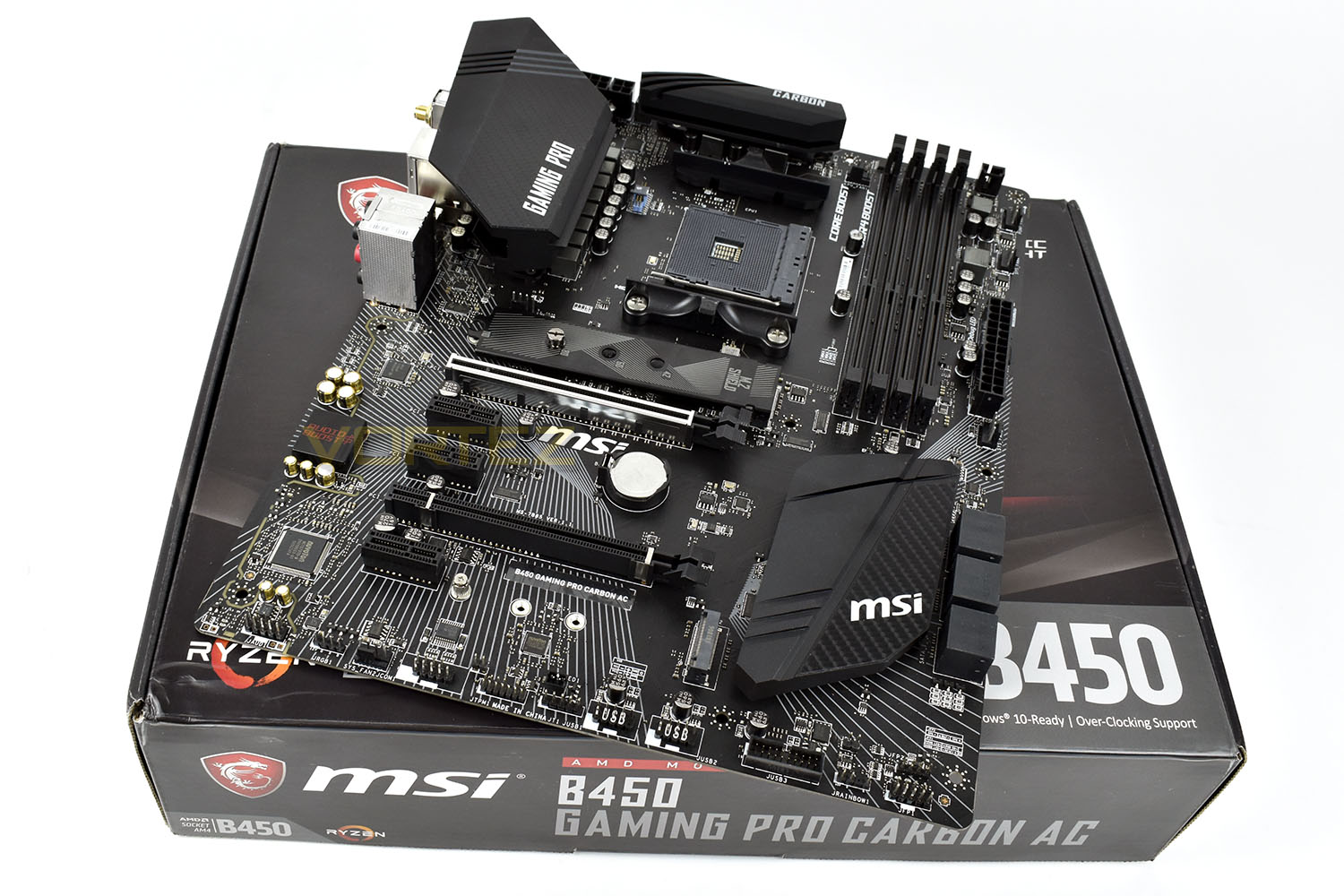
As well as the above features, we’re provided with AudioBoost 4 with Nahimic3 for great gaming audio, an Intel Gigabit LAN port, Bluetooth 5.0 for connecting game controllers or mobile phones. There’s also an abundance of RGB connections as well as more 3/4pin fan jacks than you can shake a stick at. Also, don’t forget, AMD’s B450 still supports overclocking so extra performance should be possible.
The B450 chipset uses the same AM4 socket as the B350, X370 and X470 chipsets and is capable of supporting Ryzen 1st and 2nd Gen. CPUs, all the way up to the Ryzen 7 2700X.
On the face of it, we can clearly see where MSI have spent the £120 budget, but does the performance back up the price tag? Read on to find out.
AMD on the 2nd Gen. Ryzen:
The 2nd Gen AMD Ryzen Processor (codename “Pinnacle Ridge”) is not merely and exciting evolution of the AMD Ryzen Family, but a fantastic new opportunity for PC enthusiasts to take home an impressively well-rounded platform. AMD has spent the past year listening to community feedback from Reddit, Twitter, customers, trade shows and websites like Vortez, to outfit our new processors with an awesome complement of user-first features. And when you add them all up, we believe we have the ultimate processor gamers, creators and enthusiasts.
Technical Specifications
SOCKET: AM4
CPU (MAX SUPPORT): Ryzen 7
CHIPSET: AMD B450 Chipset
DDR4 MEMORY: 1866/ 2133/ 2400/ 2667Mhz (by JEDEC)
2667/ 2800/ 2933/ 3000/ 3066/ 3200/ 3466 MHz (by A-XMP OC MODE)
MEMORY CHANNEL: Dual
DIMM SLOTS: 4
MAX MEMORY (GB): 64
PCI-E X16: 2
PCI-E GEN: Gen3 (16) (8), Gen2 (4)
PCI-E X1: 3
SATAIII: 6
M.2 SLOT: 2
RAID: 0/1/10
TPM (HEADER): 1
LAN: 1 (Intel® I211AT)
USB 3.1 PORTS (FRONT): 2(Gen1, Type A)
USB 3.1 PORTS (REAR): 1(Gen2, Type C), 1(Gen2, Type A), 2(Gen1, Type A)
USB 2.0 PORTS (FRONT): 4
USB 2.0 PORTS (REAR): 2
SERIAL PORTS(FRONT): 1
AUDIO PORTS (REAR): 5+ Optical S/PDIF (Realtek® ALC1220 Codec)
DISPLAYPORT: 1
HDMI: 1
DIRECTX: 12
FORM FACTOR: ATX
CROSSFIRE: Yes
OPERATING SYSTEM:
Support for Windows® 10 64-bit
Support for Windows® 7 64-bit
* To support Windows® 7 64-bit, you must install an AMD Pinnacle Ridge & Summit Ridge CPU.
CPU (MAX SUPPORT): Ryzen 7
CHIPSET: AMD B450 Chipset
DDR4 MEMORY: 1866/ 2133/ 2400/ 2667Mhz (by JEDEC)
2667/ 2800/ 2933/ 3000/ 3066/ 3200/ 3466 MHz (by A-XMP OC MODE)
MEMORY CHANNEL: Dual
DIMM SLOTS: 4
MAX MEMORY (GB): 64
PCI-E X16: 2
PCI-E GEN: Gen3 (16) (8), Gen2 (4)
PCI-E X1: 3
SATAIII: 6
M.2 SLOT: 2
RAID: 0/1/10
TPM (HEADER): 1
LAN: 1 (Intel® I211AT)
USB 3.1 PORTS (FRONT): 2(Gen1, Type A)
USB 3.1 PORTS (REAR): 1(Gen2, Type C), 1(Gen2, Type A), 2(Gen1, Type A)
USB 2.0 PORTS (FRONT): 4
USB 2.0 PORTS (REAR): 2
SERIAL PORTS(FRONT): 1
AUDIO PORTS (REAR): 5+ Optical S/PDIF (Realtek® ALC1220 Codec)
DISPLAYPORT: 1
HDMI: 1
DIRECTX: 12
FORM FACTOR: ATX
CROSSFIRE: Yes
OPERATING SYSTEM:
Support for Windows® 10 64-bit
Support for Windows® 7 64-bit
* To support Windows® 7 64-bit, you must install an AMD Pinnacle Ridge & Summit Ridge CPU.
Packaging & First Look
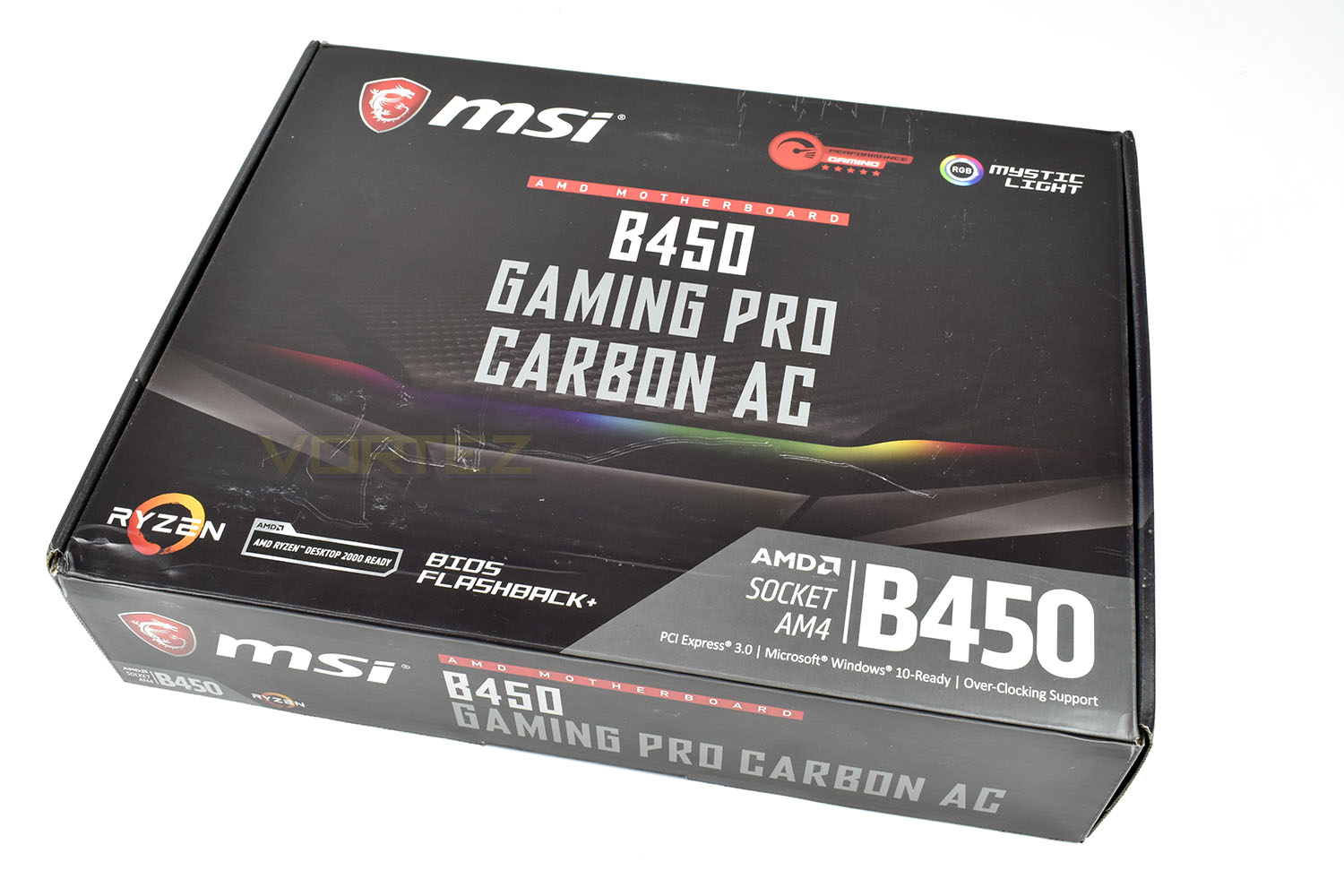
Our box arrived looking a little worse for wear but this isn’t indicative of how an MSI motherboard would generally arrive.The front of the packaging shows the carbon theme, as well as a hint towards the RGB aspects. We also see a Performance Gaming logo, with the 5 stars underneath.
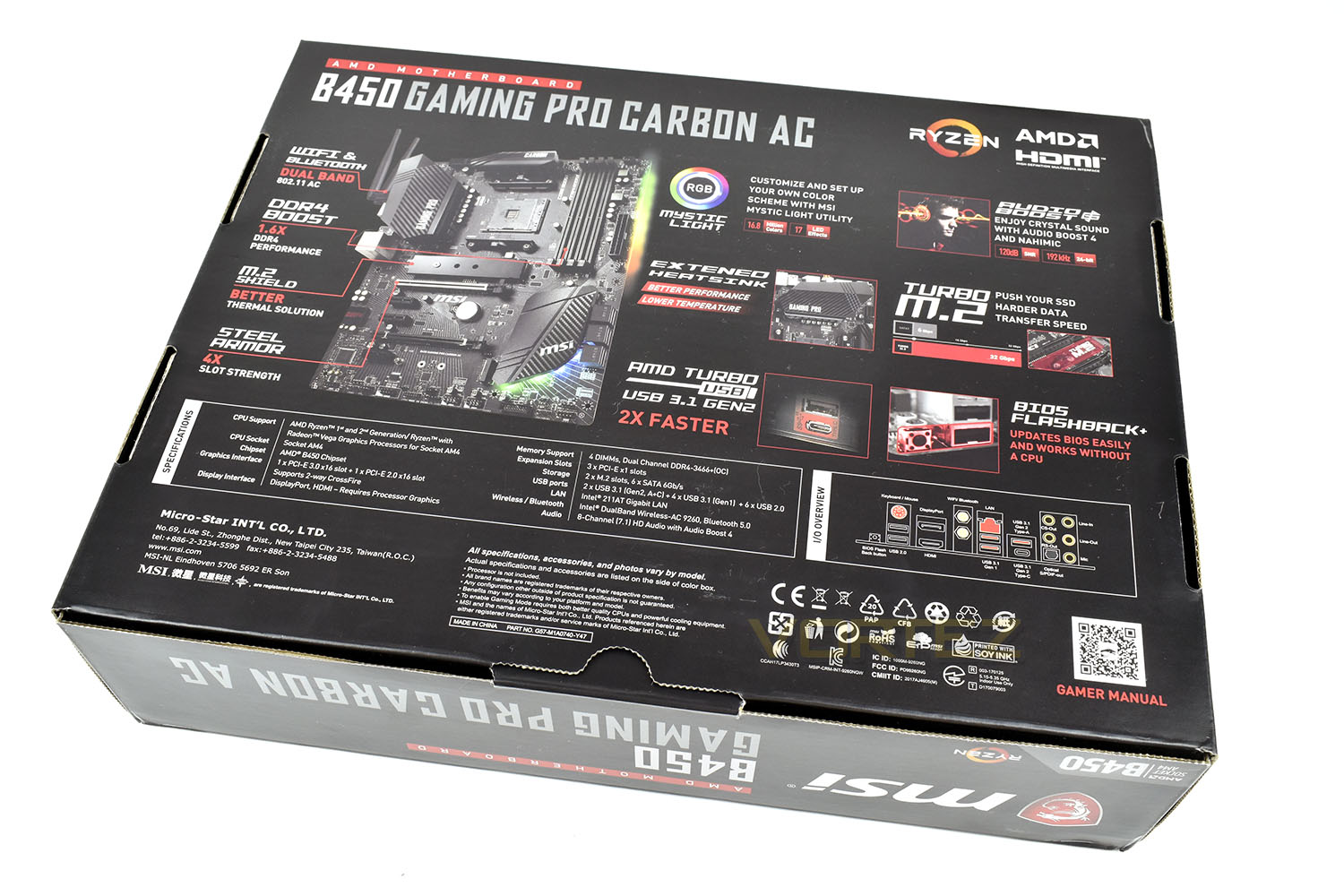
The reverse side is packed full of information, showing off the RGB Mystic Light, BIOS Flashback+, Type C USB and other important features.
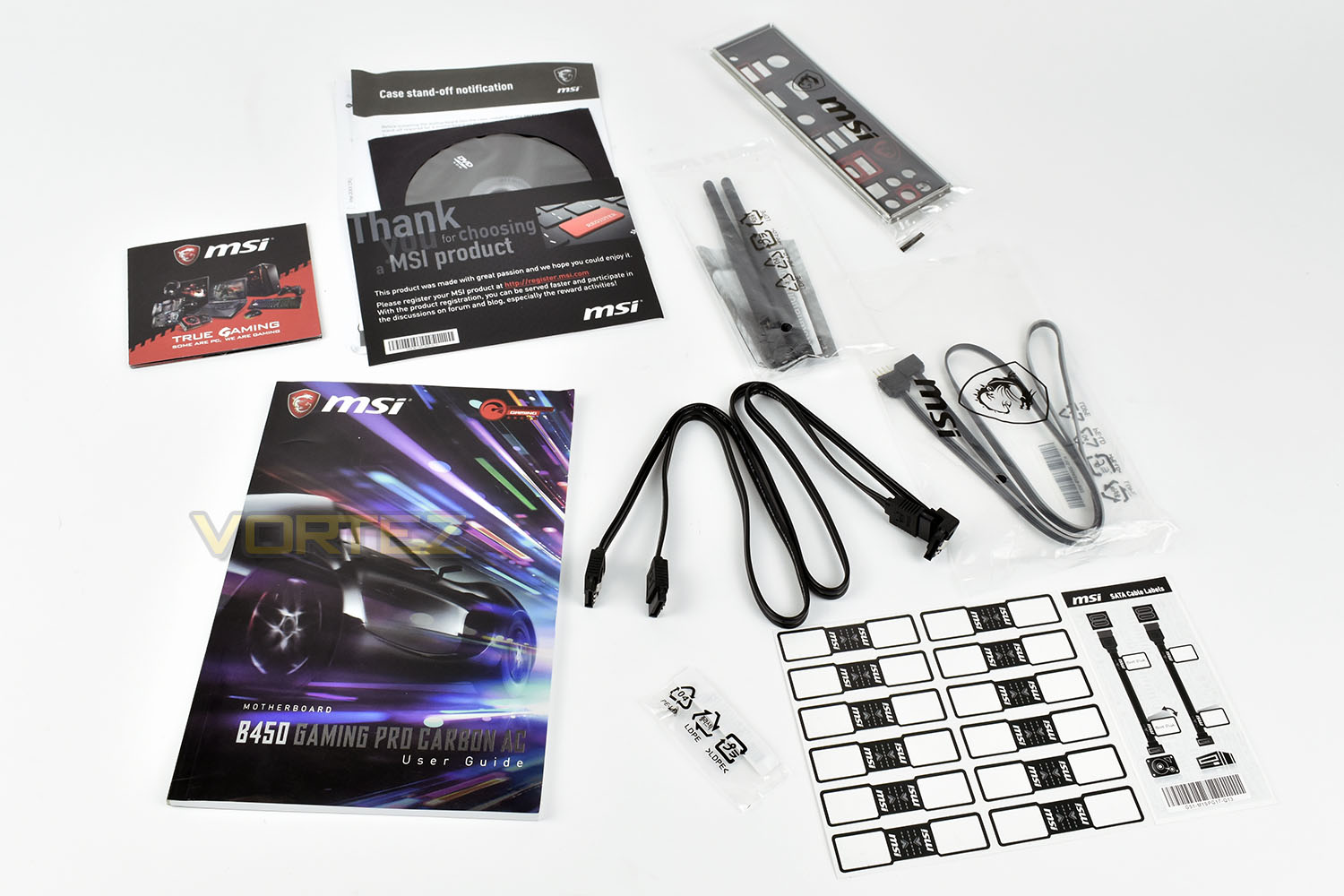
Bundled with the motherboard is a thick User Guide, a pair of SATA cables, an RGB extension cable, a couple of antennas for the WiFi on the rear IO. There’s also a spare M.2 screw which comes into play if you need to remove the M.2 heatsink. The labelled rear IO shield is also included, as well as a sheet of labels, to help tidy up your rig with labels on SATA cables etc.
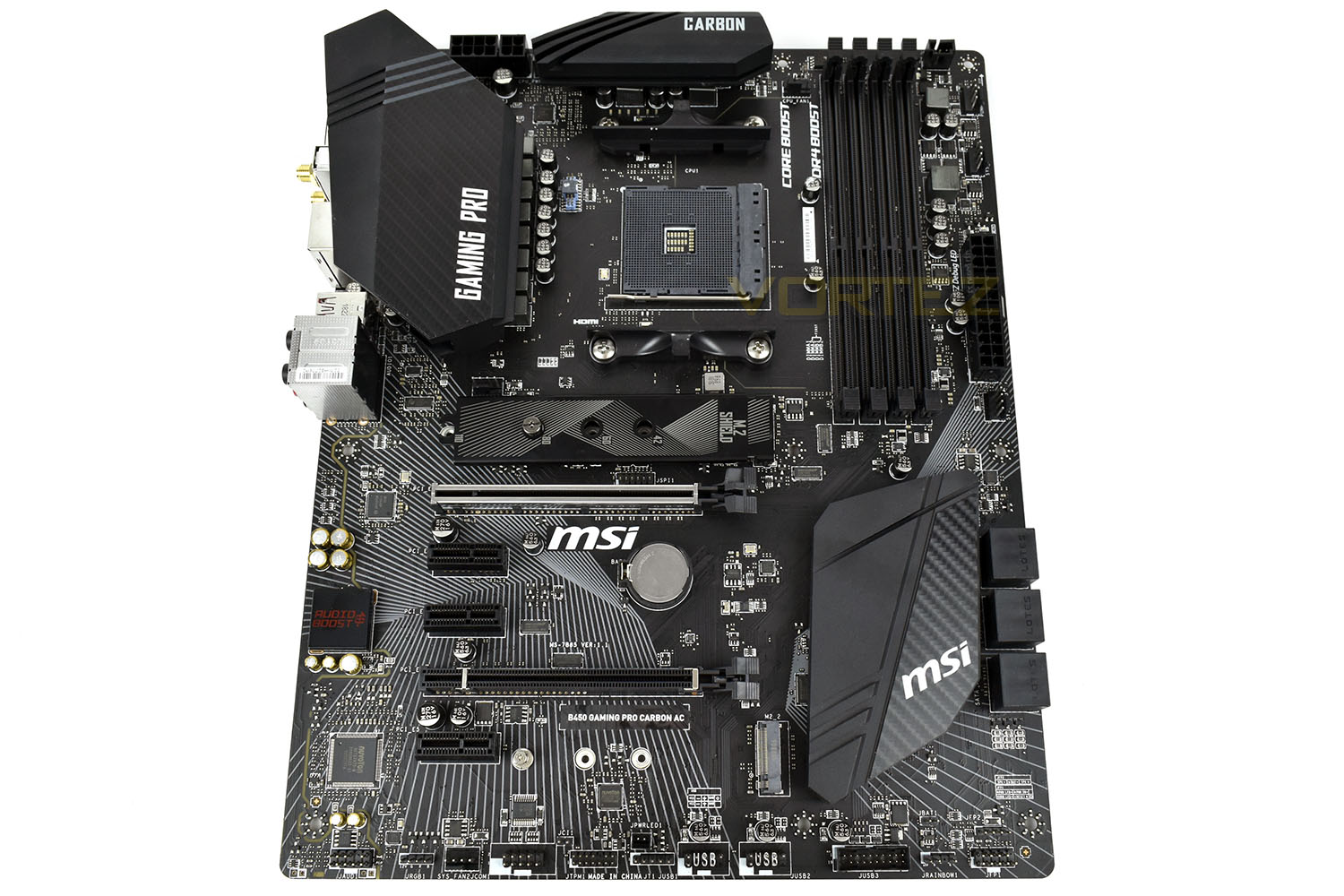
The monochrome theme on the MSI B450 Gaming Pro Carbon AC looks brilliant, with a grey lined pattern spreading across the board in various directions. The carbon fibre sections on the heatsinks also looks fantastic. We’ll see how it looks with the RGB lighting cranked up, but for now we’re very pleased with the overall aesthetics.
Closer Look
The B450 range of motherboards is aimed towards those aiming to save money while attaining all of the essential features. It seems MSI didn’t get that memo when coming up with the B450 Gaming Pro Carbon AC and just decided to throw the feature set at it, starting with a large heatsink for the power delivery components. MSI have also opted for an 8+4 CPU power socket design, allowing extra current for the CPU when overclocking.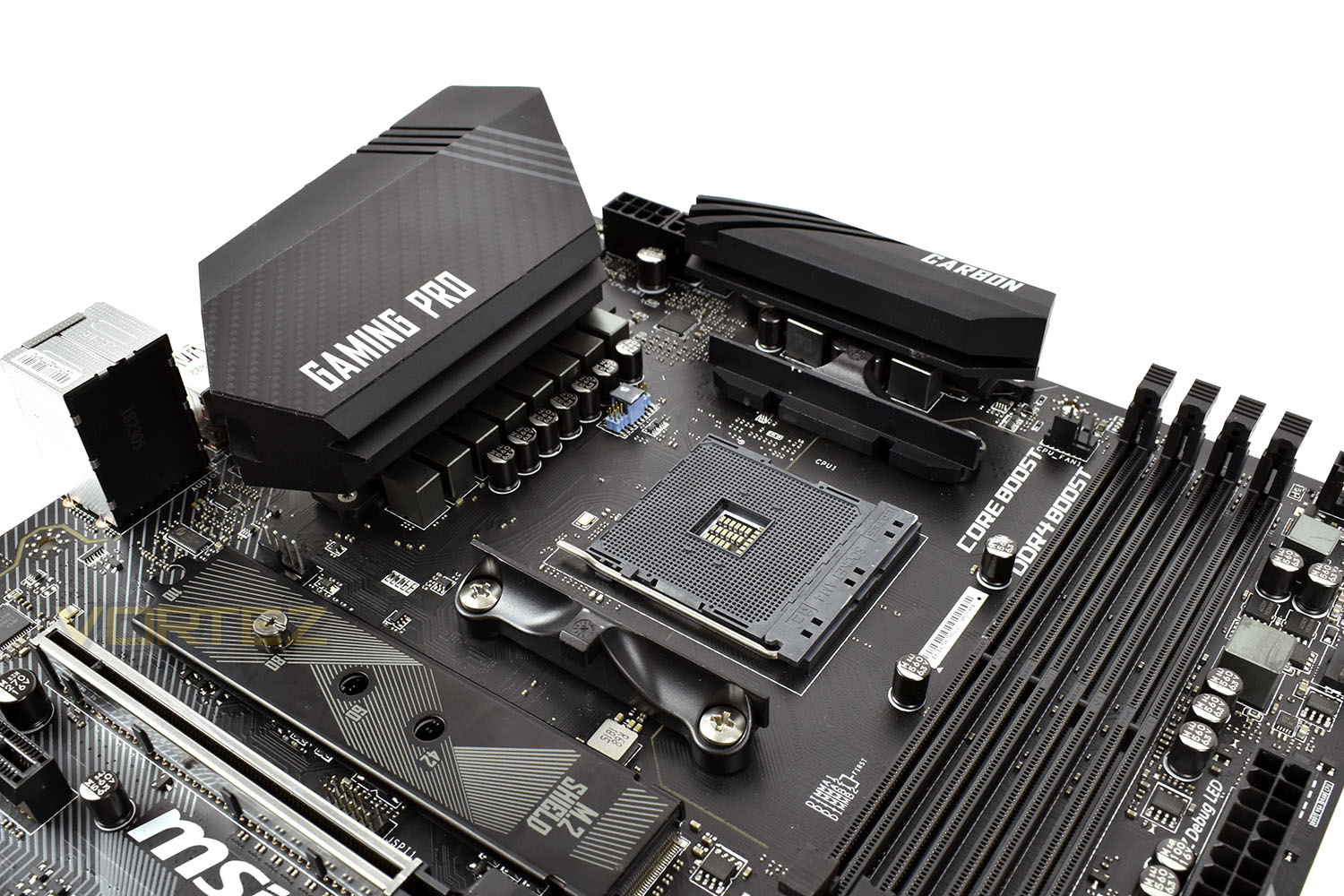
The full-length M.2 heatsink can be used for any M.2 drive, including NVMe SSDs, providing they don’t arrive with their own heatsink or if it can be removed. Any drive conforming to the 22/42, 22/60, 22/80 or 22/110 standard can be installed. The heatsink is designed to help dissipate heat from hot NVMe drives, helping to improve performance by reducing the risk of thermal throttling.
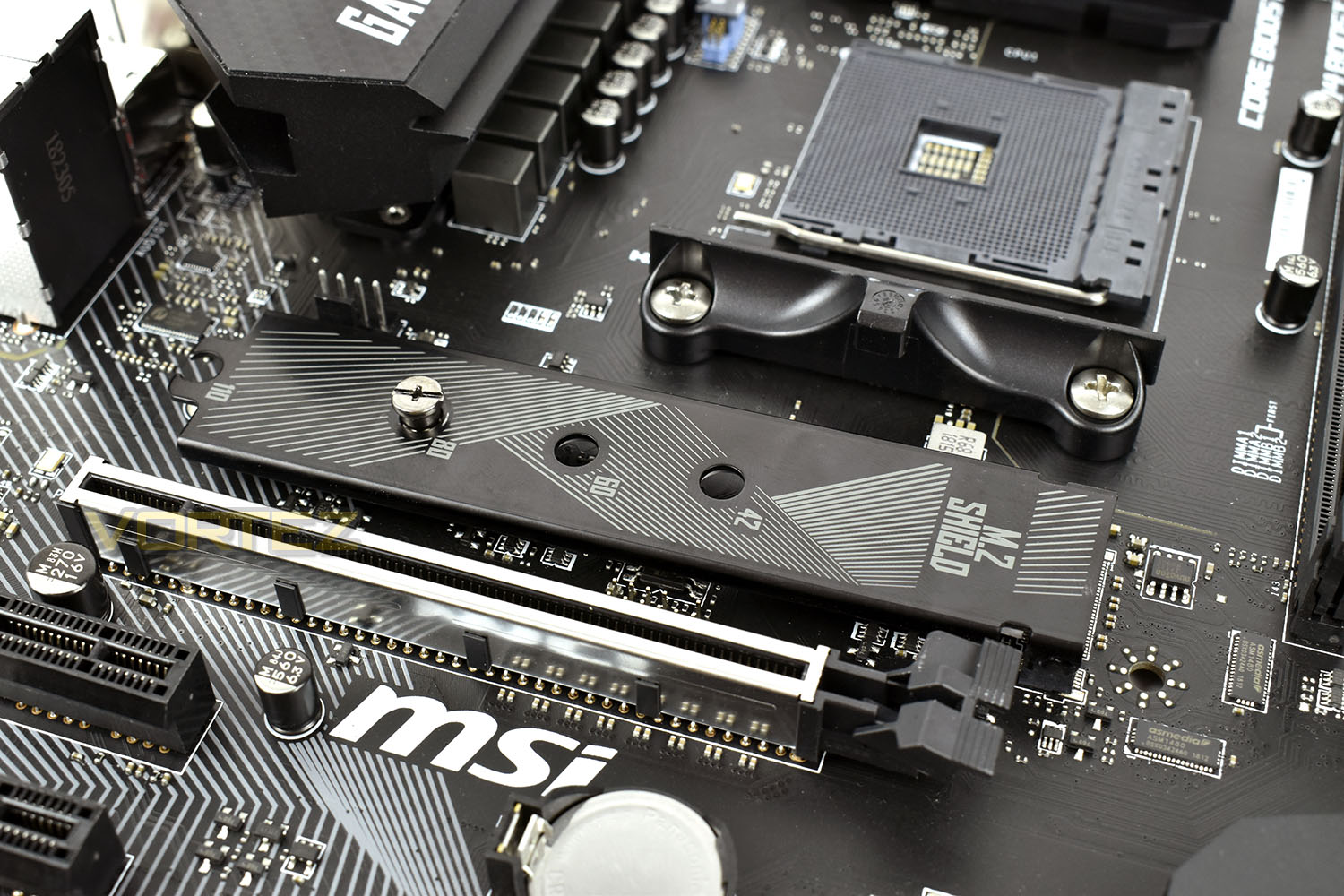
Four DDR4 DIMM slots are used for the memory, capable of supporting up to 64GB of DDR4 3466MHz memory. Underneath the DIMM slots is the 24-pin motherboard power connection, as well as a trio of 4-pin PWM fan connections. There’s also a 4th PWM fan connection above the RAM slots.
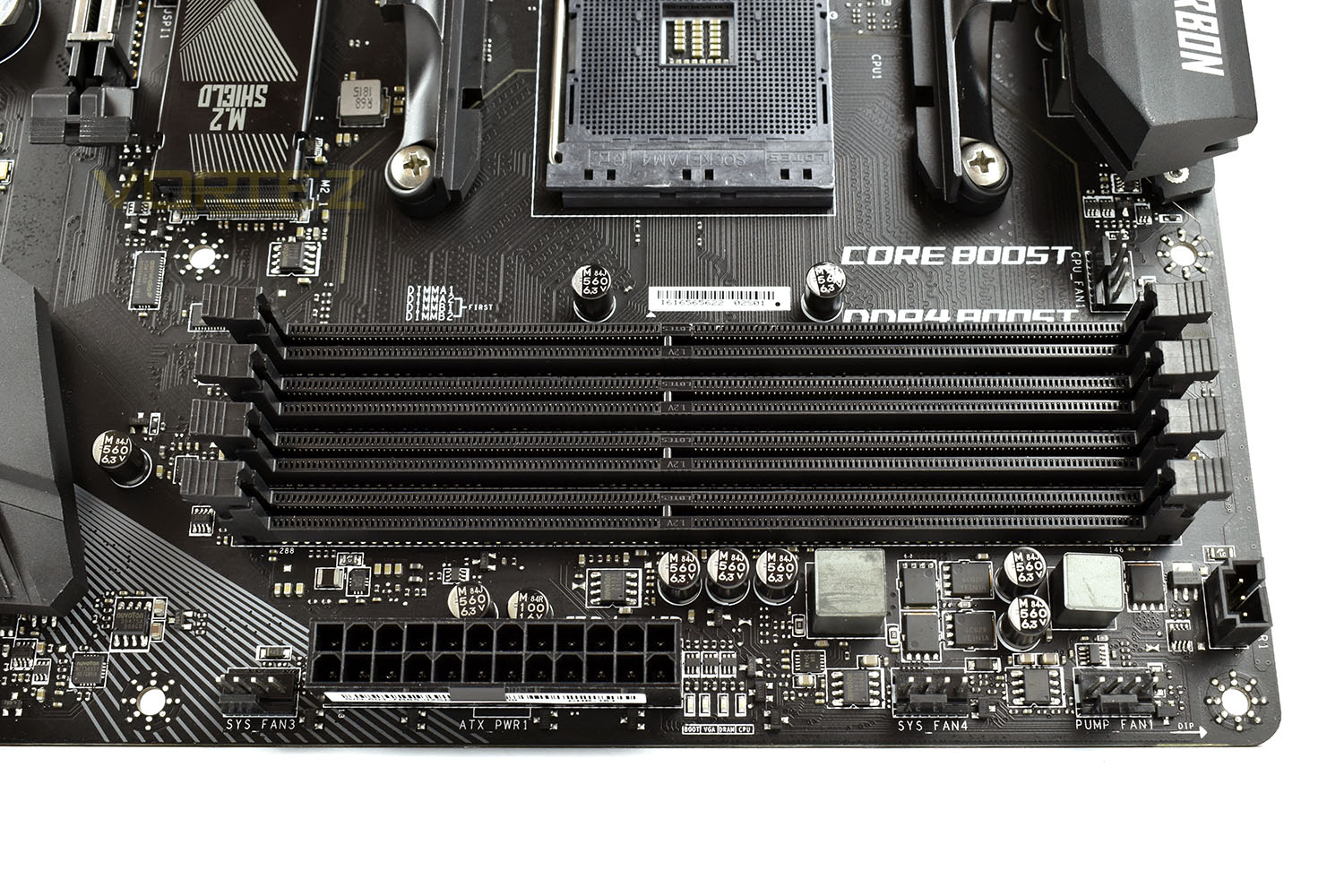
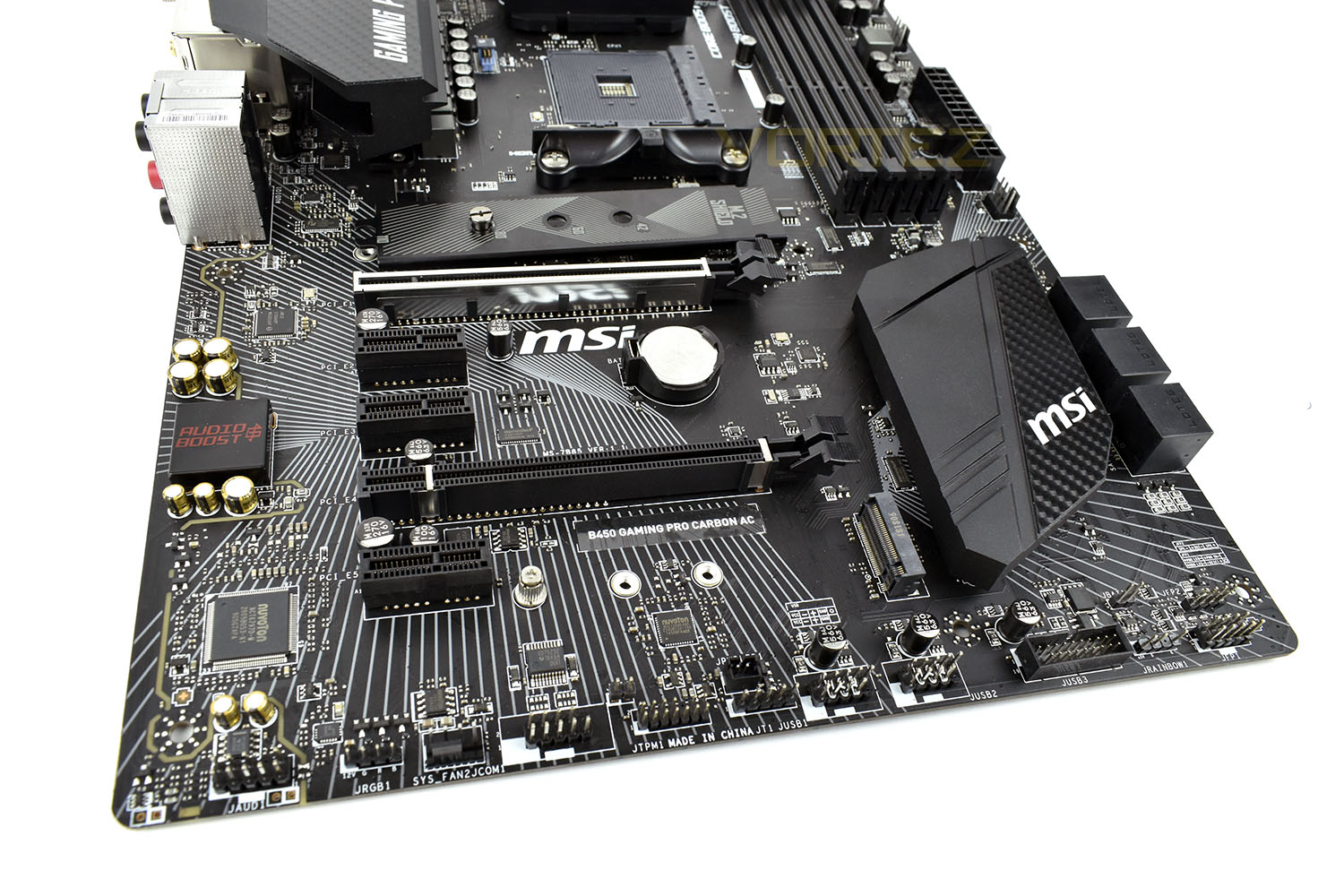
We get two full x16 PCI-E 3.0 slots for graphics cards, though please beware that the board will only support AMD CrossFire and not the NVIDIA SLI technology, and they won’t run at x16 each when configured with multiple cards. You’ll see there’s also three x1 ports for network cards or storage controllers.
The top x16 PCI-E ports features MSI’s Steel Armour, helping to prevent large graphics cards from bending the port or shearing off if the case is dropped.
Along the bottom row is a wide array of different connections, including USB 2.0 and 3.0, RGB lighting connections, front audio and PWM fan ports.
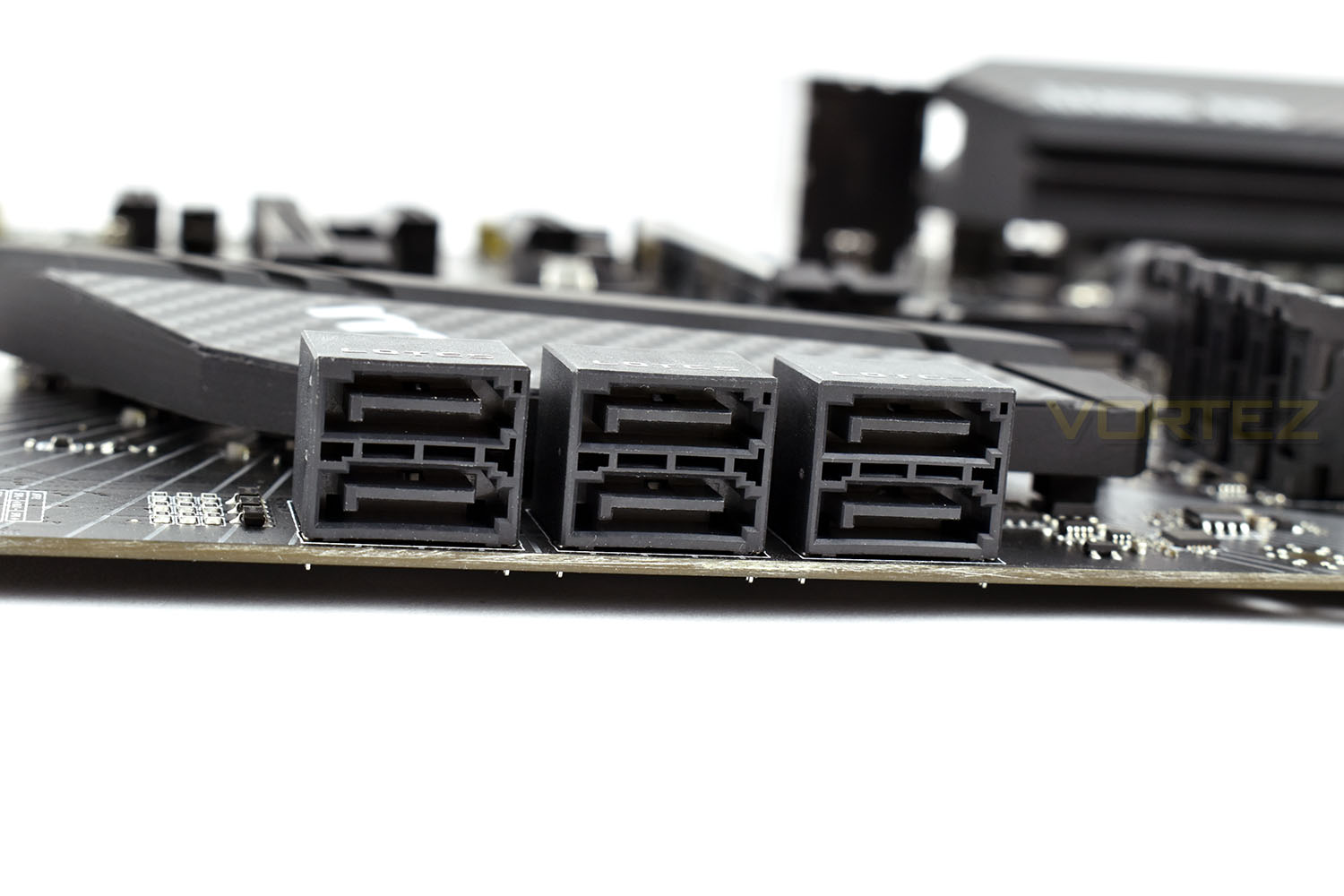
SATA storage is handled via 6 right-angled SATA 3.0 ports, all capable of the 6Gbps standard. Perfect for those with a few hard drives and a couple of SATA SSDs.
Closer Look (Continued)
MSI tend to include their higher end audio on the top-tier motherboards, with the Gaming Pro Carbon AC coming under that umbrella. AudioBoost4 uses Nahimic3 software to help create an even more vibrant audio profile. MSI have also divided the right and left channel into separate PCBs, as well as isolating the entire region of the motherboard to reduce any interference as much as possible.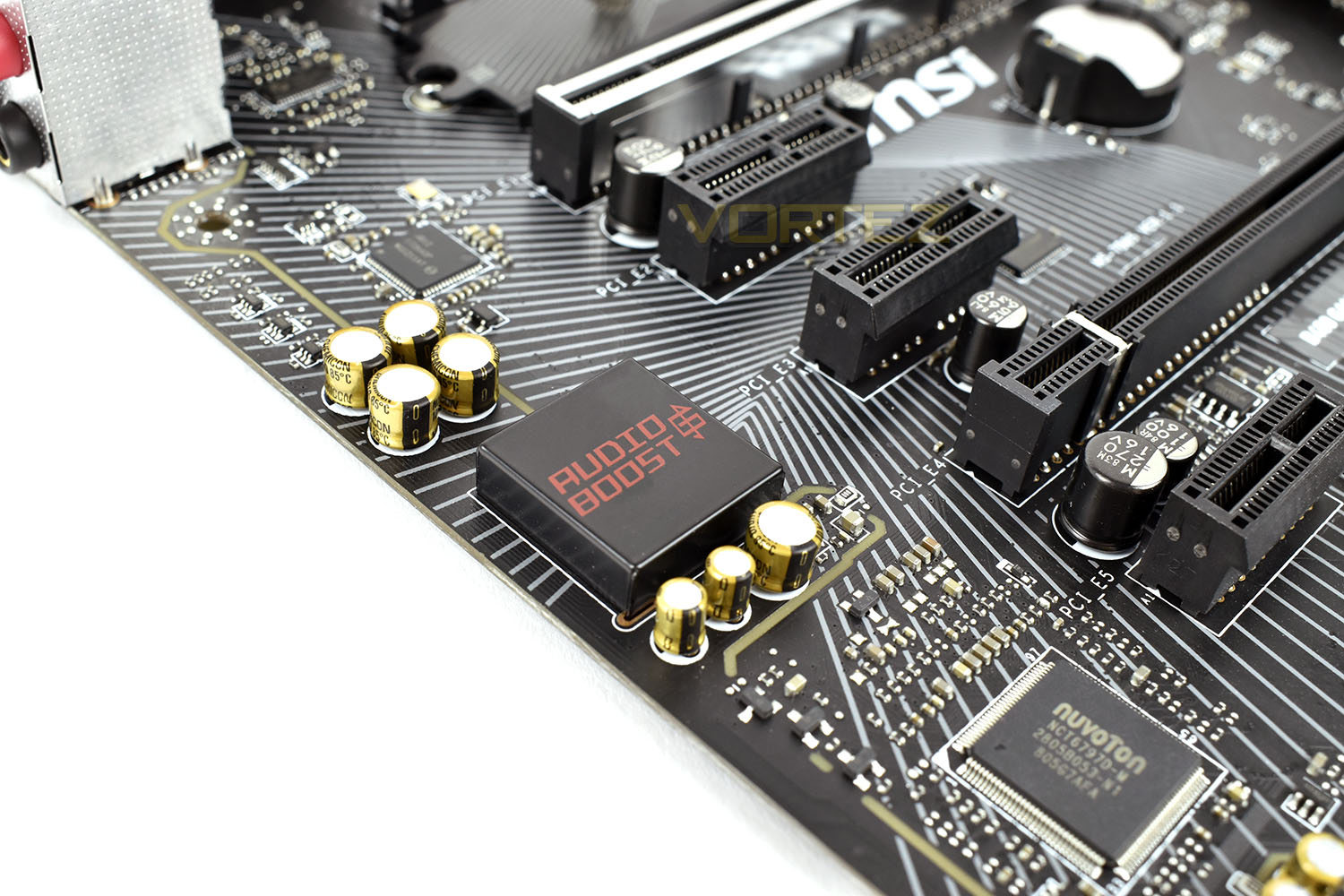
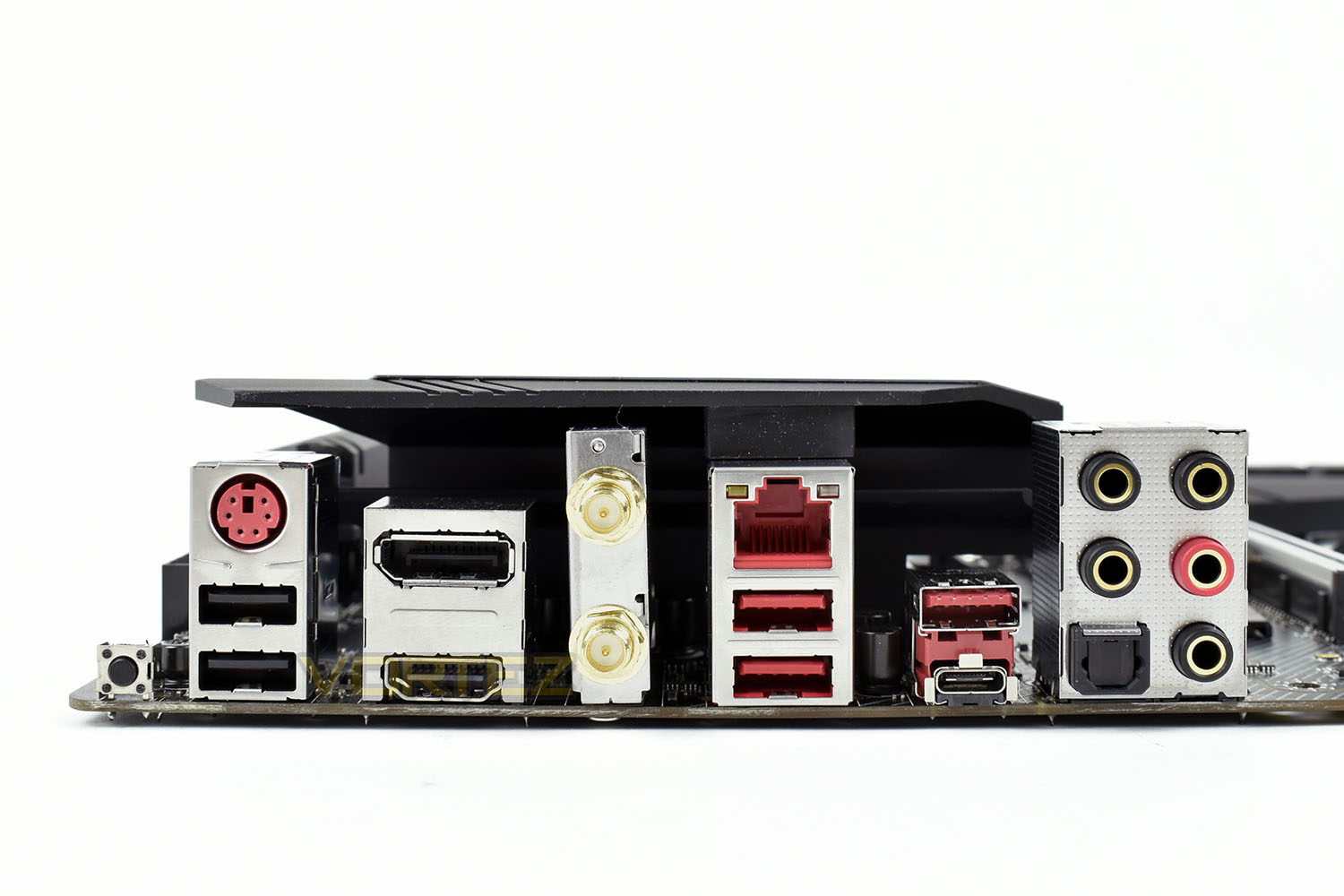
The rear IO is well featured for a B450 motherboard, coming with a BIOS flashback button, allowing you to flash to the latest BIOS without the need for a CPU, RAM or a GPU. Next up is the PS/2 port, for legacy support of keyboards and mice, as well as a pair of USB 2.0 ports which are still perfectly adequate for keyboards and mice, even with a 1000Hz polling rate or RGB lighting.
Due to the possibility of using an AMD APU, there’s a DisplayPort and HDMI port for connecting up high resolution monitors.
The two gold ports are for antenna connections, for the Intel WiFi and Bluetooth chip.
Carrying on to the right, the first red stack is a pair of USB 3.0 ports and the Intel Gigabit LAN port.
Then we get to the high-speed USB connectivity, with the Type A and Type C USB 3.1 Gen. 2 ports.
Last up, audio, with 7.1 audio support, or gold plated SPDIF out for digital audio.
BIOS & Overclocking
BIOSMSI employ their tried and tested Click BIOS 5 with the B450 Gaming Pro Carbon AC. The Click BIOS 5 is thoroughly well thought out, with a clear sense of where to go. The mouse and keyboard support are also fantastic.
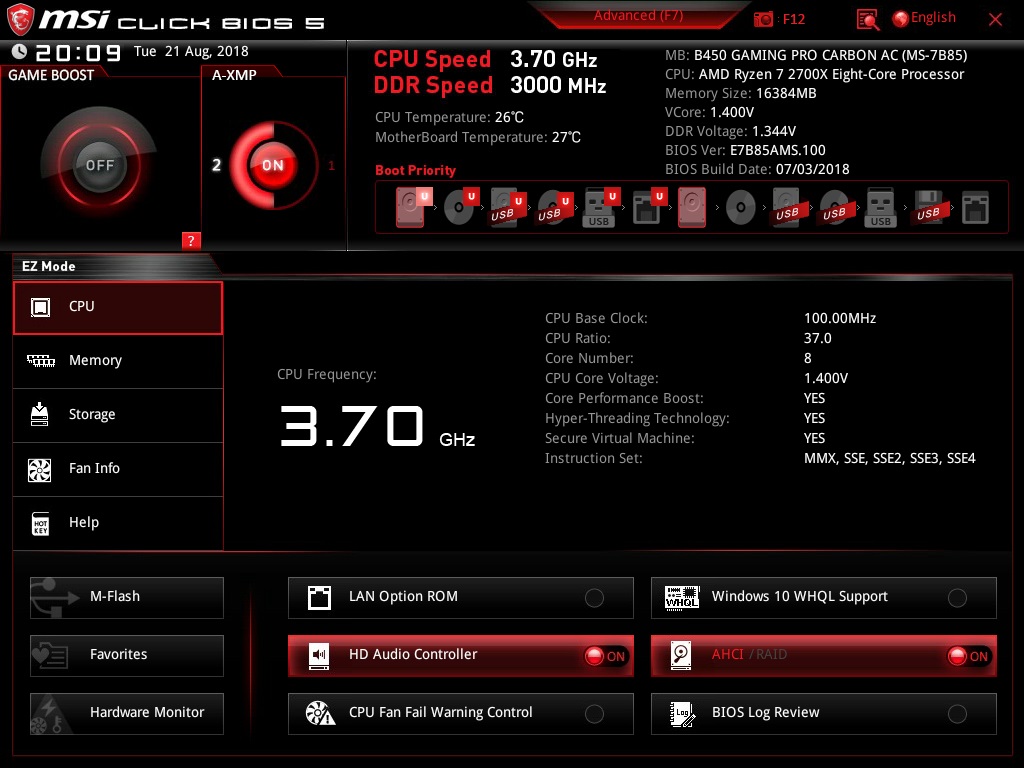
When using the BIOS in “EZ Mode”, which can be toggled via F7, it’s a case of clicking options which you want to change or you can view clock speeds and temperatures. It’s also possible to enable your DDR4 XMP memory profile to extract the advertised performance from your memory kit.
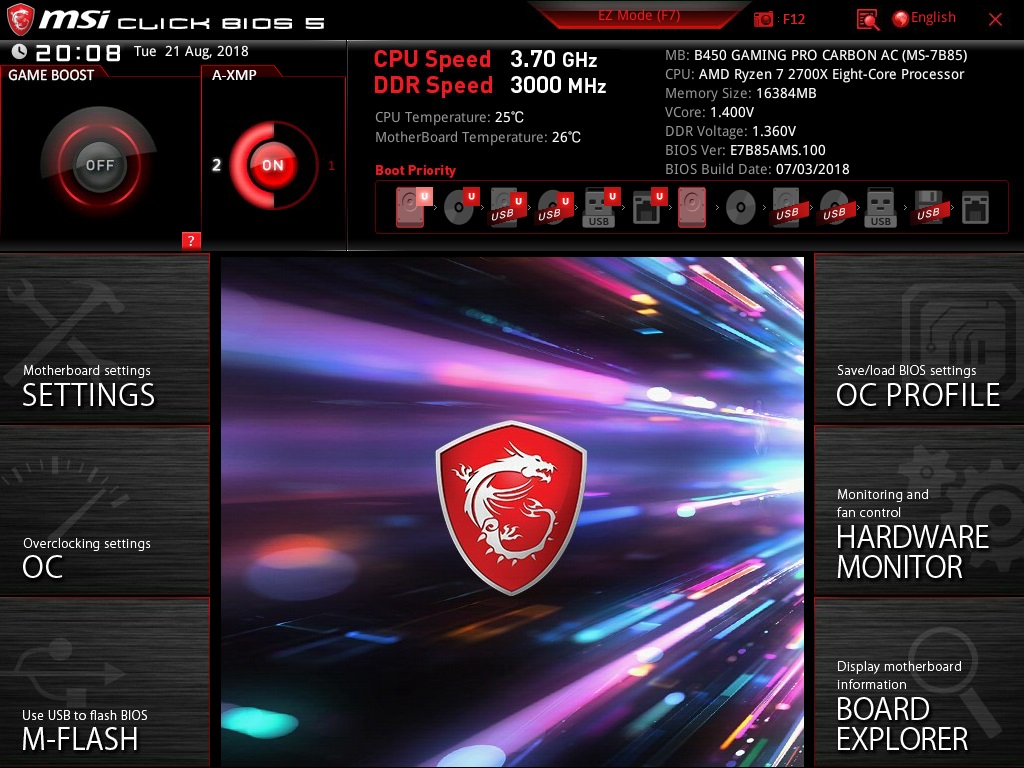
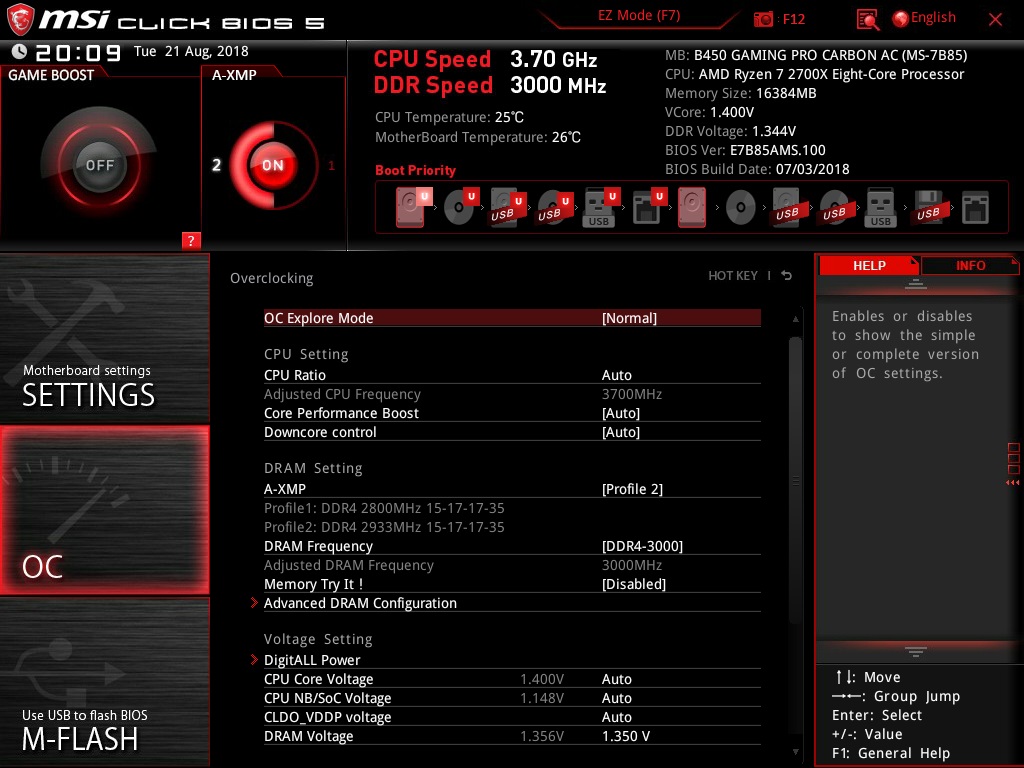
However, when flipped to the Advanced Mode, we’re given a plethora of options, much like most BIOS suites, but we’d argue that the MSI is best laid out and the easiest to operate. Considering this is an AMD B450 board, we’re impressed with the ability of the overclocking options. The X470 Gaming M7 AC that we tested in April was equipped to the same level but costs almost twice as much on the shelves. We’ll see how the hardware keeps up compared to the big brother, but we’re certainly happy with the BIOS.
Overclocking
After having a good mess about with the BIOS, tweaking vCore settings and looking at LoadLine Calibration settings, we decided to go with a 1.42v vCore. We know this is safe for our CPU from previous testing. We aimed for 4.35GHz at first, which is a known quantity on our Ryzen 7 2700X, which we managed on the MSI X470 Gaming M7 AC.
Unfortunately, even pushing 1.45v through the CPU, we couldn’t get 4.35GHz to be stable. So we backed down to 1.42v again and tried for 4.30GHz.
Eventually, after a 2 hour stress test, we were happy with the stability of our overclock and went ahead with the Cinebench test.
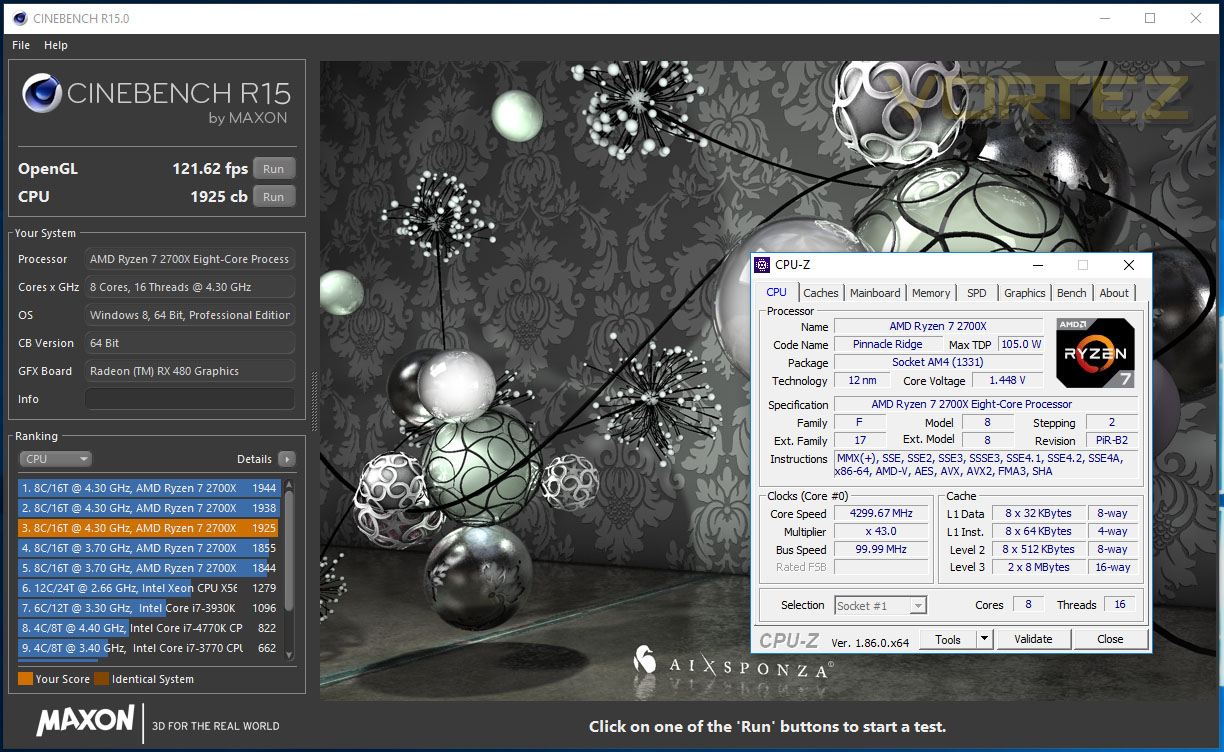
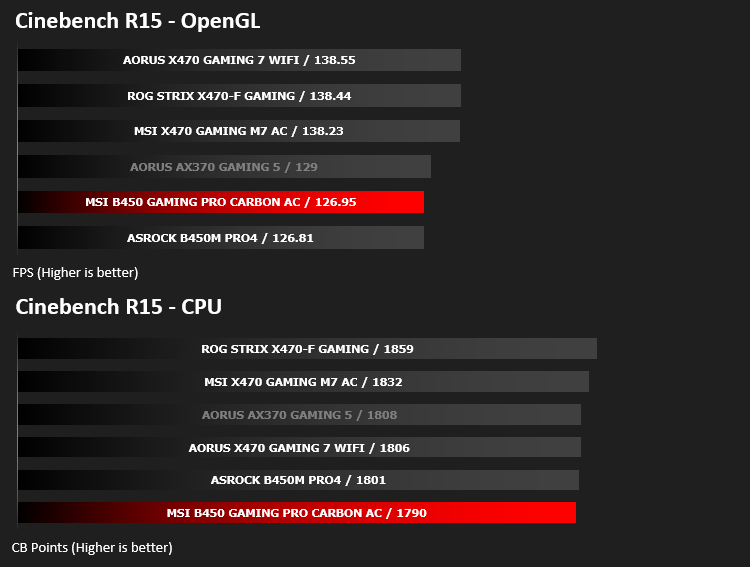
We noticed an improvement from 1790, which was the lowest we’ve had from our 2700X at stock speeds, all the way up to 1925. This is a whisker from the 1944 result we managed on the MSI X470. It seems those large heatsinks on the power phase are worthwhile.
Test Setup & Software
Test SetupCPU AMD Ryzen 7 2700X
Cooling Corsair H150i Pro RGB
Motherboard MSI B450 Gaming Pro Carbon AC
Memory 16GB Corsair Vengeance LPX 3000MHz @ 3000MHz @ 15-17-17-37-55
Graphics AMD Radeon RX 480 8GB
Storage Corsair Force LE 480GB
PSU Corsair RM750X 80 Plus Gold Certified PSU
Cooling Corsair H150i Pro RGB
Motherboard MSI B450 Gaming Pro Carbon AC
Memory 16GB Corsair Vengeance LPX 3000MHz @ 3000MHz @ 15-17-17-37-55
Graphics AMD Radeon RX 480 8GB
Storage Corsair Force LE 480GB
PSU Corsair RM750X 80 Plus Gold Certified PSU
Benchmarks
Cinebench R15 – CPU/OpenGL Score
x264 HD 4.0 – 1st and 2nd pass encoding
SiSoftware SANDRA – CPU & Memory benchmarks
POV-RAY – CPU benchmarks
TrueCrypt – CPU benchmarks
AIDA64 – CPU benchmarks & Memory
PCMark 8 – Home Suite & Photoshop
3DMark FireStrike – 3D Benchmark
Games – Rise of the Tomb Raider & Total War: WARHAMMER
x264 HD 4.0 – 1st and 2nd pass encoding
SiSoftware SANDRA – CPU & Memory benchmarks
POV-RAY – CPU benchmarks
TrueCrypt – CPU benchmarks
AIDA64 – CPU benchmarks & Memory
PCMark 8 – Home Suite & Photoshop
3DMark FireStrike – 3D Benchmark
Games – Rise of the Tomb Raider & Total War: WARHAMMER
Other Software
Temperature Analysis: Aida64 & Ryzen Master
Stress Testing Software: AIDA64 Stability Test
CPU Specification Monitoring: CPU-Z
Performance Monitoring: MSI Afterburner
Stress Testing Software: AIDA64 Stability Test
CPU Specification Monitoring: CPU-Z
Performance Monitoring: MSI Afterburner
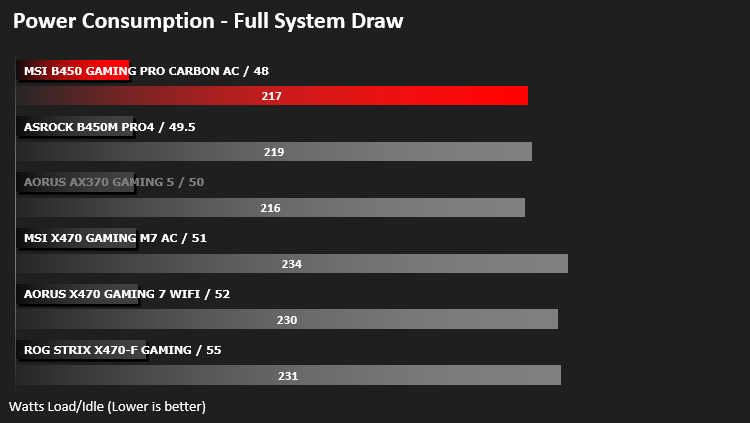
Benchmarks: Power Consumption
It’s interesting to note the power consumption across all motherboards. Although they are using the Z270 chipset, energy results can fluctuate between manufacturers due to the features and specifications that are integrated. First of all, for the idle tests the system is cold booted into Windows and no additional applications are executed – the watts are noted on the external energy monitor we use and then the system is loaded with 3DMark FireStrike – watts are again monitored for the duration of the test and the highest rated wattage result is then noted down. Below are the results of this energy test.
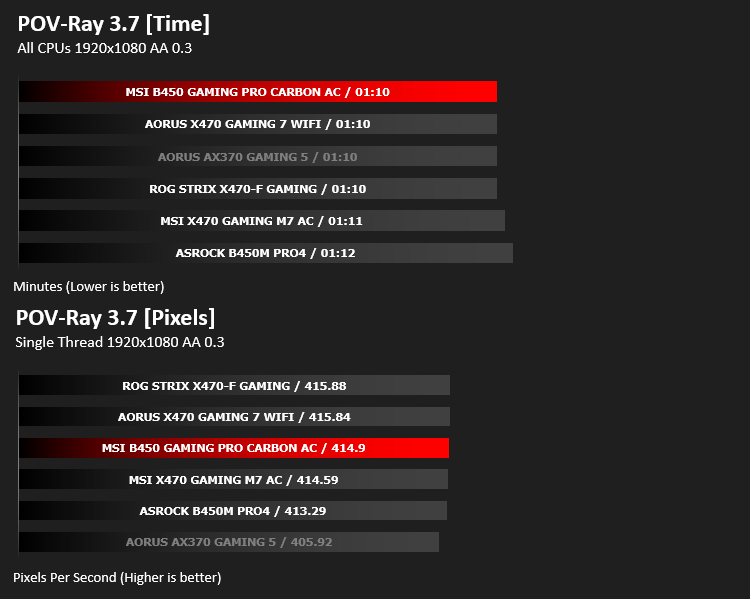
Ray Tracing Performance – POV-Ray 3.7
Persistence of Vision Raytracer’s PovRay is a free and open source 3D animator application with versions for computers with different operating systems.
This product allows users to build their custom 3D worlds with excellent quality despite their computer’s hardware. It has adjustable options for levels of radiance, refraction, and reflection. Calculation time may vary depending on the computer model, but PovRay can adapt to many computer builds, and is supported by the open source community.
This product allows users to build their custom 3D worlds with excellent quality despite their computer’s hardware. It has adjustable options for levels of radiance, refraction, and reflection. Calculation time may vary depending on the computer model, but PovRay can adapt to many computer builds, and is supported by the open source community.
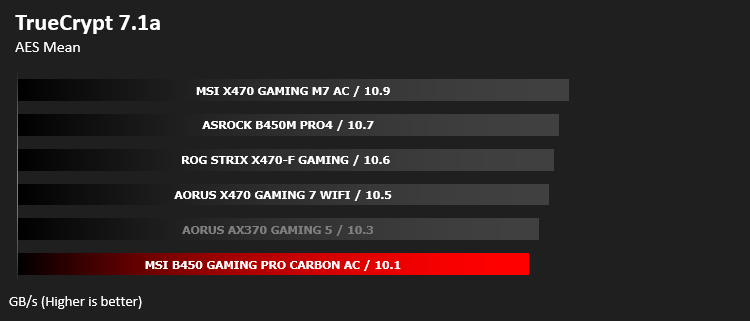
AES Encryption Performance – TrueCrypt 7.1a
TrueCrypt is a discontinued source-available freeware utility used for on-the-fly encryption (OTFE). It can create a virtual encrypted disk within a file or encrypt a partition or (under Microsoft Windows except Windows 8 with GPT) the entire storage device (pre-boot authentication).
Encoding Performance – x264 HD
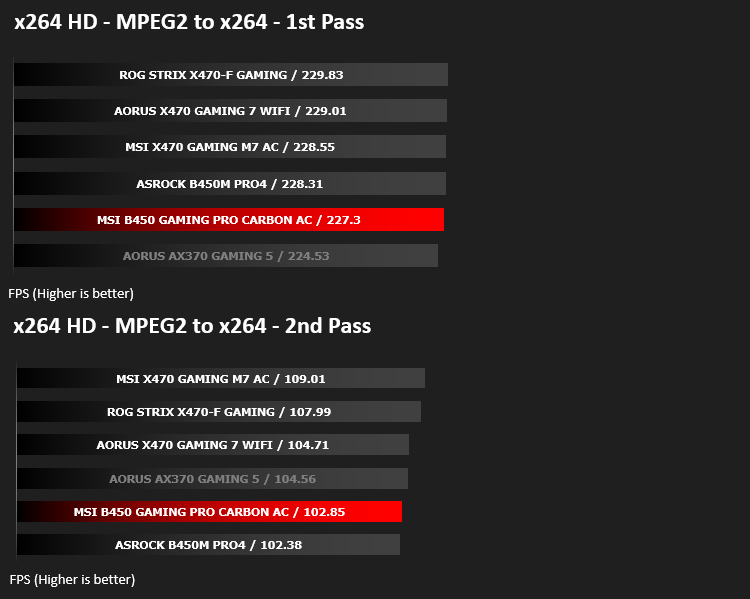
Simply put, this test measures how fast your machine can encode a short, DVD quality MPEG-2 video clip into a high-quality x264 video clip. What’s x264, you ask? It’s more or less the next-generation Xvid/DivX codec. I think it’s ideal for a benchmark because the application (x264.exe) reports fairly accurate compression results (in frames per second) for each pass of the video encoding process, and it uses multi-core processors very efficiently.
Processing Features Performance – AIDA64
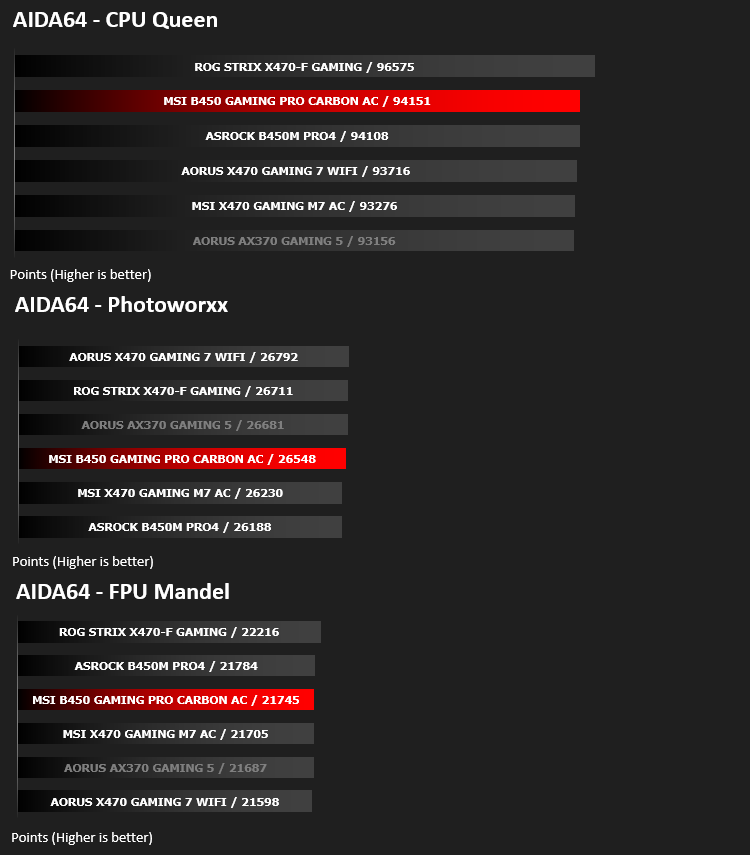
AIDA64 Product PageThis simple integer benchmark focuses on the branch prediction capabilities and the misprediction penalties of the CPU. It finds the solutions for the classic “Queens problem” on a 10 by 10 sized chessboard. At the same clock speed theoretically the processor with the shorter pipeline and smaller misprediction penalties will attain higher benchmark scores. For example — with HyperThreading disabled — the Intel Northwood core processors get higher scores than the Intel Prescott core based ones due to the 20-step vs 31-step long pipeline. CPU Queen test uses integer MMX, SSE2 and SSSE3 optimizations.
Memory Transfer Performance – AIDA64
AIDA64 Product PageMemory bandwidth benchmarks (Memory Read, Memory Write, Memory Copy) measure the maximum achiveable memory data transfer bandwidth. The code behind these benchmark methods are written in Assembly and they are extremely optimized for every popular AMD, Intel and VIA processor core variants by utilizing the appropriate x86/x64, x87, MMX, MMX+, 3DNow!, SSE, SSE2, SSE4.1, AVX, and AVX2 instruction set extension.
The Memory Latency benchmark measures the typical delay when the CPU reads data from system memory. Memory latency time means the penalty measured from the issuing of the read command until the data arrives to the integer registers of the CPU.
The Memory Latency benchmark measures the typical delay when the CPU reads data from system memory. Memory latency time means the penalty measured from the issuing of the read command until the data arrives to the integer registers of the CPU.

Processing Power Performance – Cinebench R15
CINEBENCH can measure systems with up to 64 processor threads. This test scene contains approximately 2,000 objects which in turn contain more than 300,000 polygons in total, and uses sharp and blurred reflections, area lights, shadows, procedural shaders, antialiasing, and much more. The result is displayed in points (pts). The higher the number, the faster your processor.
Bandwidth Performance – SiSoftware SANDRA
SANDRA isn’t always a benchmark that is included in hardware reviews but I believe it shouldn’t be ignored. SANDRA provides a vigorous package that tests your system in a rather large array of benchmarks. There are many aspects of benchmark that can be executed. We will be considering – CPU and memory tests.
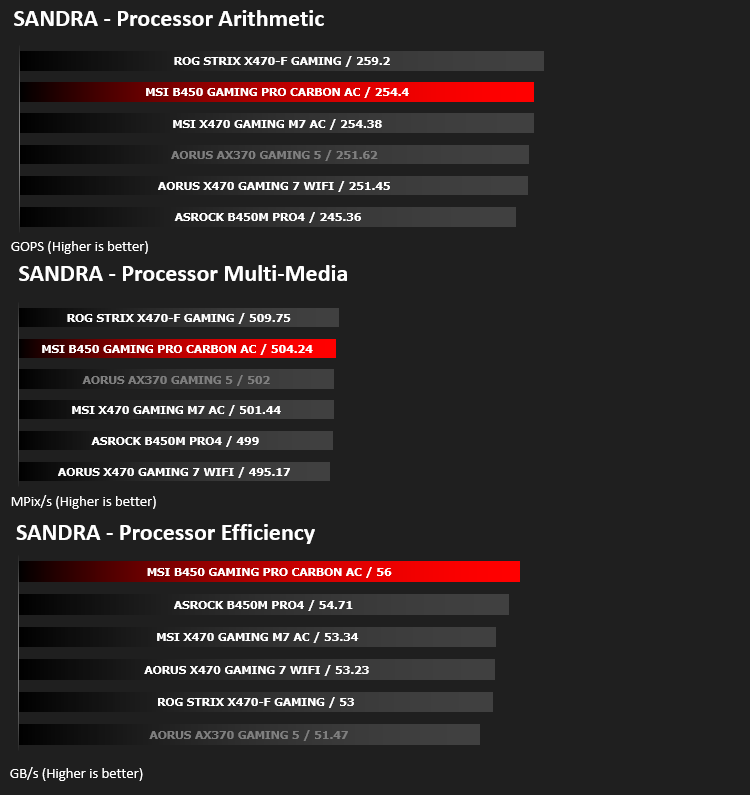

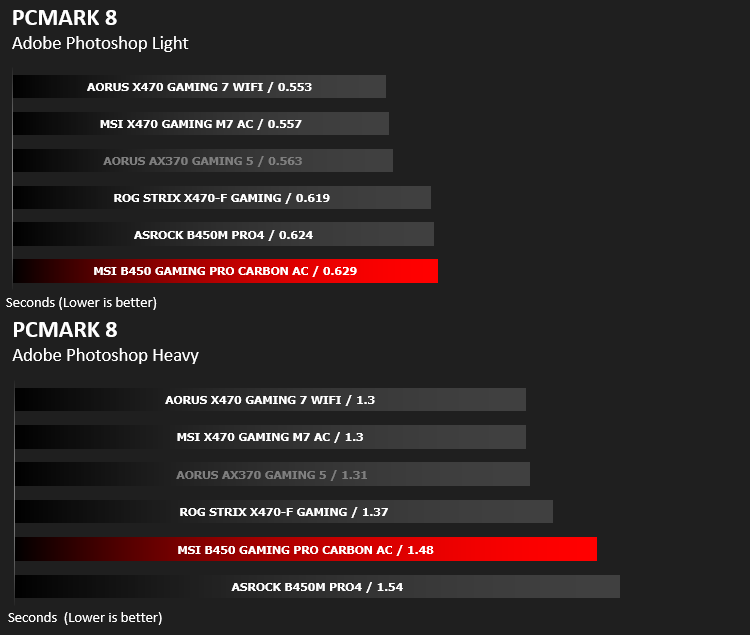
Image Editing Performance – PCMark 8 Photoshop
PCMark 8 Product Page Developed in partnership with Benchmark Development Program members Acer, AMD, Condusiv Technologies, Dell, HGST, HP, Intel, Microsoft, NVIDIA, Samsung, SanDisk, Seagate and Western Digital, PCMark 8 is the latest version in FutureMark’s popular series of PC benchmarking tools. Improving on previous releases, PCMark 8 includes new tests using popular applications from Adobe and Microsoft.
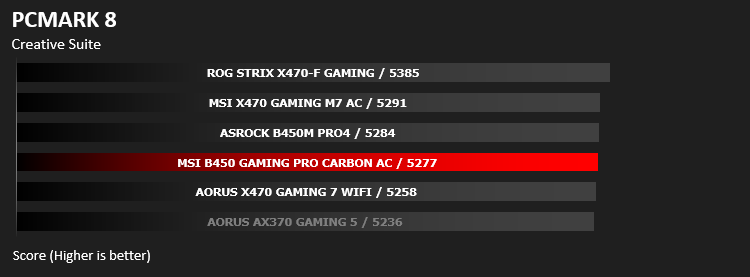
Overall System Performance – PCMark 8
PCMark 8 combines performance benchmarking with battery life measurement and includes tests based on popular Adobe and Microsoft applications. Whether you are looking for long battery life, or maximum power, PCMark 8 will help you find the devices that offer the perfect combination of efficiency and performance for your needs. It’s the complete PC performance benchmark for home and business.
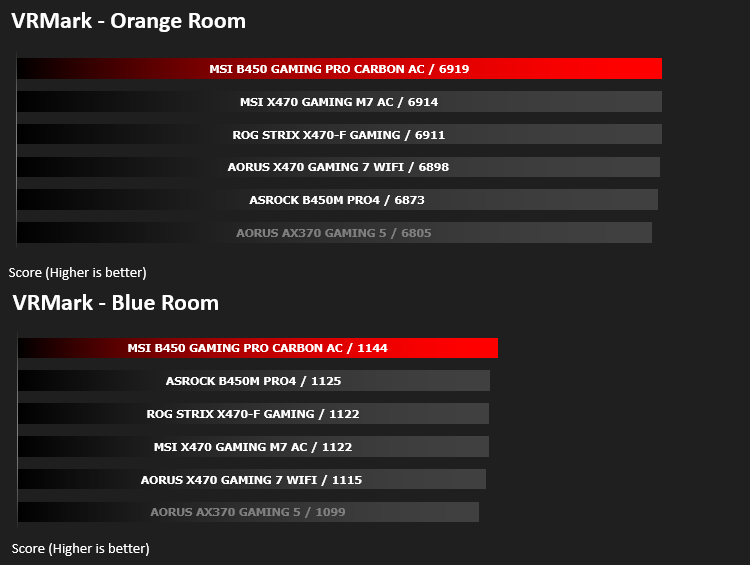
VR Performance – VRMark
VRMark Product PageVRMark includes two VR benchmark tests that run on your monitor, no headset required, or on a connected HMD. At the end of each test, you’ll see whether your PC is VR ready, and if not, how far it falls short.
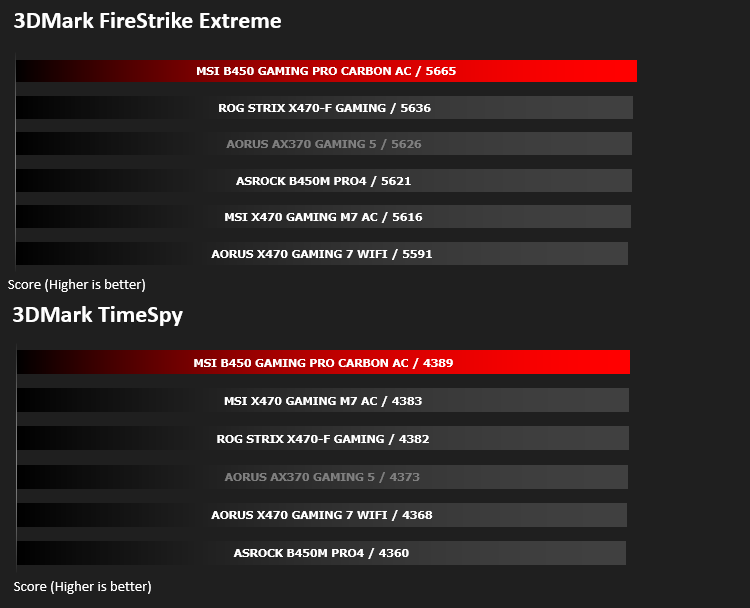
3D Performance – 3DMark
3DMark FireStrike Product PageFire Strike is our new showcase DirectX 11 benchmark designed for high-performance gaming PCs. It is our most ambitious and technical benchmark ever, featuring real-time graphics rendered with detail and complexity far beyond what is found in other benchmarks and games today. Fire Strike will only be available in the Windows editions of 3DMark initially.
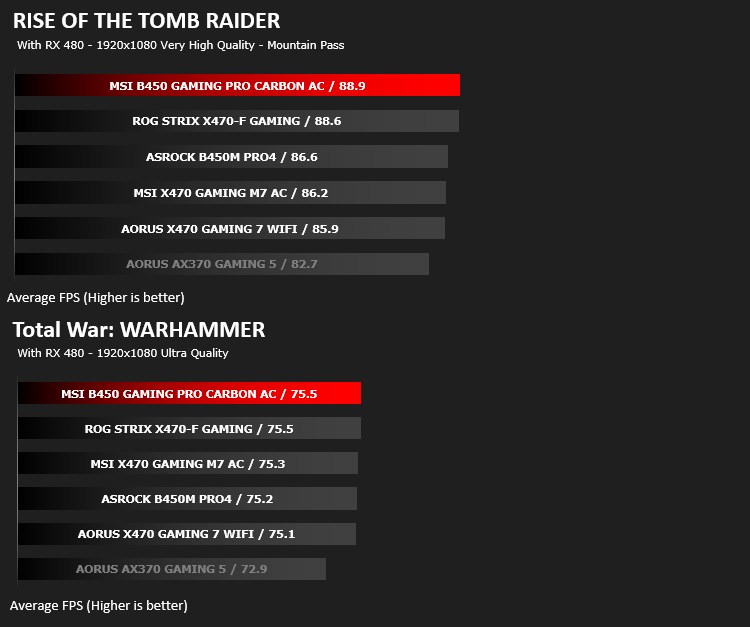
Gaming Performance – Rise of the Tomb Raider & Total War: WARHAMMER
It’s important for us to perform a number of game benchmarks as well as the synthetic tests because gamers will want to know if there are any significant benefits. So here we have two recent gaming titles.
Conclusion
The MSI B450 Gaming Pro Carbon AC, almost without doubt, offers incredible gaming and computational performance without breaking the bank, which is even more apparent when you compare the numbers with the X470 flagship model which fares better in most tests but gets shown the door when it comes to gaming results, including VR, with the MSI B450 topping every single gaming-related graph.The layout is pretty good too; there’s ample fan connections, a pair of M.2 ports, both of which support AMD’s StoreMi technology for improving the speed of hard disk drives by using an SSD as a cache device. The heatsinks aren’t too big or cumbersome but they perform their tasks well and allow a very reasonable overclock to our 2700X CPU. There’s the pair of PCI-E 16x slots, alongside with three x1 which should be plenty for any reasonable consumer PC. Don’t forget the full six SATA ports, which are often cut back to only four on lower end chipset boards, leaving scope for large storage arrays; they’re even equipped with RAID support, if data security is your bag.
The colour scheme, which we’ve mentioned a few times, isn’t really a “colour scheme” at all, but it lends itself well to the RGB craze. We like the grey lines design on the PCB, which while being very noticeable, isn’t too in-your-face. MSI have found a good balance here.
The rear IO, for a motherboard with a £120 price tag, is lacking a little too much for our liking. We’d expect a minimum of 8 USB ports, which the ASRock B450M Pro4 managed. We’re not ignoring the fact that Display Port and 7.1 audio is included, but USB ports are becoming more and more precious to PC users, especially if their case of choice doesn’t house many on the front panel. The Intel WiFi is welcomed, due to the possibilities it opens up for the end user. Many people aren’t lucky enough to be able to wire into their router and must therefore rely on the wireless capabilities of their PC. The Intel WiFi chip allows both 2.4GHz and 5.0GHz wireless transmissions, as well as Bluetooth 5.0.
Speaking of the 7.1 audio; MSI’s AudioBoost4 is well regarded amongst tech enthusiasts, with its warm sound and great performance. If you plan to use this as a gaming machine, you’ll be served well by this.
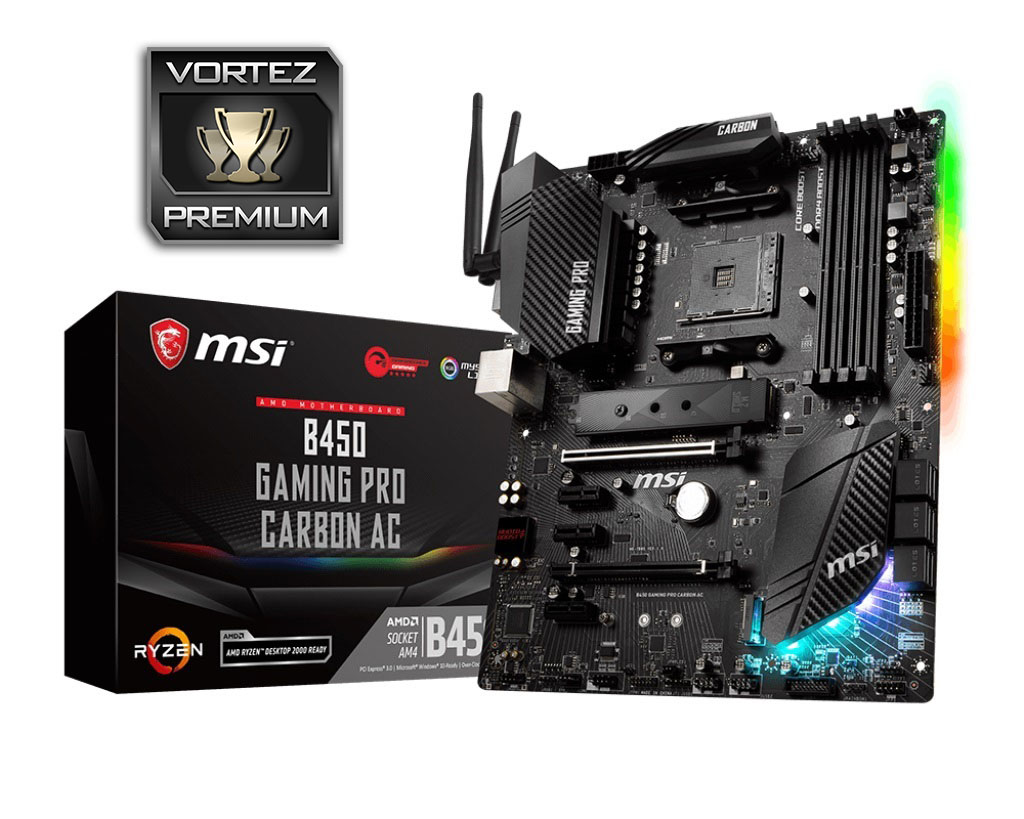
Considering the results in our gaming tests, which were repeated several times, we can’t help but recommend this motherboard as a solid base for your new battlestation. The AM4 forwards and backwards compatibility should also provide some added incentive for a potential buyer
Pros
+ The best gaming performance we’ve seen on an AM4 board
+ Keeps up in the rest of the tests
+ Lovely monochrome design with Carbon Fibre accents
+ Large heatsinks perform a genuine function
+ Twin M.2 ports (With StoreMi)
+ Abundance of fan and RGB ports
+ RGB lighting
+ 8+4 CPU power delivery
+ AudioBoost4
Cons
– Too few USB ports on the rear IO
+ The best gaming performance we’ve seen on an AM4 board
+ Keeps up in the rest of the tests
+ Lovely monochrome design with Carbon Fibre accents
+ Large heatsinks perform a genuine function
+ Twin M.2 ports (With StoreMi)
+ Abundance of fan and RGB ports
+ RGB lighting
+ 8+4 CPU power delivery
+ AudioBoost4
Cons
– Too few USB ports on the rear IO
Click here for an explanation of our awards at Vortez.net.
Stay connected with the Vortez Social Media pages:
Join in with the discussions on Discord